ES17180WU - Switch JUNG - Free user manual and instructions
Find the device manual for free ES17180WU JUNG in PDF.


User questions about ES17180WU JUNG
0 question about this device. Answer the ones you know or ask your own.
Ask a new question about this device
Download the instructions for your Switch in PDF format for free! Find your manual ES17180WU - JUNG and take your electronic device back in hand. On this page are published all the documents necessary for the use of your device. ES17180WU by JUNG.
USER MANUAL ES17180WU JUNG
Universal automatic switch 1.1 m
Art. no.: ..17181..
Universal automatic switch 2.2 m
Art. no.: ..17281..
Operating instructions
1 Safety instructions

Electrical devices may only be mounted and connected by electrically skilled persons.
Serious injuries, fire or property damage possible. Please read and follow manual fully.
Danger of electric shock. Always disconnect before carrying out work on the device or load. In so doing, take all the circuit breakers into account, which support dangerous voltages to the device and or load.
Danger of electric shock. Device is not suitable for disconnection from supply voltage. The load is not electrically isolated from the mains even when the device is switched off.
Do not press on the sensor window. Device can be damaged.
The device is not suitable for use as a burglar alarm or other alarm.
These instructions are an integral part of the product, and must remain with the end customer.
2 Device components
text_image
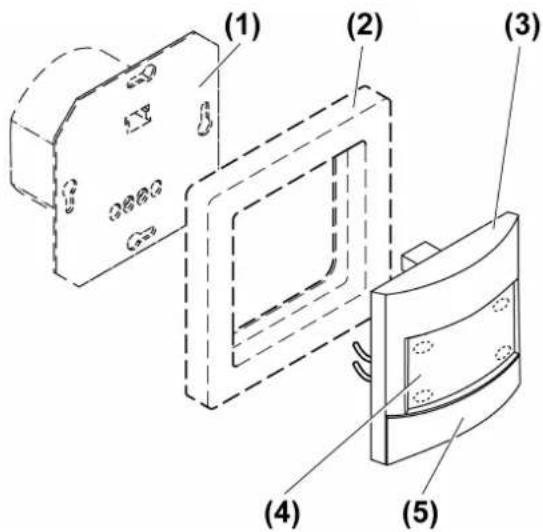
(1) (2) (3) (4) (5)Figure 1: Motion detector cover 1.10 m
text_image
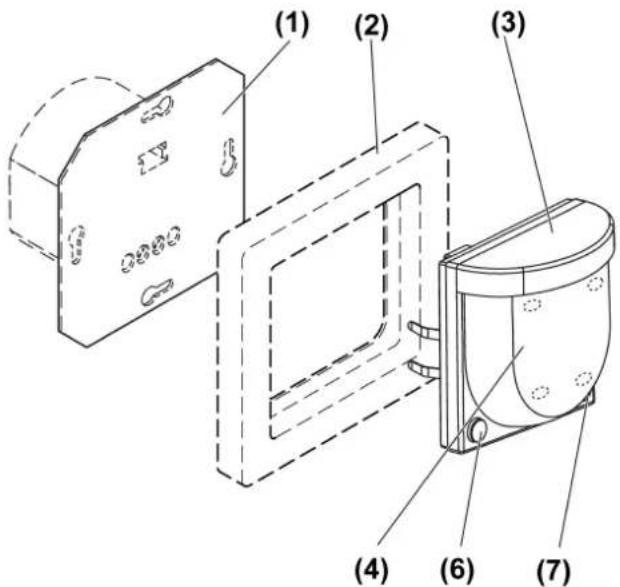
(1) (2) (3) (4) (6) (7)Figure 2: Motion detector cover 2.20 m
(1) FM insert
(2) Frame
(3) Motion detector cover
(4) Sensor window and status LED
(5) Switch 0 AUTO I
(6) Button OFF
(7) Button ON
Status LED
| Red LED lights up Self-test | |
| Red LED flashes 3 s on / 3 s off Alarm function | active |
| Red LED flashes 0.5 s on / 0.5 s off Alarm was triggered | triggered |
| Red LED flashes three times followed by a 1 s pause | Cover was previously connected to another insert |
| Yellow LED lights up "Continuous off" or "Off for | 0.5 - 5 hours" func-tion active |
| Yellow LED flashes Presence simulation active | |
| Green LED lights up "Continuous on" or "On for | 0.5 - 5 hours" func-tion active |
| Blue LED lights up Device is coupled with a mobile device and active app | |
| Blue LED flashes 0.5 s on / 0.5 s off Bluetooth coupling mode active |
3 Intended use
– Automatic switching of lighting depending on the heat motion and ambient brightness
– Operation with flush-mounted insert for dimming or switching or 3-wire extension from LB management
– Wall installation on flush-mounted insert
Product characteristics
Functions directly on the cover
– Extension of the detection area in combination with 3-wire extension
– Continuous on, Continuous off
- Operation with 2-wire or 3-wire extension, rotary dimmer extension or push-button
– Dimming insert can be dimmed via extension
- Resetting to factory setting
Motion detector cover 1.10 m
– Cover panel for limiting the detection field
Functions via app
- Setting the brightness threshold
- Adjusting the sensitivity of the PIR sensors
- Setting the run-on time
- Continuous on, Continuous off
- On or off for 0.5 - 5 hours
- Switch-off warning
- Dynamic run-on time
– Presence simulation - Alarm function
- Timer function
- Operating lock
– Reduced basic sensitivity
– Automatic summer/winter time changeover - Test operation
In combination with a switch insert
– Short time operation
In combination with a dimming insert
- Switch on with last saved brightness or saved switch-on brightness
- Adjusting the minimum brightness
- Adjusting the maximum brightness
- Hotel function
– Night light function
Automatic operation
The device detects heat motions of people, animals and objects.
- The light is switched on if a person enters the detection field and the brightness threshold is below the set brightness threshold.
- The run-on time restarts with each detected motion.
- The light is switched off, if: no more movement is detected in the detection field and the run-on time has elapsed or the ambient light is too bright and the run-on time has elapsed.
To avoid any switch-on caused by a cooling illuminant, no movement signals are evaluated for a brief lockout time after switching off. The motion detector adjusts itself to the ambient conditions to keep the time as short as possible.
Behaviour after a mains voltage failure
After mains voltage return, the device performs a self-test for a maximum of 20 seconds. After the self-test has been completed, the device is ready for operation.
If the red status LED flashes three times at repeated intervals, the cover was previously connected to another insert. To enable the function again, either place the cover onto the respective insert or press the switch (5) within 10 seconds from AUTO position to the OFF position for motion detector cover 1.10 m, and the OFF button for more than 4 seconds for motion detector cover 2.20 m.
The following applies during the self-test:
– The red status LED is illuminated.
- The load is switched off.
– Movements are not detected
– The device can be operated via extensions
4 Commissioning
Install app on a mobile end device
Requirement for operation via app is a mobile end device with Bluetooth interface, running the Android operating system or iOS.
■ Download and install the Clever Config app from the iTunes App Store (iOS) or Google Play Store (Android).
Couple mobile end devices via Bluetooth
Precondition: insert and cover must be ready for operation. The mobile end device is located close to the cover.
■ Activate coupling mode motion detector cover 1.10 m: Move the switch (5) from position AUTO (centre) to the right.
The green LED lights up and the light is switched on.
■ Cover the lens for at least 4 seconds within 1 minute.
■ Activate coupling mode motion detector cover 2.20 m: Press the button ON (7) for more than 4 seconds.
The blue LED flashes. The coupling mode is active for 1 minute.
■ Start the app and search for device to be coupled.
Cover is coupled with the end device and shown in the app.
The coupling mode is automatically exited after successful coupling. The blue LED lights up to confirm an active connection.
A maximum of 8 mobile end devices can be coupled with a cover. When coupling the 9th device, the oldest device will be deleted.
5 Operation
Operation using 2-wire or 3-wire extension with button cover or push-button
Multiple extensions can be combined with each other. All operations described here are also possible via the app. Operation with the rotary dimmer extension is described in the rotary dimmer extension instructions.
Switching on light for the duration of the run-on time
■ Press the button cover or push-button briefly.
If the button cover or push-button is pressed again in the switched-on state, the run-on time is restarted. In combination with a dimming insert, switch-on brightness is switched on again.
i Short-time operation: When pressed, pulses are generated approx. every 3 seconds for 1 minute. Exception for 3-wire extension: only one pulse is generated.
Adjust the brightness, only in combination with dimming insert
■ Long press on button cover at the top or bottom or push-button.
Save switch-on brightness, only in combination with dimming insert
■ Adjust the brightness.
- Press the button cover over entire surface for longer than 4 seconds.
i An push-button cannot be used to save the switch-on brightness.
Delete switch-on brightness, only in combination with dimming insert
■ Press the button cover briefly: Light switches on at the saved switch-on brightness.
■ Press the button cover over the entire surface for longer than 4 seconds: Switch-on brightness is deleted. Switching on takes place at the last brightness value set.
A push-button cannot be used to delete the switch-on brightness.
Operation on the cover
With the switch or the two buttons you can switch between automatic operation, continuous on and continuous off.
■ Motion detector cover 1.10 m: Move the switch (5) to position ON or OFF.
■ Motion detector cover 2.20 m: Press the button ON (7) or OFF (6).
Continuous on function green LED is illuminated or continuous off function yellow LED is illuminated.
In order to switch on automatic operation again, put the switch (5) back to the centre position for motion detector cover 1.10 m, and the ON button (7) or OFF button (6) for motion detector cover 2.20 m. Green or yellow LED goes out.
6 Information for electrically skilled persons

DANGER!
Mortal danger of electric shock.
Disconnect the device. Cover up live parts.
Motion detection
The detection of heat sources through a motion detector and thus the extent of the detection field is influenced by the following criteria:
Geometry of the detection field, assembly height and set sensitivity (Figure 3) up to (Figure 10)
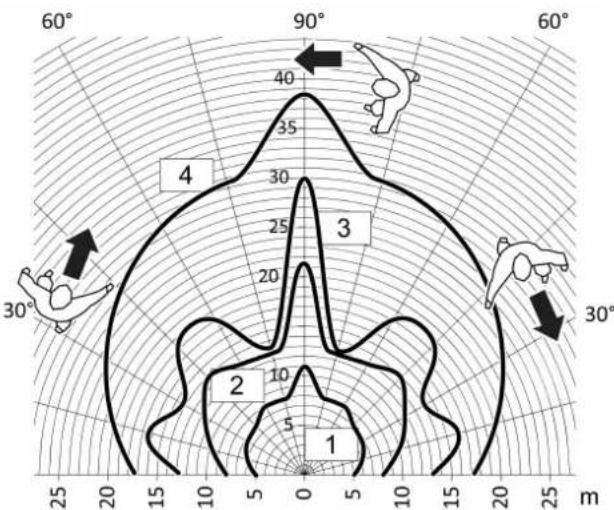
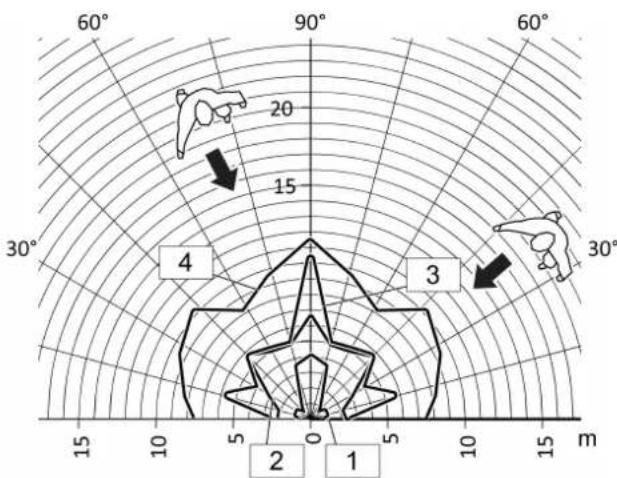
Direction of movement: If motion detector passes tangentially, this results in a heat signal which can be evaluated well. If movement is radial to the sensor, the heat signal is smaller and thus harder to evaluate, resulting in a smaller range.
The following specifications on the extent of the detection field are general guide values. Discrepancies can occur depending on the installation environment and the intensity of the heat motion.
Motion detector cover 1.10 m detection field and range

text_image
1,10 m 0,50 m < 2,00 mFigure 3: Motion detector cover 1.10 m detection field and installation height
radar
| Region | Value | |---|---| | 1 | 10 | | 2 | 10 | | 3 | 30 | | 4 | 40 |Figure 4: Range with tangential direction of motion motion detector cover 1.10 m
1 25% sensitivity
2 50% sensitivity
3 75% sensitivity
4 100% sensitivity
radar
| Angle | Value | |-------|-------| | 60° | 20 | | 90° | 15 | | 120° | 10 | | 150° | 5 | | 180° | 0 | | 210° | -5 | | 240° | -10 | | 270° | -15 | | 300° | -20 |Figure 5: Range with radial direction of motion motion detector cover 1.10 m
1 25% sensitivity
2 50% sensitivity
3 75% sensitivity
4 100% sensitivity
Motion detector cover 2.20 m detection field and range
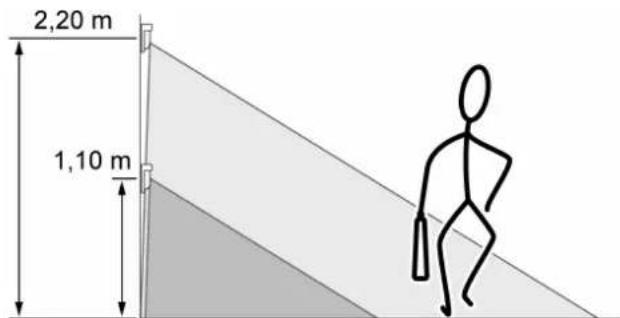
text_image
2,20 m 1,10 mFigure 6: Motion detector cover 2.20 m detection field and installation height
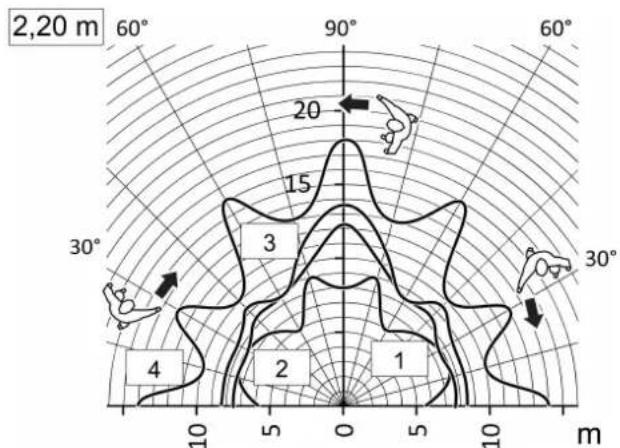
radar
| Region | Value | |---|---| | 1 | 3 | | 2 | 2 | | 3 | 15 | | 4 | 4 | | 5 | 10 | | 60° | 60 | | 90° | 90 | | 60° | 60 | | 30° | 30 | | 10° | 10 | | 5° | 0 | | 0° | 0 | | 5° | 0 | | 10° | 0 | | 10° | 0 | | 10° | 0 | | 10° | 0 | | 10° | 0 | | 10° | 0 | | 10° | 0 | | 10° | 0 | | 10° | 0 | | 10° | 0 | | 10° | 0 | | 10⁵° | 20 | | 10⁵° | 15 | | 10⁵° | 10 | | 10⁵° | 5 | | 10⁵° | 2 | | 10⁵° | 1 | | 10⁵° | 0 | | 10⁵° | 0 | | 10⁵° | 0 | | 10⁵° | 0 | | 10⁵° | 0 | | 10⁵° | 0 | | 10⁵° | 0 | | 10⁵° | 0 | | 10⁵° | 0 | | 10⁵° | 0 |Figure 7: Range with tangential direction of motion motion detector cover 2.20 m, mounting height 2.20 m
1 25% sensitivity
2 50% sensitivity
3 75% sensitivity
4 100% sensitivity
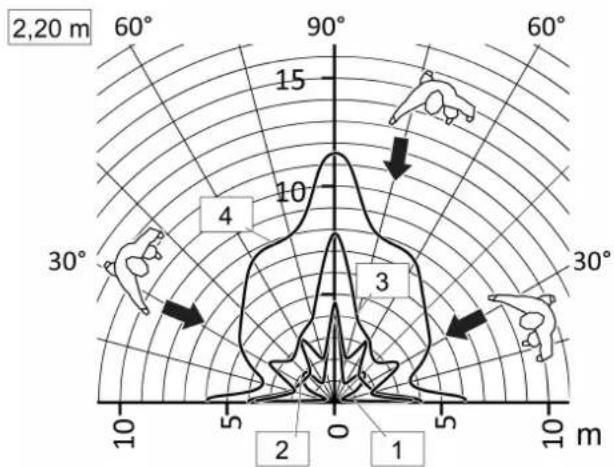
text_image
2,20 m 60° 90° 15 10 30° 4 3 10 m 2 5 0 1Figure 8: Range with radial direction of motion motion detector cover 2.20m , mounting height 2.20m
1 25% sensitivity
2 50% sensitivity
3 75% sensitivity
4 100% sensitivity
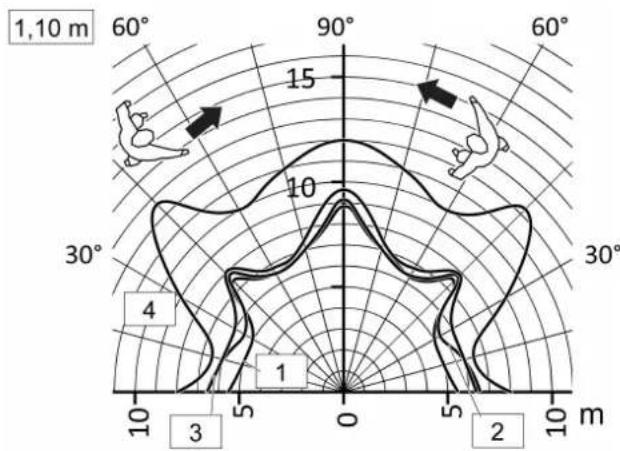
text_image
1,10 m 60° 90° 60° 15 10 30° 30° 4 1 0 5 2 10 m 3 5 10Figure 9: Range with tangential direction of motion motion detector cover 2.20 m, mounting height 1.10 m
1 25% sensitivity
2 50% sensitivity
3 75% sensitivity
4 100% sensitivity
text_image
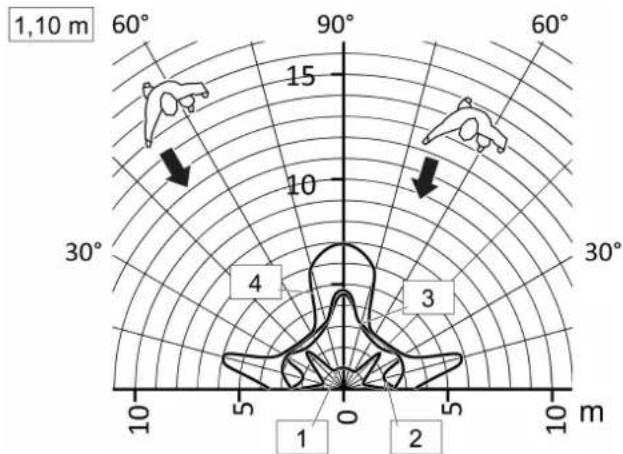
1,10 m 60° 90° 60° 15 10 30° 4 3 10 m 5 0 1 2Figure 10: Range with radial direction of motion motion detector cover 2.20 m, mounting height 1.10 m
1 25% sensitivity
2 50% sensitivity
3 75% sensitivity
4 100% sensitivity
Selecting installation location
■ Select a vibration-free installation location. Vibrations can lead to unwanted switching.
■ To achieve optimum range, choose an installation location that is tangential to the direction of motion.
■ Avoid interference sources in the detection area. Interference sources can trigger the motion detector, e.g. heat sources such as heating units, outlets from ventilation openings or air conditioners, copiers, printers, coffee machines, draughty doorways, animals etc.
Fitting the cover
■ Connecting and mounting the FM insert properly (see flush-mounted insert instructions).
Further installation steps are necessary to ensure the degree of protection IP 44 (see Seal set instructions).
■ Fit the cover with frame on the flush-mounted insert.
Expanding the detection field
To expand the detection field, connect a 3-wire extension with presence or motion detector cover. The main device also evaluates signals of the extension and, if necessary, switches the lighting on.
Limiting the detection field
The detection field can also be limited by reducing the sensitivity or switching off a sensor.
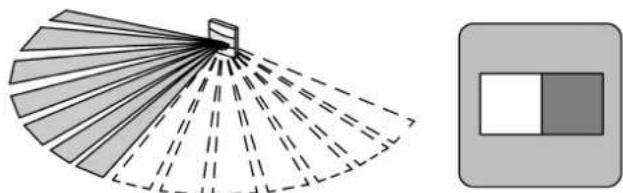
Alternatively, the detection area for motion detector cover 1.10 m can be limited with a panel (Figure 11).
natural_image
Diagram showing a fan-shaped arrangement of color swatches with dashed lines and a separate rectangular box (no text or symbols)Figure 11: Limiting detection area for motion detector cover 1.10 m
Mounting the panel

natural_image
Simple line drawing of a device with two connectors and a rectangular panel (no text or symbols)Figure 12: Dismounting of cover series CD/LS

natural_image
Simple line drawing of a mechanical component with a screwdriver inserted (no text or symbols)Figure 13: Dismounting the design cover series CD/LS
text_image
CD/LS:
natural_image
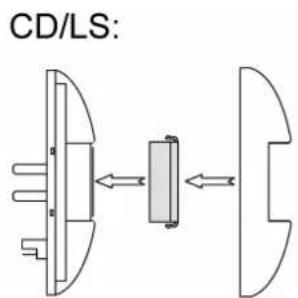
Pure electrical circuit lines without any symbolsFigure 14: Mounting of panel series CD/LS and A
Series CD, LS
■ Remove switch (5) (Figure 12).
■ Use a screwdriver to carefully remove the design cover (Figure 13).
■ Mount the cover for the left or right side of the device (Figure 14).
Series A:
■ Mount the cover from the front on the left or right side of the device (Figure 14).
Locking the switch

text_image
(8) (9)Figure 15: Locking the switch
The switch can be mechanically locked to the AUTO position as required. Use the provided screw (9) for this.
■ Remove the cover from the (Figure 12) switch (5).
■ Turn screw (9) in the hole (8) (Figure 15).
Configuring device settings
Settings are configured via the app
Default settings
| Function Setting | |
| Operating function Automatic operation | |
| Sensitivity 100 % | |
| Detection angle 180° | |
| Brightness threshold 10 lux | |
| Run-on time 2 minutes | |
| Supplementary function switched-off |
Checking detection field
Any motions detected are displayed in the app and by the red LED. The lighting is switched on for approx. 1 second. If the light is not to be switched dependent on motion, the Continuous on or Continuous off function should also be activated.
3-wire extension: detected motions are sent to the main device. This switches according to its settings.
■ Activate the walking test via the app and pace off the detection field. The function is automatically terminated after approx 5 minutes.
Restoring the device to factory settings
i After resetting the device to the default setting, it has to be removed from the app. On iOS equipment, the device also has to be removed from the list of paired Bluetooth devices (Settings/Bluetooth). Otherwise, re-pairing will not be possible.
Motion detector cover 1.10 m
■ Briefly disconnect the device from the mains voltage.
Red LED lights up, self-test runs.
■ Within 1 minute after switching on the mains voltage, move the switch (5) from position AUTO (centre) to the left.
After approx. 20 seconds, the red LED flashes quickly.
■ Within 10 seconds, move the switch (5) to position and back to position AUTO (centre), then back to the left
The red LED flashes more slowly, device is reset to the factory settings and restarts.
Motion detector cover 2.20 m
■ Briefly disconnect the device from the mains voltage.
Red LED lights up, self-test runs.
■ Within 1 minute after switching on the mains voltage, press the OFF button (6) for more than 20 seconds.
After approx. 20 seconds, the red LED flashes quickly.
■ Within 10 seconds, release the button and actuate it briefly once again.
The red LED flashes more slowly, device is reset to the factory settings and restarts.
7 Technical data
Ambient temperature -20 ... +45 °C
Storage/transport temperature -25 ... +70 °C
Degree of protection IP20
Brightness setting approx. 5 ... 500 lx and day operation
Sensitivity 0, 25, 50, 75, 100 %
Run-on time approx. 10 s ... 60 min
Installation height
Art. no. ..17181.. 1.10 m
Art. no. ..17281.. 1.10 m / 2.20 m
Detection angle 180°
Radio frequency 2.402 ... 2.480 GHz
Transmission capacity max. 2.5 mW, Class 2
Transmitting range typ. 10 m
8 Parameter list
Adjustable parameter list via app
Depending on the insert, the following parameters can be changed with the app.
Settings for switch and dimming inserts
| Parameters Setting | options, default setting | Explanation |
| Operating function | Automatic on, offDefault setting: automatic | Automatic: The load is switched depending on motion and brightness.On or off: The load is permanently switched on or off. |
| Limiting the length | On, OffDefault setting: Off | Time limit for the "On" and "Off" functions. The device is in automatic operation again after the time has elapsed.The time can be set gradually in the range of 0.5 - 5 hours.Default setting: 2 h |
| Detection setting | Sensitivity:0, 25, 50, 75, 100%Default setting: Sensitivity:100 %, walking test: Off, reduced basic sensitivity: Off | Sensitivity:Adjustable in 5 steps for each sensor A – B.To restrict the detection field, switch off individual sensors. To do this, set the sensitivity to 0 %.Walking test On: Checking the detection field. The function automatically terminates after 5 minutes. Reduced basic sensitivity On: Reduced basic sensitivity for use in environments with interference sources. |
| Brightness setting | Switch-on threshold: Motion detector: 5... 500 lx and day operationPresence detector: 5... 1000 lx and day operationDefault setting: 5 lx, day operation Off | Switch-on threshold: The load is switched on if the brightness value falls below this value and if motion is detected. Day operation On: The device operates independently of the brightness. |
| Run-on time 10 s ... | 60 minDefault setting: 2 min, dynamic run-on time Off | The load remains switched on for this time, even if no more motion is detected or the ambient light is bright enough.Dynamic run-on time On: The device automatically determines a run-on time within specified limits and dynamically from detected motion. In so doing, the run-on time is increased if presence continues or decreased if absence is detected. The maximum run-on time is the set run-on time. The shortest run-on time is 10 seconds. For run-on times times from 5 minutes, the brief presence detection function is also active. |
| Operating mode M | Motion detector operation, presence detector operationDefault setting: motion detector operation | Setting whether the device operates as a motion detector or presence detector. |
| Operating lock On, | OffDefault setting: Off | The device cannot be operated on location if the operating lock is active. For use in public areas. |
| Starting presence simulation | On, OffDefault setting: Off | The function can only be activated after more than 24 hours of time was saved. In automatic mode, the times at which the lighting was switched on are continuously saved. A maximum of 60 switching operations are saved over a period of 24 hours. If more switching operations take place, the oldest ones are overwritten respectively. If the presence simulation is activated, the lighting is switched on at the saved times depending on the brightness. Switch-off takes place after the run-on time has elapsed. Detected motions prolong the run-on time or the light is switched on de-pending on brightness. Times are not saved. The dynamic run-on time is not taken into account. |
| Alarm function On, | OffDefault setting: Off | This function is used to monitor an area for unauthorised access during absence. If this is the case, the lighting flashes (1 second on, 1 second off) for the duration of the run-on time. In addition, a message is sent via the Bluetooth interface. When motions are detected, the run-on time is restarted. |
| Time change active | On, OffDefault setting: On | Activates automatic summer/wintertime changeover |
| Time controller 16 | switch pointsDefault setting: none | With this function it is possible to automatically switch on functions such as night light or hotel function for a defined period of time. A weekly timer is available for this purpose. The timer updates itself with every Bluetooth connection to a mobile end device. One function can be switched on or off per switch point. A time and one or more weekdays are assigned to each switch point. |
Settings only for switch inserts
| Parameters Setting | options, default setting | Explanation |
| Pulse operation On | , OffDefault setting: Off | If motion occurs, then a short pulse of approx. 0.5 seconds is triggered depending on the brightness. The pulse is repeated approx. every 3 seconds as long as motions are detected. |
| Switch-off warning | On, OffDefault setting: Off | If the switch-off warning is activated, the light is not switched off immediately after the run-on time has elapsed. Triple flashing at an interval of 10 seconds shows that the light will be switched off soon. The run-on time is thereby prolonged by approx. 30 seconds. If motion is detected during the switch-off warning, then the run-on time is restarted and the light remains on. |
Settings only for dimming inserts
| Parameters Setting | options, default setting | Explanation |
| Switch-off warning | On, OffDefault setting:Off | If the switch-off warning is activated, the light is not switched off immediately after the run-on time has elapsed. The light is first dimmed to minimum brightness within 30 seconds. The run-on time is thereby prolonged by approx. 30 seconds. If motion is detected during the switch-off warning, then the run-on time is restarted and the light switches back to the switch-on brightness. |
| Minimum brightness | 1 ... 67%Default setting:5 % | Specifies the minimum settable brightness. |
| Maximum brightness | 1 ... 100%Default setting:100 % | Specifies the maximum settable brightness. |
| Switch-on brightness | 5 ... 100%Default setting:100 % | The device switches on at the set switch-on brightness. Note: If the value is above the set maximum brightness or below the minimum brightness, then the system will switch to the appropriate limit value. |
| Switching on to the last value | On, OffDefault setting:Off | When it is switched on, the light is switched on to the last brightness value set. |
| Hotel function On, | OffDefault setting:Off | If the function is activated, the light is switched to the switch-on brightness when motion is detected. After the run-on time has elapsed, the light is not dimmed off but is dimmed to a defined brightness value. |
| Brightness hotel function | 5 ... 100%Default setting:20 % of the maximum brightness | Brightness to which the light is dimmed when the hotel function is activated and the run-on time has elapsed. It is a percentage of the maximum brightness. |
| Night light function | On, OffDefault setting:Off | When the function is activated, the light is not switched on to the switch-on brightness but to a defined brightness value when motion is detected. |
| Brightness night light function | 5 ... 100%Default setting:20 % of the maximum brightness | Brightness to which the light is switched on when the night light function is switched on. It is a percentage of the maximum brightness. |
9 Troubleshooting
Motion detector does not switch on
Cause 1: The ambient brightness is greater than the adjusted brightness threshold.
Set the brightness threshold via app.
Cause 2: Motion detector does not detect any motions.
Check detection area for any obstacles.
Adjust the sensitivity of the sensors via app
Motion detector switches on without motion
Cause: Motion detector detects heat motions.
Pay attention to interference sources such as heaters, fans, air-conditioners and cooling luminaires in the detection field.
Motion detector switches off despite motion
Cause: The ambient light is too bright and the switch-off threshold was exceeded.
Set the brightness threshold via app.
Motion detector does not switch off after the set run-on time has elapsed
Cause: Motion detector detects motions constantly.
Pay attention to interference sources such as heaters, fans and air-conditioners in the detection field.
10 Accessories
Sealing kit for automatic switch 180° 2.20 m Art. no. AS..50DS
11 Conformity
Albrecht Jung GmbH & Co. KG hereby declares that the radio system type art. no. ..17181.. and ..17281.. meets the directive 2014/53/EU. You can find the full article number on the device. The complete text of the EU Declaration of Conformity is available under the Internet address:
www.jung.de/ce
12 Warranty
The warranty is provided in accordance with statutory requirements via the specialist trade.
ALBRECHT JUNG GMBH & CO. KG
Vollmestraße 1
58579 Schalksmühle
GERMANY
Telefon: +49 2355 806-0
Telefax: +49 2355 806-204
kundencenter@jung.de
www.jung.de