LS-CR90L - Battery LVSUN - Free user manual and instructions
Find the device manual for free LS-CR90L LVSUN in PDF.


User questions about LS-CR90L LVSUN
0 question about this device. Answer the ones you know or ask your own.
Ask a new question about this device
Download the instructions for your Battery in PDF format for free! Find your manual LS-CR90L - LVSUN and take your electronic device back in hand. On this page are published all the documents necessary for the use of your device. LS-CR90L by LVSUN.
USER MANUAL LS-CR90L LVSUN
Laptop Car DC Adaptor
LS-CR90L
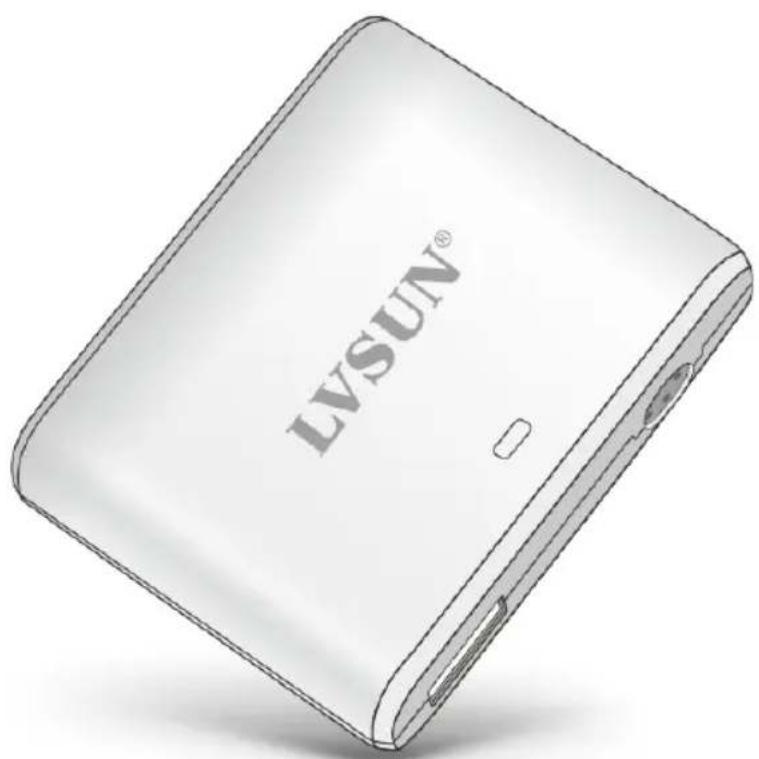
text_image
LVSUN®User Manual
Now enjoy your trip with the world's smallest universal DC adapter with 90W power for notebooks and USB chargeable devices. Since it's very small, so it can be easily and conveniently carried with great convenience and it can power your laptop and devices in cars. Moreover, this adapter also has an integrated 5 Volt USB charging port, allowing you to charge accessory devices through USB port without any additional power adapters. With our ultra slim and smart power adapter, you'll find an ideal companion for your myriad pursuits in life.
Product Features
- Mini and intelligent design, compact size with Zippo
- 100% automatic, no fiddly switch, just plug and go.
● Supply power for laptop, netbook, iPhone, iPad, Tablet PC, PSP, Mp4 and other related USB devices everywhere. - Portable and convenient, smart partner for travel
- 10pcs tips for optional, compatible with different brands of laptop and netbooks.
- Multi protections: short circuit, over current, over voltage, over Temperature protections.
Specification
● Product: Mini Universal Laptop Car DC Adaptor
Model: LS-CR90L
Input: DC 11-15V 10A
Output: DC 14.5V-24V 6A 90W(max)
USB output: 5V2.4A
Size: 63.5x48.9x16.9mm
N.W.:61g
High Efficiency:96%
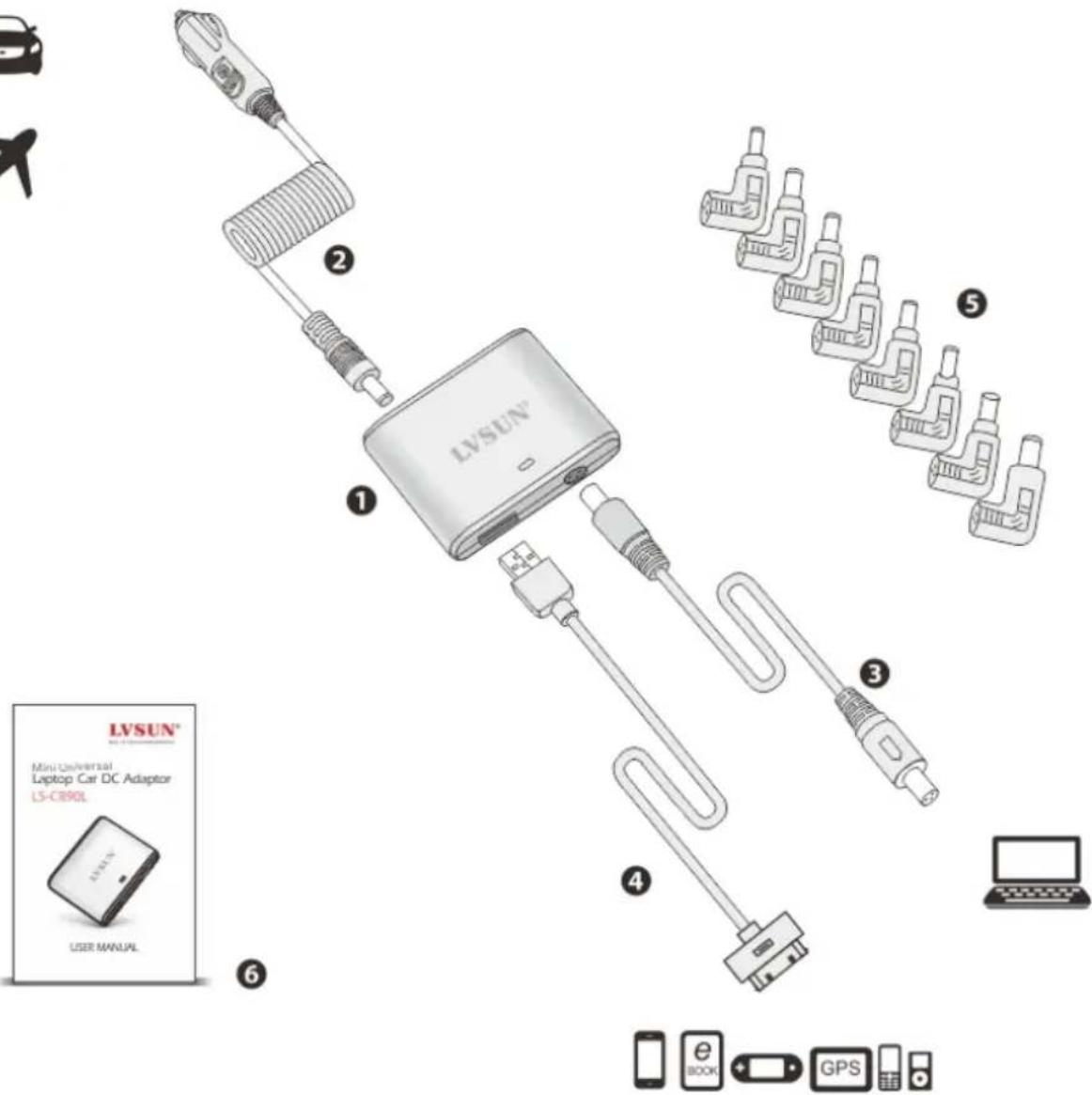
Product Diagram:

text_image
LV SUN® Mini Universal Laptop Car DC Adaptor LS-CB90L USER MANUAL 1 2 3 4 5 6 Smartphone e BOOK GPS① LS-CR90L Body
② Car charging cable
③ Laptop prolong DC cable
④ Mobile phone USB cable(not include)
⑤ Laptop DC tip (Optional)
⑥ User manual
The above accessories and quantity is different for different areas with different requirements. And the photos just for reference, the products kindly based on packaging sample.
Operation Instruction
- Check the DC voltage of your notebook
Method one: you can check from the back of you notebook.
MODEL NO:CL32
DC RATING:——19V 3.42A
Voltage=19 Volt
Method two: you can look at the label of your notebook adaptor.
INPUT:100-240V\~1.5A(1.5A) 50-60Hz
OUTPUT: 19V—3.42A(3.42A)⊖●⊕
Voltage=19 Volt
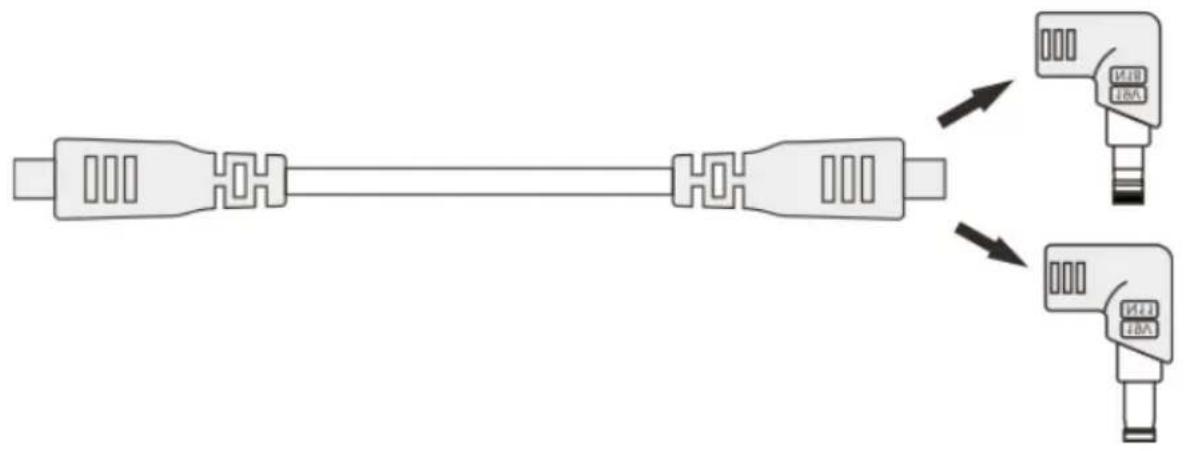
choose the right laptop dc tip, for example like N04, you'll find output voltage 19V which is engraved on the tip. Connect it with prolong cable as below:
text_image
Diagram showing a connector with two labeled ports (MB, IBA) and directional arrows indicating connection to each port.Caution: This adapter supports voltage output ranging from 14.5-24 volts. Please be informed that using this adapter to charge a notebook outside of the 14.5-24 volts range may damage the notebook.
● Charge or supply power for laptops and mobile phones
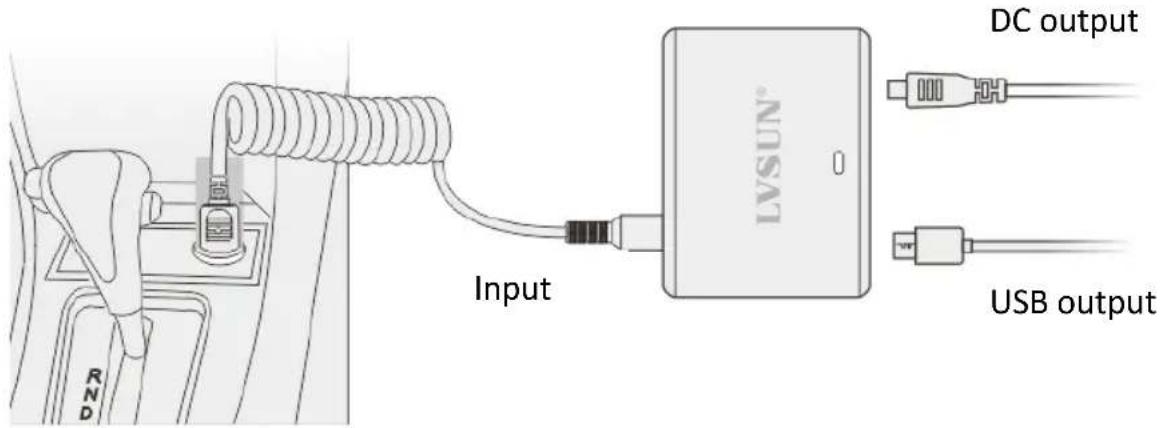
Insert the car plug to the cigar lighter socket, then connect the other end to the input port of our car adaptor. Select the right laptop DC tip or mobile phone USB cable and connect it to the DC output or USB output of car adaptor, then it can charge or supply power for your laptops and mobile phones.
text_image
Input LV SUN® DC output USB outputCigar lighter socket
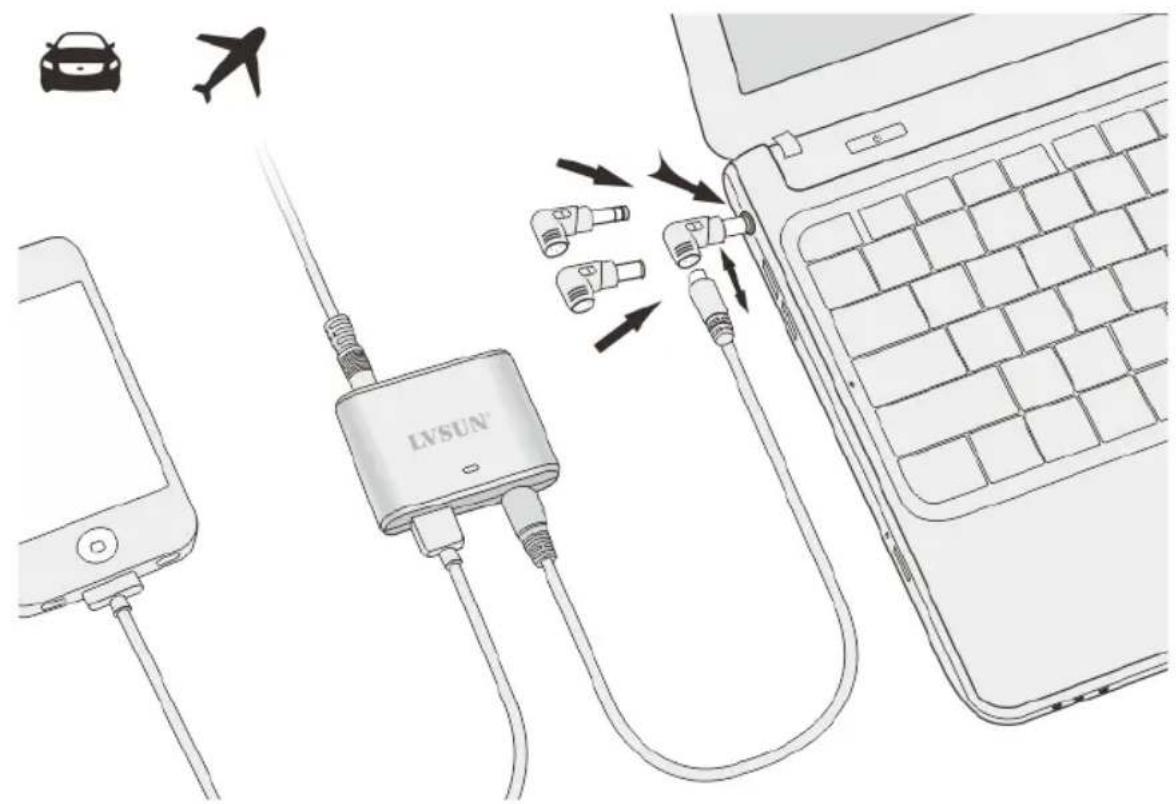
text_image
Diagram illustrating LVSUN device connection to a laptop, showing cable routing and airline iconsLaptop DC Tip Specification
| No | Output Voltage | Range Voltage | Connectors Spec. | Replacement |
| N04 | 19V | 18.1-19.9V | 4.8*1.7*10.7mm | HP/COMPAQ:18.5V/2.7A,18.5V/3.5A,18.5V/3.8A,18.5V/4.9A; DELTA:19V/2.64A;ASUS:19V/2.64A; NEC:19V/2.64A |
| N07 | 19V | 18.1-19.9V | 5.5*2.5*10.7mm | IBM:19V/4.2A; DELL:19V/3.16A,19V/3.42A;COMPAQ/HP:18.5V/4.9A,19V/4.9A; DELTA:19V/2.64A.;TOSHIBA:19V/3.16A,19V/3.42A,19V/4.74A;ASUS:19V/4.74A.LENOVO:20V/2A;LITEON:19V/3.16A,19V/3.42A,19V/3.95A,19V/4.74A; NEC:19V/2.64A,19V/3.16A;GATEWAY:19V/3.16A,19V/3.42A,19V/3.68A,19V/4.74A |
| N09 | 19.5V | 18.5-20.4V | 6.0*4.3*10.7mm | SONY:19.5V/2.7A,19.5V/3A,19.5V/4.1A,19.5V/4.7A;FUJITSU: 19V/3.16A, 19V/3.69A, 19V/4.22A |
| N11 | 19V | 18.1-19.9V | 5.5*1.7*10.7mm | TOSHIBA: 19V/3.95A; ACER: 19V/3.42A;DELTA: 20V/3.5A |
| N18 | 19V | 18.1-19.9V | 5.5*2.1*10.7mm | ACER:19V/3.16A,19V/3.42A,19V/4.74A;LITEON:19V/3.16A,19V/3.42A;NEC:19V/3.16A |
| N19 | 19V | 18.1-19.9V | 5.5*3.0*10.7mm | SAMSUNG:19V/3.16A,19V/3.75A,19V/4.22A,19V/4.74A |
| N23 | 18.5V | 17.6-19.4V | 7.4*5.0*12.5mm | HP/COMPAQ: 18.5V/3.5A,18.5V4.9A etc. |
| N24 | 20V | 19-21V | 7.9*5.5*0.9mm | IBM/LENOVO: 20V/4.5A,20V/3.25A etc. |
| N35 | 20V 19 | 21V | 11*5.6*11mmsquare tip | Lenovo: 20V2.25A,20V3.25A, 20V4.5A |
| N36 | 19.5V | 18.5-20.4V | 4.5*3.0 with pin | HP:19.5V2.31A, 19.5V3.33A,19.5V4.62A |
Notes:1, All listing of brand names are registered trademarks of their respective companies..
2, Not all connectors are available in the package, connectors may be different for different market.
Important Safety Information
The user manual is to help you use the power adapter safely, to ensure your personal safety, and to reduce the risk of fire, electric shock, or injury.
- Read all instructions in this user manual carefully before using the adapter.
- Do not open the device. There are no serviceable parts inside. Please always follow all the warnings and instructions closely.
- Your adapter should be used with cables and tips approved by LVSUN only. Using your adapter with non-approved cables and tips may result in serious or fatal injury, and/or property damage.
- Do not operate the adapter near a heat source, a heat went or under direct sunlight. Your adapter should be used in temperatures between 0°C-35°C(32°F-95°F).
- Do not ever cover the adapter with papers or other materials that reduce the cooling.
- To prevent injury and/or property damage, disconnect the input power cable from the adapter when it is not used. Please do not leave the adapter unattended while in use.
- The adapter may become hot during normal operation. Please handle the adapter with caution during or immediately after operation.
- Do not use your device in a net environment. For example, near bath tubs, sinks, Swimming pools, or in wet basements.
- Use the adapter only in automotive vehicles with 12Volt.
- Before cleaning the device, disconnect the device from the electrical outlet. Clean the device with dampened soft cloth. Do not use liquid or aerosol cleaners, which may contain flammable substances.
- Do not attempt to repair, modify, or tamper with the external or internal components of the adapter. Doing so will void the warrant and may lead to serious or fatal injury and/or property damage.
Hereby LVSUN ElectronicsTechnology Co., Ltd declares that this device is in compliance with the requirements of Directive 2014/30/EU (EMC), Directive 2014/35/EU (LVD) and the Directive 2011/65/EU for RoHS compliance. The complete declaration of conformity can be requested by post under the below mentioned manufacturer address.
Warning:
This device is a class B product. This equipment may cause some radio interference in living environment. In this case, the user can be requested to undertake appropriate measures to prevent interference
www.enlvsun.com
LVSUN Electronics Technology Co., Ltd
E-mail: market@enlvsun.com
