MiniMod VCF - Synthesizer AJH Synth - Free user manual and instructions
Find the device manual for free MiniMod VCF AJH Synth in PDF.


User questions about MiniMod VCF AJH Synth
0 question about this device. Answer the ones you know or ask your own.
Ask a new question about this device
Download the instructions for your Synthesizer in PDF format for free! Find your manual MiniMod VCF - AJH Synth and take your electronic device back in hand. On this page are published all the documents necessary for the use of your device. MiniMod VCF by AJH Synth.
USER MANUAL MiniMod VCF AJH Synth
Thank you for purchasing the AJH Synth MiniMod VCF module, which like all AJH Synth Modules, has been designed and handbuilt in the UK from the very highest quality components. We hope that it will help and inspire you towards creating some great music and soundscapes!
The MiniMod VCF is a very faithful replica of the four pole 24db/octave low pass filter used in the early Model D synthesiser. By using fully matched discrete ladder transistors along with audio- phile grade capacitors and operational amplifiers in the audio signal path, it captures the vintage sound and vibe of this epic filter and combines it with the versatility of the Eurorack modular format.
The front panel provides a three channel input mixer and a large filter cutoff control, along with 1/3 and 2/3 CV inputs to emulate the action of the original VCF keyboard switches. There is also a variable Exponential CV input which is about 30% more sensitive than the 1v/oct input, which allows some nice over modulation effects.
Added features include Voltage Controlled Emphasis (Resonance) which uses a Vactrol as the control element. This approach was chosen because it is a purely resistive element and importantly has no impact on the vintage sound of the filter. The fast acting Vactrol chosen allows modulation speeds up into the audio range. The filter will of course self-resonate and act as a sine wave oscillator too.
An overdrive facility can be selected using the onboard jumper which allows the input to the filter core to be substantially overdriven - great for adding a bit of extra dirt to the sound!
Module width is 14 HP of Eurorack space and it is compatible with standard Eurorack cases. The height of the panel is 128.5mm, and depth is 26mm. There are four mounting holes at the corners of the module and we provide 4 of M3 rack fixing screws, along with a Eurorack compatible power cable. Current consumption is 45mA from the +12V supply rail and 30mA from the -12V supply rail.
All AJHSynth modules are covered by a one year guarantee against manufacturing defects.
Note:
It is very important that the power supply ribbon cable is connected correctly, see the “adjustment and calibration” section for an illustration of the correct orientation.

text_image
AJH SYNTHControls, Inputs and Outputs
text_image
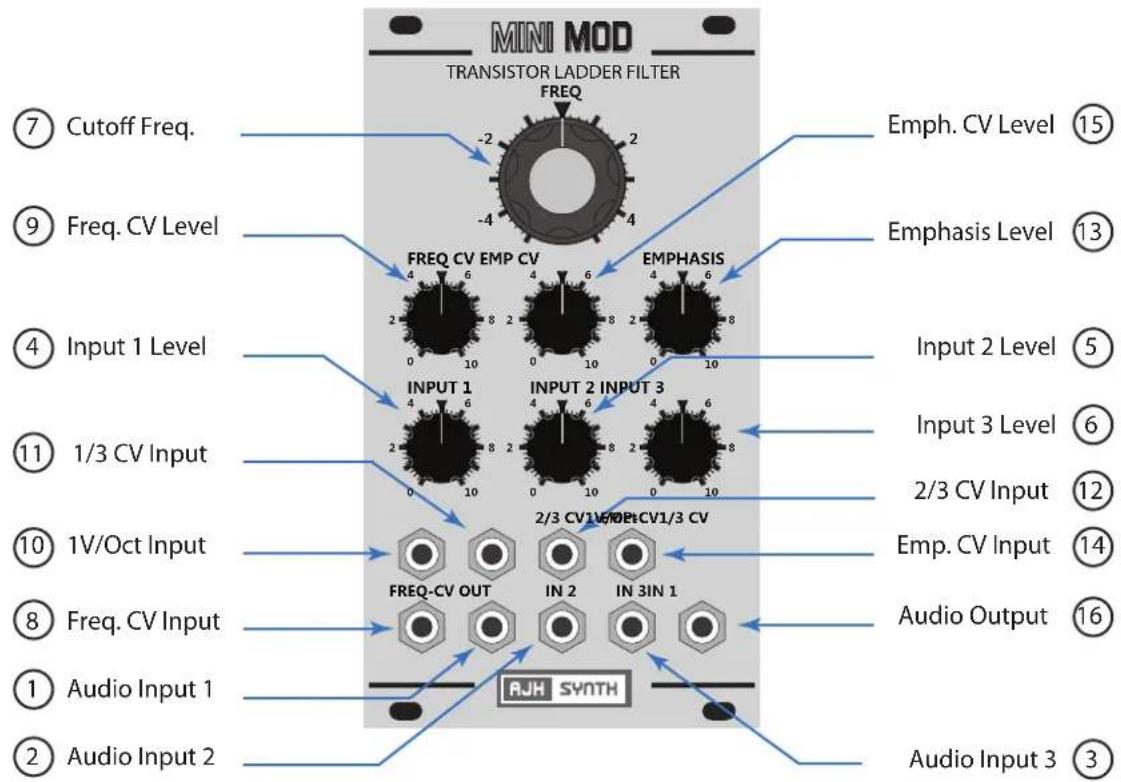
MINI MOD TRANSISTOR LADDER FILTER FREQ -2 2 -4 4 ⑦ Cutoff Freq. ⑨ Freq. CV Level ④ Input 1 Level ⑪ 1/3 CV Input ⑩ 1V/Oct Input ⑧ Freq. CV Input ① Audio Input 1 ② Audio Input 2 Emph. CV Level ⑮ Emphasis Level ⑬ FREQ CV EMP CV 4 6 8 2 4 6 8 2 4 6 INPUT 1 INPUT 2 INPUT 3 2/3 CV1/V/OP+CV1/3 CV FREQ-CV OUT IN 2 IN 3IN 1 Audio Output ⑯ Audio Input 3 ⑰ Input 2 Level ⑫ Input 3 Level ⑥ 2/3 CV Input ⑫ Emp. CV Input ⑭ Audio Output ⑯ AJH SYNTH① Audio Input 1: Audio Input 1 forms part of a 3 input audio mixer which is attached to the front end of the filter. This Input is mixed with Input 2 and Input 3 at a level set by Audio 1 Level control (4). Typically the output from a VCO would be connected to this Input, but any AC signal with a level of up to +/- 5 Volts is acceptable.
All three Audio Inputs are for audio signals only, the filter signal path is AC coupled so DC control voltages are not useful here but will not cause any problem if accidentally connected.
② Audio Input 2: Audio Input 2 forms part of a 3 input audio mixer which is attached to the front end of the filter. This input is mixed with Input 1 and Input 3 at a level set by Audio 2 Level control (5). Signal levels of up to +/- 5 Volts are acceptable.
③ Audio Input 3: Audio Input 3 forms part of a 3 input audio mixer which is attached to the front end of the filter. This input is mixed with Input 1 and Input 2 at a level set by Audio 3 Level control (6). Signal levels of up to +/- 5 Volts are acceptable.
④ Input 1 Level: Sets the amount of signal from Audio Input 1 (between 0% and 100%) that is mixed with (Audio) Audio Inputs 2 & 3 and sent to the filter core.
⑤ Input 2 Level: Sets the amount of signal from Audio Input 2 (between 0% and 100%) that is mixed with (Audio) Audio Inputs 1 & 3 and sent to the filter core.
⑥ Input 3 Level: Sets the amount of signal from Audio Input 3 (between 0% and 100%) that is mixed with (Audio) Audio Inputs 1 & 2 and sent to the filter core.
⑦ Cutoff Freq.: The Cutoff Frequency control manually varies the cut off frequency of the low pass filter. At the minimum setting (fully counter clockwise) the filter will cut off all frequencies with no audio output and at the maximum setting the filter will pass all frequencies. It is still active when using CV control, in which case it acts as an offset control.
⑧ Freq CV Input : Connect an external control voltage to this Input for voltage control of the filter cutoff frequency. The amount of signal passed to the filter core control circuitry can be adjusted with the Freq. CV Level control (9)
⑨ Freq. CV Level : Sets the amount of control voltage (between 0% and 130%) which is sent from the Freq. CV Input (8) to the filter cutoff circuitry. It has a greater range than the 1 V/Oct Input so that overmodulation effects are possible. 1V / Octave from the Freq. CV Input occurs with this control knob pointing to position 7 (2 o'clock).
10 1 V/Oct Input: A voltage applied to this Input changes the filter cutoff at the rate of 1 volt per octave, or if the filter is in full self oscillation (Emphasis Control fully clockwise) it will control the pitch of the resulting sine wave at the rate of 1 V/Oct. When compared to the Model D this emulates having "Keyboard Control" switches 1 and 2 "On".
⑪ 1/3 CV Input: A voltage applied to this input changes the filter cutoff at the rate of 333 mV per octave. When compared to the vintage Model D this is the equivalent of having "Keyboard Control" switch 1 "On" and switch 2 "Off".
⑫ 2/3 CV Input: A voltage applied to this input changes the filter cutoff at the rate of 666 mV per octave. When compared to the vintage Model D this is the equivalent of having "Keyboard Control" switch 2 "On" and switch 1 "Off".
⑬ Emphasis Level: This control manually regulates the amount of internal feedback applied to the filter core. "Emphasis" is now more commonly known as resonance in the modular synth world, they are just different words for the same effect.
At high levels of feedback (between positions 8 and 10) the filter will self-oscillate, so that even without any audio input to the filter a sine wave output is generated and the frequency can be controlled by applying control voltages to the 1V/Oct, Exp. CV, 1/3 or 2/3 inputs.
Like the Model D, when using the 1 V/Oct the sinewave can be played in the same manner as a VCO with a tracking range of 3 - 4 octaves.
The CV scaling is not temperature corrected so it may drift with changes in ambient temperature. Under normal circumstances it should track reasonably accurately over a four octave range. Again, this correctly emulates the behaviour of the vintage Model D filter.
⑭ Emp CV Input: Applying a control voltage to this Input will vary the Emphasis at the level set by the Emp. CV Level control (15). Acceptable input voltage range is +/- 5V
⑮ Emp. CV Level: This varies the amount of control voltage passed from the Emp. CV Input (14) to the filter core and it's range is 0% to 100%. The manual Emphasis Level control (13) is still active when using external CV control of Emphasis and acts as an offset control.
16 Audio Output: This is the audio output for the signal after passing through the filter core and would typically be connected to the Audio Input of a VCA. The output level is dependent upon the input level, with a single input of +/- 5V to (for example) Audio Input 1 and Audio 2 Level at 100% the gain would be unity, i.e. output would also be +/- 5V.
Gain Jumper : (J1 on PCB) Removing this jumper increases the gain of the signal by around 70% BEFORE it is fed to the filter core, which can give a nice overdrive effect. This can be used to emulate the vintage Model D "trick" of plugging the headphone output back into the VCF External Input.
With this jumper removed there is a proportionate (70%) increase in VCF output level and this should be compensated further down the signal chain. So, if being fed into a VCA the VCA Input Level control will need to be turned down to compensate for this higher signal level.
Adjustment and Calibration
Note:
This information is given for completeness, the MiniMod VCF is calibrated after manufacture and under normal circumstances should not require any user adjustment.

text_image
A Scale Adjust B Regen Adjust C Offset Adjust D Range Adjust E Gain Jumper Power Cable AJHSynth Red Stripe aligns with -12V as shown(A) Scale Adjust: Sets the 1V/Oct voltage scaling. To adjust, first remove all inputs, then turn Emphasis Level (13) to 10 (full on) and adjust Frequency Control (7) for 440hz output. Now apply EXACTLY 2V to the 1 V/Oct input and adjust for 1760Hz output (precisely 2 octaves higher).
(B) Regen Adjust: With no inputs, set Emphasis Level (13) to 10 (full on) and adjust Frequency Control (7) for 440Hz. Now turn Empahsis Level to 8 and turn Scale Adjust Trimmer until the filter just starts to selfsoscillate.
© Offset Adjust : Adjusts the vactrol circuit offset. FOR MANUFACTURER ADJUSTMENT ONLY, specialist test equipment is needed to calibrate this trimmer correctly.
(D) Range Adjust: Sets the frequency range. To adjust remove all Inputs, set Emphasis Level (13) to 10 (full on) and set Cutoff Frequency (7) to -1 position. Adjust trimmer for 440Hz output.
E Gain Jumper : See previous page.
If you need any help using this module or have any technical questions please feel free to contact us at support@ajhsynth.com