Rackbar RKBS20S6F10R - Inverter CyberPower - Free user manual and instructions
Find the device manual for free Rackbar RKBS20S6F10R CyberPower in PDF.


User questions about Rackbar RKBS20S6F10R CyberPower
0 question about this device. Answer the ones you know or ask your own.
Ask a new question about this device
Download the instructions for your Inverter in PDF format for free! Find your manual Rackbar RKBS20S6F10R - CyberPower and take your electronic device back in hand. On this page are published all the documents necessary for the use of your device. Rackbar RKBS20S6F10R by CyberPower.
USER MANUAL Rackbar RKBS20S6F10R CyberPower
Reliability. Quality. Value.
User Manual
RACKBar(tm)
Surge
natural_image
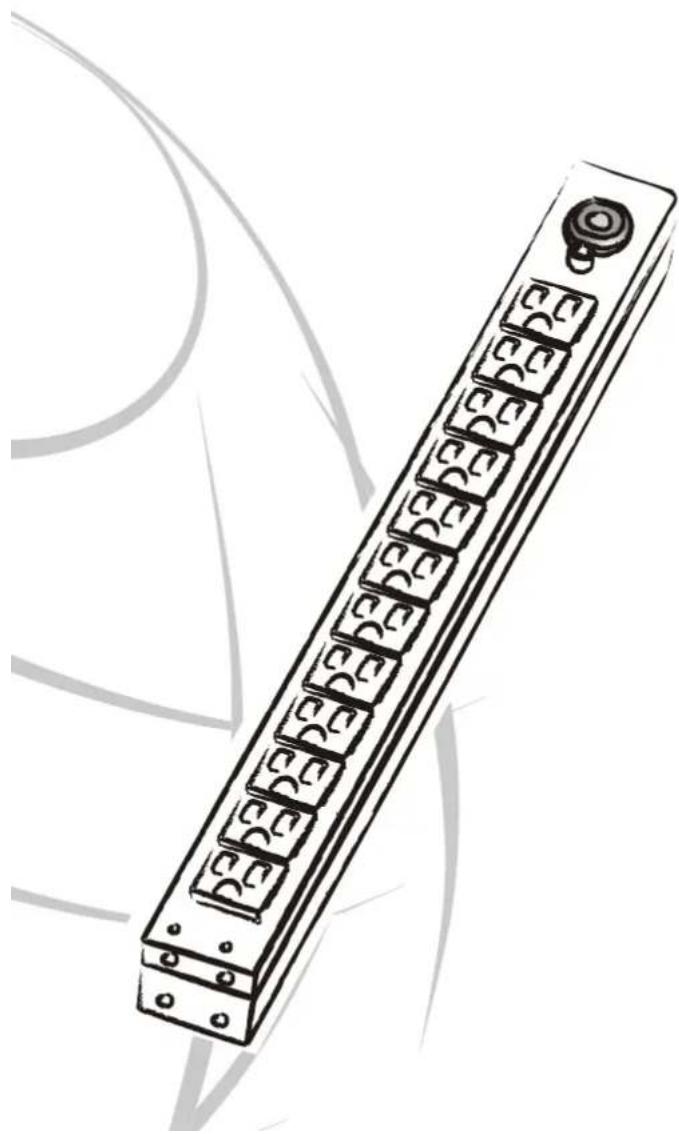
Illustration of a long rectangular electronic component with multiple slots and a button, no visible text or symbols.Model List
| RKBS15S2F8R | RKBS20S2F8R | RKBS20ST2F8R |
| RKBS15S2F10R | RKBS20S2F10R | RKBS20ST2F10R |
| RKBS15S2F12R | RKBS20S2F12R | RKBS20ST2F12R |
| RKBS15S4F8R | RKBS20S4F8R | RKBS20ST4F8R |
| RKBS15S4F10R | RKBS20S4F10R | RKBS20ST4F10R |
| RKBS15S4F12R | RKBS20S4F12R | RKBS20ST4F12R |
| RKBS15S6F8R | RKBS20S6F8R | RKBS20ST6F8R |
| RKBS15S6F10R | RKBS20S6F10R | RKBS20ST6F10R |
| RKBS15S6F12R | RKBS20S6F12R | RKBS20ST6F12R |
Package Contents
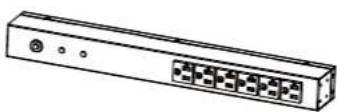
RackBar Surge Unit (RKBS) (1)

natural_image
Simple line drawing of a mechanical component with evenly spaced teeth and a curved base (no text or symbols)Cord Retention Tray (1)
Mounting Brackets

Horizontal Installation
Used (1 set)
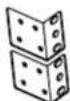
Vertical Installation Used (1 set)

Cord Retainer Clips (8/10/12 pcs - varies by model) for Cord Retention Tray
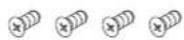
Bracket Mounting Screws M4 X 6 (4pcs)

Cord Retention Tray Mounting Screws M3 X 6 (4/8/12/16 pcs - varies by model)

Ground Screw M4 X 6 (1 pcs)
Documentation:

User Manual
Product Registration Card
Product Registration Card

Check
Before using, please check to ensure the package contains all the items shown above. If there are missing parts please contact CyberPower technical support at www.CPSww.com or call 1-877-297-6937.
RKBS Naming Convention:

- Amperage: Amperage - 15A, 20A
- Series: NULL: =NEMA 5-15P / 5-20P
T: = NEMA L5-20P - Outlet Number Front Number of Outlets followed by F - Example 8F
- Outlet Number Rear Number of Outlets followed by R - Example 8R
Safety Precautions - Read the following before installing or operating the RackBar Surge (RKBS):
- CAUTION! Use ONLY the supplied hardware (including screws, pegs and cord retainer clips) to attach the mounting brackets. Using different hardware or improper installations may cause damage that is NOT covered by this warranty.
- The RKBS must only be plugged into a three-wire, grounded outlet on a circuit protected by a fuse or circuit breaker. Connection to any other type of power outlet may result in a shock hazard.
- Do not use extension cords or adapters with this RKBS.
- Never install a RKBS, or associated wiring or equipment, during a lightning storm.
- Check that the power cord, plug, and socket are in good condition.
- This device features an internal protection that will disconnect the surge protective component at the end of its useful life but will maintain power to the load – now unprotected. If this situation is undesirable for the application, follow the manufacturer's instructions for replacing the device.
- CAUTION! To prevent the risk of fire or electric shock, this RKBS should be installed in a temperature and humidity controlled indoor area free of conductive contaminants. Do not install this RKBS where excessive moisture or heat is present..
Installation
Horizontal Installation
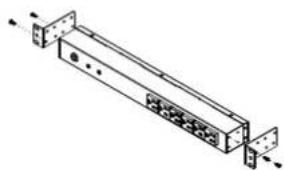
Step 1 - Mounting bracket installation
natural_image
Technical line drawing of a mechanical assembly with mounting flanges and internal components (no text or symbols)Install the screws (M4 X 6) in holes diagonal from each other.
Step 2 - RKBS Mounting

natural_image
Simple line drawing of two vertical metal supports with a horizontal support (no text or symbols)Install the RKBS using fasteners compatible with the rack.
Vertical Installation with Brackets
Step 1 – Mounting bracket installation

Install the screws (M4 X 6) in holes diagonal from each other.
Step 2 - RKBS Mounting
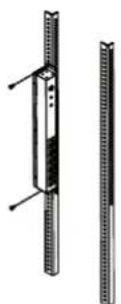
Install the RKBS using fasteners compatible with the rack.
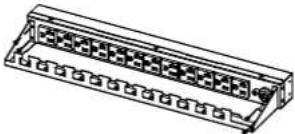
Cord Retention Tray installation
(Optional for both horizontal and vertical installations)
natural_image
Technical line drawing of a rectangular electronic component with multiple slots and mounting holes (no text or symbols)Attach the Cord Retention Tray to the RKBS with the 4 supplied Cord Retention Tray Mounting Screws (M3 X 6).

natural_image
Technical line drawing of a mechanical connector assembly with mounting holes and a magnified inset showing a small figure (no text or symbols)Attach the Cord Retainer Clips to the Cord Retention Tray.
Electrical Installation
Step 1 – Receptacle evaluation
Ensure that the plug type of your RKBS unit (e.g. NEMA 5-15P, NEMA L5-30P) matches the wall receptacle type that you are using.

RKBS must be plugged into a three-wire, grounded wall receptacle only. The wall receptacle must also be connected to an appropriate branch circuit/main with fuse or circuit breaker protection. Connection to any other type of wall receptacle may result in a shock hazard.
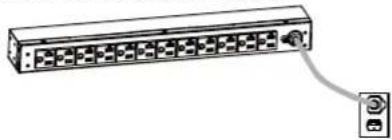
Step 2 - Plug the RKBS into the wall receptacle
natural_image
Diagram of a rack-mounted server unit with ports and an attached cable (no text or labels)Step 3 – Attach equipment
Before attaching equipment, it is important to calculate the total load that you will be placing on the RKBS. It is extremely important not to exceed the RKBS's maximum current load (as outlined in the Specifications section). In order to determine your total load, simply add up the amperage of your devices and ensure that it does not exceed the unit's capacity.

natural_image
Line drawing of a rectangular electronic component with multiple ports and connectors (no text or symbols)Step 4 – Verify Protection

Verify that both the Grounded and Protected LEDs are illuminated. This means that the RKBS is properly grounded and is protecting the equipment from surges.
Troubleshooting
| Problem Possible Cause Solution | ||
| RKBS Outlets do not provide power to connected equipment | 1. Open breaker2. Loose power cord | Reset Breaker check if plug is completely connected.If the problem remains contact tech support. |
| Circuit breaker has tripped | 1. Sustained overload2. Excessive ambient or internal temperatures.3. Faulty breaker | Reset Breaker.If the problem remains contact tech support. |
| Protected LED is not illuminated | Surge protection is exhausted. | Contact tech support. |
| Grounded LED is not illuminated | Ground circuit is open. | Check the site ground.If the site ground is good the RKBS may be faulty.Contact tech support. |
Product Features
Front View

text_image
A B CA. Mounting Bracket
B. Circuit Breaker
C. Protected LED
D. Grounded LED
E. Front Outlets
Back View

text_image
A B C D E FA. Mounting Bracket
B. Back Outlets
C. External Site Ground
D. AC Power Cord
E. Cord Retention Tray
Screw Holes
Technical Specifications
| Model Name | RKBS15S2F8RRKBS15S2F10RRKBS15S2F12RRKBS15S4F8RRKBS15S4F10RRKBS15S4F12RRKBS15S6F8RRKBS15S6F10RRKBS15S6F12R | RKBS20S2F8RRKBS20S2F10RRKBS20S2F12RRKBS20S4F8RRKBS20S4F10RRKBS20S4F12RRKBS20S6F8RRKBS20S6F10RRKBS20S6F12R | RKBS20ST2F8RRKBS20ST2F10RRKBS20ST2F12RRKBS20ST4F8RRKBS20ST4F10RRKBS20ST4F12RRKBS20ST6F8RRKBS20ST6F10RRKBS20ST6F12R |
| Input | |||
| Voltage | 100 ~ 125 V | ||
| Frequency | 50Hz/60Hz | ||
| Max Current 15 A | 20 A | ||
| Circuit Breaker 15 A | 20 A | ||
| Plug Type NEMA 5-15P NE | MA 5-20P NEMA L5-20P | ||
| Power Cord Length | 15 ft | ||
| On/Off Switch | N/A | ||
| Output | |||
| Voltage | 100 ~ 125 V | ||
| Current 15 A | 20 A | ||
| Outlet Type NEMA 5-15R | NEMA 5-20R | ||
| Filters & Protection | |||
| EMI/RFI Filtration | YES | ||
| Surge Suppression | 3600 Joules | 1800 Joules | |
| Indicators | |||
| LED Indicators | Grounded (Green), Protected (Green) | ||
| Meter Readout | N/A | ||
| Physical | |||
| Dimension (WxDxH) | 17.5" x 2.25" x 1.75" / 44.5 x 5.72 x 4.45 cm | ||
| Environmental | |||
| Humidity | Operating 0 to 95% Non-condensingNon-Operating 0 to 95% Non-condensing | ||
| Altitude | Operating 0ft to 10.000ftNon-Operating 0ft to 50.000ft | ||
| Temperature | Operating 32F to 95FNon-Operating 5F to 113F | ||
| Safety Approvals | |||
| Certifications | UL 1363 (Certified by ETL)UL 1449 (Certified by UL)RoHS | ||
| CEG Amount | $150,000 | ||
| Warranty | Lifetime | ||
Product Registration
Thank you for purchasing a CyberPower product. Prompt product registration entitles coverage under the Limited Warranty and Connected Equipment Guarantee, and also allows the opportunity to be notified of product enhancements, upgrades, and other announcements.
Registration is quick and easy at www.cpsww.com.
Need Additional Help?
Feel free to contact our Tech Support department with installation, troubleshooting, or general product questions.
CyberPower Technical Support
Phone: 1-877-297-6937
Email: tech@cpsww.com
Web: www.CPSww.com
Mail: 4241 12th Avenue E, Suite 400 Shakopee, MN 55379
Hours of Operation: Monday – Friday, 8:00am – 5:00pm (CST)
Limited Warranty and
Connected Equipment Guarantee
Read the following terms and conditions carefully before using the CyberPower RKBS(the "Product"). By using the Product you consent to be bound by and become a party to the terms and conditions of this Limited Warranty and Connected Equipment Guarantee (CEG) (together referred to as this "Warranty"). If you do not agree to the terms and conditions of this Warranty, you should return the Product for a full refund prior to using it.
Who is Providing this Warranty?
CyberPower Systems (USA), Inc. ("CyberPower") provides this Limited Warranty.
What Does This Warranty Cover?
This warranty covers defects in materials and workmanship in the Product under normal use and conditions. If the Technical Specifications indicate a dollar amount for Connected Equipment Guarantee (CEG), this Warranty also covers equipment that was connected to the Product and damaged because of the failure of the Product. If the Technical Specifications do not indicate that there is a dollar amount for Connected Equipment Guarantee (CEG), then that product does not have surge protection, and the Connected Equipment Guarantee (CEG) does not apply. In that case, damage to equipment that was connected to the Product and damaged because of a failure of the Product is not covered by the Limited Warranty, and any damage to that connected equipment is your responsibility, not ours.
What is the Period of Coverage?
This Warranty is for as long as the original owner owns the Product.
Who Is Covered?
This warranty only covers the original purchaser.
Coverage ends if you sell or otherwise transfer the Product.
How Do You Get Service?
-
Call us at (877) 297-6937 or write to us at Cyber Power Systems (USA), Inc., 4241 12th Ave. E., STE 400, Shakopee, MN 55379 or send us an e-mail message at claims@cyberpowersystems.com for instructions.
-
When you contact CyberPower, identify the Product, the Purchase Date, and the item(s) of Connected Equipment. Have information on all applicable insurance or other resources of recovery/payment that are available to the Initial Customer and Request a Claim Number.
-
You must provide a purchase receipt (or other proof of the original purchase) and provide a description of the defect.
-
Pack and ship the product to CyberPower and, if requested, the item(s) of Connected Equipment, a repair cost estimate for the damage to the Connected Equipment, and all claim forms that CyberPower provides to you. Show the Claim Number on the shipping label or include it with the product. You must prepay all shipping costs, you are responsible for packaging and shipment, and you must pay the cost of the repair estimate.
How Long Do I Have To Make A Claim?
All claims must be made within ten days of the occurrence.
What Will We Do To Correct Problems?
CyberPower will inspect and examine the Product.
If the Product is defective in material or workmanship, CyberPower will repair or replace it at CyberPower's expense, or, if CyberPower is unable to or decides not to repair or replace the Product (if defective) within a reasonable time, CyberPower will refund to you the full purchase price you paid for the Product (purchase receipt showing price paid is required).
If it appears that our Product failed to protect any equipment plugged into it, and if this Product has Connected Equipment Guarantee (CEG) coverage (Look above at "What does this Warranty Cover?"), we will also send you forms for making your claim for the connected equipment. We will repair or replace the equipment that was damaged because of the failure of our Product or pay you the fair market value (NOT REPLACEMENT COST) of the connected equipment as of the time of the damage. We will use Orion Blue Book, or another a third-party valuation guide, or eBay, craigslist, or other source to establish that amount. Our liability is limited to the amount, if any, stated in the Technical Specifications. If there is no dollar amount for your model of the Product, then there is no Connected Equipment Guarantee (CEG) coverage for that Product.
Who Pays For Shipping?
We pay when we send items to you; you pay when you send items to us.
What Are Some Things This Warranty Does Not Cover?
- This Warranty does not cover any software that was damaged or needs to be replaced due to the failure of the Product or any data that is lost as a result of the failure or the restoration of data or records, or the reinstallation of software.
- This Warranty does not cover or apply to: misuse, modification, operation or storage outside environmental limits of the Product or the equipment connected to it, nor for damage while in transit or in storage, nor if there has been improper operation or maintenance, or use with items not designed or intended for use with the Product, such as laser printers, appliances, aquariums, medical or life support devices, etc.
What are the Limitations?
- This Warranty does not apply unless the Product and the equipment that was connected to it were connected to properly wired and grounded outlets (including compliance with electrical and safety codes of the most current electrical code), without the use of any adapters or other connectors.
- The Product must have been plugged directly into the power source and the equipment connected to the Product must be directly connected to the Product and not "daisy-chained" together in serial fashion with any extension cords, another Product or device similar to the Product, surge suppressor, or power tap. Any such installation voids the Limited Warranty.
- The Product and equipment connected to it must have been used properly in a suitable and proper environment and in conformance with any license, instruction manual, or warnings provided with the Product and the equipment connected to it.
- The Product must have been used at all times within the limitations on the Product's VA capacity.
- The sole and exclusive remedies of the Initial Customer are those provided by this Warranty.
What Limitations Apply if there is Connected Equipment Guarantee (CEG) Coverage for My Product?
Products with Connected Equipment Guarantee (CEG) coverage (Look above at "What does this Warranty cover?") were designed to eliminate disrupting and damaging effects of momentary (less than 1ms) voltage spikes or impulses from lightning or other power transients. If it can be shown that a voltage spike lasting longer than 1ms has occurred, the occurrence will be deemed outside the rated capabilities of the Product and the Limited Warranty is void. CyberPower Does Not Cover or Undertake Any Liability in Any Event for Any of the Following:
- Loss of or damage to data, records, or software or the restoration of data or records, or the reinstallation of software.
- Damage from causes other than AC power line transients, spikes, or surges on properly installed, grounded, and code-compliant 120 volt power lines in the United States and Canada.
- Damage from fire, flood, wind, rain, rising water, leakage or breakage of plumbing, abuse, misuse or alteration of either the product or the Connected Equipment.
- CyberPower excludes any liability for personal injury. CyberPower excludes any liability for direct, indirect, special, incidental, or consequential damages (except as provided under the Connected Equipment Guarantee (CEG), if it applies), whether for damage to or loss of property, profits, business interruption, or loss of information or data. NOTE: Some States or Provinces do not allow the exclusion or limitation of incidental or consequential damages, so the above limitation may not apply to you.
- The Product is not for use in high-risk activities or with aquariums. The Product is not designed or intended for use in hazardous environments requiring fail-safe performance, or for use in any circumstance in which the failure of the Product could lead directly to death, personal injury, or severe physical or property damage, or that would affect operation or safety of any medical or life support device (collectively, "High Risk Activities"). CyberPower expressly disclaims any express or implied warranty of fitness for High Risk Activities or with aquariums. CyberPower does not authorize use of any Product in any High Risk Activities or with Aquariums. ANY SUCH USE IS IMPROPER AND IS A MISUSE OF THE PRODUCT.
Contact Information
CyberPower Systems, Inc.
4241 12th Ave. East
Suite 400
Shakopee, MN 55379
Phone: (952) 403-9500
Toll-free: (877) 297-6937
CyberPower is the warrantor under this Limited Warranty.
You may also contact CyberPower on the web at CPSww.com.