AR24HSFSDWKNJO - Air-conditioner SAMSUNG - Free user manual and instructions
Find the device manual for free AR24HSFSDWKNJO SAMSUNG in PDF.


User questions about AR24HSFSDWKNJO SAMSUNG
0 question about this device. Answer the ones you know or ask your own.
Ask a new question about this device
Download the instructions for your Air-conditioner in PDF format for free! Find your manual AR24HSFSDWKNJO - SAMSUNG and take your electronic device back in hand. On this page are published all the documents necessary for the use of your device. AR24HSFSDWKNJO by SAMSUNG.
USER MANUAL AR24HSFSDWKNJO SAMSUNG
Air Conditioner user & installation manual
Planet First
100% Recycled Paper
This manual is made with 100% recycled paper.
imagine the possibilities
Thank you for purchasing this Samsung product.
SAMSUNG
Features of your new air conditioner
2-step cooling
2-step cooling function will quickly cool the room to reach the desired temperature and then it will adjust the fan speed and air flow direction automatically to help you stay comfortable and refreshing.
Fast cooling/heating
If you want the strong and cool/warm air, just select Fast function! It will get you the strongest air!
Comfort cooling/heating
If you want the comfortable and refreshing air, Comfort function will spread the cool/warm air indirectly to you, so that you can stay comfortable.
Single User
Use Single User function when you are alone at home. Single User function will minimize the energy consumption with inverter technology and reduce your electricity bill by adjusting the maximum operating capacity of the compressor.
Easy Filter
There is no grille to remove before separating the filter from the air conditioner! Therefore, filter can be cleaned easily, more frequently! Frequent filter cleaning will prevent dust from entering into the product or accumulating on the filter.
good'sleep function
good'sleep function will allow you to have deep, good night's sleep by adjusting the temperature, fan speed and air flow direction.
Smart Install
When the installation is done, your product will examine itself through trial operation to check if it was installed properly.
Easy Installation
It's so easy to install! You can easily hang the product on the wall and connect the pipes and wires by opening the cover on the bottom of the product. Now you won't have to tilt the product to connect the pipe and the wires!

Correct Disposal of This Product
(Waste Electrical & Electronic Equipment)
(Applicable in countries with separate collection systems)
This marking on the product, accessories or literature indicates that the product and its electronic accessories (e.g. charger, headset, USB cable) should not be disposed of with other household waste at the end of their working life. To prevent possible harm to the environment or human health from uncontrolled waste disposal, please separate these items from other types of waste and recycle them responsibly to promote the sustainable reuse of material resources.
Household users should contact either the retailer where they purchased this product, or their local government office, for details of where and how they can take these items for environmentally safe recycling.
Business users should contact their supplier and check the terms and conditions of the purchase contract. This product and its electronic accessories should not be mixed with other commercial wastes for disposal.
English-2
Contents
Preparation
Safety precautions ....4
Checking before use ....10
Basic function
Checking the name of the parts ....11
Checking the remote controller 12
Basic function....14
Adjusting the air flow direction....16
Timer
Setting the On/Off timer 17
good'sleepmode....19
Options
2-Step cooling function 20
Using the Fast function....21
Using the Comfort function 21
Using the Single user function....22
Using the Quiet function 23
Settings
Using the Auto clean function....24
Setting the Beep sound 24
Others
Cleaning the air conditioner....25
Maintaining the air conditioner....28
Troubleshooting 29
Installation
Safety precautions 31
Choosing the installation location....32
Accessories 35
Fixing the installation plate....36
Disassembling/Assembling the Cover panel for indoor unit installation 38
Connecting the assembly cable 40
Installing and connecting the assembly pipe of the indoor unit 42
Evacuating the indoor unit 43
Cutting or extending the pipe 43
Installing and connecting the drain hose of the indoor unit 45
Changing direction of the drain hose 46
Installing and connecting the drain hose of the outdoor unit 47
Evacuating the connected pipes....47
Performing the gas leak tests....50
Fixing the indoor unit in place....51
Fixing the outdoor unit in place 51
Smart Install mode....52
Final check and trial operation....54
Pump down procedure (when removing the product)....54
How to connect your extended power cables....55
English-3
Safety precautions
Before using your new air conditioner, please read this manual thoroughly to ensure that you know how to safely and efficiently operate the extensive features and functions of your new appliance.
Because the following operating instructions cover various models, the characteristics of your air conditioner may differ slightly from those described in this manual. If you have any questions, call your nearest contact center or find help and information online at www.samsung.com.
Important safety symbols and precautions:
| WARNING | Hazards or unsafe practices that may result in severe personal injury or death. | ||
| CAUTION | Hazards or unsafe practices that may result in minor personal injury or property damage. | ||
| Follow directions. Cut-off the power supply. | |||
| Do NOT attempt. Do NOT disassemble. | |||
| Make sure the machine is grounded to prevent electric shock. | |||
FOR INSTALLATION
WARNING
Use the power line with the power specifications of the product or higher and use the power line for this appliance only. In addition, do not use an extension line.
▶ Extending the power line may result in electric shock or fire.
▶ Do not use an electric transformer. It may result in electric shock or fire.
▶ If the voltage/frequency/rated current condition is different, it may cause fire.
The installation of this appliance must be performed by a qualified technician or service company.
▶ Failing to do so may result in electric shock, fire, explosion, problems with the product, or injury and may also void warranty on the installed product.
Install a Isolation Switch next to the Air Conditioner (but not on the panels of the Air Conditioner) and circuit breaker dedicated to the air conditioner.
▶ Failing to do so may result in electric shock or fire.
Fix the outdoor unit firmly so that the electric part of the outdoor unit is not exposed.
▶ Failing to do so may result in electric shock, fire, explosion, problems with the product.
English-4
Do not install this appliance near a heater, inflammable material. Do not install this appliance in a humid, oily or dusty location, in a location exposed to direct sunlight and water (rain drops). Do not install this appliance in a location where gas may leak.
▶ This may result in electric shock or fire.
Never install the outdoor unit in a location such as on a high external wall where it could fall.
▶ If the outdoor unit falls, it may result in injury, death or property damage.
This appliance must be properly grounded. Do not ground the appliance to a gas pipe, plastic water pipe, or telephone line.
▶ Failure to do so may result in electric shock, fire, and explosion.
▶ Make sure to use a socket-outlet with ground.
FOR INSTALLATION
CAUTION
Install your appliance on a level and hard floor that can support its weight.
▶ Failing to do so may result in abnormal vibrations, noise, or problems with the product.
Install the draining hose properly so that water is drained correctly.
▶ Failing to do so may result in water overflowing and property damage. Avoid adding drain to waste pipes as odours may arise in the future.
When installing the outdoor unit, make sure to connect the draining hose so that draining is performed correctly.
The water generated during the heating operation by the outdoor unit may overflow and result in property damage.
In particular, in winter, if a block of ice falls, it may result in injury, death or property damage.
FOR POWER SUPPLY
WARNING
When the circuit breaker is damaged, contact your nearest service center.
Do not pull or excessively bend the power line. Do not twist or tie the power line. Do not hook the power line over a metal object, place a heavy object on the power line, insert the power line between objects, or push the power line into the space behind the appliance.
▶ This may result in electric shock or fire.
English-5
Safety precautions
FOR POWER SUPPLY
CAUTION

When not using the air conditioner for a long period of time or during a thunder/lightning storm, cut the power at the circuit breaker.
▶ Failing to do so may result in electric shock or fire.
FOR USING

WARNING

If the appliance is flooded, please contact your nearest service center.
▶ Failing to do so may result in electric shock or fire.
If the appliance generates a strange noise, a burning smell or smoke, cut-off the power supply immediately and contact the nearest service center.
▶ Failing to do so may result in electric shock or fire.
In the event of a gas leak (such as propane gas, LP gas, etc.), ventilate immediately without touching the power line. Do not touch the appliance or power line.
▶ Do not use a ventilating fan.
▶ A spark may result in an explosion or fire.
To reinstall the air conditioner, please contact your nearest service center.
▶ Failing to do so may result in problems with the product, water leakage, electric shock, or fire.
▶ A delivery service for the product is not provided. If you reinstall the product in another location, additional construction expenses and an installation fee will be charged.
▶ Especially, when you wish to install the product in an unusual location such as in an industrial area or near the seaside where it is exposed to the salt in the air, please contact your nearest service center.

Do not touch the circuit breaker with wet hands.
This may result in electric shock.
Do not turn the air conditioner off with the circuit breaker while it is operating.
▶ Turning the air conditioner off and then on again with the circuit breaker may cause a spark and result in electric shock or fire.
After unpacking the air conditioner, keep all packaging materials well out of the reach of children, as packaging materials can be dangerous to children.
▶ If a child places a bag over its head, it may result in suffocation.
English-6
Do not insert your fingers or foreign substances into the outlet when the air conditioner is operating.
▶ Take special care that children do not injure themselves by inserting their fingers into the product.
Do not touch the air flow blade with your hands or fingers during the heating operation.
▶ Take special care that children do not injure themselves by inserting their fingers into the product.
Do not strike or pull the air conditioner with excessive force.
This may result in fire, injury, or problems with the product.
FOR USING
WARNING
Do not place an object near the outdoor unit that allows children to climb onto the machine.
This may result in children seriously injuring themselves.
Do not use this air conditioner for long periods of time in badly ventilated locations or near infirm people.
▶ Since this may be dangerous due to a lack of oxygen, Open a window at least once an hour.
If any foreign substance such as water has entered the appliance, cut-off the power supply and contact the nearest service center.
▶ Failing to do so may result in electric shock or fire.
Do not attempt to repair, disassemble, or modify the appliance yourself.
▶ Do not use any fuse (such as cooper, steel wire, etc.) other than the standard fuse.
▶ Failing to do so may result in electric shock, fire, problems with the product, or injury.
English-7
Safety precautions
FOR USING
CAUTION
Do not place objects or devices under the indoor unit.
▶ Water dripping from the indoor unit may result in fire or property damage. (example electrical appliances)
Check that the installation frame of the outdoor unit is not broken at least once a year.
▶ Failing to do so may result in injury, death or property damage.
Max current is measured according to IEC standard for safety and current is measured according to ISO standard for energy efficiency.
Do not stand on top of the appliance or place objects (such as laundry, lighted candles, lighted cigarettes, dishes, chemicals, metal objects, etc.) on the appliance.
This may result in electric shock, fire, problems with the product, or injury.
Do not operate the appliance with wet hands.
▶ This may result in electric shock.
Do not spray volatile material such as insecticide onto the surface of the appliance.
As well as being harmful to humans, it may also result in electric shock, fire or problems with the product.
Do not drink the water from the air conditioner.
▶ The water may be harmful to humans.
Do not apply a strong impact to the remote controller and do not disassemble the remote controller.
Do not touch the pipes connected with the product.
▶ This may result in burns or injury.
Do not use this air conditioner to preserve precision equipment, food, animals, plants or cosmetics, or for any other unusual purposes.
▶ This may result in property damage.
Avoid directly exposing humans, animals or plants from the air flow from the air conditioner for long periods of time.
This may result in harm to humans, animals or plants.
English-8
This appliance is not intended for use by persons (including children) with reduced physical, sensory or mental capabilities, or lack of experience and knowledge, unless they have been given supervision or instruction concerning use of the appliance by a person responsible for their safety. Children should be supervised to ensure that they do not play with the appliance.
FOR CLEANING
WARNING
Do not clean the appliance by spraying water directly onto it. Do not use benzene, thinner or alcohol to clean the appliance.
This may result in discoloration, deformation, damage, electric shock or fire. Before cleaning or performing maintenance, cut-off the power supply and wait until the fan stops.
▶ Failing to do so may result in electric shock or fire.
FOR CLEANING
CAUTION
Take care when cleaning the surface of the heat exchanger of the outdoor unit since it has sharp edges.
This should be done by a qualified technician please contact your installer or service center.
Do not clean the inside of the air conditioner by yourself.
For cleaning inside the appliance, contact your nearest service center.
When cleaning the internal filter, refer to the descriptions in the 'Cleaning the air conditioner' section.
▶ Failure to do may result in damage, electric shock or fire.
Checking before use
Operation ranges
The table below indicates the temperature and humidity ranges the air conditioner can be operated within. Refer to the table for efficient use.
| Mode Indoor temperature Outdoor temperature Indoor humidity | |||
| Cooling | 16 °C~32 °C -10 °C~46 °C Relative humidity 80% or less | ||
| Heating | 27 °C or less -15 °C~24 °C - | ||
| Dry | 18 °C~32 °C -10 °C~46 °C - | ||
▶ If the air conditioner operates in cooling mode for long period of time in high humidity area, dew may be formed.
If the outdoor temperature goes down to -5^ , heating capacity may decrease as much as 60% 70% of specified capacity according to the using conditions.
Maintaining your air conditioner
Internal protections via the unit control system
This internal protection operates if an internal fault occurs in the air conditioner.
| Type Description | |
| Against cold air | The internal fan will be off to prevent cold air when the heat pump is heating. |
| Defrost cycle | The internal fan will be off to defrost ice when the heat pump is heating.Vertical air flow blade will be closed during defrost cycle and it will open again during heating operation after defrost cycle. |
| Protect compressor | The air conditioner does not start operating immediately to help protect the compressor of the outdoor unit after it has been started. |

- If the heat pump is operating in Heat mode, Defrost cycle is actuated to help remove frost from an outdoor unit that may have deposited at low temperatures. The internal fan is switched off automatically and restarted only after the defrost cycle is completed.
Smart install
- Through Smart install function, installer can check if the installation was done properly.
▶ If the installation was not done properly, error indicator will turn on the indoor unit display. Therefore user will know if the installation was done properly or not.
English-10
Checking the name of the parts
Your air conditioner may slightly look different from illustration shown below depending on your model.
Main parts

text_image
Air filter Air intake Room temperature sensor Air flow blade (up and down) Air flow blade (left and right)BASIC FUNCTION02

Display

text_image
Power button/ Remote controller receiver Operation indicator Timer/Auto clean indicator Single user indicatorEnglish-11
Checking the remote controller
- Point the remote controller towards the remote controller receiver of the indoor unit.
- When you properly press the button on the remote controller, you will hear beep sound from the indoor unit and a transmit indicator(💡) appears on the remote controller display.
Remote controller buttons
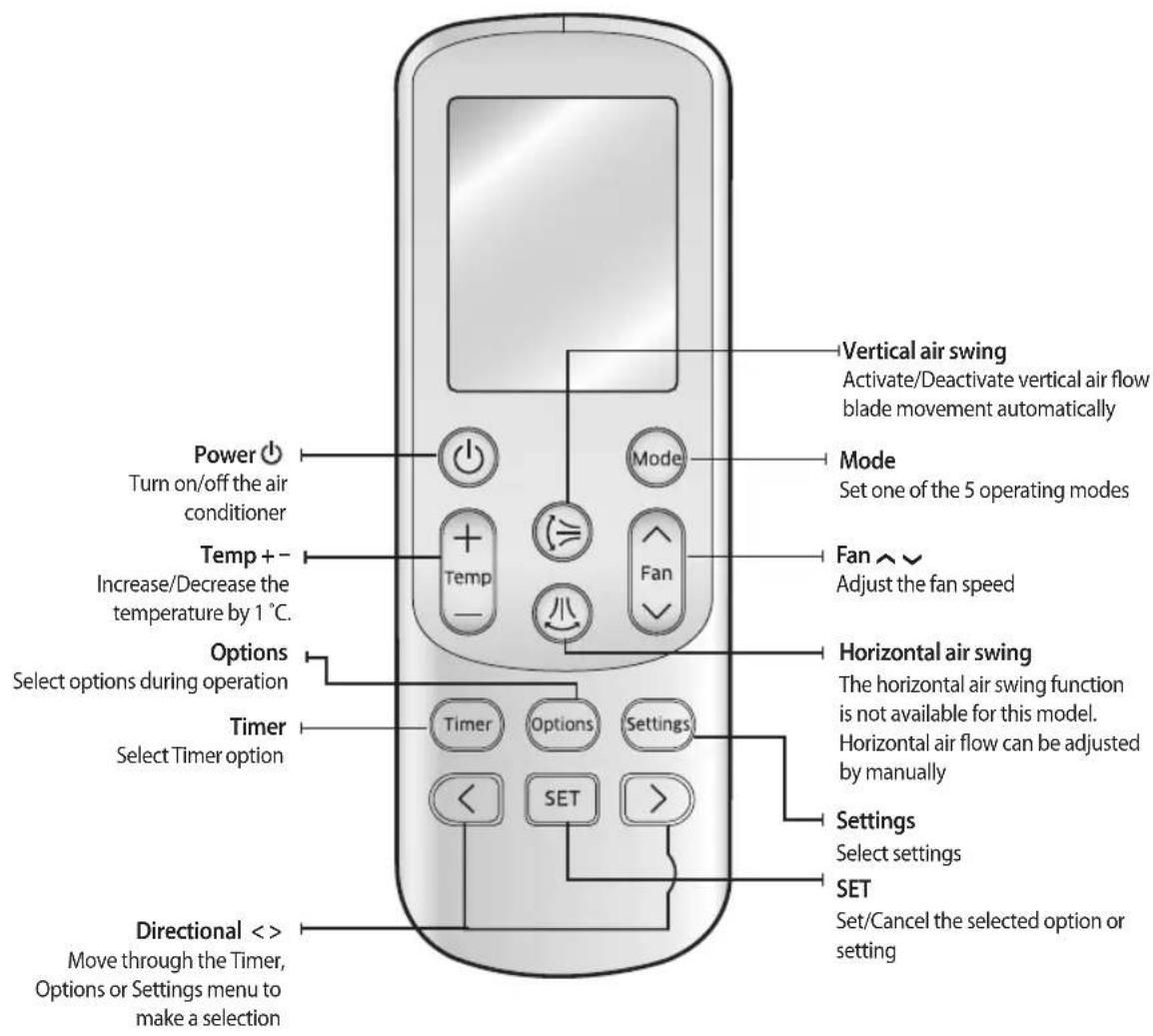
text_image
Power Turn on/off the air conditioner Temp + - Increase/Decrease the temperature by 1 °C. Options Select options during operation Timer Select Timer option Directional < > Move through the Timer, Options or Settings menu to make a selection Mode Set one of the 5 operating modes Fan ↑ ↓ Adjust the fan speed Vertical air swing Activate/Deactivate vertical air flow blade movement automatically Horizontal air swing The horizontal air swing function is not available for this model. Horizontal air flow can be adjusted by manually Settings Select settings SET Set/Cancel the selected option or setting
- In case you wish to cancel the options or settings that you have just set, press the Options or Settings button again, then the most recently selected item will blink and you may simply cancel it by pressing the SET button while selected item is blinking.
English-12
Remote controller display

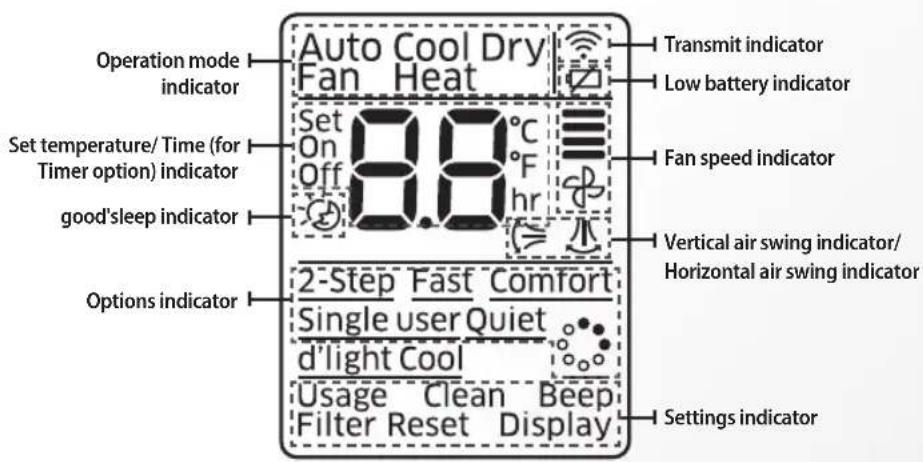
text_image
Operation mode indicator Set temperature/ Time (for Timer option) indicator good'sleep indicator Options indicator Auto Cool Dry Fan Heat Set On Off 8.8°C °F hr Transmit indicator Low battery indicator Fan speed indicator Vertical air swing indicator/ Horizontal air swing indicator 2-Step Fast Comfort Single user Quiet d'light Cool Usage Clean Beep Filter Reset Display Settings indicator
• Make sure that the water does not get to the remote controller.
• The following function are displayed on the remote controller display but not supported in this model.
- Horizontal air swing / Virus Doctor / d'light Cool / Usage / Filter Reset / Display
Low Battery warning
When the battery is exhausted, (☐) will be displayed in the remote controller display. When the icon appears, change the batteries. The remote controller requires two 1.5 V AAA type batteries.
Storing the remote controller
When you do not use the remote controller for long time, remove the batteries from the remote controller and store it.
Inserting the batteries
- Push the lever as arrow indicates on the rear side of the remote controller and pull up.
- Insert two AAA batteries.
Check and match the "+" and "-" signs accordingly. Make sure you have inserted the batteries in correct position. - Close the cover by place it back to its original position.
You should hear click sound when the cover is locked properly.
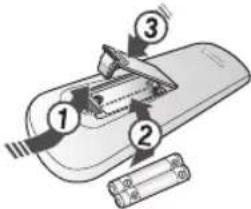
text_image
Diagram of a battery pack with labeled components and battery terminals
- The signal may not be received properly if electronic fluorescent lamps such as inverter fluorescent lamps are operating in the same space.
• If other electrical products operate by the remote controller, call your nearest contact center.

Correct disposal of batteries in this product
(Applicable in countries with separate collection systems)
This marking on the battery, manual or packaging indicates that the batteries in this product should not be disposed of with other household waste at the end of their working life. Where marked, the chemical symbols Hg, Cd or Pb indicate that the battery contains mercury, cadmium or lead above the reference levels in EC Directive 2006/66.
If batteries are not properly disposed of, these substances can cause harm to human health or the environment.
To protect natural resources and to promote material reuse, please separate batteries from other types of waste and recycle them through your local, free battery return system.
English-13
Basic function
Basic operation is an operation mode that can be selected by pressing the Mode button.
Auto
In Auto mode, the air conditioner will automatically set the temperature and fan speed depending on the room temperature.
Cool
In Cool mode, the air conditioner will cool your room. You can adjust the temperature and the fan speed to feel cooler in hot season.
- If current outside temperature is much higher than the selected indoor temperature, it may take time to bring the inner temperature to the desired coolness.
- Quiet mode makes the noise quieter during the operation of the indoor unit in the Cool mode.
Dry
The air conditioner in Dry mode acts like a dehumidifier by removing moisture from the indoor air.
Dry mode makes the air feel refreshing in a humid climate.
To activate the Dry mode, set temperature on the remote controller should be lower than indoor room temperature.
Fan
Fan mode can be selected to circulate your room. Fan mode will be helpful to refresh the stale air in your room.
Heat
The air conditioner heats as well as cools. Warm your room with this versatile appliance in the cold of winter.
- Fan may not operate for about 3\~5 minutes at the beginning to prevent any cold blasts while the air conditioner is warming up.
- Quiet mode makes the noise quieter during the operation of the indoor unit in the Heat mode.
- Since the air conditioner heats the room by taking heat energy from outdoor air, the heating capacity may decrease when outdoor temperature is extremely low.
Use an additional heating appliance in combination with the air conditioner if you feel the air conditioner heats insufficiently.

- Only Heating models have this function: AR**HS** series.
English-14
Basic function
Press the button to turn on the air conditioner.
Press the Mode button to set the operating mode.
• Each time you press the Mode button, the mode will change in order of Auto, Cool, Dry, Fan and Heat.

flowchart
graph LR
    A["Auto\nSet 24°C"] --> B["Cool\nSet 24°C"]
    B --> C["Dry\nSet 24°C"]
    C --> D["Fan\nSet 24°C"]
    D --> E["Heat\nSet 24°C"]
Press the button to set the desired fan speed.
| Auto | ≡(Auto) |
| Cool | ≡(Auto),≡(Low),≡(Med),≡(High),≡(Turbo) |
| Dry | ≡(Auto) |
| Fan | ≡(Low),≡(Med),≡(High),≡(Turbo) |
| Heat | ≡(Auto),≡(Low),≡(Med),≡(High),≡(Turbo) |
Press the button to adjust the temperature.
| Auto You can adjust the set temperature by 1 °C within the range of 16 °C~30 °C. |
| Cool You can adjust the set temperature by 1 °C within the range of 16 °C~30 °C. |
| Dry You can adjust the set temperature by 1 °C within the range of 18 °C~30 °C. |
| Fan Temperature adjustment is not possible. |
| Heat You can adjust the set temperature by 1 °C within the range of 16 °C~30 °C. |

• Dry mode is only available in the cooling mode.
English-15
Adjusting the air flow direction
Vertical air flow
This function will allow you to adjust the air flow direction vertically.
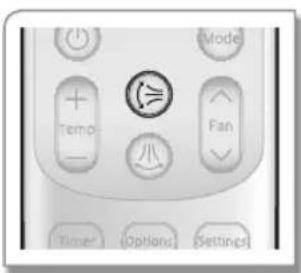
Press the ⏻ button to make air flow blades vertically.
text_image
Mode Temp Fan Timer Options SettingsTo keep the air flow direction in a constant direction, press the @ button again. The air flow blade(s) will stop the movement.
▶ If you adjust the vertical air flow blade manually, it may not close completely when you turn off the air conditioner.
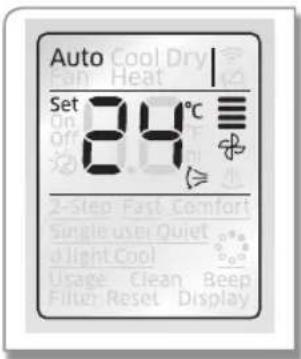
text_image
Auto Cool Dry Set 24°C On off 2-Step Fast Comfort Single user Quiet Light Cool Usage Clean Beep Filter Reset Display
- Adjusting the air flow direction is not available in good'sleep mode while it is in cool mode. - However, you can adjust the air flow direction in good'sleep mode while it is in heat mode.
Remote controller display
Horizontal air flow
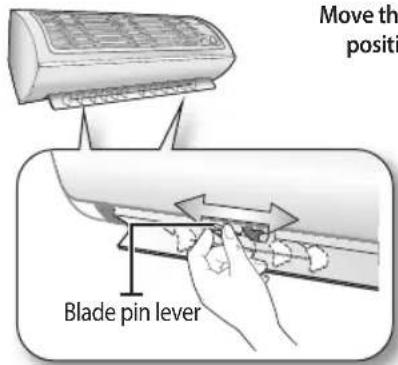
Make sure one of the blade pin lever that stick out of the air flow blades are not broken.
text_image
Move th positi Blade pin leverMove the blade pin lever left or right to keep the air flow direction in a constant position you prefer.

- Be extremely careful with your fingers while adjusting the Horizontal air flow direction. There is a potential risk of personal injury when the unit is mishandled.
English-16
Setting the On/Off timer
Setting the On timer
When the air conditioner is off;
text_image
Timer Options Settings < SET >
text_image
Auto Cool Dry Can Heat Set On 8.8°F Off hr 2-Step Fast Comfort Single user Quiet d'light Cool Usage Clean Beep Filter Reset DisplayRemote controller display
-
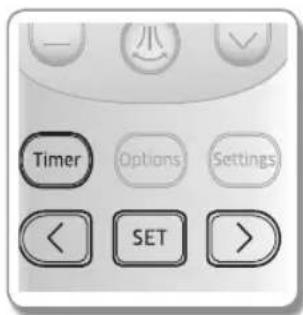
Press the Timer button.
-
Press the < > button until (On) indicator starts to blink.
-
Press the SET button to set the On timer.
- (On) indicator will keep blinking and you can set the time.
- Press the < > button to set the time.
- You can set the time in half hour unit from 30 minutes (0.5 on the display) \~ 3 hours and hour unit from 3\~24 hours.
- Time can be set from minimum 30 minutes to maximum 24 hours.
- Press the SET button to complete the On timer setting.
- (On) indicator and the set time of the timer will be displayed on the remote controller display and the Timer indicator ⏻) will be displayed on the indoor unit display.
- On timer setting will be cancelled if you don't press the SET button within 10 seconds after setting the time. Therefore, check for the (On) indicator on the remote controller display and the Timer indicator ⏻) on the indoor unit display.

text_image
Cancel ▶ Press the button to make the set time to display as , and press the SET button. ▶ Press the Pavebutton.| Additional options available in On/Off timer mode(When the remote controller is on) | |
 | You can select from Auto/Cool/Dry/Fan /Heat. |
| [9HZ] | You can adjust the temperature in Auto/Cool/Dry /Heat mode . |
 | You can adjust the fan speed in Cool/Fan/Heat mode. |
 After 10 seconds from the completion of the On timer setting, only (On) indicator will remain displayed on the remote controller display.If you press thePowedbutton on the indoor unit after setting the On timer from the remote controller, Timer indicator on the indoor unit display will disappear and the On timer will be cancelled. Even though the On timer is cancelled, (On) indicator on the remote controller will remain displayed.When the On timer is set while the air conditioner is off, Timer indicator will be displayed and remain on until the On timer turns on. After 10 seconds from the completion of the On timer setting, only (On) indicator will remain displayed on the remote controller display.If you press thePowedbutton on the indoor unit after setting the On timer from the remote controller, Timer indicator on the indoor unit display will disappear and the On timer will be cancelled. Even though the On timer is cancelled, (On) indicator on the remote controller will remain displayed.When the On timer is set while the air conditioner is off, Timer indicator will be displayed and remain on until the On timer turns on. | |
English-17
Setting the On/Off timer
Setting the Off timer
When the air conditioner is on;
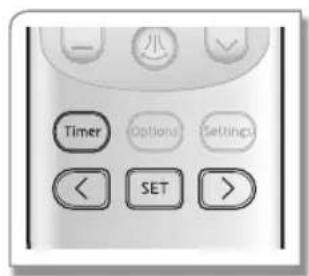
text_image
Timer Options Settings < SET >
text_image
Auto Cool Dry Pan Heat Set On Off 8.0 °C 2-Step Fast Comfort Single User Quiet dLight Cool Usage Clean Beep Filter Reset DisplayRemote controller display
- Press the Timer button.
- Press the < > button until (Off) indicator starts to blink.
- Press the SET button to set the Off timer.
- (Off) indicator will keep blinking and you can set the time.
- Press the < > button to set the time.
- You can set the time in half hour unit from 30 minutes (0.5 on the display) \~ 3 hours and hour unit from 3\~24 hours. - Time can be set from minimum 30 minutes to maximum 24 hours.
- Press the SET button to complete the Off timer setting.
- (Off) indicator and the set time of the timer will be displayed on the remote controller display and the Timer indicator ⏻ will be displayed on the indoor unit display.
- Off timer setting will be cancelled if you don't press the SET button within 10 seconds after setting the time. Therefore, check for the (Off) indicator on the remote controller display and the Timer indicator (💡) on the indoor unit display.

text_image
Cancel ▶ Press the button to make the set time to display as , and press the SET button. ▶ Press the Power button.
- f0timer may not work depending on the On/Off status of the indoor unit and the On/Off status of the indicator on the remote controller display.
- Only the latest setting timer will be applied between the On Timer/Off Timer good'sleep and Off timer functions.
• After setting the timer, the set time will be displayed for 3 seconds before it disappears. - If Timer function is used in Heating mode, Air conditioner work into former mode. (AR**HV**series)
Combining On Timer and Off Timer
| When the air conditioner is off When the air conditioner is on | |
| When set time on On timer is shorter than Off timerEx) On timer : 3 hours, Off timer : 5 hours- The air conditioner will turn on after 3 hours from the moment you have set the timer and the air conditioner will remain on for 2 hours and then turn off automatically. | When set time on On timer is longer than Off timerEx) On timer : 3 hours, Off timer : 1 hour- The air conditioner will turn off after 1 hour from the moment you have set the timer and turn on after 2 hours from the moment it was turned off. |

- Set time for the On timer and the Off timer should be different from each other.
- When the On timer and the Off timer is set, setting can be cancelled by pressing the Power ⏻ button.
English-18
good'sleep mode
For a comfortable sleep, the air conditioner will operate in 3 stages in order of Fall asleep ▷ Sound sleep ▷ Wake up stage. When the air conditioner is operating in Cool/Heat mode;
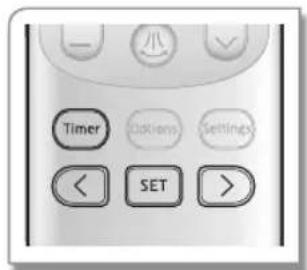
text_image
Timer Colors Settings < SET >
text_image
Cool Set 26 °C Off 2-Step Fast Comfort Single User Quiet 4 Light Cool Usage Clean Beep Filter Reset DisplayRemote controller display
- Press the Timer button.
- Press the < > button until ( ) indicator starts to blink.
- Press the SET button to set the good'sleep mode.
- (✗) indicator will keep blinking and you can set the time.
-
Press the < > button to set the time.
-
You can set the time in half hour unit from 30 minutes (0.5 on the display) \~ 3 hours and hour unit from 3\~12 hours.
- Time can be set from minimum 30 minutes to maximum 12 hours.
-
Default time setting for the good'sleep mode is 8 hours.
-
Press the SET button to complete the good'sleep mode setting.
-
(○) indicator and the set time of the good steel be displayed on the remote controller display.
- Timer indicator will be displayed on the indoor unit display.
- good'sleep mode setting will be cancelled if you don't press the SET button within 10 seconds after setting the time. Therefore, check for the indicator on the remote controller display and the Timer indicator (☐) on the indoor unit display.
Cancel
▶ Press the button to make the set time to display as , and press the SET button.
| Additional options available ingmod'sleep | |
 | You can set the desired temperature by 1°C in the range of 16°C~30°C. |
 | Fan speed will be adjusted automatically according to thegood'sleepmode.However, If you selectgood'sleepmode while heating operation is on, you can adjust fan speed. |
 | When thegood'sleepmode is on.In Cool mode: Air flow direction will be adjusted automatically.In Heat mode: Adjusting air flow direction is available. |
Temperature and fan speed change ingood'sleep mode
• Fall asleep: Eases you into sleep by dropping the temperature.
• Sound sleep: Relaxes your body and raises your temperature slightly.
- Wake up: Allows you to wake up from comfortable intermittent air and it makes you feel refreshed.

- Recommended set temperature is between 25^ 27^ for cooling and 21^ 23^ for heating.
- If the set temperature is too low, you may feel cold during sleep or catch a cold.
- Optimal operation hour of good'sleep mode is 8 hours. Therefore, if the time is set too short or long, you may not feel as comfortable as you would expect.
- If the good'sleep mode is set over 5 hours, Wake up stage will begin when 1 hour is remaining in the operation time and the air conditioner will stop automatically.
- When the On timer and the good'sleep function is set simultaneously, the air conditioner will only apply the function that was set later.
English-19
2-Step cooling function
2-Step Cooling function will set the air conditioner to cool the room quickly to reach the set temperature when the indoor temperature is higher than the set temperature, and then the air conditioner will automatically operate in Dry mode when indoor temperature reaches set temperature.
When the air conditioner is operating in Cool mode;

text_image
Timer Options Settings < SET >- Press the Options button.
- Press the < > button until (2-Step) indicator starts to blink.
- Press the SET button to set the 2-Step Cooling function.
- (2-Step) will blink first, then remain on the display as (2-Step) and 2-Step Cooling function will begin.
Cancel ▶ Press the Options button again to make the (2-Step) indicator blink and press the SET button.
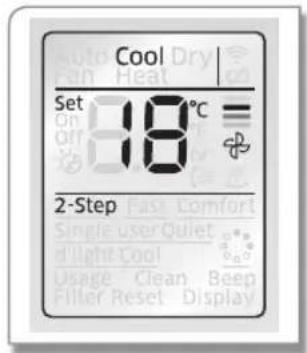
text_image
Cool Set 18°C 2-Step Single user Quiet d'light Cool Usage Clean Beep Filler Reset DisplayRemote controller display
English-20
Using the Fast function
You can set the Fast function to provide fast and powerful cooling/heating.
When the air conditioner is operating in Cool/Heat mode;

text_image
Timer Options Settings < SET >- Press the Options button.
- Press the < > button until (Fast) indicator starts to blink.
- Press the SET button to set the Fast function.
- (Fast) will blink first, then remain on the display as (Fast) and Fast function will begin.
Cancel
▶ Press the Options button again to make the (Fast) indicator blink and press the SET button.
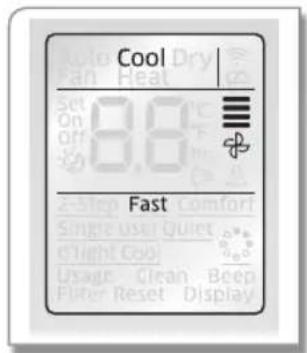
text_image
Cool 8.6 Fast
• Fast function is only available in Cool/Heat mode.
• Vertical air swing can be adjusted.
- Set temperature and fan speed cannot be adjusted.
- If the Fast function is selected while Single user/Quiepod'sleep function is on, corresponding function will be cancelled.
- When you select Fast function in Heat mode, you may not be able to increase fan speed in order to prevent any cool air from blowing.
Remote controller display
Using the Comfort function
You can set the Comfort function to provide mild cooling/heating.
When the air conditioner is operating in Cool/Heat mode;
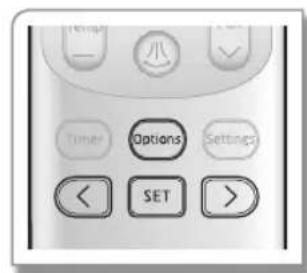
text_image
Timer Options Settings << SET >- Press the Options button.
- Press the < > button until (Comfort) indicator starts to blink.
- Press the SET button to set the Comfort function.
- (Comfort) will blink first, then remain on the display as (Comfort) and Comfort function will begin.
Cancel
▶ Press the Options button again to make the (Comfort) indicator blink and press the SET button.
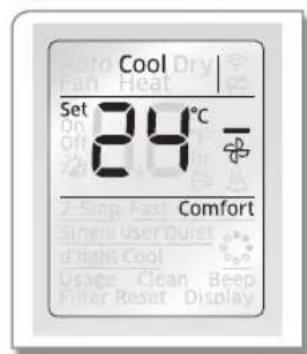
text_image
Cool Set 84°C Comfort
• Comfofunction is only available in Cool/Heat mode.
• Vertical air swing can be adjusted.
- Set temperature can be adjusted, but fan speed cannot be adjusted.
- If the Comfort function is selected while Single user/Quiet/good'sleep function is on, corresponding function will be cancelled.
Remote controller display
English-21
Using the Single user function
This function will reduce the energy usage while the air conditioner is operating in Cool/Heat mode.
When the air conditioner is operating in Cool/Heat mode;
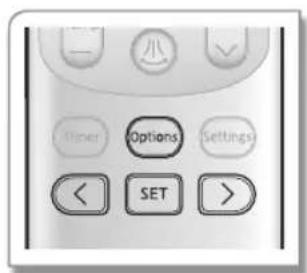
text_image
Timer Options Settings < SET >
text_image
Cool Set 24°C Single userRemote controller display
- Press the Options button.
- Press the < > button until (Single user) indicator starts to blink.
-
Press the SET button to set the Single user function.
-
(Single user) will blink first, then remain on the display as (Single user). Then == = = _ will be displayed on the set temperature indicator part for few seconds and Single user function will begin.
- When the Single user function is on, vertical air swing will turn on automatically.
- If the current set temperature is lower than 24^ C in Cool mode, it will be automatically raised to 24^ C.
Cancel
▶ Press the Options button again to make the (Single user) indicator blink and press the SET button.

• Single user function is only available in Cool/Heat mode.
- If the Single user function is selected while Fast/Comfort function is on, corresponding function will be cancelled.
• Vertical air swing will remain on even after the Single user function is cancelled.
| Additional options available in Single user function | |
| You can adjust the set temperature by 1 °C within the range of 24 °C ~ 30 °C in Cool mode and 16 °C ~ 30 °C in Heat mode. | |
| (Auto), (Low), (Med), (High), (Turb) can be selected. | |
| Vertical air swing can be selected. | |
English-22
Using the Quiet function
You can reduce the noise generated from an indoor unit during Cool/Heat mode.
When the air conditioner is operating in Cool/Heat mode;

text_image
Options SET >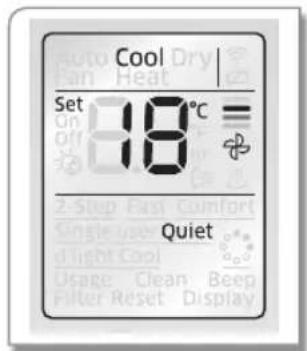
text_image
Cool Set 18°C = QuietRemote controller display
- Press the Options button.
- Press the < > button until (Quiet) indicator starts to blink.
- Press the SET button to set the Quiet function.
- (Quiet) will blink first, then remain on the display as (Quiet) and Quiet function will begin.
Cancel
▶ Press the Options button again to make the (Quiet) indicator blink and press the SET button.
| Additional options available in Quiet function | |
 | You can adjust the set temperature by 1 °C within the range of 16°C ~ 30 °C. |
| [2KBC] | Fan speed is set to Auto). |
 | Vertical air swing can be selected. |

- Quiet function is only available in Cool/Heat mode.
- If the Quiet function is selected while Fast/Single use good'sleep function is on, corresponding function will be cancelled.
English-23
Using the Auto clean function
Auto clean function will minimise the moisture inside of the indoor unit. Activate this function to help provide you with clean air.
When the air conditioner is operating;
text_image
Timer Settings SET >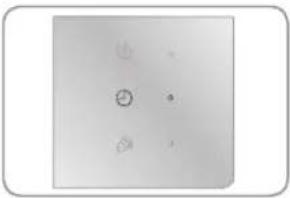
natural_image
Simple diagram with four symbols: a circle, a dot, and a triangle, arranged in a grid-like pattern (no text or labels)Indoor unit display
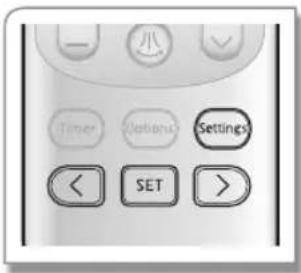
- Press the Settings button.
-
Press the button until (Clean) indicator starts to blink.
-
Press the SET button to set the Auto clean function.
- (Clean) indicator will be displayed on the remote controller display and Timer(1) indicator will turn on the indoor unit display. Auto clean function will be activated after the air conditioner stops operating.
- Duration of the Auto clean function can be different depending on the previous operation mode used.
Auto(cool), Cool, Dry mode : 30 minutes.
Auto(heat), Heat, Fan mode: 15 minutes.
Cancel
▶ Press the Settings button again to make the (Clean) indicator blink and press the SET button.

- When the operation mode is set during Auto clean function is activated, the air conditioner will operate in chosen operation mode and the Auto clean function will be re-activated when the operation stops.
- During the auto clean function, indoor fan will continue to run and air flow blade will remain open to expel ambient air.
• lighting in Auto clean mode.
Setting the Beep sound
Beep sound from the indoor unit can be muted.

text_image
Timer Options Settings < SET >- Press the Settings button.
- Press the < > button until (Beep) indicator starts to blink.
- Press the SET button to mute the beep sound.
English-24
Cleaning the air conditioner
CAUTION
- Make sure to turn off the power of the indoor unit and cut-off the power supply before cleaning the air conditioner.
Cleaning the indoor unit
▶ Wipe the surface of the unit with a slightly damp micro fiber cloth when needed.

- Contact the service center when you clean the indoor unit heat exchanger because it needs to be disassembled.
- Since the panel of the indoor unit is easily scratched, you should use a micro fiber cloth to clean the panel. When you use the micro fiber cloth, slightly dampen the cloth and remove any debris on the cloth to avoid scratches.
CAUTION
• Do not clean the display using alkaline detergent.
- Do not use sulfuric acid, hydrochloric acid, organic solvents (such as thinner, kerosene and acetone etc.) to clean the surface of the product or put any stickers on it. They may damage the surface of the air conditioner.

natural_image
Illustration of a hand cleaning a car air conditioner cover (no text or symbols)Cleaning the outdoor unit heat exchanger
▶ When dust accumulates on the heat exchanger, it may decrease cooling performance. Therefore, clean it regularly.
▶ Spray water to clean the dust.

• If it is difficult to clean the outdoor unit heat exchanger on your own, contact service center.
CAUTION
- Be careful with the sharp edges on the outdoor unit heat exchanger.

natural_image
Exterior view of a server rack unit with mesh grille and mounting base (no visible text or symbols)Heat exchanger (Illustration may differ slightly depending on the models)
English-25
Cleaning the air conditioner
Removing the Air filter
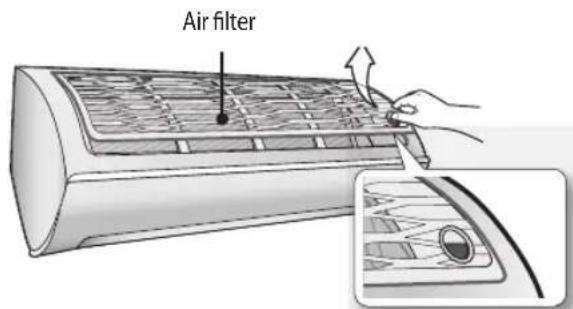
There is a hole on the bottom right side of the filter. Put your finger in that hole to get a grip on the filter and slightly push it up to release the hooks from the bottom side. Then, pull it down to remove the filter from the main body.
text_image
Air filterCleaning the Air filter
Washable foam based air filter captures large particles from the air. The filter is cleaned with a vacuum or by hand washing.
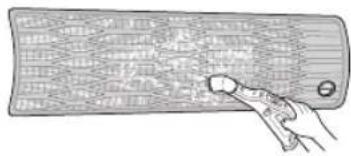
Remove the Air filter from the main body.

Clean the Air filter with a vacuum cleaner or soft brush. If dust is too heavy, rinse it with running water.
natural_image
Illustration of a hand holding a rectangular object with grid pattern (no text or symbols)Insert the Air filter back in its original position. Dry the Air filter in a ventilated area.

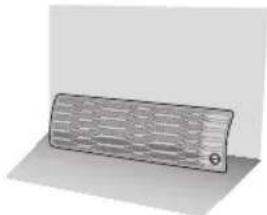
natural_image
3D rendered image of a rectangular object with grid pattern, no visible text or symbols
- Clean the Air filter every 2 weeks. Cleaning term may differ depending on the usage and environmental conditions. In dusty area, clean it once a week.
- If the Air filter dries in a confined (or humid) area, odors may generate. If it occurs, re-clean and dry it in a well-ventilated area.
English-26
Cleaning the air conditioner
Reassembling the Air filter
- Put the filter on the main body and insert the hooks which are in the top of the Air filter into the main body. ①
- There's one hook in both side of the filter, press the surface of the Air filter softly and get the hooks into the main body. ②
- Press the bottom of the filter lightly to securely fix the main body. ③④⑤

text_image
Air filter ① ①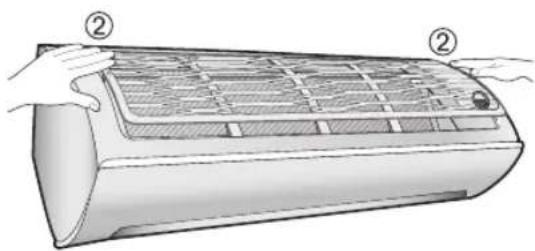
natural_image
Illustration of a car air conditioner unit with hands holding the grille (no text or symbols)
text_image
Diagram of a car air conditioner with labeled parts showing hand positioning and cooling mechanismEnglish-27
Maintaining the air conditioner
If the air conditioner will not be used for an extended period of time, dry the air conditioner to maintain it in best condition.
-
Dry the air conditioner thoroughly by operating in Fan mode for 3 to 4 hours and cut-off the power supply. There may be internal damage if moisture is left in components.
-
Before using the air conditioner again, dry the inner components of the air conditioner again by running in Fan mode for 3 to 4 hours. This helps remove odors which may have generated from dampness.
Periodical checks
Refer to the following chart to maintain the air conditioner properly.
| Type Description | Every 2 weeks | Every 3 months | Every 4 months | Once a year | |
| Indoor unit | Clean the Full HD filter (1) | ||||
| Clean the condensate drain pan (2) | |||||
| Thoroughly clean the heat exchanger (2) | |||||
| Clean the cross fan (2) | |||||
| Clean the condensate drain pipe (2) | |||||
| Replace the remote controller batteries (1) | |||||
| Outdoor unit | Clean the heat exchanger on the outside of the unit (2) | ||||
| Clean the heat exchanger on the inside of the unit (2) | |||||
| Clean the electric components with jets of air (2) | |||||
| Verify that all the electric components are firmly tightened (2) | |||||
| Clean the fan (2) | |||||
| Verify that all the fan assembly is firmly tightened (2) | |||||
| Clean the condensate drain pan (2) | |||||
: This check mark requires checking the indoor/outdoor unit periodically. Follow the description to maintain the air conditioner properly.
(1) The described operations should be performed more frequently if the area of installation is very dusty.
(2) These operations must always be performed by qualified personnel. For more detailed information, see the installation part in the manual.
English-28
Troubleshooting
Refer to the following chart if the air conditioner operates abnormally. This may save time and unnecessary expenses.
| PROBLEM SOLUTION | |
| The air conditioner does not work at all. | Check power status and then operate the air conditioner again.Plug in or switch on the circuit breaker and then operate the air conditioner again.Ensure Isolator is switch on.Check if you have set the Off Timer. Operate the air conditioner again by pressing thePowerbutton. |
| The temperature adjustment is not working. | Check if you have selected Fan/Fast mode. In these modes, desired temperature is set to auto and you cannot adjust the temperature. |
| Cool/Warm air does not come out of the air conditioner. | Check if the set temperature is higher(during Cool mode)/lower (during Heat mode) than the current temperature. Press theTemp+or - button on the remote controller to change the set temperature.Check if the Air filter is blocked by dirt. If there is a lot of dust on the Air filter, cooling (heating) performance may decrease. Clean them frequently.Check if the outdoor unit is covered or installed near the obstacle. Take the cover off and take the obstacle away.Check if the air conditioner is operating in Defrost mode. When the ice formed in winter or the outdoor temperature is too low, the air conditioner operates in Defrost mode automatically. In Defrost mode, indoor fan stops and warm air does not come out.If the doors or windows are open, it may cause bad cooling (heating) performance.Close the doors and windows.Check if the air conditioner has just been turned on after stopping cooling or heating operation. In this case, just a fan will run to protect the outdoor unit compressor.Check if the pipe length is too long. When the pipe length exceeds maximum allowable pipe length, cooling (heating) performance may decrease. |
| Air flow adjustment is not working. | Check if you have selectedgood'sleepmode. In this mode, you cannot adjust the air flow direction. (If thegood'sleepmode is operating in Heat mode, you can adjust the air flow direction.) |
OTHERS06
Troubleshooting
| PROBLEM SOLUTION | |
| Fan speed adjustment is not working. | · Check if you have selected Auto/Dry/Fagood'sleep mode. In these mode, fan speed is set to Auto and you cannot adjust the fan speed. |
| Remote controller is not working. | · Check if your batteries are depleted.· Make sure nothing is blocking your remote controller sensor.· Check that there are strong lighting apparatus near the air conditioner. Strong light which comes from fluorescent bulbs or neon signs may interrupt the electric waves. |
| Timer function does not set. | · Check if you press the SET button on the remote controller after you have set the time. |
| The indicator is blinking continuously. | · Press the Poweb button or disconnect the power plug/switch off the auxiliary power switch.If the indicator is still blinking, contact the service center. |
| Odors permeate in the room during operation. | · Check if the appliance is running in a smoky area. Ventilate the room or operate the air conditioner in Fan mode for 1~2 hours.(We do not use smelly components in the air conditioner.)· Check the Drains have been cleared Regular Maintenance. |
| Error is indicated.· | When an indoor unit indicator blinks, contact the nearest service center. Please ensure the error code is passed onto the service center when booking the service call. |
| Noise is generated.· | Depending on the status of the air conditioner usage, noise can be heard when refrigerant flow movement changes. It is normal. |
| Smoke is generated from the outdoor unit. | · If may not be a fire but it can be a steam generated by the defrost operation from outdoor heat exchanger during Heat mode in winter. |
| Water is dropping from the outdoor unit piping connection. | · Water may be generated because of the temperature difference. It is normal. |
English-30
Safety precautions
Carefully follow the precautions listed below because they are essential to guarantee the safety of the equipment.
• Always disconnect the air conditioner from the power supply before servicing it or accessing its internal components.
- Verify that installation and testing operations are performed by qualified personnel.
- Verify that the air conditioner is not installed in an easily accessible area.
General information
- Carefully read the content of this manual before installing the air conditioner and store the manual in a safe place in order to be able to use it as reference after installation.
For maximum safety, installers should always carefully read the following warnings.
▶ Store the operation and installation manual in a safe location and remember to hand it over to the new owner if the air conditioner is sold or transferred.
This manual explains how to install an indoor unit with a split system with two SAMSUNG units. The use of other types of units with different control systems may damage the units and invalidate the warranty. The manufacturer shall not be responsible for damages arising from the use of non compliant units.
This product has been determined to be in compliance with the Low Voltage Directive (2006/95/EC), and the Electromagnetic Compatibility Directive (2004/108/EC) of the European Union.
The manufacturer shall not be responsible for damage originating from unauthorized changes or the improper connection of electric and requirements set forth in the "Operating limits" table, included in the manual, shall immediately invalidate the warranty.
The air conditioner should be used only for the applications for which it has been designed: the indoor unit is not suitable to be installed in areas used for laundry.
▶ Do not use the units if damaged. If problems occur, switch the unit off and disconnect it from the power supply.
In order to help prevent electric shocks, fires or injuries, always stop the unit, disable the protection switch and contact SAMSUNG's technical support if the unit produces smoke, if the power cable is hot or damaged or if the unit is very noisy.
▶ Always remember to inspect the unit, electric connections, refrigerant tubes and protections regularly. These operations should be performed by qualified personnel only.
The unit contains moving parts, which should always be kept out of the reach of children.
Do not attempt to repair, move, alter or reinstall the unit. If performed by unauthorized personnel, these operations may cause electric shocks or fires.
▶ Do not place containers with liquids or other objects on the unit.
▶ All the materials used for the manufacture and packaging of the air conditioner are recyclable.
The packing material and exhaust batteries of the remote controller (optional) must be disposed of in accordance with current laws.
The air conditioner contains a refrigerant that has to be disposed of as special waste. At the end of its life cycle, the air conditioner must be disposed of in authorized centers or returned to the retailer so that it can be disposed of correctly and safely.
Installing the unit
IMPORTANT: When installing the unit, always remember to connect first the refrigerant tubes, then the electrical lines. Always disassemble the electric lines before the refrigerant tubes.
Upon receipt, inspect the product to verify that it has not been damaged during transport.
If the product appears damaged, DO NOT INSTALL it and immediately report the damage to the carrier or retailer (if the installer or the authorized technician has collected the material from the retailer.)
▶ After completing the installation, always carry out a functional test and provide the instructions on how to operate the air conditioner to the user.
▶ Do not use the air conditioner in environments with hazardous substances or close to equipment that release free flames to avoid the occurrence of fires, explosions or injuries.
▶ To help prevent injury when accidentally touching the indoor unit fan, install the indoor unit at least 2.5 m above the floor.
The air conditioner should be used only for the applications for which it has been designed: the indoor unit is not suitable to be installed in areas used for laundry.
Our units must be installed in compliance with the spaces indicated in the installation manual to ensure either accessibility from both sides or ability to perform routine maintenance and repairs. The units' components must be accessible and that can be disassembled in conditions of complete safety either for people or things.
For this reason, where it is not observed as indicated into the Installation Manual, the cost necessary to reach and repair the unit (in safety, as required by current regulations in force) with slings, trucks, scaffolding or any other means of elevation won't be considered in-warranty and charged to end user.
Power supply line, fuse or circuit breaker
▶ Always make sure that the power supply is compliant with current safety standards. Always install the air conditioner in compliance with current local safety standards.
▶ Always verify that a suitable grounding connection is available.
▶ Verify that the voltage and frequency of the power supply comply with the specifications and that the installed power is sufficient to ensure the operation of any other domestic appliance connected to the same electric lines.
▶ Always verify that the cut-off and protection switches are suitably dimensioned.
▶ Verify that the air conditioner is connected to the power supply in accordance with the instructions provided in the wiring diagram included in the manual.
▶ Always verify that electric connections (cable entry, section of leads, protections...) are compliant with the electric specifications and with the instructions provided in the wiring scheme.
Always verify that all connections comply with the standards applicable to the installation of air conditioners.
Choosing the installation location
Indoor unit
▶ For Wi-Fi Air-conditioner installation, select indoor unit location near to wireless router.
In case Wi-Fi signal strength weakened, Smart APP may be disconnected depending on the Wi-Fi signal strength.
▶ Where airflow is not blocked.
▶ Where cool air can be distributed throughout the room.
▶ Install the refrigerant piping length and the height difference of both indoor and outdoor units as indicated in the installation diagram.
▶ Wall that prevents vibration and is strong enough to hold the product weight.
▶ Out of the direct sunlight.
▶ 1 m or more away from the TV or radio (to prevent the screen from being distorted or noise from being generated).
As far away as possible from the fluorescent and incandescent lights (so that the remote controller can be operated well).
▶ A place where the air filter can be replaced easily.
- Don't install directly above electronics equipment as leaking water may cause damage if not serviced. (eg. Computers, TV, etc).
English-32
Choosing the installation location
Outdoor Unit
▶ Where it is not exposed to strong wind
▶ Well ventilated and dustless places
▶ Where possible keep out of sunlight and rain
▶ Where neighbors are not annoyed by operation sound or hot air
▶ Solid wall or support that prevents vibration and is strong enough to hold the product weight
▶ Where there is no risk of flammable gas leakage
▶ When installing the unit at a high place be sure to fix the unit legs
▶ 3 m or more away from the TV or radio (to prevent the screen from being distorted or noise from being generated)
▶ Install the unit horizontally
▶ Place where drained water does not become any problem.
▶ Place with no plants (especially climbing plants) and where small animal can not access.
▶ Outdoor unit should not be place higher than 2.4 m or directly under eaves for accessibility for service and OH&S reasons.

- Avoid the following places to prevent malfunction of the unit
- Where there is machine oil - Salty environment such as seaside areas
- Where sulfide gas exists - Other special atmosphere areas
text_image
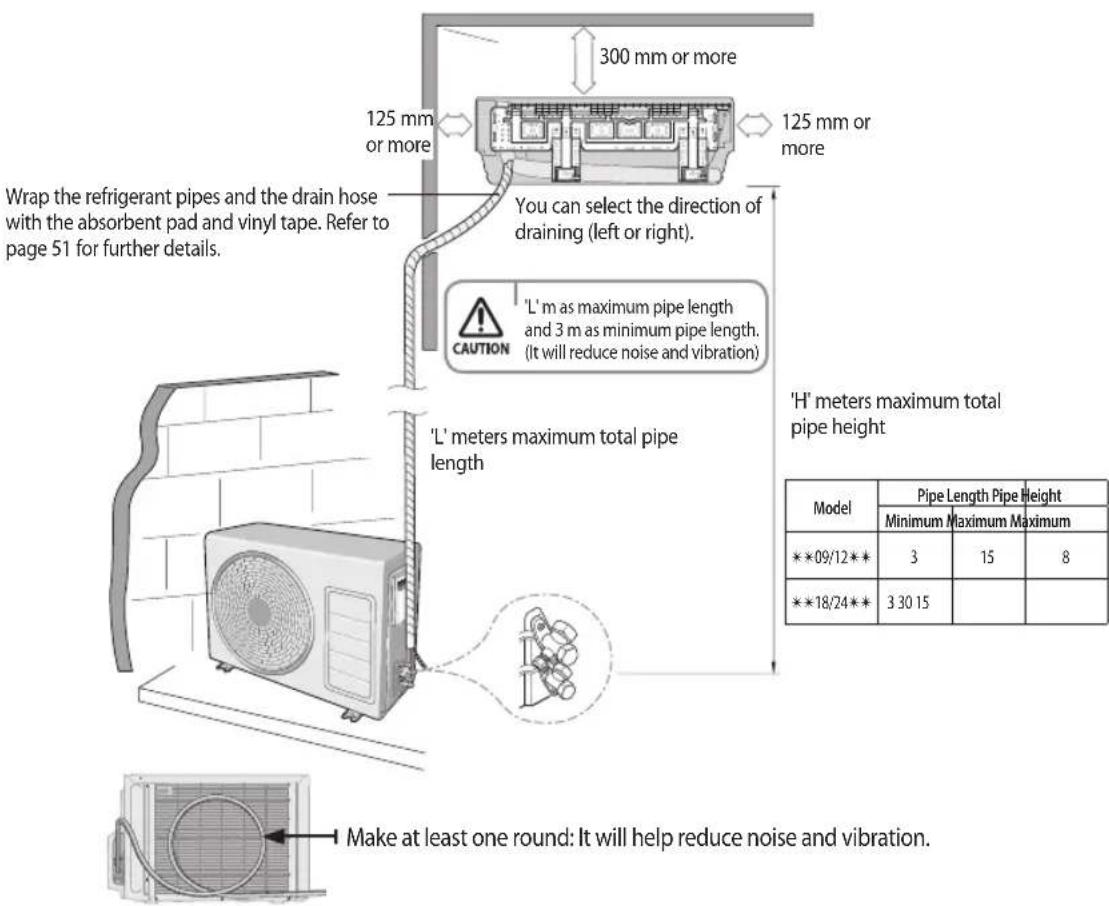
300 mm or more 125 mm or more 125 mm or more Wrap the refrigerant pipes and the drain hose with the absorbent pad and vinyl tape. Refer to page 51 for further details. You can select the direction of draining (left or right). 'L' m as maximum pipe length and 3 m as minimum pipe length. (It will reduce noise and vibration) CAUTION 'L' meters maximum total pipe length 'H' meters maximum total pipe height Make at least one round: It will help reduce noise and vibration. Model Pipe Length Pipe Height Minimum Maximum Maximum ***09/12** 3 15 8 ***18/24** 3 30 15* The appearance of the unit may be different from the diagram depending on the model.
English-33
Space Requirements for Outdoor Unit
When installing 1 outdoor unit
◆ Figure Description
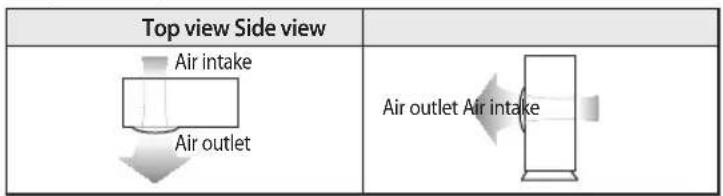
text_image
Top view Side view Air intake Air outlet Air outlet Air intake• , Air flow direction.
(Unit : mm)
◆ When the air outlet is opposite the wall
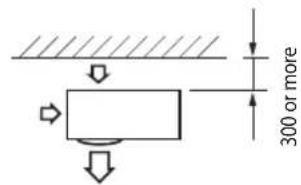
text_image
300 or more◆ When the air outlet is towards the wall
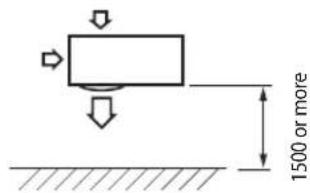
text_image
1500 or more◆ When 3 sides of the outdoor unit are blocked by the wall
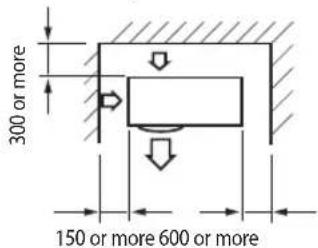
text_image
300 or more 150 or more 600 or more◆ The upper part of the outdoor unit and the air outlet is towards the wall
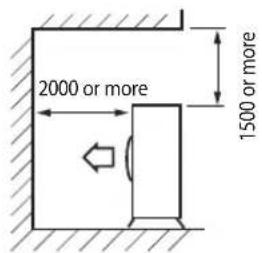
text_image
2000 or more 1500 or more◆ The upper part of the outdoor unit and the air outlet is opposite the wall
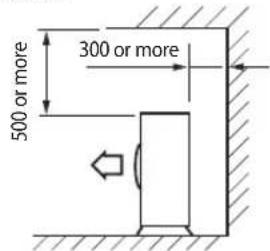
text_image
500 or more 300 or moreWhen the walls are blocking front and the rear side of the outdoor unit
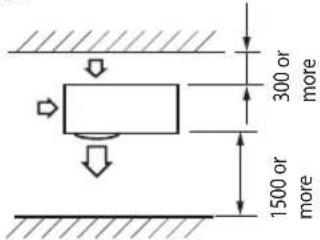
text_image
300 or more 1500 or moreWhen installing more than 1 outdoor unit
(Unit: mm)
When the air outlet is towards the wall
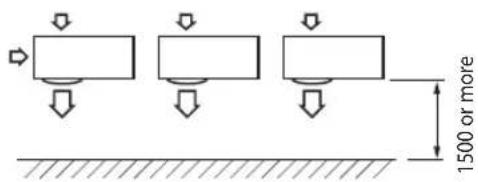
text_image
1500 or more◆ When 3 sides of the outdoor unit are blocked by the wall
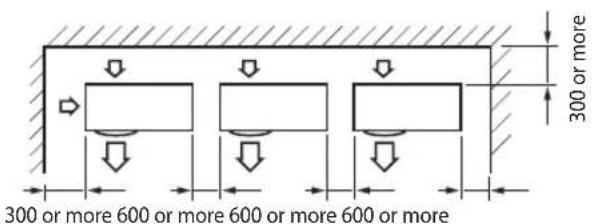
text_image
300 or more 300 or more 600 or more 600 or more 600 or moreEnglish-34
Choosing the installation location
(Unit: mm)
When the walls are blocking front and the rear side of the outdoor units
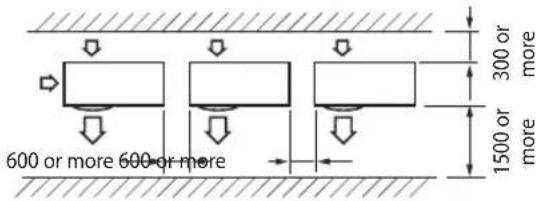
text_image
600 or more 600 or more 300 or more 1500 or moreWhen front and rear side of the outdoor unit is towards the wall
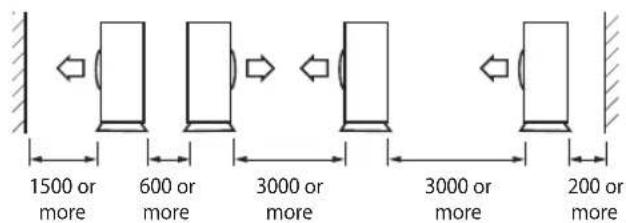
text_image
1500 or more 600 or more 3000 or more 3000 or more 200 or moreWhen the upper part of the outdoor unit and the air outlet is opposite the wall
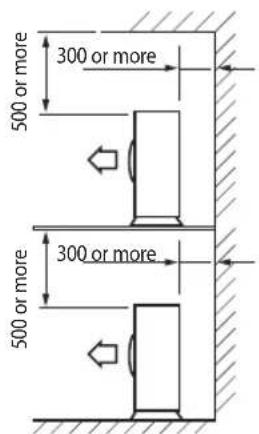
text_image
500 or more 300 or more 500 or more 300 or more
• If installation is done in inappropriate space, unit may generate sound and cause bad effect on the product.
• Installation must be done in level and in a place where vibration will not cause any effect.
Accessories
The following accessories are supplied with the air conditioner :

• The number of each accessory is indicated in parentheses.
Accessories in the indoor unit case
| Installation Plate (1) **09/12** | Installation Plate (1) **18/24** | Remote controller (1) | Batteries for Remote controller (2) | User's & Installation Manual (1) |
| [IMAGE] | [IMAGE] | [IMAGE] | [IMAGE] | [IMAGE] |
Remote Control Holder (1) | M4 x 25 Tapped Screws (2) | M4 x 12 Tapped Screws (2)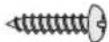 | Cap Screws (3) |
Accessories in the outdoor unit case
| Drain Plug (1) Rubber Leg (4) | |
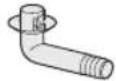 |  |
English-35

- The flare nuts are attached to the end of each pipe of an evaporator or a service port. Use the nuts when connecting the pipes.
• The wire assembly cable is optional. If it is not supplied, use the standard cable. - The drain plug and rubber leg are only included when the air conditioner is supplied without the assembly pipe as seen in the picture below.
Optional accessories
Insulated Assembly Pipe,∅6.35 mm x 5 m (1) | Insulated Assembly Pipe,∅9.52 mm x 5 m (1)***09/12** | Insulated Assembly Pipe,∅12.70 mm x 5 m (1)***18**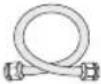 | Insulated Assembly Pipe,∅15.88 mm x 5 m (1)***24** | PET3 Foam Tube Insulation (1) | Vinyl Tapes (2) |
Putty 100 g (1) | Pipe Clamps A (3) | Pipe Clamps B (3) | Cement Nails (6)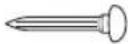 | M4 x 25 Tapped Screws (6)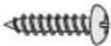 | Drain Hose,length 2 m (1) |
3-wire Assembly Cable (1)
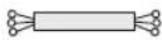
2-wire Assembly Cable (1)


• If these accessories are supplied, they will be in the accessory box.
Tools required for installation
General Tools
• Vacuum Pump(Backward flowing prevention) • Manifold Gauge • Stud Finder
- Torque Wrench
- Pipe Cutter
- Reamer
- Pipe Bender
- Spirit Level
- Screw Driver
- Spanner
- Drill
- L Wrench
- Measuring Tape
Tools for test operations
• Thermometer • Resistance Meter
• Electroscope
Fixing the installation plate
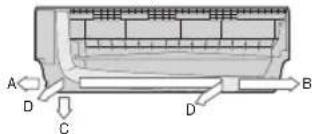
You can select the direction of the drain hose depending on where you want to install the indoor unit. Therefore before fixing the installation plate to a wall or a window frame, you must determine the position of the 65 mm hole through which the cable, pipe and hose pass to connect the indoor unit to the outdoor unit.
When facing the wall, the pipe and cable can be connected from the:
• Right (A)
- Left (B)
- Underside_right (C)
- Rear_right or left (D)

* Direction of pipe
text_image
A D C D B- You can install the refrigerant pipe in the left/right/bottom, or the rear side of the indoor unit.
- If changing the pipe direction from left to right, do not drastically bent it but slowly turn it in the opposite direction as shown. Otherwise, the pipe may be damaged in the process.
English-36
- Disassemble the cover panel as described in page 38\~39.
- Remove the Hanger plate from the indoor unit.
(1) Unscrew 2 screws that fixes the Hanger plate to the indoor unit.
(2) Push the hooks (on the bottom part of the indoor unit) up to release the installation plate from the hooks that holds it.
(3) Pull the installation plate to release it completely from the indoor unit.
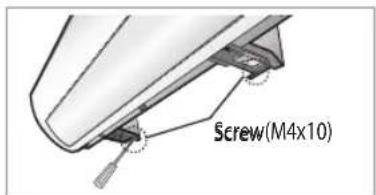
text_image
Screw(M4x10)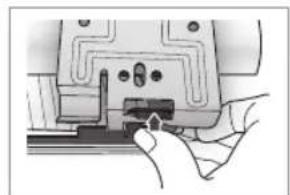
natural_image
Hand inserting a component into a device (no text or symbols visible)
natural_image
Illustration of hands installing or adjusting a device panel with arrows pointing to components (no text or symbols visible)- Determine the position of the pipe and drain hose hole as seen in the picture and drill the hole with an inner diameter of 65 mm so that it slants slightly downwards.
Pipe hole (∅65 mm)
Pipe hole (∅65 mm)
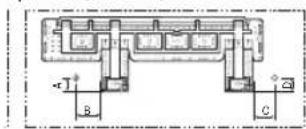

(Unit: mm)
| Model A B C D | ||||
| **09** | 36 120 81 36 | |||
| **12** | 36 190 81 36 | |||
| **18/24** | 33 110 110 33 | |||

• Make sure to drill only one hole after choosing the direction of the pipe.
- Fix the indoor unit.
If you fix the indoor unit on a wall
(1) Fix the installation plate to the wall giving attention to the weight of the indoor unit.

- If you mount the plate to a concrete wall using plastic anchors, make sure that gaps between the wall and the plate, created by projected anchor, is less than 20 mm.
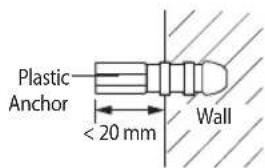
text_image
Plastic Anchor < 20 mm WallIf you fix the indoor unit on a window frame
(1) Determine the positions of the wooden uprights to be attached to the window frame.
(2) Attach the wooden uprights to the window frame giving attention to the weight of the indoor unit.
(3) Attach the installation plate to the wooden upright using tapping screws.
If you fix the indoor unit on a gypsum board
(1) Use stud finder to find out locations of the studs.
(2) Fix the plate hanger on two studs.

- Search for other spots if there are less than two studs, or the distance between the studs are different from the plate hanger.
• Fix the installation plate without inclining to one side.

- Make sure that a wall can withstand the weight of the product. If you install the product in a place where it is not strong enough to withstand the product weight, the unit could fall and cause injury.
Assembling the hanger screw
Use 2 screws to fix the indoor unit with hanger plate as shown in the picture.
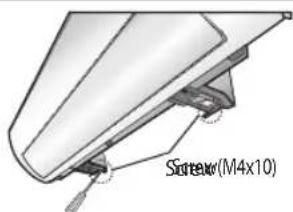
text_image
Screw(M4x10)English-37
Disassembling/Assembling the Cover panel for indoor unit installation

text_image
QR code image containing encoded data, no visible human-readable textPlease scan this QR code for detail video of indoor unit installation.
In order to install the indoor unit, you must disassemble the cover panel first. Please proceed following instructions to disassemble and assemble the cover panel. Hooks (on the cover panel) may get damaged if you apply excessive force as you disassemble and assemble the cover panel. Please follow the following instructions.
Removing the screws
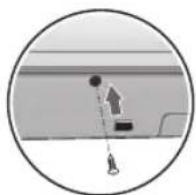
Cover panel is assembled on the bottom part of the indoor unit (as shown in the illustration) and it is fastened with screws. Remove the Cap screw first and unfasten the screws so that you can disassemble the cover panel.
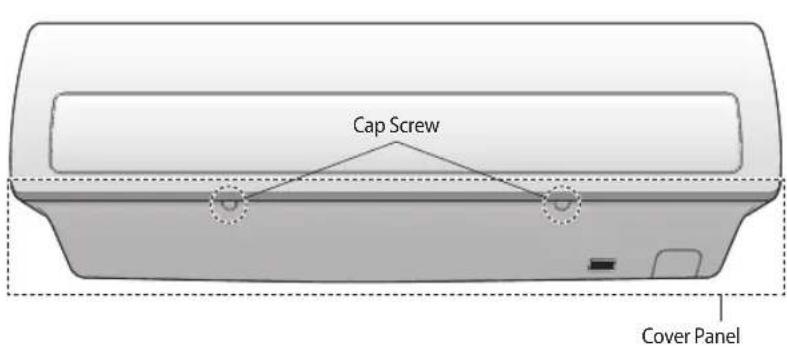
text_image
Cap Screw Cover Panel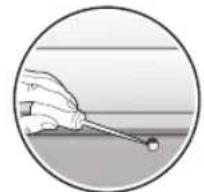
natural_image
Illustration of a hand holding a small rod near a surface, no text or symbols present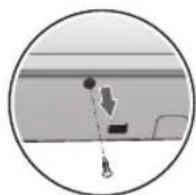
Removing the Cover panel (Before mounting the indoor unit)
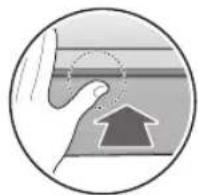
The bottom panel fits the main body using the side, center, and bottom hooks as shown. Unlock the side hooks first, and then unlock the center and bottom hooks.
Check the location of the hooks before removing the cover panel.
▶ Location of the hooks on the central part
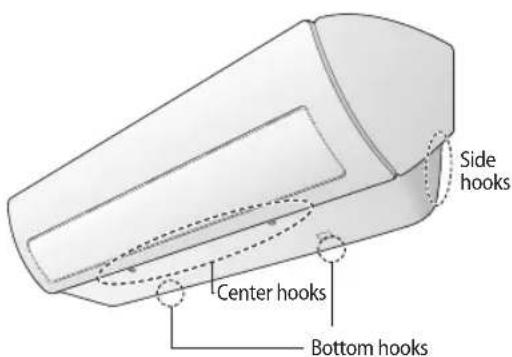
text_image
Side hooks Center hooks Bottom hooks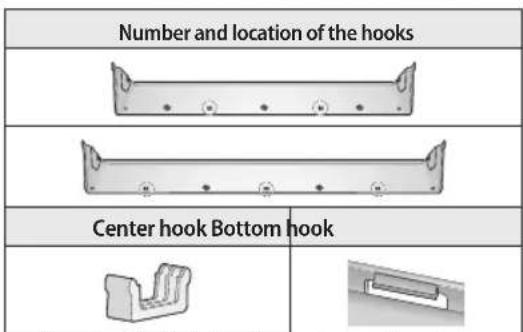
text_image
Number and location of the hooks Center hook Bottom hook* For specific Hook location and quantity, please refer to cover panel with indicating arrows based on physical goods.
English-38
Disassembling/Assembling the Cover panel for indoor unit installation
▶ Removing the hooks on the side

natural_image
Illustration of hands using a tool to lift a rectangular object, with no visible text or symbols* Caution (fragile)
- Gently press the both side of the cover panel inwards (①) and release the hooks on both sides(②).
▶ Removing the hooks on the central part
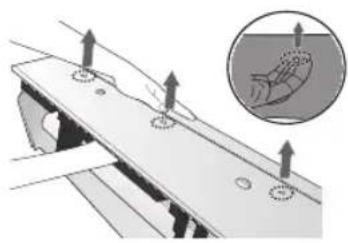
natural_image
Mechanical assembly diagram showing a plate with mounting holes and a magnified inset of a hand holding a small object (no text or symbols)* Caution (fragile)
- Use both hands
- Release each hook by pushing it up at an angle.
Assembling the Cover panel (After mounting the indoor unit)
To assemble the Cover panel, proceed in reverse order of disassembling.
Use both hands for assembling and be extra careful not to damage the pipes and drain hose.
Lock the side, center, and bottom hooks in this sequence. Tighten the bottom panel with the screws, and close the screw holes with their cap.

natural_image
Illustration of a hand holding a device with arrows indicating movement or force (no text or symbols present)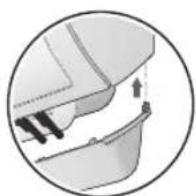

English-39
Connecting the assembly cable
Cable specification
| Model Power cable | Interconnection cable Type GL | ||
| **09/12** | 3G x 2.5 mm ^2 , H07RN-F | 3G x 1.0 mm ^2 , H07RN-F2 x 0.75 mm ^2 , H05RN-F | 20 A |
| **18/24** | 3G x 2.5 mm ^2 , H07RN-F | 3G x 1.0 mm ^2 , H07RN-F2 x 0.75 mm ^2 , H05RN-F | 25 A |

- Connect the power cable to the auxiliary circuit breaker. If every pole fails to connect to the power supply, it must be incorporated in a wire with a contact opening of ≥ 3 mm.
• Use shield cable (Category 5; less than 50pF/m) for noisy environmental site.
Connecting the cable
Electrical work
(1) For electrical and earth works, comply with the 'technical standards of electrical installations' and the the 'wiring regulations' of the Local wiring regulations.
(2) Tighten the terminal block screw to under 1.2 N·m (12 kgf·cm).
(3) Precautions when connecting terminal blocks of the indoor unit
▶ Before connecting, make sure the connecting part of the terminal socket is facing upwards.
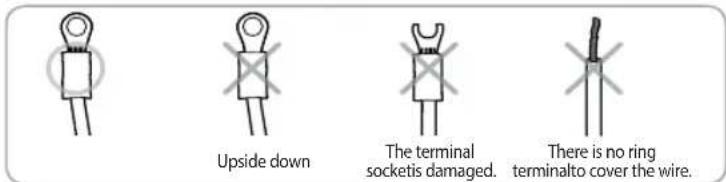
There must be no space between the terminal and the screw when connected. - Any remaining space may become a fire hazard due to overheating of the electrical contact.
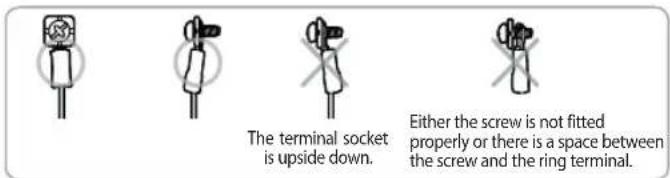

For the terminal block wiring, use a wire with a ring terminal socket only. Regular wires without a ring terminal socket may become a fire hazard due to overheating of the electrical contact during a wiring work.
English-40
Connecting the assembly cable
* When you install the unit, make first refrigerant connections and then electrical connections.
Connect the air conditioner to grounding system before performing the electrical connection.
If unit is uninstalled, first disconnect electrical cables, then refrigerant connections.
If the outdoor unit is more than 5 meters away from the indoor unit, you must extend the cable. The maximum length of the cable is 15(**09/12***) / 30(**18/24***) meters.
- Extend the assembly cable if necessary.

- Do not connect two or more different cables to extend the length. It may cause fire.
- Open the cover panel.
- Remove the screw securing the connector cover.
- Pass the assembly cable through the rear of the indoor unit and connect the assembly cable to terminals. (Refer to the picture below)

• Each wire is labeled with the corresponding terminal number.
- Pass the other end of the cable through the 65 mm hole in the wall.
- Close the connector cover by tightening the screw carefully.
- Close the cover panel.
- Remove the terminal board cover on the side of the outdoor unit.
- Connect the cables to the terminals as seen in the picture.
Indoor unit

Outdoor unit
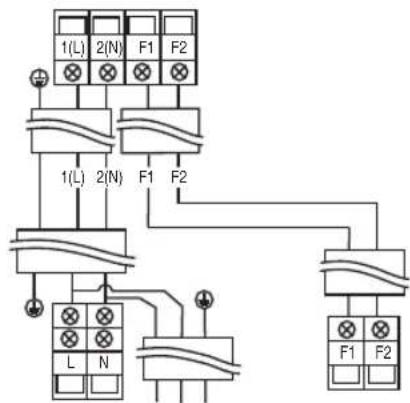
text_image
1(L) 2(N) F1 F2 1(L) 2(N) F1 F2 L N F1 F2
• Also circular terminal must be matched with screw size in terminal block.
• After connecting the cables, make sure terminal numbers on the indoor/outdoor unit matches.
- Please ensure that Power & Communication cables are separated, they must not be in the same cable.
- Connect the grounding conductor to the grounding terminals.
- Close the terminal board cover by tightening the screw carefully.

- Connect the wires firmly so that wires can not be pulled out easily. (If they are loose, it could cause burn-out of the wires.)
- Connect the wires according to color codes, referring to the wiring diagram.
• The power cable and the interconnection cable should be selected according to the specification in page 40.
English-41
Installing and connecting the assembly pipe of the indoor unit
Connect indoor and outdoor units with field-supplied copper pipes by means of flare connections. Use insulated seamless refrigeration grade pipe only, (Cu DHP type according to ISO1337), degreased and deoxidized, suitable for operating pressures of at least 4200 kPa and for burst pressure of at least 20700 kPa. Under no circumstances must sanitary type copper pipe be used.
There are 2 refrigerant pipes of different diameters:
• The smaller one is for the liquid refrigerant
• The larger one is for the gas refrigerant
A short pipe is already fitted to the air conditioner. You may need to extend the pipe using the assembly pipe (optional).
The connection procedure for the refrigerant pipe varies according to the exit position of the pipe when facing the wall:
• Right (A)
- Left (B)
- Underside (C)
• Rear
- Cut out the appropriate knock-out piece (A, B, C) on the rear of the indoor unit unless you connect the pipe directly from the rear.
- Smooth the cut edges.
- Remove the protection caps of the pipes and connect the assembly pipe to each pipe. Tighten the nuts first with your hands, and then with a torque wrench, applying the following torque:

natural_image
Technical line drawing of a mechanical component with labeled points A, B, and C (no text or symbols beyond labels)| Outer Diameter | Torque | |
| N·m kgf·cm | ||
| ø6.35 mm 14~ | 8 140~180 | |
| ø9.52 mm 34~ | 42 350~430 | |
| ø12.70 mm 49~ | 61 500~620 | |
| ø15.88 mm 68~ | 82 690~830 | |

• If you want to shorten or extend the pipes, refer to page 43\~44.
- Cut off the remaining foam insulation.
- If necessary, bend the pipe to fit along the bottom of the indoor unit. Then pull it out through the appropriate hole.
▶ The pipe should not project from the rear of the indoor unit.
▶ The bending radius should be 100 mm or more.
-
Pass the pipe through the hole in the wall.
-
For further details on how to connect to the outdoor unit and evacuate the air, refer to page 47\~49.

- The pipe will be insulated and fixed permanently into position after finishing the installation and the gas leak test; refer to page 51 for further details.

- Tighten the flare nut with torque wrench according to specified method. If the flare nut is over-tightened, the flare may break and cause refrigerant gas leakage.
• DO NOT WALL UP THE PIPE CONNECTION! All refrigerant pipe connection must be easy accessible and serviceable.
Evacuating the indoor unit
The indoor unit is supplied with inert gas (nitrogen).
Before installing the unit, check if nitrogen gas flow out of indoor unit.
If this one isn't true, DO NOT INSTALL THE UNIT since leakage could be inside the indoor unit.
- Unscrew the caps at the end of each pipe.
▶ All inert gas exhausts from the indoor unit.

- To prevent dirt or foreign substances from getting into the pipes during installation, do NOT remove the caps completely until you are ready to connect the pipes.

- The remaining air in the Refrigeration cycle, which contains moisture, may cause malfunction on the compressor.
• Always contact the service center or a professional installation agency for product installation.
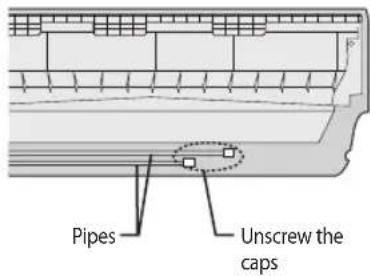
text_image
Pipes Unscrew the capsCutting or extending the pipe
The length of the pipe can be :
• Extended up to : see table page 33
- Shorten up to: see page 33

If you need a pipe longer than 5 meters :
• You must add refrigerant to the pipes; otherwise, the indoor unit may freeze.
- Make sure that you have all the required tools (pipe cutter, reamer, flaring tool and pipe holder).
- If you want to shorten the pipe, cut it using a pipe cutter, ensuring that the cut edge remains at 90^ with the side of the pipe (see below examples of correct and incorrect cut edges).
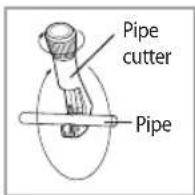
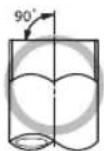
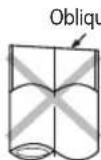
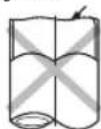
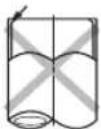
- To prevent a gas leak, remove all burrs at the cut edge of the pipe using a reamer.

• Face the pipe down while removing the burrs to make sure that burrs do not get in to the pipe.
English-43
Cutting or extending the pipe
- Put a flare nut slightly into the pipe and modify the flare.
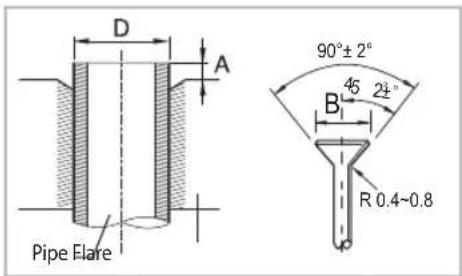
text_image
D A 90°±2° 45 21° B R 0.4~0.8 Pipe Flare| Outer Diameter (D) | Depth (A) | Flaring Size (B) |
| ø6.35 mm 1.3 mm | 8.7 - 9.1 mm | |
| ø9.52 mm 1.8 mm | 12.8 - 13.2 mm | |
| ø12.70 mm 2.0 mm | 16.2 - 16.6 mm | |
| ø15.88 mm 2.2 mm | 19.3 - 19.7 mm |
- Check if you flared the pipe correctly (see examples of incorrectly flared pipes below).
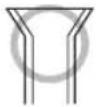
Correct
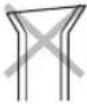
Inclined

Damaged Surface
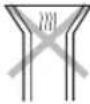
Cracked

Uneven
Thickness
- Align the pipes to connect them easily. Tighten the flare nuts first with your hands, and then with a torque wrench, applying the following torque:
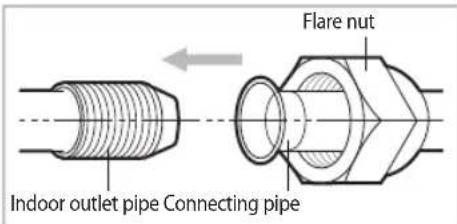
text_image
Flare nut Indoor outlet pipe Connecting pipe| Outer Diameter | Torque | |
| N·m kgf·cm | ||
| ø6.35 mm 14~18 | 140~180 | |
| ø9.52 mm 34~42 | 350~430 | |
| ø12.70 mm 49~61 | 500~620 | |
| ø15.88 mm 68~82 | 690~830 | |

- Excessive torque can be cause of gas leakage. If extending pipe by welding/brazing please ensure nitrogen is used during welding/brazing process. The joint must be accessible and serviceable.

- The holder system is detachable as shown.

text_image
Holder system (detachable)- For further details on how to connect to the outdoor unit and evacuate the air, refer to page 47\~49.

- Tighten the flare nut with torque wrench according to specified method. If the flare nut is over-tightened, the flare may break and cause refrigerant gas leakage.
English-44
Installing and connecting the drain hose of the indoor unit
When installing the drain hose for the indoor unit, check if condensation draining is adequate. When passing the drain hose through the 65 mm hole drilled in the wall, check the followings:
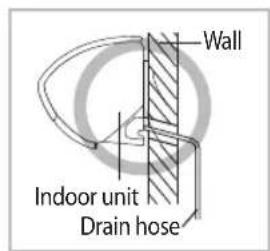
text_image
Wall Indoor unit Drain hose
natural_image
Pure mechanical diagram showing a curved bracket and vertical hatched section (no text or symbols)The drain hose must NOT slant upwards.

natural_image
Pure mechanical diagram showing a curved bracket and vertical support structure without any text or symbolsThe end of the drain hose must NOT be placed under water.
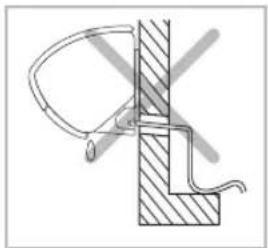
natural_image
Technical line drawing of a mechanical assembly with no visible text or symbolsThe drain hose must not be bent.
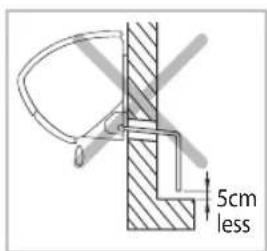
text_image
5cm lessKeep a clearance of at least 5 cm between the end of the drain hose and the ground.
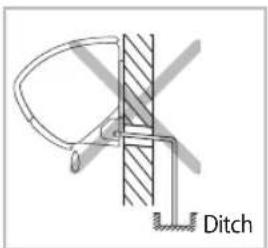
text_image
DitchDo not place the end of the drain hose in a hollow.
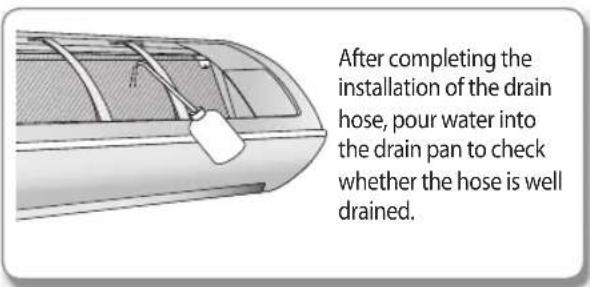
text_image
After completing the installation of the drain hose, pour water into the drain pan to check whether the hose is well drained.1) Correct connection 2) Incorrect connection
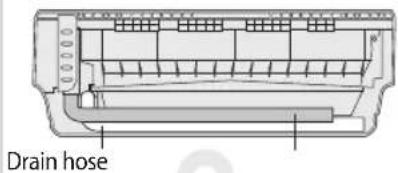
text_image
Drain hose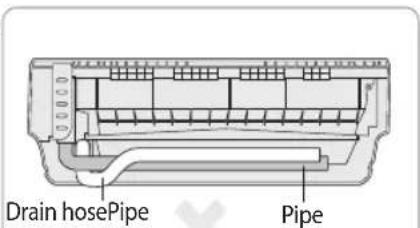
text_image
Drain hosePipe Pipe
- Don't tie drain hose to the assembly pipe which may lead to water leakage.
Drain hose installation
- If necessary, connect the 2 meter extension drain hose to the drain hose.
- If you use the extension drain hose, insulate the inside of the extension drain hose with a shield.
- Fit the drain hose into 1 of 2 drain hose holes, then fix the end of the drain hose tightly with a clamp.

• If you do not use the other drain hose hole, block it with a rubber stopper.
- When extending the Drain Hose, hold the end of Drain Hose and Extended Hose, rotate and insert the drain hose into Extended hose for 40\~45 mm. Make sure the two hoses are firmly connected, there is no water leakage.
- Connect the Drain Hose after using Foam Insulation to wrap the Extended Hose. Then, Use vinyl tape to wrap the each side of connection by 20 mm.
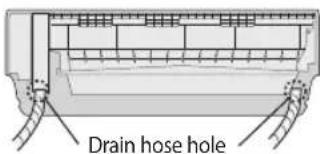
text_image
Drain hose holeEnglish-45
Installing and connecting the drain hose of the indoor unit
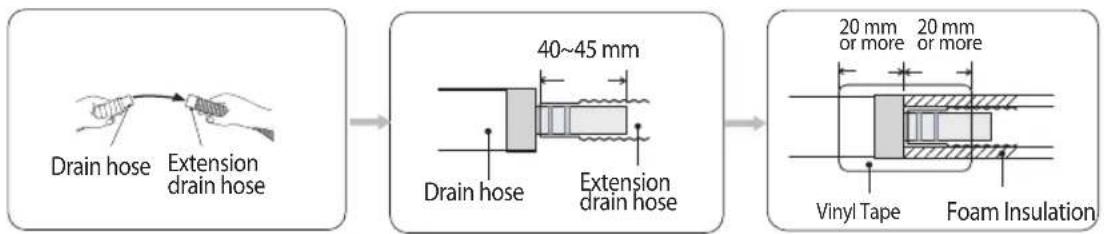
text_image
Drain hose Extension drain hose 40~45 mm Drain hose Extension drain hose 20 mm or more 20 mm or more Vinyl Tape Foam Insulation- Pass the drain hose under the refrigerant pipe, keeping the drain hose tight.
- Pass the drain hose through the hole in the wall. Check if it slants downwards as seen in the picture.
- Using natural drainage method, check the drainage is normal.

text_image
Shield Drain hose Extension drain hose
- The hose will be fixed permanently into position after finishing the installation and the gas leak test; refer to page 51 for further details.

• Make sure the installed direction of the drain hose is correct. Inadequate installation may cause condensate water leakage.
- If the drain hose is routed inside the room, insulate the hose so that dripping condensation does not damage the furniture or floors.
• DO NOT WALL UP THE DRAIN HOSE CONNECTION!
Drain hose connection must be easy accessible and serviceable.
Changing direction of the drain hose
Change the direction only when it is necessary.
- Detach the rubber cap with the pliers.
- Detach the drain hose by pulling it and turning to the left.
- Insert the drain hose by fixing it with the screw into the groove of the drain hose and the outlet of the drain pan.
- Attach the rubber cap with a screwdriver by turning it to the right until it fixes to the end of the groove.
- Check for leakage on both side of the drain outlet.
Pour the water in direction of arrow.

natural_image
Diagram of a mechanical device with two views showing internal components (no text or symbols)* Direction of the drained water
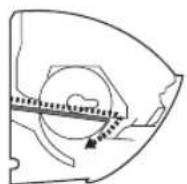

text_image
Screw hole Screw Drain hose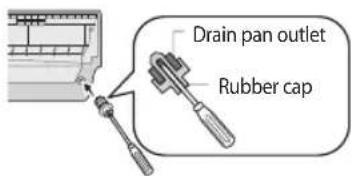
text_image
Drain pan outlet Rubber cap
- Make sure the indoor unit is in upright position when you pour water to check for leakage. Make sure that the water does not overflow onto the electrical part.
English-46
Installing and connecting the drain hose of the outdoor unit
While heating, ice may accumulate. During the process of defrosting, check if condensation draining is adequate. For adequate draining, do the following.
- Insert the drain plug into the drain hole on the underside of the outdoor unit.

- To avoid drain plug from contacting the ground, secure gap between the ground and the bottom surface of the outdoor unit.
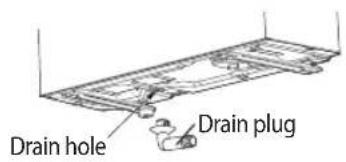
text_image
Drain hole Drain plug- Connect a drain hose to the drain plug.
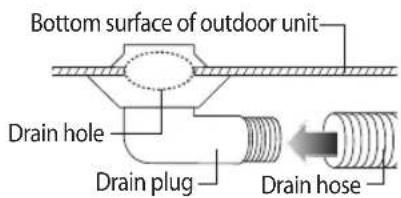
text_image
Bottom surface of outdoor unit Drain hole Drain plug Drain hose- Ensure that condensation draining is adequate.

- In areas with heavy snow fall, piled snow could block the air intake. To avoid this incident, install a frame that is higher than estimated snow fall. In addition, install a snow-proof hood to avoid snow from piling on the outdoor unit.
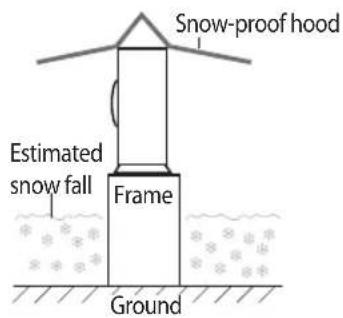
text_image
Snow-proof hood Estimated snow fall Frame GroundEvacuating the connected pipes
The outdoor unit is loaded with sufficient R-410A refrigerant. Do not vent R-410A into atmosphere: it is a fluorinated greenhouse gas, covered by Kyoto Protocol, with a Global Warming Potential (GWP) = 1975.
You should evacuate the air in the indoor unit and in the pipe. If air remains in the refrigerant pipes, it affects the compressor. It may cause reduction of cooling capacity and malfunction. Use Vacuum Pump as seen in the picture.

- When installing, make sure there is no leakage. When recovering the refrigerant, ground the compressor first before removing the connection pipe. If the refrigerant pipe is not properly connected and the compressor works with the service valve open, the pipe inhales the air and it makes the pressure inside of the refrigerant cycle abnormally high. It may cause explosion and injury.
English-47
Evacuating the connected pipes
- Connect each assembly pipe to the appropriate valve on the outdoor unit and tighten the flare nut.
- Tighten the flare nut first with your hands, and then with a torque wrench, applying the following torque.

• Excessive torque can be cause of gas leakage.

- Make the electrical connection and leave the system into "stand by mode". Do not turn on the system! This is necessary for better vacuum operation (full OPEN position of Electronic Expansion Valve - EEV -).
- Connect the charging hose of the low-pressure side of manifold gauge to a gas service port as seen in the picture.
- Open the valve of the low pressure side of manifold gauge counterclockwise.
- Evacuate the air in the connected pipes using the vacuum pump for about 15 minutes.
▶ Make sure that pressure gauge shows -0.1 MPa(-76 cmHg) after about 10 minutes.
This procedure is very important to avoid a gas leak.
▶ Close the valve of the low pressure side of manifold gauge clockwise.
▶ Turn off the vacuum pump.
▶ Check for 2 minutes if there is any pressure change.
▶ Remove the hose of the low pressure side of manifold gauge.
- Set a valve cork of liquid and gas service port to the open position.
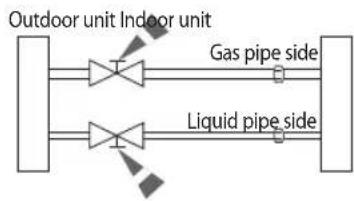
flowchart
graph LR
    A["Outdoor unit"] --> B["Indoor unit"]
    B --> C["Gas pipe side"]
    B --> D["Liquid pipe side"]
| Outer Diameter | Torque | |
| N·m | kgf·cm | |
| ø6.35 mm | 14~18 | 140~180 |
| ø9.52 mm | 34~42 | 350~430 |
| ø12.70 mm | 49~61 | 500~620 |
| ø15.88 mm | 68~82 | 690~830 |
Manifold gauge
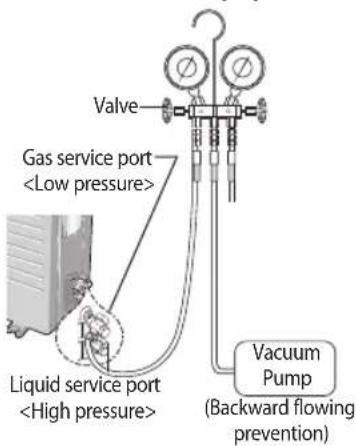
text_image
Valve Gas service portAdding Refrigerant
Add refrigerant charge according to table below:
If you use a pipe longer than 5 m,
'A' g of refrigerant R-410A must be added for each extra meter.
If you use a pipe shorter than 5 m,
The evacuating time is normal.
Refer to the Service Manual for further details.
| Model A | |
| **09/12 ** | 15 |
| **18/24 ** |

• The remaining air in the Refrigeration cycle, which contains moisture, may cause malfunction on the compressor.
• Always contact the service center or a professional installation agency for product installation.
English-48
Evacuating the connected pipes
Important information regulation regarding the refrigerant used
This product contains fluorinated greenhouse gases covered by the Kyoto Protocol.
Do not vent gases into the atmosphere.
1. Please fill in with indelible ink,
▶ ① the factory refrigerant charge of the product,
▶ ② the additional refrigerant amount charged in the field and
▶ ①+ ② the total refrigerant charge. on the refrigerant charge label supplied with the product.

a. Factory refrigerant charge of the product: see unit name plate
b. Additional refrigerant amount charged in the field (Refer to the above information for the quantity of refrigerant replenishment.)
c. Total refrigerant charge
d. Refrigerant cylinder and manifold for charging
Refrigerant type GWP value
R-410A 1975
* GWP=Global Warming Potential
Contains fluorinated greenhouse gases covered by the Kyoto Protocol.
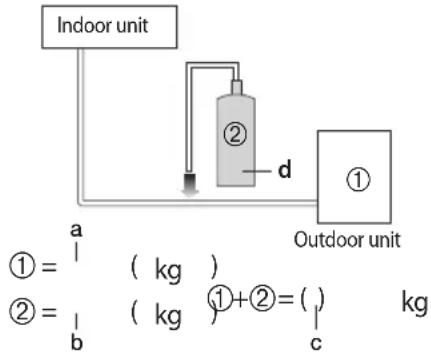
flowchart
graph TD
    A["Indoor unit"] --> B["①"]
    B --> C["Outdoor unit"]
    D["②"] -->|d| B
    E["① = (kg)"]
    F["② = (kg)"]
    G["① + ② = (kg)"] --> H["c"]

- The filled-out label must be adhered in the proximity of the product charging port (e.g. onto the inside of the stop valve cover).
Charging the refrigerant under conditions of liquid by using a liquid pipe
R-410A is a mixed type of refrigerant. It is necessary for recharging under conditions of liquid. When recharging refrigerant from the refrigerant cylinder to the equipment, follow the instructions below.
1. Before recharging, check whether the cylinder has a siphon or not.
There are two ways to recharge the refrigerant.
Cylinder with siphon
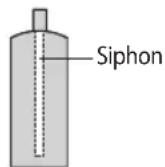
▶ Charge the refrigerant standing the cylinder upright.
Cylinder without siphon
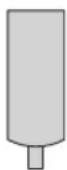
▶ Charge the refrigerant turning the cylinder upside down.

- If R-410A refrigerant is charged with gas, the composition of the charged refrigerant changes and the characteristics of the equipment vary.
- During the measuring operation of refrigerant quantity added use electronic scales. If cylinder doesn't have syphon, upset it.
English-49
Performing the gas leak tests
Make sure to check for gas leaks before completing the installation process (connecting the assembly pipe and hose between indoor unit and outdoor unit, insulating the cables, hose and pipe, and fixing the indoor unit to the installation plate).
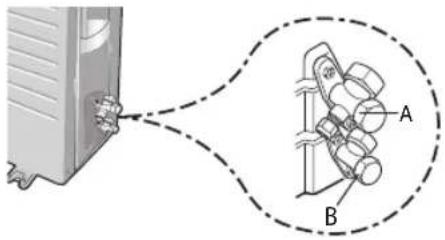
text_image
Diagram showing a device connected to a mechanical component with labeled parts A and B, including dashed lines indicating connection.
text_image
C DTest part for outdoor unit

text_image
Tightening torque for body cap (Refer to the table) Spindle Charging core R-22 : Diameter of the screw - 7/16-20UNF R-410A : Diameter of the screw - 1/2-20UNF Tightening torque for charging port cap (Refer to the table)To check for gas leaks on the outdoor unit, Check the valve A and B using a leak detector
To check for gas leaks on the indoor unit, Check the flare nut C and D using a leak detector.
Test part for indoor unit
▶ Before inspecting the leakage, use a torque wrench to close the cap for the service valve. (Comply with a tightening torque for each size of the diameter, and tighten the cap firmly to prevent any leakage.).
▶ To check for any possible leakage, insert inert gas into the pipes connected to indoor/outdoor units and check the connection part of the indoor/outdoor units with soap lather or liquid for leakage test.
| Outer Diameter (mm) | Tightening torque | |
| Body cap (N·m) | Charging port cap (N·m) | |
| ø 6.35 | 20 ~ 25 | 10 ~ 12 |
| ø 9.52 | 20 ~ 25 | |
| ø12.70 | 25 ~ 30 | |
| ø15.88 | 30 ~ 35 | |
| ø19.05 | 35 ~ 40 | |
(1 N·m = 10 kgf·cm)
Leak test with nitrogen (before opening valves)
In order to detect basic refrigerant leaks, before recreating the vacuum and recirculating the R-410A.
Leak test (after opening valves)
Before opening valves, discharge all the nitrogen from the system and create vacuum according to page 47\~49. After opening valves, check leaks using a leak detector for refrigerant.
Pump down (before disconnecting the refrigerant connections for unit repair, removal or disposal)
Pump-down is an operation intended to collect all the system refrigerant in the outdoor unit.
This operation must be carried out before disconnecting the refrigerant tubing in order to avoid refrigerant loss to the atmosphere.
▶ Shut off the liquid valve with the Allen wrench.
▶ Turn the system on in cooling with fan operating at high velocity.
( Compressor will immediately start, provided 3 minutes have elapsed since the last stop).
▶ After 2 minutes of operation, shut the suction valve with the same wrench.
▶ Turn the system off and switch mains supply off.
▶ Disconnect tubing. After disconnection, protect valves and tubing ends from dust.
▶ Compressor damage may occur if run at a negative suction pressure.
English-50
Fixing the indoor unit in place
Perform the following work on the area where gas leak test was done priory. After checking for gas leaks in the system, insulate the pipe, hose and cables. Then place the indoor unit on the installation plate.
- To minimise condensation problems, wrap foam insulation (as shown in the figure) on a part without insulation on the end of the pipes.
- Wind the pipe, assembly cable and drain hose with vinyl tape.
- Place the bundle (the pipe, assembly cable and drain hose) in the lower part of the indoor unit carefully so it does not project from the rear of the indoor unit.
- Hook the indoor unit to the installation plate and move the unit to the right and left until it is securely in place.

- Make sure pipe does not move when you install the indoor unit on an installation plate.
- Wrap the rest of the pipe with vinyl tape.
- Attach the pipe to the wall using clamps (optional).
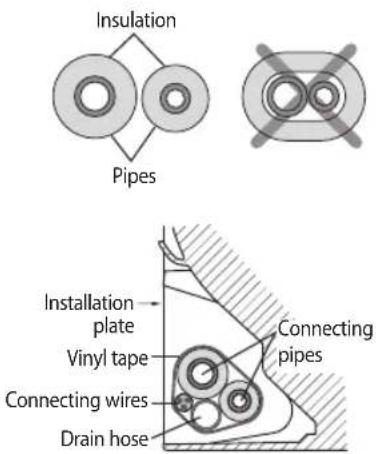
text_image
Insulation Pipes Installation plate Vinyl tape Connecting wires Drain hose Connecting pipesFixing the outdoor unit in place
Install the outdoor unit in level on a stable base to help avoid the generation of noise and vibration, especially when installing the unit close to a neighbor.
If you install the outdoor unit in a place exposed to strong winds or at a height, fix it to an appropriate support (wall or ground).
- Place the outdoor unit as indicated on the top of the unit to let the discharged air out properly.
- Fix the outdoor unit in level to an appropriate support using anchor bolts.
- If the outdoor unit is exposed to strong winds, install shield plates around the outdoor unit so that the fan can operate correctly.
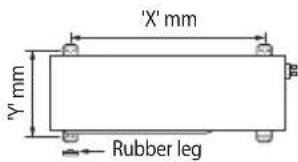
text_image
'X' mm Y' mm Rubber leg| Model X Y | ||
| **09** | 507 292 | |
| **12** | 602 310 | |
| **18/24** | 660 340 |

- Secure the rubber leg to help prevent the generation of noise and vibration.
Outdoor unit installed on the wall by rack
- Ensure the wall will be able to suspend the weight of rack and outdoor unit;
• Install the rack close to the column as much as possible;
• Install proper grommet in order to help reduce noise and residual vibration transferred by outdoor unit towards wall.
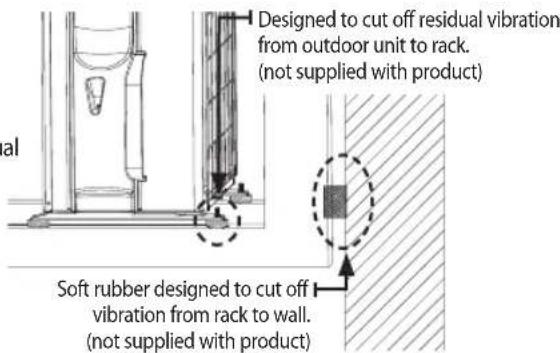
text_image
Designed to cut off residual vibration from outdoor unit to rack. (not supplied with product) Soft rubber designed to cut off vibration from rack to wall. (not supplied with product)English-51
Smart Install mode
This model supports Smart Install mode which checks installation status to find out if there is any problems with any of the functions. Execute Smart Install mode after installation.
- Check the installation status of the air conditioner.
1) Check the power supply, service valve (if it's open), power cable of the indoor and outdoor unit and amount of additional refrigerant required for pipe extension.
2) Status of the indicator after supplying the power: Standby status
- When the air conditioner is in standby status, use the remote controller to start the Smart Install mode.
1) Press the [SET], [Mode], [Power] button simultaneously for 4 seconds.
▶ Smart Install mode can be operated only with the supplied remote controller.
▶ During the Smart install mode procedure, remote controller cannot be operated.

text_image
Temp - Model Fan Timer Options Settings < SET >
text_image
Model + Temp - Single user Fan Timer Options Settings < SET >* Remote controller may be different (image/functions) depending on the model.
English-52
1) Smart Install mode in progress
• 88 Display: Progress will be displayed in 0\~99.
- LED Display: Indicator on the indoor unit display will blink in sequence and then all indicators will blink. (This will be repeated.)
| TYPE 88 Display LED Display | ||
| Indoor unit indicator |  | 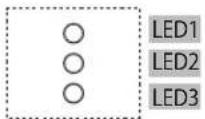 |
* Display may be different depending on the model.
- Smart Install mode will end.
1) Smart Install mode will take approximately 7\~13 minutes. (Actual time may be different depending on the model.)
2) When Installation is successful: Smart Install mode will end with ringing sound and the air conditioner will be in standby status. (Error message will not be displayed on the indoor unit indicator and the remote controller and buttons on the indoor unit will work normally.)
3) When installation is not successful: Smart Install mode will end and error message will be displayed on the indoor unit display.

- Take necessary measures when error occurs.
- Refer to the service manual for necessary measures for each error that occurs.
- Use the product after taking care of the error that occurs.
| Error indicator | Error Measures to take by an installer | |||
| 88Display | LED Display | |||
| LED 1 LED | 2 LED 3 | |||
| ∅ | ∅ | ∅/∅∅ | ||
| E 101 | ○ | ∅ | ∅ | Communication Error between Indoor and outdoor unit. (whether the power cable and communication cable is crossed or not) |
| E 121 | ○ | ∅ | ○ | Error on indoor temperature sensor |
| E 122,E 123 | ∅ | ∅ | ○ | Error on indoor heat exchanger |
| E 154 | ○ | ○ | ∅ | Error on indoor fan motor |
| 88display and all LED blinks | ∅ | ∅ | ∅ | EEPROM/Option error |
| E 162,E 163 | ||||
| E422 | ∅ | ○ | ∅ | Refrigerant flow blocking Error |
| E554 | ∅ | ○ | ∅ | Lack of Refrigerant (For Inverter model only) |
| ※ Above LED pattern is displayed when there's error is occurred on outdoor unit. Check the LED display on outdoor unit for the details. | ||||
* ○:Off / Ⓞ:Blinking / ●:On
English-53
Final check and trial operation
To complete the installation, perform the following checks and tests to ensure that the air conditioner operates correctly.
Check the followings :
• Strength of the installation site
• Tightness of pipe connection to detect gas leak
• Electric wiring connection
• Heat-resistant insulation of the pipe
- Drainage
• Grounding conductor connection
- Correct operation (follow the steps below)
1. Press the Power ⏻ button and check the following :
▶ The indicator on the indoor unit lights up.
▶ The airflow blade opens and the fan gears up for operation.
2. Press the Mode button to select Cool or Heat mode.
In Cool mode, use Temp hr. + or - button and set the temperature at 16 °C.
In Heat mode, use Temp hr. + or - button and set the temperature at 30 °C.

- Approximately 3\~5 minutes later, outdoor unit will start to operate and the Cool or Warm air will blow out.
• After 12 minutes of stationary condition check the indoor unit air treatment.
Cooling mode (indoor unit check) → Inlet air temp. - Outlet air temp : From 10 °C to 12 °C (indicative delta T)
Heating mode (indoor unit check) → Outlet air temp. - Inlet air temp: From 11 °C to 14 °C (indicative delta T)
In heating mode, the indoor fan motor can remain off to avoid cold air blown into conditioned space.
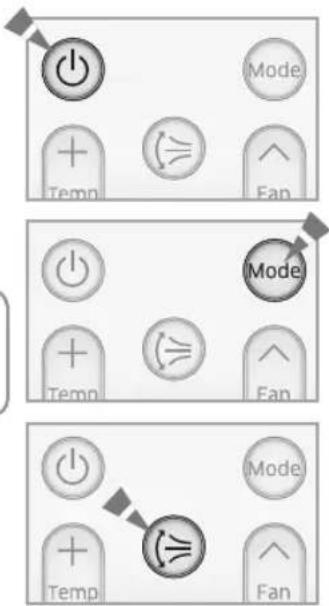
text_image
Mode + Temp Fan Mode + Temp Fan Mode + Temp Fan3. Press the Air swing (≡ button and check the following:
▶ The airflow blades work properly.
4. Press the Power ⏻ button to stop the operation.

- When you complete the installation successfully, hand over this manual to the user for storage in a handy and safe place.
Pump down procedure (when removing the product)
- Press the Power ⏻ button on the indoor unit for 5 seconds. Beep will sound immediately to let you know that the product is ready for pump down procedure Please let the compressor run for more than 5 minutes.
- Release the valve caps on High and Low pressure side.
- Use L wrench to close the valve on the high pressure side.
- After approximately 2 minutes, close the valve on the low pressure side.
- Press the Power ⏻ button on the indoor unit or remote controller
- Disconnect the pipes.
English-54
How to connect your extended power cables
Items to prepare
(compressor and insulation tape should be prepared by an installation technician.)
| Tools Crimping pliers | Connection sleeve (mm) | Insulation tape | Contraction tube (mm) | |
| Spec | MH-14 20x∅7.0(HxOD) Width 18 mm 50x∅8.0(LxOD) | |||
| Shape |  |  |  |  |
- As shown in the figure, peel off the shields from the rubber/wire of the power cable.
- Peel off 20 mm of the wire shields of the tube installed already.

After peeling off the tube wire, you must insert a contraction tube.
-
Insert both sides of core wire of the power cable into the connection sleeve.
-
Using a compressor, compress the two points and flip it over and compress another two points in the same location.
- The compression dimension should be 8.0.
- After compressing it, pull both sides of the wire to make sure it is firmly pressed.
-
Wrap it with the insulation tape twice and position your contraction tube in the middle of the insulation tape.
-
Apply heat to the contraction tube to contract it.
-
After tube contraction work is completed, wrap it with the insulation tape to finish.

text_image
(Unit : mm) Power cable (provided by us) 20 20 20 60 120 180 Wire tube power cable 20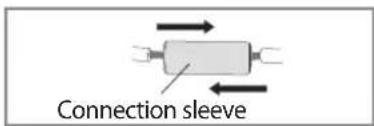
text_image
Connection sleeve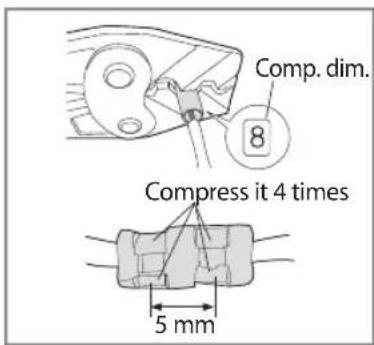
text_image
Comp. dim. 8 Compress it 4 times 5 mm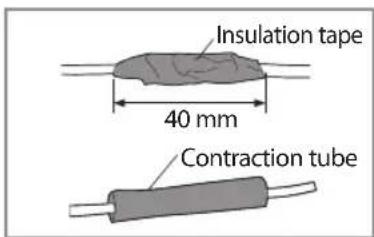
text_image
Insulation tape 40 mm Contraction tube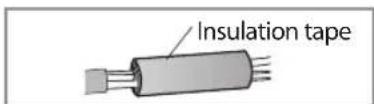

- In case of extending the electric wire, please DO NOT use a round-shaped pressing socket. - Incomplete wire connections can cause electric shock or a fire.
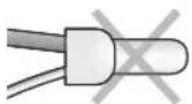
English-55

QUESTIONS OR COMMENTS?
| COUNTRY CALL OR VISIT US ONLINE AT | ||
| IRAN 021-8255 www.samsung.com/iran/support | ||
| SAUDI ARABIA 920021230 | www.samsung.com/sa/supportwww.samsung.com/sa_en/support | |
| U.A.E 800-SAMSUNG (726-7864) | www.samsung.com/ae/supportwww.samsung.com/ae_ar/support | |
| QATAR 800-2255 (800-CALL) | www.samsung.com/ae/supportwww.samsung.com/ae_ar/support | |
| BAHRAIN 8000-4726 | www.samsung.com/ae/supportwww.samsung.com/ae_ar/support | |
| OMAN 800-SAMSUNG(726-7864) | www.samsung.com/ae/supportwww.samsung.com/ae_ar/support | |
| JORDAN | 0800-2227306 5777444 | www.samsung.com/Levant/support |
| SYRIA 18252273 www.samsung.com/Levant/support | ||
| EGYPT | 08000-72678616580 | www.samsung.com/eg/support |
| MOROCCO 080 100 2255 www.samsung.com/n_africa/support | ||
| KUWAIT 183-2255 (183-CALL) | www.samsung.com/ae/supportwww.samsung.com/ae_ar/support | |
| NIGERIA | 0800-726-7864 | www.samsung.com/africa_en/support |
| ALGERIA | 021 36 11 00 www.samsung.com/n_africa/support | |
| PAKISTAN | 0800-Samsung (72678) | www.samsung.com/pk/support |
| TUNISIA | 80-1000-12 www.samsung.com/n_africa/support | |
| SOUTH AFRICA | 0860 SAMSUNG (726 7864) | www.samsung.com/support |
| GHANA | 0800-100770302-200077 | www.samsung.com/africa_en/support |
| BOTSWANA | 8007260000 | www.samsung.com/support |
| NAMIBIA 08 197 267 864 www.samsung.com/support | ||
| ANGOLA | 91-726-7864 | www.samsung.com/support |
| ZAMBIA | 0211 350370 | www.samsung.com/support |