FM288LI - Vacuum Cleaner HOOVER - Free user manual and instructions
Find the device manual for free FM288LI HOOVER in PDF.


User questions about FM288LI HOOVER
0 question about this device. Answer the ones you know or ask your own.
Ask a new question about this device
Download the instructions for your Vacuum Cleaner in PDF format for free! Find your manual FM288LI - HOOVER and take your electronic device back in hand. On this page are published all the documents necessary for the use of your device. FM288LI by HOOVER.
USER MANUAL FM288LI HOOVER
natural_image
Black and white photo of a HOVER vacuum cleaner with extended blade and base (no visible text or symbols)
GENERATION FUTURE
text_image
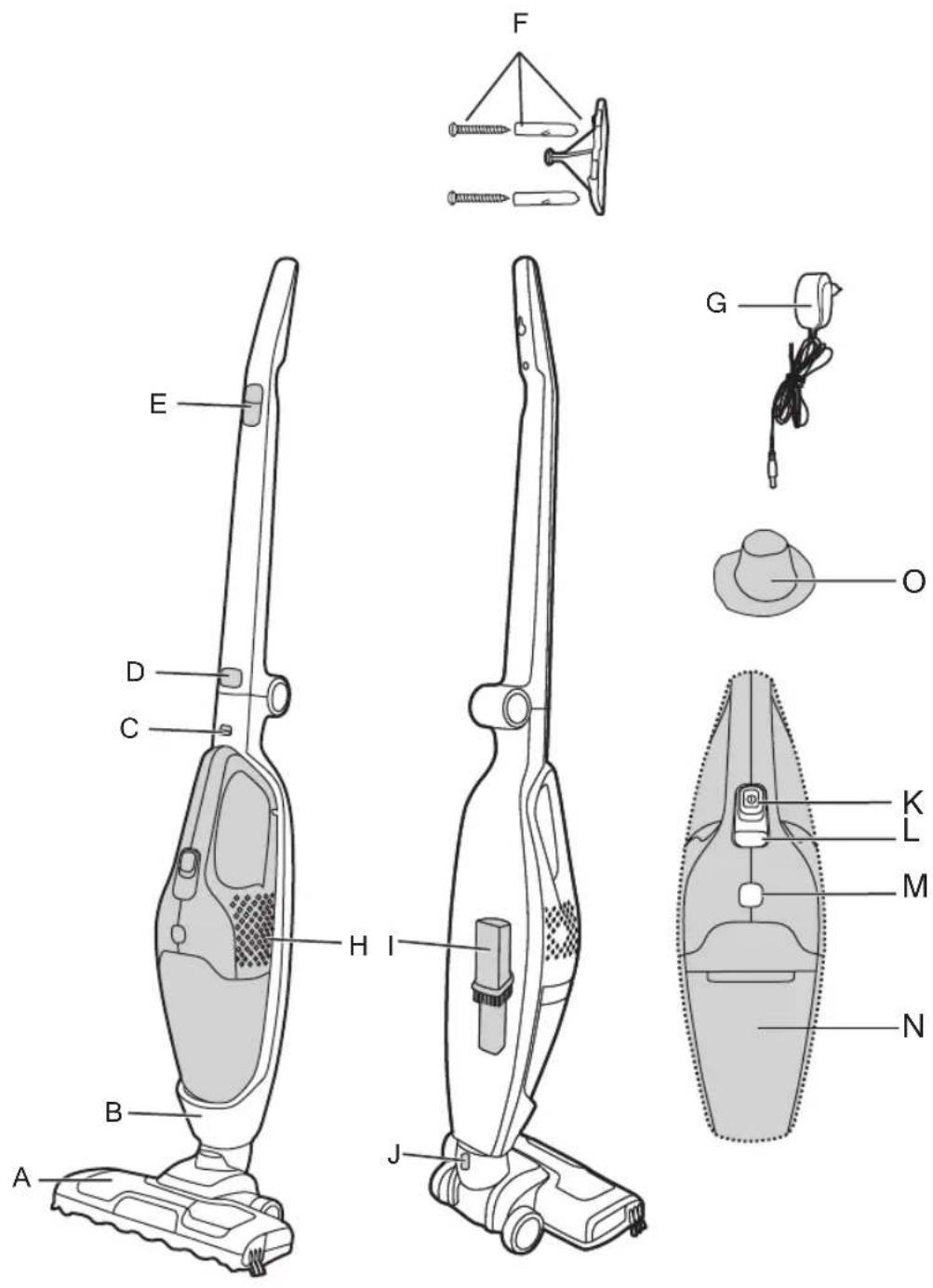
A B C D E F G H I J K L M N O
natural_image
Illustration of a hand holding a tool with an arrow indicating motion (no text or symbols)
natural_image
Illustration of a hand using a vacuum cleaner to lift a small component (no text or symbols present)
natural_image
Line drawing of a vacuum cleaner with attached power outlet (no text or symbols)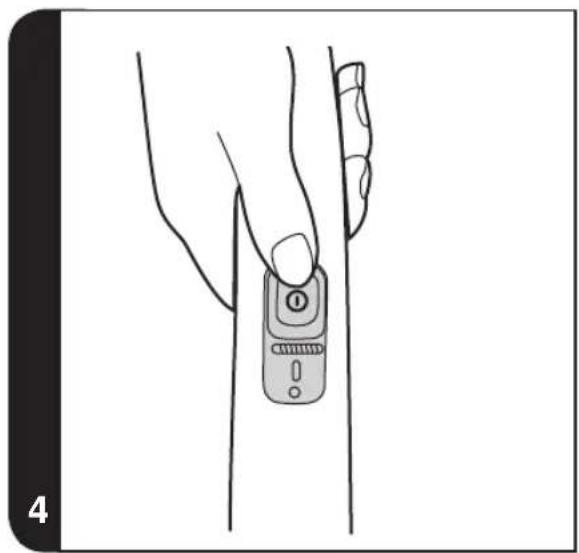
natural_image
Line drawing of a hand holding a mobile phone with a finger, against a plain background (no text or symbols)
natural_image
Illustration of a hand using a vacuum cleaner to lift a device, showing airflow direction (no text or symbols)
natural_image
Line drawing of two robotic vacuum cleaner units with front and side views, showing mechanical components and a close-up detail (no text or symbols)


natural_image
Illustration of hands using a handheld device to adjust or install a device, showing a curved arrow indicating rotation (no text or symbols present)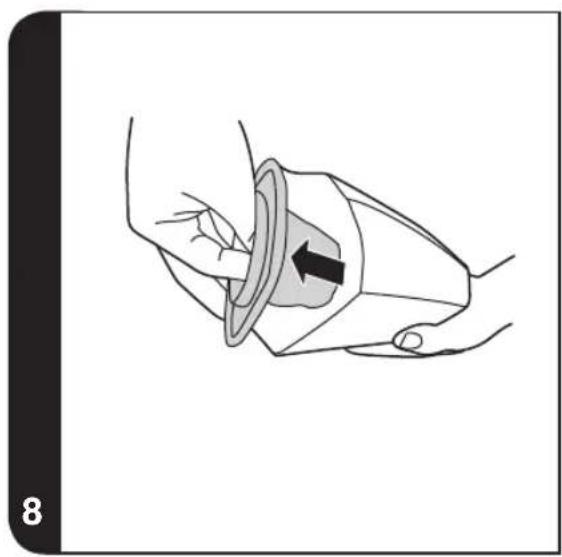
natural_image
Illustration of a hand holding a device with a black arrow indicating direction (no text or symbols)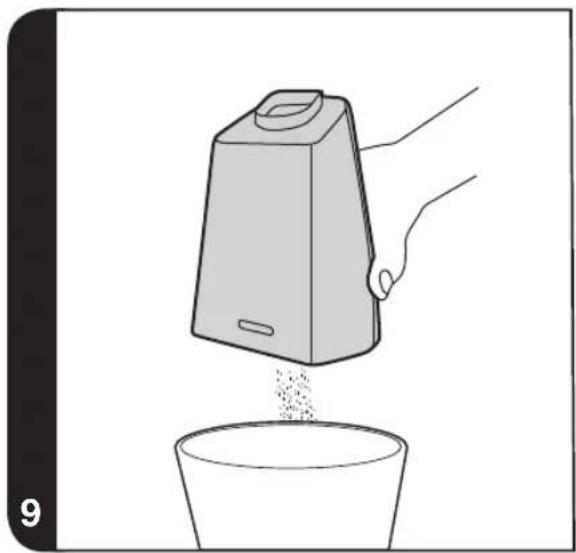
natural_image
Illustration of a hand pouring granular material from a container into a bowl (no text or symbols)
natural_image
Illustration showing two hand tools: one using a tool to lift a cube, the other holding a lid (no text or symbols)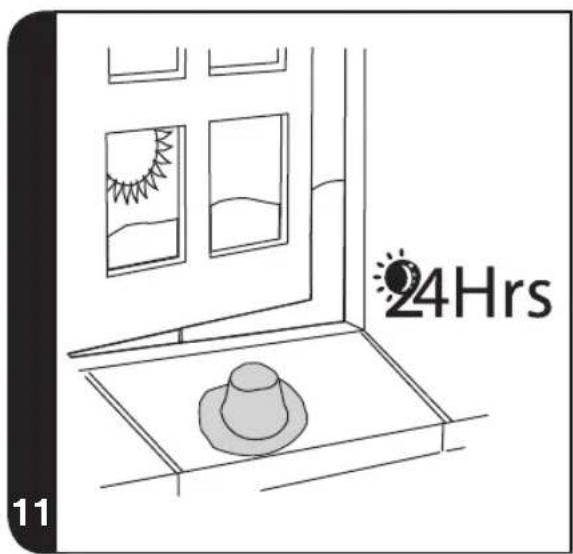
text_image
24Hrs 11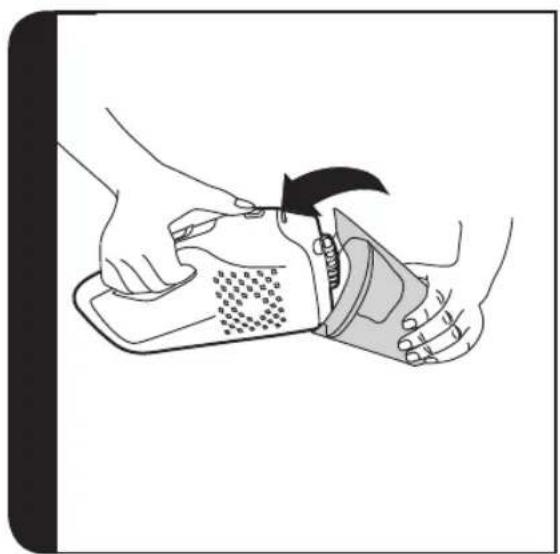
natural_image
Illustration of hands using a tool to adjust or install a device, showing a mechanical component being inserted (no text or symbols present)


natural_image
Line drawing of a hand using a handheld vacuum cleaner device, showing body positioning and adjustment arrows (no text or symbols)
natural_image
Line drawing of hands holding a device with a spring scale (no text or symbols)
natural_image
Illustration of hands holding a handheld electronic device with a screwdriver inserted (no text or symbols visible)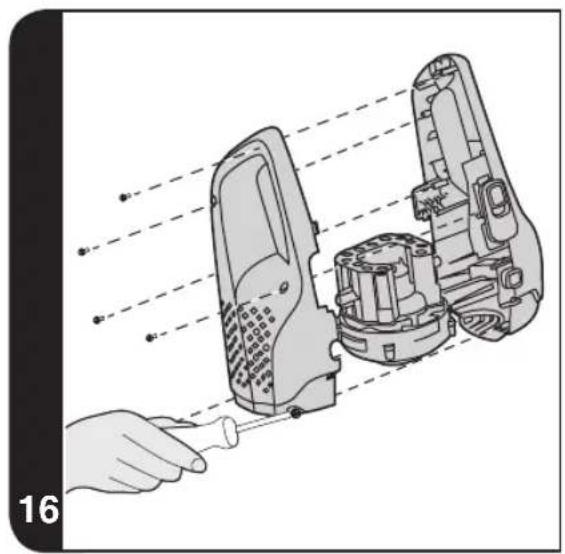
natural_image
Illustration of a hand using a tool to disassemble or install a mechanical device, with no visible text or symbols.
GB
INSTRUCTIONS FOR SAFE USE
This appliance should only be used for domestic cleaning, as described in this user guide. Please ensure that this guide is fully understood before operating the appliance.
Always switch off and remove the charger from the socket before cleaning the appliance or any maintenance task.
This appliance can be used by children aged from 8 years and above and persons with reduced physical, sensory or mental capabilities or lack of experience and knowledge if they have been given supervision or instruction concerning use of the appliance in a safe way and understand the hazards involved. Children shall not play with the appliance. Cleaning and user maintenance shall not be made by children without supervision.
If the power cord is damaged stop using the appliance immediately. To avoid a safety hazard, an authorised Hoover service engineer must replace the power cord.
Keep hands, feet, loose clothing and hair away from rotating brushes.
Use only the original charger supplied with the appliance.
Check that your supply voltage is the same as that stated on the charger.
If the appliance is to be disposed of the batteries must first be removed. The appliance must be disconnected from the supply mains when removing the battery. Dispose of the batteries safely. Run the appliance until it stops because the batteries are fully discharged. Used batteries should be taken to a recycling station and not disposed of with household waste. To remove the batteries, please contact the Hoover Customer Centre or proceed according to the following instructions.
NOTE: Should you experience any difficulty in dismantling the unit or for more detailed information on treatment, recovery and recycling of this appliance, please contact your local city office or your household waste disposal service.
When charging the appliance, the power switch must be off.
Never charge the batteries in temperatures above 37^ C or below 0^ C.
It is normal for the charger to become warm to the touch when charging.
Use only attachments, consumables or spares recommended or supplied by Hoover.
Static electricity: some carpets can cause a small build up of static electricity. Any static discharge is not hazardous to health.
GB
Do not use your appliance out of doors or on any wet surface or for wet pick up.
Do not pick up hard or sharp objects, matches, hot ashes, cigarette ends or other similar items.
Do not spray with or pick up flammable liquids, cleaning fluids, aerosols or their vapours.
Do not run over the power cord when using your appliance or remove the plug by pulling on the power cord.
Do not continue to use your appliance or charger if it appears faulty.
Hoover service: To ensure the continued safe and efficient operation of this appliance we recommend that any servicing or repairs are only carried out by an authorised Hoover service engineer.
Do not use the appliance to clean animals or people.
Do not replace the batteries with non-rechargeable batteries.
The Environment
The symbol on this appliance indicates that this appliance may not be treated as household waste. Instead it must be handed over to the applicable collection point for the recycling of electrical and electronic equipment. Disposal must be carried out in accordance with local environmental regulations for waste disposal. For more detailed information about treatment, recovery and recycling of this appliance, please contact your local city office, your household and waste disposal service or the shop where you purchased the appliance.


This appliance complies with the European Directives 2006/95/EC, 2004/108/EC and 2011/65/EU.
HOOVER Limited, Pentrebach, Merthyr Tydfil, Mid Glamorgan, CF48 4TU, UK
PRODUCT COMPONENTS
Main Cleaner
A. Carpet and Floor Nozzle
B. Main Body
C. Handheld Release Button
D. Handle Release Button
E. On/Off Switch
F. Product Holder
G. Charger
H. Handheld Unit
I. Crevice Tool / Dusting Brush
J. Nozzle Release Button
Handheld Cleaner
K. On/Off Switch
L. Charging/Power Indicator
M. Dust Container Release Button
N. Dust Container
Filter
O. Cloth Filter
PREPARING YOUR CLEANER
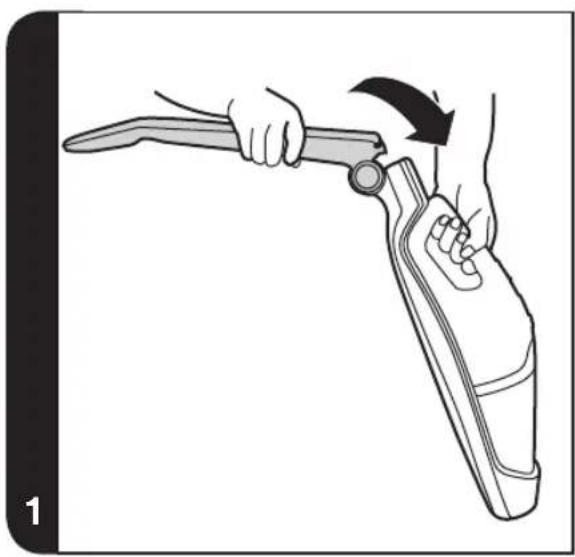
- Unfold the handle from the main body until it locks in place. [1]
- Line up the nozzle with the main body and firmly push into the main body until the nozzle locks in place. [2]
- For first use, charge your cleaner for 5Hrs and completely discharged. After first use the normal charging time is 4Hrs.
- The indicator light will blink when charging and remain lit when fully charged.[3]
- Fix the Product Holder to your wall using the screw and holder provided.
* Certain Models Only
GB
USING YOUR CLEANER
Main Cleaner
Turn the cleaner on by sliding the On/Off switch[E] to the required settings:[4]
- HARD FLOOR: First position of On/Off switch, the agitator and nozzle LED lights are OFF.
- CARPET: Second position of On/Off switch, the agitator and nozzle LED lights are ON.
Handheld Cleaner
- Push the handheld release button upward, lift the handheld unit from the main body.[5]
- Turn the handheld cleaner on by sliding the On/Off switch [K] forward.
Charging/Power Indication\*
This cleaner is equipped with a LED display. When the product is working, the display will report the following indication:
BATTERY LEVEL INDICATOR:
• 3 points = Fully Charged
• 2 points = 2/3 charge
• 1 point = 1/3 charge
DISCHARGE INDICATOR: When the batteries are fully discharged, the indicator will flash for around 20 seconds before cleaner switches off automatically.
Crevice Tool / Dusting Brush
The accessory is stored at the rear of the main body. It fits directly onto the handheld unit.
IMPORTANT: During storage and charging, secure your appliance handle into the product holder. [6]
CLEANER MAINTENANCE
Emptying the Dust Container
- Push the handheld unit release button upwards, lift the handheld unit from main body.
- Press the dust container release button and remove the dust container. [7]
- Lift the filter from the dust container. [8]
- Turn the dust container upside down over a bin to instantly empty it. [9]
- Reassemble the handheld unit and return to the cleaner main body.
Cleaning the Filter
- Push the handheld release button upwards, lift the handheld unit from cleaner main body.
- Press the dust container release button and remove the dust container.
- Remove the filter from the dust container and clean.
- Wash the filter in lukewarm water and leave to dry for 24 hours. Once thoroughly dry return to the dust container.[10, 11]
- If required, wash the dust container in lukewarm water. Ensure it is fully dry before returning to the main body of the cleaner.
- Reassemble the handheld unit and return to the cleaner main body. [12,13]
NOTE: Do not use hot water or detergents when cleaning the filters. In the unlikely event of the filters becoming damaged, fit a genuine Hoover replacement. Do not try use the product without a filter fitted.
IMPORTANT: For optimum performance, always keep your filter clean. We recommend that the filter should be washed at least once a month.
Changing and Cleaning the Agitator
IMPORTANT: Always switch off the cleaner before changing the agitator.
- Using a coin turn the lock to the open position. [14]
- Remove the Agitator cover.
- Remove the Agitator.
- Replace with the new Agitator or clean it. This can only fit in one direction. [15]
- Re-fit the Agitator cover and lock with a coin.
* Certain Models Only
GB
Battery Replacement
For reasons of safety the Lithium-Ion batteries in this cleaner are only replaceable by a Hoover Service engineer. When the batteries fail to maintain charge, please contact the Hoover Customer Service Centre to arrange a replacement.
End of Product Life Battery Disposal
If the cleaner is to be disposed off the batteries should be removed. Used batteries should be taken to a recycling station and not disposed whit household waste. To remove the batteries, please contact the Hoover Customer Service Centre or proceed according to the following instructions:
IMPORTANT: Always fully discharge the batteries before removal and ensure charger is unplugged.
- Run the unit until the batteries are completely empty.
- Release the handheld unit from the main body of the cleaner.
- Press the dust container release button and remove the dust container.
- Remove 6 screws and open the unit. [16]
- Remove the motor /battery housing and disconnect the cables.
- Remove the batteries from the housing.
Note: Should you experience any difficulties in dismantling the unit or for more detailed information about treatment, recovery and recycling of this product, please contact your local city office, your household waste disposal service.
TROUBLE SHOOTING
Should you have any problem with you cleaner, follow this simple check list before calling the Hoover Customer Service Centre:
A. Cleaner does not switch on.
Check if the cleaner is charged.
B. Loss of suction or no suction
Empty the dust container and wash the filter
Remove nozzle and check for any blockages in the duct.
C. Batteries cannot be charged.
This may be a result of very long storage periods (over half year).
Contact Hoover customer service to arrange battery replacement.
If the problem persists contact the Hoover customer service centre.
INFORMATIONS IMPORTANTES
Always replace parts with genuine Hoover spares. These are available from your local Hoover dealer or direct from Hoover. When ordering parts always quote your model number.
Consumables
• Pre motor Cloth Filter S120 35601696
• Agitator Y35 35601695
Your guarantee
The guarantee conditions for this appliance are as defined by our representative in the country in which it is sold. Details regarding these conditions can be obtained from the dealer from whom the appliance was purchased. The bill of sale or receipt must be produced when making any claim under the terms of this guarantee.
Subject to change without notice.


text_image
HOVERGENERATION FUTURE
Hoover Limited Pentrebach
Merthyr Tydfil
Mid Glamorgan
CF48 4TU
Hoover Customer Helpine
03444 995599
PRINTED IN P.R.C
48017734