WA11K2SIV - Washing machine SAMSUNG - Free user manual and instructions
Find the device manual for free WA11K2SIV SAMSUNG in PDF.


User questions about WA11K2SIV SAMSUNG
0 question about this device. Answer the ones you know or ask your own.
Ask a new question about this device
Download the instructions for your Washing machine in PDF format for free! Find your manual WA11K2SIV - SAMSUNG and take your electronic device back in hand. On this page are published all the documents necessary for the use of your device. WA11K2SIV by SAMSUNG.
USER MANUAL WA11K2SIV SAMSUNG
natural_image
Simple 3D illustration of a rectangular block with a curved top surface (no text or symbols)Please read this manual before using and note how to use in the proper manner.
Please be careful of keeping the manual.
Otherwise, it should be bought separately.
FEATURES 1
SAFETY ......INSTRUCTIONS
DESCRIPTION OF PARTS 3.
CONTROL PANEL 4
WASHING PROCEDURE 5.
Fuzzy(Digital) course 5....
Blanket course 5.
Speedy course 5
Wool course 5
Eco ^+ (Thobe) course 5-tion
Delay start course 5.
MANUAL ......FUNCTIONS
INSTALLATION & MAINTENANCE 7
Environment 7
Levelling 7
Connecting the water supply hose 7.
Assembling the rat protection panel 8
In case of pump-drained washer .8....
Connecting the drain hose 8.
How to add the fabric softener 8
How to put the detergent in 8.
Water supply connector filter 9
Cleaning the filter net. 9
How to clean the filter 9
How to assemble the legs 9
TROUBLESHOOTING 10
SPECIFICATIONS
FUZZY(DIGITAL) CONTROL
- Fuzzy(Digital) control operates with best washing course by sensing the washload like artificial intelligence.
TRANSPARENT WINDOW

- This Transparent Window is the new concept to solve the curiosity of users to see inside of washing machine while operation. While operation, the laundry progress inside of washing machine can be checked by looking through the transparent window.
PULSATOR

- The Pulsator helps water and detergent to go through fabrics efficiently while providing both the powerful water action to clean larger and heavier clothes and the gentle water action to clean all delicates with less wear and tear on clothes.
WATERFALL FLOW
- The Waterfall Flow injected from under the pulsator cascades with full force back into the tub, pushing down any clothes that float right under the water surface. It is this Waterfall Flow that enables this washing machine to effectively wash large and heavy items, such as bluejeans and blankets.
MAGIC FILTER
- This unique magic Filter ensures that all the lint inside the tub is captured for top quality filtering results to deliver consistently effective cleaning results.
SOFTENER DISPENSER
- The Softener Dispenser releases the fabric softener at the appropriate time when the last rinsing proceeds.
- Child Lock Function ( page2)
- Auto Restart
The power is turned on automatically after power failure. - Saving Energy
The Eco+(Thobe) course, it is a wash course to saving the energy reduces laundry time for frequent and soiled clothes.
SAFETY INSTRUCTIONS
Please note that the following precautions for safety intend to prevent unpredictable danger and damage by helping the proper use in safety.
When using hot water in washing, please make sure that the water should not exceed 50^ C.
- Plastic parts may be deformed or damaged, and an electric shock or a fire may take place.
WARNING
There might be serious injury or fatal accident when you violate this instruction.
If the power supply cord or plug is damaged or loosened, do not use.
- An electric shock or a fire may take place.
Do not pull the cord off or touch it with moist hands.
- An electric shock or a fire may take place.
Do not bend the power supply cord by force or press it with heavy things.
• An electric shock or å fire may take place.
Do not install the washer nearby electric implement or don't put a candle light or cigarette light on the washer.
• A fire may take place.
Do not disassemble, repair or remodel it recklessly.
- When you need to repair it, please call service agent. An electric shock or a fire may take place.
During operation, do not put your hands or metal materials under the washer.
- You may be hurt by spinning board beneath the washer.
Stay away from the washer when the bottom of the washer sinks into the water.
- There might be an electric shock. Please wait until the water drains out completely.
Do not put laundry stained with gasoline, benzene, or alcohol in the washer, and keep the materials away from the washer.
- An explosion or a fire may take place.
During spinning, don't put your hand in the spinning tub.
- It may hurt your hands. If it does not stop within 15 seconds after you open the lid, call service agent immediately.
CAUTIONS
There might be a slight injury or damage when you violate this instruction.
Don't' install it in the area with moisture or outdoor where it has rain or snow
- An electric shock or a fire may take place.
Please unplug the power supply cord when you do not use it.
- An electric shock or a fire may take place.
If there is dust or water on the power supply plug and its connected part, please remove it completely.
- An electric shock or a fire may take place.
Do not make your kids look into the inside of the washer.
- If your kid falls into the washer, his life could be in danger.
Ventilate immediately without touching the power plug if gas is leaking.
- An electric shock or a fire may take place if it catches flame.
If the washer makes strange noise, smell or smoke, unplug it promptly and call service agent.
- An electric shock or a fire may take place.
When cleaning, don't spray water to the parts of the washer directly.
- It may make it's life span shorten. Also an electric shock or fire may take place
Don't use several appliances together with an outlet.
• A fire may take place due to unusual heat.
Don't press the button with an awl or pin.
• An electric shock or a fire may take place.

Child-Lock function: This is a device to protect children from being accidentally hurt while playing with the washer.
How to start the Child-Lock function:
- Press the "Power" button to go to an initial washing mode.
- By pressing "Start/Hold" button, you start washing and in case Child Lock function is needed during the laundry
- Push the "Course" button and get the function started.
(Note: You cannot perform the function without the "Power" button on.)
In the event that you would like to modify the Child-Lock function, "L" signal flashes in the "signal window showing the rest of the set time" every two seconds, which means it is locked and indicates how much time is left until the function is released.
To release the function of Child-Lock:
- In case the "Child-Lock" is programmed, press both the "Function" and "Course" buttons in sequence.
DESCRIPTION OF PARTS
The User's Manual is for common use.
Make use of the User's Manual depending upon your washing machine model.

text_image
FILTER LID Be sure to keep the lid closed during washing and spinning. FABRIC SOFTENER DISPENSER BLEACH INLET PULSATOR FRONT CONTROL PANEL ADJUSTABLE LEGS Adjust the length of the legs when installing the washer. WATER SUPPLY HOSE(HOT) WATER SUPPLY HOSE (COLD) DRAIN-HOSE (PUMP) DETERGENT BOX SPIN BASKET POWER CORD GROUND LEAD When the water pipe is metal, make sure to cover the end of the ground wire. WATER DRAIN HOSE SOUND ABSORPTION PANELCONTROL PANEL
For more details, see control panel of your washing machine.
POWER BUTTON
Press this button once to operate.
Press once again to turn the power off.
POWER
> START/HOLD BUTTON
Use to pause and restart the operation.
To change the washing procedure during operation, press this button to stop, and once again to restart after changing the procedure.
START/HOLD
DELAY START BUTTON
Press this button when delay start washing is needed.
DELAY START
COURSE SELECT BUTTON
With every press of this button, the washing course changes;
FUZZY(DIGITAL) → BLANKET → SPEEDY → WOOL → Eco+ (THOBE) option → FUZZY(DIGITAL)
COURSE
FUNCTION SELECT BUTTON
With every press of this button, the function changes; SOAK,WASH,RI NSE,SPI N →
WASH → RINSE → SPIN → WASH&RINSE → RINSE&SPIN → WASH,RINSE,SPIN
FUNCTION
WATER LEVEL SELECT BUTTON
According to the washload, select the water level;
MED → HIGH → EXTRA LOW → LOW
WATER LEVEL

WATER SUPPLY SELECT BUTTON
As you press this button, the type of water is selected as follows.
COLD → COLD + HOT → HOT → COLD
WATER SUPPLY
REMAINING TIME INDICATOR LIGHT
The indicator light shows the remaining time (in minutes) of each wash cycle.
At the end of the cycle, the power automatically switches off.
WASHING PROCEDURE
Before starting washing, check the following;
Connect the water supply hose to the water tap. Leave a tap open. Plug the power cord in. Make sure to lay down the drain hose. (In case no drain pump)
Put the laundry into the washer and add detergent, too.
Be careful not to overload. Use right detergent for the fabrics you are washing.
FUZZY(DIGITAL) COURSE
Selects the best washing course automatically.

- Press the POWER Button to "ON".
- Press the START/HOLD button.
Water level is selected automatically.
Washing, rinsing, and spinning follow.
If you want to pause, press the START/HOLD
button again.You can change the course when paused.
- Close the lid.
BLANKET COURSE

- Press the power button to "ON".
- Press the course select button once.
- Press the START/HOLD button
Water level is selected automatically.
Washing, rinsing, and spinning follow.
If you want to pause, press the START/HOLD
button again. You can change the course when paused.
- Close the lid.
SPEEDY COURSE

Because washing is speedy, it is good for light or less stained laundry.
- Press the power button to "ON".
- Press the course select button twice.
- Press the START/HOLD button
Water level is selected automatically.
Washing, rinsing, and spinning follow.
If you want to pause, press the START/HOLD
button again. You can change the course when paused.
- Close the lid.
WOOL COURSE

- Press the power button to "ON".
- Press the course select three times.
- Press the START/HOLD button.
Washing, rinsing, and spinning follow.
If you want to pause, press the START/HOLD
button again. You can change the course when paused.
- Close the lid.
CAUTION...
-Do not use water above 30°C for WOOL washing.
-Refer to the tag attached on the clothes for washing information.
-Fasten buttons and turn inside out before washing.
-Use the detergent indicated in the laundry.
-When the degree of dirt is extreme, soak the laundry in warm water for about 10 minutes before pressing the WOOL course button in order to enhance washing efficiency.
ECO+(THOBE) COURSE option

- Press the power button to "ON".
- Press the course select button four times.
- Press the START/HOLD button
Water level is selected automatically.
Washing, rinsing, and spinning follow.
If you want to pause, press the START/HOLD
button again. You can change the course when paused.
- Close the lid.
DELAY START COURSE

Select this course when you have to go out or do something else.
- Press the power button to "ON".
- Press the DELAY START button once.
You may change the delay start time with use the DEALY START button.
(from 3 hours to 18 hours)
- Press the START/HOLD button and put the proper amount of detergent into tub.
- Close the lid.
The washing finishes by the time you reserved.
MANUAL FUNCTIONS
Each washing course changes manually.
Ex) If you want to wash in the speedy course : Power - Select speedy course - Wash - Start/Hold button
 once once | SOAK FUNCTION (Including WASH, RINSE, SPIN)Press the POWER button.Select the course(Press the course button).→ FUZZY(DIGITAL), BLANKET, SPEED, WOOL, ECO (THOBE)Press the FUNCTION SELECT button once.Press the START/HOLD button once.Water level is selected automatically.Washing, rinsing, and spinning follow. |
 twice twice | WASH ONLYPress the POWER button.Press the FUNCTION SELECT button twice.Press the START/HOLD button once.Washing goes on for 18 minutes.When the FUNCTION button is pressed during washing, the wash time can be changed to between 3 and 25 minutes in duration. |
 three times three times | RINSE ONLYPress the FUNCTION button three times.Press the START/HOLD button once.Rinsing goes on for 15 minutes.When the FUNCTION button is pressed during rinsing, the rinse times can be changed to between 1 to 5 times in duration. |
 four times four times | SPIN ONLYPress the FUNCTION button four times.Press the START/HOLD button once.Spin drying goes on for 11 minutes.When the FUNCTION button is pressed during spinning,the spin time can be changed to from 1 to 7 minutes. |
 five times five times | WASH AND RINSEPress the FUNCTION button five times.Press the START/HOLD button once.Washing and rinsing go on for 38 minutes.When the FUNCTION button is pressed during working, the rinse times can be changed to between 1 to 5 times in duration. |
 six times six times | RINSE AND SPINPress the FUNCTION button six times.Press the START/HOLD button once.Rinsing and spin drying follow.When the FUNCTION button is pressed during working, the rinse times can be changed to between 1 and 5 times in duration. |
INSTALLATION & MAINTENANCE
The User's Manual is for common use.
Make use of the User's Manual depending upon your washing machine model.
ENVIRONMENT
Leave some space
Maintain at least 10cm between the washer and the wall.
Place the washer on a sturdy flat surface.
If the washer is placed on an uneven or weak surface, noise or vibration occurs. (Allowable is 1°)
Adjust the legs for even placement.
Never install the washer near water.
Do not place the washer in steamy rooms or where the washer is directly exposed to rain. Moisture may destroy the electrical insulation causing an electrical shock hazard.
Avoid direct sunlight or heaters.
As plastic and electrical components are affected by direct heat, never place the washer near furnaces, boilers, etc.
Do not place under direct sunlight.

LEVELLING
- If the washer is not leveled with the ground, it makes the machine tremble more or be out of order. So, make sure that the washer is leveled properly.
SEE IF THE MACHINE IS PLACED LEVEL BY CHECKING THE POSITION OF THE WASHING TUB.
- Open the lid of the machine, pour water into the tub up to the level just below the pulsator, and adjust the legs so that the pulsator is positioned at the center of the water as shown in the figure.
- Place the machine more than 10cm away from the wall.
- Adjust the legs on feet for levelling.
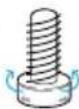
LockLoosen

text_image
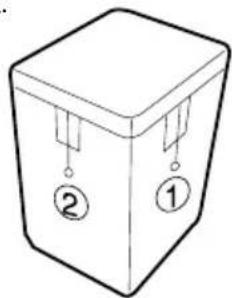
Water loosen- Adjust the side horizontally first and the front in same direction ② next.
- If the thread is not within the limit, adjust the height of the legs.

natural_image
Simple line drawing of a 3D box with labeled parts (no text or symbols beyond labels)
CONNECTING THE WATER SUPPLY HOSE
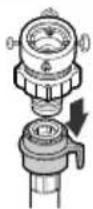
- Remove the adaptor from the water supply hose.

-
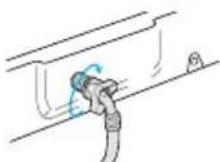
Connect the other end of the water supply hose to the inlet water valve at the back of the washer. Screw the hose clockwise all the way in.
-
First, using a "+" type screw driver, loosen the four screws on the adaptor. Next, take the adaptor and turn part(b) following the arrow for gap about 5mm between them.


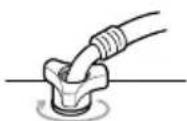
5-1. Connect the other end of the water supply hose to the inlet water valve at the top of the washer. Screw the hose clockwise all the way in.
- Connect adaptor to the water tap by tightening the screws firmly. Then, turn part (b) following the arrow and put (a) and (b) together.


If the water tap is a screw type, assemble a water supply hose that fits to the tap as shown.
- Connect the water supply hose to the adaptor. Pull down the part (c) of the water supply hose .When the part (c) is released, the hose is automatically connected to the adaptor making a 'click' sound.
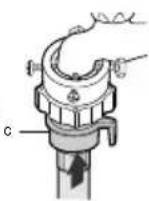
NOTICE After completing connection, if water leaks from the hose, then repeat the same steps. Use the most conventional type of faucet for water supply. In case the faucet is square or too big, remove the spacing ring before inserting the faucet into the adaptor.
ASSEMBLING THE RAT PROTECTION PANEL
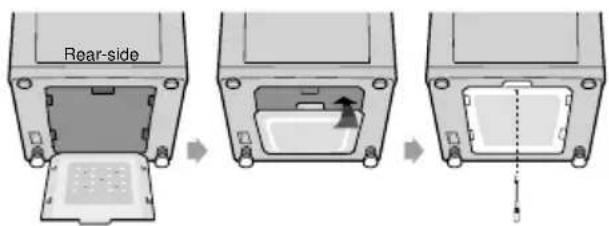
Tilt the washer a little and lift up the panel until it clicks, finally fix the panel with screw to the base as shown in the figure.
text_image
Rear-side-
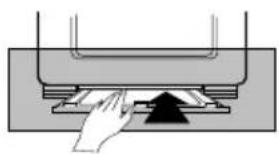
Insert the sound absorbing panel to the assembling hole on back side to the end.
-
If you have difficulty inserting the panel lift up the washer a little and insert it
natural_image
Diagram of a hand pressing down on a mechanical component (no text or symbols visible)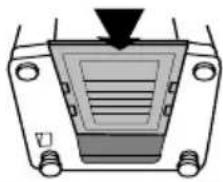
natural_image
Diagram of a vehicle front view showing a rectangular component with a downward arrow and internal lines, no text or symbols present.IN CASE OF PUMP-DRAINED WASHER

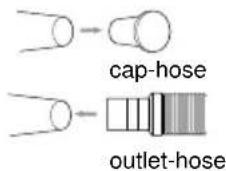
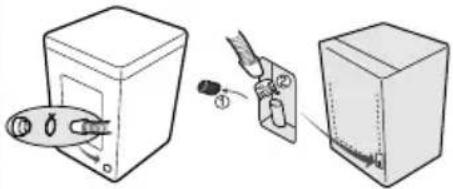
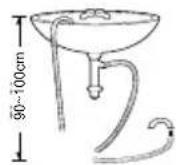
Take out the cap-hose and connect the outlet-hose.
Be sure to join tightly the drain hose into the drain-outlet on the back of the machine.
Be sure to join tightly the drain hose into the drain-outlet on the side of the machine.
Install the drain hose in the position of about 90\~100cm above the ground.
text_image
Diagram showing three steps of a device installation: adding a plug into a box, adding a tool to a battery, and finally adding a switch.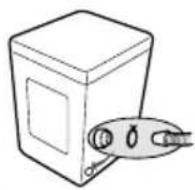
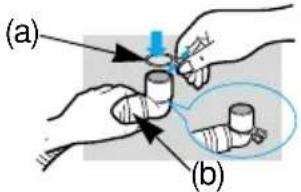
CONNECTING THE DRAIN HOSE

After pressing the joint ring(a), insert the drain hose(b) to drain direction.
text_image
(a) (b)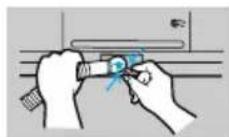
HOW TO ADD THE FABRIC SOFTENER

- When a proper amount (one time does) of fabric softener is stored in the softener inlet, it is automatically put in at the last rinsing cycle.
- Do not use detergent, bleach or starch into the Softener Inlet.
-
Using too much softener may produce unsatisfactory results.
-
Do not open the lid during the Spin Dry cycle. If added too early, its effectiveness will decrease.
- Do not leave the softener into the Softener Dispenser for a long time. Because softener became stiff.
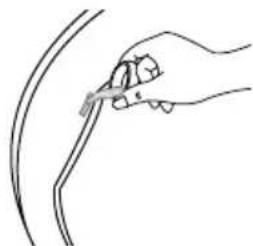
natural_image
Line drawing of a hand holding a pen over a curved line (no text or symbols)HOW TO PUT THE DETERGENT IN

- Open the detergent box by pulling in the direction of the arrow as shown in the figure and then put the powder detergent in the detergent box.
- Put in one-time amount of detergent evenly so the detergent may not brim over the box.
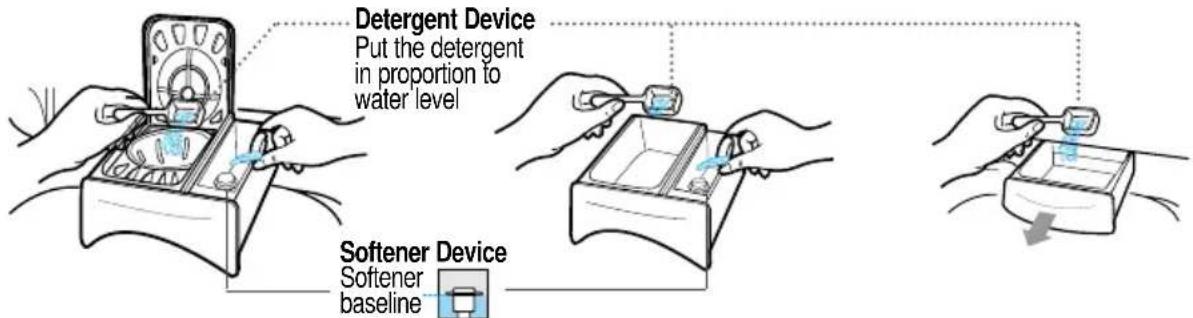
text_image
Detergent Device Put the detergent in proportion to water level Softener Device Softener baselineCAUTION : If softener is stored over the above base line, it may flow down at any time.
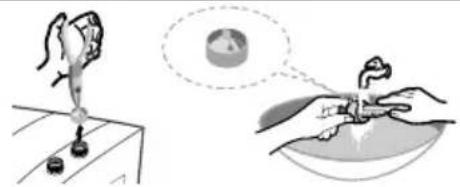
WATER SUPPLY CONNECTOR FILTER
natural_image
Illustration showing a hand pouring liquid into a container with a magnified view of the container (no text or symbols)- Pull out the filter and wash well.

text_image
inlet water valve- Pull in the filter and connect the hose to the inlet water valve tightly.

natural_image
Simple line drawing of a hand pouring liquid into a mechanical component (no text or symbols)- Check if there is a leakage. Note to tighten up the connector.
➢ CLEANING THE FILTER NET Clean the filter net often to keep the washer clean.

natural_image
Hand holding a mobile phone with a scroll, no visible text or symbols- Push the upper part of the filter and pull in.
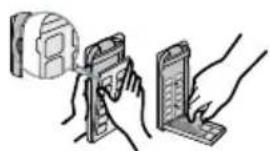
natural_image
Illustration of hands holding a device with a magnified view (no text or symbols)- Open the cover as shown in the figure.

- Clean the filter. 4. Close the cover and insert the lower part of the filter in the basket first and then push the filter with "click" sound.
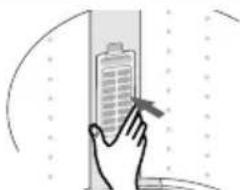
natural_image
Illustration of a hand interacting with a building inside a vertical window (no text or symbols)lower part of the filter in the basket first and then push the filter with "click" sound.
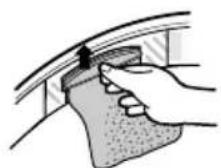
- Push up and pull out the filter net.

- Remove the collected lint from the filter net.
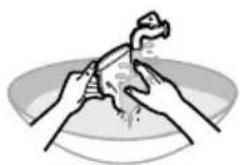
natural_image
Illustration of hands performing a manual task on a curved object (no text or symbols present)- Clean the filter. 4.
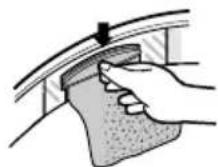
Pull down the filter net.
HOW TO CLEAN THE FILTER

-
Place a rag under the washer filter not to wet the floor.
-
Rotate the filter counterclockwise and pull out the filter.
-
Remove dirt and rotate the filter clockwise until it locks in position.
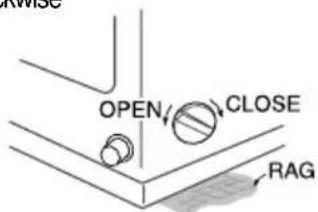
text_image
RAG OPEN CLOSE RAG(pump drained washer)
- Place a rag under washer filter not to wet the floor.
2.Turn the filter-cap to the left.
-
Take the filter out and remove dirt s.
-
Reassemble in reverse order.

text_image
REAR SIDE FILTER CLOSE OPEN RAGHOW TO ASSEMBLE THE LEGS

-
Check the 4 Legs.(Front-right. Front-left. Rear-right. Rear-left)
-
Lay down the Washing Machine to the front.
-
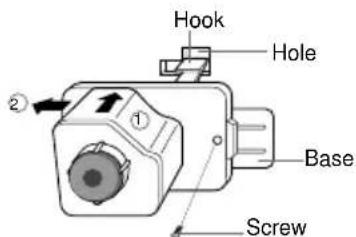
Insert the hook of leg in to the square hole of base.
-
Push the leg to the arrow direction to "Click".
-
Finally fix the legs on the base with screw like a figure.
text_image
Hook Hole Base ScrewTROUBLESHOOTING
Washing machine won't work
Is the water tap opened?
Is the washer plugged in?
Is the power cut off?
Is there enough water?

Water dose not drain
Is the drain hose down?(No pump) Is the drain hose frozen?
Is the drain hose clogged?
If the water dose not drain in 15 minutes, a buzzer will sound, and the remaining time indicator will show "5E".


Water is not supplied
Is the water tap opened?
Is the water cut off?
Is the water supply hose or hose connection clogged?
Is the water tap frozen?
If water is not supplied in 1 hour, a buzzer will sound, and the remaining time indicator will show "4E".

text_image
4E ura➤ Spinning does not work
Is the laundry spread out evenly in the washer?
Is the washer set on a sturdy flat surface?


natural_image
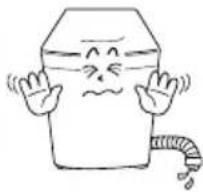
Cartoon illustration of a smiling cube character with arms raised, next to a coiled snake (no text or symbols)Water is overflowed
Restart after spinning.
If the error sign still indicates, call agency.


IN CASE THE NEED FOR SERVICING ARISES.
If any problem occurs with your products, do not hesitate to call any nearby. Name, address, telephone number is required.

text_image
SAMSUNGSPECIFICATIONS
| POWER CONSUMPTION | WASH | 426W | STANDARD WATER LEVEL | HIGH | 75 l |
| SPIN | 270W | MED | 55 l | ||
| LOW | 42 l | ||||
| DIMENSIONS(mm) | W599xD637xH968 | EXTRA LOW | 31 l | ||
| WEIGHT | 48 kg | WATER USAGE | 202 l | ||
| WATER PRESSURE | 0.05~0.78 MPa (0.5 ~ 8.0 kg·f/cm2) | PULSATOR ROTATING SPEED | 100 rpm | ||
| WASHING TYPE | Stirring Type | SPIN SPEED | 680 rpm | ||