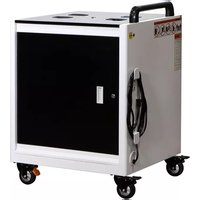
AC-GO - Mobile Device Charger Anywhere Cart - Free user manual and instructions
Find the device manual for free AC-GO Anywhere Cart in PDF.


| Product Type | 32-Device Smart Charging Cart |
| Compatible Devices | Chromebooks or tablets up to 14" |
| Dimensions (H x W x D) | 37" x 29" x 26" |
| Product Weight | 128 lbs |
| Shipping Weight | 137 lbs |
| AC Input | 120V AC, 60 Hz |
| Maximum Current | 14A total (1400W per side) |
| Charging System | Intelli-Sense Smart Charger with automatic load sensing |
| Number of Outlets | 16 outlets per side (Group A and Group B) |
| Carry Capacity | 32 devices (up to 4 per basket, 8 baskets total) |
| Locking Mechanism | Locking top doors and top door lock |
| Caster Type | 4 locking casters (black tab) and 4 directional casters (orange tab) |
| Warranty - Frame | Lifetime |
| Warranty - Components | 2 years |
| Warranty - Electronics | 2 years |
| Safety Features | Overload protection, external power button, internal power switch, mode selection switch |
| Recommended Use | Only adults should move the cart; do not allow children to climb or move |
| Cleaning Instructions | Wipe with a dry cloth; do not place liquids on or near the cart |
| Spare Parts Available | Power cord (part #1320399), external power button (part #1321375), power strips |
Frequently Asked Questions - AC-GO Anywhere Cart
User questions about AC-GO Anywhere Cart
0 question about this device. Answer the ones you know or ask your own.
Ask a new question about this device
Download the instructions for your Mobile Device Charger in PDF format for free! Find your manual AC-GO - Anywhere Cart and take your electronic device back in hand. On this page are published all the documents necessary for the use of your device. AC-GO by Anywhere Cart.
USER MANUAL AC-GO Anywhere Cart
natural_image
Exterior view of a modern office building (no signage)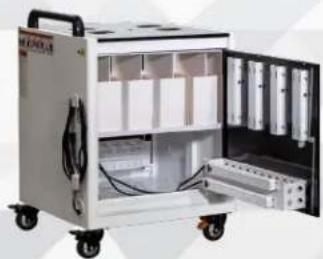
natural_image
Interior view of a white industrial machine with open doors and internal compartments (no visible text or symbols)
AC-GO
32 DEVICE SECURE SMART CHARGING CART
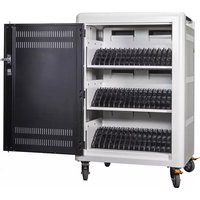
The AC-GO is designed to charge & store up to 32 Chromebooks or tablets up to 14". Please review this guide before installing devices and to learn how to safely use your cart.
AC input: 120V AC 60 Hz | Max amps: 14A
natural_image
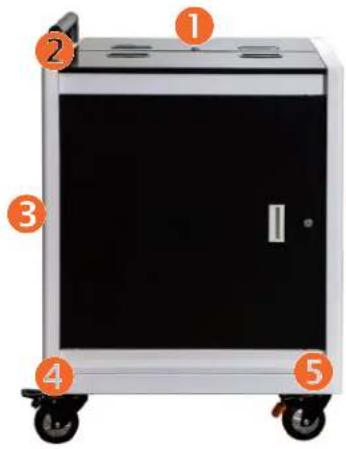
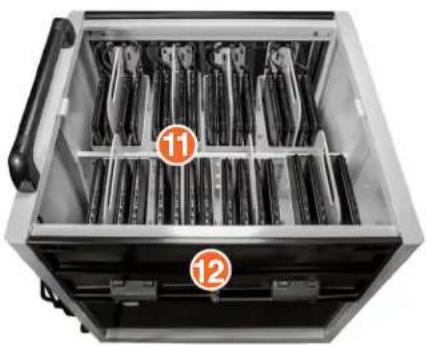
Interior view of a mechanical device with numbered compartments (11 and 12) showing internal components (no text or symbols on the device itself)Front of Cart (closed)
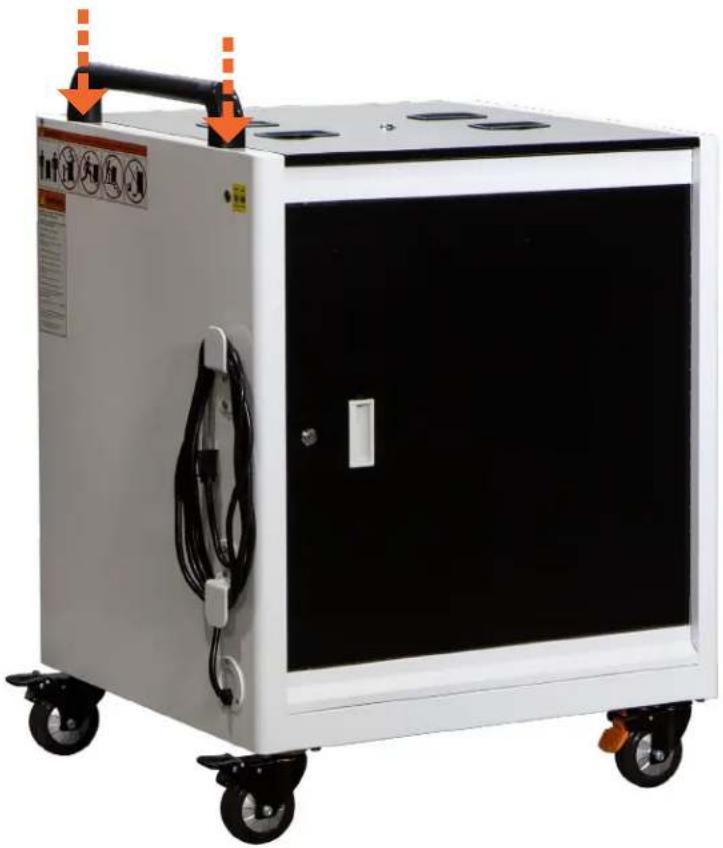
1 Locking Top Doors
② Handle
3 Power Cord
4" Locking Casters (Black tab)
5 4" Directional Casters (Orange tab)
DIMENSIONS
Height: 37"
Width: 29"
Depth: 26"
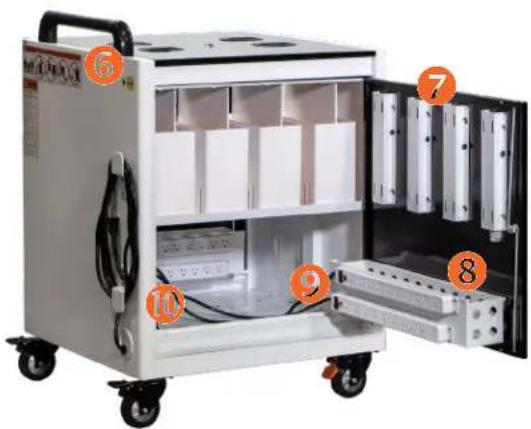
Side of Cart (open)
6 External Power Button
7 Cable Management Guides
8 AC Adapter Basket (1 per side)
9 Power Strips
10 INTELLI-SENSE Smart Charger
Top of Cart (open)
11 8 Carry Out Baskets (Shown with devices, not included)
12 Top Door Lock
WEIGHT
| Product Weight: | 128 lbs. |
| Shipping Weight: | 137 lbs. |
Specifications subject to change without notice.

WARNING
THIS IS NOT A TOY. ALWAYS FOLLOW SAFETY PRECAUTIONS.
ONLY ADULTS should move the cart.

natural_image
Two human silhouettes standing beside a small cart, no text or symbols presentDO NOT allow children to move or climb.

DO NOT ride or run with the cart.

DO NOT attempt to move downstairs.

natural_image
Prohibition sign showing a person pushing a staircase with a red circle (no text or symbols)DO NOT place liquids on or near the cart.


IMPORTANT
THE ELECTRICAL SYSTEM IS DESIGNED TO HANDLE A MAXIMUM OF 1400 WATTS per side. If wattage exceeds 1400W at one time, charging system may not operate correctly. Remove devices until the total wattage is under 1400W.

WARNING
- THIS IS NOT A TOY. CHILDREN SHOULD NEVER MOVE OR CLIMB THE CART!
• ONLY ADULTS should move the cart.
- NEVER climb, sit on or tilt the cart.
- ALWAYS move the cart slowly and be aware of your surroundings.
- ALWAYS latch doors before moving the cart.
- DO NOT use the power cord to pull the cart.
- DO NOT roll the cart over the power cord.
- DO NOT touch any part of the electrical system while plugged in.
- DO NOT place liquids on or near the cart.
- DO NOT use an extension cord with this unit.
- DO NOT plug in the cart if the switch, receptacles, or power cord are broken, cracked, torn or inadequately repaired.
- Repairs should always be performed by a qualified electrician.
- Set the power switch to the OFF position before you unplug the unit from the wall, plug the unit into the wall, or plug in devices.
- If external devices are set on top of the cart, remove them before rolling cart around.
For warranty claims, please have the following information ready, then visit www.anywherecart.com/support to create a help ticket.
Serial Number:
Charging System Type:
Date Of Purchase:
Reseller Name:
PO Number:
Locate the narrow cardboard box containing the handle rod, handle bolts, mounting brackets & hex wrenches.
2 Locate the threaded holes for the handle on top of the cart

Using the larger hex wrench, attach and tighten both the left and right side handle mounting bracket to the cart using 4 large bolts.
4Fit the handle rod between the bracket and tighten using the smaller hex wrench and handle bolts.
natural_image
Exterior view of a white industrial vacuum cleaner with attached electrical cable and control panel (no visible text or symbols)THE ELECTRICAL SYSTEM IS DESIGNED TO HANDLE A MAXIMUM OF 14 AMPS.

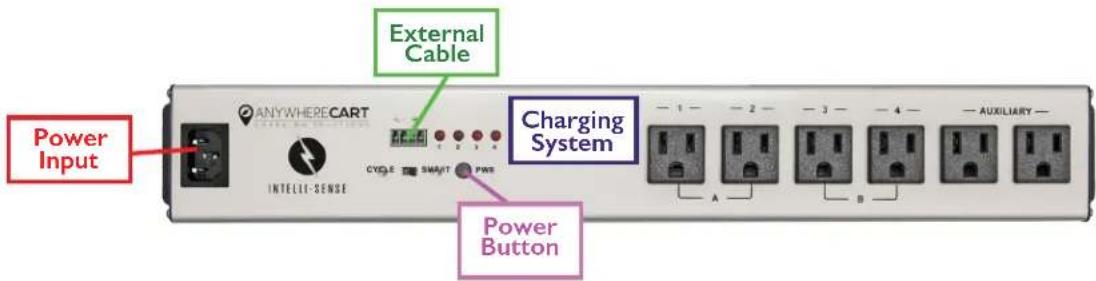
① Power Input ② Internal Power Button
③ Mode Selection Switch ④ External Cable Port
5 Cycle Outlets "A" 6 Cycle Outlets "B" 7 Auxiliary Outlets (Always ON)
QUICK START TIPS
I. Plug in device adapters so there are an equal number of devices in Group A and Group B.
2. Make sure the Mode Selection Switch is set to "SMART" mode.
3. Plug in cart.
The Intelli-Sense timer will automatically sense the charging needs of the cart and start charging in the most efficient and quickest method.
Within 5 seconds of plugging in your cart's power cord, your INTELLI-SENSE Smart Charging System will initiate an test of your devices charging level requirements.
Devices which are plugged into power strips that draw the most power will take priority and can take up to 2 hours before switching to the next set of outlets. Once devices are fully charged, the system will remain in a trickle charging state, maintaining your devices battery levels.
With Mode Selection Switch set to SMART:

bar
Group Outlets "A" Group Outlets "B" | Category | Amp Load (A) | Amp Load (B) | | :--- | :--- | :--- | | Group 1 | 7 | OFF | | Group 2 | ON | OFF | | Group 3 | 5 | OFF | | Group 4 | 5.5 | OFF | | Group 5 | 5.5 | OFF | | Group 6 | 5 | OFF | | Group 7 | 4.5 | OFF | | Group 8 | ON | OFF | | Group 9 | 4.5 | ON | | Group 10 | ON | ON |Group Outlets "A" and Group Outlets "B" power on for 8 seconds in sequence then enter the following modes depending on current draw.
If the total current draw is greater than 9A:
The group outlets with the highest current draw will power on, while the group with less current draw remains OFF. Once the current draw difference is within 0.5A, the system will switch to the other group. When the total current is less than 9A, all outlets will power on at the same time.
If the total current draw is less than 9A:
Group "A" and Group "B" power on at the same time. The total output is continuously monitored in case a new device is added.
NOTE: If wattage exceeds 14 Amps or about 1400 Watts at one time, the charging system may not operate correctly. Review your device's AC Adapter wattage, multiplying it by 16.
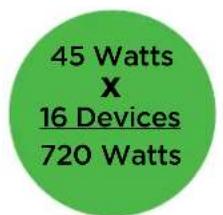
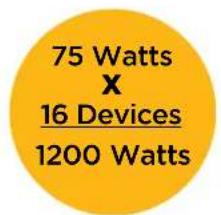

1 Open the Locking Top Doors of your cart and remove all 8 Carry Out Baskets. Place 4 devices in each basket, ensuring charging ports are on the same side.

natural_image
White rectangular storage unit with black vertical bars and a handle, no visible text or symbols3 Hook the Removable AC Adapter Basket onto door and locate the Cable Management Guides.

natural_image
Interior view of a white industrial machine with open doors and internal compartments, showing no visible text or symbols.5 With Carry Out Basket in place, plug (DC) cord into all devices on the right side. Use a cable tie to group cords together.

natural_image
Close-up of cable connectors and electronic devices mounted on a cabinet (no visible text or symbols)2 Open a side door and locate the AC Adapter Basket. Lift it up off the door, place up to 16 adapters in basket and plug them into the power strips.

natural_image
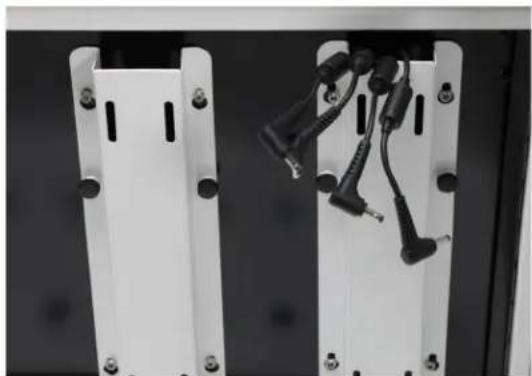
Interior view of a white industrial machine with open doors and internal compartments, showing no visible text or symbols.4 Pull up, then forward to remove Guide. Place 4 device (DC) power cords into each Guide. Re-mount Guide to door and tighten the thumbscrews.
natural_image
Close-up of two white electronic device panels with black connectors and screws, no visible text or symbols6 Repeat steps 1-6 for other side of cart.

natural_image
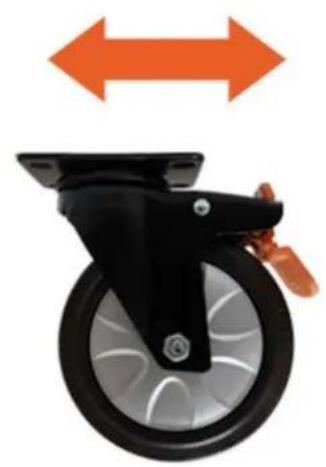
Exterior view of a white industrial machine with open doors and internal compartments (no visible text or symbols)Your cart is equipped with Casters that have an "Orange" color foot pedal.
① Engage the Directional Locking Casters by pressing the orange foot pedal down. Your cart will now easily track in a straight line.
2 Release the Direction Lock by lifting up on the foot pedal. The cart will have its full swivel motion restored.
Directional Locking
natural_image
Close-up of a black and silver bicycle control wheel with orange bidirectional arrows indicating motion (no text or symbols)Press the BLACK foot pedal to lock the wheels and keep the cart in place

Full Swivel

natural_image
Black and silver bicycle steering wheel with orange star-shaped graphic above (no text or symbols)Release the BLACK foot pedal for a precise, swivel motion
- In the Classroom
- Tight Spaces
- Short Distances

Release the ORANGE foot pedal for a precise, swivel motion
- In the Classroom
- Tight Spaces
- Short Distances
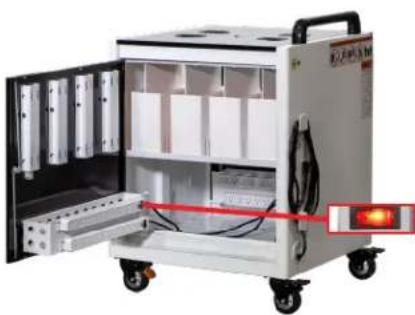
External LED Button is flashing green and devices are not charging
Overload Protection Mode has been activated.
Verify devices don't exceed 1400 watts at one time by multiplying your device's AC adapter wattage by 16.
3 Reduce the number of devices if necessary and resume charging.

Testing the Power Cord
Power Cord - Part # 1320399
Check the main Power Cord into the Power Input port located on the left side of the Charging System to verify it is secure.
Plug the cart into a wall outlet and press the internal Power Button labeled PWR directly on the Charging System.
If the system does not power on, test your Power Cord by removing it and plugging in a PC monitor style IEC Power Cord.

Testing the Power Strips
Open the side panel doors and locate the Power Strips.
Verify each switch is in the "RESET" position, not the "OFF" position.
Using an extension cord, test each Power Strip by unplugging each cord
from the charging system and plugging them into the extension cord.
If one or more Power Strips no longer works, replace as needed.
natural_image
Exterior view of a portable industrial machine with open doors and internal compartments, no visible text or symbolsTesting the External Power Button
External Power Button - Part # 1321375
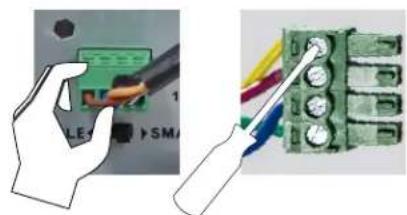
With your cart plugged in, open the rear panel door and press the internal Power Button labeled PWR on the charging system.
If your cart powers on, unplug the External Cable from Charging System.
3. Using a small flat head screwdriver, ensure all individual wires are secure.
Cug the External Cable back in and press the External Power Button.
If the External Power Button does not light up or power on, replace it.
natural_image
Illustration showing a hand using a power tool to switch an electronic component (no text or symbols visible)Limited Warranty
- The terms below shall have the following definitions for purposes of this Warranty:
"Client" means the original party purchasing the Products from Anywhere Cart or from an authorized dealer to sell Anywhere Cart branded products.
"Components" mean the mechanical components of a Product including the wheels, locks, drawer slides and hinges.
"Electronics" mean the electronic timer, Sync station and power strips. Cords and switches are not warranted.
"Frame" means the main frame or chassis of a Product.
"Products" means any goods and any related services to be supplied by Anywhere Cart to the Client pursuant to the Acceptance of an Order and any other goods or services which Anywhere Cart supplies to the Client from time to time.
Anywhere Cart warrants that the Products to be supplied to Client are free from defects in material and workmanship under normal use and service for which they were intended if, but only if, the Products have been properly installed and operated. Anywhere Cart's obligation under this Warranty is limited to only supplying replacement part(s) for any part(s) which are returned and found to be defective, provided that such part(s) are returned to Anywhere Cart within the following Warranty Period:
a. With regard to the Frame, the Warranty Period shall be for the life of the Product to Client.
b. With regard to Components, the Warranty Period shall be for a period of two (2) years from the date of delivery of the Product to Client.
c. With regard to Electronics, the Warranty Period shall be for a period of two (2) years from the date of delivery of the Product to Client.
Except as prohibited or limited by applicable law, Anywhere Cart does not warrant that the Products meet the requirements of any safety code of any country, state, municipality, or other jurisdiction, and Client assumes all risk and liability whatsoever resulting from the use thereof, whether used singly or in combination with other machines or apparatus. This Warranty shall not apply to any of Anywhere Cart's Products, or parts thereof, which have been repaired or altered, without Anywhere Cart's written consent, outside Anywhere Cart's facility or altered in any way so as, in the sole judgment of Anywhere Cart, to adversely affect the stability or reliability of the Products, or if such Products have been subject to misuse, negligence, or accident, or have been operated in a manner not in accordance with Anywhere Cart's printed instructions or have been operated under conditions more severe than, or otherwise exceeding, those set forth in the specifications for such Products.
EXCEPT AS PROHIBITED OR LIMITED BY APPLICABLE LAW, THIS WARRANTY AND THE OBLIGATIONS AND LIABILITIES OF Anywhere Cart ARE EXCLUSIVE AND IN LIEU OF WARRANTIES, GUARANTIES OR LIABILITIES, EXPRESS OR IMPLIED, INCLUDING ANY IMPLIED WARRANTY FOR MERCHANTABILITY, FITNESS FOR A PARTICULAR PURPOSE, ARISING BY LAW OR OTHERWISE OR WHETHER OR NOT OCCASIONED BY Anywhere Cart's NEGLIGENCE AND CLIENT HEREBY WAIVES ALL REMEDIES NOT EXPRESSLY PROVIDED IN THIS WARRANTY. THIS WARRANTY SHALL NOT BE EXTENDED, ALTERED OR VARIED EXCEPT BY A WRITTEN INSTRUMENT SIGNED BY Anywhere Cart AND CLIENT. REGARDLESS OF THE FAILURE OF THE SOLE AND EXCLUSIVE REMEDIES PROVIDED IN THIS WARRANTY, Anywhere Cart WILL NOT BE LIABLE FOR ANY SPECIAL, INCIDENTAL, INDIRECT OR CONSEQUENTIAL DAMAGES WHATSOEVER (INCLUDING, WITHOUT LIMITATION, DAMAGES FOR LOSS OF REVENUE, BUSINESS OR PROFITS, LOSS RESULTING FROM BUSINESS INTERRUPTION, LOSS OF BUSINESS INFORMATION, LOSS RESULTING FROM ANY CLAIM BY ANY THIRD PARTY, ANY LOSS DUE TO DAMAGE TO PROPERTY, AND INJURY TO OR DEATH OF ANY PERSONS RESULTING, DIRECTLY OR INDIRECTLY, FROM THE USE OR LOSS OF THE PRODUCTS OR ANY OTHER PECUNIARY LOSS) OF ANY KIND OR NATURE. Anywhere Cart NEITHER ASSUMES NOR AUTHORIZES ANY PERSON TO ASSUME FOR IT ANY OTHER LIABILITY IN CONNECTION WITH THE SALE OR USE OF THE PRODUCTS, AND THERE ARE NO ORAL AGREEMENTS OR WARRANTIES COLLATERAL TO OR AFFECTING THIS WARRANTY, THE EXCLUSION OF SPECIAL, INCIDENTAL, INDIRECT OR CONSEQUENTIAL DAMAGES IS AN INDEPENDENT AGREEMENT OF Anywhere Cart AND CLIENT APART FROM THE SOLE AND EXCLUSIVE REMEDIES PROVIDED IN THIS WARRANTY.
Client shall notify Anywhere Cart by registered or certified mail, return receipt requested, of a breach of this Warranty within thirty (30) days after discovery thereof, but not later than the expiration of the applicable Warranty Period, otherwise such claims shall be deemed waived.
- Limitations of Warranty.
Anywhere Cart makes no warranties to any third party. You are responsible for all claims, damages, settlements, expenses, and attorneys' fees with respect to claims made against You as a result of Your use or misuse of the Product. This warranty applies only if the Product is installed, operated, maintained, and used in accordance with Anywhere Cart specifications. Specifically, the warranties do not extend to any failure caused by (i) accident, unusual physical, electrical, or electromagnetic stress, neglect or misuse, (ii) fluctuations in electrical power beyond Anywhere Cart specifications, (iii) use of the Product with any accessories or options not furnished by Anywhere Cart or its authorized agents, or (iv) installation, alteration, or repair of the Product by anyone other than Anywhere Cart or its authorized agents.
- Disclaimer of Warranty.
Except As Expressly Provided Otherwise Herein And To The Maximum Extent Permitted By Applicable Law, Anywhere Cart Disclaims All Other Warranties With Respect To The Product, Whether Express, Implied, Statutory Or Otherwise, Including Without Limitation, Satisfactory Quality, Course Of Dealing, Trade Usage Or Practice Or The Implied Warranties Of Merchantability, Fitness For A Particular Purpose Or Noninfringement Of Third Party Rights.
- Limitation of Liability.
In no event shall Anywhere Cart be liable for indirect, incidental, special, exemplary, punitive, or consequential damages of any nature including, but not limited to, loss of profits, data, revenue, production, or use, business interruption, or procurement of substitute goods or services arising out of or in connection with this limited warranty, or the use or performance of any product, whether based on contract or tort, including negligence, or any other legal theory, even if Anywhere Cart has advised of the possibility of such damages. Anywhere Cart's total, aggregate liability for damages of any nature, regardless of form of action, shall in no event exceed the amount paid by you to Anywhere Cart for the specific product upon which liability is based.
- Governing Law and Your Rights.
This warranty gives You specific legal rights; You may also have other rights granted under state law. These rights vary from state to state.
- Warranty Period for Anywhere Cart Product Purchased:
AC-GO Lifetime Frame, 2 Years Components, 2 Year Electronics
- DEVICE SECURE SMART CHARGING CART
- Front of Cart (closed)
- Side of Cart (open)
- Top of Cart (open)
- WARNING
- THIS IS NOT A TOY. ALWAYS FOLLOW SAFETY PRECAUTIONS.
- IMPORTANT
- THE ELECTRICAL SYSTEM IS DESIGNED TO HANDLE A MAXIMUM OF 14 AMPS.
- QUICK START TIPS
- If the total current draw is greater than 9A:
- If the total current draw is less than 9A:
- External LED Button is flashing green and devices are not charging
- Testing the Power Cord
- Testing the Power Strips
- Testing the External Power Button
- Limited Warranty
Brand : Anywhere Cart
Model : AC-GO
Category : Mobile Device Charger