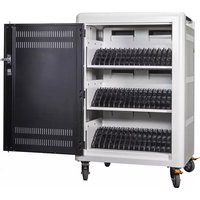
AC-45 - Mobile Device Charger Anywhere Cart - Free user manual and instructions
Find the device manual for free AC-45 Anywhere Cart in PDF.


| Product Type | Mobile Device Charger |
| Brand | Anywhere Cart |
| Model | AC-45 |
| Dimensions (approx.) | 10 x 5 x 2 cm |
| Weight (approx.) | 100 g |
| Input Voltage | AC 100-240 V, 50/60 Hz |
| Output Power | USB: 5 V / 2 A (max) |
| Charging Ports | 1 x USB-A |
| Charging Technology | Standard USB charging, overcharge protection |
| Compatibility | Smartphones, tablets, and other USB devices |
| Safety Features | Overcurrent, overvoltage, short circuit, and overheat protection |
| Operating Temperature | 0°C to 40°C |
| Storage Temperature | -20°C to 60°C |
| Material | Fire-resistant plastic, copper wiring |
| Maintenance | Wipe with a dry cloth; do not use liquids or abrasives |
| Cleaning Instructions | Unplug before cleaning; avoid moisture |
| Spare Parts Availability | Not available separately; replace unit if damaged |
| Repairability | Non-repairable; dispose of according to local regulations |
| Certifications | CE, RoHS, FCC (typical for such devices) |
| Package Contents | AC-45 charger, user manual |
| Warranty | 1 year (subject to local laws) |
Frequently Asked Questions - AC-45 Anywhere Cart
User questions about AC-45 Anywhere Cart
0 question about this device. Answer the ones you know or ask your own.
Ask a new question about this device
Download the instructions for your Mobile Device Charger in PDF format for free! Find your manual AC-45 - Anywhere Cart and take your electronic device back in hand. On this page are published all the documents necessary for the use of your device. AC-45 by Anywhere Cart.
USER MANUAL AC-45 Anywhere Cart
THANK YOU FOR CHOOSING ANYWHERE CART!
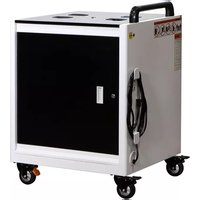
The AC-PLUS and AC-PLUS-T are designed to charge and store up to 36 Chromebooks, tablets, and laptops. The AC-45 is designed to charge and store up to 45 Chromebooks, tablets, and laptops.
Please review this manual before installing your equipment to learn how to safely use your cart.
AC input: 120V AC 60 Hz
Max amps: 12A
Max wattage: 1875W
IDENTIFYING COMPONENTS
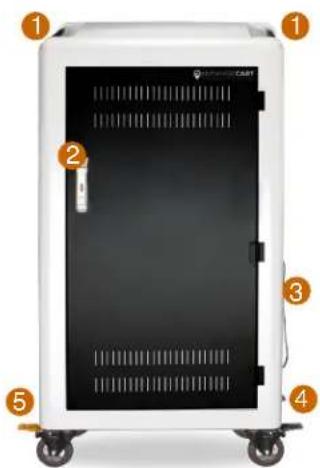
Front of Cart (closed)
- Push Handle
- Door Lock Latch w/Padlock Flange
- Power Cord w/ Wrap Brackets
- 4" Swivel / Lock Casters (2)
- 4" Swivel / Directional Casters (2)

natural_image
White portable electronic device with black doors and rack-mounted accessories, no visible text or symbolsFront of Cart (open)
- Device Cord Pass-Thru
- Door Hinges
- Door Lock Latch
- Removable Dividers
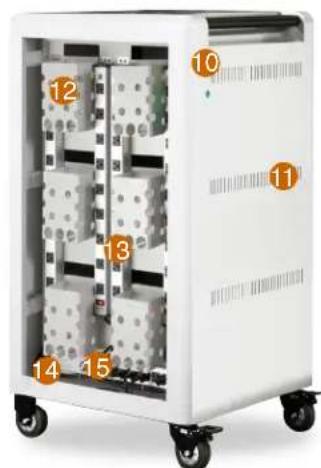
Back of Cart (open)
- External Illuminated LED Power Button
- Air Flow Vents
- AC Adapter Baskets
- Power Outlet Strips
- In-line GFCI Circuit
- Cycle Timer (AC-PLUS only)
- INTELLI-SENSE Smart Charger (AC-PLUS-T, AC-45 only)


Model:
Serial Number:
Charging System:
Date Of Purchase:
Reseller Name:
Customer ID:
SETTING UP YOUR DEVICES UP FRONT
Device slots come set at around 1" wide and are removable to fit larger device width.
- Using a ruler, measure the thickest part of your device. If it is less than 1" thick, skip to next page.

natural_image
Exterior view of a modern laptop with a golden ruler beside it (no visible text or symbols)- Slide Retaining Strip forward & out of the way. Strip can be removed if needed.
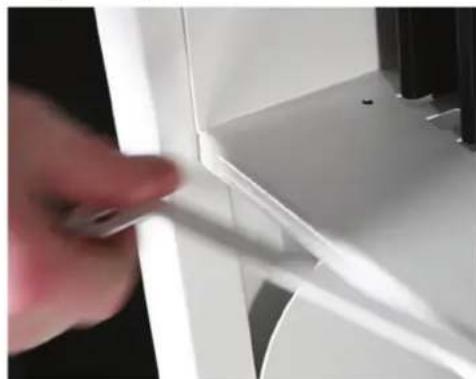
natural_image
Close-up of a hand holding a white plastic clip against a white background (no text or symbols visible)- Adjust spacing as needed.

natural_image
Hand inserting a black plastic clip into an open electrical panel (no text or symbols visible)- If your device is thicker than 1", locate & remove thumbscrew by turning counter clockwise.

natural_image
Close-up of a hand adjusting a white panel with black connectors (no visible text or symbols)- Pulling forward, then up, remove divider panel.

natural_image
Close-up of a hand holding a black mechanical component with zigzag patterns (no visible text or symbols)- Slide retaining metal strip into place & replace thumbscrew.

natural_image
Close-up of a hand inserting black connectors into a rack-mounted server rack (no visible text or symbols)SETTING UP YOUR DEVICES IN BACK
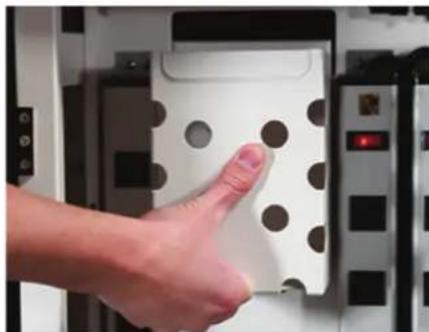
- Remove basket by pulling forward first, then pull upward.
natural_image
Hand pressing a button on a white electronic device panel with circular holes (no visible text or symbols)- If your device power adapters are "brick" style, feed power cables thru holes.

natural_image
Close-up of hands assembling a black electronic component with a white die-like block nearby (no visible text or symbols)- Feed device cables into pass-thru slots to front of cart.

natural_image
Close-up of hands holding black electrical connectors with metal fittings (no visible text or symbols)-
Use the supplied Cable Clips to fasten each cable to the divider by pressing down firmly, securing the cable in place.
-
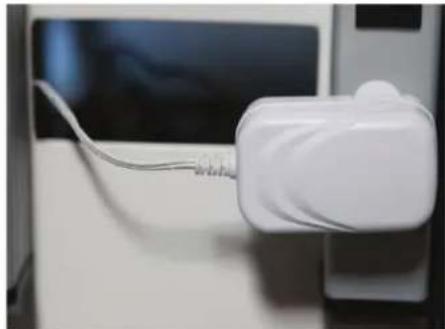
If your device uses "wall wart" style adapters, plug into outlets then skip to step 5.
natural_image
Close-up of a white electronic device with a cable inserted into it, next to a dark screen (no visible text or symbols)- Hook basket(s) back in place & plug power cables into outlets.

natural_image
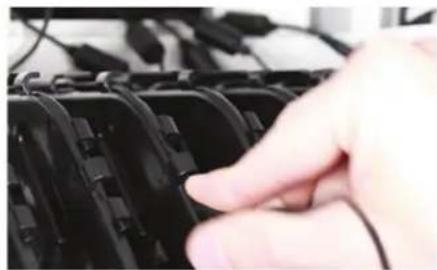
Close-up of a hand holding a black electronic device with multiple ports and a perforated panel (no visible text or symbols)- Working up front, weave device cables into divider tabs.
natural_image
Close-up of a hand inserting black plastic clips into a rack (no text or symbols visible)
natural_image
3D diagram of a black plastic enclosure with white cutouts and two red arrows pointing to the top panel (no text or symbols)
AC-PLUS 15 MINUTE CYCLE TIMER
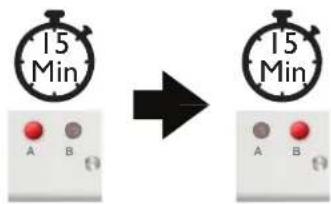
The AC-PLUS is equipped with a 15 Minute Cycle Timer Charging System. Its designed to simplify charging your devices without complicated mode settings or adjustments.

Within 5 seconds of plugging in your cart's power cord, the 15 Minute Cycle Timer on the AC-PLUS will charge half of the devices in your cart at once. It will begin to charge devices which are plugged into power strips on the "A" circuit. Then, after 15 minutes, devices which are on the "B" circuit will charge. This continuous cycle will remain in operation until your cart's External Illuminated LED Power Button is pressed and no longer illuminates.
- Power Cord Inlet
- Internal Power Button
- LED Indicators
-
External Switch Cable
-
Cycle Outlets "A"
- Cycle Outlets "B"
- Auxiliary Outlets (Always ON)

INTELLI-SENSE
AC-PLUS-T & AC-45 SMART CHARGING SYSTEM
The AC-PLUS-T and AC-45 are equipped with the INTELLI-SENSE Smart Charging System. Its designed to more efficiently charge your devices while also creating a plug and play environment.

Within 5 seconds of plugging in your cart's power cord, your INTELLI-SENSE Smart Charging System will initiate an test of your devices charging level requirements. Devices which are plugged into power strips that draw the most power will take priority and can take up to 2 hours before switching to the next set of outlets. Once devices are fully charged, the system will remain in a trickle charging state, maintaining your devices battery levels.
If you prefer, a 30 Minute Cycle Mode is available by switching the Mode Selection Switch to the LEFT. This will start to charge devices which are on the "A" circuit. After 30 minutes, devices which are on the "B" circuit will charge. This continuous cycle will remain in operation until your cart's External Illuminated LED Power Button is pressed and no longer illuminates.
- Power Cord Inlet
- Internal Power Button
- Mode Selection Switch
- External Switch Cable
-
LED Indicators
-
Cycle Outlets "A"
- Cycle Outlets "B"
- Auxiliary Outlets (Always ON)
ELECTRICAL TROUBLESHOOTING
IDENTIFYING COMPONENTS

Step 1: Testing the GFCI Module
- With your cart plugged in, open the rear panel door.
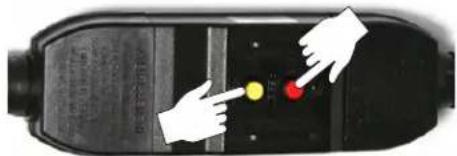
- Locate the GFCI Module on the left side bottom of your cart.
- Press down on the Yellow Button (Test).
- Then press the Red Button (Reset).
- Allow 5 seconds for the Charging System to reset.
- If resetting the GFCI Module did not correct the issue, go to Step 2.
Part # 1322859
Step 2: Testing the Power Cord
- Unplug your cart and remove cords from both ends of the GFCI Module.
- Plug the main Power Cord into the Power Input port located on the left side of the Charging System.
- Plug the cart back into a wall outlet and press the internal Power Button labeled PWR on the Charging System.
- If the system does not power on, verify that your Power Cord is not damaged by plugging in a PC monitor style IEC-320-C13 Power Cord.
- If the system powers on, replace the Power Cord, otherwise go to Step 5.
Part # 1320399

Step 3: Testing the Power Strips
- Open the rear panel door and locate the 4 vertically mounted Power Strips.
- Verify each switch is in the "RESET" position, not the "OFF" position.
- Using an extension cord, test each Power Strip by unplugging each cord from the charging system and plugging them into the extension cord.
- If one or more Power Strips no longer works, replace as needed.

natural_image
Two identical electrical outlet cables with a red indicator light on top, no visible text or symbols9 Outlet Power Strip for AC-PLUS, AC-PLUS-T
12 Outlet Power Strip for AC-45
Part # 1320953
Part # 1323853
ELECTRICAL TROUBLESHOOTING
Step 4: Testing the External Power Button
Part # 1321375
- With your cart plugged in, open the rear panel door and press the internal Power Button labeled PWR on the charging system.
- If your cart powers on, unplug the Switch Cable from the Charging System.
- Using a small flat head screwdriver, ensure all individual wires are secure.
- Plug the Switch Cable back into the Charging System then press the External Power Button on the side of your cart.
- If the External Power Button does not light up or power on, replace it.

natural_image
Three-step diagram showing hands using a tool to adjust circuit components: battery, switch, and push button (no text or symbols)Step 5: Determining your Model Number
- Find the model name and serial number sticker. This sticker may be on the side or back.
- Determine which Charging System is installed by opening the back door / panel.

Step 6: Testing the Charging System
15 Minute Timer for AC-PLUS Only
Part # 1323198

- Remove all plugs from the outlets of your Charging System.
- Power on your system by pressing the internal Power Button.
- Verify the "A" LED illuminates for 15 minutes.
- Then verify the "B" red LED illuminates for 15 minutes.
- If either does not, replace the Charging System.
Intelli-Sense Smart Charging System
For AC-PLUS-T For AC-45 only
Part # 1323152 Part # 1323855

- Remove all plugs from the outlets of your Charging System.
- Power on your system by pressing the internal Power Button.
- Verify the "1" and "2" LEDs illuminate for about 10 seconds.
- Verify the "3" and "4" LEDs illuminate for about 10 seconds.
- Finally, verify all four LEDs illuminate for about 10 seconds.
- If this sequence does not occur, replace the Charging System.

flowchart
graph LR
    A["10 Sec"] --> B["10 Sec"]
    B --> C["10 Sec"]
LIMITED WARRANTY
- The terms below shall have the following definitions for purposes of this Warranty:
"Client" means the original party purchasing the Products from Anywhere Cart or from an authorized dealer to sell Anywhere Cart branded products.
"Components" mean the mechanical components of a Product including the wheels, locks, drawer slides and hinges.
"Electronics" mean the electronic timer, Sync station and power strips. Cords and switches are not warranted.
"Frame" means the main frame or chassis of a Product.
"Products" means any goods and any related services to be supplied by Anywhere Cart to the Client pursuant to the Acceptance of an Order and any other goods or services which Anywhere Cart supplies to the Client from time to time.
Anywhere Cart warrants that the Products to be supplied to Client are free from defects in material and workmanship under normal use and service for which they were intended if, but only if, the Products have been properly installed and operated. Anywhere Cart's obligation under this Warranty is limited to only supplying replacement part(s) for any part(s) which are returned and found to be defective, provided that such part(s) are returned to Anywhere Cart within the following Warranty Period:
a. With regard to the Frame, the Warranty Period shall be for the life of the Product to Client.
b. With regard to Components, the Warranty Period shall be for a period of two (2) years from the date of delivery of the Product to Client.
c. With regard to Electronics, the Warranty Period shall be for a period of two (2) years from the date of delivery of the Product to Client.
Except as prohibited or limited by applicable law, Anywhere Cart does not warrant that the Products meet the requirements of any safely code of any country, state, municipality, or other jurisdiction, and Client assumes all risk and liability whatsoever resulting from the use thereof, whether used singly or in combination with other machines or apparatus. This Warranty shall not apply to any of Anywhere Cart's Products, or parts thereof, which have been repaired or altered, without Anywhere Cart's written consent, outside Anywhere Cart's facility or altered in any way so as, in the sole judgment of Anywhere Cart, to adversely affect the stability or reliability of the Products, or if such Products have been subject to misuse, negligence, or accident, or have been operated in a manner not in accordance with Anywhere Cart's printed instructions or have been operated under conditions more severe than, or otherwise exceeding, those set forth in the specifications for such Products.
EXCEPT AS PROHIBITED OR LIMITED BY APPLICABLE LAW, THIS WARRANTY AND THE OBLIGATIONS AND LIABILITIES OF Anywhere Cart ARE EXCLUSIVE AND IN LIEU OF WARRANTIES, GUARANTIES OR LIABILITIES, EXPRESS OR IMPLIED, INCLUDING ANY IMPLIED WARRANTY FOR MERCHANTABILITY, FITNESS FOR A PARTICULAR PURPOSE, ARISING BY LAW OR OTHERWISE OR WHETHER OR NOT OCCASIONED BY Anywhere Cart's NEGLIGENCE AND CLIENT HEREBY WAIVES ALL REMEDIES NOT EXPRESSLY PROVIDED IN THIS WARRANTY. THIS WARRANTY SHALL NOT BE EXTENDED, ALTERED OR VARIED EXCEPT BY A WRITTEN INSTRUMENT SIGNED BY Anywhere Cart AND CLIENT. REGARDLESS OF THE FAILURE OF THE SOLE AND EXCLUSIVE REMEDIES PROVIDED IN THIS WARRANTY, Anywhere Cart WILL NOT BE LIABLE FOR ANY SPECIAL, INCIDENTAL, INDIRECT OR CONSEQUENTIAL DAMAGES WHATSOEVER (INCLUDING, WITHOUT LIMITATION, DAMAGES FOR LOSS OF REVENUE, BUSINESS OR PROFITS, LOSS RESULTING FROM BUSINESS INTERRUPTION, LOSS OF BUSINESS INFORMATION, LOSS RESULTING FROM ANY CLAIM BY ANY THIRD PARTY, ANY LOSS DUE TO DAMAGE TO PROPERTY, AND INJURY TO OR DEATH OF ANY PERSONS RESULTING, DIRECTLY OR INDIRECTLY, FROM THE USE OR LOSS OF THE PRODUCTS OR ANY OTHER PECUNIARY LOSS) OF ANY KIND OR NATURE. Anywhere Cart NEITHER ASSUMES NOR AUTHORIZES ANY PERSON TO ASSUME FOR IT ANY OTHER LIABILITY IN CONNECTION WITH THE SALE OR USE OF THE PRODUCTS, AND THERE ARE NO ORAL AGREEMENTS OR WARRANTIES COLLATERAL TO OR AFFECTING THIS WARRANTY. THE EXCLUSION OF SPECIAL, INCIDENTAL, INDIRECT OR CONSEQUENTIAL DAMAGES IS AN INDEPENDENT AGREEMENT OF Anywhere Cart AND CLIENT APART FROM THE SOLE AND EXCLUSIVE REMEDIES PROVIDED IN THIS WARRANTY.
Client shall notify Anywhere Cart by registered or certified mail, return receipt requested, of a breach of this Warranty within thirty (30) days after discovery thereof, but not later than the expiration of the applicable Warranty Period, otherwise such claims shall be deemed waived.
- Limitations of Warranty.
Anywhere Cart makes no warranties to any third party. You are responsible for all claims, damages, settlements, expenses, and attorneys' fees with respect to claims made against You as a result of Your use or misuse of the Product. This warranty applies only if the Product is installed, operated, maintained, and used in accordance with Anywhere Cart specifications. Specifically, the warranties do not extend to any failure caused by (i) accident, unusual physical, electrical, or electromagnetic stress, neglect or misuse, (ii) fluctuations in electrical power beyond Anywhere Cart specifications, (iii) use of the Product with any accessories or options not furnished by Anywhere Cart or its authorized agents, or (iv) installation, alteration, or repair of the Product by anyone other than Anywhere Cart or its authorized agents.
- Disclaimer of Warranty.
Except As Expressly Provided Otherwise Herein And To The Maximum Extent Permitted By Applicable Law, Anywhere Cart Disclaims All Other Warranties With Respect To The Product, Whether Express, Implied, Statutory Or Otherwise, Including Without Limitation, Satisfactory Quality, Course Of Dealing, Trade Usage Or Practice Or The Implied Warranties Of Merchantability, Fitness For A Particular Purpose Or Noninfringement Of Third Party Rights.
- Limitation of Liability.
In no event shall Anywhere Cart be liable for indirect, incidental, special, exemplary, punitive, or consequential damages of any nature including, but not limited to, loss of profits, data, revenue, production, or use, business interruption, or procurement of substitute goods or services arising out of or in connection with this limited warranty, or the use or performance of any product, whether based on contract or tort, including negligence, or any other legal theory, even if Anywhere Cart has advised of the possibility of such damages. Anywhere Cart's total, aggregate liability for damages of any nature, regardless of form of action, shall in no event exceed the amount paid by you to Anywhere Cart for the specific product upon which liability is based.
- Governing Law and Your Rights.
This warranty gives You specific legal rights; You may also have other rights granted under state law. These rights vary from state to state.
- Warranty Period for Anywhere Cart Product Purchased:
AC-PLUS, AC-PLUS-T, AC-45
Lifetime Frame, 2 Years Components, 2 Year Electronics
- THANK YOU FOR CHOOSING ANYWHERE CART!
- IDENTIFYING COMPONENTS
- Front of Cart (closed)
- Front of Cart (open)
- Back of Cart (open)
- SETTING UP YOUR DEVICES UP FRONT
- SETTING UP YOUR DEVICES IN BACK
- AC-PLUS 15 MINUTE CYCLE TIMER
- AC-PLUS-T & AC-45 SMART CHARGING SYSTEM
- ELECTRICAL TROUBLESHOOTING
- Step 1: Testing the GFCI Module
- Step 2: Testing the Power Cord
- Step 3: Testing the Power Strips
- Step 4: Testing the External Power Button
- Step 5: Determining your Model Number
- Step 6: Testing the Charging System
- LIMITED WARRANTY
Brand : Anywhere Cart
Model : AC-45
Category : Mobile Device Charger