MCP6L2 - Energy meter Microchip - Free user manual and instructions
Find the device manual for free MCP6L2 Microchip in PDF.


User questions about MCP6L2 Microchip
0 question about this device. Answer the ones you know or ask your own.
Ask a new question about this device
Download the instructions for your Energy meter in PDF format for free! Find your manual MCP6L2 - Microchip and take your electronic device back in hand. On this page are published all the documents necessary for the use of your device. MCP6L2 by Microchip.
USER MANUAL MCP6L2 Microchip
Note the following details of the code protection feature on Microchip devices:
• Microchip products meet the specification contained in their particular Microchip Data Sheet.
- Microchip believes that its family of products is one of the most secure families of its kind on the market today, when used in the intended manner and under normal conditions.
- There are dishonest and possibly illegal methods used to breach the code protection feature. All of these methods, to our knowledge, require using the Microchip products in a manner outside the operating specifications contained in Microchip's Data Sheets. Most likely, the person doing so is engaged in theft of intellectual property.
• Microchip is willing to work with the customer who is concerned about the integrity of their code.
- Neither Microchip nor any other semiconductor manufacturer can guarantee the security of their code. Code protection does not mean that we are guaranteeing the product as "unbreakable."
Code protection is constantly evolving. We at Microchip are committed to continuously improving the code protection features of our products. Attempts to break Microchip's code protection feature may be a violation of the Digital Millennium Copyright Act. If such acts allow unauthorized access to your software or other copyrighted work, you may have a right to sue for relief under that Act.
Information contained in this publication regarding device applications and the like is provided only for your convenience and may be superseded by updates. It is your responsibility to ensure that your application meets with your specifications. MICROCHIP MAKES NO REPRESENTATIONS OR WARRANTIES OF ANY KIND WHETHER EXPRESS OR IMPLIED, WRITTEN OR ORAL, STATUTORY OR OTHERWISE, RELATED TO THE INFORMATION, INCLUDING BUT NOT LIMITED TO ITS CONDITION, QUALITY, PERFORMANCE, MERCHANTABILITY OR FITNESS FOR PURPOSE. Microchip disclaims all liability arising from this information and its use. Use of Microchip devices in life support and/or safety applications is entirely at the buyer's risk, and the buyer agrees to defend, indemnify and hold harmless Microchip from any and all damages, claims, suits, or expenses resulting from such use. No licenses are conveyed, implicitly or otherwise, under any Microchip intellectual property rights.
QUALITY MANAGEMENT SYSTEM CERTIFIED BY DNV = ISO/TS 16949=
Trademarks
The Microchip name and logo, the Microchip logo, dsPIC, FlashFlex, KEELOQ, KEELOQ logo, MPLAB, PIC, PICmicro, PICSTART, PIC ^32 logo, rfPIC, SST, SST Logo, SuperFlash and UNI/O are registered trademarks of Microchip Technology Incorporated in the U.S.A. and other countries.
FilterLab, Hampshire, HI-TECH C, Linear Active Thermistor, MTP, SEEVAL and The Embedded Control Solutions Company are registered trademarks of Microchip Technology Incorporated in the U.S.A.
Silicon Storage Technology is a registered trademark of Microchip Technology Inc. in other countries.
Analog-for-the-Digital Age, Application Maestro, BodyCom, chipKIT, chipKIT logo, CodeGuard, dsPICDEM, dsPICDEM.net, dsPICworks, dsSPEAK, ECAN, ECONOMONITOR, FanSense, HI-TIDE, In-Circuit Serial Programming, ICSP, Mindi, MiWi, MPASM, MPF, MPLAB Certified logo, MPLIB, MPLINK, mTouch, Omniscient Code Generation, PICC, PICC-18, PICDEM, PICDEM.net, PICkit, PICtail, REAL ICE, rfLAB, Select Mode, SQI, Serial Quad I/O, Total Endurance, TSHARC, UniWinDriver, WiperLock, ZENA and Z-Scale are trademarks of Microchip Technology Incorporated in the U.S.A. and other countries.
SQTP is a service mark of Microchip Technology Incorporated in the U.S.A.
GestIC and ULPP are registered trademarks of Microchip Technology Germany II GmbH & Co. & KG, a subsidiary of Microchip Technology Inc., in other countries.
All other trademarks mentioned herein are property of their respective companies.
© 2012-2013, Microchip Technology Incorporated, Printed in the U.S.A., All Rights Reserved.
Printed on recycled paper. ISBN: 978-1-62076-090-4
Microchip received ISO/TS-16949:2009 certification for its worldwide headquarters, design and wafer fabrication facilities in Chandler and Tempe, Arizona; Gresham, Oregon and design centers in California and India. The Company's quality system processes and procedures are for its PIC® MCUs and dsPIO® DSCs, KEELoo® code hopping devices, Serial EEPROMs, microperipherals, nonvolatile memory and analog products. In addition, Microchip's quality system for the design and manufacture of development systems is ISO 9001:2000 certified.
Object of Declaration: MCP6L2 and PIC18F66J93 Energy Meter Reference Design
EU Declaration of Conformity
This declaration of conformity is issued by the manufacturer.
The development/evaluation tool is designed to be used for research and development in a laboratory environment. This development/evaluation tool is not intended to be a finished appliance, nor is it intended for incorporation into finished appliances that are made commercially available as single functional units to end users. This development/evaluation tool complies with EU EMC Directive 2004/108/EC and as supported by the European Commission's Guide for the EMC Directive 2004/108/EC (8 ^th February 2010).
This development/evaluation tool complies with EU RoHS2 Directive 2011/65/EU.
For information regarding the exclusive, limited warranties applicable to Microchip products, please see Microchip's standard terms and conditions of sale, which are printed on our sales documentation and available at www.microchip.com.
Signed for and on behalf of Microchip Technology Inc. at Chandler, Arizona, USA
Duck Colom
Derek Carlson
VP Development Tools
02-May-12 Date
NOTES:
Table of Contents
Preface 9
Introduction....9
Document Layout 10
Conventions Used in this Guide 11
Recommended Reading.... 12
The Microchip Web Site 12
Customer Support 12
Document Revision History.... 12
Chapter 1. Product Overview
1.1 Introduction ...... 13
1.2 What Does the MCP6L2 and PIC18F66J93 Energy Meter Kit Include? ..... 14
1.3 Getting Started 14
1.3.1 Step 1: Wiring Connections 14
1.3.2 Step 2: Turn On Line/Load Power to the Meter (Power the Meter) .....14
Chapter 2. Hardware
2.1 Overview 15
2.2 Input and Analog Front End 18
2.3 Power Supply Circuit 20
Chapter 3. Calculation Engine and Register Description
3.1 COHERENT SAMPLING ALGORITHM 21
3.1.1 The Advantages of the Coherent Sampling in this Energy Metering Design 21
3.1.2 Coherent Sampling Algorithm 22
3.2 Calculation Engine Signal Flow Summary 23
3.3 Complete Register List 24
3.4 METER_VERSION_ID 25
3.5 METER_STATUS 25
3.6 CAL_CONTROL 26
3.7 RAW_I_RMS 26
3.8 I_RMS 27
3.9 RAW_V_RMS 27
3.10 V_RMS 27
3.11 FREQUENCY 27
3.12 POWER_ACT 27
3.13 POWER_REACT 28
3.14 POWER_APP 28
3.15 POWER_FACTOR 28
3.16 PHASE_COMPENSATION 28
3.17 GAIN_I_RMS 29
3.18 GAIN_POWER_ACT 29
3.19 GAIN POWER REACT 29
3.20 GAIN NUMR ENERGY ACT 29
3.21 GAIN_DENR_ENERGY_ACT 30
3.22 GAIN_NUMR_ENERGY_REACT 30
3.23 GAIN_DENR_ENERGY_REACT 30
3.24 PHASE_COMPENSATION_LOW 30
3.25 PHASE_COMPENSATION_HIGH 31
3.26 GAIN_V_RMS 31
3.27 GAIN_I_RMS_LOW 31
3.28 GAIN_I_RMS_HIGH 31
3.29 GAIN_POWER_ACT_LOW 31
3.30 GAIN_POWER_ACT_HIGH 32
3.31 GAIN_NUMR_ENERGY_ACT_LOW 32
3.32 GAIN NUMR ENERGY ACT HIGH 32
3.33 GAIN_DENR_ENERGY_ACT_LOW 32
3.34 GAIN_DENR_ENERGY_ACT_HIGH 32
3.35 GAIN_POWER_REACT_LOW 32
3.36 GAIN POWER REACT HIGH 33
3.37 GAIN_NUMR_ENERGY_REACT_LOW 33
3.38 GAIN_NUMR_ENERGY_REACT_HIGH 33
3.39 GAIN_DENR_ENERGY_REACT_LOW 33
3.40 GAIN_DENR_ENERGY_REACT_HIGH 33
3.41 METER_CONSTANT 34
3.42 PULSE_WIDTH 34
3.43 NO_LOAD_THRESHOLD_I_RMS 34
3.44 LINE_CYC 34
3.45 ENERGY_ACT 35
3.46 ENERGY_REACT 35
Chapter 4. Communication Protocol
4.1 Protocol 37
4.1.1 Command Description ....37
Chapter 5. Microchip Energy Meter Software
5.1 Overview 41
5.2 The Main Screen 41
5.3 Debug Mode 43
5.3.1 Refreshing Registers Status ....43
5.3.2 Monitoring Individual Registers ....44
5.3.3 Writing to Individual Registers 44
Chapter 6. Energy Meter Calibration
6.1 Introduction 45
6.2 Calibration Registers 45
6.3 Closed Loop Calibration 46
6.3.1 Closed Loop Calibration Principle ......46
6.3.2 Closed Loop Calibration with Microchip Energy Meter Software 47
6.4 Open Loop Calibration 50
6.4.1 Open Loop Calibration Principle 50
6.4.2 Open Loop Calibration with Energy Meter GUI 51
6.5 Auto-Calibration 54
6.5.1 Auto-Calibration Principle ....54
6.5.2 Auto-Calibration with Energy Meter GUI ....55
Appendix A. Schematic and Layouts
A.1 Introduction 57
A.2 Schematics and PCB Layout 57
A.3 Board – Schematic – Analog-to-Digital Converter 58
A.4 Board – Schematic – Microcontroller 59
A.5 Board – Schematic – LCD - USB 60
A.6 Board – Top Silk 61
A.7 Board – Top Copper 62
A.8 Board – Top Silk and Copper 63
A.9 Board – Bottom Silk 64
A.10 Board – Bottom Copper 65
A.11 Board – Bottom Silk and Copper 66
Appendix B. Bill of Materials (BOM)
Worldwide Sales and Service 70
NOTES:
Preface
NOTICE TO CUSTOMERS
All documentation becomes dated, and this manual is no exception. Microchip tools and documentation are constantly evolving to meet customer needs, so some actual dialogs and/or tool descriptions may differ from those in this document. Please refer to our web site (www.microchip.com) to obtain the latest documentation available.
Documents are identified with a "DS" number. This number is located on the bottom of each page, in front of the page number. The numbering convention for the DS number is "DSXXXXXA", where "XXXXX" is the document number and "A" is the revision level of the document.
For the most up-to-date information on development tools, see the MPLAB ^® IDE online help. Select the Help menu, and then Topics to open a list of available online help files.
INTRODUCTION
This chapter contains general information that will be useful to know before using the MCP6L2 and PIC18F66J93 Energy Meter Reference Design. Items discussed in this chapter include:
- Document Layout
- Conventions Used in this Guide
- Recommended Reading
• The Microchip Web Site - Customer Support
• Document Revision History
DOCUMENT LAYOUT
This document describes how to use the MCP6L2 and PIC18F66J93 Energy Meter as a development tool to emulate and debug firmware on a target board. The manual layout is as follows:
- Chapter 1. “Product Overview” – Important information on using the MCP6L2 and PIC18F66J93 Energy Meter including a Getting Started section that describes wiring the line and load connections.
- Chapter 2. “Hardware” – Includes details about the function blocks of the meter including the analog front-end and power supply design.
- Chapter 3. “Calculation Engine and Register Description” – This section describes the digital signal flow for all power output quantities such as RMS current, RMS voltage, active power, reactive power and apparent power. This section also includes the registers’ detail.
- Chapter 4. “Communication Protocol”—The protocol used for accessing the registers is described. It includes commands that are used to interface to the meter.
- Chapter 5. “Microchip Energy Meter Software” – Describes the functionality of the Graphical User Interface (GUI) that runs on the PC.
- Chapter 6. "Energy Meter Calibration"—Information on calibration of the energy meter using the GUI.
- Appendix A. “Schematic and Layouts” – Shows the schematic and layout diagrams
- Appendix B. "Bill of Materials (BOM)" – Lists the parts used to build the MCP6L2 and PIC18F66J93 Energy Meter.
CONVENTIONS USED IN THIS GUIDE
This manual uses the following documentation conventions:
DOCUMENTATION CONVENTIONS
| Description Represents Examples | ||
| Arial font: | ||
| Italic characters Referenced books | mPLAB | ^ IDE User's Guide |
| Emphasized text ...is the only compiler... | ||
| Initial caps A window the Output | ut window | |
| A dialog the Settings dialog | ||
| A menu selection select Enable Programmer | ||
| Quotes A field name in a window or dialog | "Save project before build" | |
| Underlined, italic text with right angle bracket | A menu path File>Save | —— |
| Bold characters A dialog button | Click OK | |
| A tab | Click the Power tab | |
| N'Rnnnn | A number in verilog format, where N is the total number of digits, R is the radix and n is a digit. | 4'b0010, 2'hF1 |
| Text in angle brackets <> | A key on the keyboard | Press,, |
| Courier New font: | ||
| Plain Courier New | Sample source code | #define START |
| Filenames | autoexec.bat | |
| File paths | c:\mccl8\h | |
| Keywords | _asm, _endasm, static | |
| Command-line options | -Opa+, -Opa- | |
| Bit values | 0, 1 | |
| Constants | 0xFF, 'A' | |
| Italic Courier New | A variable argument | file.o, where file can be any valid filename |
| Square brackets [] | Optional arguments | mccl8 [options] file [options] |
| Curly brackets and pipe character: { | } | Choice of mutually exclusive arguments; an OR selection | errorlevel {0|1} |
| Ellipses... Replaces repeated text var_name [, | var_name...] | |
| Represents code supplied by user | ||
RECOMMENDED READING
This user's guide describes how to use the MCP6L2 and PIC18F66J93 Energy Meter. Other useful documents are listed below. The following Microchip documents are available and recommended as supplemental reference resources.
- MCP6L2 Data Sheet – “2.8 MHz, 200 μA Op Amps” (DS22135)
This data sheet provides detailed information regarding the MCP6L2 device.
- PIC18F66J93 Data Sheet – “64/80-Pin, High-Performance Microcontrollers with LCD Driver, 12-Bit A/D and nanoWatt Technology” (DS39948)
This data sheet provides detailed information regarding the PIC18F66J93 device.
- PIC18F87J72 Single-Phase Energy Meter Calibration User's Guide (DS51964)
This User's Guide describes the calibration registers and Universal Asynchronous Receiver/Transmitter (UART) communication protocol used on the PIC18F87J72 Single-Phase Energy Meter Reference Design. Only some of the information applies to the MCP6L2 and PIC18F66J93 Energy Meter Reference Design. The chapters recommended for reading will be specified later in this document.
Microchip provides online support via our web site at www.microchip.com. This web site is used as a means to make files and information easily available to customers. Accessible by using your favorite Internet browser, the web site contains the following information:
- Product Support – Data sheets and errata, application notes and sample programs, design resources, user's guides and hardware support documents, latest software releases and archived software
- General Technical Support – Frequently Asked Questions (FAQs), technical support requests, online discussion groups, Microchip consultant program member listing
- Business of Microchip – Product selector and ordering guides, latest Microchip press releases, listing of seminars and events, listings of Microchip sales offices, distributors and factory representatives
CUSTOMER SUPPORT
Users of Microchip products can receive assistance through several channels:
• Distributor or Representative
- Local Sales Office
• Field Application Engineer (FAE)
- Technical Support
Customers should contact their distributor, representative or field application engineer (FAE) for support. Local sales offices are also available to help customers. A listing of sales offices and locations is included in the back of this document.
Technical support is available through the web site at:
http://www.microchip.com/support.
DOCUMENT REVISION HISTORY
Revision B (February 2013)
- Updated Figure 1-2.
Revision A (August 2012)
- Initial Release of this Document.
Chapter 1. Product Overview
1.1 INTRODUCTION
The MCP6L2 and PIC18F66J93 Energy Meter is a fully functional single-phase meter that uses the 12-bit successive approximation analog-to-digital converter (SAR ADC) integrated in the microcontroller. This low-cost design has a shunt as the current sensor. The signal from the shunt is amplified by two external operational amplifiers and applied to the input of the ADC. The PIC18F66J93 directly drives the LCD and communicates via UART with the MCP2200, offering an isolated USB connection for meter calibration and access to the device power calculations. The system calculates active and reactive energy; active, reactive and apparent power; power factor; RMS current; RMS voltage, and line frequency.
The Microchip energy meter software is used to calibrate and monitor the system. The calibration can be done in closed loop or open loop. When connected to a stable source of voltage and current, the meter can do an auto-calibration by including the open loop calibration routine and formulas in the firmware.

text_image
USB (Isolated) Reactive Power Active Power LCD LED CE Rout MICROCHIP 9V IN TP2 TR TP3 RS2 RS3 RS4 RS5 RS6 RS7 RS8 RS9 RS10 RS11 RS12 RS13 RS14 RS15 RS16 RS17 RS18 RS19 RS20 RS21 RS22 RS23 RS24 RS25 RS26 RS27 RS28 RS29 RS30 RS31 RS32 RS33 RS34 RS35 RS36 RS37 RS38 RS39 RS40 RS41 RS42 RS43 RS44 RS45 RS46 RS47 RS48 RS49 RS50 RS51 RS52 RS53 RS54 RS55 RS56 RS57 RS58 RS59 RS60 RS61 RS62 RS63 RS64 RS65 RS66 RS67 RS68 RS69 RS70 RS71 RS72 RS73 RS74 RS75 RS76 RS77 RS78 RS79 RS80 RS81 RS82 RS83 RS84 RS85 RS86 RS87 RS88 RS89 RS90 RS91 RS92 RS93 RS94 RS95 RS96 RS97 RS98 RS99 LINE NeutralFIGURE 1-1: MCP6L2 and PIC18F66J93 Energy Meter Reference Design.
1.2 WHAT DOES THE MCP6L2 AND PIC18F66J93 ENERGY METER KIT INCLUDE?
This MCP6L2 and PIC18F66J93 Energy Meter kit includes:
• MCP6L2 and PIC18F66J93 Energy Meter (ARD00370)
• Important Information Sheet
1.3 GETTING STARTED
To illustrate how to use the MCP6L2 and PIC18F66J93 Energy Meter, the following example is shown using a two-wire 1-phase, 220 VAC line voltage and connections using energy meter calibrator equipment, or other programmable load source. The nominal current ( I_N ) is 5A, and the maximum current ( I_MAX ) is 60A. The energy meter was designed for 50 Hz line systems.
All connections described in this section are dependent upon the choice of the current sensing element. A secondary external transformer may be required in higher current meter designs. To test a calibrated meter, the following connections apply for a two-wire connection.
1.3.1 Step 1: Wiring Connections
Figure 1-2 is identifying the line and load connections of the MCP6L2 and PIC18F66J93 Energy Meter.

text_image
1 2 3 4 Line Neutral MAIN LOAD Line NeutralFIGURE 1-2: Example Connections using a Two-Wire System.
1.3.2 Step 2: Turn On Line/Load Power to the Meter (Power the Meter)
The meter will turn on when the line connection has 220V connected. The LCD display will show the total energy accumulated.
Chapter 2. Hardware
2.1 OVERVIEW
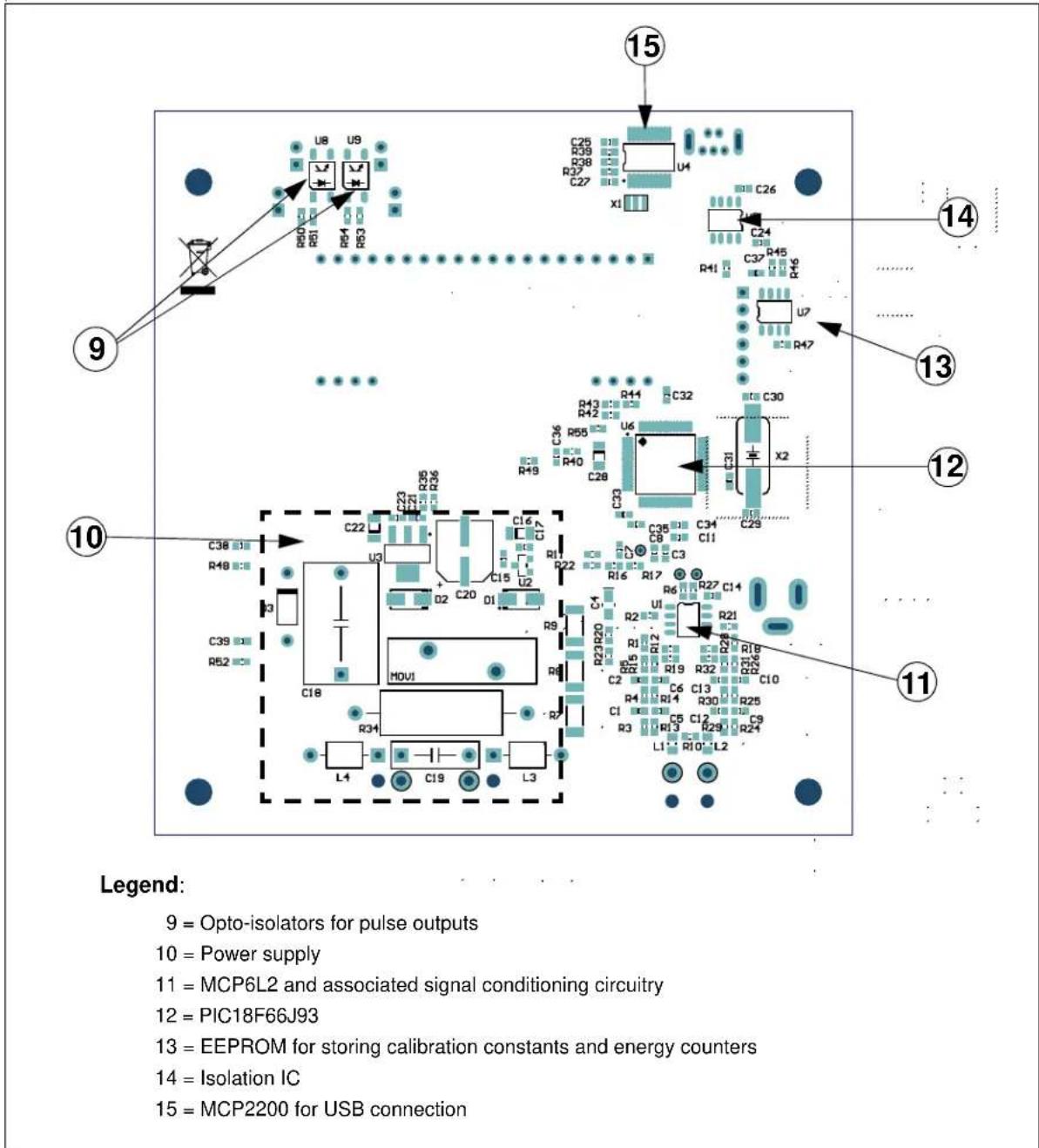
Figures 2-1 and 2-2 show the MCP6L2 and PIC18F66J93 Energy Meter:

text_image
USB (Isolated) J2 LDI Reactive Power C E Active Power LD3 LD2 J3 LCDI CE RoHS SWI MicroCHIP ARD00370 1 2 9V IN J1 TP2 TP1 TP3 R33 CP2 CP1 CP3 CP4 3 4 5 6 7 Legend: 1 = ICSP Programming header (non-isolated) 5 = Push-button switches 2 = +9V DC input (non-isolated) 6 = 9-digit LCD Display with icons for kWh and kVARh 3 = Connections to shunt current sensing resistor 7 = Pulse Output for active and reactive energy (isolated) 4 = Connections to Line and Neutral 8 = USB connection (isolated)FIGURE 2-1: Top View – Hardware Components.
text_image
15 C25 R39 R38 R37 C27 U4 x1 C26 C24 R45 R46 R41 U7 R47 14 9 13 12 10 C38 R48 C22 R36 R35 C16 C17 C15 U2 D2 C20 D1 C39 R52 C18 M0U1 R34 L4 C19 L3 C36 R55 R40 C28 R49 R43 R42 R41 C33 C32 U6 C31 C29 X2 C38 C34 C33 C32 C31 C29 C39 R21 R20 R19 R18 R17 R16 R15 R14 R13 R12 R11 R10 L2 Legend: 9 = Opto-isolators for pulse outputs 10 = Power supply 11 = MCP6L2 and associated signal conditioning circuitry 12 = PIC18F66J93 13 = EEPROM for storing calibration constants and energy counters 14 = Isolation IC 15 = MCP2200 for USB connectionFIGURE 2-2: Bottom View – Hardware Components.
flowchart
graph TD
    A["RC1"] --> B["Switch 2"]
    C["RC5"] --> B
    D["RG4"] --> E["Switch 3"]
    F["RG3"] --> E
    G["Active energy"] --> H["Switch 2"]
    I["Reactive energy"] --> J["Switch 3"]
    K["MC P2200"] --> L["USB to UART converter"]
    M["RC6/TX"] --> L
    N["Mini - USB connector"] --> L
    O["RC7/RX"] --> L
    P["RC3/SCL"] --> Q["SCL"]
    P --> R["SDA"]
    P --> S["WP"]
    T["RC4/SDA"] --> Q
    T --> R
    U["RC0"] --> S
    V["I²C™ - EEPROM"] --> Q
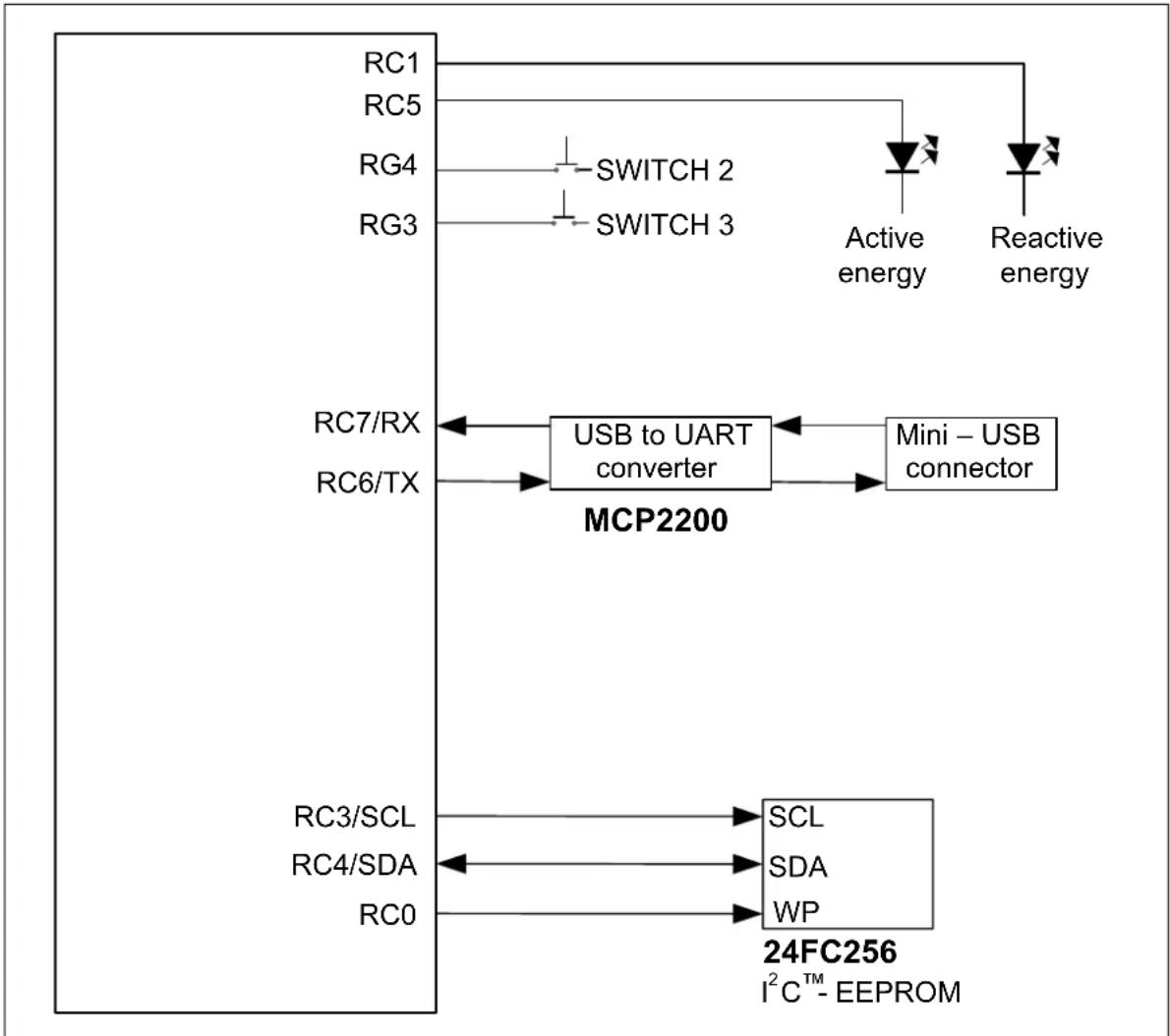
FIGURE 2-3: Digital Connections.
2.2 INPUT AND ANALOG FRONT END
The MCP6L2 and PIC18F66J93 Energy Meter comes populated with components designed for 220V line voltage. The high voltage line and neutral connections are at the bottom of the main board. The 200 shunt sits on the high or line side of a two-wire system, and the meter employs a hot or "live" ground.
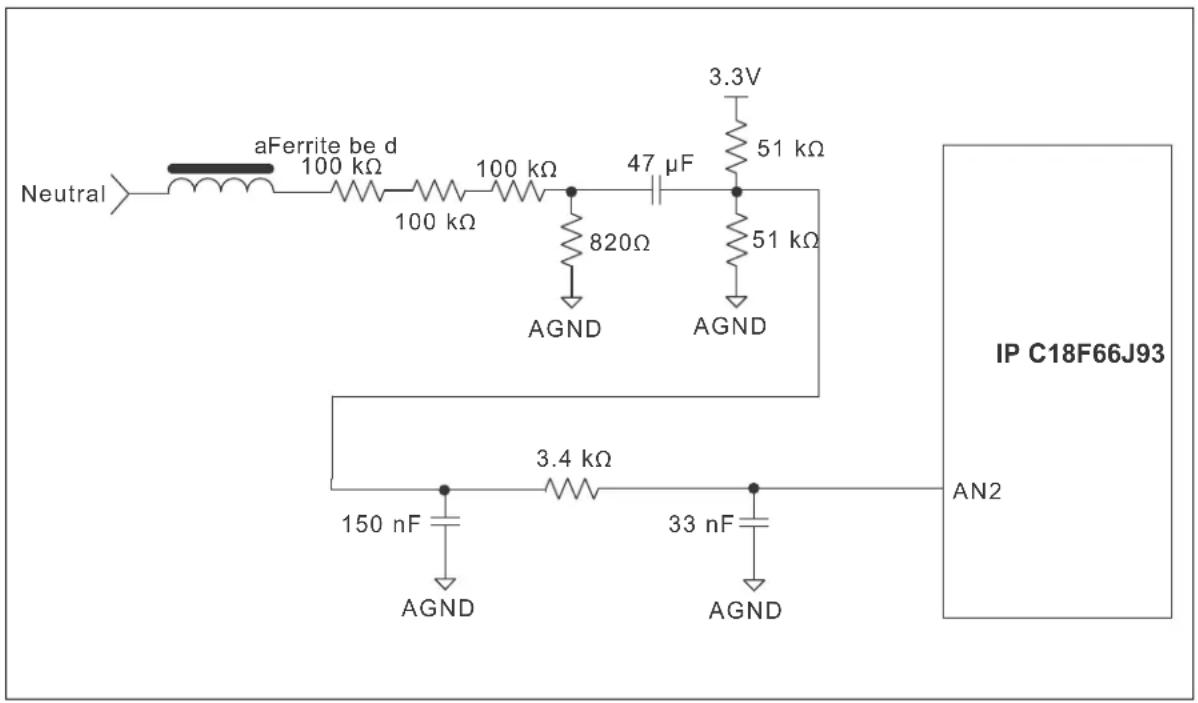
The neutral side of the two-wire system goes into a resistor divider on the voltage channel input, along with a DC offset added from V_DD . Anti-aliasing low-pass filters are included. The voltage channel uses three 100 kΩ resistors and one 820Ω resistor to achieve a divider ratio of 366:1. For a line voltage of 220 V_RMS , the voltage channel input signal size will be 601 mV _RMS , with a DC offset of 1.65V.
text_image
Neutral aFerrite be d 100 kΩ 100 kΩ 100 kΩ 47 μF 3.3V 51 kΩ 820Ω AGND 51 kΩ AGND IP C18F66J93 AN2 3.4 kΩ 150 nF AGND 33 nF AGNDFIGURE 2-4: Analog Front End - Voltage Measurement.
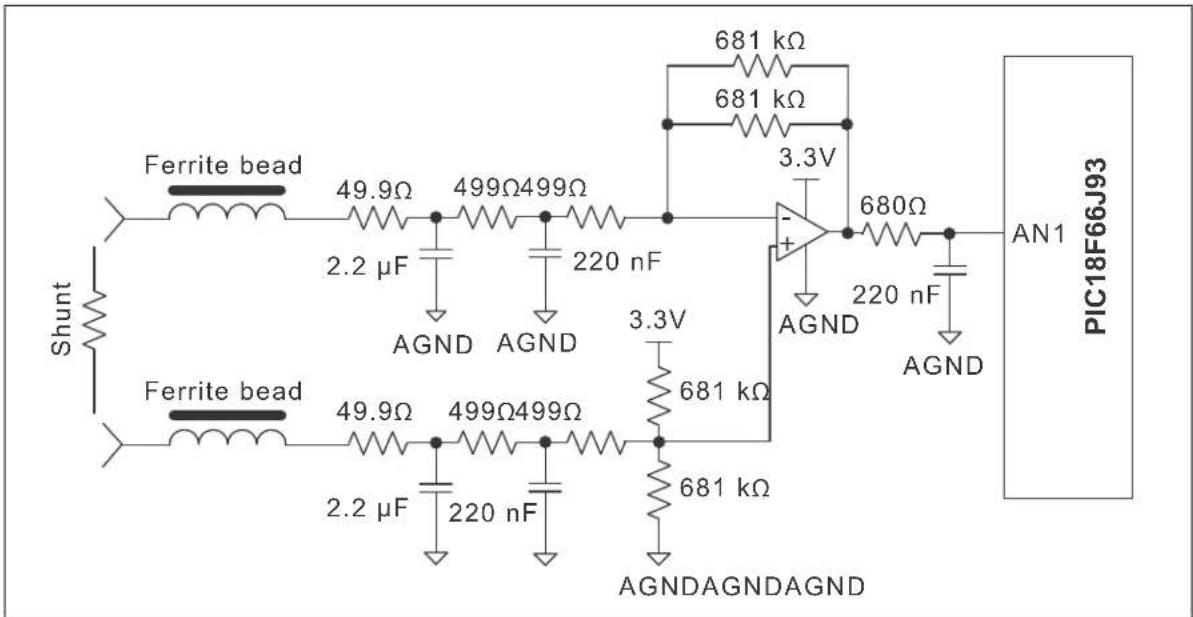
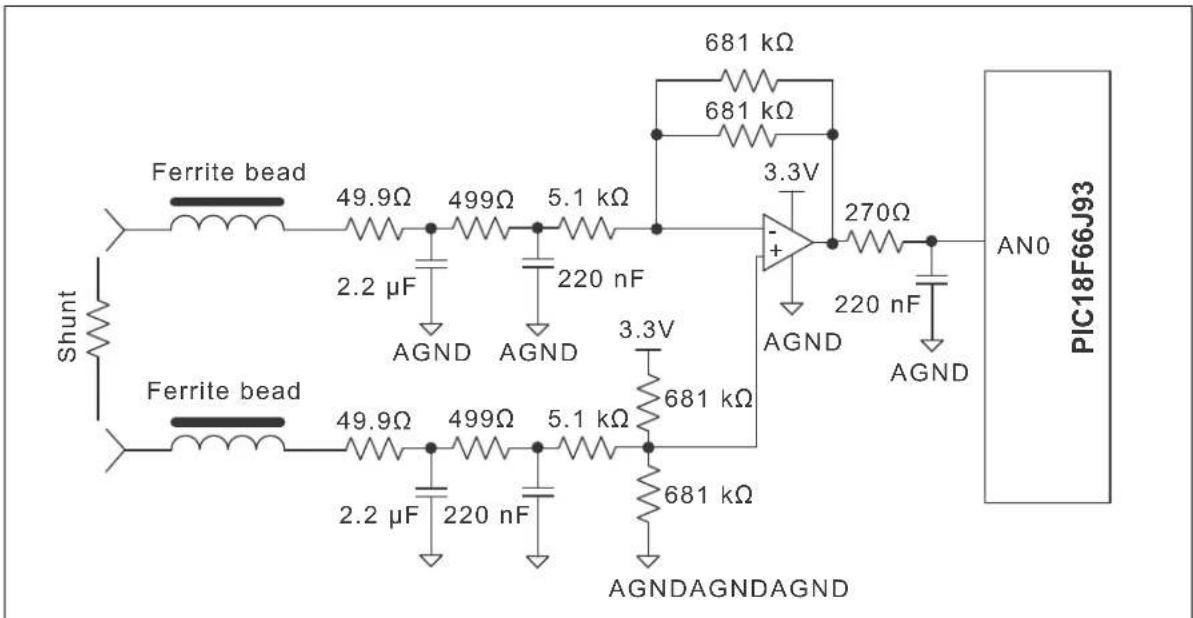
To amplify the signal from the shunt, this energy meter design uses the two operational amplifiers from the MCP6L2 device to create two signal paths, with different gains: one for the low-current's range and one for the high-current's range, as shown in Figures 2-5 and 2-6:
text_image
Shunt Ferrite bead 49.9Ω 499Ω499Ω 2.2 μF AGND AGND Ferrite bead 49.9Ω 499Ω499Ω 2.2 μF 220 nF 681 kΩ 681 kΩ 3.3V 680Ω AGND AGND 220 nF AGND 681 kΩ 681 kΩ AGNDAGNDAGND PIC18F66J93 AN1FIGURE 2-5: Analog Input Circuitry for Current Measurement, LOW-Current's Range.
text_image
Shunt Ferrite bead 49.9Ω 499Ω 5.1 kΩ 2.2 μF AGND AGND Ferrite bead 49.9Ω 499Ω 5.1 kΩ 2.2 μF 220 nF 681 kΩ 681 kΩ 3.3V + 270Ω AGND AGND 220 nF AGND 681 kΩ AGNDAGNDAGND AN0 PIC18F66J93FIGURE 2-6: Analog Input Circuitry for Current Measurement, HIGH-Current's Range.
The low-current's range circuit (Figure 2-5) has a gain of 325 V/V. The high-current's range circuit (Figure 2-6) has a gain of 60 V/V. The firmware switches between the two gains with hysteresis between 4 and 5 A _RMS .
Note that all of the circuitry associated with the analog front-end is connected to the analog ground plane, AGND.
2.3 POWER SUPPLY CIRCUIT
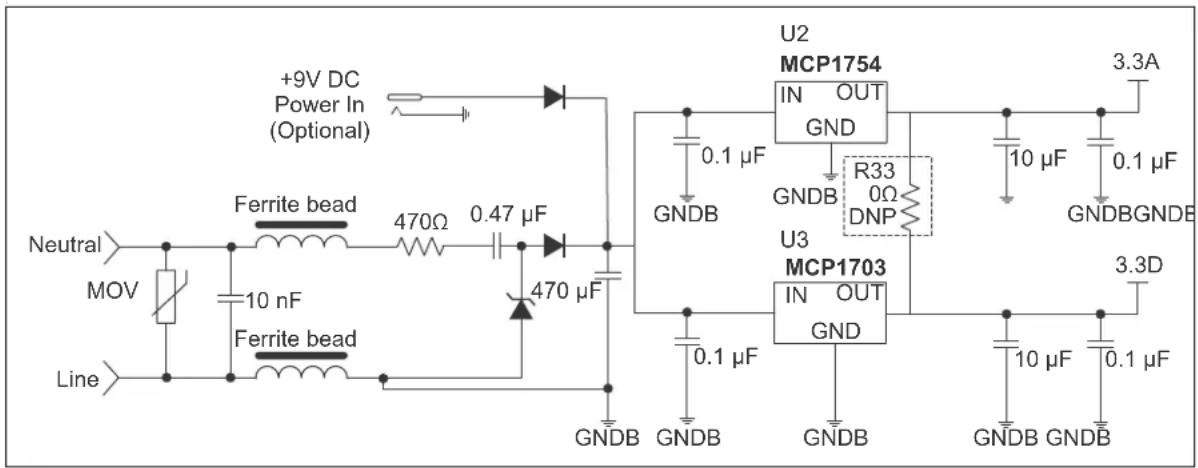
The capacitive power supply circuit for the MCP6L2 and PIC18F66J93 Energy Meter uses a half-wave rectified signal and two +3.3V voltage regulators. One Low-dropout (LDO) supplies the analog side, and the other supplies the digital circuitry of the meter. There is an option to use only one LDO, by populating the R33 resistor and removing the U2 LDO. This will result in a lower cost meter, at the price of a decrease in accuracy.
text_image
+9V DC Power In (Optional) Ferrite bead Neutral MOV Line 10 nF Ferrite bead 470Ω 0.47 μF 470 μF GNDB U2 MCP1754 IN OUT GND 0.1 μF GNDB R33 0Ω DNP U3 MCP1703 IN OUT GND 0.1 μF GNDB 3.3A 10 μF 0.1 μF GNDBGNDB 3.3D 10 μF 0.1 μF GNDB GNDBFIGURE 2-7: Power Supply Circuit.
Chapter 3. Calculation Engine and Register Description
3.1 COHERENT SAMPLING ALGORITHM
3.1.1 The Advantages of the Coherent Sampling in this Energy Metering Design
The outputs of an energy meter, power and RMS values are obtained by multiplying two AC signals, computing the average value and then multiplying it with a calibration gain. Ideally, these signals are sinusoids, with the frequency equal to the line frequency:
EQUATION 3-1:
$$ S _ {1} t (\quad) \quad_ {1} A \quad \omega t (\quad) \quad c o $$
$$ S _ {2} t (\mathbf {\theta}) \quad_ {2} A \omega t + (\phi $$
The two signals (S_1 and S_2) can be the voltage and/or the current waveforms. The instantaneous power value is obtained by multiplication:
EQUATION 3-2:
$$ P t (\ni_ {1} \mathfrak {S} (\times_ {2} \mathfrak {G}) \ni \frac {A _ {1} \times A _ {2}}{2} \times \cos (\phi) + \frac {A _ {1} \times A _ {2}}{2} \times \cos (2 \omega t + \phi) $$
The resultant signal has a continuous component and a sinusoidal component with a frequency equal to double the line frequency. Because the energy meter is computing the average power, only the continuous component is of interest, with the other requiring attenuation. If it is not properly attenuated, the indication of the energy meter will fluctuate in time. There are two methods to obtain efficient attenuation of the unwanted component: low-pass filtering and coherent sampling.
The instantaneous power signal can be applied to a low-pass filter with the cutoff frequency much lower than the double of the line frequency. If the energy meter must compute Active Power, Reactive Power, RMS Voltage, RMS Current (four instantaneous power computations, in total), it means that four low-pass filters must be applied.
In this particular energy meter design, with two current paths and gain switching controlled by the firmware, the problem is more complex with the low-pass filtering approach. This is because the low-pass filters have low-cutoff frequency, and consequently, high settling time. This affects the response of the meter outputs when the current gain is switched. In order to avoid this, the signals from the two current paths must be processed simultaneously, and low-pass filters must be applied on the instantaneous powers resulting from both paths. Therefore, three additional low-pass filters are required (for the instantaneous Active Power, Reactive Power and RMS Current on the other current channel). This means a total of seven low-pass filters are required for this energy meter design. Considering that the low-pass filter routines must be executed for each sample, the resulting processing time can be too long.
The coherent sampling approach solves this issue by eliminating the low-pass filters. Coherent sampling refers to the situation when the sampling frequency is a fixed integer multiple of the line frequency. The unwanted sinusoidal component from the instantaneous power signal is attenuated under coherent sampling conditions, if the averaging is computed over a number of samples corresponding to an integer number of line cycles.
3.1.2 Coherent Sampling Algorithm
Coherent sampling implies a dependency between the sampling frequency and the line frequency. Because the line frequency is not fixed, the sampling frequency needs to be adjustable. In the MCP6L2 and PIC18F66J93 Energy Meter design, based on the microcontroller's internal successive approximation ADC (SAR ADC), the sampling period is controlled by a timer. At the beginning of the Interrupt Service Routine, the new timer value is set, and then the ADC samples are acquired and processed. The new timer value is computed based on the value of the line signal period.
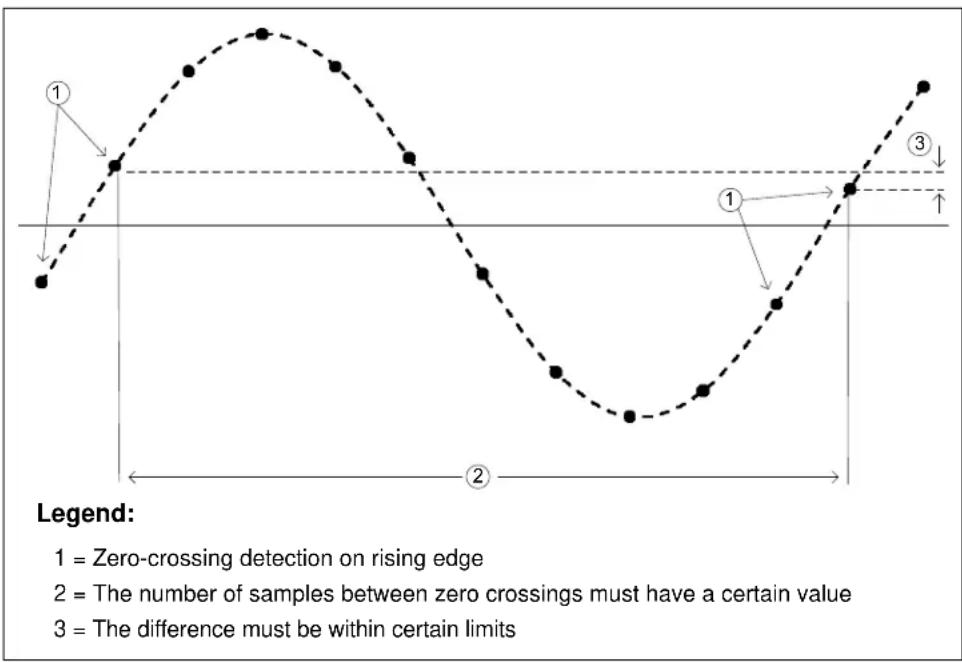
In order to save hardware resources (timers), the line signal period is not measured directly in this design. Based on the amplitude of the acquired signal samples, the firmware detects the zero crossings on rising edges and tries to achieve a fixed integer number of samples between successive crossings, by adjusting the sampling period. The conditions for obtaining coherent sampling implemented in the firmware are:
- The number of samples between zero crossings must have a certain value (64 samples per line cycle in this design)
- The difference between the first sample after zero crossing and the corresponding sample from the previous line period, must be within certain limits (for more accurate locking on the line frequency).
A graphical representation of these conditions is shown in Figure 3-1.
text_image
1 = Zero-crossing detection on rising edge 2 = The number of samples between zero crossings must have a certain value 3 = The difference must be within certain limitsFIGURE 3-1: Conditions for Obtaining Coherent Sampling Implemented in the Firmware.
These conditions are checked after every zero crossing on rising edge. If they are not met, then the corrections are applied to the sampling period.
The zero-crossing detection is done on the voltage channel, because it has much lower dynamic range than the current channel. To increase immunity to noise and distortions (harmonics), the acquired voltage samples are passed through a low-pass filter with a cutoff frequency lower than the line frequency, before being processed for zero-crossing detection.
3.2 CALCULATION ENGINE SIGNAL FLOW SUMMARY
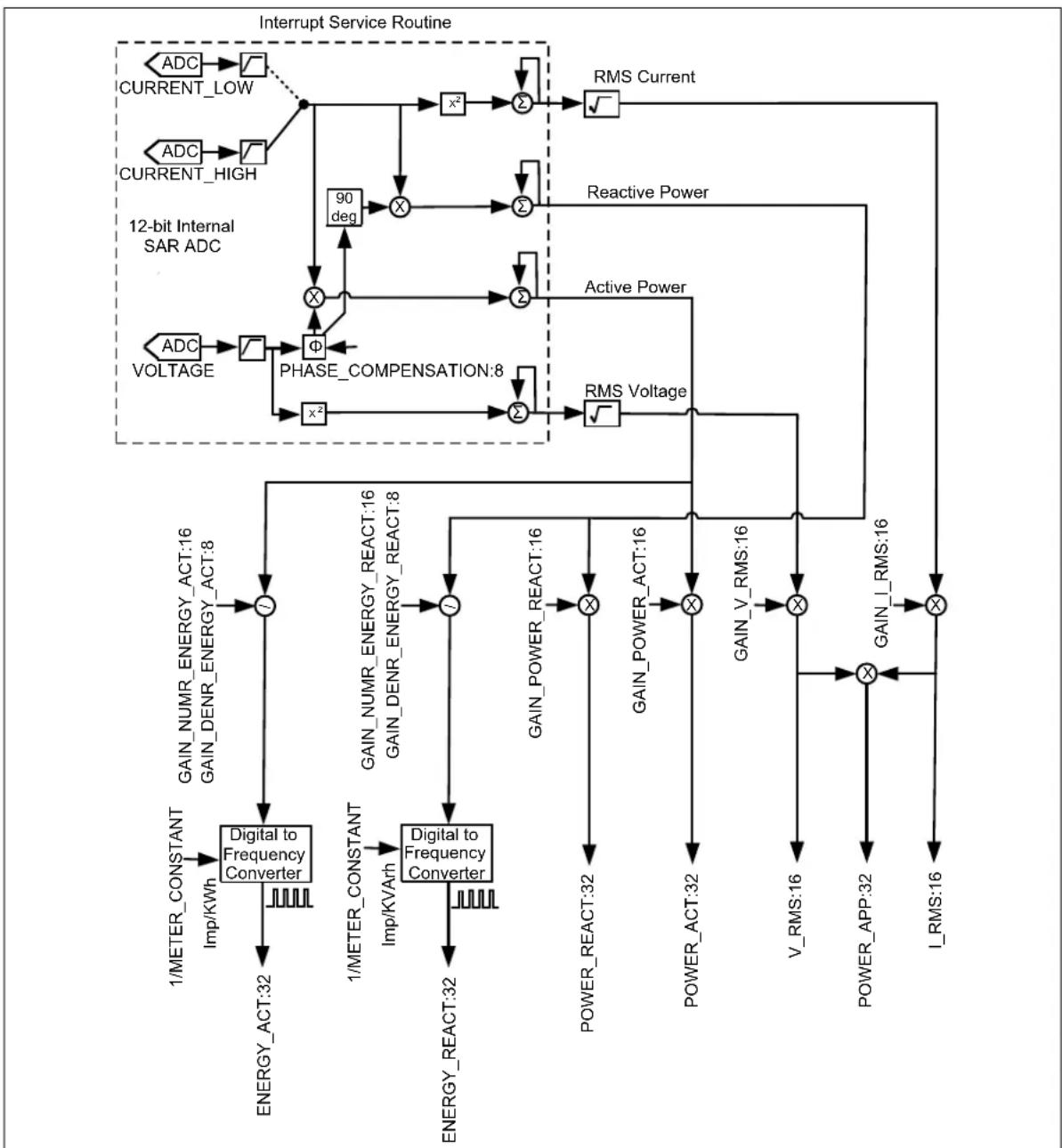
RMS voltage, RMS current, Active Power, Reactive Power, Apparent Power and calibration output pulses are calculated through the process described in Figure 3-2. The calibration registers for each calculation are shown as well as the output registers.
flowchart
graph TD
    A["Interrupt Service Routine"] --> B["ADC CURRENT_LOW"]
    A --> C["ADC CURRENT_HIGH"]
    B --> D["x²"]
    C --> E["x²"]
    D --> F["Σ"]
    E --> G["Σ"]
    F --> H["RMS Current"]
    G --> I["Reactive Power"]
    H --> J["90 deg"]
    I --> K["Active Power"]
    J --> L["Φ"]
    K --> M["Phase_COMPENSATION:8"]
    L --> N["Φ"]
    M --> O["Σ"]
    N --> P["RMS Voltage"]
    O --> Q["RMS Voltage"]
    P --> R["GAIN_NUMR_ENERGY_ACT:16 GAIN_DENR_ENERGY_ACT:8"]
    Q --> S["GAIN_NUMR_ENERGY_REACT:16 GAIN_DENR_ENERGY_REACT:8"]
    R --> T["Δ"]
    S --> U["Δ"]
    T --> V["Δ"]
    U --> W["Δ"]
    V --> X["Δ"]
    W --> Y["Δ"]
    X --> Z["Δ"]
    Y --> AA["Δ"]
    Z --> AB["Δ"]
    AA --> AC["Δ"]
    AB --> AD["GAIN_Power_REACT:16"]
    AC --> AE["GAIN_Power_ACT:16"]
    AD --> AF["Δ"]
    AE --> AG["Δ"]
    AF --> AH["Δ"]
    AG --> AI["Δ"]
    AH --> AJ["Δ"]
    AI --> AK["GAIN_V_RMS:16"]
    AJ --> AL["V_RMS:16"]
    AK --> AM["Δ"]
    AL --> AN["Power_APP:32"]
    AM --> AO["I_RMS:16"]
    AN --> AP["I_RMS:16"]
    subgraph 12-bit Internal SAR ADC
        B
        C
        D
        E
        F
        G
        H
        I
        J
        K
        L
        M
        N
        O
        P
        Q
        R
        S
        T
        U
        V
        W
        X
        Y
        Z
        AA
        AB
        AC
        AD
        AE
        AF
        AG
        AH
        AI
        AJ
        AK
        AL
        AM
        AP
        AQ
        AR
        AS
    end
FIGURE 3-2: MCP6L2 and PIC18F66J93 Calculation Engine Signal Flow.
3.3 COMPLETE REGISTER LIST
TABLE 3-1: INTERNAL REGISTER SUMMARY
| Address | Register Name Bits R/W Description | |||
| 0x000 | METER_VERSION_ID 8 R Hardware and firmware | version | identification register | |
| 0x001 | METER_STATUS 8 R Contains information regarding the operational status of the meter | |||
| 0x002 | CAL_CONTROL | 8 | R/W | Configuration register for calibration control |
| 0x003 | RAW_I_RMS | 16 | R Raw | RMS value of the current channel |
| 0x005 | I_RMS | 16 | R RMS | value of the current channel, post calibration |
| 0x007 | RAW_V_RMS | 16 | R Raw | RMS value of the voltage channel |
| 0x009 | V_RMS | 16 | R RMS | value of the voltage channel, post calibration |
| 0x00B | FREQUENCY | 16 | R | Line frequency indication |
| 0x00D | POWER_ACT | 32 | R | Active Power indication |
| 0x011 | POWER_REACT | 32 | R | Reactive Power indication |
| 0x015 | POWER_APP | 32 | R Apparent Power indication | |
| 0x019 | POWER_FACTOR | 16 | R Power factor indication | |
| 0x01B | PHASE_COMPENSATION | 8 | R | Phase delay between voltage and current channels |
| 0x01C | GAIN_I_RMS | 16 | R | Gain adjustment for current channel RMS |
| 0x01E | GAIN_POWER_ACT | 16 | R | Active Power Gain adjust |
| 0x020 | GAIN_POWER_REACT | 16 | R Reactive Power Gain adjust | |
| 0x022 | GAIN_NUMR_ENERGY_ACT | 16 | R | Active Power Pulse Output correction factor |
| 0x024 | GAIN_DENR_ENERGY_ACT | 8 R Active Power Pulse Output correction factor | ||
| 0x025 | GAIN_NUMR_ENERGY_REACT | 16 | R | Reactive Power Pulse Output correction factor |
| 0x027 | GAIN_DENR_ENERGY_REACT | 8 R Reactive Power Pulse Output correction factor | ||
| 0x028 | PHASE_COMPENSATION_LOW | 8 | R/W | Phase-delay between voltage and low region current channels |
| 0x029 | PHASE_COMPENSATION_HIGH | 8 | R/W | Phase-delay between voltage and high region current channels |
| 0x02A | GAIN_V_RMS | 16 | R/W | Gain adjustment for voltage RMS |
| 0x02C | GAIN_I_RMS_LOW | 16 | R/W | Gain adjustment for low region current RMS |
| 0x02E | GAIN_I_RMS_HIGH | 16 | R/W | Gain adjustment for high region current RMS |
| 0x030 | GAIN_POWER_ACT_LOW | 16 | R/W | Low-region Active Power gain adjust |
| 0x032 | GAIN_POWER_ACT_HIGH | 16 | R/W | High-region Active Power gain adjust |
| 0x034 | GAIN_NUMR_ENERGY_ACT_LOW | 16 | R/W | Low-region Active Power Pulse Output correction factor |
| 0x036 | GAIN_NUMR_ENERGY_ACT_HIGH | 16 | R/W | High-region Active Power Pulse Output correction factor |
| 0x038 | GAIN_DENR_ENERGY_ACT_LOW | 8 | R/W | Low-region Active Power Pulse Output correction factor |
| 0x039 | GAIN_DENR_ENERGY_ACT_HIGH | 8 | R/W | High-region Active Power Pulse Output correction factor |
| 0x03A | GAIN_POWER_REACT_LOW | 16 | R/W | Low-region Reactive Power gain adjust |
| 0x03C | GAIN_POWER_REACT_HIGH | 16 | R/W | High-region Reactive Power gain adjust |
| 0x03E | GAIN_NUMR_ENERGY_REACT_LOW | 16 | R/W | Low-region Reactive Power Pulse Output correction factor |
| Address | Register Name | Bits | R/W | Description |
| 0x040 GAIN_NUMR_ENERGY_REACT_HIGH 16 R/W High-region | Reactive Power Pulse Output correction factor | |||
| 0x042 GAIN_DENR_ENERGY_REACT_LOW 8 R/W Low-region | Reactive Power Pulse Output correction factor | |||
| 0x043 GAIN_DENR_ENERGY_REACT_HIGH 8 R/W High-region | Reactive Power Pulse Output correction factor | |||
| 0x044 METER_CONSTANT 16 R/W Meter Constant in imp/kWh | ||||
| 0x046 PULSE_WIDTH 8 R/W Defines CF pulse width in milliseconds | ||||
| 0x047 NO_LOAD_THRESHOLD_I_RMS 8 R/W Bellow this Current RMS indication, energy accumulation is disabled | ||||
| 0x048 LINE_CYC | 8 R/W | It is "n" | from the formula:Computation cycle = 2^n number of line cycles | |
| 0x100 ENERGY_ACT | 32 R/W | Active | Energy Counter | |
| 0x104 ENERGY_REACT | 32 R/W | Reactive | Energy Counter | |
3.4 METER\_VERSION\_ID
| Name | Bits Address Cof. | ||
| METER_VERSION_ID | 8 | 0x000 | R |
This register contains a constant that is hard-coded in the firmware, giving information regarding the hardware and firmware version running on the energy meter.
3.5 METER\_STATUS
| Name | Bits Address | Cof |
| METER_STATUS | 8 0x001 | R |
The register contains information regarding the operational status of the energy meter.
REGISTER 3-1: METER_STATUS REGISTER
| U-0 | U-0 | U-0 | U-0 | U-0 | U-0 | U-0 | R |
| — | — | — | — | — | — | — | CURRENT_REGION |
| bit 7 bit 0 | |||||||
| Legend: | |||
| R = Readable bit | W = Writable bit | U = Unimplemented bit, read as ‘0’ | |
| -n = Value at POR | ‘1’ = Bit is set | ‘0’ = Bit is cleared | x = Bit is unknown |
bit 7-1 Unimplemented: Read as '0'
bit 0 CURRENT_REGION: Indicates the selected current region
1 = High Current Region
0 = Low Current Region
3.6 CAL\_CONTROL
Name Bits Address Cof
CAL_CONTROL 8 0x002 R/W
This register controls the calibration process.
REGISTER 3-2: CAL_CONTROL REGISTER
| U-0 U-0 U-0 R-0 R/W-0 R/W-0 | U-0 | R/W-0 | |||||
| — | — | — | AUTOCAL_FIRST_LINE_CYCLE | CURRENT_REGION_SELECTED | FORCE_CURRENT_REGION | — | CAL_MODE |
| bit 7 bit 0 | |||||||
Legend:
| R = Readable bit W = Writable bit | U = Unimplemented bit, read as ‘0’ | |
| -n = Value at POR ‘1’ = Bit is set | ‘0’ = Bit is cleared | x = Bit is unknown |
bit 7-5 Unimplemented: Read as '0'
bit 4 AUTOCAL_FIRST_LINE_CYCLE: Flag used in the auto-calibration routine.
1 = The actual line cycle is the first after the current region has been changed in the auto-calibration routine. 0 = The actual line cycle is not the first after the current region has been changed in the auto-calibration routine.
bit 3 CURRENT_REGION_SELECTED: Current region set by the external device via UART, during the calibration procedure
1 = Low Current Region 0 = High Current Region
bit 2 FORCE_CURRENT_REGION: This bit is set by the external device via UART, before the calibration procedure.
1 = Automatic current region selection is bypassed. The current region is set by the "CURRENT_REGION_SELECTED" bit. 0 = The current region is set automatically, based on current RMS indication.
bit 1 Unimplemented: Read as '0'
bit 0 CAL_MODE: Activates the auto-calibration procedure.
1 = Auto-calibration procedure has been activated. 0 = Auto-calibration procedure is not enabled.
3.7 RAW\_I\_RMS
Name
RAW2_I_RMS
Bits Address Cof
16
0x003 R
This register is the raw current RMS value, before the multiplication with the calibration register GAIN_I_RMS.
3.8 I\_RMS
Name Bits Address Cof I_RMS 16 0x005 R
This register is the current RMS indication, in amperes, after the multiplication with the calibration register GAIN_I_RMS. The decimal point is placed after three digits, for low-current region, or two digits, for high-current region. For example: if the meter is in the low region and the read value is I_RMS = 5000 (in decimal), it means that the current is 5.000A. But if the same value is read when the meter is in the high-current region, it means that the current is 50.00A.
3.9 RAW\_V\_RMS
Name Bits Address Cof RAW_V_RMS 16 0x007 R
This register is the raw voltage RMS value, before the multiplication with the calibration register GAIN_V_RMS.
3.10 V\_RMS
Name Bits Address Cof V_RMS 16 0x009 R
This register is the voltage RMS indication, in volts, after the multiplication with the calibration register GAIN_V_RMS. The decimal point is placed after the first digit. For example: a read value of V_RMS = 2200 means 220.0V.
3.11 FREQUENCY
Name Bits Address Cof FREQUENCY 16 0x00B R
This register is the line frequency indication, in hertz. The decimal point is placed after three digits. For example: a read value of FREQUENCY = 50000 means 50.000 Hz.
3.12 POWER\_ACT
Name Bits Address Cof POWER_ACT 32 0x00D R
This register is the active power indication, in watts. The decimal point is placed after five digits for low-current region or four digits for high-current region. For example: if the meter is in the low region and the read value is POWER_ACT = 110000000 (in decimal), it means that the active power is 1100.00000W. If the same value is read when the meter is in the high-current region, it means that the active power is 11000.0000W.
3.13 POWER\_REACT
Name Bits Address Cof POWER_REACT 32 0x011 R
This register is the reactive power indication, in VAR. The decimal point is placed after five digits, for low-current region, or four digits, for high-current region. For example: if the meter is in the low region and the read value is POWER_REACT = 110000000 (in decimal), it means that the active power is 1100.00000 VAR. If the same value is read when the meter is in the high-current region, it means that the active power is 11000.0000 VAR.
3.14 POWER\_APP
Name Bits Address Cof POWER_APP 32 0x015 R
This register is the apparent power indication, in VA. The decimal point is placed after five digits, for low-current region, or four digits, for high-current region. For example: if the meter is in the low region and the read value is POWER_APP = 110000000 (in decimal), it means that the active power is 1100.00000 VA. If the same value is read when the meter is in the high-current region, it means that the active power is 11000.0000 VA.
3.15 POWER\_FACTOR
| Name | Bits Address Cof | |
| POWER_FACTOR | 16 0x019 | R |
This register is the power factor indication. The power factor value is obtained by dividing the register value to 65535. For example: a read value of POWER_FACTOR = 32767 means that the power factor is 0.5.
3.16 PHASE\_COMPENSATION
| Name | Bits | Address Cof |
| PHASE_COMPENSATION | 8 | 0x01B R |
This register contains the phase compensation value between the voltage and the current channels, used by the metering engine at the moment of reading. It is a copy of one of the calibration registers: PHASE_COMPENSATION_LOW or PHASE_COMPENSATION_HIGH, depending on the actual current region.
For more information related to phase compensation implementation in firmware, refer to Chapter 2.3.2.3 from "PIC18F87J72 Single-Phase Energy Meter Calibration User's Guide" (DS51964).
3.17 GAIN\_I\_RMS
Name Bits Address Cof GAIN_I_RMS 16 0x01C R
This register contains the gain value for the current RMS indication, used by the metering engine at the moment of reading. It is a copy of one of the calibration registers: GAIN_I_RMS_LOW or GAIN_I_RMS_HIGH, depending on the actual current region.
3.18 GAIN\_POWER\_ACT
Name Bits Address Cof GAIN_POWER_ACT 16 0x01E R
This register contains the gain value for the active power indication, used by the metering engine at the moment of reading. It is a copy of one of the calibration registers: GAIN_POWER_ACT_LOW or GAIN_POWER_ACT_HIGH, depending on the actual current region.
3.19 GAIN\_POWER\_REACT
Name Bits Address Cof GAIN_POWER_REACT 16 0x020 R
This register contains the gain value for the reactive power indication, used by the metering engine at the moment of reading. It is a copy of one of the calibration registers: GAIN_POWER_REACT_LOW or GAIN_POWER_REACT_HIGH, depending on the actual current region.
3.20 GAIN\_NUMR\_ENERGY\_ACT
| Name | Bits Address Cof |
| GAIN_NUMR_ENERGY_ACT | 16 0x022 R |
This register contains the active energy gain value necessary to produce the specified number of impulses per kilowatt-hour (the meter constant), used by the metering engine at the moment of reading. It is a copy of one of the calibration registers: GAIN_NUMR_ENERGY_ACT_LOW or GAIN_NUMR_ENERGY_ACT_HIGH, depending on the actual current region.
3.21 GAIN\_DENR\_ENERGY\_ACT
Name Bits Address Cof
GAIN_DENR_ENERGY_ACT 8 0x024 R
This register contains the number of left bit shifts for the raw active power, used by the metering engine at the moment of reading. It is a copy of one of the calibration registers: GAIN_DENR_ENERGY_ACT_LOW or GAIN_DENR_ENERGY_ACT_HIGH, depending on the actual current region.
3.22 GAIN\_NUMR\_ENERGY\_REACT
Name Bits Address Cof
GAIN_NUMR_ENERGY_REACT 16 0x025 R
This register contains the reactive energy gain value necessary to produce the specified number of impulses per kVArh (the meter constant), used by the metering engine at the moment of reading. It is a copy of one of the calibration registers:
GAIN_NUMR_ENERGY_REACT_LOW or GAIN_NUMR_ENERGY_REACT_HIGH, depending on the actual current region.
3.23 GAIN\_DENR\_ENERGY\_REACT
Name Bits Address Cof
GAIN_DENR_ENERGY_REACT 80x027 R
This register contains the number of left bit shifts for the raw reactive power, used by the metering engine at the moment of reading. It is a copy of one of the calibration registers: GAIN_DENR_ENERGY_REACT_LOW or
GAIN_DENR_ENERGY_REACT_HIGH, depending on the actual current region.
3.24 PHASE\_COMPENSATION\_LOW
Name
PHASE_COMPENSATION_LOW 8 0x028 R/W
This calibration register contains the phase compensation value between the voltage and the low-current region channel.
For more information related to phase compensation implementation in firmware please refer to Chapter 2.3.2.3 from "PIC18F87J72 Single-Phase Energy Meter Calibration User's Guide" (DS51964).
3.25 PHASE\_COMPENSATION\_HIGH
Name Bits Address Cof
PHASE_COMPENSATION_HIGH 8 0x029 R/W
This calibration register contains the phase compensation value between the voltage and the high-current region channel.
For more information related to phase compensation implementation in firmware please refer to Chapter 2.3.2.3 from "PIC18F87J72 Single-Phase Energy Meter Calibration User's Guide" (DS51964).
3.26 GAIN\_V\_RMS
Name Bits Address Cof
GAIN_V_RMS 16 0x02A R/W
This calibration register contains the gain value for the voltage RMS indication.
3.27 GAIN\_I\_RMS\_LOW
Name Bits Address Cof
GAIN_I_RMS_LOW 16 0x02C R/W
This calibration register contains the gain value for the current RMS indication in the low-current region.
3.28 GAIN\_I\_RMS\_HIGH
Name Bits Address Cof
GAIN_I_RMS_HIGH 16 0x02E R/W
This calibration register contains the gain value for the current RMS indication in the high-current region.
3.29 GAIN\_POWER\_ACT\_LOW
Name
GAIN_POWER_ACT_LOW
Bits Address Cof
16 0x030 R/W
This calibration register contains the gain value for the active power indication in the low-current region.
3.30 GAIN\_POWER\_ACT\_HIGH
Name Bits Address Cof GAIN_POWER_ACT_HIGH 16 0x032 R/W
This calibration register contains the gain value for the active power indication in the high-current region.
3.31 GAIN\_NUMR\_ENERGY\_ACT\_LOW
Name Bits Address Cof GAIN_NUMR_ENERGY_ACT_LOW 16 0x034 R/W
This calibration register contains the active energy gain value necessary to produce the specified number of impulses per kWh (the meter constant) in the low-current region.
3.32 GAIN\_NUMR\_ENERGY\_ACT\_HIGH
Name Bits Address Cof GAIN_NUMR_ENERGY_ACT_HIGH 16 0x036 R/W
This calibration register contains the active energy gain value necessary to produce the specified number of impulses per kWh (the meter constant) in the high-current region.
3.33 GAIN\_DENR\_ENERGY\_ACT\_LOW
Name Bits Address Cof GAIN_DENR_ENERGY_ACT_LOW 8 0x038 R/W
This calibration register contains the number of left bit shifts for the raw active power in the low-current region.
3.34 GAIN\_DENR\_ENERGY\_ACT\_HIGH
Name Bits Address Cof GAIN_DENR_ENERGY_ACT_HIGH 8 0x039 R/W
This calibration register contains the number of left bit shifts for the raw active power in the high-current region.
3.35 GAIN\_POWER\_REACT\_LOW
Name Bits Address Cof GAIN_POWER_REACT_LOW 16 0x03A R/W
This calibration register contains the gain value for the reactive power indication in the low-current region.
3.36 GAIN\_POWER\_REACT\_HIGH
Name Bits Address Cof
GAIN_POWER_REACT_HIGH 16 0x03C R/W
This calibration register contains the gain value for the reactive power indication in the high-current region.
3.37 GAIN\_NUMR\_ENERGY\_REACT\_LOW
Name Bits Address Cof
GAIN_NUMR_ENERGY_REACT_LOW 16 0x03E R/W
This calibration register contains the reactive energy gain value necessary to produce the specified number of impulses per kVArh (the meter constant) in the low-current region.
3.38 GAIN\_NUMR\_ENERGY\_REACT\_HIGH
Name Bits Address Cof
GAIN_NUMR_ENERGY_REACT_HIGH 16 0x040 R/W
This calibration register contains the reactive energy gain value necessary to produce the specified number of impulses per kVArh (the meter constant) in the high-current region.
3.39 GAIN\_DENR\_ENERGY\_REACT\_LOW
Name
Bits Address Cof
GAIN_DENR_ENERGY_REACT_LOW 80x042 R/W
This calibration register contains the number of left bit shifts for the raw reactive power in the low-current region.
3.40 GAIN\_DENR\_ENERGY\_REACT\_HIGH
Name
Bits Address Cof
GAIN_DENR_ENERGY_REACT_HIGH 8 0x043 R/W
This calibration register contains the number of left bit shifts for the raw reactive power in the low-current region.
3.41 METER\_CONSTANT
Name Bits Address Cof METER_CONSTANT 16 0x044 R/W
This register contains the meter constant in imp/kWh. It must be a multiple of 100.
3.42 PULSE\_WIDTH
Name Bits Address Cof PULSE_WIDTH 8 0x046 R/W
This register contains the width of the active/reactive energy pulse in milliseconds. The maximum pulse width that can be set in the existing firmware release is 65 milliseconds. If higher values are required, then the corresponding code portion in the firmware must be modified.
3.43 NO\_LOAD\_THRESHOLD\_I\_RMS
Name Bits Address Cof NO_LOAD_THRESHOLD_I_RMS 8 0x047 R/W
This register contains the current RMS indication (I_RMS value) in the low-current region bellow which the energy accumulation is disabled.
3.44 LINE\_CYC
Name Bits Address Cof LINE_CYC 8 0x048 R/W
This register contains the value of "n" from the formula:
EQUATION 3-3:
$$ C o m p u t a t i o n _ c y c l e _ d u r a t i o n = 2 ^ {n} \times l i n e _ c y c l e _ d u r a t i o n $$
The computation cycle contains a number of 2^n line cycles. The indication registers are updated every computation cycle. The value of LINE_CYC register sets the update rate of the indication registers.
In this software release LINE_CYC = 4. The energy meter was designed for 50 Hz systems, so a line cycle has a period of 20 milliseconds. It results in a computation cycle of :
$$ C o m p u t a t i o n _ c y c l e _ d u r a t i o n = 2 ^ {4} \times 2 0 = 3 2 0 m i l l i s e c o n d s $$
3.45 ENERGY\_ACT
Name Bits Address Cof
ENERGY_ACT 32 0x100 R/W
This energy counter register contains the accumulated active energy in kWh. The decimal point is after two digits. For example: an indication of ENERGY_ACT = 1234 means that the value of the accumulated active energy is 12.34 kWh.
3.46 ENERGY\_REACT
Name Bits Address Cof
ENERGY_REACT 32 0x104 R/W
This energy counter register contains the accumulated reactive energy in kVArh. The decimal point is after two digits.
For example: an indication of ENERGY_REACT = 1234 means that the value of the accumulated active energy is 12.34 kVArh.
NOTES:
Chapter 4. Communication Protocol
4.1 PROTOCOL
The UART of the PIC Microcontroller is used to communicate with the meter. In addition to the reading and writing of the registers, there are also dedicated commands for clearing, loading and storing calibration registers to Flash. The first byte UART data is an ASCII character that represents the command, and each command has a specific protocol. Each command ends with the ASCII character "X".
4.1.1 Command Description
The first byte of the data (byte 0) is an ASCII character E, L, S, W, R, C or A.
- E – Request for Echo Response to which meter responds with "Q" as acknowledgment
- L – Load Calibration Registers from Flash (LOAD)
• S – Store Calibration Registers (STORE) - W – Write Bytes (WRITE)
- R – Read Bytes (READ)
• C – Load Default Calibration Values
• A – Run Auto-calibration Routine
The last data byte is always an 'X' character. All commands will result in the same command being returned. The exception is the 'R' (READ) command which will return the additional data in lieu of the number of bytes.
4.1.1.1 "E" ECHO: - TO DETECT THE METER CONNECTION
Example: 'EX'.
Returns: 'QX'
4.1.1.2 "L" LOAD: LOAD CALIBRATION REGISTERS FROM FLASH
Example: 'LX'.
Returns: 'LX'.
This command is used to verify that the calibration values were actually written into Flash (or EEPROM). When the software executes an 'SX' command, it should verify that the values were stored by issuing an 'LX' command and then reading the calibration values with an 'R' command.
4.1.1.3 "S" STORE: STORE CALIBRATION REGISTERS INTO FLASH
The Store command writes all the calibration values to the internal EEPROM, and this function takes some time. During that time, the meter is not functional. The Store command should only be used after calibrating the meter, not while it is in actual use.
Example: 'SX'.
Returns: 'SX'.
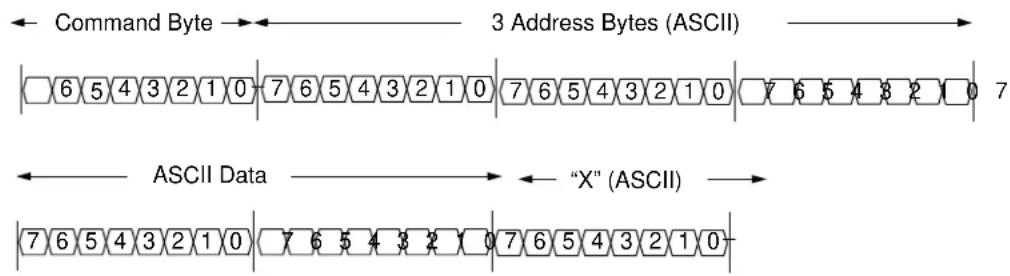
4.1.1.4 "W" WRITE: WRITE STARTING AT SPECIFIED ADDRESS
Write specified bytes.
Example: 'W030000102030405060708090A0B0C0D0E0FX'.
Returns: 'W030000102030405060708090A0B0C0D0E0FX'.
Note: If the number of data characters is odd, the last character (the one just prior to the 'X') will be ignored.
text_image
Command Byte → ← 3 Address Bytes (ASCII) → |6543210|76543210|76543210|76543210|76543210|76543210| ASCII Data → ← "X" (ASCII) → |76543210|76543210|76543210|76543210|76543210|76543210TABLE 4-1: WRITE COMMAND EXAMPLE
| Description Command ASCII Command Hex | |
| WRITE 40000d toGAIN_V_RMS Register | “W 02A 9C40 X” 57 30 32 41 39 43 34 30 58 |
FIGURE 4-1: WRITE Command Protocol.
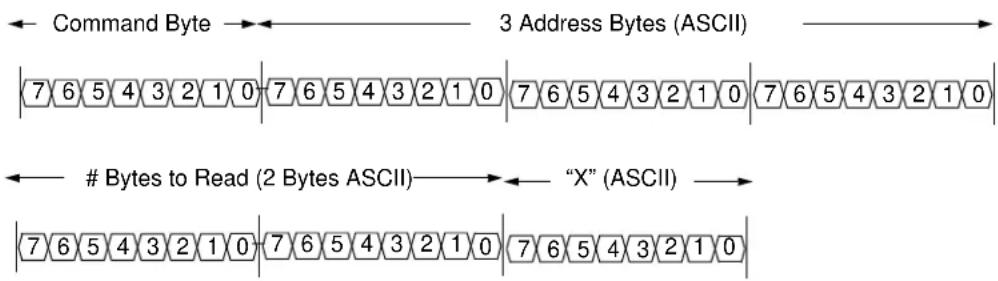
4.1.1.5 "R" READ: READ STARTING AT SPECIFIED ADDRESS
Example: 'R03010X' (read 16 bytes starting at address 30h).
Returns: 'R030000102030405060708090A0B0C0D0E0FX'
Note: For 16 bytes, there are 32 ASCII characters returned, or two characters per byte.
text_image
Command Byte → ← 3 Address Bytes (ASCII) |7 6 5 4 3 2 1 0 |7 6 5 4 3 2 1 0 |7 6 5 4 3 2 1 0 |7 6 5 4 3 2 1 0 | ← # Bytes to Read (2 Bytes ASCII) → ← "X" (ASCII) → |7 6 5 4 3 2 1 0 |7 6 5 4 3 2 1 0 |7 6 5 4 3 2 1 0 |TABLE 4-2: READ COMMAND EXAMPLE
| DESCRIPTION COMMAND ASCII COMMAND HEX | ||
| READ on POWER_ACT Register | “R 00D 04 X” | 52 30 30 44 30 34 58 |
FIGURE 4-2: Read Command Protocol.
4.1.1.6 "A" AUTOCALIBRATION: RUN AUTO-CALIBRATION ROUTINE
Example: "AX"
Returns: "DX" or "BX"
This command enables the auto-calibration routine only if it is present in the firmware and returns "DX". If not, it returns "BX", indicating that the auto-calibration routine is not present in the firmware (the statement "#define AUTOCALIBRATION_ENABLE" is missing).
NOTES:
Chapter 5. Microchip Energy Meter Software
5.1 OVERVIEW
The Microchip Energy Meter Software is a Graphical User Interface (GUI) that runs on a PC. It enables the meter to be monitored, debugged and calibrated during development phase.
5.2 THE MAIN SCREEN
The main screen contains four tabs:
- Energy Meter: This tab contains the instantaneous meter output display and a debug window, which enables access to all the internal registers of the meter.
- Closed Loop Calibration: This tab contains a calibration tool for closed loop calibration.
- Open Loop Calibration: This tab contains a calibration tool for open loop calibration.
• Auto Calibration: This tab contains an interface for auto calibration.
The calibration procedures are presented in detail in Chapter 6. "Energy Meter Calibration".
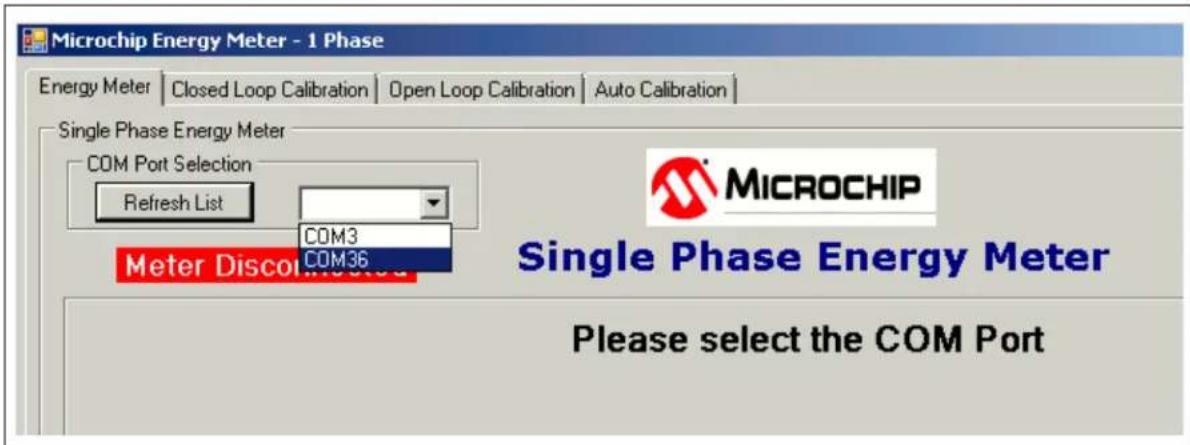
The COM port selection on the top of the window is used to select a serial port or a serial port emulator (the energy meter must be connected to the PC via the USB interface and powered up).
The status of the meter connection to the computer is displayed on the top of the window (see Figure 5-1). If connected, this status displays the text "Meter Detected" in green; when disconnected, it changes the status to "Meter Disconnected", in red. The status is present across all tabs.
text_image
Microchip Energy Meter - 1 Phase Energy Meter | Closed Loop Calibration | Open Loop Calibration | Auto Calibration | Single Phase Energy Meter COM Port Selection Refresh List COM3 Meter Discon COM36 MICROCHIP Single Phase Energy Meter Please select the COM PortFIGURE 5-1: Energy Meter GUI – COM Port Selection.
The tool has a feature to display the instantaneous parameters from the meter, updated in real time (see Figure 5-2). The “Instantaneous Parameters” field contains the recent meter output parameters: RMS Voltage, RMS Current, Line Frequency, Active Power, Reactive Power, Apparent Power and Power Factor. The corresponding registers are continuously collected and periodically refreshed on the PC side.

text_image
Microchip Energy Meter - 1 Phase Energy Meter | Closed Loop Calibration | Open Loop Calibration | Auto Calibration | Single Phase Energy Meter COM Port Selection Refresh List | COM36 Miter Detected Single Phase Energy Meter Instantaneous Parameters Voltages (RMS) Voltage: 220.0 V Currents (RMS) Current: 10.00 A Frequency Frequency: 50.001 Hz Instantaneous Power Active: 1100.04 W Reactive: 1906.59 VAR Apparent: 2200.00 VA Power Factor: 0.500 Stop Refresh Instantaneous Data Enter Debug Mode Reading all instantaneous parameters Software Version Version: 1.0FIGURE 5-2: Energy Meter GUI – Instantaneous Parameters Display.
5.3 DEBUG MODE
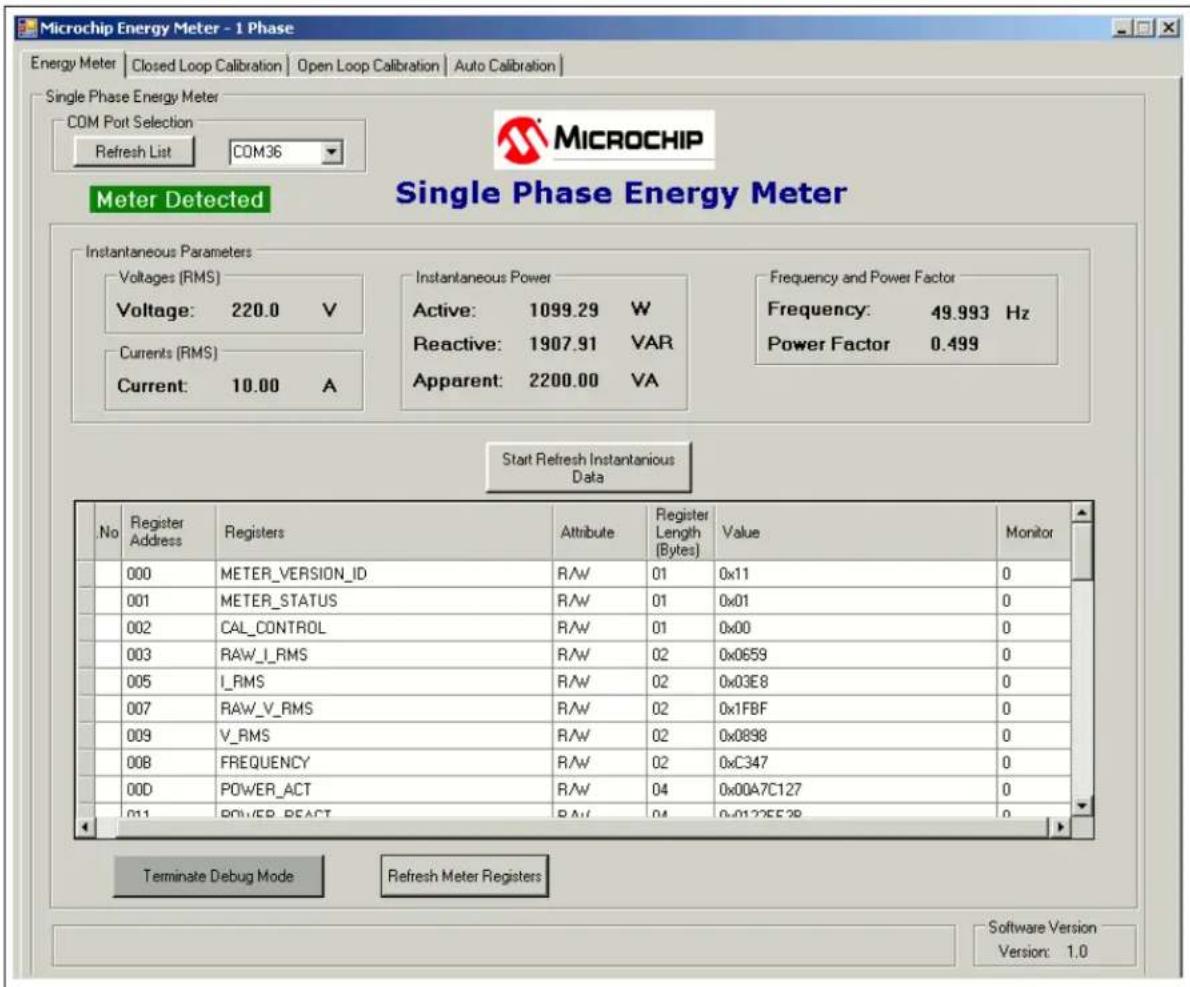
The Debug mode feature enables access to all the internal registers of the meter. From the Energy Meter tab, click on the Enter Debug Mode button on the lower right corner of the tool. The Debug mode screen appears ready for use.
Debug mode displays a complete list of the internal registers of the meter in detail: address, name, attribute, register length and value.
Each register is available for read and write in real time, when the meter is computing.
5.3.1 Refreshing Registers Status
To update all the internal registers, click the Refresh Meter Registers button at the bottom of the window, as shown in Figure 5-3. This will update the registers only once per click.
text_image
Microchip Energy Meter - 1 Phase Energy Meter | Closed Loop Calibration | Open Loop Calibration | Auto Calibration | Single Phase Energy Meter COM Port Selection Refresh List COM36 MICROCHIP Meter Detected Single Phase Energy Meter Instantaneous Parameters Voltages (RMS) Voltage: 220.0 V Currents (RMS) Current: 10.00 A Instantaneous Power Active: 1099.29 W Reactive: 1907.91 VAR Apparent: 2200.00 VA Frequency and Power Factor Frequency: 49.993 Hz Power Factor 0.499 Start Refresh Instantaneous Data No Register Address Registers Attribute Register Length Value Monitor 000 METER_VERSION_ID R/W 01 0x11 0 001 METER_STATUS R/W 01 0x01 0 002 CAL_CONTROL R/W 01 0x00 0 003 RAW_L_RMS R/W 02 0x0659 0 005 L_RMS R/W 02 0x03E8 0 007 RAW_V_RMS R/W 02 0x1FBF 0 009 V_RMS R/W 02 0x0898 0 008 FREQUENCY R/W 02 0xC347 0 00D POWER_ACT R/W 04 0x00A7C127 0 011 POWER_REFACT R/W 04 0x012CE528 0 Terminate Debug Mode Refresh Meter Registers Software Version Version: 1.0FIGURE 5-3: Energy Meter GUI – Debug Mode.
5.3.2 Monitoring Individual Registers
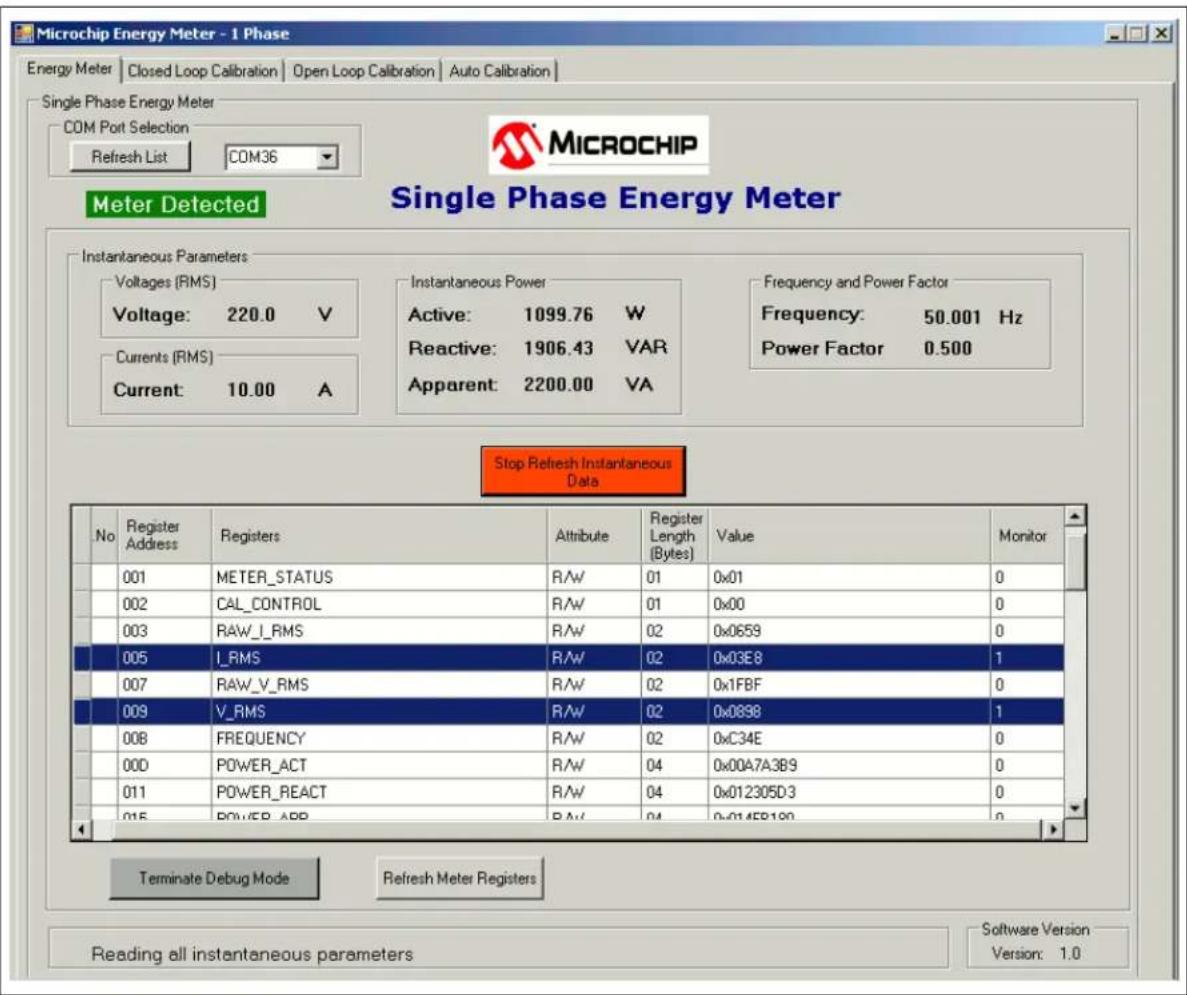
The tool enables the selected registers to be monitored for their real-time updates. Monitoring can be enabled by writing "1" to the column "Monitor" across a particular register, as shown in Figure 5-4. By enabling the monitoring feature, once the Start Refresh Instantaneous Data button is pressed, the GUI reads the register periodically, showing the real-time status. Unless monitoring is enabled, the register status is not updated after every instantaneous refresh.
text_image
Microchip Energy Meter - 1 Phase Energy Meter | Closed Loop Calibration | Open Loop Calibration | Auto Calibration | Single Phase Energy Meter COM Port Selection Refresh List COM36 Miter Detected Single Phase Energy Meter Instantaneous Parameters Voltages (RMS) Voltage: 220.0 V Currents (RMS) Current: 10.00 A Instantaneous Power Active: 1099.76 W Reactive: 1906.43 VAR Apparent: 2200.00 VA Frequency and Power Factor Frequency: 50.001 Hz Power Factor 0.500 Stop Refresh Instantaneous Data No Register Address Registers Attribute Register Length Value Monitor 001 METER_STATUS R/W 01 0x01 0 002 CAL_CONTROL R/W 01 0x00 0 003 RAW_I_RMS R/W 02 0x0659 0 005 I_RMS R/W 02 0x03E8 1 007 RAW_V_RMS R/W 02 0x1FBF 0 009 V_RMS R/W 02 0x0898 1 00B FREQUENCY R/W 02 0xC34E 0 00D POWER_ACT R/W 04 0x00A7A3B9 0 011 POWER_REACT R/W 04 0x012305D3 0 015 POWER_APP R/W 04 0x0145P199 0 Terminate Debug Mode Refresh Meter Registers Reading all instantaneous parameters Software Version Version: 1.0FIGURE 5-4: Energy Meter GUI – Monitoring Individual Registers in Debug Mode.
5.3.3 Writing to Individual Registers
For testing certain limiting conditions and manual tuning the calibration registers, the software offers the option to write to individual registers. To write to a register, enter the value in HEX format (as stored in the registers) in the "Value" column across that particular register and press
Chapter 6. Energy Meter Calibration
6.1 INTRODUCTION
This chapter describes the methods to calculate calibration parameters. It includes various types of calibration suitable for different stages of meter design.
6.2 CALIBRATION REGISTERS
This registers that need to be calibrated include the following:
- Gain registers:
- GAIN_V_RMS
- GAIN_I_RMS_LOW
- GAIN_I_RMS_HIGH
- GAIN_POWER_ACT_LOW
- GAIN_POWER_ACT_HIGH
- GAIN_NUMR_ENERGY_ACT_LOW
- GAIN_NUMR_ENERGY_ACT_HIGH
- GAIN_DENR_ENERGY_ACT_LOW
- GAIN_DENR_ENERGY_ACT_HIGH
- GAIN_POWER_REACT_LOW
- GAIN_POWER_REACT_HIGH
- GAIN_NUMR_ENERGY_REACT_LOW
- GAIN_NUMR_ENERGY_REACT_HIGH
- GAIN_DENR_ENERGY_REACT_LOW
- GAIN_DENR_ENERGY_REACT_HIGH
- Phase compensation registers:
- PHASE_COMPENSATION_LOW
- PHASE_COMPENSATION_HIGH
All the calibration registers, except GAIN_V_RMS, have one set of values for the low-current region and one for the high-current region. Each current region must be calibrated separately. For this purpose, the mechanism that switches automatically between the two current regions can be bypassed by setting the bit called FORCE_CURRENT_REGION, in CAL_CONTROL register. In this mode, the current region is set by the value of the CURRENT_REGION_SELECTED bit, in the same register.
6.3 CLOSED LOOP CALIBRATION
6.3.1 Closed Loop Calibration Principle
For this type of calibration, the energy meter must be connected to a calibration device, consisting of a source with configurable RMS Voltage, RMS Current, Power Factor and a Reference Meter. By reading the values indicated by the Reference Meter, and those indicated by the meter to be calibrated, the calibration gain can be computed:
EQUATION 6-1:
$$ {N e w _ g a i n E x i s t i n g _ g a i n} {\times \frac {I n d i c a t i o n _ f r o m _ R e f e r e n c e _ M e t e r}{I n d i c a t i o n _ f r o m _ M e t e r _ t o _ b e _ c a l i b r a t e d}} $$
The indication can be Voltage RMS, Current RMS, Active/Reactive Power, or Active/Reactive Energy Pulses.
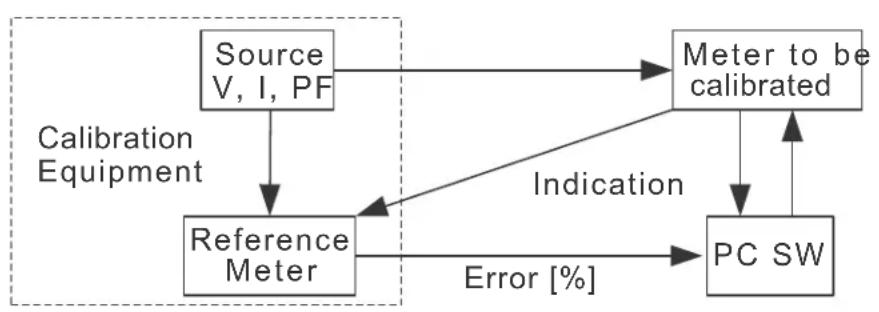
flowchart
graph TD
    A["Source V, I, PF"] --> B["Reference Meter"]
    B --> C["Meter to be calibrated"]
    C --> D["PC SW"]
    D -->|Indication| B
    B -->|Error["%"]| D
    style A fill:#f9f,stroke:#333
    style B fill:#ccf,stroke:#333
    style C fill:#cfc,stroke:#333
    style D fill:#fcc,stroke:#333
FIGURE 6-1: Closed Loop Calibration Setup.
In the case of energy pulses, the calibration equipment can indicate the error between the period of the pulses from its Reference Meter and the meter to be calibrated. In this case, the previous formula is applied in this form:
EQUATION 6-2:
$$ N e w _ g a i n = \frac {E x i s t i n g _ g a i n}{\frac {E r r o r \% ] [}{1 0 0} l} + $$
The above formulas apply to gain calibration. They are computed for a power factor of 1, except for the Reactive Energy and Power gains, which are computed at a different power factor (usually 0.5).
The information for phase compensation is extracted from the indication of the Active Power at a power factor different than 1 (usually 0.5), after Active Power Gain has been previously computed at the power factor of 1. For more information related to phase compensation calibration, refer to Section 2.3.2.3 - Phase Compensation from the "PIC18F87J72 Single-Phase Energy Meter Calibration User's Guide (DS51964)".
6.3.2 Closed Loop Calibration with Microchip Energy Meter Software
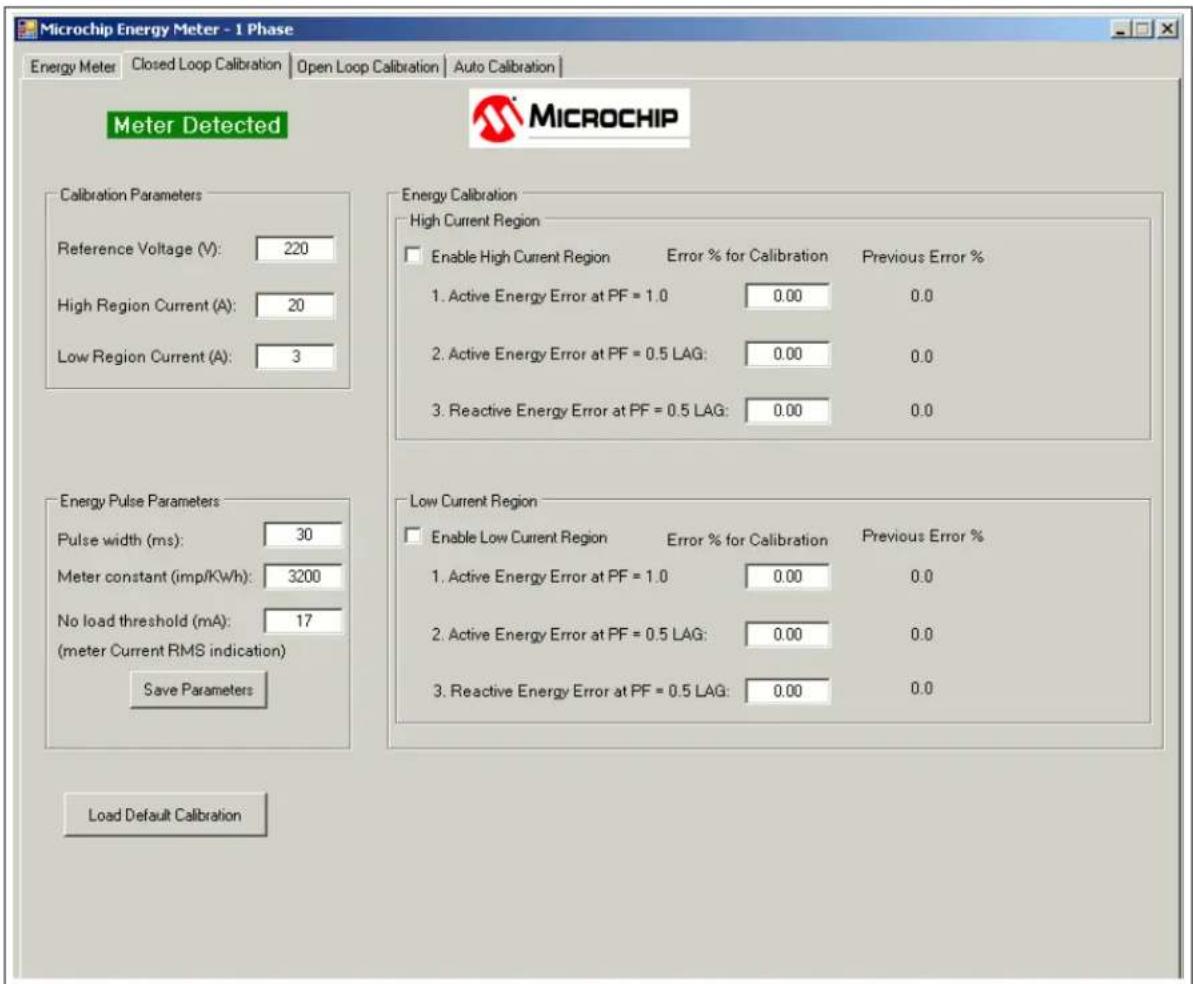
Select the Closed Loop Calibration tab. The screen from Figure 6-2 appears.
text_image
Microchip Energy Meter - 1 Phase Energy Meter Closed Loop Calibration Open Loop Calibration Auto Calibration Meter Detected MICROCHIP Calibration Parameters Reference Voltage (V): 220 High Region Current (A): 20 Low Region Current (A): 3 Energy Calibration High Current Region Enable High Current Region Error % for Calibration Previous Error % 1. Active Energy Error at PF = 1.0 0.00 0.0 2. Active Energy Error at PF = 0.5 LAG: 0.00 0.0 3. Reactive Energy Error at PF = 0.5 LAG: 0.00 0.0 Energy Pulse Parameters Pulse width (ms): 30 Meter constant (imp/kWh): 3200 No load threshold (mA): 17 (meter Current RMS indication) Save Parameters Load Default Calibration Low Current Region Enable Low Current Region Error % for Calibration Previous Error % 1. Active Energy Error at PF = 1.0 0.00 0.0 2. Active Energy Error at PF = 0.5 LAG: 0.00 0.0 3. Reactive Energy Error at PF = 0.5 LAG: 0.00 0.0FIGURE 6-2: Closed Loop Calibration Screen.
Before the actual calibration, the default values of the energy pulse parameters can be modified. The software sets the corresponding registers:
- Pulse Width (ms) – PULSE_WIDTH
- Meter Constant (imp/kWh) – METER_CONSTANT
- No Load Threshold (mA) – NO_LOAD_THRESHOLD_I_RMS
After the modification, press the Save Parameters button to store the values to EEPROM.
Enter the values indicated by the Reference Meter in the "Calibration Parameters" fields. The recommended calibration values are 220V line voltage, 20A for the high-current region and 3A for the low-current region.
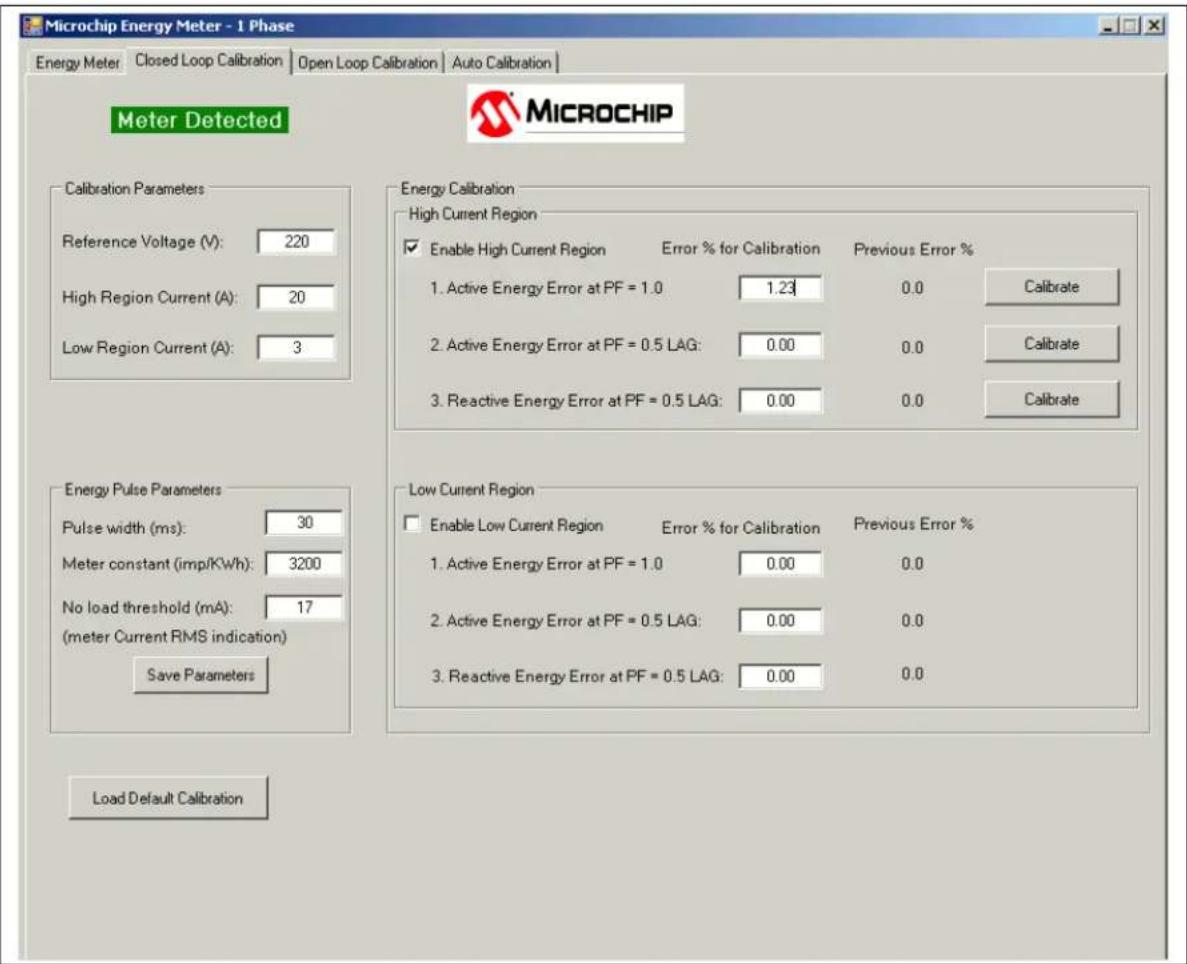
To start calibrating the high-current region, configure the source to provide the specified high-region calibration current and select the "Enable High Current Region" check box. The software will configure the corresponding register in the meter and force it to work in the high-current region only. The screen will change, as shown in Figure 6-3.
text_image
Microchip Energy Meter - 1 Phase Energy Meter Closed Loop Calibration Open Loop Calibration Auto Calibration Meter Detected MICROCHIP Calibration Parameters Reference Voltage (V): 220 High Region Current (A): 20 Low Region Current (A): 3 Energy Calibration High Current Region Enable High Current Region Error % for Calibration Previous Error % 1. Active Energy Error at PF = 1.0 1.23 0.0 Calibrate 2. Active Energy Error at PF = 0.5 LAG: 0.00 0.0 Calibrate 3. Reactive Energy Error at PF = 0.5 LAG: 0.00 0.0 Calibrate Energy Pulse Parameters Pulse width (ms): 30 Meter constant (imp/Kwh): 3200 No load threshold (mA): 17 (meter Current RMS indication) Save Parameters Load Default Calibration Low Current Region Enable Low Current Region Error % for Calibration Previous Error % 1. Active Energy Error at PF = 1.0 0.00 0.0 2. Active Energy Error at PF = 0.5 LAG: 0.00 0.0 3. Reactive Energy Error at PF = 0.5 LAG: 0.00 0.0FIGURE 6-3: Closed Loop Calibration – High-Current Region.
The calibration of each current region consists of three stages that must be performed in a specified order. In each stage, proceed with the following steps:
- Configure the Power Factor from the source.
- Obtain the indication of the energy pulse error in percentage format from the Reference Meter.
- Write the error value in the corresponding text box from the screen.
- Press the corresponding Calibrate button.
When Calibrate is pressed, the software computes the new values of the following calibration registers, and saves them to EEPROM:
- High Region, Step 1: GAIN_V_RMS, GAIN_I_RMS_HIGH, GAIN_POWER_ACT_HIGH, GAIN_NUMR_ENERGY_ACT_HIGH, GAIN_DENR_ENERGY_ACT_HIGH
• High Region, Step 2: PHASE_COMPENSATION_HIGH - High Region, Step 3: GAIN_POWER_REACT_HIGH, GAIN_NUMR_ENERGY_REACT_HIGH, GAIN_DENR_ENERGY_REACT_HIGH
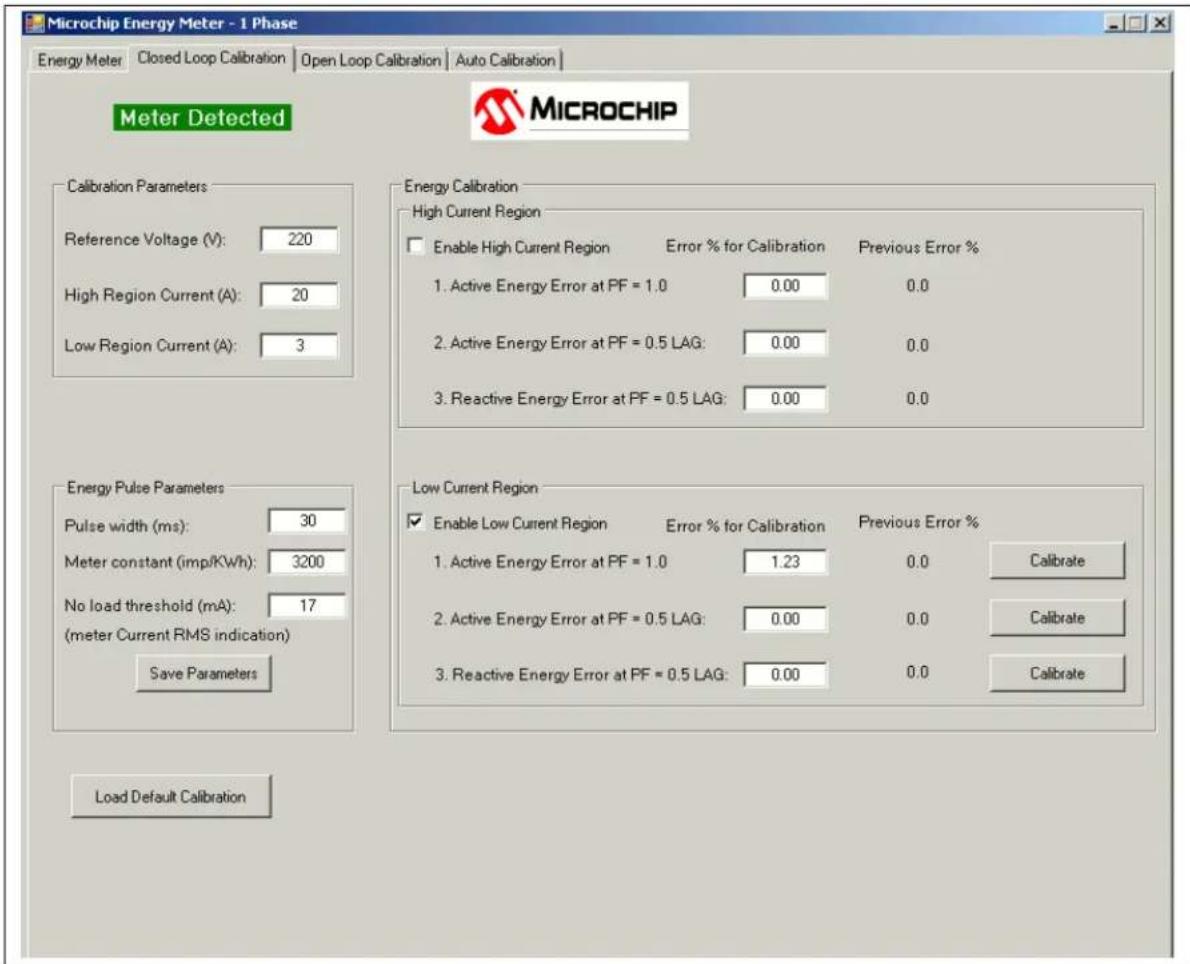
To calibrate the low-current region, configure the source to provide the specified low-region calibration current and select the "Enable Low Current Region" check box. The software will configure the corresponding register in the meter and force it to work in the low-current region only. The screen will change, as shown in Figure 6-4.
text_image
Microchip Energy Meter - 1 Phase Energy Meter Closed Loop Calibration Open Loop Calibration Auto Calibration Meter Detected MICROCHIP Calibration Parameters Reference Voltage (V): 220 High Region Current (A): 20 Low Region Current (A): 3 Energy Calibration High Current Region Enable High Current Region Error % for Calibration Previous Error % 1. Active Energy Error at PF = 1.0 0.00 0.0 2. Active Energy Error at PF = 0.5 LAG: 0.00 0.0 3. Reactive Energy Error at PF = 0.5 LAG: 0.00 0.0 Energy Pulse Parameters Pulse width (ms): 30 Meter constant (imp/KWh): 3200 No load threshold (mA): 17 (meter Current RMS indication) Save Parameters Load Default Calibration Low Current Region Enable Low Current Region Error % for Calibration Previous Error % 1. Active Energy Error at PF = 1.0 1.23 0.0 Calibrate 2. Active Energy Error at PF = 0.5 LAG: 0.00 0.0 Calibrate 3. Reactive Energy Error at PF = 0.5 LAG: 0.00 0.0 CalibrateFIGURE 6-4: Closed Loop Calibration – Low-Current Region.
The user must perform the calibration in the same manner as for the high region. When the Calibrate button is pressed, the software computes the new values of the following calibration registers, and saves them to EEPROM:
- Low Region, Step 1: GAIN_I_RMS_LOW, GAIN_POWER_ACT_LOW, GAIN_NUMR_ENERGY_ACT_LOW, GAIN_DENR_ENERGY_ACT_LOW
- Low Region, Step 2: PHASE_COMPENSATION_LOW
- Low Region, Step 3: GAIN_POWER_REACT_LOW, GAIN_NUMR_ENERGY_REACT_LOW, GAIN_DENR_ENERGY_REACT_LOW.
After the last calibration step, the software will automatically deselect the "Enable Low Current Region" check box, and the automatic current region selection mechanism from the energy meter will be reactivated.
6.4 OPEN LOOP CALIBRATION
6.4.1 Open Loop Calibration Principle
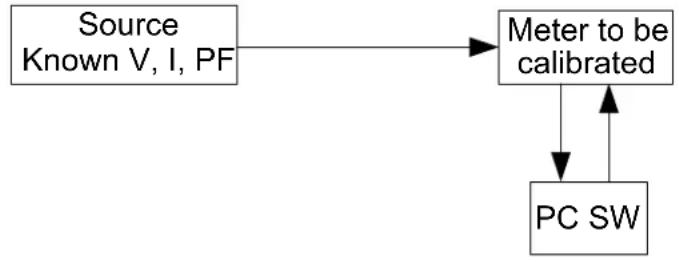
The meter to be calibrated is connected to a source delivering stable, known values of RMS Voltage, RMS Current and Power Factor. This type of calibration does not require a Reference Meter and feedback from the calibration device.
flowchart
graph TD
    A["Source\nKnown V, I, PF"] --> B["Meter to be calibrated"]
    B --> C["PC SW"]
    B --> D["Output"]
FIGURE 6-5: Open Loop Calibration Setup.
The calibration software running on the PC computes the calibration coefficients based on the values indicated by the meter and the known parameters of the source.
The calibration is done at a single power factor, different than 1 (to include the phase compensation calibration). Usually, this power factor is 0.5.
The calibration parameters are computed differently, depending on the parameter type, as follows:
- Voltage/Current RMS Gains: The software running on the PC reads the meter output (RMS indication) and the existing calibration gain. It calculates the new calibration gain with the following formula:
EQUATION 6-3:
$$ N e w _ R M S _ g a i n E x i s t i n g _ R M S _ g a i n $$
$$ \times \frac {\text { Expected_RMS_indication }}{\text { Read_RMS_indication }} $$
- Active/Reactive Energy and Power Gains: The software running on the PC computes these values directly, based on the assumption they are proportional to the Voltage and Current RMS gains:
EQUATION 6-4:
$$ E n e r g y (P o w e r) _ g a i n = V o l t a g e _ R M S _ g a i n \times C u r r e n t _ R M S _ g a i n k $$
The proportionality factors, noted with "k" in the above formula, are hard-coded in the software. They can be computed by knowing all the operations applied in the signal processing chain (bit shifts, number of samples per line cycle, number of cycles per computation cycle), or by the simpler way, computing them from the readings of the RMS and energy/power gains on a calibrated meter.
- Phase Compensation: The software on the PC reads the indicated Active Power from the energy meter. By knowing the expected Active Power (since the voltage, current and the applied power factor are already known), it computes the phase compensation. For more information related to phase compensation calibration, refer to Section 2.3.2.3 - Phase Compensation in "PIC18F87J72 Single-Phase Energy Meter Calibration User's Guide (DS51964)".
6.4.2 Open Loop Calibration with Energy Meter GUI
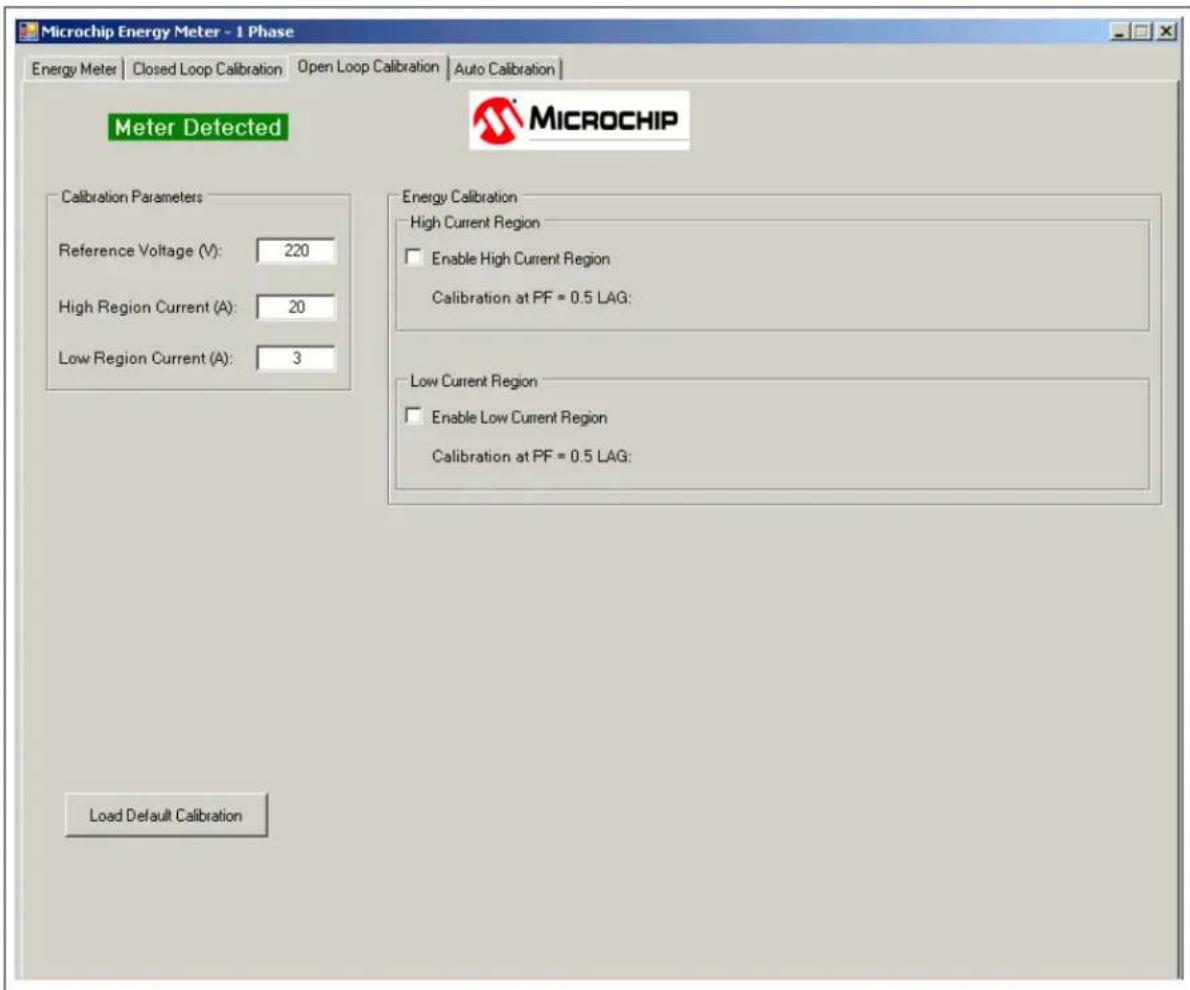
When the Open Loop Calibration tab is selected, the screen in Figure 6-6 will appear.
text_image
Microchip Energy Meter - 1 Phase Energy Meter | Closed Loop Calibration | Open Loop Calibration | Auto Calibration | Meter Detected MICROCHIP Calibration Parameters Reference Voltage (V): 220 High Region Current (A): 20 Low Region Current (A): 3 Load Default Calibration Energy Calibration High Current Region Enable High Current Region Calibration at PF = 0.5 LAG: Low Current Region Enable Low Current Region Calibration at PF = 0.5 LAG:FIGURE 6-6: Open Loop Calibration Screen.
The source must be configured with the parameters specified in the "Calibration Parameters" box. The recommended calibration values are 220V line voltage, 20A for the high-current region, and 3A for the low-current region. The user can modify these values, but it is recommended to have the high-region calibration current higher than 5A, and the low-region calibration current lower than 5A.
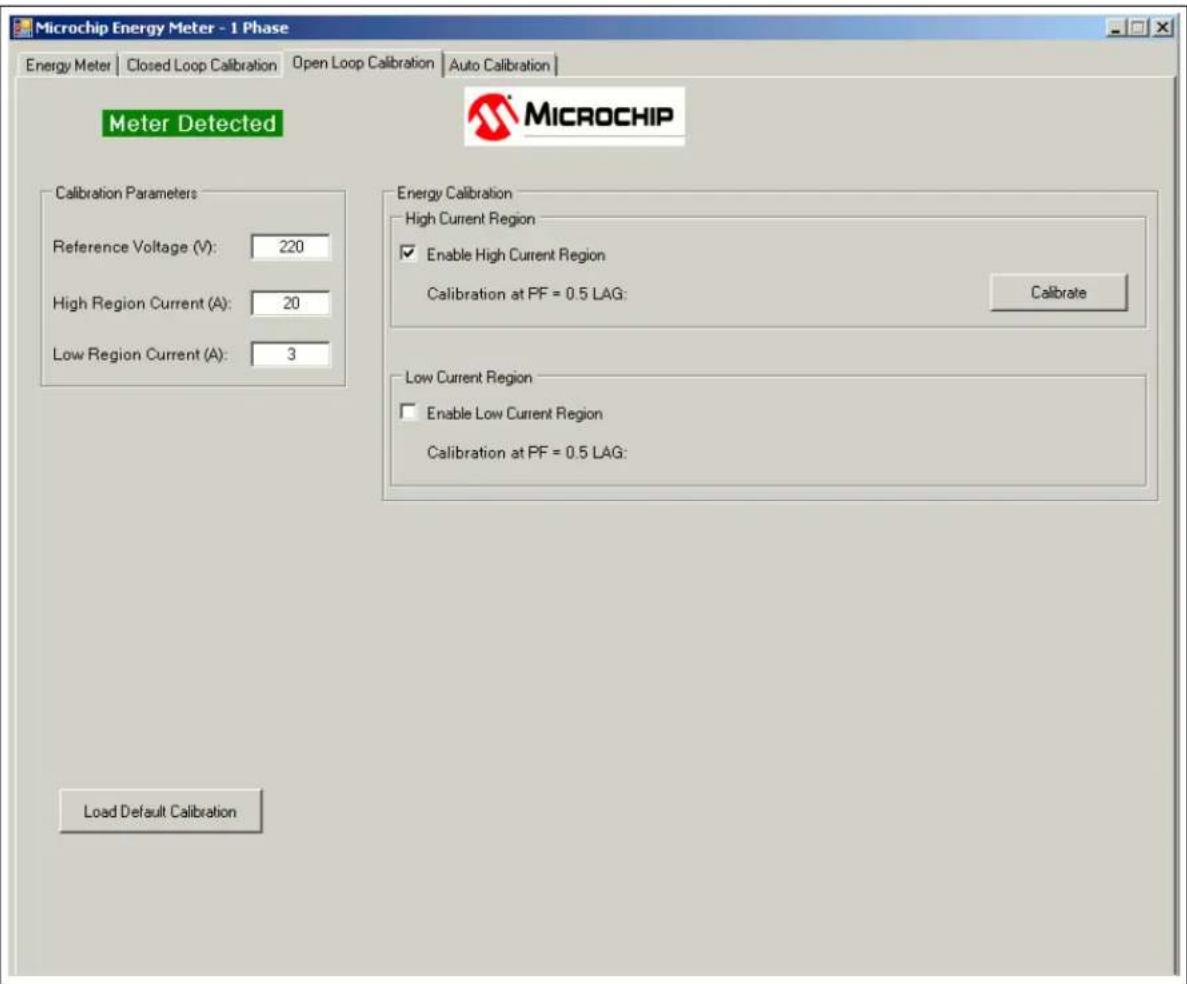
To start calibrating the high-current region, configure the source to provide the specified high-region calibration current, at power factor of 0.5, and select the "Enable High Current Region" check box. The software will configure the corresponding register in the meter and force it to work in the high-current region only. The following window will appear:
text_image
Microchip Energy Meter - 1 Phase Energy Meter | Closed Loop Calibration | Open Loop Calibration | Auto Calibration | Meter Detected MICROCHIP Calibration Parameters Reference Voltage (V): 220 High Region Current (A): 20 Low Region Current (A): 3 Load Default Calibration Energy Calibration High Current Region Enable High Current Region Calibration at PF = 0.5 LAG: Calibrate Low Current Region Enable Low Current Region Calibration at PF = 0.5 LAG:FIGURE 6-7: Open Loop Calibration – High Current Region
Press Calibrate. The GUI sends a confirmation message when the calibration is complete and the new registers are saved to EEPROM.
At this step, the GUI calibrates all the registers related to the high-current region and the GAIN_V_RMS register. The energy gain registers are calibrated for a meter constant of 3200 imp/kWh.
To calibrate the low-current region, configure the source to provide the specified low-region calibration current, at power factor of 0.5, and select the "Enable Low Current Region" check box. The software will configure the corresponding register in the meter and force it to work in the low-current region only. The following window will appear:

text_image
Microchip Energy Meter - 1 Phase Energy Meter | Closed Loop Calibration | Open Loop Calibration | Auto Calibration | Meter Detected MICROCHIP Calibration Parameters Reference Voltage (V): 220 High Region Current (A): 20 Low Region Current (A): 3 Load Default Calibration Energy Calibration High Current Region Enable High Current Region Calibration at PF = 0.5 LAG: Low Current Region Enable Low Current Region Calibration at PF = 0.5 LAG: CalibrateFIGURE 6-8: Open Loop Calibration – Low- Current Region.
Press Calibrate. A confirmation message will be sent when the calibration is complete and the new registers are saved to EEPROM.
At this step, the GUI calibrates all the registers related to the low-current region. The energy gain registers are calibrated for a meter constant of 3200 imp/kWh.
6.5 AUTO-CALIBRATION
6.5.1 Auto-Calibration Principle
Auto Calibration is considered to be the open loop calibration routine implemented into the energy meter's firmware. Communication with the PC is not required during this procedure.
The Auto-Calibration routine can be triggered by external events, such as I/O pin state change (from push-button, jumper or other MCU), or UART command (as in this design).
When the trigger event is received, the meter enters into Auto-Calibration mode: it acquires data, computes the calibration parameters and saves them to EEPROM. Then it returns back to Normal mode.
Because the calibration routine occupies a significant size of the program memory, the user has the option to remove it from the code by commenting the statement #define AUTOCALIBRATION_ENABLE in the file Config_EnergyMeter.c. If the size of the program memory becomes a limitation in the user's custom design, the user may create two firmware versions: one for the calibration, with a reduced set of features, and one with the auto-calibration routine removed and the complete set of features.
The auto-calibration method implemented in this design requires only one current level. Both low- and high-current regions are calibrated at 5A. This value was selected to be in the range of both regions.
The execution time of the auto calibration routine includes the following components:
- the duration of two line cycles (one for the high-current region and one for the low-current region)
- calibration registers calculation time (it is much lower than the duration of a line cycle so it can be neglected)
- the necessary time to store the calibration registers to EEPROM
6.5.2 Auto-Calibration with Energy Meter GUI
When the Auto Calibration tab is selected, the following screen appears:

text_image
Microchip Energy Meter - 1 Phase Energy Meter | Closed Loop Calibration | Open Loop Calibration | Auto Calibration | Meter Detected MICROCHIP The calibration parameters are hardcoded in the FW (Voltage 220V, Current 5A, Power Factor 0.5 lag). For different values, please modify the FW. Before pressing "Calibrate", please check that the meter is connected to the calibration equipment configured with the parameters specified above. CalibrateFIGURE 6-9: Auto-Calibration Screen.
The source must be configured with the parameters specified in the text above the Calibrate button.
After Calibrate is pressed, three possible messages can appear:
- An error message indicating that the auto-calibration routine is not present in the meter code, because the firmware was compiled with the statement #define AUTOCALIBRATION_ENABLE commented or missing.
• "Auto Calibration Complete" - "Communication error. Calibration not done." — this means the GUI did not receive feedback from the energy meter.
In the current firmware version, the energy gain registers are computed for a meter constant of 3200 imp/kWh.
NOTES:
Appendix A. Schematic and Layouts
A.1 INTRODUCTION
This appendix contains the following schematics and layouts of the MCP6L2 and PIC18F66J93 Energy Meter:
- Board – Schematic – Analog-to-Digital Converter
- Board – Schematic – Microcontroller
- Board – Schematic – LCD - USB
- Board – Top Silk
- Board – Top Copper
- Board – Top Silk and Copper
- Board – Bottom Silk
- Board – Bottom Copper
- Board – Bottom Silk and Copper
A.2 SCHEMATICS AND PCB LAYOUT
The layer order is shown in Figure A-1.
FIGURE A-1: Layer Order.
A.3 BOARD - SCHEMATIC - ANALOG-TO-DIGITAL CONVERTER
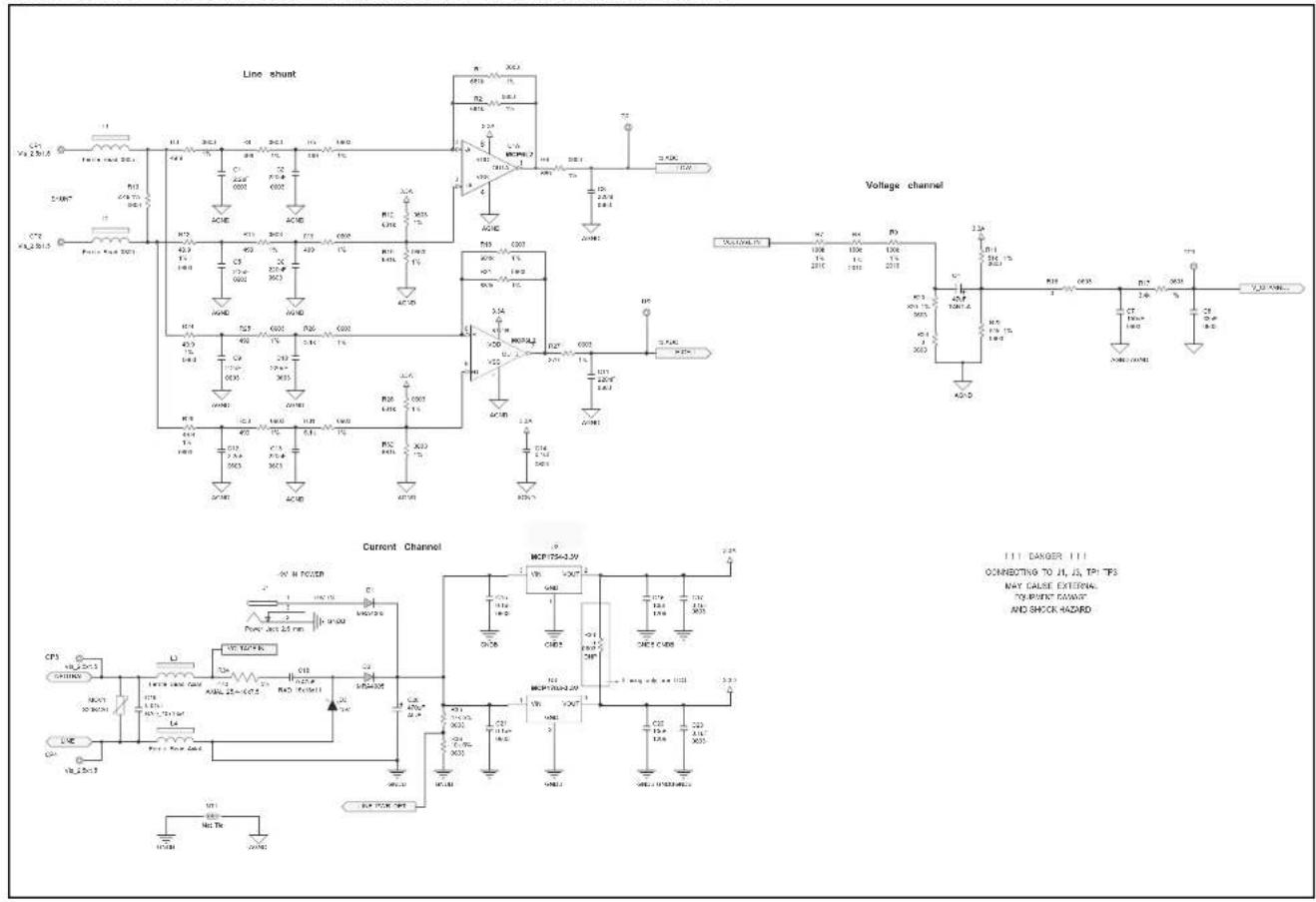
text_image
Line shunt Voltage channel Current Channel 1.1 DANGER 1.1 CONNECTING TO JL JL TPI TP3 MAY CULSE EXTERNAL TOURBENT GAVANT AND SHOCK HAZARDA.4 BOARD - SCHEMATIC - MICROCONTROLLER

natural_image
Pure electrical circuit lines without any symbolsA.8 BOARD – TOP SILK AND COPPER

text_image
USB (Isolated) LC01 J2 J5 C E J4 Active Power L03 L02 CE ✓ RoHS SWI MICROCHIP AR000370 9V IN TP2 TPI R33 J1 CP2 CP1 CP3 CP4 SW2 SW3A.9 BOARD - BOTTOM SILK
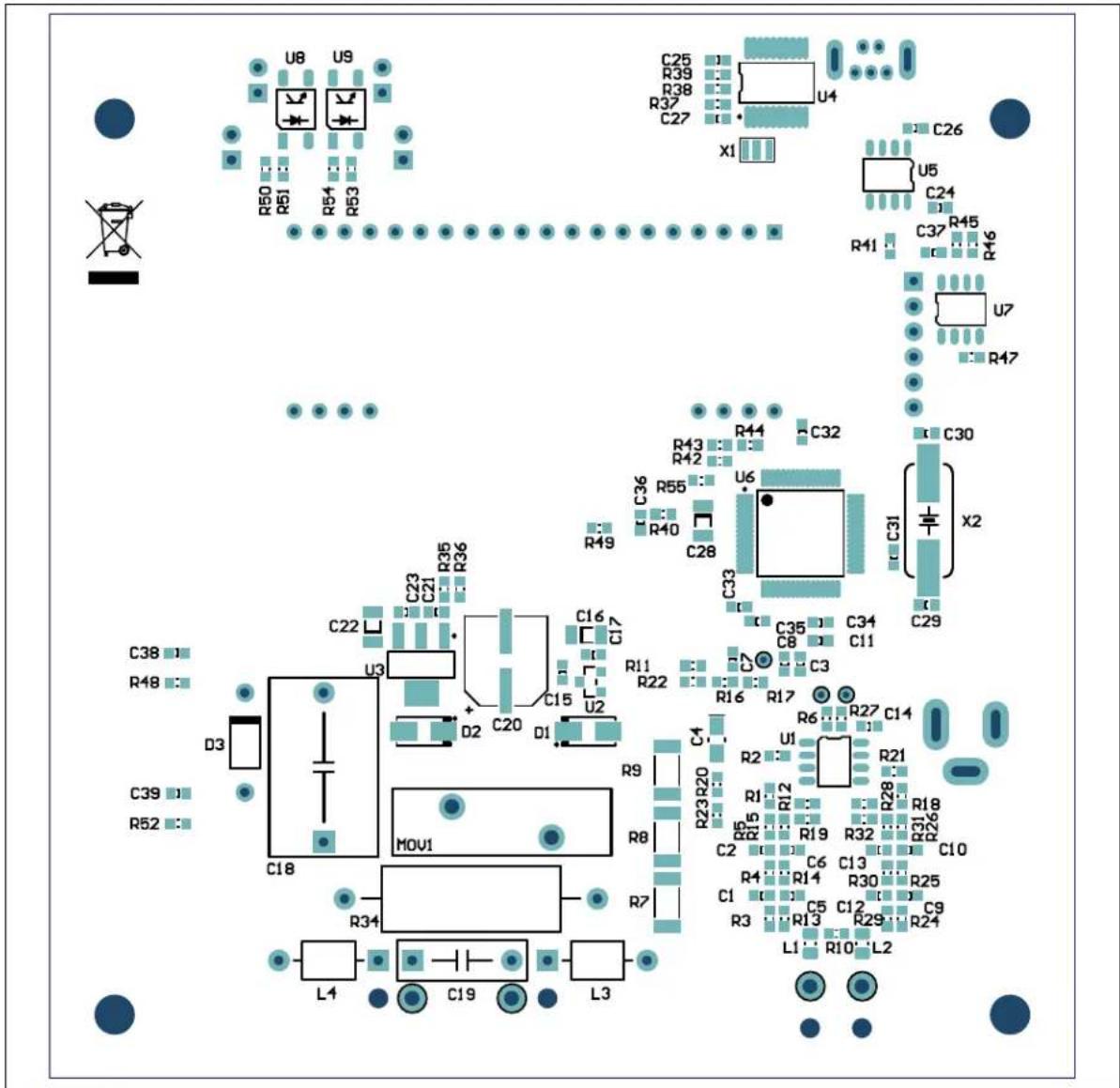
text_image
U8 U9 R50 R51 R54 R53 C25 R39 R38 R37 C27 U4 X1 C26 U5 C24 R41 R45 R46 U7 R47 C37 R41 R43 R42 R44 C32 C30 R43 R42 R40 C36 C33 C31 X2 C28 C35 C34 C11 C3 C29 C38 R48 D3 C22 C23 C21 R35 C16 C17 C15 U2 D2 C20 D1 R11 R22 R16 R17 R27 C14 R21 R23 R20 R1 R12 R19 R32 R31 R26 C10 C2 R15 R19 C6 C13 R25 R4 R14 R30 C9 C1 R3 C5 C12 R29 R24 L1 R10 L2 M0V1 R34 L4 C19 L3A.10 BOARD - BOTTOM COPPER

natural_image
Blue printed circuit board with integrated circuits and traces, no readable text or symbolsA.11 BOARD - BOTTOM SILK AND COPPER
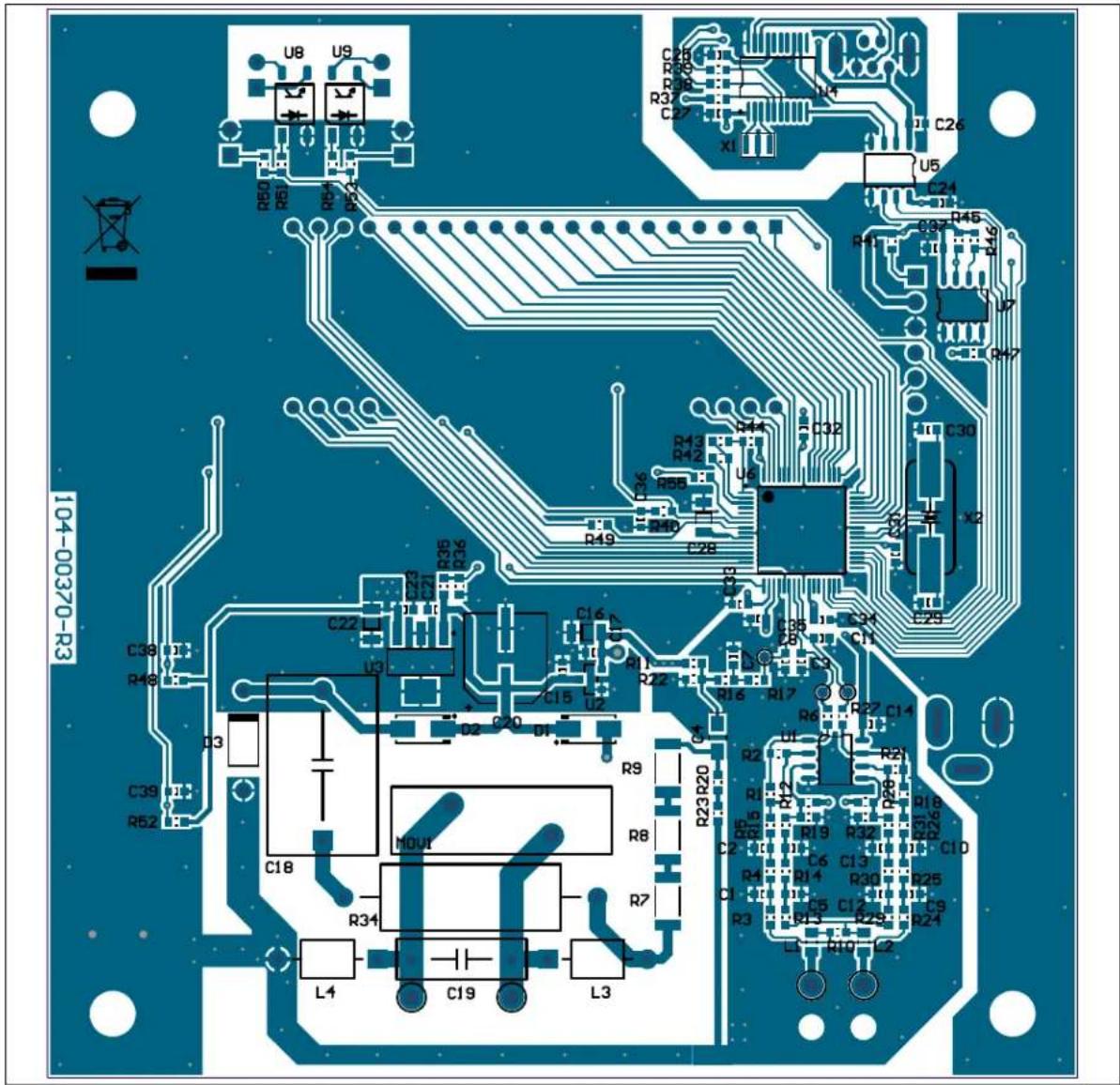
text_image
U8 U9 R60 R51 R42 R63 R54 R43 R65 R55 R44 R66 R56 R45 R67 R46 R68 R57 R47 R69 R48 R49 R70 R47 C2H R58 R32 C27 X1 U4 C26 U5 C24 R41 R45 R46 U7 R47 C30 C32 R13 R42 R58 R49 C28 C36 C38 C39 C30 C22 C23 C21 R35 R36 C16 U3 C15 U2 D2 C20 D1 C17 R11 R22 R16 R17 C35 C34 C11 C33 C32 C27 C26 R27 C14 R23 R20 R18 R19 R32 R31 R26 C10 R21 R22 R19 R30 C13 R25 C9 R24 R17 R18 R19 R32 R31 R26 C10 R19 R18 R25 C13 R25 C9 R24 R14 C14 C13 C10 C10 C10 C10 C10 C10 C10 C10 C10 C10 C10 C10 C10 C10 C10 C10 C10 C10 C10 C10 C10 C10 C10 C10 C10 C10 C10 C10 C10 C10 C10 C10 C10 C10 C39 R52 D3 C38 U1 D48 U2 MOUT R34 L4 C19 L3Appendix B. Bill of Materials (BOM)
TABLE B-1: BILL OF MATERIALS (BOM)
| Qty. | Reference Description Manufacturer Part Number | |||
| 4 C1, C5,C9, C12 | Cap. ceramic 2.2 uF 6.3V 10% X7R 0603 TDK | ®Corporation C1608X7R0J225K | ||
| 6 C2, C3,C6, C10,C11, C13 | Cap. ceramic 0.22 uF 10V 10% X7R 0603 TDK | Corporation C1608X7R1A224K | ||
| 1 C4 Cap. tant. 47 uF 4V 10% size A AVX Corporation TAJA476K004RNJ | ||||
| 1 C7 Cap. ceramic 0.15 uF 16V 10% X7R 0603 TDK Corporation C1608X7R1C154K | ||||
| 1 C8 Cap. ceramic 33 nF 50V 10% X7R 0603 TDK Corporation C1608X7R1H333K | ||||
| 16 | C14, C15,C17, C21,C23, C24,C26, C31,C32, C33,C34, C35,C36, C37,C38, C39 | Cap. ceramic 0.1 uF 16V 10% X7R 0603 | TDK Corporation C1608X7R1C104K | |
| 3 | C16, C22,C28 | Cap. ceramic 10 uF 10V X7R 20% 1206 TDK | Corporation C3216X7R1A106M | |
| 1 | C18 | Cap. film 0.47 uF 305V AC power supply | EPCOS AG | B32932A3474M |
| 1 | C19 | Cap. film .01 uF 330V AC suppress | EPCOS AG | B32911A3103M |
| 1 C20 Cap. elect. 470 uF 16V 20% VS size F Panasonic ®- ECG EEE-1CA471UP | ||||
| 2 C25, C27 Cap. ceramic 1 uF 10V X7R 20% 0603 TDK Corporation C1608X7R1A105M | ||||
| 2 | C29, C30 | Cap. ceramic 22 pF 50V 5% C0G. 0603 | TDK Corporation | C1608C0G1H220J |
| 2 D1, D2 Diode STD REC 1A 600V SMA. ON Semiconductor ® | MRA4005T3G | |||
| 1 D3 Diode Zener 15V 1W DO-41 Fairchild Semiconductor® | 1N4744A | |||
| 1 | J1 | Conn. power jack male 2.5 mm clsd. | CUI Inc | PJ-002B |
| 1 J2 Conn. recept. USB TH. vert. 5 pos. Molex ® | 500075-1517 | |||
| 1 | J3 | Conn. hdr. male .100 1 x 6 pos. vert. | TE Connectivity, Ltd. | HDR M 1x6 Vertical |
| 2 | J4, J5 | Conn. hdr. male .100 1 x 2 pos. vert. | TE Connectivity, Ltd. | HDR M 1x2 Vertical |
| 2 | L1, L2 | Ferrite 800 MA 150 mOhm 0805 SMD. | Laird Technologies® | LI0805H151R-10 |
| 2 | L3, L4 | Bead core single 3.8 X 5.3 mm axial | Panasonic - ECG | EXC-ELSA35 |
| 1 LD1 LED 2 X 1.2mm rd/gn wtr. clr. SMD. Kingbright Corporation | APHBM2012SURKCGKC | |||
| 2 LD2, LD3 LED 5mm RED 640 nm 20 mcd 2 mA Kingbright Corporation | WP7113LSRD | |||
| 1 | MOV1 | Varistor 420 V RMS 20 mm radial | EPCOS AG | S20K420 |
| Qty. | Reference | Description | Manufacturer | Part Number |
| 1 PCB Printed Circuit Board - MCP6L2 and PIC18F66J93 Energy Meter Reference Design | — 104-00370 | |||
| 8 R1, R2, R12, R18, R19, R21, R28, R32 | Res. 681 kOhm 1/10W 1% 0603 SMD. Panasonic - ECG ERJ-3EKF6 | 813V | ||
| 4 R3, R13, R24, R29 | Res. 49.9 Ohm 1/10W 1% 0603 SMD. Panasonic - ECG ERJ-3EKF4 | 9R9V | ||
| 6 R4, R5, R14, R15, R25, R30 | Res. 499 Ohm 1/10W 1% 0603 SMD. Panasonic - ECG ERJ-3EKF4 | 90V | ||
| 1 R6 Res. 680 Ohm 1/10W 1% 0603 SMD. Panasonic - ECG ERJ-3EKF6800V | ||||
| 3 R7, R8, R9 Res. 100 kOhm 3/4W 1% 2010 SMD. Panasonic - ECG ERJ-12SF1003U | ||||
| 1 R10 Res. 2.49 Ohm 1/10W 1% 0603 SMD. Vishay | ®Intertechnology, Inc. | CRCW06032R49FKEA | ||
| 2 R11, R22 Res. 51 kOhm 1/10W 1% 0603 SMD. Panasonic - ECG ERJ-3EKF5102V | ||||
| 2 R16, R23 Res. 0 Ohm 1/10W 0603 SMD. Panasonic - ECG ERJ-3GEY0R00V | ||||
| 1 R17 Res. 3.4 kOhm 1/10W 1% 0603 SMD. Panasonic - ECG ERJ-3EKF3401V | ||||
| 1 R20 Res. 820 Ohm 1/10W 1% 0603 SMD. Panasonic - ECG ERJ-3EKF8200V | ||||
| 2 R49, R55 Res. 1 kOhm 1/10W 1% 0603 SMD. Panasonic - ECG ERJ-3EKF1001V | ||||
| 2 R26, R31 Res. 5.1 kOhm 1/10W 1% 0603 SMD. Panasonic - ECG ERJ-3EKF5101V | ||||
| 1 R27 Res. 270 Ohm 1/10W 1% 0603 SMD. Panasonic - ECG ERJ-3EKF2700V | ||||
| 1 R34 Res. 470 Ohm 3W 5% axial Panasonic - ECG RSMF3JT470R | ||||
| 1 R33 Res. 0 Ohm 1/10W 0603 SMD. - DO NOT POPULATE | Panasonic - ECG | ERJ-3GEY0R00V | ||
| 1 R35 Res. 47 kOhm 1/10W 5% 0603 SMD. Panasonic - ECG ERJ-3GEYJ473V | ||||
| 5 R36, R41, R42, R43, R44 | Res. 10 kOhm 1/10W 5% 0603 SMD. Panasonic - ECG ERJ-3GEYJ103V | |||
| 3 R37, R38, R39 | Res. 390 Ohm 1/10W 5% 0603 SMD. Panasonic - ECG ERJ-3GEYJ391V | |||
| 3 R40, R50, R53 | Res. 1 kOhm 1/10W 5% 0603 SMD. Panasonic - ECG ERJ-3GEYJ102V | |||
| 3 R45, R46, R47 | Res. 2.2 kOhm 1/10W 5% 0603 SMD. Panasonic - ECG ERJ-3GEYJ222V | |||
| 2 R48, R52 | Res. 4.7 kOhm 1/10W 5% 0603 SMD. Panasonic - ECG ERJ-3GEYJ472V | |||
| 2 R51, R54 | Res. 3.3 kOhm 1/10W 5% 0603 SMD. Panasonic - ECG ERJ-3GEYJ332V | |||
| 3 SW1, SW2, SW3 | Switch tact. 6 mm 160 GFH = 4.3 mm Omron Electronics B3S-1000P | |||
| 1 U5 Isolator HS dual digital SOIC-8 NVE Corporation IL721-3E | ||||
| 2 U8, U9 | Photocoupler Darl. Out 4-SMD. | Sharp Corporation | PC365NJ0000F | |
| 1 X1 Ceramic Resonator 12.0 MHz SMD. Murata Electronics® | CSTCE12M0G55-R0 | |||
| 1 X2 Crystal 8 MHz 18 pF SMD. Abracon®Corporation ABLS-8.000MHZ-B4-T | ||||
Note 1: The components listed in this Bill of Materials are representative of the PCB assembly. The released BOM used in manufacturing uses all RoHS-compliant components.
TABLE B-2: BILL OF MATERIALS – MICROCHIP CONSIGNED PARTS
| Qty | Reference | Description | Manufacturer Part Number | ||
| 1 | LCD1 | LCD 7 digits | 28 pins Xiamen Ocular Optics | Co., Ltd. | DP076P |
| 1 | U1 | IC op amp 2 | .8MHZ 2.7V SOIC-8 Microchip | Technology Inc. | MCP6L2T-E/SN |
| 1 | U2 | IC reg. LDO | 150mA 3.3V SOT-23A-3 | Microchip | MCP1754ST-3302E/CB |
| 1 | U3 | IC reg. LDO | 250mA 3.3V SOT-223-3 | Microchip | MCP1703-3302E/DB |
| 1 | U4 | IC USB to UART SSOP-20 | Microchip | Technology Inc. | MCP2200-I/SS |
| 1 | U6 | IC PIC MCU | Flash 64K X 4 TQFP-64 | Microchip | PIC18F66J93-I/PT |
| 1 | U7 | IC EEPROM | 256 KBIT 1 MHZ SOIC-8 | Microchip | 24FC256-I/SN |
Note 1: The components listed in this Bill of Materials are representative of the PCB assembly. The released BOM used in manufacturing uses all RoHS-compliant components.
Worldwide Sales and Service
AMERICAS
Corporate Office
2355 West Chandler Blvd.
Chandler, AZ 85224-6199
Tel: 480-792-7200
Fax: 480-792-7277
Technical Support:
http://www.microchip.com/
support
Web Address:
www.microchip.com
Atlanta
Duluth, GA
Tel: 678-957-9614
Fax: 678-957-1455
Boston
Westborough, MA
Tel: 774-760-0087
Fax: 774-760-0088
Chicago
Itasca,
Tel: 630-285-0071
Fax: 630-285-0075
Cleveland
Independence, OH
Tel: 216-447-0464
Fax: 216-447-0643
Dallas
Addison, TX
Tel: 972-818-7423
Fax: 972-818-2924
Detroit
Farmington Hills, MI
Tel: 248-538-2250
Fax: 248-538-2260
Indianapolis
Noblesville, IN
Tel: 317-773-8323
Fax: 317-773-5453
Los Angeles
Mission Viejo, CA
Tel: 949-462-9523
Fax: 949-462-9608
Santa Clara
Santa Clara, CA
Tel: 408-961-6444
Fax: 408-961-6445
Toronto
Mississauga, Ontario,
Canada
Tel: 905-673-0699
Fax: 905-673-6509
ASIA/PACIFIC
Asia Pacific Office
Suites 3707-14, 37th Floor
Tower 6, The Gateway
Harbour City, Kowloon
Hong Kong
Tel: 852-2401-1200
Fax: 852-2401-3431
Australia - Sydney
Tel: 61-2-9868-6733
Fax: 61-2-9868-6755
China - Beijing
Tel: 86-10-8569-7000
Fax: 86-10-8528-2104
China - Chengdu
Tel: 86-28-8665-5511
Fax: 86-28-8665-7889
China - Chongqing
Tel: 86-23-8980-9588
Fax: 86-23-8980-9500
China - Hangzhou
Tel: 86-571-2819-3187
Fax: 86-571-2819-3189
China - Hong Kong SAR
Tel: 852-2943-5100
Fax: 852-2401-3431
China - Nanjing
Tel: 86-25-8473-2460
Fax: 86-25-8473-2470
China - Qingdao
Tel: 86-532-8502-7355
Fax: 86-532-8502-7205
China - Shanghai
Tel: 86-21-5407-5533
Fax: 86-21-5407-5066
China - Shenyang
Tel: 86-24-2334-2829
Fax: 86-24-2334-2393
China - Shenzhen
Tel: 86-755-8864-2200
Fax: 86-755-8203-1760
China - Wuhan
Tel: 86-27-5980-5300
Fax: 86-27-5980-5118
China - Xian
Tel: 86-29-8833-7252
Fax: 86-29-8833-7256
China - Xiamen
Tel: 86-592-2388138
Fax: 86-592-2388130
China - Zhuhai
Tel: 86-756-3210040
Fax: 86-756-3210049
ASIA/PACIFIC
India - Bangalore
Tel: 91-80-3090-4444
Fax: 91-80-3090-4123
India - New Delhi
Tel: 91-11-4160-8631
Fax: 91-11-4160-8632
India - Pune
Tel: 91-20-2566-1512
Fax: 91-20-2566-1513
Japan - Osaka
Tel: 81-6-6152-7160
Fax: 81-6-6152-9310
Japan - Tokyo
Tel: 81-3-6880-3770
Fax: 81-3-6880-3771
Korea - Daegu
Tel: 82-53-744-4301
Fax: 82-53-744-4302
Korea - Seoul
Tel: 82-2-554-7200
Fax: 82-2-558-5932 or
82-2-558-5934
Malaysia - Kuala Lumpur
Tel: 60-3-6201-9857
Fax: 60-3-6201-9859
Malaysia - Penang
Tel: 60-4-227-8870
Fax: 60-4-227-4068
Philippines - Manila
Tel: 63-2-634-9065
Fax: 63-2-634-9069
Singapore
Tel: 65-6334-8870
Fax: 65-6334-8850
Taiwan - Hsin Chu
Tel: 886-3-5778-366
Fax: 886-3-5770-955
Taiwan - Kaohsiung
Tel: 886-7-213-7828
Fax: 886-7-330-9305
Taiwan - Taipei
Tel: 886-2-2508-8600
Fax: 886-2-2508-0102
Thailand - Bangkok
Tel: 66-2-694-1351
Fax: 66-2-694-1350
EUROPE
Austria - Wels
Tel: 43-7242-2244-39
Fax: 43-7242-2244-393
Denmark - Copenhagen
Tel: 45-4450-2828
Fax: 45-4485-2829
France - Paris
Tel: 33-1-69-53-63-20
Fax: 33-1-69-30-90-79
Germany - Munich
Tel: 49-89-627-144-0
Fax: 49-89-627-144-44
Italy - Milan
Tel: 39-0331-742611
Fax: 39-0331-466781
Netherlands - Drunen
Tel: 31-416-690399
Fax: 31-416-690340
Spain - Madrid
Tel: 34-91-708-08-90
Fax: 34-91-708-08-91
UK - Wokingham
Tel: 44-118-921-5869
Fax: 44-118-921-5820
11/29/12