HTINT601T - Security Camera Speco Technologies - Free user manual and instructions
Find the device manual for free HTINT601T Speco Technologies in PDF.


User questions about HTINT601T Speco Technologies
0 question about this device. Answer the ones you know or ask your own.
Ask a new question about this device
Download the instructions for your Security Camera in PDF format for free! Find your manual HTINT601T - Speco Technologies and take your electronic device back in hand. On this page are published all the documents necessary for the use of your device. HTINT601T by Speco Technologies.
USER MANUAL HTINT601T Speco Technologies
① Contents....1
- Precautions ...... 2, 3
Safety Instructions 4
● Package Contents......5
● Camera Installation....6-12
● Lens Adjustment 13-15
Specifications....16-20
● Camera Dimension 21-23
Features......24
OSD Menu Details 25-40
● Trouble Shooting....41
Precautions
Do not install the camera in extreme temperature conditions.

natural_image
Cartoon illustration of two anthropomorphic surveillance cameras emitting flames, with a cloud above (no text or symbols)Only use the camera under conditions where temperatures are between -10°C and +50°C. Be especially careful to provide ventilation when operating under high temperatures.
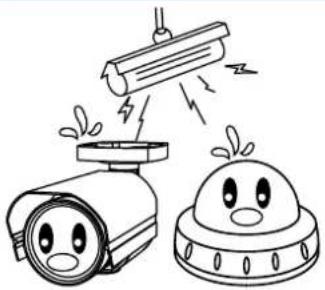
Do not install the camera under unstable lighting conditions.
natural_image
Illustration of a surveillance camera and a satellite with warning symbols (no text or labels)Severe lighting change or flicker can cause the camera to work improperly.
Do not touch the front lens of the camera.

natural_image
Illustration of a hand holding a fire hydrant next to a helmet with a sad face, and another helmet with angry faces (no text or symbols)This is one of the most important parts of the camera. Be careful not to leave fingerprints on the lens cover.
Never keep the camera pointed directly at strong light.

natural_image
Illustration of a sun shining on a camera and a satellite with smiling faces (no text or symbols)It can cause malfunctions to occur.
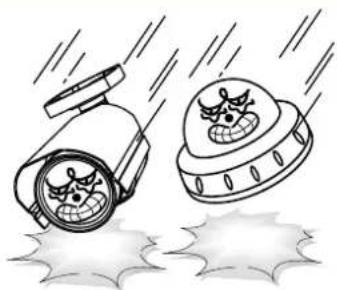
Do not drop the camera or subject it to physical shocks.
natural_image
Illustration of two anthropomorphic spacecraft with snowflakes flying below (no text or symbols)Housing damage can compromise weatherproof ratings.
Do not expose the camera to radioactivity.

natural_image
Illustration of two cartoon-style icons: a radiometer emitting smoke and a helmet with steam, next to a radiation symbol (no text or labels)If exposed to radioactivity the CCD will fail.
NOTE
* If the camera is exposed to spotlight or object reflecting strong light, smear or blooming may occur.
* please check that the power satisfies the normal specification before connecting the camera.

text_image
CAUTION RISK OF ELECTRIC SHOCK DO NOT OPEN CAUTION:TO REDUCE THE RISK OF ELECTRIC SHOCK DO NOT REMOVE COVER(OR BACK). NO USER-SERVICEABLE PARTS INSIDE. REFER SERVICING TO QUALIFIED SERVICE PERSONNEL. ISO14001 CE FC
The lightning flash with an arrowhead symbol, within an equilateral triangle is intended to alert the user to the presence of uninsulated dangerous voltage within the product's enclosure that may be of sufficient magnitude to constitute a risk of electric shock to persons.

The exclamation point within an equilateral triangle is intended to alert the user to the presence of important operating and maintenance (servicing) instructions in the literature accompanying the appliance.
In USA and Canada, Use Class 2 Power Supply Only
INFORMATION - This equipment has been tested and found to comply with limits for a Class A digital device, pursuant to part 15 of the FCC Rules & CE Rules. These limits are designed to provide reasonable protection against harmful interference when the equipment is operated in a commercial environment. This equipment generates, uses, and can radiate radio frequency energy and, if not installed and used in accordance with the instruction manual, may cause harmful interference to radio communications. Operation of this equipment in a residential area is likely to cause harmful interference in which case the user will be required to correct the interference at their own expense.
WARNING - Changes or modifications not expressly approved by the manufacturer could void the user's authority to operate the equipment.
WARNING - To prevent electric shock and risk of fire hazards:
◆Do NOT use power sources other than that specified.
◆Do NOT expose this appliance to rain or moisture.
Apparatus shall not be exposed to dripping or splashing and no objects filled with liquids, such as vases, shall be placed on the apparatus.
CAUTION : To prevent electric shock and risk of fire hazards:
Do NOT use power sources other than those specified.
Safety Instructions
Precautions for use
This camera should be installed by qualified personnel only
There are no user serviceable parts inside
Do not disassemble this camera other than to make initial adjustments
Use a UL approved regulated 24 volt AC or 12 volt DC power supply
Use appropriate low voltage power cable to prevent fire or electrical shock
Please insure that your installation area can support the weight of the camera
Please handle this camera carefully :
Do not use a strong or abrasive detergent when cleaning the camera
Do not install near cooling or heating device
Package Contents
Please make sure that the following items are included in the Package:
1) HTINT70T, HTINT701T, HTINT702T
• 1 Video Test Connector, Power Jack
• 1 Focus Adjustment(HTINT70T)
- 1 Bracket Base
• 1 Wrench
- Set Screw
- 4 Tapping Screws 4x25
- 4 Hexagon Socket Screws M5x10
- WHEN USING 12 VOLTS DC (constant voltage 500mA)

text_image
Power Input : RED Center : (+) DC 12V Power Supply- WHEN USING 24 VOLTS AC (40 Volt Amps)

text_image
RED (+) BLACK:(-) AC 24V Power Supply- CONNECT VIDEO CABLE
1) WHEN USING IT AS ANALOG OUTPUT, CONNECT YELLOW COLOR BNC CABLE TO THE BNC JACK.

text_image
CVBS2) WHEN USING IT AS TVI OUTPUT, CONNECT BLACK COLOR BNC CABLE TO THE BNC JACK.

text_image
TVICAMERA INSTALLATION
Compatibility
1) HTINT70T, HTINT701T, HTINT702T
CVCJBB INTJBS INTCM

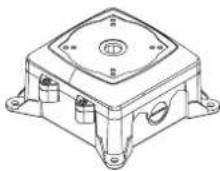


natural_image
Technical line drawing of a mechanical component with no visible text or symbols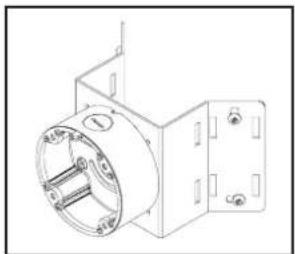
natural_image
Technical line drawing of a mechanical component with no visible text or symbolsCVCJBD

→ Adaptor plate(60PLATE) with rubber
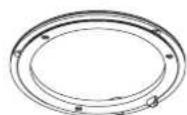

CAMERA INSTALLATION
Compatibility
3) HTINT591T
CVCJBD
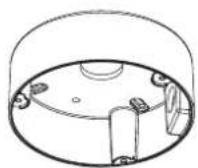
→ Adaptor plate(59PLATE) with rubber


4) HT7246T, HT7250T
INTWM INTPM CVCJBD DFM

natural_image
Technical line drawings of various security camera components and base parts (no text or labels)CAUTION : The installation instructions in this manual are for use by qualified service personnel only. To reduce the risk of electric shock, do not perform any servicing other than that contained in the operating instructions unless you are qualified to do so.
CAMERA INSTALLATION
text_image
"A" Open the cap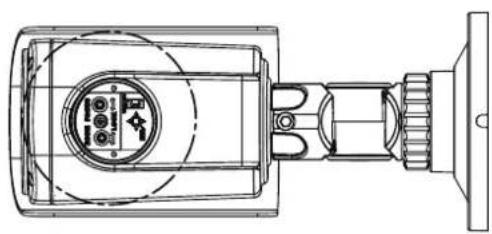
natural_image
Technical line drawing of a mechanical device with no visible text or symbols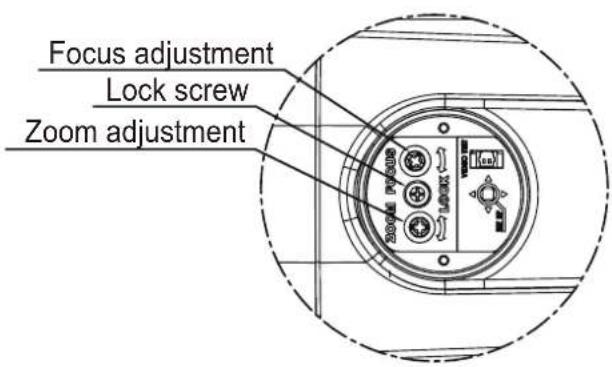
text_image
Focus adjustment Lock screw Zoom adjustmentLENS ADJUSTMENT
2. HTINT60T

natural_image
Technical line drawing of a mechanical component with no visible text or symbols
natural_image
Technical line drawing of a mechanical component with concentric rings and central hub (no text or symbols)
text_image
Zoom adjustment Lock screw Focus adjustmentLENS ADJUSTMENT
- HT7246T, HT7250T
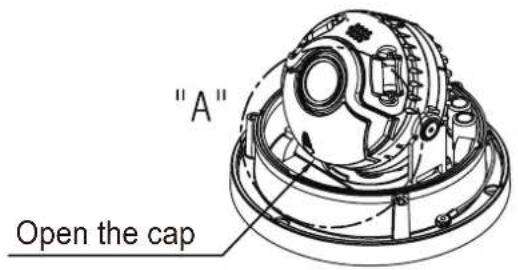
text_image
"A" Open the cap
natural_image
Technical line drawing of a mechanical assembly with no visible text or symbols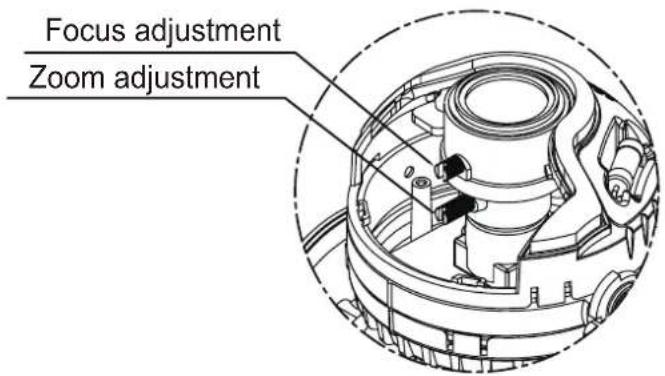
text_image
Focus adjustment Zoom adjustmentIntensifier T® Series
DC Auto Iris Varifocal Lens 2.8-12mm,5-50mm / 3.6mm Fixed Board Lens

natural_image
Exterior view of a black surveillance camera with mounting flange (no visible text or symbols)SPECIFICATIONS
HTINT70T (2.8-12mm)
HTINT701T (3.6mm)
HTINT702T (5-50mm)

text_image
1/2.5" CMOS EAT & SHEET Microspherical 0.00 Lbs Auto-Wheel Balance Sensitivity by 32x BLC Reconstruction High Speed Shelter Methanol Substance CDO Auto-Wheel Body Covering IP60 RE-199-40 SEV| MODEL | HTINT70T / HTINT701T / HTINT702T | |||
| Image Sensor | 1/2.9 Inch SONY 2Mega CMOS Sensor | |||
| Pixels - total | 2001 (H) X 1121 (V) | |||
| Pixels - Effective | 1985 (H) X 1105 (V) | |||
| Resolution | 1920X1080(1080p@30f / 1080p@25f)1280X720_CROP(720p@60f / 720p@50f)1280X720_CROP(720p@30f / 720p@25f) | |||
| Scanning System | Progressive Scan | |||
| S/N Ratio | 50 dB | |||
| Video Output | 1.0Vp-p Composite. 75 Ohms1.0Vp-p TVI(Transport Video Interface) 75 Ohms | |||
| Minimum Illumination | 0.001 Lux @ F1.4(Sens-Up X32) | |||
| Shutter Speed | AUTO / Manual(1/25,1/30Sec ~ 1/30000Sec) / FLICKER | |||
| BLC | 0 | |||
| HSBLC | 0 | |||
| WDR | ON / OFF (Low,Middle,High)(15 Fram) | |||
| ACE(D-WDR) | O(OFF/LOW/MIDDLE/HIGH) | |||
| Day&Night | AUTO / COLOR / BW / EXT | |||
| White Balance | AUTO/AWB/AWC-SET/MANUAL | |||
| Smart-IR | 0 | |||
| Sense-Up | x2 ~ x32 | |||
| Motion | ON / OFF (4 Area) | |||
| Digital Noise Reduction | 3DNR (OFF/LOW/MIDDLE/HIGH) | |||
| De-Fog | O (AUTO/MANUAL) | |||
| brightness | 0 ~ 20 | |||
| AGC | 0~20(Level Adjustable) | |||
| Privacy | ON / OFF (16 Area) | |||
| Mirror | MIRROR,V-FLIP | |||
| Sharpness | 0~20(Level Adjustable) | |||
| Defect | AUTO DETECT | |||
| Coaxial Communication | 0 | |||
| Language | ENG/KOR/CHN/CHA(S)/JPN | |||
| Lens | DC Auto Iris Varifocal Lens 2.8-12mm, 5-50mm / 3.6mm Fixed Board Lens | |||
| Power | DC 12V/AC 24V Dual Voltage Operation | |||
| Power Consumption | DC 12V | Heater Off: 180mA, On: 380mA ±10%(MAX) | Heater Off: 160mA, On: 350mA ±10%(MAX) | Heater Off: 180mA, On: 380mA ±10%(MAX) |
| AC 24V | Heater Off: 90mA, On: 160mA ±10%(MAX) | Heater Off: 80mA, On: 150mA ±10%(MAX) | Heater Off: 90mA, On: 160mA ±10%(MAX) | |
| Operating Temperature | -10 ~ +50 Deg C. RH 95% Max. | |||
| Storage Temperature | -20 ~ +60 Deg C. RH 95% Max. | |||
| Dimension | 3.94" (W)*3.94"(H)*8.27"(D) | |||
| Weight | 3.09lbs | |||
Intensifier T® Series
DC Auto Iris Varifocal Lens 2.8-12mm / 3.6mm Fixed Board Lens

natural_image
Close-up of a gray security camera with lens and mounting bracket (no visible text or symbols)HTINT60T (2.8-12mm)
HTINT601T (3.6mm)

text_image
1/2.9" CMOS 8.0V HOURS Maximum Battery 8.0V Max Alpha White Battery Sensitivity to 32x BLC Development High-Standard Shutter Water Solution 0.00 DCY/DCY 1.00 IP67 BL 15V DC 50HzSPECIFICATIONS
| MODEL | HTINT60T / HTINT601T | ||
| Image Sensor | 1/2.9 Inch SONY 2Mega CMOS Sensor | ||
| Pixels - total | 2001 (H) X 1121 (V) | ||
| Pixels - Effective | 1985 (H) X 1105 (V) | ||
| Resolution | 1920X1080(1080p@30f / 1080p@25f)1280X720_CROP(720p@60f / 720p@50f)1280X720_CROP(720p@30f / 720p@25f) | ||
| Scanning System | Progressive Scan | ||
| S/N Ratio | 50 dB | ||
| Video Output | 1.0Vp-p Composite. 75 Ohms1.0Vp-p TVI(Transport Video Interface) 75 Ohms | ||
| Minimum Illumination | 0.001 Lux @ F1.4(Sens-Up X32) | ||
| Shutter Speed | AUTO / Manual(1/25,1/30Sec ~ 1/30000Sec) / FLICKER | ||
| BLC | 0 | ||
| HSBLC | 0 | ||
| WDR | ON / OFF (Low,Middle,High)(15 Fram) | ||
| ACE(D-WDR) | O(OFF/LOW/MIDDLE/HIGH) | ||
| Day&Night | AUTO / COLOR / BW / EXT | ||
| White Balance | AUTO/AWB/AWC-SET/MANUAL | ||
| Smart-IR | 0 | ||
| Sense-Up | x2 ~ x32 | ||
| Motion | ON / OFF (4 Area) | ||
| Digital Noise Reduction | 3DNR (OFF/LOW/MIDDLE/HIGH) | ||
| De-Fog | O (AUTO/MANUAL) | ||
| brightness | 0 ~ 20 | ||
| AGC | 0~20(Level Adjustable) | ||
| Privacy | ON / OFF (16 Area) | ||
| Mirror | MIRROR,V-FLIP | ||
| Sharpness | 0~20(Level Adjustable) | ||
| Defect | AUTO DETECT | ||
| Coaxial Communication | 0 | ||
| Language | ENG/KOR/CHN/CHA(S)/JPN | ||
| Lens | DC Auto Iris Varifocal Lens 2.8-12mm / 3.6mm Fixed Board Lens | ||
| Power | DC 12V/AC 24V Dual Voltage Operation | ||
| Power Consumption | DC 12V | Heater Off: 180mA, On: 380mA ±10%(MAX) | Heater Off: 160mA, On: 350mA ±10%(MAX) |
| AC 24V | Heater Off: 90mA, On: 160mA ±10%(MAX) | Heater Off: 80mA, On: 150mA ±10%(MAX) | |
| Operating Temperature | -10 ~ +50 Deg C. RH 95% Max. | ||
| Storage Temperature | -20 ~ +60 Deg C. RH 95% Max. | ||
| Dimension | 4.65" (Dia)*3.80(H) | ||
| Weight | 1.99lbs | ||
Intensifier T® Series
3.6mm Fixed Board Lens

natural_image
Exterior view of a security camera (no visible text or symbols)HTINT591T (3.6mm)

text_image
1/2.9" CMOS BAY & Azure Minimum 0.05Lbs Auto White Balance Sensitivity Up 32x BLC Construction High Speed ShortCap System Satellite 0.00 Air Traffic Source Camera IP677 20-12V - 42-12VSPECIFICATIONS
| MODEL | HTINT591T | |
| Image Sensor | 1/2.9 Inch SONY 2Mega CMOS Sensor | |
| Pixels - total | 2001 (H) X 1121 (V) | |
| Pixels - Effective | 1985 (H) X 1105 (V) | |
| Resolution | 1920X1080(1080p@30f / 1080p@25f)1280X720_CROP(720p@60f / 720p@50f)1280X720_CROP(720p@30f / 720p@25f) | |
| Scanning System | Progressive Scan | |
| S/N Ratio | 50 dB | |
| Video Output | 1.0Vp-p Composite. 75 Ohms1.0Vp-p TVI(Transport Video Interface) 75 Ohms | |
| Minimum Illumination | 0.001 Lux @ F1.4(Sens-Up X32) | |
| Shutter Speed | AUTO / Manual(1/25,1/30Sec ~ 1/30000Sec) / FLICKER | |
| BLC | 0 | |
| HSBLC | 0 | |
| WDR | ON / OFF (Low,Middle,High)(15 Fram) | |
| ACE(D-WDR) | O(OFF/LOW/MIDDLE/HIGH) | |
| Day&Night | AUTO / COLOR / BW / EXT | |
| White Balance | AUTO/AWB/AWC-SET/MANUAL | |
| Smart-IR | 0 | |
| Sense-Up | x2 ~ x32 | |
| Motion | ON / OFF (4 Area) | |
| Digital Noise Reduction | 3DNR (OFF/LOW/MIDDLE/HIGH) | |
| De-Fog | O (AUTO/MANUAL) | |
| brightness | 0 ~ 20 | |
| AGC | 0~20(Level Adjustable) | |
| Privacy | ON / OFF (16 Area) | |
| Mirror | MIRROR,V-FLIP | |
| Sharpness | 0~20(Level Adjustable) | |
| Defect | AUTO DETECT | |
| Coaxial Communication | 0 | |
| Language | ENG/KOR/CHN/CHA(S)/JPN | |
| Lens | 3.6mm Fixed Board Lens | |
| Power | DC 12V/AC 24V Dual Voltage Operation | |
| Power Consumption | DC 12V | Heater Off: 160mA, On: 350mA ±10%(MAX) |
| AC 24V | Heater Off: 80mA, On: 150mA ±10%(MAX) | |
| Operating Temperature | -10 ~ +50 Deg C. RH 95% Max. | |
| Storage Temperature | -20 ~ +60 Deg C. RH 95% Max. | |
| Dimension | 4.72"(Dia)*3.35"(H) | |
| Weight | 2.20lbs | |
Intensifier T® Series
DC Auto Iris Varifocal Lens 2.8-12mm,5-50mm

natural_image
Close-up of a metallic security camera with a lens and 'Intersifier' logo (no text-heavy elements)HT7246T (2.8-12mm)
HT7250T (5-50mm)

text_image
1/2.9" CMOS SAP-30000 Wireless Wireless 0.001us Auto-Wallis Distance Sensitivity up 32x BLC Smart Home High Speed Shutter Smart DISH Auto Standard Drive Camera IP67 80 to 80 HzSPECIFICATIONS
| MODEL | HT7246T / HT7250T | ||
| Image Sensor | 1/2.9 Inch SONY 2Mega CMOS Sensor | ||
| Pixels - total | 2001 (H) X 1121 (V) | ||
| Pixels - Effective | 1985 (H) X 1105 (V) | ||
| Resolution | 1920X1080(1080p@30f / 1080p@25f)1280X720_CROP(720p@60f / 720p@50f)1280X720_CROP(720p@30f / 720p@25f) | ||
| Scanning System | Progressive Scan | ||
| S/N Ratio | 50 dB | ||
| Video Output | 1.0Vp-p Composite. 75 Ohms1.0Vp-p TVI(Transport Video Interface) 75 Ohms | ||
| Minimum Illumination | 0.001 Lux @ F1.4(Sens-Up X32) | ||
| Shutter Speed | AUTO / Manual(1/25,1/30Sec ~ 1/30000Sec) / FLICKER | ||
| BLC | 0 | ||
| HSBLC | 0 | ||
| WDR | ON / OFF (Low,Middle,High)(15 Fram) | ||
| ACE(D-WDR) | O(OFF/LOW/MIDDLE/HIGH) | ||
| Day&Night | AUTO / COLOR / BW / EXT | ||
| White Balance | AUTO/AWB/AWC-SET/MANUAL | ||
| Smart-IR | 0 | ||
| Sense-Up | x2 ~ x32 | ||
| Motion | ON / OFF (4 Area) | ||
| Digital Noise Reduction | 3DNR (OFF/LOW/MIDDLE/HIGH) | ||
| De-Fog | O (AUTO/MANUAL) | ||
| brightness | 0 ~ 20 | ||
| AGC | 0~20(Level Adjustable) | ||
| Privacy | ON / OFF (16 Area) | ||
| Mirror | MIRROR,V-FLIP | ||
| Sharpness | 0~20(Level Adjustable) | ||
| Defect | AUTO DETECT | ||
| Coaxial Communication | 0 | ||
| Language | ENG/KOR/CHN/CHA(S)/JPN | ||
| Lens | DC Auto Iris Varifocal Lens(2.8-12mm,5-50mm) | ||
| Power | DC 12V/AC 24V Dual Voltage Operation | ||
| Power Consumption | DC 12V | Heater Off: 180mA, On: 380mA ±10%(MAX) | Heater Off: 180mA, On: 380mA ±10%(MAX) |
| AC 24V | Heater Off: 90mA, On: 160mA ±10%(MAX) | Heater Off: 90mA, On: 160mA ±10%(MAX) | |
| Operating Temperature | -10 ~ +50 Deg C. RH 95% Max. | ||
| Storage Temperature | -20 ~ +60 Deg C. RH 95% Max. | ||
| Dimension | 5.10"(Dia)*3.46"(H) | ||
| Weight | 1.0 lbs | ||
Intensifier T ^® Series
3.6mm Fixed Board Lens

natural_image
Black OSD CAMERA camera with visible lens and mounting base (no text or symbols on device body)SPECIFICATIONS
HTINT40T(3.6mm)

text_image
1/2.9" CMOS BLS & MBS 0.001µm Auto White Balance Sensitivity to 32x BLC Compensation High Speed Shorter Solution DAR MDS BCLV| MODEL | HTINT40T |
| Image Sensor | 1/2.9 Inch SONY 2Mega CMOS Sensor |
| Pixels - total | 2001 (H) X 1121 (V) |
| Pixels - Effective | 1985 (H) X 1105 (V) |
| Resolution | 1920X1080(1080p@30f / 1080p@25f)1280X720_CROP(720p@60f / 720p@50f)1280X720_CROP(720p@30f / 720p@25f) |
| Scanning System | Progressive Scan |
| S/N Ratio | 50 dB |
| Video Output | 1.0Vp-p Composite. 75 Ohms1.0Vp-p TVI(Transport Video Interface) 75 Ohms |
| Minimum Illumination | 0.001 Lux @ F1.4(Sens-Up X32) |
| Shutter Speed | AUTO / Manual(1/25,1/30Sec ~ 1/30000Sec) / FLICKER |
| BLC | 0 |
| HSBLC | 0 |
| WDR | ON / OFF (Low,Middle,High)(15 Fram) |
| ACE(D-WDR) | O(OFF/LOW/MIDDLE/HIGH) |
| Day&Night | AUTO / COLOR / BW / EXT |
| White Balance | AUTO/AWB/AWC-SET/MANUAL |
| Smart-IR | 0 |
| Sense-Up | x2 ~ x32 |
| Motion | ON / OFF (4 Area) |
| Digital Noise Reduction | 3DNR (OFF/LOW/MIDDLE/HIGH) |
| De-Fog | O (AUTO/MANUAL) |
| brightness | 0 ~ 20 |
| AGC | 0~20(Level Adjustable) |
| Privacy | ON / OFF (16 Area) |
| Mirror | MIRROR,V-FLIP |
| Sharpness | 0~20(Level Adjustable) |
| Defect | AUTO DETECT |
| Coaxial Communication | 0 |
| Language | ENG/KOR/CHN/CHA(S)/JPN |
| Lens | 3.6mm Fixed Board Lens |
| Power | DC 12V |
| Power Consumption | 100mA ±10%(MAX) |
| Operating Temperature | -10 ~ +50 Deg C. RH 95% Max. |
| Storage Temperature | -20 ~ +60 Deg C. RH 95% Max. |
| Dimension | 1.34"(W)*1.34(H)*0.65"D(D) |
| Weight | 0.66 lbs |
CAMERA DIMENSION
1) HTINT70T, HTINT701T, HTINT702T
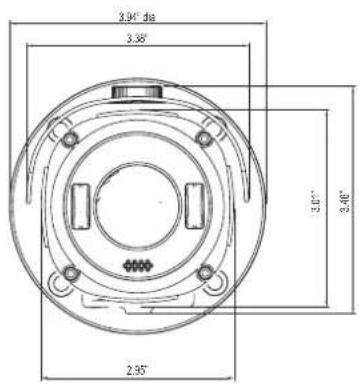
text_image
3.90° da 3.35° 3.00° 2.46° 2.95°
text_image
4.80° 3.27°natural_image
Technical line drawing of a mechanical component with a central circular housing and mounting base (no text or symbols)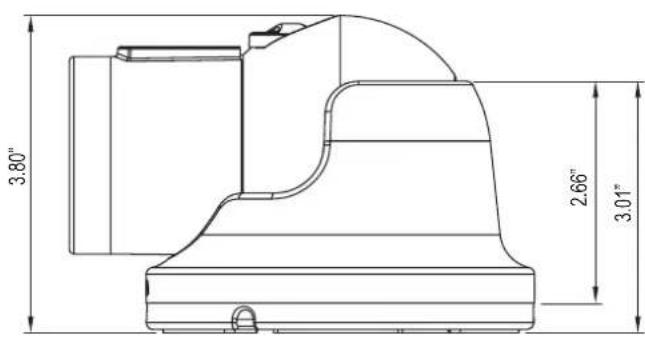
text_image
3.80" 2.66" 3.01"CAMERA DIMENSION
3) HTINT591T
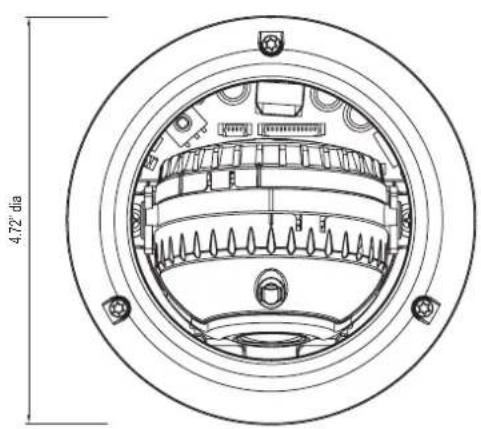
natural_image
Technical line drawing of a circular mechanical component with internal gear-like structure and dimension label (4.72° dia)
text_image
3.23" dia 3.35" 1.82"4) HT7246T, HT7250T
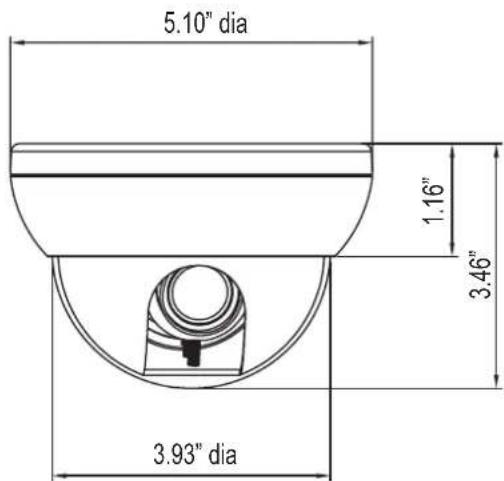
text_image
5.10" dia 1.16" 3.46" 3.93" dia
text_image
5.10" diaCAMERA DIMENSION
5) HTINT40T

General Features
● Transfer Video Interface
The combination of a 2Mega CMOS image sensor and TVI DSP provides an excellent resolution of TVI picture.
● 3D-DNR
Smart 3DNR prevents the image blurring of moving object and activates only if moving objects are appearing on the scene.
Smart-IR
No saturation image, vivid image in darkness! "TVI" camera makes very sharp video image in darkness! This technology eliminates saturation of video image of the closer object in darkness by control of the IR sensitivity. Saturation never happens in our "TVI" cameras, you can enjoy vivid image in any dark condition!
- Sens-Up
Despite a limited & low light condition, Sens-Up - Max. x32 helps the viewer to get visible and clear images.
- Defog
Defog function improve the clarity of images taken in poor conditions such as fog, smoke, rain or snow.
● WDR
A powerful and advanced technology that captures clean and superior high resolution picture even where images appear dark and strong back light.
● CVBS(Composite Video Blanking and Sync)
TV system is switchable 'NTSC' or 'PAL' with built-in OSD.
● Intelligent Function
An extra ordinary technology enables Speco Technologies TVI become an ultimate and of solution by providing intelligent features based on motion detection. It strengthens crime prevention and detection.
How to Set Up the camera menu
- Setup Menu
| MENU | ||||||
| 1.PRESET | INDOOR / OUTDOOR / LOW LIGHT / HALLWAY / LOBBY(WDR) / ELEVATOR | |||||
| 2.MAIN SETUP | 1.LENS | DC | MODE | INDOOR / OUTDOOR / DEBLUR | ||
| RETURN | ||||||
| MANUAL | MODE | NORMAL / DEBLUR | ||||
| RETURN | ||||||
| 2.EXPOSURE | BRIGHTNESS | 0~20 | ||||
| SHUTTER | AUTO | |||||
| MANUAL | SPEED | 1/30 ~ 1/30000 | ||||
| RETURN | ||||||
| FLICKER | ||||||
| INTENSIFY | OFF ~ X32 | |||||
| AGC | 0~20 | |||||
| RETURN | ||||||
| 3.WHITE BAL | AUTO | |||||
| AWB | ||||||
| AWC-SET | ||||||
| MANUAL | KELVIN | LOW / MIDDLE / HIGH | ||||
| R-GAIN | 0 ~ 20 | |||||
| B-GAIN | 0 ~ 20 | |||||
| RETURN | ||||||
| 4.BACKLIGHT | OFF | |||||
| HLC | LEVEL | 0 ~ 20 | ||||
| MODE | ALL DAY / NIGHT ONLY | |||||
| RETURN | ||||||
| BLC | H-POS | 0 ~ 20 | ||||
| V-POS | 0 ~ 19 | |||||
| H-SIZE | 0 ~ 20 | |||||
| V-SIZE | 0 ~ 19 | |||||
| RETURN | ||||||
| WDR | WEIGHT | LOW / MIDDLE / HIGH | ||||
| RETURN | ||||||
| 5.SPECO DNR | OFF / LOW / MIDDLE / HIGH | |||||
| 6.DAY&NIGHT | AUTO | SMART IR | 0~20 | |||
| AGC THRES | 0~20 | |||||
| AGC MARGIN | 0~20 | |||||
| DELAY | LOW / MIDDLE / HIGH | |||||
| RETURN | ||||||
| COLOR | ||||||
| B/W | SMART IR | 0~20 | ||||
| RETURN | ||||||
| EXTERN | SMART IR | 0~20 | ||||
| EXTERNAL S/W | LOW / HIGH | |||||
| DELAY | LOW / MIDDLE / HIGH | |||||
| RETURN | ||||||
| 7.IMAGE | SHARPNESS | 0 ~ 20 | ||||
| GAMMA | 0.45 ~ 0.65 | |||||
| COLOR GAIN | 0 ~ 20 | |||||
| MIRROR | ON/OFF | |||||
| FLIP | ON/OFF | |||||
| ACE | OFF/LOW/MIDDLE/HIGH | |||||
| DEFOG | OFF | |||||
| ON | MODE | AUTO/MANUAL | ||||
| LEVEL | LOW/MIDDLE/HIGH | |||||
| RETURN | ||||||
How to Set Up the camera menu
- Setup Menu
| MENU | ||||||
| 7. IMAGE | PRIVACY | OFF | ||||
| ON | ZONE NUM | 0~15 | ||||
| ZONE DISP | ON/OFF | |||||
| H-POS | 0~60 | |||||
| V-POS | 0~34 | |||||
| H-SIZE | 0~60 | |||||
| V-SIZE | 0~34 | |||||
| Y LEVEL | 0~20 | |||||
| CR LEVEL | 0~20 | |||||
| CB LEVEL | 0~20 | |||||
| RETURN | ||||||
| RETURN | ||||||
| 8.MOTION | OFF | |||||
| ON | SENSITIVITY | 0 ~ 10 | ||||
| WINDOW TONE | 0 ~ 4 | |||||
| WINDOW ZONE | 0 ~ 3 | |||||
| WINDOW USE | OFF/ON | |||||
| DET H-POS | 1 ~ 60 | |||||
| DET V-POS | 1 ~ 34 | |||||
| DET H-SIZE | 1 ~ 60 | |||||
| DET V-SIZE | 1 ~ 34 | |||||
| ALARM | OFF/ON | |||||
| RETURN | ||||||
| 9.SYSTEM | COM. | CAM ID | 0 ~ 255 | |||
| BAUDRATE | 2400 / 4800 / 9600 / 57600 / 115200 | |||||
| RETURN | ||||||
| IMAGE RANGE | FULL | |||||
| COMP | ||||||
| USER | OFFSET | 0~32 | ||||
| RETURN | ||||||
| FRAME RATE | 1080_30P, 720_30P, 720_60P | |||||
| COLOR SPACE | YUV / SD-CBCR / HD-CBCR | |||||
| CVBS | PAL / NTSC | |||||
| LANGUAGE | ENG / CHN / CHN(S) / JPN / KOR | |||||
| COLOR BAR | OFF/ON | |||||
| RESET | OFF/ON | |||||
| RETURN | ON | |||||
| 10.RETURN | ||||||
| 3. EXIT | EXIT / RESET (L/R - PUSHING) | |||||
Menu Set Up
Menu items can be selected by using the OSD buttons of the camera.
1. PRESET
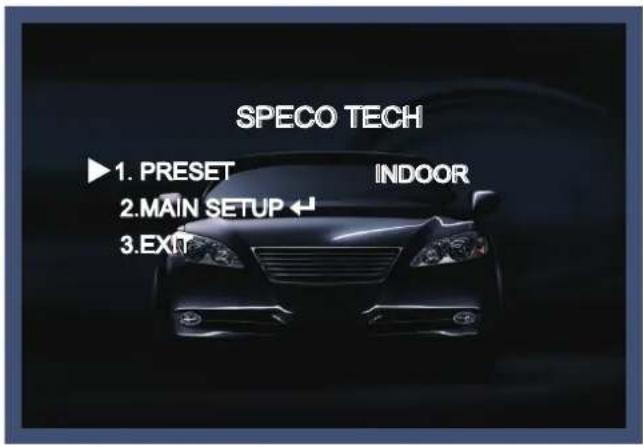
text_image
SPECO TECH ▶1. PRESET INDOOR 2.MAIN SETUP ← 3.EXIT1-1. Preset : INDOOR / OUTDOOR / LOW LIGHT / HALLWAY / LOBBY(WDR) / ELEVATOR.
- Used for a quick and easy setup for the installation environment.
* The Advanced Set Up menu will be displayed on the monitor.
- Move and select the required function using the Up and Down button.
* Move the triangular indicator Up or Down to select the desired feature by pressing the Up or Down button.
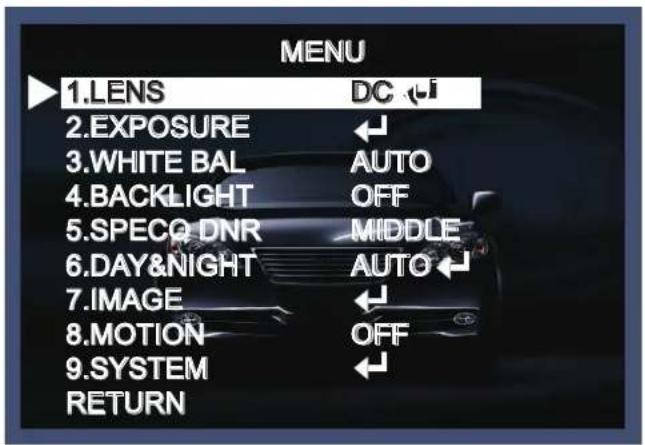
text_image
MENU 1.LENS DC 2.EXPOSURE ← 3.WHITE BAL AUTO 4.BACKLIGHT OFF 5.SPECO DNR MIDDLE 6.DAY&NIGHT AUTO 7.IMAGE ← 8.MOTION OFF 9.SYSTEM ← RETURN- Change menu settings using the Left or Right button.
* Available values or Status are displayed by pressing the Left or Right buttons.
Press the button until desired value / status is displayed.
- After Changing the setting move the arrow indicator to EXIT and press the SET button to EXIT.
NOTE
* Move to the available submenu by moving
arrow to desired feature.
* Submenu is not available when this symbol displayed "---".
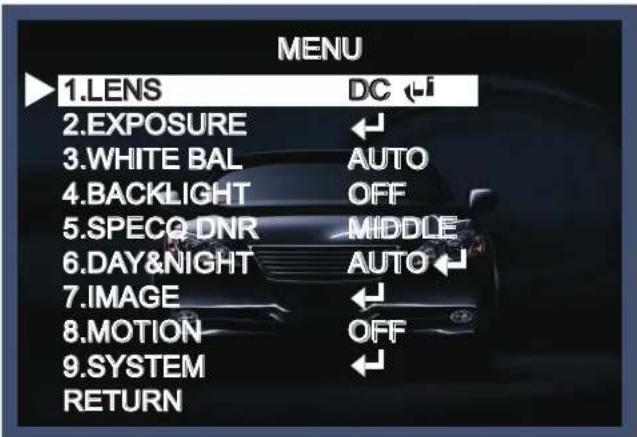
LENS
- Move the triangular indicator to LENS using the Up and Down buttons on the Set Up menu screen.
- Select the desired lens type by pressing the Left of Right button.
text_image
MENU 1.LENS DC i 2.EXPOSURE ← 3.WHITE BAL AUTO 4.BACKLIGHT OFF 5.SPECO DNR MIDDLE 6.DAY&NIGHT AUTO ← 7.IMAGE ← 8.MOTION OFF 9.SYSTEM ← RETURNNOTE
text_image
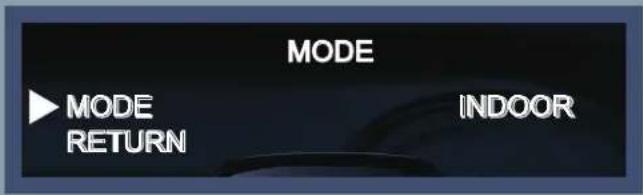
MODE MODE RETURN INDOOR* When you select the mode setup, you can select INDOOR, OUTDOOR or DEBLUR depending on the installation environment.
*On manual mode, you can select NORMAL or DEBLUR depending on the installation environment.
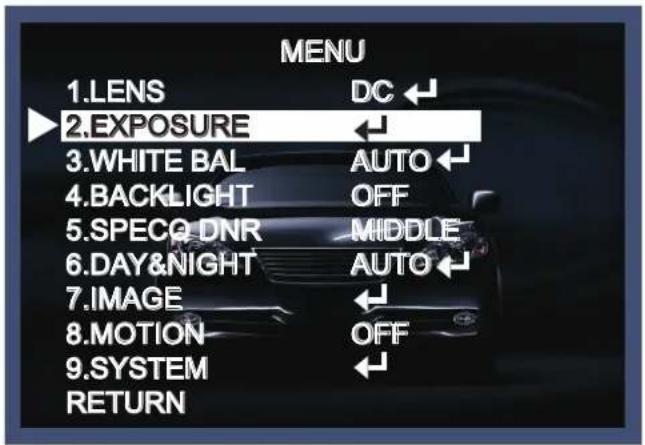
EXPOSURE
- On the Set Up menu, Select EXPOSURE by using the Up or Down button.
text_image
MENU 1.LENS DC 2.EXPOSURE 3.WHITE BAL AUTO 4.BACKLIGHT OFF 5.SPECO DNR MIDDLE 6.DAY&NIGHT AUTO 7.IMAGE 8.MOTION OFF 9.SYSTEM RETURN- Select the desired shutter mode by pressing the Left or Right button.

text_image
2.EXPOSURE BRIGHTNESS [||||||||||||] 10 SHUTTER AUTO INTENSIFY X16 AGC [||||||||||||] 20 RETURN◆ BRIGHTNESS : The brightness can be adjusted. The brightness control range is 1\~20.
◆ SHUTTER : DC lens is launched with the setting of 1/30 and the manual lens is launched with the setting of Auto shutter, but the shutter speed can be adjusted from 1/30 to 1/30,000.
→ FLK : Select FLK mode if flickering occurs ; caused by the unmatched frequency of electric light.
NOTE
* Sense-Up mode does not work when Electronic shutter is set to Manual.
◆ INTENSIFY : Brightness will be increased automatically depending on the circumstance of low light condition.
→ Off \~x32 Level Adjustable.
◆ AGC (Auto Gain Control) : The higher the AGC level is, the more noises appear.
→ 0\~20 Level selectable.
White Balance
Use this function when the color adjustment of a screen is needed.
- Move the triangular indicator to WHITE BAL on the SETUP menu screen using the Up and Down button.
- Select the desired mode by using the left or Right button.

text_image
MENU 1.LENS DC ← 2.EXPOSURE ← 3.WHITE BAL AUTO ← 4.BACKLIGHT OFF 5.SPECO DNR MIDDEL 6.DAY&NIGHT AUTO ← 7.IMAGE ← 8.MOTION OFF 9.SYSTEM RETURN◆ AUTO : Use this mode when the color temperature is from 2,500k to 9,500k.
◆ AWB : The function to search for the color which is matched well with the ambient environment.
◆ AWC→SET : After letting camera focus on the blank white paper to the best condition of current lighting environment, press the SET button. If the lighting condition is changed, Re-adjustment should be needed.
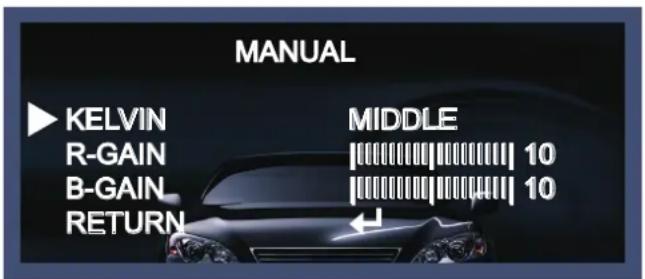
◆ MANUAL : Manual compensation make the more detailed control possible. First, after adjusting the white balance using the ATW or AWB mode, change the mode into the manual compensation mode and then press Set button. While looking at the color change of the subject seen on the screen after setting up the proper color temperature, increase the each value of the blue and the red.
text_image
MANUAL KELVIN MIDDLE R-GAIN 10 B-GAIN 10 RETURN- KELVIN : LOW/MIDDLE/HIGH level adjustable.
- R-GAIN : 0\~20 level adjustable.
- B-GAIN : 0\~20 level adjustable.
- Return : Every function is set up at the EXPOSURE menu, and then return the previous menu.
NOTE
White Balance may not work properly in the following conditions. If this doesn't work, use the AWB mode.
* When there is a very high color temperature in the circumstances of the subject. (for example, clear sky, Sunset)
* It is very dark.
* If the camera is pointed directly at fluorescent light or if there is a drastic lighting change, The operation of White balance may become unstable.
BACKLIGHT
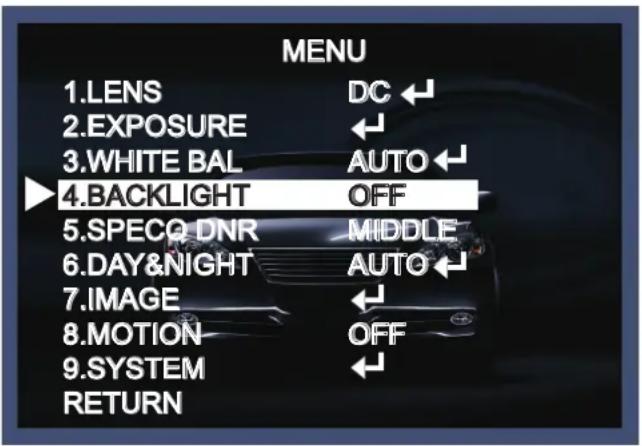
On this menu, backlight image can be compensated by users selecting one of modes.(HLC, BLC, WDR)
- Move the triangular indicator to BACKLIGHT on the SETUP menu screen using the Up and Down button.
- Select the desired mode by using the left or Right button.
text_image
MENU 1.LENS DC ← 2.EXPOSURE ← 3.WHITE BAL AUTO ← 4.BACKLIGHT OFF 5.SPECO DNR MIDDLE 6.DAY&NIGHT AUTO ← 7.IMAGE ← 8.MOTION OFF 9.SYSTEM ← RETURN◆ Off : Deactivated status.
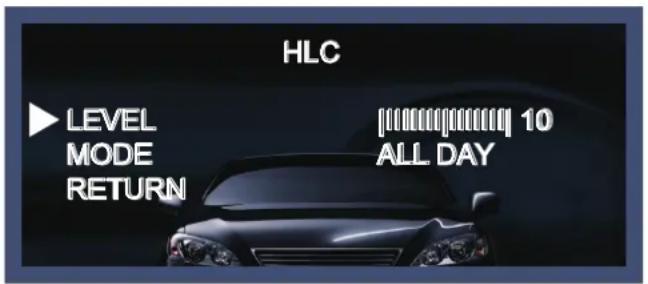
◆ HLC : This fuction is used to surpress or strong light source (for example, headlights of cars during nighttime) so that other subjects can be seen in more detail. If you select HCL, a submenu appears where you can make finer adjustments.
- LEVEL : Adjust the brightness level from which on the light source is to be masked out.
0\~20 level adjustable.
- MODE : All day/night only adjustable.
text_image
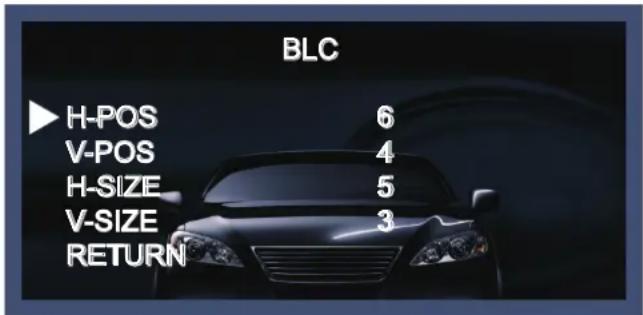
HLC LEVEL MODE RETURN [||||||||||] 10 ALL DAY◆ BLC : This function is used to counterbalance the screen image by increasing the brightness so that a subject which appears dark due to a strong backlight can be displayed in more detail. If you select BLC, a submenu appears where you can make finer adjustments.
- H-POS/V-POS/H-SIZE/V-SIZE : Define the position and size of the area of interest by changing the position & size.
text_image
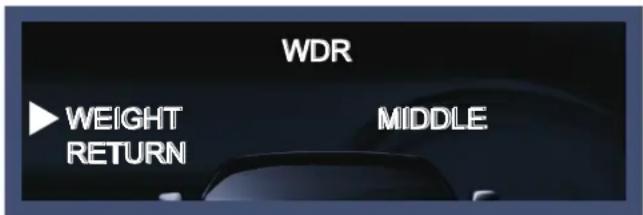
BLC H-POS 6 V-POS 4 H-SIZE 5 V-SIZE 3 RETURN◆ WDR : The WDR (Wide Dynamic Range) fuction works to correct excessive light within the frame to produce a usable image. When the image has simultaneous bright and dark areas, it makes both areas distinct. If you select WDR, a submenu appears where you can make finer adjustments.
- WEIGHT [MIDDLE, HIGH, LOW] : Select the WDR level of the camera.
text_image
WDR WEIGHT RETURN MIDDLE:SPECO DNR
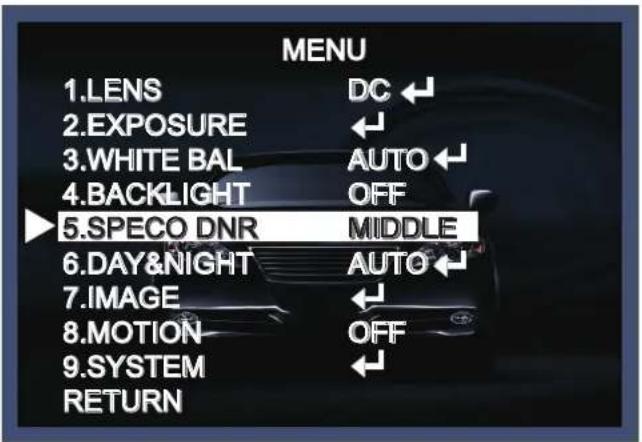
This function is used to improve the picture quality by filtering the noise which is generated under low bright light conditions. You can set different levels here.
- Move the triangular indicator to SPECO DNR by using the Up and Down button.
- Select the mode to use by pressing the left or Right button and LOW/MIDDLE/HIGH level selectable.
text_image
MENU 1.LENS DC 2.EXPOSURE ← 3.WHITE BAL AUTO 4.BACKLIGHT OFF 5.SPECO DNR MIDDLE 6.DAY&NIGHT AUTO 7.IMAGE ← 8.MOTION OFF 9.SYSTEM RETURNDay&Night
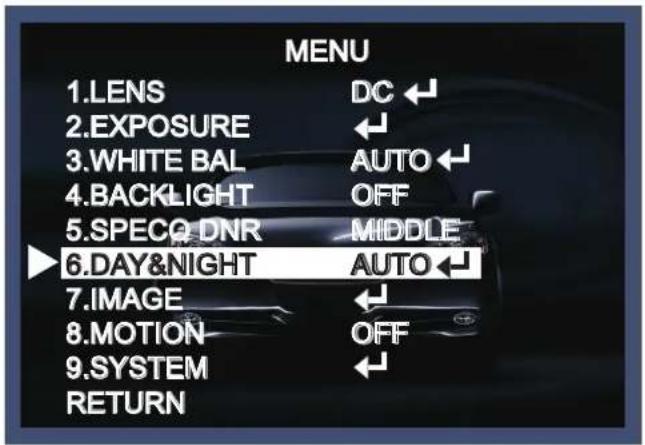
You can change the color mode of color or black / white by setting up the mode.
- Select Day&Night using the Up or Down button on the Set Up menu screen.
- Select the desired mode using the Left or Right buttons.
text_image
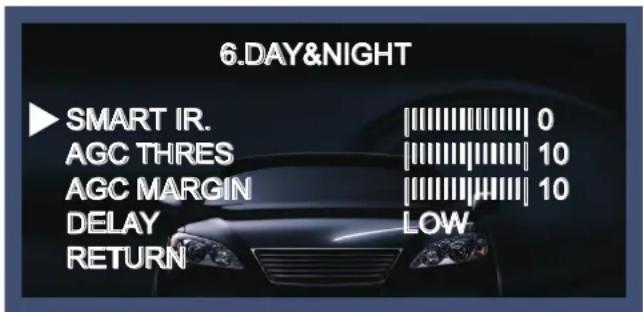
MENU 1.LENS DC 2.EXPOSURE 3.WHITE BAL AUTO 4.BACKLIGHT OFF 5.SPECO DNR MIDDLE 6.DAY&NIGHT AUTO 7.IMAGE 8.MOTION OFF 9.SYSTEM RETURN◆ AUTO : Automatically, It shifts into the color mode in the bright environment and the B/W mode in the low light condition. It can adjust the delay time, starting brightness and end brightness according to the ambient conditions by pressing the Set button.
text_image
6.DAY&NIGHT SMART IR. 0 AGC THRES 10 AGC MARGIN 10 DELAY LOW RETURN- SMART IR : 0\~20 smart IR level adjustable.
- AGC THRES : 0\~20 AGC THRES level adjustable.
- AGC MARGIN : 0\~20 AGC MARGIN level adjustable.
- DELAY [LOW/MIDDLE/HIGH] : Set the delay time for switching between COLOR and B/W
◆ COLOR : Making the video output color always.
◆ B / W : Making the video output B/W always.
text_image
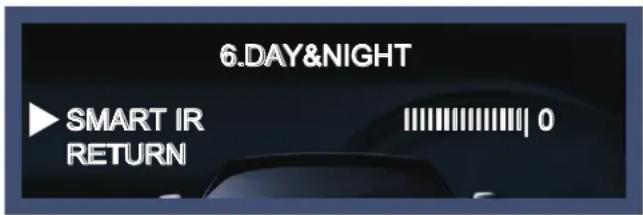
6.DAY&NIGHT SMART IR RETURN |||||||||| 0- SMART IR : It controls the IR LED(bright portion base), saturation is not expected. 0\~20 level adjustable.
◆ EXTERN : It can change the color or B/W mode automatically through the connection with the ground terminal.(Option for box camera and IR camera)
- SMART IR : It controls the IR LED(bright portion base), saturation is not expected. 0\~20 level adjustable.

text_image
6.DAY&NIGHT SMART IR EXTERNAL S/W DELAY RETURN ||||||||||| 0 LOW LOW- EXTERN S/W [LOW/HIGH] : Set the external signal for switching between COLOR and B/W.
- DELAY [LOW/MIDDLE/HIGH] : Set the delay time for switching between color and B/W .
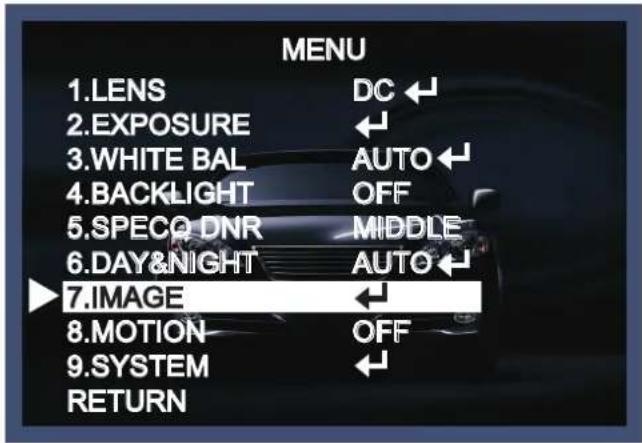
IMAGE
When selecting, the following submenu will appear.
text_image
MENU 1.LENS DC ← 2.EXPOSURE ← 3.WHITE BAL AUTO ← 4.BACKLIGHT OFF 5.SPECO DNR MIDDLE 6.DAY&NIGHT AUTO ← 7.IMAGE 8.MOTION OFF 9.SYSTEM RETURNHere you can optimise the image quality by adjusting different options.
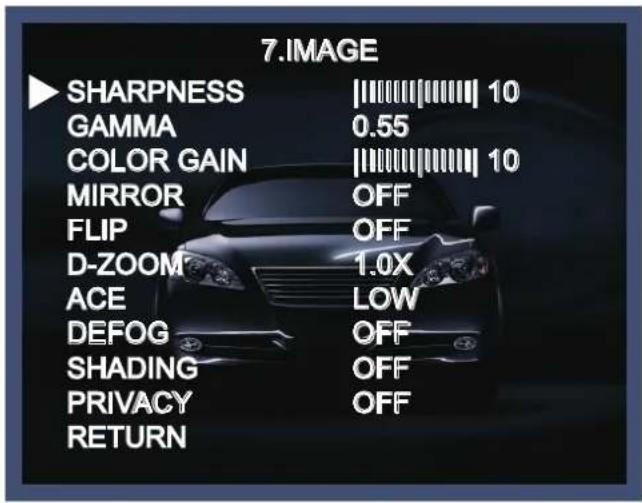
text_image
7. IMAGE SHARPNESS |10 GAMMA 0.55 COLOR GAIN |10 MIRROR OFF FLIP OFF D-ZOOM 1.0X ACE LOW DEFOG OFF SHADING OFF PRIVACY OFF RETURN- SHARPNESS [1 \~ 20]: Adjusts the image sharpness. If the level goes up excessively, it may affect the video image and generate a noise.
- GAMMA [0.45 \~ 0.65] : Changes the gamma curve of the camera.
- COLOR GAIN [0 \~ 20]: Changes the color gain of the camera.
- MIRROR [ON, OFF] : Mirrors the image horizontally on the screen.
-
FLIP [ON, OFF] : Flips the image vertically on the screen.
-
D-ZOOM : You can use the digital zoom with x1\~x8 magnification. The higher the digital zoom magnification is, the lower the resolution is.
- ACE [LOW/MIDDLE/HIGH] : Intelligent lightn level control to over come even strong backlight conditions.
- DEFOG [ON, OFF] : This function helps to recognize the object in a dusty weather condition. ON, a submenu appears where you can make finer adjustments.
- SHADING [ON, OFF] : Compensates the shading effects of lenses when the lens is set to a very wide angle. This function will reduce the brightness difference between the centre and the edges. If you select ON, a submenu appears where you can make finer adjustments.
◆ PRIVACY [ON, OFF] : This is used to hide certain areas on the monitor. You can designate each different 16 area. The size of a designated area can be adjusted. The color of a privacy area can be selected various colors. When you select the return, the setting values in this function menu are saved, then get out of this menu.

text_image
PRIVACY ZONE NUM 0 ZONE DISP OFF H-POS 12 V-POS 2 H-SIZE 3 V-SIZE 3 Y LEVEL ||||||||||| 10 CR LEVEL ||||||||||| 10 CB LEVEL ||||||||||| 10 RETURN- ZONE NUM [0\~15] : Select a mask out of the 16 mask areas and set the options below for the selected mask.
- ZONE DISP [ON, OFF] : Choose ON to activate privacy masks and press OFF to deactivate masks.
- H-POS [0\~60] : Define the horizontal start position of the privacy mask.
- V-POS [0\~33] : Define the vertical start position of the privacy mask.
- H-ZISE [0\~60] : Define the horizontal size of the privacy mask.
- V-SIZE [0\~33] : Define the vertical size of the privacy mask.
- Y LEVEL [0\~20] : Define the brightness of the mask color.
- CR LEVEL [0\~20] : Define the red amount of the mask color.
- CB LEVEL [0\~20] : Define the blue amount of the mask color.
MOTION
This function is used to detect moving objects in the monitored area. When choosing ON, the following submenu will appear where you can adjust the settings for the MOTION function.
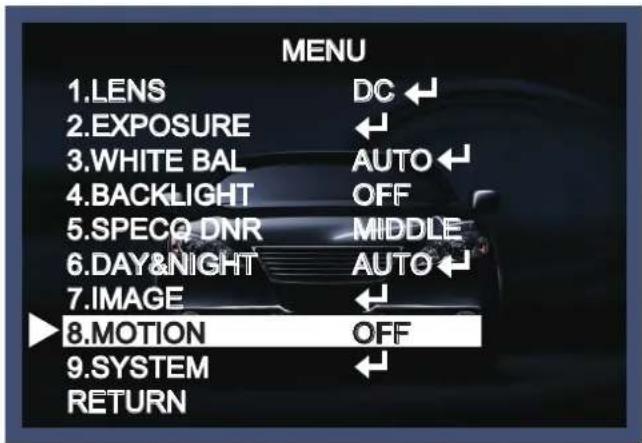
text_image
MENU 1.LENS DC 2.EXPOSURE 3.WHITE BAL AUTO 4.BACKLIGHT OFF 5.SPECO DNR MIDDLE 6.DAY&NIGHT AUTO 7.IMAGE 8.MOTION OFF 9.SYSTEM RETURN
text_image
8.MOTION SENSITIVITY ||||||||||| 0 WINDOW TONE 0 WINDOW USE 0 WINDOW ZONE OFF DET H-POS 1 DET V-POS 1 DET H-SIZE 28 DET V-SIZE 15 ALARM OFF RETURN- SENSITIVITY [0\~20] : The higher the setting value is, the higher the sensitivity gets, even though the movement of a subject.
- WINDOW TONE [0\~3] : Select the number of window use for motion detection.
- WINDOW USE [ON, OFF]
- WINDOW ZONE [ON, OFF]
- DET H-POS [0\~60] : Define the horizontal start position of the monitoring area.
- DET V-POS [0\~34] : Define the vertical start position of the monitoring area.
- DET H-ZISE [0\~60] : Define the horizontal size of the monitoring area.
- DET V-SIZE [0\~34] : Define the vertical size of the monitoring area.
- ALARM [ON, OFF] : In motion situation, you can select the detail of option setting.
SYSTEM
This can be used when you want to select the additional function control.
-
When the SETUP menu is displayed, select SYSTEM using the Up and Down button.
-
Select one of the mode using the Up and Down button.

text_image
MENU 1.LENS DC ← 2.EXPOSURE ← 3.WHITE BAL AUTO ← 4.BACKLIGHT OFF 5.SPECO DNR MIDDLE 6.DAY&NIGHT AUTO ← 7.IMAGE ← 8.MOTION OFF 9.SYSTEM ← RETURN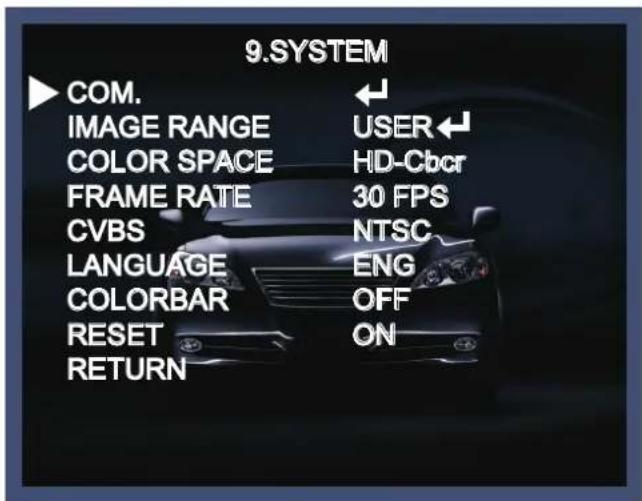
text_image
9.SYSTEM COM. IMAGE RANGE COLOR SPACE FRAME RATE CVBS LANGUAGE COLORBAR RESET RETURN ← USER← HD-Cbcr 30 FPS NTSC ENG OFF ON- COM. : This menu id used for RS-485 communication. Users are able to select 'CAM ID(0\~255)' and 'BAU DRATE(2400/4800/9600/57600/115200).
- IMAGE RANGE [FULL/COMP/USER] : Adjust the rate of YC signal to 100%(FULL), 75%(COMP) or 100%\~75%(USER).
- COLOR SPACE [YUV/SD-CBCR/HD-CBCR] : Select different color settings for a warmer or a colder image.
- FRAME RATE [25 FPS/30 FPS] : Choose a frame rate.
- CVBS [PAL/NTSC] : Select the video format that matches the present TV system.
- LANGUAGE : ENG, CHN, CHN(S), JPN, KOR
- COLOR BAR [OFF/ON] : Check current condition with color bar.
- RESET [ON] : All settings will be restored to factory default.
RETURN
Press the Set button in the return menu to save the current settings and return the Set Up menu.
- Trouble Shooting
| PROBLEM | POSSIBLE CAUSE |
| Northing appears on the screen. | Check the power cable, power supply output and video connection between the camera and monitor. |
| The image on the screen is dim. | Are the camera lens or the lens glass dirty?Clean the lens / glass with a soft clean cloth.Adjust the monitor controls, as required.If the camera is facing a very strong light, change the camera position.Adjust the lens focus. |
| The image on the screen is dark. | Adjust the contrast control of the monitor.If there is an intermediate device, correctly set the 75Ω/Hi-z. |
| The camera is not working properly and the surface of the camera is hot. | Check the camera is correctly connected to an appropriate regulated power source. |
| Motion Detection is not activated. | Has MOTION DET been set to ON in the menu?Has MD AREA been properly defined? |
| The color of the picture is not correct. | Check the settings in WHITE BALANCE menu. |
| The image on the screen flickers. | Make sure that the camera isn't facing direct sunlight or fluorescent lighting. If necessary,change the camera position. |
| The INTENSIFY does not work. | Check that the AGC setting in the EXPOSURE menu is not set to OFF.Check the EXPOSURE menu and make sure SHUTTER is set to----. |
SUBJECT TO CONDITIONS AND EXCLUSIONS FOUND BELOW, THIS PRODUCT IS WARRANTED AGAINST MANUFACTURING DEFECTS IN MATERIAL AND WORKMANSHIP FOR THE FOLLOWING PERIOD FOR PARTS AND LABOR:
| SPECO TECHNOLOGIES CAMERAS....5 YEARS |
| SPECO TECHNOLOGIES IP CAMERAS....2 YEARS |
| SPECO PTZ AND VL CAMERAS....1 YEAR |
| SPECO TECHNOLOGIES MONITORS....1 YEAR |
| IR LEDS....90 DAYS |
| DVRs | 3 YEARS |
| NVRs | 3 YEARS |
| BALANCE OF | |
| SPECO TECHNOLOGIES LINE | 1 YEAR |
SPECO TECHNOLOGIES WILL REPAIR OR REPLACE (AT OUR DISCRETION) ANY PARTS FOUND TO BE DEFECTIVE FOR THE WARRANTY PERIOD SPECIFIED. WE WILL PROVIDE A REPLACEMENT FOR ANY DEFECTIVE PART.
CONDITIONS
- YOU MUST OBTAIN A RETURN AUTHORIZATION (RA) NUMBER FOR ANY MERCHANDISE BEING RETURNED TO SPECO TECHNOLOGIES, WHETHER FOR RETURN/EXCHANGE OR REPAIR, WHETHER IN OR OUT OF WARRANTY.
- THIS WARRANTY WILL BE HONORED ONLY UPON PRESENTATION OF THE ORIGINAL DATED BILL OF SALE OR SALES SLIP.
- TRANSPORTATION OF THE PRODUCT TO OUR SERVICE DEPARTMENT IS THE RESPONSIBILITY OF THE USER. REPAIRED OR REPLACED PRODUCT WILL BE RETURNED PREPAID DURING THE WARRANTY PERIOD.
- SPECO TECHNOLOGIES DOES NOT AUTHORIZE ANY INTERNET OR MAIL ORDER PRODUCT SALES. IF A SPECO TECHNOLOGIES PRODUCT IS PURCHASED FROM AN UNAUTHORIZED DISTRIBUTOR OR OTHER SOURCE, INCLUDING RETAILERS, MAIL ORDER SELLERS AND ONLINE SELLERS, IT WILL NOT BE HONORED OR SERVICED UNDER THE EXISTING SPECO TECHNOLOGIES WARRANTY POLICY. ANY SPECO TECHNOLOGIES PRODUCT PURCHASED FROM THESE ONLINE MERCHANTS WILL VOID THE APPLICABLE WARRANTY AND IS INELIGIBLE FOR TECHNICAL SUPPORT. IF YOU HAVE QUESTIONS ABOUT A RESELLER, PLEASE CONTACT SPECO TECHNOLOGIES AT 1-800-645-5516 FOR A LIST OF UNAUTHORIZED DEALERS, VISIT: www.specotech.com/ unauthorized.
EXCLUSIONS
- THIS WARRANTY SHALL NOT COVER ADJUSTMENT OF CUSTOMER OPERATED CONTROLS AS EXPLAINED IN THE APPROPRIATE Model's INSTRUCTION MANUAL OR PRODUCTS WHICH HAVE BEEN ALTERED, ABUSED, OR HAVE MISSING OR ALTERED SERIAL NUMBERS.
- THIS WARRANTY SHALL NOT APPLY TO UNCRATING, SETUP, INSTALLATION, OR THE REMOVAL AND REINSTALLATION OF PRODUCTS AFTER REPAIR.
- THIS WARRANTY SHALL NOT APPLY TO REPAIRS OR REPLACEMENTS NECESSITATED BY ANY CAUSE BEYOND THE RESULT OF MANUFACTURE INCLUDING, BUT NOT LIMITED TO, ANY MALFUNCTION, DEFECTS OR FAILURE CAUSED BY OR RESULTING FROM UNAUTHORIZED SERVICE OR PARTS, IMPROPER MAINTENANCE, MODIFICATION OR REPAIR BY THE USER, ABUSE, MISUSE, NEGLECT, ACCIDENT, FIRE, FLOOD, OR OTHER ACTS OF NATURE, INCORRECT LINE VOLTAGE, DAMAGE OR IMAGE BURNS TO TELEVISION PICTURE TUBES CAUSED BY OR ATTRIBUTABLE TO THE USE OF ANY ACCESSORY, ELECTRONICS GAME OR DEVICE, OR DAMAGE CAUSED TO IMAGE PICKUP DEVICES BY EXCESSIVE LIGHT.
THE FOREGOING IS IN LIEU OF ALL OTHER EXPRESSED WARRANTIES AND WE DO NOT AUTHORIZE ANY PARTY TO ASSUME FOR US ANY OTHER OBLIGATION OR LIABILITY. IN NO EVENT SHALL WE BE LIABLE FOR INCIDENTAL OR CONSEQUENTIAL DAMAGES ARISING FROM THE USE OF THIS PRODUCT, OR FOR ANY DELAY IN THE USE OF THIS PRODUCT DUE TO CAUSES BEYOND OUR CONTROL. SOME STATES DO NOT ALLOW LIMITATIONS OF HOW LONG AN IMPLIED WARRANTY LASTS AND/OR DO NOT ALLOW THE EXCLUSION OR LIMITATION OF CONSEQUENTIAL DAMAGES. THE ABOVE LIMITATIONS ON IMPLIED WARRANTY AND CONSEQUENTIAL DAMAGES MAY NOT APPLY TO YOU.
THIS WARRANTY GIVES YOU SPECIFIC LEGAL RIGHTS. YOU MAY HAVE OTHER RIGHTS WHICH VARY FROM STATE TO STATE.
NOTE: FOR YOUR PROTECTION IN THE EVENT OF THEFT OR LOSS OF THIS PRODUCT, PLEASE FILL IN THE INFORMATION REQUESTED BELOW AND RETAIN WITH YOUR SALES RECEIPT.
MODEL NO.: ____ SERIAL NO.: ____
(LOCATED ON BACK OR BOTTOM OF UNIT)
DATE OF PURCHASE: ____
WHERE PURCHASED: ____ PURCHASE PRICE: ____
| Speco Technologies200 New HighwayAmityville, NY 11701www.specotech.com | FOR MORE INFORMATION REGARDING SERVICE OR RETURN,CALL US TOLL FREE: 1-800-645-5516 IN METRO NY: 631-957-8700 |
ALWAYS USE DISCRETION WHEN INSTALLING VIDEO AND/OR AUDIO SURVEILLANCE EQUIPMENT ESPECIALLY WHEN THERE IS AN EXPECTATION OF PRIVACY. INQUIRE REGARDING FEDERAL, STATE AND/OR LOCAL REGULATIONS APPLICABLE TO THE LAWFUL INSTALLATION OF VIDEO AND/OR AUDIO RECORDING OR SURVEILLANCE EQUIPMENT. PARTY CONSENT MAY BE REQUIRED.
▶MEMO
▶MEMO
▶MEMO
▶MEMO
speco technologies®
200 New Highway
Amityville, NY 11701
631-957-8700
1 800 645 5516
www.specotech.com