SED-2300Q - Video Surveillance ACTi - Free user manual and instructions
Find the device manual for free SED-2300Q ACTi in PDF.


User questions about SED-2300Q ACTi
0 question about this device. Answer the ones you know or ask your own.
Ask a new question about this device
Download the instructions for your Video Surveillance in PDF format for free! Find your manual SED-2300Q - ACTi and take your electronic device back in hand. On this page are published all the documents necessary for the use of your device. SED-2300Q by ACTi.
USER MANUAL SED-2300Q ACTi
natural_image
Abstract geometric design with overlapping triangular shapes and a white triangle, no text or symbols present.
ACTi
www.acti.com
0 RECAUTIONS
1. Read these instructions
All the safety and operating instructions should be read before the product is operated.
2. Heed all warnings
All warnings on the product and in the instruction manual should be adhered to.

The symbol indicates the following items, please carefully read the description next to each symbol.
a. Failure to follow the safety instruction given may directly endanger people, cause damage to the system or to other equipment.
b. The requirements to make this device work, including hardware, computer settings, network settings, and operation procedures.
c. The tips to make using this device easier, more convenient and more efficient.
3. Servicing
Do not attempt to service this video product yourself as opening or removing covers may expose you to dangerous voltage or other hazards. Refer all servicing to qualified service personnel.
Copyright
This manual is the intellectual property of ACTi and is protected by copyright. All rights are reserved. No part of this document may be reproduced or transmitted for any purpose by any means including electronic or mechanical without the official written permission from ACTi.
Trademarks
All names used in this manual for hardware and software are probably registered trademarks of respective companies.
Liability
Every care has been taken during writing this manual. Please inform your local office if you find any inaccuracies or omissions. We cannot be held responsible for any
typographical or technical errors and reserve the right to make changes to the product and manuals without prior notice.
FCC/CE Regulation
NOTE: This equipment has been tested and found to comply with the limits for a Class A digital device, pursuant to Part 15 of the FCC Rules. These limits are designed to provide reasonable protection against harmful interference when the equipment is operated in a commercial environment. This equipment generates, uses, and can radiate radio frequency energy and, if not installed and used in accordance with the instruction manual, may cause harmful interference to radio communications. Operation of this equipment in a residential area is likely to cause harmful interference in which case the user will be required to correct the interference at his own expense.
FCC Caution: To assure continued compliance, (example – use only shielded interface cables when connecting to computer or peripheral devices). Any changes or modifications not expressly approved by the party responsible for compliance could void the user's authority to operate this equipment.
CE: This device passed the test performed according to the European standard EN55022:1998 Class A, EN 61000-3-2:2000, EN61000-3-3"1995/A1:2001, EN55024:1998/A1:2001.
Table of Contents
0 PRECAUTIONS 0-1
Copyright 0-1
Trademarks 0-1
Liability 0-1
FCC/CE Regulation 0-2
1 INTRODUCTION 1-1
1.1 PACKAGE CONTENTS 1-1
1.2 FEATURES AND BENEFITS 1-2
1.3 Safety instructions 1-4
1.4 PARTs' NAMES and LOCATIONS 1-6
2 INSTALLATION 2-1
2.1 Mounting the Video Server 2-1
2.2 Basic Connections 2-2
1 INTRODUCTION
1.1 PACKAGE CONTENTS
SED-2300Q
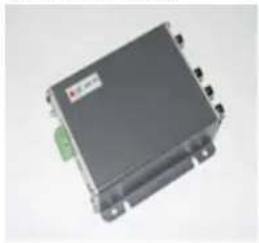
natural_image
Exterior view of a black electronic device with a green connector (no visible text or symbols)Product CD

natural_image
Circular optical disc (CD) with visible internal components and logo, no readable text or symbols beyond the label.Warranty Card
text_image
Warranty Card Standard License Copyright: 100% Copyright: 100% Copyright: 100% Copyright: 100% Copyright: 100% Copyright: 100% Copyright: 100% Copyright: 100% Copyright: 100% Copyright: 100% Copyright: 100% Copyright: 100% Copyright: 100% Copyright: 100% Copyright: 100% Copyright: Copyright Copyright:Terminal Blocks & Screws

natural_image
Collection of industrial screw and terminal components including screws, bolts, and connectors (no text or symbols visible)Power Adaptor (Option)

natural_image
Black rectangular electronic device with attached cable and green connector (no visible text or symbols)1.2 FEATURES AND BENEFITS
This Quad Video Server is a cutting-edge digital video transmission device. It can compress and transmit real time images with outstanding images quality at reasonable bandwidth through a standard TCP/IP network. That's because it is Ethernet (LAN and WAN) ready and has the powerful ARM9 SoC and the MPEG-4 compression ASIC inside. In addition, with these powerful hardware platform, excellent SDK support and powerful respective apparatuses (eg. the transcoder), this Quad Video Server is your best choice building up either conventional IP surveillance system or intelligent IP surveillance system.
• Real-time MPEG-4 Compression
With Hardware MPEG-4 compression chip inside, the composite video inputs can be efficiently compressed into MPEG-4 bit stream without any delay. The ASIC base compression engine can support not only CIF, but also FULL D1 image resolution.
• QoS Enabled Video Streaming
For real-time video streaming requirements, the video server implemented the 802.1pQ features inside the SoC as the streaming engine to make sure the video streaming package is forwarded faster than normal TCP/UDP packet.
• Automatic Frame Rate Control
The video server supports automatic/manual streaming frame rate control, especially for multiple clients concurrent access the same video stream in different network bandwidth.
• Digital Time Code Embedded
The “Digital Time Code Embedded” function is to embed the recording time in the MPEG bit stream. Therefore, each image frame has its respective time when it was recorded. It is very useful when users want to find the video at an exact time or between a certain time intervals.
- Build-in LAN and WAN (Low Latency PPPoE Supported) Ports
The video server provides two RJ-45 connectors. One is WAN and the other is LAN. The WAN port connects to the internet and LAN port connects to the local network. Since the internet's bandwidth is very critical, the WAN port is equipped with a low latency PPPoE
(Point-to-Point over Ethernet) which has excellent transmission speed and enables the video server to connect to an ADSL or a cable modem.
- DDNS Supported
The video server supports DDNS (Dynamic Domain Name Server), users can set the video server at a virtual domain name (such as cam1.Taipei.xxx) at dynamic IP. Everyone can use the virtual domain name to view the video anywhere that has the access to the internet.
• Build-in Hardware Motion Detection
No more external motion sensors are required. By tuning the object sensitivity, it is very reliable to fit into your environment. Besides, hardware motion detection delivers better sensitivity and responds faster than software motion detection.
- Bundle Powerful Surveillance Software
To extend the capabilities of the video server, a powerful surveillance program is included in the package and is totally free to use. Users can easily utilize the existing PC to be a digital video recorder. Schedule recording and manual recording keep every important image recorded in the local hard disk. Reliable and accurate motion detection with instant warning makes you responsive in every condition. Quick and simple search and playback function lets you easily find the images you want.
- Software Development Kit Support
The video server can be integrated or controlled by user's application program through the Streaming Library or ActiveX control. With its high level programming interface, software developer's time and efforts to is highly reduced.
1.3 Safety instructions
- Don't use the power supply with other voltages
This device is likely to be damaged or damage other equipments / personnel, if you use a power supply with different voltage than the one included with this device. All warranty of this product will be voided in the situations above.
- Don’t open the housing of the product
- Cleaning
Disconnect this video product from the power supply before cleaning.
- Attachments
Do not use attachments not recommended by the video product manufacturer as they may cause hazards.
• Water and Moisture
Do not use this video product near water, for example, near a bathtub, washbowl, kitchen sink, or laundry tub, in a wet basement, or near a swimming pool and the like.
- Don't use accessories not recommended by the manufacturer
- Only install this device and the power supply in a dry place protected from weather
- Servicing
Do not attempt to service this video product yourself as opening or removing covers may expose you to dangerous voltage or other hazards. Refer all servicing to qualified service personnel.
• Damage Requiring service
Disconnect this video product from the power supply immediately and refer servicing to qualified service personnel under the following conditions.
- When the power-supply cord or plug is damaged.
- If liquid has been spilled, or objects have fallen into the video product.
- If the video product has been exposed to rain or water directly.
- If the video product does not operate normally by following the
operating Instructions in this manual. Adjust only those controls that are covered by the instruction manual as an improper adjustment. Other controls may result in damage and will often require extensive work by a qualified technician to restore the video product to its normal operation.
- Safety Check
Upon completion of any service or repairs to this video product, ask the service technician to perform safety checks to determine that the video product is in proper operating condition.
1.4 PARTs' NAMES and LOCATIONS
■ Front Panel

text_image
① ② ③ ④ ⑤ ⑥ ⑦ ⑧1. Red LED
LED indicating Power or H/W Reset Function
2. Yellow LED
LED indicating when RS-485 is active
3. Green LED
LED indicating when LAN/WAN is active
4. Reset Button
Get back to default value while forgetting Login Name & Password
Procedure
- Switch off the video server by disconnecting the power cable
- Using a suitable pointed object, press and continue to hold the Reset Button depressed. While continuing to hold the Reset Button depressed, reconnect the power cable.
- Keep holding the Reset Button depressed around 6 seconds, release the Reset Button. The unit will start up with the factory default settings.
5. Terminal Blocks Pin 1\~6

text_image
DO1 NC GND DI1 NC GND| PIN | NAME | DESCRIPTION |
| 1 | DO1 | Digital Output 1 |
| 2 | NC | Non Connector |
| 3 | GND | Ground Pin |
| 4 | DI1 | Digital Input 1 |
| 5 | NC | Non Connector |
| 6 | GND | Ground Pin |
6. Terminal Blocks Pin 7\~12

text_image
Rx+ Tx- NC NC 12V GND| PIN | NAME | DESCRIPTION | |
| RS-485 | RS-232 | ||
| 7 | Rx+ | D+ | Rx |
| 8 | Tx- | D- | Tx |
| 9 | NC | Non Connector | |
| 10 | NC | Non Connector | |
| 11 | 12V | Power Input (DC +12V) | |
| 12 | GND | Ground Pin of Power Input | |
7. WAN port
The video server connects to the WAN (wide area network) via a standard RJ45 connector. Supporting NWAY, this video server can auto detect the speed of local network segment (10Base-T/100Base-TX Ethernet). The WAN port is for FTTH and can connect to a xDSL or cable modem.
8. LAN port
The video server connects to the LAN (local area network) via a standard RJ45 connector. Supporting NWAY, this video server can auto detect the speed of local network segment (10Base-T/100Base-TX Ethernet).
■ Rear Panel
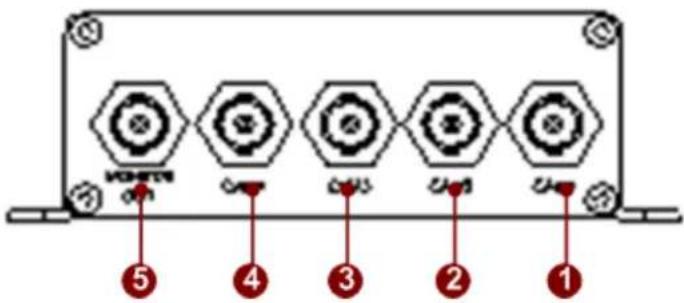
text_image
HONETRY ⑤ ④ ③ ② ①1 Cam1
Analog Video Input of Composite Signal with BNC Connector
2 Cam2
Analog Video Input of Composite Signal with BNC Connector
3 Cam3
Analog Video Input of Composite Signal with BNC Connector
4 Cam4
Analog Video Input of Composite Signal with BNC Connector
5 Monitor Out
Analog Video Output of Composite Signal with BNC Connector
2
INSTALLATION
2.1 Mounting the Video Server
The video server can be mounted onto a wall by using the accessories provided.
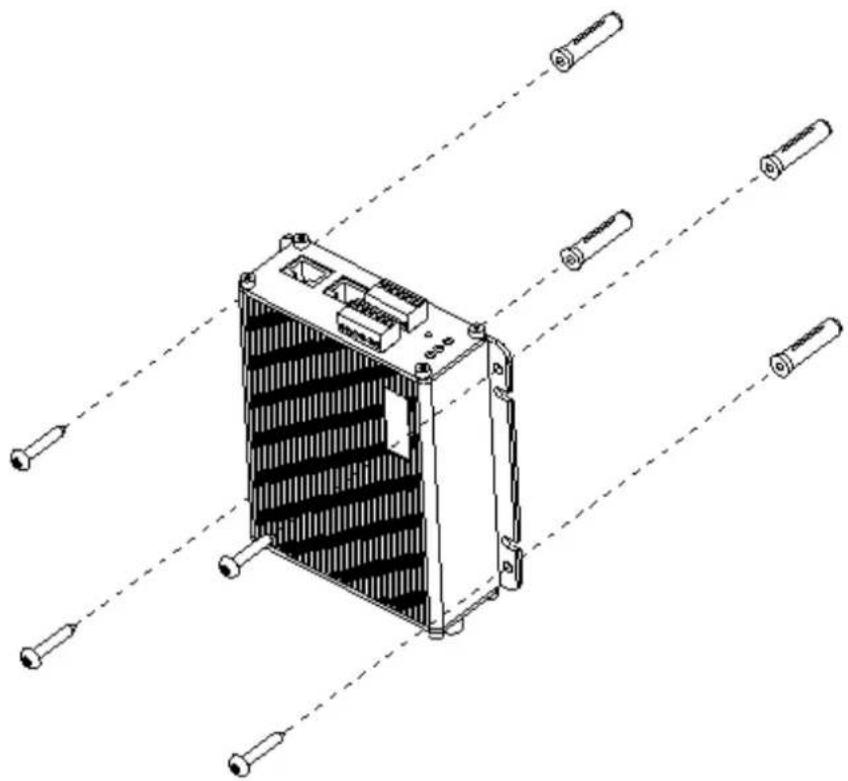
natural_image
Technical line drawing of a heat exchanger or cooling unit with multiple screw fasteners and mounting holes (no text or symbols)2.2 Basic Connections
Follow the procedures below to connect the video server to the respective apparatuses. Please refer to page 1-6 for more details.

flowchart
graph TD
    A["Device ⑤"] --> B["Switch"]
    B --> C["Port ①"]
    B --> D["Port ②"]
    B --> E["Port ③"]
    B --> F["Port ④"]
    B --> G["Port ⑤"]
    B --> H["Laptop"]
    style A fill:#f9f,stroke:#333
    style B fill:#ccf,stroke:#333
    style C fill:#cfc,stroke:#333
    style D fill:#fcc,stroke:#333
    style E fill:#cff,stroke:#333
    style F fill:#ffc,stroke:#333
    style G fill:#cfc,stroke:#333
    style H fill:#fcc,stroke:#333
-
Connect an analog video source (eg. CCD Camera) to the video server's CAM1 \~ CAM4(BNC connector).
-
Connect an analog monitor to the video server's Monitor-Out (BNC connector)
-
Connect the video server's LAN port to an Ethernet hub (RJ45 connectors)
-
Connect a PC to the Ethernet hub (RJ45 connectors)
-
Connect a power adaptor to the video server (terminal block connector)