
GX30F - Mobile Phone SHARP - Free user manual and instructions
Find the device manual for free GX30F SHARP in PDF.


| Product type | GSM mobile phone 850/900/1800/1900 |
| Brand | SHARP |
| Model | GX30F |
| Power supply | Rechargeable Li-ion battery (XN-1BT30) or high-capacity battery (XN-1BT31); mains charger (XN-1QC31); car lighter cord (XN-1CL30) |
| Main display | CGS color LCD (Continuous Grain Silicon); resolution not specified |
| External display | Color display |
| Built-in camera | CCD sensor; sizes: XXL (858×1144), XL (768×1024), Large (480×640), Medium (240×320), Small (120×160); flash/mobile light; digital zoom |
| Video | Recording video clips with sound |
| Memory | Internal phone memory + SD or MMC memory card (max 512 MB SD, 128 MB MMC) |
| Connectivity | Bluetooth (hands-free/car kit), infrared, USB cable, GPRS |
| Main functions | Camera, SMS, MMS, voice mail, WAP browser, Java™, MP3 player, voice recorder, ringtone composer, calendar, alarms, calculator, games, profiles, call forwarding, call waiting, conference call |
| Supported formats | JPEG photos, MP3 music |
| Maintenance and cleaning | Clean with a soft dry cloth; do not use solvents; avoid shocks, water, and extreme temperatures |
| Safety | Maximum SAR: 0.377 W/kg; complies with Directive 1999/5/EC; precautions for use on aircraft, in hospitals, and in vehicles |
| Spare parts and accessories | Spare battery (XN-1BT30), high-capacity battery (XN-1BT31), mains charger (XN-1QC30/31), car lighter cord (XN-1CL30), USB cable (XN-1DC30), hands-free kit (XN-1ER20), SD memory card |
| Repairability | Do not open or repair yourself; entrust to Sharp-approved qualified personnel |
Frequently Asked Questions - GX30F SHARP
User questions about GX30F SHARP
0 question about this device. Answer the ones you know or ask your own.
Ask a new question about this device
Download the instructions for your Mobile Phone in PDF format for free! Find your manual GX30F - SHARP and take your electronic device back in hand. On this page are published all the documents necessary for the use of your device. GX30F by SHARP.
USER MANUAL GX30F SHARP
Powered by JBlend™ Copyright 1997-2003 Aplix Corporation. All rights reserved. JBlend and all JBlend-based trademarks and logos are trademarks or registered trademarks of Aplix Corporation in Japan and other countries.

JBlend™
Powered by Mascot Capsule®/Micro3D Edition™ Mascot Capsule® is a registered trademark of HI Corporation ©2002-2003 HI Corporation. All Rights Reserved
Licensed by Inter Digital Technology Corporation under one or more of the following United States Patents and/or their domestic or foreign counterparts and other patents pending, including U.S. Patents: 4,675,863: 4,779,262: 4,785,450 & 4,811,420.
Licensed under U.S. Patent 4,558,302 and foreign counterparts.
T9 Text Input is licensed under one or more of the following: U.S. Pat. Nos. 5,818,437, 5,953,541, 5,187,480, 5,945,928, and 6,011,554; Australian Pat. No. 727539; Canadian Pat. No. 1,331,057; United Kingdom Pat. No. 2238414B; Hong Kong Standard Pat. No. HK0940329; Republic of Singapore Pat. No. 51383; Euro. Pat. No. 0 842 463 (96927260.8) DE/DK, FI, FR, IT, NL,PT.ES,SE,GB; Republic of Korea Pat. Nos. KR201211B1 and KR226206B1; and additional patents are pending worldwide.
SD logo

is a trademark.
Bluetooth is a trademark of the Bluetooth SIG, Inc.

Bluetooth®
The Bluetooth word mark and logos are owned by the Bluetooth SIG, Inc. and any use of such marks by Sharp is under license. Other trademarks and trade names are those of their respective owners.
CP8 PATENT
INPUT VOLTAGE: 12V/24V ...
OUTPUT VOLTAGE: 5.2V ... 500mA
SHARP
CORPORATION
FABRIQUE
EN CHINE
e13
021978
ATTENTION:
• USE A 1 AMP FUSE.
• FOR NEGATIVE GROUND ONLY.
• DO NOT
DISASSEMBLE.
Presentation
Note
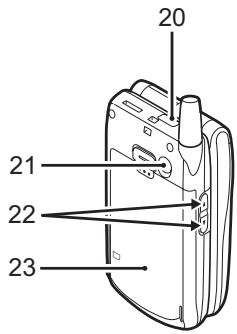
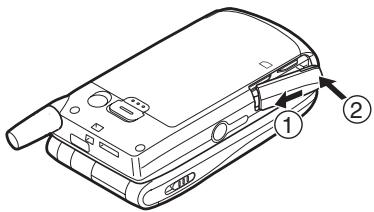
4. Close the cover.
Note
Note
Note
OPENWAVE

* Windows® 98 Second Edition, Windows® 98 Service Pack 1
** Service Pack 4
*** Service Pack 1a
FCC Declaration of Conformity
This mobile phone GX30 with PC/Data interface cable XN-1DC30 complies with part 15 of the FCC Rules.
Operation is subject to the following two conditions:
(1) This device may not cause harmful interference, and (2) this device must accept any interference received, including interference that may cause undesired operation.
Responsible Party:
SHARP ELECTRONICS CORPORATION
Sharp Plaza, Mahwah, New Jersey 07430
TEL: 1-800-BE-SHARP
Tested To Comply With FCC Standards
FOR HOME OR OFFICE USE

FCC Notice
The phone may cause TV or radio interference if used in close proximity to receiving equipment. The FCC can require you to stop using the phone if such interference cannot be eliminated.
Information to User
This equipment has been tested and found to comply with the limits of a Class B digital device, pursuant to Part 15 of the FCC Rules. These limits are designed to provide reasonable protection against harmful interference in a residential installation. This equipment generates, uses, and can radiate radio frequency energy and, if not installed and used in accordance with the instructions, may cause harmful interference to radio communications.
However, there is no guarantee that interference will not occur in a particular installation. If this equipment does cause harmful interference to radio or television reception, which can be determined by turning the equipment off and on, the user is encouraged to try to correct the interference by one or more of the following measures:
- Reorient or relocate the receiving antenna.
- Increase the separation between the equipment and receiver.
- Connect the equipment into an outlet on a circuit different from that to which the receiver is connected.
- Consult the dealer or an experienced radio/TV technician for help.
CAUTION: Changes or modifications not expressly approved by the manufacturer responsible for compliance could void the user's authority to operate the equipment.
Exposure to Radio Waves
THIS MODEL PHONE MEETS THE GOVERNMENT'S REQUIREMENTS FOR EXPOSURE TO RADIO WAVES.
Your wireless phone is a radio transmitter and receiver. It is designed and manufactured not to exceed the emission limits for exposure to radio frequency (RF) energy set by the Federal Communications Commission of the U.S. Government. These limits are part of comprehensive guidelines and establish permitted levels of RF energy for the general population. The guidelines are based on standards that were developed by independent scientific organizations through periodic and thorough evaluation of scientific studies. The standards include a substantial safety margin designed to assure the safety of all persons, regardless of age and health.
The exposure standard for wireless mobile phones employs a unit of measurement known as the Specific Absorption Rate, or SAR. The SAR limit set by the FCC is 1.6 W/kg.* Tests for SAR are conducted using standard operating positions specified by the FCC with the phone transmitting at its highest certified power level in all tested frequency bands. Although the SAR is determined at the highest certified power level, the actual SAR level of the phone while operating can be well below the maximum value. This is because the phone is designed to operate at multiple power levels so as to use only the power required to reach the network. In general, the closer you are to a wireless base station antenna, the lower the power output.
Before a phone model is available for sale to the public, it must be tested and certified to the FCC that it does not exceed the limit established by the government-adopted requirement for safe exposure. The tests are performed in positions and locations (e.g., at the ear and worn on the body) as required by the FCC for each model. The highest SAR value for this model phone when tested for use at the ear is 0.552 W/kg and when worn on the body, as described in this user guide, is 0.706 W/kg. Body-worn Operation: This device was tested for typical body-worn operations with the back of the phone kept 1.5 cm from the body. To maintain compliance with FCC RF exposure requirements, use accessories that maintain a 1.5 cm separation distance between the user's body and the back of the phone. The use of belt-clips, holsters and similar accessories should not contain metallic components in its assembly.
The use of accessories that do not satisfy these requirements may not comply with FCC RF exposure requirements, and should be avoided. While there may be differences between the SAR levels of various phones and at various positions, they all meet the government requirement for safe exposure.
The FCC has granted an Equipment Authorization for this model phone with all reported SAR levels evaluated as in compliance with the FCC RF emission guidelines. SAR information on this model phone is on file with the FCC and can be found under the Display Grant section of http://www.fcc.gov/oet/fccid after searching on FCC ID APYHRO00033.
Additional information on Specific Absorption Rates (SAR) can be found on the Cellular Telecommunications & Internet Association (CTIA) web-site at http://www.phonefacts.net.
* In the United States and Canada, the SAR limit for mobile phones used by the public is 1.6 watts/kg (W/kg) averaged over one gram of tissue. The standard incorporates a substantial margin of safety to give additional protection for the public and to account for any variations in measurements.
Index
Symbols
Camera 10, 51
on/off 84
on/off 86
J
main display 9, 19
Tone
deactivation 31
DTMF tone 31
deactivation 31
Key # 10
Navigation keys (arrow
keys) 9, 35
V
Vodafone live! 87
Brand : SHARP
Model : GX30F
Category : Mobile Phone