
K1W120W - Wall mount for screen Chief - Free user manual and instructions
Find the device manual for free K1W120W Chief in PDF.


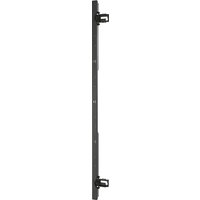
| Product Type | Wall Mount for Screen |
| Brand | Chief |
| Model | K1W120W |
| Weight Capacity per Display | 25 lbs (11.34 kg) |
| Total Weight Capacity | 25 lbs (11.34 kg) |
| Mounting Pattern Compatibility | VESA 75x75 and 100x100 mm |
| Materials | Steel |
| Color | Black |
| Tilt Adjustment | Yes, adjustable pitch tension |
| Pivot Adjustment | Yes, 90° rotation for portrait mode |
| Rotation Adjustment | Yes, lockable with security screw |
| Quick Release Faceplate | Yes, with security screw option |
| Cable Management | Integrated channels and clips |
| Installation Type | Wall mount on wood studs (16" or 24" spacing) |
| Included Hardware | Mounting bracket, screws, washers, hex keys |
| Width | Approximately 4.5 inches (arm) |
| Height | Approximately 6 inches (arm) |
| Depth | Adjustable, approx. 2-15 inches |
| Weight | Approximately 3 lbs |
| Certifications | UL listed, TUV approved |
| Warranty | 5 years |
Frequently Asked Questions - K1W120W Chief
User questions about K1W120W Chief
0 question about this device. Answer the ones you know or ask your own.
Ask a new question about this device
Download the instructions for your Wall mount for screen in PDF format for free! Find your manual K1W120W - Chief and take your electronic device back in hand. On this page are published all the documents necessary for the use of your device. K1W120W by Chief.
USER MANUAL K1W120W Chief
INSTALLATION INSTRUCTIONS
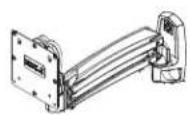
K1W110
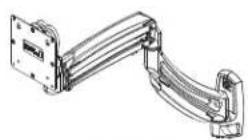
K1W120
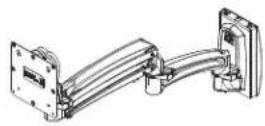
K1S120

K1W120XRH
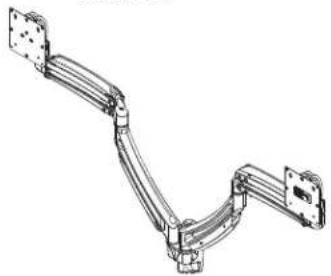
K1W220

K1S220

K1W220XRH
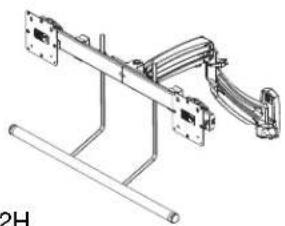
K1W22H

K1S22H
K1W/K1S Wall Mounts
DISCLAIMER
Milestone AV Technologies and its affiliated corporations and subsidiaries (collectively "Milestone"), intend to make this manual accurate and complete. However, Milestone makes no claim that the information contained herein covers all details, conditions or variations, nor does it provide for every possible contingency in connection with the installation or use of this product. The information contained in this document is subject to change without notice or obligation of any kind. Milestone makes no representation of warranty, expressed or implied, regarding the information contained herein. Milestone assumes no responsibility for accuracy, completeness or sufficiency of the information contained in this document.
Chief® is a registered trademark of Milestone AV Technologies. All rights reserved.
DEFINITIONS
MOUNTING SYSTEM: A MOUNTING SYSTEM is the primary Chief product to which an accessory and/or component is attached.
ACCESSORY: AN ACCESSORY is the secondary Chief product which is attached to a primary Chief product, and may have a component attached or setting on it.
COMPONENT: A COMPONENT is an audiovisual item designed to be attached or resting on an accessory or mounting system such as a video camera, CPU, screen, display, projector, etc.

WARNING: A WARNING alerts you to the possibility of serious injury or death if you do not follow the instructions.

CAUTION: A CAUTION alerts you to the possibility of damage or destruction of equipment if you do not follow the corresponding instructions.

IMPORTANT SAFETY INSTRUCTIONS!

WARNING: Failure to read, thoroughly understand, and follow all instructions can result in serious personal injury, damage to equipment, or voiding of factory warranty! It is the installer's responsibility to make sure all mounting systems are properly assembled and installed using the instructions provided.

WARNING: Failure to provide adequate structural strength for this mounting system can result in serious personal injury or damage to equipment! It is the installer's responsibility to make sure the structure to which this mounting system is attached can support five times the combined weight of all equipment. Reinforce the structure as required before installing the mounting system.

WARNING: Use this mounting system only for its intended use as described in these instructions. Do not use attachments not recommended by the manufacturer.

WARNING: Never operate this mounting system if it is damaged. Return the mounting system to a service center for examination and repair.

WARNING: Do not use this product outdoors.

WARNING: Exceeding the weight capacity can result in serious personal injury or damage to equipment! It is the installer's responsibility to make sure the combined weight of all components attached to the K1W/K1S Series Monitor Arm up to (and including) the display does not exceed the weight limits listed below. Use with products heavier than the maximum weight indicated may result in collapse of the mounting system and its accessories causing possible injury.
| MODEL Max Weight Allowed for EACH Display | Max Weight Capacity of Mounting System | |
| K1W110 | 25 lbs(11.34 kg) | 25 lbs(11.34 kg) |
| K1W120 | 25 lbs(11.34 kg) | 25 lbs(11.34 kg) |
| K1W120XRH | 25 lbs(11.34 kg) | 25 lbs(11.34 kg) |
| K1S120 | 25 lbs(11.34 kg) | 25 lbs(11.34 kg) |
| K1W220 | 25 lbs(11.34 kg) | 50 lbs(22.68 kg) |
| K1W220XRH | 25 lbs(11.34 kg) | 50 lbs(22.68 kg) |
| K1S220 | 25 lbs(11.34 kg) | 50 lbs(22.68 kg) |
| K1W22H | 9 lbs(4.08 kg) | 18 lbs(8.16 kg) |
| K1S22H | 9 lbs(4.08 kg) | 18 lbs(8.16 kg) |
--SAVE THESE INSTRUCTIONS!--
DIMENSIONS
K1W110
![DYNAMIC LIFT ARM LENGTH RANGE STRAIGNT = MAX FULL UP/DOWN = MIN 1.38 [34.9] 7.12 [259.3] [180.9] 1.97 [50.1] 3.22 [81.7] 1.36 [34.4] TILT RANGE 75° UP 10° DOWN INTERFACE ROTATION RANGE ±90° MOUNTING PATTERN COMPATIBILITY 100 X 100 75 X 75 DYNAMIC HEIGHT ADJUST RANGE 14.07 1.07 [357.4] [27.2]](/content/2026/06/1218841/images/fe5b3b04d2c64eaea5a9863b663de6566efeb9b9cd008ff2878b02a1007bc1db.jpg)
K1W120
![1.20 [84.9] 6.25 173.4 MAX ALL HAND COUN KIN 24.4 [79.7] [70.0] 1.27 [30.3] 3.22 [0.7] 1.26 [84.4] TURBAGE TURBAGE HIND TURBAGE TURBAGE TURBAGE TURBAGE TURBAGE TURBAGE TURBAGE TURBAGE TURBAGE TURBAGE TURBAGE TURBAGE TURBAGE TURBAGE TURBAGE TURBAGE TURBAGE TURBAGE TURBAGE TURBAGE TURBACE RUMBERG RUMB…](/content/2026/06/1218841/images/fbb77234f4e661267759f91df2e191a052eb82e7b6c30b1970f73482fa7e10e2.jpg)
![1.20 [34.9] 6.20 175.4 DYNAMIC LET ARM LENGTH-RANGE STANDARD MAX FULL LENGTH CUM 200 250 [378.5] [35.5] 1.27 [36.9]](/content/2026/06/1218841/images/d60b32d8bb3eba814694c14ca59660968afd88860f82f311f0a8b2f725b51f75.jpg)

![3.7 BANDER TOP 10 HORNOWN OCHARGE HEIGHT ALBERT BHAPE 25.45 10.85 [62.4] [6-4.4]](/content/2026/06/1218841/images/3757b46fde7df14671e4c02c19db5f07c6e073197b6093982caa9b0c2f8b5bff.jpg)

![K1W120XRH DYNAMIC LIFT AHM LENGTH RANGE STRAIGNT = MAX FULL UP/DOWN = MIN 10.21 7.12 [259.3] [180.9] 1.97 [50.1] 1.38 [34.9] 6.75 [171.5] TILT RANGE 75° UP 5° DOWN DYNAMIC HEIGHT ADJUST RANGE 17.35 4.35 [440.7] [110.5] MOUNTING PATTERN COMPATIBILITY 100 X 100 75 X 75 INTERFACE ROTATION RANGE ±90° 5.…](/content/2026/06/1218841/images/a17f179034b5c3be3cf65fa9724c5e15076daeff0a2142c82892ad8d898f96d6.jpg)
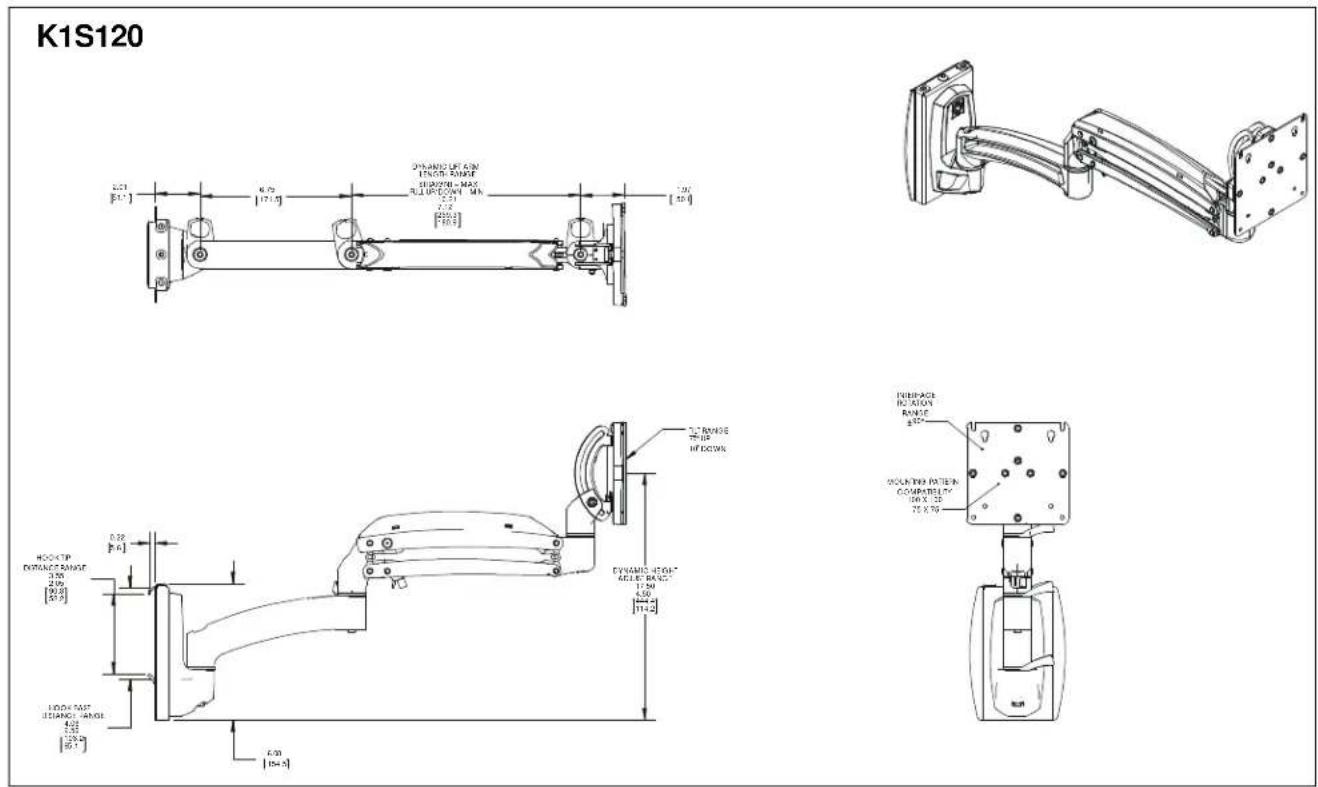
![K1W220 1.87 [±0.3] 4.75 [±0.4] 9.8 [±0.4] 3.30 [±0.4] 1.30 [±0.4] DYNAMIC LITATM CLOCK 4.8°/°N STRAWLITATM = 600 VL, JF/CNN, MR. HOLATING TATTERS CO-NATELLY 100, 0.150 0, 0.150 RIF-ALOZ RINJ-ALOZ 100, 0.150 2.90° 3.25 [±0.4] 1.30 [±0.4] DRANGE 28° ± 10° ± N/A DRANGE HEIGHT AUG, ANG 25.45 10° ± 10° ±](/content/2026/06/1218841/images/0092cf48f992d6ba4427a96e7effce327d6f7e5b272be3366a9bf4d69c3acefc.jpg)
![K1W220XRH 1.97 [50.1] 6.75 [171.5] 0.81 [20.6] 0.50 [12.7] 1.38 [34.9] DYNAMIC LIFT ARM LENGTH RANGE STRAIGHT ARM = MAX FULL UP/DOWN = MIN 10.21 7.12 [259.3] [180.8] MOUNTING PATTERN COMPATIBILITY 100 X 100 75 X 75 INTERFACE ROTATION RANGE ±90° 3.22 [81.7] 1.29 [32.8] TILT RANGE 75° UP 5° DOWN DYNAM…](/content/2026/06/1218841/images/8ef7da88c91dd925dddcd747e733d9458166bd06cf5431f84a938e23d8897eb7.jpg)
![K1S220 DYNAMIC LTR ARM LENGTH RANGE 5.00" (400mm) 750 [90°] 25° [60°] 4.70 [75°] 0.85 [20.0] 2.45 [80.0] VOUT HCT MOUNTING RATTERN RIFICATION BY HCT 3.15 TAX 3.5 MACHINE RIFICATION HCT 3.15 ST MOUNT R/T HY DOCK. DYNAMIC LTR ARM ALUMI RANGE 300 [85°] HOOK DEPTH RANGE 3.15 3.15 HOOK HORDER 3.15 HOOK R…](/content/2026/06/1218841/images/fb3134701cffc3d4c260442e621abc4dde66051997571c754b6b95ffd5ee9030.jpg)
![K1W22H 1.38 [34.9] 8.75 171.5 DYNAMIC LIFT ARM LENGTHANGE STRAISHE A/R02 - MAX FULL UP/DOWN - MIN 10.21 2.12 [559.0] [560.0] 12.30 5.57 [372.9] [141.5] 3.82 [76.4] 3.35 [45.1] MOUNTING PATTERN COMPATIBILITY 100 X 100 75 X 75 TILT RANGE 10° UP 10° DOWN DYNAMIC HEIGHT ACQUISIT RANGE 21.78 8.79 [562.8]…](/content/2026/06/1218841/images/9d14a3c030c53a52de87b01a2cf6c22aa2699f1bfb2c4cb7607cffd13a0fedfc.jpg)
LEGEND
 | Tighten Fastener |  | Pencil Mark |
| Apretar elemento de fijación | Marcar con lápiz | ||
| Befestigungsteil festziehen | Stiftmarkierung | ||
| Apertar fixador | Marcar com lápis | ||
| Serrare il fissaggio | Segno a matita | ||
| Bevestiging vastdraaien | Potloodmerkteken | ||
| Serrez les fixations | Marquage au crayon | ||
 | Loosen Fastener |  | Drill Hole |
| Aflojar elemento de fijación | Perforar | ||
| Befestigungsteil lösen | Bohrloch | ||
| Desapertar fixador | Fazer furo | ||
| Allentare il fissaggio | Praticare un foro | ||
| Bevestiging losdraaien | Gat boren | ||
| Desserrez les fixations | Percez un trou | ||
 | Phillips Screwdriver |  | Adjust |
| Destornillador Phillips | Ajustar | ||
| Kreuzschlitzschraubendreher | Einstellen | ||
| Chave de fendas Phillips | Ajustar | ||
| Cacciavite a stella | Regolare | ||
| Kruiskopschroevendraaier | Afstellen | ||
| Tournevis à pointe cruciforme | Ajuster | ||
 | Open-Ended Wrench |  | Remove |
| Llave de boca | Quitar | ||
| Gabelschlüssel | Entfernen | ||
| Chave de bocas | Remover | ||
| Chiave a punte aperte | Rimuovere | ||
| Steeksleutel | Verwijderen | ||
| Clé à fourche | Retirez | ||
 | By Hand |  | Optional |
| A mano | Opcional | ||
| Von Hand | Optional | ||
| Com a mão | Opcional | ||
| A mano | Opzionale | ||
| Met de hand | Optie | ||
| À la main | En option | ||
 | Hex-Head Wrench |  | Security Wrench |
| Llave de cabeza hexagonal | Llave de seguridad | ||
| Sechskantschlüssel | Sicherheitsschlüssel | ||
| Chave de cabeça sextavada | Chave de segurança | ||
| Chiave esagonale | Chiave di sicurezza | ||
| Zeskantsleutel | Veiligheidssleutel | ||
| Clé à tête hexagonale | Clé de sécurité |
TOOLS REQUIRED FOR INSTALLATION

PARTS
![A (1) [Arm assembly] (K1W120 shown) B (4/8)* M4x10mm C (4/8)* M4x20mm D (4/8)* M10x5.3x10 *single display models/ dual display models K1W models only! E (1) [Wall bracket] F (4) 1/4 x 2 1/2" G (4) 1/4" H (1) M4 x 4mm K (1/2)* #10-32 x 3/8" J (1) - included with K1W22H and K1S22H Models ONLY J1 (1) […](/content/2026/06/1218841/images/6a12551ecfb24f75a3220f377cedeedb9c604a7099ccbe03be656d83a8088d16.jpg)
Assembly And Installation
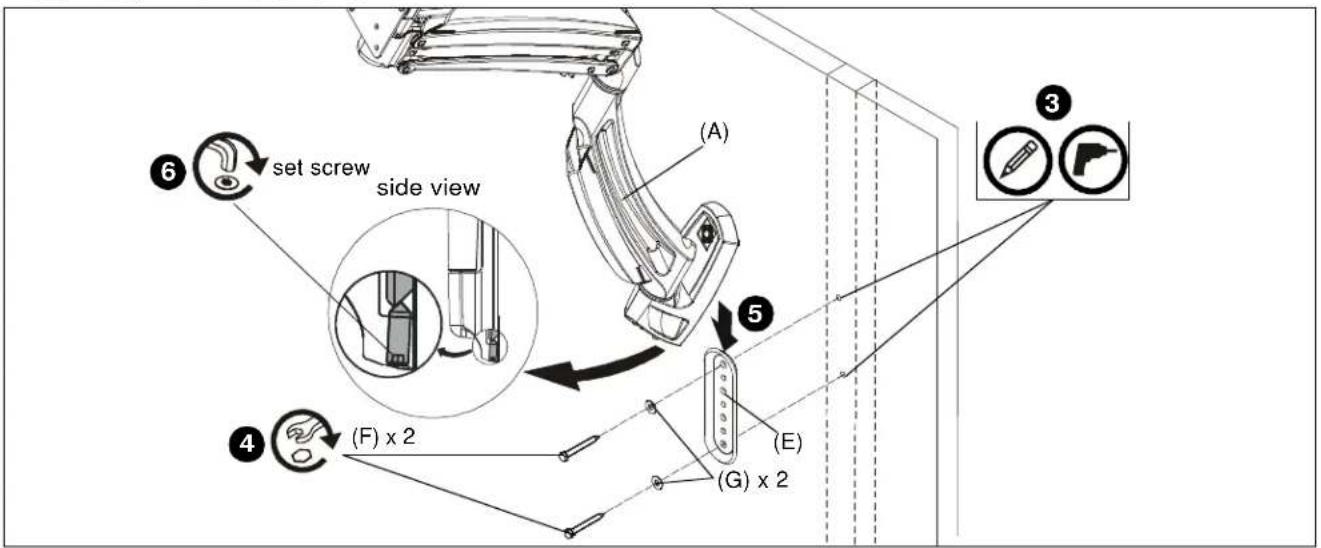
Figure 1
Connecting K1W Series (wall mount) to Wall
- Determine mounting location on wall.
- Use a stud finder to locate 2" x 4" wood stud.
- Use wall bracket (E) to mark and drill two 1/8" x 2 1/2" holes in wall at desired mounting location. (See Figure 1)
IMPORTANT ! : Only top and bottom holes of wall bracket (E) must be used to attach bracket to wall as shown in Figure 1. Do NOT use any other holes to secure bracket to wall!
- Use two 1/4-2 1/2" hex head lag screws (F) and two 1/4" washers (G) to install wall bracket (E) onto wall. (See Figure 1)
IMPORTANT ! : Over tightening screws (F) may cause bracket to compress into soft wall surface resulting in difficult mount installation or improper engaging of set screw in Step 6.
-
Hang monitor arm (A) over wall bracket (E). (See Figure 1)
-
Secure monitor arm to wall bracket (E) by tightening set screw. Ensure set screw engages back side of wall bracket (E) to properly secure mount. (See Figure 1)
Connecting K1S Series to Office Furniture
NOTE: K1S220 has an OFBU bracket instead of an OFBLU bracket. Proceed to K1S220 section if installing K1S220.
K1S120 and K1S22H
- Determine mounting location.
- Hang OFBLU bracket onto slat wall at desired mounting location by inserting the upper mounting plate into wall track. (See Figure 2)
- Let lower mounting plate rest against slat wall.
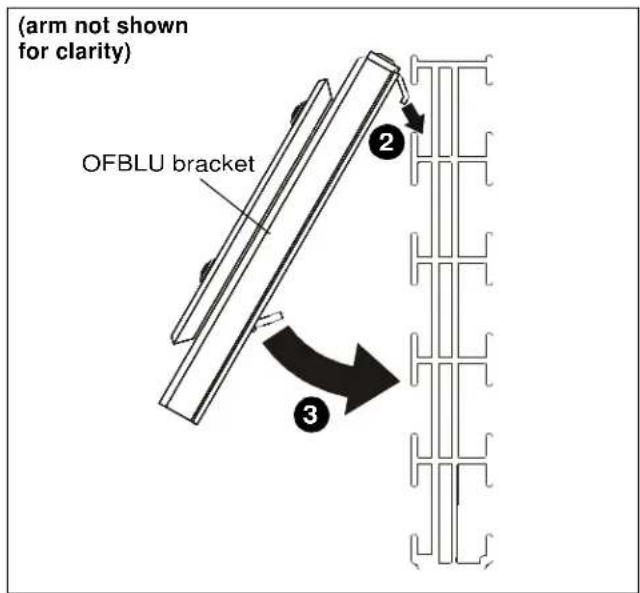
Figure 2
- Using 5/32" hex key (N), turn adjustment screw clockwise to lower mounting plate until it is able to easily slide into wall track. (See Figure 3)
- Using 5/32" hex key (N), turn adjustment screw counterclockwise to raise lower mounting plate until bracket is fully secured to slat wall. (See Figure 3)
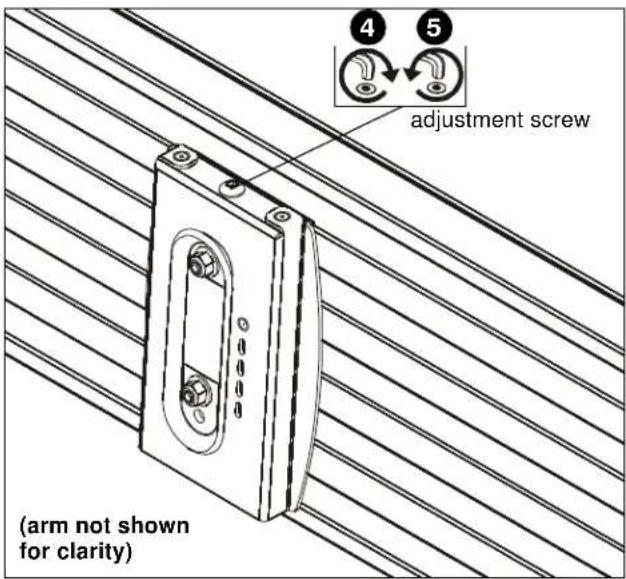
Figure 3
K1S220
- Verify mounting brackets on OFBU bracket can move freely. (See Figure 4)

Figure 4
- Locate desired installation location and slide upper mounting plate into wall making sure bracket is seated in channel bottom. (See Figure 5)
- Let lower mounting plate rest against wall.
- Using 1/2" socket, tighten tension hex head bolt until lower mounting plate slides into channel in wall and continue tightening until resistance is felt. (See Figure 5)

Figure 5
- Tighten two upper and lower button head cap screws to secure OFBU bracket to wall. (See Figure 6)

Figure 6
IMPORTANT ! : If the display being installed has a recessed mounting surface, the display must be assembled to the mount prior to mount installation. See Display Installation in this document before proceeding.
Array Installation (K1W22H/K1S22H ONLY)
- Slide rotational spacer (J10) into opening on array attachment bracket. (See Figure 7)
- Use 5/16-18 x 3" button head cap screw (J3), two thin steel washers (J8), plastic spacer (J9), pocket washer (J5), pivot pin (J4), pivot point spacer (J12) and 5/16-18 lock nut (J6) to secure array (J1) to K1 arm (A). (See Figure 7)
NOTE: Cable clip (J11) can be used in place of pivot point spacer (J12) if additional cable management is desired. (See Figure 7)

Figure 7
Display Installation
- Remove quick release faceplate from mount by pulling quick release lever and sliding faceplate off mount. (See Figure 8)
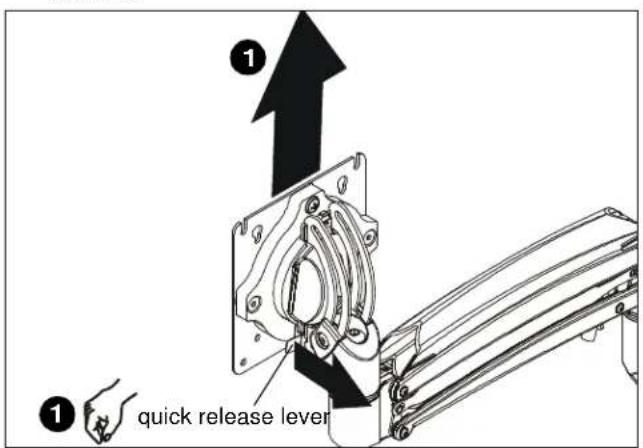
Figure 8

WARNING: Exceeding the weight capacity can result in serious personal injury or damage to equipment! It is the installer's responsibility to make sure the combined weight of all components attached to the K1W/K1S Series Monitor Arm up to (and including) the display does not exceed the weight limits listed below. Use with products heavier than the maximum weight indicated may result in collapse of the mount and its accessories causing possible injury.
| MODEL Max Weight Allowed for EACH Display | Max Weight Capacity of Mounting System | |
| K1W110 | 25 lbs(11.34 kg) | 25 lbs(11.34 kg) |
| K1W120 | 25 lbs(11.34 kg) | 25 lbs(11.34 kg) |
| K1W120XRH | 25 lbs(11.34 kg) | 25 lbs(11.34 kg) |
| K1S120 | 25 lbs(11.34 kg) | 25 lbs(11.34 kg) |
| K1W220 | 25 lbs(11.34 kg) | 50 lbs(22.68 kg) |
| K1W220XRH | 25 lbs(11.34 kg) | 50 lbs(22.68 kg) |
| K1S220 | 25 lbs(11.34 kg) | 50 lbs(22.68 kg) |
| K1W22H | 9 lbs(4.08 kg) | 18 lbs(8.16 kg) |
| K1S22H | 9 lbs(4.08 kg) | 18 lbs(8.16 kg) |
-
Carefully place display face down on protective surface.
-
Connect faceplate to display
For flush mounting hole installation:
- Using Phillips screwdriver, carefully install four M4x10mm screws (B) through corresponding holes on faceplate and into the mounting holes on the display. (See Figure 9)
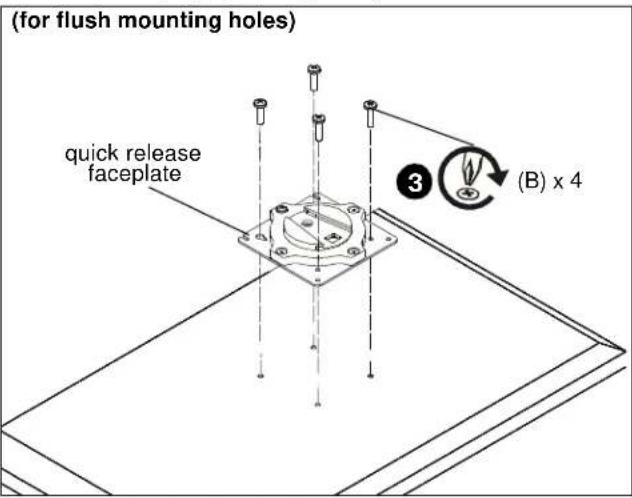
Figure 9
For recessed mounting hole installation:
- Place four spacers (D) on top of mounting holes on back of display. (See Figure 10)
- Using Phillips screwdriver, carefully install four M4x20mm screws (C) through corresponding holes on faceplate, spacers (D) and into the mounting holes on the display. (See Figure 10)
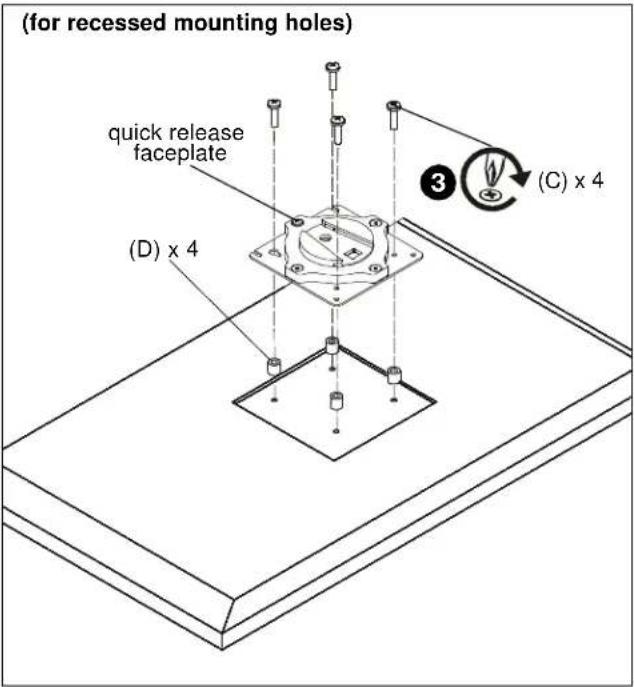
Figure 10
- Position display with faceplate attached above mount. (See Figure 11)
- Slide faceplate onto mounting head until quick release tab clicks into place. (See Figure 11)

Figure 11
Handle Installation (K1W22/K1S22 models only)
- Loosen four screws securing handle brackets to K1W22/K1S22 array. (See Figure 12)
- Install uprights of handle (J2) into handle brackets located on the back of array. (See Figure 12)

Figure 12
- Position handle (J2) at desired height and secure by tightening button head cap screws attaching handle brackets to array. (See Figure 13)
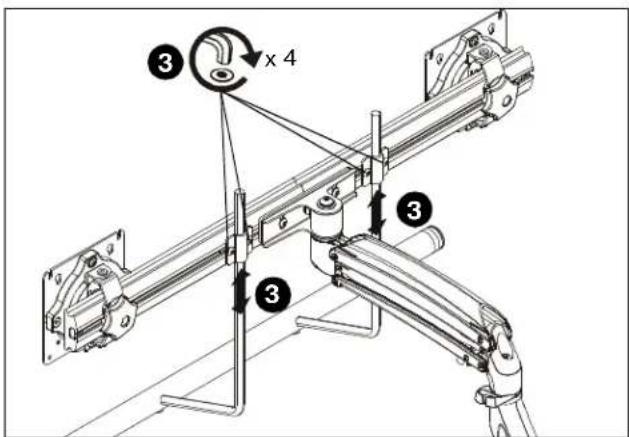
Figure 13
Adjustments
Pitch Adjustment (non-array models)
- Adjust pitch to desired tilt position. (See Figure 14)
- Adjust pitch tension screw to change the adjustment tension. (See Figure 14)
Pivot Adjustment (non-array models)
- Adjust pivot position as desired. (See Figure 14)
- Use 3/16" hex key (K) to adjust pivot point tension screws to change pivot adjustment tension. (See Figure 14)
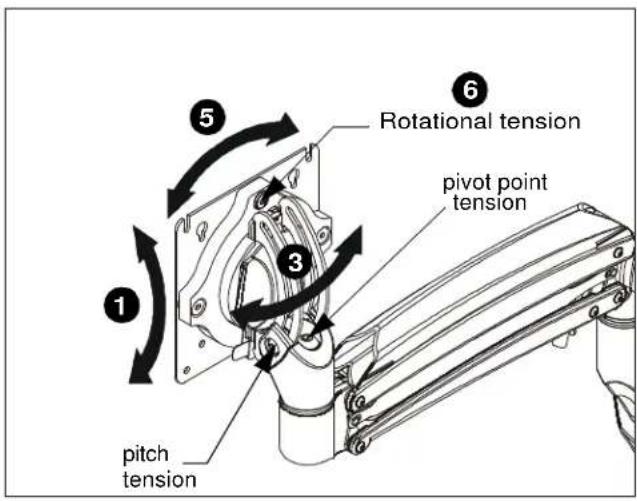
Figure 14
Rotational Adjustment
NOTE: (Optional) Rotational adjustment may be locked by installing rotational locking screw (K) into back of faceplate. (See Figure 15)
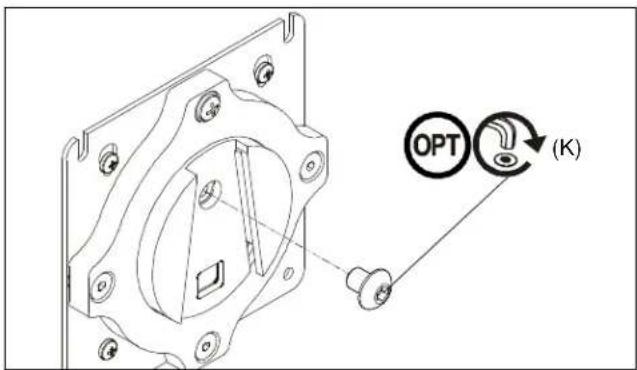
Figure 15
- The monitor may be adjusted 90 degrees in either direction in order to provide a portrait view of the monitor. (See Figure 14)
- Use 3/16" hex key (K) to adjust rotational adjustment screw to adjust rotational tension. (See Figure 14)
Lift Arm Tension Adjustment
- Tension may also be adjusted with upper tension adjustment screw inside cable management cover and 1/8" hex key (N). (See Figure 16)
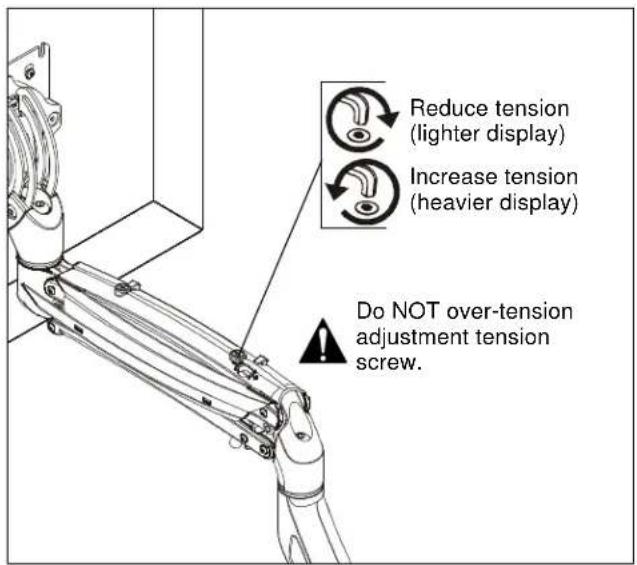
Figure 16
Adjustments - K1W22H/K1S22H models only
Display Adjustments
- Loosen knobs securing faceplates to array. (See Figure 17)
- Slide displays laterally on array to adjust lateral shift. (See Figure 17)
- Adjust pitch and pivot position as desired. (See Figure 17)
- Tighten knobs to secure faceplates in position. (See Figure 17)
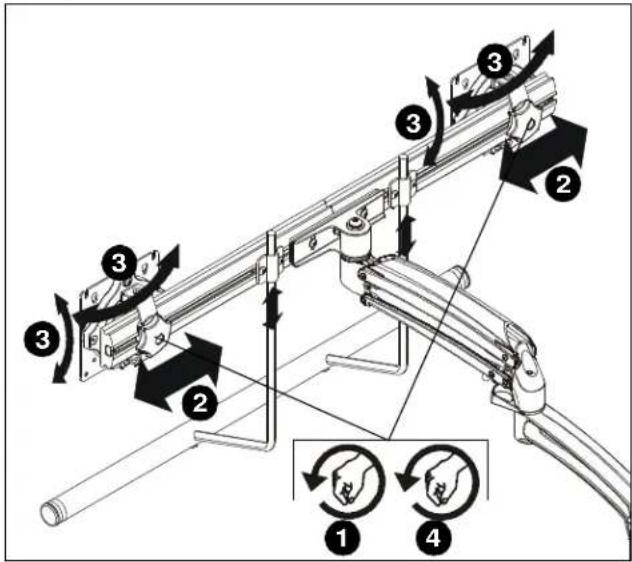
Figure 17
Array Bar Roll Adjustment
- Loosen roll adjustment screws on back of array bracket. (See Figure 18)
- Adjust roll of array bar as desired. (See Figure 18)
- Tighten roll adjustment screws on back of array bracket. (See Figure 18)
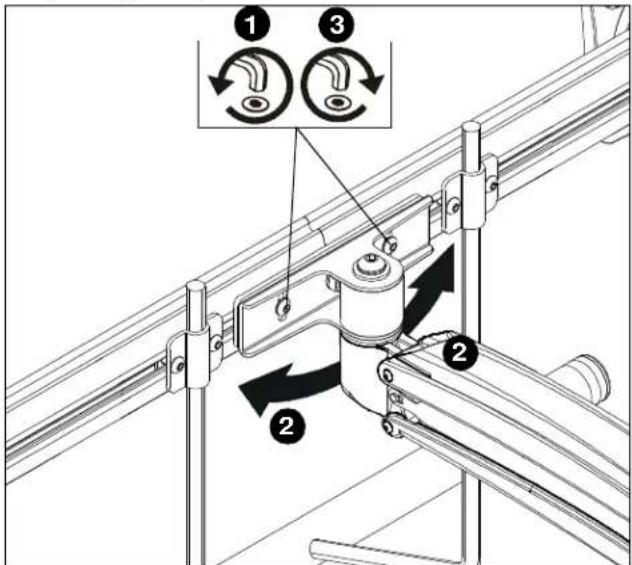
Figure 18
Display Removal

WARNING: Only remove display from mount when the display can be lifted up from the mount! DO NOT remove display unless the display is in the upright position! (See Figure 19)
- Make sure display is in the upright position.
- Remove quick release faceplate from mount by pulling quick release lever and sliding faceplate off mount. (See Figure 19)

Figure 19
Display Removal Security Screw
NOTE: In order to prevent display from being easily removed from mount using the quick release lever, install M4x4mm security screw (K) into lower hole on back of faceplate. (See Figure 20)
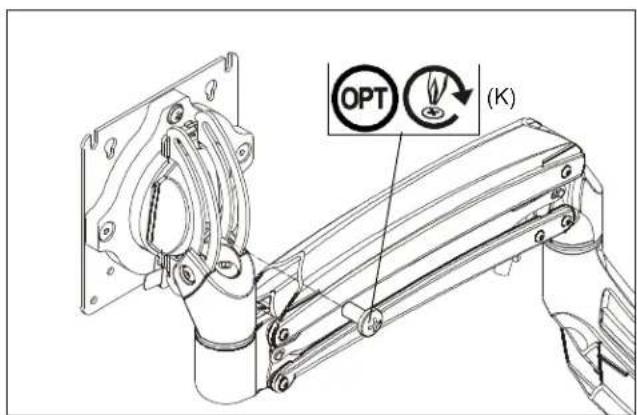
Figure 20
Cable Management
- Press insides of cable management covers at both ends to unhinge tabs on either end of cable management cover on upper arm. (See Figure 21)
- Lift cable management cover up until tabs are unhinged and cover is in the "open" position. (See Figure 21) and (See Figure 22)

Figure 21
IMPORTANT ! : Be sure to leave enough slack in the cables near display and arm joint to allow for full arm articulation!
- Close cable management covers on monitor arm. (See Figure 22)
- Repeat Steps 1-4 for lower arm.
Array Models
- Install array cable clips (J7) to back of array. (See Figure 23)
- Route cables through array cable clips (J7) as desired. (See Figure 23)
- Route cables through arm cable clips as desired. (See Figure 23)

Figure 23

Figure 22
- Route cables through cable management channels. (See Figure 22)
K1W/K1S Series
Installation Instructions



- INSTALLATION INSTRUCTIONS
- K1W/K1S WALL MOUNTS
- DISCLAIMER
- DEFINITIONS
- IMPORTANT SAFETY INSTRUCTIONS
- DIMENSIONS
- ASSEMBLY AND INSTALLATION
- CONNECTING K1W SERIES (WALL MOUNT) TO WALL
- CONNECTING K1S SERIES TO OFFICE FURNITURE
- K1S120 AND K1S22H
- K1S220
- ARRAY INSTALLATION (K1W22H/K1S22H ONLY)
- DISPLAY INSTALLATION
- HANDLE INSTALLATION (K1W22/K1S22 MODELS ONLY)
- ADJUSTMENTS
- PITCH ADJUSTMENT (NON-ARRAY MODELS)
- PIVOT ADJUSTMENT (NON-ARRAY MODELS)
- ROTATIONAL ADJUSTMENT
- LIFT ARM TENSION ADJUSTMENT
- ADJUSTMENTS - K1W22H/K1S22H MODELS ONLY
- DISPLAY ADJUSTMENTS
- ARRAY BAR ROLL ADJUSTMENT
- DISPLAY REMOVAL
- DISPLAY REMOVAL SECURITY SCREW
- CABLE MANAGEMENT
- ARRAY MODELS
Brand : Chief
Model : K1W120W
Category : Wall mount for screen