LRE3023SW - Cooker LG - Free user manual and instructions
Find the device manual for free LRE3023SW LG in PDF.


User questions about LRE3023SW LG
0 question about this device. Answer the ones you know or ask your own.
Ask a new question about this device
Download the instructions for your Cooker in PDF format for free! Find your manual LRE3023SW - LG and take your electronic device back in hand. On this page are published all the documents necessary for the use of your device. LRE3023SW by LG.
USER MANUAL LRE3023SW LG
Please read this owner's manual thoroughly before operating and keep it handy for reference at all times.
LRE3023ST
LRE3023SB
LRE3023SW
TABLE OF CONTENTS
3 IMPORTANT SAFETY INSTRUCTIONS
10 OvERvIEw
10 Range overview
11 Control panel overview
12 FEATURES
12 Settings
12 Clock
13 Timer on/off
13 Convection auto conversion
14 Thermostat
14 Language
14 Preheating alarm light
14 Beeper volume
20 Removing and replacing the oven racks
21 Bake
21 Convection bake
22 Convection roast
22 Recommended convection roast guide
23 Broil
23 Recommended broiling guide
25 Warm
25 Proof
25 Favorites
26 Sabbath mode
27 CARE AND CLEANING
27 Cleaning the glass/ceramic cooktop.
28 Self clean
31 Cleaning the exterior
31 Changing the oven light
32 Removing and replacing the oven door and storage drawer
34 FAqs
35 TROUBLESHOOTING
39 wARRANTY
IMPORTANT SAFETY INSTRUCTIONS
Read and follow all instructions before using your oven to prevent the risk of fire, electric shock, personal injury, or damage when using the range. This guide does not cover all possible conditions that may occur. Always contact your service agent or manufacturer about problems that you do not understand.
Download this owner's manual at: http://www.lg.com.

This is the safety alert symbol. This symbol alerts you to potential hazards that can result in property damage and/or serious bodily harm or death. All safety messages will follow the safety alert symbol and either the word WARNING or CAUTION. These words mean:

WARNiNg
Indicates a hazardous situation which, if not avoided, could result in death or serious injury.

CAUFiON
Indicates a hazardous situation which, if not avoided, could result in minor or moderate injury.
ANTI-TIP SAFETY PRECAUTIONS

WARNiNg
- It is possible for a child or adult to tip the range and be killed.
- Verify that the anti-tip device has been properly installed and engaged to the floor or wall and engaged to the leveling leg of the range.
- Ensure the anti-tip device is reengaged when the range moved.
- To check that the anti-tip bracket is properly installed: Grasp the top rear edge of the range back guard and carefully attempt to tilt it forward. Verify that the anti-tip devices are engaged.
- Do not operate the range without the anti-tip device in place and engaged.
- Failure to follow these instructions can result in death or serious burns to children or adults.
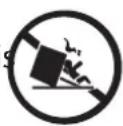
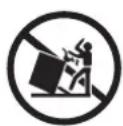
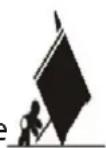
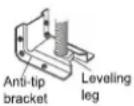
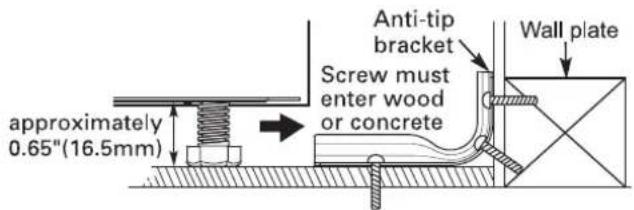
- To check that the anti-tip brackets are properly installed, remove any items on the cook-top. Grasp the top rear edge of the range back guard and carefully attempt to tilt it forward. Verify that the anti-tip devices are engaged.
- Remove the warming or storage drawers and visually inspect that the rear leveling legs are fully inserted into the anti-tip brackets.
- Be certain that your appliance is properly installed and grounded by a qualified technician.
- Do not repair or replace any part of the appliance unless specifically recommended in the manual. All other servicing should be performed by a qualified technician.
• Always disconnect power from the appliance before servicing.
SAFETY PRECAUTIONS

WARNiNg: This product contains chemicals known to the State of California to cause cancer. Wash hands after handling.
- DO NOT TOUCH HEATING ELEMENTS OR INTERIOR SURFACES OF THE OVEN. Heating elements may be hot even though they are dark in color. Interior surfaces of an oven become hot enough to cause burns. During and after use, do not touch or let clothing or other flammable materials contact heating elements or interior surfaces of oven until they have had sufficient time to cool. Other surfaces, such as oven vent openings and surfaces near these openings, oven doors, and windows of oven doors, also get hot and may cause burns if not cooled.
- Use care when opening the oven door. Let hot air or steam escape from the oven before removing or replacing food in the oven.
- DO NOT heat unopened food containers. Pressure in the containers may cause them burst which may result in injury.
- Be certain that all packing materials are removed from the appliance before operating. Keep plastic, clothes, and paper away from parts of the appliance that may become hot.
- DO NOT force the door open. This can damage the automatic door locking system. Use care when opening the oven door after the self cleaning cycle. Stand to the side of the oven when opening the door to allow hot air or steam to escape. The oven may still be VERY HOT.
- DO NOT use harsh etching, abrasive cleaners or sharp metal scrapers to clean the oven door glass since they can scratch the surface. Scratches may cause the glass to shatter.
- Be careful when removing and lifting the door.
- DO NOT lift the door by the handle. The door is very heavy.
-
DO NOT use the oven for drying clothes. Only use the oven for its intended purpose.
-
DO NOT use utensils for removing refuse (ash, food etc.)
- Refer to the installation manual for proper anti-tip bracket installation.
- Never remove the oven legs. The range will not be secured to the anti-tip brackets if the legs are removed.

CAUfiON
- DO NOT line the oven walls, racks, bottom, or any other part of the oven with aluminum foil or any other material. Doing so will disrupt heat distribution, produce poor baking results and cause permanent damage to the oven interior (aluminum foil will melt to the interior surface of the oven).
• Never attempt to dry a pet in the oven.
- Do not leave metal objects, such as cans, around the burner.

WARNING
- DO NOT step or sit on the oven door. Install the anti-tip brackets packed with range.
- The range could be tipped and injury might result from spilled hot liquid, food, or the range itself.
- If the range is pulled away from the wall for cleaning, service, or any other reason, ensure that the anti-tip brackets are properly re-engage when the range is pushed back against the wall.
• NEVER use your appliance for warming or heating the room. -
Keep children and pets away from the oven.
-
DO NOT use water on grease fires. Should an oven fire occur, leave the oven door closed and turn the oven off. If the fire continues, throw baking soda on the fire or use a fire extinguisher.
- Only use dry pot holders. Moist or damp pot holders on hot surfaces may result in burns from steam. Do not let the pot holder touch hot heating elements. Do not use a towel or other bulky cloth to remove food.
- Do not store items in or on the range. Flammable materials should not be stored in or near the range.
- Wear proper apparel. Loose-fitting or hanging garments should never be worn while using the range.
• Never pour COLD WATER over a hot oven for cleaning.
- Do not use the range if it is damaged.
- Do not operate the oven without the charcoal heater mesh.
- Do not allow anyone to climb, stand or hang on the door, storage drawer or cooktop. They could damage the range and even tip it over, causing severe personal injury.
ELECTRICAL SAFETY
- Protective Liners. Do not use aluminum foil or any other material to line the oven bottoms. Improper installation of these liners may result in a risk of electric shock or fire.
- Do Not allow aluminum foil or the temperature probe to contact heating elements.
- Before replacing your oven light bulb, switch off the electrical power to the oven at the main fuse or circuit breaker panel. Failure to do so can result in severe personal injury, death, or electrical shock.

WARNING
- Be careful with your fingers when closing the drawer.
You should grasp only the pocket type handle on a drawer panel. If you grasp the back side of the drawer panel, you can get hurt by a hidden bracket on the door bottom.
PAN PLACEMENT
natural_image
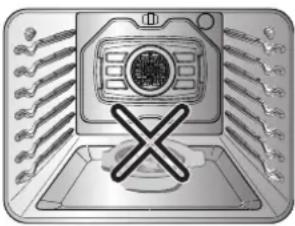
Illustration of a computer monitor with a crossed X symbol on the base, surrounded by multiple wrenches (no text or symbols present)- Do not place food or cookware on the bottom of the oven cavity. Doing so will cause permanent damage to the oven bottom finish.
- Never place plastic, paper, canned foods or combustible material in the oven.
dEEP FAT FRYERS
• Use extreme caution when moving or disposing of hot grease.
• Always heat fat slowly, and watch as it heats.
- If frying combinations of oils and fats, stir together before heating.
- Use a deep fat thermometer, if possible, to prevent overheating fat beyond the smoking point.
- Use the least possible amount of fat for effective shallow or deep-fat frying. Filling the pan with too much fat can cause spillovers when food is added.
SAFETY dURING USE
- Do not touch the oven racks while they are hot.
- If the rack must be moved while the oven is hot, do not let the potholder contact the hot heating element in oven.
• Always use pot holders or oven mitts when removing food from the oven or the center warming element. Cookware will be hot.
• Always use an oven mitt to remove the temperature probe after cooking. - Use caution with the TIMED BAKE or DELAYED TIMED BAKE features. Use the automatic timer when cooking cured or frozen meats and most fruits and vegetables. Foods that can easily spoil, such as milk, eggs, fish, meat or poultry, should be chilled in the refrigerator first. Even when chilled, they should not
stand in the oven for more than 1 hour before cooking begins, and should be removed promptly when cooking is complete. Eating spoiled food can result in sickness from food poisoning.
- Should an oven fire occur, leave the oven door closed and turn the oven off. If the fire continues, throw baking soda on the fire or use a fire extinguisher.
- Should an oven fire occur, DO NOT put water or flour on the fire. Flour may be explosive and water can cause a grease fire to spread and cause personal injury.
- DO NOT use the broiler pan without the grid. DO NOT cover the grid with aluminum foil.
- Do not use plastic to cover food. Use foil or oven resistant lids only.
- If the oven is heavily soiled with oil, self clean the oven before using the oven again. It could cause a risk of fire.
- Wipe up heavy soil on the oven bottom of the oven before using the Self Clean function.
- Use proper pan sizes. For smaller pots and pans, use the smaller heating elements. For larger pots and pans, use the larger heating elements. Select utensils that have flat bottoms large enough to cover the heating elements. The use of undersized utensils will expose a portion of the heating element to direct contact and may result in ignition of clothing.
- Never leave surface units unattended at high heat settings. Boil overs cause smoking and greasy spillovers that may ignite.
- Glazed cooking utensils. Only certain types of glass, glass/ceramic, ceramic, earth-enware, or other glazed utensils are suitable for a range-top service without breaking due to the sudden change in temperature.
- Utensil handles should be turned inward and not extend over adjacent surface units. To reduce the risk of burns, ignition of flammable materials, and spillage due to unintentional contact with the utensil, the handle of a utensil should be positioned so that it is turned inward, and does not extend over adjacent surface units.
- Be careful not to close your ngers in the drawer. Only use the pocket type handle on the drawer panel. Grasping the back side of the drawer panel may cause injury by a hidden bracket on the door bottom.
CHILD SAFETY

WARNING
- Keep children away from the oven.
- Accessible parts may become hot when the grill is in use.
- During normal operation (self-clean cycle, bake, etc.) DO NOT touch the hot surface between the bottom of the oven door and the top of the drawer on the front of the oven. Doing so is a burn hazard and will cause injury.
• Never let a child hang on the oven door.
- Do not allow children crawl into the oven.

CAUFiONN
• DO NOT leave small children unattended near the oven.
- During the self clean cycle, the outside of the oven can become very hot to the touch.
- NEVER leave children alone or unsupervised near the appliance when it is in use or is still hot. Children should never be allowed to sit or stand on any part of the appliance as they could be injured or burned.
- NEVER store items of interest to children in cabinets above the range. Children climbing on the range or on the oven door to reach items could be seriously injured.
- Let hot utensils cool in a safe place, out of reach of small children.
- Children should not be allowed to play with controls or other parts of the appliance.
GLASS/CERAMIC COOKING SURFACES
Stand to the side of the range when opening the oven door. The hot air and steam that escape can cause burns to hands, face and eyes.

WARNiNg
• DO NOT TOUCH SURFACE UNITS OR AREAS NEAR UNITS.
- Surface units may be hot even though they are dark in color. Areas near surface units may become hot enough to cause burns. During and after use, do not touch, or let clothing or other flammable materials contact surface units or areas near units until they have had sufficient time to cool. This includes the cooktop and the area above the oven door.
- Do not cook on a broken cooktop. If the cooktop should break, cleaning solutions and spillovers may penetrate the broken cooktop and create a risk of electric shock. Contact a qualified technician immediately.
- Clean cooktop with Caution. Do not use sponges or cloth to wipe spills on a hot cooking area. Use a proper metal scraper.
- DO NOT use the glass cooktop surface as a cutting board.
- DO NOT place or store items that can melt or catch fire on the glass cooktop, even when it is not being used.
• Always turn the surface units on after placing cookware.
- DO NOT store heavy items above the cooktop surface that could fall and damage it.
- DO NOT place aluminum foil or plastic items such as salt and pepper shakers, spoon holders, or plastic wrappings or any other material on the range when it is in use.
- Be sure you know which control pads operate each surface unit. Make sure you turned on the correct surface unit.
- NEVER cook directly on the glass. Always use cookware.
- Always place the pan in the center of the surface unit you are cooking on. NEVER leave surface units unattended at high heat setting. Proper contact of utensil to burner will also improve efficiency.
- Boil overs cause smoking and greasy spillovers that may catch on fire.
• Always turn the surface units off before removing cookware.
• DO NOT use plastic wrap to cover food.
-Plastic may melt onto the surface and be very difficult to remove.
• DO NOT touch surface units until it has cooled down.
- The surface elements may still be hot and burns may occur if the glass surface is touched before it has cooled down sufficiently.
- Immediately clean the spills on cooking area to prevent a tough cleaning chore later.
- If cabinet storage is provided directly above cooking surface, limit it to items that are infrequently used and can be safely stored in an area subjected to heat. Temperatures may be unsafe for items such as volatile liquids, cleaners or aerosol sprays.
- When warming foods do not use containers that seal. Allow venting for heated air to escape.
- Some cleaners can produce dangerous fumes if applied to a hot surface.
• DO NOT use a steel-wool pad.
-It will scratch the surface.
• DO NOT use scrub pads or abrasive cleaning pads.
-They may damage your glass cooktop surface.
- Cookware with rough or bottoms can mark or scratch the cooktop surface.
- Do not slide anything metal or glass across the cooktop.
- Do not use cookware with dirt or dirt built-up on the bottom.
SAFETY wHEN CLEANING

cAUfiON
- Open window or turn on a ventilation fan or hood before self cleaning.
- Do Not Use Oven Cleaners. No commercial oven cleaner or oven liner protective coating of any kind should be used in or around any part of the oven.
- Before self cleaning the oven. Remove broiler pan, all oven racks, meat probe and any other utensils from the oven cavity.
- Never keep pet birds in the kitchen. The health of birds is extremely sensitive to the fumes released during an oven self clean cycle. Fumes may be harmful or fatal to birds. Move birds to well-ventilated room.
- Clean in the self clean cycle only parts listed in this manual. Before self clean the oven, remove the broiler pan and any utensils of foods from the oven.
- It is normal for the cooktop of the range to become hot during a self clean cycle. Therefore, touching the cooktop during a clean cycle should be avoided.
- Important Instruction. In the event the self clean error code F is displayed, and three long beeps sound, the oven is malfunctioning in the self clean mode. Switch off the electrical power to the main fuse or breaker and have serviced by a qualified technician.
• Make sure oven lights are cool before cleaning.
- Never pour water on the oven. Doing so may cause oven malfunction.
COOk MEAT AND POULTRY THOROUGHLY
To protect against food borne illnesses, cook meat and poultry thoroughly. The USDA has indicated the following as safe minimum internal temperatures for consumption:
• Ground beef, veal, pork, or lamb: 160 °F
- Poultry: 165 °F
- Beef, veal, pork, or lamb: 145 °F
• Fish/seafood: 145°F
OvERvIEw
RANGE OvERvIEw
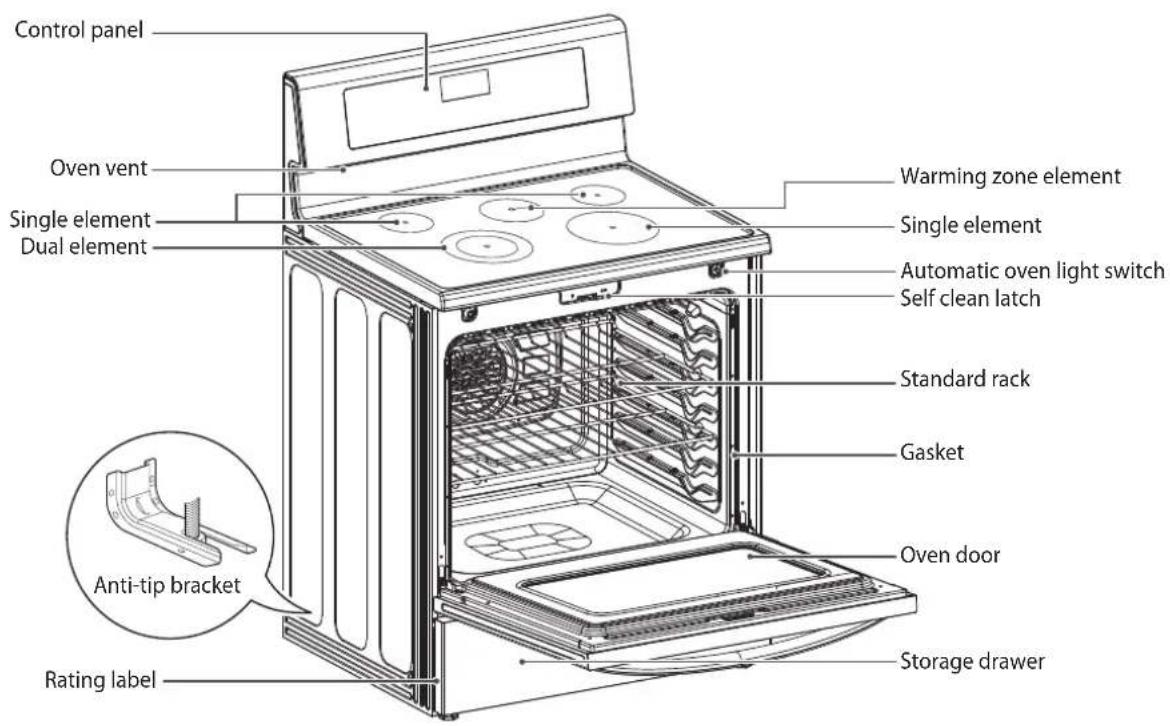
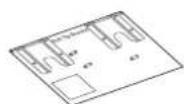
Accessories for installation
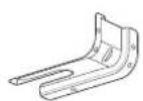
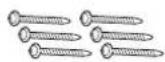
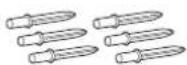
Anchors (6ea)
Anti-tip (1ea) Screws (6ea)Template
Accessories for cooking
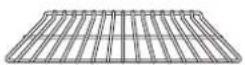
Standard rack (2ea)

Owner's manual Installation manual
CONTROL PANEL OVERVIEW
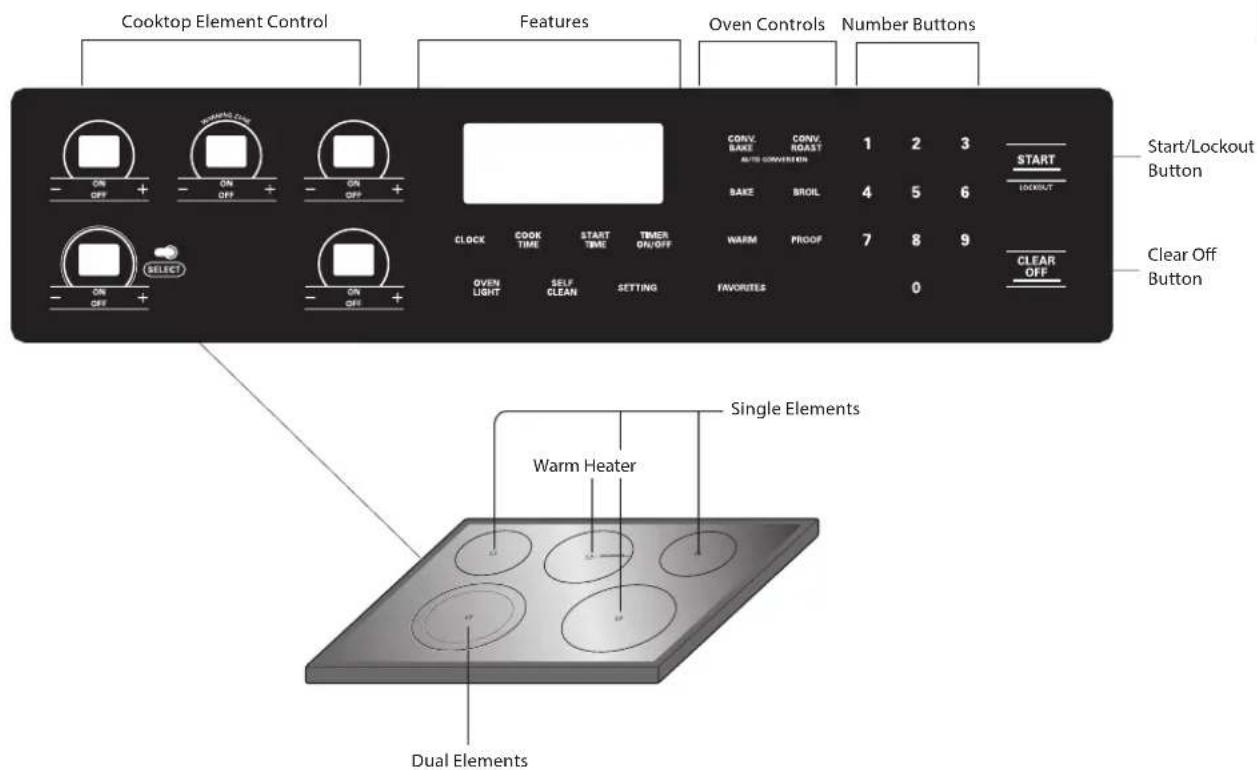

NOTE
Cooktop Element Controls are set up in the same order as the corresponding elements.
HS (Hot Surface) Indicator
The HS indicator will appear in the display once the element is turned off or during the self clean cycle. The HS indicator will stay on until the surface has cooled to approximately 150^ F/66°C or when the self clean cycle ends.
PF (Power Failure) / Flashing Time
Depending on the model of your range, the display will either show "PF" or a flashing clock. This means that the product has just been plugged in, or that it has experienced a power interruption. To clear the "PF" message, press the "On/Off" key on the cooktop controls and the "Clear/Off" key on the oven controls. If your oven displays a flashing clock, then press the "Clock" key and reset the time, or press any key to stop flashing.
FEATURES
SETTINGS
Use the SETTING button to set Convection Auto Conversion, Thermostat, Language, Preheating Alarm Light, Beeper Volume and to switch temperature scale between Fahrenheit and Celsius.
CLOCK
The clock must be set to the correct time of the day in order for the automatic oven timing functions to work properly.
- Press CLOCK.
- Press the number buttons to enter the time.
For example, to set the clock for 10:30, press the numbers: 1, 0, 3 and 0. - Press START.

NOTE
- The time of the day cannot be changed during a Timed Baking or Self Clean cycle.
- To check the time of the day when the display is showing other information, simply press the CLOCK button.
- If no buttons are pressed within 25 seconds of pressing the CLOCK button, the display will revert to its original setting.
- If the display time is blinking, you may have experienced a power failure. Reset the time.
- If there has been a power interruption to the appliance while the oven door is locked, press the CLEAR OFF key to unlock the door.
Setting the hour mode on the clock (12 or 24 hour.)
Your control is set to use a 12-hour clock. If you would prefer to have a 24-hour time clock, follow the steps below.
- Press and hold the CLOCK button for three seconds.
- Press the 1 button for 12-hour or the 2 button for 24-hour.
- Press the START button to accept.
Minimum & Maximum default settings
All of the features listed have a minimum and a maximum time or temperature setting that may be entered into the control. An entry acceptance beep will sound each time a control key is pressed.
An entry error tone (two short tones) will sound if the entry of the temperature or time is below the minimum or above the maximum setting for the feature.
| FEATURE M | MIN.TEMP. | /TIME | MAX. TEMP./ TIME | Default |
| CLOCK | 12 Hr. 1:00 | Hr. / Min. 12:59 Hr. / Min. | ||
| 24 Hr. 0:00 | Hr. / Min. 23:59 Hr. / Min. | |||
| TIMER | 12 Hr. 0:01 | Min. 11:59 Hr. / Min. | ||
| 24 Hr. 0:01 | Min. 11:59 Hr. / Min | |||
| COOK TIME | 12 Hr. 0:01 | Min. 11:59 Hr. / Min | ||
| 24 Hr. 0:01 | Min. 11:59 Hr. / Min | |||
| CONVECTION BAKE | 300°F / 150°C 550°F / 285°C 12 Hr. | |||
| CONVECTION ROAST | 300°F / 150°C 550°F / 285°C 12 Hr. | |||
| BROIL | Lo - 400°F | Hi - 550°F | 3 Hr. | |
| BAKE | 170°F / 75°C | 550°F / 285°C | 12 Hr. | |
| PROOF | 12 Hr. | |||
| WARM | 170°F/75°C,3 hours | |||
| SELF CLEAN | 3 Hr. | 5 Hr. | 4 Hr. |
TIMER ON/OFF
The TIMER ON/OFF serves as an extra timer in the kitchen that will sound when the set time has run out. It does not start or stop cooking.
The TIMER ON/OFF feature can be used during any of the oven control functions.
Setting the Timer
- To set hours and minutes: Press the TIMER ON/OFF button once. To set minutes and seconds: Press the TIMER ON/OFF button twice.
- Use the number buttons to set the timer. For example, to set the timer for five minutes: Press the TIMER ON/OFF button once and then press the 5 button.
- Press Timer or START button to start the timer. The time will count down and the time will show in the display.

NOTE
If TIMER ON/OFF or START button is not pressed, the timer will return to the time of day.
- When the set time has run out, End will appear in the display. The indicator tones will sound every 15 seconds until TIMER ON/OFF is pressed.
To Cancel the Timer
- Press the TIMER ON/OFF button once. The display will return to the time of day.

NOTE
If the remaining time is not shown in the display, recall the remaining time by pressing the TIMER ON/OFF button.
CONvECTION AUTO CONvERSION
When cooking using convection cycle (Conv. bake and roast), the oven temperature is automatically reduced by 25^ F. The display will show the changed temperature. This feature is called "AUTO CONVERSION". Your range comes with this feature "ENABLED".
To DISABLE the auto conversion feature, follow below.
- Press the SETTING button one time. "AUTO" will appear in the display.
- Press the 1 button to ENABLE or press the 2 button to DISABLE.
- Press the START button to accept the change.
THERMOSTAT
You may find that your new oven cooks differently than the one it replaced. Use your new oven for a few weeks to become more familiar with it before changing the temperature settings. If after familiarizing yourself with the new oven, and you still think that it is too hot or too cold, you can adjust the thermostat yourself.
Setting the thermostat
- Press the SETTING button twice. "AdJU" will appear in the display.
- Using the number buttons, enter the amount of degrees that you wish to adjust the oven.
- Press the SETTING button repeatedly to toggle between plus (+) or minus (-) to adjust the temperature either up or down.
- Press the START button to accept the change.

NOTE
- This adjustment will not affect the broiling or Self Clean temperatures. The adjustment will be retained in memory after a power failure. The oven temperature can be increased (+) or decreased (-) as much as 35°F or 19°C.
- Once the temperature is increased or decreased, the display will show the adjusted temperature until it readjusts.
LANGUAGE
The default language of the display is English. It can be changed to Spanish or French
- Press the SETTING button three times. "Lng" will appear in the display.
Press the 1 button for English, 2 button for Spanish, or the 3 button for French.
- Press the START button to accept the change.
PREHEATING ALARM LIGHT
When the oven reaches its set-temperature, the preheating alarm light will flash until the oven door is opened. You can activate or deactivate the preheating alarm light.
- Press the SETTING button four times. "PrE" will appear in the display.
- Press the 1 button for ON or press the 2 button for OFF.
- Press the START button to accept the change.
BEEPER vOLUME
- Press the SETTING button five times.
- "Beep" will appear in the display. Press the 1 button for LOUD, 2 button for NORMAL, 3 button for LOW, and press the 4 button for MUTE.
- Press the START button to accept the change.
The oven temperature settings can either be set to Fahrenheit or Celsius. The oven defaults to Fahrenheit unless changed by the user.
- Press the SETTING button six times. "UNIT" will appear in the display.
- Press the 1 button for F (Fahrenheit) or the 2 button for C (Celsius).
- Press the START button to accept the change.
OvEN LIGHT
The interior oven light automatically turns ON when the door is opened. The oven light may also be manually turned ON or OFF by pressing the OVEN LIGHT button.

NOTE
The oven light cannot be turned on if the Self Clean function is active.
LOCKOUT
The Lockout feature automatically locks the oven door and prevents most oven and cooktop controls from being turned on. It does not disable the clock, timer or the interior oven light.
- Press and hold the START button for three seconds.
- The lock melody will sound, OVEN LOCKOUT will appear in the display and DOOR LOCKED will flicker in the display.
- Once the oven door is locked, the DOOR LOCKED indicator will stop flickering and remain on along with the lock icon 🔒.
- To deactivate the Lockout feature, press and hold the START button for three seconds. The unlock melody will sound and UNLOCKING will appear in the display until the controls are unlocked.
START TIME (Delayed timed COOK)
The automatic timer of the DELAYED TIMED COOK function will turn the oven ON and OFF at the time you select. This feature can only be used with the: BAKE, CONVECTION BAKE and CONVECTION ROAST modes.
To set the oven for Delayed Start (example, to BAKE at 300°F and start operating the bake mode at 4:30):
Make sure that the clock is set for the correct time of day.
- Press the BAKE button. 350°F will appear in the display.
- Use the oven buttons to set the temperature: Press 3, 0 and 0.
- Press the START TIME button.
- Set the start time: Press 4, 3 and 0 for 4:30.
- Press the START button. A short beep will sound and the oven will begin baking.

NOTE
• To cancel the DELAYED TIMED COOK function, press the CLEAR OFF button at any time.
- To change the cooking time, repeat steps 3-4 and press the START button.
- If your oven clock is set as a 12 hour clock, you can delay the cook time for 12 hours. If your oven clock is set as a 24 hour clock, you can delay the cook time for 24 hours.
The oven will continue to cook for the set amount of time and then turn off automatically. When the cooking time has elapsed:
• END and the time of day will show in the display.
- The cook end indicator tone will sound every 60 seconds until the CLEAR OFF button is pressed.
- When WARM is set, the warming function is activated after cooking for the set time.

cAUtion
- Use the automatic timer when cooking cured or frozen meats and most fruits and vegetables. Foods that can easily spoil, such as milk, eggs, fish, meat or poultry, should be chilled in the refrigerator. Even when chilled, they should not stand in the oven for more than 1 hour before cooking begins, and should be removed promptly when cooking is completed.
- Eating spoiled food can result in sickness from food poisoning.
COOK TIME (TIMED COOK)
The TIMED COOK feature allows you to set the oven to cook for a specific length of time. This feature can only be used with the BAKE, CONVECTION BAKE, CONVECTION ROAST and FAVORITE modes.
Setting the TIMED COOK function (example, BAKE at 300°F for 30 minutes):
Make sure that the clock is set to the correct time of day.
- Press the BAKE button. 350°F will appear in the display.
- Use the number buttons to set the temperature. Press 3, 0 and 0.
- Press the COOK TIME button. TIMED will flash. BAKE, 0:00 and 300°F will appear in the display.
- Set the baking time: Press 3 and 0 (for 30 minutes). The baking time can be set for any amount of time between 1 minute and 11 hours and 59 minutes.
- Press the START button. The display will show the cooking time countdown.

NOTE
To set the WARM function to engage at the end of the timed cook cycle, repeat steps 1-4 and then press the WARM button. WARM will appear in the display. (Refer to the "WARM" section on the previous page.
The oven will continue to cook for the set amount of time and then turn off automatically. When the cooking time has elapsed:
• END and the time of day will show in the display.
- The cook end indicator tone will sound every 60 seconds until the CLEAR OFF button is pressed.
- When WARM is set, the warming function is activated after cooking for the set time.
To change the cook time while operating the oven (example, to change the cook time from 30 minutes to 1 hour and 30 minutes):
- Press the COOK TIME button.
- Press the number keys to change the baking time: 1, 3, 0.
- Press the START button to accept the change.
USING THE COOKTOP
COOKING AREAS
The cooking areas on your range are identified by permanent circles on the glass cooktop surface. For the most efficient cooking, fit the pan size to the element size.
Pans should not extend more than 1/2 to 1-inch beyond the cooking area.
When a control is turned on, a glow can be seen through the glass cooktop surface. The element will cycle on and off to maintain the preset heat setting, even on Hi.
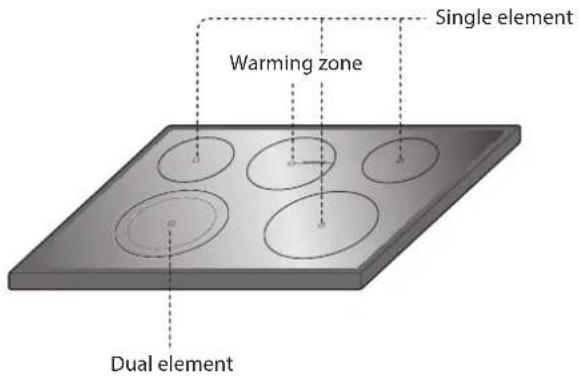
Hot surface indicator
HS (Hot Surface) will appear in the display once the element is turned off or during the self clean cycle. The HS indicator will stay on until the surface has cooled to approximately 150°F (66°C) or when the self clean cycle ends.

cAUfiON
It is normal for the surface elements to cycle on and off during cooking, even on higher settings. This will happen more frequently if cooking on a lower temperature setting.
Using the cooktop elements
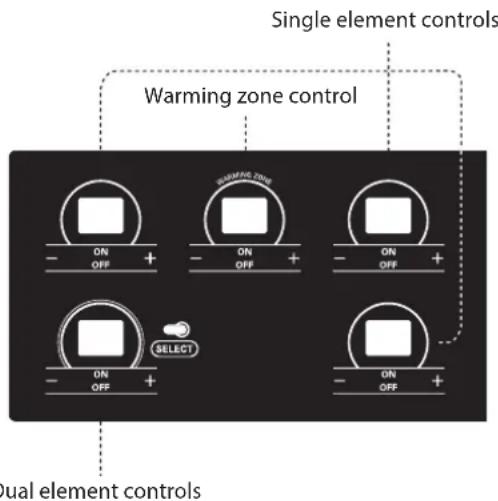
To turn on a SINGLE element (left and right rear elements):
- Press the ON/OFF button that controls the element that you would like to use (refer to the below cook-top element control image).
- Press the + button once to adjust the element temperature to Hi, or the - button once to adjust the element temperature to Lo.
- Use the - / + buttons to adjust the element temperature settings. The element temperature settings are adjustable at all times.
- To turn off the element after cooking, press the ON/OFF button once.
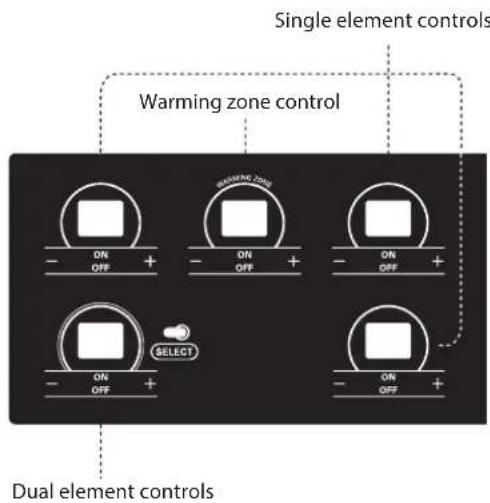

NOTE
• Hi is the highest temperature available.
• Lo is the lowest temperature available.
- Press and hold the + or - buttons to quickly scroll through the temperature settings.

CAUFiON
- NEVER leave food on the cooktop unattended. Spillovers can cause smoke. Greasy spillovers may catch on fire.
- The oven surface element may appear to have cooled after it has been turned OFF. The element may still be hot and burn may occur if this element is touched before it has cooled sufficiently.
To turn on a DUAL element (left and right front elements):
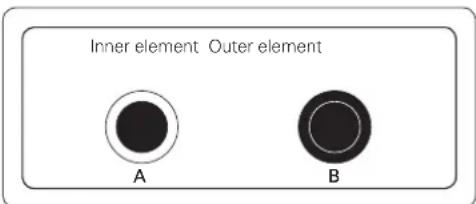
The front two elements on the cooktop are dual elements. You are able to adjust the dual elements according to the pot/pan size that you are using.
- Press the ON/OFF button that controls the element that you would like to use (refer to the below cooktop element control image).
- Press the SELECT button to select either the inner (smaller) or outer (larger) element function. The dual elements default to the inner element function. The light bars above the SELECT button indicate whether the element is adjusted for the inner or outer element function. One bar will display for the inner element and two bars will display for outer element.
- Press the + button once to adjust the element temperature to Hi, or the - button once to adjust the element temperature to Lo.
- Use the - / + buttons to adjust the element temperature settings. The element temperature settings are adjustable at all times.
- To turn off the element after cooking, press the ON/OFF button once.

NOTE
• Hi is the highest temperature available.
• Lo is the lowest temperature available.
- Press and hold the or - buttons to quickly scroll through the temperature settings.
To turn on the Warming Zone (center element):
Use the Warming Zone to keep food warm after it has already been cooked. The warming zone is not meant for cooking food. Attempting to cook uncooked or cold food on the warming zone could result in a food borne illness.
- Press the warming zone ON/OFF button. The warming zone indicator light will flash.
- Press the + button once to adjust the temperature to Hi, or the - button once to adjust the temperature to Lo. Power level sequence is from - Lo, 2, 3, 4, Hi or from + Hi, 4, 3, 2, Lo.
- Use the - / + buttons to adjust the temperature settings. The temperature settings are adjustable at all times.
- To turn off the warming zone, press the ON/OFF button once.

cAUtiON
- Only use cookware and dishes that are safe for oven and cooktop use.
• Always use oven mitts when removing food from the cooktop and oven. - Do not place sealed containers on the cooktop.
- DO NOT use plastic wrap to cover food while on the cooktop. Plastic may melt onto the surface and be very difficult to clean.
- When using the warming zone, food should be kept in its container and covered with a lid or aluminum foil to maintain food quality.
- DO NOT leave food on the warming zone for more than two hours.
Recommended surface cooking settings
| Element Temp. Recommended Use | ||
| Single or Dual | 8.5-Hi | Bring liquid to a boilStart cooking |
| 5.5-8.0 | Hold a rapid boil, frying, deep fat fryQuickly brown or sear food | |
| 3.5-5.0 | Maintain a slow boilFry or saute foodsCook soups, sauces and gravies | |
| 2.2-3.0 | Stew or steam foodSimmer | |
| LO-2.0 | Keep food warmMelt chocolate or butter | |
| Element Temp. Recommended Use | |
| Warming Zone | HiFried FoodsHot BeverageSoups (liquid) |
| 2-4Dinner Plate with FoodSaucesSoups (Cream)StewVegetablesMeats | |
| LoBread/PastriesGraviesCasserolesEggs | |
Home canning tips
Be sure that the canner is centered over the surface unit and flat on the bottom.
- The base must not be more than 1 inch larger than the element. Use of water bath canners with rippled bottoms may extend the time required to bring the water to a boil and cooktops may be damaged.
- Some canners are designed with smaller bases for use on smooth top surfaces.
- Use the high heat setting only until the water comes to a boil or pressure is reached in the canner.
- Reduce to the lowest heat setting that maintains the boil, or pressure. If the heat is not turned down, the cooktop may be damaged.
USING THE PROPER COOKWARE
Using the proper cookware can prevent many problems, such as food taking longer to cook or achieving inconsistent results. Proper pans will reduce cooking times and cook food more evenly. Stainless steel is recommended.
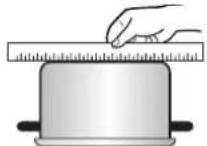
Check pans for flat bottoms by using a straight edge or ruler
- Place a ruler across the bottom of the pan.
- Hold it up to the light.
- No light should be visible under the ruler.

NOTE
- Do not use a small pan on a large element. Not only does this waste energy, but it can also result in spillovers burning onto the cooking area.
- Only use flat bottomed cookware. Do not use cookware that is oversized or uneven such as round bottom woks, rippled bottom cookware, or oversized canners and griddles.
- Do not use foil or foil-type containers. Foil may melt onto the glass. Do not use the cooktop if metal has melted on it. Call an authorized Servicer.
| Recommended cookware | Do not use |
| Flat bottom and straight sides. | Curved, grooved, or warped pan bottoms. Pans with uneven bottoms do not cook efficiently and sometimes may not boil liquid. |
| Heavy-gauge pans. | Very thin-gauge metal or glass pans. |
| Pan sizes that match the amount of food to be prepared and the size of the surface element. | Pans that are smaller or larger than the element. |
| Weight of handle does not tilt pan. Pan is well balanced. | Cookware with loose or broken handles. Heavy handles that tilt the pan. |
| Tight-fitting lids. Loose-fitting lids. | |
| Flat bottom woks. | Woks with a ring-stand bot-tom. |
USING THE OVEN
- When using an oven thermometer in the oven cavity, the temperature may differ from the actual set oven temperature.
REMOVING AND REPLACING THE OVEN RACKS

CAUFiON
- Replace oven racks before turning the oven on to prevent burns.
- DO NOT cover the racks with aluminum foil, or any other material, or place anything on the bottom of the oven. Doing so will result in poor baking and may damage the oven bottom.
• Only arrange oven racks when the oven is cool.
Removing the racks:
- While wearing oven mitts, grasp the oven rack.
- Pull the rack straight out until it stops.
- Lift up the front of the rack.
- Pull out the rack.
Replacing the racks:
- While wearing oven mitts, place the end of the rack on the support.
- Tilt the front end of the rack up.
- Push the rack in.
- Check that the rack is properly in place.
Rack and Pan Placement
Rack
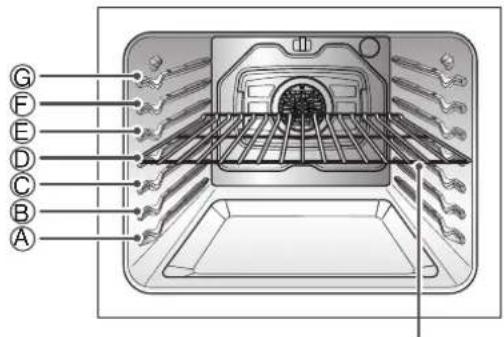
If cooking on two racks, place the oven racks in positions B and D. If cooking on three racks, place them in positions B, D, and F (offset rack). Place the cookware as shown in the Multiple rack baking/Single rack baking images below.
If baking with more than one pan, place the pans so that each one has at least 1" to 1 1/2" of air space around them.
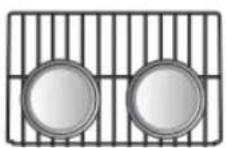
Standard Rack
(Position B)
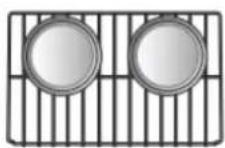
Standard Rack
(Position D)
Multiple rack baking
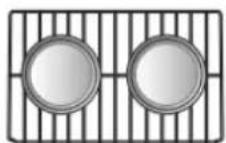
Standard Rack
Single rack baking
Oven vent
- Areas near the vent may become hot during operation and may cause burns.
• Do not block the vent opening. - Avoid placing plastics near the vent as heat may distort or melt the plastic.
- It is normal for steam to be visible when cooking foods with high moisture.
OVEN CONTROLS
BAKE
BAKE is used to prepare foods such as pastries, breads, casseroles. The oven can be programmed to bake at any temperature from 170°F (77°C) to 550°F (288°C). The default temperature is 350°F (177°C).
Setting the BAKE function (example, 375°F):
- Press the BAKE button.
- Set the oven temperature using the number buttons: Press 3, 7 and 5.
- Press the START button. The oven will start to preheat.
As the oven preheats, the temperature is displayed and rises in 5 degree increments. Once the oven reaches the set temperature, a tone will sound and the oven light will blink on and off.
- When cooking is complete, press the CLEAR OFF button.
- Remove food from the oven.

NOTE
It is normal for the convection fan to operate periodically throughout a normal bake cycle. This is to ensure even baking results.
Baking Tips
- Baking time and temperature will vary depending on the ingredients, size, and shaped of the baking pan used.
- If baking with more than one pan, place the pans so that each one has at least 1" to 1 1/2" of air space around them.
- Check for food doneness at the minimum recipe time.
- Use metal bakeware (with or without a nonstick finish), heatproof glass-ceramic, ceramic or other bakeware recommended for oven use.
- Dark metal pans or nonstick coatings will cook food faster with more browning. Insulated bakeware will slightly lengthen the cooking time for most foods.
CONVECTION BAKE
The convection system uses a fan to circulate the heat evenly within the oven. Improved heat distribution allows for even cooking and excellent results while cooking with single or multiple racks.
Setting the CONVECTION BAKE function (example, 375°F):
- Press the CONV. BAKE button. The display will flash 350°F.
- Set the oven temperature using the number buttons: Press 3, 7 and 5.
- Press the START button. The display will show CONV. BAKE and the oven temperature starting at 100°F.
As the oven preheats, the display will show increasing temperatures in 5 degree increments. Once the oven reaches the set adjusted temperature, a tone will sound and the oven light will flash on and off. The display will show the auto converted oven temperature 350^ F, CONV. BAKE and the fan icon.
- When cooking has finished or to cancel, press the CLEAR OFF button.

NOTE
The oven fan will run while convection baking. The fan will stop when the door is open, but the heat will not turn off. In some cases, the fan may shut off during a convection bake cycle.
Tips for Convection Baking
- Cookies and biscuits should be baked on pans with no sides or very low sides to allow heated air to circulate around the food. Food baked on pans with a dark finish will cook faster.
- When using Convection Bake with a single rack, place oven rack in position D. If cooking on two racks, place the oven racks in positions B and D.
- Multiple oven rack cooking may slightly increase cook times for some foods.
CONvECTION ROAST
The CONVECTION ROAST feature is designed to give optimum roasting performance. CONVECTION ROAST combines cooking with the convection fan to roast meats and poultry. The heated air circulates around the food from all sides, sealing in juices and flavors. Foods are crispy brown on the outside while staying moist on the inside. Convection roasting is especially good for large tender cuts of meat, uncovered.
Setting the CONvECTION ROAST function (example, 375°F):
- Press the CONV. ROAST button. The display will flash 350°F.
- Set the oven temperature using the number buttons: Press 3, 7 and 5.
- Press the START button. The display will show CONV. ROAST and the oven temperature starting at 100°F.
As the oven preheats, the display will show increasing temperatures in 5 degree increments. Once the oven reaches the set adjusted temperature, a tone will sound and the oven light will flash on and off. The display will show the auto converted oven temperature 350^ F, CONV. ROAST and the fan icon.
- When cooking has finished or to cancel, press the CLEAR OFF button.

NOTE
The oven fan will run while convection roasting. The fan will stop when the door is open, but the heat will not turn off. In some cases, the fan may shut off during a convection roast cycle.
RECOMMENdEd CONvECTION ROAST GUIDE
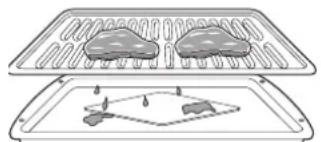
When preparing meats for convection roasting, use the broiler pan, grid and roasting rack. the broiler pan will catch grease spills and the grid will help prevent grease splatters. The roasting rack will allow the heat to circulate around the meat.
- Place oven rack on bottom or next to the bottom rack position.
- Place the gride in the broiler pan.
- Place the roasting rack on the grid. Make sure that the roasting rack is securely seated on the grid in the broiler pan.
- Place the broiler pan on the oven rack.
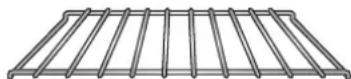
Roasting rack
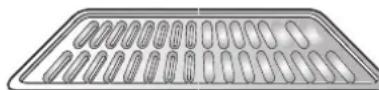
Grid (sold separately)
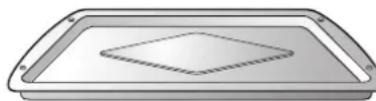
Broiler Pan (sold separately)

CAUFiON
- DO NOT use the roasting rack when broiling. This will help prevent food from coming in contact with the broil element and grease from splattering.
• DO NOT use the broiler pan without the grid.
• DO NOT cover the grid with aluminum foil.
• Position food (fat side up) on the roasting rack.
BROIL
The Broil function uses intense heat from the upper heating element to cook food. BROIL works best for tender cuts of meats, fish, and thinly cut vegetables.
Some models may feature a hybrid broiler consisting of an inner broiler that utilizes a carbon heating element which provides instantaneous heat, and a traditional outer broiling element. During normal broiler operation, it is normal for either element to cycle off intermittently.
This range is designed for open door broiling. The door has a broil stop position.

cAUfion
- DO NOT use a broiler pan without a grid. Oil can cause a grease fire.
- DO NOT cover the grid and broiler pan with aluminum foil. Doing so will cause a fire.
• Always use a broiler pan and grid for excess fat and grease drainage. This will help to reduce splatter, smoke, and flare-ups.
To set the oven to BROIL
- Open the oven door to the broil stop position (about 10 degrees from the closed position).
- Press the BROIL button once for Hi or twice for Lo.
- Press the START button. The oven will begin to heat.
- If using Broil, it is best to let the oven preheat for approximately three minutes before cooking food.
- When cooking is complete, or to cancel at any time, press the CLEAR OFF button.
Smoking
Due to the intense heat associated with broiling, it is normal to experience smoke during the cooking process. This smoke is a natural byproduct of searing and should not cause you to worry. If you are experiencing more smoke than you are comfortable with, use the following tips to reduce the amount of smoke in your oven.
- Always use a broiler pan. Do not use sautee pans or regular baking sheets for safety reasons.
- NEVER use a broiler pan that is not thoroughly cleaned and at room temperature at the beginning of cooking.
-
ALWAYS run your cooktop ventilation system or vent hood during broiling.
-
Keep the interior of your oven as clean as possible. Left over debris from prior meals can burn or catch fire.
-
Avoid fatty marinades and sugary glazes. Both of these will increase the amount of smoke you experience. If you would like to use a glaze, apply it at the very end of cooking.
-
If you are experiencing significant smoke with any food item, consider:
• Lower the broiler to the LO setting.
- Lower the rack position to cook the food further away from the broiler.
- Use the HI broil setting to achieve the level of searing you desire, and then either switch to the LO broil setting, or switch to the BAKE function.
-
As a rule, fattier cuts of meat and fish will produce more smoke than leaner items.
-
Adhere to the recommended broil settings and cooking guidelines in the chart on the following page whenever possible.
RECOMMENdEd BROILING GUIDE
The size, weight, thickness, starting temperature, and your preference of doneness will affect broiling times. The following guide is based on meats at refrigerator temperature.

NOTE
Always use a broiler pan when broiling on the HI setting.
natural_image
Illustration of two meat cuts placed on a tray with a small diagram below showing a simple setup (no text or symbols)Broiling chart
| Food | Quantity and/or Thickness | Shelf Position | First Side Time (min.) | Second Side Time (min.) | Comments |
| Ground Beef Well Done | 1 lb. (4 patties) 1/2 to 3/4" thick | G | 4~5 | 3~4 | Space evenly. Up to 8 patties may be broiled at once. |
| Beef Steaks | Steaks less than 1" thick cook through before browning. | ||||
| Rare | 1" thick | F | 4 | 2~3 | |
| Medium | 1 to 1 1/2 lbs. | F | 5 | 3~4 | Pan frying is recommended. Slash fat. |
| Well Done | F | 6 | 4~5 | ||
| Rare | 1 1/2" thick | D | 10 | 4~6 | |
| Medium | 2 to 2 1/2 lbs. | D | 12 | 6~8 | |
| Well Done | D | 14 | 8~10 | ||
| Chicken | 1 whole cut up 2 to 2 1/2 lbs., split lengthwise 2 Breasts | C | 20 | 6~8 | Broil skin-side-down first. |
| E | 8~9 | 5~6 | |||
| Lobster Tails | 2-4 10 to 12 oz. each | C | 12~14 | Do not turn over. | Cut through back of shell. Spread open. Brush with melted butter before broiling and after half of broiling time. |
| Fish Fillets | 1/4 to 1/2" thick | E | 5 | 2~4 | Handle and turn very carefully. Brush with lemon butter before and during cooking, if desired. |
| Ham Slices (precooked) | 1/2" thick | E | 5 | 2~4 | Increase time 5 to 10 minutes per side for 1 1/2" thick or home-cure ham. |
| Pork Chops Well Done | 2 (1/2" thick) 2 (1" thick) about 1 lb. | E | 7 | 4~6 | Slash fat. |
| D | 9~10 | 6~8 | |||
| Lamb Chops | Slash fat. | ||||
| Medium | 2 (1" thick) about | E | 6 | 4~6 | |
| Well Done | 10 to 12 oz. | E | 8 | 7~9 | |
| Medium | 2 (1 1/2" thick) about 1 lb. | E | 11 | 9 | |
| Salmon Steaks | 2 (1" thick) 4 (1" thick) about 1 lb. | E | 13 | 9~11 | |
| E | 7~8 | 4~6 | Grease pan. Brush steaks with melted butter. |
* This chart is only for reference. Adjust cook time according to your preference.
Broiling Tips
Beef
- Steaks and chops should always be allowed to rest for five minutes before cutting into them and eating. This allows the heat to distribute evenly through the food and creates a more tender and juicy result.
- Consider removing thick pieces of meat from the refrigerator 30 minutes prior to cooking. This will help them cook more quickly and evenly, and will produce less smoke when broiling. Please note that cooking times will likely be shorter than the times indicated in the Broiling Chart.
- For bone-in steaks or chops that have been "Frenched" (all meat removed from around the bone), wrap the exposed sections of bone in foil to reduce burning.
Seafood
- When broiling skin-on fish, always use the Medium broil setting and always broil the skin side last.
- Seafood is best consumed immediately after cooking. Allowing seafood to rest after cooking can cause the food to dry out.
- It is a good idea to rub a thin coating of oil on the surface of the broiling pan before cooking to reduce sticking, especially with fish and seafood. You can also use a light coating of non-stick pan spray.
vegetables
- Toss your vegetables lightly in oil before cooking to improve browning.
wARM
This function will maintain an oven temperature of 170^ F. The WARM function will keep cooked food warm for serving up to 3 hours after cooking has finished. The Warm function may be used without any other cooking operations or can be used after cooking has finished using TIMED BAKE or DELAYED TIMED BAKE.
Setting the wARM function:
- Press the WARM/PROOF button.
- Press START.
- Press the CLEAR OFF button at any time to cancel.
To set the wARM function after timed cooking:
- Select the cooking function.
- Enter the oven temperature using the number buttons.
- Press the COOK TIME button and enter the cook-time using the number buttons.
- Press the WARM/PROOF button.
- Press the START button.
- When cooking is finished, press the CLEAR OFF button to cancel the WARM function.

NOTE
The WARM function is intended to keep food warm.
Do not use it to cool food down.
PROOF
Setting the PROOF function:
This feature maintains a warm oven for rising yeast leavened products before baking.
- Use rack B or C for proofing.
- Press the WARM/PROOF button twice. PrF will appear in the display.
- Press the START button.
- Press the CLEAR OFF button when proofing is finished.

NOTE
- To avoid lowering the oven temperature and lengthening proofing time, do not open the oven door unnecessarily. Check bread products early to avoid overproofing.
- Do not use the proofing mode for warming food or keeping food hot. The proofing oven temperature is not hot enough to keep foods at safe temperatures. Use the WARM feature to keep food warm. Proofing will not operate when the oven is above 125^ F. HOT will show in the display.
FAvORITES
The FAVORITES function is used to record and recall your favorite recipe settings. You can store and recall up to three different settings.
Setting the FAvORITES function:
- Press the FAVORITES button once for Bread, twice for Meat, and three times for Chicken. The default temperature will appear and COOK will flash in the display.
| Category | Press the Favorite button | Default Temp. (may be changed and recalled) | Cook mode |
| Bread Press | FAVORITE once. | 375°F Bake | |
| Meat Press | FAVORITE twice. | 325°F Convection | Roast |
| Chicken Press | FAVORITE three times. | 350°F Convection | Roast |
- Press the number buttons to change the default temperature.
- Press the START button. The preheat indicator tones will sound 3 times when the oven reaches the programmed temperature.

NOTE
Only the oven temperature can be modified and stored. The category name and cook mode will stay the same.
SABBATH MODE
Sabbath mode is typically used on the Jewish Sabbath and Holidays. When the SABBATH mode is activated, the oven does not turn off until the SABBATH mode is deactivated. In SABBATH mode, all function buttons, except for the CLEAR OFF is inactive. Sb will appear in both the cooktop and oven displays.

NOTE
If the oven light is turned ON and the SABBATH mode is active, the oven light will remain ON until the SABBATH mode is turned OFF. If the oven light needs to be OFF, be sure to turn the oven light OFF before activating the SABBATH mode. SABBATH mode can only be used while baking (BAKE mode).
Setting the SABBATH mode
- Press the BAKE button.
- Press the number buttons to enter the bake temperature.
- Press the START button.
- Press and hold the SETTING button for three seconds. SB and □ will appear in the display when the Sabbath mode is activated.
- To cancel the Sabbath mode, press and hold the SETTING button for three seconds. To cancel the Bake function, press the CLEAR OFF button at any time.
Changing the temperature while in SABBATH mode
- Press the BAKE button. (No tones will sound and the display will not change.)
- Set the temperature using the number buttons.
- Press the START button.

NOTE
There is a 15 second delay before the oven will recognize the temperature change.
CARE AND CLEANING
CLEANING THE GLASS/CERAMIC COOKTOP

cAUftiON
• DO NOT use scrub pads or abrasive cleaning pads. They may damage your cooktop surface.
- For your safety, wear an oven mitt or potholder while cleaning the hot cooking surface.
Use Ceramic Cooktop Cleaner on the glass cooktop.
Other creams my not be as effective or may scratch, damage or stain the cooktop surface.
To maintain and protect the surface of the glass cooktop, follow these steps:
- Before using the cooktop for the first time, clean it with a ceramic cooktop cleaner. This helps protect the top and makes cleanup easier.
- Daily use of ceramic cooktop cleaner will help keep the cooktop looking new.
- Shake the cleaning cream well. Apply a few drops of cleaner directly to the cooktop.
- Use a paper towel to clean the entire cooktop surface.
- Rinse with clear water and use a dry cloth or paper towel to remove all cleaning residue.

NOTE
DO NOT heat the cooktop until it has been cleaned thoroughly.
Burned-on Residue
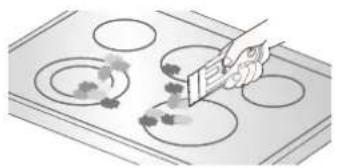
- While the cooktop is still hot, remove any burnt-on deposits or spilled food from the glass/ceramic cooking surface with a suitable metal razor scraper (similar to scraping paint off of a windowpane - it will not damage the decorated cooking surface). Hold the scraper at an approximate 30° angle to the cooktop.
natural_image
Illustration of a hand using a tool to interact with circular components, no text or symbols present
NOTE
- Do not use a dull or nicked blade.
-
To prevent burns, please wear an oven mitt or pot-holder while using the metal scraper.
-
When the cooking surface has cooled down, apply a few dabs (about the size of a dime) of an approved cleaner in each burner area and work the cleaning cream over the cooktop surface with a damp paper towel.
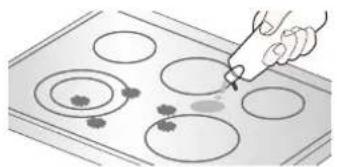
natural_image
Illustration of a hand using a pipette to clean circular objects on a baking mat (no text or symbols)
NOTE
Approved cleaners:
• Weiman CookTop Cleaning Cream
- (www.weiman.com)
• Cerama Bryte (www.ceramabryte.com)
• Golden Ventures Cerama Bryte
- Easy-Off 3 in 1 Glass Top Cleaner Spray (www.easyoff.us).
- Clean with clear water and wipe the cooktop surface with a clean, dry paper towel.
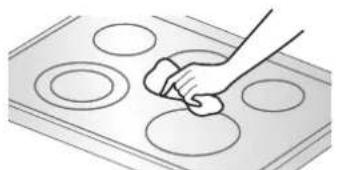
natural_image
Hand cleaning circular components on a tray (no text or symbols visible)IMPORTANT:
If any sugar or food containing sugar (preserves, ketchup, tomato sauce, jellies, fudge, candy, syrups, chocolate, etc.), plastic or foil melts on the cooktop, remove the molten material IMMEDIATELY with a metal razor scraper (it will not damage the decorated cooking surface) while the cooking surface is still hot to avoid the risk of damage to the glass-ceramic surface. For your safety, please wear an oven mitt or potholder while cleaning the hot cooking surface.
Metal Marks and Scratches
- Be careful not to slide pots and pans across the cooktop. Doing so will leave metal markings on the cooktop surface. To help remove these marks, use a ceramic cooktop cleaner with a cleaning pad for ceramic cooktops.
- If pots with a thin overlay of aluminum or copper are allowed to boil dry, the overlay may leave black discoloration on the cooktop. This should be removed immediately before heating again or the discoloration may be permanent.

cAUfion
Cookware with rough or uneven bottoms can mark or scratch the cooktop surface.
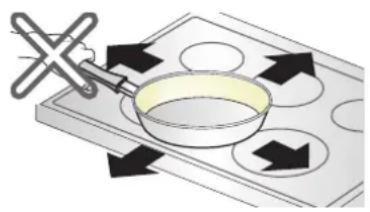
natural_image
Illustration of a frying pan on a tray with arrows indicating direction (no text or symbols)- Do not slide metal or glass across the cooktop surface.
- Do not use cookware with any dirt build up on bottom.
Cooktop Seal
To clean the cooktop seal around the edges of the glass, lay a wet cloth on it for a few minutes, then wipe clean with nonabrasive cleaners.
SELF CLEAN
The self clean cycle uses extremely hot temperatures to clean the oven cavity. While running the Self Clean cycle, you may notice smoking or an odor. This is normal; especially if the oven is heavily soiled.
During Self Clean, the kitchen should be well ventilated to minimize the odors from cleaning.

CAUFiON
- DO NOT leave small children unattended near the appliance. During the Self Clean cycle, the outside of the range can become very hot to touch.
- If you have pet birds, move them to another well-ventilated room. The health of some birds is extremely sensitive to the fumes given off during the Self Clean cycle of any range.
- DO NOT line the oven walls, racks, bottom or any other part of the range with aluminum foil or any other material. Doing so will destroy heat distribution, produce poor baking results and cause permanent damage to the oven interior (aluminum foil will melt to the interior surface of the oven).
- DO NOT force the door open. This can damage the automatic door locking system. Use care when opening the oven door after the Self Clean cycle. Stand to the side of the oven when opening the door to allow hot air or steam to escape. The oven may still be VERY HOT.
Before starting Self Clean:
- Remove the oven racks, broiler pan, broiler grid, all cookware, aluminum foil or any other material from the oven.
- The kitchen should be well ventilated to minimize the odors from cleaning.
- Wipe any heavy spillovers on the bottom of the oven.
- Make sure that the oven light bulb cover is in place and the oven light is off.
- The oven light cannot be turned on during a self clean cycle. The oven light cannot be turned on until the oven temperature has cooled below 500°F (260°C) after a self clean cycle is complete.
During the self clean cycle, the cooktop elements cannot be used.

NOTE
- Remove oven racks and accessories before starting the self clean cycle.
- If oven racks are left in the oven cavity during the self clean cycle, they will discolor and become difficult to slide in and out.
- Clean the frame of the oven and door with hot soapy water. Rinse well.
- Do not clean the gasket. The fiberglass material of the oven door gasket cannot withstand abrasion. It is essential for the gasket to remain intact. If you notice it becoming worn or frayed, replace it.
- Wipe up any heavy spillovers on the oven bottom.
• Make sure that the oven light bulb cover is in place and the oven light is off.
Setting Self Clean
The Self-Clean function has cycle times of 3, 4, or 5 hours.
Self Clean Soil Guide
| Soil Level Cycle Setting | |
| Lightly soiled oven cavity 3 Hour | Self Clean |
| Moderately Soiled Oven Cavity 4 | Hour Self Clean |
| Heavily Soiled Oven Cavity 5 Hour | Self Clean |
- Remove all racks and accessories from the oven.
- Press the SELF CLEAN button. The oven defaults to the recommended four hour self clean for a moderately soiled oven. Press twice for a five hour self clean or three times for a three hour self clean.
- Press START.
- Once the Self Clean is set, the oven door will lock automatically and the lock icon will display. You will not be able to open the oven door until the oven is cooled. The lock will release automatically when the oven has cooled.

cAUfiON
DO NOT force the oven door open when the lock icon is displayed. The oven door will remain locked until the oven temperature has cooled. Forcing the door open will damage the door.
Setting Self Clean with a delayed start
- Remove all racks and accessories from the oven.
- Press the SELF CLEAN button. The oven defaults to the recommended four hour self clean for a moderately soiled oven. Press twice for a five hour self clean or three times for a three hour self clean.
- Press the START TIME button.
- Use the number buttons to enter the time of day you would like the Self Clean to start.
- Press the START button.

NOTE
It may become necessary to cancel or interrupt a self clean cycle due to excessive smoke or fire in the oven. To cancel the Self Clean function, press the CLEAR OFF button.
during Self Clean
- The self clean cycle uses extremely hot temperatures to clean the oven cavity. While running the Self Clean cycle, you may notice smoking or an odor. This is normal; especially if the oven is heavily soiled.
- As the oven heats, you may hear sounds of metal parts expanding and contracting. This is normal and will not damage the oven.
- Do not force the oven door open when LOCKED is displayed. The oven door will remain locked until the oven temperature has cooled. Forcing the door open will damage the door.

NOTE
- The Self Clean cycle cannot be started if the Lockout feature is active.
- Once the Self Clean cycle is set, the oven door will lock automatically. You will not be able to open the oven door until the oven is cooled. The lock will release automatically.
- Once the door has been locked, the LOCKED indicator light will stop flashing and remain on. Allow about 15 seconds for the oven door lock to activate.
- If the clock is set for a 12 hour display (default) the Delayed Self Clean can never be set to start more than 12 hours in advance.
After the Self Clean cycle
- The oven door will remain locked until oven temperature has cooled.
- You may notice some white ash in the oven. Wipe it off with a damp cloth or a soap-filled steel wool pad after the oven cools. If the oven is not clean after one clean cycle, repeat the cycle.
- If oven racks were left in the oven and do not slide smoothly after a clean cycle, wipe racks and rack supports with a small amount of vegetable oil to make them glide easier.
- Fine lines may appear in the porcelain because it went through heating and cooling. This is normal and will not affect performance.
CLEANING THE EXTERIOR
Painted and Decorative Trim
For general cleaning, use a cloth with hot soapy water. For more difficult soils and built-up grease, apply a liquid detergent directly onto the soil. Leave it on for 30 to 60 minutes. Rinse with a damp cloth and dry. Do not use abrasive leaners.
Stainless Steel Surfaces (on some models)
To avoid scratches, do not use a steel wool pads.
- Place a small amount of stainless steel appliance cleaner or polish on a damp cloth or paper towel.
- Clean a small area, rubbing with the grain of the stainless steel if applicable.
- Dry and buff with a clean, dry paper towel or soft cloth.
- Repeat as necessary.
Oven door
- Use soapy water to thoroughly clean the oven door. Rinse well. DO NOT immerse the door in water.
- You may use a glass cleaner on the outside glass of the oven door. DO NOT spray water or glass cleaner on the door vents.
- DO NOT use oven cleaners, cleaning powders, or harsh abrasive cleaning materials on the outside of the oven door.
- DO NOT clean the oven door gasket. The oven door gasket is made of a woven material that is essential for a good seal. Care should be taken not to rub, damage, or remove this gasket.

CAUfION
Do not use harsh cleaners or harsh abrasive cleaning materials on the outside of the oven door. Doing so can cause damage.
Do not hand clean oven door gasket
Remove any debris from door
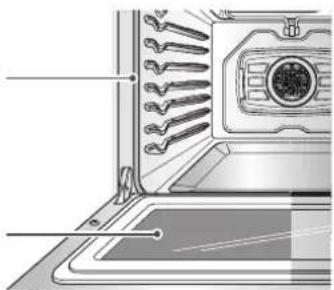
natural_image
Diagram of a kitchen appliance showing internal components with no visible text or symbolsBroiler Pan and Grid
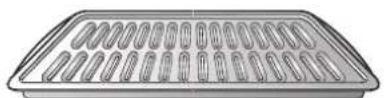
- Do not store a soiled broiler pan or grid anywhere in the range.
- Do not clean the broiler pan or grid in a self cleaning mode.
- Remove the grid from the pan. Carefully pour out the grease from the pan into a proper container.
- Wash and rinse the broiler pan and grid in hot water with a soap-filled or plastic scouring pad.
- If food has burned on, sprinkle the grid with cleaner while hot and cover with wet paper towels or a dish-cloth. Soaking the pan will remove burned-on foods.
- Both the broiler pan and grid may be cleaned with a commercial oven cleaner or in the dishwasher.
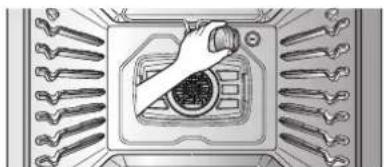
The oven light is a standard 40-watt appliance bulb. It will turn on when the oven door is open. When the oven door is closed, press the OVEN LIGHT button to turn it on or off.
- Unplug the range or disconnect power.
- Turn the glass bulb cover in the back of the oven counterclockwise to remove.
- Turn the bulb counterclockwise to remove from socket.
- Insert the new bulb and turn it clockwise.
- Insert the glass bulb cover and turn it clockwise.
- Plug in the range or reconnect the power.
natural_image
Illustration of a hand using a tool to press inside a computer socket, surrounded by multiple wrenches (no text or symbols)
WARNiNg
• Make sure that the oven and bulb are cool.
- Disconnect the electrical power to the range at the main fuse or circuit breaker panel. Failure to do so can result in severe personal injury, death, or electrical shock.
REMOVING AND REPLACING THE OVEN DOOR AND STORAG DRAWER

cAUfion
- The door is very heavy. Be careful when removing and lifting the door.
• DO NOT lift the door by the handle. - DO NOT hit the glass with pots, pans, or any other object.
- Scratching, hitting, jarring or stressing the glass may weaken its structure, causing an increased risk of breakage at a later time.
Removing the oven door
- Fully open the door. Pull the hinge locks down toward the door frame, to the unlocked position. A tool, such as a small flat-blade screwdriver, may be required.
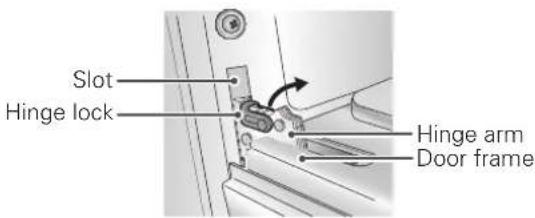
Push hinge locks down to unlock
- Firmly grasp both sides of the door at the top. Close the door to the removal position (approximately five degrees) which is halfway between the broil stop position and fully closed.
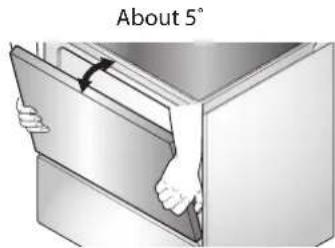
Removal Position
- Lift the door up and out until the hinge arm is clear off of the slot. Put the door on the floor.
Replacing the oven door
- Firmly grasp both sides of the door at the top.
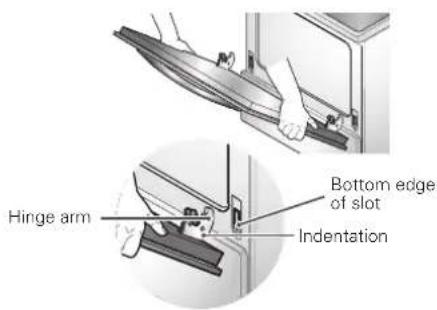
- With the door at the same angle as the removal position, seat the indentation of the hinge arm into the bottom edge of the hinge slot. The notch in the hinge arm must be fully seated into the bottom of the slot.
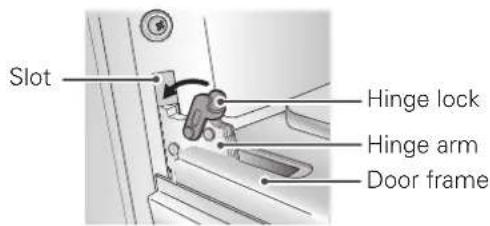
Push hinge locks up to lock
-
Fully open the door. If the door will not fully open, the indentation is not seated correctly in the bottom edge of the slot.
-
Push the hinge locks down against the front frame of the oven cavity to the locked position. Close the oven door.
Removing the Storage drawer

WARNiNg
Disconnect the electrical power to the range at the main fuse or circuit breaker panel. Failure to do so can result in severe personal injury, death, or electrical shock.
Most cleaning can be done with the drawer in place; however, the drawer may be removed if further cleaning is needed. Use warm water to thoroughly clean.
- Fully open the drawer.
- Remove the two screws.
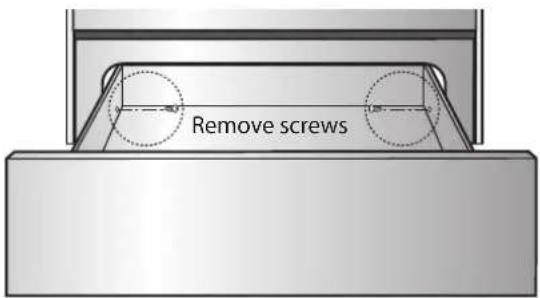
- Locate the glide lever on each side of the drawer. Push down on the left glide lever and pull up on the right glide lever.
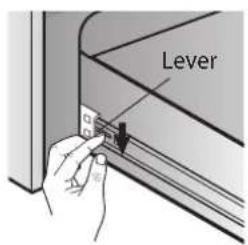
Push down with finger
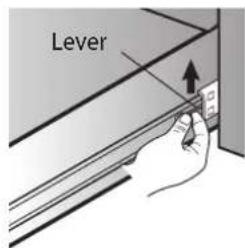
Pull up with finger
- Pull the storage drawer away from the range.
Replacing the Storage drawer
- Pull the bearing glides to the front of the chassis glide.
- Align the glide on each side of the drawer with the glide slots on the range.
- Push the drawer into the range until levers "click" (approximately 2 inch).
- Pull the drawer open again to seat bearing glides into position.
- Replace the two screws.

NOTE
- Be careful with your fingers when closing the drawer. You should grasp only the pocket type handle on a drawer panel. If you grasp the back side of the drawer panel, you can get hurt by a hidden bracket on the door bottom.
FAqs
What types of cookware are recommended to use with my cook top?
• The pans must have a flat bottom and straight sides.
• Only use heavy-gauge pans.
- The pan size must match the amount of food to be prepared and the size of the surface element.
• Use tight fitting lids.
• Only use flat bottom woks.
Why does "HS" appear on the cooktop display?
HS (Hot Surface) will appear in the display once the element is turned off or during the self clean cycle. The HS indicator will stay on until the surface has cooled to approximately 150^ F ( 66^ C) or when the self clean cycle ends.
What does "PF" in the display mean?
"PF" means there has been a power interruption in your home. Press Clear/off Key and the "On/Off" key on the cook-top controls to clear this code. It may also require you to reset the time for the display.
Is it normal to hear a clicking noise coming from the back of my oven when I am using it?
Yes, this is normal. The controller has relays that open and close during baking.
During convection cooking the fan stops when I open the door. Is that normal?
Yes, this is normal. When the door is opened, the convection fan will stop until the door is closed.
Can I use aluminum foil to catch drippings in my oven cavity?
No. If aluminum foil is placed on the bottom of the oven cavity, it will burn and you will not be able to remove it. The heater for the oven is below the oven cavity and provides direct heat to the bottom of the cavity. If you already have burnt foil on the bottom, do not worry, as it will not hinder the performance.
Can I use aluminum foil on the racks?
It is not recommend to place aluminum foil inside the oven cavity. Using foil on the racks will restrict air flow which could result in poor cooking results.
Can I leave my racks in the oven when running a Self Clean cycle?
No. Although it will not damage the racks, it will discolor them and may make them hard to slide in and out during use. Remove all items from the oven before starting a Self Clean cycle.
What should I do if my racks are sticky and have become hard to slide in and out?
Over time, the racks may become hard to slide in and out. Apply a small amount of olive oil to the ends of the racks. This will work as a lubricant for easier gliding.
What should I do for hard to remove stains on my cooktop?
The cooktop should be cleaned after every use to prevent permanent staining. When cooking high sugar based food, such as tomato sauce, is it recommended to clean the stain while the cooktop is still warm. Use a safety mitt when cleaning to prevent burns. Refer to the CARE AND CLEANING section of this owner's manual for further instruction.
Should I broil with the door opened or closed?
Your electric range is designed for open door broiling. The door has a broil stop position. The broil stop position is about 10 degrees from the closed position.
Why aren't the function buttons working?
Make sure that the range is not in Lockout mode. The lock symbol 📁 will show in the display if Lockout is activated. To deactivate Lockout, press and hold the START button for three seconds. The unlock melody will sound and UNLOCKING will appear in the display until the controls are unlocked.
Why is the time flashing?
This means that the product has just been plugged in, or that it has experienced a power interruption. To clear the flashing time, press any key and reset the clock if needed.
BEFORE REqUESTING SERvICE
| Problem Possible Causes / Solutions | |||
| Range is not level. | ·Poor installation. Place an oven rack in the center of the oven. Place a level on the oven rack. Adjust leveling legs at the base of the range until the oven rack is level.·Floor is not level. Make sure that the floor is strong and stable enough to adequately support the range. If floor is sagging or sloping, contact a carpenter to correct the situation.·Kitchen cabinet alignment may make range appear unlevel. Be sure cabinets are square and have sufficient room for range clearance. | ||
| Oven control is beeping and displaying an F code error. | ·Electronic control has detected the fault condition. Press CLEAR OFF to clear the display and stop beeping. Reprogram oven. If fault recurs, record fault number. Press CLEAR OFF and contact a Service agent. | ||
| CODE Description CODE Description | |||
| F-1 Opened Sensor F-6 Oven hot | |||
| F-2 Shorted Sensor | F-9 | No heating | |
| F-3 Key Short Error F-10 Door Lock | Fail | ||
| Surface units will not maintain a rolling boil or cooking is not fast enough. | ·Improper cookware is being used. Use pans that are flat and match the diameter of the surface unit selected.·In some areas, the power (voltage) may be low. Cover pan with a lid until desired heat is obtained. | ||
| Surface units do not work properly. | ·A fuse in your home may be blown or the circuit breaker tripped. Replace the fuse or reset the circuit breaker.·Cooktop controls are improperly set. Check to see that the correct control is set for the surface unit you are using. | ||
| Surface unit stops glowing when changed to a lower setting. | ·This is normal. The unit is still on and hot. | ||
| Areas of discoloration on the cooktop. | ·Food spillovers not cleaned before next use. See the Care and Cleaning section.·Hot surface on a model with a light-colored cooktop. This is normal. The surface may appear discolored when it is hot. This is temporary and will disappear as the glass cools. | ||
| Frequent cycling on and off of surface units. | ·This is normal. The element will cycle on and off to maintain the heat setting. | ||
| Oven will not work. | Plug is not completely inserted in the electrical outlet. Make sure that the electrical plug is plugged into a live, properly grounded outlet.A fuse in your home may be blown or the circuit breaker tripped. Replace the fuse or reset the circuit breaker.Oven controls improperly set. See the "Using the oven" section.Oven is too hot. Allow the oven to cool. | ||
| Oven light does not work. | Replace or tighten bulb. See the "Oven light" section. | ||
| Oven smokes excessively during broiling. | Control not set properly. Refer to the "Using the oven" section.Meat is too close to the broil element. Reposition the rack to provide proper clearance between the meat and the element.Meat is not properly prepared. Remove excess fat from meat. Cut remaining fatty edges to prevent curling.Broiler pan is upside down and the grease is not draining. Always place the grid on the broiler pan with ribs up and slots down to allow grease to drip into the pan.Grease has built up on oven surfaces. Regular cleaning is necessary when broiling frequently.Old grease or food spatters cause excessive smoking. Clean the interior of the oven. | ||
| Food does not bake or roast properly. | Oven controls improperly set. See the "Using the oven" section.Rack position is incorrect or the rack is not level. Refer to the "Rack and Pan Placement" section.Incorrect cookware or cookware of improper size being used. Refer to the "Using the proper cookware" section. | ||
| Food does not broil properly. | Improper rack position being used. Refer to the "Removing and replacing oven racks" section.Cookware not suited for broiling. | ||
| Food does not broil properly. | Aluminum foil used on the broiling pan and grid has not been fitted properly and slit as recommended.In some areas the power voltage may be low. Preheat the broil element for 5-7 minutes. Refer to the Broiling Guide. | ||
| Displayed Time is flashing. | This is normal. This means that the product has just been plugged in, or that it has experienced a power interruption. To clear the flashing time, press any key and reset the clock if needed. | ||
| Oven control display PF message. | “PF” means there has been a power interruption in your home. Press Clear/off Key and the “On/Off” key on the cooktop controls to clear this code. It may also require you to reset the time for the display. | ||
| Oven temperature too hot or too cold. | · Oven Sensor needs to be adjusted. Refer to the "Using the oven" section. | ||
| Scratches or abrasions on cooktop surface. | · Coarse particles such as salt or sand between cooktop and utensils can cause scratches.· Be sure cooktop surface and bottoms of utensils are clean before usage. Small scratches do not affect cooking and will become less visible with time.· Cleaning materials not recommended for ceramic-glass cooktop have been used. Refer to the "Care and Cleaning" section.· Cookware with rough bottom has been used. Use smooth, flat-bottomed cookware. | ||
| Metal marks. | · Scraping of metal utensils on cooktop surface. Do not slide metal utensils on cooktop surface. Use a ceramic-glass cooktop cleaning creme to remove the marks.· Refer to the "Care and Cleaning" section. | ||
| Brown streaks or specks. | · Boilovers are cooked onto surface. Use a blade scraper to remove soil. Refer to the "Care and Cleaning" section. | ||
| Areas of discoloration with metallic sheen. | · Mineral deposits from water and food. Remove using a ceramic-glass cooktop cleaning creme. Use cookware with clean, dry bottoms. | ||
| Oven will not self clean. | · The oven temperature is too high to set a self clean operation. Allow the range to cool and reset the controls.· Oven controls improperly set. Refer to the "Care and Cleaning" section.· A self clean cycle cannot be started if the lockout feature is activated. | ||
| "Crackling" or "popping" sound. | · This is the sound of the metal heating and cooling during both the cooking and Self Clean functions. This is normal. | ||
| Fan noise. | · A convection fan may automatically turn on and off. This is normal. | ||
| Convection fan stops. | · Convection fan stops during a convection bake cycle. This is normal and is done to allow for more even heating during the cycle. This is not a failure of the range and should be considered normal operation. | ||
| Excessive smoking during a self clean cycle. | · Excessive soil. Press the CLEAR OFF button. Open the windows to rid the room of smoke. Wait until the self clean mode is cancelled. Wipe up the excess soil and reset. | ||
| Oven door will not open after a self clean cycle. | · Oven is too hot. Allow the oven to cool. | ||
| Oven not clean after a self clean cycle. | · Oven controls not properly set. See the Self Clean section.· Oven was heavily soiled. Clean up heavy spillovers before starting the self clean cycle. Heavily soiled ovens may need to self clean again or for a longer period of time. | ||
| CLEAN and door flash in the display. | · The self clean cycle has been selected but the door is not closed. Close the oven door. | ||
| LOCKED appears in the display. | The oven door is locked because the temperature inside the oven is too hot. Press the CLEAR OFF button. Allow the oven to cool | ||
| Burning or oily odor emitting from the vent. | This is normal in a new oven and will lessen in time. To speed the process, set a self clean cycle for a minimum of 3 hours. Refer to the "self clean" section. | ||
| Oven racks are difficult to slide. | The shiny, silver-colored racks were cleaned in a self clean cycle. Apply a small amount of vegetable oil to a paper towel and wipe the edges of the oven racks with the paper towel. | ||
| Oven door remains locked after the self clean cycle. | Oven interior is still hot. Allow about one hour for the oven to cool after the completion of a self clean cycle. The door can be opened when the LOCK indicator disappears from the display.The control lock is activated. | ||
| Moisture collects on oven window or steam comes from oven vent. | This is normal when cooking foods high in moisture.Excessive moisture was used when cleaning the window. | ||
wARRANTY (USA)
LG Electronics Inc. will repair or replace your product, at LG's option, if it proves to be defective in material or workmanship under normal use, during the warranty period set forth below, effective from the date of original consumer purchase of the product. This limited warranty is good only to the original purchaser of the product and effective only when used in U.S.A.
| WARRANTY PERIOD | HOW SERVICE IS HANDLED |
| One YearFrom the date of the original purchase. | Any part of the oven that fails due to a defect in materials or workmanship. During this full one-year warranty, LG will also provide, free of charge, all labour and in-home service to replace the defective part. |
THIS WARRANTY IS IN LIEU OF ANY OTHER WARRANTIES, EXPRESS OR IMPLIED, INCLUDING WITHOUT LIMITATION, ANY WARRANTY OF MERCHANTABILITY OR FITNESS FOR A PARTICULAR PURPOSE. TO THE EXTENT ANY IMPLIED WARRANTY IS REQUIRED BY LAW, IT IS LIMITED IN DURATION TO THE EXPRESS WARRANTY PERIOD ABOVE. LG WILL NOT BE LIABLE FOR ANY CONSEQUENTIAL, INDIRECT, OR INCIDENTAL DAMAGES OF ANY KIND, INCLUDING LOST REVENUES OR PROFITS, IN CONNECTION WITH THE PRODUCT. SOME STATES DO NOT ALLOW LIMITATION ON HOW LONG AN IMPLIED WARRANTY LASTS OR THE EXCLUSION OF INCIDENTAL OR CONSEQUENTIAL DAMAGES, SO THE ABOVE LIMITATIONS OR EXCLUSIONS MAY NOT APPLY TO YOU.
THIS LIMITED WARRANTY DOES NOT APPLY TO:
- Service calls to correct the installation of your appliance, to instruct you how to use your appliance, to replace house fuses or correct house wiring, or to replace owner-accessible light bulbs.
- Repairs when your appliance is used in other than normal, single-family household use.
- Pickup and delivery. Your appliance is designed to be repairable in the home.
- Damage resulting from accident, alteration, misuse, abuse, fire, flood, improper installation, acts of God, or use of products not approved by LG Corporation.
- Repairs to parts or systems resulting from unauthorized modifications made to the appliance.
- Replacement parts or repair labour costs for units operated outside the united states.
- Any labour costs during the limited warranty period.
This warranty is extended to the original purchaser for products purchased for home use within the U.S.A. In Alaska, the warranty excludes the cost of shipping or service calls to your home. Some states do not allow the exclusion or limitation of incidental or consequential damages, so this exclusion or limitation may not apply to you. This warranty gives you specific legal rights, and you may also have other rights which vary from state to state. To know what your legal rights are, consult your local or state consumer affairs or your state's Attorney General.
CUSTOMER ASSISTANCE INFORMATION:
| To Prove Warranty Coverage | Retain your Sales Receipt to prove date of purchase.A copy of your Sales Receipt must be submitted at the time warranty service is provided. |
| To Obtain the Nearest Authorized Service Center or Sales Dealer, or to Obtain Product, Customer, or Service Assistance | Call 1-800-243-0000 (Phone answered 24 hours - 365 days a year) and choose the appropriate prompt from the menu; or visit our website at: http://us.lgservice.com. |
NOTE
MANUAL DEL USUARIO
COCINA ELÉCTRICA
natural_image
Illustration of a computer monitor with a central screen and a crossed X symbol, surrounded by tools (no text or labels)Estante
natural_image
Illustration of two food items on a tray, one with meat and the other with candle (no text or symbols)natural_image
Illustration of a hand using a tool to brush or mark circular objects on a tray (no text or symbols visible)
NOTA
natural_image
Illustration of a hand piping small circular objects onto a tray (no text or symbols)
NOTA
natural_image
Hand cleaning circular components on a tray (no text or symbols visible)IMPORTANTE:
natural_image
Illustration of a cooking pan on a tray with directional arrows indicating rotation (no text or symbols)natural_image
Illustration of a hand using a tool to press inside a mechanical component (no text or symbols visible)
ADVERTENCIA
Register your product Online!
www.lg.com