HZMS-48 - Plate warmer Hatco - Free user manual and instructions
Find the device manual for free HZMS-48 Hatco in PDF.


User questions about HZMS-48 Hatco
0 question about this device. Answer the ones you know or ask your own.
Ask a new question about this device
Download the instructions for your Plate warmer in PDF format for free! Find your manual HZMS-48 - Hatco and take your electronic device back in hand. On this page are published all the documents necessary for the use of your device. HZMS-48 by Hatco.
USER MANUAL HZMS-48 Hatco

Register Online!
(see page 2)

text_image
Hatco® CORPORATION
Technology
Heated Zone Merchandisers
HZMH and HZMS Series
Installation and Operating Manual
P/N 07.04.569.00
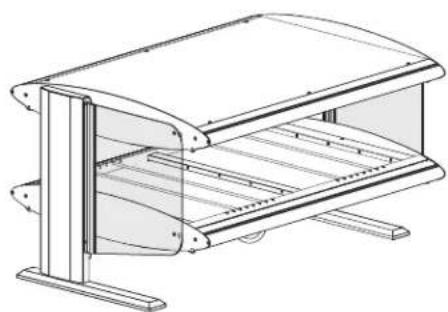
natural_image
Technical line drawing of a mechanical device with no visible text or symbols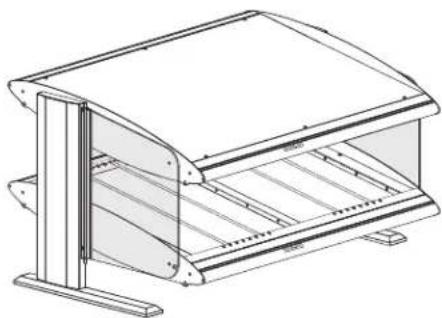
natural_image
Technical line drawing of a mechanical device with a curved top and side supports (no text or symbols)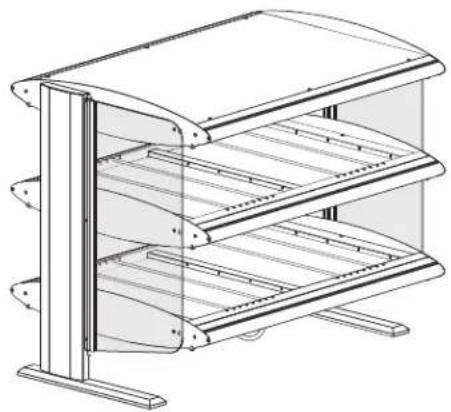
natural_image
Technical line drawing of a multi-tiered storage cabinet or rack unit (no text or symbols)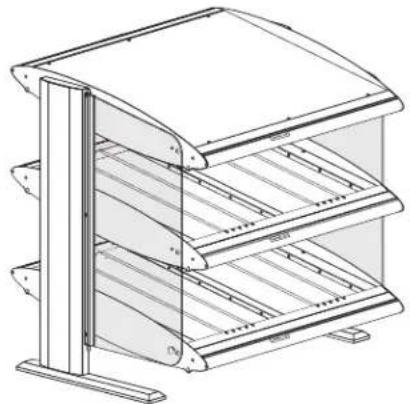
natural_image
Technical line drawing of a multi-tiered storage cabinet or rack unit (no text or symbols)WARNING
Do not operate this equipment unless you have read and understood the contents of this manual! Failure to follow the instructions contained in this manual may result in serious injury or death. This manual contains important safety information concerning the maintenance, use, and operation of this product. If you're unable to understand the contents of this manual, please bring it to the attention of your supervisor. Keep this manual in a safe location for future reference.
ADVERTENCIA
Important Owner Information ....2
Introduction......2
Important Safety Information....3
Model Description....4
All Models....4
HZMH-XX and HZMH-XXD Models 4
HZMS-XX and HZMS-XXD Models 4
Model Designation....4
Specifications....5
Plug Configurations....5
Electrical Rating Charts....5
Factory Setpoints — Slanted Shelf Models .....6
Factory Setpoints — Horizontal Shelf Models .....6
Overall Dimensions — HZMH Models .....7
Overall Dimensions — HZMS Models ....8
Shelf and Zone Dimensions....9
Overhead Zone Identification....9
Installation 10
General 10
Operation 11
General....11
Changing Shelf Setpoint Temperatures 12
Changing Element Power Percentages 13
Changing Operating Mode....15
Changing Between Fahrenheit and Celsius 15
Maintenance 16
General 16
Cleaning 16
Troubleshooting Guide ....17
Options and Accessories....18
Limited Warranty....19
Addendum 20
LCD Controller Flow Chart — Horizontal Shelf Model.....20
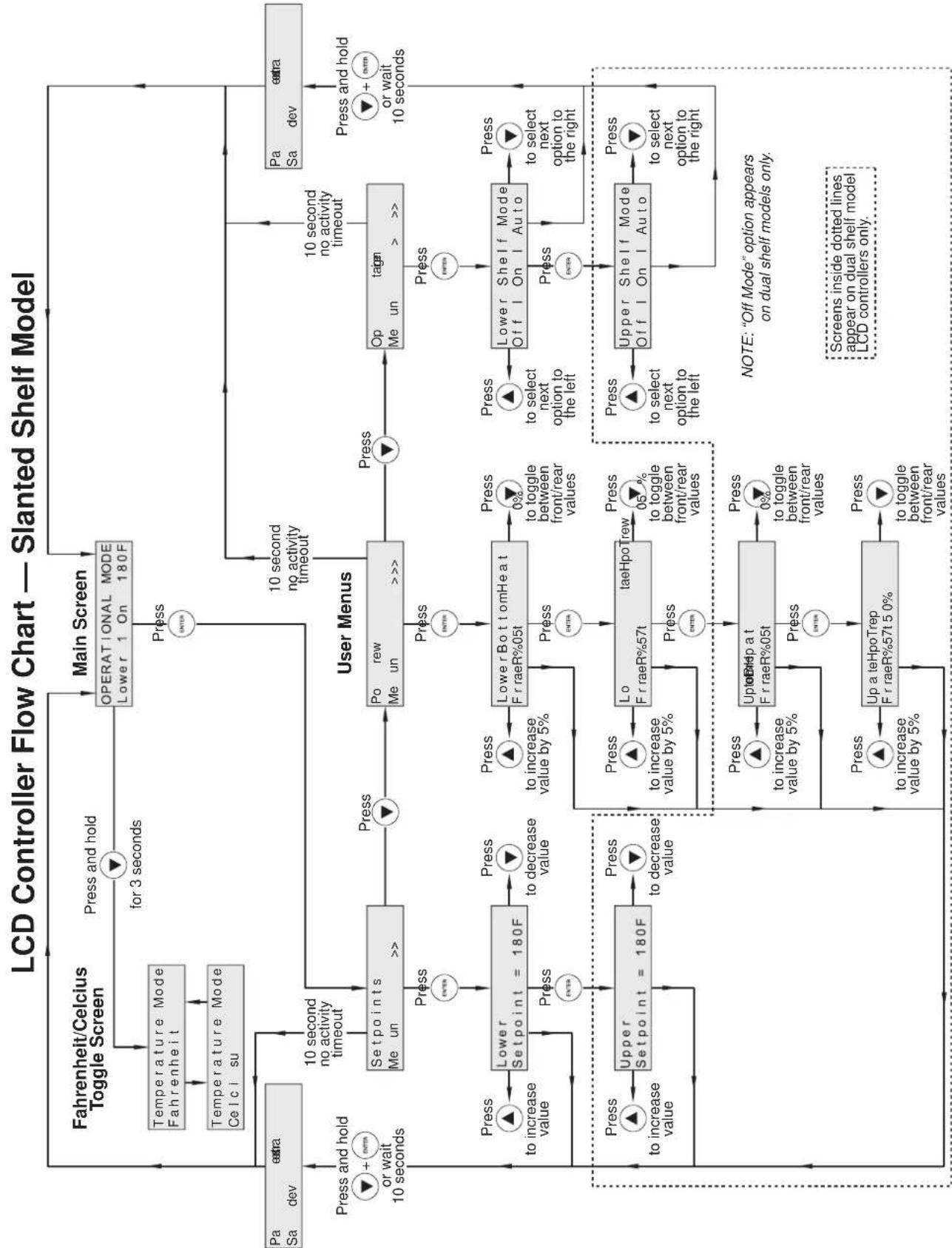
LCD Controller Flow Chart — Slanted Shelf Model.....21
Authorized Parts Distributors......Back Cover
IMPORTANT OWNER INFORMATION
Record the model number, serial number (specification label located on the side of the control enclosure), voltage, and purchase date of the unit in the spaces below. Please have this information available when calling Hatco for service assistance.
Model No. ____
Serial No. ____
Voltage
Date of Purchase ____
Register your unit!
Completing online warranty registration will prevent delay in obtaining warranty coverage. Access the Hatco website at www.hatcocorp.com, select the Parts & Service pull-down menu, and click on "Warranty Registration".
Business 8:00 AM to 5:00 PM
Hours: Central Standard Time (C.S.T.)
(Summer Hours: June to September –
8:00 AM to 5:00 PM C.S.T.
Monday through Thursday
8:00 AM to 2:30 PM C.S.T. Friday)
Telephone: (800) 558-0607; (414) 671-6350
E-mail: partsandservice@hatcocorp.com
Fax: (800) 690-2966 (Parts and Service)
(414) 671-3976 (International)

24 Hour 7 Day Parts and Service Assistance available in the United States and Canada by calling (800) 558-0607.
Additional information can be found by visiting our web site at www.hatcocorp.com.
INTRODUCTION
Hatco Heated Zone Merchandisers with Spot On ^® technology are perfect for holding hot packaged food in convenience stores, on a buffet line, or at temporary serving areas. Instant-on, individually-zoned overhead ribbon elements are combined with heated shelves that have separate front and rear heating elements to significantly reduce energy consumption. Hot wrapped products are kept at optimum serving temperatures without affecting quality. These units feature an LCD controller, LED lighting on each shelf, and come with a cord and plug set.
Hatco Heated Zone Merchandisers are products of extensive research and field testing. The materials used were selected for maximum durability, attractive appearance, and optimum performance. Every unit is inspected and tested thoroughly prior to shipment.
This manual provides the installation, safety, and operating instructions for Heated Zone Merchandisers. Hatco recommends all installation, operating, and safety instructions appearing in this manual be read prior to installation or operation of the warmer.
Safety information that appears in this manual is identified by the following signal word panels:
WARNING
WARNING indicates a hazardous situation which, if not avoided, could result in death or serious injury.
CAUTION
CAUTION indicates a hazardous situation which, if not avoided, could result in minor or moderate injury.
NOTICE
NOTICE is used to address practices not related to personal injury.

Read the following important safety information before using this equipment to avoid serious injury or death and to avoid damage to equipment or property.
WARNING
ELECTRIC SHOCK HAZARD:
- Plug unit into a properly grounded electrical receptacle of the correct voltage, size, and plug configuration. If plug and receptacle do not match, contact a qualified electrician to determine and install proper voltage and size electrical receptacle.
- Turn OFF power switch, unplug power cord, and allow unit to cool before performing any cleaning, setup, or maintenance.
- DO NOT submerge or saturate with water. Unit is not waterproof. Do not operate if unit has been submerged or saturated with water.
- Unit is not weatherproof. Locate unit indoors where ambient air temperature is a minimum of 70^ (21°C).
- Do not steam clean or use excessive water on unit.
- This unit is not "jet-proof" construction. Do not use jet-clean spray to clean this unit.
- Do not clean unit when it is energized or hot.
- Do not pull unit by power cord.
- Discontinue use if power cord is frayed or worn.
- Do not attempt to repair or replace a damaged power cord. Cord must be replaced by Hatco, an Authorized Hatco Service Agent, or a person with similar qualifications.
- This unit must be serviced by qualified personnel only. Service by unqualified personnel may lead to electric shock or burn.
- Use only Genuine Hatco Replacement Parts when service is required. Failure to use Genuine Hatco Replacement Parts will void all warranties and may subject operators of the equipment to hazardous electrical voltage, resulting in electrical shock or burn. Genuine Hatco Replacement Parts are specified to operate safely in the environments in which they are used. Some aftermarket or generic replacement parts do not have the characteristics that will allow them to operate safely in Hatco equipment.
FIRE HAZARD: Install unit with a minimum of 3" (76 mm) of space from rear of unit to a back wall. If safe distances are not maintained, discoloration or combustion could occur.
Make sure food product has been heated to the proper food-safe temperature before placing in unit. Failure to heat food product properly may result in serious health risks. This unit is for holding pre-heated food product only.
WARNING
Do not place food product directly onto hardcoat surface. Food product must be wrapped, boxed, or on a food pan.
Make sure all operators have been instructed on the safe and proper use of the unit.
This unit is not intended for use by children or persons with reduced physical, sensory, or mental capabilities. Ensure proper supervision of children and keep them away from the unit.
This unit has no "user-serviceable" parts. If service is required on this unit, contact an Authorized Hatco Service Agent or contact the Hatco Service Department at 800-558-0607 or 414-671-6350; fax 800-690-2966; or International fax 414-671-3976.
CAUTION
BURN HAZARD: Some exterior surfaces on unit will get hot. Use caution when touching these areas.
Locate unit at proper counter height in an area that is convenient for use. Location should be level to prevent unit or its contents from falling accidentally and strong enough to support the weight of the unit and contents.
Do not move or relocate unit for cleaning. Unit is bulky and heavy.
NOTICE
Do not lay unit on front or back side. Damage to unit could occur.
Use non-abrasive cleaners and cloths only. Abrasive cleaners and cloths could scratch finish of unit, marring its appearance and making it susceptible to soil accumulation.
IMPORTANT—DO NOT use paper towel or glass cleaner to clean plastic surfaces such as sneeze guards and flip-up doors. Paper towel and glass cleaner may scratch the material. Wipe off plastic surfaces using a soft, clean, water-dampened cloth.
Do not slide pans across hardcoat surface, use rough-bottomed pans, or drop anything on hardcoat surface. Scratching may occur. Damage to hardcoat surface caused by misuse is not covered under warranty.
Clean unit daily to avoid malfunctions and maintain sanitary operation.
All Models
All Hatco Heated Zone Merchandisers are perfect for holding hot packaged food in convenience stores, on a buffet line, or at temporary serving areas. Hot wrapped products are kept at optimum serving temperatures without affecting quality. Instant-on, individually-zoned overhead ribbon heating elements are combined with heated shelves that have separate front and rear heating elements to significantly reduce energy consumption. Other features include an LCD controller, LED lighting above each shelf, product divider rods, hinged glass side panels, and a 6' (1829 mm) cord and plug set. Heated Zone Merchandisers come standard in black and are available in several Designer colors.
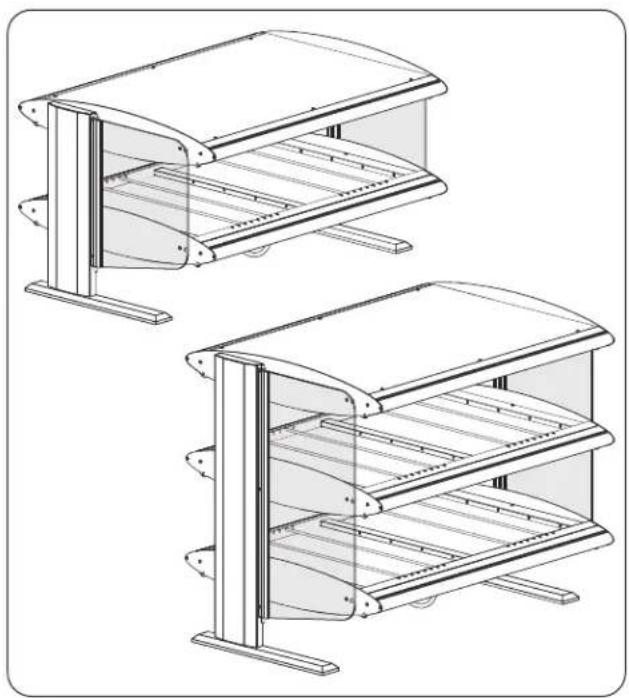
HZMH-XX and HZMH-XXD Models
HZMH models are horizontal shelf merchandisers designed to hold hot wrapped product. They are available in widths from 24" to 60" (610 to 1524 mm) in six inch (152 mm) increments and are available in single or dual shelf models.
natural_image
Technical line drawings of two modular storage or rack systems with vertical supports and horizontal shelves (no text or symbols)HZMH Models
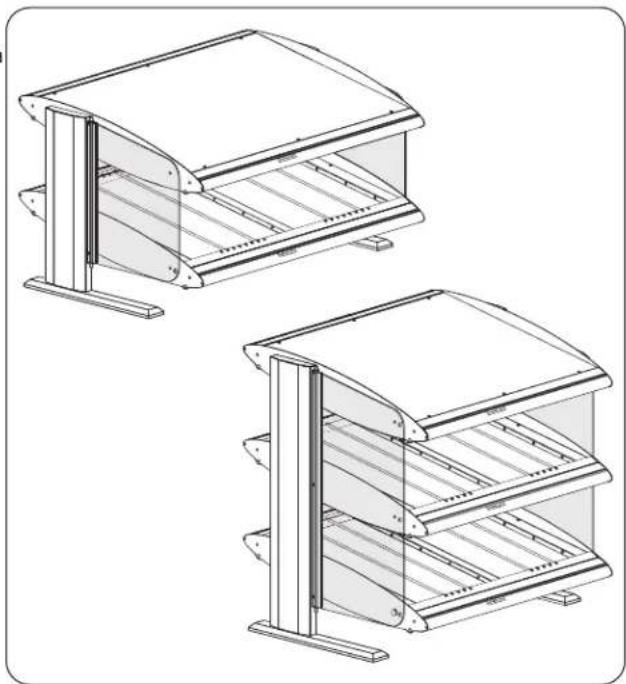
HZMS-XX and HZMS-XXD Models
The HZMS models are slanted shelf merchandisers designed to hold hot wrapped product. The shelves are slanted for the convenience of self-service. They are available in widths from 24" to 60" (610 to 1524 mm) in six inch (152 mm) increments and are available in single or dual shelf models.
natural_image
Technical line drawings of two modular storage or rack unit designs with vertical supports and horizontal shelves (no text or symbols)HZMS Models
NOTE: Sneeze guards and flip-up doors are available for the Heated Zone Merchandisers. Refer to the OPTIONS AND ACCESSORIES section in this manual for details.

Technology
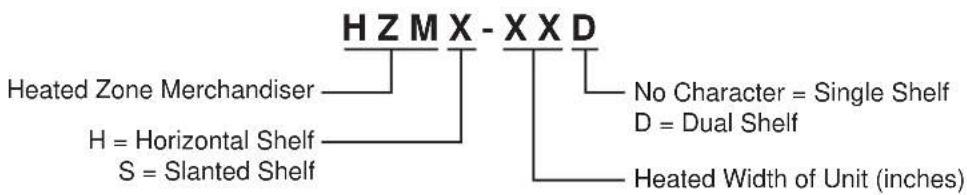
MODEL DESIGNATION
text_image
HZMX-XXD Heated Zone Merchandiser H = Horizontal Shelf S = Slanted Shelf No Character = Single Shelf D = Dual Shelf Heated Width of Unit (inches)Plug Configurations
Units are equipped with an electrical cord and plug appropriate for the electrical rating of the unit and must be connected to a dedicated circuit.
WARNING
ELECTRIC SHOCK HAZARD: Plug unit into a properly grounded electrical receptacle of the correct voltage, size, and plug configuration. If plug and receptacle do not match, contact a qualified electrician to determine and install proper voltage and size electrical receptacle.
NOTE: The specification label is located on the side of the control enclosure. See the label for the serial number and verification of unit electrical information.


NEMA 5-15P


NEMA 5-20P


NEMA L14-20P


NEMA L14-30P
Plug Configurations
NOTE: Receptacle not supplied by Hatco.
Electrical Rating Chart — HZMH-XX Models (Horizontal Single Shelf)
| Model Voltage Watts Amps | Overhead Zones Plug Configuration | ||||
| HZMH-24 | 120 | 750 | 6.3 | 2 | NEMA 5-15P |
| HZMH-30 | 120 1350 11.3 4 NEMA 5-15P | ||||
| HZMH-36 | 120 1400 11.7 4 NEMA 5-15P | ||||
| HZMH-42 | 120 1450 12.1 4 NEMA 5-20P | ||||
| HZMH-48 | 120 1500 12.5 4 NEMA 5-20P | ||||
| HZMH-54 | 120 2100 17.5 6 NEMA 5-30P | ||||
| HZMH-60 | 120 2150 17.9 6 NEMA 5-30P | ||||
Electrical Rating Chart — HZMH-XXD Models (Horizontal Dual Shelf)
| Model Voltage Watts Amps | OverheadZones Plug Configuration | |
| HZMH-24D 120 1500 12.5 4 NEMA 5-20P | ||
| HZMH-30D 120/208–240 2700 11.3 8 NEMA L14-20P | ||
| HZMH-36D 120/208–240 2800 11.7 8 NEMA L14-20P | ||
| HZMH-42D 120/208–240 2900 12.1 8 NEMA L14-20P | ||
| HZMH-48D 120/208–240 3000 12.6 8 NEMA L14-20P | ||
| HZMH-54D 120/208–240 4200 17.6 | 12 | NEMA L14-30P |
| HZMH-60D 120/208–240 4300 18.0 | 12 | NEMA L14-30P |
Electrical Rating Chart — HZMS-XX Models (Slanted Single Shelf)
| Model Voltage Watts Amps | Overhead Zones | Plug Configuration |
| HZMS-24 120 750 6.3 2 NEMA 5-15P | ||
| HZMS-30 120 1350 11.3 4 NEMA 5-15P | ||
| HZMS-36 120 1400 11.7 4 NEMA 5-15P | ||
| HZMS-42 120 1450 12.1 4 NEMA 5-20P | ||
| HZMS-48 120 1500 12.5 4 NEMA 5-20P | ||
| HZMS-54 120 2100 17.5 6 NEMA 5-30P | ||
| HZMS-60 120 2150 17.9 6 NEMA 5-30P |
Electrical Rating Chart — HZMS-XXD Models (Slanted Dual Shelf)
| Model Voltage Watts Amps | Overhead Zones | Plug Configuration | |||
| HZMS-24D 120 1500 12.5 4 NEMA 5-20P | |||||
| HZMS-30D | 120/208–240 | 2700 | 11.3 | 8 | NEMA L14-20P |
| HZMS-36D | 120/208–240 | 2800 | 11.7 | 8 | NEMA L14-20P |
| HZMS-42D | 120/208–240 | 2900 | 12.1 | 8 | NEMA L14-20P |
| HZMS-48D | 120/208–240 | 3000 | 12.6 | 8 | NEMA L14-20P |
| HZMS-54D | 120/208–240 | 4200 | 17.6 | 12 | NEMA L14-30P |
| HZMS-60D | 120/208–240 | 4300 | 18.0 | 12 | NEMA L14-30P |
Factory Setpoints—Slanted Shelf Models
Slanted shelf models are pre-set at the factory to the following setpoints. The setpoints are the same for each shelf on dual units.
Hardcoat Shelf Heating Elements:
Setpoint Temperature = 180°F (82°C)
Stand-By Power Percentage:
Front Element = 50% of full wattage
Rear Element = 0% of full wattage
Overhead Ribbon Heating Elements
Power Percentage:
Front Element = 75% of full wattage
Rear Element = 50% of the front overhead heating element's Power Percentage.
Factory Setpoints—Horizontal Shelf Models
Horizontal shelf models are pre-set at the factory to the following setpoints. The setpoints are the same for each shelf on dual units.
Hardcoat Shelf Heating Elements:
Setpoint Temperature = 180°F (82°C)
Stand-By Power Percentage = 50% of full wattage
Overhead Ribbon Heating Elements
Power Percentage = 75% of full wattage
Overall Dimensions — HZMH Models
| Model | Width (A) | Depth (B) | Height (C) | Footprint Width (D) | Footprint Depth (E) | Shelf Height (F) |
| HZMH-24 26-1 | 1/16" (677 mm) | 28-9/16" (725 mm) | 21-7/8" (555 mm) | 27-15/16" (709 mm) | 19" (483 mm) | 9-1/2" (242 mm) |
| HZMH-30 32-1 | 1/16" (829 mm) | 28-9/16" (725 mm) | 21-7/8" (555 mm) | 33-15/16" (861 mm) | 19" (483 mm) | 9-1/2" (242 mm) |
| HZMH-36 38-1 | 1/16" (982 mm) | 28-9/16" (725 mm) | 21-7/8" (555 mm) | 39-15/16" (1013 mm) | 19" (483 mm) | 9-1/2" (242 mm) |
| HZMH-42 44-1 | 1/16" (1134 mm) | 28-9/16" (725 mm) | 21-7/8" (555 mm) | 45-15/16" (1166 mm) | 19" (483 mm) | 9-1/2" (242 mm) |
| HZMH-48 50-1 | 1/16" (1286 mm) | 28-9/16" (725 mm) | 21-7/8" (555 mm) | 51-15/16" (1318 mm) | 19" (483 mm) | 9-1/2" (242 mm) |
| HZMH-54 56-1 | 1/16" (1439 mm) | 28-9/16" (725 mm) | 21-7/8" (555 mm) | 57-15/16" (1471 mm) | 19" (483 mm) | 9-1/2" (242 mm) |
| HZMH-60 62-1 | 1/16" (1591 mm) | 28-9/16" (725 mm) | 21-7/8" (555 mm) | 63-15/16" (1623 mm) | 19" (483 mm) | 9-1/2" (242 mm) |
| HZMH-24D 26 | 11/16" (677 mm) | 28-9/16" (725 mm) | 32-7/8" (835 mm) | 27-15/16" (709 mm) | 19" (483 mm) | 9-1/2" (242 mm) |
| HZMH-30D 32 | 11/16" (829 mm) | 28-9/16" (725 mm) | 32-7/8" (835 mm) | 33-15/16" (861 mm) | 19" (483 mm) | 9-1/2" (242 mm) |
| HZMH-36D 38 | 11/16" (982 mm) | 28-9/16" (725 mm) | 32-7/8" (835 mm) | 39-15/16" (1013 mm) | 19" (483 mm) | 9-1/2" (242 mm) |
| HZMH-42D 44 | 11/16" (1134 mm) | 28-9/16" (725 mm) | 32-7/8" (835 mm) | 45-15/16" (1166 mm) | 19" (483 mm) | 9-1/2" (242 mm) |
| HZMH-48D 50 | 11/16" (1286 mm) | 28-9/16" (725 mm) | 32-7/8" (835 mm) | 51-15/16" (1318 mm) | 19" (483 mm) | 9-1/2" (242 mm) |
| HZMH-54D 56 | 11/16" (1439 mm) | 28-9/16" (725 mm) | 32-7/8" (835 mm) | 57-15/16" (1471 mm) | 19" (483 mm) | 9-1/2" (242 mm) |
| HZMH-60D 62 | 11/16" (1591 mm) | 28-9/16" (725 mm) | 32-7/8" (835 mm) | 63-15/16" (1623 mm) | 19" (483 mm) | 9-1/2" (242 mm) |
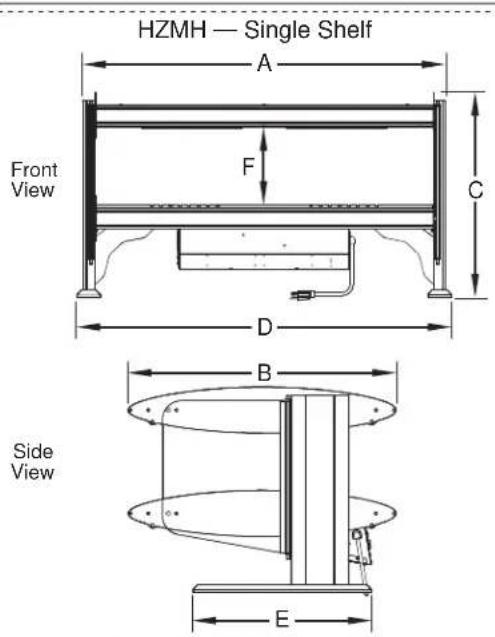
text_image
HZMH — Single Shelf A Front View F C D B Side View E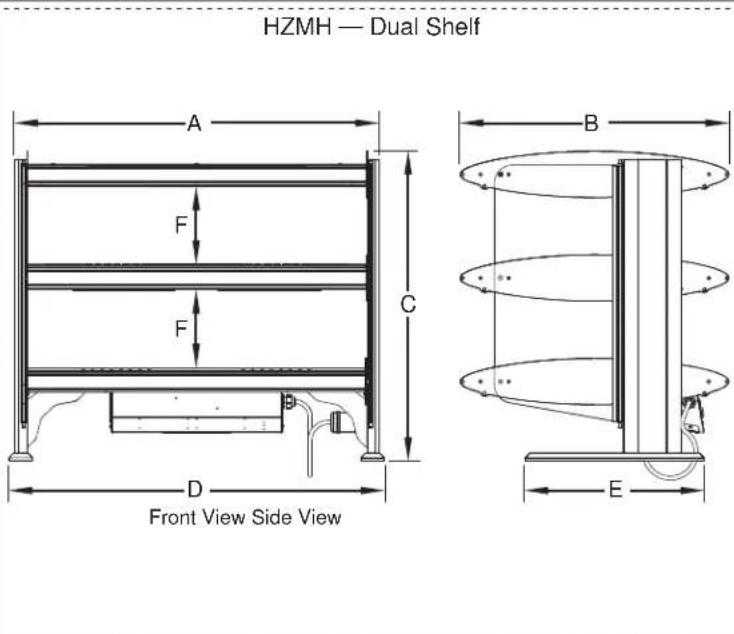
text_image
HZMH — Dual Shelf A F C B D Front View Side View EHZMH Single Shelf and Dual Shelf Dimensions
Overall Dimensions — HZMS Models
| Model | Width (A) | Depth (B) | Height (C) | Footprint Width (D) | Footprint Depth (E) | Shelf Height (F) |
| HZMS-24 26-1 | 1/16" (677 mm) | 28-3/16" (715 mm) | 21-3/4" (551 mm) | 27-15/16" (709 mm) | 19" (483 mm) | 9-5/16" (237 mm) |
| HZMS-30 32-1 | 1/16" (829 mm) | 28-3/16" (715 mm) | 21-3/4" (551 mm) | 33-15/16" (861 mm) | 19" (483 mm) | 9-5/16" (237 mm) |
| HZMS-36 38-1 | 1/16" (982 mm) | 28-3/16" (715 mm) | 21-3/4" (551 mm) | 39-15/16" (1013 mm) | 19" (483 mm) | 9-5/16" (237 mm) |
| HZMS-42 44-1 | 1/16" (1134 mm) | 28-3/16" (715 mm) | 21-3/4" (551 mm) | 45-15/16" (1166 mm) | 19" (483 mm) | 9-5/16" (237 mm) |
| HZMS-48 50-1 | 1/16" (1286 mm) | 28-3/16" (715 mm) | 21-3/4" (551 mm) | 51-15/16" (1318 mm) | 19" (483 mm) | 9-5/16" (237 mm) |
| HZMS-54 56-1 | 1/16" (1439 mm) | 28-3/16" (715 mm) | 21-3/4" (551 mm) | 57-15/16" (1471 mm) | 19" (483 mm) | 9-5/16" (237 mm) |
| HZMS-60 62-1 | 1/16" (1591 mm) | 28-3/16" (715 mm) | 21-3/4" (551 mm) | 63-15/16" (1623 mm) | 19" (483 mm) | 9-5/16" (237 mm) |
| HZMS-24D 26 | 11/16" (677 mm) | 28-3/16" (715 mm) | 32-3/4" (831 mm) | 27-15/16" (709 mm) | 19" (483 mm) | 9-5/16" (237 mm) |
| HZMS-30D 32 | 11/16" (829 mm) | 28-3/16" (715 mm) | 32-3/4" (831 mm) | 33-15/16" (861 mm) | 19" (483 mm) | 9-5/16" (237 mm) |
| HZMS-36D 38 | 11/16" (982 mm) | 28-3/16" (715 mm) | 32-3/4" (831 mm) | 39-15/16" (1013 mm) | 19" (483 mm) | 9-5/16" (237 mm) |
| HZMS-42D 44 | 11/16" (1134 mm) | 28-3/16" (715 mm) | 32-3/4" (831 mm) | 45-15/16" (1166 mm) | 19" (483 mm) | 9-5/16" (237 mm) |
| HZMS-48D 50 | 11/16" (1286 mm) | 28-3/16" (715 mm) | 32-3/4" (831 mm) | 51-15/16" (1318 mm) | 19" (483 mm) | 9-5/16" (237 mm) |
| HZMS-54D 56 | 11/16" (1439 mm) | 28-3/16" (715 mm) | 32-3/4" (831 mm) | 57-15/16" (1471 mm) | 19" (483 mm) | 9-5/16" (237 mm) |
| HZMS-60D 62 | 11/16" (1591 mm) | 28-3/16" (715 mm) | 32-3/4" (831 mm) | 63-15/16" (1623 mm) | 19" (483 mm) | 9-5/16" (237 mm) |

HZMS Single Shelf and Dual Shelf Dimensions
Shelf and Zone Dimensions
| Model | Interior Shelf Width (A) | Zone Width (B) |
| 24" Models | 24"(610 mm) | 20-1/16"(510 mm) |
| 30" Models | 30"(762 mm) | 12-5/16"(314 mm) |
| 36" Models | 36"(914 mm) | 15-5/16"(390 mm) |
| 42" Models | 42"(1067 mm) | 18-5/16"(465 mm) |
| 48" Models | 48"(1219 mm) | 21-5/16"(543 mm) |
| 54" Models | 54"(1372 mm) | 15-13/16"(402 mm) |
| 60" Models | 60"(1524 mm) | 17-13/16"(453 mm) |
NOTE: 24" (610 mm) models do not have a zone divider. 30" to 48" (762–1219 mm) models have a single zone divider. 54" and 60" (1372 and 1524 mm) models have two zone dividers.

text_image
Overhead View of Shelf A Zone Divider 21-3/4" (552 mm) BShelf and Zone Dimensions
Overhead Zone Identification
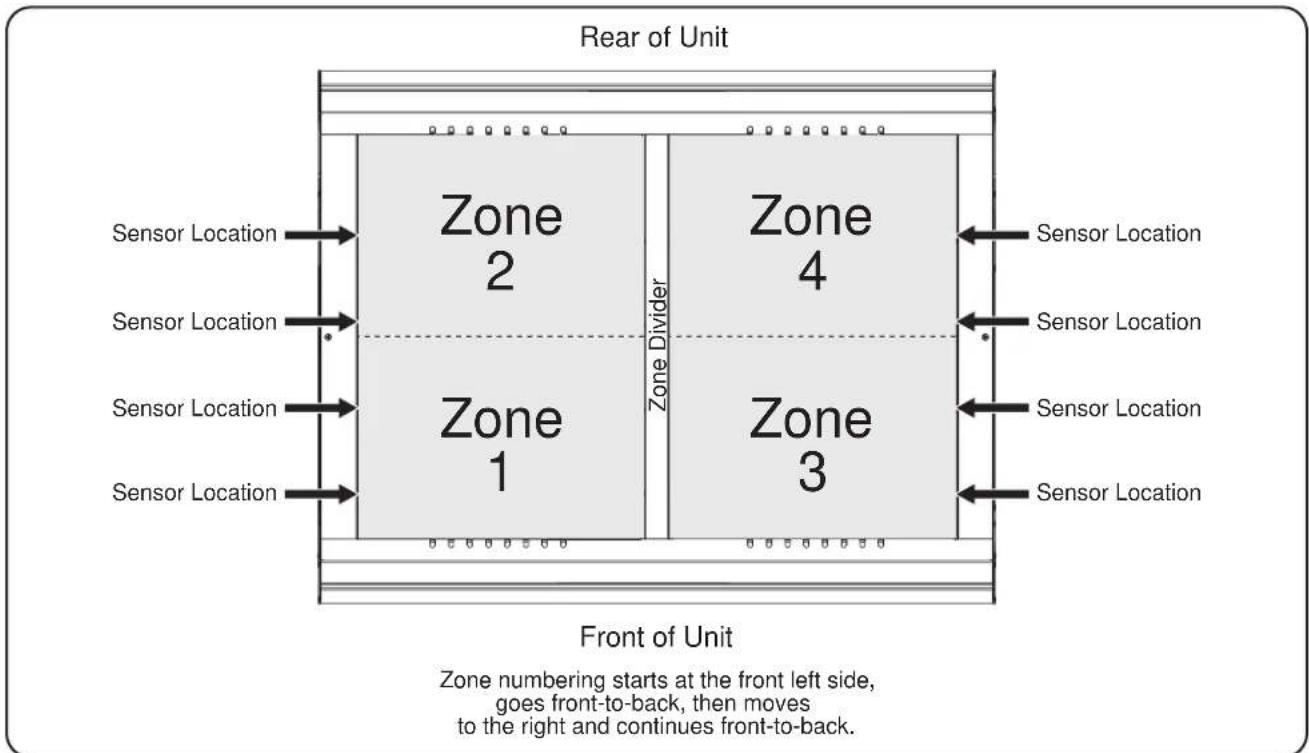
text_image
Rear of Unit Sensor Location Sensor Location Sensor Location Sensor Location Sensor Location Zone 2 Zone 1 Zone Divider Zone 4 Zone 3 Sensor Location Sensor Location Sensor Location Sensor Location Front of Unit Zone numbering starts at the front left side, goes front-to-back, then moves to the right and continues front-to-back.Top View of Shelf for Overhead Zone Identification (four zone shelf shown)
General
Hatco Heated Zone Merchandisers are shipped with most components pre-assembled. Care should be taken when unpacking shipping carton to avoid damage to the unit and components enclosed.
WARNING
ELECTRIC SHOCK HAZARD: Unit is not weatherproof. Locate unit indoors where ambient air temperature is a minimum of 70^ F ( 21^ C).
FIRE HAZARD: Install unit with a minimum of 3" (76 mm) of space from rear of unit to a back wall. If safe distances are not maintained, discoloration or combustion could occur.
CAUTION
Locate unit at proper counter height in an area that is convenient for use. Location should be level to prevent unit or its contents from falling accidentally and strong enough to support the weight of the unit and contents.
NOTICE
Do not lay unit on front or back side. Damage to unit could occur.
NOTE: Due to the size and weight of Heated Zone Merchandisers, installation of a unit will require two or more people.
1. Remove the unit from the carton.
NOTE: To prevent delay in obtaining warranty coverage, complete online warranty registration. See the IMPORTANT OWNER INFORMATION section for details.
2. Remove tape and protective packaging from all surfaces of the unit.
3. Place the unit in the desired location.
- Locate the unit in an area where the ambient air temperature is constant and a minimum of 70^ (21^) . Avoid areas that may be subject to active air movements or currents (i.e., near exhaust fans/hoods and air conditioning ducts).
- Make sure the unit is at the proper counter height in an area convenient for use.
• Make sure the countertop is level and strong enough to support the weight of the unit and food product. -
Make sure the feet on the bottom of the unit are positioned securely on the countertop.
-
Install the product divider rods into the channel dividers, if desired. The rods can be adjusted easily to separate holding areas as needed.
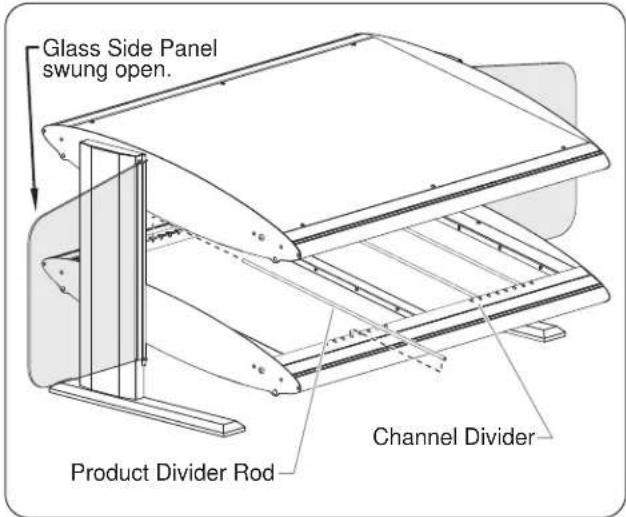
text_image
Glass Side Panel swung open. Channel Divider Product Divider RodInstalling Product Divider Rods
- Install any accessories that came with the unit. Refer to the OPTIONS AND ACCESSORIES section for details.
- Plug the unit into a properly grounded electrical receptacle of the correct voltage, size, and plug configuration. See the SPECIFICATIONS section for details.
General
Heated Zone Merchandisers are setup at the factory for energy-saving, automatic operation (Auto Mode). Refer to "Factory Setpoints" in the SPECIFICATIONS section for factory setpoint information. Use the following information and procedures to operate a Heated Zone Merchandiser.

Read all safety messages in the IMPORTANT SAFETY INFORMATION section before operating this equipment.
Do not place food product directly onto hardcoat surface. Food product must be wrapped, boxed, or on a food pan.
NOTICE
Do not slide pans across hardcoat surface, use rough-bottomed pans, or drop anything on hardcoat surface. Scratching may occur. Damage to hardcoat surface caused by misuse is not covered under warranty.
Theory of Operation
The Heated Zone Merchandiser is designed for efficient and environmentally-friendly operation by heating specific "zones" only when product is present. The operation of the Heated Zone Merchandiser is controlled by a series of optical sensors and the LCD controller. The sensors are located along the sides of each hardcoat shelf. Larger units have additional sensors located in zone dividers that separate each shelf into multiple overhead heat zones.
For all sizes of units, each hardcoat shelf is equipped with separate front and rear heating elements. These two elements operate independently in Auto Mode.
The number of overhead ribbon heating elements is determined by the size of the unit. The overhead elements above each hardcoat shelf are considered individual heat zones. This means that the number of zones on each shelf is either two, four, or six—depending on the size of the unit. Each overhead element operates independently in Auto Mode
NOTE: Each shelf on a Heated Zone Merchandiser can be set to a different operating mode.
Auto Mode Operation
At startup in Auto Mode operation, all shelf heating elements and overhead heating elements in an empty Heated Zone Merchandiser will be in Stand-By. The front and rear shelf elements will heat at their Stand-By power percentage to the setpoint temperature. All overhead elements remain off. When product is placed on a shelf, the optical sensors signal the LCD controller, and the controller activates the appropriate shelf elements and overhead elements. Each of the shelf elements affected by the placement of product will heat at full wattage to the setpoint temperature. Each of the overhead elements affected by the placement of product will heat at its setpoint power percentage. All affected elements will remain activated until all product is removed from the "zone." Anytime a zone is emptied of product, the zone will return to Stand-By.
On Mode Operation
At startup in On Mode operation, all shelf heating elements will heat at full wattage to the setpoint temperature, and all overhead heating elements will heat at their setpoint power percentage. All shelf elements will remain at full wattage and all overhead elements will remain at their setpoint power percentage the entire time the unit is on.
Off Mode Operation
At startup in Off Mode operation, all shelf heating elements and overhead heating elements are disabled. Only the LED lights above each shelf will illuminate. This mode provides ambient lighting for the display of non-heated product.
Startup
- Move the Power ON/OFF (I/O) switch to the ON (I) position.
• The LED lights will illuminate.
- The LCD controller will startup. After the startup screens and during operation, the display will cycle through the overhead heat zones showing their current status and temperature.
- Auto Mode = All shelf elements will heat at Stand-By power percentage to the setpoint temperature. All overhead elements remain off.
On Mode = All shelf elements will heat at full wattage to the setpoint temperature. All overhead elements will heat at their setpoint power percentage.
Off Mode = All heating elements are disabled—for ambient lighting only.
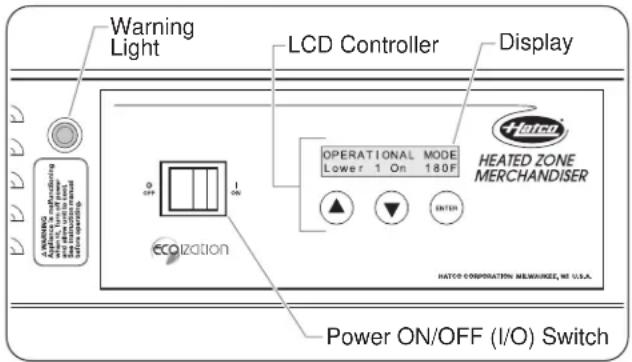
text_image
Warning Light LCD Controller Display WARNING Applicator & manufacturing and other units on top Power ON/OFF (I/O) Switch OPERATIONAL MODE Lower 1 On 180F HEATED ZONE MERCHANDISER HATCO CORPORATION MEWANZE, MI U.S.A. COOLIZATION POWER ON/OFF (I/O) SwitchHZM Series Control Panel
NOTE: If the warning light comes on at any time, the unit is overheating/malfunctioning. Turn off and unplug the unit. Contact an Authorized Service Agent or Hatco for assistance.

BURN HAZARD: Some exterior surfaces on unit will get hot. Use caution when touching these areas.
- Place pre-heated, wrapped food product onto the desired shelf.
- Auto Mode = The optical sensors will signal the LCD controller, and the controller will activate the appropriate zone(s).
- Continue to load and empty the shelves on the unit as desired.
- Auto Mode = The various zones in the unit will adjust automatically to the levels of product on the shelves—ensuring maximum efficiency.
NOTE: To change the shelf setpoint temperature(s), element power percentages, or the operating mode, refer to the appropriate procedure in this section.
Shutdown
- Move the Power ON/OFF (I/O) switch to the OFF (O) position. All LED lights, heating elements, and the LCD controller will shut off.
IMPORTANT NOTES:
Each of the following programming functions is separated into specific procedures for each model.
Detailed flow charts showing the screen layout of the LCD controller for both slanted and horizontal models are available in the ADDENDUM section of this manual.
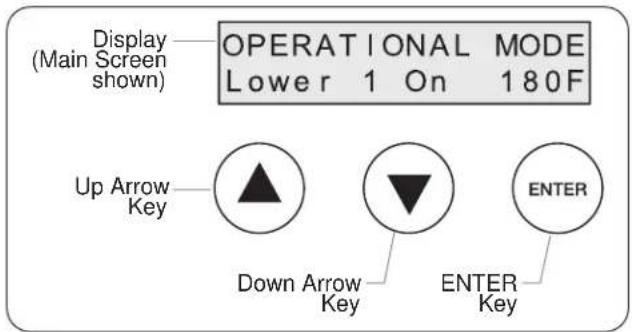
text_image
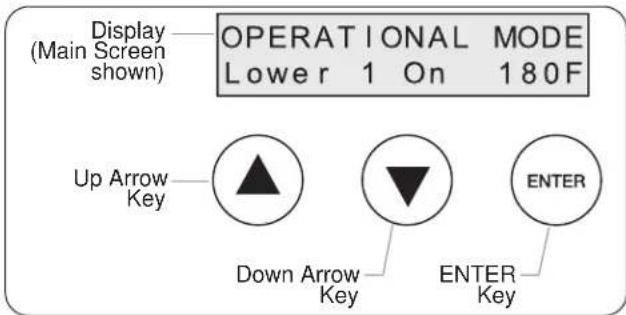
Display (Main Screen shown) OPERATIONAL MODE Lower 1 On 180F Up Arrow Key Down Arrow Key ENTER KeyClose-Up View of LCD Controller
Changing Shelf Setpoint Temperature
Use one of the following procedures to change the setpoint temperature for the hardcoat shelf heating elements (front and rear).
NOTE: Press and hold the +keys together at any time during programming to save parameters and return to the Main screen.
Horizontal and Slanted Single Shelf Models
- From the Main screen, press the key. The Setpoints Menu screen will appear:
$$ \begin{array}{c c} \text {Sespit} \ \text {Menu} & \gg \end{array} $$
NOTE: Inactivity for ten seconds at this level of programming will cause the LCD controller to return to the Main screen without making any changes.
- Press the key again. The Lower Setpoint screen will appear:
$$ \begin{array}{l} \text {Lower} \ \text {Setpoint = 180F} \end{array} $$
- Press the key to increase setpoint value.
-
Press the key to decrease setpoint value.
-
Wait ten seconds, or press and hold the + keys together.
- The Parameters Saved screen will appear to confirm the changes, and the display will return to the Main screen:
$$ \begin{array}{l} \text {Parameters} \ \text {Sa ed} \end{array} $$
Horizontal and Slanted Dual Shelf Models
- From the Main screen, press the key. The Setpoints Menu screen will appear:
$$ \begin{array}{c c} \text { S e stopi } \ \text { Menu } & \gg \end{array} $$
NOTE: Inactivity for ten seconds at this level of programming will cause the LCD controller to return to the Main screen without making any changes.
- Press the key again. The Lower Setpoint screen will appear:
$$ \begin{array}{l} \text {Lower} \ \text {Setpoint = 180F} \end{array} $$
- Press the key to increase setpoint value.
-
Press the key to decrease setpoint value.
-
Press the key. The Upper Setpoint screen will appear:
$$ \begin{array}{l} \text { Upper } \ \text { Setpoint = 180F } \end{array} $$
- Press the key to increase setpoint value.
-
Press the key to decrease setpoint value.
-
Wait ten seconds, or press and hold the +k▼ys together.
- The Parameters Saved screen will appear to confirm the changes, and the display will return to the Main screen:
$$ \begin{array}{c} \text {Parameters} \ \text {Sa ed} \end{array} $$
Changing Element Power Percentages
Use one of the following procedures to change power percentages for the hardcoat shelf heating elements as well as the overhead ribbon heating elements.
Horizontal Single Shelf Models
- From the Main screen, press the key! The Setpoints Menu screen will appear:
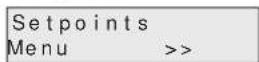
- Press the key. The Power Menu screen will appear:

NOTE: Inactivity for ten seconds at this level of programming will cause the LCD controller to return to the Main screen without making any changes.
- Press the key: The LowerBottomHeat screen will appear:
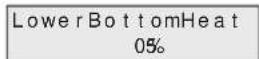
Adjust the power percentages for the lower hardcoat shelf heating elements:
- Press the key to increase value by 5%.
-
Press the key to decrease value by 5%.
-
Press the key. The LowerTopHeat screen will appear:
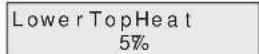
Adjust the power percentages for the lower shelf overhead heating elements:
- Press the key to increase value by 5%.
-
Press the key to decrease value by 5%.
-
Wait ten seconds, or press and hold the + keys together.
- The Parameters Saved screen will appear to confirm the changes, and the display will return to the Main screen:
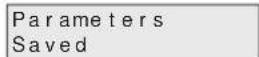
Slanted Single Shelf Models
- From the Main screen, press the key: The Setpoints Menu screen will appear:

- Press the key. The Power Menu screen will appear:
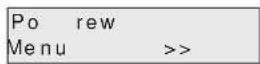
NOTE: Inactivity for ten seconds at this level of programming will cause the LCD controller to return to the Main screen without making any changes.
- Press the key: The LowerBottomHeat screen will appear:
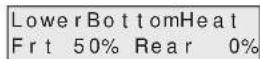
Adjust the power percentages for the lower hardcoat shelf heating elements:
- Press the key to increase value by 5%.
-
Press the key to toggle between front/rear values.
-
Press the key. The LowerTopHeat screen will appear:
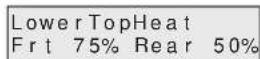
Adjust the power percentages for the lower shelf overhead heating elements:
- Press the key to increase value by 5%.
-
Press the key to toggle between front/rear values.
-
Wait ten seconds, or press and hold the + keys together.
- The Parameters Saved screen will appear to confirm the changes, and the display will return to the Main screen:

continued...
Horizontal Dual Shelf Models
- From the Main screen, press the key: The Setpoints Menu screen will appear:
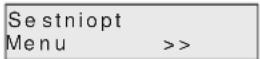
- Press the key. The Power Menu screen will appear:

NOTE: Inactivity for ten seconds at this level of programming will cause the LCD controller to return to the Main screen without making any changes.
- Press the key: The LowerBottomHeat screen will appear:
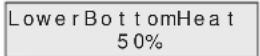
Adjust the power percentages for the lower hardcoat shelf heating elements:
- Press the key to increase value by 5% .
-
Press the key to decrease value by 5%.
-
Press the key. The LowerTopHeat screen will appear:

Adjust the power percentages for the lower shelf overhead heating elements:
- Press the key to increase value by 5% .
-
Press the key to decrease value by 5%.
-
Press the key: The UpperBottomHeat screen will appear:

Adjust the power percentages for the upper hardcoat shelf heating elements:
- Press the key to increase value by 5% .
-
Press the key to decrease value by 5%.
-
Press the key. The UpperTopHeat screen will appear:
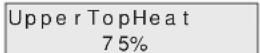
Adjust the power percentages for the upper shelf overhead heating elements:
- Press the key to increase value by 5%.
-
Press the key to decrease value by 5%.
-
Wait ten seconds, or press and hold the + keys together.
- The Parameters Saved screen will appear to confirm the changes, and the display will return to the Main screen:
Slanted Dual Shelf Models
- From the Main screen, press the key: The Setpoints Menu screen will appear:

- Press the key. The Power Menu screen will appear:

NOTE: Inactivity for ten seconds at this level of programming will cause the LCD controller to return to the Main screen without making any changes.
- Press the key: The LowerBottomHeat screen will appear:

Adjust the power percentages for the lower hardcoat shelf heating elements:
- Press the key to increase value by 5%.
-
Press the key to toggle between front/rear values.
-
Press the key. The LowerTopHeat screen will appear:
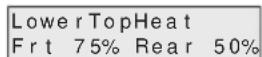
Adjust the power percentages for the lower shelf overhead heating elements:
- Press the key to increase value by 5%.
-
Press the key to toggle between front/rear values.
-
Press the key: The UpperBottomHeat screen will appear:

Adjust the power percentages for the upper hardcoat shelf heating elements:
- Press the key to increase value by 5%.
-
Press the key to toggle between front/rear values.
-
Press the key. The UpperTopHeat screen will appear:
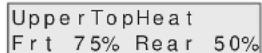
Adjust the power percentages for the upper shelf overhead heating elements:
- Press the key to increase value by 5% .
-
Press the key to toggle between front/rear values.
-
Wait ten seconds, or press and hold the + keys together.
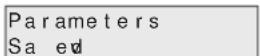
- The Parameters Saved screen will appear to confirm the changes, and the display will return to the Main screen:

text_image
Display (Main Screen shown) OPERATIONAL MODE Lower 1 On 180F Up Arrow Key Down Arrow Key ENTER KeyClose-Up View of LCD Controller
Changing Operating Mode
Use one of the following procedure to change the operating mode of each shelf on a Heated Zone Merchandiser. The three available operating modes are Auto Mode, On Mode, and Off Mode. If necessary, refer to "Theory of Operations" at the beginning of the OPERATION section for a description of each mode.
Horizontal and Slanted Single Shelf Models
- From the Main screen, press the key: The Setpoints Menu screen will appear:

- Press the key two times. The Operating Menu screen will appear:
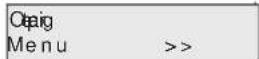
NOTE: Inactivity for ten seconds at this level of programming will cause the LCD controller to return to the Main screen without making any changes.
- Press the ENTER key. The Lower Shelf Mode screen will appear:

Select the desired operating mode for the lower shelf:
- Press the key to select the next option to the left.
-
Press the key to select the next option to the right.
-
Wait ten seconds, or press and hold the + keys together.
• The Parameters Saved screen will appear to confirm the changes, and the display will return to the Main screen:

Horizontal and Slanted Dual Shelf Models
NOTE: Each shelf on a dual shelf Heated Zone Merchandiser can be set to a different operating mode.
- From the Main screen, press the key: The Setpoints Menu screen will appear:
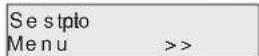
- Press the key two times. The Operating Menu screen will appear:

NOTE: Inactivity for ten seconds at this level of programming will cause the LCD controller to return to the Main screen without making any changes.
- Press the ENTER key. The Lower Shelf Mode screen will appear:

Select the desired operating mode for the lower shelf:
- Press the key to select the next option to the left.
-
Press the key to select the next option to the right.
-
Press the ENTER key. The Upper Shelf Mode screen will appear:
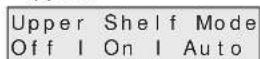
Select the desired operating mode for the upper shelf:
- Press the key to select the next option to the left.
-
Press the key to select the next option to the right.
-
Wait ten seconds, or press and hold the +▼ keys together.
- The Parameters Saved screen will appear to confirm the changes, and the display will return to the Main screen:
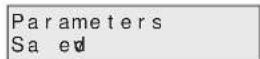
NOTE: Press and hold the ▼ + ENTER keys together at any time during programming to save parameters and return to the Main screen.
Changing Between Fahrenheit and Celsius
Use the following procedure to change/toggle the unit of measure between fahrenheit and celsius for the temperature shown on the display.
- From the Main screen, press and hold the ▼ key for three seconds. The Temperature Mode screen will appear and show the unit of measure that is now active:
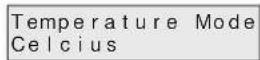
After three seconds, the display will return to the Main screen.
- Repeat step #1 to return to the previous unit of measure:
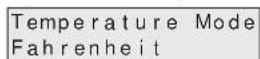
General
Hatco Heated Zone Merchandisers are designed for maximum durability and performance with minimum maintenance.
WARNING
ELECTRIC SHOCK HAZARD:
- Turn OFF power switch, unplug power cord, and allow unit to cool before performing any cleaning, setup, or maintenance.
- DO NOT submerge or saturate with water. Unit is not waterproof. Do not operate if unit has been submerged or saturated with water.
- Do not steam clean or use excessive water on unit.
- This unit is not "jet-proof" construction. Do not use jet-clean spray to clean this unit.
- Do not clean unit when it is energized or hot.
- Use only Genuine Hatco Replacement Parts when service is required. Failure to use Genuine Hatco Replacement Parts will void all warranties and may subject operators of the equipment to hazardous electrical voltage, resulting in electrical shock or burn. Genuine Hatco Replacement Parts are specified to operate safely in the environments in which they are used. Some aftermarket or generic replacement parts do not have the characteristics that will allow them to operate safely in Hatco equipment.
This unit has no "user-serviceable" parts. If service is required on this unit, contact an Authorized Hatco Service Agent or contact the Hatco Service Department at 800-558-0607 or 414-671-6350; fax 800-690-2966; or International fax 414-671-3976.
CAUTION
Do not move or relocate unit for cleaning. Unit is bulky and heavy.
Cleaning
To maintain performance and preserve the finish of the Heated Zone Merchandiser, clean the unit daily.
NOTICE
Clean unit daily to avoid malfunctions and maintain sanitary operation.
Use non-abrasive cleaners and cloths only. Abrasive cleaners and cloths could scratch finish of unit, marring its appearance and making it susceptible to soil accumulation.
IMPORTANT—DO NOT use paper towel or glass cleaner to clean plastic surfaces such as sneeze guards and flip-up doors. Paper towel and glass cleaner may scratch the material. Wipe off plastic surfaces using a soft, clean, water-dampened cloth.
- Turn off the unit, unplug the power cord, and allow the unit to cool.
-
Remove and discard any remaining food product.
-
Swing open the glass side panels for easy access to the entire shelf for cleaning.
NOTE: The glass side panels are held in place magnetically.
-
Remove and clean the product divider rods and channel dividers.
-
Lift the product divider rods straight up and out of the channel dividers.
- The channel dividers are held in place by magnets positioned along the front edge and back edge of the shelf. To remove a channel divider, pull the divider away from the edge.
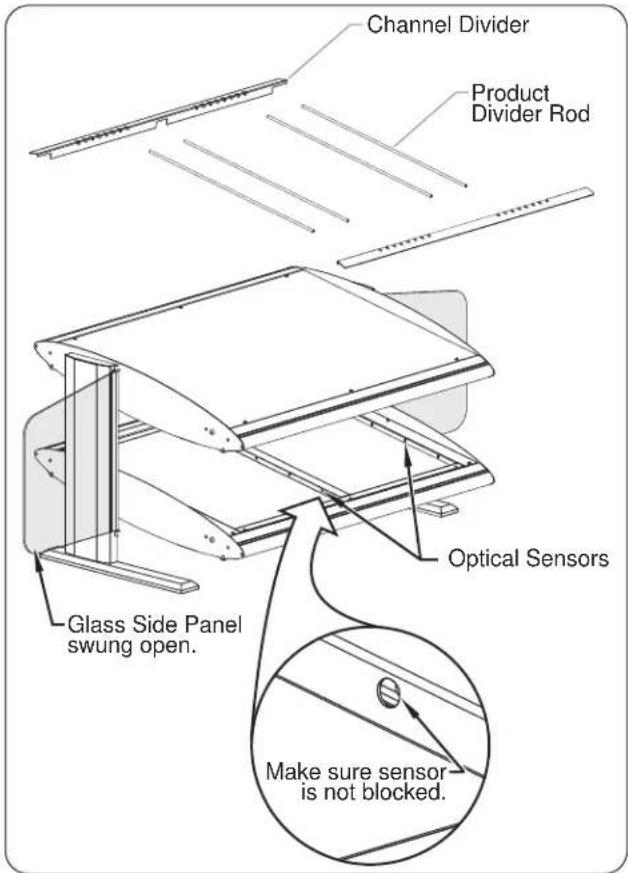
text_image
Channel Divider Product Divider Rod Glass Side Panel swung open. Optical Sensors Make sure sensor is not blocked.Cleaning a Heated Zone Merchandiser
- Make sure the optical sensors on each side of the heated shelves and in the zone dividers are not blocked by debris. If they are blocked, carefully use a soft cloth or toothpick to remove the debris.
- Wipe down all exterior and interior surfaces using a non-abrasive, damp cloth (a non-abrasive cleaner may be used for difficult stains).
- Wipe dry all surfaces using a non-abrasive, dry cloth.
- Clean the glass side panels using a standard glass cleaner.
- If equipped, clean the plastic sneeze guards or flip-up doors using soft cleaning cloths, mild soap, and water. NOTICE: Do not use paper towel or glass cleaner on plastic surfaces—scratching may occur.
WARNING
This unit must be serviced by qualified personnel only. Service by unqualified personnel may lead to electric shock or burn.
WARNING
ELECTRIC SHOCK HAZARD: Turn OFF power switch, unplug power cord, and allow unit to cool before performing any cleaning, setup, or maintenance.
| Symptom Probable | Cause Corrective Action | |
| Display lights not working. P | Power turned OFF. Move Power ON/OFF (I/O) switch to the ON (I) position. | |
| LED display lights defective. Contact Authorized Service Agent or Hatco for assistance. | ||
| Unit not hot enough. Unit in | Stand-By (not loaded with food product). | Load food product. Optical sensors will signal LCD controller to energize unit and heat to setpoint temperatures/power percentages. |
| Unit/shelf in Off Mode operation. | Change unit/shelf operation to Auto Mode or On Mode. Refer to the OPERATION section for procedure. | |
| Temperature setpoints/power percentages set too low. | Adjust temperature setpoints/power percentages to higher settings. Refer to the OPERATION section for procedures. | |
| Heating element(s) not working. | Contact Authorized Service Agent or Hatco for assistance. | |
| Sensors or LCD controller not working properly. | Contact Authorized Service Agent or Hatco for assistance. | |
| Excessive air movement around unit. | Restrict or redirect air movement (i.e., air conditioning duct or exhaust fan) away from unit or install flip-up doors on unit to contain heat and block air flow. | |
| Unit connected to incorrect power supply. | Contact Authorized Service Agent or Hatco for assistance. | |
| Unit too hot. | Temperature setpoints/power percentages set too high. | Adjust temperature setpoints/power percentages to lower settings. Refer to the OPERATION section for procedures. |
| Sensors or LCD controller not working properly. | Contact Authorized Service Agent or Hatco for assistance. | |
| Unit connected to incorrect power supply. | Contact Authorized Service Agent or Hatco for assistance. | |
| No heat, but light works. | Unit/shelf in Off Mode operation. | Change unit/shelf operation to Auto Mode or On Mode. Refer to the OPERATION section for procedure. |
| Temperature setpoints/power percentages set too low. | Adjust temperature setpoints/power percentages to higher settings. Refer to the OPERATION section for procedures. | |
| Heating element(s) not working. | Contact Authorized Service Agent or Hatco for assistance. | |
| Sensors or LCD controller not working properly. | Contract Authorized Service Agent or Hatco for assistance. | |
| No heat and no light. | Power turned OFF. Move Power ON/OFF switch(es) to the ON position. | |
| Circuit breaker tripped. | Reset circuit breaker. If circuit breaker continues to trip, contact Authorized Service Agent or Hatco for assistance. | |
Flip-Up Doors
Flip-up doors are available for all models as an added option at the time of order. Flip-up doors can be installed on each shelf on either the customer side or operator side of the unit. Use the following procedure to install flip-up doors (the procedure is the same for either side as well as each shelf).
- Align the screw holes at each end of the flip-up door hinge with the mounting hole in each end plate on the unit.
- Insert a hinge screw through each end plate and into the flip-up door.
- Tighten the hinge screws until the flip-up door is secure. Do not over-tighten the screws.
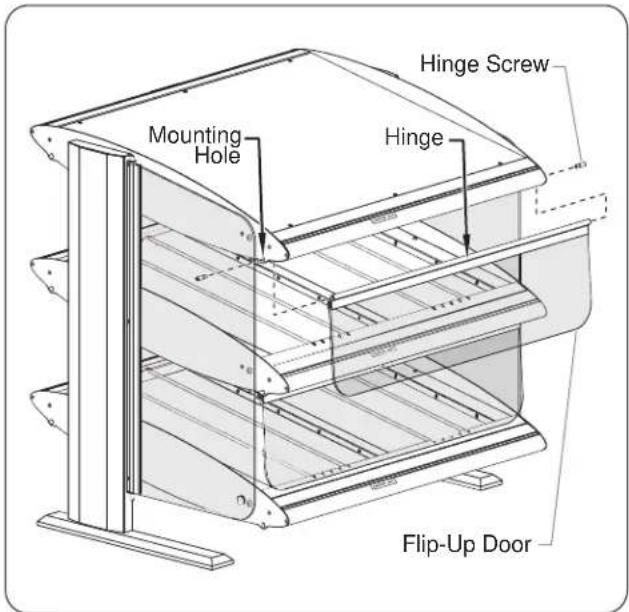
text_image
Mounting Hole Hinge Screw Hinge Flip-Up DoorFlip-Up Door Installation
Sneeze Guards
Sneeze guards are available for all models as an added option at the time of order. Sneeze guards can be installed above each shelf on either the customer side or operator side of the unit.
Support Post Accent Lighting
Support post accent lighting is available for all models as an added option at the time of order. The accent lighting consists of a vertical strip of LED lights running up the center of each support post.
Product Divider Rods
Stainless steel product divider rods are available as an accessory.
HZM-DIV ......Stainless Steel Divider Rod
1. PRODUCT WARRANTY
Hatco warrants the products that it manufactures (the "Products") to be free from defects in materials and workmanship, under normal use and service, for a period of one (1) year from the date of purchase when installed and maintained in accordance with Hatco's written instructions or 18 months from the date of shipment from Hatco. Buyer must establish the Product's purchase date by registering the Product with Hatco or by other means satisfactory to Hatco in its sole discretion.
Hatco warrants the following Product components to be free from defects in materials and workmanship from the date of purchase (subject to the foregoing conditions) for the period(s) of time and on the conditions listed below:
a) One (1) Year Parts and Labor PLUS One (1) Additional Year Parts-Only Warranty:
Conveyor Toaster Elements (metal sheathed)
Drawer Warmer Elements (metal sheathed)
Drawer Warmer Drawer Rollers and Slides
Strip Heater Elements (metal sheathed)
Display Warmer Elements (metal sheathed air heating)
Holding Cabinet Elements (metal sheathed air heating)
Heated Well Elements — HWB Series (metal sheathed)
b) One (1) Year Parts and Labor PLUS Four (4) Years Parts-Only Warranty:
3CS and FR Tanks
c) One (1) Year Parts and Labor PLUS Nine (9) Years Parts-Only Warranty on:
Electric Booster Heater Tanks
Gas Booster Heater Tanks
d) Ninety (90) Day Parts-Only Warranty:
Replacement Parts
THE FOREGOING WARRANTIES ARE EXCLUSIVE AND IN LIEU OF ANY OTHER WARRANTY, EXPRESSED OR IMPLIED, INCLUDING BUT NOT LIMITED TO ANY IMPLIED WARRANTY OF MERCHANTABILITY OR FITNESS FOR A PARTICULAR PURPOSE OR PATENT OR OTHER INTELLECTUAL PROPERTY RIGHT INFRINGEMENT. Without limiting the generality of the foregoing, SUCH WARRANTIES DO NOT COVER: Coated incandescent light bulbs, fluorescent lights, heat lamp bulbs, coated halogen light bulbs, halogen heat lamp bulbs, xenon light bulbs, LED light tubes, glass components, and fuses; Product failure in booster tank, fin tube heat exchanger, or other water heating equipment caused by liming, sediment buildup, chemical attack, or freezing; or Product misuse, tampering or misapplication, improper installation, or application of improper voltage.
2. LIMITATION OF REMEDIES AND DAMAGES
Hatco's liability and Buyer's exclusive remedy hereunder will be limited solely, at Hatco's option, to repair or replacement using new or refurbished parts or Product by Hatco or a Hatco-authorized service agency (other than where Buyer is located outside of the United States, Canada, United Kingdom, or Australia, in which case Hatco's liability and Buyer's exclusive remedy hereunder will be limited solely to replacement of part under warranty) with respect to any claim made within the applicable warranty period referred to above. Hatco reserves the right to accept or reject any such claim in whole or in part. In the context of this Limited Warranty, "refurbished" means a part or Product that has been returned to its original specifications by Hatco or a Hatco-authorized service agency. Hatco will not accept the return of any Product without prior written approval from Hatco, and all such approved returns shall be made at Buyer's sole expense. HATCO WILL NOT BE LIABLE, UNDER ANY CIRCUMSTANCES, FOR CONSEQUENTIAL OR INCIDENTAL DAMAGES, INCLUDING BUT NOT LIMITED TO LABOR COSTS OR LOST PROFITS RESULTING FROM THE USE OF OR INABILITY TO USE THE PRODUCTS OR FROM THE PRODUCTS BEING INCORPORATED IN OR BECOMING A COMPONENT OF ANY OTHER PRODUCT OR GOODS.
LCD Controller Flow Chart — Horizontal Shelf Model

flowchart
graph TD
    A["Fahrenheit/Celcius Toggle Screen"] -->|Press and hold for 3 seconds| B["Main Screen"]
    B --> C["OPERATIONAL MODE Lower 1 On 180F"]
    C -->|Press| D["Setpoints Me un >>"]
    D -->|Press| E["User Menus"]
    E -->|Press| F["Op Me un >"]
    F -->|Press| G["Lower Shelf Mode Off | On | Auto"]
    G -->|Press| H["Up down Off | On | Auto"]
    H -->|Press| I["Up a teHpoTrep 75%"]
    I -->|Press| J["Upper Setpoint = 180F"]
    J -->|Press| K["Lower Setpoint = 180F"]
    K -->|Press| L["To increase value"]
    L --> M["Upper Setpoint = 180F"]
    M -->|Press| N["To decrease value"]
    N --> O["Lower BottomHeat 50%"]
    O -->|Press| P["To decrease value by 5%"]
    P --> Q["Lo 75%"]
    Q -->|Press| R["Up emHottoBrep at 50%"]
    R -->|Press| S["To decrease value by 5%"]
    S --> T["Up a teHpoTrep 75%"]
    T -->|Press| U["To increase value by 5%"]
    U --> V["Upper Setpoint = 180F"]
    V -->|Press| W["To decrease value"]
    W --> X["Lower BottomHeat 50%"]
    X -->|Press| Y["To decrease value by 5%"]
    Y --> Z["Lower Setpoint = 180F"]
    Z -->|Press| AA["To increase value"]
    AA --> AB["Upper Setpoint = 180F"]
    AB -->|Press| AC["To decrease value"]
    AC --> AD["Lower BottomHeat 50%"]
    AD -->|Press| AE["To decrease value by 5%"]
    AE --> AF["Lower Setpoint = 180F"]
    AF --> AG["To increase value"]
    AG --> AH["Upper Setpoint = 180F"]
    AH -->|Press| AI["To increase value"]
    AI --> AJ["Lower BottomHeat 50%"]
    AJ -->|Press| AK["To decrease value by 5%"]
    AK --> AL["Lower Setpoint = 180F"]
    AL -->|Press| AM["To increase value"]
    AM --> AN["Upper Setpoint = 180F"]
    AN -->|Press| AO["To decrease value"]
    AO --> AP["Lower BottomHeat 50%"]
    AP -->|Press| AQ["To decrease value by 5%"]
    AQ --> AR["Lower Setpoint = 180F"]
    AR -->|Press| AS["To increase value"]
    AS --> AT["Upper Setpoint = 180F"]
    AT -->|Press| AU["To decrease value"]
    AU --> AV["Lower BottomHeat 50%"]
    AV -->|Press| AW["To decrease value by 5%"]
    AW --> AX["Lower Setpoint = 180F"]
    AX -->|Press| AY["To increase value"]
    AY --> AZ["Upper Setpoint = 180F"]
    AZ -->|Press| BA["To decrease value"]
    BA --> BB["Lower BottomHeat 50%"]
    BB -->|Press| BC["To decrease value by 5%"]
    BC --> BD["Lower Setpoint = 180F"]
    BD -->|Press| BE["To increase value"]
    BE --> BF["Upper Setpoint = 180F"]
    BF -->|Press| BG["To decrease value"]
    BG --> BH["Lower BottomHeat 50%"]
    BH -->|Press| BI["To decrease value by 5%"]
    BI --> BJ["Lower Setpoint = 180F"]
    BJ --> BK["To increase value"]
    BK --> BL["Upper Setpoint = 180F"]
    BL -->|Press| BM["To increase value"]
    BM --> BN["Lower BottomHeat 50%"]
    BN -->|Press| BO["To decrease value by 5%"]
    BO --> BP["Lower Setpoint = 180F"]
    BP --> BQ["To increase value"]
    BQ --> BR["Upper Setpoint = 180F"]
    BR -->|Press| BS["To decrease value"]
    BS --> BT["Lower BottomHeat 50%"]
    BT -->|Press| BU["To decrease value by 5%"]
    BU --> BV["Lower Setpoint = 180F"]
    BV --> BW["To increase value"]
    BW --> BX["Upper Setpoint = 180F"]
    BX --> BY["Lower BottomHeat 50%"]
    BY -->|Press| BZ["To decrease value by 5%"]
    BZ --> CA["Lower Setpoint = 180F"]
    CA --> CB["To increase value"]
    CB --> CC["Upper BottomHeat 50%"]
    CC -->|Press| DA["To decrease value by 5%"]
    DA --> DB["Lower Setpoint = 180F"]
    DB --> DC["To increase value"]
    DC --> DD["Upper BottomHeat 50%"]
    DD -->|Press| DE["To decrease value by 5%"]
    DE --> DF["Lower Setpoint = 180F"]
    DF --> DG["To increase value"]
    DG --> DH["Upper BottomHeat 50%"]
    DH --> DI["To decrease value by 5%"]
flowchart
graph TD
    A["Fahrenheit/Celcius Toggle Screen"] -->|Press and hold for 3 seconds| B["OPERATIONAL MODE Lower 1 On 180F"]
    B -->|Press| C["User Menus"]
    C -->|Press| D["Op taign Me un > >>"]
    D -->|Press| E["Lower Shelf Mode Off | On | Auto"]
    E -->|Press| F["Upper Shelf Mode Off | On | Auto"]
    F -->|Press| G["Up a teHpoTrep F rraeR%57t 50%"]
    G -->|Press| H["Upto tHPa at F rraeR%05t"]
    H -->|Press| I["Lo F rraeR%57t"]
    I -->|Press| J["Lower BottomHeat F rraeR%05t"]
    J -->|Press| K["Lower Setpoint = 180F"]
    K -->|Press to increase value| L["Upper Setpoint = 180F"]
    L -->|Press to increase value| M["Lower Setpoint = 180F"]
    M -->|Press to decrease value| N["Set points Me un >>"]
    N -->|Press| O["User Menus"]
    O -->|Press| P["User Menus"]
    P -->|Press| Q["User Menus"]
    Q -->|Press| R["User Menus"]
    R -->|Press| S["User Menus"]
    S -->|Press| T["User Menus"]
    T -->|Press| U["User Menus"]
    U -->|Press| V["User Menus"]
    V -->|Press| W["User Menus"]
    W -->|Press| X["User Menus"]
    X -->|Press| Y["User Menus"]
    Y -->|Press| Z["User Menus"]
    Z -->|Press| AA["User Menus"]
    AA -->|Press| AB["User Menus"]
    AB -->|Press| AC["User Menus"]
    AC -->|Press| AD["User Menus"]
    AD -->|Press| AE["User Menus"]
    AE -->|Press| AF["User Menus"]
    AF -->|Press| AG["User Menus"]
    AG -->|Press| AH["User Menus"]
    AH -->|Press| AI["User Menus"]
    AI -->|Press| AJ["User Menus"]
    AJ -->|Press| AK["User Menus"]
    AK -->|Press| AL["User Menus"]
    AL -->|Press| AM["User Menus"]
    AM -->|Press| AN["User Menus"]
    AN -->|Press| AO["User Menus"]
    AO -->|Press| AP["User Menus"]
    AP -->|Press| AQ["User Menus"]
    AQ -->|Press| AR["User Menus"]
    AR -->|Press| AS["User Menus"]
    AS -->|Press| AT["User Menus"]
    AT -->|Press| AU["User Menus"]
    AU -->|Press| AV["User Menus"]
    AV -->|Press| AW["User Menus"]
    AW -->|Press| AX["User Menus"]
    AX -->|Press| AY["User Menus"]
    AY -->|Press| AZ["User Menus"]
    AZ -->|Press| BA["User Menus"]
    BA -->|Press| BB["User Menus"]
    BB -->|Press| BC["User Menus"]
    BC -->|Press| BD["User Menus"]
    BD -->|Press| BE["User Menus"]
    BE -->|Press| BF["User Menus"]
    BF -->|Press| BG["User Menus"]
    BG -->|Press| BH["User Menus"]
    BH -->|Press| BI["User Menus"]
    BI -->|Press| BJ["User Menus"]
    BJ -->|Press| BK["User Menus"]
    BK -->|Press| BL["User Menus"]
    BL -->|Press| BM["User Menus"]
    BM -->|Press| BN["User Menus"]
    BN -->|Press| BO["User Menus"]
    BO -->|Press| BP["User Menus"]
    BP -->|Press| BQ["User Menus"]
    BQ -->|Press| BR["User Menus"]
    BR -->|Press| BS["User Menus"]
    BS -->|Press| BT["User Menus"]
    BT -->|Press| BU["User Menus"]
    BU -->|Press| BV["User Menus"]
    BV -->|Press| BW["User Menus"]
    BW -->|Press| BX["User Menus"]
    BX -->|Press| BY["User Menus"]
    BY -->|Press| BZ["User Menus"]
    BZ -->|Press| CA["User Menus"]
    CA -->|Press| CB["User Menus"]
    CB -->|Press| CC["User Menus"]
    CC -->|Press| CD["User Menus"]
    CD -->|Press| CE["User Menus"]
    CE -->|Press| CF["User Menus"]
    CF -->|Press| CG["User Menus"]
    CG -->|Press| CH["User Menus"]
    CH -->|Press| CI["User Menus"]
    CI -->|Press| CJ["User Menus"]
    CJ -->|Press| CK["User Menus"]
    CK -->|Press| CR["User Menus"]
    CR -->|Press| CS["User Menus"]
    CS -->|Press| CT["User Menus"]
    CT -->|Press| CU["User Menus"]
    CU -->|Press| CX["User Menus"]
    CX -->|Press| CY["User Menus"]
    CY -->|Press| CZ["User Menus"]
    CZ -->|Press| DA["User Menus"]
    DA -->|Press|
    DA --> DB["User Menus"]
NOTES
ALABAMA
Jones McLeod Appl. Svc. Birmingham 205-251-0159
ARIZONA
Service Solutions Group Phoenix 602-234-2443
Byassee Equipment Co. Phoenix 602-252-0402
CALIFORNIA
Industrial Electric Commercial Parts & Service, Inc. Huntington Beach 714-379-7100
Chapman Appl. Service San Diego 619-298-7106
P & D Appliance Commercial Parts & Service, Inc. S. San Francisco 650-635-1900
COLORADO
Hawkins Commercial Appliance Englewood 303-781-5548
FLORIDA
Whaley Foodservice Repair Jacksonville 904-725-7800
3Wire Nass Service Co., Inc. Orlando 407-425-2681
B.G.S.I. Pompano Beach 954-971-0456
Comm. Appliance Service Tampa 813-663-0313
GEORGIA
TWC Services Mableton 770-438-9797
Heritage Service Group Norcross 866-388-9837
Southeastern Rest. Svc. Norcross 770-446-6177
HAWAII
Burney's Comm. Service, Inc. Honolulu 808-848-1466
Food Equip Parts & Service Honolulu 808-847-4871
ILLINOIS
Parts Town Lombard 708-865-7278
Eichenauer Elec. Service Decatur 217-429-4229
Midwest Elec. Appl. Service Elmhurst 630-279-8000
Cone's Repair Service Moline 309-797-5323
INDIANA
GCS Service Indianapolis 317-545-9655
IOWA
Electric Motor Service Co. Davenport 319-323-1823
Goodwin Tucker Group Des Moines 515-262-9308
KENTUCKY
Service Solutions Group Lexington 859-254-8854
Service Solutions Group Louisville 502-451-5411
LOUISIANA
Chandlers Parts & Service Baton Rouge 225-272-6620
MARYLAND
Electric Motor Service Baltimore 410-467-8080
GCS Service Silver Spring 301-585-7550
MASSACHUSETTS
Ace Service Co., Inc. Needham 781-449-4220
MICHIGAN
Bildons Appliance Service Detroit 248-478-3320
Commercial Kitchen Service Bay City 517-893-4561
Midwest Food Equip. Service Grandville 616-261-2000
MINNESOTA
GCS Service Plymouth 800-345-4221
MISSOURI
General Parts Kansas City 816-421-5400
Commercial Kitchen Services St. Louis 314-890-0700
Kaemmerlen Parts & Service St. Louis 314-535-2222
NEBRASKA
Anderson Electric Omaha 402-341-1414
NEVADA
Burney's Commercial Las Vegas 702-736-0006
Hi. Tech Commercial Service N. Las Vegas 702-649-4616
NEW JERSEY
Jay Hill Repair Fairfield 973-575-9145
Service Plus Flanders 973-691-6300
NEW YORK
Acme American Repairs, Inc. Brooklyn 718-456-6544
Alpro Service Co. Brooklyn 718-386-2515
Appliance Installation Buffalo 716-884-7425
Duffy's Equipment Services, Inc. Buffalo 800-836-1014
3Wire Northern Plattsburgh 800-634-5005
Duffy's Equipment Services, Inc. Sauquoit 800-836-1014
J.B. Brady, Inc. Syracuse 315-422-9271
NORTH CAROLINA
Authorized Appliance Charlotte 704-377-4501
OHIO
Akron/Canton Comm. Svc. Inc. Akron 330-753-6635
Service Solutions Group Cincinnati 513-772-6600
Commercial Parts and Service Columbus 614-221-0057
Electrical Appl. Repair Service Brooklyn Heights 216-459-8700
E. A. Wichman Co. Toledo 419-385-9121
OKLAHOMA
Hagar Rest. Service, Inc. Oklahoma City 405-235-2184
Krueger, Inc. Oklahoma City 405-528-8883
OREGON
Ron's Service, Inc. Portland 503-624-0890
PENNSYLVANIA
Elmer Schultz Services Philadelphia 215-627-5401
FAST Comm. Appl. Service Philadelphia 215-288-4800
Appliance Installation & Service Pittsburgh 412-809-0244
K & D Service Co. Harrisburg 717-236-9039
Electric Repair Co. Reading 610-376-5444
RHODE ISLAND
Marshall Electric Co. Providence 401-331-1163
SOUTH CAROLINA
Whaley Foodservice Repair W. Columbia 803-791-4420
TENNESSEE
Camp Electric Memphis 901-527-7543
TEXAS
GCS Service Fort Worth 800-433-1804
Armstrong Repair Service Houston 713-666-7100
Cooking Equipment Specialist Mesquite 888-866-9276
Refrigerated Specialist, Inc. Mesquite 888-866-9276
Commercial Kitchen Repair Co. San Antonio 210-735-2811
UTAH
La Monica's Rest. Equip. Service Murray 801-263-3221
VIRGINIA
Daubers Norfolk 757-855-4097 Daubers Springfield 703-866-3600
WASHINGTON
3Wire Restaurant Appliance Seattle 800-207-3146
WISCONSIN
A.S.C., Inc. Madison 608-246-3160
A.S.C., Inc. Milwaukee 414-543-6460
CANADA
ALBERTA
Key Food Equipment Service Edmonton 780-438-1690
BRITISH COLUMBIA
Key Food Equipment Service Vancouver 604-433-4484 Key Food Equipment Service Victoria 250-920-4888
MANITOBA
Air Rite, Inc. Winnipeg 204-895-2300
NEW BRUNSWICK
EMR Services, Ltd. Moncton 506-855-4228
ONTARIO
R.G. Henderson Ltd. Toronto 416-422-5580
Choquette - CKS, Inc. Ottawa 613-739-8458
QUÉBEC
Choquette - CKS, Inc. Montreal 514-722-2000
Choquette - CKS, Inc. Québec City 418-681-3944
UNITED KINGDOM
Marren Group Northants +44(0)1933 665313
HATCO CORPORATION
P.O. Box 340500
Milwaukee, WI 53234-0500 U.S.A.
(800) 558-0607 (414) 671-6350
Parts and Service Fax (800) 690-2966
International Fax (414) 671-3976
partsandservice@hatcocorp.com
www.hatcocorp.com
Register your unit online!
See IMPORTANT OWNER INFORMATION section for details.