
PLCMDVR47 - Rear Camera Pyle - Free user manual and instructions
Find the device manual for free PLCMDVR47 Pyle in PDF.


| Product Type | Backup Camera Parking Assist System with Dual Cameras and Monitor |
| Display | 4.25-inch high-resolution full color LCD built into rearview mirror assembly |
| Cameras | Two cameras: one interior front-facing (on mirror), one exterior mount rear-facing (waterproof) |
| Rear Camera Waterproof Rating | IP68 (marine grade) |
| Video Resolution | HD (1080P): 1920x1080 pixels; FHD (720P): 1280x720 pixels |
| Image Capture Resolution | 1, 2, 5, or 8 megapixels |
| Video File Format | .AVI |
| Image File Format | .jpeg |
| Recording Modes | Front, Back, or Double Record |
| TF Card Support | Up to 32GB (not included) |
| Wide Angle Lens | 120 degrees |
| Parking Assist | Built-in distance scale lines and parking assist system |
| G-Sensor | Yes, for impact detection and automatic file locking |
| Microphone & Speaker | Built-in microphone for sound recording and speaker for audio playback |
| Power Supply | DC 12V; compatible with 12V/24V negative ground systems |
| Installation | Mirror mounts over existing rearview mirror with rubber straps; camera connects via RCA video cable and power harness |
| Dimensions (Approx.) | Mirror assembly: 12 x 4.5 x 1.5 inches; Rear camera: 2 x 1.5 x 1.5 inches (estimated) |
| Weight (Approx.) | Mirror assembly: 1.2 lbs; Rear camera: 0.3 lbs (estimated) |
| Anti-Glare Mirror | Yes |
| Time Watermark | On/Off settings available |
| Auto Record Function | Automatically records on vehicle start |
Frequently Asked Questions - PLCMDVR47 Pyle
User questions about PLCMDVR47 Pyle
0 question about this device. Answer the ones you know or ask your own.
Ask a new question about this device
Download the instructions for your Rear Camera in PDF format for free! Find your manual PLCMDVR47 - Pyle and take your electronic device back in hand. On this page are published all the documents necessary for the use of your device. PLCMDVR47 by Pyle.
USER MANUAL PLCMDVR47 Pyle
PLCMDVR47
Backup Camera Parking Assist System
Dual Cameras and Monitor with Image & Video Recording
Please read all of the installation instructions carefully before installing the product. Improper installation will void manufacturer's warranty. The installation instructions do not apply to all types of vehicles, and are written as guidelines to assist in installing the system. Please consult an experienced technician if you are not comfortable installing the product. Prior to using and installing the Backup Camera System, please read the safety information provided in this user manual. Be sure to use the product as outlined in this user manual. Altercation or modifications carried out without appropriate authorization may invalidate the user's right to operate the equipment.
WARNING: Failure to read and follow these warnings and instructions may result in serious injury, including damaged property, so please pay close attention and exhibit the utmost care.
The Digital Backup Camera is designed as an aid to the driver in detecting potentially hazardous driving conditions, obstructions, and large stationary objects. You, the driver, must also remember to drive safely and properly. Use of the Digital Backup Camera is not a substitute for safe, proper and legal driving practices.
Never back up while looking only at the screen. You should always check behind and around the vehicle when backing up just as you would if the vehicle did not have the Digital Backup Camera. Always make sure your driving area is clear. Always back up slowly and with caution.
Never depend on the Backup Camera entirely when backing up. The image on the screen is different from actual and real-time conditions. Objects viewed in the rear view monitor differ from actual distances because a wide-angle lens is used. So use the camera as an aid and always follow intended driving practices to properly judge distances from objects.
The Backup Camera's assisted low lux lighting performance feature is also an aid to a driver. Always use your own eyes to confirm the vehicle's surroundings, as the displayed image may be not well lit or not entirely visible. Always proceed with caution and perform double-checks before proceeding.
The area displayed by the Backup Camera is limited. It does not display objects that are close to or just below the bumper, underneath the vehicle, or objects out of the camera's view. The camera's view can change according to your vehicle's orientation on the road or changing road conditions.
Be sure to always check the camera is properly functioning, is properly positioned and securely mounted.
Make sure your trunk or hatch operates correctly, as intended, before and after installation.
Proceed with caution when cleaning your vehicle around the camera. Avoid excess water exposure around the camera especially with spraying or a power washer.
Please make sure to keep the camera clean and unobstructed from any debris
Follow all traffic laws and motor vehicle regulations.
Consult local laws and regulations for any restrictions on installation or use.
Using a Backup Camera System is not adequate enough to completely eliminate a vehicle's blind spot. Always remember to drive with caution, following all traffic laws.
System Installation and Wiring
Camera System installation on diesel vehicles may require a slightly different wiring install. These installation instructions do not apply to all types of vehicles. They are meant only as a general guide due to the large number of vehicle makes and models. Consult your local motor vehicle laws on the use of this product to be sure it is permitted. Through installation of this backup camera system, you should be sure as to not degrade, damage or compromise the safety of any system or device on your vehicle. Improper installation and wiring of the vehicle back-up camera system may damage the vehicle's electrical system, including vital vehicle computer and operating systems. That could lead to an accident or fire, causing property damage and/or serious personal injury. It is highly recommended to seek professional installation advice from a qualified auto electrician or, in the alternative, to have the installation performed by a qualified auto electrician.
Please ensure that your monitor is secured and mounted where it would NOT obstruct any OEM vehicle safety features. In an event of an accident, manufacturer is not responsible for bodily injury caused by the monitor being a projectile. Select location for mounting the monitor in desired location. Ensure monitor location will not obstruct your vision while driving. The manufacturer assumes no liability for damage caused to your vehicle due to improper installation or use.
Caution: This unit is designed to operate on a 12V/24V DC NEGATIVE GROUND electrical systems. Connecting to other types of electrical systems will cause damage to your vehicle. Please contact the manufacturer if you are unaware of the system type in your vehicle.
Quick Installation (*Refer to the installation diagram found later in this user manual):
The backup camera system is compatible with a wide range of vehicles and video display monitors.
This kit includes necessary wiring and cable connector accessories sufficient for typical connections. However, additional accessory cables and installation materials may be necessary for a completely secure and operational backup camera performance.
Connect the camera, using the DC 12V power and video harness cable. Connect the red wire to the positive 12V reverse tail light in the rear of your car. You may need to temporarily remove an interior panel or other cover. Then, connect the black wire, and ground properly. Then, on the power and video harness cable, use the camera connector cable to connect to the exterior mount camera. This connection will supply power to the camera directly. (Red wire is positive, black wire is negative).
Then, connect the power and wiring harness to the video mirror assembly. It will appear as the 'AV' Input located on the top side of the rearview mirror assembly.
To connect the rearview mirror monitor assembly, use the included rubber straps to mount the assembly over your existing rearview mirror. (The mirror assembly also features a camera that faces the front of your vehicle). The included cigarette lighter accessory cable allows you to directly power the mirror monitor assembly via the DC power lighter receptacle. Simply connect the cable to your vehicle, then to the mirror monitor's USB connector.
- Determine the best location for the exterior mount camera (The camera is preferably mounted just above the license plate).
- Be sure when running the connection cables to leave a small amount of slack so you can still move the camera around the license plate, if you decide to slightly adjust the camera's positioning at a later time.
- After installation test the camera before use. Placing your vehicle in reverse should provide a picture in the monitor within the rearview mirror assembly.
- Mount your exterior camera in the desired location, then connect the included RCA video cable, from the camera, and run the cable through to your video display's RCA connection. Make sure to route all cables and wiring in the least obtrusive route possible as to avoid conflict with other vehicle circuitry and to ensure a safe and stable installation/connection.
Rearview Mirror Mounting
The system includes rubber straps that allow you to mount the mirror monitor assembly onto your vehicle's existing rearview mirror. The rearview mirror assembly comes equipped with built-in microphone for sound recording, speaker for audio playback (for your videos) and adjustable angle camera. This camera features the ability to snap pictures and record video while it's mounted inside your vehicle. Manually adjust the angle of the camera to position exactly where needed. The mirror monitor assembly also features button controls.
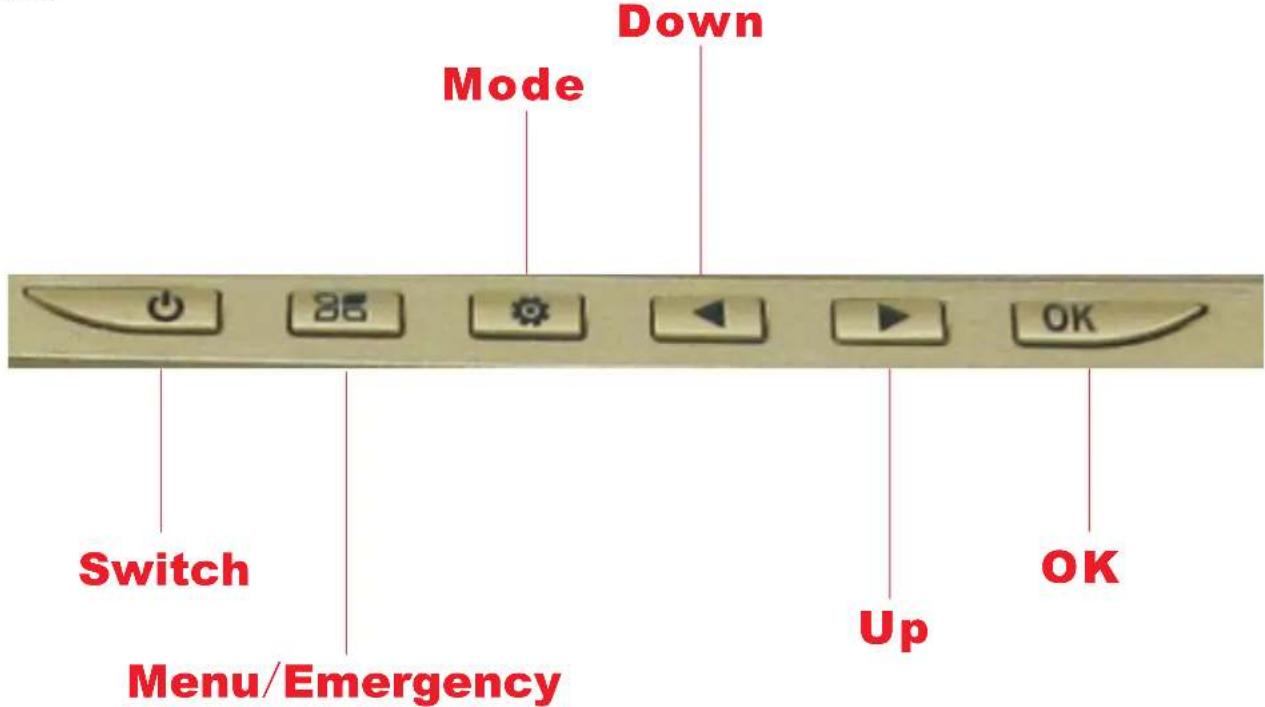
Host Keys
- OK: In the video mode, short press the key to start recording and short press the key again to stop recording; In the photo mode, short press the key to take picture; In the file browser mode, short press the key to play video and short press the key again to stop play; In the Menu mode, short press the key to confirm.
- Switch: In the shutdown state, long press the key, the DVR will power on and start working; In the working state, long press the key, the DVR will automatically save the video file and user settings and shutdown; Under the standby mode, short press the key to switch the screen.
- Menu/Emergency: Under the standby mode, short press the key to switch to different modes and long press the key to enter to main menu interface, short press the key to exit interface after setting; In the video mode, short press the key to lock the video, the video file will not be covered;
- Mode: For inter-camera mode key/camera/playback switch.
- Down: In the menu and playback mode, select the function key down; In the playback mode, long press the key to rewind when playing the video.
- Up: In the menu and playback mode, select the function key up; In the playback mode, long press the key to fast forward when playing the video; In the video mode, short press the key to stop record sounds and short press the key again to start to record sounds.
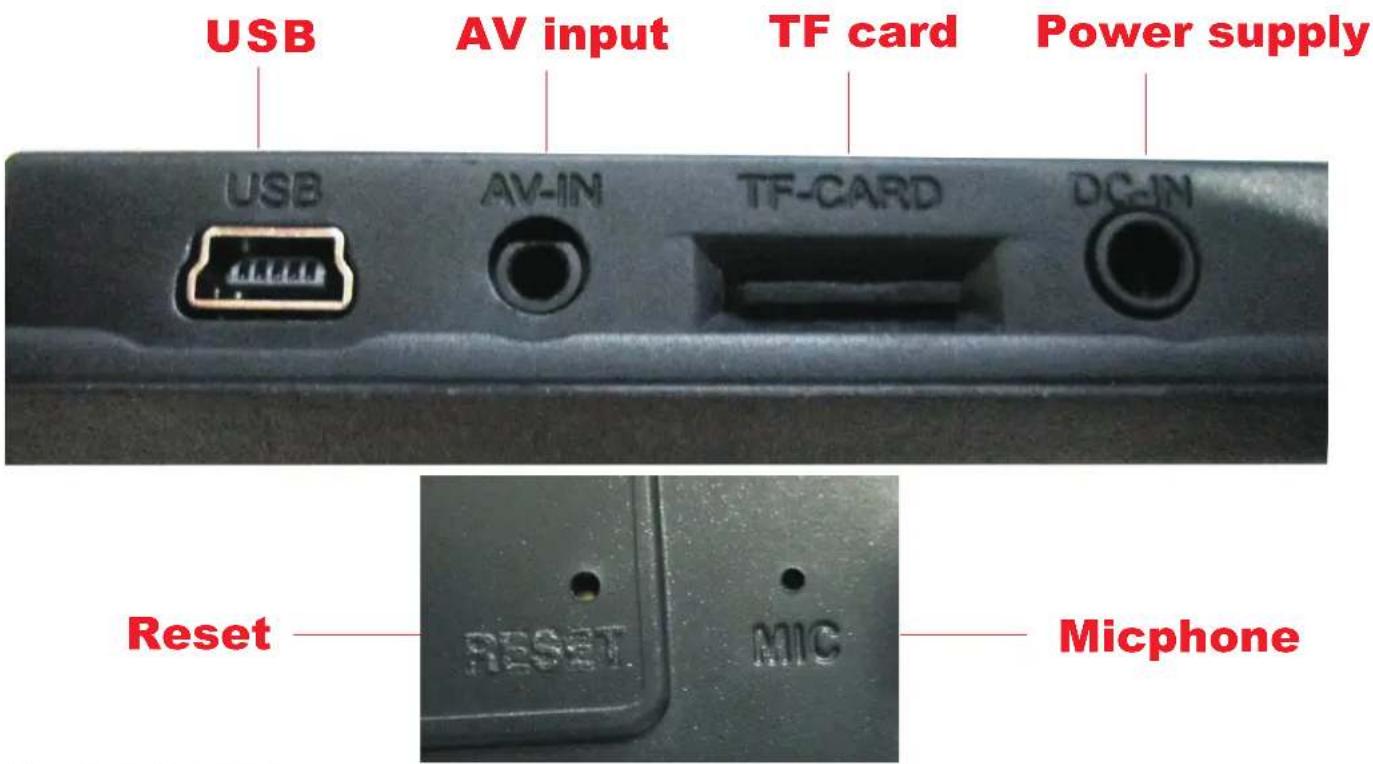
User Input Control
| USB | For connecting a PC to transfer data; Power connector |
| AV-IN | AV cable is used to connect the video output to AV equipment |
| TF-CARD | TF memory card slot |
| DC-IN | DC cable connector |
| RESET | System restart the reset button |
| MIC | Recording receiving port |
Capture Images
Press 'OK' while in the 'Camera Mode' to capture a photo.
Record Video
Press 'OK' while in the 'Video Mode' to record a video.
Record Time
In the video settings menu, the 'RT' section allows you to choose a time at which the PLCMDVR47 will automatically record videos and save in a continuous pattern. The system will make sure to continue to record and 'save over' your unwanted recording videos.
Recording
The system stops recording once the TF card is full or if the record option is turned OFF.
G-Sensor
Activate the G-Sensor in the settings menu to allow saving and locking the recording files in the event of sudden impact or an accident.
Emergency File Save
When in video recording mode, press "MENU" to prevent that file from being overwritten by circular recording.
Playback Media
While in the playback mode, press the up and down arrows to cycle through your captured media, then press OK to view your media.
Model: PLCMDVR47
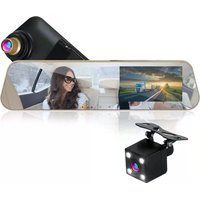
HD Rearview Mirror Monitor and Dual Camera System with Hi-Res Video Recording, Built-in 4.3" Screen Display, Built-in Distance Scale Lines, Parking Assist, (2)Cameras, Motion Impact Recording, Waterproof Camera
Feature:
• Dual DVR Camera Recording System
• Rearview Mirror Monitor with (2) Cameras
- Easily Mounts to Your Existing Rearview Mirror Assembly
• Camera + Camcorder: Snap Pictures and Record Video
• Transfer Files to Computer to Save & Share
• (1)Camera Located on the Mirror(Front Vehicle Recording)
• (1) Exterior Mount Waterproof Camera(Rear Vehicle Recording)
• Support TF Card up to 32GB (* Not Included)
- Switchable to View Either Camera on the Video Screen Display
- Marine Grade Waterproof Construction, IP68(Exterior Mount Camera)
- Convenient Parking Assist System Adds Safety & Reliability
• Record Video from One or Both Cameras
• Auto Record Function: Automatically Records on Vehicle Start
• Includes All the Necessary Cables & Wiring
• Brightness, Exposure and Color Adjustment Settings
• Quickly Mount and Un-Mounts
• Time Water mark: ON/OFF
• 120 Degree Wide Angle Camera Lens
• Anti-Glare Rearview Mirror
- Can be hard-wired or Powered via Included Cigarette Lighter Accessory Cable
• Power: DC 12V
LCD Display:
• Hi-Res 4.25" Full Color Video Display
- Monitor is Built—into the Rearview Mirror Assembly
• Display Screen Can Be Powered Off for Full Mirror Use
- Instantly Preview Your Images and Video On the Display Screen
Video Recording:
- Choose Between HD and FHD
• HD(1080P): 1920X1080 Pixels
• FHD(720P): 1280X720 Pixels
• Record Modes: Front, Back or Double Record
• Video File Format: .AVI
Image Capture:
- Choose Between 1,2,5 or 8 Mega Pixel Images
• Image File Format: .jpeg
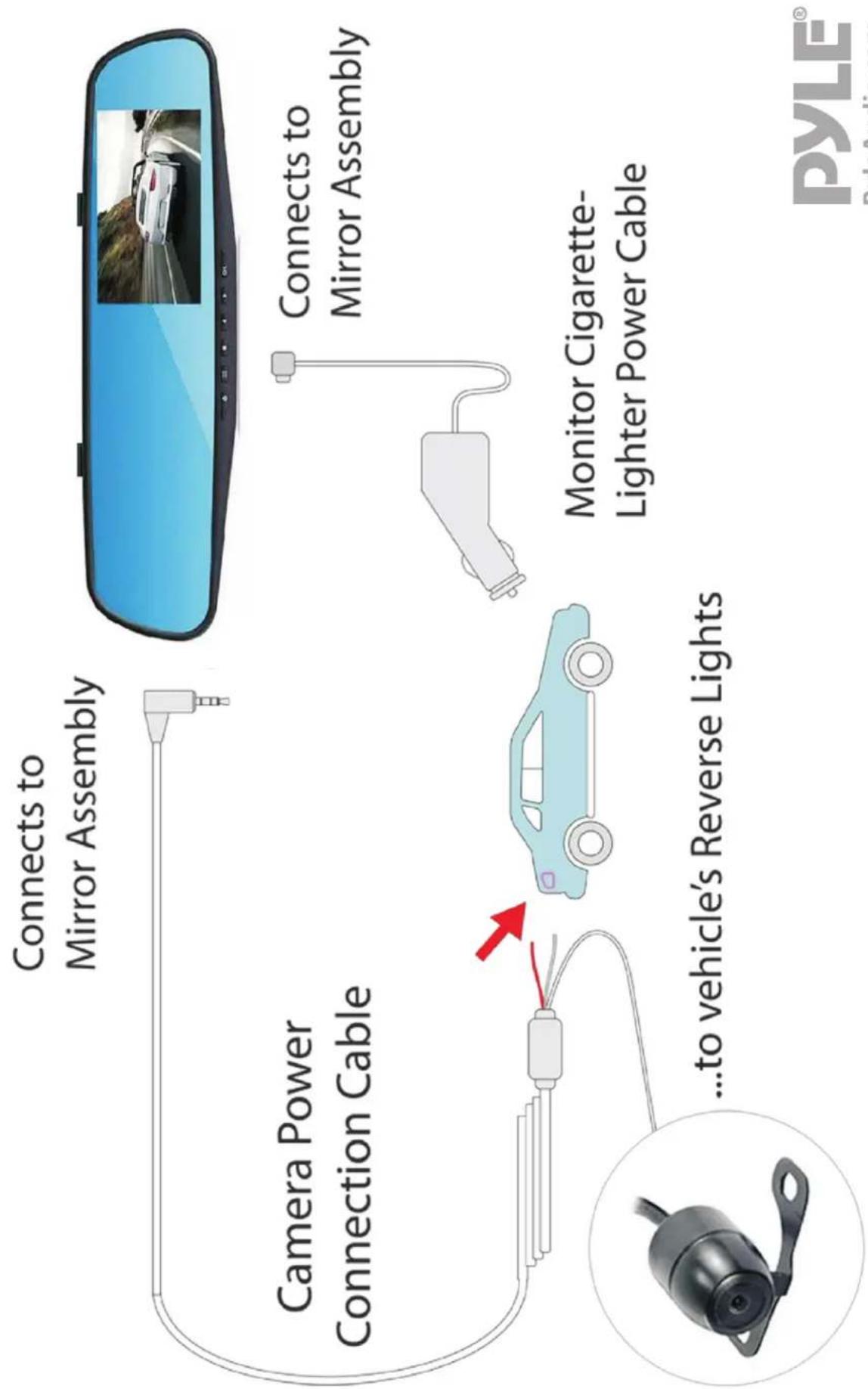
flowchart
graph TD
    A["Camera Power Connection Cable"] --> B["Connects to Mirror Assembly"]
    B --> C["Monitor Cigarette-Lighter Power Cable"]
    C --> D["...to vehicle's Reverse Lights"]
    D --> E["Car with Red Arrow"]
Brand : Pyle
Model : PLCMDVR47
Category : Rear Camera