PLCM12 - Rear Camera Pyle - Free user manual and instructions
Find the device manual for free PLCM12 Pyle in PDF.


| Product Type | Backup Camera - Parking Assist |
| Brand | Pyle |
| Model | PLCM12 |
| Power Supply | DC 12V (from reverse tail light) |
| Video Output | Composite RCA (yellow) |
| Camera Type | Wide-angle lens with low lux performance |
| Mounting Location | Rear of vehicle, preferably above license plate |
| Dimensions | Approx. 2.5 x 2.5 x 2.5 inches (estimated) |
| Weight | Approx. 0.2 lbs (estimated) |
| Wiring | Includes DC power cable and RCA video cable |
| Activation | Automatic when vehicle is in reverse gear |
| Maintenance | Keep camera clean; avoid high-pressure water spray |
| Safety Notes | Do not rely solely on camera; always check surroundings |
| Compatibility | Works with most vehicles; diesel may need different wiring |
| Spare Parts | Not specified; contact manufacturer for replacement cables |
| Repair | Consult experienced technician; improper installation voids warranty |
Frequently Asked Questions - PLCM12 Pyle
User questions about PLCM12 Pyle
0 question about this device. Answer the ones you know or ask your own.
Ask a new question about this device
Download the instructions for your Rear Camera in PDF format for free! Find your manual PLCM12 - Pyle and take your electronic device back in hand. On this page are published all the documents necessary for the use of your device. PLCM12 by Pyle.
USER MANUAL PLCM12 Pyle
PLCM12
Backup Camera - Parking Assist
Please read all of the installation instructions carefully before installing the product. Improper installation will void manufacturer's warranty. The installation instructions do not apply to all types of vehicles, and are written as guidelines to assist in installing the system. Please consult an experienced technician if you are not comfortable installing the product. Prior to using and installing the Backup Camera System, please read the safety information provided in this user manual. Be sure to use the product as outlined in this user manual. Altercation or modifications carried out without appropriate authorization may invalidate the user's right to operate the equipment.
WARNING: Failure to read and follow these warnings and instructions may result in serious injury, including damaged property, so please pay close attention and exhibit the utmost care.
- The Digital Backup Camera is designed as an aid to the driver in detecting potentially hazardous driving conditions, obstructions, and large stationary objects. You, the driver, must also remember to drive safely and properly. Use of the Digital Backup Camera is not a substitute for safe, proper and legal driving practices.
- Never back up while looking only at your connected monitor display screen. You should always check behind and around the vehicle when backing up just as you would if the vehicle did not have the Digital Backup Camera. Always make sure your driving area is clear. Always back up slowly and with caution.
- Never depend on the Backup Camera entirely when backing up. The image on the monitor display screen may be slightly different from actual and real-time conditions. Objects viewed in the rear view monitor differ from actual distances because a wide-angle lens is used. So use the camera as an aid and always follow intended driving practices to properly judge distances from objects.
- The Backup Camera's assisted low lux lighting performance feature is also an aid to a driver. Always use your own eyes to confirm the vehicle's surroundings, as the displayed image may be not well lit or not entirely visible. Always proceed with caution and perform double-checks before proceeding.
- The area displayed by the Backup Camera is limited. It does not display objects that are close to or just below the bumper, underneath the vehicle, or objects out of the camera's view. The camera's view can change according to your vehicle's orientation on the road or changing road conditions.
- Be sure to check the camera is properly functioning, is properly positioned and securely mounted, every time you operate your vehicle.
- Make sure your trunk or hatch operates correctly, as intended, before and after installation.
- Proceed with caution when cleaning your vehicle around the camera. Avoid excess water exposure around the camera especially with spraying or a power washer.
- Please make sure to keep the camera clean and unobstructed from any debris
- Follow all traffic laws and motor vehicle regulations.
- Consult local laws and regulations for any restrictions on installation or use.
- Using a Backup Camera System is not adequate enough to completely eliminate a vehicle's blind spot. Always remember to drive with caution, following all traffic laws.
System Installation and Wiring
Note: Camera System installation on diesel vehicles may require a slightly different wiring install.
Caution: Connecting to other types of electrical systems will cause damage to your vehicle. Please contact the manufacturer if you are unaware of the system type in your vehicle. Refer to the model's power requirements prior to connection and installation.
Quick Installation:
This rearview backup camera system comes with camera and installation wiring. When installing, the camera is preferably to be mounted in the rear of your vehicle (just above the license plate).
This kit includes necessary wiring and cable connector accessories sufficient for typical connections.
However, additional accessory cables and installation materials may be necessary for completely secure and operational backup camera performance.
Camera Connection:
Connect the camera to the using the included DC 12V power cable. Connect the DC 12V power cable to the positive 12V reverse tail light in the rear of your vehicle. Then, connect the black wire, of the DC 12V power cable, and ground properly. This connected power and ground cable then connects to the camera, and will supply power to the camera directly.
Next, use the included yellow RCA video connector cable, and run that cable from the yellow RCA video connector jack of the camera, to the yellow video connector of your compatible display monitor
The yellow RCA cable when connected, automatically retrieves the video signal when activated (when your vehicle is switched into the reverse gear).
Installation Transcript:
- Locate the reverse taillight wiring behind your vehicle's reverse light. You may need to remove an interior panel, or other cover, in order to locate the wiring. Connect the included power 12V DC power cable to the reverse light.
a. Connect the power cable's Red wire to your vehicle's reverse light positive wire.
b. Connect the power cable's Black wire to your vehicle's reverse light negative wire.
-
Connect the camera to this 'reverse light' connection installation, then mount the camera in the desired location.
-
Run the RCA video cable from the camera to your compatible video display monitor.
*Please remember to run cables in the least obtrusive route possible. Vehicle vibrations and bumpy driving conditions can result, so extra care should be taken to securely mount the camera and fasten all cables and wiring to secure locations.
*Ensure the wires are safely and securely connected, with proper isolation applied to all connections.
Additional Notes:
- Determine the best location for the camera (The camera is preferably mounted just above the license plate).
- Be sure when running the connection cables to leave a small amount of slack so you can still move the camera around the license plate, if you decide to slightly adjust the camera's positioning at a later time.
- After installation, Test the camera before use. Placing your vehicle in reverse should provide a picture in the monitor within the rearview mirror assembly.
PLCM12 Rear View Backup Camera

flowchart
graph LR
    A["Camera"] --> B["Video"]
    A --> C["Power"]
    B --> D["Car with Power Cable ...to vehicle's Reverse Lights"]
    C --> D
    style A fill:#f9f,stroke:#333
    style D fill:#bbf,stroke:#333
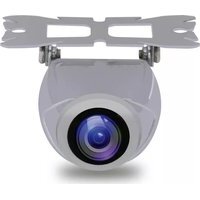

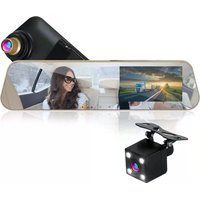
Brand : Pyle
Model : PLCM12
Category : Rear Camera