1208REG - Switch JUNG - Free user manual and instructions
Find the device manual for free 1208REG JUNG in PDF.


User questions about 1208REG JUNG
0 question about this device. Answer the ones you know or ask your own.
Ask a new question about this device
Download the instructions for your Switch in PDF format for free! Find your manual 1208REG - JUNG and take your electronic device back in hand. On this page are published all the documents necessary for the use of your device. 1208REG by JUNG.
USER MANUAL 1208REG JUNG
Operating instructions
Power unit for rail mounting
Art. no. 1208REG
Pulse insert
Art. no. 1708IE

1 Safety instructions.... 3
2 Intended use 3
3 Operation 4
4 Information for electrically skilled persons 5
4.1 Mounting and electrical connection.... 5
5 Technical data....7
6 Troubleshooting 9
7 Accessories....9
8 Warranty....9
1 Safety instructions

Electrical devices may only be mounted and connected by electrically skilled persons.
Serious injuries, fire or property damage possible. Please read and follow manual fully.
Danger of electric shock. Always disconnect before carrying out work on the device or load. In so doing, take all the circuit breakers into account, which support dangerous voltages to the device and or load.
Danger of electric shock. Automatic RMD is not suitable for disconnection from supply voltage because mains potential is even present at the load when the device is switched off. Always disconnect before carrying out work on the device or load. To do so, switch off all associated circuit breakers.
Do not connect automatic RMDs in parallel. Damage to devices may result.
Use pulse insert exclusively for activation of the automatic RMD.
This manual is an integral part of the product, and must remain with the end customer.
2 Intended use
Intended use of automatic RMD
- Manual or automatic switching of light in stairways
- Installation in sub-distribution units on DIN rail according to DIN EN 60715
- Switch on using pulse insert or push-button
The automatic RMD can also be used with pulse inserts from the light management.
Intended use of pulse insert
- Manual or automatic switch-on of an automatic RMD
- Mounting in appliance box with dimensions according to DIN 49073
– Operation with suitable LB-Management cover, see accessories
Automatic switching of light
The pulse insert is combined with a motion detector cover. As soon as the brightness drops below a value set on the motion detector cover and motions are detected, the pulse insert sends a switch-on signal cyclically to the automatic RMD. The latter switches on the light for the set run-on time. After the run-on time has elapsed, the automatic RMD switches the light off. After switch-off, pulse inserts with motion detector covers will not detect any motions for approx. 3 seconds.
3 Operation
Switching the light on manually
■ Press the LB Management push-button 1-gang on the pulse insert or the push-button. Light is switched on independently of the brightness for the run-on time. LED (2) on automatic RMD lights up.
i The run-on time is restarted if actuation is repeated.
In conjunction with motion detectors and push-buttons, long operation on the button can lead to the motion detectors being restarted. During this time, the motion detector cannot be operated via app.
Setting the automatic RMD
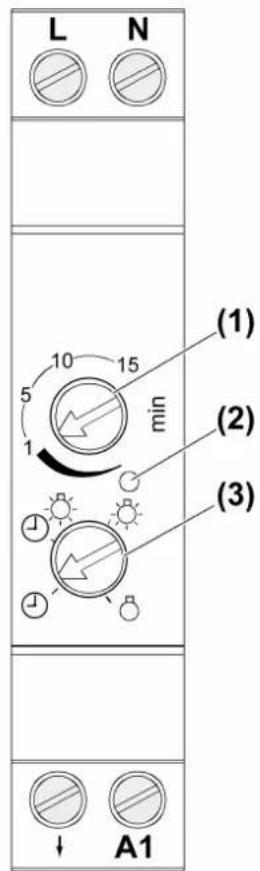
text_image
L N 10 15 5 min (1) (2) (3) ↓ A1Image 1: Automatic RMD
Automatic function without switch-off warning. The lighting is switched off after the run-on time elapses.
Automatic function with switch-off warning. After the run-on time elapses, the lighting is not switched off immediately, but rather only after flashing three times at intervals of 10 seconds.
Light is switched on continuously.
Light is switched off continuously.
■ Set run-on time. Turn adjuster (1) (see figure 1).
■ Presetting the operating mode. Turn adjuster (3) (see figure 1).
With the automatic function with switch-off warning, the service life of the relay contact may be reduced when fluorescent lamps or energy-saving lamps are used. The set run-on time is prolonged by approx. 30 seconds.
4 Information for electrically skilled persons

DANGER!
Mortal danger of electric shock.
Disconnect the device. Cover up live parts.
4.1 Mounting and electrical connection
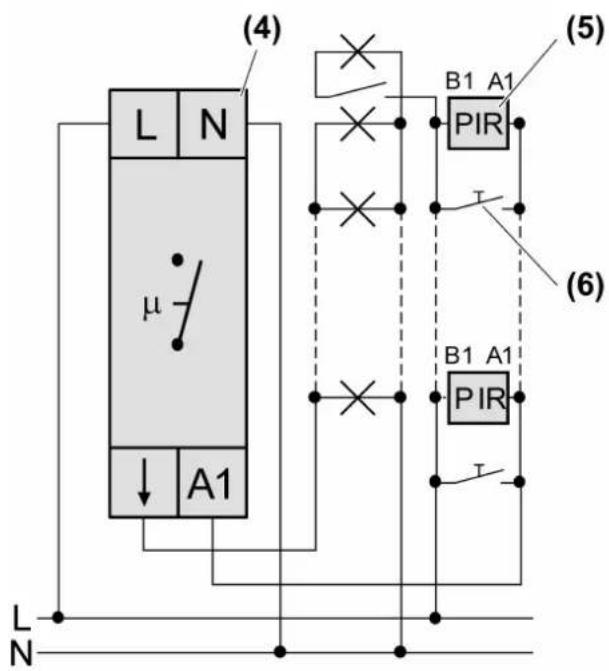
The automatic RMD can be used for a 3-conductor circuit (Figure 2) or a 4-conductor circuit (Figure 3). The 4-conductor circuit has the advantage that an additional luminaire can be switched separately.

text_image
(4) L N μ ↓ A1 (5) B1 A1 PIR T (6) B1 A1 PIR T L NImage 2: Connection diagram for 3-conductor circuit
text_image
(4) L N μ ↓ A1 L N (5) B1 A1 PIR T (6) B1 A1 PIR TImage 3: Connection diagram for 4-conductor circuit
(4) Automatic RMD
(5) Pulse insert with LB management motion detector cover or LB Management push-button 1-gang
(6) Push-button, NO contact

CAUTION!
Overvoltage when connected to two phase conductors.
Destruction of the automatic RMD.
Connect to only a single phase.
Do not operate multiple automatic RMDs next to each other.
Avoid having heat sources, e.g. RMD dimmers, in the immediate vicinity of the automatic RMD.
Ensure sufficient heat dissipation.

On control input A1 of the automatic RMD the aggregate current load must not exceed 40 mA. To determine the current load, add together the current consumption of all connected pulse inserts and lighting elements of the push-buttons.
If only pulse inserts with LB management motion detector cover or LB Management push-button 1-gang are used, a maximum of 14 pulse inserts can be connected.
Example for mixed operation with pulse inserts and illuminated push-buttons: 6 x pulse insert: 6 x 2.8 mA = 16.8 mA current available for lighting elements: 40 mA - 16.8 mA = 23.2 mA Number of lighting elements for 0.9 mA per element: 23.2 mA / 0.9 mA = 25.7 This allows 25 illuminated push-buttons to be connected.
i The number of push-buttons is not limited.

text_image
1 x 0,2 ... 4,0 mm² 2 x 0,2 ... 4,0 mm² 1 x 0,34 ... 4,0 mm² 2 x 0,34 ... 4,0 mm² 1 x 0,14 ... 2,5 mm² 2 x 0,14 ... 2,5 mm²Image 4: Clampable conductor cross-section for automatic RMD
text_image
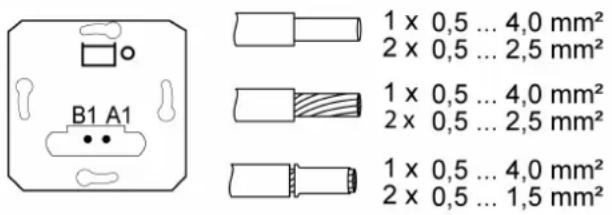
B1 A1 1 x 0,5 ... 4,0 mm² 2 x 0,5 ... 2,5 mm² 1 x 0,5 ... 4,0 mm² 2 x 0,5 ... 2,5 mm² 1 x 0,5 ... 4,0 mm² 2 x 0,5 ... 1,5 mm²Image 5: Clampable conductor cross-section for pulse insert
■ Note clampable conductor cross-sections automatic RMD (see figure 4) and pulse insert (see figure 5).
■ Mount automatic RMD (4) on DIN rail.
■ Connect automatic RMD (4), pulse insert (5) and push-button (6) according to connection diagram (Figure 2) or (Figure 3).
■ Fit pulse insert or push-button in an appliance box, pulse insert terminals must be at the bottom.
■ Install the cover frame and the cover.
■ If multiple circuit breakers supply dangerous voltages to the device or load, couple the circuit breakers or label them with a warning so that disconnection from the supply voltage is ensured.
■ Set run-on time and operating mode on automatic RMD, see "Operation".
■ Adjust the brightness threshold and sensitivity on the motion detector cover, see instructions for the respective cover.
When in combination with a pulse insert, not all functions on the motion detector can be used.
5 Technical data
Power unit for rail mounting, art. no.
1208REG
Rated voltage AC 230 V\~
Mains frequency 50 Hz
Power consumption approx. 1 W
Ambient temperature +5 ... +45 °C
Run-on time approx. 10 s ... 15 min
Tolerance ± 20 %
Control input A1
Current carrying capacity 40 mA
Switching voltage AC 250 V\~
Ohmic switching current 16A
Switch-on current 20 ms max. 165 A
Minimum switching current AC 100 mA
Connected load
Incandescent lamps 2300 W
HV halogen lamps 2300 W
HV-LED lamps typ. 400 W
Fluorescent lamps, uncompensated 1200 VA
Fluorescent lamps, parallel compensated 920 VA
Fluorescent lamps, duo circuit 2300 VA (140 F)
Electronic transformers 1500 W
Inductive transformers 1000 VA
Electronic ballast Type-dependent
Installation width 18 mm / 1 HP
Total line length
Power cable max. 100 m
Control cable max. 100 m
Pulse insert, art. no. 1708IE
Rated voltage AC 230 V\~
Mains frequency 50 Hz
Power consumption depending on the cover 0.25 ... 0.45 W
Current consumption approx. 2.8 mA
Ambient temperature -5 ... +45 °C
Pulse duration approx. 60 ms
Pulse stop approx. 8 s
6 Troubleshooting
Light switches on but not off
Cause 1: The overload protection of the control input has tripped on the automatic RMD, because too many pulse inserts or push-buttons are connected.
Reduce number of connected devices.
Cause 2: The overload protection of the control input has tripped on the automatic RMD, because the automatic RMD has been installed too close to an external heat source, e.g. a dimmer.
Check installation situation, ensure better cooling.
Light does not switch off.
Cause: Constant motion in detection field of motion detector cover.
Check installation situation of motion detector cover.
Reduce sensitivity on the motion detector cover (see instructions for the cover).
Replacing defective devices in systems with light management devices
Automatic RMD is defective.
The automatic RMD can be replaced one to one.
Light management pulse insert or cover is defective.
LB management covers and system inserts (1708IE) can only be used in combination in existing installations. (Observe current consumption)
7 Accessories
LB Management push-button 1-gang Art. no. ..1700..
LB Management motion detector 1.1 m Art. no. ..17180..
LB Management motion detector 1.1 m Art. no. ..17182..
LB Management motion detector 2.2 m Art. no. ..17280..
8 Warranty
The warranty is provided in accordance with statutory requirements via the specialist trade.
ALBRECHT JUNG GMBH & CO. KG
Volmestraße 1
58579 Schalksmühle
GERMANY
Telefon: +49 2355 806-0
Telefax: +49 2355 806-204
kundencenter@jung.de
www.jung.de