
Weldforce 250MST - Welding machine Weldclass - Free user manual and instructions
Find the device manual for free Weldforce 250MST Weldclass in PDF.


| Product Type | Welding Machine (MIG/MMA/TIG) |
| Model | Weldforce 250MST |
| Part Number | WC-250MST |
| Dimensions (L x W x H) | 620 x 260 x 490 mm |
| Weight | 22 kg |
| Power Supply | 240 V +/- 15% 50 Hz Single Phase |
| Factory Fitted Plug Rating | 15 A |
| Maximum Input Current | 38 A (with 20A supply: 39 A) |
| Output Terminals | Dinse 35-50 |
| Protection Class | IP23 |
| Welding Processes | MIG (GMAW/FCAW), Stick (MMA), Lift TIG (DC) |
| MIG Wire Sizes | 0.8, 0.9, 1.0, 1.2 mm |
| MIG Wire Spool Sizes | 200 mm (4.5/5 kg) and 300 mm (15 kg) |
| Stick Electrode Sizes | 1.6 – 4.0 mm |
| TIG Tungsten Sizes | 1.6 – 3.2 mm |
| MIG Welding Current Range | 20 – 250 A (depending on supply) |
| MIG Duty Cycle (at 40°C) | 200A @ 20%, 130A @ 60%, 100A @ 100% (15A supply) |
| Stick Welding Current Range | 20 – 180 A (depending on supply) |
| TIG Welding Current Range | 20 – 180 A (DC) |
| Wire Feed Speed | 2 – 20 m/min |
| Synergic MIG Programs | 28 programs for different wire/gas combinations |
| Control Panel | LCD screen, two rotary knobs, process selection |
| Special Functions | Soft Start, Inductance, Burnback, Post-Gas, Trigger Mode (2T/4T), Spot/Stitch, VRD, Hot Start, Arc Force |
| Cooling | Fan with thermal overload protection |
| Generator Use | Minimum 13 kVA (recommended 15 kVA for full output) |
| Maintenance | Clean ventilation slots, check cables, replace worn consumables |
| Safety Features | VRD (Voltage Reduction Device), thermal overload, IP23 rating |
| Accessories Included | MIG torch (BZL 25), earth clamp, gas hose, drive rollers, operating manual |
Frequently Asked Questions - Weldforce 250MST Weldclass
User questions about Weldforce 250MST Weldclass
0 question about this device. Answer the ones you know or ask your own.
Ask a new question about this device
Download the instructions for your Welding machine in PDF format for free! Find your manual Weldforce 250MST - Weldclass and take your electronic device back in hand. On this page are published all the documents necessary for the use of your device. Weldforce 250MST by Weldclass.
USER MANUAL Weldforce 250MST Weldclass
natural_image
Abstract geometric pattern with radial lines and a central star-like shape (no text or symbols)Weldclass
Be Outstanding
Weldforce 210MST & 250MST
Synergic MIG – Stick – TIG

natural_image
Technical line drawings of two electronic devices, one with a fan and button, the other with a front panel and control panel (no text or symbols)OPERATING INSTRUCTIONS
Edition 2.6
IMPORTANT!
To qualify for full 24 month warranty, you must register within 30 days of purchase. See inside for details.
Read these Operating Instructions Completely before attempting to use this machine. Save this manual and keep it handy for quick reference. Pay particular attention to the safety instructions we have provided for your protection. Contact your distributor if you do not fully understand anything in this manual.
Congratulations & thank you for choosing Weldclass!
The Weldforce range from Weldclass provides market leading value, features and durability.
Register Your Warranty Now
To qualify for an extended warranty, you must register within 30 days of purchase.
Full details on warranty period and terms can be found at www.weldclass.com.au/WarrantyInfo
Please register your warranty now by going to:

www.weldclass.com.au/weldforcewarranty
You will need;
a) A copy of your purchase invoice / receipt.
b) Your machine serial number which can be found on the technical data plate on the back of the machine, or on the outside of the box that your machine came in.
Satisfaction Guarantee
For full details on our satisfaction guarantee, refer to www.weldclass.com.au/mbg
Using Gasless MIG Wire?
Weldclass Platinum GL-11 is Australia's No.1 Gasless wire. Welders right across Australia & beyond rate Platinum GL-11 as the most user-friendly, smoothest running gasless wire on the market.
Talk to your Weldclass distributor today, or go to: www.Weldclass.com.au/GL-11

natural_image
Close-up of a metallic wire spool with visible blades and central hole (no text or symbols)Platinum GL-11
1 CONTENTS
1 CONTENTS....3
2 SPECIFICATIONS 7
2.1 210MST Specifications ....7
2.2 250MST Specifications....9
3 KNOW YOUR MACHINE....11
3.1 Machine Front....11
3.2 Machine Rear 11
3.3 Machine Side....11
3.4 Control Panel....12
3.5 LCD Readout....13
3.6 Symbols chart....14
4 CONTROLS EXPLAINED....16
4.1 Weld Process Selection....16
4.1.1 MIG Process: 16
4.1.2 Stick (MMA) & TIG Process: 16
4.2 MIG Synergic Program Selection....17
4.3 Function Selection....20
4.3.1 Soft-Start Adjustment (SYN/MAN) 22
4.3.2 Inductance (SYN/MAN)....22
4.3.3 Burnback Adjustment (SYN/MAN)....22
4.3.4 Post-Gas Time (SYN/MAN) 22
4.3.5 Trigger Function (SYN/MAN)....22
4.3.6 Spot/Stitch Weld Time (SYN/MAN)....22
4.3.7 Metric/Imperial (SYN/MAN) 22
4.3.8 Machine Software Information (SYN/MAN)....23
4.3.9 Plug/Power Supply Selection (SYN/MAN) [Weldforce 210MST only] ....23
4.3.10 Hot Start Adjustment (MMA)....23
4.3.11 Arc Force Adjustment (MMA)....23
4.4 VRD Function (Stick)....23
4.5 Factory Reset....24
4.6 Errors/Alarms 24
5 POWER SUPPLY 25
5.1 Electrical Connection....25
5.1.1 Weldforce 210MST....25
5.1.2 Weldforce 250MST....25
5.2 Extension Leads....25
5.3 Generator Use....26
5.3.1 Generator Size....26
5.3.2 Generator Quality & Warranty Limitations....26
5.3.3 3 Golden Rules of Generator use ....26
6 OPERATING ENVIRONMENT....27
6.1 Location....27
6.2 Ventilation....27
7 BASIC OPERATION....28
7.1 MIG Welding....28
7.1.1 Fitting Wire Spool....28
7.1.2 Loading Wire Feeder 30
7.1.3 Gasless Welding Setup 32
7.1.4 Gas MIG Welding Setup 33
7.1.5 Additional Setup for MIG welding with aluminium 34
7.1.6 Adjusting Settings for MIG Welding in Manual Mode (MAN)....34
7.1.7 Adjusting Settings for MIG Welding in Synergic (Auto) Mode (SYN)....34
7.2 Stick (MMA) Welding Operation 35
7.3 Lift TIG Operation....36
8 ACCESSORIES, SPARE PARTS & CIRCUIT DIAGRAMS....37
8.1 MIG Torch and Spares: 37
8.2 TIG Torch and Spares (Optional Extra): 38
8.3 Optional Accessories....39
8.4 Drive Rollers: 39
8.5 Machine Spare Parts: 40
8.6 Primary Schematic Circuit Diagram....44
9 CARE & MAINTENANCE....46
9.1 Keep your Welding Machine in Top Condition....46
9.2 Storing the Welder 46
10 GENERAL GUIDE TO WELDING 47
10.1 Duty Cycle Rating 47
10.2 Choosing a Welding Process – MIG, Stick or TIG?......47
10.2.1 The Stick (MMA) Process 47
10.2.2 The TIG Process....48
10.2.3 The MIG Process 48
0.3 Joint Preparations 49
11 MIG BASIC WELDING GUIDE....51
11.1 MIG Basic Welding Techniques ....51
11.2 Gas Metal Arc Welding (GMAW)....51
11.3 Flux Cored Arc Welding (FCAW) 51
11.4 Position of MIG Torch....52
11.5 Distance from the MIG Torch Nozzle to the Work Piece....52
11.6 Travel Speed 52
11.7 MIG Welding (GMAW) Variables....53
11.7.1 Preselected Variables....53
11.7.2 Primary Adjustable Variables....53
11.7.3 Secondary Adjustable Variables....53
11.8 Establishing the Arc and Making Weld Beads 55
11.9 MIG Voltage & Wire Speed Settings....55
11.9.1 Setting Wire Speed/Amperage 55
11.9.2 Setting Voltage....55
11.9.3 Changing to a different welding wire....55
11.9.4 How to determine correct Wire Speed/Voltage Setting 56
11.10 Suggested Settings for Typical MIG Applications 56
11.11 Welding wire Size Selection ....56
11.12 MIG Welding Troubleshooting....57
11.12.1 Porosity Problems....57
11.12.2 Wire Feed Problems....58
11.12.3 Weld Quality Problems 59
12 STICK (MMA) BASIC WELDING GUIDE....61
12.1 Size of Electrodes 61
12.2 Storage of Electrodes 61
12.3 Electrode Polarity....61
12.4 Effects of Stick (MMA) Welding on Various Materials....61
12.4.1 High Tensile and Alloy Steels....61
12.4.2 Manganese Steels....61
12.4.3 Cast Iron 61
12.5 Types of Electrodes 62
12.5.1 MILD STEEL: 62
12.5.2 CAST IRON:....62
12.5.3 STAINLESS STEEL: 62
12.6 Suggested Settings for Typical Stick (MMA) Applications 62
12.7 MMA Welding Techniques ....63
12.7.1 A Word for Beginners....63
12.7.2 The Welder....63
12.7.3 Striking the Arc....63
12.7.4 Arc Length....64
12.7.5 Rate of Travel 64
12.8 Making Welded Joints....65
12.8.1 Butt Welds....65
12.8.2 Fillet Welds....66
12.8.3 Vertical Welds....67
12.8.4 Overhead Welds....68
12.9 MMA (Stick) Troubleshooting....69
13 TIG BASIC WELDING GUIDE....71
13.1 TIG Electrode Selection and Preparation 71
13.1.1 Electrode Polarity....71
13.1.2 Preparing Tungsten for DC Electrode Negative (DCEN) Welding 72
13.1.3 Shielding Gas for TIG Welding....73
13.1.4 Typical TIG Welding Settings....73
13.2 TIG Welding Troubleshooting....74
14 KNOWLEDGE & RESOURCES....75
15 SAFETY....75
15.1 Store and Retain this Manual....75
15.2 Important Safety Information ....75
15.3 Welding Operation 75
15.4 Welding Safety Instructions & Warnings....77
15.4.1 Personal Safety....78
15.4.2 Arc Rays can Burn Eyes and Skin....78
15.4.3 Noise Can Damage Hearing 78
15.4.4 Work Environment Safety....79
15.4.5 Electricity Can Kill....79
15.4.6 Fumes And Gases....80
15.4.7 Fire & Explosive Risks....81
15.4.8 Sparks & Hot Metal....81
15.4.9 Gas Cylinders....82
16 WARRANTY....82
16.1 Warranty Information 82
2 SPECIFICATIONS
2.1 210MST Specifications

natural_image
Exterior view of a black welding torch with digital display and coiled cable (no visible text or symbols)| Description | Weldforce 210MST |
| Part Number | WC-210MST |
| Dimensions of Power Source (L x W x H) | 460 x 240 x 360mm |
| Weight of Power Source | 13kg |
| Standard | AS 60974.1 |
| Power Supply | 240V +/- 15% 50hz Single Phase(See further information under section 5 of this manual) |
| Factory Fitted Supply Plug Rating | 10A |
| Maximum Input Current ( I_1max ) | 32A |
| Output Terminals | DinseTM style 10-25 |
| Protection Class | IP23 |
| MIG Welding | |
| Spool Size | 100mm (1kg) & 200mm (4.5kg or 5kg) |
| MIG Wire Sizes | 0.6, 0.8, 0.9, 1.0mm |
| Stick (MMA) Welding | |
| MMA Electrode Size | 1.6 – 3.2mm |
| TIG Welding | |
| TIG Tungsten Size | 1.6 – 2.4mm |
Table 1
| This table applies when utilizing '15A' power supply mode* (Refer to 5.1.1.1)*If using on 15A power supply15A plug should be installed by a qualified person (i.e. licensed electrician) | |
| Effective Input Current ( I_eff ) | 15A |
| Maximum Input Current ( I_1max ) | 32A |
| MIG Welding | |
| Welding Current Output | 20 – 180A (max 210A) |
| Welding Voltage Output | 15 – 23V |
| Wire Feed Speed (m/min) | 1.5 – 16.5 |
| Duty Cycle | 180A / 23.0V @ 20%100A / 19.0V @ 60%80A / 18.0V @ 100% |
| Nominal Open Circuit Voltage U_o | 78V |
| Stick (MMA) Welding | |
| Welding Current Output | 20 – 150A |
| Duty Cycle | 150A / 26.0V @ 30%100A / 24.0V @ 60%80A / 23.2V @ 100% |
| Nominal Open Circuit Voltage U_o | VRD off 78V / VRD on 15V |
| TIG Welding | |
| Welding Current Output | 20 – 150A |
| Duty Cycle | 150A / 16.0V @ 30%100A / 14.0V @ 60%80A / 13.2V @ 100% |
| Nominal Open Circuit Voltage U_o | 78V |
Table 2
| This table applies when utilizing '10A' power supply mode** (Refer to 5.1.1.1) **Machine output on 10A mode is limited / restricted so that effective power draw (I1eff) does not exceed 10A, for safe and compliant operation. | |
| Effective Input Current ( I_1eff ) | 10A |
| Maximum Input Current ( I_1max ) | 25A |
| MIG Welding | |
| Welding Current Output | 20 – 150A |
| Welding Voltage Output | 15 – 21V |
| Wire Feed Speed (m/min) | 1.5 – 16.5 |
| Duty Cycle | 150A / 21.5V @ 20%100A / 19.0V @ 60%80A / 18.0V @ 100% |
| Nominal Open Circuit Voltage U_o | 78V |
| Stick (MMA) Welding | |
| Welding Current Output | 20 – 130A |
| Duty Cycle | 130A / 25.2V @ 20%100A / 24V @ 60%80A / 23.2V @ 100% |
| Nominal Open Circuit Voltage U_o | VRD on 65V / VRD off 15V |
| TIG Welding | |
| Welding Current Output | 20 – 130A |
| Duty Cycle | 130A / 15.2V @ 35%100A / 14.0V @ 60%80A / 13.2V @ 100% |
| Nominal Open Circuit Voltage U_o | 78V |
Table 3
2.2 250MST Specifications
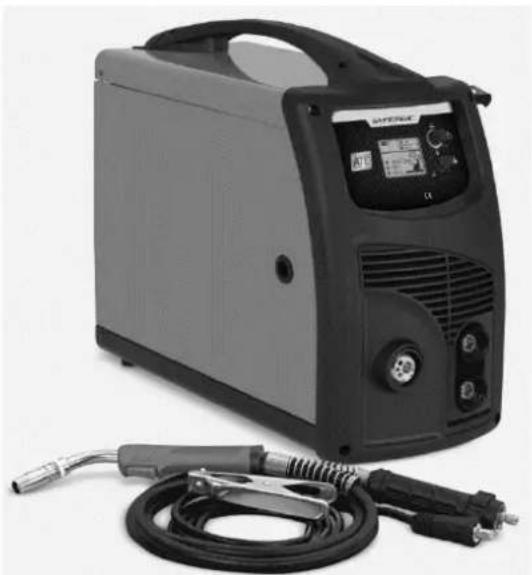
natural_image
Exterior view of a modern electric welding machine with attached welding torch and power cord (no visible text or symbols)| Description | Weldforce 250MST |
| Part Number | WC-250MST |
| Dimensions of Power Source (L x W x H) | 620 x 260 x 490mm |
| Weight of Power Source | 22kg |
| Standard | AS 60974.1 |
| Power Supply | 240V +/- 15% 50hz Single Phase(See further information under section 5 of this manual) |
| Factory Fitted Supply Plug Rating | 15A |
| Maximum Input Current ( I_1max ) | 38A |
| Output Terminals | DinseTM style 35-50 |
| Protection Class | IP23 |
| MIG Welding | |
| Spool Size | 200mm (4.5kg or 5kg) & 300mm (15kg) |
| MIG Wire Sizes | 0.8, 0.9, 1.0, 1.2mm |
| Stick (MMA) Welding | |
| MMA Electrode Size | 1.6 – 4.0mm |
| TIG Welding | |
| TIG Tungsten Size | 1.6 – 3.2mm |
| This table applies when utilizing ‘15A’ power supply * (Refer to 5.1.1.1)*Machine is factory fitted with 15A plug for commissioning purposes only. Whilst 15A plug is fitted, operator must ensure output and duty cycle limits indicated below are not exceeded. | |
| Effective Input Current ( I_eff ) | 15A |
| Maximum Input Current ( I_max ) | 34A |
| MIG Welding | |
| Welding Current Output | 20 – 200A |
| Welding Voltage Output | 15 – 23V |
| Duty Cycle | 200A / 24.0V @ 20%130A / 20.5V @ 60%100A / 19.0V @ 100% |
| Nominal Open Circuit Voltage U_o | 60V |
| Stick (MMA) Welding | |
| Welding Current Output | 20 – 160A |
| Duty Cycle | 160A / 26.4V @ 25%110A / 24.4V @ 60%90A / 23.6V @ 100% |
| Nominal Open Circuit Voltage U_o | VRD off 60V / VRD on 15V |
| TIG Welding | |
| Welding Current Output | 20 – 180A |
| Duty Cycle | 180A / 17.2V @ 25%130A / 15.2V @ 60%100A / 14.0V @ 100% |
| Nominal Open Circuit Voltage U_o | 60V |
Table 4
Table 5
| This table applies when utilizing ‘20A’ power supply * (Refer to 5.1.1.1)*This table applies if machine is connected to 20A power supply & 20A plug is fitted. Plug should only be installed by a qualified person (such as a licensed electrician). | |
| Effective Input Current ( I_eff ) | 18A |
| Maximum Input Current ( I_1max ) | 39A |
| MIG Welding | |
| Welding Current Output | 20 – 220A (max 250A) |
| Welding Voltage Output | 15 – 25V |
| Wire Feed Speed (m/min) | 2-20m/min |
| Duty Cycle | 220A / 25.0V @ 20%130A / 20.5V @ 60%100A / 19.0V @ 100% |
| Nominal Open Circuit Voltage U_o | 60V |
| Stick (MMA) Welding | |
| Welding Current Output | 20 – 180A |
| Duty Cycle | 180A / 27.2V @ 25%130A / 25.2V @ 60%100A / 24.0V @ 100% |
| Nominal Open Circuit Voltage U_o | VRD off 60V / VRD on 15V |
| TIG Welding | |
| Welding Current Output | 20 – 180A |
| Duty Cycle | 180A / 17.2V @ 25%130A / 15.2V @ 60%100A / 14.0V @ 100% |
| Nominal Open Circuit Voltage U_o | 60V |
Table 6
3 KNOW YOUR MACHINE
3.1 Machine Front
- Control panel
- MIG Torch
- Earth Clamp
- MIG Torch Euro Connector
- Positive Dinse Socket
- Negative Dinse Socket
- MIG Torch Polarity Change Tail
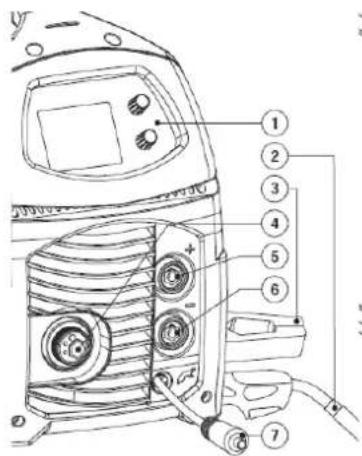
Weldforce 210MST
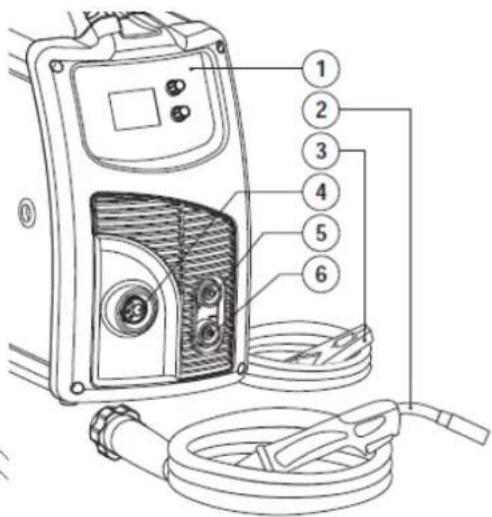
Figure 1
Weldforce 250MST
3.2 Machine Rear
- Mains Power Switch
- Gas Inlet Connection
- 240V AC Mains Power Input Lead
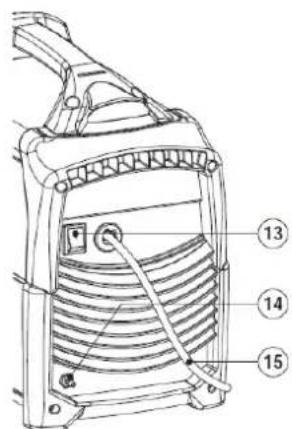
Weldforce 210MST
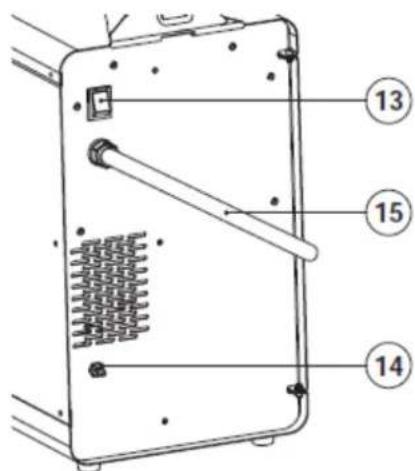
Figure 2
Weldforce 250MST
3.3 Machine Side
- Positive (+) MIG Torch Power Connection
- Negative (-) MIG Torch Power Connection

Figure 3
3.4 Control Panel
- Top Selection Knob
- Bottom Selection Knob
- LCD Screen
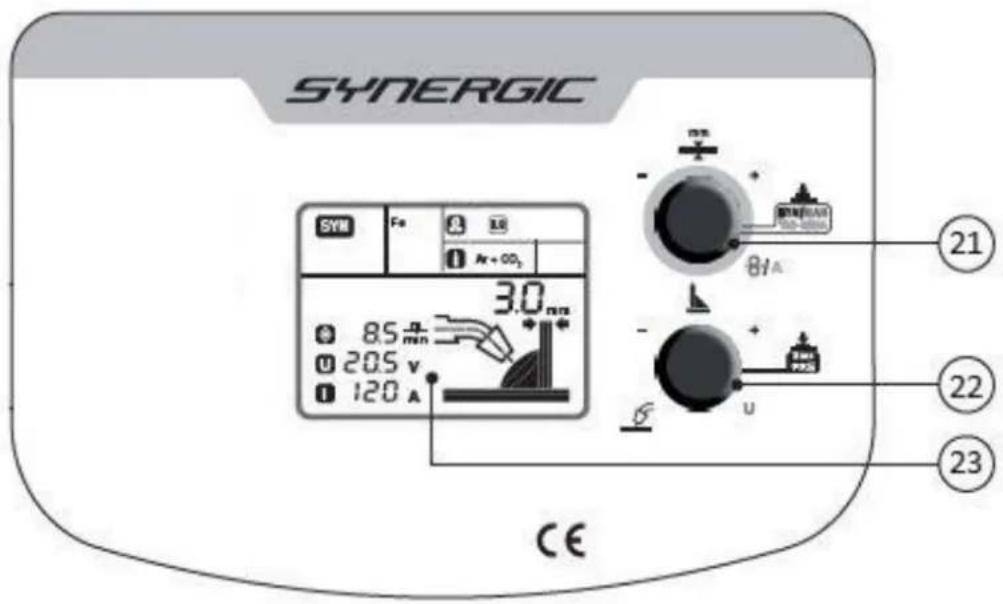
Figure 4
3.5 LCD Readout
- Welding Process Indicator
- Wire Type Indicator
- Wire Size Indicator
- Gas Type Indicator
- Material Thickness Setting
- Material Thickness Indicator
- Inductance Setting Indicator
- Amperage Setting
- Voltage Setting
- Wire Speed Setting
- Soft Start Indicator
- Inductance Indicator
- Burnback Indicator
- Post Gas Indicator

Figure 5

Figure 6
3.6 Symbols chart
| [IMAGE] | Power On |
| [GK0D] | Power Off |
 | Power On Indication |
 | Over Temperature Fault Indicator |
 | Caution / Hazard / Fault |
 | Read Instruction Manual |
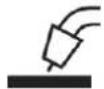 | MIG Function |
 | TIG Function |
 | Stick/MMA Function |
 | Material Thickness |
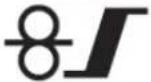
 | Wire Feed Speed |
 | Soft Start |
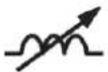 | Inductance Control |
 | Inductance Control |
 | Burnback Control |
 | Post Gas Control |
 | Torch Trigger Mode |
 | Spot Welding Mode |
 | Amperage (Current) |
 | Voltage |
 | Manual MIG Welding Mode |
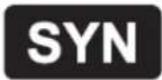 | Synergic (Auto) MIG Welding Mode |
 | Wire Diameter Size |
 | Shielding Gas Type |
 | Electrical Hazard |
 | Toxic Gas/Fume Hazard |
 | Explosive Hazard |
 | Eye Injury Hazard |
 | Pacemaker Interference Warning |
 | Do not suspend from handle |
 | Radiation Hazard |
 | Single phase Inverter power source DC |
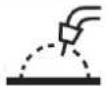 | MIG (GMAW) Function |
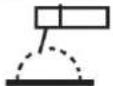 | Stick/MMA (SMAW) Function |
 | TIG (GTAW)Function |
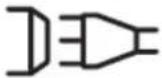 | Power SupplyConnection |
 | Single Phase |
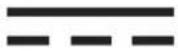 | Direct Current (DC) |
 | Negative |
| [74D] | Positive |
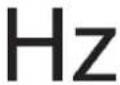 | Hertz (cycles/sec) |
 | Duty Cycle |
Table 7
4 CONTROLS EXPLAINED
4.1 Weld Process Selection
- Press and hold the 'Top Selection Knob' (21) until the current Welding Process Indicator Lights (24) beings flashing.
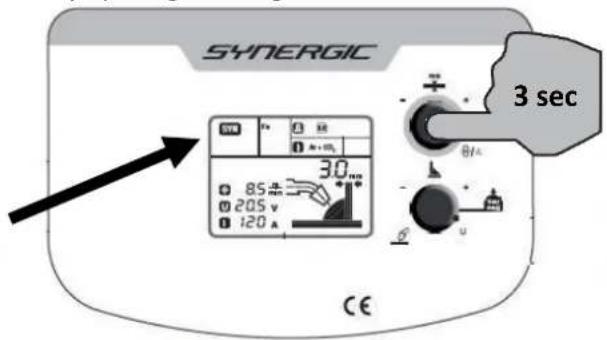
Figure 7
- Rotate the 'Bottom Selection Knob' (22) until the desired Welding Process Indicator Light (24) is flashing.
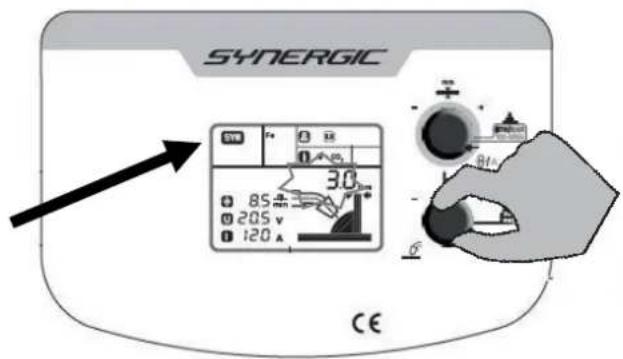
Figure 8
- Press the 'Top Selection Knob' (21) to select the process.
4.1.1 MIG Process:
In Manual MIG mode (MAN) – the 'Top Selection Knob' (21) adjusts wire speed and the 'Bottom Selection Knob' (22) adjusts the voltage.
In Synergic (Auto) MIG mode (SYN) – the 'Top Selection Knob' (21) adjusts material thickness and the 'Bottom Selection Knob' (22) adjusts the inductance.
4.1.2 Stick (MMA) & TIG Process:
The 'Top Selection Knob' (21) amperage and the 'Bottom Selection Knob' (22) is disabled.
4.2 MIG Synergic Program Selection
(Only available in SYN process mode)
- Ensure Synergic MIG mode is selected
- Press and hold the 'Bottom Selection Knob' (22) for 3 seconds until the program number is displayed on the screen.

Figure 9
- Rotate the 'Bottom Selection Knob' (22) until the desired Synergic MIG program is displayed.
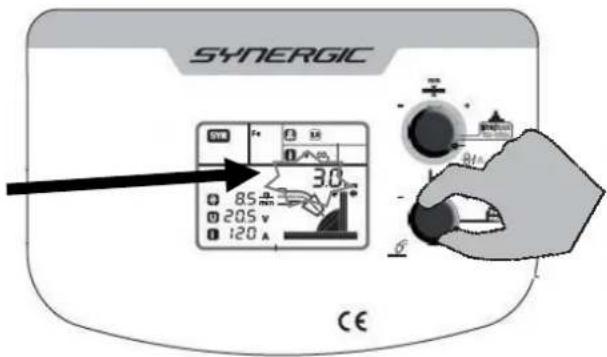
Figure 10
- Press the 'Bottom Selection Knob' (22) to select the program – see below.
Weldforce 210MST
| MIG Synergic Program Chart | |||
| Program | Wire Size | Wire Type | Shielding Gas |
| 1 | 0.6mm | Solid Steel (Fe) | Mixed (Argon + CO2) |
| 2 | 0.8mm | ||
| 3 | 0.9mm | ||
| 4 | 1.0mm | ||
| 5 | 0.6mm | CO2 | |
| 6 | 0.8mm | ||
| 7 | 0.9mm | ||
| 8 | 1.0mm | ||
| 9 | 0.8mm | Stainless Steel (Ss) | Argon + O2 |
| 10 | 0.9mm | ||
| 11 | 1.0mm | ||
| 12 | 0.8mm | Stainless Steel (Ss) | Argon + CO2 |
| 13 | 0.9mm | ||
| 14 | 1.0mm | ||
| 15 | 0.8mm | Aluminium | Argon |
| 16 | 0.9mm | ||
| 17 | 1.0mm | ||
| 18 | 0.8mm | Gasless Flux Cored Steel | N/A |
| 19 | 0.9mm | ||
| 20 | 1.2mm | ||
| 21 | 0.8mm | Aluminium Bronze (CuAl) | Argon (Ar) |
| 22 | 0.9mm | ||
| 23 | 1.0mm | ||
| 24 | 0.8mm | Silicone Bronze (CuSi) | Argon (Ar) |
| 25 | 0.9mm | ||
| 26 | 1.0mm | ||
Table 8
Weldforce 250MST
| MIG Synergic Program Chart | |||
| Program | Wire Size | Wire Type | Gas |
| 1 | 0.6 | Solid Steel (Fe) | Argon + CO2 Mixed |
| 2 | 0.8 | ||
| 3 | 0.9 | ||
| 4 | 1.0 | ||
| 5 | 1.2 | ||
| 6 | 0.6 | CO2 | |
| 7 | 0.8 | ||
| 8 | 0.9 | ||
| 9 | 1.0 | ||
| 10 | 1.2 | ||
| 11 | 0.8 | Stainless Steel (Ss) | Argon + O2 |
| 12 | 0.9 | ||
| 13 | 1.0 | ||
| 14 | 0.8 | Argon + CO2 | |
| 15 | 0.9 | ||
| 16 | 1.0 | ||
| 17 | 0.8 | Aluminium | Argon (Ar) |
| 18 | 0.9 | ||
| 19 | 1.0 | ||
| 20 | 0.8 | Gasless Flux Cored Steel | N/A |
| 21 | 0.9 | ||
| 22 | 1.2 | ||
| 23 | 0.8 | Aluminium Bronze (CuAl) | Argon (Ar) |
| 24 | 0.9 | ||
| 25 | 1.0 | ||
| 26 | 0.8 | Silicone Bronze (CuSi) | Argon (Ar) |
| 27 | 0.9 | ||
| 28 | 1.0 | ||
Table 9
4.3 Function Selection
- Press and hold both the 'Top Selection Knob' (21) and the 'Bottom Selection Knob' (22) for 3 seconds until the Menu number is displayed on the screen.

Figure 11
- Rotate the 'Bottom Selection Knob' (22) until the desired Menu/Function number is displayed.

Figure 12
- Press the 'Bottom Selection Knob' (22) to select desired Menu/Function.
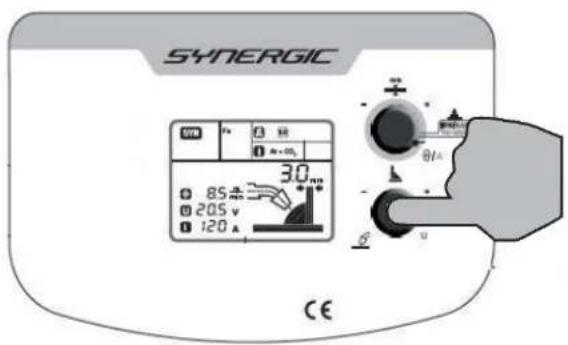
Figure 13
- Rotate the 'Bottom Selection Knob' (22) to adjust the Function Setting.

Figure 14
- Press the 'Bottom Selection Knob' (22) to confirm the setting.

Figure 15
| Special Functions | ||
| 1. Press & hold Bottom & Top Knobs together for 3 sec2. Rotate Bottom Knob until desired Menu # & Symbol displays3. Press Bottom Knob to select (repeat if required)4. Rotate Bottom Knob to adjust5. Press Bottom Knob to confirm | ||
| Menu # | Symbol | Description |
| POWER INPUT MODE (Must be in MIG mode) | ||
| 5 | PLG | Plug/Power Supply Selection (10A/15A) |
| MIG FUNCTIONS | ||
| 1 | Soft Start Adjustment | |
| Inductance | ||
| Burnback Adjustment | ||
| Post-Gas Time (sec) | ||
| 2 | Trigger Function (2T/4T) | |
| Spot Weld Time (sec) | ||
| 3 | Metric/Imperial Selection | |
| 4 | Inf | Machine Software Information |
| STICK (MMA) FUNCTIONS (Steps 2 & 3 above are not applicable) | ||
| Hot | Hot Start Adjustment | |
| RrC | Arc Force Adjustment | |
Table 10
4.3.1 Soft-Start Adjustment (SYN/MAN)
Soft-Start setting is adjustable on a scale -10 to +10. Sometimes known as 'hot start' or 'slow feed'. When a weld is started, the workpiece and the wire will be 'cold' compared to welding temperature. This can cause an uneven and poor start to the weld using the voltage and wire feed speed selected as optimal once the arc is established. This setting slows the wire speed down at the start of the weld which improves the weld starting performance. If you find the wire 'bumping' the workpiece before the arc is fully established try increasing Soft-Start setting.
4.3.2 Inductance (SYN/MAN)
Inductance setting is adjustable from -10 to +10.
This setting changes the MIG waveform to simulate changing the inductance of the welding circuit. Inductance controls the rate of the current rise and fall as the welding wire contacts the workpiece (known as a short circuit).
More inductance increases the short circuit time and decreases the short circuit frequency rate. This causes a wider and more penetrating arc, often with better edge wetting, useful for thicker weld joints.
Less inductance will create a narrow more focused arc. This effect can also be used to fine tune the arc to produce less spatter. This is often effective on thin materials.
Wire speed, wire size and type, shielding gas will all change the effect that the inductance setting has on the welding arc. Inductance change will have no practical effect on MIG spray transfer process (as opposed to short circuit process).
4.3.3 Burnback Adjustment (SYN/MAN)
Burn-back setting is adjustable on a scale 0 to 10. Burnback adjustment controls the short period of time that the wire feed will continue to run for after the main welding current stops. If the wire feed and current is stopped at exactly the same time, the wire will still be hot and will 'burn' back and stick to the welding tip. If this problem is happening, increasing the burnback adjustment will cause the wire feeder to run for longer after the arc has stopped. If the burnback adjustment is excessive, after a weld has stopped, the operator will be left with excess 'stick out' wire length from the torch tip that will require correcting before starting the next weld.
4.3.4 Post-Gas Time (SYN/MAN)
Post-Gas (or Post-Flow) setting is adjustable from 0 – 10 seconds. This controls the period of time the shielding gas continues to flow after the arc has stopped. This protects the weld area from contamination while it is still hot enough to react with atmospheric gases, after the weld is finished/trigger is released. In most common welding applications post-gas is not critical and can be set to 0.
4.3.5 Trigger Function (SYN/MAN)
2T stands for Two Touch or 'Standard Trigger' mode. In this mode the trigger is pulled and held on to start welding, when the trigger is released, the welding stops.
4T stands for Four Touch or 'Latching' mode. The trigger is pulled once and released to start welding and then pulled and released again to stop the welding. This function is useful for longer welds as the trigger is not required to be held on continuously and thus reduces operator fatigue.
4.3.6 Spot/Stitch Weld Time (SYN/MAN)
This setting will ONLY be accessible when Trigger Mode is set to 'Spot Welding'.
Spot/Stitch Weld Time setting is adjustable from 0 – 5 seconds. This controls the length of time for the weld. When the trigger is pulled the machine will weld for the set time and then stop. This is great for producing very precise weld size or ensuring consistent weld size/length when spot welding, tacking or stitch welding.
4.3.7 Metric/Imperial (SYN/MAN)
This changes the display settings to either Metric or Imperial language.
4.3.8 Machine Software Information (SYN/MAN)
This is information displayed for service technician reference. It shows the version of software installed on the machine and other technical information.
4.3.9 Plug/Power Supply Selection (SYN/MAN) [Weldforce 210MST only]
This changes the power supply mode of the machine.
“10A” mode is suitable for running on a 10A rated power plug. However, the maximum output of the machine will be restricted in this mode.
“15” mode will enable full output settings. However, to use machine in this mode the power supply plug must be upgraded to 15A rated plug by a licensed electrician.
4.3.10 Hot Start Adjustment (MMA)
Hot Start setting is adjustable from 0 – 100%. Hot start provides extra power when the weld starts to counteract the high resistance of the electrode and workpiece as the arc is started. It makes igniting the electrode easier and prevents it from sticking when cold. Default setting is 50%.
4.3.11 Arc Force Adjustment (MMA)
Arc Force setting is adjustable from 0 – 100%. Sometimes called 'Dig' or 'Arc Control'. A Stick welder is designed to produce constant output current (CC). This means with different types of electrode and arc length; the welding voltage varies to keep the current constant. This can cause instability in some welding conditions as Stick welding electrodes will have a minimum voltage they can operate with and still have a stable arc.
Arc Force control boosts the welding power if its senses the welding voltage is getting too low. The higher the arc force adjustment, the higher the minimum voltage that the power source will allow. This effect will also cause the welding current to increase. 0 is Arc Force off, 100 is maximum Arc Force. This is practically useful for electrode types that have a higher operating voltage requirement or joint types that require a short arc length such as out of position welds. Default setting is 50%.
4.4 VRD Function (Stick)
This function only applies to Stick (MMA) mode.
VRD function reduces the welding machines' open circuit voltage (OCV, or no-load voltage) from 78V to a much safer level of approximately 15V. OCV is the voltage measured across the positive and negative terminals when welding is not in progress.
The VRD function will de-activate to allow full welding power/voltage when the operator strikes an arc and the resistance between the electrode and work piece is less than 200 Ohms (i.e. metal to metal contact).
When the VRD function is active, "VRD" will be displayed on the LCD screen.
4.5 Factory Reset
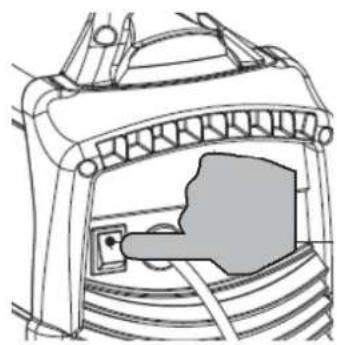
A reset back to factory default settings can be performed by pressing and hold both the 'Top Selection Knob' (21) and the 'Bottom Selection Knob' (22) whilst turning the machine on using the Mains Power Switch (11).

Figure 16
natural_image
Technical line drawing of a mechanical component or bracket with no visible text or symbols4.6 Errors/Alarms
If the machine detects an error it will display a given code on the LCD Screen as follows.
ALARM 01 and “!”: Welding primary thermal/over temperature error. This is a safety device to protect the machine from overheating. The machine will not weld until the machine has cooled down sufficiently. Leave machine turned on so the cooling system continues to cool the internal components.
ALARM 02 and “!”: Welding secondary thermal/over temperature error. This is a safety device to protect the machine from overheating. The machine will not weld until the machine has cooled down sufficiently. Leave machine turned on so the cooling system continues to cool the internal components.
ALARM 03: Overvoltage. Check the voltage of the power supply to the machine.
ALARM 04: Undervoltage. Check the voltage of the power supply to the machine.
ALARM 10: Welding circuit overcurrent. Make sure the feeder speed and/or welding current are not too high.
ALARM 11: Torch and earth short-circuit. Make sure the welding circuit has not short-circuited.
ALARM 13: No internal communication. If the alarm continues, contact an authorised repair centre.
ALARM 18: Auxiliary voltage fault. If the alarm continues, contact an authorised repair centre.
5 POWER SUPPLY
5.1 Electrical Connection
5.1.1 Weldforce 210MST
The Weldforce 210MST is factory-fitted with a 10A 240V plug for commissioning purposes. Whilst this 10A plug is fitted the operator must ensure that the machine is set on 10A mode and ensure that output & duty cycle limits indicated in Table 3 are not exceeded.
If full output is required (as per Table 2), 15A power supply mode can be selected, to allow use on 15A 240V power supply. If used on 15A power supply, the machine should be fitted with a 15A 240V plug.
Follow the procedure below for setting machine to 10A or 15A Output Mode;
5.1.1.1 Setting machine to 10A or 15A Input Mode
- Ensure machine is in MIG mode (SYN or MAN - refer to 4.1)
- Press and hold both the 'Top Selection Knob' (21) and the 'Bottom Selection Knob' (22) together for 3 seconds until the Menu number is displayed on the screen.
- Rotate the 'Bottom Selection Knob' (22) until Menu #5 [PLG] is displayed.
- Press the 'Bottom Selection Knob' (22). The 'PLG' Function Indicator should flash.
- Rotate the 'Bottom Selection Knob' (22) to choose 10A or 15A Mode.
- Press the 'Bottom Selection Knob' (22) to confirm the setting.
5.1.2 Weldforce 250MST
The Weldforce 250MST is factory-fitted with a 15A 240V plug for commissioning purposes. Whilst this 15A plug is fitted the operator must ensure that the operation of the machine does not exceed the output and duty cycle limits as per Table 5.
If full output is required (as per Table 6), machine must be connected to a 20A 240V power supply and the machine should be fitted with a 20A 240V plug.
WARNING! These machines must be electrically connected by a qualified electrical trades-person. Personal injury or death or damage to the machine may result from incorrectly connected power supply or plug.
5.2 Extension Leads
If an extension cord must be used, it should be minimum cable core size 2.5mm ^2 .
Using extension leads of over 30m is not recommended.
5.3 Generator Use
This machine is designed with generator use in mind and incorporates wide voltage tolerance and intelligent voltage sensing technology to provide maximum protection from power fluctuations that can occur with motor generators.
5.3.1 Generator Size
Weldforce 210MST: Generator size should be not less than 7kva, preferably 8kva or more. A 7kVa generator will not provide enough power to enable full output and duty cycle, however it should provide sufficient power to enable MIG welding up to approximately 150A. This means it should successfully weld with 0.9mm gasless wire and material thickness of up to approximately 4-5mm steel.
To enable full output and duty cycle, minimum recommended generator size is 10kVa.
Weldforce 250MST: Generator size should be not less than 13kva. A 13kVa generator will not provide enough power to enable full output and duty cycle of this welder. However, it should provide sufficient power to enable MIG welding up to approximately 200A.
To enable full output and duty cycle of this welder, minimum recommended generator size is 15kVa or larger.
5.3.2 Generator Quality & Warranty Limitations
Avoid using poor, low quality generators as these have the greatest risk of power spikes etc. A suitable quality generator should have a THD (total harmonic distortion) rating of no more than 6%. Most reputable generator suppliers will be able to specify the THD ratings on their product.
Any damage caused by poor quality generator power supply or incorrect use is not covered under warranty.
5.3.3 3 Golden Rules of Generator use
When running an inverter welder off a generator there are 3 VERY IMPORTANT Golden Rules that MUST be followed:
- Do NOT plug welder into generator until AFTER generator has been started up and is running smoothly
- UNPLUG welder from generator BEFORE shutting generator down/turning generator off
- NEVER let your generator run out of fuel whilst the welder is plugged in.
Following these Golden Rules will significantly reduce the risk of any damage resulting from generator power supply.
For more information on using generator power, go to: weldclass.com.au/generator
6 OPERATING ENVIRONMENT
6.1 Location
The machine has electrical components and control circuit boards which may be damaged by excessive moisture, dust and dirt, so a clean and dry operating environment is important for reliable product life.
The enclosure design of this power source meets the requirements of IP23S as outlined in AS 60529. This provides adequate protection against solid objects (greater than 12mm), and direct protection from vertical drops. Under no circumstances should the unit be operated or connected in a micro environment that will exceed the stated conditions. For further information please refer to AS 60529.
6.2 Ventilation
Adequate ventilation is required to provide proper cooling for the machine. Ensure that the machine is placed on a stable level surface where clean cool air can easily flow through the unit.
7 BASIC OPERATION
7.1 MIG Welding
WARNING! Before changing the feed roller or wire spool, ensure that the mains power is switched off.
7.1.1 Fitting Wire Spool
1. Weldforce 210MST:
a. Open the wire feeder compartment door.
b. Remove the retaining Nut & Spring
c. Remove Flange/Spacer
d. Fit the wire spool to the Spool Post, ensuring that the wire spool is positioned so that the wire will exit from bottom of spool.
e. Replace Flange/Spacer. (Note orientation of spacer should be as per Figure 17 below, depending on size of spool).
f. Replace retaining Nut & Spring
g. Adjust Tension so that the spool can rotate freely, but does not continue to rotate/free-wheel once the wire feed stops (causing wire to unravel).
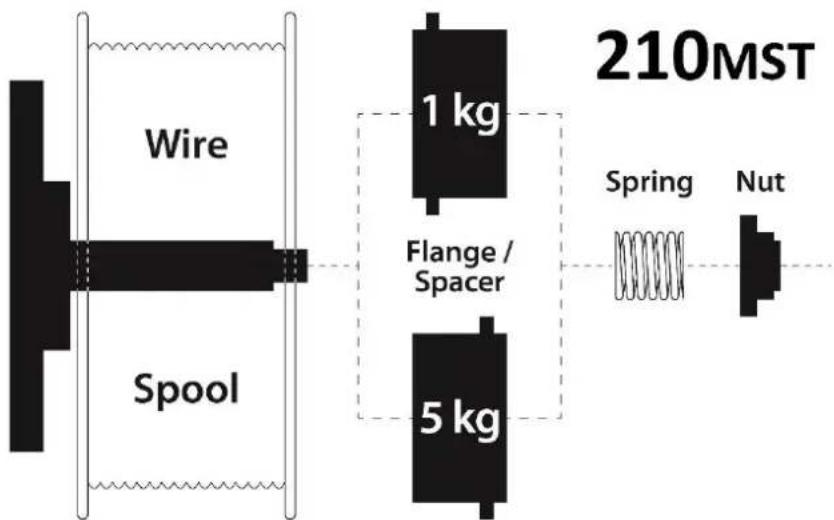
flowchart
graph LR
    A["Wire"] --> B["Spool"]
    B --> C["1 kg"]
    B --> D["5 kg"]
    C --> E["Spring"]
    D --> F["Nut"]
    style A fill:#f9f,stroke:#333
    style B fill:#ccf,stroke:#333
    style C fill:#cfc,stroke:#333
    style D fill:#cfc,stroke:#333
    style E fill:#fcc,stroke:#333
    style F fill:#fcc,stroke:#333
Figure 17
2. Weldforce 250MST
a. Open the wire feeder compartment door.
b. Remove the retaining Nut
c. Remove Flange/Spacer (if fitted)
d. Fit the wire spool to the Spool Post, ensuring that the wire spool is positioned so that the wire will exit from bottom of spool.
e. If using D200/5kg spools - Replace Flange/Spacer(s). As some 5kg spools vary in width, additional thin spacer is supplied with machine, to be fitted or removed as required.
f. Replace retaining Nut
g. Adjust Tension with Hex Key so that the spool can rotate freely, but does not continue to rotate/free-wheel once the wire feed stops (causing wire to unravel).

7.1.2 Loading Wire Feeder
-
Release the Wire Feed Tension Arm by pivoting the Tension Lever towards you from the vertical 'locked' position.
-
Remove Drive Roller Retaining Cap & Drive Roller
-
Check the wire Drive Roller groove matches the selected MIG wire type and size. The drive roller will have two different sized grooves; the size of the groove in use is stamped on the side of the drive roller. For flux cored 'soft' wire, such as that used in gasless MIG welding, the drive roller groove has a serrated profile (known as knurled). For solid 'hard' MIG wire, the drive roller groove used has a 'v' shaped profile. For Aluminum MIG wire, the drive roller required has a 'U' shaped groove.
-
Fit correct drive roller & replace retaining cap
-
Manually feed the wire through the Wire Inlet Guide, through the Drive Roller groove and into the Wire Outlet Tube.
-
Ensuring that the wire is correctly seated in the drive roller groove, replace the Wire Feed Tension Arm and lock it into place by pivoting the Wire Feed Tension Lever back to the vertical position.
-
Adjusting wire feed tension by winding the Tension Lever Knob. Clockwise will increase tension, anticlockwise will decrease drive tension.
TIP! Ideal tension is as little as possible, while maintaining a consistent wire feed with no drive roller slippage.
Check all other causes of excess wire feeding friction causing slippage first, such as; incorrect/worn drive roller, worn/damaged torch consumables, blocked/damaged torch wire guide liner, before increasing wire feed tension. There is a number scale on the Wire Feed Tension Adjustment Lever to indicate the adjustment position. The higher the number indicated, the higher the tension that is set.
WARNING! The use of excessive feed tension will cause rapid and premature wear of the drive roller, the support bearing and the drive motor/gearbox.
-
Connect the MIG Torch to the MIG torch Euro Connector on the front of the machine. Secure by firmly hand tightening the threaded collar on the MIG Torch connector.
-
Check that the correct matching MIG wire, drive roller and MIG torch tip are fitted.
-
Connect the machine to suitable mains power using the mains input power lead. Switch the mains power switch to 'I' (On) to power up the machine.
-
Set welding process to 'MAN' or 'SYN' (refer to 4.1)
-
You are now ready to feed the wire through the torch. With the wire feeder cover open, pull the trigger on the MIG torch to check that the wire is feeding smoothly through the feeder and into the torch.
-
Remove the contact tip from the torch and lay the torch out as straight as possible.
-
Pull the trigger on the torch until the wire feeds out through the end of the MIG torch.
-
Replace the tip on the MIG torch and trim off any excess wire.
WARNING! DO NOT touch the wire while it is feeding as it is electrically live and you risk electrocution or injury.
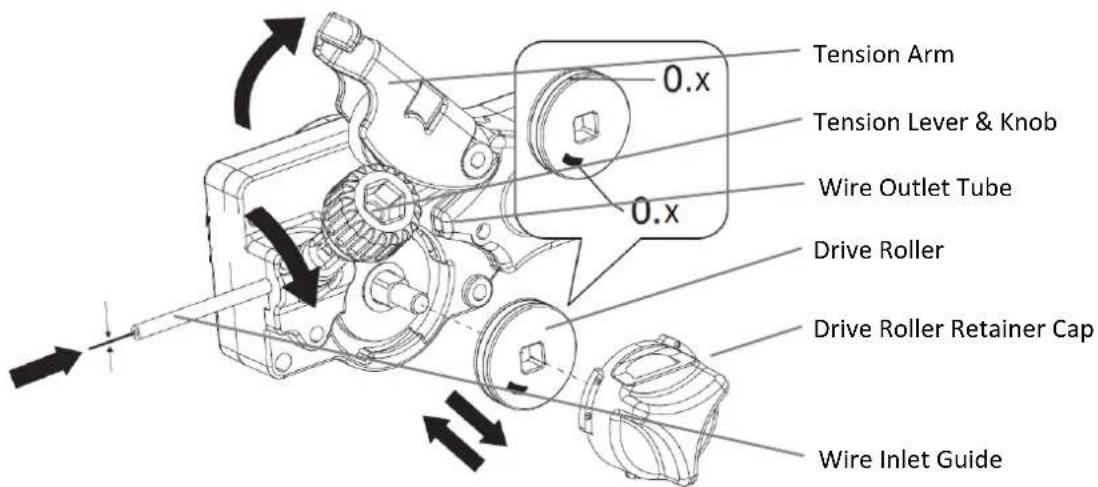
Weldforce 210MST Figure 18
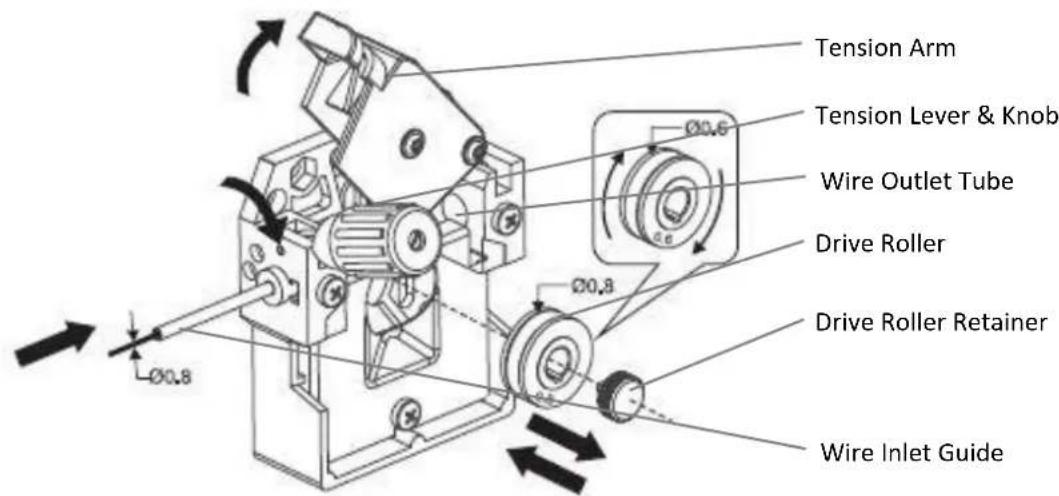
Weldforce 250MST Figure 19
7.1.3 Gasless Welding Setup
- Connect the earth cable quick connector to the Positive Dinse Socket.
- Connect the earth clamp to the work piece. Contact with the work piece must be firm contact with clean, bare metal, with no corrosion, paint or scale at the contact point.
- Connect the MIG Torch Polarity Change Tail to the Negative Dinse Socket (for 210MST) or Negative Torch Terminal (260MST).
Note: if this connection is not made, there will be no electrical connection to the welding torch!

natural_image
Diagram showing cable connections and a battery terminal with polarity indicators (no text or symbols)Weldforce 210MST
Figure 20
Weldforce 250MST
7.1.4 Gas MIG Welding Setup
NOTE: Gas MIG welding will require a gas cylinder. (Argon mix or CO2)
- Connect the earth cable quick connector to the negative welding power output socket.
- Connect the earth clamp to the work piece. Contact with the work piece must be firm contact with clean, bare metal, with no corrosion, paint or scale at the contact point.
-
Connect the MIG Torch Polarity Change Tail to the Positive Dinse Socket (210MST) or Positive Torch Terminal (260MST).
Note: if this connection is not made, there will be no electrical connection to the welding torch! -
Connect the gas regulator to a gas cylinder (not included with machine) and connect the gas hose from the regulator to the gas inlet connection on the rear of the machine. Ensure all hose connections are tight and clamped with the hose clamps provided.
-
Open gas cylinder valve and adjust regulator. Press Trigger on the welding torch to initiate flow of gas through the welding torch. Flow should be between 10-25L/min depending on application.
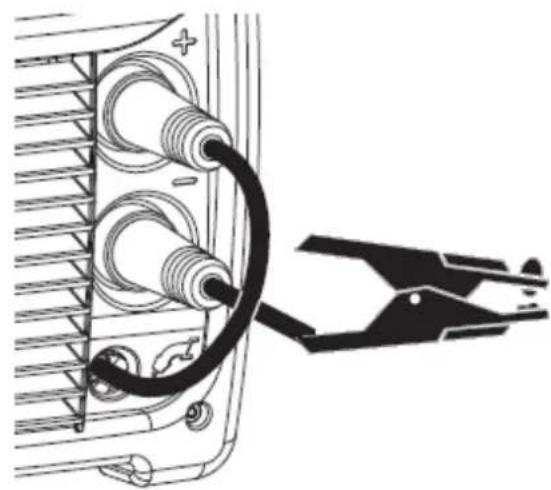
natural_image
Diagram of a cable being inserted into a device, showing coiled wires and a pliers (no text or symbols present)Weldforce 210MST
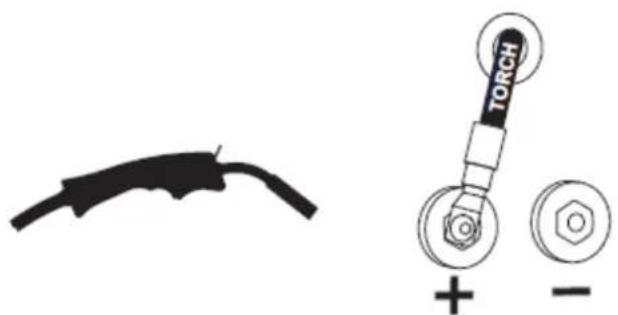
Figure 21
Weldforce 250MST
7.1.5 Additional Setup for MIG welding with aluminium
Welding with aluminium provides a unique challenge, due to the low column strength and surface friction of the wire. This causes the wire to deform more as it is pushed through the feed mechanism and the torch wire delivery liner, greatly increasing friction. Because good MIG welding results are dependent on a smooth wire feed, certain changes must be made to the wire feed system to minimise friction caused issues.
-
A shorter MIG Torch will minimize friction and issues. If possible limit length to no longer than 3m
-
Replace the liner in the MIG Torch with a special Graphite/Teflon/PVC liner (rather than the conventional steel liner). The Weldclass Universal Graphite liner kit is recommended (P3-CTUL09)
-
Choose the largest diameter wire possible that can be used by your machine for your application. (Ideally 1.0mm or above)
-
Ensure the wire drive system is fitted with the correct size U-groove drive roller to suit the wire being used.
-
Ensure specific Aluminium contact tip to suit chosen wire (or a standard tip in one size oversize, e.g. 1.0mm aluminium wire, use standard 1.2mm contact tip).
TIP! For above reasons, it is quite common for operators to have an extra MIG torch specifically set up for aluminium use, if the machine is used for welding steel as well.
7.1.6 Adjusting Settings for MIG Welding in Manual Mode (MAN)
-
Follow above steps for either 'Gasless Welding Setup' or 'Gas MIG Welding Setup' (whichever is relevant)
-
Set welding process selection to 'MAN' (refer to 4.1)
-
Set the desired Wire Speed using the 'Top Selection Knob' (21).
-
Set the desired Voltage output using the 'Bottom Selection Knob' (22).
-
Adjust special Function settings if required (refer to 4.3)
7.1.7 Adjusting Settings for MIG Welding in Synergic (Auto) Mode (SYN)
-
Follow above steps for either 'Gasless Welding Setup' or 'Gas MIG Welding Setup' (whichever is relevant)
-
Set welding process selector to 'MIG' (refer to 4.1)
-
Set the MIG Program to the relevant Program number (refer to 4.2)
-
Set the Wire Speed/Material Thickness using the 'Top Selection Knob' (21).
-
Adjust Inductance if required using the 'Bottom Selection Knob' (22).
-
Adjust special Function settings if required (refer to 4.3)
7.2 Stick (MMA) Welding Operation
- Connect the earth cable quick connector to the Negative (-) Dinse Socket (6)
- Connect the earth clamp to the work piece. Contact with the work piece must be firm contact with clean, bare metal, with no corrosion, paint or scale at the contact point.
- Insert an electrode into the electrode holder and connect the electrode holder and work lead to the Positive (+) Dinse Socket (5).
NOTE: This polarity connection configuration is valid for most GP (General Purpose) MMA electrodes. There are variances to this. If in doubt, check the electrode specifications or consult the electrode manufacturer.
- Connect the machine to suitable power. Switch the mains power switch (13) to 'I' to power up the machine.
- Set welding process selector to 'MMA' (refer to 4.1)
- Select the required output current using the 'Top Selection Knob' (21).
- Adjust special Function settings if required (refer to 4.3)
- You are now ready to weld!
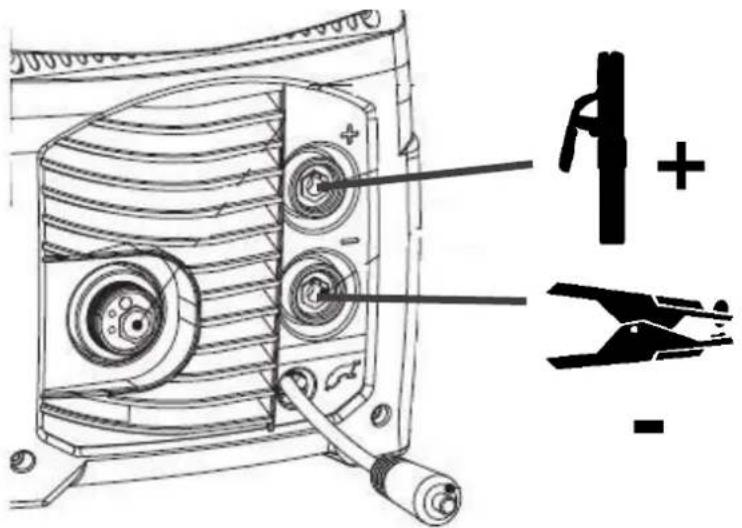
Figure 22
7.3 Lift TIG Operation
NOTE: Lift TIG operation requires an optional standard Gas valve control TIG torch, argon gas cylinder & regulator.
NOTE: The Weldforce 210MST & 250MST are DC (Direct Current) output welders only, this means that they are NOT able to TIG weld reactive metals such as Aluminium alloys and Brass (which require AC output). DC TIG output is suitable for steel, stainless steel and copper.
- Connect the earth cable to the Positive Dinse Socket.
- Connect the earth clamp to the work piece. Contact with the work piece must be firm contact with clean, bare metal, with no corrosion, paint or scale at the contact point.
- Insert TIG torch power connection into the Negative Dinse Socket
- Connect TIG torch gas line to the Gas regulator and ensure gas regulator is connected to Argon gas cylinder. Ensure all connections are tight.
- Open gas cylinder valve and adjust regulator. Open gas valve on the TIG torch to test flow of gas through the TIG torch. Flow should be between 5-10 l/min depending on application.
- Connect the machine to suitable power. Switch the mains power switch (13) to 'I' to power up the machine.
- Set welding process selector to 'TIG' (refer to 4.1)
- Select the required output current using the 'Top Selection Knob' (21).
- You are now ready to weld!
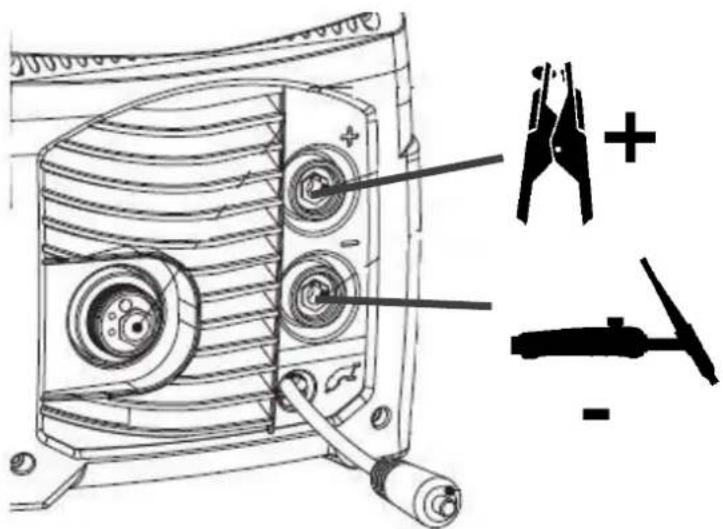
Figure 23
8 ACCESSORIES, SPARE PARTS & CIRCUIT DIAGRAMS
8.1 MIG Torch and Spares:
The MIG Torch supplied with the Weldforce 210MST & 250MST is a BZL 25 (Binzel 25 style) model. To view parts for this torch, see below table or go to: Weldclass.com.au/BZL25parts

natural_image
Close-up of a black Velactas welding torch with attached cable (no visible text or symbols)
BZL 25 Torch Parts

| Ref. | Part No. | Description |
| WC-03614 | Complete BZL 25 Torch – 3m | |
| WC-03615 | Complete BZL 25 Torch – 4m | |
| 1 | P3-B25SN | Neck |
| 2 | P3-B25NS | Nozzle Spring Pk2 |
| 3 | P3-B25TH | Tip Holder Pk2 |
| 4 | P3-BT6066 | Tip 0.6mm Pk5 |
| 4 | P3-BT6086 | Tip 0.8mm Pk5 |
| 4 | P3-BT609 | Tip 0.9mm Pk5 |
| 4 | P3-BT610 | Tip 1.0mm Pk5 |
| 4 | P3-BTA610 | Tip 1.0mm Alu Pk5 |
| 4 | P3-BTA612 | Tip 1.2mm Alu/Flux Core Pk5 |
| 5 | P3-B25N | Nozzle Pk2 |
| 6 | P3-BRSL4 | Liner – Steel wires |
| 6 | P3-CTUL09 | Liner – Aluminium wire |
Table 11
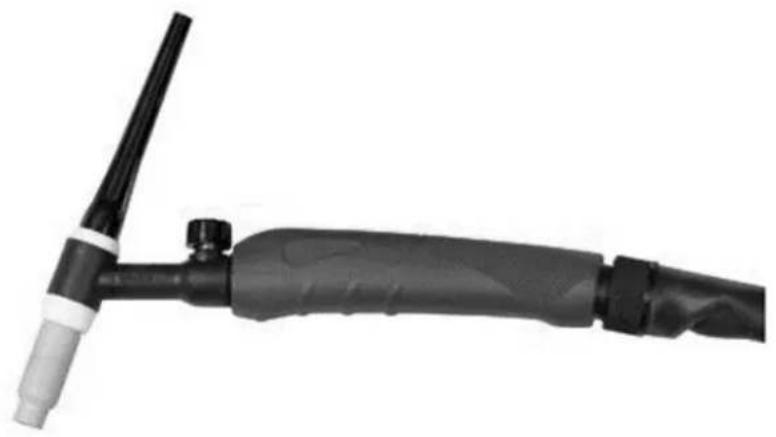
8.2 TIG Torch and Spares (Optional Extra):
The compatible TIG torch for this machine is the Weldclass 3-TTU2917V/4 torch.
To view this torch and parts, go to: www.weldclass.com.au
natural_image
Close-up of a black and white welding torch with a pointed tip, no visible text or symbols| Part No. | Description |
| 3-TTU2917V/4 | Complete TIG Torch – 17 Series with Valve 4m |
| P3-TB17FV | Torch Body - 17FV Flexible (With Valve) |
| WC-57Y02P | Back cap – Long Pk2 |
| WC-57Y05P | Back cap – Medium Pk2 |
| WC-57Y04P | Back cap – Short Pk2 |
| P3-10N23 | Collet – 1.6mm |
| P3-10N24 | Collet – 2.4mm |
| P3-10N25 | Collet – 3.2mm |
| P3-10N31 | Collect Body – 1.6mm Pk2 |
| P3-10N32 | Collect Body – 2.4mm Pk2 |
| P3-10N28 | Collect Body – 3.2mm Pk2 |
| P3-10N49 | TIG Ceramic Cup - #5 7.9mm Pk2 |
| P3-10N48 | TIG Ceramic Cup - #6 9.5mm Pk2 |
| P3-10N47 | TIG Ceramic Cup - #7 11.1mm Pk2 |
| P3-10N46 | TIG Ceramic Cup - #8 12.7mm Pk2 |
| P3-10N45 | TIG Ceramic Cup - #10 15.8mm Pk2 |
| WC-05192 | TIG Tungsten RE4 – 1.6mm Pk10 |
| WC-05193 | TIG Tungsten RE4 – 2.4mm Pk10 |
| WC-05194 | TIG Tungsten RE4 – 3.2mm Pk10 |
Table 12
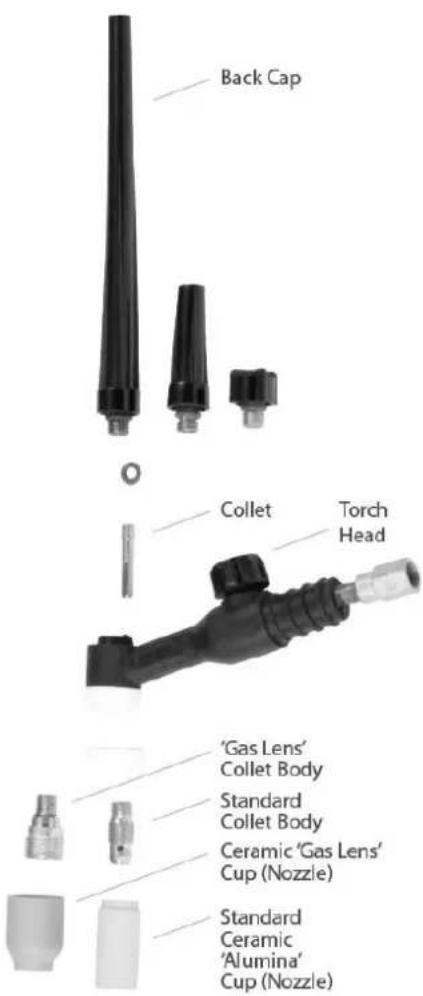
Figure 24
8.3 Optional Accessories
| Optional Accessories | |
| Part No. | Drive Roller |
| 3-TTU2917V/4 | Complete TIG Torch – 17 Series with Valve 4m |
| WC-06235 | Welding Trolley |
| WC-01775 | Welding Gloves |
| P6-MPLY | MIG Pliers |
Table 13
8.4 Drive Rollers:
| Weldforce 210MST Drive Rollers | |
| Part No. | Drive Roller |
| WC-06422 | V-Groove (Steel) 0.6mm / 0.8-0.9mm |
| WC-06425 | Knurled (Flux-Cored) 0.8-0.9mm / 1.2mm |
| WC-06426 | U-Groove (Aluminium) 0.9-1.0mm / V-Groove (Steel) 0.9-1.0mm |
Table 14
| Weldforce 250MST Drive Rollers | |
| Part No. | Drive Roller |
| WC-06438 | V-Groove (Steel) 0.6mm / 0.8-0.9mmAlso used for 0.8mm Flux-Cored |
| WC-06439 | V-Groove (Steel) 1.0mm / 1.2mm |
| WC-06440 | U-Groove (Aluminium) 0.8-0.9mm / 1.0mm |
| WC-06441 | U-Groove (Aluminium) 1.0mm/1.2mm |
| WC-06443 | Knurled (Flux-Cored) 0.9-1.0mm / 1.2mm |
Table 15
8.5 Machine Spare Parts:
For machine parts, go to Weldclass.com.au/machines or contact your Weldclass distributor.
Weldforce 210MST
| Ref. | Description |
| 1 | Resistor |
| 2 | Single Phase Rectifier |
| 3 | Capacitor |
| 4 | Relay |
| 5 | Diode |
| 6 | Torch polarity change tail cable |
| 7 | On/Off Power Switch |
| 8 | Potentiometer Knob |
| 9 | Gas Solenoid Valve |
| 10 | Switch Cover |
| 11 | Main Power Cable |
| 12 | Current Transformer |
| 13 | Cooling Fan |
| 14 | Inductance Filter |
| 15 | Transformer X Flyback |
| 16 | Output Inductor |
| 17 | Power Transformer |
| 18 | Rear Plastic Panel |
| 19 | Handle |
| 20 | Door Handle |
| 21 | Control Panel Protector Frame |
| 22 | Front Plastic Panel |
| 23 | Cable Gland |
| 24 | Rear Metal Panel |
| 25 | Front Metal Panel |
| 26 | Panel Hole Plug (Diaphram) |
| 27 | Top Metal Case Panel |
| 28 | Side Metal Case Panel |
| 29 | Wire Feeder Door |
| 30 | Earth Clamp |
| 31 | Torch polarity change tail dinse |
| Ref. | Description |
| 32 | Drive Roller |
| 33 | Euro Torch Connection Socket |
| 34 | MIG Torch |
| 35 | Output Cable Connection Socket |
| 36 | IGBT & Diode Set |
| 37 | Complete PCB |
| 38 | Control Panel |
| 39 | Bottom Metal Case Panel |
| 40 | Drive System |
| 41 | Spool Hub |
| 42 | Wire Guide Tube |
Table 16

Figure 25

Figure 26
Weldforce 250MST
| Ref. | Description |
| 1 | Switch |
| 2 | Control Knob |
| 3 | Thermostat |
| 4 | Solenoid Valve |
| 5 | Switch Cover |
| 6 | Cable |
| 7 | Main Power Cable |
| 8 | Fan |
| 9 | Motor |
| 10 | Torch Connection Protection |
| 11 | Handle Cover |
| 12 | Shield |
| 13 | Card holder |
| 14 | Reel Spacer |
| 15 | Front Panel |
| 16 | Handle |
| 17 | Foot |
| 18 | Torch Hook |
| 19 | Dinse Holder |
| 20 | Diaphram |
| 21 | Door |
| 22 | Side Panel |
| 23 | Dinse Socket |
| 24 | Dinse Plug |
| 25 | Earth Clamp |
| 26 | Drive Roller – Fe |
| 27 | Torch Connection |
| 28 | Drive Roller – Alu |
| 29 | Anchor for Pressure Roller |
| 30 | MIG Torch |
| 31 | Wire Conduit |
| Ref. | Description |
| 32 | Roller Fixing Screw |
| 33 | Clamp Kit |
| 34 | Kit 2 Rollers Wirefeeder |
| 35 | Bottom Kit |
| 36 | Single Phase Bridge Kit |
| 37 | Kit IGBT + Diodes |
| 38 | Diode Kit |
| 39 | Reel Kit |
| 40 | Cover Kit |
| 41 | MOSFET Flyback Kit |
| 42 | Condenser Kit Snap-in |
| 43 | Complete Control PCB Kit |
| 44 | Front Panel Card Kit |
| 45 | Back Panel Kit |
| 46 | Front Panel Kit |
| 47 | Kit Cable Bushing + Ring Nut |
| 48 | Gas Hose Kit |
Table 17
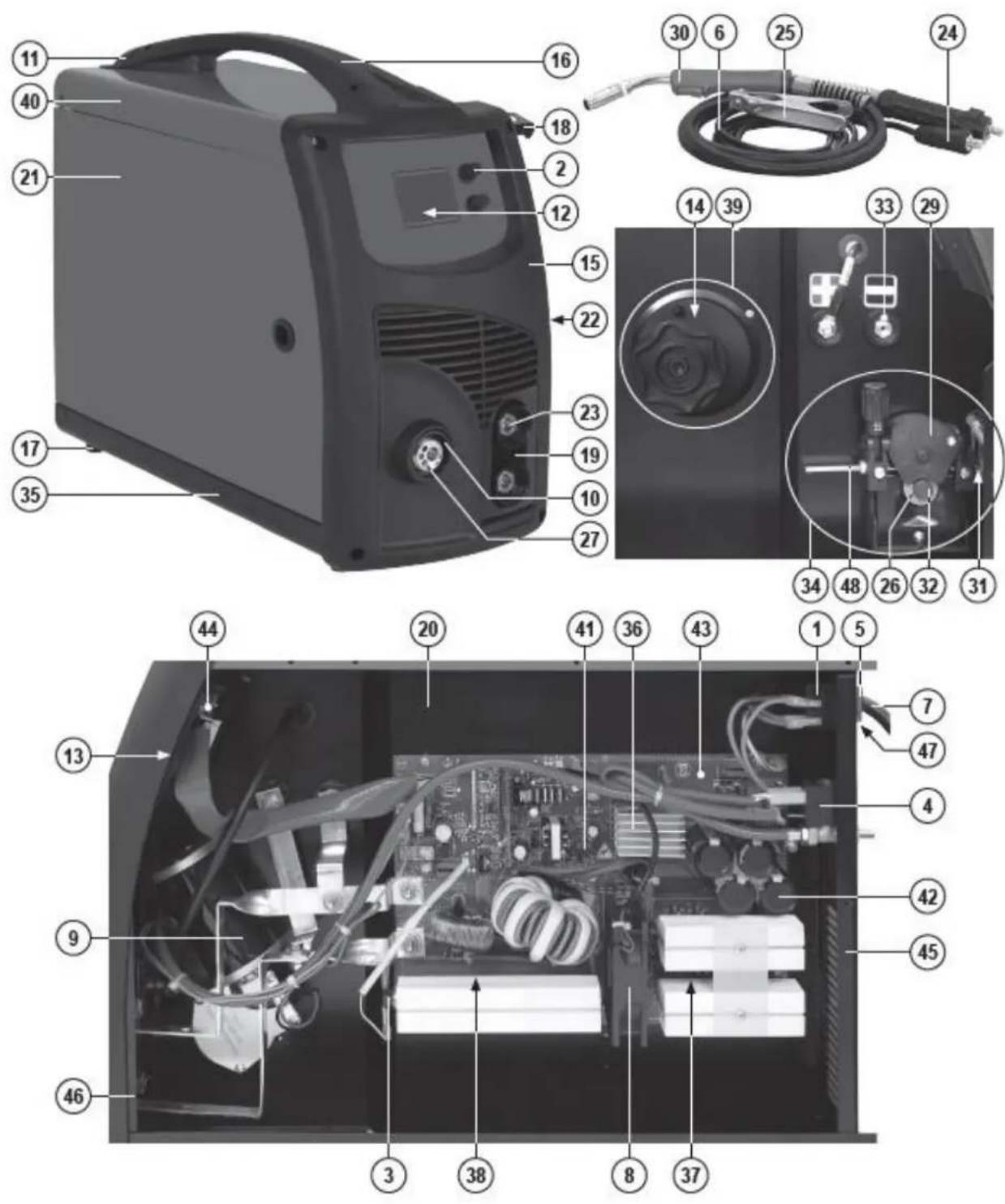
8.6 Primary Schematic Circuit Diagram
Weldforce 210MST

9.1 Keep your Welding Machine in Top Condition
The Weldforce 210MST & 250MST do not require any special maintenance, however the user should take care of their machine as follows:
- Regularly clean the ventilation slots
- Keep the casing clean
- Check all cables before use
- Check electrode holders, work lead/clamps and welding torches before use
- Replace worn electrode holders and earth clamps, which do not provide a good connection
- Replace worn torch consumable parts in a timely manner
- Replace worn wire drive components in a timely manner
- Use a soft cloth or brush to clean electrical components. Do not use liquid cleaning products, water or especially solvents
- Do not use compressed air to clean electrical components as this can force dirt and dust further into components, causing electrical short circuits
- Check for damaged parts
WARNING! Before performing cleaning/maintenance, replacing cables/connections, make sure the welding machine is switched off and disconnected from the power supply.
If damaged, before further use, the welder must be carefully checked by a qualified person to determine that it will operate properly. Check for breakage of parts, mountings and other conditions that may affect its operation.
Have your welder repaired by an expert. An authorised service centre should properly repair a damaged part.
This appliance is manufactured in accordance with relevant safety standards. Only experts must carry out repairing of electrical appliances, otherwise considerable danger for the user may result. Use only genuine replacement parts. Do not use modified or non-genuine parts.
9.2 Storing the Welder
When not in use the welder should be stored in the dry, dust-free and frost-free environment.
10 GENERAL GUIDE TO WELDING
10.1 Duty Cycle Rating
Weldforce welding machines are fitted with thermal overload protection which means the machine will cut out when it reaches a certain temperature, to prevent damage to components. The machine will then re-start when it returns to a safe temperature.
Duty cycle is a measure of the percentage of time a machine will operate within a certain time period at a given amperage. For example a duty cycle of 160A @ 25% means that a machine will operate at 160A for 2½ minutes in a 10 minute time period. The machine will have to rest for the remaining 7½ minutes to enable it to cool down.
The international standard for duty cycle rating is based on an ambient air temperature of 40^ C with 50% humidity, over a 10 minute period. In an environment with temperatures exceeding 40^ C, the duty cycle will be less than stated. In ambient temperature less than 40^ C, duty cycle performance will be higher. There are numerous other factors that can influence actual duty cycle performance.
10.2 Choosing a Welding Process – MIG, Stick or TIG?
10.2.1 The Stick (MMA) Process
10.2.1.1 Description
The acronym MMA (or MMAW) stands for Manual Metal Arc Welding. 'Manual' refers to the fact that the MMA process requires the operator to apply filler metal (in contrast to MIG 'semi-automatic' welding where the machine feeds the filler metal into the weld). 'Metal' refers to the fact that the filler metal itself (the stick electrode) is used to conduct the welding current to the job. MMA welding is commonly known as 'stick-electrode' or 'arc' welding.
10.2.1.2 Process
The MMA process involves the electrode being touched on the job to ignite the arc. The electrode is held in the electrode holder and must be continually replaced as it is consumed. The electrode consists of a metal core, which is the filler metal, covered by a flux coating which shields the weld and prevents it from oxidising. During welding the flux forms into a slag covering the weld which is chipped off after the weld has formed.
10.2.1.3 Advantages
MMA welding offers several advantages over alternative welding processes. Primarily it has a greater capacity than MIG welding, or in other words it can weld heavier materials with the same amperage output. For this reason small, portable inverter welders like the WeldForce machines, have the capacity to weld with up to 3.2mm or 4mm electrodes making it suitable for a vast range of applications without the complication of shielding gas or wire feeding. Moreover, MMA welding is typically more 'forgiving' than MIG or TIG when welding rusty or dirty materials (which makes it ideal for maintenance applications).
10.2.1.4 Limitations
Traditionally, welding thin materials whilst avoiding “blow-through” can be tricky with the MMA process. This being said, however, welding thin materials with a WeldForce machine will be noticeably easier because the arc is so stable and the output can be very finely adjusted down to very low amps.
10.2.1.5 Materials
MMA welding can be used with a wide variety of electrodes including general purpose, low hydrogen, stainless steel, iron powder, hard facing & cast iron just to name a few.
10.2.2 The TIG Process
10.2.2.1 Description
The acronym TIG stands for Tungsten Inert Gas. Tungsten refers to the type of conductor (a tungsten electrode) that is used to transfer the welding current to the job and create the arc. Inert Gas refers to the fact that the process relies on an inert gas to prevent weld oxidisation.
Also referred to as Gas Tungsten Arc Welding (GTAW).
10.2.2.2 Process
In simple terms, TIG welding is probably most similar to oxy flame welding. However, instead of a flame it uses an electrical arc to melt the job and filler metal, and instead of a preheat flame it uses inert gas to prevent weld oxidisation. Like oxy flame welding, the filler metal is fed into the weld by hand as required. Due to the fact that the current is not conducted to the job via the filler metal, (as it is in MIG and MMA welding), the arc is much more controllable.
10.2.2.3 Advantages
Very low amperages can be achieved making this process ideal for welding thin materials. Also, due to the independence of the arc and the filler metal application, TIG welding is very controllable and can therefore achieve very high quality welds with excellent appearance. Unlike MIG and MMA welding, TIG welding does not produce spatter so clean up is very minimal. It is typically used where weld appearance is critical (e.g. handrails) or where weld quality is vital (e.g. pressure vessels or pipes).
10.2.2.4 Limitations
Whilst TIG welding is very controllable, it can also be slower and more tedious than MIG or MMA welding and it will generally not operate well on dirty or rusty materials meaning that additional weld preparation is sometimes necessary. It also requires a higher level of skill and experience to achieve a quality result.
10.2.2.5 Materials
This machine incorporates DC TIG function which can be used to weld a variety of materials including mild steels, stainless steels, copper and chrome moly.
Note: TIG welding is often associated with welding of aluminium, however, aluminium TIG welding is only possible with AC/DC TIG welding machines. This machine is DC only and is not designed for TIG welding of aluminium.
10.2.3 The MIG Process
10.2.3.1 Description
The acronym MIG stands for Metal Inert Gas. Metal' refers to the fact that the filler metal itself (the MIG wire) is used to conduct the welding current to the job and create the arc. Inert Gas refers to the fact that the process relies on an inert gas to prevent weld oxidisation. The acronym MAG is also often used which stands for Metal Active Gas. MAG is fundamentally the same as MIG except that MAG technically refers to when Carbon Dioxide (CO2) is used as a shielding gas (instead of an inert gas of argon, helium or a mixed gas with these as a base).
The process is also referred to as Gas Metal Arc Welding (GMAW) when gas is used or Flux-Cored Arc Welding (FCAW) when flux-cored or gasless/self-shielded wire is used.
10.2.3.2 Process
The MIG welding process involves the filler wire being fed through a torch/gun to the job. The filler wire carries the welding current to the job. The weld pool is generally covered by an inert gas supplied from the torch which shields the weld and prevents it from oxidising. However, gasless welding wire can be used without any shielding gas. This gasless wire has a hollow core filled with flux which shields the weld and prevents it from oxidising. During welding this flux forms into a slag covering the weld which is chipped off after the weld has formed.
10.2.3.3 Advantages
MIG welding is both easy and fast. Once weld settings are adjusted, the filler wire is fed automatically into the weld at the correct rate. It does not rely on the operator to feed in filler wire like TIG welding.
Also because the filler wire is on a roll it lasts significantly longer than a Stick welding electrode so
there is much less downtime in replacing filler wire. MIG can also weld with thin wires at low amperages achieving great results on thin materials. At the same time, bigger diameter wires and higher amperages can be used to weld thicker materials with good penetration. When a shielding gas is used there is no flux formed on the weld so clean up is minimal.
10.2.3.4 Limitations
MIG welding with shielding gas cannot be done in windy environments. However, in many applications gasless/self-shielding wires are available that don't require gas. MIG traditionally requires a higher level of skill and experience to be able to balance voltage and wire speed settings well to achieve a quality result. However, the Synergic programs on this machine make this very easy and much more foolproof.
10.2.3.5 Materials
MIG welding can be used with a wide variety of wires including steel, stainless steel, gasless wires, aluminium, silicone bronze & hard facing just to name a few.
10.3 Joint Preparations
In many cases, it will be possible to weld steel sections without any special preparation. For heavier sections and for repair work on castings, etc., it will be necessary to cut or grind an angle between the pieces being joined to ensure proper penetration of the weld metal and to produce sound joints. In general, surfaces being welded should be clean and free of rust, scale, dirt, grease, etc. Slag should be removed from oxy-cut surfaces. Typical joint designs are shown in the following figures.
Open Square Butt Joint

Gap varies from 1.6mm (1/16") to 4.8mm (3/16") depending on plate thickness
Figure 28
Double Vee Butt Joint

Figure 31
Single Vee Butt Joint
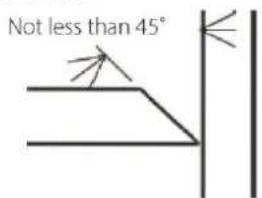
Figure 29
Lap Joint

Figure 32
Single Vee Butt Joint
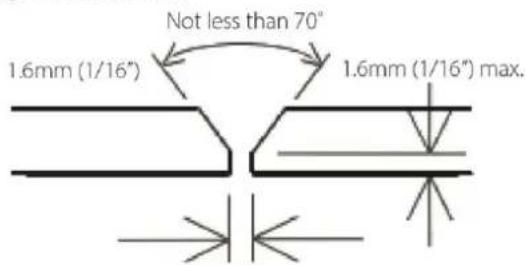
Figure 30
Fillet Joint
Figure 33

Tee Joints
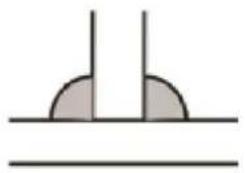
natural_image
Simple diagram showing two vertical lines above a horizontal line, with two shaded semicircular regions below (no text or symbols)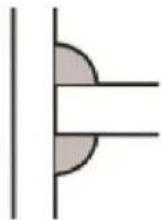
natural_image
Pure diagram of a pipe elbow joint without any text, numbers, or symbolsFigure 35
Corner Weld
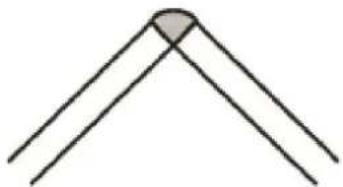
natural_image
Simple line drawing of a three-LED transistor (no text or symbols)Figure 36
Plug Welds

natural_image
3D rendering of a metallic L-shaped bracket with two circular holes on top (no text or symbols)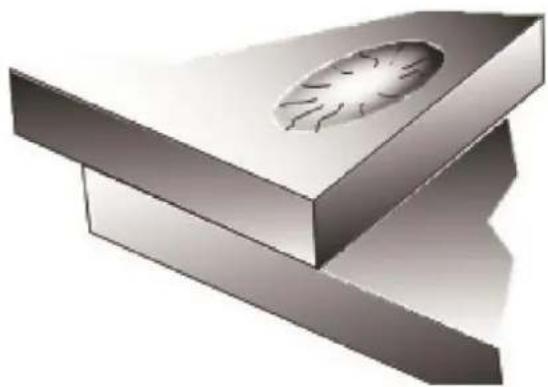
natural_image
3D rendering of a mechanical component with a circular hole and flanged base (no text or symbols)Figure 37
11 MIG BASIC WELDING GUIDE
11.1 MIG Basic Welding Techniques
Two different welding processes are covered in this section (GMAW and FCAW), with the intention of providing the very basic concepts in MIG welding, where a welding torch is hand held, and the electrode (welding wire) is fed into a weld pool, and the arc is shielded by a gas (GMAW) or flux cored wire (FCAW).
11.2 Gas Metal Arc Welding (GMAW)
This process, also known as MIG welding, CO2 welding, Micro Wire Welding, short arc welding, dip transfer welding, wire welding etc. It is an electric arc welding process which fuses together the parts to be welded by heating them with an arc between a solid continuous, consumable electrode and the work. Shielding is obtained from an externally supplied welding grade shielding gas. The process is normally applied semi automatically; however the process may be operated automatically and can be machine operated. The process can be used to weld thin and fairly thick steels and some nonferrous metals in all positions.
GMAW Process
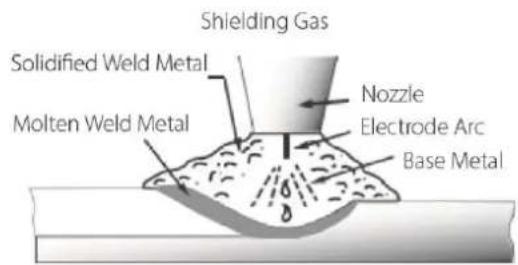
Figure 38
11.3 Flux Cored Arc Welding (FCAW)
This is an electric arc welding process which fuses together the parts to be welded by heating them with an arc between a continuous flux-filled welding wire and the work. Shielding is obtained through decomposition of the flux within the tubular wire. Additional shielding may or may not be obtained from an externally supplied gas or gas mixture. The process is normally applied semi automatically; however the process may be applied automatically or by machine. It is commonly used to weld large diameter wires in the flat and horizontal position and small wire diameters in all positions. The process is used to a lesser degree for welding stainless steel and for overlay work.
FCAW Process
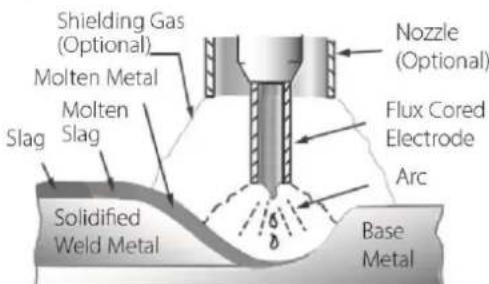
Figure 39
11.4 Position of MIG Torch
The angle of MIG torch to the weld has an effect on the width of the weld. The welding torch should be held at an angle to the weld joint. (See Secondary Adjustable Variables below). Hold the torch so that the welding seam is viewed at all times. Always wear the welding helmet with proper filter lenses and use the proper safety equipment.
CAUTION! Do not pull the welding torch back when the arc is established. This will create excessive wire extension (stick-out) and make a very poor weld.
The welding wire is not energized until the torch trigger switch is depressed. The wire may therefore be placed on the seam or joint prior to lowering the helmet.
Position of MIG Torch
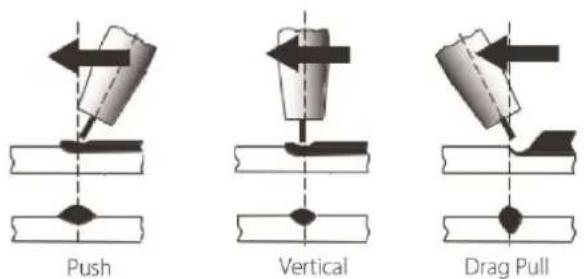
Figure 40
11.5 Distance from the MIG Torch Nozzle to the Work Piece
The welding wire stick out from the MIG Torch nozzle should be between 10mm to 20mm. This distance may vary depending on the type of joint and type of wire that is being welded. Generally solid wire is about 10mm and flux-cored/gasless wire about 15-20mm.
11.6 Travel Speed
The speed at which the molten pool travels influences the width of the weld and penetration of the welding run.
11.7 MIG Welding (GMAW) Variables
Most of the welding done by all processes is on carbon steel. The items below describe the welding variables in short-arc welding of 0.6mm to 6mm mild sheet or plate. The applied techniques and end results in the MIG process are controlled by these variables.
11.7.1 Preselected Variables
Preselected variables depend upon the type of material being welded, the thickness of the material, the welding position, the deposition rate and the mechanical properties.
These variables are:
- Type of welding wire
- Size of welding wire
- Type of shielding gas
- Gas flow rate
11.7.2 Primary Adjustable Variables
These control the process after preselected variables have been found. They control the penetration, bead width, bead height, arc stability, deposition rate and weld soundness.
These variables are:
- Arc Voltage
- Welding current (wire feed speed)
- Travel speed
11.7.3 Secondary Adjustable Variables
These variables cause changes in primary adjustable variables which in turn cause the desired change in the bead formation. They are:
- Stick-Out: This is the distance between the end of the contact tube (tip) and the end of the welding wire). Maintain at about 10mm stick-out for solid wire and 15-20mm for gasless wire.

Figure 41
-
Wire Feed Speed: Increase in wire feed speed increases weld current/amperage. Decrease in wire feed speed decreases weld current.
-
Nozzle Angle: This refers to the position of the welding torch in relation to the joint. The transverse angle is usually one half the included angle between plates forming the joint. The longitudinal angle is the angle between the centre line of the welding torch and a line perpendicular to the axis of the weld. The longitudinal angle is generally called the Nozzle Angle and can be either trailing (pulling) or leading (pushing).
Whether the operator is left handed or right handed has to be considered to realize the effects of each angle in relation to the direction of travel.
Transverse & Longitudinal Nozzle Axes
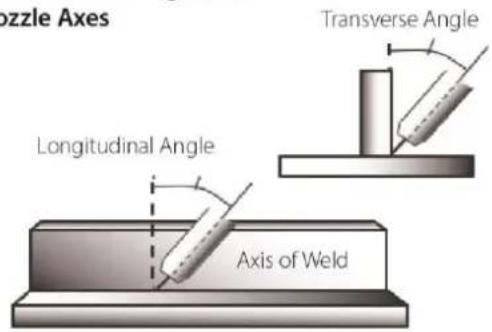
Figure 42
Nozzle Angle, Right Handed Operator
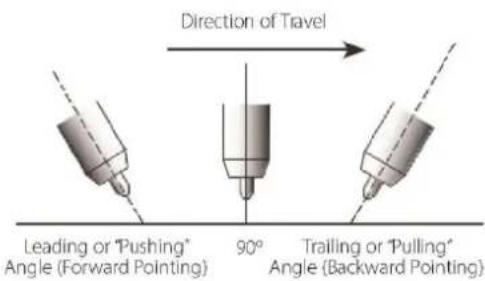
Figure 43
Horizontal Butt Weld

Figure 44
Vertical Fillet Welds
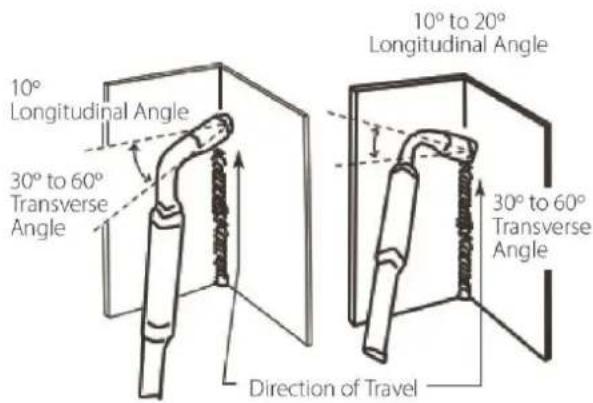
Figure 46
Horizontal Fillet Weld
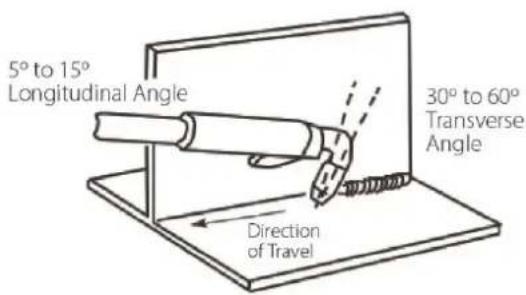
Figure 45
Overhead Fillet Weld
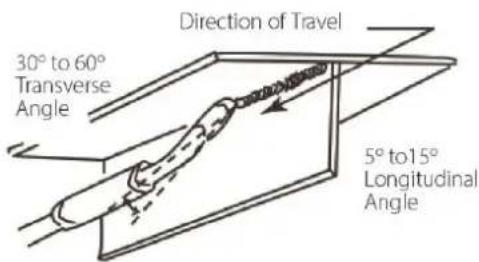
Figure 47
11.8 Establishing the Arc and Making Weld Beads
Before attempting to weld on a finished piece of work, it is recommended that practice welds be made on a sample metal of the same material as that of the finished piece. The easiest welding procedure for the beginner to experiment with MIG welding is the flat position. The equipment is capable of flat, vertical and overhead positions. For practicing MIG welding, secure some pieces of 1.6mm or 2.0mm mild steel plate (150 x 150mm). Use 0.9mm flux cored gasless wire or a solid wire with shielding gas.
11.9 MIG Voltage & Wire Speed Settings
Manual MIG welding setting requires some practice by the operator, as the machine has two control settings that have to balance. These are the Wire Speed control and the welding Voltage control.
Voltage is essentially the power in the welding arc that sets the heat. The wire speed feed simply controls the rate at which the welding wire is fed into the weld pool. For any voltage position setting, there will be a specific corresponding 'sweet spot' in the wire feeding speed that will give the smoothest and most stable welding arc. The correct wire feeding speed for a given voltage setting is affected by welding wire type and size, shielding gas, welding material and joint type.
The recommended process for setting a MIG (in Manual mode) is:
- Set the welding voltage as desired
- Slowly adjust the wire speed until the arc is smooth and stable.
- When reaching this point, if the penetration/ heat input is too much/ not enough, adjust the voltage setting and repeat the process.
- If not able to achieve a smooth and stable arc with the desired heat input for the weld, it is likely that a change in wire size and/or shielding gas type is required (assuming all other factors are correct).
Synergic function makes the setup of MIG welding much simpler as follows:
- Choose Synergic program to suit wire type and size and shielding gas
- Select amperage output or material thickness
- The machine calculates the optimal voltage and wire speed for the application
- Obviously other variables such as welding joint type, position and thickness, air temperature can affect the optimal voltage and wire feed setting, so voltage can be adjusted to fine-tune for optimal performance.
11.9.1 Setting Wire Speed/Amperage
The welding current (amperage) is determined by the Wire Speed control.
Increased Wire Speed will increase the current and result in a shorter arc.
Less Wire Speed will reduce the current and lengthen the arc.
11.9.2 Setting Voltage
Increasing the welding voltage hardly alters the current level, but lengthens the arc. By decreasing the voltage, a shorter arc is obtained with a little change in current level.
11.9.3 Changing to a different welding wire
When changing to a different welding wire diameter, different control settings are required. A thinner welding wire needs more Current (Wire Speed) to achieve the same current level. A satisfactory weld cannot be obtained if the Current (Wire Speed) and Voltage settings are not adjusted to suit the welding wire diameter and the dimensions of the work piece.
11.9.4 How to determine correct Wire Speed/Voltage Setting
If the Current/Amperage (Wire Speed) is too high for the welding voltage, "stubbing" will occur as the wire dips into the molten pool and does not melt. Welding in these conditions normally produces a poor weld due to lack of fusion.
If, however, the welding voltage is too high, large drops will form on the end of the wire, causing spatter. The correct setting of voltage and Current (Wire Speed) can be seen in the shape of the weld deposit and heard by a smooth regular arc sound.
11.10 Suggested Settings for Typical MIG Applications
| Material | Wire Type | Shielding Gas | Wire Size | Weld Position | Amperage Range | Voltage Range |
| Mild Steel | Solid Mild Steel Weldclass XT6 (E70S-6) | Argon + CO2 Mix | 0.6mm | All | 40 – 60 | 17 – 18 |
| 0.8mm | All | 50 – 80 | 18 – 20 | |||
| 0.9mm | All | 60 – 220 | 16 – 22 | |||
| 1.2mm | All | 120 – 350 | 15 – 23 | |||
| Gasless Flux-cored Mild Steel Weldclass GL-11 (E71T-11) | Not required | 0.8mm | Horizontal | 90 – 150 | 14 – 16 | |
| Vertical & Overhead | 60 – 125 | 10 – 12 | ||||
| 0.9mm | Horizontal | 80 – 200 | 12 – 17 | |||
| Vertical & Overhead | 70 – 150 | 12 – 15 | ||||
| 1.2mm | Horizontal | 160 – 220 | 16 – 18 | |||
| Vertical & Overhead | 120 – 180 | 16 – 18 | ||||
| Stainless Steel | Stainless Steel 316L | Argon or Mix | 0.8mm | All | 60 – 125 | 17 – 22 |
| 0.9mm | All | 75 – 160 | 17 – 22 | |||
| Aluminium | Aluminium (5356) | Argon | 1.0mm | All | 110 – 200 | 19 – 22 |
| 1.2mm | All | 130 – 250 | 22 – 28 |
Table 18
These settings are a guide only. Actual settings required will depend on plate thickness, operator technique, environment, etc.
11.11 Welding wire Size Selection
The choice of Welding wire size and shielding gas used depends on the following:
- Thickness of the metal to be welded
- Type of joint
- Capacity of the wire feed unit and power source
- The amount of penetration required
- The deposition rate required
- The bead profile desired
- The position of welding
- Cost of the wire
- Environment (can shielding gas be used or not?)
11.12 MIG Welding Troubleshooting
The general approach to fix MIG welding problems is to start at the wire spool then work through to the MIG torch. There are two main areas where problems occur with MIG: Porosity and Inconsistent wire feed.
11.12.1 Porosity Problems
When there is a gas problem the result is usually porosity within the weld metal. Porosity always porosity within the weld metal. Porosity always stems from some contaminant within the molten weld pool which is in the process of escaping during solidification of the molten metal.

natural_image
Close-up of a textured, irregularly shaped object with dark circular indentations, possibly a food item or artifact (no visible text or symbols)
natural_image
Diagram showing a downward arrow pointing to a shaded heart-shaped object embedded in a rectangular block (no text or symbols)Figure 48
Contaminants range from no gas around the welding arc to dirt on the workpiece surface. Porosity can be reduced by checking the following points.
| Troubleshooting - Porosity | |
| Fault | Cause |
| Shielding gas cylinder contents and gas regulator | Ensure that the shielding gas cylinder is not empty and the gas regulator is correctly adjusted to at least 15 litres per minute |
| Gas leaks | Check for gas leaks between the regulator/cylinder connection and in the gas hose to the Power Source. |
| Internal gas hose in the Power Source | Ensure the hose from the solenoid valve to the torch adaptor has not fractured and that it is connected to the torch adaptor. This should only be done by qualified technician. |
| Welding in a windy environment | Shield the weld area from the wind or increase the gas flow or use gasless welding wire |
| Welding dirty, oily, painted, oxidized or greasy plate | Clean contaminates off the work piece. |
| Distance between the MIG torch nozzle and the work piece | Keep the distance between the MIG torch nozzle and the work piece to a minimum. |
| Maintain the MIG torch in good working order. | Ensure that the gas holes are not blocked in the tip holder and gas is exiting out of the torch nozzle. |
| Do not restrict gas flow by allowing spatter to build up inside the torch nozzle. | |
| Check that the MIG torch O-rings are not damaged on the Euro connector. | |
Table 19
WARNING! Disengage the feed roll when testing for gas flow by ear or use the 'Gas Test' button
11.12.2 Wire Feed Problems
TOP TIPS - Wire Jam Troubleshooting
- If wire jam occurs when the torch becomes hot, this is often because the heat causes the wire and the top to expand (which shrinks the hole in the tip). Using a slightly oversize tip can prevent this – eg: for 0.9mm wire, use a 1.0mm tip.
- Do NOT over-tighten the drive roll tension – this will accelerate wear if the drive system, distort the wire & will cause further wire feed problems.
Table 20
Wire feeding problems can be reduced by checking the following points.
The most common faults are marked with * :
| Troubleshooting – Wire Feed | |
| Fault | Cause |
| Feed roller driven by motor in the cabinet slipping | Wire spool brake is too tight. |
| Wire spool unwound and tangled. | Wire spool brake is too loose. |
| Worn or incorrect feed roller size | Use a feed roller matched to the size you are welding. |
| Replace feed roller if worn. | |
| Wire rubbed against the misaligned guides affecting the wire feed. | Misalignment of inlet/outlet guides. |
| * Liner blocked with swarf (Replace liner) | Increased amounts of swarf are produced by the wire passing through the feed roller when excessive pressure is applied to the pressure roller adjuster. |
| Swarf can also be produced by the wire passing through an incorrect feed roller groove shape or size. | |
| Swarf is fed into the conduit liner where it accumulates thus reducing wire feed. | |
| * Incorrect or worn contact tip | The contact tip transfers the weld current to the electrode wire. If the hole in the contact tip is too large then arcing may occur inside the contact tip resulting in the wire jamming in the contact tip. |
| When using soft wire such as aluminum it may become jammed in the contact tip due to expansion of the wire when heated. A contact tip designed for soft wires should be used. | |
| Poor work lead contact to work piece. | If the work lead has a poor electrical contact to the work piece then the connection point will heat up and results in reduction of power at the arc. |
| Bent liner (Replace liner) | This will cause friction between the wire and the liner this reducing wire feed. |
Table 21
11.12.3 Weld Quality Problems
Other weld problems can be reduced by checking the following points.
| Troubleshooting - MIG Weld Quality | ||
| Fault | Cause | Remedy |
Undercut Figure 49 Figure 49 | Welding arc voltage too high | Decrease voltage or increase the wire feed speed. |
| Incorrect torch angle | Adjust angle. | |
| Excessive heat input | Increase the torch travel speed and/or decrease welding current by decreasing the voltage or decreasing the wire feed speed. | |
Lack of penetration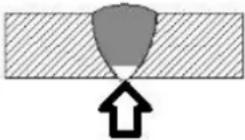 Figure 50 Figure 50 | Welding current too low. | Increase welding current by increasing wire feed speed and increasing voltage. |
| Joint preparation too narrow or gap too tight. | Increase joint angle or gap. | |
| Shielding gas incorrect. | Change to a gas which gives higher penetration. | |
Lack of fusion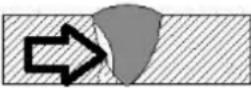 Figure 51 Figure 51 | Voltage too low | Increase voltage |
Excessive spatter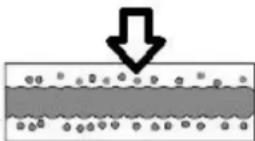 Figure 52 Figure 52 | Voltage too high | Decrease voltage or increase the Current (Wire Speed) control/ |
| Voltage too low. | Increase the voltage or decrease Current (Wire Speed) | |
| Irregular weld shape | Incorrect voltage and current settings.Convex, voltage too low.Concave, voltage too high. | Adjust voltage and current by adjusting the voltage control and the Current (Wire Speed) control |
| Wire is wandering. | Replace contact tip. | |
| Incorrect shielding gas. | Check shielding gas. | |
| Insufficient or excessive heat input. | Adjust the Current (Wire Speed) control or the voltage control. | |
Weld cracking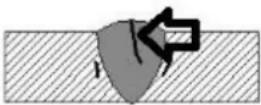 Figure 53 Figure 53 | Weld bead is too small. | Decrease travel speed. |
| Weld penetration narrow and deep. | Reduce current and voltage and increase MIG torch travel speed or select a lower penetration shielding gas. | |
| Excessive weld stresses. | Increase weld metal strength or revise design. | |
| Excessive voltage. | Decrease voltage. | |
| Cooling rate too fast. | Slow the cooling rate by preheating part to be welded or cool slowly. | |
| Troubleshooting – MIG Weld Quality | ||
| Fault | Cause | Remedy |
| Cold weld puddle | Loose welding cable connection. | Check all welding cable connections |
| Low power supply voltage. | Contact supply authority | |
| Arc does not have a crisp sound that short arc exhibits when the wire feed speed and voltage are adjusted correctly | The MIG torch has been connected to the wrong voltage polarity on the front panel. | Connect the MIG torch to the positive (+) welding terminal for solid wires and negative (-) welding terminal for gasless wires.Refer to the wire manufacturer for the correct polarity. |
Table 22
12 STICK (MMA) BASIC WELDING GUIDE
12.1 Size of Electrodes
The electrode size is determined by the thickness of metals being joined and can also be governed by the type of welding machine available. Small welding machines will only provide current (amperage) to run smaller sized electrodes. For thin sections, it is necessary to use smaller electrodes otherwise the arc may burn holes through the job. A little practice will soon establish the most suitable electrode for a given application.
12.2 Storage of Electrodes
Always store electrodes in a dry place and in their original containers. If electrodes have been exposed to moisture or moist air then they will need to be dried out using an electrode drying oven.
12.3 Electrode Polarity
Electrodes are generally connected to the electrode holder with the electrode holder connected positive polarity.
The work lead is connected to the negative polarity and is connected to the work piece. If in doubt consult the electrode data sheet.
12.4 Effects of Stick (MMA) Welding on Various Materials
12.4.1 High Tensile and Alloy Steels
The two most prominent effects of welding these steels are the formation of a hardened zone in the weld area, and, if suitable precautions are not taken, the occurrence in this zone of under-bead cracks. Hardened zone and under-bead cracks in the weld area may be reduced by using the correct electrodes, preheating, using higher current settings, using larger electrodes sizes, short runs for larger electrode deposits or tempering in a furnace.
12.4.2 Manganese Steels
The effect on manganese steel of slow cooling from high temperatures causes embrittlement. For this reason it is absolutely essential to keep manganese steel cool during welding by quenching after each weld or skip welding to distribute the heat.
12.4.3 Cast Iron
Most types of cast iron, except white iron, are weldable. White iron, because of its extreme brittleness, generally cracks when attempts are made to weld it. Trouble may also be experienced when welding white-heart malleable, due to the porosity caused by gas held in this type of iron.
12.5 Types of Electrodes
Arc Welding electrodes are classified into a number of groups depending on their applications. There are a great number of electrodes used for specialised industrial purposes which are not of particular interest for everyday general work. These include some low hydrogen types for high tensile steel, cellulose types for welding large diameter pipes, etc. The range of electrodes dealt with in this publication will cover the vast majority of applications likely to be encountered; are all easy to use.
12.5.1 MILD STEEL:
-
General Purpose "GP" E6013 (Weldclass 12V): This all-position electrode is used for maintenance and fabrication. Works well on mild steel, galvanized steel, sheet metal, steel tube and RHS. Its soft arc has minimal spatter, moderate penetration and an easy-to-clean slag. Tolerant to dirty / rusty steel & poor fit up. This is the most common type of electrode used for Stick welding.
-
Hydrogen Controlled E7016 (Weldclass 16XT): A "low-hydrogen" electrode commonly used for mild or high strength steel, where the joint requires higher strength than regular "GP" electrodes, such as highly restrained joints or components subject to higher load stress. Also used as a buffer layer prior to hard facing. All-Positional (except for vertical down), easy striking & smooth running, with low spatter & easy slag removal.
12.5.2 CAST IRON:
- Cast Iron Ni-CI (NCI): Suitable for joining all cast irons (Suitable for mehanite, alloy and malleable cast iron) except white cast iron. Weld positions: flat, horizontal.
12.5.3 STAINLESS STEEL:
-
Stainless Steel 316L: Used for welding common 300 series stainless steels such as 301, 302, 304, 304L and 316L. All welding positions, excluding vertical down. Very Smooth Running and Easy to use.
-
Universal 312: Weld-all style electrodes for welding almost any steel or stainless-steel, including dissimilar metals. Weld metal is very crack resistant. Commonly used for repair and maintenance welding of unknown steels. All welding positions excluding vertical down.
12.6 Suggested Settings for Typical Stick (MMA) Applications
| Material | Electrode Type | Electrode Size | Amperage Range |
| Mild Steel | General PurposeWeldclass E12V (E6013) | 2.6mm | 60 – 100 |
| 3.2mm | 100 – 140 | ||
| 4.0mm | 140 – 190 | ||
| Mild Steel | Hydrogen Controlled (High Strength)Weldclass 16XT (E7016) | 2.5mm | 60 – 110 |
| 3.2mm | 90 – 140 | ||
| 4.0mm | 130 – 190 | ||
| Stainless Steel | Stainless Steel316L | 2.6mm | 40 – 70 |
| 3.2mm | 100 – 150 | ||
| 4.0mm | 135 – 180 |
Table 23
These settings are a guide only. Actual settings required will depend on plate thickness, operator technique, environment, etc.
12.7 MMA Welding Techniques
12.7.1 A Word for Beginners
For those who have not yet done any welding, the simplest way to commence is to run beads on a piece of scrap plate. Use mild steel plate about 6.0mm thick and a 3.2mm electrode.
Clean any paint, loose scale or grease off the plate and set it firmly on the work bench so that welding can be carried out in the down hand position. Make sure that the Work Lead/Clamp is making good electrical contact with the work, either directly or through the work table. For light gauge material, always clamp the work lead directly to the job, otherwise a poor circuit will probably result.
12.7.2 The Welder
Place yourself in a comfortable position before beginning to weld. Get a seat of suitable height and do as much work as possible sitting down. Don't hold your body tense. A taut attitude of mind and a tensed body will soon make you feel tired. Relax and you will find that the job becomes much easier. You can add much to your peace of mind by wearing a leather apron and gauntlets. You won't be worrying then about being burnt or sparks setting alight to your clothes.
Place the work so that the direction of welding is across, rather than to or from, your body. The electrode holder lead should be clear of any obstruction so that you can move your arm freely along as the electrode burns down. If the lead is slung over your shoulder, it allows greater freedom of movement and takes a lot of weight off your hand. Be sure the insulation on your cable and electrode holder is not faulty; otherwise you are risking an electric shock.
12.7.3 Striking the Arc
Practice this on a piece of scrap plate before going on to more exacting work.
You may at first experience difficulty due to the tip of the electrode “sticking” to the work piece. This is caused by making too heavy a contact with the work and failing to withdraw the electrode quickly enough. A low amperage will accentuate it. This freezing on of the tip may be overcome by scratching the electrode along the plate surface in the same way as a match is struck.
Another difficulty you may meet is the tendency, after the arc is struck, to withdraw the electrode so far that the arc is broken again. A little practice will soon remedy both of these faults.
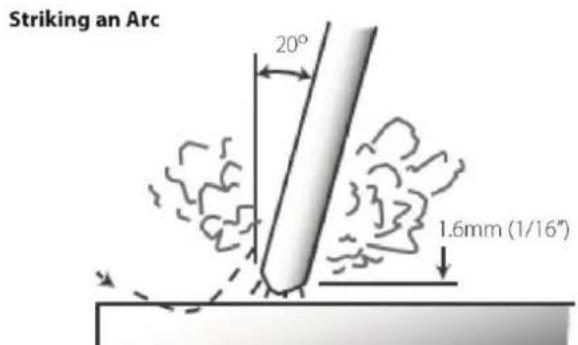
Figure 54
12.7.4 Arc Length
As soon as the arc is established, maintain a 1.6mm to 3.2mm gap between the burning electrode end and the parent metal. Draw the electrode slowly along as it melts down. The securing of an arc length necessary to produce a neat weld soon becomes almost automatic. You will find that a long arc produces more heat.
A very long arc produces a crackling or spluttering noise and the weld metal comes across in large, irregular blobs. The weld bead is flattened and spatter increases. A short arc is essential if a high quality weld is to be obtained although if it is too short there is the danger of it being blanketed by slag and the electrode tip being solidified in. If this should happen, give the electrode a quick twist back over the weld to detach it.
12.7.5 Rate of Travel
After the arc is struck, your next concern is to maintain it, and this requires moving the electrode tip towards the molten pool at the same rate as it is melting away. At the same time, the electrode has to move along the plate to form a bead.
The electrode is directed at the weld pool at about 20° from the vertical. The rate of travel has to be adjusted so that a well-formed bead is produced.
If the travel is too fast, the bead will be narrow and strung out and may even be broken up into individual globules. If the travel is too slow, the weld metal piles up and the bead will be too large.
12.8 Making Welded Joints
Having attained some skill in the handling of an electrode, you will be ready to go on to make up welded joints.
12.8.1 Butt Welds
Set up two plates with their edges parallel, as shown in Figure 55, allowing 1.6mm to 2.4mm gap between them and tack weld at both ends. This is to prevent contraction stresses from the cooling weld metal pulling the plates out of alignment.
Plates thicker than 6.0mm should have their mating edges beveled to form a 70° to 90° included angle. This allows full penetration of the weld metal to the root. Using a 3.2mm Weldclass 12V Stick electrode at 100 amps, deposit a run of weld metal on the bottom of the joint.
Do not weave the electrode, but maintain a steady rate of travel along the joint sufficient to produce a well-formed bead. At first you may notice a tendency for undercut to form, but keeping the arc length short, the angle of the electrode at about 20^ from vertical, and the rate of travel not too fast, will help eliminate this.
The electrode needs to be moved along fast enough to prevent the slag pool from getting ahead of the arc. To complete the joint in thin plate, turn the job over, clean the slag out of the back and deposit a similar weld.
Heavy plate will require several runs to complete the joint. After completing the first run, chip the slag out and clean the weld with a wire brush. It is important to do this to prevent slag being trapped by the second run. Subsequent runs are then deposited using either a weave technique or single beads laid down in the sequence shown in Figure 56. The width of weave should not be more than three times the core wire diameter of the electrode.
When the joint is completely filled, the back is either machined, ground or gouged out to remove slag which may be trapped in the root, and to prepare a suitable joint for depositing the backing run. If a backing bar is used, it is not usually necessary to remove this, since it serves a similar purpose to the backing run in securing proper fusion at the root of the weld.

Figure 55

flowchart
graph TD
    A["1"] --> B["2"]
    B --> C["3"]
    C --> D["4"]
    D --> E["5"]
    E --> F["6"]
    F --> G["7"]
    G --> H["8"]
    H --> I["9"]
    I --> J["10"]
    J --> K["11"]
    K --> L["12"]
    L --> M["13"]
    M --> N["14"]
    N --> O["15"]
    O --> P["16"]
    P --> Q["17"]
Figure 56
12.8.2 Fillet Welds
These are welds of approximately triangular cross-section made by depositing metal in the corner of two faces meeting at right angles. Refer Figure 57 and Figure 58.
A piece of angle iron is a suitable specimen with which to begin, or two lengths of strip steel may be tacked together at right angles. Using a 3.2mm Weldclass 12V Stick electrode at 100 amps, position angle iron with one leg horizontal and the other vertical. This is known as a horizontal-vertical (HV) fillet. Strike the arc and immediately bring the electrode to a position perpendicular to the line of the fillet and about 45° from the vertical. Some electrodes require being sloped about 20° away from the perpendicular position to prevent slag from running ahead of the weld. Refer to Figure 57.
Do not attempt to build up much larger than 6.4mm width with a 3.2mm electrode, otherwise the weld metal tends to sag towards the base, and undercut forms on the vertical leg. Multi-runs can be made as shown in Figure below. Weaving in HV fillet welds is undesirable.
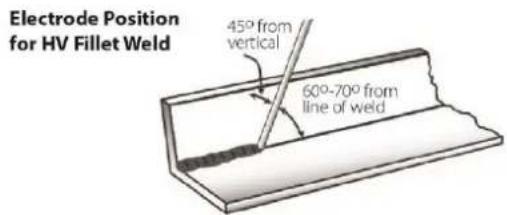
Figure 57

Figure 58
12.8.3 Vertical Welds
12.8.3.1 Vertical Up
Tack weld a three feet length of angle iron to your work bench in an upright position. Use a 3.2mm Weldclass 12V Stick electrode and set the current at 100 amps. Make yourself comfortable on a seat in front of the job and strike the arc in the corner of the fillet. The electrode needs to be about 10^ from the horizontal to enable a good bead to be deposited.
Refer Figure 59.
Single Run Vertical Fillet Weld
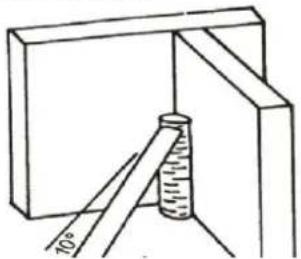
natural_image
Simple line drawing of a measuring tool inside a box, showing a cylinder and ruler (no text or symbols)Figure 59
Use a short arc, and do not attempt to weave on the first run. When the first run has been completed deslag the weld deposit and begin the second run at the bottom. This time a slight weaving motion is necessary to cover the first run and obtain good fusion at the edges.
At the completion of each side motion, pause for a moment to allow weld metal to build up at the edges, otherwise undercut will form and too much metal will accumulate in the centre of the weld. Figure 60 illustrates multi-run technique and Figure 61 shows the effects of pausing at the edge of weave and of weaving too rapidly.
Multi Run Vertical Fillet Weld

Figure 60
Examples of Vertical Fillet Welds
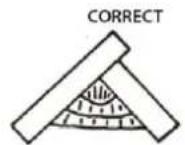
Pause at edge of weave allows weld metal to build up and eliminates undercut
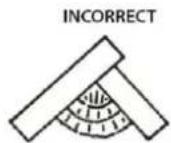
Note: Weld contour when insufficient pause at edge of weave
Figure 61
12.8.3.2 Vertical Down
The Weldclass 12V Stick electrode makes welding in this position particularly easy. Use a 3.2mm electrode at 100 amps. The tip of the electrode is held in light contact with the work and the speed of downward travel is regulated so that the tip of the electrode just keeps ahead of the slag. The electrode should point upwards at an angle of about 45°.
12.8.4 Overhead Welds
Apart from the rather awkward position necessary, overhead welding is not much more difficult that down hand welding. Set up a specimen for overhead welding by first tacking a length of angle iron at right angles to another piece of waste pipe. Then tack this to the work bench or hold in a vice so that the specimen is positioned in the overhead position as shown in the sketch.
The electrode is held at 45° to the horizontal and tilted 10° in the line of travel (Figure 62). The tip of the electrode may be touched lightly on the metal, which helps to give a steady run. A weave technique is not advisable for overhead fillet welds.
Use a 3.2mm Weldclass 12V Stick electrode at 100 amps, and deposit the first run by simply drawing the electrode along at a steady rate. You will notice that the weld deposit is rather convex, due to the effect of gravity before the metal freezes.
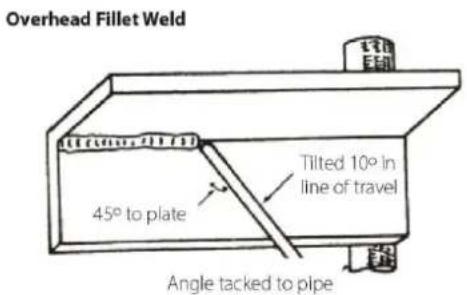
Figure 62
12.9 MMA (Stick) Troubleshooting
| Fault | Cause | Remedy |
A gap is left by failure of the weld metal to fill the root of the weld. Figure 63 Figure 63 | Welding current too low. | Increase welding current. |
| Electrode too large for joint. | Use smaller diameter electrode. | |
| Insufficient gap. | Allow wider gap. | |
Non-metallic particles are trapped in the weld metal. Figure 64 Figure 64 | Non-metallic particles may be trapped in undercut from previous run. | If a bad undercut is present clean slag bout and cover with a run from a smaller gauge electrode. |
| Joint preparation too restricted. | Allow for adequate penetration and room for cleaning out the slag. | |
| Irregular deposits allow slag to be trapped. | If very bad, chip or grind out irregularities. | |
| Lack of penetrations with slag trapped beneath weld bead. | Use smaller electrode with sufficient current to give adequate penetrations. Use suitable tools to remove all slag from comers. | |
| Rust or mill scale or preventing full fusion. | Clean joint before welding. | |
| Wrong electrode for position in which welding is done. | Use electrodes designed for position in which welding is done, otherwise proper control of slag is difficult. | |
A groove has been formed in the base metal adjacent to the top of a weld and has not been filled by the weld metal (undercut).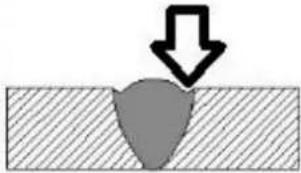 Figure 65 Figure 65 | Welding current is too high. | Reduce welding current. |
| Welding arc is too long. | Reduce the length of the welding arc. | |
| Angle of the electrode is incorrect. | Electrode should not be inclined less than 45^ to the vertical face. | |
| Joint preparation does not allow correct electrode angle. | Allow more room for joint for manipulation of the electrode. | |
| Electrode too large for joint. | Use smaller gauge electrode. | |
| Insufficient deposit time at edge of weave. | Pause for a moment at edge of weave to allow weld metal build-up. | |
| Power source is set for MIG (GMAW) welding. | Set power source to STICK (MMA) mode. | |
Portions of the weld run do not fuse to the surface of the metal or edge of the joint.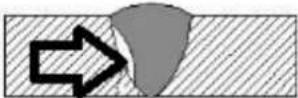 Figure 66 Figure 66 | Small electrodes used on heavy cold plate. | Use larger electrodes and preheat the plate. |
| Welding current is too low. | Increase welding current. | |
| Wrong electrode angle. | Adjust angle so the welding arc is directed more into the base metal. | |
| Travel speed of electrode is too high. | Reduce travel speed of electrode. | |
| Scale or dirt on joint surface. | Clean surface before welding. | |
Gas pockets or voids in weld metal (porosity) Figure 67 Figure 67 | High levels of Sulphur in steel. | Use an electrode that is designed for high Sulphur steels. |
| Electrodes are damp. | Dry electrodes before use. | |
| Welding current is too high. | Reduce welding current. | |
| Surface impurities such as oil, grease, paint, etc. | Clean joint before welding. | |
| Welding in a windy environment. | Shield the weld area from the wind. | |
| Electrode damaged i.e. flux coating incomplete. | Discard damaged electrodes and only use electrodes with a complete flux coating. | |
Crack occurring in weld metal soon after solidification commences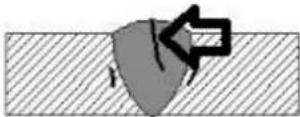 Figure 68 Figure 68 | Rigidity of joint. | Redesign to relieve weld joint of severe or use crack resistance electrodes. |
| Insufficient throat thickness. | Travel slightly slower to allow greater build up in throat. | |
| Weld current is too high. | Decrease welding current. |
Table 24
13 TIG BASIC WELDING GUIDE
TIG Welding is a fusion procedure that uses an electric ARC created between an infusible tungsten electrode and base material to be welded. For TIG welding an inert gas must be used (Argon) which protects the welding bead. If filling material is used, it is made up of rods suitable to the material to be welded (steel, stainless steel, copper etc.).
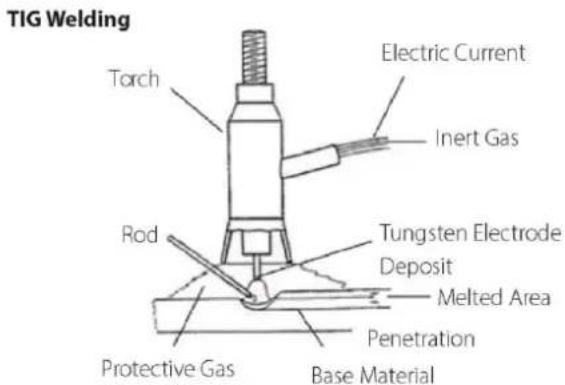
Figure 69
In TIG mode, welding is possible in all positions: flat, angle, on the edge, vertical and overhead. Furthermore, with respect to other types of welding, the welding joint has greater mechanical resistance, greater corrosion resistance and limited heating in the welded area which limits distortion. Welding can be done even without weld material, guaranteeing a smooth, shiny weld with no impurities or slag.
13.1 TIG Electrode Selection and Preparation
13.1.1 Electrode Polarity
Connect the TIG torch to the negative (-) torch terminal and the work lead to the positive (+) work terminal for direct current straight polarity. Direct current straight polarity is the most widely used polarity for DC TIG welding. It allows limited wear of the electrode since 70% of the heat is concentrated at the work piece.
| Tungsten Electrode Types | |||
| Electrode Type | Application | Features | Colour Code |
| Rare-Earth (Weldclass RE4) | All metals* | High-Performance, suitable for both DC (Steel, Stainless steel etc) and AC (Aluminium)* TIG welding. Maintains tip shape, reliable arc striking, low burn off rate, long service life and smooth/stable arc. | Purple |
Table 25
* Note that the WeldForce 210MST machine is only capable of DC TIG welding. It cannot perform AC TIG welding required to weld Aluminium.
| Tungsten Electrode Current Ranges | |
| Electrode Diameter | DC Current (Amps) |
| 1.6mm (1/16") | 60 – 115 |
| 2.4mm (3/32") | 100 – 165 |
| 3.2mm (1/8") | 135 – 200 |
Table 26
| Guide For Selecting Filler Wire Diameter | |
| Filler Electrode Diameter | DC Current (Amps) |
| 1.6mm (1/16") | 20 – 90 |
| 2.4mm (3/32") | 65 – 115 |
| 3.2mm (1/8") | 100 – 165 |
Table 27
13.1.2 Preparing Tungsten for DC Electrode Negative (DCEN) Welding
The electrode should be pointed (tapered) according to the welding current.
Grind end of tungsten on fine grit, hard abrasive wheel before welding. Do not use wheel for other jobs or tungsten can become contaminated causing lower weld quality.
Rule of thumb is that the taper section should be 2.5 times the Electrode Diameter.

Figure 70
Ideal Tungsten Preparation = Stable ARC
Diameter of the flat left on the end of the Electrode determines amperage capacity.
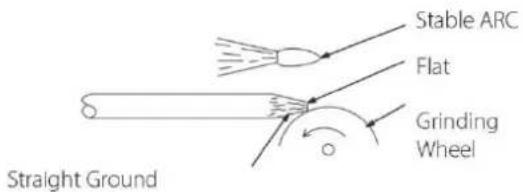
Figure 71
Wrong Tungsten Preparation = Wandering ARC
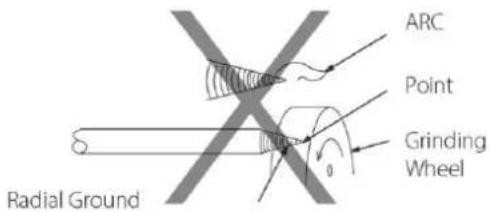
Figure 72
Pointing the Tungsten Electrode
The electrode should be pointed according to the welding current.

Figure 73
| Electrode Angles | |
| Angle @ | Range of Current (Amps) |
| 30° | 0 – 30 |
| 60-90° | 30 -120 |
| 90-120° | 120 - 250 |
| 120° | ≥250 |
Table 28
13.1.3 Shielding Gas for TIG Welding
| Shielding Gas Selection | |
| Alloy | Shielding Gas |
| Carbon Steel | Welding Argon |
| Stainless Steel | |
| Nickel Alloy | |
| Copper | |
| Titanium | |
Table 29
13.1.4 Typical TIG Welding Settings
| TIG Welding Settings For Steel | ||||||
| Metal Thickness | DC Current (Amps) | Tungsten Electrode Diameter | Filler Rod Diameter (if required) | Argon Gas Flow Rate L/min | Joint Type | |
| Mild Steel | Stainless Steel | |||||
| 1.2mm (0.045") | 45-55 | 30-45 | 1.0mm (0.040") | 1.6mm (1/16") | 5 – 7 | Butt/ Corner |
| 50-60 | 35-50 | Lap / Fillet | ||||
| 1.6mm (1/16") | 60-70 | 40-60 | 1.6mm (1/16") | 1.6mm (1/16") | 7 | Butt/ Corner |
| 70-90 | 50-70 | Lap / Fillet | ||||
| 3.2mm (1/8") | 80-100 | 65-85 | 1.6mm (1/16") | 2.4mm (3/32") | 7 | Butt/ Corner |
| 90-115 | 90-110 | Lap / Fillet | ||||
Table 30
13.2 TIG Welding Troubleshooting
| Troubleshooting - TIG Weld quality | ||
| Fault | Cause | Remedy |
| Excessive bead build up or poor penetration or poor fusion at edges of weld | Welding current is too low. | Increase weld current and/or faulty joint preparation |
| Weld bead too wide and flat or undercut at edges of weld or excessive burn through | Welding current is too high. | Decrease weld current. |
| Weld bead too small or insufficient penetration or ripples in bead are widely spaced apart. | Travel speed too fast. | Decrease weld current. |
| Weld bead too wide or excessive bead build up or excessive penetration in butt joint. | Travel speed too fast. | Increase travel speed. |
| Uneven leg length in fillet joint | Wrong placement of filler rod. | Re-position rod. |
| Electrode melts or oxidises when an arc in struck | Torch lead connected to positive welding terminal. | Connect torch lead to negative welding terminal. |
| No gas flowing to welding region. | Check the gas lines for kinks or breaks and gas cylinder contents. | |
| Torch is clogged with dust or dirt. | Clean torch. | |
| Gas hose is cut. | Replace gas hose. | |
| Gas passage contains impurities. | Disconnect gas hose from the rear of Power Source then raise gas pressure and blow out impurities. | |
| Gas regulator turned off. | Turn on. | |
| Torch electrode is too small for the welding current. | Increase electrode diameter or reduce the welding current. | |
| Dirty weld pool | Electrode contaminated by contact with work piece or filler rod material. | Clean the electrode by grinding off any contaminates. |
| Work piece surface has foreign material on it. | Clean surface. | |
| Gas contaminated with air. | Check gas lines for cuts and loose fitting or change gas cylinder. | |
| Poor weld pool | Inadequate shielding gas. | Increase gas flow or check gas line for gas flow problems. |
| Arc start is not smooth. | Tungsten electrode is too large for the welding current. | Select the right size electrode. |
| The wrong electrode is being used for the welding job. | Select the right electrode type. | |
| Gas flow rate is too high. | Select the right rate for the welding job. | |
| Incorrect shielding gas is being used. | Select the right shielding gas. | |
| Poor Work Lead/Clamp connection to work piece. | Improve connection to work piece. | |
| Arc flutters during TIG welding. | Tungsten electrode is too large for the welding current. | Select the right size electrode. |
Table 31
14 KNOWLEDGE & RESOURCES
Please refer to Weldclass website www.weldclass.com.au for more information.
15 SAFETY
15.1 Store and Retain this Manual
Retain this manual for the safety warnings and precautions, assembly, operating, inspection, maintenance and cleaning procedures. Write the product's serial number into the NOTES section at the rear, and keep this manual and the receipt in a safe and dry place for future reference.
15.2 Important Safety Information
Failure to follow the warnings and instructions may result in electric shock, fire, serious injury and/or death. Save all warnings and instructions for future reference.
This is the safety alert symbol to alert you to potential personal injury hazards:

Obey all safety messages that follow this symbol to avoid possible injury or death.

DANGER! indicates a hazardous situation which, if not avoided, will result in death or serious injury.

WARNING! indicates a hazardous situation which, if not avoided, could result in death or serious

CAUTION, used with the safety alert symbol, indicates a hazardous situation which, if not avoided, result in minor or moderate injury.
NOTE, used to address practices not related to personal injury.
CAUTION, without the safety alert symbol, is used to address practices not related to personal injury.
15.3 Welding Operation
- Maintain labels and nameplates on the welder. These carry important information. If unreadable or missing, contact Weldclass for a replacement.
- Avoid unintentional starting. Make sure the welder is setup correctly and you are prepared to begin work before turning on the welder.
-
Unplug before performing maintenance. Always unplug the welder from its electrical outlet before performing any inspection, maintenance, or cleaning procedures.
-
Never leave the welder unattended while energised. Turn power off before leaving the welder unattended.
-
Do not touch live electrical parts. Wear dry, insulating gloves. Do not touch the electrode or the conductor tong with bare hands. Do not wear wet or damaged gloves.
-
Protect yourself from electric shock. Do not use the welder outdoors. Insulate yourself from the work piece and the ground. Use non-flammable, dry insulating material if possible, or use dry rubber mats, dry wood or plywood, or other dry insulating material large enough to cover the area of contact with the work or the ground.
-
Avoid inhaling fume. Some fume created by welding contain chemicals known to cause cancer, birth defects or other harm. Your risk from these exposures varies, depending on how often you do this type of work. To reduce your exposure to these chemicals, work in a well-ventilated area, and work with approved safety equipment, such as dust masks that are specially designed to filter out microscopic particles.
-
People with pacemakers should consult their physician(s) before using this machine.

WARNING! Electromagnetic fields in close proximity to a heart pacemaker cause interference, or failure of the pacemaker. The use of a Welder is NOT RECOMMENDED for pacemaker wearers. Consult your doctor.
- Ensure that the unit is placed on a stable location before use.

WARNING! If this unit falls while plugged in, severe injury, electric shock, or fire may result.
- Transportation Methods. Lift unit with the handles provided, or use a handcart or similar device of adequate capacity. If using a fork lift vehicle, secure the unit to a skid before transporting.

CAUTION! Disconnect input power conductors from de-energized supply line before moving the welding power source.
-
Exercise good work practices. The warnings, precautions, and instructions discussed in this instruction manual cannot cover all possible conditions and situations that may occur. It must be understood by the operator that common sense and caution are factors which cannot be built into this product, but must be considered by the operator.
-
Do not use this machine for pipe thawing. This machine was not designed for pipe thawing and will be a significant electrical & heat hazard if attempt is made to use for thawing pipe.
15.4 Welding Safety Instructions & Warnings

WARNING! Protect yourself and others from possible serious injury or death.
Keep children away. Read the operating/Instruction manual before installing, operating or servicing this equipment. Have all installation, operation, maintenance, and repair work performed by qualified people.
If an operator does not strictly observe all safety rules and take precautionary actions, welding products and welding processes can cause serious injury or death, or damage to other equipment or property.
Safe practices have developed from past experience in the use of welding and cutting. These practices must be learned through study and training before using this equipment. Some of these practices apply to equipment connected to power lines; other practices apply to engine driven equipment. Anyone not having extensive training in welding and cutting practices should not attempt to weld.
Safe practices are outlined in the Australian Standard AS 1674.2 entitled: Safety in Welding and European Standard EN60974-1 entitled: Safety in welding and allied processes.

WARNING! Only use safety equipment that has been approved by an
appropriate standards agency. Unapproved safety equipment may not provide adequate protection. Eye and breathing protection must be AS/NZS compliant for the specific hazards in the work area.

DANGER! Always wear AS/NZS compliant safety glasses and full face shielded with appropriate filter shade number. (Refer Filter Table on page 17.)

CAUTION! Heavy-duty work gloves, non-skid safety shoes and hearing section used for appropriate conditions will reduce personal injuries.

CAUTION! Have the equipment serviced by a qualified repair person using cal replacement parts. This will ensure that the safety of the power tool is maintained.
15.4.1 Personal Safety

CAUTION! Keep the work area well lit. Make sure there is adequate space lying the work area. Always keep the work area free of obstructions, grease, and other debris. Do not use equipment in areas near flammable chemicals, dust, and vapours. Do not use this product in a damp or wet location.
-
Stay alert, watch what you are doing and use common sense when operating equipment. Do not use a tool while you are tired or under the influence of drugs, alcohol or medication. A moment of distraction when operating equipment may result in serious personal injury.
-
Do not overreach. Keep proper footing and balance at all times. This enables better control of the power tool in unexpected situations.
15.4.2 Arc Rays can Burn Eyes and Skin

CAUTION! Arc rays from the welding process produce intense heat and strong ultraviolet rays that can burn eyes and skin.
- Use a Welding Helmet or Welding Face Shield fitted with a proper shade filter (refer AS 60974-1, AS/NZS 1337.1 and AS/NZS 1338.1 Safety Standards) to protect your face and eyes when welding or watching. (See Filter Table on Page17).
- Wear approved safety glasses. Side shields are recommended.
- Use protective screens or barriers to protect others from flash and glare; warn others not to watch the arc.
- Wear protective clothing made from durable, flame-resistant material (wool and leather) and foot safety protection.
- Never wear contact lenses while welding.
15.4.3 Noise Can Damage Hearing

CAUTION! Noise from some processes can damage hearing. Use AS/NZS compliant ear plugs or ear muffs if the noise level is high.
15.4.4 Work Environment Safety

DANGER! Remove any combustible material from the work area.
- When possible, move the work to a location well away from combustible materials. If relocation is not possible, protect the combustibles with a cover made of fire resistant material.
- Remove or make safe all combustible materials for a radius of 10 metres around the work area. Use a fire resistant material to cover or block all doorways, windows, cracks, and other openings.
- Enclose the work area with portable fire resistant screens. Protect combustible walls, ceilings, floors, etc., from sparks and heat with fire resistant covers.
- If working on a metal wall, ceiling, etc., prevent ignition of combustibles on the other side by moving the combustibles to a safe location. If relocation of combustibles is not possible, designate someone to serve as a fire watch, equipped with a fire extinguisher, during the welding process and well after the welding is completed.
- Do not weld or cut on materials having a combustible coating or combustible internal structure, as in walls or ceilings, without an approved method for eliminating the hazard.
- After welding, make a thorough examination for evidence of fire. Be aware that visible smoke or flame may not be present for some time after the fire has started. Do not weld or cut in atmospheres containing dangerously reactive or flammable gases, vapours, liquids, and dust. Provide adequate ventilation in work areas to prevent accumulation of flammable gases, vapours, and dust.
- Do not apply heat to a container that has held an unknown substance or a combustible material whose contents, when heated, can produce flammable or explosive vapours. Clean and purge containers before applying heat. Vent closed containers, including castings, before preheating, welding, or cutting.
15.4.5 Electricity Can Kill

DANGER! Touching live electrical parts can cause fatal shocks or severe burns.
The electrode and work circuit is electrically live whenever the output is on.
The input power circuit and machine internal circuits are also live when power is on. In semiautomatic or automatic wire welding, the wire, wire reel, drive roll housing, and all metal parts touching the welding wire are electrically live. Incorrectly installed or improperly grounded equipment is a hazard.
- Do not touch live electrical parts.
- Wear dry, hole-free insulating gloves and body protection.
- Insulate yourself from the work and the ground using dry insulating mats or covers.
-
Disconnect input power before installing or servicing this equipment. Lock input power, disconnect switch open, or remove line fuses so power cannot be turned on accidentally.
-
Properly install and ground this equipment according to national, state, and local codes.
- Turn off all equipment when not in use. Disconnect power to equipment if it will be left unattended or out of service.
- Use fully insulated electrode holders. Never dip the holder in water to cool it or lay it down on the ground or the work surface. Do not touch holders connected to two welding machines at the same time or touch other people with the holder or electrode.
- Do not use worn, damaged, undersized, or poorly spliced cables.
- Do not wrap cables around your body.
- Connect work piece to a good electrical ground.
- Do not touch the electrode while in contact with the work (ground) circuit.
- Use only well-maintained equipment. Repair or replace damaged parts as soon as practical.
- In confined spaces or damp locations, do not use a welder with AC output unless equipped with a voltage reducer.
Arc rays from the welding process produce intense heat and strong ultraviolet rays that can burn eyes and skin. Use the following table to select the appropriate shade number for a Welding Helmet or Welding Face Shield.
| Recommended Protection Fillers For Electric Welding | ||
| Welding Process / Application | Approximate Range of Welding Current in Amps | Minimum Shade Number of Filter Lens |
| Stick (MMA) | Up to 100 | 8 |
| 100 to 200 | 10 | |
| MIG(other than Aluminum and Stainless Steel) | Up to 150 | 10 |
| 150 to 250 | 11 | |
| MIGof Aluminum and Stainless Steel | Up to 250 | 12 |
| MIGFlux-Cored Arc Welding (FCAW) – with or without Shielding Gas | Up to 300 | 10 |
| TIG | Up to 100 | 10 |
| 100 to 200 | 11 | |
Table 32
15.4.6 Fumes And Gases

WARNING! Welding produces fumes and gases. Breathing these fumes and gases can be hazardous to your health.
- Keep your head out of the fumes. Do not breathe the fumes.
- If inside, ventilate the area and/or use an exhaust at the arc to remove welding fumes and gases.
- If ventilation is poor, use an approved supplied-air respirator (PAPR).
- Read the Safety Data Sheets (SDS) and the manufacturer's instruction for the metals, consumables, coatings, and cleaners.
-
Work in a confined space only if it is well ventilated, or while wearing an air-supplied respirator. Shielding gases used for welding can displace air causing injury or death. Be sure the breathing air is safe.
-
Do not weld in locations near degreasing, cleaning, or spraying operations. The heat and rays of the arc can react with vapours to form highly toxic and irritating gases.
-
Do not weld on coated metals, such as galvanized, lead, or cadmium plated steel, unless the coating is removed from the weld area, the area is well ventilated, and if necessary, while wearing an air-supplied respirator. The coatings and any metals containing these elements can give off toxic fumes if welded.
15.4.7 Fire & Explosive Risks

WARNING! Sparks and spatter fly off from the welding arc. The flying sparks hot metal, weld spatter, work piece, and hot equipment can cause fires and burns.
Accidental contact of electrode or welding wire to metal objects can cause sparks, overheating, or fire.
- Protect yourself and others from flying sparks and hot metal.
- Do not weld where flying sparks can strike flammable material.
- Remove all flammables within 10m of the welding site.
- Be alert that welding sparks and hot materials from welding can easily go through small cracks and openings to adjacent areas.
- Watch for fire, and keep a fire extinguisher nearby.
- Be aware that welding on a ceiling, floor, bulkhead, or partition can cause fire on the hidden side.
- Do not weld on closed containers such as tanks or drums.
- Connect the work lead/clamp to the job as close to the welding area as practical to prevent welding current from traveling long, possibly unknown paths and causing electric shock and fire hazards.
- Do not use a welder to thaw frozen pipes.
- Remove the stick electrode from the holder or cut off the welding wire at the contact tip when not in use.
15.4.8 Sparks & Hot Metal

WARNING! Chipping and grinding causes flying metal, and as welds cool they can throw off slag.
- Wear an AS/NZS approved face shield or safety goggles. Side shields are recommended.
- Wear appropriate safety equipment to protect the skin and body.
15.4.9 Gas Cylinders

WARNING! Gas cylinders contain gas under high pressure. If damaged, a an explode. Since gas cylinders are normally part of the welding process, be sure to treat them carefully.
- Protect compressed gas cylinders from excessive heat, mechanical shocks, and arcs.
- Install and secure cylinders in an upright position by chaining them to a stationary support or equipment cylinder rack to prevent falling or tipping.
- Keep cylinders away from any welding or other electrical circuits.
- Never allow a welding electrode to touch any cylinder.
- Use appropriate shielding gas, regulators, hoses, and fittings designed for the specific application; maintain them and their associated parts in good condition.
- Turn your face away from the valve outlet when opening the cylinder valve.
16 WARRANTY
16.1 Warranty Information
For full details on warranty period and terms and conditions, go to www.weldclass.com.au/WarrantyInfo
NOTES:

natural_image
Abstract black and white geometric pattern with radial lines and a central star (no text or symbols)Weldclass
Be Outstanding
www.Weldclass.com.au


- Weldclass
- Be Outstanding
- Weldforce 210MST & 250MST
- OPERATING INSTRUCTIONS
- IMPORTANT!
- Congratulations & thank you for choosing Weldclass!
- Register Your Warranty Now
- Satisfaction Guarantee
- Using Gasless MIG Wire?
- CONTENTS
- SPECIFICATIONS
- 210MST Specifications
- 250MST Specifications
- KNOW YOUR MACHINE
- Machine Front
- Machine Rear
- Machine Side
- Control Panel
- LCD Readout
- Symbols chart
- CONTROLS EXPLAINED
- Weld Process Selection
- MIG Process:
- Stick (MMA) & TIG Process:
- MIG Synergic Program Selection
- Function Selection
- Soft-Start Adjustment (SYN/MAN)
- Inductance (SYN/MAN)
- Burnback Adjustment (SYN/MAN)
- Post-Gas Time (SYN/MAN)
- Trigger Function (SYN/MAN)
- Spot/Stitch Weld Time (SYN/MAN)
- Metric/Imperial (SYN/MAN)
- Machine Software Information (SYN/MAN)
- Plug/Power Supply Selection (SYN/MAN) [Weldforce 210MST only]
- Hot Start Adjustment (MMA)
- Arc Force Adjustment (MMA)
- VRD Function (Stick)
- Factory Reset
- Errors/Alarms
- POWER SUPPLY
- Electrical Connection
- Weldforce 210MST
- Setting machine to 10A or 15A Input Mode
- Weldforce 250MST
- Extension Leads
- Generator Use
- Generator Size
- Generator Quality & Warranty Limitations
- 3 Golden Rules of Generator use
- OPERATING ENVIRONMENT
- Location
- Ventilation
- BASIC OPERATION
- MIG Welding
- Fitting Wire Spool
- Weldforce 210MST:
- Weldforce 250MST
- Loading Wire Feeder
- Gasless Welding Setup
- Gas MIG Welding Setup
- Additional Setup for MIG welding with aluminium
- Adjusting Settings for MIG Welding in Manual Mode (MAN)
- Adjusting Settings for MIG Welding in Synergic (Auto) Mode (SYN)
- Stick (MMA) Welding Operation
- Lift TIG Operation
- ACCESSORIES, SPARE PARTS & CIRCUIT DIAGRAMS
- MIG Torch and Spares:
- TIG Torch and Spares (Optional Extra):
- Optional Accessories
- Drive Rollers:
- Machine Spare Parts:
- Primary Schematic Circuit Diagram
- Weldforce 210MST
- Keep your Welding Machine in Top Condition
- Storing the Welder
- GENERAL GUIDE TO WELDING
- Duty Cycle Rating
- Choosing a Welding Process – MIG, Stick or TIG?
- The Stick (MMA) Process
- Description
- Process
- Advantages
- Limitations
- Materials
- The TIG Process
- Description
- Process
- Advantages
- Limitations
- Materials
- The MIG Process
- Description
- Process
- Advantages
- Limitations
- Materials
- Joint Preparations
- MIG BASIC WELDING GUIDE
- MIG Basic Welding Techniques
- Gas Metal Arc Welding (GMAW)
- Flux Cored Arc Welding (FCAW)
- Position of MIG Torch
- Distance from the MIG Torch Nozzle to the Work Piece
- Travel Speed
- MIG Welding (GMAW) Variables
- Preselected Variables
- Primary Adjustable Variables
- Secondary Adjustable Variables
- Establishing the Arc and Making Weld Beads
- MIG Voltage & Wire Speed Settings
- Setting Wire Speed/Amperage
- Setting Voltage
- Changing to a different welding wire
- How to determine correct Wire Speed/Voltage Setting
- Suggested Settings for Typical MIG Applications
- Welding wire Size Selection
- MIG Welding Troubleshooting
- Porosity Problems
- Wire Feed Problems
- TOP TIPS - Wire Jam Troubleshooting
- Weld Quality Problems
- STICK (MMA) BASIC WELDING GUIDE
- Size of Electrodes
- Storage of Electrodes
- Electrode Polarity
- Effects of Stick (MMA) Welding on Various Materials
- High Tensile and Alloy Steels
- Manganese Steels
- Cast Iron
- Types of Electrodes
- MILD STEEL:
- CAST IRON:
- STAINLESS STEEL:
- Suggested Settings for Typical Stick (MMA) Applications
- MMA Welding Techniques
- A Word for Beginners
- The Welder
- Striking the Arc
- Arc Length
- Rate of Travel
- Making Welded Joints
- Butt Welds
- Fillet Welds
- Vertical Welds
- Vertical Up
- Vertical Down
- Overhead Welds
- MMA (Stick) Troubleshooting
- TIG BASIC WELDING GUIDE
- TIG Electrode Selection and Preparation
- Electrode Polarity
- Preparing Tungsten for DC Electrode Negative (DCEN) Welding
- Ideal Tungsten Preparation = Stable ARC
- Wrong Tungsten Preparation = Wandering ARC
- Pointing the Tungsten Electrode
- Shielding Gas for TIG Welding
- Typical TIG Welding Settings
- TIG Welding Troubleshooting
- KNOWLEDGE & RESOURCES
- SAFETY
- Store and Retain this Manual
- Important Safety Information
- Welding Operation
- Welding Safety Instructions & Warnings
- Personal Safety
- Arc Rays can Burn Eyes and Skin
- Noise Can Damage Hearing
- Work Environment Safety
- Electricity Can Kill
- Fumes And Gases
- Fire & Explosive Risks
- Sparks & Hot Metal
- Gas Cylinders
- WARRANTY
- Warranty Information
Brand : Weldclass
Model : Weldforce 250MST
Category : Welding machine