IAQ18WJWE6 - Air-conditioner SAMSUNG - Free user manual and instructions
Find the device manual for free IAQ18WJWE6 SAMSUNG in PDF.


User questions about IAQ18WJWE6 SAMSUNG
0 question about this device. Answer the ones you know or ask your own.
Ask a new question about this device
Download the instructions for your Air-conditioner in PDF format for free! Find your manual IAQ18WJWE6 - SAMSUNG and take your electronic device back in hand. On this page are published all the documents necessary for the use of your device. IAQ18WJWE6 by SAMSUNG.
USER MANUAL IAQ18WJWE6 SAMSUNG
natural_image
Illustration of a stylized air conditioner unit with horizontal stripes (no text or symbols)Safety Precautions
You should take the following safety precautions when using your air conditioner.

WARNING
- If you don't follow the safety precautions, you may get the risk of an electric shock, injury or death.
•The manufacturer or qualified service personnel must install this air conditioner. - Unplug the electric power before repairing, installing or cleaning.
DURING OPERATION
◆ Do not repair the air conditioner at your discretion. It is recommended to contact a service center directly.
◆ Never spill any kind of liquid on the air conditioner.
If this happens, unplug or turn off the air conditioner and contact an authorized service center.
◆ Do not insert anything between the airflow blades to prevent damage of the inner fan and consequent injury. Keep children away from the air conditioner.
◆ Do not place any obstacles in front of the air conditioner.
◆ Do not spray any kind of liquid into the indoor unit. If this happens, turn off the breaker and contact a service center.
◆ Make sure that the air conditioner is well ventilated at all times: Do not place a cloth or other materials over it.
◆ Remove the batteries if you don't use the remote control for a long time. (If applicable)
◆ Use the remote control within 7 meters from the indoor unit. (If applicable)
DISPOSING OF THE UNIT
◆ Before throwing out the air conditioner, remove the batteries from the remote control.
When you dispose of the air conditioner, consult your dealer. If pipes are removed incorrectly, refrigerant may blow out and cause air pollution. When it contacts with your skin, it can cause skin injury.
◆ The package of the air conditioner should be recycled or disposed properly for environmental reasons.
OTHERS
◆ Never store or load the air conditioner upside down or sideways to prevent the damage of the compressor.
◆ Young children or infirm persons should be always supervised when they use the air conditioner.
◆ Max current is measured according to IEC standard for safety.
◆ Current is measured according to ISO standard for energy efficiency.
Contents
PREPARATION
■ Safety Precautions 2
■ Name of Each Part 4
■ Remote Control-Buttons and Display 6
- Inserting the Remote Control Batteries 7
- Getting Start 8
◆ OPERATION
■ Selecting the Auto Mode 9
■ Selecting the Cool Mode 10
■ Selecting the Heat Mode 11
■ Selecting the Dry Mode 12
■ Selecting the Fan Mode 13
■ Selecting the Turbo Function 14
■ Selecting the Energy Saving Function 15
■ Adjusting the Airflow Direction Vertically 16
■ Adjusting the Airflow Direction Horizontally 17
■ Setting the On Timer 18
■ Setting the Off Timer 19
■ Setting the Sleep Timer 20
■ Setting the 1 Hour Timer 21
◆ RECOMMENDATIONS FOR USE
■ Operating Recommendations 22
■ Temperature and Humidity Ranges 23
■ Operating Your Air Conditioner Without the Remote Control ..... 23
■ Troubleshooting Guide 24
■ Cleaning Your Air Conditioner 25
■ Cleaning Deodorizing and Bio Filter (Option) 25
Name of Each Part
The design and shape can be changed according to the model.
Indoor Unit

text_image
Temperature sensor Power(On/Off) button Air filter (under the grille) Airflow blades (outlet) Air Inlet Operation indicator (Green) Timer indicator (Green) Turbo indicator (Red) Power(On/Off) buttonOutdoor Unit
UQ18WJWB UQ18WJWE SH18ZWJX
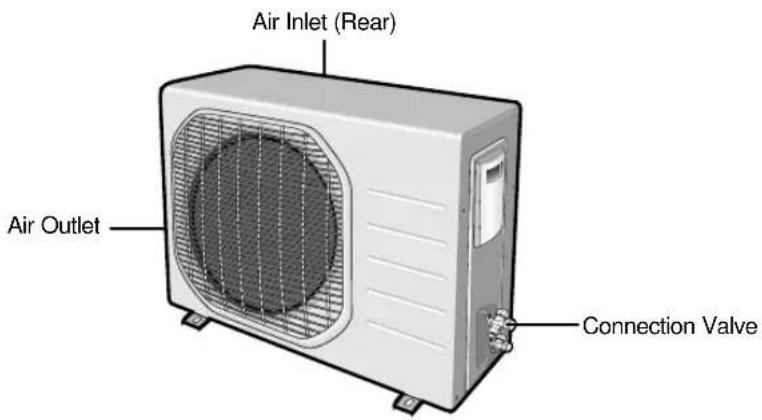
text_image
Air Inlet (Rear) Air Outlet Connection ValveOutdoor Unit
SH18AW6X UQ24W6WB UQ24W6WE SH24AW6X SH24ZW6X
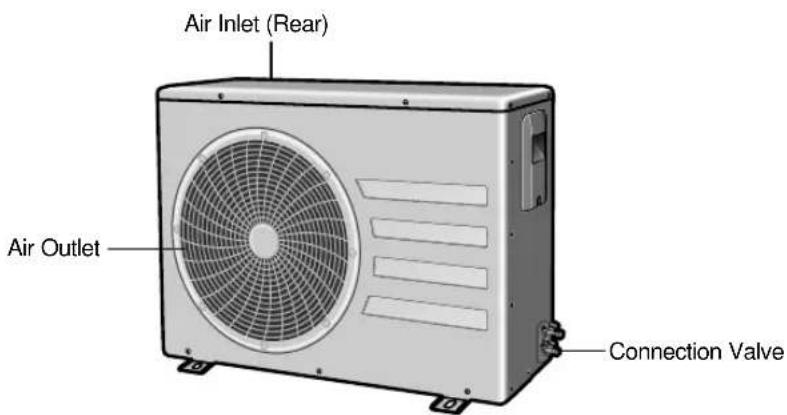
text_image
Air Inlet (Rear) Air Outlet Connection ValveRemote Control-Buttons and Display

text_image
Transmission indicator Temperature and Timer setting Battery life indicator Operation modes indicator (Auto AUTO, COOL, DRY, FAN, HEAT) Airflow direction Fan speed indicator Turbo button 1 Hour Timer button Fan speed button Airflow control button Timer Set/Cancel button Battery check button 1 Hour Timer indicator SET TEMP. ON OFF POWER 1HR. MODE TEMP. FAN SPEED ENERGY SAVING FLAP SLEEP SET/CANCEL ON On Timer button BATTERY Off Timer button 1 Hour Timer indicator On Timer indicator Off Timer indicator Turbo function indicator Sleep mode indicator Energy saving indicator Power(On/Off) button Mode selection button (AUTO, COOL, DRY, FAN, HEAT) Temperature adjustment button Energy Saving buttonM1e
◆ Each mode indicator shows the current setting and the battery life.
◆ You can check the battery life by pressing the BATTERY button.
◆ The number of the battery life indicator means the remaining battery life. Replace the batteries when only one battery life indicator remains.
Inserting the Remote Control Batteries
You must insert or replace the remote control batteries when:
◆ You purchase the air conditioner
◆ The remote control does not work correctly
N
◆ Use two AAA, LR03 1.5V batteries.
◆ Do not use old batteries or different kinds of batteries together.
◆ Batteries may be completely discharged after 12 months, even if they have not actually been used.
1 Remove the battery cover in the rear of the remote control by pushing it with your thumb.
2 Insert two batteries, respecting the polarities as indicated by the + and - symbols.
3 Close the cover by sliding it back in its place.

natural_image
Line drawing of a car interior with a handle and seat, no text or symbols present
natural_image
Line drawing of a remote control casing with a battery inside, showing internal components and a pointer indicating the component (no text or symbols present)Getting Start
The User's Manual provides you valuable information about your air conditioner. Please read this manual carefully before using the air conditioner. It will help you take full advantage of the unit's features.
You have already seen the basic description of the unit on pages from 4 to 6. Starting up with the next page, you will find a series of step-by-step procedures for each function available.
The illustrations in the step-by-step procedures use three different symbols:
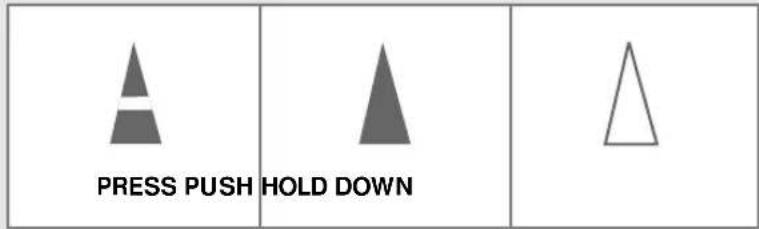
text_image
PRESS PUSH HOLD DOWNSelecting the Auto Mode
You can select the Auto mode if you want to cool or heat your room automatically. You can adjust the temperature and the fan speed in this mode.
1 If necessary, press the ⏻ button.
Result: ◆ The operation indicator on the indoor unit lights up.
◆ The air conditioner starts up in the mode you selected last.
◆ The indoor unit beeps.
2 Press the MODE button on the remote control until Auto is displayed.
Result: ◆ The indoor unit beeps each time you press the button.
◆ The air conditioner runs in the Auto mode.
◆ The Auto mode cools or heats the room depending on the set temperature.
◆ The air conditioner changes the Cool or Heat mode automatically depending on the current temperature during operation.
Note: You can change modes at any time.
3 Press the button to adjust the temperature until the required temperature is displayed.
You can set the temperature between 16°C and 30°C.
Result: Each time you press the button:
- The temperature is adjusted by 1°C
- The indoor unit beeps
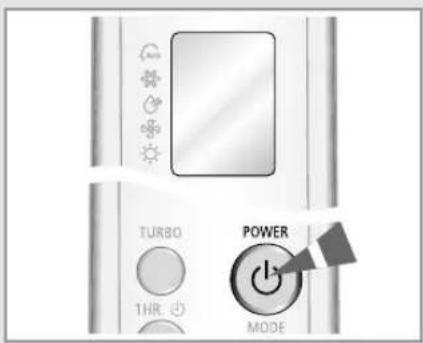
text_image
TURBO 1HR POWER MODE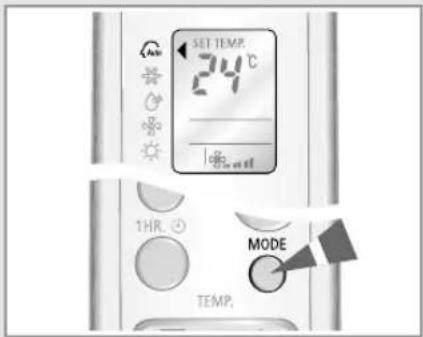
text_image
SET TEM 24°C 1HR. MODE TEMP.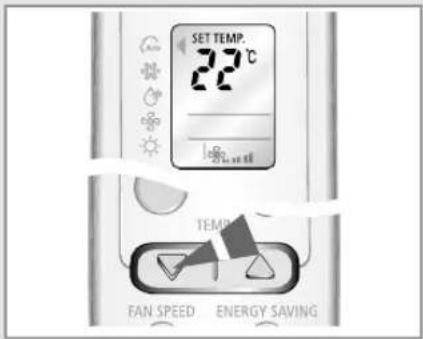
text_image
SET TEMP. 22°C TEMP FAN SPEED ENERGY SAVINGSelecting the Cool Mode

text_image
TURBO POWER THR MANDS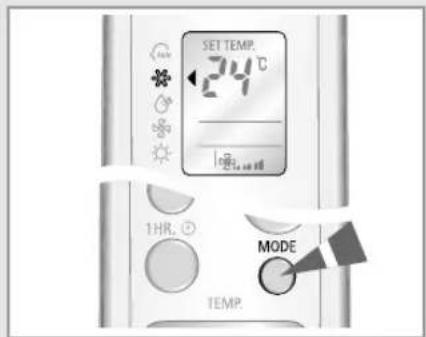
text_image
SET TEMP. 24°C log 1HR. MODE TEMP.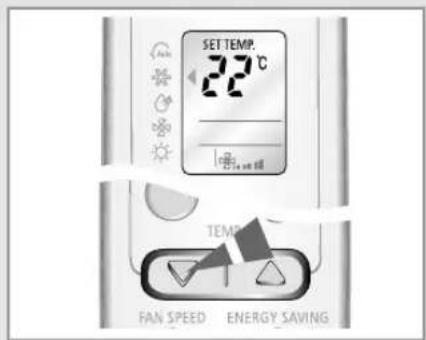
text_image
SET TEMP. 22°C FAN SPEED ENERGY SAVING
text_image
SET TEMP. 22°C FAN SPEED FLAP SLEEP EGY SAVINGYou can select the Cool mode if you want to cool your room. You can adjust the temperature and the fan speed when cooling.
1 If necessary, press the ⏻ button.
Result: ◆ The operation indicator on the indoor unit lights up.
◆ The air conditioner starts up in the mode you selected last.
◆ The indoor unit beeps.
2 Press the MODE button on the remote control until ✦ is displayed.
Result: ◆ The indoor unit beeps each time you press the button.
◆ The air conditioner runs in the Cool mode.
NOTE You can change modes at any time.
3 Press the button to adjust the temperature until the required temperature is displayed.
You can set the temperature between 16^ C and 30^ C.
Result: ◆ Each time you press the button:
- The temperature is adjusted by 1°C
- The indoor unit beeps
◆ If the room temperature is higher than the selected temperature, the air conditioner starts cooling.
◆ If the room temperature reaches the set temperature, the air conditioner stops cooling, but the fan operates consistently.
4 Press the button to select the fan speed until the required setting is displayed.
Automatic (rotated : ⚙→ ⚙… → ⚙…)
Low
Medium
High
Maximum
Result: Each time you press the button, the indoor unit beeps.
5 To control the airflow direction, refer to pages 16 and 17.
Selecting the Heat Mode
You can select the Heat mode if you want to heat your room. You can adjust the temperature and the fan speed when heating.
1 If necessary, press the ⏻ button.
Result: ◆ The operation indicator on the indoor unit lights up.
◆ The air conditioner starts up in the mode you selected last.
◆ The indoor unit beeps.
2 Press the MODE button on the remote control until ⚙ is displayed.
Result: ◆ The indoor unit beeps each time you press the button.
◆ The air conditioner runs in the Heat mode.
Note: You can change modes at any time.
3 Press the button to adjust the temperature until the required temperature is displayed.
You can set the temperature between 16°C and 30°C.
Result: ◆ Each time you press the button:
- The temperature is adjusted by 1°C
- The indoor unit beeps
◆ If the room temperature reaches 5^ C higher than the set temperature, the air conditioner stops heating, but the fan operates consistently.
◆ If the room temperature reaches 3^ C lower than the set temperature, the air conditioner starts heating again.
4 Press the button to select the fan speed until the required setting is displayed.
Automatic (rotated: ♣→♂→♂...)
Low
Medium
High
Maximum
Result: ◆ Each time you press the button, the indoor unit beeps.
◆ For the first 3\~5 minutes, the fan may not operate to prevent the cool air from running out of the indoor unit. It helps to warm the air in your room sufficiently.
5 To control the airflow direction, refer to pages 16 and 17.
text_image
TURBO 1HR POWER MORE
text_image
SET TEMP. 24°C 1HR. ⏚ MODE TEMP.
text_image
SET TEMP. 28°C TEMP. FAN SPEED ENERGY SAVING
text_image
SET TEMP. 28°C FAN SPEED FLAP SLEEP EGY SAVINGSelecting the Dry Mode

text_image
TURBO 1HR POWER MODEYou can select the Dry mode if you want to dehumidify your room. You can adjust the temperature in this mode.
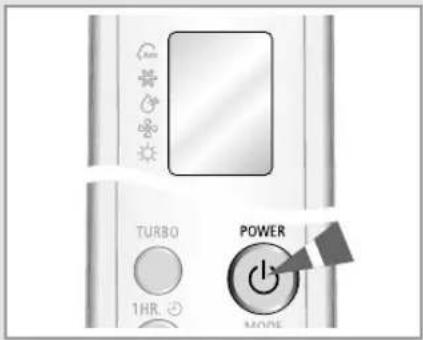
1 If necessary, press the POWER button.
Result: ◆ The operation indicator on the indoor unit lights up.
◆ The air conditioner starts up in the mode you selected last.
◆ The indoor unit beeps.
text_image
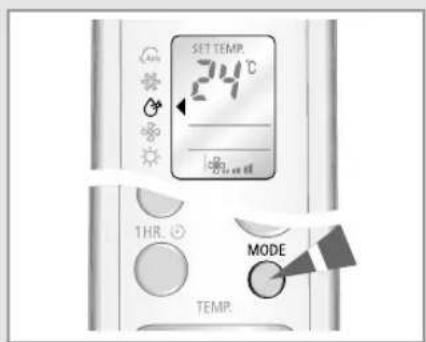
SET TEMP. 24°C 1HR. MODE TEMP.2 Press the button on the remote control until is displayed.
Result: ◆ The indoor unit beeps each time you press the MODE button.
◆ The air conditioner runs in the Dry mode.

You can change modes at any time.
text_image
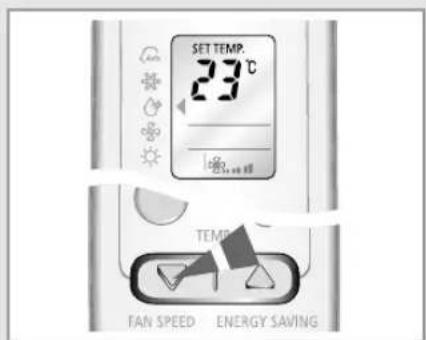
SET TEMP. 23°C FAN SPEED ENERGY SAVING3 Press the button to adjust the temperature until the required temperature is displayed.
You can set the temperature between 16^ C and 30^ C.
Result: ◆ Each time you press the button:
- The temperature is adjusted by 1°C
- The indoor unit beeps
◆ The air conditioner starts dehumidifying and the fan speed is adjusted automatically.
4 To control the airflow direction, refer to pages 16 and 17.
Selecting the Fan Mode
You can select the Fan mode if you want to ventilate your room. It helps to refresh the air in your room. You can adjust the fan speed in this mode.
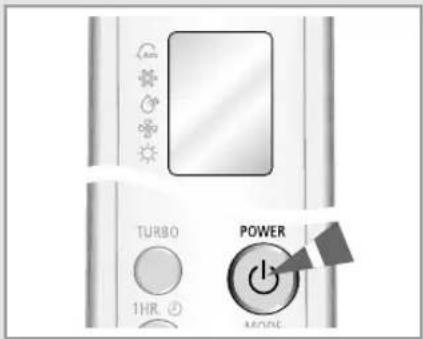
1 If necessary, press the ⏻ button.
Result: ◆ The operation indicator on the indoor unit lights up.
◆ The air conditioner starts up in the mode you selected last.
◆ The indoor unit beeps.
2 Press the button on the remote control until is displayed.
Result: ◆ The indoor unit beeps each time you press the button.
◆ The air conditioner runs in the Fan mode.
◆ The temperature is set automatically.
Make You can change modes at any time.
3 Press the button to select the fan speed until the required setting is displayed.
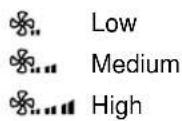
Result: Each time you press the button, the indoor unit beeps.
4 To control the airflow direction, refer to pages 16 and 17.
text_image
TURBO 1HR POWER MODE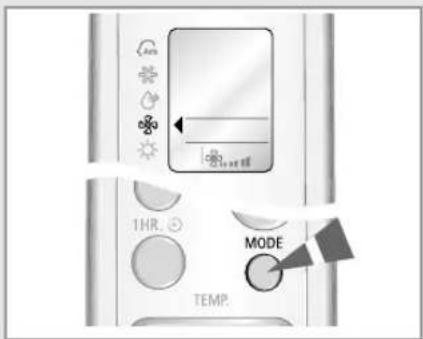
text_image
Speed 100% 50% 20% 10% 30% 10% 50% 20% 10% 30% 10% 50% 20% 10% 30% 10% 50% 20% 10% 30% 10% 50% 20% 10% 30% 10% 50% 20% 10% 30% 10% 50% 20% 10% 30% 10% 50% 20% 1 2 3 4 5 6 7 8 9 10 11 12 13 14 15 16 17 18 19 20 21 22 23 24 25 26 27 28 29 30 31 32 33 34 35 36 37 38 39 40 41 42 43 44 45 46 47 48 49 50 51 52 53 54 55 56 57 58 59 60 61 62 63 64 65 66 67 68 69 70 71 72 73 74 75 76 77 78 79 80 81 82 83 84 85 86 87 88 89 90 91 92 93 94 95 96 97 98 99 100
text_image
FAN SPEED FLAP SLEEP Energy SavingSelecting the Turbo Function
text_image
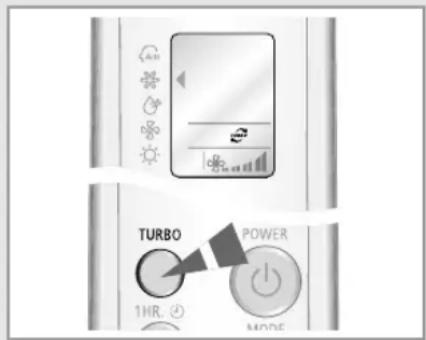
TURBO POWER 1HR. MODEYou can select the Turbo Function if you want to cool or heat your room in the fastest way. After the 30-minute operation with the maximum setting, it returns to the previous setting.
1 If necessary, press the ⏻ button.
Result: ◆ The operation indicator on the indoor unit lights up.
◆ The air conditioner starts up in the mode you selected last.
◆ The indoor unit beeps.
2 Press the ○ button.
Result: ◆ The temperature and fan settings are adjusted automatically.
◆ The air conditioner cools or heats the room as quickly as possible.
◆ After 30 minutes, the air conditioner is reset automatically to the previous setting.
◆ You can select the Turbo function in the Auto, Cool and Heat mode. If you select this function in the Dry or Fan mode, the mode changes to the Auto mode.
3 Press the ○ button again to stop the Turbo Function before the end of the 30-minute period.
Result: The air conditioner is reset automatically to the previous setting.
4 To control the airflow direction, refer to pages 16 and 17.
Selecting the Energy Saving Function
You can select the Energy Saving Function to save energy when cooling or heating.
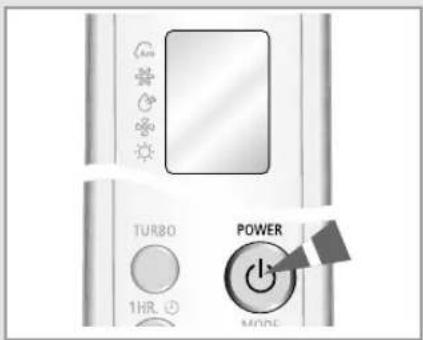
1 If necessary, press the ⏻ button.
Result: ◆ The operation indicator on the indoor unit lights up.
◆ The air conditioner starts up in the mode you selected last.
◆ The indoor unit beeps.
2 Press the ○ button.
Result: ◆ The indoor unit beeps.
◆ The air conditioner runs in the Energy saving mode.
◆ The outer airflow blade moves up and down.
◆ To stop the Energy saving mode, press the again.
Note: You can select the Energy saving mode only in the Cool and Heat mode.
3 Press the ▼ | △ button to adjust the temperature until the required temperature is displayed.
4 Press the ○ button to select the fan speed until the required setting is displayed.
5 To control the airflow direction, refer to pages 16 and 17.
text_image
TURBO 1HR POWER MODE
text_image
SET TEMP. 25 °C FAN SPEED ENERGY SAVIN FLAP SLEEP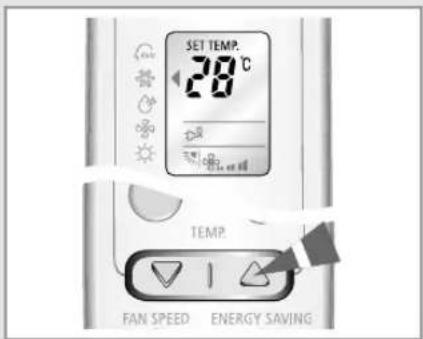
text_image
SET TEMP. 28°C TEMP. FAN SPEED ENERGY SAVING
text_image
SET TEMP. 28°C FAN SPEED FLAP SLEEP VERY SAVINGAdjusting the Airflow Direction Vertically
text_image
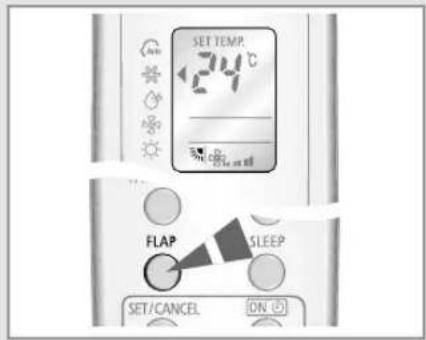
SET TEMP 24°C FLAP SLEEP SET/CANCEL ONYou can adjust the airflow direction vertically. The outer airflow blade moves up and down to increase the efficiency of the cooling or heating operation.
1 Press the FLAP button until the required direction is set. Result: The outer blade is adjusted vertically.
2 Press the FLAP button to move the blade up and down automatically during operation.
3 Press the FLAP button again to stop the blade moving up and down.
If you turn the air conditioner... Then the blade...
off is closed completely. on set to the default position.
Adjusting the Airflow Direction Horizontally
You can adjust the airflow direction horizontally with your hands. The inner blades with small fins moves the air to the required direction.
1 Adjust the inner blades by moving them to left or right.

natural_image
Close-up of a car grille and ventilation grilles with a triangular arrow pointing to a textured surface (no text or symbols visible)Setting the On Timer

text_image
3 HR ON SET/CANCEL ON BATTERY OFF
text_image
3 HR ON SET/CANCEL ON BATTERY OFF
text_image
SET TEMP. 24°C ON 1 THR. MODE TEMP.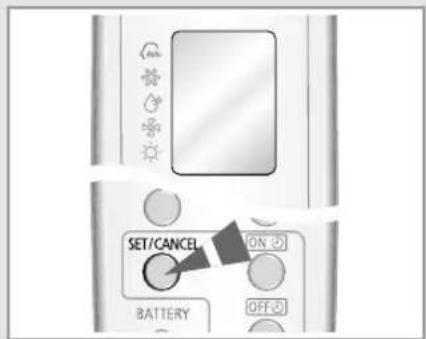
text_image
SET/CANCEL ON BATTERY OFFYou can set the On Timer to turn on the air conditioner automatically at the appointed time. You can set the time from 1 hour to 24 hours.
1 Press the ON button until the required time is displayed to set the On Timer. You can set the time between 1 hour and 24 hours.
2 Press the SET/CANCEL button to complete the setting.
Result: ◆ The remaining time is displayed.
◆ The timer indicator stops blinking.
◆ The selected mode and the temperature on the display disappear after 10 seconds.
◆ The air conditioner turns on automatically at the appointed time and the On Timer setting disappears.
3 Press the MODE button until the desired mode is displayed at the top of the remote control to select the mode in advance.
Result: The air conditioner operates in the selected mode when it is turned on.
[Unreadable]
If you don't use the remote control after setting the On Timer, it turns off automatically after 25 hours.
To Cancel the On Timer
Press the SET/CANCEL button to cancel the On Timer.
Mate
If you press the ○ button, both the On Timer and the Off Timer are canceled.
Setting the Off Timer
You can set the Off Timer to turn off the air conditioner automatically at the appointed time. You can set the time from 1 hour to 24 hours.
1 Press the ⏻ button until the required time is displayed to set the Off Timer. You can set the time between 1 hour and 24 hours.
2 Press the SET/CANCEL button to complete the setting.
Result: ◆ The remaining time is displayed.
◆ The timer indicator stops blinking.
◆ The air conditioner turns off automatically at the appointed time and the Off Timer setting disappears.
If you would like to turn the air conditioner on after 2 hours and to operate it for 2 hours:
- Press the button until '2 Hr' is displayed.
- Press the SET/CANCEL button.
- Press the button until '4 Hr' is displayed.
- Press the SET/CANCEL button.
NOTE You can check or change the mode and/or the temperature by pressing the MODE button or the ▼ | △ button after setting the Off Timer.
To Cancel the Off Timer
Press the SET/CANCEL button to cancel the Off Timer.
If you press the ⏻ button, both the On Timer and the Off Timer are canceled.

text_image
3 HR SET/CANCEL ON BATTERY OFF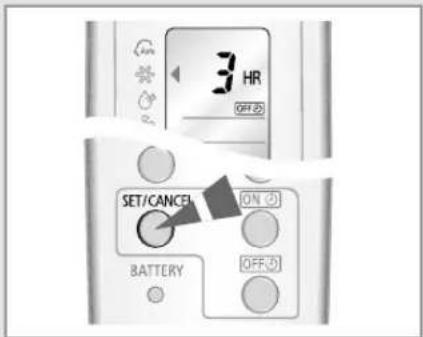
text_image
3 HR OFF 2 SET/CANCEL ON BATTERY OFF 0
text_image
SET TEMP. 124°C SET/CANCEL ON BATTERY OFFSetting the Sleep Timer

text_image
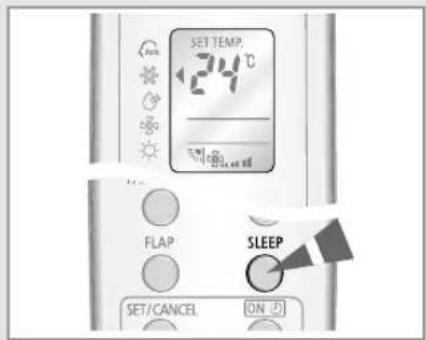
SET TEMP. 24°C FLAP SLEEP SET/CANCEL ONYou can set the Sleep Timer to turn off the air conditioner automatically while you are sleeping. The air conditioner stops operating 6 hours after you set the Sleep Timer.
1 Press the 📄 button until the ⚙️ indicator appears on the remote control.
Result: ◆ The indoor unit beeps.
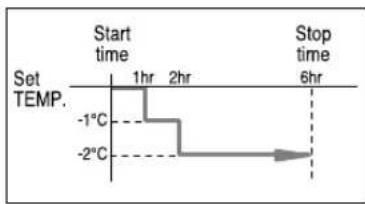
◆ The air conditioner will be controlled as indicated in the illustrations below.

You can set Sleep Timer only in the Cool or Heat mode.
Cooling The temperature is increased by 1^ C every hour. After the increase of 2^ C, the temperature is maintained for 4 hours.

text_image
Set TEMP. 2°C 1°C Start time 1hr 2hr Stop time 6hrHeating The temperature is decreased by 1^ C every hour. After the decrease of 2^ C, the temperature is maintained for 4 hours.
text_image
Start time Set TEMP. -1hr 2hr -2°C Stop time 6hrTo Cancel the Sleep Timer
text_image
SET TEMP 124°C FLAP SLEEP SET/CANCEL ONPress the 🧑 button to cancel the Sleep Timer.
Result: ◆ The indoor unit beeps.
◆ The ⚙️ indicator is no longer displayed.
◆ The air conditioner operates normally.
Setting the 1 Hour Timer
You can set the 1 Hour Timer to turn off the air conditioner automatically after an hour. It is the quick and convenient way using only one button.
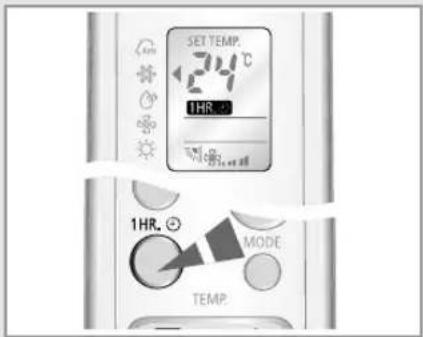
1 Press the ^1 HR. button until the 1HR. indicator appears on the remote control.
Result: ◆ The indoor unit beeps.
◆ The air conditioner turns off after an hour automatically.
2 Press the MODE button until the desired mode is displayed at the remote control to select the mode after setting the 1 Hour Timer.
Result: The air conditioner operates in the selected mode for an hour.
[Unreadable]
If you set the 1 Hour Timer when the air conditioner is turned off, the air conditioner turns on and operates for an hour.

To cancel the 1 Hour Timer
Press the ^1 HR, button to cancel the 1 Hour Timer.
Result: ◆ The indoor unit beeps.
◆ The 1HR indicator is no longer displayed.
◆ The air conditioner operates normally.
text_image
SET TEMP. 24°C 1HR. 1HR. MODE TEMP.
text_image
SET TEMP. 24°C 1HR. MODE TEMP.Operating Recommendations
When you use your air conditioner, it is recommended to read the following:
Topic Recommendation
| Heating capacity The heat pump inside the air conditioner absorbs heat from outside air and brings it indoors. If the temperature of the outside air drops, the air conditioner heats less. If the room is not warm enough, use an additional heating appliance. | |
| Warm air circulation The air conditioner circulates warm air to heat your room. It will take some time to warm the air in your room entirely after the air conditioner turns on. Therefore, turn the air conditioner on in advance. | |
| Frost When you select the Heat mode, frost may form in the outdoor unit due to the low temperature and high humidity. If this happens:◆ The heating operation is stopped.◆ The air conditioner defrosts automatically for about 7 minutes. After about 7 minutes, the air conditioner starts operating again normally. | |
| High indoor and outdoor If both the indoor and outdoor temperatures temperatures are high when you select the Heat mode, the fan and the compressor of the outdoor unit may stop at times. This is normal; wait until the air conditioner turns on again. | |
| Power failure If power failure occurs when the air conditioner is operating, the air conditioner turns off. When the power returns, the air conditioner starts up again automatically. | |
| Protection mechanism When the air conditioner is started immediately after being plugged in or stopped, the normal operation starts up after 3 minutes for the reason of protection. |
Temperature and Humidity Ranges
If you check the following tables, you can use your air conditioner more efficiently.
If the air conditioner is used at... Then...
| High temperatures | The air conditioner may stop operating for the reason of protection. |
| Low temperatures | Water may leak and some malfunction may occur if the heat exchanger freezes. |
| High humidity levels | Water may condense and drip from the surface of the indoor unit if you don’t use the air conditioner for a long time. |
Operation Outdoor Temperature Indoor Temperature Indoor Humidity
Heating 0°C to 24°C approx. 27°C or less -
Cooling 19°C to 43°C approx. 16°C to 32°C approx. 80% or less
Dehumidifying 19°C to 43°C approx. 16°C to 32°C approx. -
* If the outdoor temperature is as low as 0°C, the heating capacity drops up to 70\~80% depending on the operating condition.
If you use the air conditioner over 32°C(indoor temperature), the cooling capacity may drop.
Operating Your Air Conditioner Without the Remote Control
You can operate your air conditioner directly without the remote control.
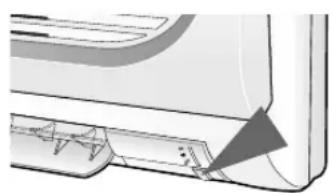
1 To turn the air conditioner on, press the On/Off button on the right side of the indoor unit.
Result: ◆ The Operation indicator on the indoor unit lights up.
◆ The indoor unit beeps.
◆ The air conditioner starts up in the appropriate mode for the room temperature. The air conditioner changes the Cool or Heat mode automatically depending on the current temperature during operation.
2 To turn the air conditioner off, press the On/Off button again.
Note Even if you turned the air conditioner on with the On/Off button, you can control it with the remote control.
natural_image
Technical illustration of a wall-mounted air conditioner unit with a triangular component inserted (no text or symbols)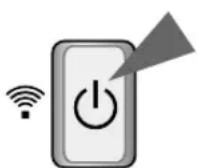
Troubleshooting Guide
Before contacting the service center, check the following. It will save your time and the expense of an unnecessary call.
| Problem | Explanation/Solution |
| The air conditioner does not operate. | ◆ Check if the circuit breaker of the air conditioner is switched on.◆ Check if the air conditioner is turned on. If necessary, press thebutton on the remote control.◆ Check if the Timer indicator on the indoor unit is on.If so:- Wait until the set time is reached and the air conditioner starts automatically.- Cancel the Timer. (See pages 18 and 19 for further details) |
| The air conditioner does not operate with the remote control. | ◆ Check if there are no obstacles in front of the indoor unit.◆ Check the remote control batteries.◆ Make sure that you are within 7 meters from the indoor unit. |
| No beep is heard when you press theon the remote control. | ◆ Check if you are pointing the remote control at the remote control sensor on the right side of the indoor unit.◆ Replace the remote control batteries if necessary. |
| The air conditioner does not cool or heat. | ◆ Check if the correct operating mode has been selected (Auto, Cool, Heat).◆ The room temperature may be too low or too high.◆ Check if the air filter is dirty; refer to page 25 for cleaning instructions.◆ Check that there is no obstacle in front of the outdoor unit. |
| When heating, the required room temperature is never reached and the air conditioner frequently stops. | ◆ Check if the required temperature is set correctly.◆ Increase the fan speed.◆ If the airflow is directed upwards, set the blade downwards with the remote control. |
| The fan speed does not change when you press thebutton. | ◆ Check if the mode is set to the Auto, Cool, Heat or Fan mode; in the Dry mode, the fan speed changes automatically. |
| The airflow direction does not change when you press thebutton. | ◆ Check if the air conditioner has been turned on; if necessary, press thebutton on the remote control. |
| The timer is not correctly triggered. | ◆ Check if the timer is set correctly; see pages 18 and 19. |
| Odor permeates into the room during operation. | ◆ You can use the Fan mode to ventilate your room. |
Cleaning Your Air Conditioner
For the best use of your air conditioner, you must clean it every 2 weeks to remove the dust that accumulates on the air filter.

PORTANT
Before cleaning your air conditioner, check if you have turned off the circuit breaker.
1 Open the upper front grille by pulling the lower right and left tabs of the grille.
Pull air filters out of each tab of the grille. 2
3 Remove all dust on the air filters with a vacuum cleaner or brush.
4 When you finish, insert air filters by fixing them to each tab of the grille.
5 To close the front grille, fix it to hooks and push down the lower right and left tabs of the grille.
6 Clean the front grille with a damp cloth and mild detergent (do NOT use benzene, solvents or other chemicals).
Note
If you have not used the air conditioner for a long time, select the Fan mode for 3 to 4 hours to dry the inside of the air conditioner.

natural_image
Cross-sectional diagram of an air conditioner unit showing internal compartments and airflow direction (no text or labels)
text_image
Front grille Air filter Body groove Body
text_image
Front grille Hook BodyCleaning Deodorizing and Bio Filter (Option)
There are Deodorizing and Bio filters inside your air conditioner. They remove odors and dust in your room. You should clean the filters every 3 months.
1 Open the upper front grille by pulling the lower right and left tabs of the grille.
Pull out the deodorizing and Bio filter.2
3 Wash the filters with clean water, then dry them in the shade.
4 Insert the filters in their place.
Note
You can change the position of filters with each other.
Close the front grille.5

text_image
Deodorizing Filter Bio FilterTHIS AIR CONDITIONER IS MANUFACTURED BY: ESTE AIRE ACONDICIONADO HA SIDO FABRICADO POR: CE CLIMATISEUR EST FABRIQUE PAR: QUESTO CONDIZIONATORE D'ARIA È PRODOTTO DA: ESTE APARELHO DE AR CONDICIONADO É FABRICADO POR: DIESE KLIMAANLAGE IST FABRIZIERT VON: AYTH H ΣΥΣKEYH KATAΣKEYAΣTHKE ANO:
SAMSUNG
ELECTRONICS