MCP3221 - Electronic component Microchip - Free user manual and instructions
Find the device manual for free MCP3221 Microchip in PDF.


User questions about MCP3221 Microchip
0 question about this device. Answer the ones you know or ask your own.
Ask a new question about this device
Download the instructions for your Electronic component in PDF format for free! Find your manual MCP3221 - Microchip and take your electronic device back in hand. On this page are published all the documents necessary for the use of your device. MCP3221 by Microchip.
USER MANUAL MCP3221 Microchip
Note the following details of the code protection feature on Microchip devices:
• Microchip products meet the specification contained in their particular Microchip Data Sheet.
- Microchip believes that its family of products is one of the most secure families of its kind on the market today, when used in the intended manner and under normal conditions.
- There are dishonest and possibly illegal methods used to breach the code protection feature. All of these methods, to our knowledge, require using the Microchip products in a manner outside the operating specifications contained in Microchip's Data Sheets. Most likely, the person doing so is engaged in theft of intellectual property.
• Microchip is willing to work with the customer who is concerned about the integrity of their code.
- Neither Microchip nor any other semiconductor manufacturer can guarantee the security of their code. Code protection does not mean that we are guaranteeing the product as “unbreakable.”
Code protection is constantly evolving. We at Microchip are committed to continuously improving the code protection features of our products. Attempts to break Microchip's code protection feature may be a violation of the Digital Millennium Copyright Act. If such acts allow unauthorized access to your software or other copyrighted work, you may have a right to sue for relief under that Act.
Information contained in this publication regarding device applications and the like is provided only for your convenience and may be superseded by updates. It is your responsibility to ensure that your application meets with your specifications. MICROCHIP MAKES NO REPRESENTATIONS OR WARRANTIES OF ANY KIND WHETHER EXPRESS OR IMPLIED, WRITTEN OR ORAL, STATUTORY OR OTHERWISE, RELATED TO THE INFORMATION, INCLUDING BUT NOT LIMITED TO ITS CONDITION, QUALITY, PERFORMANCE, MERCHANTABILITY OR FITNESS FOR PURPOSE. Microchip disclaims all liability arising from this information and its use. Use of Microchip devices in life support and/or safety applications is entirely at the buyer's risk, and the buyer agrees to defend, indemnify and hold harmless Microchip from any and all damages, claims, suits, or expenses resulting from such use. No licenses are conveyed, implicitly or otherwise, under any Microchip intellectual property rights.
QUALITY MANAGEMENT SYSTEM CERTIFIED BY DNV
=ISO/TS 16949:2002=
Trademarks
The Microchip name and logo, the Microchip logo, Accuron, dsPIC, KEELOQ, microID, MPLAB, PIC, PICmicro, PICSTART, PRO MATE, PowerSmart, rfPIC and SmartShunt are registered trademarks of Microchip Technology Incorporated in the U.S.A. and other countries.
AmpLab, FilterLab, Migratable Memory, MXDEV, MXLAB, SEEVAL, SmartSensor and The Embedded Control Solutions Company are registered trademarks of Microchip Technology Incorporated in the U.S.A.
Analog-for-the-Digital Age, Application Maestro, CodeGuard, dsPICDEM, dsPICDEM.net, dsPICworks, ECAN, ECONOMONITOR, FanSense, FlexROM, fuzzyLAB, In-Circuit Serial Programming, ICSP, ICEPIC, Linear Active Thermistor, Mindi, MiWi, MPASM, MPLIB, MPLINK, PICkit, PICDEM, PICDEM.net, PICLAB, PICtail, PowerCal, PowerInfo, PowerMate, PowerTool, REAL ICE, rfLAB, rfPICDEM, Select Mode, Smart Serial, SmartTel, Total Endurance, UNI/O, WiperLock and ZENA are trademarks of Microchip Technology Incorporated in the U.S.A. and other countries.
SQTP is a service mark of Microchip Technology Incorporated in the U.S.A.
All other trademarks mentioned herein are property of their respective companies.
© 2006, Microchip Technology Incorporated, Printed in the U.S.A., All Rights Reserved.
Printed on recycled paper.
Microchip received ISO/TS-16949:2002 certification for its worldwide headquarters, design and wafer fabrication facilities in Chandler and Tempe, Arizona, Gresham, Oregon and Mountain View, California. The Company's quality system processes and procedures are for its PICmicro® 8-bit MCUs, KEELoQ® code hopping devices, Serial EEPROMs, microperipherals, nonvolatile memory and analog products. In addition, Microchip's quality system for the design and manufacture of development systems is ISO 9001:2000 certified.
Table of Contents
Preface ....1
Chapter 1. Product Overview ....5
1.1 Introduction ...... 5
1.2 What is the MCP3221 PICtail™ Demo Board? 5
1.3 What the MCP3221 PICtail™ Demo Board Kit Includes 5
Chapter 2. Installation and Operation ....7
2.1 Introduction ...... 7
2.2 Features 7
2.3 Getting Started 7
2.4 MCP3221 PICtail™ Demo Board description 8
Appendix A. Schematic and Layouts 11
A.1 Introduction 11
A.2 Schematics and PCB Layout 11
A.3 Schematic 12
A.4 Board Layout – Top Layer 13
A.5 Board Layout – Bottom Layer 14
Appendix B. Bill Of Materials (BOM) 15
Worldwide Sales and Service 16
NOTES:
Preface
NOTICE TO CUSTOMERS
All documentation becomes dated, and this manual is no exception. Microchip tools and documentation are constantly evolving to meet customer needs, so some actual dialogs and/or tool descriptions may differ from those in this document. Please refer to our web site (www.microchip.com) to obtain the latest documentation available.
Documents are identified with a "DS" number. This number is located on the bottom of each page, in front of the page number. The numbering convention for the DS number is "DSXXXXXA", where "XXXXX" is the document number and "A" is the revision level of the document.
INTRODUCTION
This chapter contains general information that will be useful to know before using the MCP3221 PICtail™ Demo Board. Items discussed in this chapter include:
- Document Layout
- Conventions Used in this Guide
- Recommended Reading
• The Microchip Web Site - Customer Support
• Document Revision History
DOCUMENT LAYOUT
This document describes how to use the MCP3221 PICtail™ Demo Board as a development tool. The manual layout is as follows:
- Chapter 1. "Product Overview" – Important information about the MCP3221 PICtail™ Demo Board.
- Chapter 2. “Installation and Operation” – Includes instructions on how to get started with this demo board, with a detailed description of each function.
- Appendix A. “Schematic and Layouts” – Shows the schematic and layout diagrams for the MCP3221 PICtail Demo Board.
- Appendix B. "Bill Of Materials (BOM)" – Lists the parts used to build the MCP3221 PICtail Demo Board.
CONVENTIONS USED IN THIS GUIDE
This manual uses the following documentation conventions:
DOCUMENTATION CONVENTIONS
| Description Represents Examples | ||
| Arial font: | ||
| Italic characters Referenced books | MPLAB | ^ IDE User's Guide |
| Emphasized text ...is the only compiler... | ||
| Initial caps A window the Output | window | |
| A dialog the Settings dialog | ||
| A menu selection select Enable | Programmer | |
| Quotes A field name in a window or dialog | "Save project before build" | |
| Underlined, italic text with right angle bracket | A menu path File>Save | —— |
| Bold characters A dialog button | Click OK | |
| A tab | Click the Power tab | |
| N'Rnnnn | A number in verilog format, where N is the total number of digits, R is the radix and n is a digit. | 4'b0010, 2'hF1 |
| Text in angle brackets <> | A key on the keyboard | Press,, |
| Courier New font: | ||
| Plain Courier New | Sample source code | #define START |
| Filenames | autoexec.bat | |
| File paths | c:\mcc18\h | |
| Keywords | _asm, _endasm, static | |
| Command-line options | -Opa+, -Opa- | |
| Bit values | 0, 1 | |
| Constants | 0xFF, 'A' | |
| Italic Courier New | A variable argument | file.o, where file can be any valid filename |
| Square brackets [] | Optional arguments | mccl8 [options] file [options] |
| Curly brackets and pipe character: { | } | Choice of mutually exclusive arguments; an OR selection | errorlevel {0|1} |
RECOMMENDED READING
This user's guide describes how to use the MCP3221 PICtail™ Demo Board. The following Microchip documents are available and recommended as supplemental reference resources.
MCP3221 Data Sheet, "Low Power 12-Bit A/D Converter with I^2C^TM Interface", DS21732
This data sheet provides detailed information regarding the MCP3221 device.
AN845, "Communicating with the MCP3221 using PICmicro® Microcontrollers", DS00845
This application note provides the necessary firmware for interfacing to the MCP3221 device.
Microchip provides online support via our web site at www.microchip.com. This web site is used as a means to make files and information easily available to customers. Accessible by using your favorite Internet browser, the web site contains the following information:
- Product Support – Data sheets and errata, application notes and sample programs, design resources, user's guides and hardware support documents, latest software releases and archived software
- General Technical Support – Frequently Asked Questions (FAQs), technical support requests, online discussion groups, Microchip consultant program member listing
- Business of Microchip – Product selector and ordering guides, latest Microchip press releases, listing of seminars and events, listings of Microchip sales offices, distributors and factory representatives
CUSTOMER SUPPORT
Users of Microchip products can receive assistance through several channels:
• Distributor or Representative
- Local Sales Office
• Field Application Engineer (FAE)
- Technical Support
- Development Systems Information Line
Customers should contact their distributor, representative or field application engineer for support. Local sales offices are also available to help customers. A listing of sales offices and locations is included in the back of this document.
Technical support is available through the web site at: http://support.microchip.com
DOCUMENT REVISION HISTORY
Revision B (August 2006)
- Add disclaimer to Bill of Materials regarding RoHS-Compliant part numbers.
Revision A (March 2005)
- Initial Release of this Document.
NOTES:
Chapter 1. Product Overview
1.1 INTRODUCTION
This chapter provides an overview of the MCP3221 PICtail™ Demo Board and covers the following topics:
• What is the MCP3221 PICtail™ Demo Board?
• What the MCP3221 PICtail™ Demo Board Kit Includes
1.2 WHAT IS THE MCP3221 PICTAIL™ DEMO BOARD?
The MCP3221 device is a low-power, 12-bit A/D Converter (ADC) in a SOT-23 package. It communicates via an I ^2 C ^TM interface.
A stand-alone demonstration is possible using a USB port and the DataView™ software. The MCP3221 PICtail™ Demo Board is also used to evaluate and demonstrate the MCP3221 device using the PICkit™ 1 Flash Starter Kit.
1.3 WHAT THE MCP3221 PICTAIL™ DEMO BOARD KIT INCLUDES
This MCP3221 PICtail™ Demo Board Kit includes:
• The MCP3221 PICtail™ Demo Board (with MCP3221 installed)
- A USB Cable
• MCP3221 DataView software
- Analog and Interface Products Demonstration Boards CD-ROM (DS21912)
- MCP3221 PICtail™ Demo Board User's Guide (DS51545)
NOTES:
Chapter 2. Installation and Operation
2.1 INTRODUCTION
The MCP3221 PICtail™ Demo Board is designed to demonstrate Microchip Technology's MCP3221 device performance with the DataView software, a Personal Computer (PC) GUI, by way of the USB port. A mechanical potentiometer and a prototype area are used as the optional input sources to the device. This demo board can be used to demonstrate firmware development to the MCP3221 device using the PICkit™ 1 Flash Starter Kit.
This board is designed to evaluate the MCP3221 with minimum PCB noise. It uses a two-layer board with both analog and digital ground planes. The circuit schematic and layout have been carefully considered such that the user can evaluate true 12-bit performance using a simple PC USB power supply.
2.2 FEATURES
The MCP3221 PICtail™ Demo Board has the following features:
- Allows simple evaluation of device performance using USB interface and DataView software
- On-board PIC16C745 USB for DataView communication
- Data is displayed in an easy-to-read format complete with data-logging
- Easy to interface to PICkit™ 1 Flash Starter Kit evaluation system
- Simple DC signal generation using mechanical potentiometer
2.3 GETTING STARTED
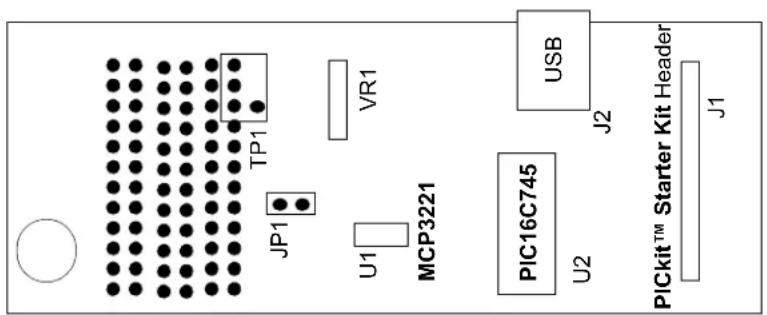
The MCP3221 PICtail™ Demo Board is used for evaluation and demonstration of the PGA's features. A block diagram of the demo board layout is shown in Figure 2-1. The following procedure describes how to operate this demo board.
- Install and run the GUI from the PC.
- Connect the MCP3221 PICtail™ Demo Board to a PC using a USB cable.
- Use jumper JP1 to select the mechanical potentiometer.
- The ADC output code will be graphically displayed on the PC.
2.4 MCP3221 PICTAIL™ DEMO BOARD DESCRIPTION
The major components of the MCP3221 PICtail™ Demo Board are listed.
- MCP3221 device (U1)
- PICmicro ^® MCU – PIC16C745 (U2)
- PICkit™ Starter Kit Header (J1)
- USB Connector (J2)
- Analog Input and Prototype Area (TP)
- Input Selection Jumper (JP1)
- Potentiometer Input (VR1)
For more detailed circuit information, refer to Appendix A. "Schematic and Layouts" and Appendix B. "Bill Of Materials (BOM)".
text_image
TP1 JP1 U1 MCP3221 PIC16C745 U2 USB J2 J1 PICKIT™ Starter Kit HeaderFIGURE 2-1: MCP3221 PICtail™ Demo Board Block Diagram.
2.4.1 Hardware Power
The USB power is regulated and filtered before supplying power to the MCP3221 device. The raw USB power supplies the digital voltage to the PICmicro MCU only. This digital power supply is filtered through the LRC circuit and the 4.1V regulator as it becomes the analog voltage ( A_VDD ) for the MCP3221. This analog power supply is also used as the reference for the mechanical potentiometer. This regulated ratiometric connection achieves superior performance from the typically noisy PC USB power supply.
2.4.2 MCP3221 Interface to PICkit™ 1 Flash Starter Kit
The MCP3221 is an infrared device. The two data lines, SCL and SDA, are connected from the PICkit Starter Kit header J1 to the appropriate port pins, RC0 and RC1. +5V and V_SS are the other two PICkit Starter Kit connections made on the MCP3221 PICkit header.
2.4.3 Selecting The Analog Input
The MCP3221 analog input is tied directly to TP1, next to a small area for prototyping. A mechanical potentiometer is also connected to this node, allowing for a quick DC evaluation of the device's function. When the jumper is selected, the wiper of the mechanical potentiometer is connected to the analog input of the device. When the jumper is de-selected, the analog input is connected only to TP1 and the prototype area.
2.4.4 Reading the MCP3221 Output Using the DataView Software GUI
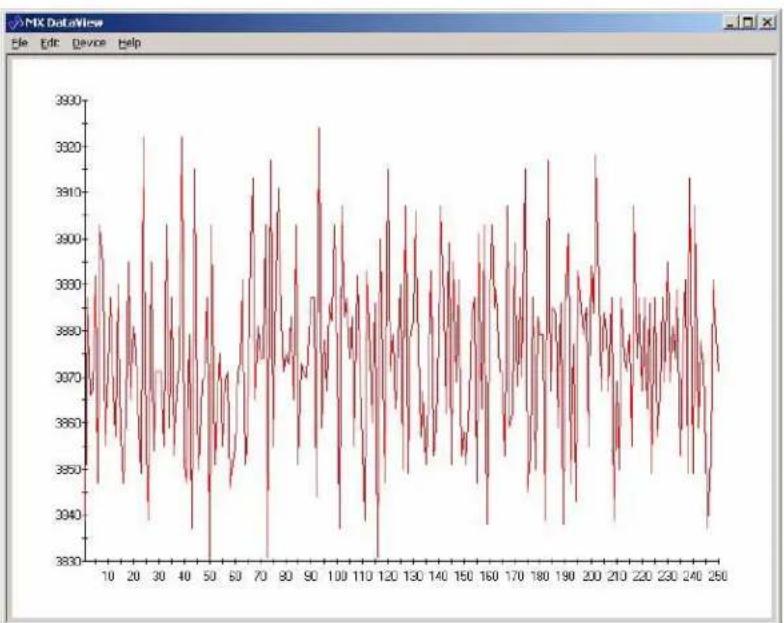
The DataView software displays the digital output of the MCP3221 ADC in a graphical format on any Windows ^® compatible PC. Through the USB port, each 12-bit word is transferred from the MCP3221 to the PC, converted to decimal and then plotted on the graph shown in Figure 2-2. Each consecutive conversion is added to the right side of the graph. The y-axis of the graph displays the output codes that have been collected and automatically scales for any given output code range. The x-axis of the graph automatically scrolls to the left once the entire graph has been filled with samples.
line
| x | y | | ---- | ----- | | 10 | 3870 | | 20 | 3890 | | 30 | 3860 | | 40 | 3880 | | 50 | 3875 | | 60 | 3865 | | 70 | 3895 | | 80 | 3870 | | 90 | 3885 | | 100 | 3875 | | 110 | 3860 | | 120 | 3890 | | 130 | 3870 | | 140 | 3885 | | 150 | 3875 | | 160 | 3865 | | 170 | 3895 | | 180 | 3870 | | 190 | 3885 | | 200 | 3875 | | 210 | 3865 | | 220 | 3890 | | 230 | 3870 | | 240 | 3885 | | 250 | 3875 |FIGURE 2-2: DataView Software Output.
2.4.5 Using the Data Logging Feature of the DataView Software
The DataView software can be used to record MCP3221 conversion data and then to save to a ASCII text file by selecting "File >> Save Data" from the Program menu. The frequency of conversion and subsequent data log is user-selected under "Device >> Configure" from the Program menu. Here the number of samples and polling interval is selected. Please note the polling interval refers to the PC to PICmicro MCU polling interval, not the PICmicro MCU to ADC sample rate.
NOTES:
Appendix A. Schematic and Layouts
A.1 INTRODUCTION
This appendix contains the following schematics and layouts for the MCP3221 PIC-tail™ Demo Board:
- Board Schematic – Digital circuitry
- Board – Top Layer
- Board – Bottom Layer
A.2 SCHEMATICS AND PCB LAYOUT
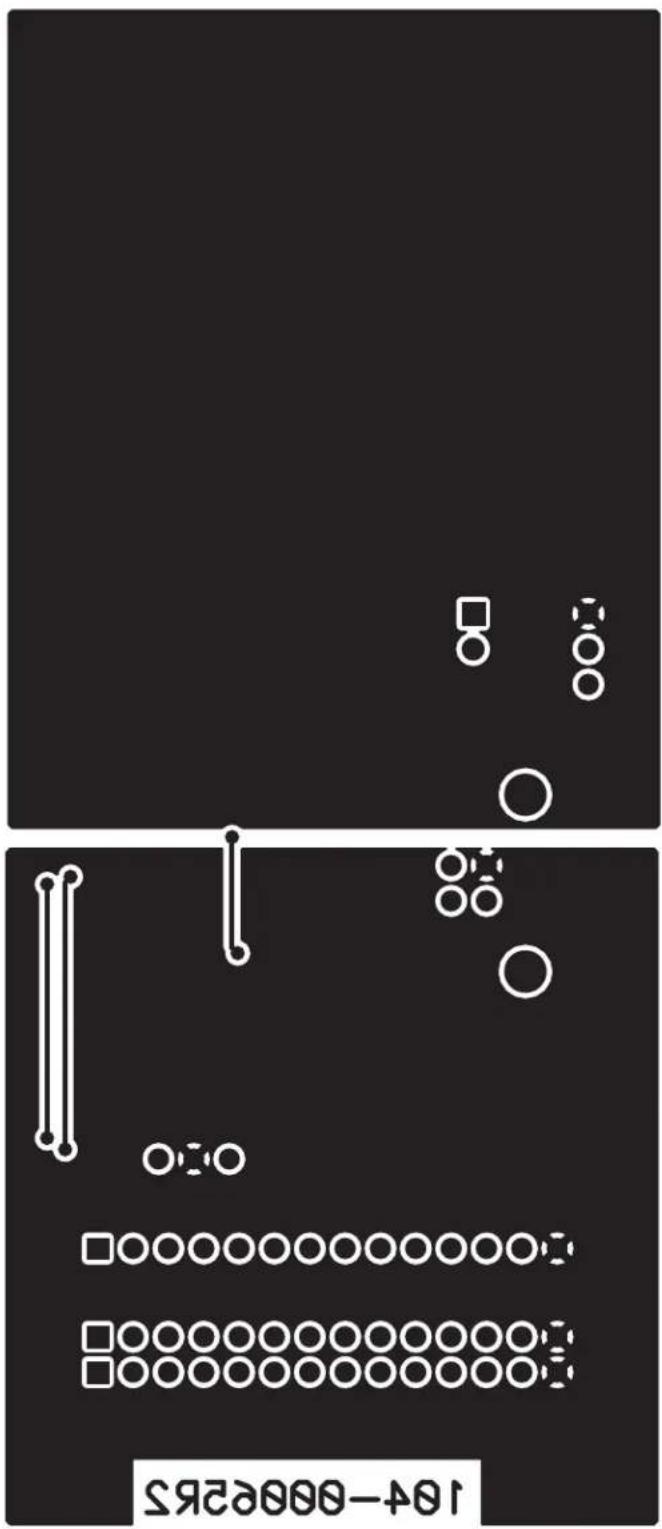
Figure A.3 shows the MCP3221 PICtail™ Demo Board schematic, while Figure A.4 and Figure A.5 show the layout for the two different layers. The layer order is shown in Figure A-1.

FIGURE A-1: Layer Order.
A.3 SCHEMATIC

text_image
A B C D E F 1 2 3 4 1 2 3 4 1 2 3 4 1 2 3 4 1 2 3 4 1 2 3 4 1 2 3 4 1 2 3 4 1 2 3 4 1 2 3 4 1 2 3 4 1 2 3 4 1 2 3 4 1 3 4 1 2 3 4 1 2 3 4 1 2 3 4 1 2 3 4 1 2 3 4 1 2 3 4 1 2 3 4 1 2 3 4 1 2 3 4 1 2 3 4 1 2 3 4 1 2 3 5 6 7 8 9 10 11 12 13 14 15 16 17 18 19 20 21 22 23 24 25 26 27 28 29 30 31 32 33 34 35 36 37 38 39 40 41 42 43 44 45 46 47 48 49 50 51 52 53 54 55 56 57 58 59 60 61 62 63 64 65 66 67 68 69 70 71 72 73 74 75 76 77 78 79 80 81 82 83 84 85 86 87 88 89 90 91 92 93 94 95 96 97 98 99 100 C MCP3221 A/D PICKit Bd. Size C MicroCHIP MicroCHIP Size C MicroCHIP Size C MicroCHIP Size C MicroCHIP Size C MicroCHIP Size C MicroCHIP Size C MicroCHIP Size C MicroCHIP Size C MicroCHIP Size C MicroCHIP Size C MicroCHIP Size C MicroCHIP Size C MicroCHIP Size C MicroCHIP Size C MicroCHIP Size C MicroCHIP Size C MicroCHIP Size C MicroCHIP Size C MicroCHIP Size C MicroCHIP Size C MicroCHIP Size C MicroCHIP Size C MicroCHIP Size C MicroCHIP Size C MicroCHIP Size C MicroCHIP SizeC MicroCHIP SizeC MicroCHIP SizeC MicroCHIP SizeC MicroCHIP SizeC MicroCHIP SizeC MicroCHIP SizeC MicroCHIP SizeC MicroCHIP SizeC MicroCHIP SizeC MicroCHIP SizeC MicroCHIP SizeC MicroCHIP SizeC MicroCHIP SizeC MicroCHIP SizeC MicroCHIP SizeC MicroCHIP SizeC MicroCHIP SizeC MicroCHIP SizeC MicroCHIP SizeC MicroCHIP SizeC MicroCHIP SizeC MicroCHIP SizeC MicroCHIP SizeC MicroCHIP SizeC MicroCHIP SizeCS MC PDC-00065 VxV 10.0-00065 VxV DC D VxV DC D VxV DC D VxV DC D VxV DC D VxV DC D VxV DC D VxV DC D VxV DC D VxV DC D VxV DC D VxV DC D VxV DC D VxV DC D VxV DC D VxV DC D VxV DC D VxV DC D VxV DC D VxV DC D VxV DC DC D VxV DC DC D VxV DC DC D VxV DC DC D VxV DC DC D VxV DC DC D VxV DC DC D VxV DC DC D VxV DC DC D VxV DC DC D VxV DC DC D VxV DC DC D VxV DC DC D VxV DC DC D VxV DC DC D VxV DC DC D VxV DC DC D V xV DC xvDC xvDC xvDC xvDC xvDC xvDC xvDC xvDC xvDC xvDC xvDC xvDC xvDC xvDC xvDC xvDC xvDC xvDC xvDC xvDC xvDC xvDC xvDC xvDC xvDC xvDC xvDC xvDC xvDC xvDC xvDC xvDC xvDC xvDC X vX vX vX vX vX vX vX vX vX vX vX vX vX vX vX vX vX vX vX vX vX vX vX vX vX vX vX vX vX vX vX vX vX vX vX vX vX vX vX vX vX vX vX vX vX vX vX vX vX vX v X v X v X v X v X v X v X v X v X v X v X v X v X v X v X v X v X v X v X v X v X v X v X v X v X v X v X v X v X v X v X v X v X v X v X v X v X v X v X v X v X v X v X v X v X v X v X v X v X v X v W U U U U U U U U U U U U U U U U U U U U U U U U U U U U U U U U U U U U U U U U U U U U U U U U U U U U U U U U U U U U U U U U U U U U U U U U U U U U U U U U U U U U U U U U U U U U U U U U U U U U I N MCP3221 A/D PICKit Bd. Size C MicroCHIP Size C MicroCHIP Size C MicroCHIP Size C MicroCHIP Size C MicroCHIP Size C MicroCHIP Size C MicroCHIP Size C MicroCHIP Size C MicroCHIP Size C MicroCHIP Size C MicroCHIP Size C MicroCHIP Size C MicroCHIP Size C MicroCHIP Size C MicroCHIP Size C MicroCHIP Size C MicroCHIP Size C MicroCHIP Size C MicroCHIP Size C MicroCHIP Size C MicroCHIP Size C MicroCHIP Size C MicroCHIP Size C MicroCHIP Size C MicroCHIP Type: PC/PC/PC/PC/PC/PC/PC/PC/PC/PC/PC/PC/PC/PC/PC/PC/PC/PC/PC/PC/PC/PC/PC/PC/PC/PC/PC/PC/PC/PC/PC/PC/PC/PC/PC/PC/PC/PC/PC/PC/PC/PC/PC/PC/PC/PC/PC/PC/PC/PC/PC/RC / PC / PC / PC / PC / PC / PC / PC / PC / PC / PC / PC / PC / PC / PC / PC / PC / PC / PC / PC / PC / PC / PC / PC / PC / PC / PC / PC / PC / PC / PC / PC / PC / PC / PC / PC / PC / PC / PC / PC / PC / PC / PC / PC / PC / PC / PC / PC / PC / PC / PC / NC MCP3221 A/D PICKit Bd. Size C MicroCHIP Size C MicroCHIP Size C MicroCHIP Size C MicroCHIP Size C MicroCHIP Size C MicroCHIP Size C MicroCHIP Size C MicroCHIP Size C MicroCHIP Size C MicroCHIP Size C MicroCHIP Size C MicroCHIP Size C MicroCHIP Size C MicroCHIP Size C MicroCHIP Size C MicroCHIP Size C MicroCHIP Size C MicroCHIP Size C MicroCHIP Size C MicroCHIP Size C MicroCHIP Size C MicroCHIP Size CS MC PDC-00065 VxW 10.0-00065 VxW 10.0-00065 VxW DC D VxW DC D VxW DC D VxW DC D VxW DC D VxW DC D VxW DC D VxW DC D VxW DC D VxW DC D VxW DC D VxW DC D VxW DC D VxW DC D VxW DC D VxW DC D VxW DC D VxW DC D VxW DC D VxW DC D VxW DCD N PROTO-AREA Gnd A/D A/D A/D A/D A/D A/D A/D A/D A/D A/D A/D A/D A/D A/D A/D A/D A/D A/D A/D A/D A/D A/D A/D A/D A/D A/D A/D A/D A/D A/D A/D A/D A/D A/D A/D A/D A/D A/D A/D A/D A/D A/D A/D A/D A/D A/D A/D A/D A/D A/D A/O A/P A/P A/P A/P A/P A/P A/P A/P A/P A/P A/P A/P A/P A/P A/P A/P A/P A/P A/P A/P A/P A/P A/P A/P A/P A/P A/P A/P A/P A/P A/P A/P A/P A/P A/P A/P A/P A/P A/P A/P A/P A/P A/P A/P A/P A/P A/P A/P A/P A/P A/P B, u, u, u, u, u, u, u, u, u, u, u, u, u, u, u, u, u, u, u, u, u, u, u, u, u, u, u, u, u, u, u, u, u, u, u, u, u, u, u, u, u, u, u, u, u, u, u, u, u, u, nA.4 BOARD LAYOUT - TOP LAYER

text_image
MCP3221 PICtail™ Bd. AGND Z0 C1 C5 JP1 AVDD VR1 R4 L4 L- L1 C7 R2 R1 L2 C6 C4 R3 D U1 C3 J4 Y1 R5 J3 J1 J2 GND SCL SPA 102-00065A.5 BOARD LAYOUT - BOTTOM LAYER
text_image
104-000E25Appendix B. Bill Of Materials (BOM)
TABLE B-1: BILL OF MATERIALS (BOM)
| Qty | Reference Description | Manufacturer Part Number | ||
| 1 | C 1 , | CAP .14UF 25V CERAMIC X7R 0805 P | Panasonic ^ - ECG ECJ-2VB1E104K | |
| 3 | C 2 , | CAP 1.6UF 10V CERAMIC X7R 0805 K | Kemet ^ | C0805C105K8RACTU |
| 1 | C3 | CAP .22UF 16V CERAMIC Y5V 0805 | Panasonic - ECG | ECJ-2VF1C224Z |
| 1 | C7 | CAP 10UF 16V ELECT HD SMD | Panasonic - ECG | EEV-HD1C100R |
| 1 | R1 | RES 1.50K OHM 1/10W 1%0805 SMD | Panasonic - ECG ERJ-6ENF1501V | |
| 1 R2 | OPEN/Optional | NOT USED | ||
| 2 | R 3 , | RES 10.40K OHM 1/10W 1%0805 SMD | Panasonic - ECG ERJ-6ENF1002V | |
| 1 | R5 | RES 4.75K OHM 1/10W 1%0805 SMD | Panasonic - ECG ERJ-6ENF4751V | |
| 1 | R6 | POT 10K OHM THUMBWHEEL CERMST | Bourns ^ Inc. | 3352W-1-103 |
| 2 L1,L2 | INDUCTOR MULTILAYER 10UH 1008 | TDK ^ ElectronicsCo., LTD | NLV25T-100J-PF | |
| 1 | TP1 | PC TEST POINT COMPACT SMT | Keystone ^ Electronics | 5016 |
| 1 | JP1 | CONN HEADER 2POS .100 VERT TIN | Molex ^ /Waldom ^ Electronics Corp. | 22-28-4021 |
| 1 | Y 1 | RESONATOR 6.00 MHZ CERAMIC W/CAP | GCS ^TM Inc | ZTT-6.00MT |
| 1 | U1 | PIC16C745I/SO | MicrochipTechnology Inc. | Will Provide |
| 1 | U2 | MCP3221A5T-I/OT | MicrochipTechnology Inc. | Will Provide |
| 1 | U4 | MCP1700T-3302E/TT | MicrochipTechnology Inc. | Will Provide |
| 1 | J4 | CONN USB RTANG FEMALE TYPE BPCB | AssmannElectronics, Inc | AU-Y1007 |
| 4 | 4 C O | BURMPON HEMESPHERE .48X.20 CLEAR | 3M ^ /ESM | SJ-5303 (CLEAR) |
Note 1: The components listed in this Bill of Materials are representative of the PCB assembly. The released BOM used in manufacturing uses all RoHS-compliant components.
WORLDWIDE SALES AND SERVICE
AMERICAS
Corporate Office
2355 West Chandler Blvd.
Chandler, AZ 85224-6199
Tel: 480-792-7200
Fax: 480-792-7277
Technical Support:
http://support.microchip.com
Web Address:
www.microchip.com
Atlanta
Alpharetta, GA
Tel: 770-640-0034
Fax: 770-640-0307
Boston
Westborough, MA
Tel: 774-760-0087
Fax: 774-760-0088
Chicago
Itasca, IL
Tel: 630-285-0071
Fax: 630-285-0075
Dallas
Addison, TX
Tel: 972-818-7423
Fax: 972-818-2924
Detroit
Farmington Hills, MI
Tel: 248-538-2250
Fax: 248-538-2260
Kokomo
Kokomo, IN
Tel: 765-864-8360
Fax: 765-864-8387
Los Angeles
Mission Viejo, CA
Tel: 949-462-9523
Fax: 949-462-9608
Santa Clara
Santa Clara, CA
Tel: 408-961-6444
Fax: 408-961-6445
Toronto
Mississauga, Ontario,
Canada
Tel: 905-673-0699
Fax: 905-673-6509
ASIA/PACIFIC
Asia Pacific Office
Suites 3707-14, 37th Floor
Tower 6, The Gateway
Habour City, Kowloon
Hong Kong
Tel: 852-2401-1200
Fax: 852-2401-3431
Australia - Sydney
Tel: 61-2-9868-6733
Fax: 61-2-9868-6755
China - Beijing
Tel: 86-10-8528-2100
Fax: 86-10-8528-2104
China - Chengdu
Tel: 86-28-8676-6200
Fax: 86-28-8676-6599
China - Fuzhou
Tel: 86-591-8750-3506
Fax: 86-591-8750-3521
China - Hong Kong SAR
Tel: 852-2401-1200
Fax: 852-2401-3431
China - Qingdao
Tel: 86-532-8502-7355
Fax: 86-532-8502-7205
China - Shanghai
Tel: 86-21-5407-5533
Fax: 86-21-5407-5066
China - Shenyang
Tel: 86-24-2334-2829
Fax: 86-24-2334-2393
China - Shenzhen
Tel: 86-755-8203-2660
Fax: 86-755-8203-1760
China - Shunde
Tel: 86-757-2839-5507
Fax: 86-757-2839-5571
China - Wuhan
Tel: 86-27-5980-5300
Fax: 86-27-5980-5118
China - Xian
Tel: 86-29-8833-7250
Fax: 86-29-8833-7256
ASIA/PACIFIC
India - Bangalore
Tel: 91-80-4182-8400
Fax: 91-80-4182-8422
India - New Delhi
Tel: 91-11-4160-8631
Fax: 91-11-4160-8632
India - Pune
Tel: 91-20-2566-1512
Fax: 91-20-2566-1513
Japan - Yokohama
Tel: 81-45-471-6166
Fax: 81-45-471-6122
Korea - Gumi
Tel: 82-54-473-4301
Fax: 82-54-473-4302
Korea - Seoul
Tel: 82-2-554-7200
Fax: 82-2-558-5932 or
82-2-558-5934
Malaysia - Penang
Tel: 60-4-646-8870
Fax: 60-4-646-5086
Philippines - Manila
Tel: 63-2-634-9065
Fax: 63-2-634-9069
Singapore
Tel: 65-6334-8870
Fax: 65-6334-8850
Taiwan - Hsin Chu
Tel: 886-3-572-9526
Fax: 886-3-572-6459
Taiwan - Kaohsiung
Tel: 886-7-536-4818
Fax: 886-7-536-4803
Taiwan - Taipei
Tel: 886-2-2500-6610
Fax: 886-2-2508-0102
Thailand - Bangkok
Tel: 66-2-694-1351
Fax: 66-2-694-1350
EUROPE
Austria - Wels
Tel: 43-7242-2244-3910
Fax: 43-7242-2244-393
Denmark - Copenhagen
Tel: 45-4450-2828
Fax: 45-4485-2829
France - Paris
Tel: 33-1-69-53-63-20
Fax: 33-1-69-30-90-79
Germany - Munich
Tel: 49-89-627-144-0
Fax: 49-89-627-144-44
Italy - Milan
Tel: 39-0331-742611
Fax: 39-0331-466781
Netherlands - Drunen
Tel: 31-416-690399
Fax: 31-416-690340
Spain - Madrid
Tel: 34-91-708-08-90
Fax: 34-91-708-08-91
UK - Wokingham
Tel: 44-118-921-5869
Fax: 44-118-921-5820