CO151HUA6DXSTK - Convection Oven Cres Cor - Free user manual and instructions
Find the device manual for free CO151HUA6DXSTK Cres Cor in PDF.


User questions about CO151HUA6DXSTK Cres Cor
0 question about this device. Answer the ones you know or ask your own.
Ask a new question about this device
Download the instructions for your Convection Oven in PDF format for free! Find your manual CO151HUA6DXSTK - Cres Cor and take your electronic device back in hand. On this page are published all the documents necessary for the use of your device. CO151HUA6DXSTK by Cres Cor.
USER MANUAL CO151HUA6DXSTK Cres Cor
| Retherm Oven | FL-2357 |
| Rev. 3 (5/12) | Page 1 of 12 |
INSTALLATION, OPERATION and MAINTENANCE MANUAL for Cres Cor 12kW QUIKTHERM™ RETHERM OVENS
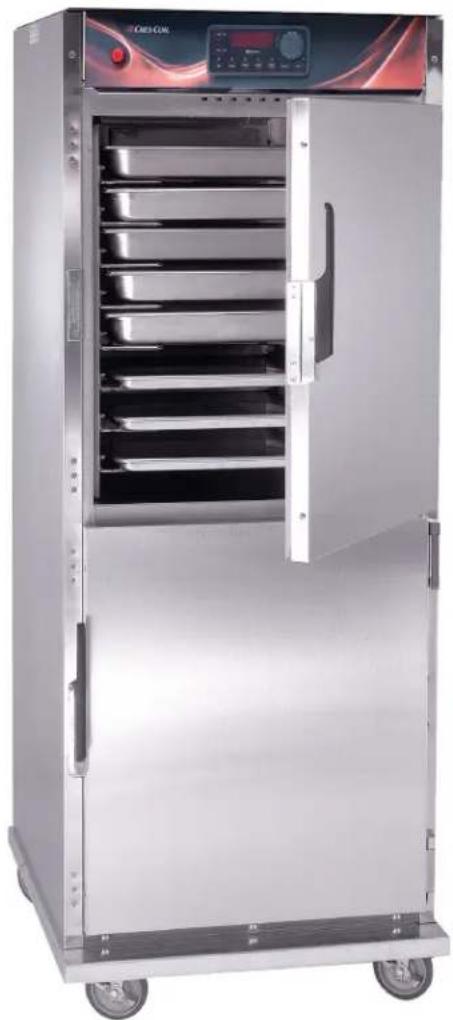
natural_image
Exterior view of a stainless steel kitchen oven with open doors and control panel (no visible text or symbols)RO151FUA18D
RO151FPUA18D
RO151F1332D
| Retherm Oven | FL-2357 |
| Rev. 3 (5/12) | Page 2 of 12 |
CRES COR®
5925 Heisley Road • Mentor, OH 44060-1833
TABLE OF CONTENTS
SUBJECT
INSTALLATION INSTRUCTIONS ....3
OPERATING INSTRUCTIONS
First Time Operation....3
How to Use Control for Cooking & Holding ....4
How to Save and Use Recipes ....5
"Quick Recipe" and Other Menu settings. 5
MAINTENANCE INSTRUCTIONS
How to Clean the Unit ....6
Trouble Shooting Guide ....7, 8
Cabinet Replacement Parts....9
Hot Unit Replacement Parts....10
Wiring Diagram For 208/240 Volt, 3 Phase....11
Wiring Diagram for 480 Volt, 3 Phase .....12
SERVICE POLICY and AGENCY LIST....FL-1400

text_image
WARNING RISK OF FIRE OR ELECTRIC SHOCK DO NOT OPEN WARNING: TO REDUCE THE RISK OF FIRE OR ELECTRIC SHOCK, DO NOT REMOVE COVER (OR BACK) NO USER-SERVICEABLE PARTS INSIDE REPAIR SHOULD BE DONE BY AUTHORIZED SERVICE PERSONNEL ONLY| Retherm Oven | FL-2357 |
| Rev. 3 (5/12) | Page 3 of 12 |
INSTALLATION INSTRUCTIONS
VENTING YOUR OVEN:
-
The purpose of ventilating hoods is to direct and capture smoke, grease-laden vapors, heat, odors, or fumes.
-
Low temperature equipment (maximum temperature 250^ F/121°C) does not produce heat, odors, fumes, grease-laden vapors or smoke and is not required to be vented.
-
Most jurisdictions consider our low-temperature ovens (maximum temperature is 350^ F/177°C) as low-heat appliances not requiring vent hoods.
-
Installation must conform with local codes. The authority having jurisdiction of enforcement of the codes will have the responsibility for making interpretations of the rules.
UNIT SPECIFICATIONS: All units use six (6) elements (2000 watts each).
All units are rated 12000 watts.
| MODEL NOS. | ELECTRICAL SPECS(AC SERVICE) | ELEC. LOAD | POWER SUPPLY REQUIREMENTALL 3 PHASE IS 3 WIRE + GROUND | ||||||
| VOLTS PHASES HZ | AMPS VOLTS AMPS PHASES VOLTS RECEPTACLE | ||||||||
| RO151FUA18D2083RO151FPUA18D2083RO151F1332D2083 | 208 3 60 34 208 50 3 208 15-50R | ||||||||
| RO151FUA18D2403RO151FPUA18D2403RO151F1332D2403 | 240 3 60 29 240 50 3 240 15-50R | ||||||||
| RO151F1332D4803 480 3 60 15 480 30 3 480 L16-30R | |||||||||
HOW TO INSTALL CABINETS:
- Remove all packing material from inside and outside of cabinet.
- Position cabinet on level floor; install the cabinet interior (pan slides) if not already installed.
- Plug power cord into proper wall receptacle.
HOW TO CHANGE FROM °C TO °F (if needed)
- Push the switch on; the light will come on.
- Push and hold the "SET" button and the button in the lower left hand corner together for 5 seconds. You are now entered into the menu.
- Scroll over the "Unit" and change it to "C", then scroll to the "END".
NOTE: A new oven needs to "burn off" manufacturing oils and excessive adhesive before its first use. Do NOT load food into oven until this has been done!
- Push the switch to on; the light will come on.
NOTE: The letters "LOTPR" (low temperature) will show on the control panel until it reaches 140°F (60°C).
- Press the "COOK" button.
- Push down and turn the control knob to show 200°F. Push the knob again to set the temperature. Run the unit for one (1) hour.
- Turn the unit off and let cool.
- Wipe the inside clean with detergent and hot water.
| Retherm Oven | FL-2357 |
| Rev. 3 (5/12) | Page 4 of 12 |
CRES COR®
5925 Heisley Road • Mentor, OH 44060-1833
OPERATING INSTRUCTIONS

text_image
CRES COR. 86.00 Reinertim + - TAM PRESS ACR 14 ACR 2-2 ACR 3-3 SUPR COMPAIR RETHERM SWITCH
This switch MUST be pushed to "HIGH" (ON) for Retherming food.

text_image
AIR RETHEM HIGH FOR RETHERM FOR COOKING LOWHOW TO USE THE RETHERM CONTROL:
*Push the lighted switch on the control panel; the light will come on and the cabinet will start heating.
*The display will read "LOTPR" (low temperature) below 140°F. (60°C.).
NOTE: Wait one (1) hour after start up before loading the food for best results.
The display will read "PREHT" until the cabinet reaches the set temperature.
Cooking:
- Press the COOK button.
- Turn the control knob to the desired cooking temperature between 200^ F ( 93^ C) and 350^ F ( 176^ C).
- Push the knob to set the temperature.
- The control automatically goes to the HOLD mode. (Continue to step 1 below).
Holding:
(Press the HOLD button only if you are just holding food),
-
Turn the control knob to the desired holding temperature between 140^ F ( 60^ C) and 220^ F ( 104^ C).
-
Push the knob to set the temperature.
-
The control automatically goes to the TIME mode.
Setting the time or Food Probe:
- If NOT using the Food Probe: a) Turn the control knob to the desired hours/minutes. b) Push the knob to set the time.
-
Using the Food Probe: Plug in the food probe BEFORE you enter the TIME mode. Otherwise, you have to press the PROBE button to set the probe temperature.
a) Turn the knob to the desired temperature.
b) The timer will stop when the probe reaches the set temperature. -
Press the START button. The display will show "READY" when preheated.
-
Press the START again to use this recipe (see Recipes").
Note: Press the knob for 4 seconds to cancel the recipe.
The DISPLAY button shows (cycles through) all the values when in each mode:
- "PREHEAT" OR "READY": momentarily shows the actual cabinet temperature.
- “COOK” (Timed): shows Home screen, set point, count down time, actual cabinet temperature.
- “COOK” (Probe): shows Home screen, set point, count up time, actual cabinet temperature.
- "HOLD": shows Home screen, set point, count up time, actual cabinet temperature.
| Retherm Oven | FL-2357 |
| Rev. 3 (5/12) | Page 5 of 12 |
OPERATING INSTRUCTIONS (continued)

text_image
CRES COR. 8800 Reformation RUMA PHYSIC RECOOL 1-5 RECOOL 321-49 SAMPL GNDRECIPES:
The control can hold up to 18 saved recipes.
To save a recipe:
- Press and hold both the TIME button and the knob for 5 seconds. The screen will be flashing. This is the setup menu.
- Turn the knob through the menu until you get to "Edit".
- Press the knob and turn to the recipe you want to edit. There are 18 blank recipes to customize and save.
- Press the knob and enter the cook, hold and time values.
- After the entering the final value, "Edit" will show again.
- Press the knob to edit more recipes or turn to "End" to exit the menu.
To use one of the recipes:
- Push one of the three RECIPE group buttons for the recipe number you want.
- Turn the knob to the recipe you want and press the knob to select.
- Press the START button to preheat.
- After it shows "READY", press the START button again to begin the recipe.
Note: The display button will cycle through all the values as before, but will include the recipe number, if using a saved recipe.
Quick Recipe Note:
You can set “Quick Recipes” for recipes that you use often. This way, when you press a recipe group button and press start, that recipe will start cooking without searching for the recipe number. Recipe numbers can be set up as “quick recipes” as follows:
- Press and hold both the TIME button and the knob for 5 seconds to get into the menu.
- Turn the knob to "RBTN" and press the knob. The word "PUSH" will flash.
- Press one of the recipe group buttons to assign a recipe.
Note: Recipe numbers 1-6 can be set up as Group button 1. Recipe numbers 7-12 can be set up as Group button 2. Recipe numbers 13-18 can be set up as Group button 3.
- Turn the knob to the recipe number you want to assign to that button and press the knob.
Repeat the process to assign recipes to the other two recipe group buttons; or, turn the knob to "END" the submenu; turn to "END" the menu.
Additional Menu Settings:
Press and hold both the TIME button and the knob for 5 seconds to get into the menu.
Here you can set the recipes, quick recipes, temperature units ( ^ C or ^ F) and the datalog settings (USB connection required):
"RECE" allows you to enable or disable the data record feature.
"RECF" allows you set how often (in minutes) a datapoint will be recorded.
"RECD" allows you to set how long (in days) you would like the data to be stored in memory.
| Retherm Oven | FL-2357 |
| Rev. 3 (5/12) | Page 6 of 12 |
MAINTENANCE INSTRUCTIONS HOW TO CLEAN THE UNIT
WARNING
BEFORE cleaning the cabinet:
- Unplug cord from wall. Allow cabinet to cool.
- Do NOT hose cabinet with water.
- Do NOT get water on controls.
- Do NOT use abrasives or harsh chemicals.
- Do NOT use "Cres Clean" (or any citrus cleaner) on labels or plastic parts.
Cleaning Hints:
- Use the mildest cleaning procedure that will do the job.
-
Always rub in the direction of the polish lines to avoid scratching the surface.
-
Use only a soft cloth, sponge, fibrous brushes, plastic or stainless steel pad for cleaning and scouring.
- Rinse thoroughly with fresh water after every cleaning operation.
- Always wipe dry to avoid water marks.
HOW TO CLEAN THE UNIT:
| SOIL CLEANER METHOD | |||
| CABINETInside and Outside(Stainless Steel) | ROUTINE CLEANING | Soap, ammonia or mild detergent* and water. | 1. Sponge on with cloth2. Rinse |
| STUBBORN SPOTS, STAINS | Mild abrasive made for Stainless Steel. | 1. Apply with damp sponge or cloth.2. Rub lightly. | |
| BURNT ON FOODS OR GREASE | Chemical oven cleaner made for Stainless Steel. | Follow oven cleaner manufacturer's directions. | |
| HARD WATER SPOTS & SCALE | Vinegar | 1. Swab or wipe with cloth.2. Rinse and dry. | |
| *Mild detergents include soaps and non-abrasive cleaners | |||
| Retherm Oven | FL-2357 |
| Rev. 3 (5/12) | Page 7 of 12 |
MAINTENANCE INSTRUCTIONS TROUBLE-SHOOTING GUIDE, continued
HOW TO ADJUST THE DOOR LATCH:
- For vertical (up and down movement) adjustment:
a. Loosen (2) screws located in magnetic strike.
b. Move strike up or down for alignment to magnet on latch.
c. Tighten screws to secure
- For horizontal (greater or lesser magnetic draw) adjustment:
a. Loosen (4) screws in door latch.
b. Move latch forward or backward to adjust magnetism.
c. Tighten screws to secure.
TROUBLE-SHOOTING GUIDE

WARNING
IF OVEN GETS TOO HOT OR WON'T SHUT OFF, DISCONNECT POWER AT BRANCH PANEL. DO NOT UNPLUG CORD!
If unit is NOT working, first check the following causes:
- Cord is unplugged from wall outlet.
-
Circuit breaker/fuse to wall outlet is blown.
-
Switch is turned off.
- Fuse on back of unit is blown.
| PROBLEM POSSIBLE CAUSE SOLUTION | ||
| Oven does not turn on | 1. Power switch is bad2. Retherm control is bad. | 1. Replace2. Replace |
| Retherm Oven | FL-2357 |
| Rev. 3 (5/12) | Page 8 of 12 |
MAINTENANCE INSTRUCTIONS TROUBLE-SHOOTING GUIDE (continued)
IF THE OVEN TURNS ON:
| PROBLEM POSSIBLE CAUSE SOLUTION | ||
| Oven does not heat, or doesn't heat properly | 1. Sensor2. Heater contactor3. Loose wiring at heater contactor4. Retherm control5. High Limit | 1. Replace2. Replace3. Replace4. Replace5. Replace |
| Blowers do not operate | 1. Air retherm switch2. Blower3. Retherm control | 1. Replace2. Replace3. Replace |
| Heater will not shut off | 1. Control defective2. Heater contactor | 1. Replace2. Replace |
| Vent fans do not shut off | 1. Vent fan switch defective2. Control compartment is still hot. | 1. Replace2. Wait until it coolsCheck “Heater will not shut off” |
| Vent fans do not operate (See Note) | 1. Vent fan switch defective2. Vent fan defective | 1. Replace2. Replace |
| Control will not switch from “COOK” to “HOLD” (timed mode) | 1. Oven is in “PROBE” mode.2. Retherm control defective | 1. Cancel recipe and switch to “TIMED” mode2. Replace |
| Control will not switch from “COOK” to “HOLD” (probe mode) | 1. Oven is in the “TIMED” mode2. Probe not plugged in3. Probe defective4. Retherm control defective | 1. Cancel recipe and switch to “PROBE” mode2. Plug in probe3. Replace4. Replace |
| Control will not switch to “COOK” (probe mode) | 1. Oven in “TIMED” mode2. Probe temperature setting lower than probe temperature3. Probe not plugged in4. Retherm control defective | 1. Switch to “PROBE” mode2. Set probe temperature to desired temperature3. Plug in probe4. Replace |
ERROR CODES:
| CODE DISPLAYED CAUSE SOLUTION | ||
| no p No meat probe Plug in probe | ||
| Err0 Temp probe bad Replace |
NOTE: Vent fans will not operate until the control compartment requires ventilation to limit temperatures. Replacement of electrical components must be done by a qualified electrician.
Refer to our Service Agency list, FL-1400 (found in the back of this manual), of authorized service centers. Instructions for replacing parts are included in replacement parts list.
| Retherm Oven | FL-2357 |
| Rev. 3 (5/12) | Page 9 of 12 |
CRES COR®
5925 Heisley Road • Mentor, OH 44060-1833
REPLACEMENT PARTS
Include all information on nameplate when ordering parts

text_image
Technical diagram of an industrial refrigerator with numbered components for identification and assembly reference.Replacement Parts:
ITEM DESCRIPTION PART NUMBER
- Door Assembly (1332D) 1221-579-K Door Assembly (UA18D) 1221-580-K
- Door Latch Kit 1006-122-01-K
- Door Strike Kit 1006-122-02-K
- Door Hinge Kit 0519-109-K
- Door Gasket (1332D) 0861-185-K Door Gasket (UA18D) 0861-235-K
- Casters 0569-306-R
- Casters w/brake 0569-306-B
- Posts 0696-250
- Air Tunnel 0546-146-C
- Wire Angles (2 per kit) 0621-281-SS-K Drip Pan (clear) 1017-058
| Retherm Oven | FL-2357 |
| Rev. 3 (5/12) | Page 10 of 12 |

text_image
Diagram of a server rack with labeled components including indicator lights and portsFRONT VIEW
text_image
Technical diagram of an internal device with numbered components for identification
text_image
14 16 ④ 5 ④ 5 ④ 5REAR VIEW
TOP VIEW WITHOUT COVER
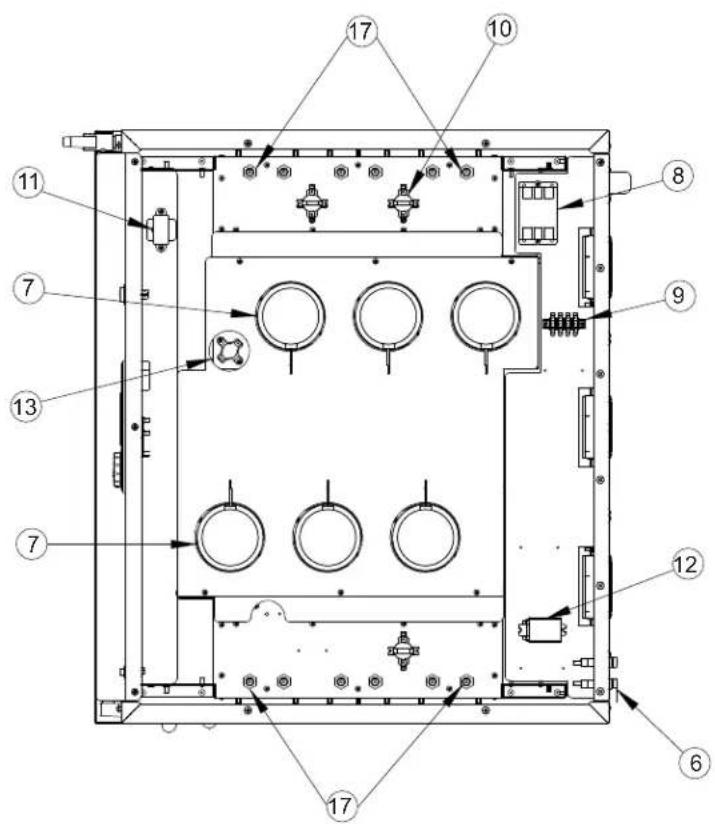
Electrical Replacement Parts:
ITEM DESCRIPTION Part No. ITEM DESCRIPTION Part No.
-
Switch (On/Off) 0808-125 10. Hi Limit Switch 0848-077
-
Retherm Thermostat 11. Transformer 0769-197
Digital Control 0848-092-03
Sensor 0848-091
-
Blower Switch 0808-114 14. Power Cord Kit 0810-
-
Vent Fan 0769-174 16. Strain Relief Kit
-
Fan Guard 0769-167 17. Heater
-
Fuse 0807-155
Fuse Holder 0807-150
Fuse (480V) 0807-058
Fuse Holder (480V) 0807-048
-
Blower Kit 0769-186-K
-
Contactor 0857-026
-
Terminal Block, rear 0852-093
-
Relay 0857-102
-
Fan Switch 0848-034
178-K
0818-103-K
Kit (208V) 0811-0300-K
Heater Kit (240V)
Heater Kit (480V)
Connector, Probe (not shown)
Food Probe 1.5" Long
Food Probe 6" Long
0811-0301-K
0811-0302-K
0848-094
0848-098
0848-100
| Retherm Oven | FL-2357 |
| Rev. 3 (5/12) | Page 11 of 12 |
CRES COR®
5925 Heisley Road • Mentor, OH 44060-1833
REPLACEMENT PARTS
for NON-PASS THRU OVENS RO151F SERIES 208/240V 3 Ph
Include all information
on nameplate when
ordering parts

flowchart
graph TD
    A["ON NAMEPLATE ON HAMEPLATE WHEN ORDERING PARTS"] --> B["TRINFORMER"]
    B --> C["TRANSFORMER"]
    C --> D["FUSES"]
    D --> E["HEATER CONTRACTOR"]
    E --> F["POWER LUTTER"]
    F --> G["POWER W/OY"]
    G --> H["BLOWER W/OY"]
    H --> I["HOLD RUTTER"]
    I --> J["THICK SWITCH"]
    J --> K["ON UNITS WITHOUT BLOWER CLUTOUT SWITCH, W/RES 15 AND IS ARE REPLACED WITH W/RE 17"]
    K --> L["ON UNITS WITHOUT BLOWER CLUTOUT SWITCH, W/RES 15 AND IS ARE REPLACED WITH W/RE 17"]
    L --> M["CONTRUCTOR"]
    M --> N["CONTRUCTOR"]
    N --> O["CONTRUCTOR"]
    O --> P["CONTRUCTOR"]
    P --> Q["CONTRUCTOR"]
    Q --> R["CONTRUCTOR"]
    R --> S["CONTRUCTOR"]
    S --> T["CONTRUCTOR"]
    T --> U["CONTRUCTOR"]
    U --> V["CONTRUCTOR"]
    V --> W["CONTRUCTOR"]
    W --> X["CONTRUCTOR"]
    X --> Y["CONTRUCTOR"]
    Y --> Z["CONTRUCTOR"]
    Z --> AA["CONTRUCTOR"]
    AA --> AB["CONTRUCTOR"]
    AB --> AC["CONTRUCTOR"]
    AC --> AD["CONTRUCTOR"]
    AD --> AE["CONTRUCTOR"]
    AE --> AF["CONTRUCTOR"]
    AF --> AG["CONTRUCTOR"]
    AG --> AH["CONTRUCTOR"]
    AH --> AI["CONTRUCTOR"]
    AI --> AJ["CONTRUCTOR"]
    AJ --> AK["CONTRUCTOR"]
    AK --> AL["CONTRUCTOR"]
    AL --> AM["CONTRUCTOR"]
    AM --> AN["CONTRUCTOR"]
    AN --> AO["CONTRUCTOR"]
    AO --> AP["CONTRUCTOR"]
    AP --> AQ["CONTRUCTOR"]
    AQ --> AR["CONTRUCTOR"]
    AR --> AS["CONTRUCTOR"]
    AS --> AT["CONTRUCTOR"]
    AT --> AU["CONTRUCTOR"]
    AU --> AV["CONTRUCTOR"]
    AV --> AW["CONTRUCTOR"]
    AW --> AX["CONTRUCTOR"]
    AX --> AY["CONTRUCTOR"]
    AY --> AZ["CONTRUCTOR"]
    AZ --> BA["CONTRUCTOR"]
    BA --> BB["CONTRUCTOR"]
    BB --> BC["CONTRUCTOR"]
    BC --> BD["CONTRUCTOR"]
    BD --> BE["CONTRUCTOR"]
    BE --> BF["CONTRUCTOR"]
    BF --> BG["CONTRUCTOR"]
    BG --> BH["CONTRUCTOR"]
    BH --> BI["CONTRUCTOR"]
    BI --> BJ["CONTRUCTOR"]
    BJ --> BK["CONTRUCTOR"]
    BK --> BL["CONTRUCTOR"]
    BL --> BM["CONTRUCTOR"]
    BM --> BN["CONTRUCTOR"]
    BN --> BO["CONTRUCTOR"]
    BO --> BP["CONTRUCTOR"]
    BP --> BQ["CONTRUCTOR"]
    BQ --> BR["CONTRUCTOR"]
    BR --> BS["CONTRUCTOR"]
    BS --> BT["CONTRUCTOR"]
    BT --> BU["CONTRUCTOR"]
    BU --> BV["CONTRUCTOR"]
    BV --> BW["CONTRUCTOR"]
    BW --> BX["CONTRUCTOR"]
    BX --> BY["CONTRUCTOR"]
    BY --> BZ["CONTRUCTOR"]
| Retherm Oven | FL-2357 |
| Rev. 3 (5/12) | Page 12 of 12 |
REPLACEMENT PARTS
for OVENS RO151F SERIES 480V, 3 Ph
Include all information
on nameplate when
ordering parts

text_image
TRANSFORMER WIRE CLOWS: THAD/MARDINO GREEN/BLUE BLUE/ORANGE RED/BLUE WHITE/WHITE BLACK/BLACK POWER SWITCH GROWTH TRANSFORMER N 6 L 12 L 10 5 4 3 2 1 6 5 4 3 2 1 6 5 4 3 2 1 6 5 4 3 2 1 6 5 4 3 2 1 6 5 4 3 2 1 6 5 4 3 2 1 6 5 4 3 2 1 6 5 4 3 2 1 6 5 A WIRE CLOWS: THAD/MARDINO GREEN/ORANGE RED/BLUE BLUE/ORANGE RED/BLUE WHITE/WHITE BLACK/BLACK. AIR PROBE K3 K1 K2 K3 K1 K2 K3 K1 K2 K3 K1 K2 K3 K1 K2 K3 K1 K2 K3 K1 K2 K3 K1 K2 K3 K1 K2 K3 K1 K2 K3 K1 K2 K3 K1 K2 K3 K1 K2 K3 K1 K2 K3 K1 K2 K3 K1 K2 K3 K1 K2 K3 K1 K2 K3 K1K2K2K2K2K2K2K2K2K2K2K2K2K2K2K2K2K2K2K2K2K2K2K2K2K2K2K2K2K2K2K2K2K2K2K2K2K2K2K2K2K2K2K2K2K2K2K2K2K2K2KCall Toll-free: 877-CRES COR (273-7267) • Fax: 800-822-0393 • www.crescor.com