UCF27HC-24-ADA - Freezer Beverage-Air - Free user manual and instructions
Find the device manual for free UCF27HC-24-ADA Beverage-Air in PDF.


User questions about UCF27HC-24-ADA Beverage-Air
0 question about this device. Answer the ones you know or ask your own.
Ask a new question about this device
Download the instructions for your Freezer in PDF format for free! Find your manual UCF27HC-24-ADA - Beverage-Air and take your electronic device back in hand. On this page are published all the documents necessary for the use of your device. UCF27HC-24-ADA by Beverage-Air.
USER MANUAL UCF27HC-24-ADA Beverage-Air
text_image
BEVERAGE-AIRBEVERAGE-AIR
INSTALLATION AND OPERATING INSTRUCTIONS for all Hydrocarbon Dual Temp Undercounter UCRF Refrigerator/Freezer Models

natural_image
Exterior view of a modern stainless steel refrigerant cabinet with 'BEVERAGE-AIR' branding on the side (no other text or symbols visible)User Manual for UCRF Refrigerator Freezer Beverage Air
WELCOME
Congratulations on your purchase of Beverage-Air food service equipment. Every employee welcomes you to the family of satisfied Beverage-Air customers.
From the earliest stages of production design, to focused steps in fabrication and assembly, rigid standards of quality are maintained by our staff of skilled employees. Beverage-Air strives to supply superior products through strict quality control guidelines exceeding industry standards, this means that each unit, given the proper maintenance will provide years of trouble free experience to its owner.
Additionally, Beverage-Air food service equipment has one of the best warranties in the food service industry, and backed by a professional staff of service technicians across the country.
We thank you for your choice and confidence in Beverage-Air Equipment.
For part inquiries or orders please call our Technical Service Department at (800) 684-1199. 8:00 AM to 5:00 PM EST.
Important Information
- PLEASE READ THESE INSTRUCTIONS CAREFULLY BEFORE INSTALLING OR USING, IF RECOMMENDED PROCEDURES ARE NOT FOLLOWED, WARRANTY CLAIMS MAY BE DENIED.
- Your warranty registration information is located with this manual. Please complete the card and submit it to Beverage Air within TEN days of installation. Failure to properly register equipment may limit or void the warranty.
- Beverage Air reserves the right to change specifications and product design without notice. Such revisions do not entitle the buyer to corresponding changes, improvements, additions, or replacements for previously purchased equipment.
User Manual for UCRF Refrigerator Freezer Beverage Air
SAFETY
This appliance has been designed with your safety in mind. It has many features to keep you from being harmed. However, safe operation and maintenance are your responsibilities. This appliance is not intended for use by persons (including children) with reduced physical, sensory or mental capabilities, or lack of experience and knowledge, unless they have been given supervision or instruction concerning use of the appliance by a person responsible for their safety.
Children should be supervised to ensure that they do not play with the appliance.
CAUTION
Use: When using this unit, please:
- Move it carefully. If on casters be sure the casters do NOT run over the power cord.
- Lock the casters when in use.
- Seek help. This machine is heavy! Be sure to move with enough help to avoid tipping or dropping the cabinet.
CAUTION
Maintenance
Do NOT:
- Clean a frozen evaporator with a sharp object
- Clean a dirty condenser with a sharp object.
-
Store gasoline, kerosene or any other flammable material near the cabinet
-
Prevent children from playing in or on the cabinet. Persons unable to use this product must be prevented access.
- Follow all instructions. There are many safety labels and directions on the unit. Heed them.
- Watch your fingers. There may be pinch points near the door hinges.
Do ALWAYS
- Use a Beverage Air recommended technician certified to repair R290 equipment.
- Use ONLY Beverage Air factory service parts. Use of non OEM parts can be dangerous because of the design
User Manual for UCRF Refrigerator Freezer Beverage Air
SAFETY
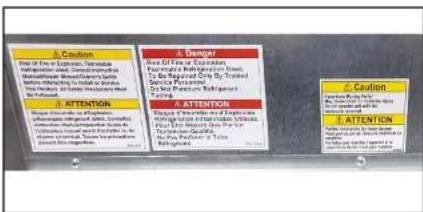
For your protection, safety labels have been placed at important locations on the cabinet. Be SURE to read and follow their instructions.
text_image
A. CAUTION Use of Fire for Exclusion, Tremadise Change in the number of cases from the Methotrexed Methylated Alveine Benzene (100 mg/100g) and 250 mg/100g Benzene (100 mg/100g) and 250 mg/100g Benzene (100 mg/100g) and 250 mg/100g A. ATTENTION Because there is a high risk abuse an effective dose, limited to conventional treatment, complete in use of a combination to reduce the dose of a high risk. A. DANGER Use of Fire for Exclusion, Fluoride, non-ventriculars, and Tumor infection by the Cancer To be repeated only by Trained Service Primaired Do not prevent any longer Duration. A. ATTENTION Because there is a high risk abuse an effective dose, limited to conventional treatment, complete in use of a combination to reduce the dose of a high risk. A. ATTENTION Because there is a high risk abuse an effective dose, limited to conventional treatment, complete in use of a combination The Patient's Pain Duration.Note: The top panel of this unit can be damaged by standing on it. Damage like that is NOT covered by warranty.
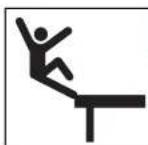
! WARNING
Risk of Personal Injury From Falling
Stay OFF top of unit
User Manual for UCRF Refrigerator Freezer Beverage Air
IMPORTANT INFORMATION
This unit is intended to be used in a commercial application. That includes bars and restaurants.
If installed in a residence some commercial service companies may not be able to service it on site.
The manufacturer has designed and produced this machine with the finest in materials. The manufacturer assumes no liability for units that have been altered in any way. Alterations or part substitutions will void the warranty.
Limitations
The machine is designed for use indoors in a controlled environment. It must be kept dry, not overheated or subjected to excessive cold. May only be connected to a dedicated electrical circuit. Extension cords are not permitted.
| Minimum Maximum | ||
| Voltage 103.5 126.5 | ||
| Room Air Temp 60° | F 100° F |
Air Flow, All Models regardless of section, door count or door material.

text_image
Warm Air OUTUser Manual for UCRF Refrigerator Freezer Beverage Air
PRODUCT INFORMATION
| Model | Cabinet Dimensions w x d x h (Inches) | Door Count | Full Load Amps - Refrigerator | Full Load Amps - Freezer | Power Cord Plug (NEMA) | Refrigerant Type / Charge (g) / Charge (oz) |
| UCRF48AHC | 48 × 32 × 34 12 22 | 2.5 | (2) 5-15P R-290 / 60 / 2.03 | |||
| UCFR48AHC | 48 × 32 × 34 12 22 | 2.5 | ||||
Height includes casters.
User Manual for UCRF Refrigerator Freezer Beverage Air
CLEARANCE AND PLACEMENT
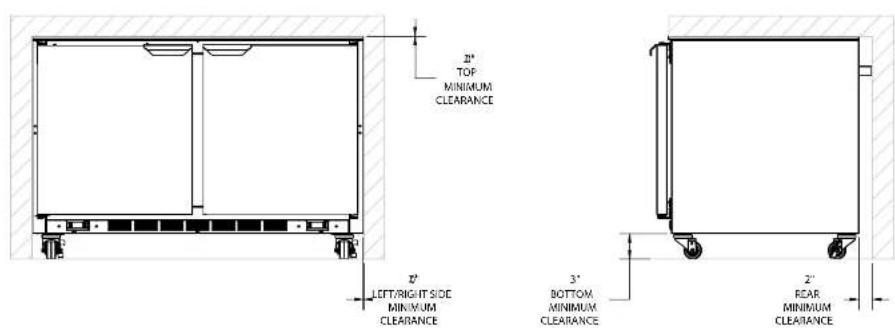
Placement
User Manual for UCRF Refrigerator Freezer Beverage Air
UNPACKING AND SET UP
Carefully inspect the shipping carton for damage. This is the only time that shipping damage may be claimed. If damage is suspected, open the carton immediately and, if there is damage, retain the carton and contact the shipper to make a claim. Do NOT contact the manufacturer.
Uncrating
Tools Needed: 12 " box wrench, adjustable wrench, level, flat head screw driver, and box cutter.
- Cut the stretch wrap along a corner post and remove the cardboard top capping and the corner posts.
- Discard stretch wrap and any cardboard that will not be recycled.
Note: additional clear plastic protective wrap is applied directly to any product with a glass door.
Skid Removal and Caster Attachment
Tip the unit forward and remove the skid.
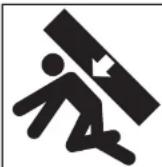

Risk of personal injury. Unit must be securely supported while attaching casters or legs.
-
Remove the shipping bolts using the 34 " box wrench while cabinet is held in one direction. Repeat the process while the cabinet is held in the opposite direction.
-
Move unit as close to final position as possible before removing the skid.
Note: The skid must be removed before the casters or legs can be attached.
Do NOT tip unit on its front or sides. If tipped onto the back, unit must not be started for 3 hours.
suitable material.
- Thread the stem casters or legs into the 12 -13 holes in the bottom of the cabinet. Tighten by hand as much as possible.
- Once the caster or leg cannot be turned any further, use a 3/4 inch wrench to tighten the nut in between the mounting plate and the wheel of the caster until snug.
- Repeat this procedure with unit secured in the opposite direction so as to access the remaining legs/
User Manual for UCRF Refrigerator Freezer Beverage Air
SHELF INSTALLATION
- Determine the proper location for the shelf clips.
- Insert the top tab of the shelf clip into the desired hole of the pilaster. The retaining tab MUST be facing up as shown.
- Rotate the clip downwards and insert the bottom tab into the matching hole in the pilaster. The clip may need to be squeezed slightly during installation.
- Install all remaining clips.
- Install shelves onto clips with the product retention bar facing up. Be careful not to dislodge clips during installation.
-
Place shelves so that the retaining tab on the clip captures the shelf as shown.
-
Confirm that the shelf is resting on ALL 4 clips and that the clips are securely attached to the pilasters.
- Improper shelf clip installation could cause the shelf and / or the product on it to fall, resulting in damage to the unit and possible bodily injury.
- Do NOT overload the shelves. The unit is designed to use all shelves that are supplied in an equally spaced manner. Contact Beverage Air customer service if fewer shelves or a different configuration to ensure shelf overloading will not occur.
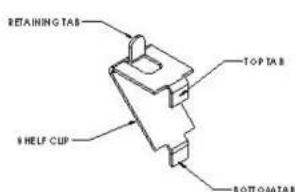
text_image
RETAINING TAB TOP TAB S HELF CUP BOTTOM TAB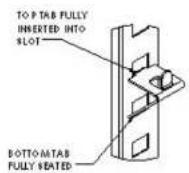
PROPERLY INSTALLED CLIP
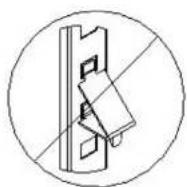
IMPROPERLY INSTALLED
CLIP (UPSIDE DOWN)
User Manual for UCRF Refrigerator Freezer Beverage Air
ELECTRICAL
This is a cord-connected unit, and must be connected to its own dedicated power supply. Check the dataplate on the machine to confirm the voltage and per the dataplate use the correct fuses or HACR circuit breakers.
Note: Do not connect to GFI / GFCI outlets. Connection to that type of outlet can result in product loss due to unsafe cabinet temperature when GFI device trips from moisture.
Power Cord
This 115 volt model is equipped with 2 cords and 5-15P plugs.
If the power cord becomes damaged, it must be replaced with the identical cord.
Follow All National and Local Codes
This unit must be grounded. Do not use extension cords and do not disable or by-pass ground prong on electrical plug.
Initial Start Up
Plug the power cord into the proper power supply.
The cabinet will soon begin to blow warm air out of the top area, and cool air will flow from the inside blower.
The cabinet temperatures have been set at the factory and should not need adjustment, however if changed, the standard refrigerator setting is 38^ F., while the standard freezer setting is 0^
Care must be taken whenever moving or servicing the
User Manual for UCRF Refrigerator Freezer Beverage Air
USING THE UNIT - DANFOSS CONTROLLER
Operation is simple, just keep it connected to the correct power supply and the refrigerator will maintain the internal temperature it has been set to. Keep the doors closed as much as possible to avoid unnecessary run time.
There are two controllers, both in the lower front grille of the cabinet. The left one is for the freezer section and the right one is for the refrigerator. Each controller displays the current internal temperature for its section.
Adjusting the set temperature lower will NOT cause the system to lower the temperature faster. When on, the refrigeration system is always operating at maximum.
For best results, make certain the unit remains powered and has achieved the desired set point before loading it with product. Pull down time will vary depending upon the type of unit and ambient conditions
The refrigerator temperature was set at the factory at 38°F, and the freezer temperature was set at 0°F., but you can adjust it to your own selected temperature.
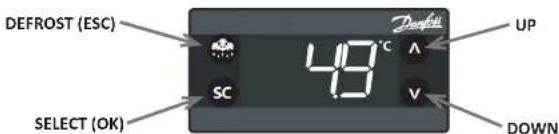
Each section will automatically defrost as needed, there is no set time for defrost. Push and immediately release the "melting" or defrost button for a manual defrost.
Note: Holding the defrost button in too long will shut the controller off.
The internal fan will be on whenever the appliance is connected to power.
The compressor and condenser fan motor will only be on when the controller senses an increase in internal cabinet temperature passed the set point.

text_image
Denfok 38.0°F Increase Select SC VUser Manual for UCRF Refrigerator Freezer Beverage Air
SEQUENCE OF OPERATIONS - REFRIGERATOR SECTION - DANFOSS CONTROLLER
The refrigerator operates based on the air temperature measured by the probe located at the return air.
| ON OFF | ||||
| COMPONENT OPERATION CONTROLLER ACTION OPERATION CONTROLLER ACTION | ||||
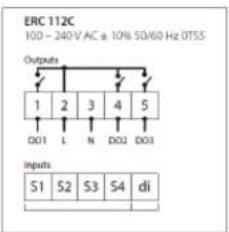
| COMPRESSOR | Compressor turns on when the air temperature at the probe is above the sum of the set point +2 | The Compressor Contact is energized | Compressor turns off when the air temperature at probe is equal to or less than the set point -2 | The Compressor Contact is de-energized |
| (ERC 112 - Terminal #1) | (ERC 112 - Terminal #1) | |||
| CONDENSER FAN | The Condenser Fan turns on when the Compressor is running | The Condenser Fan is wired directly to the Compressor, not through the controller | The Condenser Fan turns off when the Compressor is not running | The Condenser Fan is wired directly to the Compressor, not through the controller |
| EVAPORATOR FAN | The Evaporator Fan runs continuously in refrigerators. When the unit is plugged in, the Evaporator Fan will run. | The Evaporator Fan is connected directly to incoming power, not through the controller. | The Evaporator Fan runs continuously. When the unit is plugged in, The Evaporator Fan will run. | The Evaporator Fan is connected directly to incoming power, not through the controller. |
| Condition | Compressor | Condenser Fan | Evaporator -an |
User Manual for UCRF Refrigerator Freezer Beverage Air
REFRIGERATOR SECTION
Electronic Controller
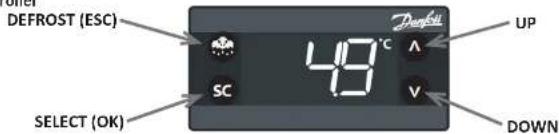
text_image
DEFROST (ESC) UP 49°C SC V DOWNControl Panel Display
| Defrost LED Alarm LED | |||||
| On fixed: Defrost active On fixed: ALARM Present | |||||
| Off: Defrost is off Flashing: ALARM Silenced | |||||
| Off: No Alarm | |||||
| Fan LED Compressor LED | |||||
| On fixed: | Fan active | On fixed: Compressor active | |||
| Off: | Fan Off | Flashing: Delay, protection or activation blocked | |||
| Off: No Alarm | |||||
NOTE: When switched on, the instrument panel performs a lamp test for a few seconds.
Keyboard Functions
User Manual for UCRF Refrigerator Freezer Beverage Air
REFRIGERATOR SECTION
text_image
ERC 112C 100 - 240V AC ± 10% 50/60 Hz OTSS Outputs 1 2 3 4 5 DO1 L N DO2 DO3 Inputs S1 S2 S3 S4 di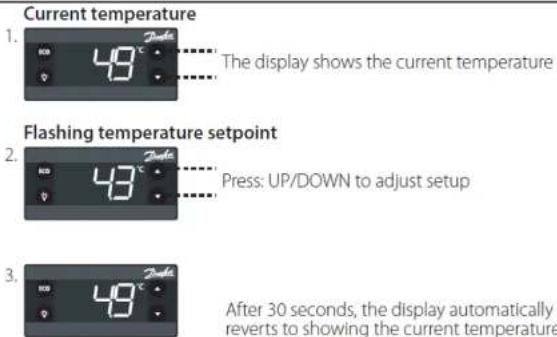
text_image
Current temperature 1. 49 ° The display shows the current temperature Flashing temperature setpoint 2. 43 ° Press: UP/DOWN to adjust setup 3. 49 ° After 30 seconds, the display automatically reverts to showing the current temperature
text_image
Current temperature 1. 49 ° The display shows the current temperature Flashing temperature setpoint 2. 43 ° Press: UP/DOWN to adjust setup 3. 49 ° After 30 seconds, the display automatically reverts to showing the current temperatureUser Manual for UCRF Refrigerator Freezer Beverage Air
REFRIGERATOR SECTION
The alarm condition is always signaled by the alarm icon 🔔.
Press any button to silence the alarm, the relative icon will continue flashing.
| Alarm Code | Trigger | Automatic Clearance | Outputs | Comments |
| "Hi" | Air temperature is higher than "ALA->Hat• for "ALA->Htd" | User configured | Blink "Hi" with the highest temperature; If configured: cut in alarm relay, beep the buzzer | High temperature alarm |
| "Lo" | Air temperature is lower than "LAt" for "Ltd" | User configured | Blink "Lo" with the lowest temperature. If configured: cut in alarm relay, beep the buzzer | Low temperature alarm |
| "Con" | Condenser temperature is too high or too low | User configured | Blink "Con". If configured: cut in alarm relay, beep the buzzer | Condenser alarm |
| "dor" | Door open for more than | Always | Blink "dor". If configured: cut in alarm relay, beep the buzzer | Door open alarm |
| "uHi" | Line voltage is higher than "Cop->uHi" | Always | Blink "uHi". If configured: cut in alarm relay, beep the buzzer | High voltage alarm |
| "uLi" | Line voltage is higher than "Cop->uLi" | Always | Blink "uLo". If configured: cut in alarm relay, beep the buzzer. | Low voltage alarm |
| "LEA" | Compressor continuous running for more than "ALA->LEA" | Always | Blink "LEA". If configured: cut in alarm relay, beep the buzzer | Leakage alarm |
| "E01" | "S1" error | Always | Blink "E01 ". If configured: cut in alarm relay, beep the buzzer | "S1" sensor failure (short or open) |
| "E02" | "S1" error | Always | Blink "E02". If configured: cut in alarm relay, beep the buzzer | "S2" sensor failure (short or open) |
| "E03" | "S1" error | Always | Blink "E03 ". If configured: cut in alarm relay, beep the buzzer | "S3" sensor failure (short or open) |
| "E04" | "S1" error | Always | Blink "E04 ". If configured: cut in alarm relay, beep | "S4" sensor failure |
User Manual for UCRF Refrigerator Freezer Beverage Air
The cooler operates based on the air temperature measured by the probe located at the return air.
| ON Off | ||||
| COMPONENT OPERATION CONTROLLED ACTION | ||||
| COMPRESSOR Compressor | or turns on when the air temperature at the probe is above the sum of the set point + 2.5 | The Compressor Contact is energized | Compressor turns off when the air temperature is equal to or less than the set point - 2.5 | The Compressor Contact is de-energized |
| (ERC 112 - Terminal #1) | ||||
| CONDENSER FAN The Condenser Fan turns on when the Compressor is running | The Condenser Fan is wired directly to the Compressor, not through the controller | The Condenser Fan turns off when the Compressor is not running | The Condenser Fan is wired directly to the Compressor, not through the controller | |
| EVAPORATOR FAN The Evaporator Fan runs continuously. When the unit is plugged in the Evaporator Fan will run | The Evaporator Fan Contact is energized. | The Evaporator Fan turns off when freezer enters a defrost cycle. | The Evaporator fan Contact is deener-gized. | |
| (ERC 112 - Terminal #5) | (ERC 112 - Terminal #5) | |||
| DEFROST HEATER The Defrost Heater will activate on cumulative Compressor runtime of 6 hours, and when temperature drops too low | The Defrost Heater Contact is energized | When either the defrost is not scheduled or the temperature at defrost probe has reached the defrost termination temperature. | The Defrost Heater Contact is de-ener-gized | |
| (ERC 112 - Terminal #6) | (ERC 112 - Terminal #6) | |||
| FACE/DOOR HEATERS The Face & Door Heat-ers turn on when the Compressor is running | The Door/Face Heater are wired to the Compressor Contact | The Face & Door Heaters turn off when the Compressor is not | The Door/Face Heater are wired to the Com-pressor Contact | |
User Manual for UCRF Refrigerator Freezer Beverage Air
FREEZER SECTION
Electronic Controller
text_image
DEFROST (ESC) UP 48°C SC V DOWNControl Panel Display
Note: Defrost is manual, LED indicator is inoperative.
| Defrost LED Alarm LED | |||||
| On fixed: Defrost active On fixed: ALARM Present | |||||
| Off: Defrost is off Flashing: ALARM Silenced | |||||
| Off: No Alarm | |||||
| Fan LED Compressor LED | |||||
| On fixed: | Fan active | On fixed: Compressor active | |||
| Off: | Fan Off | Flashing: Delay, protection or activation blocked | |||
| Off: No Alarm | |||||
NOTE: When switched on, the instrument panel performs a lamp test for a few seconds.
Keyboard Functions
 |  | [KHH8] | [42A4] |
| UP | DOWN | DEFROST (ESC) | SET (ENTER) |
| Quick press and release | Quick press and release | Quick press and release | Quick press and release |
User Manual for UCRF Refrigerator Freezer Beverage Air
FREEZER SECTION
Control Panel Connections

text_image
ERC 112D 100 - 240 V AC ± 10% 50/60 Hz OTSS Outputs 1 2 3 4 5 6 DO1 L N DO2 DO3 DO4 Inputs S1 S2 S3 S4 diChanging the Set Point

text_image
Current temperature 1. 49°C The display shows the current temperature Flashing temperature setpoint 2. 49°C Press: UP/DOWN to adjust setup 3. 49°C After 30 seconds, the display automaticallyUser Manual for UCRF Refrigerator Freezer Beverage Air
FREEZER SECTION
The alarm condition is always signaled by the alarm icon 🔔.
Press any button to silence the alarm, the relative icon will continue flashing.
| Alarm Code | Trigger | Automatic Clearance | Outputs | Comments |
| "Hi" | Air temperature is higher than "ALA->Hat• for "ALA->Htd" | User configured | Blink "Hi" with the highest temperature; If configured: cut in alarm relay, beep the buzzer | High temperature alarm |
| "Lo" | Air temperature is lower than "LAt" for "Ltd" | User configured | Blink "Lo" with the lowest temperature. If configured: cut in alarm relay, beep the buzzer | Low temperature alarm |
| "Con" | Condenser temperature is too high or too low | User configured | Blink "Con". If configured: cut in alarm relay, beep the buzzer | Condenser alarm |
| "dor" | Door open for more than | Always | Blink "dor". If configured: cut in alarm relay, beep the buzzer | Door open alarm |
| "uHi" | Line voltage is higher than "Cop->uHi" | Always | Blink "uHi". If configured: cut in alarm relay, beep the buzzer | High voltage alarm |
| "uLi" | Line voltage is higher than "Cop->uLi" | Always | Blink "uLo". If configured: cut in alarm relay, beep the buzzer. | Low voltage alarm |
| "LEA" | Compressor continuous running for more than "ALA->LEA" | Always | Blink "LEA". If configured: cut in alarm relay, beep the buzzer | Leakage alarm |
| "E01" | "S1" error | Always | Blink "EO1". If configured: cut in alarm relay, beep the buzzer | "S1" sensor failure (short or open) |
| "E02" | "S1" error | Always | Blink "EO2". If configured: cut in alarm relay, beep the buzzer | "S2" sensor failure (short or open) |
| "E03" | "S1" error | Always | Blink "E03". If configured: cut in alarm relay, beep the buzzer | "S3" sensor failure (short or open) |
| "E04" | "S1" error | Always | Blink "E04". If configured: cut in alarm relay, beep the buzzer | "S4" sensor failure |
User Manual for UCRF Refrigerator Freezer Beverage Air
USING THE UNIT - REFRIGERATOR SECTION - EUNWELL CONTROLLER
Operation is simple, just keep it connected to the correct power supply and the refrigerator will maintain the internal temperature it has been set to. Keep the doors and / or drawers closed as much as possible to avoid unnecessary run time.
The controller displays the current internal temperature.
Adjusting the set temperature lower will NOT cause the system to lower the temperature faster. When on, the refrigeration system is always operating at maximum.
The temperature was set at the factory at 35^ F, but you can adjust it to your own selected temperature. 30 seconds after adjustment, the display automatically reverts to showing the current temperature.
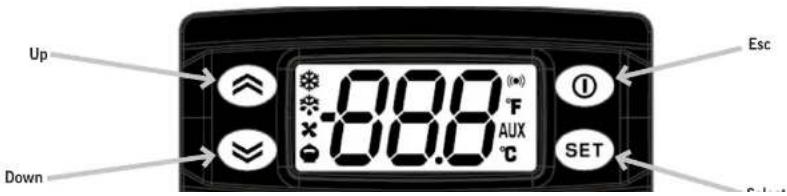
The refrigerator will automatically defrost as needed, there is no set time for defrost. Push and immediately release the "melting" or defrost button for a manual defrost.
The internal fan will be on when the unit is plugged in.
The compressor and condenser fan motor will only be on when the controller senses an increase in internal cabinet temperature passed the set point.
If equipped with glass doors, pressing the down button in will turn the cabinet light on or off.
text_image
Up Down -8.8.0 °F AUX °C SET EscUser Manual for UCRF Refrigerator Freezer Beverage Air
SEQUENCE OF OPERATIONS - REFRIGERATOR SECTION
The refrigerator operates based on the air temperature measured by the probe located at the return air.
| ON | OFF | |||
| COMPONENT | OPERATION | CONTROLLER ACTION | OPERATION | CONTROLLER ACTION |
| COMPRESSOR | Compressor turns on when the air temperature at the probe is above the sum of the set point + 4 | The Compressor Contact is energized | Compressor turns off when the air temperature at probe is equal to or less than the set point | The Compressor Contact is de-energized |
| (EW+978 - Terminal #1) | (EW+978 - Terminal #1) | |||
| CONDENSER FAN | The Condenser Fan turns on when the Compressor is running | The Condenser Fan is wired directly to the Compressor, not through the controller | The Condenser Fan turns off when the Compressor is not running | The Condenser Fan is wired directly to the Compressor, not through the controller |
| EVAP FAN | The Evaporator Fan turns on when the unit is powered on. | The Evaporator Fan is wired to constant power | The Evaporator Fan turns off when the unit is unplugged or put into standby. | The Evaporator Fan is wired to constant power |
| Some models will be wired to the fan relay (EW+978 - Terminal #3) | Some models will be wired to the fan relay (EW+978 - Terminal #3) | |||
| LIGHT | The light will turn on when the down button is pressed (or when the door is opened with solid doors) | The Light Contact is energized | The light will turn off when the down button is pressed (or when the door is closed with solid doors) | The Light Contact is de-energized |
| (Ew+978 - Terminal #2) | (Ew+978 - Terminal #2) | |||
User Manual for UCRF Refrigerator Freezer Beverage Air
REFRIGERATOR SECTION
text_image
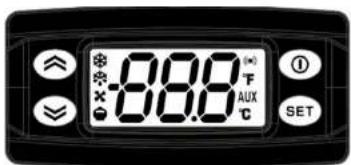
-8.08°F AUX C SETController Symbols
 | Reduced SET / EconomyPermanently on: Energy Saving ModeFlashing: Reduced Set ModeQuick Flashing: Access to level 2 parameters |  | AUXPermanently on: Aux ActiveFlashing: Deep Cooling Cycle Active |
 | CompressorPermanently On: Compressor ActiveFlashing: Delay, protection or blocked start-up | [XDBH] | DefrostPermanently on: Defrost ActiveFlashing: Manual or D.I. activation |
 | AlarmPermanently on: Alarm ActiveFlashing: Alarm Acknowledged |  | FanPermanently on: Fans Active |
 | CelsiusPermanently On: °C Setting | [CYAB] | FahrenheitPermanently on: °F Setting |
Controller Buttons
User Manual for UCRF Refrigerator Freezer Beverage Air
REFRIGERATOR SECTION
Alarms are always indicated by the buzzer (if present) and the alarm icon. To switch off the buzzer, press and release any key, the relative icon will continue to flash.
NOTE: If alarm exclusion times have been set (see AL folder in the parameters table), the alarm will not be signaled.
| Alarm Code | Trigger | Automatic Clearance | Outputs | Comments |
| "AH1" | Pb1 probe HIGH Temperature alarm | User configured | Label AH1 displayed alternately with the actual value read by the probe Pb1 | High temperature alarm |
| "AL1" | Pb1 probe LOW Temperature alarm | User | Label AL1 displayed alternately with the actual value read by the probe Pb1 | Low temperature alarm |
| "OPd" | Door open for more than | Always | Label OPd displayed alternately with the actual value read by probe Pb1 | Door open alarm |
| "E1" | "E1" error | Always | Blink "E1". If configured: cut in alarm relay, beep the buzzer | "PB1" sensor failure (short or open) |
| "E2" | "E2" error | Always | Blink "E2". If configured: cut in alarm relay, beep the buzzer | "PB2" sensor failure (short or open) |
User Manual for UCRF Refrigerator Freezer Beverage Air
CLEANING AND MAINTENANCE
Cleaning Schedule:
Cabinet
Daily wipe down
Weekly interior
Condenser coil
Quarterly cleaning
Gaskets
Periodic
Routine maintenance
Annually
Daily Exterior Cleaning
It is much easier to clean on a regular basis than to have to remove stains once they have built up.
- Wash with a clean sponge and a mild detergent that does not contain chlorine.
- Rinse with clean water.
- Dry with a soft cloth.
Weekly Interior Cleaning
- Remove all food, food related items, and shelves.
- Disconnect power to the cabinet at the main power supply circuit breaker
- Remove loose food particles from interior floors, walls, and ceiling
-
Scrub all interior surfaces and drawer gaskets with a ..... (100-120-5) intercalation
-
Polish with a soft cloth, wiping with the grain.
-
Wipe weekly with stainless steel cleaner.
-
Rinse with clean water and allow to air dry
- Re-install the shelves.
- Restore power to the cabinet by resetting main power supply circuit breaker
- Return food to the cabinet when temperature indicator displays safe food temperature
User Manual for UCRF Refrigerator Freezer Beverage Air
CONDENSER CLEANING
Keeping the condenser coil clean is critical to efficient operation.
The condenser coil is located behind the front or rear grille of the cabinet. It should be inspected once a month and cleaned as required. Vacuum clean all surfaces of the condenser. Make sure no fins are bent or damaged in the process. If there are bent fins, carefully straighten them so that air can flow through the coils. Failure to keep the condenser coil clean will lead to poor performance, excessive power consumption and compressor failure and may result in loss of property. Failure to keep the condenser coil clean may void the limited warranty.
- Unplug unit from power supply.
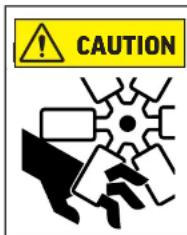
Rotating fan blade can cause personal injury.
Unplug unit from power supply before beginning to clean condenser
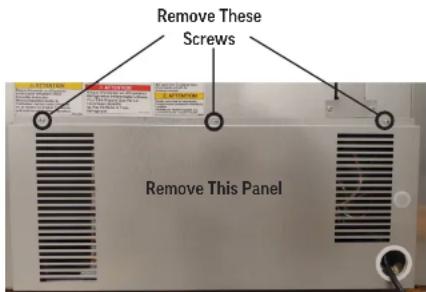
- Remove the Phillips head screws at the top of the panel.
-
Once the screws have been removed the you can lower the panel
-
To reinstall line up the bottom of the panel to the bottom of the unit keeping the screw holes lined up on the panel and on the unit
- Reinstall the screw on the top of the front grille panel.
Note: Air filters are not recommended as they restrict the flow of cooling air.
text_image
Remove These Screws Remove This PanelUser Manual for UCRF Refrigerator Freezer Beverage Air
METHODS FOR CLEANING STAINLESS STEEL
| Cleaning Needed Cleaning | Agent Method of Application Affect on Finish | ||
| Smears and fingerprints | Areal 20, Lac-O-Nu, Lumin Wash O'Cedar Cream Polish, Stainless Shine. | Rub with cloth as directed on the package. | Satisfactory for use on all finishes.Provides barrier film to minimize prints. |
| Stubborn Spots and Stains, Baked-On Splatter, and Other Light Discolorations | Allchem Concentrated Cleaner. | Apply with damp sponge or cloth.Rub with damp cloth. | Use in direction of polish lines on No. 4 (polished) finish. May scratch No. 2 (mill) and Nos. 7 and 8 (polished) finishes. |
| Samae, Twinkle or Cameo Copper Cleaner | Rub with damp cloth. | ||
| Grade FFF Italian pumice, whiting, or talc. | Rub with dry cloth. | ||
| Liquid NuSteelPaste NuSteel or DuBois Temp.Copper's Stainless Steel CleanerRevere Stainless CleanerHousehold cleansers, such as Old Dutch, Lighthouse, Sunbrite, Wyandotte, Bab-O, Gold Dust, Sapolio, Bon Ami, Ajax, or Comet Grade F Italian Pumice, Steel Bright, Lumin Cleaner, Zud, Restore, Sta-Clean, or Highlite.Penny-Brite or Copper-Brite. | Use small amount of cleaner.Rub with dry cloth using a small amount of cleaner.Apply with damp sponge or cloth.Rub with a damp cloth. May contain chlorine bleaches.Rinsethoroughly after use.Rub with a damp cloth.Rub with a dry cloth using a small amount of cleaner. | ||
| Heat tint or discoloration | Penny-Brite or Copper-Brite.Past NuSteel, DuBois Temp, or Tarnite. Revere Stainless Steel Cleaner. Allen Polish, Steel Bright, Tenacious Deposits,Rusty Discolorations, Industrial | Rub with a dry cloth.Rub with a dry cloth or stain-less steel wool.Apply with damp sponge or cloth.Rub with a damp cloth. | |
User Manual for UCRF Refrigerator Freezer Beverage Air
HELP
| Trouble Diagnosis for the User | ||
| Malfunction Possible Cause Likely Solution | ||
| No cooling - unit is silent | Unit not plugged in.Fuse or circuit breaker tripped.Power cord plug loose in outlet. | Connect to proper voltage circuit Replace fuse or reset breaker.Check outlet for loose connection, replace as needed |
| Unit cools but seems to be on all the time Dirty condenser Clean condenser | ||
| Space temperature too high | Dirty condenserEvaporator iced over Unit in high temperature environment | Clean condenser Defrost evaporatorReduce temperature of room |
| Space temperature too low Temperature control Adjust or replace control | ||
| Trouble Diagnosis for the Technician | ||
| No cooling - compressor does not hum Temp | control stuck in open position Replace temp | control. |
| No cooling - compressor hums but does not start | Low voltage to unit.Compressor starting system failure | Check voltage, correct as needed. Check start relay and start capacitor. See next step. |
| No cooling - compressor starts but shuts off | Compressor start relay failure Compressor start capacitor failure | Replace relay. Replace capacitor. |
| No cooling - compressor cycles on and off Overheating weak overload | Clean condenser, check fan motor and blade. Check refrigerant charge. Replace overload. | |
| Unit cools, but is slow to pull cabinet temperature down | Evaporator fan not turning | Check fan(s), on multiple fan units one fan may be turning slowly and will need to be replaced. |
| Unit cools but turns on and off frequently | No product in cabinet. Temperature control defective Refrigeration issue | Fill cabinet Replace controlHave system checked |
User Manual for UCRF Refrigerator Freezer Beverage Air
FOR THE SERVICE TECH · R290
Refrigeration service should only be attempted by a trained trade professional certified to work on R290 systems.
Here are some critical service items.
This list does not qualify anyone to service the unit. It is a reminder and checklist for the service tech. Keep these in mind for R290 service:
- Wire nuts are NOT to be used when changing an electrical part.
- The switches in this product are sealed, only exact replacements may be used.
- The process tubes are to be used for service access.
- Cut out (with tubing cutter) refrigeration components that are to be replaced. Do NOT un-braze.
- Because R290 can be vented into the air during service, the venting MUST be in an area free from flame or spark. It must be near an opened window or door.
- A sign noting service of a system containing propane must be attached to the unit during refrigeration service.
- A combustible gas leak detector must be used to inform anyone in the area when propane is present in the air.
Other Information:
Evacuation: It is critical that a refrigeration system be leak free and internally dry. A thorough evacuation with a good vacuum pump with a micron gauge attached is the only way to ensure that the system is dry and ready for a charge of refrigerant.
Charging: The system is critically charged and the proper type and amount MUST be weighed in.
Overcharge symptoms: Unit will cool properly but the suction line temperature will be unusually cold. Compressor run time will be longer than normal.
Undercharge symptoms: Long run time, poor cooling and a hot compressor dome are the main symptoms of an undercharge.
User Manual for UCRF Refrigerator Freezer Beverage Air
FOR THE SERVICE TECH - WIRING DIAGRAM FOR REFRIGERATOR SECTION - DANFOSS CONTROLLER

text_image
***CONTROL 78 DETAIL ***CONTROL 25 DETAIL CONCEL CONCENER FAN CURRENT RELAY COMpressor DETAIL LTR 1PM PUMP FANG ***CONTROL 25 DETAIL *NOT ALL MODELS* POWER SUPPLY (AMP) LED LANE *NOT ALL MODELS* CONCENER FAN ***CONTROL 78 DETAIL ***CONTROL 25 DETAIL ***CONTROL 25 DETAIL ***CONTROL 25 DETAIL ***CONTROL 25 DETAIL ***CONTROL 25 DETAIL ***CONTROL 25 DETAIL ***CONTROL 25 DETAIL ***CONTROL 25 DETAIL ***CONTROL 25 DETAIL ***CONTROL 25 DETAIL ***CONTROL 25 DETAIL ***CONTROL 25 DETAIL ***CONTROL 25 DETAIL **NOT ALL MODELS* **NOT ALL MODELS* **NOT ALL MODELS* **NOT ALL MODELS* **NOT ALL MODELS* **NOT ALL MODELS* **NOT ALL MODELS* **NOT ALL MODELS* **NOT ALL MODELS* **NOT ALL MODELS* **NOT ALL MODELS* **NOT ALL MODELS* **NOT ALL MODELS* **NOT ALL MODELS* **NOT ALL MODELS* **NOT ALL MODELS* **NOT ALL MODELS* **NOT ALL CODEM **NOT ALL CODEM **NOT ALL CODEM **NOT ALL CODEM **NOT ALL CODEM **NOT ALL CODEM **NOT ALL CODEM **NOT ALL CODEM **NOT ALL CODEM **NOT ALL CODEM **NOT ALL CODEM **NOT ALL CODEM **NOT ALL CODEM **NOT ALL CODEM **NOT ALL CODEM **NOT ALL CODEM **NOT ALL CODEM **NOT ALL MODELS* **NOT ALL MODELS* **NOT ALL MODELS* **NOT ALL MODELS* **NOT ALL MODELS* **NOT ALL MODELS* **NOT ALL MODELS* **NOT ALL MODELS* **NOT ALL MODELS* **NOT ALL MODELS* **NOT ALL MODELS* **NOT ALL MODELS* **NOT ALL MODELS* **NOT ALL MODELS* **NOT ALL MODELS* **NOT ALL MODELS* **NOT All MODELS* **NOT ALL MODELS* **NOT ALL MODELS* **NOT ALL MODELS* **NOT ALL MODELS* **NOT ALL MODELS* **NOT ALL MODELS* **NOT ALL MODELS* **NOT ALL MODELS* **NOT ALL MODELS* **NOT ALL MODELS* **NOT ALL MODELS* **NOT ALL MODELS* **NOT ALL MODELS* **NOT ALL MODELS* **NOT ALL MODELS* **NOT ALL MODELS* * NOT CONTROL 78 DETAIL * NOT CONTROL 25 DETAIL * NOT CONTROL 25 DETAIL * NOT CONTROL 25 DETAIL * NOT CONTROL 25 DETAIL * NOT CONTROL 25 DETAIL * NOT CONTROL 25 DETAIL * NOT CONTROL 25 DETAIL * NOT CONTROL 25 DETAIL * NOT CONTROL 25 DETAIL * NOT CONTROL 25 DETAIL * NOT CONTROL 25 DETAIL * NOT CONTROL 25 DetAIL * NOT CONTROL 25 DetAIL * NOT CONTROL 25 DetAIL * NOT CONTROL 25 DetAIL * NOT CONTROL 25 DetAIL * NOT CONTROL 25 DetAIL * NOT CONTROL 25 DetAIL * NOT CONTROL 25 DetAIL * NOT CONTROL 25 DetAIL * NOT CONTROL 25 DetAIL * NOT CONTROL 25 DetAIL * NOT CONTROL 25 DetailUser Manual for UCRF Refrigerator Freezer Beverage Air
FOR THE SERVICE TECH - WIRING DIAGRAM FOR FREEZER SECTION - DANFOSS CONTROLLER
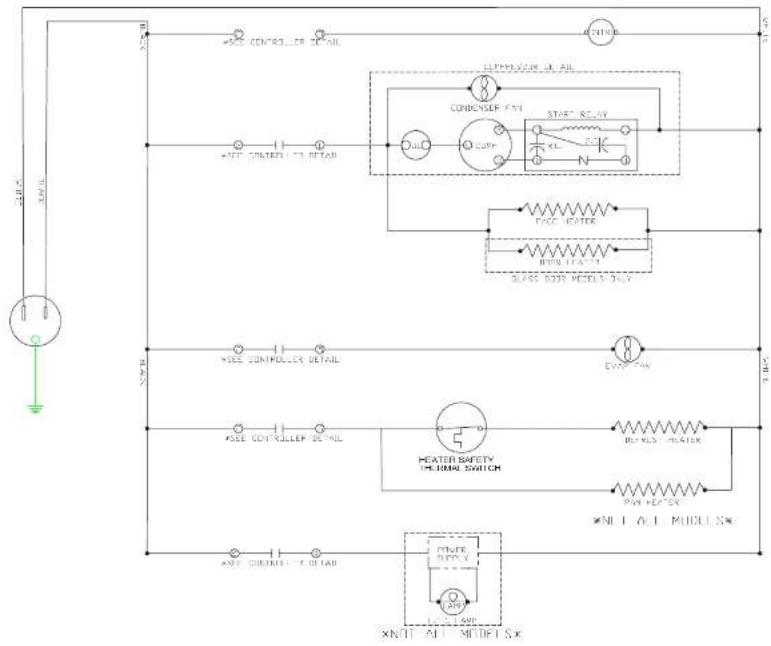
text_image
AIR *SEE CONTROLLER DETAIL *SEE CONTROLLER DETAIL *SEE CONTROLLER DETAIL *SEE CONTROLLER DETAIL *SEE CONTROLLER DETAIL *SEE CONTROLLER DETAIL *SEE CONTROLLER DETAIL *SEE CONTROLLER DETAIL *SEE CONTROLLER DETAIL *SEE CONTROLLER DETAIL *SEE CONTROLLER DETAIL *SEE CONTROLLER DETAIL *SEE CONTROLLER DETAIL *SEE CONTROLLER DETAIL *SEE CONTROLLER DETAIL HEATER SAFETY THIONIC SWITCH POWER REPLY RUN ROLL PIN REPLY XN11 ALL MUELL SX XN11 ALL MURRY SXUser Manual for UCRF Refrigerator Freezer Beverage Air
FOR THE SERVICE TECH - WIRING DIAGRAM FOR REFRIGERATOR SECTION - ELIWELL CONTROLLER

text_image
NOT CONTROLLER DETAIL NET CONPRESSOR FAN CURRENT RELAY COMPRESSOR DETAIL DISV (PRO) NOT CONTROLLER DETAIL NOT ALL MODELS* EVEF FANS NOT CONTROLLER DETAIL NOT ALL MODELS* POWER SUPPLY LED LAMP NOT ALL MODELS* CONPRESSOR FAN LIMIN RELAYUser Manual for UCRF Refrigerator Freezer Beverage Air
LIMITED WARRANTY
WARRANTY (Warranty valid in USA and Canada)
THREE (3) YEAR PARTS AND LABOR WARRANTY:
Beverage-Air Corporation warrants to the original purchaser of Beverage-Air branded equipment, including all parts thereof, that such equipment is free from defects in material and workmanship, under normal use, proper maintenance, and service as indicated by Beverage-Air installation and operation instructions, for a period of three (3) years from the date of installation, or thirty-nine (39) Months from the date of shipment from the manufacturer, whichever is earlier.
ADDITIONAL FOUR (4) YEAR COMPRESSOR PART
WARRANTY': In addition to the warranty set forth above, Beverage-Air warrants the hermetically/semi-hermetically sealed compressor (part only) for an additional FOUR (4) years beyond the first three (3) years warranty period; not to exceed eighty-seven (87) months from the date of shipment from Beverage-Air, provided upon receipt of the compressor, manufacturer examination shows the sealed compressor to be defective. This extended warranty does not cover freight for the replacement compressor or freight for the return of the failed compressor.
* Units shipped after 03/01/2020. Previous warranty applies to units shipped prior.
EXCEPTIONS:
BEVERAGE-AIR
Also, this extended compressor-part only warranty does NOT apply to any electrical controls, condenser, evaporator, fan motors, overload switch, starting relay, capacitors, temperature control, filter/drier, accumulator, refrigeration tubing, wiring harness, labor charges, or supplies which are covered by the warranty above.
Normal wear type parts, such as light bulbs/lamps and gaskets are not covered by this warranty. For the purpose of this warranty, the original purchaser shall be deemed to mean the individual or company for who the product was originally installed.
Our obligation under this warranty shall be limited to repairing or replacing, including labor, any part of such product, which proves thus defective. Beverage-Air reserves the right to examine any product claimed to be defective.
The labor warranty shall be for self-contained units only and for standard straight time, which is defined as normal service rate time, for service performed during normal working hours. Any service requested outside of a servicer's normal working hours will be covered under this warranty at the normal rate and any additional overtime rate will be at the responsibility of the equipment purchaser.
Any part or accessory determined to be defective in the
User Manual for UCRF Refrigerator Freezer Beverage Air
LIMITED WARRANTY (CONTINUED)
With the exception of Blast Chillers product is designed for maintaining temperature and not bringing food to a desired temperature therefore cannot be held responsible for this function under warranty.
Units must be in a conditioned environment or warranty will be void.
Condensing coils must be cleaned at regular intervals. Failure to do so can cause compressor malfunction and will void warranty. Although cleaning requirements vary in accordance with operation of various products, Beverage-Air recommends a minimum monthly cleaning.
NO CLAIMS CAN BE MADE AGAINST THIS WARRANTY FOR SPOILAGE OF FOOD. PRODUCTS, LOSS OF SALES OR CONSEQUENTIAL DAMAGES.
THE FOREGOING WARRANTIES ARE EXPRESSLY GIVEN IN LIEU OF ALL OTHER WARRANTIES, EXPRESS, IMPLIED, OR STATUTORY, INCLUDING THE IMPLIED WARRANTIES OF MERCHANTABILITY AND FITNESS FOR A PARTICULAR PURPOSE, WHICH ARE HERBY DISCLAIMED, ALL OTHER OBLIGATIONS OR LIABILITIES ON OUR PART, AND WE NEITHER ASSUME, NOR AUTHORIZE ANY OTHER PERSON TO ASSUME FOR US, ANY OBLIGATION OR LIABILITY IN CONNECTION WITH THE SALE OF SAID REFRIGERATION UNITS OR ANY PARTS THERE OF.
This warranty shall not be assignable and shall be honored only in so far as the original purchaser. This warranty
LIMITATION OF LIABILITY:
Beverage-Air Corporation or their affiliates shall not be liable for any indirect, incidental, special or consequential damages, or losses of a commercial nature arising out of malfunction equipment or its parts components thereof, as a result of defects in material or workmanship.
THE ORIGINAL OWNER'S SOLE AND EXCLUSIVE REMEDY AND BEVERAGE-AIR'S SOLE AND EXCLUSIVE LIABILITY SHALL BE LIMITED TO THE REPAIR OR REPLACEMENT OF PARTS OR COMPONENTS CONTAINED IN THE EQUIPMENT IDENTIFIED ABOVE WHICH UNDER NORMAL USE AND SERVICE MALFUNCTION AS A RESULT OF DEFECTS IN MATERIAL OR WORKMANSHIP, SUBJECT TO THE APPLICABLE PROVISIONS AND LIMITATIONS STATED ABOVE.
User Manual for UCRF Refrigerator Freezer Beverage Air
Warranty Registration
Register your product online at Beverage Air.com/parts-service or fill out and mail the form below.
Cabinet Model Number:
Date Of Installation: