
CR4405 - Printer Code - Free user manual and instructions
Find the device manual for free CR4405 Code in PDF.


| Product Type | Barcode Scanner Sled for iPhone 5/5s |
| Brand | Code |
| Model | CR4405 (CR44X5) |
| Compatibility | Apple iPhone 5 and 5s |
| Dimensions (Sled) | Approximately 5.5 x 2.5 x 1.5 inches (140 x 64 x 38 mm) |
| Weight | Approximately 100 g (with battery) |
| Power Supply | 5VDC via USB or charging station |
| Battery Type | Rechargeable lithium-ion battery cartridge |
| Battery Charging Status | LED indicator: Red (0-30%), Yellow (31-60%), Green (61-95%), Solid Green (96-100%) |
| Scanning Technology | CMOS imager |
| Read Range (3 mil Code 39) | 3.1 to 4.0 inches (80-102 mm) |
| Read Range (13 mil UPC) | 1.1 to 11.0 inches (28-280 mm) |
| Communication Modes | iPhone Keyboard, iPhone App, USB Downloader, USB Pass-Through |
| Operating Systems Supported | iOS (iPhone 5/5s) |
| CortexMobile App | Demonstration and SDK reference app |
| Firmware Upgradable | Yes, via CortexTools and USB connection |
| Regulatory Compliance | FCC Part 15, CE (EN 55022/24, EN 60950-1), Industry Canada |
| Warranty | One year limited warranty |
| Maintenance | Clean window with soft cloth; avoid touching lens |
| Included Accessories | USB 2.0 cable, 5VDC power supply, battery cartridge |
| Additional Resources | Configuration guide at www.codecorp.com |
Frequently Asked Questions - CR4405 Code
User questions about CR4405 Code
0 question about this device. Answer the ones you know or ask your own.
Ask a new question about this device
Download the instructions for your Printer in PDF format for free! Find your manual CR4405 - Code and take your electronic device back in hand. On this page are published all the documents necessary for the use of your device. CR4405 by Code.
USER MANUAL CR4405 Code
natural_image
Illustration of a smartphone with a strap and cable (no text or symbols)CR4405
Compatible with Apple® iPhone® 5 and 5s
MANUAL VERSION 03
RELEASE DATE: JANUARY 2016
Statement of Agency Compliance

The Code Reader™ 4405 (CR4405) has been tested for compliance with FCC regulations and was found to be compliant with all applicable FCC Rules and Regulations.
IMPORTANT NOTE: To comply with FCC RF exposure compliance requirements, this device must not be co-located or operate in conjunction with any other antenna or transmitter.
CAUTION: Changes or modifications not expressly approved by the party responsible for compliance could void the user's authority to operate the equipment.
The CR4405 has been tested for compliance to CE standards and guidelines and was found to conform to applicable CE standards, specifically the EMC requirements EN 55024, ESD EN 61000-4-2, Radiated RF Immunity EN 61000-4-3, ENV 50204, EFT EN 61000-4-4, Conducted RF Immunity EN 61000-4-6, EN 55022, Class B Radiated Emissions, and Class B Conducted Emissions.

The CR4405 has been tested and certified in compliance with the Technical Regulations Conformity Certification of Specified Radio Equipment (ordinance of MPT N°.37, 1981), Article 2, Paragraph 1, Item 19.
Code voids product warranty if the hard case has been opened or tampered with in any way.
The CR4405 meets all safety and quality standards in accordance to EN 60950-1:2006/A11:2009/A1:2010.
CR4405 FOC, Industry Canada and ICES Compliance
FCC:
This device complies with part 15 of the FCC Rules. Operation is subject to the following two conditions: (1) This device may not cause harmful interference, and (2) this device must accept any interference received, including interference that may cause undesired operation.
NOTE: This equipment has been tested and found to comply with the limits for a Class B digital device, pursuant to part 15 of the FCC Rules. These limits are designed to provide reasonable protection against harmful interference in a residential installation. This equipment generates, uses and can radiate radio frequency energy and, if not installed and used in accordance with the instructions may cause harmful interference to radio communications. However, there is no guarantee that interference will not occur in a particular installation.
If this equipment does cause harmful interference to radio or television reception, which can be determined by turning the equipment off and on, the user is encouraged to try to correct the interference by one or more of the following measures:
• Recorient or relocate the receiving antenna.
- Increase the separation between the equipment and receiver.
- Connect the equipment into an outlet on a circuit different from that to which the receiver is connected.
- Consult the dealer or an experienced radio/TV technician for help.
IMPORTANT! Any changes or modifications not expressly approved by the party responsible for compliance could void the user's authority to operate this equipment.
Code Reader™ 4405 User Manual
Copyright © 2016 Code Corporation.
All Rights Reserved.
The software described in this manual may only be used in accordance with the terms of its license agreement.
No part of this publication may be reproduced in any form or by any means without written permission from Code Corporation. This includes electronic or mechanical means such as photocopying or recording in information storage and retrieval systems.
NO WARRANTY. This technical documentation is provided AS-IS. Further, the documentation does not represent a commitment on the part of Code Corporation. Code Corporation does not warrant that it is accurate, complete or error free. Any use of the technical documentation is at the risk of the user. Code Corporation reserves the right to make changes in specifications and other information contained in this document without prior notice, and the reader should in all cases consult Code Corporation to determine whether any such changes have been made. Code Corporation shall not be liable for technical or editorial errors or omissions contained herein; nor for incidental or consequential damages resulting from the furnishing, performance, or use of this material. Code Corporation does not assume any product liability arising out of or in connection with the application or use of any product or application described herein.
NO LICENSE. No license is granted, either by implication, estoppel, or otherwise under any intellectual property rights of Code Corporation. Any use of hardware, software and/or technology of Code Corporation is governed by its own agreement.
The following are trademarks or registered trademarks of Code Corporation:
CodeXML ^® , Maker, QuickMaker, CodeXML ^® Maker, CodeXML ^® Maker Pro, CodeXML ^® Router, CodeXML ^® Client SDK, CodeXML ^® Filter, HyperPage, CodeTrack, GoCard, GoWeb, ShortCode, GoCode ^® , Code Router, QuickConnect Code, Rule Runner ^® , Cortex ^® , CortexRM, CortexMobile, Code, Code Reader, CortexAG, CortexStudio, CortexTools, Affinity ^® , CortexDecoder, CortexJPOS, and CortexOPOS.
All other product names mentioned in this manual may be trademarks of their respective companies and are hereby acknowledged.
The software and/or products of Code Corporation include inventions that are patented or that are the subject of patents pending. U.S. Patents: 6997387, 6942152, 7014113, 7070091, 7097099, 7353999, 7519239, 7621453, 8001550, 8011584.
The Code Reader software uses the Mozilla SpiderMonkey JavaScript engine, which is distributed under the terms of the Mozilla Public License Version 1.1. The Code Reader software is based in part on the work of the Independent JPEG Group.
Code, 12393 S. Gateway Park Place, Ste. 600, Draper, Utah 84020
www.codecorp.com
Table of Contents
1.0 - Included if Ordered....5
2.0 - Battery Installation and Removal....6
3.0 - Phone Installation....6
4.0 - Charging the CR4405 Sled and Spare Battery ....7
5.0 - USB Direct Connection to Sled 7
6.0 - Powering On the iPhone and Sled Reader....7
7.0 - Sled Battery Status Indication....8
8.0 - Scanning 8
9.0 - Symbologies Defaulted On 8
10.0 - Symbologies Defaulted Off....8
11.0 - Reading Ranges....9
12.0 - CR4405 Sled Reader Configuration....9
13.0 - CR4405 Communication Modes.... 10
14.0 - Power Management....10
15.0 - Software Development Kit (SDK).... 10
16.0 - Using CortexMobile ^4 ..... 11
17.0 - CortexMobile ^® Used for Demonstration....12
18.0 - Battery Life Management via the SDK....12
19.0 - CR4405 Dimensions....13
20.0 - Charging Station Dimensions 13
21.0 - Sled Reader ID and Firmware Version 14
1.0 - Included if Ordered
natural_image
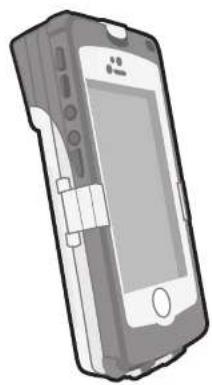
Illustration of a smartphone with front panel and screen (no text or symbols)CR4405 (Model #: CR44X5)

USB 2.0 Cable
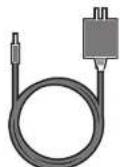
5VDC Power Supply
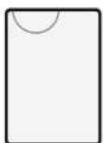
Battery Cartridge
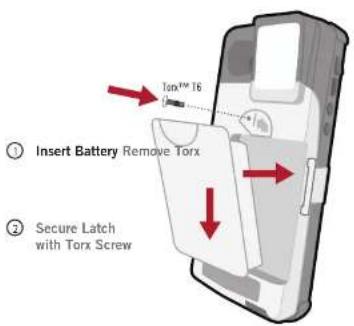
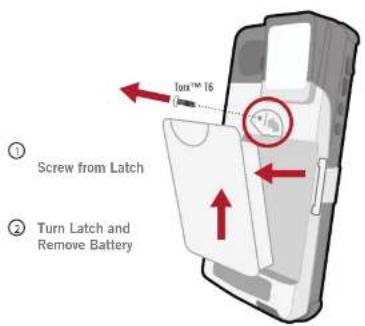
2.0 - Battery Installation and Removal
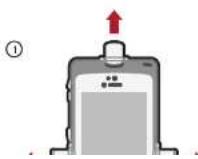
3.0 - Phone Installation

natural_image
Two smartphones with one partially open and one partially closed, showing battery charging (no text or symbols visible)4.0 - Charging the CR4405 Sled and Spare Battery


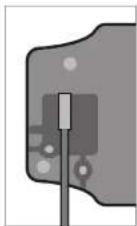

0 - 30%

31 - 60%

61 - 95%

96 - 100%


Sled Battery Status While Charging Sled LED Behavior
| 0 - 10% Flashes Red | |
| 11 - 30% Flashes Yellow | |
| 31 - 95% Flashes Green | |
| 96 - 100% Solid Green |
5.0 - USB Direct Connection to Sled
6.0 - Powering On the iPhone® and Sled Reader
7.0 - Sled Battery Status Indication

natural_image
Illustration of a smartphone with a red warning light on top (no text or symbols)| Sled Battery Status While Not Charging Sled LED Behavior (when scan button is pressed) | |
| 100% - 31% None | |
| 30% - 11% Flashes Yellow 3x | |
| 10% - 0% Flashes Red 3x | |
8.0 - Scanning
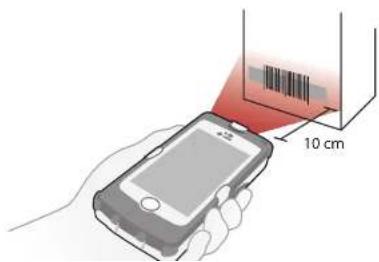
11.0 - Reading Ranges
| CR4405 Performance | ||
| Test Barcode Min Inches (mm) Max Inches (mm) | ||
| 3 mil Code 39 3.1" (80 mm) 4.0" (102 mm) | ||
| 7.5 mil Code 39 1.3" (33 mm) 7.2" (182 mm) | ||
| 10.5 mil GS1 DataBar 0.8" (20 mm) 8.7" (220 mm) | ||
| 13 mil UPC 1.1" (28 mm) 11.0" (280 mm) | ||
| 4.2 mil Data Matrix 1.9" (48 mm) 4.3" (110 mm) | ||
| 5 mil Data Matrix 1.7" (43 mm) 4.5" (115 mm) | ||
| 6.3 mil Data Matrix 1.3" (33 mm) 5.9" (150 mm) | ||
| 10 mil Data Matrix 0.8" (20 mm) 7.1" (180 mm) | ||
| 20.8 mil Data Matrix 1.1" (28 mm) 13.5" (343 mm) | ||
Note: working ranges are a combination of both the wide and high density fields. All samples were high quality barcodes and were read along a physical center line at a 10^ angle. Default AGC settings were used. Accuracy = +/- 10%.
12.0 - CR4405 Sled Reader Configuration
The CR4405 can be configured for specific tasks, data manipulation, or operational modes by scanning configuration barcodes found in the CR4405 Configuration Guide at http://www.codecorp.com.
13.0 - CR4405 Communication Modes
The CR4405 has four communication modes, with an associated configuration barcode by the same name in the CR4405 Configuration Guide.
| Communication Mode Description | |
| iPhone Keyboard Communication Mode (default) | This mode allows you to scan data into an iPhone 5/5s application like Notes or a spreadsheet, as if you were manually entering in data (e.g. from the on-screen keyboard). ^4 |
| iPhone App Communication Mode | This mode allows you to scan data into an iPhone 5/5s application built around the CR44x5 SDK library. |
| USB Downloader Mode This mode allows for USB | communication with CortexTools® installed on a computer.CortexTools is a utility that is used for firmware upgrades and other diagnostic tasks. |
| USB Pass-Through Mode | The purpose of this mode is to bypass the sled and allow the iPhone to sync with a PC or Mac for app development, upgrades, or to sync with iTunes via a USB cable connected to a computer.This mode is automatically activated only: 1) When the sled becomes directly connected (i.e. not through a charging station) to a powered USB cable, or 2) When the USB Pass-Through configuration barcode is scanned.In this mode the sled can still scan configuration barcodes, but cannot read and display barcodes. If the sled was in Keyboard Mode or App Mode before becoming directly connected to a powered USB cable, the sled can become enabled for barcode reading by simply unplugging the USB cable causing the sled to revert to the last communication mode set. You can also scan the Keyboard Mode or App Mode configuration barcode if needed. |
* It should be noted that certain third party apps do not allow data to be "tabbed" even though such configurations may be set in the CR4405 reader. For example, some spreadsheet programs require human touch on a new cell in which to enter new data, rather than Prefix Tab or Suffix Tab configuration to prompt the cursor to automatically move to a new cell.
14.0 - Power Management
Power Management Modes Description
(1) ·s T_·s / M_·s!
This indicates the order to close after the number of occurrences at
16.0 - Using CortexMobile®
CortexMobile® is an iPhone 5/5s software application developed by Code to demonstrate the capabilities of the CR4405. This software app can serve as a reference for programmers who use Code's SDK to build other apps which can be downloaded to the iPhone from the App Store. The sled must be in iPhone App Communication Mode to run Code SDK-based applications.
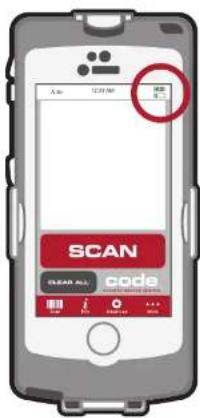

The main application screen contains two battery icons, the first indicates your iPhone battery status, the second indicates the sled battery status.

If the 'not connected icon' appears in the place of the sled battery status icon, ensure that the sled is in iPhone App Communication Mode by scanning the related barcode located in the configuration guide. Note that the "soft" scan button will be grayed out until the correct communication mode is set.
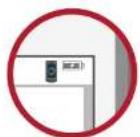
If the 'power icon' appears in the place of the sled battery status icon, the sled is in sleep mode and must be woken before scanning can continue. A message may also appear on the screen prompting you to press the scan button located on the side of the CR4405. After doing so, the sled should be ready for scanning.
CortexMobile® Button Descriptions
Button Description

Allows you to scan barcodes either with the use of the on-screen "soft" scan button or the scan button located on the side of the CR4405. Scanned barcode data will appear on the main screen of the app.
•
17.0 - CortexMobile® Used for Demonstration
A default time of 1 minute is set for sled inactivity before going to sleep. Activating CortexMobile®disables sleep. The next time the sled reboots, the sleep timer setting reverts to its default value.
18.0 - Battery Life Management via the SDK
Power consumption generally depends on scanner and iPhone usage. CortexMobile™ can demonstrate the SDK's ability to implement a sophisticated power management scheme called Intelligent Charging that allows the sled battery to provide power necessary for scanning and back-up power to a connected iPhone. The sled can do this by monitoring the battery levels of both itself and the iPhone.
NOTE: Although Intelligent Charging is a default setting on the reader, it can only be implemented if the sled is in iPhone App Communication Mode and running an SDK-based app. Otherwise the sled will always charge the iPhone until the sled's battery level drops to 15% or less.
NOTE: Intelligent Charging can be deactivated by scanning the configuration barcode for one of the other two charge modes available (iPhone Always Charging via Sled or iPhone Never Charging via Sled).
To accomplish Intelligent Charging, CR4405 firmware settings have been created to define key thresholds, which are:
- “Sled Battery Reserve Level.” This default sled battery threshold is 40%, which means that 40% of the CR4405 battery charge (if available) will be allocated to scanning for approximately 12 hours, assuming 100 scans per hour.
- "Sled Battery Critical Level." This default sled battery threshold is 15%, below which the CR4405 will no longer provide back-up power to the iPhone, and will reserve power only for scanning and sled management.
- “iPhone Battery Critical Level.” This default iPhone battery threshold is 25%, below which the CR4405 will primarily charge the iPhone depending on the sled battery level.
If... Then..
iPhone Battery Status Sled Battery Status Sled
19.0 - CR4405 Dimensions
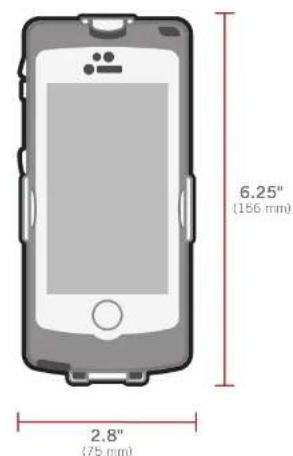

natural_image
Illustration of a smartphone with a 30-inch height label and a 1.25-inch width measurement (no text or symbols on the device itself)20.0 - Charging Station Dimensions
21.0 - Reader ID and Firmware Version
To find out the Reader ID and Firmware version, open a text editor program (i.e., Notepad, Microsoft Word, etc.) and read the Reader ID and Firmware configuration barcode.
Reader ID and Firmware

A text string indicating the firmware version and CR4405 ID number will be displayed.
xample: Xap/i06/60456none0020094903A0600000070007001600620002 O cd(13.2.18) (see below):

Note: Code will periodically release new firmware for CR4405 readers. For information on latest firmware visit our website at www.codecorp.com/codesupport.php.
22.0 - Upgrading the CR4405 Firmware
The OMAO's role: firmware can be updated by downloading engines to a 20 from https://www.oderson.com/downloads plan. The firmware
23.0 - CR4405 Maintenance
The CR4405 needs only minimum maintenance to operate. The tips below for maintenance suggestions.
Enhancing the CR4405's Touchscreen Capacitive Cover
The CR4405 contains a transparent capacitive cover that helps protect the iPhone and seals out moisture and debris. The cover is resistant to abrasion, corrosion, thermal exposure and impact. A scratch resistant material is also applied to both sides of the cover during the manufacturing process. The cover is tightly stretched and attached to the sled case to provide ruggedness and trouble-free touch response from the iPhone's screen. For best operation, caution should be taken to ensure that the iPhone screen is free from dirt, oils, and additional protective covers (e.g. mylar stickers).
Cleaning the CR4405
The CR4405 window should be clean to allow the best performance of the device. The window is the clear plastic piece inside the head of the reader. Avoid touching the window. Your CR4405 uses CMOS technology that is much like a digital camera. A dirty window may stop the CR4405 from reading barcodes.
If the window becomes dirty, clean it with a soft, non-abrasive cloth or a facial tissue (no lotions or additives) that has been moistened with water. A mild detergent may be used to clean the window, but the window should be wiped with a water moistened cloth or tissue after using the detergent.
Technical Support and Returns
To modify any default settings, download the CR4405 Configuration Guide at www.codecorp.com/files.php and scan the appropriate barcode. For user specific configurations, visit www-codecorp.com/codesupport.php.
For all returns Code will issue an RMA number which must be placed on the packing slip when the reader is returned. Visit www.codecorp.com/codesupport.php for more information.
24.0 - Warranty\*
The CR4405, Charging Stations and Batteries carry a one year limited warranty as described herein.
Limited Warranty
24.0 - Warranty\*
Non Warranty Repairs
Code warrants its repair/replacement services for ninety (90) days from the date of shipment of the repaired/replacement product to the Customer. This warranty applies to repairs and replacements for: i) damage excluded from the limited warranty described above; and ii) Code Products on which the limited warranty described above has expired (or will expire within such ninety (90) day warranty period). For repaired product this warranty covers only the parts that were replaced during the repair and the labor associated with such parts.
Non Extension of Term of Coverage
Product that is repaired or replaced, or for which a software patch, update, or other work around is provided, assumes the remaining warranty of the original Code Product and does not extend the duration of the original warranty period.
Software and Data
Code is not responsible for backing up or restoring any of software, data, or configuration settings, or reinstalling any of the foregoing on products repaired or replaced under this limited warranty.
Shipping and Turn Around Time
The estimated RMA turn-around time from receipt at Code's facility to shipment of the repaired or replaced product to Customer is ten (10) business days. An expedited turn-around time may apply to products covered under certain CodeOne Service Plans. Customer is responsible for shipping and insurance charges for shipping Code Product to Code's designated RMA facility and repaired or replaced product is returned with shipping and insurance paid by Code. Customer is responsible for all applicable taxes, duties, and similar charges.
Transfer
If a customer sells a covered Code Product during the Warranty Coverage Term, then that coverage may be transferred to the new owner by written notification from the original owner to Code Corporation at:
CodeOne Service Center
12393 South Gateway Park Place, Suite 600
Draper, UT 84020
Limitation on Liability
Code's performance as described herein shall be Code's entire liability, and the Customer's sole remedy, resulting from any defective Code product. Any claim that Code has failed to perform its warranty obligations as described herein must be made within six (6) months of the alleged failure. Code's maximum liability related to its performance, or failure to perform, as described herein shall be limited to the amount paid by Customer for the Code product that is subject to the claim. In no event will either party be liable for any lost profits, lost savings, incidental damage, or other economic consequential damages. This is true even if the other party is advised of the possibility of such damages.
EXCEPT AS MAY BE OTHERWISE PROVIDED BY APPLICABLE LAW, THE LIMITED WARRANTIES DESCRIBE HEREIN REPRESENT THE ONLY WARRANTIES CODE MAKES WITH RESPECT TO ANY PRODUCT CODE DISCLAIMS ALL OTHER WARRANTIES WHETHER


- CR4405
- Statement of Agency Compliance
- Code Reader™ 4405 User Manual
- Table of Contents
- - Included if Ordered
- - Battery Installation and Removal
- - Phone Installation
- - Charging the CR4405 Sled and Spare Battery
- - USB Direct Connection to Sled
- - Powering On the iPhone® and Sled Reader
- - Sled Battery Status Indication
- - Scanning
- - Reading Ranges
- - CR4405 Sled Reader Configuration
- - CR4405 Communication Modes
- - Power Management
- - Using CortexMobile®
- CortexMobile® Button Descriptions
- Button Description
- - CortexMobile® Used for Demonstration
- - Battery Life Management via the SDK
- - Reader ID and Firmware Version
- - Upgrading the CR4405 Firmware
- - CR4405 Maintenance
- Enhancing the CR4405's Touchscreen Capacitive Cover
- Cleaning the CR4405
- Technical Support and Returns
- - Warranty\*
- Non Warranty Repairs
- Non Extension of Term of Coverage
- Software and Data
- Shipping and Turn Around Time
- Transfer
Brand : Code
Model : CR4405
Category : Printer