
East Beach - Loudspeaker ENERGY SISTEM - Free user manual and instructions
Find the device manual for free East Beach ENERGY SISTEM in PDF.


| Product Type | Portable Bluetooth Speaker with FM Radio, USB and microSD Playback |
| Power Output | 50 W (2 × 10 W mid-range + 1 × 30 W subwoofer) |
| Speaker Configuration | 2 x 2" mid-range drivers, 1 x 4" subwoofer with bass reflex |
| Frequency Response | 85 Hz ~ 16 kHz |
| Total Harmonic Distortion (THD) | < 1% |
| Signal-to-Noise Ratio | > 90 dB |
| Bluetooth Version | 5.0, Class II |
| Bluetooth Protocols | HFP, A2DP, AVRCP |
| Wireless Range | Up to 10 m |
| TWS Technology | Yes, compatible with Frame Speaker (up to 10 m range) |
| FM Radio Band | 87.5 – 108 MHz (built-in antenna) |
| USB/microSD Playback | Supports MP3, WAV, WMA; up to 128 GB (FAT/FAT32) |
| Power Supply | 5 V / 2 A via microUSB (adapter not included) |
| Battery Type | Li-Ion 4400 mAh / 7.4 V |
| Charging Time | Approximately 7 hours |
| Battery Life | Depends on volume and music type (refer to manual table) |
| Playback Modes | Bluetooth, microSD, USB, FM Radio |
| Dimensions (Estimated) | Approximately 30 x 15 x 10 cm |
| Weight (Estimated) | Approximately 2 kg |
| Care and Maintenance | Keep away from water and extreme temperatures; clean with a dry cloth |
| Included Accessories | MicroUSB charging cable (1.5 m), remote control (optional) |
Frequently Asked Questions - East Beach ENERGY SISTEM
User questions about East Beach ENERGY SISTEM
0 question about this device. Answer the ones you know or ask your own.
Ask a new question about this device
Download the instructions for your Loudspeaker in PDF format for free! Find your manual East Beach - ENERGY SISTEM and take your electronic device back in hand. On this page are published all the documents necessary for the use of your device. East Beach by ENERGY SISTEM.
USER MANUAL East Beach ENERGY SISTEM
Care and maintenance 3
Technical specifications 3
Audio 3
Wireless connection 4
FM radio 4
MicroSD and USB player 4
TWS compatible with 4
Power supply 4
Built-in battery 4
Other features 4
Product content 4
General overview 4
Switching on and off the device 5
Charging the battery 6
Bluetooth - microSD - USB - FM Radio 6
Bluetooth 6
True Wireless Stereo 6
USB and microSD playback 7
Browsing folders 7
FM radio 7
Battery life 7
Declaration of conformity 7
ENERGY♥SISTEM
ENERGY♥SISTEM
ENERGY♥SISTEM
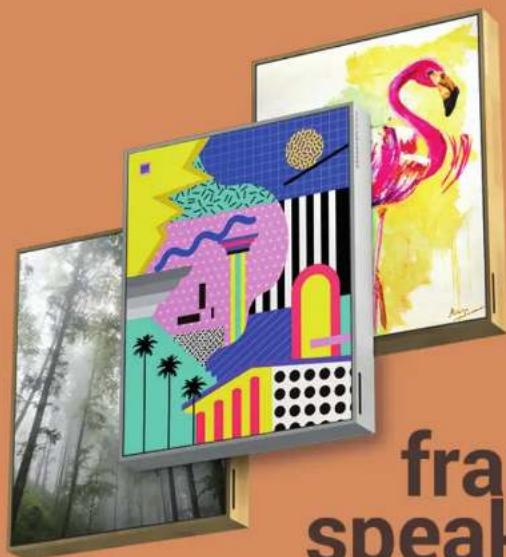
frame speaker.
ENERGY♥SISTEM
• Power: 50 W
• 2 mid-range speakers: 10 W, 2"
• 1 subwoofer: 30 W, 4"
- Bass reflex
• Frequency response: 85 Hz \~ 16 KHz
- THD < 1%
• S/N ratio: > 90 dB
Wireless connection
- Bluetooth 5.0, class II
• Frequency band: 2.4 GHz
• Maximum output signal: <20.00 dBm
• Supported Bluetooth protocols: HFP / A2DP / AVRCP - Up to 10 m distance range
• True Wireless Stereo (TWS) Technology with a distance range of up to 10 m
FM radio
- Built-in antenna
• FM frequency band: 87.5 – 108 MHz
MicroSD and USB player
- MicroSD and USB decoder: reads MP3/ WAV/ WMA files stored on external storage units (up to 128 GB) with FAT/FAT32 file system.
TWS compatible with
- Frame Speaker
Power supply
- 5 V/2 A microUSB
• Device connector: microUSB
• Power cable length: 150 cm
Built-in battery
• Capacity: 4400 mAh/7.4 V
- Type: Li-Ion

- USB playback port
- MicroSD slot
- LED mode indicator
- On LOFLD-102
ENERGY♥SISTEM
If you press the On/Off button on the remote control, the LED mode indicator (3) will blink red. This means the speaker has gone into "Standby" mode. You won't be able to turn the device on and off using the remote control. Please take into account that this mode uses up your speaker's battery. The device will automatically shut down after 30 minutes.
Charging the battery
When the battery level is below 10%, you will hear a sound to remind you to charge it. Please plug the power adapter (not included) into the Charging port (9) of your Frame Speaker. Plug then the other end into your home power socket. The Charge indicator (8) lights up and switches off once the charging process has been completed. The charging time is approximately 7 hours.
Important:
- Turn off the device before charging it to optimise the charging process.
- Do not leave your Frame Speaker completely discharged for a long time.
- Use a 5 V charger with at least 1.5 A output or more to optimise the charging time.
Playback modes
Press the Change function button (7) to select one of the following playback modes:
Bluetooth - microSD - USB - FM Radio
The LED mode indicator (3) will light up as follows: blue for Bluetooth, red for FM Radio and violet for microSD and USB mode.
Bluetooth
Once Bluetooth mode is enabled, press and hold the Change function button (7) for 2 seconds to start searching for Bluetooth devices. Access the list of available devices on your smartphone or tablet and once there, select your "Frame Speaker". The devices will be connected without codes. Once the connection has been established, you will hear a confirmation sound.
ENERGY♥SISTEM
will end.
USB and microSD playback
Play .mp3, .wav and .wma files stored on your microSD cards and USB sticks (up to 128 GB). The contents play automatically a few seconds after inserting the microSD card or USB stick.
If you turn off the speaker or remove the storage unit, the internal memory will save the moment when you paused playback. If you connect the same removable storage unit once again, playback will resume and the last song that you listened to will be then played.
Press Next (5) or Back (6) to move to the next or previous track.
The folders and files of your removable cards or sticks will be read in chronological order.
Browsing folders
Press and hold the Change function button (7) for 2 seconds to move to the next memory card folder.
FM radio
Once FM radio mode is enabled, press and hold the Change function button (7) for 2 seconds to start searching for FM radio stations. The process may take a few minutes. Once the search has been completed, press and hold Next (5) or Back (6) to select the radio station you want to hear from all saved radio stations.
If you place the speaker somewhere else, you will have to carry out a new search to obtain a proper radio wave reception.
Your Frame Speaker saves the last selected radio station when you turn it off and on once again.
Battery life
The battery life of your Frame Speaker depends on the selected volume level and the type of music. Please take a look at this comparative table to find out more about the approximate battery life of your device:
[1] [2] [3] [4] [5] [6] [7] [8] [9] [10] [11] [12] [13] [14] [15]
ENERGY♥SISTEM
EN62479:2010
EN301 489-1 V2.1.1:2017-02
EN301489-17 V3.1.1:2017-02
EN300328V2.1.1:2016-11
in conformity with the provisions of the Directive 2014/53/EU of the European Parliament and of the Council of 16th April 2014.
Finestrat, 01st February 2019.
Daniel Havillio
Product Management Director


Brand : ENERGY SISTEM
Model : East Beach
Category : Loudspeaker