Flexibilité - Synthesizer Ritual Electronics - Free user manual and instructions
Find the device manual for free Flexibilité Ritual Electronics in PDF.


User questions about Flexibilité Ritual Electronics
0 question about this device. Answer the ones you know or ask your own.
Ask a new question about this device
Download the instructions for your Synthesizer in PDF format for free! Find your manual Flexibilité - Ritual Electronics and take your electronic device back in hand. On this page are published all the documents necessary for the use of your device. Flexibilité by Ritual Electronics.
USER MANUAL Flexibilité Ritual Electronics
Your module has been assembled with care in our studio in Marseille, France.
You can find your module on Modulargrid: https://www.modulargrid.net/e/ritual-electronics-flexibilite
For any remarks and informations, contact us at: contact@ritualelectronics.com
For video demos and patch ideas check: https://www.youtube.com/ritualelectronics
Limited warranty
Ritual Electronics warrants this product to be free materials or construction for a period of one year of purchase.
Malfunction resulting from wrong power supply v or reversed eurorack bus board cable connection product or any other causes determined by Ritual the fault of the user are not covered by this warr service rates will apply.
During the warranty period, any defective product or replaced, at the option of Ritual Electronics, of Electronics basis with the customer paying the trade Electronics. The return of your module is on us.
Ritual Electronics implies and accepts no responses
Installation
Always turn your eurorack case off before plugging or unplugging a module.
Do not touch any electrical terminals when attaching any Eurorack bus board cable.
As the 1U series does not have a shrouded header, so remember:
RED STRIPE DOWN
Ritual Electronics Flexibilité requires:
10mA on +12V
7mA on -12V
0mA on +5V
Y. will and JOUR of the American Festival event
Overview
Flexibilite is a fairly simple and useful module. Plug an expression pedal into it and use your foot to control your system.
By default it generates a 0-5V signal (unipolar) or a -5/+5V signal (bipolar), attenuated by the foot pedal.
Flexibilité has an input for external signals, so it can be used as a volume pedal on audio or attenuator/attenuverter on CV signals.
For when you need this extra hand!
Plug your expression pedal (TRS jack)
See next page
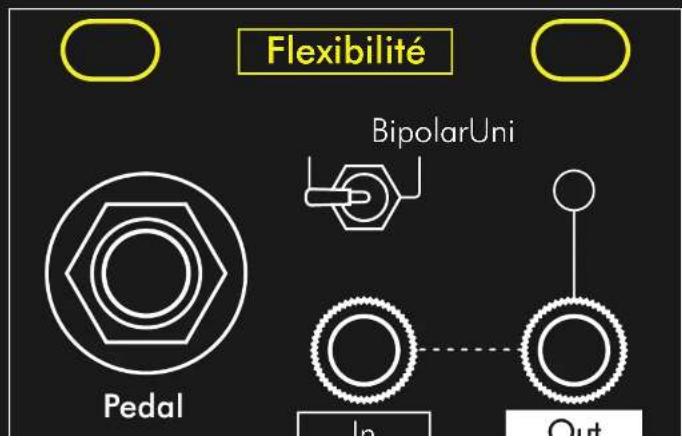
text_image
Flexibilité BipolarUni Pedal In OutPedal
What is an expression pedal?
Expression pedals are used to control variable parameters on electronic music equipment such as digital amplifiers, rack effects, stomp boxes, MIDI controllers, and keyboards. The pedals do not contribute to the sound themselves, but remotely control aspects of the device they are connected to. It might help to think of an expression pedal as a remote knob that can be controlled with your foot.
Inside the pedal there's a potentiometer that moves proportionally to the pedal. The potentiometer is connected to an output jack or output cable that attaches to the expression pedal input of the device you are controlling. Unlike an in line volume pedal, there is no 'input' on an expression pedal as it does not connect to the instruments signal chain. There is just the single output that connects to the dedicated expression pedal input on the effect device. The device sends out a control voltage on one conductor of the cable which passes
Expression pedals are typically passive devices that power of their own, with the control voltage being equipment they are connected to.
If you want to learn more about expression pedals, great article by Mission Engineering: https://missionengineering.com/understanding-ex
Polarity
Flexibilité act as the interface
The module sends either +5v or your input signal to the pedal's potentiometer and reads how much of the original signal comes back. To do this you need an expression pedal that use a TRS ("Tip/Ring/Sleeve" or "Stereo") cable. Depending on the model of pedal you're using, the wiring of the inside potentiometer to the cable end might differ.
We decided to provide a polarity switch on the back of the module. As there's no standard in the industry the switch has no label. Most expression pedal already have a polarity switch on them but if it Flexibilité does not seem to be working properly try changing the module's polarity with this little button.
Sadly some pedals use a TS ("Tip/Sleeve" or "Mono") cable and Flexibilité will not work with those.

natural_image
Isometric illustration of a rectangular block with a small cube on top, and two parallel lines below (no text or symbols)Polarity A
Bespeco VM18LU
Behringer FCV-100
Korg EXP-2
Zoom FP02M

Pol
Boss
Boss
Dun
EHX
M-A
Miss
Unipolar | Bipolar

Uni(polar)
With no inputs the module outputs a voltage ranging between 0V (pedal fully closed) to 5V (pedal fully open).
When a signal is present at the input, you will go from no signal (fully closed) to signal multiplied by 1 (original signal, without attenuation)

Bipolar
With no inputs the module outputs a voltage between -5V (pedal fully closed) to 5V fully open). 0V is obtainable half way. When a signal is present at the input F will act as an attenuverter. When the closed the signal is multiplied by -1 (sign sion), halfway through the signal is 0 tion of the inversed signal to 0, then atte
Patch ideas
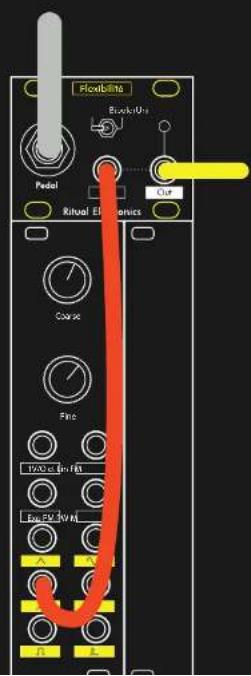
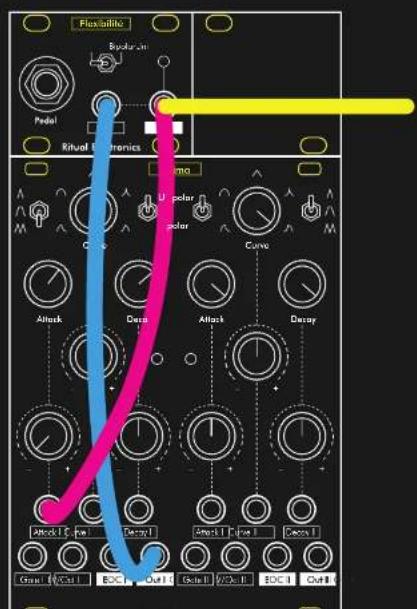
text_image
Flexibits Book/Urs Model Ritual Electronics Course Fine Input Gain PA Raw EV 30 V OutPatch ideas
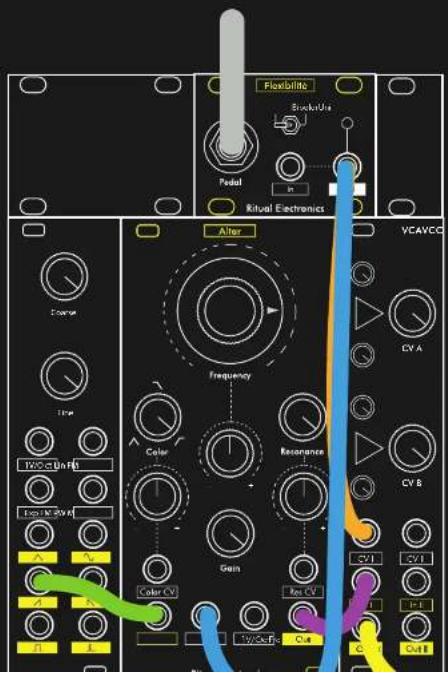
text_image
Flexibilitis Rerules Pedal Ritual Electronics After VCAVCC Frequency Color Resonance CYA CYB CYI CYI Cyan Cyan Cyan Cyan Cyan Cyan Cyan Cyan Cyan Cyan Cyan Cyan Cyan Cyan Cyan Cyan Cyan Cyan Cyan Cyan Cyan Cyan Cyan Cyan Cyan Cyan Cyan Cyan Cyan Cyan Cyan Cyan Cyan CyanPatch ideas
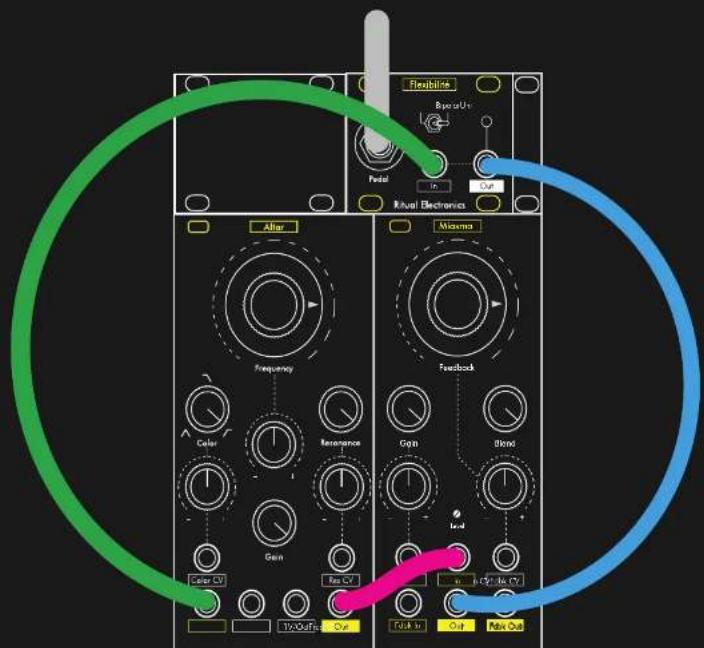
text_image
Flexibles Resistor Panel In Out Kuavi Electronics After Frequency Color Remanence Gen Reo CV IvOaRice Out Max Out Maxima Feedback Gain Blend In-4 in Cpt to C7 Out to Out Max OutPatch ideas