CBA-S2 - Power adapter Watson - Free user manual and instructions
Find the device manual for free CBA-S2 Watson in PDF.


User questions about CBA-S2 Watson
0 question about this device. Answer the ones you know or ask your own.
Ask a new question about this device
Download the instructions for your Power adapter in PDF format for free! Find your manual CBA-S2 - Watson and take your electronic device back in hand. On this page are published all the documents necessary for the use of your device. CBA-S2 by Watson.
USER MANUAL CBA-S2 Watson
AC Adapter and DC Coupler Kit
Owner's Manual
THANK YOU FOR CHOOSING WATSON
The Watson AC Adapter and DC Coupler Kit delivers continuous power to your camera, so you won't need to replace batteries. Attach the AC adapter to a regular wall outlet and pop the DC coupler into your camera. You'll have a continuous power source allowing extended shooting, so you won't have to disrupt your workflow.
PRECAUTIONS
• The Watson AC Adapter and DC Coupler Kit should be used only with compactable devices specified in this manual.
• If you notice smoke, no se, or an unusual smell from the AC Adapter and DC Coupler Kit, discontinue use. Immediately. Remove the AC Adapter and DC Coupler, and take the devices to a Watson authorized reseller.
- Remove the AC Adapter and DC Coupler when not in use.
• Do not attempt to disassemble.
- Keep fingers clear of contact with the prangs of the AC plug and AC outlet, and use caution when inserting or removing the AC plug from the AC outlet. If the prangs of the AC plug are boot, they can become a back-hazed.
- Avoid exposing this product to water or extreme humidity, and keep it in a cool dry place.
- Keep out of reach of children.
- All images are for illustrative purposes only.
CONNECT THE DC COUPLER TO THE AC ADAPTER
Depending on your model, you will need to make one or both of these connections.
Insert the AC adapter's plug into the DC coupler.
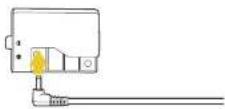
4
Insert the DC coupler's plug into the AC adapter's socket.
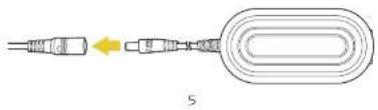
natural_image
Diagram of a connector with a yellow arrow indicating direction, no text or symbols presentINSERT THE DC COUPLER INTO YOUR CAMERA

Note: If the battery chamber door has no cord slot and isn't removable, leave the chamber door open.
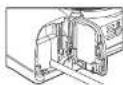
6
natural_image
Pure electrical circuit lines without any symbolsONE-YEAR LIMITED WARRANTY
The Wilson products are needed to the origin purchase to be from the side in Indonesia and Western and Northern normal consumer use for a period of one (1) year from the prior year to the 20th quarter replacement which ever occurs after. The warming market requires 14% with respect to clinical warming on the limited safety principal treatment, as well as a description of any product that helps programme lower of the product in its intended manner and is not granted environment. In particular, the product or particl shall be recombined by the warming provider. If the product has been discontinued, the wear and proper resources are right possible with a model of a specified quality and function.
This warranty is not to be damaged or defect due to failure, neglect, accident, interruption, share improper or similar information. Except as PROVIDED HERE, THE WARRANTY PROCIMATES NUTHER ANY EXPRESS WARRANTIES PER ANY INDEPENDENT HOLDINGS NOT LIMITED TO ANY INDEPENDENT WRITTEN BY THE PARTICULAR PURPOSE. This warranty provides goodwill specification rights and may provide additional rights that may translate to resale.
To state in name or coverage, contact the Wilson Customer Service Department for whom and are merchandise authorisation (WHA) number, and return the defective product to version along with the FHA number and proof of purchase. Shipment of the defective product is at the purchase's own risk and expense.
For more information or to arrange services, which is a Mahangkar.com or call Customer Service at 212-591-2053
Product warranty provided by the Canadian Group.
www.gesagroup.com
Valeant aerogland trademark of the Group.
As the information on the request of their rights in tenors.

WATSON
- Stock Group Inc
www.poweredbywatson.com © 2021 Gradus Group LLC. All Rights Reserved.