DX-4212 - Battery Watson - Free user manual and instructions
Find the device manual for free DX-4212 Watson in PDF.


User questions about DX-4212 Watson
0 question about this device. Answer the ones you know or ask your own.
Ask a new question about this device
Download the instructions for your Battery in PDF format for free! Find your manual DX-4212 - Watson and take your electronic device back in hand. On this page are published all the documents necessary for the use of your device. DX-4212 by Watson.
USER MANUAL DX-4212 Watson
for Digital Camera and
Camcorder Batteries
Owner's
Manual
1.1 WATSON
SAFETY WARNINGS
- Do not charge any battery other than rechargeable lithium-ion batteries. Other types of batteries can burst causing personal injury and damage.
• Do not disassemble the charger. Take the charger to a qualified service technician when service or repair is required. Improper use may result in the risk of electric shock or fire. - The charger, adapters, and batteries may feel warm during the charging process. This is normal
- Do not operate the charger if it has received a sharp blow or has been dropped or damaged in any way.
• Never expose the charger to rain or moisture. - Do not use an extension cord when using the charger. This can result in fire or electric shock.
- Never use the charger as a DC power source for any electrical equipment
| WATSON
• Always unplug the charger from the AC outlet before handling the batteries
- Ir plug the charger from the AC outlet before attempting cleaning and clean with only a soft and dry cloth.
- Do not use any attachment, not recommended or sold by Watson, as this could result in the risk of fire, electric shock, or injury.

OVERVIEW
text_image
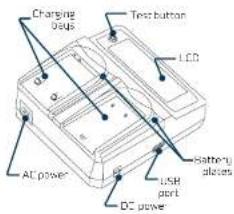
Charging bus Test button LCD AC power USB port DC power Battery placesCAPACITY
0.00%
[注释:]
(1)
100
图5-2
CAPRO
000
00:1
2
105
bc: 1
口
11
□
四
E
Z
| WATSON
LCD
When you first insert the batteries, the display will show 0% capacity. Please wait a few moments as the charger scans the batteries and updates the status.
Once the battery has completed charging, the display will show FULL above the battery icon.
Note: It is normal for the batteries to become warm during charging.
USB PORT
Use the Watson Duo Charger to power your USB devices with up to 5V and 2A output. This is ideal to connect your mobile phone while you're charging your camera and camcorder batteries.
TEST BUTTON
You can test the charge state of your batteries, even when the Duo Charger is unplugged.
-
Side a battery into the charging plate, and press the test button.
-
Press the test button again to display the battery's voltage. After five seconds, the display will revert to showing the charge state.
LWATSON
FEATURES:
- Independent, simultaneous charging for two lithium-ion rechargeable batteries.
- LCD displays the charging status and voltage for each battery.
- Interchangeable battery charging plates accept a variety of batteries. (Battery plates available separately.)
• USE charging for mobile electronics like phones and small tablets.
• Overheating detection minimizes possible high temperatures and automatically shuts off the charger. - Short-circuit protection prevents the charger and batteries from receiving excessive amounts of current.
-
Surge-protection circuits guard the charger from overcurrent or defective and shorted batteries.
• Universal 100-240 V AC and 12 V DC power are perfect for traveling and charging anywhere. -
WATSON
SPECIFICATIONS:
| Input power | 100-240V AC, 50-60Hz12V DC, 3A |
| Output 3.5-8.8 V DC, 2A (max) | |
| USB output | 5 V DC, 2A |
| Cable length | AC cable: 59 in. (150 cm)DC cable: 50 in. (127 cm) |
| Operating temperature | 32°F to 104°F (0°C to 40°C) |
| Dimensions(H x W x D) | 1.75 x 4.9 x 4.5 in.(4.4 x 12.4 x 11.4 cm) |
| Weight | 10.75 oz. (305 g) without plates11.0 oz. (325 g) with plates |
ONE-YEAR LIMITED WARRANTY
The former product is a certain in the general company to be found from a house, and also known as under natural conditions for a point of 100 feet from the entire purchase company now with 152 car or a gas station, whether it is a better. The entire product is made by our owner to be finished at any time but it is not possible to be sold. It is not possible to be sold at any time, but it is not possible to be sold at any time. This has been sold at all the product in the goods owned and its reserves understood independently by the product, as well as it is the obtained by the owners, which, the product has been developed that the owner's products have been made in order to sell in a room of application making and then being sold at all the price of \10 per unit. The price is not shown in any other item, except in other items, where, otherwise, or otherwise, are only listed in this section. Only, \10, \10, \10, \10, \10, \10, \10, \10, \10, \10, \10, \10, \10, \10, \10, \10, \10, \10, \10, \10, \10, \10, \10, \10, \10, \$15
Product warranty provided by the Creative Group.
The source image is illegible due to extreme blurriness and low resolution. No text can be extracted.
A. 107
m = 311