HT672H - Security Camera Speco Technologies - Free user manual and instructions
Find the device manual for free HT672H Speco Technologies in PDF.


| Product Type | Security Camera |
| Brand | Speco Technologies |
| Model | HT672H |
| Resolution | 1080p (1920 x 1080) |
| Image Sensor | 2 MP CMOS |
| Lens Type | Fixed, 3.6mm |
| Night Vision | Infrared LEDs up to 30m |
| Video Output | HD-TVI / CVBS |
| Power Supply | DC 12V, 1A |
| Power Consumption | Max 6W |
| Dimensions (W x H x D) | 67mm x 65mm x 120mm |
| Weight | 0.3 kg (without bracket) |
| Housing Material | Aluminum die-cast |
| Ingress Protection | IP66 (weatherproof) |
| Operating Temperature | -30°C to +60°C |
| Key Features | True Day/Night, D-WDR, 3D DNR |
| Mounting | Surface mount (bracket included) |
| Cleaning Instructions | Use a soft dry cloth; avoid solvents |
| Safety | Use only specified power adapter; disconnect when cleaning |
| Spare Parts | Power adapter, mounting bracket, screws (available from Speco) |
| Repairability | Repair by authorized service center only |
| General Information | HD-TVI 1080p security camera for indoor/outdoor use |
Frequently Asked Questions - HT672H Speco Technologies
User questions about HT672H Speco Technologies
0 question about this device. Answer the ones you know or ask your own.
Ask a new question about this device
Download the instructions for your Security Camera in PDF format for free! Find your manual HT672H - Speco Technologies and take your electronic device back in hand. On this page are published all the documents necessary for the use of your device. HT672H by Speco Technologies.
USER MANUAL HT672H Speco Technologies
(960H Small Outdoor IR)
Contents
- Contents ...... 1
- Precautions....2, 3
Safety Instructions 4
● Package Contents .... 5
● Camera Installation 6-12
● Lens Adjustment 3-17
Specifications....18-21
Precautions
Do not install the camera in extreme temperature condit

natural_image
Cartoon illustration of two anthropomorphic surveillance cameras emitting flames, with a cloud above (no text or symbols)Only use the camera under conditions where temperatures are between -4°F and +140°F. Be especially careful to provide ventilation when operating under high temperatures.
Do not install the camera under unstable lighting conditions.
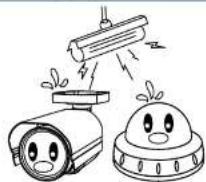
Severe lighting change or flicker can cause the camera to work improperly.
Do not touch the front lens of the camera.

This is one of the most important parts of the camera. Be careful not to leave fingerprints on the lens cover.
Never keep the camera pointed directly at strong light.
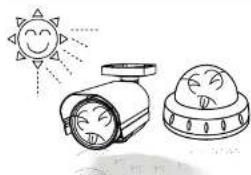
natural_image
Illustration of a sun shining on a surveillance camera and a dome-shaped object (no text or symbols)Do not drop the camera or subject it to physical shocks.
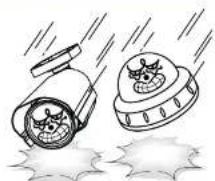
natural_image
Illustration of two cartoon-style surveillance cameras with smoke, emitting exhaust smoke from a puddle (no text or symbols)Do not expose the camera to radioactivity.

It can cause malfunctions to occur. If exposed Housingability the CC compromise
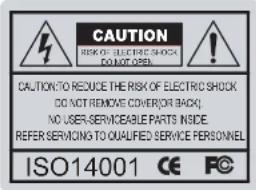
text_image
CAUTION RISK OF ELECTRIC SHOCK DO NOT OPEN CAUTION TO REDUCE THE RISK OF ELECTRIC SHOCK DO NOT REMOVE COVER( OR BACK ) NO USER-SERVICEABLE PARTS INSIDE. REFER SERVICING TO QUALIFIED SERVICE PERSONNEL ISO14001 CE FC
The lightning flash with an arrowhead symbol, within an equilateral triangle is intended to alert the user to the presence of uninsulated dangerous voltage within the product's enclosure that may be of sufficient magnitude to constitute a risk of electric shock to persons.

The exclamation point within an equilateral triangle is intended to alert the user to the presence of important operating and maintenance (servicing) instructions in the literature accompanying the appliance.
In USA and Canada, Use Class 2 Power Supply Only
INFORMATION - This equipment has been tested and found to comply with limits for a Class A digital device, pursuant to part 15 of the FCC Rules & CE Rules. These limits are designed to provide reasonable protection against harmful interference when the equipment is operated in a commercial environment. This equipment generates, uses, and can radiate radio frequency energy and, if not installed and used in accordance with the instruction manual, may cause harmful interference to radio communications. Operation of this equipment in a residential area is likely to cause harmful interference in which case the user will be required to correct the interference at
Safety Instructions
Precautions for use
① This camera should be installed by qualified personnel only
There are no user serviceable parts inside
Do not disassemble this camera other than to make initial adjustments
- Use a UL approved regulated 24 volt AC or 12 volt DC power supply
- Use appropriate low voltage power cable to prevent fire or electrical shock
Please insure that your installation area can support the weight of the camera
Please handle this camera carefully :
Do not use a strong or abrasive detergent when cleaning the camera
- Do not install near cooling or heating device
Package Contents
Please make sure that the following items are included in the Package:
1) HT7040H, HT7042H
• 1 Video Test Connector, Power Jack
- 1 Focus Adjustment
- 1 Bracket Base
• 1 Wrench
- Set Screw
- 4 Tapping Screws 4x25
- 4 Hexagon Socket Screws M5x10
2) HT671H, HT670H, HT672H
• 1 Video Test Connector, Power Jack
• 1 Chameleon Cover
• 1 Wrench
- Set Screw
- 3 Tapping Screws 4x40
- 1 Hexagon Socket Screw M4x8
3) HT649H, HT648H
• 1 Video Test Connector, Power Jack
4 el 1 e
CAMERA INSTALLATION
CONNECT POWER CABLE
- WHEN USING 12 VOLTS DC (constant voltage 500 mA)

text_image
Power Input :RED Center : (+) DC 12V Power Supply- WHEN USING 24 VOLTS AC (40 Volt Amps)

text_image
RED(+) BLACK:(-) AC 24V Power Supply- CONNECT VIDEO CABLE
- CONNECT BNC CABLE TO THE BNC JACK.

CAMERA INSTALLATION
Compatibility
1) HT7040H, HT7042H
INTCM

INTJBS
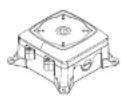
CVCJBB


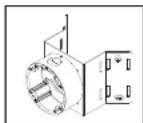
2) HT671H, HT670H, HT649H, HT648H, HT672H
INTWM
CVCJBD
INTCM
INTPMDFM
CAMERA INSTALLATION
Compatibility
3) HT5940H
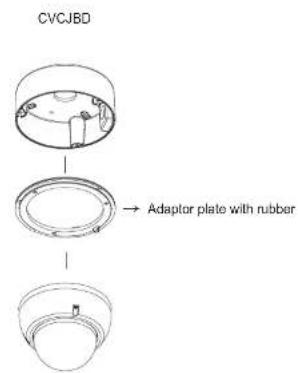
text_image
CVCJBD Adaptor plate with rubberCAMERA INSTALLATION
- HT7040H, HT7042H
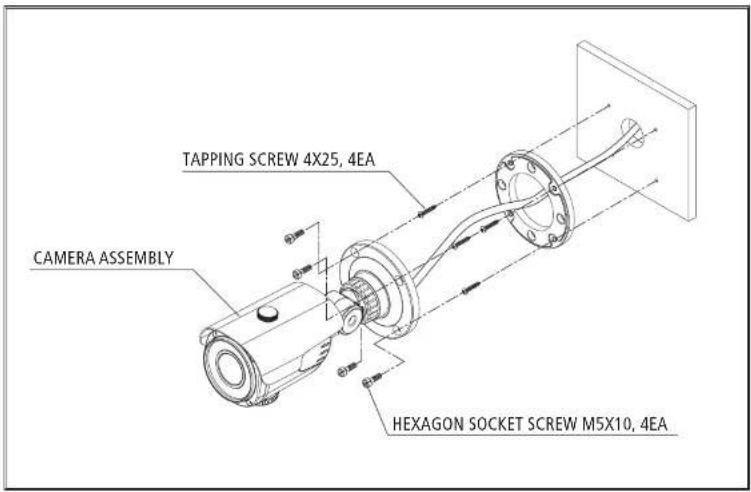
text_image
TAPPING SCREW 4X25, 4EA CAMERA ASSEMBLY HEXAGON SOCKET SCREW M5X10, 4EACAMERA INSTALLATION
- HT671H, HT670H, HT672H
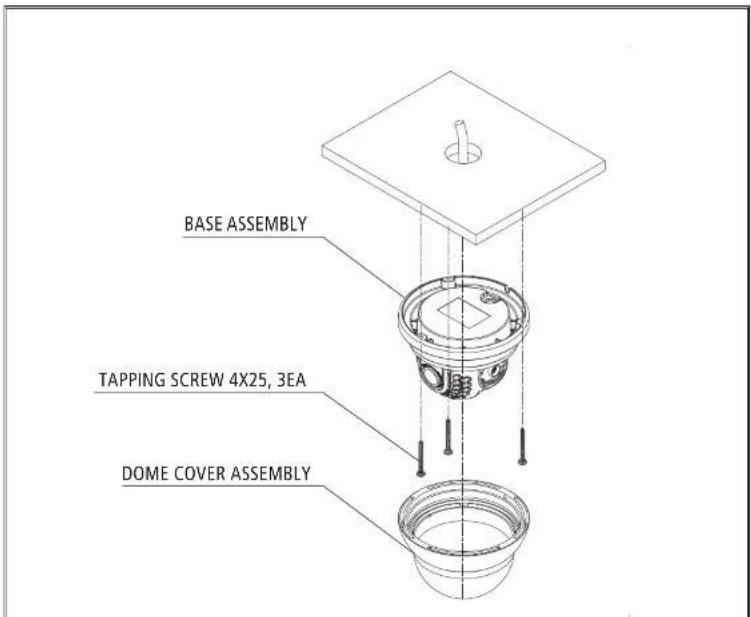
text_image
BASE ASSEMBLY TAPPING SCREW 4X25, 3EA DOME COVER ASSEMBLYCAMERA INSTALLATION
- HT649H, HT648H

text_image
BASE ASSEMBLY TAPPING SCREW 4X25, 3EA DOME COVER ASSEMBLYCAMERA INSTALLATION
- HT5940H
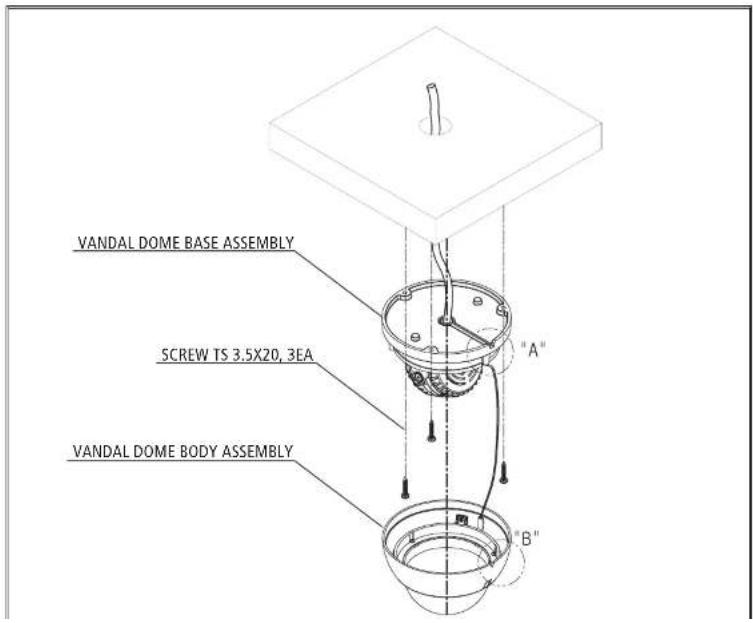
text_image
VANDAL DOME BASE ASSEMBLY SCREW TS 3.5X20, 3EA VANDAL DOME BODY ASSEMBLY "A" "B"LENS ADJUSTMENT
- HT7040H
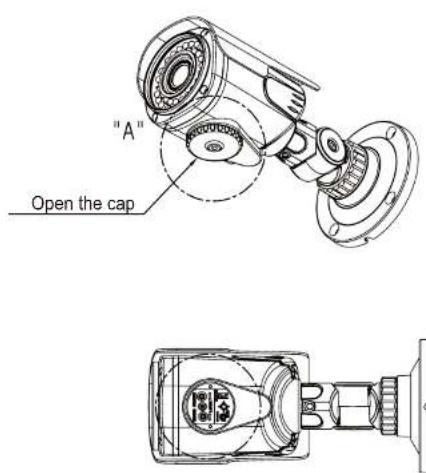
text_image
"A" Open the capLENS ADJUSTMENT
- HT7042H

text_image
"A" Open the capLENS ADJUSTMENT
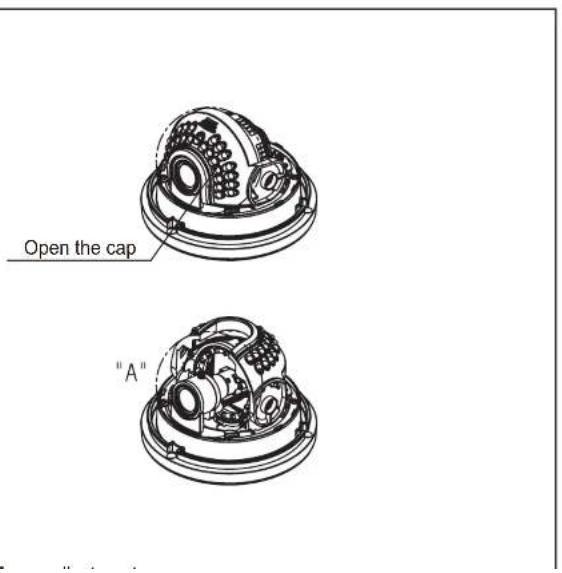
- HT670H, HT671H, HT672H
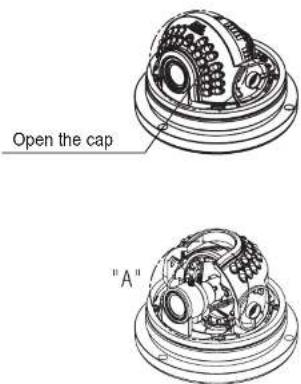
text_image
Open the cap "A"LENS ADJUSTMENT
- HT649H, HT648H
text_image
Open the cap "A"LENS ADJUSTMENT
- HT5940H

text_image
"A" Open the capSpeco Technologies
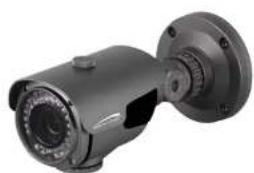
(960H Outdoor IR Bullet Camera)
DC Auto Iris Varifocal Lens 2.8-12mm/5\~50mm
natural_image
Close-up of a metallic security camera with dual lens and mounted head (no visible text or symbols)HT7040H(2.8\~12mm)
HT7042H(5\~50mm)
SPECIFICATIONS
| MODEL | HT7040H / HT7042H |
| Sensor type | 1/3 Inch Color 960H CCD |
| Effective pixels | 976 (H) X 494 (V) approx. 480K pixels (NTSC) |
| 976 (H) X 582 (V) approx. 570K pixels (PAL) | |
| Total pixels | 1020 (H) X 508 (V) approx. 520K pixels (NTSC) |
| 1020 (H) X 596 (V) approx. 610K pixels (PAL) | |
| Resolution | COLOR : 650 TV lines, BW : 700 TV line |
| Scanning system | 2:1 Interlace |
| Min. illumination | IR LED ON : 0 Lux @F1.2 (Sens-UP X256) |
| Video Output | 1.0Vp-p Composite. 75 Ohms |
| S/N Ratio | 52dB |
| AGC | Low / Middle / High |
Speco Technologies
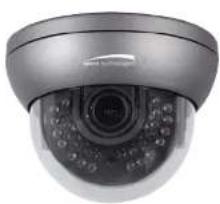
(960H Outdoor IR Dome Camera)
DC Auto Iris Varifocal Lens 2.8-12mm/5-50mm/4mm Fixed Board Lens
natural_image
Close-up of a silver security camera with dual circular displays and control knobs (no visible text or symbols)HT671H(2.8\~12mm)
HT672H(5\~50mm)
HT670H(4mm Fixed Board Lens)

SPECIFICATIONS
| MODEL | HT671H / HT672H / HT670H |
| Sensor type | 1/3 Inch Color 960H CCD |
| Effective pixels | 976 (H) X 494 (V) approx. 480K pixels (NTSC)976 (H) X 582 (V) approx. 570K pixels (PAL) |
| Total pixels | 1020 (H) X 508 (V) approx. 520K pixels (NTSC)1020 (H) X 596 (V) approx. 610K pixels (PAL) |
| Resolution | COLOR : 650 TV lines, BW : 700 TV line |
| Scanning system | 2:1 Interlace |
| Min. illumination | IR LED ON : 0 Lux @F1.2 (Sens-UP X256) |
| Video Output | 1.0Vp-p Composite. 75 Ohms |
| S/N Ratio | 52dB |
| AGC | Low / Middle / High |
Speco Technologies
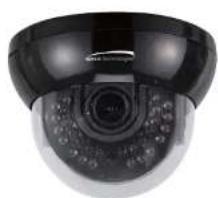
(960H Indoor IR Dome Camera)
DC Auto Iris Varifocal Lens 2.8-12mm/4mm Fixed Board Lens
natural_image
Close-up of a black and white surveillance camera with digital display (no visible text or symbols)HT649H(2.8\~12mm)
HT648H(4mm Fixed Board Lens)

SPECIFICATIONS
| MODEL | HT649H / HT648H |
| Sensor type | 1/3 Inch Color 960H CCD |
| Effective pixels | 976 (H) X 494 (V) approx. 480K pixels (NTSC)976 (H) X 582 (V) approx. 570K pixels (PAL) |
| Total pixels | 1020 (H) X 508 (V) approx. 520K pixels (NTSC)1020 (H) X 596 (V) approx. 610K pixels (PAL) |
| Resolution | COLOR : 650 TV lines, BW : 700 TV line |
| Scanning system | 2:1 Interlace |
| Min. illumination | IR LED ON : 0 Lux @F1.2 (Sens-UP X256) |
| Video Output | 1.0Vp-p Composite. 75 Ohms |
| S/N Ratio | 52dB |
| AGC | Low / Middle / High |
Speco Technologies
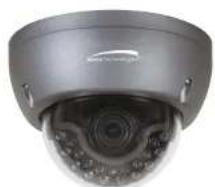
(960H Small Outdoor IR / Non IR Dome Camera)
DC Auto Iris Varifocal Lens 2.8-12mm
natural_image
Close-up of a silver security camera with a circular dial and central lens (no visible text or symbols)HT5940H(2.8\~12mm) with IR

SPECIFICATIONS
| MODEL | HT5940H |
| Sensor type | 1/3" Inch Color 960H CCD |
| Effective pixels | 976 (H) X 494 (V) approx. 480K pixels (NTSC)976 (H) X 582 (V) approx. 570K pixels (PAL) |
| Total pixels | 1020 (H) X 508 (V) approx. 520K pixels (NTSC)1020 (H) X 596 (V) approx. 610K pixels (PAL) |
| Resolution | COLOR : 650 TV lines, BW : 700 TV line |
| Scanning system | 2:1 Interlace |
| Min. illumination | IR LED ON:0Lux@F1.2(Sens-UP X256) |
| Video Output | 1.0Vp-p Composite. 75 Ohms |
| S/N Ratio | 52dB |
| AGC | Low / Middle / High |
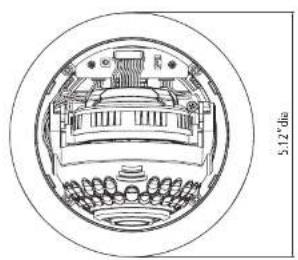
CAMERA DIMENSION
1) HT7040H, HT7042H

text_image
3.94" dia 3.54" dia
text_image
8.27" 4.72" 100mm×100mm2) HT671H, HT670H, HT672H
CAMERA DIMENSION
3) HT649H, HT648H
natural_image
Cross-sectional diagram of a mechanical assembly with no visible text or symbols
text_image
3.94° dia 5.12° dia 3.94° 1.61°4) HT5940H


General Features
● 700TV Lines
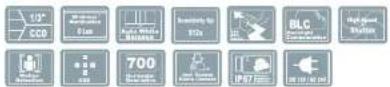
The combination of a 960H CCD image sensor and SPECO DSP provides an excellent resolution of 700TV Lines.
● 3D-DNR
Smart 3DNR prevents the image blurring of moving object and activates only if moving objects are appearing on the scene.
● DIS(Digital Image Stabilizer) Function
Makes a stabilizing clearer and the highest picture quality when out of focus by the wind or climate changing.
Smart-IR
No saturation image, vivid image in darkness. "SPECO 960H" camera makes very sharp video image in darkness. This technology eliminates saturation of video image of the closer object in darkness by control of the IR sensitivity. Saturation never happens in our "SPECO 960H" cameras, you can enjoy vivid image in any dark condition.
● Sens-Up
Despite a limited & low light condition, Sens-Up - Max. x256 helps the viewer to get visible and clear images.
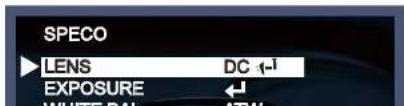
Menu Set Up
Menu setting can be selected by the button inside the camera.
- Press and hold the set button.
* The Set Up menu will be displayed on the monitor.

text_image
SPECO LENS DC -1 EXPOSURE WHITE BAL ATW DAY&NIGHT COLOR 3DNR ON SPECIAL ADJUST RESET EXIT- Move and select the required function using the Up and Down button.
text_image
SPECO LENS DC 1-1 EXPOSURE WHITE BAL ATWNOTE
* Move to the available submenu by moving ←arrow to desired feature.
* Submenu is not available when this symbol is displayed "---".
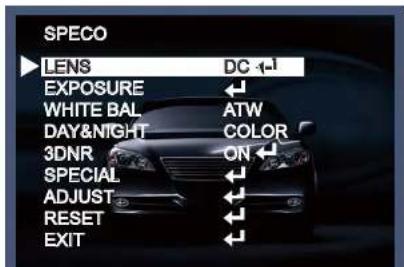
Lens
This function is to adjust the brightness of the monitor.
- Move the triangular indicator to LENS using the Up and Down buttons on the Set Up menu screen.
- Select the desired lens type by pressing the Left of Right button.
text_image
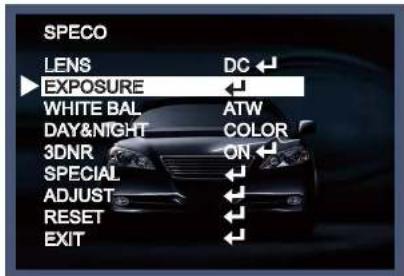
SPECO LENS DC 1-1 EXPOSURE WHITE BAL ATW DAY&NIGHT COLOR 3DNR ON SPECIAL ADJUST RESET EXITExposure
- On the Set Up menu, Select EXPOSURE by using the Up or Down button.
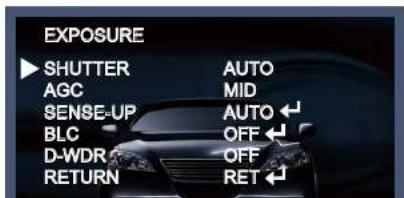
text_image
SPECO LENS DC EXPOSURE WHITE BAL ATW DAY&NIGHT COLOR 3DNR ON SPECIAL ADJUST RESET EXIT- Select the desired shutter mode by pressing the Left or Right button.
text_image
EXPOSURE SHUTTER AUTO AGC MID SENSE-UP AUTO ← BLC OFF ← D-WDR OFF RETURN RET ←NOTE
*Sense Up mode does not work while the Electronic shutter is set to Manual or DIS.
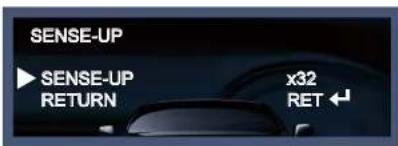
Sense-Up: The bright screen can be displayed by sensing the degree of the darkness automatically under the circumstance of low light condition or at night.
→ Off : Deactivated status.
→ Auto : Sense-Up auto mode status, The brightness degree is decided by the Sense Up setting value in the low light condition.
text_image
SENSE-UP ► SENSE-UP RETURN x32 RET ←NOTE
*Sense Up mode does not work while the AGC mode is off.
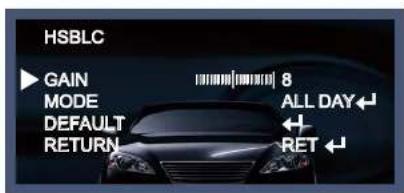
→ HSBLC (Highlight Suppression Back Light Compensation): When there is a car head light turned on at the entrance of the gas station or in some place in the parking lot, the numbers of the car plate can be recognized by blocking only the light from the car headlight. The area is set up specifically so you can recognize the car plate numbers by blocking out the strong light.
text_image
HSBLC GAIN 8 MODE ALL DAY DEFAULT RETURN RET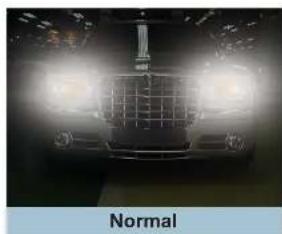
natural_image
Front view of a car with headlights on, labeled 'Normal' below (no other text or symbols)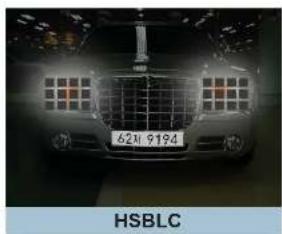
text_image
6219194 HSBLC◆ D-WDR : This camera which is using 3D-DNR DSP provides intelligent light level control to overcome even strong backlight conditions.
White Balance
Use this function when the color adjustment of a screen is needed.
-
Move the triangular indicator to WHITE BAL on the SETUP menu screen using the Up and Down button.
-
Select the desired mode by using the left or Right button.
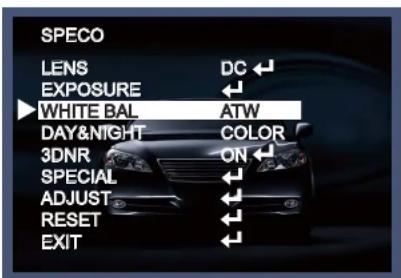
text_image
SPECO LENS DC EXPOSURE WHITE BAL ATW DAY&NIGHT COLOR 3DNR ON SPECIAL ADJUST RESET EXITUse the appropriate mode according to your purposes among these three modes.
◆ ATW : Use this mode when the color temperature is from 1,800K to 10,500K.
◆ AWB : The function to search for the color which is matched well with the ambient environment. This should be used when the color temperature is from 3,000K to 7,000K.
◆ AWC→SET : After letting the camera focus on the blank white paper to the best condition of current lighting environment, press the SET button. If the lighting condition is changed, Re-adjustment is
NOTE
The White Balance may not be working properly in the following conditions.
* When there is a very high color temperature in the circumstances of the subject.
(for example, clear sky, Sunset)
* It is very dark.
* If the camera is headed to the fluorescent light directly or if there is a drastic lighting change, The operation of White balance may become unstable.
* In these conditions, AWB mode is recommended.
Day&Night
You can change the color mode of color or black / white by setting up the mode.
- Select Day&Night using the Up or Down button on the Set Up menu screen.
- Select the desired mode using the Left or Right buttons.
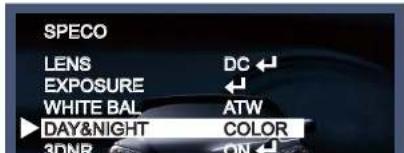
text_image
SPECO LENS DC EXPOSURE WHITE BAL ATW DAY&NIGHT COLOR 3DNR ONAuto : Automatically, It shifts into the color mode in the bright environment and the B/W mode in the low light condition. It can adjust the delay time, starting brightness and end brightness according to the ambient conditions by pressing the Set button.

text_image
DAY&NIGHT AUTO DELAY 5 D → N(AGC) 60 N → D(AGC) 20- RETURN RET ←◆ EXT : It can change the color or B/W mode automatically by connecting external signal.
3DNR
This function decreases the noise in the low light background.
- Move the triangular indicator to 3DNR by using the Up or Down button.
- Select the mode to use by pressing the Right or Left button.

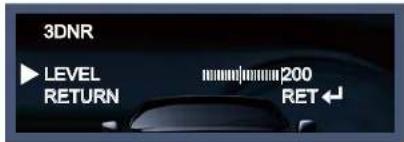
text_image
3DNR LEVEL RETURN 200 RET ←NOTE
* If 3DNR function is used, the cancellation effect of noise is excellent. The higher the compensation proportion raise, the better the effect of noise cancellation is, but the ghost effect may occur.
Special
This can be used when you want to select the additional function control.
- When the SETUP menu is displayed, select SPECIAL using the Up and Down button.
- Select one of the mode using the Up and Down button.

text_image
SPECO LENS DC ← EXPOSURE ← WHITE BAL ATW◆ CAM (Camera) TITLE : It can be adjusted when you get into the Cam Title menu. This function is to display the letters of the camera on the monitor. The 15 characters can be displayed and the location of the camera title on the screen can be adjusted. Move the triangular indicator to CAMERA ID using the Up and Down button on the Setup menu and then Set to On using the Left or Right button. After the letters you want to display on the monitor set up, press set button on the "END" and complete the set up.
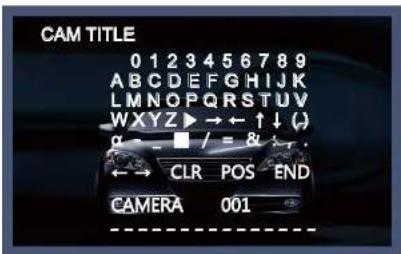
text_image
CAM TITLE 0 1 2 3 4 5 6 7 8 9 A B C D E F G H I J K L M N O P Q R S T U V W X Y Z ▶ → ← ↑ ↓ ( ) α = ■ / = & v _ . ← → CLR POS END CAMERA 001NOTE
* If you want to erase the letter, move the cursor on the empty space in front of the number 0, and then letters will be erased by pressing the Set button one by one. Selecting the CLR option will erase all of the characters.

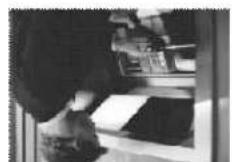
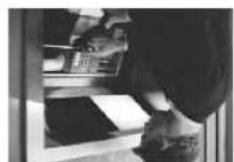
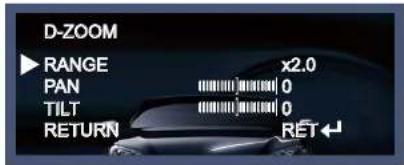
→ D-Zoom : You can use the digital zoom with x1 \~ x32 magnification.
The higher the digital zoom magnification is, the lower the resolution is.
text_image
D-ZOOM ▶ RANGE x2.0 PAN 0 TILT 0 RETURN RET←NOTE
→ DIS (Digital Image Stabilizer) : DIS offers to compensate for the ghost effect and gives a clear image in a low light condition.

text_image
DIS OFF DIS ON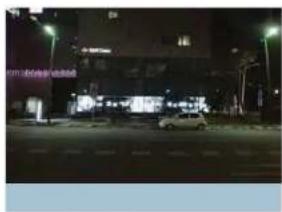
natural_image
Night street scene with illuminated buildings and a parked car (no visible text or signage)→ NEG. IMAGE
- On : Activate a negative image just like a film.
- Off : Normal image.
→ Return : Save the digital zoom setting, then return to the SPECIAL menu.
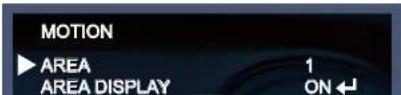
♦ MOTION : This can detect the movement of a subject and you can see the moving image of the subject on the monitor when the camera detects it. When the Motion Detection is ON, a new submenu appears when you press the Set menu.
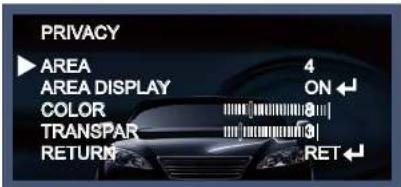
◆ PRIVACY : This is used to hide certain areas on the monitor. You can designate up to 8 different areas. The size of a designated area can be adjusted. The color of a privacy area can be changed to 15 different colors. When Return is selected, all the changes are saved.
text_image
PRIVACY ▶ AREA 4 AREA DISPLAY ON ↓ COLOR 8 TRANSPAR 3 RETURN RET ↓◆ DEFECT : You can eliminate white spots (defect) up to max.512 points.

text_image
DEFECT ► SENSE UP x32 DIFF 1 THRESHOLD 2 START RETURN RET ←- Sense Up: To eliminate defect, set the high level of Sense Up. You can set to max. 64x, but 32x is the best setting value to eliminate defect.
- DIFF: You can set the size of DEFECT from 0 to 3.
- THRESHOLD : The higher the level is, the more defect will appear.
START: "Close Set Button on the " - " work, it will start to eliminate default "PROCEEDING NOW "
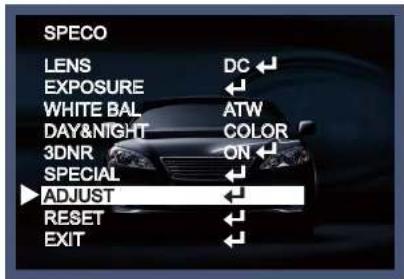
Adjust
This function is needed to control the brightness of the monitor.
-
When the Set UP menu is displayed, select ADJUST using the Up and Down button.
-
Select the desired mode by using Up or Down button.
text_image
SPECO LENS DC EXPOSURE WHITE BAL ATW DAY&NIGHT COLOR 3DNR ON SPECIAL ADJUST RESET EXIT
text_image
ADJUST SHARPNESS 25 MONITOR LCD RETURN RET◆ Sharpness : The outline of an image becomes sharp and more distinct as the level of sharpness increases.
Reset
The camera is set to the Factory Default value.
Exit
Press the Set button in the exit menu to save the current settings and exit the Set Up menu.
Trouble Shooting
| PROBLEM | POSSIBLE CAUSE |
| Nothing appears on the screen. | Check the power cable, power supply output and video connection between the camera and monitor. |
| The image on the screen is dim. | Is the camera lens or the lens glass dirty?Clean the lens / glass with a soft clean cloth.Adjust the monitor controls, as required.If the camera is facing a very strong light, change the camera position.Adjust the lens focus. |
| The image on the screen is dark. | Adjust the contrast control of the monitor.If there is an intermediate device, correctly set the 75Ω/Hi-z. |
| The camera is not working properly and the surface of the camera is hot. | Check the camera is correctly connected to an appropriate regulated power source. |
| Motion Detection | Has MOTION DET been set to ON in the menu? |

LIMITED WARRANTY - VIDEO PRODUCTS
THIS WARRANTY IS VALID ONLY ON PRODUCTS PURCHASED AND USED IN THE UNITED STATES OF AMERICA AND CANADA. THIS WARRANTY APPLIES ONLY TO THE ORIGINAL USER.
SUBJECT TO CONDITIONS AND EXCLUSIONS FOUND BELOW, THIS PRODUCT IS WARRANTED AGAINST MANUFACTURING DEFECTS IN MATERIAL AND WORKMANSHIP FOR THE FOLLOWING PERIOD FOR PARTS AND LABOR:
| SPECO TECHNOLOGIES CAMERAS....5 YEARS |
| SPECO TECHNOLOGIES IP CAMERAS....2 YEARS |
| SPECO PTZ AND VL CAMERAS....1 YEAR |
| SPECO TECHNOLOGIES MONITORS....1 YEAR |
| IR LEDS....90 DAYS |
| DVRS | 3 YEARS |
| NVRs | 3 YEARS |
| BALANCE OF | |
| SPECO TECHNOLOGIES LINE | 1 YEAR |
SPECO TECHNOLOGIES WILL REPAIR OR REPLACE (AT OUR DISCRETION) ANY PARTS FOUND TO BE DEFECTIVE FOR THE WARRANTY PERIOD SPECIFIED. WE WILL PROVIDE A REPLACEMENT FOR ANY DEFECTIVE PART.
CONDITIONS
-
YOU MUST OBTAIN A RETURN AUTHORIZATION (RA) NUMBER FOR ANY MERCHANDISE BEING RETURNED TO SPECO TECHNOLOGIES, WHETHER FOR RETURN/EXCHANGE OR REPAIR, WHETHER IN OR OUT OF WARRANTY.
-
THIS WARRANTY WILL BE HONORED ONLY UPON PRESENTATION OF THE ORIGINAL DATED BILL OF SALE OR SALES SLIP.
-
TRANSPORTATION OF THE PRODUCT TO OUR SERVICE DEPARTMENT IS THE RESPONSIBILITY OF THE USER. REPAIRED OR REPLACED PRODUCT WILL BE RETURNED PREPAID DURING THE WARRANTY PERIOD.
-
SPECO TECHNOLOGIES DOES NOT AUTHORIZE ANY INTERNET OR MAIL ORDER PRODUCT SALES. IF A SPECO TECHNOLOGIES PRODUCT IS PURCHASED FROM AN UNAUTHORIZED DISTRIBUTOR OR OTHER SOURCE, INCLUDING RETAILERS, MAIL ORDER SELLERS AND ONLINE SELLERS, IT WILL NOT BE HONORED OR SERVICED UNDER THE EXSTING SPECO TECHNOLOGIES WARRANTY POLICY ANY SPECO TECHNOLOGIES PRODUCT PURCHASED FROM THESE ONLINE MERCHANTS WILL VOID THE APPLICABLE WARRANTY AND IS INELIGIBLE FOR TECHNICAL SUPPORT. IF YOU HAVE QUESTIONS ABOUT A RESELLER, PLEASE CONTACT SPECO TECHNOLOGIES AT 1-800-645-5516 FOR A LIST OF UNAUTHORIZED DEALERS, VISIT: www.specotech.com/unauthorized.
EXCLUSIONS
-
THIS WARRANTY SHALL NOT COVER ADJUSTMENT OF CUSTOMER OPERATED CONTROLS AS EXPLAINED IN THE APPROPRIATE Model's INSTRUCTION MANUAL OR PRODUCTS WHICH HAVE BEEN ALTERED, ABUSED, OR HAVE MISSING OR ALTERED SERIAL NUMBERS.
-
THIS WARRANTY SHALL NOT APPLY TO UNCRATING, SETUP, INSTALLATION, OR THE REMOVAL AND REINSTALLATION OF PRODUCTS AFTER REPAIR.
-
THIS WARRANTY SHALL NOT APPLY TO REPAIRS OR REPLACEMENTS NECESSITATED BY ANY CAUSE BEYOND THE RESULT OF MANUFACTURE INCLUDING, BUT NOT LIMITED TO, ANY MALFUNCTION, DEFECTS OR FAILURE CAUSED BY OR RESULTING FROM UNAUTHORIZED SERVICE OR PARTS, IMPROPER MAINTENANCE, MODIFICATION OR REPAIR BY THE USER, ABUSE, MISUSE, NEGLECT, ACCIDENT, FIRE, FLOOD, OR OTHER ACTS OF NATURE, INCORRECT LINE VOLTAGE, DAMAGE OR IMAGE BURNS TO TELEVISION PICTURE TUBES CAUSED BY OR ATTRIBUTABLE TO THE USE OF ANY ACCESSORY, ELECTRONICS GAME OR DEVICE, OR DAMAGE CAUSED TO IMAGE PICKUP DEVICES BY EXCESSIVE LIGHT.
THE PARABASIA IS NOT OF IT ANDER ECONOMATO GARRIANCE FOR THE TAX DEBTANCE OF THE WORK TO ADRIVE FOR THE TAX
- MEMO -
speco technologies®
200 New Highway