
BGTS-19 - Polisher BISSELL - Free user manual and instructions
Find the device manual for free BGTS-19 BISSELL in PDF.


| Product Type | Floor Polisher / Buffer |
| Brand | Bissell |
| Model | BGTS-19 |
| Motor Power | 1.5 HP |
| Speed Settings | Dual-speed: 175 RPM (low) / 300 RPM (high) |
| Voltage | 115V, 60Hz (also available 220V, 50Hz) |
| Amperage | 10.8 A |
| Apron Size | 19 inches |
| Drive Type | B-style universal clutch plate |
| Cord Length | 50 feet (14/3 gauge) |
| Chassis Material | All metal |
| Handling | Fully adjustable handle with locking lever |
| Safety Features | Grounded plug, safety interlock switch, dual trigger operation |
| Warranty - Motor & Chassis | 5 years |
| Warranty - Labor | 1 year |
| Usage | Indoor use only |
| Brush Compatibility | B-style brushes and pad drivers |
| Weight | Approx. 130 lbs (59 kg) |
Frequently Asked Questions - BGTS-19 BISSELL
User questions about BGTS-19 BISSELL
0 question about this device. Answer the ones you know or ask your own.
Ask a new question about this device
Download the instructions for your Polisher in PDF format for free! Find your manual BGTS-19 - BISSELL and take your electronic device back in hand. On this page are published all the documents necessary for the use of your device. BGTS-19 by BISSELL.
USER MANUAL BGTS-19 BISSELL
New Equipment Warranty
Limited Warranty
The manufacturer gives you the following limited warranty for this product if it was originally purchased for use, not resale, from BISSELL BigGreen Commercial or a BISSELL BigGreen Commercial-Authorized Retail Dealer.
The manufacturer will repair or replace, free of charge, to the original purchaser, any part which is found to be defective in material or workmanship within one (1) year of the date of purchase; five (5) years on the motor and gear box.
Drive belts, brushes, and other parts subject to normal wear are not covered by this limited warranty. This limited warranty does not apply to any part subjected to accident, abuse, or alteration, misuse, damage caused by fire or act of God, the use of voltages other than indicated on the serial number plate of this product or service of this product by other than a trained service technician.
The manufacturer does not authorize any person or representative to assume or grant any other warranty obligation with the sale of this product.
The manufacturer's limited warranty is valid only if you retain proof of purchase from BISSELL BigGreen Commercial or a BISSELL BigGreen Commercial Authorized Retail Dealer for this product. If you purchase this product from any other source, your purchase is "AS IS," which means the manufacturer grants you no warranty, and that you, not the manufacturer, assume the entire risk of the quality and performance of this product, including the entire cost of any necessary servicing or repairs of any defects.
The manufacturer's liability for damages to you for any costs whatsoever arising out of this statement of limited warranty shall be limited to the amount paid for this product at the time of original purchase, and the manufacturer shall not be liable for any direct, indirect, consequential or incidental damages arising out of the use or inability to use this product.
Some states do not allow the exclusion or limitation of incidental or consequential damages, so the above limitation or exclusion may not apply to you.
ALL EXPRESS AND IMPLIED WARRANTIES FOR THIS PRODUCT, INCLUDING IMPLIED WARRANTIES OF MERCHANTABILITY AND FITNESS FOR A PARTICULAR PURPOSE, ARE LIMITED IN DURATION TO THE WARRANTY PERIOD, AND NO WARRANTIES, WHETHER EXPRESS OR IMPLIED, WILL APPLY AFTER THIS PERIOD.
Some states do not allow limitations on the duration of implied warranties, so the above limitation may not apply to you.
This warranty gives you specific legal rights, and you may also have other rights which vary from state to state.

BigGreen Commercial
BISSELL BioGreen Commercial
FMT FLOOR MACHINE SERIES
SAFETY, OPERATION AND MAINTENANCE MANUAL WITH PARTS LIST
Please read before use!
DUAL-SPEED FLOOR MACHINE
1.5 HP | 175/300 RPM


natural_image
Exterior view of a stainless steel floor cleaning machine (no visible text or symbols)Models:
BGTS-17
BGTS-19
BGTS-21
2000 RPM
Fully Adjustable
Balanced Design
All Metal Chassis

BigGreen Commercial™
Bissell®
BigGreen Commercial™
Dear Valued Customer,
Congratulations on the purchase of your BISSELL, BigGreen Commercial FMT Dual-Speed Floor Machine! The world of floor care is becoming more high-tech and competitive and we strive to provide you with the most innovative products. Our Floor Machine is yet another example of this, bringing a new dimension to floor care and maintenance with its cutting-edge features, quality and value.
Please review this manual paying careful attention to the Safety Instructions section. Keep in mind that any unnecessary damage, neglect or abuse of this machine will void your warranty. You can be confident that simple maintenance will ensure that your Floor Machine provides quality performance for many years to come.
If warranty questions arise, please consult your manual or contact your distributor. Should you have any questions regarding maintenance, replacing parts or ordering parts, please call an authorized distributor.
Before you begin using your Floor Machine, thoroughly review the Owner's Manual.
Again, congratulations on the purchase of your BISSELL BigGreen Commercial FMT Dual-Speed Floor Machine!
Questions or Comments?
Bissell®
BigGreen Commercial
BISSELL BigGreen Commercial
100 Armstrong Road | Suite 101 | Plymouth, MA 02360
Phone: 800-242-1378 | Fax: 877-672-4566
www.bissellcommercial.com
Bissell®
BigGreen Commercial
Warranty Registration
Please take a moment to register your machine. Fill out the information below and mail back to BISSELL BigGreen Commercial immediately.
The warranty starts on the purchase date by the original purchaser, subject to proof of purchase. Please immediately register your machine by returning this Machine Registration Card at the time of purchase. If proof of purchase cannot be identified, the warranty start date is ninety (90) days after the inventory stocking date at the distributor's warehouse.
Machine Model ____ Purchase Date ____
Motor Type ____ Serial No. ____
Place of Purchase
Shipped To ____
Your Name ____ Phone ____
E-mail ____ Fax ____
Address Line 1
Address Line 2
City ____ State ____ Zip ____
Comments:
Mail to:
BISSELL BigGreen Commercial
100 Armstrong Road | Suite 101 | Plymouth, MA 02360
FMT DUAL-SPEED FLOOR MACHINE SERIES
By BISSELL BigGreen Commercial
Please fill out the following information:
Model No:
Serial No:_
Distributor Name:
Distributor Phone No:
Date of Purchase:

Built With Pride in the USA
Bissell®
Table of Contents
New Equipment Warranty....4
1.0 Safety Instructions ....5
2.0 Grounding Instructions....6
3.0 Assembly Instructions....7
4.0 Operating Tips....9
5.0 Trouble Shooting Guide....10
6.0 Brush Construction....11
7.0 Machine Schematic Drawing....13
8.0 Machine Parts List....14
New Equipment Warranty
5-year warranty on motor and chassis. 1-year warranty on service labor.
Limited Warranty
The manufacturer gives you the following limited warranty for this product if it was originally purchased for use, not resale, from BISSELL. BigGreen Commercial or a BISSELL. BigGreen Commercial-Authorized Retail Dealer.
The manufacturer will repair or replace, free of charge, to the original purchaser, any part which is found to be defective in material or workmanship within one (1) year of the date of purchase; five (5) years on the motor and gear box.
Drive belts, brushes, and other parts subject to normal wear are not covered by this limited warranty. This limited warranty does not apply to any part subjected to accident, abuse, or alteration, misuse, damage caused by fire or act of God, the use of voltages other than indicated on the serial number plate of this product or service of this product by other than a trained service technician.
The manufacturer does not authorize any person or representative to assume or grant any other warranty obligation with the sale of this product.
The manufacturer's limited warranty is valid only if you retain proof of purchase from BISSELL BigGreen Commercial or a BISSELL BigGreen Commercial-Authorized Retail Dealer for this product. If you purchase this product from any other source, your purchase is "AS IS," which means the manufacturer grants you no warranty, and that you, not the manufacturer, assume the entire risk of the quality and performance of this product, including the entire cost of any necessary servicing or repairs of any defects.
The manufacturer's liability for damages to you for any costs whatsoever arising out of this statement of limited warranty shall be limited to the amount paid for this product at the time of original purchase, and the manufacturer shall not be liable for any direct, indirect, consequential or incidental damages arising out of the use or inability to use this product.
Some states do not allow the exclusion or limitation of incidental or consequential damages, so the above limitation or exclusion may not apply to you.
ALL EXPRESS AND IMPLIED WARRANTIES FOR THIIS PRODUCT, INCLUDING IMPLIED WARRANTIES OF MERCHANTABILITY AND FITNESS FOR A PARTICULAR PURPOSE, ARE
LIMITED IN DURATION TO THE WARRANTY PERIOD, AND NO WARRANTIES, WHETHER
EXPRESS OR IMPLIED, WILL APPLY AFTER THIS PERIOD.
Some states do not allow limitations on the duration of implied warranties, so the above limitation may not apply to you.
This warranty gives you specific legal rights, and you may also have other rights which vary from
Notes:
1.0 Safety Instructions
READ THIS MANUAL BEFORE USING THE DUAL-SPEED FLOOR MACHINE. KNOW THE PROPER OPERATION, CORRECT APPLICATIONS AND THE LIMITATIONS OF THIS EQUIPMENT BEFORE USE.
Reduce the Risk of Fire, Electric Shock or Injury:
- This floor machine is designed for indoor use only. Do not use outdoors. Do not expose to rain.
- Do not wash the motor with flowing water. If the motor gets wet, seek authorized service.
- Keep the vents on this air-cooled motor free from debris. Do not operate with the motor covered or with vents blocked. Do not use this machine as a floor sander.
- Never operate this floor machine near flammable dusts, liquids or vapors. Never use flammable solvents as a cleaning agent. Engine sparks and operating heat can cause fire.
- Never handle electrical equipment with wet hands. Never operate this floor machine with bare feet.
- Unplug the floor machine when not in use and when servicing the equipment. To unplug, grasp the plug not the cord.
- Do not operate a floor machine with damaged handle controls, cord or plug. If the equipment is not performing properly, seek repair from a qualified service supplier.
- This floor machine is constructed with electrical grounding at the plug. Operate only when connected to a properly grounded outlet. See section 1.2 for grounding details.
- Prevent electrical cord abuse. Do not close a door upon the cord, drive equipment over it, or run the floor machine over it. Do not expose the cord to hot surfaces. Do not lift, pull or carry this floor machine by the cord.
- Never operate the floor machine over sharp objects that can be thrown out and harm the operator and damage the floor. Sweep hard floors before scrubbing or buffing. Vacuum clean carpets before shampooing or bonnet cleaning.


2.0 Grounding Instructions
DANGER: IMPROPER GROUNDING METHOD CAN RESULT IN A RISK OF ELECTRIC SHOCK.
Electrical equipment must be grounded. If it should malfunction or breakdown,
grounding provides a path of least resistance for electrical current and reduces the risk of electric shock. The vacuum is equipped with a cord containing a grounding conduct and grounding plug. The plug must be inserted into an appropriate outlet that is proper installed and grounded in accordance with all local codes and ordinances.
If repair or replacement of the cord or plug is necessary, DO NOT connect the grounded wire to a flat bed terminal. The green insulated wire, with or without yellow stripes, is the grounding wire.
The BISSELL BigGreen Commercial Dual-Speed Floor Machine operates on a 10.8 amp nominal 115V, 60 Hz, A.C. power circuit (motors may be custom wired at the factory 220V, 50 Hz international operation). The, amp, hertz and voltage ratings are listed on the motor spec label found on each floor machine. Using voltages above or below those indicated on the spec label will damage the motor. Always check your local voltage requirements.
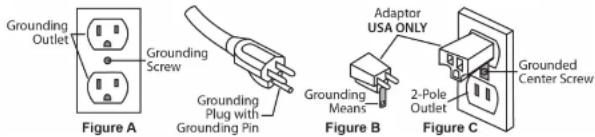
This floor machine is for use on a normal 120 volt circuit. It has a grounded plug that fits the outlet illustrated in Figure A. If a properly grounded outlet is not available, a temporary adapter, such as the adapter illustrated in Figure B and C, may be used to connect the plug into a 2-pole outlet, as shown in Figure C.
The temporary adapter should be used only until a properly grounded outlet, Figure A, can be installed by a qualified electrician. The green color rigid ear lug or grounding means extending from the adapter must be connected to a permanent ground, such as a properly grounded outlet box cover. Whenever the adapter is used, it must be held in place by its grounding means and a metal screw, as shown in Figure C.
WARNING:
Improper connection of the equipment grounding conductor can result in a risk of electric shock. Check with a qualified electrician or service person if you are in doubt as to whether the outlet is properly grounded. DO NOT modify the plug provided with the
8.0 Machine Parts List Continued
| Item | Description | Part No. | Qty. | ||
| 62A | Bumper | 17" | - | Green | M-232- |
| 62B | Bumper | 19" | - | Green | M-232- |
| 62C | Bumper | 21" | - | Green | M-232- |
| 63A | Apron | 17" | A-169 | ||
| 63B | Apron | 19" | A-171 | ||
| 63C | Apron | 21" | A-172 | ||
| 64 | Scrubber | Plug | B-50 | ||
| 65 | Base | Casting | Screw | B-31 | |
| 66 | Flag | Wire | Connector | G48 | |
| 67 | Slotted | Hex | Head | B-3 | |
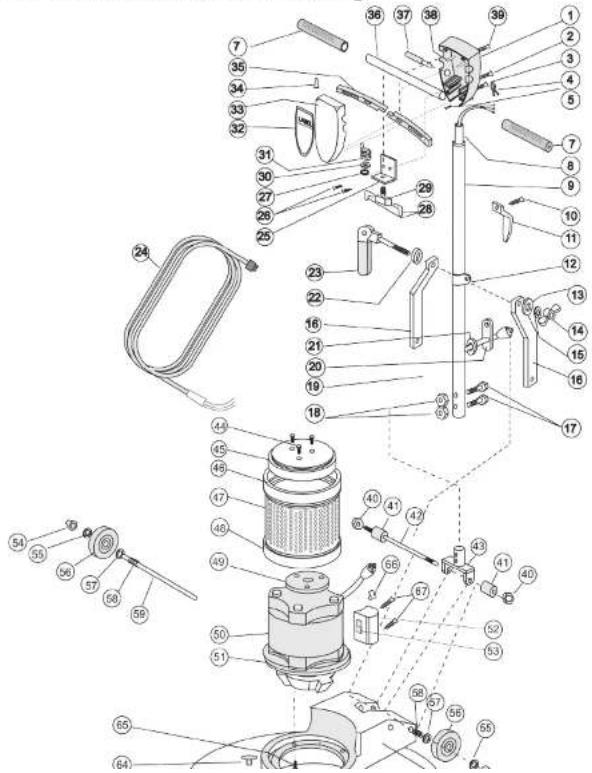
8.0 Machine Parts List
| Item Description Part No. Qty. | ||||||
| 1 Switch Box Back A-104 1 | ||||||
| 2 Handle Tube Screw | ||||||
| 3 Switch Box Closing Screw B-21 4 | ||||||
| 4 Strain Relief Clip M-213 1 | ||||||
| 5 Ground Wire Screw | B-58 | |||||
| 6 Rubber Spacer - Green M-218-G 2 | ||||||
| 7 Hand Grip | M-218 | |||||
| 8 Handle Tube Insert | M-247 | |||||
| 9 Handle Tube Assembly | M-206 | |||||
| 10 Cable Hook Screw | B-2 | 2 | ||||
| 11 Cable Hook | A-164 | |||||
| 12 Sliding Collar | A-111 | |||||
| 13 Cam Washer | B-37 | |||||
| 14 Cam Lock Wing Nut B-25 1 | ||||||
| 15 Cam Split Washer | B-39 | 1 | ||||
| 16 Bent Brace | M-216 | |||||
| 17 Yoke Bolt | B-18A | |||||
| 18 Yoke Nut | B-19 | |||||
| 19 Handle Tube Cable | G-16 | |||||
| 20 Black Rubber Cable Connector | M-249 | 1 | ||||
| 21 Cable Grommet | B-63 | |||||
| 22 Rectangular Hole Cam Washer | B-67 | 1 | ||||
| 23 A Cam Assembly | C-100 | 1 | ||||
| 23B Complete Cam Assembly Kit (Includes 1 each of CCA 1 | ||||||
| Drawing Items #13, 14, 15, 22, 23) | ||||||
| 24 50-Foot Cable, 14/3-Gauge - Yellow | G-14-15-Y | 1 | ||||
| 25 Switch Mounting Plate | G-30-B | |||||
| 26 Switch Plate Screw | B-1 | |||||
| 27 Int. Tooth Lock Washer (for Switch) B-35 1 | ||||||
| 28 Insulated Flag Wire Connector | G-48 | 2 | ||||
| 29 On-Off Switch and Plate Assembly | G-33-AB | 1 | ||||
| 30 Lock Washer | B-33 | 1 | ||||
| 31 Trigger Return Spring | G-30-CT057 | 4 | ||||
| 32 Label for Switch Box Call for # 1 | ||||||
| 33 Switch Box Front | A-103 | |||||
| 34 Wire Connector | G-47 | |||||
| 35 Trigger | A-105 | 2 | ||||
| 36 10' Crossbar | M-211-A | 1 | ||||
| 37 Safety Interlock Assembly | SIA-1 | 1 | ||||
| 38 Trigger Pin | B-70 | |||||
| 39 Crossbar Screw | B-22 | 2 | ||||
| 40 Acorn Nut for Yoke Pin | B-8 | |||||
| 41 Rubber Yoke Spacer | B-5 | |||||
| 42 Yoke Pin | B-7 | 1 | ||||
| 43 Yoke | A-1001 | 1 | ||||
| 44 Drip Cap Mounting Screw | B-151 | |||||
| 45 66 Frame Drip Cap Cover | M-242 | 1 | ||||
| 46 66 Frame Drip Cap Cover Bumper - Green M-239-G | 1 | |||||
| 47 Two-Speed Motor Screen SCR-02 | 1 | |||||
| 48 Two-Speed Motor Screen Bumper - Green M-238-G | 1 | |||||
| 49 Cork Drip Cap Gasket M-248 1 | ||||||
| 50 Two-Speed Motor, 66 Frame, 1.5 HP w/ Gearbox 115V MOTOR/GB-TS | 1 | |||||
| 51 Gear Box, 11:1, Triple Planetary GB06006 | 1 | |||||
| 52 Two-Speed Hi-Lo Switch Box SCAP-2 1 | ||||||
3.0 Assembly Instructions
3.1 Handle Installation
n-2 This machine handle (1) has been custom fit to its mounting yoke (2) at the factory and then taken apart for shipping. For easy assembly, make sure that the handle number on the tag (see right) matched the serial number stamped on the chassis.
You will need 7/16" wrenches to complete the assembly: 1. Remove the handle and mounting hardware from the carton. Bolt's, nuts, washers and the locking lever assembly are in the plastic bag attached to the handle
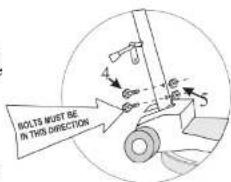
- Position the handle (1) over the mounting yoke (2) with the power cord (3) facing away from the motor. Push the tube down until the bolt holes are lined up.
- Insert the mounting bolts (4) into the bolt holes from the back of the machine. Secure each bolt with a locking nut (5). The locking nuts will face the motor.
-
The handle mounting collar (6) is designed to slide freely up and down the handle tube. This feature allows the handle to be adjusted for the comfortable operation of all users. Align the mounting collar (6) and the two bent handle braces (7).
^25 . Remove the lever assembly parts from the plastic bag. 2 -
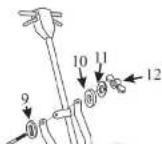
Place the thick spacer with a rectangular hole (9) onto the locking lever shaft (8). The spacer must fit onto the rectangular neck of the lever.
- Insert the shaft through the mounting hole in the right handle brace, the mounting collar and the left handle brace.
- Place the spacer (10) on the shaft.
- Place the split washer (11) on the shaft


3.2 Install / Change the Apron
If you've purchased more than one apron, you can easily change aprons for different cleaning jobs.
- Lock the handle in the "up: position and tip the floor machine back.
- If you're changing the apron, give the brush a quick flip counterclockwise to unlock and remove the brush.
- Remove the 3 knurled thumb nuts that hold the apron to the machine chassis.
- Remove the existing apron.
- Align the new apron.
• Re-install the three bolts and tighten.
• Install a brush that is 2" smaller than the apron.
3.3 Attach the Power Cord
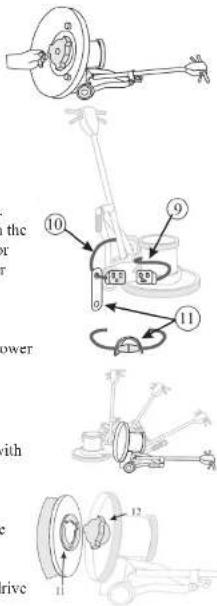
The triple-wire grounded power cord has been factory-installed into the handle tube. A flexible rubber cable connector (11) is used to secure the plug-in connections. The floor machine ships with this connector mounted on the cord coming out of the handle (10). Stretch the connector and slip the male connector (9) (coming out of the motor housing) through the connector hole and then into the female connector.
Now, plug the end of the 50 foot cord into a grounded power outlet. Squeeze the triggers on the handle and check for power to the motor.
3.4 Brush or Pad Driver Installation
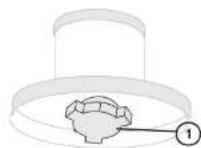
A brush or pad driver mounts onto your floor machine with a "B" style Universal clutch plate.
Unplug the floor machine. Lock the machine handle in the "up" position and tip the floor machine back onto the handle.
Slide the brush or pad driver clutch plate (11) over the drive plug (12)
7.0 Machine Schematic Drawing
6.2 Scrubbing Brush Filaments
Scrubbing brushes are available with a range of bristle types - from the softest for high-gloss floors, to the most aggressive for heavy soils. Match your brush to the floor as you match a detergent with the soils.
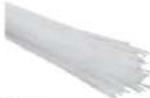
Nylon is used for general scrubbing. Because nylon softens when wet, it is great for gentle scrubbing, mopping and polishing of decorative floors. Nylon will not scratch tile, terrazzo or coated surfaces. Nylon brushes are durable and long lasting.
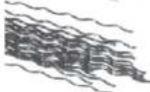
Polypropylene is a common choice for general purpose scrubbing and works well on both concrete and on coated floors. Polypropylene brushes typically cost less than nylon, but do not last as long.
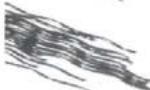
Non-scuff poly is a finer diameter (0.015-0.018") filament used for lighter duty scrubbing conditions and on waxed or finished floors.
Bassine is a soft, natural fiber. The end of the bristle splits or "flags" to build a polishing surface.
Union mix is a mixture of bassine and tampico (another natural fiber). The mixture is stiffer than bassine alone and is used by more traditional cleaners for scrubbing. It is often replaced by poly.

Soft abrasive bristle is a 0.018" nylon filament extruded with a 500 grade grit. It is used for gentle scrubbing and is as aggressive as a white scrub pad.

Daily abrasive bristle is a 0.035" nylon filament with 180 grade grit. It is used for daily scrubbing of resilient tile and finished floors and is as aggressive as a red scrub pad.
Stripper abrasive bristle is a 0.022" nylon filament with 120 grade grit. It is used for aggressive scrubbing and light stripping of resilient floors, terrazzo and concrete. It is as aggressive as a blue scrub pad.
4.0 Operating Tips
- For indoor use only. Sweep abrasive soils before scrubbing.
- While the brush or pad driver is spinning, keep the floor machine moving to avoid "donut" burns on the floor.
To Start Operation:
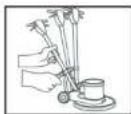
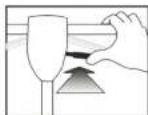
- Unlock the handle by raising the locking lever.
- Lower the handle to a comfortable position, typically waist height.
- Relock the handle by pushing the lever down. NEVER OPERATE THE MACHINE WITH THE HANDLE UNLOCKED.
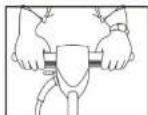
- This floor machine is a high torque motor. Hold the machine firmly with both hands when starting up.
- Push the red safety interlock switch forward to unlock the dual triggers.
- Squeeze the dual triggers to release power to the motor. Once power is on, either trigger will keep power to the motor.
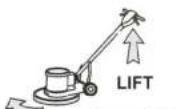
• To stop the floor machine release both triggers. - The spinning brush helps move the floor machine. (Lift the handle slightly to work to the right. Push the handle down slightly to work to the left.)
4.1 To Store your Machine
- Lock the handle in the "up" position. Tilt the machine back and remove the pad driver or brush.
- Wind the cord around the handles and the bottom cord hook.
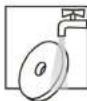
- Wash brushes or pads and hang to dry. Never store machine standing on the brush.
- Inspect and maintain equipment on a regular schedule for best results.
- Check and clean pads after each operation. Remove soil and chemical buildup. Replace worn or damaged pads.
- Check the triggers and switches for proper operation.
SET HANDLE
HEIGHT
PUSH LOCK FORWARD
SQUEEZE BOTH TRIGGERS
RIGHT

4.2 Transport
To transport this floor machine from the janitor's closet to the work area:
- Lock the handle in the "up" position. Wid the cord around the handles and the bottom cord hook.
- Tip the machine back onto the transport wheels. Push or pull the machine by the handle, not by the cord or any other part of the machine. Travel carefully.

5.0 Troubleshooting Guide
Never operate this floor machine when the equipment is not performing as expected or when any part is visibly damaged. The cause and solution for some basic problems are described below. When repair is needed, take the equipment to an authorized repair service center.
5.1 The Floor Machine will not Run
- Circuit breakers are tripped in the building. Check and reset.
• Equipment is unplugged. Check plug, wall and at machine base. Plug in. - Power cord failure. Test with a working power cord. Lock the handle up and tip the motor back. Unplug the cord at the motor and plug the motor into your working power cord.
- IMPORTANT! THIS IS JUST FOR TESTING. When you do this, you have removed the safety handle controls from the circuit and you are sending power directly to the motor. If the motor now spins, the problem is in the cord of the handle assembly. Seek authorized repair services.
- If the motor still does not spin, the problem is either in the male connection at the motor base or in the motor. Seek authorized repair service.
• Motor sparks or smokes. Seek authorized repair service.
5.2 Electrical Shock to Operator
• Equipment wiring failure or electrical short in the machine. Seek authorized service.
- Poor grounding or no grounding. Test the outlet with a ground fault interrupter. Retain certified electrician to inspect and repair grounding. NEVER clip off the ground plug on your cord.
- Repeated circuit breaking. High amp draw and circuit breaking can be an electrical or mechanical problem. Seek authorized repair service.
6.0 Brush Construction
Your new floor machine provides reliable, efficient, safe power to your scrubbing brush. To get the best results, you need to use a brush of the best design and construction.
Your floor machine is built with a "B" style drive plug (1). The height and width of the ears on the plug will match a "B" style or "Universal" clutch plate (2) mounted on the brush block.
The brush block (3) is constructed of molded plastic or this plywood. Use a brush with a block diameter 2" less than your machine apron size.
The bristle material (4) that actually does the scrubbing is typically 1-1/2" to 2" long. Holes are drilled in the block and bundles of bristles are folded in half, forced into the hole and stapled in place (staple-set).
When the bristles wear down to less than 1/2" long, they have little flexibility and it's time to replace. Bristle materials are described on page 11.
6.1 Pad Driver Construction
If you scrub or polish with a non-woven pad, use a pad driver to connect the pad to the machine.
The brush block (3) is constructed of molded plastic, fit with shorter, stiffer, pad-holding bristles (5) or "velcro-like" pad-holding hooks (6) and use a riser (7) to create extra clearance between the block and the machine apron. With this construction, use a pad driver with block diameter 1" less than your machine apron size.


Machine Apron Size 17" 19" 21"
Pad Driver - with 3/4" Riser 16" 18" 19"

- New Equipment Warranty
- Limited Warranty
- FMT FLOOR MACHINE SERIES
- SAFETY, OPERATION AND MAINTENANCE MANUAL WITH PARTS LIST
- DUAL-SPEED FLOOR MACHINE
- Bissell®
- BigGreen Commercial™
- Dear Valued Customer,
- Questions or Comments?
- Warranty Registration
- FMT DUAL-SPEED FLOOR MACHINE SERIES
- Please fill out the following information:
- Table of Contents
- Notes:
- Safety Instructions
- Reduce the Risk of Fire, Electric Shock or Injury:
- Grounding Instructions
- WARNING:
- Assembly Instructions
- Handle Installation
- Install / Change the Apron
- Attach the Power Cord
- Brush or Pad Driver Installation
- Scrubbing Brush Filaments
- Operating Tips
- To Store your Machine
- Transport
- Troubleshooting Guide
- The Floor Machine will not Run
- Electrical Shock to Operator
- Brush Construction
- Pad Driver Construction
Brand : BISSELL
Model : BGTS-19
Category : Polisher