
311062 - Coffee grinder Emga - Free user manual and instructions
Find the device manual for free 311062 Emga in PDF.


| Product Type | Digital Platform Scale |
| Brand | Emga |
| Model | 311062 |
| Capacity | 6 kg / 12 lb (model dependent up to 150 kg / 300 lb) |
| Graduation | 2 g / 0.005 lb (model dependent) |
| Weighing Units | kg / lb |
| Display | 1-inch LCD with backlight |
| Key Functions | ON/OFF, TARE, UNIT, HOLD |
| Power Supply | AC adapter (100-240V, DC 15V) or 4 AA batteries |
| Platform Material | SUS 304 Stainless Steel |
| Platform Dimensions (WxDxH) | 315 x 305 x 55 mm |
| Net Weight | 4 kg |
| Operating Temperature | 5°C to 35°C |
| Operating Humidity | 15% - 85% RH |
| Application Modes | Weighing, Hold, Tare |
| Safety Precautions | Do not operate in hostile environments; avoid liquid ingress; do not disassemble; check power cable regularly |
| Cleaning Instructions | Disconnect power, clean with damp cloth and mild soap; do not use acids or solvents |
| Battery Warning | Risk of explosion if replaced incorrectly; dispose according to local laws |
| Warranty | 1 year from date of purchase against defects in material and workmanship |
| Disposal | Do not dispose with domestic waste; follow WEEE directive |
Frequently Asked Questions - 311062 Emga
User questions about 311062 Emga
0 question about this device. Answer the ones you know or ask your own.
Ask a new question about this device
Download the instructions for your Coffee grinder in PDF format for free! Find your manual 311062 - Emga and take your electronic device back in hand. On this page are published all the documents necessary for the use of your device. 311062 by Emga.
USER MANUAL 311062 Emga
natural_image
Digital kitchen scale with a digital display showing 2005, no visible text or symbols on the device itself.Platform Scale
R260
User's Manual
EMGA
CONTENTS
INTRODUCTION 2
Safety Precautions 2
INSTALLATION ....3
Package Contents 3
Parts Description.... 4
Selecting the Location 4
Power Supply 4
Battery Power 5
OPERATION 5
Keypad and Display Description 5
Status Indicators 6
Keypad Description 6
Turning Scale On/Off 6
Zero Operation 6
Changing Units of Measure....7
MAINTENANCE 7
Cleaning 7
Troubleshooting 8
Service Information 8
TECHNICAL DATA 9
Specifications 9
Disposal 10
ERROR AND STATUS MESSAGE 10
INTRODUCTION
This manual provides detailed instructions for the installation work, operation and maintenance instructions of the CHARDER R260 Scale, please read this manual thoroughly before installing and operating the scale.
Safety Precautions
Please follow these safety precautions:
- Verify AC Adapter input voltage matches the local AC power supply.
- Do not insert liquids or foreign object.
- Do not operate the scale in hostile environments.
- Do not drop loads or leave permanent load on the platform. This may damage the measuring system.
- Do not place the scale upside down on the pan.
- Do not open the scale. Never attempt to make repairs yourself because this could be dangerous. The warranty is void if this stipulation is ignored. The scale may only be opened by authorized personnel.
- Always disconnect the device from the power supply before installing, servicing, cleaning or performing maintenance.
- Check the power cable regularly for damage. If it is damaged, immediately disconnect the device from the power supply.
R260 Series
CHARDER
INSTALLATION
Package Contents
• R260 Scale
- AC Power Adaptor
- User's Manual

R260 Scale

AC Power Adaptor

User's Manual
R260 Series
CHARDER
Parts Description

Selecting the Location
Select a firm, vibration-free and horizontal location for the scale. Avoid locations with direct sunlight, excessive air current, heat sources, or rapid temperature fluctuations.
Power Supply
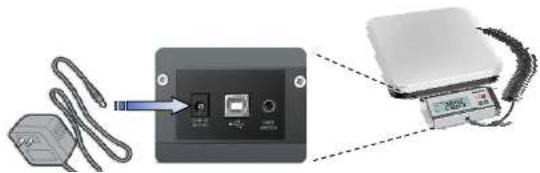
Connect the AC Adaptor to the AC mains supply. Connect the plug to the AC jack on the bottom of the scale as shown in the illustration below. The power outlet should be close to the scale and easily accessible.
R260 Series
CHARDER
Battery Power
The scale will automatically switch to battery operation if there is a power failure or the power cord is removed to provide uninterrupted scale operation.
Note: When low battery is displayed, the scale will shut off after 30 seconds.

CAUTION:
Risk of explosion can occur if replaced with the wrong type or connected improperly.
Do not use the battery for any purpose other than those described in this manual.
Do not disassemble, repair or otherwise manipulate the battery. Obey the local laws and regulations on disposing the battery.
OPERATION
Keypad and Display Description

R260 Series
CHARDER
Status Indicators
| ICON Description | |
| Stability display | |
| →0← | Zero setting activated |
| Negative sign | |
| NET Display net weight | |
| Hold Display hold function | |
| kg / lb Currently chosen weight unit | |
Keypad Description
| KEY DESCRIPTION FUNCTION | ||
| POWER ON / OFF - Turn on and off display | ||
| UNIT | - Change the weighing units to alternate units of measurement | |
| TARE - Call up TARE function | ||
| HOLD | - Call up HOLD function | |
Turning Scale On/Off
To turn the scale on, press the [ON / OFF] button scale will display
88888 and then enters the active weighing mode.
To turn the scale off, press the [ON / OFF] button to turn it off.
Zero Operation
Changing Units of Measure
In weighing mode, use [UNIT] to display the next available measuring unit. Repeat process to scroll through all units.
Performing TARE function
Place an empty container on the scale and press [TARE]. The display will show a net value of "0".
To clear the Tare value, press [TARE] with the pan empty.
Performing HOLD feature
Press [HOLD] and a triangle will appear above NET triangle. And load object on the platform. Once the weight is stable, the scale locks the weight automatically. Even if you remove the object from the platform. Press [HOLD] again to release HOLD feature.
MAINTENANCE
Cleaning
Before cleaning, disconnect the power plug from power outlet and remove batteries from the appliance to power off the unit.
- Clean with a damp cloth and a mild soap or similar agents if necessary, and buffed dry with.
- Do not use any acids, alkalis or strong active solvents to clean the housing or control panels.
R260 Series
CHARDER
Troubleshooting
| SYMPTOM POSSIBLE CAUSE REMEDY | ||
| Scale does not turn on | Battery discharged Replace the battery or use adapter | |
| Power cord not plugged in properly | Check power cord connection and plugged in properly into the power outlet. | |
| Other failure Have the scale serviced by Charder authorized service center. | ||
| Poor accuracy | Unstable environment Move the scale to suitable location, refer to the manual Selecting the Location. | |
| Improper calibration Perform calibration. | ||
R260 Series
CHARDER
TECHNICAL DATA
Specifications
| MODEL R260 | |||||
| Capacity | 6 kg / 12 lb | 15 kg / 30 lb | 30 kg / 60 lb | 60 kg / 120 lb | 150 kg / 300 lb |
| Graduation | 2 g / 0.005 lb | 5 g / 0.01 lb | 5 g < 15 kg >10 g0.01 lb < 30 lb >0.02 lb | 10 g / 0.02 lb | 20 g / 0.05 lb |
| Power Requirements | 100 V - 240 V DC 15V AC adapter4-AA batteries | ||||
| Weighing Units | kg / lb | ||||
| Display 1" in LCD with backlight | |||||
| Display Type LCD with backlit | |||||
| Key Function | 4 KeysON,OFF / TARE / UNIT / HOLD | ||||
| Operating Temperature and Humidity | 5°C to 35°C / 41°F to 95°F15% - 85% RH | ||||
| Application Mode | Weighing , Hold , Tare | ||||
| Construction | SUS 304 Stainless Steel platform | ||||
| Platform Size | 315 x 305 x 55 mm | ||||
| Weight 4 kg | |||||
R260 Series
CHARDER
Disposal
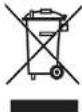
In conformance with the European Directive 2002/96 EC on Waste Electrical and Electronic Equipment (WEEE), this device may not be disposed of with domestic waste. This also applies to countries outside the EU, according to their specific
requirements.
Please dispose of this product in accordance with local regulations at the collecting point specified for electrical and electronic equipment. For more detailed information about recycling this product, please contact the local distributor from which you purchased this device.
ERROR AND STATUS MESSAGE
Error Message
| ERROR MESSAGE DESCRIPTION REMEDY | ||
 | Low battery indication | Connect the power supply or change new batteries. |
 | Zero value is too high or too low when power on | Empty load plate before power up and check if scale is placed correctly. Recalibrate the scale. |
 | Zero value is too high when power on | Empty load plate before power up. Recalibrate the scale. |
 | AD board is malfunctioned | Check possible disconnect wire or change AD board. |
WARRANTY
Charder scales are warranted against defects in material and workmanship for a period of one(1) year from the date of purchase. Please retain your receipt as proof of purchase.
Warranty expiration on products returned without proof of purchase will be determined from the manufacturing date code or the date of shipment to the authorized dealer.
Coverage may be invalidated as this date is previous to purchase date. No other express or implied warranty is given by Charder.
Freight damage on returns is not covered under warranty.
This warranty does not apply for following reasons, the product has been damaged by accident or misuse, parts and products of a consumable nature, exposed to radioactive or corrosive materials, has foreign material penetrating to the inside of the product, or as a result of service or modification by other than Charder.

Brand : Emga
Model : 311062
Category : Coffee grinder