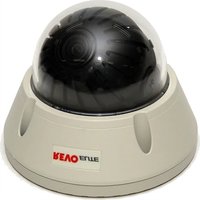
REVDN600-2 - Security Camera REVO - Free user manual and instructions
Find the device manual for free REVDN600-2 REVO in PDF.


| Brand | REVO |
| Model | REVDN600-2 |
| Product Type | Security Camera |
| Image Sensor | 1/3" Sony Super HAD CCD II |
| Resolution | 600 TV lines (Color) |
| Minimum Illumination | 0.1 lux (Color), 0.04 lux (B/W) @ F1.2, 50 IRE |
| Lens Options | 2.8-12mm F1.2 varifocal, 9-22mm F1.4, 4-9mm F1.6 |
| Lens Type | DC auto iris varifocal |
| Day/Night | Auto / Color / B/W / EXT (with IR filter) |
| White Balance | ATW1, ATW2, AWC, Manual, Indoor, Outdoor |
| Back Light Compensation | BLC / HLC |
| OSD Menu | Yes (On Screen Display) |
| Motion Detection | 4 areas |
| Privacy Mask | 8 positions, 15 colors |
| Power Supply | AC24V ±10% / DC12V ±10% |
| Power Consumption | 250 mA (approx 3W) |
| Video Output | BNC, 1.0 Vp-p, 75 ohms |
| Scanning System | 2:1 Interlace |
| Synchronization | Internal |
| Dimensions | 50 x 30 x 30 mm (approx) |
| Weight | 250 g (approx) |
| Operating Temperature | -10°C to 50°C |
| FCC Compliance | Class A |
| CE Compliance | Class A |
Frequently Asked Questions - REVDN600-2 REVO
User questions about REVDN600-2 REVO
0 question about this device. Answer the ones you know or ask your own.
Ask a new question about this device
Download the instructions for your Security Camera in PDF format for free! Find your manual REVDN600-2 - REVO and take your electronic device back in hand. On this page are published all the documents necessary for the use of your device. REVDN600-2 by REVO.
USER MANUAL REVDN600-2 REVO
Please read this manual thoroughly before use, and keep it handy for future reference.
Design and specifications are subject to change without notice.
WARNING
TO REDUCE THE RISK OF FIRE OR ELECTRIC SHOCK. DO NOT EXPOSE THIS PRODUCT TO RAIN OR MOISTURE. DO NOT INSERT ANY METALLIC OBJECTS THROUGH THE VENTILATION GRILLS OR OTHER OPENINGS ON THE EQUIPMENT.
CAUTION
EXPLANATION OF GRAPHICAL SYMBOLS

The lightning flash with snowhead symbol, within an equilateral triangle, is intended to start the user to the presence of uninsulated "dangerous voltage" within the product's enclosure that may be of sufficient magnitude to constitute a risk of electric shock to persons.

The exclamation point within an equilateral triangle is intended to alert the user to the presence of important operating and maintenance (servicing) instructions in the literature accompanying the product.
PRECAUTIONS
Safety
Should any liquid or solid object be into the nominal, under the unit and have it checked by the qualified personnel before operating it any further.
Unplug the unit from the wall cut at it is not going to be need for several days or more. To disconnect the cord, pull it out by the plug. Never pull the cord itself.
Allow adequate air circulation to prevent internal heat build-up. Do not place the unit air surfaces (raps, blankets, etc.) or near materials (carbents, diapers) that may block the ventilation holes.
Height and vertical linearity controls located at the near panel area for special adjustments by qualified personnel only.
Installation Do not install the unit in an extremely hot or humid place or in a place subject to excessive dual, mechanical vibration.
Cleaning
Clean the unit with a slightly damp soft cloth. Use a mild household dotergent. Never use strong solvents such as thinner or benzene as they might damage the finish of the unit.
Retain the original carlon and packing materials for safe transport of this unit in the future.
FCC COMPLIANCE STATEMENT
FCC INFORMATION: THIS EQUIPMENT HAS BEEN TESTED AND FOUND TO COMPLY WITH THE LIMITS FOR A CLASS A DIGITAL DEVICE, PURSUANT TO PART 15 OF THE FCC RULES. THESE LIMITS ARE DESIGNED TO PROVIDE REASONABLE PROTECTION AGAINST HARMFUL INTERFERENCE WHEN THE EQUIPMENT IS OPERATED IN A COMMERCIAL ENVIRONMENT. THIS EQUIPMENT GENERATES, USES, AND CAN RADIATE RADIO FREQUENCY ENERGY AND IF NOT INSTALLED AND USED IN ACCORDANCE WITH THE INSTRUCTION MANUAL MAY CAUSE HARMFUL INTERFERENCE TO RADIO COMMUNICATIONS. OPERATION OF THIS EQUIPMENT IN A RESIDENTIAL AREA IS LIKELY TO CAUSE HARMFUL INTERFERENCE IN WHICH CASE THE USER WILL BE REQUIRED TO CORRECT THE INTERFERENCE AT HIS OWN EXPENSE.
CAUTION : CHANGES OR MODIFICATIONS NOT EXPRESSLY APPROVED BY THE PARTY RESPONSIBLE FOR COMPLIANCE COULD VOID THE USER'S AUTHORITY TO OPERATE THE EQUIPMENT.
THIS CLASS A DIGITAL APPARATUS COMPLIES WITH CANADIAN ICES-003. CET APPAREIL NUMÉRIQUE DE LA CLASSE A EST CONFORME À LA NORME NMB-003 DU CANADA.
CE COMPLIANCE STATEMENT
WARNING
THIS IS A CLASS A PRODUCT. IN A DOMESTIC ENVIRONMENT THIS PRODUCT MAY CAUSE RADIO INTERFERENCE IN WHICH CASE THE USER MAY BE REQUIRED TO TAKE ADEQUATE MEASURES.
IMPORTANT SAFETY INSTRUCTIONS
-
Read these instructions.
-
Keep these instructions.
-
Heed all warnings.
-
Follow all instructions.
-
Do not use this apparatus near water.
-
Clean only with dry cloth
-
Do not block any ventilation openings. Install in accordance with the manufacturer's instructions.
-
Do not install near any heat sources such as radiators, heat registers, stoves, or other apparatus (including amplifiers) that produce heat.
-
Do not defeat the safety purpose of the polarized or grounding-type plug. A polarized plug has two braces with one wider than the other. A grounding type plug has two blades and a third grounding prompt. The wide blade or the third prong are provided for your safety. If the provided plug does not fit into your bullet, consult an electrician for replacement of the opposite bullet.
-
Protect the power cord from being walked on or pinched particularly at plugs, convenience receptacles, and the point where they exit from the apparatus.
-
Only use attachments/accessories specified by the manufacturer.
-
Use only with the cart, stand, tripod, bracket, or table specified by the manufacturer, or sold with the apparatus. When a cart is used, use caution when moving the carl/apparatus combination to avoid injury from tip-over.
-
Unplug this apparatus during lightning storms or when unused for long periods of time.
-
Refer all servicing to qualified service personnel. Servicing is required when the apparatus has been damaged in any way, such as power-supply cord or plug is damaged, liquid has been moisture, does not operate normally, or has been dropped.
-
CAUTION THESE SERVICING INSTRUCTIONS ARE FOR USE BY QUALIFIED SERVICE PERSONNEL ONLY. TO REDUCE THE RISK OF ELECTRIC SHOCK DO NOT PERFORM ANY SERVICING OTHER THAN THAT CONTAINED IN THE OPERATING INSTRUCTIONS UNLESS YOU QRE QUALIFIED TO DO SO.
-
Use satisfy clause 2.5 of IEC60950-1/UL60950-1 or Certified/Listed Class 2 power source only.

INTRODUCTION
The camera provides high-quality images using Sony CCD technology especially designed for closed-circuit television (CCTV) and security surveillance applications.
Features:
• High resolution and high performance Sony®Supra r HAID® II Technology
• Excellent picture quality
• ECO lines[Color] of resolution
• 0.1 lux(Color), 0.04lux(B/W) @ F1.2 50IRE Sensitivity
- Auto electronic shutter [1/60(1/50) - 17100,000] and manual electronic shutter modes
- OSD (On Screen Division)
• Auto and manual white balance modes
+ DVD
- OSD Font Color (16 Color)
• BLC (Back Light Compensation)
• Day&Night (Auto / DAY / NIGHT / EXT)
• Private Mask (8 position, 15 Colors)
• AGC (Auto Gain Control)
• MIRROR (ON/OFF)
• VIDEO OUT BNC
• Motion Detection(4 point)
• HLC (High Light Compensation)
• DPC (Dead Pixel Cancellation)
• 2.8-12mm All Vertical Lens F1.2(D&N Lens option)
• (1402) All Vertical Lens F1.4 (D&N Lens option)
• 4-0mm A/I Vartifocal Lens F1.6(D&N Lens option)
• Operatee in AC24V 47-10% / DC12V 47-10%
+ Use Certified / Listed Class 2 power source only
Test monitor Output

IMPORTANT: The user of this camera is responsible for checking and complying with local, state, and federal laws and statutes concerning the recording and monitoring of audio signals.
CAMERA CONNECTIONS

-
Lens: At Var-Hocal here for wide area monitoring (CAN with CR model option)
-
Power : 24V AC input / 12V DC input
power source from a DC 12V or AC 24V ac +10% 60/50Hz +1Hz
Used Lefr-mand Island Cabes 2 pachir south-tailany
If using DC 12V power adaptor
- Video : BNC connector used to connect the camera to a monitor, switcher, etc.

REMINDER:
Never aim the camera directly into the sun.
INSTALLATION
- Loose the four torx screws located midway up the front of the housing leave the screws intact in the front portion. (Fig. 1)
- Drill the mounting location using the supplied drill guide label. (Fig. 3)
- Attach the housing to the ceiling using suitable fasteners, M6x35 tapping screws are supplied only use if they are suitable. (Fig. 3)
- Closing the housing using the loosen lors screws. (Fig. 2)

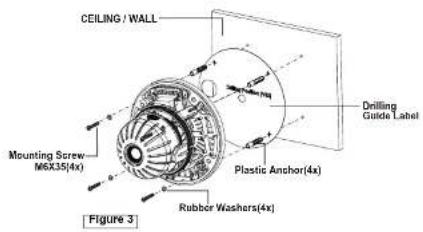
• MOUNTING HOUSING TO
The housing can also be moved on a 45 cm
Be mounted on a 49 of 28 electrical box.

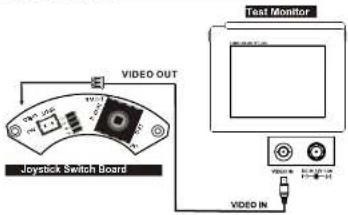
- Video out check-
STRUCTURE OF THE SETUP MENU
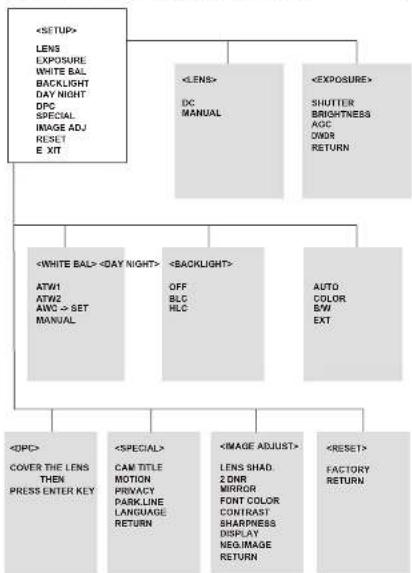
flowchart
graph TD
    A["<SETUP>"] --> B["LENS EXPOSURE"]
    B --> C["WHITE BAL BACKLIGHT DAY NIGHT DPC SPECIAL IMAGE ADJ RESET E XIT"]
    A --> D["<LENS> DC MANUAL"]
    A --> E["<EXPOSURE> SHUTTER BRIGHTNESS AGC COLOR RETURN"]
    F["<WHITE BAL> ATW1 ATW2 AWC → SET MANUAL"] --> G["<DAY NIGHT> OFF BLC HLC"]
    F --> H["<BACKLIGHT> AUTO COLOR B/W EXT"]
    I["<DPC> COVER THE LENS THEN PRESS ENTER KEY"] --> J["<SPECIAL CAM TITLE MOTION PRIVACY PARKLINE LANGUAGE RETURN"]
    K["<IMAGE ADJUST> LENS SHAD 2 DNR MIRROR FONT COLOR CONTRAST SHARPNESS DISPLAY NEGIMAGE RETURN"] --> L["<RESET> FACTORY RETURN"]
LENS (Selection)
This function is used to adjust the brightness of the screen.
- When the SETUP menu is displayed on the screen, please position the arrow to point to 'LENS' by using the UP and DOWN buttons.
- Please select the type of the lens you wish to use by pressing the LEFT or RIGHT button.
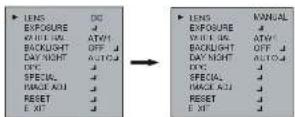
Note The brightness of the screen can be adjusted to DC mode
EXPOSURE
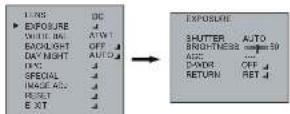
The EXPOSURE menu is used to set the automatic light control method for this camera.
1) SHUTTER Select the shutter mode (Auto. 1/80'50), FLK- 1/100.000 sec)
Can be changed while in shutter mode.
2) BRIGHTNESS Adjust: BRIGHTNESS level (0 - 255)
Can be adjusted while in DCF manual tens mode 3) AGC Auto gap central OFF (LOW + MIDOLE / HIGH)
2) Add Also for call to OFF / LOV / MIDDLE / HIGH
4) DWDR Digital Wide dynamic range (Xtanded Dynamic Range)
OFF/ON
WHITE BAL
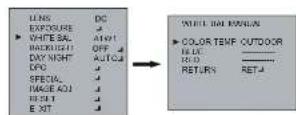
The screen color can be adjusted by using the WHITE BALANCE function.
1) ATW1
2) ATW2
3) AWC → SET
Set the color temperature 2500°K 10000°K
Set the color temperature 2000°K 13000°K
Please press the ENTER button while the camera is directed
at a piece of white paper to obtain the open form state under
cunch, illumination. If the environment including the light is changed, you have to adjust the white balance span.
4) MANUAL Manual mode. User can change R and B Gain manually.
INDOOR Se the color temperature to 3200K
OUTDOOR Set the color temperature to 6300K
BACKLIGHT
1) BLC
Prevents such a back light effect to secure a clear image under all
2) HLC
TME function improves the identification capability of subjects using a
THE function improves the information capability of subjects facing it. briefly it situation by filling out the strength of the light.
< MODE> BACKLIGHT

flowchart
graph LR
    A["INPUT"] --> B["EXPOSURE"]
    B --> C["WEET BAL"]
    C --> D["BACKLIGHT OFF"]
    D --> E["DAY NIGHT AUTG"]
    E --> F["DISC"]
    F --> G["SPECIAL"]
    G --> H["RACK ALL"]
    H --> I["RESET"]
    I --> J["EXIT"]

    B --> K["BACKLIGHT SLC"]
    K --> L["AREA BEL"]
    L --> M["AREA STAGE"]
    M --> N["GAIN"]
    N --> O["HEIGHT"]
    O --> P["WIDTH"]
    P --> Q["LEFT RIGHT"]
    Q --> R["TOP/BOTTOM"]
    R --> S["RETURN"]
    S --> T["RETR"]

    K --> U["BACKLIGHT HLC"]
    U --> V["LEVEL"]
    V --> W["MODE"]
    W --> X["RETURN RET"]

    style A fill:#f9f,stroke:#333
    style B fill:#f9f,stroke:#333
    style C fill:#f9f,stroke:#333
    style D fill:#f9f,stroke:#333
    style E fill:#f9f,stroke:#333
    style F fill:#f9f,stroke:#333
    style G fill:#f9f,stroke:#333
    style H fill:#f9f,stroke:#333
    style I fill:#f9f,stroke:#333
    style J fill:#f9f,stroke:#333
    style K fill:#ccf,stroke:#333
    style L fill:#ccf,stroke:#333
    style M fill:#ccf,stroke:#333
    style N fill:#ccf,stroke:#333
    style O fill:#ccf,stroke:#333
    style P fill:#ccf,stroke:#333
    style Q fill:#ccf,stroke:#333
    style R fill:#ccf,stroke:#333
    style S fill:#ccf,stroke:#333
    style T fill:#ccf,stroke:#333
DAY NIGHT
The DAY:NIGHT menu is used to configure the day and night related setting for this camera.
This camera can turn the IR(infrared)filter an or off
Mode: AUTO / COLOR / B/W / EXT (The EXT is not operating in this mode)

flowchart
graph LR
    A["LINE"] --> B["EXPOSURE"]
    B --> C["WHITE BAL"]
    C --> D["BACK/RESET"]
    D --> E["DAY NIGHT AUTO"]
    E --> F["DAY NIGHT AUTO"]
    F --> G["1-LEVEL"]
    G --> H["1-LEVEL"]
    H --> I["2-LEVEL"]
    I --> J["3-LEVEL"]
    J --> K["4-LEVEL"]
    K --> L["5-LEVEL"]
    L --> M["6-LEVEL"]
    M --> N["7-LEVEL"]
    N --> O["8-LEVEL"]
    O --> P["9-LEVEL"]
    P --> Q["10-LEVEL"]
    Q --> R["11-LEVEL"]
    R --> S["12-LEVEL"]

flowchart
graph LR
    A["LENS/DC"] --> B["DAY NIGHT BW"]
    C["ON/OFF"] --> B
    D["WHITE BAL"] --> B
    E["BACK/INT"] --> B
    F["DAY NIGHT"] --> B
    G["OUT/OFF"] --> B
    H["SP/C"] --> B
    I["S/X"] --> B
    J["X/S"] --> B
    K["X/A"] --> B
    L["X/A"] --> B
    M["X/A"] --> B
    N["X/A"] --> B
    O["X/A"] --> B
    P["X/A"] --> B
    Q["X/A"] --> B
    R["X/A"] --> B
    S["X/A"] --> B
    T["X/A"] --> B
    U["X/A"] --> B
    V["X/A"] --> B
    W["X/A"] --> B
    X["X/A"] --> B
    Y["X/A"] --> B
    Z["X/A"] --> B
    AA["X/A"] --> B
    AB["X/A"] --> B
    AC["X/A"] --> B
    AD["X/A"] --> B
    AE["X/A"] --> B
    AF["X/A"] --> B
    AG["X/A"] --> B
    AH["X/A"] --> B
    AI["X/A"] --> B
    AJ["X/A"] --> B
    AK["X/A"] --> B
    AL["X/A"] --> B
    AM["X/A"] --> B
    AN["X/A"] --> B
    AO["X/A"] --> B
    AP["X/A"] --> B
    AQ["X/A"] --> B
    AR["X/A"] --> B
    AS["X/A"] --> B
    AT["X/A"] --> B
    AU["X/A"] --> B
    AV["X/A"] --> B
    AW["X/A"] --> B
    AX["X/A"] --> B
    AY["X/A"] --> B
*The IR LEVEL is not operating in DAY NIGHT B/W mode.
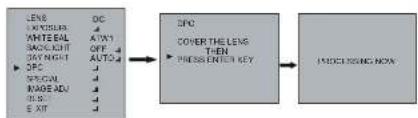
DPC
DPC Auto setting (Dead pixels are automatically removed)
flowchart
graph LR
    A["LENS<br>UPPICAL<br>ANTIMAL<br>BACKLIGHT<br>DAY NIGHT<br>OPC<br>SPECIAL<br>MAKE ADJ<br>RIS<br>E XIT"] --> B["DC<br>ATK1<br>OFF<br>AUTO"]
    B --> C["DFC<br>COVER THE LENS<br>THEN<br>PRESSIVEN KEY"]
    C --> D["IMOUNTING NON"]
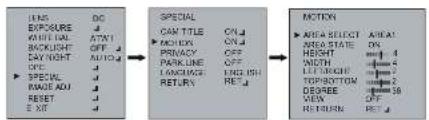
SPECIAL
1) CAM TITLE

A. CAM TITLE
B. Character Table
C. Command Line
+ : Move to left
- : Move to right
CLR : Erase all characters
POS : Move the position of title
END : Save and End
2) MOTION
AREA SELECT Select MD area number. (AREA1 - AREA4)
AREA STATE SELECTED ON/OFF
HEIGHT WIDTH Adjust height of MD area
WIDTH Adjust width of MD area LEFT:RIGHT Adjust the location of the MD area with boundary, LEFT and RIGHT
TOP/BOTTOM Adjust the location of the MD area with boundary TOP and BOTTOM
DEGREE Adjust versatility of MD series (0-255)
VIEW
In the selected area, the pink dots are displayed on the screen.
flowchart
graph LR
    A["INS"] --> B["DO"]
    C["EXPOSURE"] --> D["UN"]
    E["OK/VAL"] --> F["ATN"]
    G["BACKLIGHT"] --> H["OFF"]
    I["DAY NIGHT"] --> J["AUTO"]
    K["OPEN"] --> L["▶"]
    M["SPECIAL"] --> N["CAN TITLE"] --> O["CN ▼"]
    P["MOTION"] --> Q["▶ AREA SELECT"] --> R["AREA1"]
    S["▶ AREA SELECT"] --> T["AREA2"]
    U["AREA SELECT"] --> V["AREA3"]
    W["AREA SELECT"] --> X["AREA4"]
    Y["AREA SELECT"] --> Z["AREA5"]
    AA["AREA SELECT"] --> AB["AREA6"]
    AC["AREA SELECT"] --> AD["AREA7"]
    AE["AREA SELECT"] --> AF["AREA8"]
    AG["AREA SELECT"] --> AH["AREA9"]
    AI["AREA SELECT"] --> AJ["AREA10"]
    AK["AREA SELECT"] --> AL["AREA11"]
    AM["AREA SELECT"] --> AN["AREA12"]
    AO["AREA SELECT"] --> AP["AREA13"]
    AQ["AREA SELECT"] --> AR["AREA14"]
    AS["AREA SELECT"] --> AT["AREA15"]
    AU["AREA SELECT"] --> AV["AREA16"]
    AW["AREA SELECT"] --> AX["AREA17"]
    AY["OUTPUT"] --> AZ["OUTPUT"]
    BA["SPECIAL"] --> BB["PARK LINE"] --> BC["PARK LINE OFF"]
    BD["MOTION"] --> BE["LANGUAGE"] --> BF["LANGUAGE ENGLISH"]
    BG["MOTION"] --> BH["RETURN"] --> BI["RETURN RET"]
3) PRIVACY
AREA SELECT Select MASK area number.(Area 1 - Area 8)
AREA STATE Select MASK ON/OFF
HEIGHT Adjust height of MASK area
WIDTH Adjust width of MASK area
LEFT/RIGHT Adjust the location of the MASK area with boundary LEFT and RIGHT
TOP/BOTTOM Adjust the location of the MASK area with boundary
TOP and BOTTOM.
COLOR Select MASK color. (0-15)
RETURN

flowchart
graph LR
    A["LENS"] --> B["EXPOSURE"]
    B --> C["WHITE BAL"]
    C --> D["AUTY"]
    D --> E["BACKLOG"]
    E --> F["OFF"]
    F --> G["AUTO"]
    G --> H["DAY NIGHT"]
    H --> I["EPC"]
    I --> J["SINCHIN"]
    J --> K["PAGE ADJ"]
    K --> L["RESET"]
    L --> M["EAT"]

    N["SPECIAL"] --> O["CANTILE"]
    O --> P["OFF"]
    P --> Q["MOTION"]
    Q --> R["OFF"]
    R --> S["PRIVACY"]
    S --> T["ON"]
    T --> U["PARK LINE"]
    U --> V["OFF"]
    V --> W["LANGUAGE"]
    W --> X["ENGLISH"]
    X --> Y["RETURN"]
    Y --> Z["HOLD"]

    AA["PRIVACY"] --> AB["AABLE MILLED"]
    AB --> AC["AREA STATE"]
    AC --> AD["ON"]
    AD --> AE["HEIGHT"]
    AE --> AF["ON"]
    AF --> AG["WIDTH"]
    AG --> AH["ON"]
    AH --> AI["LIFT RED OUT"]
    AI --> AJ["OR FOR BOTTOM"]
    AJ --> AK["ON"]
    AK --> AL["COLOR"]
    AL --> AM["ON"]
    AM --> AN["RETURN"]
    AN --> AO["HOLD"]
4) PARK.LINE
Select Paing area

5) LANGUAGE
ENGLISH or CHINESE
6) RETURN
REI
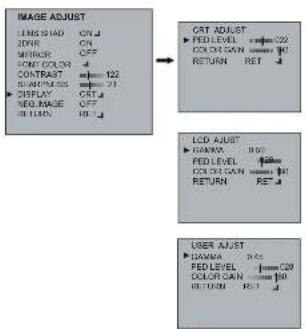
IMAGE ADJUST
1) LENS SHAD Adjust Lens shading level (0-255)
3) MIRROR Select MIRROR ON/OFF
4) FONT COLOR Select FONT COLOR level (0-15)
Select IDR TITLE level (0-15)
5) CONTRAST Adjust: CONTRAST level (0-265)
8) SHARPNESS Adjust SHARPNESS level (0-31)
7) DISPLAY Select DISPLAY mode (CRT/LCDUSER)
8) NEG. IMAGE Select Negative image mode ON/OFF


flowchart
graph TD
    A["IMAGE ADJUST"] --> B["CAT ADJUST"]
    B --> C["LCD ADJUST"]
    C --> D["USER ADJUST"]
RESET
1) FACTORY Returns to the level which was set by the manufacturer for shipment.
EXIT
1) EXIT Saves all the setting menus and then exits.
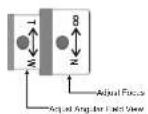
LENS ADJUSTMENT (OPTIONAL VARIFOCAL LENS)
Field of view: Adjust setting from Tele (T) to Wide (W) field of View.
Focus: Adjust lens focus from near (N) to infinity (∞).
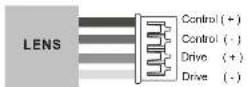
DC AUTO IRIS LENS
| 2.8-12mm | 9-22mm | 4-9mm | |
| Image Size | 1/3" CCD | 1/3" CCD | 1/3" CCD |
| Focal Length | 2.8-12mm ±5% | 9-22mm ±5% | 4-9mm ±5% |
| Aperture Ratio | 1: 1.2 ±5% | 1: 1.4 ±5% | 1: 1.6 ±5% |
| Angular Field of View | DIAGONAL2.8mm : 119.9"12mm : 26.80" | DIAGONAL9mm : 40.2"22mm : 16.1" | DIAGONAL4mm : 92.4"9mm : 39.2" |
SPECIFICATIONS
| MODEL | NTSC | PAL | |
| Power | Power source | AC20V ± 100V, DC20V ± 175 | |
| Power source type | 250mA (45.5 Wh/d) | ||
| General | Impulse source | 1/4" Soft Super-HO-CCD II | |
| Tool sample | R100V (600V)* | N300V (900V)* | |
| Scanning system | 2 Interlocn | ||
| Scanning Hotkey | 15-200V (60V ± 18.4W±14V) | 15-200V (40V ± 8W±14V) | |
| Syst. system | Internal | ||
| Eccentric System | 500 - 1000MWh | 100 - 1700.000 Wh | |
| Standard | R60" Trench COOLVR | ||
| IR. Master station | 0.7 Litter C/O 60A, LockBW, Q FL 2.98RE | ||
| System Control | 15" High Power, Compa#e | ||
| R/R/Hz | Vine fin: 200B (400Ω·h) | ||
| Dramine Control (200V, Open & Open) | |||
| F U N C T I O N | Latz | NAMAL DC | |
| Gearer | 40.10V (100V, Hardener, 250V - 40000000000000000000000000000000000000000000000000000000000000000000000000000000000000000000000000000 | ||
| Brill dust | 0-250 | ||
| Bedding | OFF 120V (120V ± Light Concentration) | ||
| Cave | OFF 120V (120V ± Light Concentration) | ||
| COPPA | OFFLA | ||
| White matter | ADOT "CAPOT" (MAXIMETER, MAXIMETER) | ||
| Body & Right | ADOT "CAPOT" (MAXIMETER) | ||
| Slight | OFF 120V | ||
| Tilt material | OFF 120V | ||
| IR. Rearl, Grath | 0-250 | ||
| Compa#r Tire | OFF 120V | ||
| Rockclon Dlock | OFF ON (Alkali) | ||
| Frequency Smoking | OFF ON (Alkali) | ||
| Parking Line | OFF 120V | ||
| Late Shading | OFF 120V (200V) | ||
| Mirror | OFF 120V | ||
| Mirror | OFF 120V | ||
| Food Color | FOOT TO COOLER, BUTILE TO COOLER | ||
| Cotton | 0-250 | ||
| Sugar curc | OFF 120V | ||
| Battery | OFF 120V | ||
| Battery | OFF 120V | ||
| Battery | OFF 120V | ||
| Battery Type | OFF 120V | ||
| Battery Type | OFF 120V | ||
| CPU | ENGLISH ORDER | ||
| CPU | East Road Direction Motor (NEWR 447 Pcs) | ||
| Panel | FACILITY SWITCH TESTER | ||
| Condenser & RF | Power Plant | 4.5 V/m | |
| Water supply | 30L / 100W | ||
| Class Water | Fixed Level | ||
| Latz | 120V - 120V - 2.25V (120V - 2.25V) | ||
| Control | 15-200V (15-200V - 200V - 200V) | ||
| Control Interface | 25-400V (400V - 400V - 400V) | ||
| Control & Numbers | 15-200V (15-200V - 200V - 200V) | ||
| Hardware Dimension | 150V ± 1700 Wh | ||
| Weight | 250V | ||
EXTERNAL DIMENSION

50303062A
- WARNING
- CAUTION
- EXPLANATION OF GRAPHICAL SYMBOLS
- PRECAUTIONS
- Safety
- FCC COMPLIANCE STATEMENT
- CE COMPLIANCE STATEMENT
- IMPORTANT SAFETY INSTRUCTIONS
- INTRODUCTION
- Features:
- CAMERA CONNECTIONS
- REMINDER:
- INSTALLATION
- LENS (Selection)
- EXPOSURE
- WHITE BAL
- BACKLIGHT
- < MODE> BACKLIGHT
- DAY NIGHT
- DPC
- SPECIAL
- 1) CAM TITLE
- 2) MOTION
- 3) PRIVACY
- RETURN
- 5) LANGUAGE
- 6) RETURN
- IMAGE ADJUST
- RESET
- EXIT
- LENS ADJUSTMENT (OPTIONAL VARIFOCAL LENS)
- EXTERNAL DIMENSION
Brand : REVO
Model : REVDN600-2
Category : Security Camera