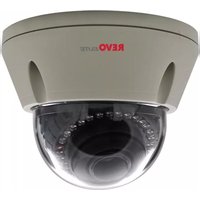
REVDN700E-2 - Security Camera REVO - Free user manual and instructions
Find the device manual for free REVDN700E-2 REVO in PDF.


| Product Type | Security Camera (Day & Night Color Camera) |
| Brand / Model | REVO REVDN700E-2 |
| Image Sensor | 1/3" Sony Super-HAD II PS 960H CCD |
| Horizontal Resolution | 700 TVL |
| Minimum Illumination | 0.1 Lux (Color), 0.01 Lux (B/W), 0.0001 Lux (Sens-Up B/W) |
| IR LEDs | 30x 850nm, range up to 30m |
| Lens Type | DC auto iris varifocal (options: 2.6-6mm, 2.8-12mm, 4-9mm, 6-50mm) |
| Wide Dynamic Range | x512 (WDR models) |
| Day/Night Mode | Auto, Manual, External (with IR cut filter) |
| Video Output | CVBS 1.0Vp-p (BNC), UTP (optional) |
| Power Supply | 12VDC or 24VAC (±10%), certified Class 2 |
| Power Consumption | 3.5W (IR off), 6.0W (IR on) |
| Weight (VP Dome Unit) | 760 g (1.66 lb) |
| Dimensions (VP Dome) | ∅146.3 mm x 113.7 mm (outer diameter x height) |
| Housing Material | Impact-resistant polycarbonate window (LEXAN), metal body |
| Mounting Type | Ceiling mount (VP Dome or Indoor Dome) |
| Control Interface | On-screen display via tact switch or RS-485 (Pelco-D/P, Fastrax) |
| Video Analytics (PVA) | Motion, Loitering, Abandon, Scene Change, Unfocus, Windy Area |
| Privacy Masking | Up to 10 zones (4-point polygonal, color, transparency, mosaic) |
| Digital Image Effects | V-FLIP, MIRROR, ROTATION, NEGA, FREEZE, DIS (Stabilization) |
| Noise Reduction | 2D + 3D DNR (adjustable) |
| Synchronization | Internal / Line Lock (Phase Control) |
| Maintenance | Clean with dry cloth and mild detergent; avoid solvents |
| Safety | Use certified Class 2 power supply; do not expose to rain or moisture |
| Spare Parts / Repairs | No user-serviceable parts; refer to qualified service personnel |
Frequently Asked Questions - REVDN700E-2 REVO
User questions about REVDN700E-2 REVO
0 question about this device. Answer the ones you know or ask your own.
Ask a new question about this device
Download the instructions for your Security Camera in PDF format for free! Find your manual REVDN700E-2 - REVO and take your electronic device back in hand. On this page are published all the documents necessary for the use of your device. REVDN700E-2 by REVO.
USER MANUAL REVDN700E-2 REVO
Super High Resolution Day & Night Color Camera (Optional WDR)

natural_image
Line drawing of a circular object with curved bands and a small protrusion, labeled 'VP-DOME' at the bottom (no other text or symbols)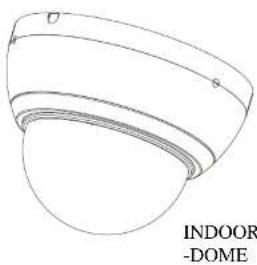
natural_image
Line drawing of a dome-shaped object with labeled indoor and outdoor features (no text or symbols on the object itself)LIMITATION OF LIABILITY
THE INFORMATION IN THIS PUBLICATION IS BELIEVED TO BE ACCURATE IN ALL
WARNING
TO REDUCE THE RISK OF FIRE OR ELECTRIC SHOCK, DO NOT EXPOSE THIS PRODUCT TO RAIN OR MOISTURE. DO NOT INSERT ANY METALLIC OBJECTS THROUGH THE VENTILATION GRILLS OR OTHER OPENINGS ON THE EQUIPMENT.
CAUTION
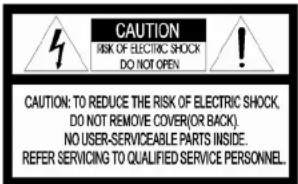
EXPLANATION OF GRAPHICAL SYMBOLS
The lightning flash with arrowhead symbol, within an equilateral triangle, is intended to alert the user to the presence of uninsulated "dangerous voltage" within the product's enclosure that may be of sufficient magnitude to constitute a risk of electric shock to persons.

The exclamation point within an equilateral is intended to alert the user to the presence of important operating and maintenance (servicing) instructions in the literature accompanying the appliance.
FCC COMPIANCE STATEMENT
FCC INFORMATION : This equipment has been tested and found to comply with the limits for a Class A digital device, pursuant to Part 15 of the FCC Rules. These limits are designed to provide reasonable protection against harmful interference when the equipment is operated in a commercial environment. This equipment generates, uses, and can radiate radio frequency energy and, if not installed and used in accordance with the instruction manual, may cause harmful interference to radio communications. Operation of this equipment in a residential area is likely to cause harmful interference in which case the user will be required to correct the interference at his own expense.
CAUTION : Changes or modifications not expressly approved by the party responsible for compliance could void the user's authority to operate the equipment.
This Class A digital apparatus complies with Canadian ICES-003.
This is a Class A product. In a domestic environment this product may cause radio interference in which case the user may be required to take adequate measures.
IMPORTANT SAFETY INSTRUCTIONS
- Read these instructions.
- Keep these instructions.
- Heed all warnings
- Follow all instructions.
- Do not use this apparatus near water.
- Clean only with dry cloth.
- Do not block any ventilation openings. Install in accordance with the manufacturer's instructions.
- Do not install near any heat sources such as radiators, heat registers, stoves, or other apparatus (including amplifiers) that produce heat.
- Do not defeat the safety purpose of the polarized or grounding-type plug. A polarized plug has two blades with one wider than the other. A grounding type plug has two blades and a third grounding prong. The wide blade or the third prong are provided for your safety. If the provided plug does not fit into your outlet, consult an electrician for replacement of the obsolete outlet.
-
Protect the power cord from being walked on or pinched particularly at plugs, convenience receptacles, and the point where they exit from the apparatus.
-
Only use attachments/accessories specified by the manufacturer.
-
Use only with the cart, stand, tripod, bracket, or table specified by the manufacturer, or sold with the apparatus. When a cart is used, use caution when moving the cart/apparatus combination to avoid injury from tip-over.
-
Unplug this apparatus during lightning storms or when unused for long periods of time.
-
Refer all servicing to qualified service personnel. Servicing is required when the apparatus has been damaged in any way, such as power-supply cord or plug is damaged, liquid has been moisture, does not operate normally, or has been dropped.
-
CAUTION - THESE SERVICING INSTRUCTIONS ARE FOR USE BY QUALIFIED SERVICE PERSONNEL ONLY, TO REDUCE THE RISK OF ELECTRIC SHOCK DO NOT PERFORM ANY SERVICING OTHER THAN THAT CONTAINED IN THE OPERATING INSTRUCTION S UNLESS YOU QRE QUALIFIED TO DO SO.
-
Use satisfy clause 2.5 of IEC60950-1/III 60950-1 or Certified/Liste

PRECAUTIONS
Before installation, carefully read the manual to ensure correct operation and setup, heeding all warnings and instructions.
Do not block any ventilation openings. Install in accordance with the manufacturer's instructions.
Ensure manual is kept in good condition for future use.
Do not install the device near any heat sources such as radiators, heat registers, stoves, or other equipment (including amplifiers) that produce heat.
Only use attachments/accessories specified by the manufacturer.
Should any liquid get into the housing, immediately disconnect the device from the power supply and have it checked by authorized personnel before reusing.
Do not install the device in a place of high humidity or where exposed to gas or oil.
Installation and servicing by authorized personnel only, adhering to local safety regulations.
Unless you are an authorized technician, never try to dismantle the device. To avoid electric shock, never remove the screws or covers.
If a camera, do not expose the device to radioactivity. It will cause serious damage to the CCD.
Use Certified/Listed Class 2 power source only.
Cleaning
Clean the device with a slightly damp soft cloth. Use a mild household detergent. Never use strong solvents such as thinner or benzene as they might damage the finish of the unit.
TABLE OF CONTENTS
CONTENTS OF PACKAGE 7
INTRODUCTION 8
CAMERA CONNECTIONS 9
INSTALLATION 10
LENS ADJUSTMENT 12
CAMERA OVERVIEW 13
CAMERA ADJUSTMENT 14
EXTERNAL DIMENSION 23
SPECIFICATIONS 25
CONTENTS OF PACKAGE
Installation of the camera must be performed by qualified service personnel in accordance with all local and national electrical and mechanical codes.
Carefully remove the colour camera and its accessories from the carton and verify that they were not damaged in shipment.
The content of the package includes:
- Camera in Housing
- This Manual
- Accessory Kit for Installing
INTRODUCTION
The camera provided high-quality image using SONY 1/3" CCD and digital signal processing LSIs.
Features:
● 1/3" Super-HAD CCD
● Super high-resolution (700TVL)
● Wide Dynamic Range (-x512) (Optional)
● Day & Night(Auto, Manual, External, Filter delay, Change level adjust)
● 0.1Lux(Color), 0.01 Lux(BW) @ F1.2 50IRE
● Auto Electronic Shutter [1/50(60) \~ 1/100,000] and manual electronic shutter
modes [1/50(60) - 1/10,000]
- Sens-Up (\~x256)
2D-NR, 3D-NR
- UDF Function(Ultra Deep Field)
● Multi Camera Configuration Set (4-Sets/Night Profile, Ext DN Profile)
● PVA/PVA+ (Personal Video Analytics)
■ Very High Configurable.
■ Various Detection Methods(Motion, Loitering Object, Abandon, Scene
Change, Unfocus, Windy Area)
■ Various Zone Event Detection Methods, and Event Area Combinations.
■ 8 Objects Trace, 4 Objects Display
■ Concurrent Processing with All Detections, and All Objects.
■ Two Counting Block.
■ Event String Sending (Editable String)
■ Digital Tracking(Using D-PTZ)
■ Various Detection Area(MAX. 10 area, Line, Rectangle, 4-Point polygonal)
● Back Light Compensation (EHLC, Auto, Spot)
- i-Freeze Function(Reduce recording space)
● Privacy Mask or Mosaic(MAX. 10 area/4-point polygonal/transparency)
● Digital Image Stabilization.
Digital PTZ
● Digital Effect (H/V reverse, 180 degree rotate, inverse, freeze)
● Smart IR (30no 850nm IR)
● White Pixel Removal.
- Focus Aid Function.
● Color Rolling Suppression.
● System Lock (4-character password)
● Auto and Manual white balance modes
● Support Line-Lock external synchronization
● RS-485 Remote camera control
Multi-Language
- User Certified / Listed Class 2 power source only
- Operates in 12VDC or 24VAC
CAMERA CONNECTIONS
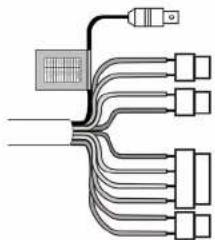
natural_image
Pure electrical circuit lines without any symbolsConnection Cable Description
| COLOR Description | |
| RED | AC24V/DC12V |
| WHITE | AC24V/DC12V |
| BLUE | RS485(-) |
| GREEN RS485(+) | |
| YELLOW ALARM OUT | |
| GRAY DN EXT-IN | |
| BLACK&WHITE DN EXT-OUT | |
| BLACK GND | |
| SKY BLUE UTP+(Option) | |
| PINK | UTP- |
1) External Day/Night Control
Select Day/Night mode using external equipment, by connecting control lines to the appropriate terminals.
- DAY&NIGHT EXTERNAL INPUT Switches the cameras D/N mode to either Day or Night based on the input status. Refer to the diagram below. The cameras D/N mode must be set to EXT for this to function.
| Black | GND |
| DAY&NIGHT INPUT Gray |
● DAY&NIGHT OUTPUT – Open Collector (5V/10mA)
The camera turns on an external IR LED Lamp by detecting the sensitivity on the AGC
level when the D&N mode is set "AUTO" on the OSD menu of the camera.
| Black&White | DAY&NIGHT OUTPUT | →● 5V/10mA : IR LED ON (NIGHT) |
| GNDBlack | →● 0V : IR LED OFF (DAY) |
2) Alarm Out - Open Collector (5V/10mA)
● Motion detection signals are output through this port. (YELLOW AND GND)
● Active state is configurable.
3) Power Input Terminal
- RED & WHITE: These terminals accept 24VAC or 12 VDC. When using 12VDC it is recommended to use a DC power supply that can support an inrush current of 0.55A
4) Camera Control
- GREEN: RS 485+
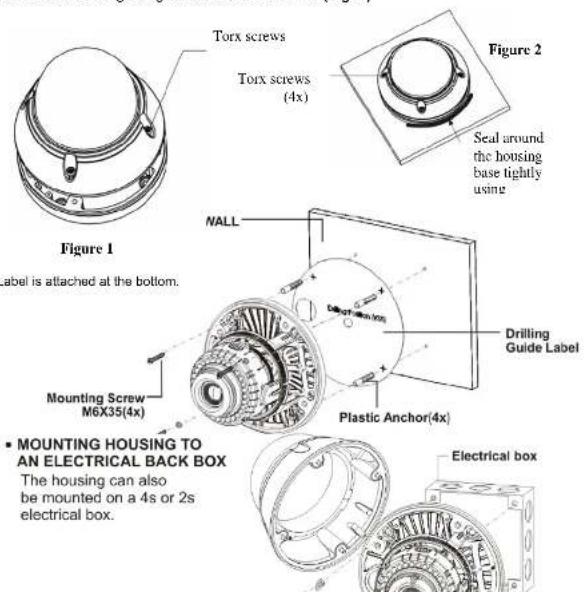
INSTALLATION - VP DOME
- Loosen the four torx screws located midway up the front of the housing leaving the screws intact in the front portion. (Fig. 1)
- Drill the mounting location, using the Drilling guide. (Fig. 3)
- Attach the housing to the ceiling using suitable fasteners, M6x35 tapping screws are supplied. Only use if they are suitable. (Fig. 3)
- Close the housing using the loosen torx screws. (Fig. 2)
INSTALLATION – INDOOR DOME
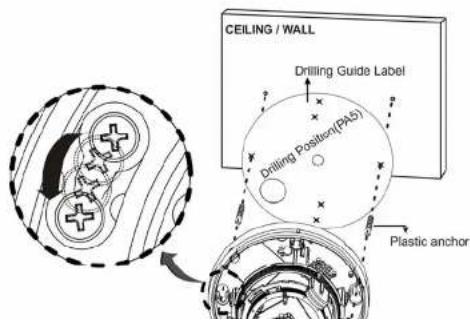
- Using the drilling guide, drill the mounting holes and cable hole in place on the ceiling or wall.
- To remove dome cover, turn the dome body counterclockwise until locators reach end of travel and pull off. Push the liner on the sides where the patterns are put in the teeth of a comb and pull it out.
- Attach the housing to the ceiling using suitable fasteners, M6x35 tapping screws are supplied. Only use if they are suitable. Turn the housing in the right direction about 16 degrees to lock in place.
- The assembly of the dome body and liner is in reverse order of disassembly. Finally, lock dome body with locking screw (M3X5) from the accessory kit.
5.
LENS ADJUSTMENT
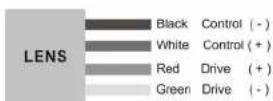
Field of view: Adjust setting from Telephoto (T) to wide (W) field of View.
Focus: Adjust lens focus from near (N) to infinity.

DC AUTO IRIS LENS
| 2.6-6mm 4-9mm | 2.8~12mm 6-50mm | ||||
| Image Size | 1/3" CCD 1/3" | CCD 1/3" CCD 1/3" CCD | |||
| Focal Length | 2.6-6.0mm 5% 4 | 0.9-0.0mm 5% 2.8 | 12mm 5% 6.0-50mm 5% | ||
| Ape. Ratio | 1:1.6 5% 1: | 1.6 5% 1:1.4 | 5% 1:1.6 6.9% | ||
| Angular Field of View (Degree) | DIAGONAL 2.6mm : 134.6 6mm : 59.2 | DIAGONAL 4mm : 92.4 9mm : 39.2 | DIAGONAL 2.8mm : 119.9 12mm : 28.8 | ||
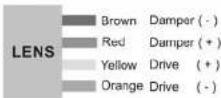

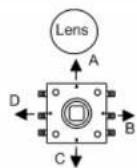
CAMERA OVERVIEW



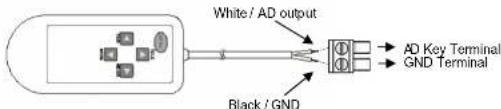
External AD Key Control (optional)
F. Test Video Output
G. External AD Key Input
H. BNC/UTP Switch
1) Menu: Represent present menu subject on top of screen.
In case of used Multi-Camset, Represent CAM ID and "camset" name included.
Common Headers:
: Currently active menu item is displayed. Move by Up/Down keys.
←: There is sub-menu. Press Enter key going to sub-menu.
v : Indicates the selected menu item.
Item: Displays the current control item you are adjusting.
Item: Disabled menu item or can't adjust.
2) Bottom Line Control Bar.
Exit: Exit menu mode. Pop-up menu rise when configuration changed.
- Overwrite: Save the changed data to save area.
- Restore: Cancel the changes. Read from save area.
- Cancel: Return to menu.
Load: Load saved data
- Default: Load default configuration from default area.
- Backup: Load saved configuration from backup area.
- Cancel: Return to menu
Save: Save current configuration
- Save: Save current configuration to save area.
Editing Area(No Save), Default(Read Only). Save Area(Use on Start), Backup
* Don't Power off while doing Save, Load, Backup, Overwrite
CAMERA ADJUSTMENT
1) ATW/Wide Mode: No limits in the range of color temperature.
2) ATW/Indoor Mode: Suitable for low color temperature.
- CRS(Color Rolling Suppression) Mode supported.
NOTE:
* When you select the CRS will be processed in the following order: Checking Condition: Checking current environment within the range. Checking Variation: Measure color rolling range during 30 seconds. User can stop this action.
No Need CRS: Variation is low. No need to use CRS function.
Force CRS: Even if color variation is low, use CRS function.
- ATW Range: Adjust AWB Range.
- Convergence Shift: Adjust AWB target.
R Variation: Represent blue variation.
B Variation: Represent red variation
3) ATW/Outdoor Mode: Suitable for high color temperature. (Natural Light)
4) Fix/Indoor Mode: Fixed color temperature (3200 °K) mode, for indoor environment.
- R: Adjust red color.
- B: Adjust blue color.
- Push/Set: Tracking WB of current screen, and represent R, B value.
- Default: Restore R, B default value.
5) Fix/FL Mode: Fixed color temperature mode, for fluorescent lamp environment.
6) Fix/Outdoor Mode: Fixed color temperature (6300 °K)mode, for outdoor environment.
NOTE:
* MIN_SHT (Minimum shutter speed) : NTSC:1/60se/ PAL:1/50sec
* MAX_SHT (Maximum shutter speed) : 1/100000sec
* FLC_SHT (Flickerless shutter speed) : NTSC:1/100sec PAL:1/120sec
1) AE Mode
- Full Auto: DC Lens or Video Lens – Fix shutter speed to MIN_SHT.
Manual Lens - Operating as shutter mode.
- Fast SHT (Fast shutter mode): Adjust range - 1/250-1/10000
- SHT Fix (Shutter Fix Mode): shutter speed is fixed at a given value.
NOTE:
* If lighting is not enough, noise may be increase.
* If lighting is enough using AGC maximum, automatically decrease shutter speed.
2) UDF (Ultra Deep Field)
B 1 1 1 1 1 1 1 1 1 1 1 1 1 1
* Motion is occurred: Fast screen update mode.
3) Low Light: If using UDF function, this function being disabled.
- AGC: Boost the signal and adjusting the brightness. (Off/Low/Mid/High)
- Sens-Up: By summing multiple fields, adjusting the proper brightness in low light conditions (2X\~256X)
- Apert: In low light conditions, reduce noise by lowing the sharpness value.
- Color: In low light conditions, reduce noise by lowing the color value.
WDR function can not be used with the BLC and is recommended Full Auto Modes.
- Visibility: Increases sharpness of the high brightness region.
- Comb Bal (Combination Balance) : Adjust the balance of High&low luminance area.
- Brightness: Adjust brightness level of WDR.
5) BLC: Back Light Compensation / BLC function can not be used with WDR function.
- EHLC (Excessive High Light Compensation) : Fill to high brightness area
with gray color. Clipping of the area is more bright area than the threshold value.
Clip Th (Clipping Threshold) : Adjust clipping level.
Clip Mask (Clip Mask Brightness) : Selecting gray color of clipping area.
- Auto: Weighting on the dark area of AE among the splitting 9 area.
- Spot: Weighting on the specified area of AE.
- Anti-Sat Weighting on the highlight area.
6) Brightness: Adjust AE reference level.
Privacy Zone can be configured with up to 10. Because they share area ID with
PVA Zone, It can not be used same ID.
1) Zone: Select mask number.
NOTE:
*If you see "PVA" in the "Func" menu PVA Function is currently being used in the area.
2) Func: Select mask on/off.
3) Color: Select mask color (15 colors available).
4) Transparency: Change the mask transparency.
5) Mosaic: Making mosaic current area.
6) Frame: Border display current area.
7) Shape: Select the shape of mask (4-point polygon or rectangle)
- Rect (Rectangle)
Adjust rectangle with 4-arrow keys. Press [ENTER] key is to finish edit area.
- Poly (4-Point Polygon/Each point can move)
It you select one of "a,b,c,d", the active point is displayed. Move the point with 4-
arrow keys. Press [ENTER] key is to finish edit area.
NOTE:
* For more than 180 of interior angle is not permitted.
- Posl: Adjust area position with 4-arrow keys.
-DVA/DVA+ (Personal Video Analytics
Global Functions: This functions being performed in the entire area.
- Output Select: It must be specify the outputs, each function will be enabled.
Press [Enter Key], to select output of each detection zone.
Alarm: Trigger alarm to output port
Communication: Event string sends on RS-485
Screen: Display on screen.
5 Back: return to previous menu.
- Detections
Motion: General motion detection
Loitering: Within a set period of time, detect loitering objects of entire screen.
NOTE:
* Please don't use as a signal for video recording start.
* The result of loitering detection can be inaccuracy.
Abandon/Absent: Detect the difference to stored background.
NOTE:
* Please don't use as a signal for video recording start.
* The result of abandon/absent detection can be inaccuracy.
Scene Change: Detect a change in the screen.
NOTE:
* It is good for detecting scene change, including vertical lines or high contrast objects of the background.
* Please don't use as a signal for video recording start.
* The result of scene change detection can be inaccuracy.
Windy Area Detection: Detect continuous movement caused by wind or etc.
If same movement occurs in same area, alarm is ignored in this area.
If no motion is detected for a period of time, windy area turns off.
NOTE:
* Please don't use as a signal for video recording start.
* In Simple mode is not supported.
* The result of windy area detection can be inaccuracy.
1) Zone Base Functions
Max 10 Zone can be configured.
NOTE:
* Because they share area ID with Privacy mask, it can not be used same ID.
- Zone: Select zone ID.
- Func(Function) : Zone Function On/Off (Blinking enabled area).
- Shape: Select area shape
Color: Select area's frame color.
Rect(Rectangle) · Adjust rectangle with 4-arrow keys
* For more than 180 of interior angle is not permitted.
Line: Select Start/End Point. It you select one of start/end, the active point is displayed. Move the point with 4-arrow keys. Press [ENTER] key is to finish edit point. Posi: Adjust area position with 4-arrow keys.
MD Event
NOTE:
* The result of MD event detection can be inaccuracy.
Zone: Configurations for various zone events.
Following area, possible events are different.
Output Select: Press [Enter] key on icon to watching event, popup box appear.
- Alarm: Trigger alarm to output port.
3) Communication: Event string sends on RS-485
Screen: Display on screen.
Back: return to previous menu.
12 : Send event to counting machine. (OFF : No Effect /
INC : Increment counting value. / DEC : Decrement counting value)
NOTE:
* The result of counting value can be inaccuracy.
Screen: Printed event at bottom side by side scrolling.
| Icon | Subject | Range | |
| Motion | Rect.Poly.Line | Motion occurred. | |
| Motion Inside | Rect, Poly | Motion occurred in the area. | |
| Move Into | Rect, Poly | Object on outside moves into the area. | |
| Appear Inside | Rect, Poly | Object which appeared inside. *) In Simple mode is not supported. | |
| Move Out | Rect, Poly | Object moves out. *) Please don't use as a signal for video recording start. | |
| Appeared & Move Out | Rect, Poly | Object which appeared inside, and moves out *) Please don't use as a signal for video recording start. *) In Simple mode is not supported. | |
| Disappear Inside | Rect, Poly | Object disappeared inside. *) Please don't use as a signal for video recording start. *) In Simple mode is not supported. | |
| Moved In & Disappear | Rect, Poly | Objects from outside, move into inside, and disappears inside. *) Please don't use as a signal for video recording start. *) In Simple mode is not supported. | |
| Loitering | Rect, Poly | Detect moving object within the zone during arecording start. *) In Simple mode is not supported. | |
| ↓ ↓ ↓ | In & Out Direction | Rect | Detect object moving. From top to enter of area, detecting direction of moving out. *) Please don't use as a signal for video recording start. *) In Simple mode is not supported. |
| ↓ ↓ → ↑ | In & Out Direction | Rect | Detect object moving. From right to enter of area, detecting direction of moving out. *) Please don't use as a signal for video recording start. *) In Simple mode is not supported. |
| ↓ ← ↩ ↕ | In & Out Direction | Rect | Detect object moving. From left to enter of area, detecting direction of moving out. *) Please don't use as a signal for video recording start. *) In Simple mode is not supported. |
| ↑ ↑ ↗ ↙ | In & Out Direction | Rect | Detect object moving. From bottom to enter of area, detecting direction of moving out. *) Please don't use as a signal for video recording start. *) In Simple mode is not supported. |
| ← | Move Clockwise | Line | Event will occur the object moves in a clockwise direction that start around. *) Please don't use as a signal for video recording start. |
| → | Move Conter-Clockwise | Line | Event will occur the object moves in a counter-clockwise direction that start around. *) Please don't use as a signal for video recording start. |
Path Event: Detect route between two zones. (Max.10 path detection is possible).
NOTE:
* Disabled zone can not be configured.
* In Simple mode is not supported.
* The result of path event detection can be inaccuracy.
Output Direction Setup: same as zone output configuration.
Clear All: All path combinations clear.
2) Env.Setup(Environment setup): Configurations for each PVA functions.
- Md Sens(MD Sensitivity) : Adjust motion sensitivity.(HW sensitivity)
- Loiter Time (min): Time for judge to loitering object.
- Abandon/Absent Setup
Sens(Sensitivity) : Adjust sensitivity of abandon/absent detection.
Det Time (min): Time for judge to absent/abandon area.
Rst Time (sed): Time for maintain event. After this, background will be update.
- Scn Chg Setup (Scene Change Setup)
Sens(Sensitivity) : Adjust sensitivity of scene change detection.
Chg Ratio: Adjust judgment ratio that changed from the stored background.
Det Time (sec): Time for iudae scene chaoinga.
Rst Time (sec): Time for release to windy object that staying with no motion
3) Display Setup: Configuration for information on screen.
NOTE:
* Priority: Abandon/Absent > Loiler > Moving Object > Windy
* Same priority: large object size order
Alarm: Represent alarm icon on right-up side by of screen.
Counter: Represent counting on left-bottom. (Det Only: When an event occurs)
Zone Area: Represent active zone.
Moving Object: Represent moving object with white rectangle.
Loitering: Represent loitering object with green rectangle.
Abandon/Absent: Represent abandon/absent area with wine colored rectangle.
Windy Area: Represent moving object with violet rectangle.
4) dTracking Setup : Configurations for digital Pan/Tilt/Zoom.
NOTE:
* Prority : Tracking priority : Zone > Loitering > Abandon/Absent > Obj.
* Maximum 4 objects can be represented.
* Same priority: Continuing detect. And Obj. > Size
All Object: Tracking all detected object.
Loitering: Tracking detected loitering object.
Abandon/Absent: Tracking detected absent/abandon area.
Zone: When zone event rising, tracking the area.
Menu for adjustment of video quality and DNR.
2) 3D-NR: Adjust 3D-NR strength. Remove noise by summing several frames.
3) DNR Demo: Represent DNR effect. Left side is none DNR screen,
right side is DNR screen.
4) Color Enh(Color Enhance): Adjust of color strength.
1) Freeze: When [ENTER] key pressed, still image will be output on the screen.
2) d-Effect: Off/Rotation/Mirror/V Flip
3) Nega (Negative Picture): Inverse color effect.
4) DIS (Digital Image Stabilization): Compensation to image vibration.
Because of this function used d-ptz, screen magnification will be changed.
5) dPTZ Preset : Configuration for dPTZ preset. It will be applied when menu exit.
Zoom: Adjust magnification.
Pan&Tilt: Adjust Pen/Tilt position.
Up/Down: Adjust tilt position
Left/Right: Adjust pan position.
6) i-Freeze: Select term of refresh rate for output video. This function is useful to reduce the recording data storage. When motion is detected while i-Freeze, image is refresh to live mode. So not only reducing the recording data but also not to miss object
- Cam Info: Display camera basic information.
NOTE:
* Cam ID/Baud rate/Protocol/Lens Type/CCD Type/Video System/Firmware Version
- System Lock: System locking by 4-characters PID (Lock/Unlock)
- Change PID: Change PID used in the system lock.
NOTE:
* Enter PID: Input previous password. Default PID is "0000".
* Enter New PID: Input new password.
* Retype New PID: Confirm of new password.
- Title: Change camera title. Max. 8-characters.
- Display: Configurations for display camera ID&title.
Cam ID: Select camera ID display on/off.
Title: Select title display on/off.
Display Pos: Change position the string location.
- Language: Change menu&OSD language.
2) Setup Tools
- System Config
Multi-Camset: Select On (User can use 4 configuration sets)/off
Video Analytics: Select PVA mode. (Simple PVA/ PVA+)
Communication: Configuration for RS-485.
Cam ID: Select the camera ID (001 - 255).
Baud Rate: Select serial communication speed (2400/4800/9600/19200).
Protocol : RS-485 protocol. (Auto, FASTRAX/PELCO-D/PELCO-P)
Event Out: Off, Text-Out, FxLink
Event Strings: Select&edit sending strings for PVA/PVA+ Events.
NOTE:
* Text Out: Send event string through RS-485 line.
This function can work with IDIS DVR's Text-in feature.
* FxLink: Send event to PC application.
- WPC (White Pixel Compensation) : Compensation for defected pixel on CCD.
NOTE:
* While operating on WPC, Iris will be closed automatically if you using DC/IRIS Lens.
For manual lens, you have to block the lens hole.
Static/Auto: Automatic detecting for defected pixel & compensation.
Proceeding: Doing detection for white pixel.
NOTE:
* If brightness is too high, stop the process and print message "Bright Too High".
* This function can compensate max. 63 points.
* If detected points are more than 63 points, repeats this detection by changes conditions.
- If more than 63 point while changing conditions, stop the process, and print "Too Many WH
FIXERS
* User can stop the proceeding while on operating.
Automated white pixel compensation for not compensated pixel by static method.
No limits of compensation pixel number.
Select level (Low/Mid/High). Higher value setting is compensating more pixels.
NOTE:
* If the scene contains high frequency components can cause a loss.
Static/Manual: Manual white pixel compensation by appointment method.
Move Finder window using 4-arrow keys
Marker: Expand finder window using digital zoom.
Move compensation pixel using 4-arrow keys.
Register: Adding compensation pixel.
NOTE:
* Registered points are more than 63 points, print "Memory Full" and stops action.
Marker: Use this if user sees other points.
Finder: Use this when you need to move finder screen.
UnDo: Cancel the registered point.
Done: Return to previous menu.
Unregist: Deleting registered pixel.
NOTE:
* No more exist register pixel, Print "Memory empty" and stops action.
Marker: Select for if you continue unregister action.
UnDo: Cancel the unregistered point.
Done: Return to previous menu.
Default: Recover to factory adjustment state.
- Focus Aid
For prevent the spread of light, AE mode changed to Shutter Fix Mode.
Min SHT (sec): Adjust minimum shutter speed.
Zoom: Zoom to focus window.
Adj: Adjust.
Start: Start measurement of maximum focus value
Stop: Stop the measurement. And initialize maximum focus value.
NOTE:
* FAD Max: Hold maximum focus value.
* FAD Val: Print present focus value.
Usage.
Step1: Point target to focus window.
Good target: higher contrast, more complex patterns.
Step2: Minimize the spread of light with adjust shutter speed.
Step3 : Turn the lens focus ring to end, start "Adj"
Step4: Turn the lens focus ring slow by opposite side, record max focus value.
Step5: If current lad value is lower (than Max lad value, stop turning focus ring.
Step6: Adjust focus ring to be closer to the max fad value.
3) Lens : Select lens (DC lens/Video lens/Manual Lens)
Active only used AC Power. - Int(Internal)/Ext(External)
If mode is set to Ext, Sync Phase can be adjusted.
5) Day/Night
- Detection: Configuration D/N change method. (Internal/Fix-Day/Fix-Night/EXT-IN)
Internal: Operating DN changing with internal detection algorithm.
Fix-Day: Day mode fixed
Fix-Night: Night mode fixed.
External: Work with EXT-IN mode. If port input voltage is high,
DN mode is Night. And If port w voltage is low, DN mode is Day.
- IR Led Adj.: Adjust IR led brightness (Auto/Lowest/Low/Mid/High/Highest).
- Burst: Select burst signal on/off at night mode.
- Delay (sec): Select Delay time in D/N mode changing.
- D/N Threshold: Configuration for threshold level in D/N mode changing.
(Low/Mid/High/User)
NOTE:
* User Mode : Difference of D>N Level and N>D Level must be more than 2,
and D>N must be less than N>D.
D>N: Adjust level that changing point of Day -> Night.
N>D: Adjust level that changing point of Night -> Day.
- OPD: Optical detector value. Represent present physical brightness.
- Use Alt Camset(N), Alt Camset:
Select camera configuration set to apply in night mode.
NOTE:
* Not support in single camset mode.
6) EXT-I/O
- D/N OUT (Day&Night Output) : Select output method, No Func/D/N Out/AUX0
AUX0: User Defined output 0
Set AUX0: Output voltage through to D/N OUT port (Open Collector (5V/10mA))
- ALARM OUT: Select output method, No Func/Alarm Out/AU
AUX1: User Defined output 1.
Set AUX1: Output voltage through to D/N OUT port (Open Collector (5V/10mA))
- D/N IN: Select input method. No Func/Alt Camset.
Alt. Camset: When inputted signal, change camera configuration.
Select camset number
7) Counter: Configurations for output of counting machine.
- 1.2 : Represent counting value / adjust offset value.
- Alarm On Zero: When counter value reached zero, will be alarmed.
Preset Cnt1, Cnt2: When counter value reaches zero, will be reset this value.
Reset: Initialize counter. (Default Zero, or Alarm on zero enabled: Offset Value)
TextOut to Comm: Event string sends through RS-485 lines.
NOTE:
* Event Out must be activated.
EXTERNAL DIMENSION - VP DOME
| ∅99.0(INNER ∅93.0) 57.5 113.7 ∅146.3 | ∅121.0 4-Ø6.4 5 PF 3/4" TAP 15 |
| Window Size | 0.1 in. (2.5mm thick), impact-resistant P.C (LEXAN) 3.93 in. (10cm) diameter |
| Cable Entry One 1" (25mm) opening holes | |
| Weight – Unit: Shipping: | 1.66 lb. (760 g) 2.11 lb. (960 g) |
| ∅99.0(INNER ∅93.0) 57.5 113.7 ∅146.3 | ∅121.0 4-Ø6.4 5 PF 3/4" TAP 15 |
| Window Size | 0.1 in. (2.5mm thick), impact-resistant P.C (LEXAN) 3.93 in. (10cm) diameter |
| Cable Entry One 1" (25mm) opening holes | |
| Weight – Unit: Shipping: | 1.66 lb. (760 g) 2.11 lb. (960 g) |
EXTERNAL DIMENSION - INDOOR DOME
 | 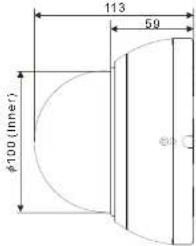 |
| Unit: mm | |
| Window Size | 0.1 in. (2.5mm thick), impact-resistant P.C (LEXAN) 3.93 in. (10cm) diameter |
| Cable Entry One 1" (25mm) opening holes | |
| Weight – Unit: Shipping: | 0.99 lb. (450 g) 1.41 lb. (640 g) |
SPECIFICATIONS (WDR)
| ITEM NTSC PAL | |
| ELECTRICAL | |
| Input Voltage DUAL(DC12V, AC24V) ±10% | |
| Power Consumption IR Off: 3.5 Watts(300mA) / IR On:6.0 Watts(500mA) | |
| Power Connector 2-Pin Terminal Block | |
| VIDEO | |
| Image Device 1/3" Sony Super-HAD II PS 960H CCD | |
| Total Pixels 1020(H) x 508(V) 1020(H) x 596(V) | |
| Effective Pixels 976(H) x 494(V) 976(H) x 582(V) | |
| Scanning System 2:1 Interface | |
| Sync. System Internal / Line Lock (Phase Control) | |
| Scanning Freq. 15.734KHz(H),59.95Hz(V) 15.625KHz(H),50Hz(V) | |
| Horizontal Resolution 700TVL | |
| Min. illumination | 0.1 Lux(Color), 0.01 Lux(BW), 0.0001 Lux(Sens-Up BW) @ F1.2 50IRE |
| IR LED 30no 850nm IR LEDs / Distance : 30m | |
| S/N (Y signal) More than 50dB | |
| Video Output | CVBS 1.0Vp-p, 75Ω, UTP(OPTION) |
| OPERATIONAL | |
| WDR | x512(Level Adjust), WDR-Full |
| White Balance | ATW/Wide, ATW/Indoor, ATW/Outdoor, Fix/Indoor, Fix/Outdoor, Fix/FI, CRS, ATW Range Adjust |
| Exposure | Full Auto , Manual Shutter , Flickerless, Low Light(AGC, Sens-Up), UDF(Ultra Deep Field) |
| Electronic Shutter | 1/60 ~ 1/10,000 1/50 ~ 1/10,000 |
| Speed | Auto : ~ 100,000 Auto : ~ 100,000 |
| Dynamic Noise Reduction | 2D + 3D : Gain Adjust, DNR Demo |
| Day & Night | Auto , Day , Night , Ext |
| Sens-up | x256 |
| Backlight Compensation | EHLC , AUTO , SPOT |
| Motion Detection& Video Analytics | PVA(Motion, Loitering, Abandon, Scene Change, Unfocus, Windy Area)/ Simple(Motion, Loitering, Abandon, Scene Change) |
| Digital Image Stabilizer | OFF / ON |
| Privacy Masking | Max 10 (4-point polygonal, Color, Transparency, Mosaic ) |
| Digital Zoom | x4 / D-PTZ Support |
| Digital Image Effect | V-FLIP, MIRROR , ROTATION , NEGA&POSI , FREEZE , SHARPNESS, STILL SHOT |
| Display | Camera Name : ON / OFF/Adjustable Location Camera ID : ON / OFF/Adjustable Location |
| Language | English,German(TBD),French(TBD),Portuguese(TBD),Spanish(TBD) |
| Camera ID | 001~255 |
| Camera Control | Tact Switch , RS485 |
| Protocol | Auto, FASTRAR , PELCO-D, PELCO-P |
| Connector & etc | |
| Power input | Terminal block |
| Video output | BNC, UTP |
SPECIFICATIONS (WDR-Lite)
| ITEM NTSC PAL | ||
| ELECTRICAL | ||
| Input Voltage DUAL(DC12V, AC24V) ±10% | ||
| Power Consumption IR Off: 3.5 Watts(300mA) / IR On:6.0 Watts(500mA) | ||
| Power Connector 2-Pin Terminal Block | ||
| VIDEO | ||
| Image Device 1/3" Sony EXview 960H CCD II | ||
| Total Pixels 1020(H) x 508(V) 1020(H) x 596(V) | ||
| Effective Pixels 976(H) x 494(V) 976(H) x 582(V) | ||
| Scanning System 2:1 Interface | ||
| Sync. System Internal / Line Lock (Phase Control) | ||
| Scanning Freq. 15.734KHz(H), 59.95Hz(V) 15.625KHz(H), 50Hz(V) | ||
| Horizontal Resolution 700TVL | ||
| Min. illumination | 0.1 Lux(Color), 0.01 Lux(BW), 0.0001 Lux(Sens-Up B/W) @ F1.2 50IRE | |
| IR LED 30no 850nm IR LEDs / Distance : 30m | ||
| S/N (Y signal) More than 50dB | ||
| Video Output | CVBS 1.0Vp-p, 75Ω , UTP(Optional) | |
| OPERATIONAL | ||
| Image Enhancement | WDR-Lite | |
| White Balance | ATW/Wide, ATW/Indoor, ATW/Outdoor, Fix/Indoor, Fix/Outdoor,Fix/FL, CRS, ATW Range Adjust | |
| Exposure | Full Auto , Manual Shutter , Flickerless, Low Light(AGC, Sens-Up),UDF(Ultra Deep Field) | |
| Electronic Shutter | 1/60 ~ 1/10,000 | 1/50 ~ 1/10,000 |
| Speed | Auto : ~ 100,000 | Auto : ~ 100,000 |
| Dynamic Noise Reduction | 2D + 3D ; Gain Adjust, DNR Demo | |
| Day & Night | Auto , Day , Night , Ext | |
| Sens-up | x256 | |
| Backlight Compensation | EHLC , AUTO , SPOT | |
| Motion Detection&Video Analytics | PVA(Motion, Loitering, Abandon, Scene Change, Unfocus, WindyArea)/ Simple(Motion, Loitering, Abandon, Scene Change) | |
| Digital Image Stabilizer | OFF / ON | |
| Privacy Masking | Max 10 ( 4-point polygonal. Color, Transparency, Mosaic ) | |
| Digital Zoom | x4 / D-PTZ Support | |
| Digital Image Effect | V-FLIP, MIRROR, ROTATION , NEGA&POSI , FREEZE ,SHARPNESS, STILL SHOT | |
| Display | Camera Name : ON / OFF:Adjustable LocationCamera ID : ON / OFF:Adjustable Location | |
| Language | English,German(TBD),French(TBD),Portuguese(TBD),Spanish(TBD) | |
| Camera ID | 001~255 | |
| Camera Control | Tact Switch , RS485 | |
| Protocol | Auto, FASTRAX . PELCO-D, PELCO-P | |
| Connector & etc | ||
| Power input | Terminal block | |
| Video output | BNC, UTP (Option) | |
MEMO
MEMO
MEMO
WDR Super High Resolution
Day & Night Color Camera
- Super High Resolution Day & Night Color Camera (Optional WDR)
- WARNING
- CAUTION
- EXPLANATION OF GRAPHICAL SYMBOLS
- FCC COMPIANCE STATEMENT
- IMPORTANT SAFETY INSTRUCTIONS
- PRECAUTIONS
- Cleaning
- TABLE OF CONTENTS
- CONTENTS OF PACKAGE
- INTRODUCTION
- Features:
- ● PVA/PVA+ (Personal Video Analytics)
- CAMERA CONNECTIONS
- 1) External Day/Night Control
- INSTALLATION - VP DOME
- INSTALLATION – INDOOR DOME
- LENS ADJUSTMENT
- DC AUTO IRIS LENS
- CAMERA OVERVIEW
- CAMERA ADJUSTMENT
- NOTE:
- 1) AE Mode
- 2) UDF (Ultra Deep Field)
- 1) Zone Base Functions
- MD Event
- 2) Setup Tools
- - System Config
- - Focus Aid
- 5) Day/Night
- 6) EXT-I/O
- EXTERNAL DIMENSION - VP DOME
- EXTERNAL DIMENSION - INDOOR DOME
Brand : REVO
Model : REVDN700E-2
Category : Security Camera