
RBL-S - Portable radio REVO - Free user manual and instructions
Find the device manual for free RBL-S REVO in PDF.


| Product Type | Bluetooth Remote Shutter Control |
| Brand | REVO |
| Model | RBL-S |
| Compatible Products | Sony cameras with Bluetooth and power zoom |
| Operating Distance | 32 ft (10 m) |
| Battery Type | 3 V CR2032 |
| Operating Temperature | 32°F to 104°F (0°C to 40°C) |
| Dimensions (H × W × D) | 0.5 × 1.25 × 4.3 in (12.7 × 32 × 110 mm) |
| Weight | 0.7 oz (21 g) |
| Key Functions | Shutter release, focus, zoom, video start/stop, AF-ON, C1 button, lock switch |
| Zoom Control | Wide-angle (W) and telephoto (T) buttons |
| Video Recording | Press shutter release to start/stop |
| Pairing Method | Press and hold Shutter + T for 7 seconds |
| Indicator LED | Flashes to confirm pairing, shutter, and video recording |
| Lock Switch | Prevents accidental button presses |
| Battery Installation | Turn battery cover with coin, insert CR2032 with (+) up |
| Warranty | One-year limited warranty |
| Precautions | Avoid water, extreme temperatures, flammable gas; keep away from children |
| Trademarks | Bluetooth word mark and logos owned by Bluetooth SIG, Inc. |
| Customer Service | 212-594-2353 or revocinegear.com |
Frequently Asked Questions - RBL-S REVO
User questions about RBL-S REVO
0 question about this device. Answer the ones you know or ask your own.
Ask a new question about this device
Download the instructions for your Portable radio in PDF format for free! Find your manual RBL-S - REVO and take your electronic device back in hand. On this page are published all the documents necessary for the use of your device. RBL-S by REVO.
USER MANUAL RBL-S REVO
Remote Shutter Control for Sony
REVO
Thank you for choosing Revo.
The Revs Bluetooth® Remote allows you to trigger your camera and various functions from up to 32 feet away. Use Bluetooth® low-energy technology In wirelessly short photos and start and stop videos. Adjust focus and control your zoom from wide-angle to telephoto with Sony's compatible power-zoom equipped cameras and lenses. Carry the compact remote in your pocket and operate your camera at a distance. Functions vary depending on camera make and model.
Specifications
Operating distance: 32 ft. (10 m)
Battery type: 3 V CR2032
Operating temperature: 32°F to 104°F
(0°C to 40°C)
Dimensions (H × W × D): 0.5 × 1.25 × 4.3 in.
(12.7 × 32 × 110 mm)
Weight: 0.7 oz. (21 g)
Precautions
Please read and follow these instructions, and keep this manual in a safe place.
There are no user-serviceable parts inside the devices. Do not attempt to disassemble or perform any unauthorized modification.
Do not operate in the presence of flammable gas.
vapors, or water. Batteries are prone to leakage when fully
discharged. To avoid damage to the product, be sure to remove the battery when leaving the product unattended for prolonged periods or when no charge remains.
When disposing of batteries, insulate the electrical contacts with tape. Contact with metal objects or batteries rise cause a fire or extinguire.
Do not use or leave the device in conditions of
extreme heat or cold. Avoid exposing this product to water or extreme humidity, and keep it in a cool, dry place.
Keep out of reach of children. This device contains small parts which may pose a shock hazard. All images are for illustrative purposes only.
If the Camera Won't Trigger
- Make sure the plastic separator is removed from the battery.
- Make sure the battery is installed with the correct polarity.
- Set your camera for remote triggering.
• Make sure the camera and remote are paired together, and you are within range. - Make sure the lock switch is not engaged.
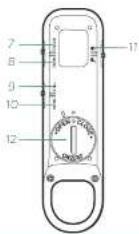
Overview
- Indicator LED
- Wide-angle zoom button
- Telephoto zoom button
- Shutter release button
- AF-ON button
- Cl button Function is the same as the Cl button on the camera. Refer to the camera's manual for the Cl button setup instructions.
- Focus Performs focus function while pressing W (close-up) and T (long distance) buttons. The camera must be set to manual focus (MF).
- Zoom Performs zoom function while pressing W (wide angle) and T (telephoto) buttons.
- Still: Photo trigger Press the shutter release button to focus and Trigger the camera for a single picture. The indicator LED will flash once.
- Movie: Video start/stop
Set your camera to video mode. Press the shutter release once to start recording video. Press again to stop. The Indicator LED will flash when recording starts and stops.
Note: Check your camera's manual for instructions on capturing video with a remote.
TI. Lock Locks the remote's controls. - Battery compartment cover Uses a CR2032 type battery.

Inserting the Battery
1 Place a coin or similar object into the groove of the battery cover, and turn in the open position to remove the cover.

-
Remove the plastic separator from undermeach the battery before use.
-
Insert the CR2032 battery with the (+) facing up.
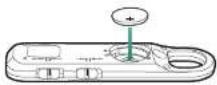
- Return the battery cover and turn to the close position.

Pairing the Remote and Camera
Note: See your camera's manual for instructions on selling your camera to remote pairing mode.
-
On the camera, select MENU>
@[network]>Bluetooth Settings>
Bluetooth Function>On -
On the camera, select MENU> network>Bluetooth Ctrl>On
-
On the camera, select MENU> network>Bluetooth Settings=Pairing
- On the remote, press and hold the Shutter release button and T button simultaneously for 7 seconds or more. The remote's indicator LED will blink. Confirmation will appear on the camera's LCD when accepted. When a confirmation message appears on the camera's screen, select OK. When pairing is complete, Paired will appear.
Note: If you're having trouble pairing, go to your camera's menu and initiate Reset Network Setting.
Trademarks
The Bluetooth ^® word mark and logos are registered trademarks owned by Bluetooth SIG, Inc. and any use of such marks by Hevo is under license. Other trademarks and trade names are those of their respective owners.
One-Year Limited Warranty
This fixed product is warranted to the original purchaser to be first from defects in materials and workmanship under normal consumer use for a period of one (1) year from the origin, purchase date or thirty 130's, days after replacement, whichever occurs later. The warranty provider's responsibility with respect to this limited warranty shall be limited solely to repair or replacement at the provider's discretion, of any product that fails during normal use of this product in its intended manner and in its intended environment. Responsibility of the product or part(s) shall be determined by the warranty provider. If the product has been discontinued, the warranty provider reserves the right to replace it with a mode of equivalent quality and function.
This warranty does not cover damage or defect caused by misuse, neglect, accident, alteration, abuse, improper installation or maintenance. EXCEPT AS PROVIDED HEREIN, THE WARRANTY PROVIDER MAKES NEITHER ANY EXPRESS WARRANTIES NOR ANY IMPLIED WARRANTIES, INCLUDING BUT NOT LIMITED TO ANY IMPLIED WARRANTY OF MERCHANTABILITY OR FITNESS FOR A PARTICULAR PURPOSE. This warranty provides you with specific legal rights, and you may also have additional rights that vary from state to state.
To obtain warranty coverage, contact the Revs Customer Service Department, to obtain a return merchandise authorization [RMA] number, and return the defective product to Revs along with the RMA number and proof of purchase. Shipment of the defective product is at the purchaser's own risk and expense.
For more information or to arrange service, visit revocinegear.com or call Customer Service at 212-594-2353.
Product warranty provided by the Gradus Group.
www.gradusgroup.com
Revo is a registered trademark of the Gradus Group.
© 2021 Gradus Group LLC. All Rights Reserved.
(续)4
Brand : REVO
Model : RBL-S
Category : Portable radio