Captain Cook R32128202 - Watch Rado - Free user manual and instructions
Find the device manual for free Captain Cook R32128202 Rado in PDF.


User questions about Captain Cook R32128202 Rado
0 question about this device. Answer the ones you know or ask your own.
Ask a new question about this device
Download the instructions for your Watch in PDF format for free! Find your manual Captain Cook R32128202 - Rado and take your electronic device back in hand. On this page are published all the documents necessary for the use of your device. Captain Cook R32128202 by Rado.
USER MANUAL Captain Cook R32128202 Rado
Innovative, durable and skin-friendly: introduced by Ratio in 1996, high-tech ceramic has become our signature. In metallic or non-metallic colors, with a glossy, matt satin-brushed or decorated finish, it is the most versatile of our materials.
HIGH-TECH HARDMETAL
Pure, simple and tough: we pioneered the use of this material by introducing the scratch-resistant watch, Diastar 1 (The Original), in 1962.
CERAMOS
Ceramos™ combines high-tech ceramic - specifically titanium carbide - with a metallic alloy. Light and adaptable to skin temperature, it has the same qualities and benefits as high-tech ceramic, enhanced by a metallic luster.
CARBON DIFFUSED STEEL
Through the diffusion of a high quantity of carbon at a low temperature, this treatment makes it possible to harden the surface of steel parts.
SAPPHIRE CRYSTAL
High-tach sapphire crystal is used throughout our collection. The application of edge-to-edge crystal and metallization are standard features of Radio.
NOTE: In order to reduce reflection, the sapphire crystal of some Radio collections has an anti-refriscites coating on both sides. With time scratches may appear on the anti-reflective coating, this is normal wear and tear.
HOW HARD IS HARD?
The hardness of Hado high-tech materials guarantees durability and brilliance. The Vickers scale is used to indicate hardness: the higher a value, the greater the resistance.
The value of 10,000 is attributed only to natural diamonds and to the Rado high-tech diamond surface.
NOTE: Rado watches are hard but not indestructible. Although our high-tech materials are resistant, Rado watches must be treated with care. They should not be dropped, and sharp knocks should be avoided. If bit hard enough, the materials may break.
PRECIOUS STONES
The name "Jubilié" refers to all the Rade products with diamonds or other precious
stones. Depending on the model, the name "Jubile" may or may not figure on the dial. Details regarding the precious stones used on Jubilé watches may be found on the accompanying Precious Stone Certificate.
The quality of a diamond is defined by 4G's: Carat, Clarity, Color and Cut.
CARAT
The weight of a diamond is measured in carals. 1 caral is the equivalent of 0.2 grams. Stones of various weight classes and sizes are used in Rado 'Jublié' models.
CLARITY
The diamond clarity rating of slones used by Radc is generally V/S (Very Very Small Inclusions) on the case and VS SI (Very Small - Small Inclusions) on the dial.
COLOR
The color spectrum ranges from colorless to yellow.
Ratio uses Top Wessellan (superior quality) diamonds.
CUT
The cut determines the fire, brilliance and the luster of the diamond. Nearly all Radio diamonds are classed as 8/8 or full cut (brillian).
There is no uniform nomenclature for describing the purity and color of other precious stones. Rado uses only precious stones of high quality.
QUARTZ WATCHES
Rado quartz watches are equipped with top-quality Swiss button-type zinc-silver oxide or lithium batteries. Under
normal conditions, a battery should last at least 30 months. The battery must be changed when the seconds hand starts to move in 4-second intervals (or when, on a multifunction watch, the digital display begins to blink). Battery exhaustion in a watch without a seconds hand becomes apparent only when the hands stop moving together. Battery changes should only be performed by an authorized Rado dealer or Service Center to ensure that only original parts are used and that your watch is properly lost for water resistance. A worn-out battery should be replaced immediately in order to reduce the risk of leakage and consequent damage to the movement.
Collection and treatment of end of life quartz watches: This symbol indicates that this product should not be disposed with household waste. It has to be returned to a local authorized collection system. By following this procedure
you will contribute to the protection of the environment and human health. The recycling of the materials will help to conserve natural resources.
CE Valid in the EU member states and in any countries with corresponding legislation.
IMPORTANT: Magnetic fields can affect the accuracy of the select.
NOTE: Date setting is not recommended between 8 pm and 2 am.
AUTOMATIC WATCHES
Automatic watches are precision instruments powered by the wearer's movement
Before using your automatic watch, we strongly advise venting the watch by turning the crown 15-20 times. A fully wound Radio automatic watch has a running reserve of at least 36 hours. If the watch stops (e.g. if it has not been worn for some time or during periods of low activity), it should be wound manually. To wind an automatic watch man early places the crown in position 1. Turn the crown forwards several times.
SWISS PRECISION
The name Rado guarantees a Swiss quality watch movement of great precision. Every movement undergoes numerous controls before being installed in a Rado watch. The average deviation of a Rado quartz watch should not exceed 15 seconds per month. The average deviation of a Rado automatic watch should not exceed -6 to +20 seconds per day.
WATER RESISTANCE
All Rado watches are water resistant. They can withstand a water pressure of at least 3 bar (depth of 30 meters). Water resistance is not a permanent condition. To ensure permanent water resistance, the watch should be checked once a year.
To ensure conformance with the warranty regulations, these operations must be performed by an authorized Rado dealer or authorized Rado Service Center.
NOTE: Water resistance information in "meters" or "bar" refers to theoretical pressure and temperature test norms and does not indicate actual diving depths.
IMPORTANT: To ensure optimal water resistance, the following must be observed after every operation involving the crown, return it to position 1 or across it back in by
pressing and turning it forwards simultaneously. Avoid shocks to the crown. Do not use either the crown or chromatograph posters underwater.
TEMPERATURE
Avoid exposing your Rado watch to extreme temperatures higher than 60°C/140°F or lower than 0°C/32°F, extreme changes in temperature, or high humidity.
MAINTENANCE
Please note that having your Rado watch serviced every 5 to 7 years will not only prolong its life but also maintain its value. For perfect maintenance, please visit only your official Radio dealer or Service Center (a list of Rado Service Centers can be found at the end of this manual or on the Internet). Your Rado watch will also benefit from being cleaned from time to time with lukevarn,
sightly soapy water and the help of a toothbrush. This cleaning is especially recommended if the watch has been in contact with salt water or cosmetics.
LEATHER STRAPS
Rado straps are made using leathers that were treated to achieve a special look and feel. Each piece can differ and the colour may vary slightly.
To preserve the condition of your leather strap for as long as possible please avoid contact with water, dameness, prolonged exposure to sunlight or with greasy substances and cosmetic products.
SKIN-FRIENDLINESS
For Raco, luxury means not only beauty and exquisite materials, but also personal comfort. Apart from ensuring durability, our high tech materials ensure that Raco watches are gentle to the skin and smooth on the wrist.
OPERATING INSTRUCTIONS
HOW TO FIND THE RELEVANT SECTION
| FOR YOUR WATCH |
| Engraved on the back of your watch is an 8-digit reference number. The first three digits refer to the movement. In the reference number 115.0653.3, for example, 115 is the caliber used in the watch. Please review the following caliber list and refer to the relevant section. |
Callbers:
| 073, 079 | page 21 |
| 080 | page 23 |
| 082 | page 21 |
| 084 | page 22 |
| 111, 113 | page 21 |
| 114 | page 22 |
| 115, 129 | page 21 |
| 140, 150 | page 23 |
| 152 | page 21 |
| 153 | page 23 |
| 156, 157, 160, 161 | page 21 |
| 193, 210 | page 42 |
| 212, 218, 219, 239, 256, 271 | page 21 |
| 277 | page 24 |
| 278 | page 21 |
| 289 | page 34 |
| 290 | page 47 |
| 291 | page 21 |
| 312 | page 37 |
| 318, 322 | page 23 |
| 320 | page 38 |
| 420 | page 23 |
| 510 | page 57 |
| 538, 559 | page 37 |
| 541 | page 39 |
| 542 | page 37 |
| 600, 657, 561, 580 | page 46 |
| 603 | page 55 |
| 604 | page 54 |
| 609, 629 | page 48 |
| 636 | page 50 |
| 642 | page 56 |
| 648 | page 50 |
| 650, 657, 653 | page 51 |
| 656, 657, 658, 661 | page 48 |
| 663 | page 52 |
| 674 | page 55 |
| 734, 763 | page 48 |
| 764 | page 50 |
| 765 | page 27 |
| 766 | page 48 |
| 770 | page 50 |
| 771 | page 56 |
| 772, 773 | page 49 |
| 963 | page 23 |
| 964 | page 24 |
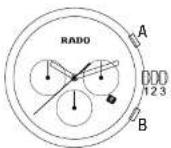
QUARTZ WATCHES
WITH DATE DISPLAY
CALIBERS: 073, 079, 082, 111, 113,
115*, 129*, 152, 156, 157*, 160, 161*,
212, 218, 219, 239, 256, 271, 278*, 291
* On certain models these movements have no date display (jewelry version) and only the positions 1 and 3 are functional.
THE CROWN HAS 3 POSITIONS
1. Normal position
When pressed in against the case (position 1), the crown ensures that the watch is water-resistant (if not damaged).
2. To set the date
Full the crown out to position 2, turn it forwards or backwards (depending on the movement) to the desired date.
Push the crown back to position 1.
3. To set the time
Full the crown out to position 3 and turn it forwards or backwards to the desired time. If the watch is equipped with a seconds hand, accept by pushing the crown back to position 1 to coincide with a given time signal.
QUARTZ WATCHES WITH DATE DISPLAY AND MOON PHASE CALIBER: 084
THE CROWN HAS 3 POSITIONS
1. Normal position
When pressed in against the case (position 1), the crown ensures that the watch is water-resistant (if not damaged).
2. Set the date and moon phase
To set the moon phase, pull the crown out to position 2 and turn a backwards until the full moon appears in the centre of the moon phase dial. Use a calendar that lists the moon's phases to find out the date of the last full moon. Turn the crown backwards again until the moon is in the position indicated on the calendar. Turn the crown forwards until the desired date is displayed. Press the crown back into position 1.
3. To set the time
Full the crown out to position 3 and turn it forwards or backwards to set the desired time. If the watch is equipped with a seconds hard, accept by pushing the crown back to position 1 to coincide with a given time signal.
QUARTZ WATCHES
WITH DAY/DATE DISPLAY CALIBER: 114
THE CROWN HAS 3 POSITIONS
1. Normal position
When pressed in against the case (position 1), the crown ensures that the watch is water-resistant (if not damaged).
2. To set the date and day
Pull the crown out to position 2, turn it forwards to set the desired date. Turn it backwards to set the desired day of the week. Push the crown back to position 1.
3. To set the time
Pull the crown out to position 3 and turn it forwards or backwards to set the desired time. Avoid by pushing the crown back to position 1 to coincide with a given time signal.
QUARTZ WATCHES
WITHOUT DATE DISPLAY
CALIBERS: 080, 140, 150, 153, 318, 322, 420, 963
THE CROWN HAS 2 POSITIONS
1. Normal position
When dressed in against the case (position 1), the crown ensures that the watch a water-resistant (if not damaged).
2. To set the time
Pull the crown out to position 2 and turn it forwards or backwards to set the desired time. If the watch is equipped with a seconds hand, accept by pushing the crown back to position 1 to coincide with a given lime signal.
QUARTZ WATCHES
WITHOUT CROWN
CALIBER: 964
To set the time on crownless watches, use the magnetic pin or the enclosed magnet accessory to press the respective contacts on the caseback forwards (+) or backwards (-) to set the desired time.
To adjust the time forwards or back one minute at a time, maintain contact for 1 second; for 30-minute adjustments, maintain contact for around 3 seconds; to adjust by several hours, maintain contact for around 4 seconds.
QUARTZ CERAMIC TOUCH WATCHES
WITHOUT DATE DISPLAY
CALIBER: 277
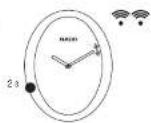
This watch has no crown. It is activated and the time is set by touch only.
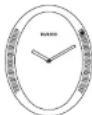
1. Activating setting mode
Activation is always a two-step process to avoid any unwanted changes in time setting.
1a. Touch the case at 8 o'clock for approximately 2 seconds. The minute hand will move slightly.
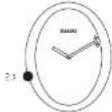
1b. Immediately slide your index finger down the right hand side of the watch case from top to bottom. The watch will emit a short 'beep' and the minute hand will move slightly again.

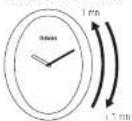
2. Setting the time
2a. Setting the hours / Changing time
Slide your finger along the left hand side
or anti-clockwise = -1 hour

2b. Selling the minutes
Slide your finger along the right hand side of
the case clockwise = +1 minute of anti-
3. Confirmation / Exit setting mode
Without this confirmation, the watch will
automatically exit setting mode after
10 seconds and will not retain the changes
Made in Step 2. The Watch All Return to the previous lime setting.
Touch the case at 8 o'clock for approd
malely 2 seconds to confirm the changes
trade to the time setting in step 2. The mini-
the hand will move slightly and the watch will pull up 'hears'. Follows easily in an
will either two books, selling modems as now deactivated.
QUARTZ CERAMIC TOUCH WATCHES WITH A SECOND TIME ZONE WITHOUT DATE DISPLAY CALIBER: 765
This watch has no crown. It is activated and the time is set by touch only. This watch has a 2nd Time Zone function, which is synchronised with the main one.
TO SET THE MAIN TIME ZONE (MAIN DIAL)
1. Activating setting mode
Activation is always a two-step process to avoid any unwanted changes in time selling.
1a. Touch the case at 10 o'clock until the minute hand on the main dial moves slightly.
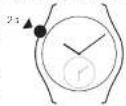
1b. Immediately slide your finger along the right hard side of the casa from top to bottom. The minute hand moves slightly again and the watch omits a small hoop.
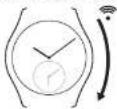
2. Setting the time
2a. Setting the hours
Slide your finger along the left hand side of the case clockwise = +1 hour or anti clockwise = -1 hour.

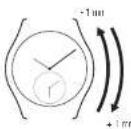
3. Confirmation / Exit setting mode
Touch the case at 10 o'clock or at 5 o'clock for 2 seconds. The watch emits two small bamps. Setting mode is now deactivated and the time cannot be changed accidentally.
2b. Setting the minutes
Slide your finger along the right hand side of the case cockwise = +1 minute or anti-clockwise = -1 minute.
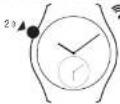
TO SET THE SECOND TIME ZONE (SMALL DIAL)
1. Activating setting mode
1a. Touch the case at 8 o'clock, the minute hand on the small dial moves slightly.
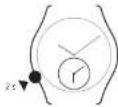
1b. Immediately slide your finger along the right hand side of the case from top to bottom. The minute hand moves slightly again and the watch emits a small beep.
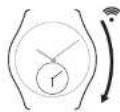
2. Setting the time
2a. Setting the hours
Slide your finger along the left hand side of the case clockwise = -1 hour or anti-clockwise = -1 hour.
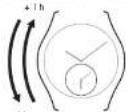
Th
2b. Selling the quarter hours (minimum possible time zone difference)
Side your finger along the right hand side of the case clockwise = + 1/4 hour or anti-clockwise = - 3/4 hour.
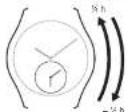
3. Confirmation / Exit setting mode
Touch the case at 8 o'clock or at 10 o'clock for 2 seconds. The watch will until two small beeps. Setting mode is now deactivated and the time cannot be changed accidentally.
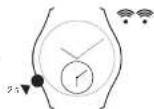
TIME ZONE SWAP
1. Activating setting mode
- Touch the case either at 8 o'clock (or 10 o'clock), the minute hand on the small (or main) dial moves slightly.

1b. Immediately slide your finger along the right hand side of the case from top to bottom. The same minute hand moves slightly again and the watch omits a small beep.

2. Swapping time zones
Touch the casa simultaneously at 9 o'clock and 3 o'clock for 2 seconds. The hands on both dials will move quickly and the time set on each dial will move to the other one.
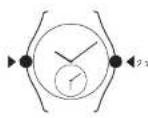
3. Confirmation / Exit setting mode
Touch the case either at 8 o'clock for 10 o'clock for 2 seconds. The watch oil emit two small beeps. Setting mode is now deactivated and the time cannot be changed accidentally.

RESYNCHRONISING THE MINUTE HANDS
If the minute hands on the small and big dials are no longer aligned you can activate a special mode to resynchronise them.
1. Activating setting mode
1a. Touch the case at 8 o'clock, until the minute hand on the small dial moves slightly from right to left.
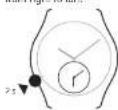
1b. Immediately slide your finger along the right hand side of the case from top to bottom. The minute hand moves slightly from right to left and the watch emits a small beep

2. Set the position of the minute hand on the small dial
In order to proceed with the resynchronisation make sure the minute hands of both dias are at almost a full hour time difference. To do so follow the setting instructions.
3. Resynchronising the minute hand
Use option a. or b. depending on the direction you wish the minute hand of the small dial to move, in order to align it with the position of the minute hand of the main dial.
3a. Resynchronising the minute hand anti-clockwise
Touch the case at 2 o'clock, wait 10 seconds for hand to begin moving, hold until it has reached the same position as the minute hand on the main dial. The hand moves at 1/3 minute intervals for accuracy and the maximum correction possible is 5 minutes.

b. Resynchronising the minute hand clockwise
Touch the case at 4 o'clock, wait 10 seconds for hand to begin moving, hold until it has reached the same position as the minute hand on the main dial. The hand moves at 1/3 minute intervals for accuracy and the maximum correction possible is 5 minutes.

4. Confirmation / Exit setting mode
Touch the case at B a clock for two seconds. The watch amits two small beeps. Setting mode is now deactivated.
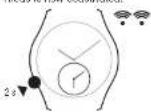
QUARTZ SPLIT- AND ADD-SECONDS CHRONOGRAPH WATCHES CALIBER: 289

THE WATCH IS DELIVERED IN 'ENERGY-SAVING' MODE
The crown is extended, the hands are at loose o'clock. The crown is extended to position 2 held by a small "black cap" around the winding stem, which needs to be removed before the first use. Once the crown has been pushed in from position 2, the watch automatically changes to the Swiss time and date. It must then be set to the local time. If the user pulls the crown to position 2, the hands return to twelve
o'clock and the watch goes back into 'energy-saving' mode after about 1 minute.
PRECIDRIVE OF ± 10 SECONDS PER YEAR
The watch ensures the display of hours, minutes and seconds to an accuracy of ± 10 sec / year. This extreme accuracy is achieved through an ultra-precise quartz combined with time display correction in the event of a disturbance.
GPD SYSTEM
The GPD system (Gear Position Detection) is the watch's key device. It allows to automatically reset the hands after a shock, either immediately or at 3am if the problem isn't resolved right away. The GPD system also includes automatic correction at 3am every three days to ensure the precision.
PERPETUAL CALENDAR
The watch is equipped with a perpetual calendar that no longer requires correcting the date. The caliber does not allow one to move the time forward or backward more than one day, in order to avoid disrupting the perpetual calendar.
SMART CROWN
The smart crown allows to set the time minute by minute or hour by hour (quick setting), by turning the crown either slowly or quickly. When changing the time in summer/winter, the movement automatically repositions the second and minute hands to the exact position of the previous time, therefore ensuring extra precision.
goes into E.O.E (end of energy) mode by selling the watch hands to 12 o'clock. You have then about 6 months to change the battery.
RESYNCHRONISATION
If the battery is empty (or removed from the movement more than one day), the watch needs to be totally resynchronised (reprogrammed). All the functions are affected. If the battery is removed from the movement less than one day, only the hour needs to be resynchronised.
BATTERY
The watch signals the end of battery life when the second hand is jumping every five seconds. If the battery is not replaced during the E.O.L. (end of life) phase, the system
THE CROWN HAS 2 POSITIONS

1. Normal position
When pressed in against the case (position 1), the crown ensures that the watch is water-resistant (if not damaged).

2. To set the time
Pull the crown out to position 2. Adjust the hands by turning the crown in either direction. The time can be set minute by minute or hour by hour (quick setting), by turning the crown either slowly or quickly.
Push the crown back in to position 1. The perpetual calendar no longer requires correcting the data.
Chronograph functions
Make sure the chronograph hands are at zero (Pusher BI.
NOTE: this movements has no 1/10th of a second counter. In this case the timekeeping is precise to 1 second.
CHR SP: Stopwatch with Intermediate
times (SPLIT) Start: Press pusher A.
Stop: Press pusher B, read off first
Intermediate (split) time.
Start again: Press pusher B to show elapsed time. Repeat for further Intermediate split times.
Stop: Press pusher A, read off total elapsed time. Reset to zero: Press pusher B again.
NOTE: The split time should be read immediately, as it continues after 10 seconds and since the chronograph totalizers for hours, minutes and seconds continue to measure the elapsed time. While the chronograph is running, do not issue the split second hand stopped any longer than is necessary to read the split time, otherwise the functioning of the split-seconds mechanism may be affected.
CHR Ad: Stopwatch with ADD timing mode.
Start: Press pusher A. Stop: Press pusher A again and read off time.
Start again: Press pusher A again. Stop again: Press pusher A again and read off time. Reset to zero: Press pusher B.
QUARTZ CHRONOGRAPH WATCHES CALIBERS: 312, 538\*, 539, 542
* On certain models these movements have no 1/10th of a second counter. In this case the timekeeping is precise to 1 second.
THE CROWN HAS 3 POSITIONS
-
Normal position When pressed in against the case (position 1), the crown ensures that the watch is water-resistant (if not damaged).
-
To set the date Full the crown out to position 2 and set the date by moving the hour hand forwards or backwards. To adjust by one day, the hour hand must be moved by 24 hours. Push the crown back to position 1.
To change time zones, summer/winter time
Pull the crown out to position 2 and turn it forwards or backwards to sat the desired hour. The minutes and seconds remain the same. Push the crown back to position 1.
3. To set the time
Pull the crown out to position 3. The small seconds hand will stop. Set the correct time by turning the crown forwards or backwards. Accept by pushing the crown back to position 1 to coincide with a given time signal.
Chronograph functions
Timing to within 1/10th of a second for up to 30 minutes.
Addition function Pusher A: Start Pusher A: Stop to read lime Pusher A: Restart Pusher A: Stop
At the end of the last step, the chronograph indicates the total time. Pusher B: Reset
Spit time function
Pusher B: Stop to read the split time.
The chronograph continues to operate.
Pusher B: Restart
The chronograph hands catch up with
the elapsed time
Pusher A: For the last stop and to display
the total time.
Pusher B: Reset
Readjusting the chronograph hands
After a battery change it may be necessary
to reset the hands to their original position.
312:
Resulting the hands:
Pull out the crown into position 2 and press
pusher A to select the hand to be
repositioned. The selected hand moves.
Press pusher B to correct the position of the hand.
Short push: Forward movement by one unit Long push: Rapid forward movement of the hand
538", 542:
Initialization of the 30-minute tolarizer hand: Pusher B and crown in position 2
Initialization of the 60-second totalizer hand: Pusher A and crown in position 3
Initialization of the 1/10th of a second hand: Pusher B and crown in position 3
Short push: Forward movement by one unit Long push: Rapid forward movement of the hand
QUARTZ CHRONOGRAPH WATCHES CALIBER: 370, 541
SCREW-IN CROWN
Certain models are filled with a screw-in crown. With these models, the crown must be unscrewed before using it to adjust any settings. Following any adjustments, the crown must be returned to position 1 and screwed back in. Position 1 is the starting point for all manipulations of the crown on all models.
THE CROWN HAS 3 POSITIONS
1. Normal position
When pressed in against the case (position 1) or screwed in, the crown ensures that the watch is water-resistant (if not damaged).
2. To set the date
Pull the crown out to position 2 and set
the date by moving the hour hand forwards
or backwards. To adjust by one day, the hour
hand must be moved by 24 hours. Push
the crown back to position 1
To change lime zones, summer/winter lime
Pull the crown out to position 2 and turn
it forwards or backwards to set the desired
hour. The minutes and seconds remain the
same. Push the crown back to position 1.
3. To set the time
Pull the crown out to position 3. The small
seconds hand will stop. Set the correct time
by turning the crown forwards or backwards
Aspect by pushing the crown back to posi-
lion 1 to coincide with a given lime signal.
Chronograph functions
Timing to within 1/10th of a second for up to
12 hours.
Adoption function
Pusher A: Start
Pusher A: Stop to read time
Fusher A: Restart
Fusher A: Stop
At the end of the last step, the chronograph
indicates the total time.
Pusher B: Reset
Spill line function
Pusher A: Start
Fusher B: Stop to read the split time.
The chromatograph continues to progress
Pusher B: Restart
The chronograph hands catch up with
the elapsed time
Pusher A: For the last stop and to display
the total time.
Pusher B: Reset
ResAdjusting the chromatograph hands
After a battery change it may be necessary to reset the hands to their original position.
370: Resalting the hands: Pull out the crown into position 2 and press pusher A to select the hand to be repositioned. The selected hand moves. Press pusher B to correct the position of the hand. Short push: Forward movement by one unit Long push: Rapid forward movement of the hand
541: Initialization of the 12-hour totalizer hand: Pusher A and crown in position 2 Initialization of the 60-minute totalizer hand: Pusher B and crown in position 2 Initialization of the 60-second totalizer hand: Pusher A and crown in position 3 Initialization of the 1/10th of a second hand: Pusher B and crown in position 3 Short push: Forward movement by one unit Long push: Rapid forward movement of the hand
MULTIFUNCTION WATCHES
CALIBERS: 193, 210
THE CROWN HAS 2 POSITIONS AND MULTIPLE FUNCTIONS
Select function: Leave crown in position 1
and turn. Scroll through the 9 functions.
Adjust function: Pull crown cut to position 2 and turn.
Turn function on/off. Press crown briefly.
Set to zero: Press crown and hold for
3 seconds.
1. To adjust the time
Select function 1

Full crown cut to position 2.
aj Hours: Turn crown quickly.
b) Minutes: Turn crown slowly.
c) Seconds: Push the crown back
to position 1. The seconds display blinks
for 1 minute, during which a brief press
of the crown will reset the seconds to zero.
2. To synchronize digital and analog displays
Set digital display to 24-hour mode (Function 6: T2), then select function 2.
Pull crown out to position 2.
Turn crown until both time displays are synchronized.
a) Hours: Turn crown quickly.
b) Minutes: Tum crown slowly.
Push the crown back to position 1.
3. AL: Alarm
Select function 3

To set the sison.
Full crown cut to position 2.
a) Hours: Turn crown quickly.
b) Minutes: Turn crown slowly.
Push the crown back to position 1.
To switch alarm tone on/off
Press crown briefly.
AL = alarm tone on. CF = alarm tone off
NOTE: The alarm can be set in 12-hour (AlM/PM) or 24-hour mode.
4. CHR SP: Stopwatch with intermediate times (SPLIT) Select function 4
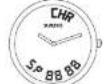
Start: Press crown. Stop: Press crown again, read off first intermediate split time. Chronograph continues to operate
Start again: Press crown again to show elapsed time. Repeat for further intermediate (split) lines.
Step: Press crown, read off total elapsed time.
Rusal to zurn: Press crown and hold for at least 3 seconds.
5. CHR Ad: Stopwatch with ADD timing mode. Select function 5
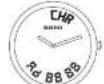
Start: Press crown. Stop: Press crown again and read off time. Start again: Press crown again and so on. Reset to zero: Press crown and hold for at least 3 seconds.
- T2: Additional time zone adjustment. Select function 6

Pull crown out to position 2. To adjust by hours: Turn the crown quickly. To adjust by 1/2 hours: Turn the crown slowly. Push the crown back to position 1.
- TM: Timer Select function 7

To sell countdown start lines Full crown cut to position 2. a) Hours: Turn crown quickly. b) Minutes: Turn crown slowly.
To select 24-hour display or AM/PM display. The watch can display the time in 12 hour (AM/PM) or 24-hour mode. Select Function 6. To check the display mode, briefly press the crown once: if A or P appears, the lime display is in 12-hour mode. If no letter appears, the time display is in 24-hour mode. To change mode, press crown briefly a second time.
To start countdown Push the crown back to position 1. When the countdown reaches zero, the watch amits an audible signal. To switch the signal off, press crown briefly.
Inner memory function
Pressing the crown automatically resets the preprogrammed starting time for the count down, and the countdown begins again.
To reset countdown to zero (at any time) Press crown for at least 3 seconds.
- To change language and year Select function 8

Pull crown out to position 2.
Language: Turn crown quickly
E = English D = German E, French, S, Spanish
-
-
-
-
-
-
-
-
-
-
-
-
-
-
-
-
-
-
-
-
-
-
-
-
-
-
-
-
-
-
-
-
-
-
-
-
-
-
-
-
-
-
-
-
-
-
-
-
-
-
-
-
-
-
-
-
-
-
-
-
-
-
-
-
-
-
-
-
-
-
-
-
-
-
-
-
-
-
-
-
-
-
-
-
-
-
-
-
- 90.
-
-
-
-
-
-
-
-
-
-
-
-
-
-
-
-
-
-
-
-
-
-
-
-
-
-
-
-
-
-
-
-
-
-
-
-
-
-
-
-
-
-
-
-
-
-
-
-
-
-
-
-
-
-
-
-
-
-
-
-
-
-
-
-
-
-
-
-
-
-
-
-
-
-
-
-
-
-
-
-
-
-
-
-
-
-
-
Push the crown back to position 1.
- To adjust the date Select function 9

Full crown cut to position 2.
Month: Turn crown quick
Date: Full crown 50% Push the crown back to position 1
NOTE: The month number is stored in the memory but is not continuously isolated. It must be set correctly in order for the calendar to function property.
DIGITAL WATCHES
WITH SELF-WINDING MECHANISM
CALIBER: 290
THE CROWN HAS 2 POSITIONS
AND MULTIPLE FUNCTIONS
1. Normal position
Time display: hours and minutes. To display the date, turn the crown: the date appears for 2 seconds.
2. To set the time
Pull the crown out to position 2
Display blinks
a) Hours: Turn crown quickly.
b) Minutes: Turn crown slowly.
Push the crown back to position 1.
This will also reset the seconds to zero.
NOTE: The seconds are not displayed.
To set the date
Turn the crown. The data is displayed.
immediately pull the crown out to position 2.
Display blinks
a) Month: Turn crown quickly.
b) Date: Turn crown slowly.
Push the crown back to position 1.
NOTE: The month number is stored in
memory but is not continuously displayed:
it must be set correctly in order for the
calendar to function property.
To select 12/24 h display
Pull the crown out to position 2.
Push the crown back to position 1 and
immediate: pull it out again to position 2.
Turn the crown to select the mode:
12 h or 24 h.
Push the crown back to position 1.
POWER RESERVE/WINDING
The running time depends on how long the watch has been worn. With a fully loaded power reserve, the watch will run for 120 days. It takes 4 to 9 months of wearing the watch for it to reach the full power reserve.
When there is only a little energy left, the corresponding symbol (the small car at the corner of the dial directly beneath the time display) stands to blink. The watch can be wound manually at any time by turning the crown forwards.
If the movement is completely stopped, you can restart it by winning it for at least 15 seconds before setting the time.
If you wish to store the watch for a long time, you may pull out the crown to position 2. This will reduce its power consumption considerably and increase the power reserve up to 10 years, but the time of day will be lost.
SELF-WINDING WATCHES
WITH DATE DISPLAY
CALIBERS: 550, 557*, 561, 580, 609,
629,656,657,658,661,734,
763..., 766, 772..., 773...
* On certain models this movement has no date display (jewelry or skeleton versions) and only the positions 1 and 3 are functional.
*** This movement has a power reserve up to 80 hours.
SCREW-IN CROWN
Certain models are filled with a screw-in crown. With these models, the crown must be unscrewed before using it to adjust any sailings. It must then be returned to position 1 and screwed back in. With all models, position 1 is the starting point for all manipulations of the crown.
THE CROWN HAS 3 POSITIONS
1. Normal position
The crown is in its normal position if it is prassed up against the case (position 1) or screwed in. In this position, the crown ensures that the watch is water-resistant
2. To set the date
Pull the crown out to position 2, turn it forwards or backwards (depending on the movement. Calibor 657* forwards only) to set the desired date. Push the crown back to position 1.
NOTE: Date soiling is not recommended between 8 pm and 2 am.
3. To set the time
Pull the crown out to position 3 and turn it forwards or backwards (Callber 65/4 forwards only) to the desired time. Accept by pushing the crown back to position 1 to coincide with a given time signal.
\*\*Rotating bezel
On certain models the rotating bezel is located under the protective covering of the sapphire crystal and can be manipulated with the crown.
Short line measurement
Unscrew the crown. Turn the crown to move the 60-minute marker to the position of the minute hand. Screw the crown back in place. The elapsed time can subsequently be read off on the inner rotating bed.
POWER RESERVE INDICATOR
Caliber 772*** features a power reserve indicator. When the watch is fully wound by wearing or manual winding it provides a power reserve of up to 80 hours. If the watch is not worn for a while, or worn only infrequently, the power reserve indicator moves counter-clockwise. When the indicator reaches the lower rad area of the display, the watch should be worn or wound manually placed the crown in position 1 and turn it forwards several times) to ensure it does not stop. During winding, the power reserve indicator moves clockwise and stops once the watch has been fully wound.
SELF-WINDING WATCHES
WITH DAY/DATE DISPLAY
CALIBERS: 636, 648, 764\*\*\*, 770\*\*\*
*** This movement has a power reserve up to 80 hours.
THE CROWN HAS 3 POSITIONS
1. Normal position
When pressad in against the case (position 1), the crown ensures that the watch is water-resistant (if not damaged).
2. To set the date
Pull the crown out to position 2, turn it forwards to set the desired date. Turn it backwards to set the desired day of the week. Push the crown back to position 1.
NOTE: Date setting is not recommended between 8 pm and 2 am.
3. To set the time
Pull the crown out to position 3 and turn it forwards or backwards to the desired time. Accept by pushing the crown back to position 1 to coincide with a given time signal.
SELF-WINDING CHRONOGRAPH
WITH DATE
CALIBERS: 650, 652, 653
THE CROWN HAS 3 POSITIONS
1. Normal position
When pressed in against the case (position 1), the crown ensures that the watch is water-resistant (if not damaged).
2. To set the date
Pull the crown out to position 2 and rotate it backwards (Caliber 650 forwards only) to the desired date, then push the crown back to position 1.
NOTE: Date setting is not recommended
between 8 pm and 2 am.
3. To set the time
Full the crown out to position 3. The small seconds hand will stop. Set the correct time by turning the crown forwards or backwards (Calber 650 forwards only). Accept by pushing the crown back to position 1 to coincide with a given time signal.
Chronograph functions
Timing to within 1/4th of a second for up to 12 hours.
Make sure the chronograph hands are at zero (Pusher B).
Pusher A: Start - stop, start - stop etc.
Pusher E: Reset (faller a slip).
SELF-WINDING SPLIT-SECONDS
CHRONOGRAPH
CALIBER: 663
SCREW-IN CROWN
This modal is fitted with a screw-in crown. The crown must be unscrewed before using it to adjust any settings. It must then be returned to position 1 and screwed back in. Position 1 is the starting point for all manipulations of the crown.
THE CROWN HAS 3 POSITIONS
Only positions 1 and 3 are functional.
1. Normal position
When pressed in against the case and screwed in, the crown ensures that the watch is water-resistant.
3. To set the time
Pull the crown out to position 3. The small seconds hand will stop. Set the correct time by turning the crown forwards or backwards. Accept by pushing the crown back to position 1 to coincide with a given time signal.
Chronograph functions
Timing to within 1/4th of a second for up to 12 hours.
Make sure the chronograph hands are at zero (Pusher Bt. Pusher A: Start - stop, start - stop etc. Pusher B: Reset (after a stop).
Chronograph functions
with split-seconds
The split-seconds function allows split
times to be recorded while the chronograph is running.
-
Start the chronograph by pressing pusher A.
-
To record a split time, press pusher C.
The split seconds hand stops, indicating the split time, while the chronograph continues running.
NOTE: The split time should be read immediately; since the chronograph totals for hours, minutes and seconds continue to measure the elapsed time.
While the chronograph is running, do not leave the split-seconds hand stopped any longer than is necessary to read the split time, otherwise the functioning of the split-seconds mechanism may be affected.
-
Press pusher C for the split-seconds hand to catch up with the chronograph seconds hand.
-
To record a new split time, start from step 2 above.
-
Press pusher A to stop the chronograph.
- Press pusher B to reset.
IMPORTANT: The split-seconds hand must have caught up with the chronograph seconds hand, as explained in slap 3 above, before the chronograph is reset.
SELF-WINDING CHRONOGRAPH
WITH DATE
CALIBER: 604
THE CROWN HAS 2 POSITIONS
1. Normal position
When pressed in against the case (position 1), the crown ensures that the watch is water-resistant (if not damaged).
2. To set the date
Set the date by pressing on push-button C. The date changes at each press. Data correction is not possible between 8.30 pm and 11 pm.
To set the time
Pull the crown out to position 2. The small seconds hand will stop. Set the correct time by turning the crown forwards or backwards. Accept by pushing the crown back to position 1 to coincide with a given time signal.
Chronograph functions
Timing to within 1/4th of a sazard for up to
30 minutes.
Make sure the chronograph hands are at
zero (Pusher BI
Pusher A: Start – step, start – stop etc.
Pusher B: Reset (after a stop)
SELF-WINDING CHRONOGRAPH
WITH DATE
CALIBERS: 603, 674\*
* On certain models this movement has no display of the date.
THE CROWN HAS 3 POSITIONS
1. Normal position
When pressed in against the case (position 1), the crown ensures that the watch is water-resistant (if not damaged).
2. To set the date
Pull the crown out to position 2, turn it forwards to set the desired date. Push the crown back to position 1.
NOTE: Dale setting is not recommended between 8 pm and 2 am.
3. To set the time
Pull the crown out to position 3 and turn it forwards or backwards to the desired
time. Accept by pushing the crown back to position 1 to coincide with a given time signal.
Chronograph functions
Timing to within 1/4th of a second for up to 12 hours.
Make sure the chronograph hands are at zero (Fusher B). Pusher A: Start - stop, start - stop etc. Pusher B: Reset (after a stop).
SELF-WINDING WATCHES WITH
A SECOND TIME ZONE AND DATE
DISPLAY (GMT/UTC)
CALIBER: 642
THE CROWN HAS 3 POSITIONS
1. Normal position
When pressed in against the case (position 1), the crown ensures that the watch is water-resistant (if not damaged).
2. To set the date and the second
time zone
Pull the crown out to position 2, and turn it backwards until you obtain the desired date. Turn the crown forwards until you obtain the desired time for the second time zone (24-h hand). Push the crown back to position 1.
NOTE: Date setting is not recommended between 8 pm and 2 am.
3. To set the time
Pull the crown out to position 3, and turn in forwards or backwards to the desired time. Accept by pushing the crown back to position 1 to coincide with a given time signal.
AUTOMATIC WATCHES WITH SECOND
TIME ZONE AND DATE DISPLAY
(GMT / UTC)
CALIBER: 771\*\*
*** This movement has a power reserve of up to 80 hours.
THE CROWN HAS 3 POSITIONS
1. Normal position
When pressed in against the case (position 1), the crown ensures that the watch is water-resistant (if not damaged).
2. To set the time and the second time zone
Pull the crown out to position 3 and turn it forwards or backwards until the desired lime is set.
The 24 hour hand also moves to set the desired time in the second time zone.
Accept by pushing the crown back to position 1 to coincide with a given time signal.
3. Setting the hour (changing the time zone or from summer to winter time) and the date
Pull the crown out to position 2 and turn it forwards or backwards until the desired date appears.
The hour hand moves in one-hour jumps. Push the crown back to position 1.
NOTE: Date setting is not recommended between 8 pm and 2 am.
HAND-WOUND MECHANICAL WATCHES WITHOUT DATE DISPLAY CALIBER: 510
THE CROWN HAS 2 POSITIONS
1. Normal position
When pressed in against the case (position 1), the crown ensures that the watch is water-resistant (if not damaged).
Winding
This mechanical calibre is hand-wound. In order to ensure continuous operation of the watch, it must be fully wound once a day by turning the crown forwards in position 1.
2. To set the time
Pull the crown out to position 2, and turn it forwards or backwards to the desired time.