71016 - Case iPort - Free user manual and instructions
Find the device manual for free 71016 iPort in PDF.


| Type de produit | Étui de protection et de charge pour iPad |
| Marque | iPort |
| Modèle | 71016 (LuxePort) |
| Matériaux | Coque en plastique rigide, joints en caoutchouc |
| Compatibilité iPad | iPad avec connecteur Lightning (taille non précisée, probablement iPad Pro 11" ou similaire) |
| Dimensions (approx.) | Environ 250 x 175 x 15 mm (selon taille iPad) |
| Poids (approx.) | Environ 200 g |
| Alimentation | Via câble Lightning vers USB-A pour charge et synchronisation |
| Fonctions principales | Protection, montage sécurisé sur BaseStation/WallStation, charge en portrait et paysage, verrouillage de sécurité |
| Installation de l'iPad | Insérer l'iPad dans la lunette, fixer avec clips de retenue, enclencher la coque |
| Montage sur station | Poser l'étui en portrait ou paysage, aimants pour maintien, déverrouillage par traction latérale |
| Verrouillage | Vis de verrouillage aux deux coins supérieurs (tourner dans le sens antihoraire) |
| Outils fournis | Outil de verrouillage, câble Lightning, câble USB-A |
| Entretien et nettoyage | Nettoyer avec un chiffon doux et sec; éviter les produits abrasifs |
| Sécurité | Contient des aimants; tenir à distance des cartes de crédit, disques durs, stimulateurs cardiaques |
| Pièces détachées et réparabilité | Non spécifié par le fabricant; contacter le service client pour remplacement |
| Informations générales | Garantie disponible sur iportproducts.com/warranty; fabriqué par iPort, San Clemente, CA, USA |
Frequently Asked Questions - 71016 iPort
User questions about 71016 iPort
0 question about this device. Answer the ones you know or ask your own.
Ask a new question about this device
Download the instructions for your Case in PDF format for free! Find your manual 71016 - iPort and take your electronic device back in hand. On this page are published all the documents necessary for the use of your device. 71016 by iPort.
USER MANUAL 71016 iPort
INSTALLING IPAD INTO CASE
Step 1
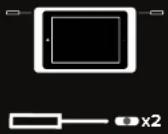
Insert the lock tool in the side holes where indicated and pry shell apart from bezel by rotating the end of the lock tool towards you.
Step 2
Pull the shell apart from the bezel.

Step 3
Insert the Lightning cable into the iPad.

Step 5
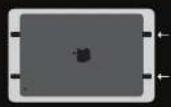
Use a flathead screw driver or the security tool to slide the two retaining clips toward the center of iPad. This will secure the iPad to the Bezel.
Step 4
Insert iPad into the Bezel, camera side first. Insert the cable into cable retention as shown.
Step 6
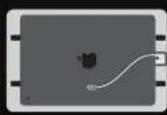
Insert the USB A cable into the USB port on the Shell.
While attaching the Shell, place the cable in the second retention clip on the inside of the Shell.
Step 7
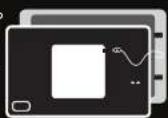
Align the tabs of the Shell making sure the opening for the camera is aligned properly. Press each corner until all tabs securely snap into place.
Step 8
Use the provided lock tool to lock the top two corners of the Case. Turn screws COUNTER CLOCKWISE until stop.
*Note If intending to lock your Case to a BaseStation, ensure to also lock Case.
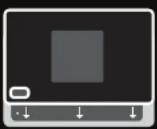
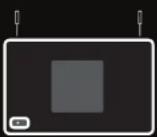
ATTACHING CASE TO
BASESTATION & WALLSTATION
Place the Case In Portrait or Landscape. Ensure the Case is properly seated for secure mounting and charging.
Case can be charged in portrait or landscape on both the WallStation and BaseStation.
Dismount Case by pulling from left or right side.
Lock Case to BaseStation if desired using lock tool.
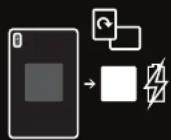
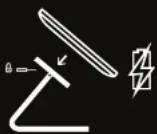
REMOVE IPAD FROM CASE
Step 1
Unlock the security locks if applied. Insert the lock tool in the side holes where indicated and pry shell apart from bezel by rotating the end of the lock tool towards you.
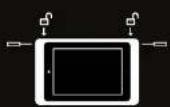
Step 3
Slide the two retaining clips away from the iPad to free the iPad from the LuxePort Bezel.

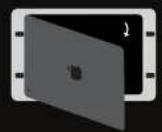
Step 2
Pull the shell apart from the bezel, revealing the back of the iPad.

For more help and info please visit: lportproducts.com/luxeport
iPort
991 Calle Amanacer
San Clemente, CA 92673
United States of America
+1 949 226 5222


CAUTION: This product contains
magnets. Do not place in direct
proximity with magnetically sensitive
objects such as credit cards or
exposed hard drives. Persons with
pace makers are the


CAUTION: Use products as directed.
Unspecified use could result in injury.
Warranty can be found at
iportproducts.com/warranty

33-7054
Brand : iPort
Model : 71016
Category : Case