
BTCCD-DISP - Tracking JUNG - Free user manual and instructions
Find the device manual for free BTCCD-DISP JUNG in PDF.


| Product Type | Display and monitoring unit for building automation |
| Brand | JUNG |
| Model | BTCCD-DISP |
| Category | Monitoring device |
| Dimensions | 80 x 80 x 10 mm (flush-mounted) |
| Weight | 120 g |
| Power Supply | 24 V DC via KNX bus or separate power supply |
| Display Type | High-resolution color TFT touch screen |
| Display Resolution | 320 x 240 pixels |
| Touchscreen | Capacitive multi-touch |
| Communication Protocol | KNX (standard for building automation) |
| Main Functions | Display and control of temperature, humidity, ventilation, lighting scenes, energy monitoring |
| Indoor Temperature Range | 0 °C to 50 °C |
| Indoor Humidity Range | 0 % to 95 % RH (non-condensing) |
| Protection Class | III (SELV) |
| Mounting | Flush-mounted in standard 60 mm junction box |
| Maintenance & Cleaning | Clean with a soft, dry cloth; avoid abrasive cleaners |
| Safety Instructions | Do not expose to extreme temperatures or moisture; installation by qualified electrician |
| Repairability & Spare Parts | Contact JUNG service for replacement parts; device is not user-serviceable |
| Warranty | 2 years from date of purchase |
Frequently Asked Questions - BTCCD-DISP JUNG
User questions about BTCCD-DISP JUNG
0 question about this device. Answer the ones you know or ask your own.
Ask a new question about this device
Download the instructions for your Tracking in PDF format for free! Find your manual BTCCD-DISP - JUNG and take your electronic device back in hand. On this page are published all the documents necessary for the use of your device. BTCCD-DISP by JUNG.
USER MANUAL BTCCD-DISP JUNG
Bluetooth Connect BTC...

Operating instructions

Description of device
The JUNG Bluetooth Connect BTC... consists of an operating cover and a flush-mounted power supply. The audio source (e.g. smartphone or MP3 player) is connected and the device is operated via the operating cover. The device is operated and set up via 8 sensor buttons.
The connections for mains voltage, loudspeakers and audio output are available on the power supply unit. The Bluetooth Connect can be operated with one or two loudspeaker modules LSM...
The music signal is transmitted via Bluetooth, amplified internally and output to loudspeakers or an external amplifier. The tracks and volume can be changed via sensor buttons. Up to 6 audio sources can be taught in, from which one audio source can be connected actively with the Bluetooth Connect.
Safety instructions
Electrical equipment must only be installed and assembled by qualified electricians. Failure to comply with these instructions may result in damage to the device fire or other hazards. This product is only intended for use in dry rooms. These instructions are an integral part of the product and must remain with the end customer.

Operation
The lower half of the cover is used for operation. All operations are made via 8 sensor buttons. In standby mode the buttons are hidden and are displayed each time you touch the lower area.
Switching on / Switching off
The Bluetooth Connect is switched on and off here (standby)
Note: After switching on, the Bluetooth Connect connects automatically to the last audio source if it can be reached. If the source is not available, e.g. because it is not within range, the next audio source is connected. The Bluetooth Connect attempts to reach the taught-in audio sources in the sequence they were taught in.
While searching for the connection, the button illumination dima brighter and darker. The plausack starts automatically demonstrating on the devine tube / device
Bluetooth
Connect
BTC...


Pause
With a press of a button, the playback of the connected audio source is interrupted.

Deleting connections
With a long press of a button (> 10 s), all previously taught-in audio sources are deleted from the Bluetooth Connect.
Intended use
- Installation in a flush-mounted device box according to DIN EN 49073 (recommended: deep box)
- Bluetooth Connect for audio output in conjunction with a playback device and for media control
Product characteristics
- Bluetooth Connect with sensor buttons
- Solid glass front
- Stereo playback
- Connecting terminals for two loudspeakers
- Stereo/mono change over
- Easy operation
• High reception quality - Integrated amplifier
• Storage of 6 audio sources - Switching on with the last audio source
- Switching on with the last volume
- Extension unit input
Installation

natural_image
Technical line drawing of a mechanical device with no visible text or symbolsThe Bluetooth Connect BTC... has been designed for installation in device boxes DIN EN 49073.
The connections for mains voltage, loudspeakers and the audio output are located on the flush-mounted power supply unit. The operating cover together with the frame are mounted onto the power supply unit.
Connecting an extension unit

The extension unit connection (1) is used to switch the Bluetooth Connect on/off via switches, e.g. together with the light. The extension unit input may only be operated on the same phase.

Before carrying out work on the device, disengage all the corresponding circuit
Breakers. Cover up live parts in the working environment. Within the device
box, all the cables carrying low voltages must have an insulating hose in order
to guarantee protective separation
Connecting a loudspeaker
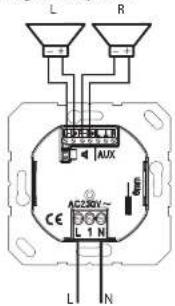
The device is intended for operation with one or two loudspeaker modules LSM.... The connection cable can be up to 5 m long.
In stereo mode, both outputs (L+R) are used. The device detects autonomously if only one loudspeaker is used and then changes its operating mode to mono.
The correction of several loudspeakers per output is not permitted.
Loudspeakers of other manufacturers may only be used if the technical data is identical with the JUNG LSM.
Please observe the polarity.
Technical data
Rated voltage: AC 230 V --
Frequency: 50/60 Hz
Power consumption in standby 0.37 W
Power consumption in operation: <4.00 W
Ambient temperature: 0...+50°C
Atmospheric humidity 15% ... 90%
no condensation
Bluetooth: A2DP, AVRCP
Degree of protection: IP 20
Connection Screw terminals
1×1.5 mm² or 1×2.5 mm²
Connecting cable loudspeaker
Twin cable H03VH-H 2 x 0.75 mm²
alternative.
JY-(St)-Y2x2x0.6
Length max. 5 m
Loudspeaker LSM.
Rated load capacity 2.5 W
Impedance: 40
Frequency range 20 ... 15000 Hz (-10 dB)
Line-out (AUX)
Impedance: 470Ω
Output level 1V
is a trademark of the
both SIG, Inc.
Brand : JUNG
Model : BTCCD-DISP
Category : Tracking