MIC3201 - Carte d'évaluation Microchip - Free user manual and instructions
Find the device manual for free MIC3201 Microchip in PDF.


User questions about MIC3201 Microchip
0 question about this device. Answer the ones you know or ask your own.
Ask a new question about this device
Download the instructions for your Carte d'évaluation in PDF format for free! Find your manual MIC3201 - Microchip and take your electronic device back in hand. On this page are published all the documents necessary for the use of your device. MIC3201 by Microchip.
USER MANUAL MIC3201 Microchip
Note the following details of the code protection feature on Microchip products:
• Microchip products meet the specifications contained in their particular Microchip Data Sheet.
- Microchip believes that its family of products is secure when used in the intended manner, within operating specifications, and under normal conditions.
• Microchip values and aggressively protects its intellectual property rights. Attempts to breach the code protection features of Microchip product is strictly prohibited and may violate the Digital Millennium Copyright Act.
- Neither Microchip nor any other semiconductor manufacturer can guarantee the security of its code. Code protection does not mean that we are guaranteeing the product is "unbreakable" Code protection is constantly evolving. Microchip is committed to continuously improving the code protection features of our products.
This publication and the information herein may be used only with Microchip products, including to design, test, and integrate Microchip products with your application. Use of this information in any other manner violates these terms. Information regarding device applications is provided only for your convenience and may be superseded by updates. It is your responsibility to ensure that your application meets with your specifications. Contact your local Microchip sales office for additional support or, obtain additional support at https://www.microchip.com/en-us/support/design-help/client-support-services.
THIS INFORMATION IS PROVIDED BY MICROCHIP 'AS IS'. MICROCHIP MAKES NO REPRESENTATIONS OR WARRANTIES OF ANY KIND WHETHER EXPRESS OR IMPLIED. WRITTEN OR ORAL, STATUTORY OR OTHERWISE, RELATED TO THE INFORMATION INCLUDING BUT NOT LIMITED TO ANY IMPLIED WARRANTIES OF NONINFRINGEMENT, MERCHANTABILITY, AND FITNESS FOR A PARTICULAR PURPOSE, OR WARRANTIES RELATED TO ITS CONDITION, QUALITY, OR PERFORMANCE.
IN NO EVENT WILL MICROCHIP BE LIABLE FOR ANY INDIRECT, SPECIAL, PUNITIVE, INCIDENTAL, OR CONSEQUENTIAL LOSS, DAMAGE, COST, OR EXPENSE OF ANY KIND WHATSOEVER RELATED TO THE INFORMATION OR ITS USE, HOWEVER CAUSED, EVEN IF MICROCHIP HAS BEEN ADVISED OF THE POSSIBILITY OR THE DAMAGES ARE FORESEEABLE, TO THE FUELST EXTENT ALLOWED BY LAW. MICROCHIPS TOTAL LIABILITY ON ALL CLAIMS IN ANY WAY RELATED TO THE INFORMATION
Trademarks
The Microchip name and logo, the Microchip logo, Adaptec, AVR. AVR logo, AVR Freaks. BestTime, BitCloud, CryptoMemory, CryptoRF, dsPIC, flexPWR, HELDO, IGLOO, JukeBlox, KeeLog, Kleer, LANCheck, LinkMD, maxXStylus, maxTXouch, MediaLB, megaAVR, Microsemi, Microsemi logo, MOST, MOST logo, MPLAG, OptoLyzer, PIC, picoPower, PICSTART, PIC32 logo, PolarFire, Prochip Designer, QTouch, SAM-BA, SenGenuity, SpyNIC, SST, SST Logo, SuperFlash, Symmetricom, SyncServer, Tachyon. TimeSource, tinyAVR, UNIO, Vectron, and XMEGA are registered trademarks of Microchip Technology Incorporated in the U.S.A. and other countries.
AgileSwitch, APT. ClockWorks, The Embedded Control Solutions Company, EtherSynch, Flashtec, Hyper Speed Control, HyperLight Load, Libero, motorBench, mTouch, Powermite 3, Precision Edge, ProASIC, ProASIC Plus, ProASIC Plus logo, Quiet-Wire, SmartFusion, SyncWorld, Temux, TimeCesium, TimeHub, TimePictra, TimeProvider, TrueTime, and ZL are registered trademarks of Microchip Technology Incorporated in the U.S.A.
Adjacent Key Suppression, AKS, Analog-for-the-Digital Age, Any Capacitor, AnyIn, AnyOut, Augmented Switching, BlueSky, BodyCom, Clocksludio, CodeGuard, CryptoAuthentication, CryptoAutomotive, CryptoCompanion, CryptoController, dsPICDEM, dsPICDEM.net, Dynamic Average Matching. DAM, ECAN, Espresso T1S, EtherGREEN, GridTime, IdealBridge, In-Circuit Serial Programming, ICSP, INICnet, Intelligent Paralleling, IntellMOS, InterChip Connectivity, JitterBlocker, Knob-on-Display, KoD, maxCrypto, maxView, memBrain, Mindi, MIWI, MPASM. MPF, MPLAB Certified logo, MPLIB, MPLINK, MultiTRAK, NetDetach, Omniscient Code Generation, PICDEM. PICDEM.net, PICKit. PICBit, PowerSmart, PureSilicon, QMatrix, REAL ICE, Ripple Blocker, RTXT, ROTG4, SAM-ICE, Serial Quad IO, simpleMAP, SimpliPHY, SmartBuffer, SmartHiLS, SMART-I.S., storCist, SGI. SuperSwitcher, SuperSwitcher II, Switchtec, SynchroPHY. Total
Table of Contents
Preface 5
Introduction......5
Document Layout 5
Conventions Used in this Guide 6
Recommended Reading....7
The Microchip Website....7
Customer Support 7
Document Revision History 7
Chapter 1. Product Overview
1.1 Introduction 9
1.2 MIC3202/MIC3202-1 Short Device Overview 9
1.3 MIC3202/MIC3202-1 Device Key Features 9
1.4 MIC3202/MIC3202-1 Evaluation Board Kit Contents 9
Chapter 2. Installation and Operation
2.1 Introduction ...... 11
2.2 Getting Started 11
2.3 Setup/Configuration 12
2.4 Other Features 12
Appendix A. Schematic and Layouts
A.1 Introduction 15
A 2 Board Schematic 16
MIC3202/MIC3202-1 Evaluation Board User's Guide
NOTES:
Preface
NOTICE TO CUSTOMERS
All documentation becomes dated, and this manual is no exception. Microchip tools and documentation are constantly evolving to meet customer needs, so some actual dialogs and/or tool descriptions may differ from those in this document. Please refer to our website (www.microchip.com) to obtain the latest documentation available.
Documents are identified with a "DS" number. This number is located on the bottom of each page, in front of the page number. The numbering convention for the DS number is "DSXXXXXA", where "XXXXX" is the document number and "A" is the revision level of the document.
For the most up-to-date information on development tools, see the MPLAB ^® IDE online help. Select the Help menu, and then Topics to open a list of available online help files.
INTRODUCTION
This chapter contains general information that will be useful to know before using the MIC3202/MIC3202-1 Evaluation Board. Items discussed in this chapter include:
- Document Layout
• Conventions Used in this Guide
• Recommended Reading
• The Microchip Website - Customer Support
• Document Revision History
MIC3202/MIC3202-1 Evaluation Board User's Guide
CONVENTIONS USED IN THIS GUIDE
This manual uses the following documentation conventions:
DOCUMENTATION CONVENTIONS
| Description Represents Examples | ||
| Arial font: | ||
| Italic characters Referenced books MPLAB | ® IDE User's Guide | |
| Emphasized text ...is the only compiler... | ||
| Initial caps A window the Output window | ||
| A dialog the Settings dialog | ||
| A menu selection select Enable Programmer | ||
| Quotes A field name in a window or dialog | "Save project before build" | |
| Underlined, italic text with right angle bracket | A menu path File>Save | ____ |
| Bold characters A dialog button | Click OK | |
| A tab | Click the Power tab | |
| N'Rnnnn | A number in verilog format, where N is the total number of digits, R is the radix and n is a digit. | 4'b0010, 2'hF1 |
| Text in angle brackets <> | A key on the keyboard | Press, |
| Courier New font: | ||
| Plain Courier New | Sample source code | Idefire START |
| Filenames | autoexec.bat | |
| File paths | c:\nccl5\h | |
| Keywords | _asn,_endasm,static | |
| Command-line options | -0pa+, -0pa- | |
| Bit values | 0,1 | |
| Constants | 0xFF, 'A' | |
| Italic Courier New | A variable argument | file.o,where file can be any valid filename |
| Square brackets [] | Optional arguments | mcccl8 [options] file [options] |
RECOMMENDED READING
This User's Guide describes how to use MIC3202/MIC3202-1. Another useful document is listed below. The following Microchip document is available and recommended as a supplemental reference resources.
- MIC3202/MIC3202-1 Data Sheet – "High-Brightness LED Driver with Integrated MOSFET and High-Side Current Sense" (M9999-091710-A)
THE MICROCHIP WEBSITE
Microchip provides online support via our website at www.microchip.com. This website is used as a means to make files and information easily available to customers. Accessible by using your favorite Internet browser, the website contains the following information:
- Product Support – Data sheets and errata, application notes and sample programs, design resources, user's guides and hardware support documents, latest software releases and archived software
- General Technical Support – Frequently Asked Questions (FAQs), technical support requests, online discussion groups, Microchip consultant program member listing
- Business of Microchip – Product selector and ordering guides, latest Microchip press releases, listing of seminars and events, listings of Microchip sales offices, distributors and factory representatives
CUSTOMER SUPPORT
Users of Microchip products can receive assistance through several channels:
• Distributor or Representative
- Local Sales Office
• Field Application Engineer (FAE)
- Technical Support
Customers should contact their distributor, representative or field application engineer (FAE) for support. Local sales offices are also available to help customers. A listing of sales offices and locations is included in the back of this document.
Technical support is available through the website at:
MIC3202/MIC3202-1 Evaluation Board User's Guide
NOTES:
Chapter 1. Product Overview
1.1 INTRODUCTION
This chapter provides an overview of the MIC3202/MIC3202-1 Evaluation Board and covers the following topics:
• MIC3202/MIC3202-1 Short Device Overview
• MIC3202/MIC3202-1 Device Key Features
• MIC3202/MIC3202-1 Evaluation Board Kit Contents
1.2 MIC3202/MIC3202-1 SHORT DEVICE OVERVIEW
The MIC3202/MIC3202-1 is a hysteretic step-down, constant-current, High-Brightness LED (HB LED) driver. It provides an ideal solution for the following type of applications:
• Architectural, Industrial, and Ambient Lighting
• LED Bulbs
- Indicators and Emergency Lighting
- Street Lighting
- Channel Letters
- 12V Lighting Systems (MR-16 bulbs, Under-Cabinet Lighting, Garden/Pathway Lighting)
1.3 MIC3202/MIC3202-1 DEVICE KEY FEATURES
The MIC3202/MIC3202-1 Device offers the following key features:
• 6V to 37V Input Voltage Range
• High Efficiency (>90%)
• ±5% LED Current Accuracy
102000 BII F II III I FIII
MIC3202/MIC3202-1 Evaluation Board User's Guide

text_image
MICROCHIP SW R9 L1 100 R4 C4 C2 LED- LED+ RV1 C3C9 R5 D1 C8 C1 VIN VIN U1 C7 EN DM e GND D3 C6 R6 C5 3 CE ADM00962 R7 U2 EN DM GND MIC3202YME Evaluation BoardFIGURE 1-1: MIC3202/MIC3202-1 Evaluation Board (ADM00962).
Chapter 2. Installation and Operation
2.1 INTRODUCTION
The MIC3202/MIC3202-1 Evaluation Board enables the evaluation of the MIC3202/MIC3202-1 device for 1A LED current. The board is optimized for ease of testing, with all the components placed on a single side. The device operates from a 6V to 37V input voltage range and includes an integrated 1.0A MOSFET. When the input voltage approaches and crosses the UVLO threshold, the internal VCC regulator starts to supply with 5V and the integrated MOSFET is turned on if the EN and DIM pins respectively are high. The inductor current builds up linearly. When the CS pin voltage hits the V_CS(MAX) with respect to V_IN , the internal MOSFET is turned off and the Schottky diode takes over and returns the current to VIN. Then the current through inductor and LEDs starts decreasing. When the CS pin hits V_CS(MIN) , the internal MOSFET is turned on and the cycle repeats.
Since the control scheme does not need loop compensation, it makes for a very simple design and avoids problems of instability.
Data sheets and support documentation can be found on the Microchip Technology website at: www.microchip.com.
2.2 GETTING STARTED
The MIC3202/MIC3202-1 needs a single-bench power source adjustable over the input voltage of 6V < V_IN < 37V that can provide at least 1A of current. The loads can either be active (electronic load in CV mode) or passive (LEDs) with the ability to dissipate the maximum load power while keeping accessible surfaces ideally <70^ .
2.2.1 Precautions
There is no reverse input protection on this board. When connecting the input sources,
MIC3202/MIC3202-1 Evaluation Board User's Guide
2.3 SETUP/CONFIGURATION
- Connect the V_IN supply to the VIN and GND input terminals. With the output of this supply disabled, set the supply voltage to the desired input test voltage (6V < V_IN < 37V). This supply voltage should be monitored at the test boards input terminals to allow voltage drops in the test cables (and ammeter, if used) to be accounted for. An ammeter can be added in line with the +VIN input terminal to accurately measure input current.
- Connect the LEDs to the output terminals between LED+ and LED-. This LED voltage drop depends on the manufacturer tolerance and number of LEDs. The LED current can be measured using an ammeter or a current probe. A 4.7 F ceramic capacitor helps to reduce the current ripple through the LED. The LED current is set to 1A by a 200 m current-sense resistor ( R_CS ).
- Enable the input supply. By default, the IC is enabled when the input voltage crosses the V_IN threshold (4V) and the internal VCC regulator and internal MOSFET are turned on when the EN and DIM pins are high. To use the EN and DIM functions of the MIC3202/MIC3202-1, a test point is provided for each of them.
2.4 OTHER FEATURES
2.4.1 EN Input
The EN pin provides a logic level control of the output and the voltage has to be 2.0V or higher to activate the current regulator. The output stage is gated by the DIM pin. When the EN pin is pulled low, the regulator goes to off-state and the supply current of the device is reduced below 1 A. Do not drive the EN pin above the supply voltage.
2.4.2 DIM Input
The DIM pin provides a logic level control for the brightness of the LED. A PWM input can be used to control the brightness of the LED. DIM high enables the output and its voltage has to be 2.0V or higher. DIM low disables the output, regardless of the EN High-State.
2.4.3 Current-Sense Input
The CS pin provides the high-side current sense to set the I FD current with an external
TABLE 2-1: TABLE TITLE IS MISSING
| R_CS (Ω) | I_LED (A)I | ^2R (W)Size(SMD) | |
| 1.330.150 | 030603 | ||
| 0.560.350 | 070805 | ||
| 0.40.50.1 | 0805 | ||
| 0.280.70.1 | 37 | 0805 | |
| 0.21.00.2 | 1206 | ||
For V_CS(MAX) and V_CS(MIN) refer to the Electrical Characteristics table in the MIC3202/MIC3202-1 data sheet.
2.4.4 Frequency of Operation
To calculate the frequency spread across the input supply, use Equation 2-2:
EQUATION 2-2:
$$ F _ {S W} = \frac {\left(V _ {D} + I _ {L E D} \times R _ {C S} + V _ {L E D}\right) \times \left(V _ {I N} - I _ {L E D} \times R _ {C S} - V _ {L E D}\right)}{L \times \Delta I _ {L} \times \left(V _ {D} + V _ {I N}\right)} $$
Where:
V_D is Schottky diode forward drop
V_LED is total LEDs voltage drop
V_IN is input voltage
I_LED is average LED current
I_L = (V_CS(MAX) - V_CS(MIN)) / R_CS
According to the equation above, choose the inductor to make the operating frequency no higher than 1 MHz. Refer to the Application Information section in the MIC3202/MIC3202-1 data sheet for more information on component selection guidelines.
2.4.5 Frequency Dithering
MIC3202/MIC3202-1 Evaluation Board User's Guide
NOTES:
Appendix A. Schematic and Layouts
A.1 INTRODUCTION
This appendix contains the following schematic and layouts for MIC3202/MIC3202-1 (ADM00962):
- Board – Schematic
- Board – Top Silk
• Board – Top Copper and Silk - Board – Top Copper
- Board – Bottom Copper
- Board – Bottom Copper and Silk
- Board – Bottom Silk
A.2 BOARD - SCHEMATIC
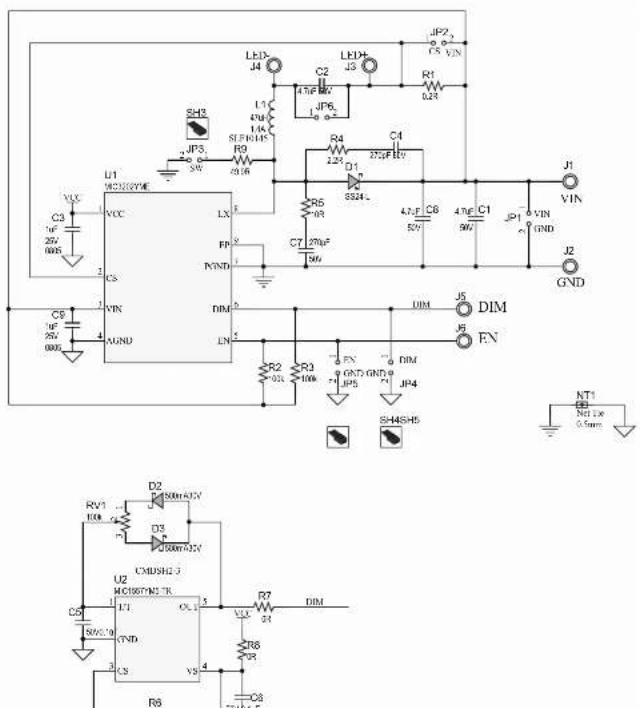
text_image
Electrical circuit diagram with labeled components including transistors, capacitors, resistors, and diodesMIC3202/MIC3202-1 Evaluation Board Users Guide
Schematic and Layouts
A.3 BOARD - TOP SILK
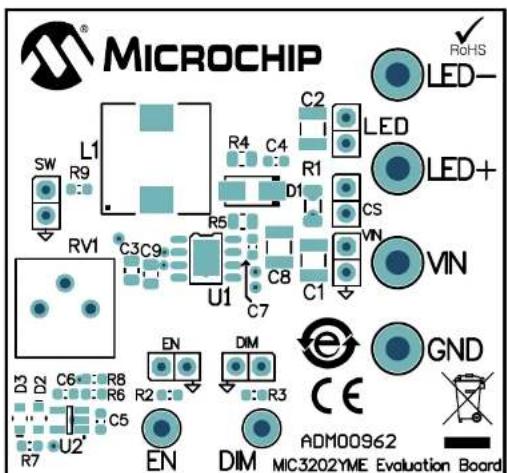
text_image
MICROCHIP RoHS LED- SW L1 R9 C2 R4 C4 LED+ RV1 C3 C9 D1 R5 CS VIN U1 C8 C1 C7 EN DIM GND D3 C6 R8 R2 R3 CE C5 R7 U2' EN DIM ADM00962 MIC3202YME Evaluation BoardA.4 BOARD - TOP COPPER AND SILK
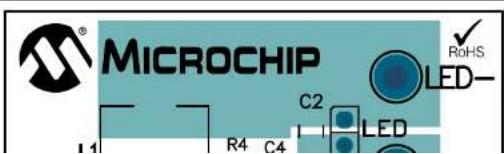
text_image
MICROCHIP C2 LED R0HS I 1 R4 C4MIC3202/MIC3202-1 Evaluation Board User's Guide
A.5 BOARD - TOP COPPER
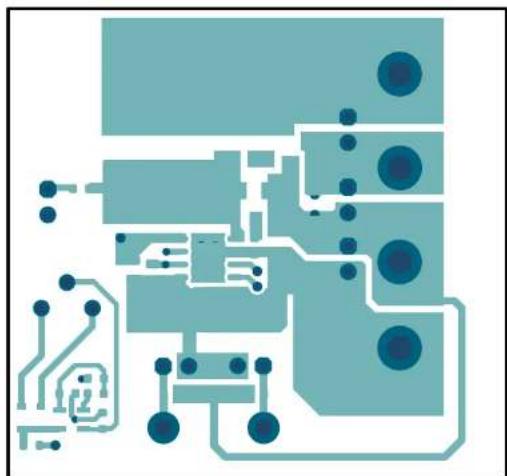
natural_image
Pure electrical circuit lines without any symbolsA.6 BOARD - BOTTOM COPPER

natural_image
Abstract composition of three small blue circles on a light teal background (no text or symbols)Schematic and Layouts
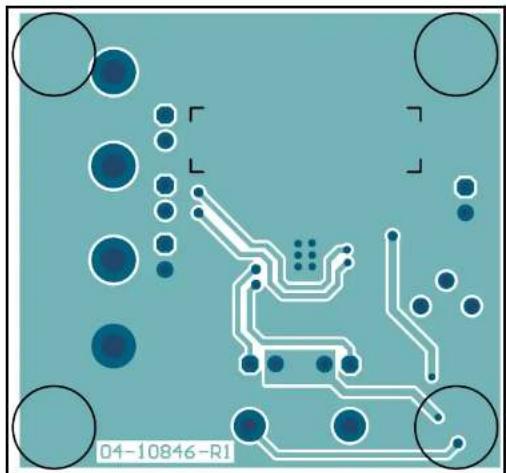
A.7 BOARD - BOTTOM COPPER AND SILK
natural_image
Pure electrical circuit lines without any symbols or text, rendered in blue on a teal background (no readable text or labels)A.8 BOARD - BOTTOM SILK
natural_image
Simple diagram with circles and shaded regions, no text or symbols presentMIC3202/MIC3202-1 Evaluation Board User's Guide
NOTES:
Appendix B. Bill of Materials (BOM)
| TABLE B-1: BILL OF MATERIALS (BOM) (1) | ||||
| Qty. | Reference Description | Manufacturer Part Number | ||
| 3 C1, | C2, C8 Capacitor, ceramic, 4.7 μF, 50V, 10%, X7R | TDK Corporation C3225X7 | R1H475K250AB | |
| 2 C3, | C9 Capacitor, ceramic, 1 μF, 25V, 10%, X7R, SMD, 0805 | AVX Corporation 08053C1 | 05K4Z2A | |
| 2 C4, | C7 Capacitor, ceramic, 270 pF, 50V, 10%, X7R, SMD, 0603 | AVX Corporation 06035C2 | 71KAT2A | |
| 2 | C5, C6 | Capacitor, ceramic, 1 μF, 10V, 10%, X7R | KEMET | C0603C104K8RACTU |
| 1 D1 | Diode, Schottky, SS24-L, 550 mV, 2A, 40V, SMD, DO-214AC_SMA | Micro Commercial Components (MCC) | SS24-LTP | |
| 2 D2, | D3 Diode, Schottky, B0530WS, 400 mV, 500 mA, 30V, SOD-323F | Diodes Incorporated | B0530WS-7-F | |
| 1 J1, | J2, J3, J4 Connector, TP, PIN, tin, TH | Keystone® Electronics Corp. | 1502-02 | |
| 1 | J5, J6 | Connector, TP, PIN, tin, TH | Harwin Plc. | H2121-01 |
| 6 JP1, | JP2, JP3, JP4, JP5, JP6 | Connector, HDR-2.54, male, 1x2, tin, 6.10 MH, TH, vertical | Molex LLC | 0022284020 |
| 1 | L1 | Inductor, 47 μH, 1.5A, 0.1R | TDK Corporation | SLF10145T-470M1R4-PF |
| 1 | R1 | Resistor, Shunt, TKF, 0.2k, 1%, 1/2W | Stackpole Electronics, Inc. | CSR1206FKR200 |
| 2 R2, | R3 Resistor, TKF, 100k, 1%, 1/4W, SMD, 0603 | Vishay/Dale | CRCW0603100KFKEAHP | |
| 1 | R4 | Resistor, TKF, 2.2R, 1%, 1/8W, SMD | Vishay/Dale | CRCW08052R20FKEA |
| 1 R5 | Resistor, TKF, 10R, 1%, 1/8W, SMD, 0805 | Vishay/Dale | CRCW080510R0FKEAC | |
MIC3202/MIC3202-1 Evaluation Board User's Guide
NOTES:
Appendix C. Board Performance Curves and Waveforms
C.1 EVALUATION BOARD PERFORMANCE

line
| Input Voltage (V) | Series 1 | Series 2 | Series 3 | | ----------------- | -------- | -------- | -------- | | 0 | 4.8 | 7.4 | 7.6 | | 1 | 4.6 | 7.2 | 7.4 | | 2 | 4.4 | 7.0 | 7.2 | | 3 | 4.2 | 6.8 | 7.0 | | 4 | 4.0 | 6.6 | 6.8 | | 5 | 3.8 | 6.4 | 6.6 | | 6 | 3.6 | 6.2 | 6.4 | | 7 | 3.4 | 6.0 | 6.2 | | 8 | 3.2 | 5.8 | 6.0 | | 9 | 3.0 | 5.6 | 5.8 | | 10 | 2.8 | 5.4 | 5.6 | | 11 | 2.6 | 5.2 | 5.4 | | 12 | 2.4 | 5.0 | 5.2 | | 13 | 2.2 | 4.8 | 5.0 | | 14 | 2.0 | 4.6 | 4.8 | | 15 | 1.8 | 4.4 | 4.6 | | 16 | 1.6 | 4.2 | 4.4 | | 17 | 1.4 | 4.0 | 4.2 | | 18 | 1.2 | 3.8 | 4.0 | | 19 | 1.0 | 3.6 | 3.8 | | 20 | 0.8 | 3.4 | 3.6 | | 21 | 0.6 | 3.2 | 3.4 | | 22 | 0.4 | 3.0 | 3.2 | | 23 | 0.2 | 2.8 | 3.0 | | 24 | 0.0 | 2.6 | 2.8 | | 25 | -0.2 | 2.4 | 2.6 | | 26 | -0.4 | 2.2 | 2.4 | | 27 | -0.6 | 2.0 | 2.2 | | 28 | -0.8 | 1.8 | 2.0 | | 29 | -1.0 | 1.6 | 1.8 | | 30 | -1.2 | 1.4 | 1.6 | | 31 | -1.4 | 1.2 | 1.4 | | 32 | -1.6 | 1.0 | 1.2 | | 33 | -1.8 | 0.8 | 1.0 | | 34 | -2.0 | 0.6 | 0.8 | | 35 | -2.2 | 0.4 | 0.6 | | 36 | -2.4 | 0.2 | 0.4 | | 37 | -2.6 | 0.0 | 0.2 | | 38 | -2.8 | -0.2 | 0.0 | | 39 | -3.0 | -0.4 | -0.2 | | 40 | -3.2 | -0.6 | -0.4 | | 41 | -3.4 | -0.8 | -0.6 | | 42 | -3.6 | -1.0 | -0.8 | | 43 | -3.8 | -1.2 | -1.0 | | 44 | -4.0 | -1.4 | -1.2 | | 45 | -4.2 | -1.6 | -1.4 | | 46 | -4.4 | -1.8 | -1.6 | | 47 | -4.6 | -2.0 | -1.8 | | 48 | -4.8 | -2.2 | -2.0 | | 49 | -5.0 | -2.4 | -2.2 | | 50 | -5.2 | -2.6 | -2.4 | | 51 | -5.4 | -2.8 | -2.6 | | 52 | -5.6 | -3.0 | -2.8 | | 53 | -5.8 | -3.2 | -3.0 | | 54 | -6.0 | -3.4 | -3.2 | | 55 | -6.2 | -3.6 | -3.4 | | 56 | -6.4 | -3.8 | -3.6 | | 57 | -6.6 | -4.0 | -3.8 | | 58 | -6.8 | -4.2 | -4.0 | | 59 | -7.0 | -4.4 | -4.2 | | 60 | -7.2 | -4.6 | -4.4 | | 61 | -7.4 | -4.8 | -4.6 | | 62 | -7.6 | -5.0 | -4.8 | | 63 | -7.8 | -5.2 | -5.0 | | 64 | -8.0 | -5.4 | -5.2 | | 65 | -8.2 | -5.6 | -5.4 | | 66 | -8.4 | -5.8 | -5.6 | | 67 | -8.6 | -6.0 | -5.8 | | 68 | -8.8 | -6.2 | -6.0 | | 69 | -9.0 | -6.4 | -6.2 | | 70 | -9.2 | -6.6 | -6.4 | | 71 | -9.4 | -6.8 | -6.6 | | 72 | -9.6 | -7.0 | -6.8 | | 73 | -9.8 | -7.2 | -7.0 | | 74 | -10.0 | -7.4 | -7.2 | | 75 | -10.2 | -7.6 | -7.4 | | 76 | -10.4 | -7.8 | -7.6 | | 77 | -10.6 | -8.0 | -7.8 | | 78 | -10.8 | -8.2 | -8.0 | | 79 | -11.0 | -8.4 | -8.2 | | 80 | -11.2 | -8.6 | -8.4 | | 81 | -11.4 | -8.8 | -8.6 | | 82 | -11.6 | -9.0 | -8.8 | | 83 | -11.8 | -9.2 | -9.0 | | 84 | -12.0 | -9.4 | -9.2 | | 85 | -12.2 | -9.6 | -9.4 | | 86 | -12.4 | -9.8 | -9.6 | | 87 | -12.6 | -10.0 | -9.8 | | 88 | -12.8 | -10.2 | -10.0 | | 89 | -13.0 | -10.4 | -10.2 | | 90 | -13.2 | -10.6 | -10.4 | | 91 | -13.4 | -10.8 | -10.6 | | 92 | -13.6 | -11.0 | -10.8 | | 93 | -13.8 | -11.2 | -11.0 | | 94 | -14.0 | -11.4 | -11.2 | | 95 | -14.2 | -11.6 | -11.4 | | 96 | -14.4 | -11.8 | -11.6 | | 97 | -14.6 | -12.0 | -11.8 | | 98 | -14.8 | -12.2 | -12.0 | | 99 | -15.0 | -12.4 | -12.2 | | Note: The data is already in the required format as it is not available in the code provided in the code above it is available in the code below it is available in the code above it is available in the code below it is available in the code above it is available in the code above it is available in the code above it is available in the code above it is available in the code above it is available in the code above it is available in the code above it is available in the code above it is available in the code above it is available in the code above it is available in the code above it is available in the code above it is available in the code above it is available in the code above it is available in the code above it are available in the code above it are available in the code above it are available in the code above it are available in the code above it are available in the code above it are available in the code above it are available in the code above it are available in the code above it are available in the code above it are available in the code above it are available in the code above it are available in the code above it are available in the code above it are available in the code above it are available within the code above it is available within the code above it is available within the code above it is available within the code above it is available within the code above it is available within the code above it is available within the code above it is available within the code above it is available within the code above it is available within the code above it is available within the code above it is available within the code above it is available within the code above it is available within the code above it is available within the code above it is available in the code above it is available within the code above it is available within the code above it is available within the code above it is available within the code above it is available within the code above it is available within the code above it is available within the code above it is available within the code above it is available within the code above it is available within the code above it is available within the code above it is available within the code above it is available within the code above it is available within the codes below it is available within the code above it is available within the code above it is available within the code above it is available within the code above it is available within the code above it is available within the code above it is available within the code above it is available within the code above it is available within the code above it is available within the code above it is available within the code above it is available within the code above it is available within the code above it is available within the code above it are available within the code above its own label 'A'.FIGURE C.1-1: Efficiency vs. Input Voltage.

line
| Input Voltage | Current Anomaly | | ------------- | ---------------- | | -10V | -10V | | 0V | 0V | | 10V | 10V | | 20V | 20V | | 30V | 30V |C.2 EVALUATION BOARD WAVEFORMS
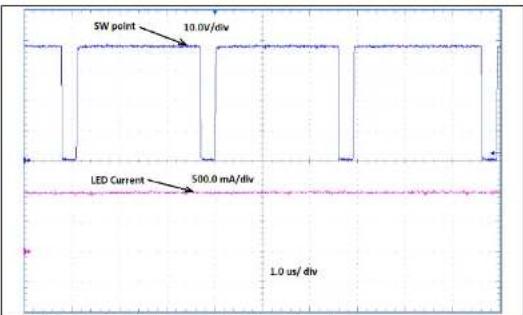
FIGURE C.2-1: 37V V IN Switching Waveform.
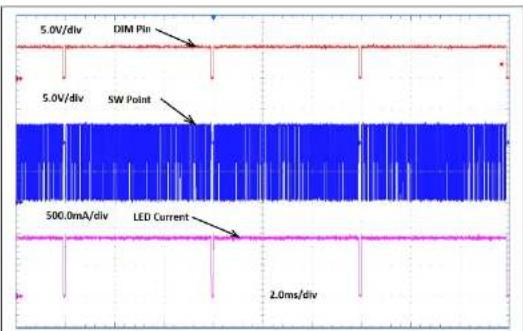
text_image
5.0V/div DIM Pin 5.0V/div SW Point 500.0mA/div LED Current 2.0ms/divWorldwide Sales and Service
| AMERICAS | ASIA/PACIFIC | ASIA/PACIFIC | EUROPE |
| Corporate Office2365 West Chandler Blvd.Chandler, AZ 85224-6199Tel: 480-792-7200Fax: 480-792-7277Technical Support:http://www.microchip.com/supportWeb Address:www.microchip.com | Australia - SydneyTel: 61-2-9868-6733China - BeijingTel: 86-10-8569-7000China - ChengduTel: 86-28-8665-5511China - ChongqingTel: 86-23-8980-9588China - DongguanTel: 86-769-8702-9880China - GuangzhouTel: 86-20-8755-8029China - HangzhouTel: 86-571-8792-8115China - Hong Kong SARTel: 852-2943-5100China - NanjingTel: 86-25-8473-2460China - QingdaoTel: 86-532-8502-7355China - ShanghaiTel: 86-21-3328-8000China - ShenyangTel: 86-24-2334-2829China - ShenzhenTel: 86-755-8864-2200China - SuzhouTel: 86-186-6233-1526China - WuhanTel: 86-27-5980-5300 | India - BangaloreTel: 91-80-3090-4444India - New DelhiTel: 91-11-4160-8631India - PuneTel: 91-20-4121-0141Japan - OsakaTel: 81-6-6152-7160Japan - TokyoTel: 81-3-6880-3770Korea - DaeguTel: 82-53-744-4301Korea - SeoulTel: 82-2-554-7200Malaysia - Kuala LumpurTel: 60-3-7651-7906Malaysia - PenangTel: 60-4-227-8870Philippines - ManilaTel: 63-2-634-9065SingaporeTel: 65-6334-8870Taiwan - Hsin ChuTel: 886-3-577-8366Taiwan - KaohsiungTel: 886-7-213-7830Taiwan - TaipeiTel: 886-2-2508-8600Thailand - BangkokTel: 66-2-894-1351 | Austria - WelsTel: 43-7242-2244-39Fax: 43-7242-2244-393Denmark - CopenhagenTel: 45-4485-5910Fax: 45-4485-2829Finland - EspooTel: 358-9-4520-820France - ParisTel: 33-1-69-53-63-20Fax: 33-1-69-30-90-79Germany - GarchingTel: 49-8931-9700Germany - HaanTel: 49-2129-3766400Germany - HellbronnTel: 49-7131-72400Germany - KarlsruheTel: 49-721-625370Germany - MunichTel: 49-89-627-144-0Fax: 49-89-627-144-44Germany - RosenheimTel: 49-8031-354-560Israel - Ra'ananaTel: 972-9-744-7705Italy - MilanTel: 39-0331-742611Fax: 39-0331-466781Italy - PadovaTel: 39-040-7626285 |
| BostonWestborough, MATel: 774-760-0087Fax: 774-760-0088ChicagoIliasca, ILTel: 630-285-0071Fax: 630-285-0075DallasAddison, TXTel: 972-818-7423Fax: 972-818-2924DetroitNovi, MITel: 248-848-4000 | China - QingdaoTel: 86-532-8502-7355China - ShanghaiTel: 86-21-3328-8000China - ShenzhenTel: 86-755-8864-2200China - SuzhouTel: 86-186-6233-1526China - WuhanTel: 86-27-5980-5300 |