
Easypix - Telephone MARTIN - Free user manual and instructions
Find the device manual for free Easypix MARTIN in PDF.


| Product Type | Professional LED color-changing lighting system (indoor use) |
| Models | Easypix 300 (300 mm), Easypix 1200 (1200 mm), Easypix Power |
| Dimensions (Easypix 300) | 300 mm x 40 mm x 53 mm (11.8 x 1.6 x 2.1 in) |
| Dimensions (Easypix 1200) | 1200 mm x 40 mm x 53 mm (47.2 x 1.6 x 2.1 in) |
| Dimensions (Easypix Power) | 325 mm x 113 mm x 94 mm (12.8 x 4.4 x 3.7 in) |
| Weight (Easypix 300) | 560 g (19.8 oz) |
| Weight (Easypix 1200) | 1.9 kg (4.2 lb) |
| Weight (Easypix Power) | 3 kg (6.6 lb) |
| Power Supply | AC 100-240 V, 50/60 Hz, auto-ranging; 5.0 A slow-blow fuse |
| LED Power (Easypix 300) | 8 W total (Osram G6SP LEDs) |
| LED Power (Easypix 1200) | 32 W total (Osram G6SP LEDs) |
| Luminous Output (Easypix 300) | 100 lumens (narrow beam) |
| Luminous Output (Easypix 1200) | 400 lumens (narrow beam) |
| Color Mixing | RGB (red, green, blue) with RGB and HSI control modes |
| Control Methods | DMX512-A, stand-alone (64 programs), master/slave synchronized |
| DMX Channels | 3 channels per output (RGB or HSI) |
| Max Luminaires per Power | 24 x Easypix 300 or 6 x Easypix 1200 (max 7.2 m total length) |
| Mounting | 35 mm DIN top-hat rail; tilt ±95° |
| Operating Temperature | 5°C to 40°C (41°F to 104°F) |
| IP Rating | IP20 (indoor only) |
| Safety Class | Class 1M LED product (IEC/EN 60825-1); not for household use |
| Cleaning | Use soft cloth; avoid solvents, abrasives, high-pressure water |
| Diffuser Filters | Interchangeable narrow, medium, wide beam angles |
| Fuse Replacement | 5.0 A slow-blow primary fuse; accessible via fuseholder |
| Included Items (Luminaire) | Luminaire with narrow diffuser, safety leaflet, 2 x short DIN rails |
| Included Items (Power) | Easypix Power, user manual, termination plug, XLR-to-RJ45 adapter, 2 power cables (EU/US) |
Frequently Asked Questions - Easypix MARTIN
User questions about Easypix MARTIN
0 question about this device. Answer the ones you know or ask your own.
Ask a new question about this device
Download the instructions for your Telephone in PDF format for free! Find your manual Easypix - MARTIN and take your electronic device back in hand. On this page are published all the documents necessary for the use of your device. Easypix by MARTIN.
USER MANUAL Easypix MARTIN
Easypix™ user manual
Martin®
Dimensions
All dimensions are in millimeters

Easypix ™ 300 / Easypix ™ 1200
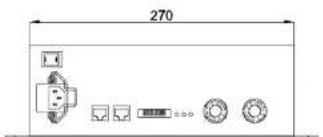

Easypix Power™
©2010 – 2011 Martin Professional™ A/S. Information subject to change without notice. Martin Professional A/S and all affiliated companies disclaim liability for any injury, damage, direct or indirect loss, consequential or economic loss or any other loss occasioned by the use of, inability to use or reliance on the information contained in this manual. The Martin logo, the Martin name and all other trademarks in this document pertaining to services or products by Martin Professional A/S or its affiliates and subsidiaries are trademarks owned or licensed by Martin Professional A/S or its affiliates or subsidiaries. The use of certain patents in Martin Easypix products is licensed by Color Kinetics, Inc. (see details printed on product).
Safety Information

Warning! Read the safety precautions in this section before installing, powering, operating or servicing this product.
The following symbols are used to identify important safety information on the product and in this manual:

Safety hazard. Risk of severe injury or death.

Hazardous voltage. Risk of lethal or severe electric shock.

LED light emission. Risk of eye injury.

Burn hazard. Hot surface. Do not touch

Refer to user manual.

Warning! Class 1M LED product according to IEC/EN 60825-1. Do not view the light output with optical instruments or any device that may concentrate the beam.
This product is for professional use only. It is not for household use.
This product presents risks of severe injury or death due to fire hazards, electric shock and falls.

Read this manual before installing, powering or servicing the product, follow the safety precautions listed below and observe all warnings in this manual and printed on the luminaire. Install and operate the luminaire only as described in this manual and in accordance with local laws and regulations. Refer any operation not described in this manual to a qualified technician.
If you have questions about how to operate the luminaire safely, please contact your Martin dealer or call the Martin 24-hour service hotline at +45 70 200 201, or in the USA on 1-888-tech-180.
PROTECTION FROM ELECTRIC SHOCK
- Disconnect the luminaire from AC power before removing or installing any cover or part and when not in use.
- The system does not support hot swap. Turn off AC power before adding any luminaire to the system.
- Connect the Easypix Power electrically to ground (earth).
- Use only a source of AC power that complies with local building and electrical codes and has both overload and ground-fault (earth-fault) protection.
- Connect a maximum of 24 Easypix 300 luminaires or 6 Easypix 1200 luminaires or any mixture of Easypix 300 and 1200 luminaires that is maximum 7.2 m long to one Easypix Power device.
- Before using the devices, check that all power distribution equipment and cables are in perfect condition and are rated for the current requirements of all connected devices.
- Isolate all devices from power immediately if any cable, seal, cover or other component is damaged, cracked or deformed. Do not reapply power until repairs have been completed.
• The Easypix is for indoor use only. - Refer any service operation not described in this manual to an authorized Martin Service partner.

PROTECTION FROM BURNS
- Do not operate the devices if the ambient temperature (Ta) exceeds 40°C ( 104°F ).
- The exterior of the luminaires and Easypix Power becomes hot, up to 65°C (149°F) during normal operation. Ensure that accidental physical contact with the devices is impossible.
- Allow the luminaire to cool for 5 minutes before servicing.
- Keep combustible materials (for example fabric, wood, paper) at least 20 cm (8 in.) away from the devices.
- Keep flammable materials well away from the devices.
- Do not modify the Easypix Power or luminaires in any way not described in this manual or install other than genuine Martin parts.
- Use only Martin approved accessories to mask or modify the light beam.
- Do not attempt to bypass fuses. Replace defective fuses with ones of the specified type and rating only.

PROTECTION FROM INJURY
- Do not look at LEDs with a magnifying glass or any other optical instrument that may concentrate the light output.
- Ensure that all external covers, components and installation fittings are securely fastened.
- Block access below the work area and work from a stable platform whenever installing, servicing or moving the devices.
- Ensure that all supporting structures, surfaces, fasteners and lifting equipment can bear the weight of all the devices they are intended to support plus an adequate safety margin, and that they conform to local building and safety regulations.
- Use a sufficient number of fasteners with sufficient corrosion resistance, dimensions and strength to mount the DIN rail safely. Any nuts used must be self-locking.
- If the Easypix Power or luminaires are to be installed in a location where injury or damage may be caused if a device falls, use a secondary means of attachment such as safety wires looped tightly around the devices and anchored securely to the mounting structure or in the mounting surface.

Disposing of this product
Martin™ products are supplied in compliance with Directive 2002/96/EC of the European Parliament and of the Council of the European Union on WEEE (Waste Electrical and Electronic Equipment), as amended by Directive 2003/108/EC, where applicable.
Help preserve the environment! Ensure that this product is recycled at the end of its life. Your supplier can give details of local arrangements for the disposal of Martin products.
Contents
Dimensions 2
Safety Information....3
Contents 7
Notes 8
Introduction....9
Unpacking 10
Using for the first time.... 10
Physical installation 11
Location and orientation 11
Mounting....12
Connections – general....16
System overview 16
AC power....17
Connecting to power.... 18
Control data link....19
System setup....21
Luminaire configuration 22
Setting up stand-alone operation.... 22
Setting synchronized master/slave mode 26
Setting RGB or HSI color control mode 29
Operation....30
Service and maintenance 32
Cleaning 32
Diffuser filters....33
Fuse replacement.... 35
Software installation 35
DMX protocols 37
RGB Mode 37
HSI Mode 37
Troubleshooting 28
Notes
Introduction
Thank you for selecting Easypix™, a compact LED-based color-changing lighting product from Martin™. The Easypix is available in short 300 mm (11.8 inch) and long 1200 mm (47.2 inch) models. Both luminaires are controlled by the Easypix Power™.
Diffuser filters that give wider beam angles are available.
This product features:
- RGB (red, green, blue) color mixing, with RGB and HSI (hue, saturation, intensity) color control options
- 32 W LED power and 400 lumens total output (at narrow beam angle) from Easypix 1200
- 8 W LED power and 100 lumens total output (at narrow beam angle) from Easypix 300
- The Easypix Power can drive up to twenty-four Easypix 300s, six Easypix 1200s, or any mixture of Easypix 300 and Easypix 1200 devices that does not exceed 7.2 meters (23 ft. 7 in.)
- Possibility of controlling all luminaires attached to an Easypix Power as one single RGB or HSI pixel
- All luminaires attached to an Easypix Power are controlled as one single RGB pixel
- DMX 512A control
- Clamp mounting system for standard 35 mm DIN rail
• 64 built-in stand-alone programs
- Master/slave functionality with 64 pre-programmed stand-alone shows available
For the latest firmware updates, documentation, product specifications and other information about this and all Martin Professional™ products, please visit the Martin website at http://www.martin.com.
Unpacking
The following items are included with the Easypix luminaire:
- 300 mm or 1200 mm strip light luminaire with narrow beam angle diffuser (installed).
- Safety leaflet
- Two short DIN rails
The following items are included with the Easypix Power - Easypix Power
• This user manual
• 3-pin male XLR to RJ45 adapter - DMX termination plug
- Two AC mains power cables (EU with Schuko plug, US without plug)
Using for the first time
Before applying power to the luminaire:
- Carefully review "Safety Information" on page 3
- Check that the local AC power voltage is within the range listed on the Easypix Power serial number label
• Install the Easypix Power and Easypix luminaires as described in this manual
Physical installation

Warning! Read "Safety Information" on page 3 before installing the devices.
The safety and suitability of lifting equipment, installation location, anchoring method, mounting hardware and electrical installation is the responsibility of the installer. All local safety regulations and legal requirements must be observed when installing and connecting the devices. Installation must be carried out by qualified professionals only.
The Easypix luminaires must be clamped onto a DIN top-hat rail that is securely anchored to a suitable flat surface. Ensure that the supporting structure can bear the weight of all installed devices plus an adequate safety margin.
Make sure that there will be at least 5 cm (2 in.) of free space and unrestricted airflow around both the Easypix Power and the Easypix luminaire.
Warning! Do not use the Easypix luminaire without the supplied diffuser filter.
Contact your Martin supplier for assistance if you have any questions about how to install this product safely.
Location and orientation
Easypix luminaires are for indoor installations with an IP rating of 20. The Easypix Power is for indoor use only;
The devices require free and unobstructed airflow around them to ensure adequate cooling:
- Do not bury the devices or locate them in an unventilated space
- Allow 5 cm (2 in.) free space around both the Easypix Power and the Easypix luminaires
Install the Easypix Power and the Easypix luminaires at least 20 cm (8 in.) away from any combustible materials (wood, paper, etc.) and well away from any flammable materials.
The housings of the Easypix luminaire and the Easypix Power reach temperatures up to 65°C (149°F). Restrict public access or locate the
Mounting
DIN rail
The Easypix luminaire is designed for mounting on standard 35 mm top-hat DIN rail.

Figure 1: Martin DIN rail dimensions (in mm)
Corrosion-resistant DIN rail can be ordered from Martin (see "Accessories" on page 41). Dimensions for the DIN rail supplied by Martin are given in Figure 1.
Note that you cannot fasten the Easypix luminaire mounting clamps directly over screws used to fasten DIN rail to the mounting surface. If a DIN rail mounting screw is in the way of a mounting clamp, move it to another slot in the DIN rail.
Note that you must install extra screws through the DIN rail into the mounting surface to secure luminaires in vertical installations (see "Mounting the Easypix luminaire vertically" on page 13).
Mounting the Easypix luminaire
Warning! The Easypix luminaire must be mounted on a top-hat profile 35 mm (1.4 inch) DIN rail that is securely anchored to a surface. The installation must conform to local electrical, building, safety and fire regulations. If there is a danger that the luminaire
To mount the luminaire on a surface using 35 mm DIN rail:
- Fasten the DIN rail securely to the mounting surface.
- See Figure 2. The luminaire mounting bracket has a hooked profile on one side (see A). Hook this profile over the top of the DIN rail and swing the bracket down. Use a 2.5 mm Allen key to tighten the mounting clamp screw (see B).
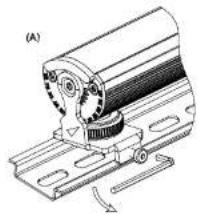

Figure 2: Mounting on DIN rail
Mounting the Easypix luminaire vertically
The mounting clamp screws will not hold the product securely on the DIN rail if luminaire is installed vertically. You must therefore insert screws in the mounting surface through the DIN rail mounting holes (see Figure 3) so that the luminaire mounting clamps rest against these screws and secure the luminaire.
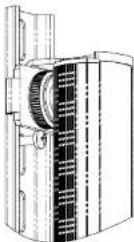
Figure 3: Vertical mounting on DIN rail
Safety attachment
When installing the luminaire in an area where it could fall and cause damage or injury, loop two safety cables or similar secondary attachments that can hold ten times the weight they secure tightly around each luminaire and fasten each safety attachment to a separate anchoring point in the mounting surface itself, not the DIN rail.
Adjusting tilt angle
The Easypix luminaire can be tilted through 95°.


Figure 4: Tilt angle
To adjust the tilt angle:
-
See Figure 5. Turn the locking knob clockwise until it releases the luminaire profile.
-
Rotate the locking knob counter-clockwise until it engages in the luminaire profile and locks it in position.

Figure 5: Releasing and tighten the tilt locking lock
Mounting the Easypix Power
Fasten the Easypix Power securely to a flat surface in a location that is accessible for service. To mount it, use M5 screws in the four mounting holes. Respect all local safety, fire and building regulations governing the installation of electrical equipment in cavities or plenums. Allow free airflow and at least 5 cm (2 in.) of free space around the device. Allow sufficient ventilation to ensure that the ambient temperature will not exceed 40°C (104°F).
When choosing a location for the Easypix Power, bear in mind that access to the DIP switch is required if you need to change the DMX address or to change stand-alone programs.
Connections – general
This section lists some general principles that apply to Easypix installations. Read "Safety Information" on page 3, "AC power" on page 17 and "Control data link" on page 19 before starting installation work.
System overview
Figure 6 gives an overview of the system layout and the cable connections for the Easypix Power.
![graph LR A["DMX"] --> B["AC power"] B --> C["Failure"] C --> D["Failure"] D --> E["Failure"] E --> F["OPTO-SPLITTER"] F --> G["DMX Termination Plug"] G --> H["Failure"] H --> I["Failure"] I --> J["Failure"] J --> K["Failure"] K --> L["Failure"] L --> M["Failure"] M --> N["Failure"] N --> O["Failure"…](/content/2026/06/1215461/images/506fc07b0c4a9a6f874c5f6df9555d87aaa4a8b973a17d9bef65661d3113654f.jpg)
Figure 6: Schematic cable and device layout
Warning! Do not exceed the maximum permitted number of luminaires connected to one Easypix Power unit, i.e. 24 Easypix 300 luminaires or 6 Easypix 1200 luminaires or any mixture of Easypix 300 and Easypix 1200 luminalres that is maximum 7.2 meters in length.
The Easypix system consists of:
-
The Easypix Power that controls luminaires in response to a DMX signal from a controller such as the Martin Light Fox™. The Easypix Power also stores stand-alone programs that luminaires can display without the need for a DMX controller.
-
Easypix 300 and Easypix 1200 luminaires.
AC power

DANGER! Read "Safety Information" on page 3 before attempting to install this product. Lock out power to the entire installation before working on cables and connections or removing any cover.
Warning! Electrical installation must be carried out by qualified professionals only.

Warning! The electrical equipment and cable used to supply the Easypix system with power must be in perfect condition, be adequately dimensioned for current requirements and respect maximum cable run lengths.
Warning! For protection from dangerous electric shock, the Easypix Power must be grounded (earthed). The AC power distribution system must be fitted with current overload and ground-fault (earth-fault) circuit breakers as well as a means to isolate the Easypix Power from power and lock out power during service.
Important! Do not connect the Easypix system to an electrical dimmer system. Doing so can damage the electronics.
The Easypix lighting system is supplied with AC power via the Easypix Power.
If you require help in planning or dimensioning the power distribution system, please contact your Martin supplier for assistance.
If there is a break or cut at any point in a cable (for example at a connection point), and if this is exposed to water, moisture can be drawn up the inside of the cable due to the vacuum effect of temperature fluctuations during operation.
The Easypix Power adapts automatically to AC mains power at 100 – 240 V nominal, 50 or 60 Hz. Do not connect to power at any other voltage or frequency.
The Easypix Power is protected by a 5.0 amp slow-blow primary fuse located on the Easypix Power. See "Fuse replacement" on page 35 for details of changing fuses. See "Specifications" on page 39 for details of fuse rating and typical current.
The Easypix 300 and Easypix 1200 are protected by an electronic circuit-breaker in the extender/splitter. Incorrect system configuration will cause an automatic luminaire power off. The circuit-breaker will
Connecting to power
The Easypix Power is supplied with an IEC power cable ready for connection to a single-phase 3-wire (live, neutral, ground/earth) power distribution system at 100-120/200-240 VAC nominal, 50/60 Hz.
Details of standard US and EU conductor identification systems are given in Table 1.
| Wire color (US system) | Wire color (EU system) | Conductor Symbol | Screw (US) | |
| black | brown | live | L | yellow or brass |
| white | blue | neutral | N silver | |
| green | yellow/green | ground(earth) | green | |
Table 1: Conductor identification

Important! Check that all installation work is completed and carry out appropriate tests and safety checks before applying power.
Power plug
If you decide to fit the supplied power cable tail with a plug that is suitable for your AC mains power outlets, install a grounding-type (earthed) plug that is rated 5 A minimum, following the plug manufacturer's instructions.
Table 1 shows some possible pin identification schemes; if pins are not clearly identified, or if you have any doubts about proper installation, consult a qualified electrician.
Control data link
The Easypix Power must be connected via a control data link for DMX controller or synchronized (master/slave) operation. The following considerations must be taken into account when planning the data link:
- Use RS-485 data cable for the data link. RS-485 cable has low capacitance and a characteristic impedance of 85 to 150 Ohms. It is electrically shielded and has at least 1 twisted pair of conductors.
- The minimum recommended data cable wire size is 0.25 mm 2 (24 AWG) for runs up to 300 meters (1000 ft.) and 0.32 mm 2 (22 AWG) for runs up 500 meters (1640 ft.) from the DMX controller to Easypix Power devices. An optically isolated amplifier-splitter such as the Martin TM RS-485 Opto-Splitter TM (P/N 90758060) must be used to extend a data link beyond these limits.
- CAT 5e network cable is suitable for the control data link in indoor installations. Installation-type cable is acceptable for fixed installations. Flexible patch-type cable with good bend and torsion recovery is required in movable installations (Martin patch cables are recommended). CAT 5e cable and RJ-45 connectors must be used for synchronized master/slave operation.
- Long parallel runs of AC power and control data cables may cause interference on the data link and must be avoided. Even if not required by law, use separate conduits for power and data cables.
- Easypix Powers can be daisy-chained, i.e. the data cable can be connected in one single chain of Easypix Powers as shown in Figure 6.
• Each chain may connect a maximum of 32 Easypix Powers. - Each chain on the link must be terminated by placing an RJ-45 DMX termination plug (available from Martin, P/N 91613028) in the DMX output socket of the last Easypix Power on the chain.
Data connection pinouts
RJ-45 connection
RJ-45 connectors are suitable if CAT 5e cable is used for the data link. RJ-45 cable connector pins are numbered from the left looking at the face of the connector with the locking clip on top (see Figure 7).

Figure 7: RJ-45 cable connector pins
Connectors must be wired according to the 568-B system using the standard RJ-45 pin-out for DMX applications:
• Pin 1 (White/orange): DMX data hot (+)
• Pin 2 (Orange): DMX data cold (-)
• Pins 7 (White/brown) and 8 (Brown): Common
Pins 3 and 6 are available for Data 2 connections in DMX 512-A or similar systems. They must be wired as follows:
• Pin 3 (White/green): Available for Data 2 hot (+)
• Pin 6 (Green): Available for Data 2 cold (-)
Pins 4 and 5 are not used in currently available lighting control systems but can be wired as follows:
- Pin 4 (Blue)
- Pin 5 (White/blue)
XLR 5-pin connection
Many DMX lighting controllers have XLR 5-pin output connectors. To connect these to the RJ-45 connectors on the Easypix Power, use an XLR 5-pin to RJ-45 adapter, (available from Martin, P/N 11840111). If you need to rewire XLR connectors, pin numbers are normally marked on connectors. Connectors must be wired using the standard XLR DMX pin-out:
- Pin 1: Cable shield
• Pin 2: DMX Data 1 - (cold)
• Pin 3: DMX Data 1 + (hot)
Important! To avoid ground/earth loop interference, ensure that the DMX cable shield does not come into contact with the shell or body of XLR connectors.
Luminaire connection
A custom 13-pin DIN cable system is used to carry power and data from the Easypix Power to Easypix luminaires and from one Easypix luminaire to the next. Cable connectors have a locking ring that must be turned fully clockwise until two clicks are heard once the connectors have been pushed together.
Extension cables are available from Martin if a gap is required between luminaires (see under 'Accessories' on page 41).
The maximum permitted power/data cable length from the Easypix Power to the last Easypix luminaire on the custom cable link is 100 m (328 ft.).
Important! The Easypix luminaire cable has identical connectors to the cable used in Martin Tripix™ luminaires, but do not connect Martin Tripix and Easypix luminaires to each other, as they use different data signals and you may cause damage that is not covered by product warranties.
System setup
Important! Read this description carefully before applying power. Incorrect configuration of the Easypix system may permanently damage the Easypix luminaire.
Important! The total length of the luminaires connected to one Easypix Power must not exceed 7.2 meters.
The Easypix Power has two output channels marked Output I and Output II. Each output channel can be controlled as one pixel. The two output channels added together can drive up to twenty-four Easypix 300s or six Easypix 1200s or any mixture that does not exceed 7.2 meters in total. You can distribute the Easypix luminaires as you like between the two output channels.
Luminaire configuration
The Easypix system is designed as a flexible modular system that can support up to 24 Easypix 300s or 6 Easypix 1200s per Easypix Power device. The Easypix Power must be configured to match the desired luminaire layout.
Setting up stand-alone operation
In stand-alone operation, no DMX controller is required. Instead, 64 pre-programmed static and dynamic lighting effects stored in the Easypix Power memory are sent to the Easypix luminaires for display when stand-alone operation is enabled.
If more complex effects are required than those available, you will need to add a DMX controller to the system and use DMX control.
The Easypix system is set up using the Easypix Power's DIP switch (see Figure 8).
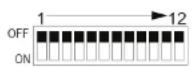
Figure 8: DIP switch
Enabling stand-alone operation
See Table 2.
| DIPs 1 2 3 4 5 6 7 8 9 10 11 12 | |||||||||||||||
| DMX Modes | |||||||||||||||
| DMX Mode RGB | 0 0 0 | ||||||||||||||
| DMX Mode HSI | 1 | 0 | 0 | ||||||||||||
| DMX Address 1-510 | x | x | x | x | x | x | x | x | x | x | |||||
| Standalone Modes | Type | Name | |||||||||||||
| Standalone ON + Master | 0 | 0 | 1 | ||||||||||||
| Standalone OFF + Save | 0 | 0 | 0 | ||||||||||||
| Standalone Program 0-64 | x | x | x | x | x | x | 0 | 0 | 0 | x | x | 1 | |||
| 0 | 0 | 0 | 0 | 0 | 0 | 0 | 0 | 0 | 0 | x | x | 1 | ALL OFF | ||
| 1 | 1 | 0 | 0 | 0 | 0 | 0 | 0 | 0 | 0 | x | x | 1 | SIMPLE COLORS | RED | |
| 2 | 0 | 1 | 0 | 0 | 0 | 0 | 0 | 0 | 0 | x | x | 1 | GREEN | ||
| 3 | 1 | 1 | 0 | 0 | 0 | 0 | 0 | 0 | 0 | x | x | 1 | BLUE | ||
| 4 Factory Default | 0 | 0 | 1 | 0 | 0 | 0 | 0 | 0 | 0 | 0 | 0 | 1 | ALL ON | ||
| 5 | 1 | 0 | 1 | 0 | 0 | 0 | 0 | 0 | 0 | x | x | 1 | CYAN | ||
| 6 | 0 | 1 | 1 | 0 | 0 | 0 | 0 | 0 | 0 | x | x | 1 | MAGENTA | ||
| 7 | 1 | 1 | 1 | 0 | 0 | 0 | 0 | 0 | 0 | x | x | 1 | YELLOW | ||
| 8 | 0 | 0 | 0 | 1 | 0 | 0 | 0 | 0 | 0 | x | x | 1 | WHITES | WARM WHITE | |
| 9 | 1 | 0 | 0 | 1 | 0 | 0 | 0 | 0 | 0 | x | x | 1 | COOL WHITE | ||
| 10 | 0 | 1 | 0 | 1 | 0 | 0 | 0 | 0 | 0 | x | x | 1 | COLD WHITE | ||
| 11 | 1 | 1 | 0 | 1 | 0 | 0 | 0 | 0 | 0 | x | x | 1 | HOT WHITE | ||
| 12 | 0 | 0 | 1 | 1 | 0 | 0 | 0 | 0 | 0 | x | x | 1 | TRENDY COLORS | ORANGE | |
| 13 | 1 | 0 | 1 | 1 | 0 | 0 | 0 | 0 | 0 | x | x | 1 | LIME GREEN | ||
| 14 | 0 | 1 | 1 | 1 | 0 | 0 | 0 | 0 | 0 | x | x | 1 | LEMON YELLOW | ||
| 15 | 1 | 1 | 1 | 1 | 0 | 0 | 0 | 0 | 0 | x | x | 1 | AQUA BLUE | ||
| 16 | 0 | 0 | 0 | 0 | 1 | 0 | 0 | 0 | 0 | x | x | 1 | BABY PINK | ||
| 17 | 1 | 0 | 0 | 0 | 1 | 0 | 0 | 0 | 0 | x | x | 1 | LILAC | ||
| 18 | 0 | 1 | 0 | 0 | 1 | 0 | 0 | 0 | 0 | x | x | 1 | BLOOD ORANGE | ||
| 19 | 1 | 1 | 0 | 0 | 1 | 0 | 0 | 0 | 0 | x | x | 1 | FLESH PINK | ||
| 20 | 0 | 0 | 1 | 0 | 1 | 0 | 0 | 0 | 0 | x | x | 1 | LEAF GREEN | ||
| DIPs | 1 | 2 | 3 | 4 | 5 | 6 | 7 | 8 | 9 | 10 | 11 | 12 | |||
| DMX Modes | |||||||||||||||
| DMX Mode RGB | 0 | 0 | 0 | ||||||||||||
| DMX Mode HSI | 1 | 0 | 0 | ||||||||||||
| DMX Address 1-510 | x | x | x | x | x | x | x | x | x | ||||||
| Standalone Modes | Type | Name | |||||||||||||
| Standalone ON + Master | 0 | 0 | 1 | ||||||||||||
| Standalone CTF + Slave | 0 | 0 | 0 | ||||||||||||
| Standalone Program 0-64 | x | x | x | x | x | x | 0 | 0 | 0 | x | x | 1 | |||
| 22 | 0 | 1 | 1 | 0 | 1 | 0 | 0 | 0 | 0 | x | x | SIMPLE DYNAMICS | RGB 1 | ||
| 23 | 1 | 1 | 1 | 0 | 1 | 0 | 0 | 0 | 0 | x | x | 1 | RGB 2 | ||
| 24 | 0 | 0 | 0 | 1 | 1 | 0 | 0 | 0 | 0 | x | x | 1 | CMY | ||
| 25 | 1 | 0 | 0 | 1 | 1 | 0 | 0 | 0 | 0 | x | x | 1 | RAINBOW | ||
| 26 | 0 | 1 | 0 | 1 | 1 | 0 | 0 | 0 | 0 | x | x | W - R - W - G - W - B | |||
| 27 | 1 | 1 | 0 | 1 | 1 | 0 | 0 | 0 | 0 | x | x | W - C - W - M - W - Y | |||
| 28 | 0 | 0 | 1 | 1 | 1 | 0 | 0 | 0 | 0 | x | x | ALTER-NATES I | RED / ORANGE | ||
| 29 | 1 | 0 | 1 | 1 | 1 | 0 | 0 | 0 | 0 | x | x | 1 | RED / PINK | ||
| 30 | 0 | 1 | 1 | 1 | 1 | 0 | 0 | 0 | 0 | x | x | 1 | RED / AQUA | ||
| 31 | 1 | 1 | 1 | 1 | 1 | 0 | 0 | 0 | 0 | x | x | GREEN / YELLOW | |||
| 32 | 0 | 0 | 0 | 0 | 0 | 1 | 0 | 0 | 0 | x | x | ALTER-NATES II | GREEN / BLUE | ||
| 33 | 1 | 0 | 0 | 0 | 0 | 1 | 0 | 0 | 0 | x | x | GREEN / ORANGE | |||
| 34 | 0 | 1 | 0 | 0 | 0 | 1 | 0 | 0 | 0 | x | x | 1 | BLUE / PURPLE | ||
| 35 | 1 | 1 | 0 | 0 | 0 | 1 | 0 | 0 | 0 | x | x | 1 | BLUE / ORANGE | ||
| 36 | 0 | 0 | 1 | 0 | 0 | 1 | 0 | 0 | 0 | x | x | 1 | BLUE / YELLOW | ||
| 37 | 1 | 0 | 1 | 0 | 0 | 1 | 0 | 0 | 0 | x | x | FADES TO WHITE | RED | ||
| 38 | 0 | 1 | 1 | 0 | 0 | 1 | 0 | 0 | 0 | x | x | 1 | GREEN | ||
| 39 | 1 | 1 | 1 | 0 | 0 | 1 | 0 | 0 | 0 | x | x | 1 | BLUE | ||
| 40 | 0 | 0 | 0 | 1 | 0 | 1 | 0 | 0 | 0 | x | x | 1 | CYAN | ||
| 41 | 1 | 0 | 0 | 1 | 0 | 1 | 0 | 0 | 0 | x | x | 1 | MAGENTA | ||
| 42 | 0 | 1 | 0 | 1 | 0 | 1 | 0 | 0 | 0 | x | x | 1 | YELLOW | ||
| Standalone Modes | Type | Name | |||||||||||||
| Standalone ON + Master | 0 | 0 | 1 | ||||||||||||
| Standalone OFF + Slave | 0 | 0 | 0 | ||||||||||||
| Standalone Program 9-64 | x | x | x | x | x | x | 0 | 0 | 0 | x | x | 1 | |||
| 43 | 1 | 1 | 0 | 1 | 0 | 1 | 0 | 0 | 0 | x | x | PULSES | RED PULSE | ||
| 44 | 0 | 0 | 1 | 1 | 0 | 1 | 0 | 0 | 0 | x | x | 1 | GREEN PULSE | ||
| 45 | 1 | 0 | 1 | 1 | 0 | 1 | 0 | 0 | 0 | x | x | 1 | BLUE PULSE | ||
| 46 | 0 | 1 | 1 | 1 | 0 | 1 | 0 | 0 | 0 | x | x | 1 | CYAN PULSE | ||
| 47 | 1 | 1 | 1 | 1 | 0 | 1 | 0 | 0 | 0 | x | x | MAGENTA PULSE | |||
| 48 | 0 | 0 | 0 | 0 | 1 | 1 | 0 | 0 | 0 | x | x | 1 | YELLOW PULSE | ||
| 49 | 1 | 0 | 0 | 0 | 1 | 1 | 0 | 0 | 0 | x | x | 1 | WHITE PULSE | ||
| 50 | 0 | 1 | 0 | 0 | 1 | 1 | 0 | 0 | 0 | x | x | 1 | RGB PULSE | ||
| 51 | 1 | 1 | 0 | 0 | 1 | 1 | 0 | 0 | 0 | x | x | 1 | CMY PULSE | ||
| 52 | 0 | 0 | 1 | 0 | 1 | 1 | 0 | 0 | 0 | x | x | FLASHES | RED FLASH | ||
| 53 | 1 | 0 | 1 | 0 | 1 | 1 | 0 | 0 | 0 | x | x | 1 | GREEN FLASH | ||
| 54 | 0 | 1 | 1 | 0 | 1 | 1 | 0 | 0 | 0 | x | x | 1 | BLUE FLASH | ||
| 55 | 1 | 1 | 1 | 0 | 1 | 1 | 0 | 0 | 0 | x | x | CYAN FLASH | |||
| 56 | 0 | 0 | 0 | 1 | 1 | 1 | 0 | 0 | 0 | x | x | MAGENTA FLASH | |||
| 57 | 1 | 0 | 0 | 1 | 1 | 1 | 0 | 0 | 0 | x | x | 1 | YELLOW FLASH | ||
| 58 | 0 | 1 | 0 | 1 | 1 | 1 | 0 | 0 | 0 | x | x | NATURE | WINTER-SPRING-SUMMER-AUTUMN | ||
| 59 | 1 | 1 | 0 | 1 | 1 | 1 | 0 | 0 | 0 | x | x | 1 | DAY-NIGHT | ||
| 60 | 0 | 0 | 1 | 1 | 1 | 1 | 0 | 0 | 0 | x | x | SUNRISE-SUNSET | |||
| 61 | 1 | 0 | 1 | 1 | 1 | 1 | 0 | 0 | 0 | x | x | SUNNY AFTERNOON | |||
| 62 | 0 | 1 | 1 | 1 | 1 | 1 | 0 | 0 | 0 | x | x | 1 | CLOUDY NIGHT | ||
Table 2: Stand-alone program DIP-switch settings
If the system is powered on when you select a stand-alone program on the DIP switch, allow several seconds for the selection to take effect.
If a DMX signal is sent to the Easypix Power, it overrides any standalone program that is currently running.
Setting synchronized master/slave mode
If you are running multiple Easypix Power devices on a data link, you can synchronize action so that all Easypix Powers and the connected Easypix luminaires run the same show simultaneously.
Setting master and slave
In synchronized (master/slave) mode, the first Easypix Power on a data link must be set as the master by setting pin 12 on the DIP switch to ON and the others set as slaves by setting pin 12 on the DIP switch to OFF. The stand-alone program selected on the master Easypix Power will be executed on all Easypix Power devices.
Important! Do not set more than one Easypix Power on a link as master.
When daisy-chaining Easypix Power devices in master/slave mode, use RJ-45 connectors and CAT 5e network cable only. Do not use RJ-45 to XLR adaptors.
![graph TD A["Master"] --> B["Slave"] B --> C["Slave"] D["Stand-alone program"] --> E["1"] E --> F["2"] F --> G["3"] G --> H["4"]](/content/2026/06/1215461/images/e678d4dca9a79071e1dd0f278c5aa188091f20f808a8081f66c90e5bbed50c88.jpg)
Setting up DMX-controlled operation
The Easypix Power can be controlled by sending instructions from a DMX controller to the 3 DMX channels (out of the 512 channels available in one DMX universe) the Easypix Power uses.
The first of these 3 channels is the Easypix Power's DMX address. You must set the Easypix Power's DMX address as a binary number on the unit's DIP switch with the lowest value on pin 1 and the highest value on pin 9 (i.e. pin 1 sets 1, pin 2 sets 2, pin 3 sets 4, pin 4 sets 8, pin 5 sets 16, pin 6 sets 32, etc. in the binary number) and the controller must send instructions to that address and the next two channels.
To save time calculating binary numbers, use Table 3. To use this table, first find the DMX address in the main block in the table. Then read the settings for pins 1 - 5 to the left and read the settings for pins 6 - 9 above the address. "0" means "OFF" and "1" means "ON".
For example, to set the DMX address to 101, you need to set DIP switch pins 1, 3, 6 and 7 to ON, as highlighted in the table.
| DIP switch pins setting | #50 | 0 | 0 | 0 | 0 | 0 | 0 | 0 | 1 | 1 | 1 | 1 | 1 | 1 | 1 | |||||
| #60 | 0 | 0 | 0 | 0 | 1 | 1 | 1 | 0 | 0 | 0 | 0 | 1 | 1 | 1 | ||||||
| #70 | 0 | 0 | 1 | 1 | 0 | 0 | 1 | 0 | 0 | 1 | 1 | 0 | 0 | 1 | ||||||
| #80 | 0 | 1 | 0 | 1 | 0 | 1 | 0 | 1 | 0 | 1 | 0 | 1 | 0 | 1 | ||||||
| #1 | #2 | #3 | #4 | #5 | ||||||||||||||||
| 0 | 0 | 0 | 0 | 0 | 52 | 54 | 96 | 128 | 160 | 192 | 224 | 256 | 288 | 320 | 352 | 384 | 419 | |||
| 1 | 0 | 0 | 0 | 0 | 1 | 33 | 66 | 97 | 129 | 161 | 193 | 226 | 257 | 289 | 321 | 353 | 385 | 417 | ||
| 0 | 1 | 0 | 0 | 0 | 2 | 34 | 68 | 98 | 130 | 162 | 194 | 226 | 258 | 290 | 322 | 354 | 386 | 418 | ||
| 1 | 1 | 0 | 0 | 0 | 3 | 35 | 67 | 99 | 131 | 163 | 195 | 227 | 259 | 291 | 323 | 355 | 387 | 419 | ||
| 0 | 1 | 0 | 0 | 0 | 4 | 36 | 68 | 100 | 132 | 164 | 196 | 228 | 258 | 292 | 324 | 356 | 388 | 420 | ||
| 1 | 0 | 1 | 0 | 0 | 5 | 37 | 69 | 101 | 133 | 165 | 197 | 229 | 260 | 293 | 325 | 357 | 389 | 421 | ||
| 0 | 1 | 0 | 0 | 0 | 6 | 38 | 70 | 102 | 134 | 166 | 198 | 230 | 262 | 294 | 326 | 358 | 390 | 422 | ||
| 1 | 1 | 1 | 0 | 0 | 7 | 39 | 71 | 103 | 135 | 167 | 199 | 231 | 263 | 295 | 327 | 359 | 391 | 423 | ||
| 0 | 0 | 0 | 1 | 0 | 8 | 40 | 72 | 104 | 136 | 168 | 200 | 232 | 264 | 296 | 328 | 359 | 392 | 424 | ||
| 1 | 0 | 0 | 1 | 0 | 9 | 41 | 73 | 105 | 137 | 169 | 201 | 233 | 265 | 297 | 329 | 360 | 393 | 425 | ||
| 0 | 1 | 0 | 1 | 0 | 10 | 42 | 74 | 106 | 138 | 170 | 202 | 234 | 256 | 298 | 330 | 361 | 394 | 426 | ||
| 1 | 1 | 0 | 1 | 0 | 11 | 43 | 75 | 107 | 139 | 171 | 203 | 235 | 257 | 299 | 331 | 362 | 395 | 427 | ||
| 0 | 0 | 1 | 1 | 0 | 12 | 44 | 76 | 108 | 140 | 172 | 204 | 236 | 258 | 300 | 332 | 364 | 396 | 428 | ||
| 1 | 0 | 1 | 1 | 0 | 13 | 45 | 77 | 109 | 141 | 173 | 205 | 237 | 269 | 301 | 333 | 365 | 397 | 429 | ||
| 0 | 1 | 1 | 1 | 0 | 14 | 46 | 78 | 110 | 142 | 174 | 206 | 238 | 270 | 302 | 334 | 366 | 398 | 430 | ||
| 1 | 1 | 1 | 1 | 0 | 15 | 47 | 79 | 111 | 143 | 175 | 207 | 239 | 271 | 303 | 335 | 367 | 399 | 431 | ||
| 0 | 0 | 0 | 0 | 1 | 16 | 48 | 80 | 112 | 144 | 176 | 208 | 240 | 272 | 304 | 336 | 368 | 400 | 432 | ||
| 1 | 0 | 0 | 0 | 1 | 17 | 49 | 81 | 113 | 145 | 177 | 209 | 241 | 273 | 305 | 337 | 369 | 401 | 433 | ||
| 0 | 1 | 0 | 0 | 1 | 18 | 50 | 82 | 114 | 146 | 178 | 210 | 242 | 274 | 306 | 338 | 370 | 402 | 434 | ||
| 1 | 1 | 0 | 0 | 1 | 19 | 51 | 83 | 115 | 147 | 179 | 211 | 243 | 275 | 307 | 339 | 371 | 403 | 435 | ||
| 0 | 0 | 1 | 0 | 1 | 20 | 52 | 84 | 116 | 148 | 180 | 212 | 244 | 276 | 308 | 340 | 372 | 404 | 436 | ||
| 1 | 0 | 1 | 0 | 1 | 21 | 53 | 85 | 117 | 149 | 181 | 213 | 245 | 277 | 309 | 341 | 373 | 405 | 437 | ||
| 0 | 1 | 1 | 0 | 1 | 22 | 54 | 86 | 118 | 150 | 182 | 214 | 246 | 278 | 310 | 342 | 374 | 406 | 438 | ||
| 1 | 1 | 1 | 0 | 1 | 23 | 55 | 87 | 119 | 151 | 183 | 215 | 247 | 279 | 311 | 343 | 375 | 407 | 439 | ||
| 0 | 0 | 0 | 1 | 1 | 24 | 56 | 88 | 120 | 152 | 184 | 216 | 248 | 290 | 312 | 344 | 376 | 408 | 440 | ||
| 0 | 0 | 1 | 0 | 1 | 25 | 57 | 89 | 121 | 153 | 185 | 217 | 249 | 291 | 313 | 345 | 377 | 409 | 441 | ||
| 1 | 0 | 1 | 0 | 1 | 26 | 58 | 90 | 122 | 154 | 186 | 218 | 250 | 292 | 314 | 346 | 378 | 410 | 442 | ||
| 1 | 1 | 0 | 1 | 1 | 27 | 59 | 91 | 123 | 155 | 187 | 219 | 251 | 283 | 315 | 347 | 379 | 411 | 443 | ||
| 0 | 0 | 1 | 1 | 1 | 28 | 60 | 92 | 124 | 156 | 188 | 220 | 252 | 284 | 316 | 348 | 380 | 412 | 444 | ||
| 1 | 0 | 1 | 1 | 1 | 29 | 61 | 93 | 125 | 157 | 189 | 221 | 253 | 285 | 317 | 349 | 381 | 413 | 445 | ||
| 0 | 1 | 1 | 1 | 1 | 30 | 62 | 94 | 126 | 158 | 190 | 222 | 254 | 286 | 318 | 350 | 382 | 414 | 446 | ||
| 1 | 1 | 1 | 1 | 1 | 31 | 63 | 95 | 127 | 159 | 191 | 223 | 255 | 287 | 319 | 351 | 383 | 415 | 447 | ||
Table 3: DMX address DIP switch settings
Alternatively, use the Martin DIP Switch Calculator, available for use online and downloadable free of charge at http://www.martin.dk/service/dipswitchpopup.htm (see Figure 10).

Figure 10: Martin™ DIP Switch Calculator
Setting RGB or HSI color control mode
To set the Easypix system to RGB mode, set DIP switch pin 10 to OFF. The three DMX channels will now control red, green and blue.
To set the Easypix system to HSI mode, set DIP switch pin 10 to ON. The three DMX channels will now control hue, saturation and intensity
Operation

Warning! Class 1M LED product according to IEC/EN 60825-1. Do not view the light output with optical instruments or any device that may concentrate the beam.
Ambient temperatures
The Easypix system can be operated at ambient temperatures from 5°C (41°F) to 40°C (104°F).
Status LEDs on the Easypix Power
Colored LEDs on the Easypix Power indicate current system status. See Table 4.
| Indicator name Power ON DMX ON Program mode | ||||
| LED color | Green | Green | Red | |
| ON Power on DMX OK System error or high temperature | ||||
| OFF No power | No DMX System OK | |||
| Blinking | Software | |||
Table 4: Status LEDs
upload
* Do not turn power off during a software upload, or you will damage software on the Easypix Power.
DMX-controlled operation
When the Easypix Power is set up for DMX-controlled operation, faders on the DMX controller are used to control color and intensity. The control method depends on which color control mode the Easypix Power is set to:
In RGB mode, three channels on the controller are used to control the intensity of red, green and blue from 0% to 100%.
In HSI mode, three channels on the controller are used to control hue, saturation and intensity.
- Hue is controlled in the following order: Red → Orange → Amber → Yellow → Green → Cyan → Blue → Indigo → Violet
When the Easypix Power is receiving a valid DMX signal, the green DMX LED lights.
Stand-alone operation
When the Easypix Power is set up for stand-alone operation, Easypix luminaires begin displaying their stand-alone program as soon as power is applied to the Easypix Power.
Service and maintenance

DANGER! Read "Safety Information" on page 3 before carrying out service or maintenance work on the Easypix system. Lock out power to the entire distribution system before servicing or opening any cover.
Important! The Easypix system requires regular service and maintenance to maintain reliable operation and protect the investment it represents. Excessive dirt and particle build-up degrades performance, causes overheating and will damage the Easypix Power and Easypix luminaire. Damage caused by inadequate cleaning or maintenance is not covered by the product warranty.
The service and maintenance procedures described in this section must be carried out by qualified professionals only. Any service procedures not described in this section must be carried out by the Martin Service organization or its authorized agents.
It is Martin policy to use the best quality materials available to ensure optimum performance and the longest possible component lifetimes. However, optical components in all luminaires are subject to wear and tear over the life of the luminaire, resulting in gradual changes in color rendition, for example. The extent of wear and tear in the Easypix depends heavily on operating conditions and environment, so it is impossible to specify precise lifetimes for optical components.
Cleaning

Warning! Do not use a high-pressure water jet for cleaning.
Regular cleaning is essential for luminaire life and performance. Build up of dust and dirt degrades the luminaire's light output and cooling ability.
Cleaning schedules will vary greatly depending on the operating environment. It is therefore impossible to specify precise cleaning intervals for the Easypix system. Inspect luminaires within their first few weeks of operation to see whether cleaning is necessary. Check again at frequent intervals. This procedure will allow you to assess cleaning requirements in your particular situation. If in doubt, consult your Martin dealer about a suitable maintenance schedule.
Clean the Easypix Power and the Easypix luminaire housing and front
cleaning. Do not use products that contain solvents, abrasives or caustic agents for cleaning, as they can cause surface damage to the housing and the front cover.
Diffuser filters
Important! Install diffuser filter sheets with the matt, textured surface facing out towards the front cover and shiny, untextured surface facing in towards the LEDs.
The Easypix luminaire is supplied with a narrow beam angle diffuser filter installed. The diffuser filter softens the output from the LEDs and alters the beam angle.
See Figure 8. Diffuser filters are available in three different beam angles: narrow, medium and wide. The diffuser filters can be ordered from Martin (see "Accessories" on page 41).
The diffuser filters are marked with notches to identify them. See Figure 8:

Figure 8: Diffuser filter identification
To install a diffuser filter:
- Isolate the Easypix luminaire from power. If the luminaire has been in use, allow it to cool for at least 5 minutes.
- Remove the luminaire from the DIN rail by using a 2.5 mm Allen key to release the mounting clamp screw and then unhooking the mounting bracket from the DIN rail.
- See Figure 9. Remove the side plate screws and the side plate at one end of the luminaire.

Figure 9: Remove diffuser
- See Figure 10. Install the diffuser filter by clipping one side of the diffuser filter into one groove in the front cover, then pushing the other side of diffuser filter down into the other groove in the front cover until it clips into place.
- Slide the front cover back into the aluminum profile housing.
- Replace the side plate and the screws. Drive all screws gradually to the bottom. Do not over-tighten, or you will damage the thread.
- Reapply power.

Fuse replacement
DANGER! Lock out power to the entire distribution system before servicing or opening any cover. Replace fuses with ones of the same type and rating only. Do not attempt to bypass a fuse.
The Easypix Power is protected by a 5.0 amp slow-blow primary fuse. If the Easypix Power is completely dead, the primary fuse may have blown.
To replace the fuse:
- Disconnect the Easypix Power from power
- See Figure 11. Open the fuseholder located next to the power cable entry with a flathead screwdriver and remove the fuse.
- Replace the fuse with one of the same type and rating. Fuse ratings are listed on serial number labels and under "Electrical" on page 40.
- Replace the fuseholder.
- If fuses continue to blow, there is probably a fault. Disconnect the device from power and data and contact a Martin service technician for assistance.

Figure 11: Fuseholder
Software installation
It may be necessary to upload new software (i.e. firmware) to the Easypix Power if you believe that the product has a software-related fault or if you want to update to a newer version. Software updates are available from the Martin website (http://www.martin.com) and can be installed via the DMX data link with the following items:
• The Martin Uploader application, version 5.0 or later, downloadable
- The Easypix main software update file, downloadable free of charge from the "After-Sales" area of the Martin website (this file can be downloaded automatically from within the Martin Uploader application)
- A Martin Universal USB-DMX Interface or similar PC/luminaire hardware interface and a Windows PC.
Installing software
To install software in the Easypix Power:
-
Connect the uploader hardware to the Easypix Power data input connector.
-
Upload the software as described in the Martin Uploader help file or user documentation. The red "Service" LED will flash during the upload.
-
When the upload is completed, the red "Service" LED will extinguish. Disconnect the uploader hardware and reconnect the Easypix Power to the DMX link.
-
Software uploads can fail (most failures are caused by interference on the data link). Cycle power off and on and check that the Easypix Power resets correctly, i.e. no LED error warning appears. If an error appears, cycle power off and on again and check that the luminaire now resets correctly. If an error appears again, repeat the upload procedure. If the problem persists, contact the Martin Service organization or its authorized agents for assistance.
DMX protocols
RGB Mode
Start code = 0
| Channel | Value | Percentage | Function |
| 1 | 0-255 | 0-100% | RedIntensity 0-100% |
| 2 | 0-255 | 0-100% | GreenIntensity 0-100% |
| 3 | 0-255 | 0-100% | BlueIntensity 0-100% |
HSI Mode
Start code = 0
| Channel | Value | Percentage | Function |
| 1 | 0-255 | 0-100% | HueRed → Orange → Amber → Yellow → Green → Cyan → Blue → Indigo → Violet → Magenta → Red |
| 2 | 0-255 | 0-100% | SaturationZero (White) → Full |
| 3 | 0-255 | 0-100% | Intensity:0-100% |
Troubleshooting
| Problem | Probable | cause(s) | Remedy |
| Easypix Power and Easypix luminaire are completely dead | No power to Easypix Power. | Check power and connections. | |
| Primary fuse blown (located in fuseholder on front panel of Easypix Power). | Isolate luminaire from power.Check fuse and replace. | ||
| One or more Easypix luminaires responds incorrectly to control or does not respond at all. | Fault on DMX link. | Inspect connections and cables.Correct poor connections.Repair or replace damaged cables. | |
| Incorrect DMX addressing. | Check Easypix Power is set to correct DMX mode.Check Easypix Power's DMX address and channels assigned to it at controller. | ||
| Defective Easypix Power. | Have faulty Easypix Power serviced by Martin service technician. | ||
| Other device on DMX link defective. | Bypass devices on DMX link until the faulty device has been identified.Have faulty device tested and serviced by Martin service technician or device supplier. | ||
| LEDs cut out intermittently. | Incorrect luminaire configuration | Check the luminaire configuration (see "Luminaire configuration" on page 22). | |
| Easypix Power is too hot | Ensure free airflow around Easypix Power.Clean the Easypix Power.Check that ambient temperature does not exceed maximum permitted level.Contact Martin for service. | ||
Specifications
Physical
Easypix Luminaire
Length....300 mm (11.8 in.) / 1200 mm (47.2 in.)
Width 40 mm (1.6 in.) including mounting brackets
Height 53 mm (1.8 in.) including mounting brackets and DIN rail
Weight ...... Easypix 300: 560 g (19.8 oz.)
.Easypix 1200: 1.9 kg (4.2 lb.)
Easypix Power
Length.... 325 mm (12.8 in.) including mounting plate
Width 113 mm (4.4 in.)
Height 94 mm (3.7 in.)
Weight 3 kg (6.6 lb.)
Dynamic Effects
Color mixing....RGB
Red 0 - 100%
Green....0 - 100%
Blue 0 - 100%
Control and Programming
Color control modes....RGB and HSI
Control options.....DMX, stand-alone, synchronized (master/slave)
DMX channels .... 3 channels per output channel
Stand-alone memory .... 64 pre-programmed static/dynamic scenes/sequences
DMX address setting ...... DIP-switch on Easypix Power device
Protocol USITT DMX512-A
Receiver RS-485
Firmware update....Serial upload via DMX link
Optics
Light source ......Osram G6SP LEDs
Total LED power....Easypix 300: 8W approx.
Easvpix 1200: 32W approx.
Construction
Luminaire
Housing ...... Aluminum
Finish ....Clear anodized
Front cover ...... PMMA
IP rating IP20
Easypix Power
Housing Steel
Finish.... Grey coated
IP rating For indoor use only
Installation
Orientation....Any
Vertical aiming +/- 95°
Mounting points ....Mounting brackets or 35 mm DIN top-hat rail
Maximum connected number of luminaires per Easypix Power
Easypix 300 luminaires 24
Easypix 1200 luminaires....6
Mixture of Easypix 300 and 1200 (max. length)....7.2 meters
Connections
Easypix Power mains input......Male (C14) IEC socket
Easypix Power data input and output RJ-45
Easypix luminaire connection 13-pin DIN power/data system
Electrical
AC power ...... Switch-selectable 100-120/200-240 VAC nominal, 50/60 Hz
Main fuse 5.0 AT (slow blow)
Thermal
Cooling All devices convection-cooled
Maximum ambient temperature (T a max.).... 40° C (104° F)
Minimum ambient temperature (T a min.) 5° C (41° F)
Max. surface temperature, steady state .....Luminaire, Ta=40° C: 65° C (149° F)
Approvals

Easypix 300, Easypix 1200
EU safety ...... EN 60598-1, EN 60598-2-17, IEC/EN 60825-1
EU EMC......EN 55 015, EN 55 103, EN 61 000-3
US safety UL 1598, UL 8750
Canadian safety....CAN/CSA C.22.2 No. 250
Easypix Power
EU safety...... EN 61558-1, EN 61347-1, EN 61347-2-11,
EN 61558-2-6, EN 61558-2-17
EU EMC... EN 55015, EN 55103-1, EN 55103-2, EN 61000-3-2, EN 61000-3-3
US safety UL/CSA 60950-1, UL 244A
Canadian safety....CSA C22.2 No. 177
Included Items
Easypix 300 and Easypix 1200
1 x luminaire with combined power/data input and output cable tails
1 x safety leaflet
2 x short Martin DIN Rail
Easypix Power
1 x Easypix Power
1 x user manual
1 x Termination Plug
1 x 3-pin male XLR to RJ45 adapter
2 x power cables (EU plug/US plug)
Spare parts
5 AT main fuse....P/N 05020010
Accessories
Set of 8 Easypix 300 Diffusers, Narrow P/N 91611343
Set of 8 Easypix 300 Diffusers, Medium....P/N 91611344
Set of 8 Easypix 300 Diffusers, Wide P/N 91611345
Set of 8 Faecuniv 1200 Diffusere Narrow PIN 91611346
Set of 8 Easypix 1200 Diffusers, Wide....P/N 91611348
0.5 m 13-pin DIN Luminaire Power/Data Extension Cable ..... P/N 91611335
1.0 m 13-pin DIN Luminaire Power/Data Extension Cable ..... P/N 91611334
5.0 m 13-pin DIN Luminaire Power/Data Extension Cable ..... P/N 91611333
5-pin male XLR to male RJ-45 adapter....P/N 11840111
5-pin female XLR to male RJ-45 adapter....P/N 11840112
3-pin male XLR to male RJ-45 adapter....P/N 11840087
3-pin female XLR to male RJ-45 adapter....P/N 11840086
Related Items
Martin DABS1™ Hardware Interface (USB-XLR) P/N 91611144
Martin Universal USB DMX (Lightjockey/Maxxyz PC) P/N 90702055
Martin ColorFox VX01 P/N 90734500
Martin LightFox P/N 90734540
Ordering Information
Easypix 300™, Narrow P/N 90354170
Easypix 1200™, Narrow P/N 90354180
Easypix Power™ P/N 90704410
All luminaires include a Narrow diffuser (installed). Medium and Wide diffusers are orderable separately.
Custom colors are available by special order – please contact your Martin
distributor for details.
Specifications subject to change without notice. Please see www.martin.com
for latest product information and specifications including photometric data.
Martin®
- EASYPIX™ USER MANUAL
- DIMENSIONS
- SAFETY INFORMATION
- PROTECTION FROM BURNS
- PROTECTION FROM INJURY
- DISPOSING OF THIS PRODUCT
- CONTENTS
- INTRODUCTION
- UNPACKING
- USING FOR THE FIRST TIME
- PHYSICAL INSTALLATION
- LOCATION AND ORIENTATION
- MOUNTING
- DIN RAIL
- MOUNTING THE EASYPIX LUMINAIRE
- MOUNTING THE EASYPIX LUMINAIRE VERTICALLY
- SAFETY ATTACHMENT
- ADJUSTING TILT ANGLE
- MOUNTING THE EASYPIX POWER
- CONNECTIONS – GENERAL
- SYSTEM OVERVIEW
- AC POWER
- CONNECTING TO POWER
- POWER PLUG
- CONTROL DATA LINK
- DATA CONNECTION PINOUTS
- XLR 5-PIN CONNECTION
- LUMINAIRE CONNECTION
- SYSTEM SETUP
- LUMINAIRE CONFIGURATION
- SETTING UP STAND-ALONE OPERATION
- TABLE 2: STAND-ALONE PROGRAM DIP-SWITCH SETTINGS
- SETTING SYNCHRONIZED MASTER/SLAVE MODE
- SETTING MASTER AND SLAVE
- SETTING UP DMX-CONTROLLED OPERATION
- SETTING RGB OR HSI COLOR CONTROL MODE
- OPERATION
- AMBIENT TEMPERATURES
- STATUS LEDS ON THE EASYPIX POWER
- DMX-CONTROLLED OPERATION
- STAND-ALONE OPERATION
- SERVICE AND MAINTENANCE
- CLEANING
- DIFFUSER FILTERS
- TO INSTALL A DIFFUSER FILTER
- FUSE REPLACEMENT
- SOFTWARE INSTALLATION
- INSTALLING SOFTWARE
- DMX PROTOCOLS
- SPECIFICATIONS
- PHYSICAL
- EASYPIX LUMINAIRE
- EASYPIX POWER
- DYNAMIC EFFECTS
- CONTROL AND PROGRAMMING
- OPTICS
- CONSTRUCTION
- LUMINAIRE
- INSTALLATION
- MAXIMUM CONNECTED NUMBER OF LUMINAIRES PER EASYPIX POWER
- CONNECTIONS
- ELECTRICAL
- THERMAL
- APPROVALS
- EASYPIX 300, EASYPIX 1200
- INCLUDED ITEMS
- EASYPIX 300 AND EASYPIX 1200
- SPARE PARTS
- ACCESSORIES
- RELATED ITEMS
- ORDERING INFORMATION
- MARTIN®
Brand : MARTIN
Model : Easypix
Category : Telephone