Rocsecure DE51 - NAS Rocstor - Free user manual and instructions
Find the device manual for free Rocsecure DE51 Rocstor in PDF.


User questions about Rocsecure DE51 Rocstor
0 question about this device. Answer the ones you know or ask your own.
Ask a new question about this device
Download the instructions for your NAS in PDF format for free! Find your manual Rocsecure DE51 - Rocstor and take your electronic device back in hand. On this page are published all the documents necessary for the use of your device. Rocsecure DE51 by Rocstor.
USER MANUAL Rocsecure DE51 Rocstor
natural_image
Front view of a black desktop computer tower case with multiple drive bays and ventilation grilles (no visible text or labels)TABLE OF CONTENTS
IMPORTANT NOTICES 4
SAFETY NOTICES 4
GENERAL NOTICES....4
CAPACITY DISCLAIMER 4
CARE AND HANDLING....4
FCC-B RADIO FREQUENCY INTERFERENCE STATEMENT....5
PRECAUTIONS FOR THE RAID SYSTEM ....5
GENERAL 7
INTRODUCTION 7
BOX CONTENT 8
KEY FEATURES 8
ENCRYPTION FEATURES 9
MINIMUM SYSTEM REQUIREMENTS....9
HARDWARE REQUIREMENTS AND PRECUSIONS 9
VIEWS 10
CONNECTORS 10
SYSTEM VIEWS (FRONT-BACK) 10
OPERATIONS 11
INSTALLION 11
DRIVE INSTALLATION....11
SECURE KEY TOKEN....12
IDENTIFYING HARD DRIVES....12
DIAD SELECTION 12
SPECIFICATIONS....18
LIMITED WARRANTY....19
TECHNICAL SUPPORT 22
TRADEMARKS ACKNOWLEDGEMENTS 22
COPYRIGHTS....23
CONTACT INFORMATION 24
- Read all Manuals and instructions carefully before using the device.
- Do not spill any liquid or insert any object into the device.
- Use the device within the specifications indicated, including but not limited to: power requirements, temperature, humidity, sunlight and magnetism from other devices such as computers and televisions.
- The product information provided in this user's manual is subject to change without prior notice and does not represent a commitment on behalf of the Manufacturer or vendor. Rocstor nor vendor assumes no liability or responsibility for any errors that may appear in this manual. Firmware, software, images, and descriptions may vary slightly from actual products.
- Please visit the Rocstor website, www.rocstor.com for further information concerning specifications and use of the device.
General Notices
- Consistently make multiple backup copies of your data for your protection. Hard disk drives are subject to failure at any time.
- Rocstorage, Inc. shall not be held liable for loss of data or the restoration or recovery of data on the device. Please view complete Limited Warranty Information in this manual or on the Rocstor website (www.rocstor.com) for further details.
Capacity Disclaimer
Actual accessible hard drive capacity will indicate up to 10% lower than stated under different Operating Systems and formatting.
The storage volume is measured in total bytes before formatting. References to round numbers of gigabytes or terabytes are an approximation only. For example, a disk drive labeled as having 500GB (gigabytes) has space for approximately 500,000,000,000 bytes before formatting. After formatting, the drive capacity is reduced by about 5% to 10% depending on the operating system and formatting used.
Care and Handling
The following instructions concern the proper care and handling of the Arcticroc 4-Bay RAID. Please take a moment to review these instructions.
- As with any storage solution, it is recommended that all data be backed up regularly.
- Please read the Safety Notices and Limited Warranty information in this Manual and on the Rocstor website (www.rocstor.com) for further details.
FCC-B RADIO FREQUENCY INTERFERENCE STATEMENT
This device complies with Part 15 of the FCC rules. Operation is subject to the following two conditions: This device may not cause harmful interference.
This device must accept any interference received, including interference that may cause undesired operation.

This equipment has been tested and found to comply with the limits for a Class B digital device, pursuant to Part 15 of the FCC rules. These limits are designed to provide reasonable protection
against harmful interference when the equipment is operated in a commercial environment. This equipment generates radio frequency energy, and if not installed and used in accordance with the instruction manual, may cause harmful interference to radio communications.

PRECAUTIONS FOR THE RAID SYSTEM
The main circuit board of the RAID System is susceptible to static electricity. Proper grounding is required to prevent electrical damage to the RAID System unit or other connected devices, including the host computer. Always place the RAID System unit on a smooth surface and avoid all dramatic movement, vibration and percussion.
- Any loss, corruption, or destruction of data is the sole responsibility of the owner/user(s). Under no circumstances will the manufacturer be held liable for the recovery, restoration, loss ... of any data.
• Installation of MSU Software in the host computer is required for proper operation. - Do NOT allow water to enter the RAID System unit.
- Installation of additional equipment in the host computer may be required. Visit our website to download the latest product information updates.
- Do NOT attempt to service this unit yourself. Disassembling the RAID System's inner parts will expose you
Under no circumstances will the manufacturer be held liable for the recovery or restoration of any data

Please thoroughly read and follow the instructions provided in this manual. Failure to do so may result in damage to the RAID System, and any or all of the connected devices.



Introduction
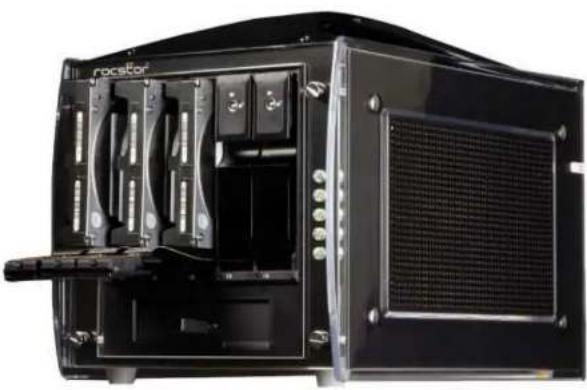
Rocsecure DE51
5 - Bay RAID Desktop Encryption Storage System
Rocsecure® Encryption products and solutions enable you to efficiently control your data from unauthorized users. With Rocstor, you can ensure business continuity through variety of real-time hardware Encryption Storage products
Rocsecure® DE51 Volume Raid solution is the most reliable real-time hardware encrypted data solutions available. Secure your valuable data with Advanced Encryption Standard Algorithm AES-256 encryption when regulatory mandates or the need to protect intellectual property from security breaches dictate. Rocsecure DE51 RAID Storage securely encrypts all data in real-time as it is written to the drive. You have the comfort of knowing that all data contained on these drives is protected against unauthorized access, including hardware theft, failure of a drive, or drive retirement. The encrypted RAID storage data cannot be accessed without the use of a unique Secure Key Token Authentication. The Rocsecure DE51 is authenticated by a digital key token, which is inserted for authentication, and removed soon after the device is authenticated, and then ready for secure data transfer.
natural_image
Black computer case with visible internal components and ventilation slots (no text or symbols)Choose Rocstor drives and store your future.
BOX CONTENTS
- Rocsecure DE51 x 1
- eSATA cable x 1
• USB 3.0 to eSATA Adapter x 1 - Power Cable x 1
- Secure Key Token x 3
- Drive Bay Keys x 2
- CD User Manual
Please make sure that the contents listed above are not damaged or missing. If you should find damages or missing contents, please contact your supplier immediately.
Please keep (store) all package contents and packaging material during the limited warranty period.
KEY FEATURES
• Real-Time Hardware AES-256 Encryption
• Large Capacity Storage Solutions, up to five 3.5" SATA hard drives
• One unique Rocstor Token Key for access to the Volume Encryption RAID Storage
• Built-in Hardware RAID 0, 1, 3, 5, 10, JBOD or Clone accelerator set for high performance access.
- Drive Hot-Swap support
• Incorporates SATA hard drive
• RAID diagnostic via LED lights.
- OS independent. Compatible with both Windows ^ and Mac ^ operating systems.
- Connect via eSATA or USB 3.0 port (Cables Included)
- Includes two (2) Rocstor Key Tokens
- Includes all necessary cables
MINIMUM SYSTEM REQUIREMENTS
To utilize the RAID, the minimum system configuration in the host computer requires the following:
OS Independent
Windows: 2008, 2012 (32/64bit), 7, 8, 10 or higher
Linux: Red Hat, SUSE, CentOS...etc
MAC: OS X(10.6, 10.7, 10.8, 10.9 or higher)

3.5 or 2.5 inch SATA-compatible hard drive and/or 2.5-inch Solid State Drive(s) (SSD) are required for the RAID System. Once the hard drive and/or SSD are formatted, the actual available storage capacity can vary depending on the selected operating environment (normally 5 - 10% less).
HARDWARE REQUIREMENTS AND PRECAUSIONS
- Whenever turning off or unplugging the Rocsecure DE51 Series from your computer system becomes necessary, always remember to safely remove it from your operating system first.
- When the Rocsecure DE51 is connected to the computer system, it's prohibited to remove, insert or swap the hard drive while data transfer is being performed.
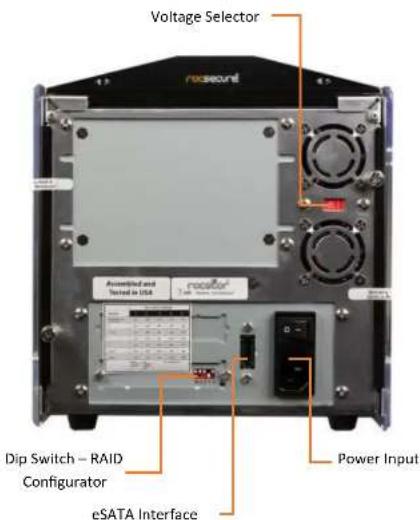
CONNECTORS
- eSATA Connector
Power Input
• ON/OFF Power Switch
• Voltage Selector Switch
text_image
Voltage Selector rosecout Dip Switch - RAID Configurator Power Input eSATA InterfaceSYSTEM VIEWS
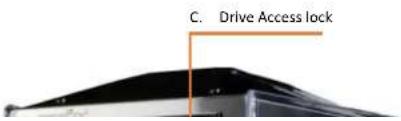
Front and Rear View
The status indication of each LED indicator is listed under the LED INDICATORS section below.
text_image
C. Drive Access lockOperation
To operate the Rocsecure DE51, the Secure Key Token must be inserted before the unit is powered up. This will enable the system to validate the encrypted codes in the token key and enable the drives to power up. When the Rocsecure Token Key is recognized and active, the PWR LED light on the front of the unit will lite up. While the PWR LED is on, the Secure Token Key may be removed and stored in a safe location. If the power is turned off, or the RESET button on the Secure Key Module in front of the unit pressed, then the Secure Key Token needs to be inserted in for the for the PWR LED and the access to the drives is restored. If the PWR LED is not on, the Token Key must be inserted in order to the storage unit to be accessed.
The Host Activity LED will activate to ON which will indicate a connection to an eSATA or USB host adapter. The light will flicker to indicate activity between the Rocsecure DE51 RAID tower and the computer. The HDD LED on this unit is normally dark and will also flicker to indicate activity between the RAID Tower and the computer. The RAID Error LED will glow if a RAID is defined and is either in a degraded or offline state. It will flicker to indicate a fault-tolerant RAID is rebuilding with a spare.
Installation
- Make sure rear power switches are in the OFF position..
- Connect Power Cord to the unit..
- Connect the computer to DE51 via eSATA Cable.
- Mount Turn on main power switch on the back of the unit.
Drive Installation
A. Be sure all doors are unlocked, use the provided keys to unlock if needed.
B. Gently pull the lever on the door to release it.
C. Insert the drive as shown on the label inside the door. The SATA connector toward the rear, with label side to
Secure Key Token
The Three Secure Token keys have identical encryption code. It is recommended, one of these keys should be kept in a safe and secure location. If you are down to the last key, make a backup of all the data stored inside your Rocsecure DE51 tower prior to sending the last key to Rocstor for duplication.
Rocstor is not responsible for key lost in the mail or retrieval of the data inside the encrypted hard drive.
IDENTIFYING HARD DRIVES
If you are using the Rocsecure DE51 to encrypt multiple hard drives, it is important to label your hard drives if you are taking the drive out of the DE51. The encrypted drive will act like a brand new drive when attach directly to the SATA controller of a computer. There will be no partition or any hint to indicate that the drive contains encrypted data. When the drive is partitioned, all the encrypted data will be lost. The same holds true if a hard drive already has data on it is installed into the Rocsecure DE51. The computer detects the hard drive as a brand new unallocated drive. Once you proceed to partition the drive, the data on the hard drive will be erased and cannot be recovered.
PORT MULTIPLIER COMPATIBILITY
When configured as a set of individual drives and connected to a SATA or an eSATA host adapter, the Port Multiplier will only work with a Port Multiplier aware host. This includes setting up the unit with more than one array. Identify your host controller and check with its hardware manufacturer if you are unsure. Rocstor offers several Port Multiplier aware host adapters.
The following table provides the results of the 1908 and 1905 data: a reference to the 1908 and 1905 results.
RAID SELECTION
JBOD (INDIVITUAL DRIVES)
• Minimum number of drives: 1
• Unit Capacity: 100% of each drive
- Fault Tolerance: None
- Spare: No
- JBOD mode offers all connected units to the host adapter, no RAID is defined at all.
• Note: JBOD mode requires a SATA controller featuring Port Multiplier support for eSATA connections
• Note: Optical drives can only be configured as JBOD using an eSATA connection.
RAID 0 (STRIPE SET)
• Minimum number of drives: 2
• Unit Capacity: size of each drive times number of drives.
- Fault Tolerance: None - if any drive is lost all data is lost
- Spare: No
- RAID 0 "stripes" the file system across the array by placing "chunks" of data sequentially between drives in a specific order
RAID 3 (STRIPE SET WITH DEDICATED PARITY)
• Minimum number of drives: 3
- Unit Capacity: size of one drive times number of total drives minus one. E.g. (4TB x 5 drives - 1 Drive = 16TB)
- Spare: Yes
- Fault tolerance: can withstand the loss of one drive without losing data. RAID 3 works by striping data for individual i/0 blocks across all members except one, which contains parity data for the stripe set computed internally by the Port Multiplier. In the event of failure, the missing information can be calculated using the parity information.
RAID 5 (STRIPE SET WITH STRIPED PARITY)
• Minimum number of drives: 3
- Unit Capacity: size of one drive times number of total drives minus one. E.g. (4TB x 5 drives - 1 Drive = 16TB)
- Spare: Yes
- Fault tolerance: can withstand the loss of one drive without losing data. RAID 5 works by striping data for individual I/O blocks across all members of the set, with each member taking turns carrying parity data computed by the Port Multiplier. In the event of failure, the missing information can be calculated using the parity Information.
LARGE (SPANNED SET)
• Minimum number of drives: 2
• Unit Capacity: 100% of all drives together regardless of differences in size.
- Spare: No.
- Fault tolerance: cannot withstand the loss of any drives without losing data. However, some data may be recovered as long as the drive(s) carrying the filesystem data (boot record, directory, etc.) remain online. LARGE mode is neither a RAID nor is it a JBOD. It works by declaring the sum of all available space of the member drives as a single unit, without striping the data. As each member is filled, new data is stored on the next...
NOTES ABOUT SPARE DRIVE
If EZ mode is disabled (SW1: 2 ON), all individual drives not configured as array members will be offered to the host adapter as separate units. To create an array with one or more spares, set or modify the RAID mode while the spares are disconnected from the Port Multiplier. When EZ mode is enabled (SW1:2 OFF), individual drives connected when an array is present are considered spare. Spare drives must be equal to or larger in size than the smallest member. When any type of array is defined, individual units will be considered spare
Raid 0 and LARGE arrays are not fault-tolerant and spare drive will not be useful, therefore disabling EZ for these arrays is recommended. When a spare drive is present and fault-tolerant RAID (1, 10, 3, or 5) is defined, EZ Mode will automatically rebuilt any available spare into the array to replace failed drive.
SETTING OR MODIFYING THE RAID MODE
NOTE: Setting or modifying the RAID mode destroys all data. Be sure the port multiplier is connected to an active host before proceeding. The port multiplier will not complete the process if it has no host connection.
- Follow the procedure for resetting the RAID Mode.
- Power down the unit and set the dip switch to the desired RAID Mode.
- While holding the SET button with a ball point pen, turn the unit on. A long beep will sound from the Port Multiplier. The SET button may be released once the long beep starts. Shortly afterward, the port multiplier should "chirp" to indicate the process is complete. If instead of a chirp the Port Multiplier sounds a series of short beeps, an error has occurred during configuration of the array.
BZS SWITCH (SW1: 1)
The BZS switch is used to silence the audible alarm buzzer. The OFF position permits the audible alarm, and the ON position silences the audible alarm. The BZS switch has immediate effect.
EZ SWITCH (SW1: 2)
RAID MODE SWITCH SETTING
The RAID Mode switches define what type of RAID will be initialized when the unit is powered up while the RAID Mode button is held down, as follows:
| DIP SWITCH POSITION | 1 (BZS) * | 2 (EZ) | 3 (M2) | 4 (M1) | 5 (M0) |
| JBOD (FACTORY DEFAULT SETTING) | OFF | OFF ** | OFF | OFF | OFF |
| RAID 0 | OFF | ON *** | ON | ON | ON |
| RAID 1 OR 10 | OFF | OFF | ON | ON | OFF |
| RAID 3 | OFF | OFF | ON | OFF | OFF |
| RAID 5 | OFF | OFF | OFF | ON | OFF |
| CLONE | OFF | OFF | OFF | ON | ON |
| LARGE | OFF | ON | ON | OFF | ON |
NOTE:
* Audible alarm is recommended at all times.
** EZ Mode has no effect when no array is defined.
*** Disabling EZ for RAID 0 and large is strongly recommended.
Specification
| System Type | 5-Bay Tower RAID system |
| Host Interface | eSATA- eSATA to USB 3.0 Included |
| Disk Interface | SATA |
| Disk Type | 3.5" & 2.5" HDD/SSD – Hot Swap Drive Support |
| Encryption Technology | FIPS Validated AES-256 Real-time Hardware Encryption Engine |
| RAID Levels | 0, 1, 3,5, 10, JBOD*, Clone, and Large |
| Token Key | Two (2) Token Key Authentication Included |
| Built-in RAID Accelerator | |
| LED indicator for RAID & disk drives status in front | |
| RAID Controller Functions | RAID 0 (Striping), RAID1 (Mirroring), RIAD 3, RAID 5 (Parity), RAID10 (Mirrored Striped), JBOD (Concatenation)*, Clone Mode (N-Way Mirror) using built-in Hardware RAID and LARGE |
| RAID Set Up Via a Set of Dip Switches Accessible From the Back of the Storage Enclosure | |
| *JBOD not available in Mac OS | |
| Power Supply | 300W. 110V~240V power supply (optional for redundant) |
| OS Independent |
LIMITED WARRANTY
This Limited Warranty is provided by Rocstorage, Inc. (hereinafter: Rocstor) for all lines of products.
General Terms
EXCEPT AS EXPRESSLY SET FORTH IN THIS LIMITED WARRANTY, ROCSTOR MAKES NO OTHER WARRANTIES OR CONDITIONS, EXPRESS OR IMPLIED, INCLUDING ANY IMPLIED WARRANTIES OF MERCHANTABILITY AND FITNESS FOR A PARCTICULAR PURPOSE. ROCSTOR EXPRESSLY DISCLAIMS ALL WARRANTIES AND CONDITIONS NOT STATED IN THIS LIMITED WARRANTY. ANY IMPLIED WARRANTIES THAT MAY BE IMPOSED BY LAW ARE LIMITED IN DURATION TO THE LIMITED WARRANTY PERIOD. SOME STATES OR COUNTRIES DO NOT ALLOW A LIMITATION ON HOW LONG AN IMPLIED WARRANTY LASTS OR THE EXCLUSION OR LIMITATION OF INCIDENTAL OR CONSEQUENTIAL DAMAGES FOR CONSUMER PRODUCTS. IN SUCH STATES OR COUNTRIES, SOME EXCLUSIONS OR LIMITATIONS OF THIS LIMITED WARRANTY MAY NOT APPLY TO YOU.
This Limited Warranty applies to the Rocstor branded hardware products sold by or leased from Rocstorage, Inc., its worldwide subsidiaries, affiliates, authorized resellers, or country distributors (collectively referred to in this Limited Warranty as "Rocstor") with this Limited Warranty. This Limited Warranty is applicable in all countries and may be enforced in any country where Rocstor or its authorized service providers offer warranty service subject to the terms and conditions set forth in this Limited Warranty. However, warranty service availability and response times may vary from country to country and may also be subject to registration requirements in the country of purchase.
Rocstor warrants that the Rocstor hardware product and all the internal components of the product that you have purchased or leased from Rocstor are free from defects in materials or workmanship under normal use during the Limited Warranty Period. The Limited Warranty Period starts on the date of purchase or lease from Rocstor. Your dated sales or delivery receipt, showing the date of purchase or lease of the product, is your proof of the purchase or lease date. You may be required to provide proof of purchase or lease as a condition of receiving warranty service. You are entitled to warranty service according to the terms and conditions of this document if a repair to your Rocstor branded hardware is required within the Limited Warranty Period. This Limited Warranty extends only to the original purchaser or lessee of this Rocstor branded product and is not transferable to anyone who obtains ownership of the Rocstor branded product from the original purchaser or lessee.
Rocstor products are manufactured using new materials or new and used materials equivalent to new in performance and reliability. Spare parts may be new or equivalent to new. Spare parts are warranted to be free from defects in material or workmanship for thirty (30) days or for the remainder of the Limited Warranty Period of the Rocstor hardware product in which they are installed, whichever is longer.
Rocstor's Obligation under the Limited Warranty
During the Limited Warranty Period, Rocstor will repair or replace the defective component parts or the hardware product. All component parts or hardware products removed under this Limited Warranty become the property of Rocstor. The replacement
product from which the serial number has been removed or that has been damaged or rendered defective (a) as a result of accident, misuse, abuse, or other external causes; (b) by operation outside the usage parameters stated in the user documentation that shipped with the product and/or posted on the Rocstor website; (c) by the use of parts not manufactured or sold by Rocstor; (d) as a result of normal wear; or (e) by modification or service by anyone other than (i) Rocstor, (ii) a Rocstor authorized service provider, or (iii) your own installation of end-user replaceable Rocstor or Rocstor approved parts if available for your product in the servicing country.
These terms and conditions constitute the complete and exclusive limited warranty agreement between Rocstor and you regarding the Rocstor branded product you have purchased or leased. These terms and conditions supersede any prior agreements or representations including representations made in Rocstor sales literature or advice given to you by Rocstor or an agent or employee of Rocstor that may have been made in connection with your purchase or lease of the Rocstor branded product. No change to the conditions of this Limited Warranty is valid unless it is made in writing and signed by an authorized representative of Rocstor.
Buyer's Obligation under the Warranty
The person requesting coverage under this warranty shall prove that he or she is the original purchaser and declares that the product has not been sold, leased, bartered or otherwise changed possession. The purchaser shall frequently backup the Rocpro hard drive and backup the data immediately prior to returning the drive for warranty service.
The buyer must notify Rocstor and show proof of notification, through any reasonable means of communication. See full street address email address and toll free phone numbers below or updated contact information are available on Rocstor.com website. The notification shall identify any defect, malfunction, or nonconformity promptly upon discovery. Rocstor will acknowledge receipt of the communication and issue a Return Merchandise Authorization (RMA) code. The buyer is obligated to securely and safely package(s) the product, preferably in the original packing materials, WITH THE RMA number, and deliver it together with a copy of the original purchase receipt and a description of the problem to the Rocstor home office. Buyer is responsible for the product until it is received by Rocstor. It is recommended that the product be insured during transportation by the sender. You must prepay any shipping charges, taxes, or duties associated with transportation of the product. In addition, you are responsible for insuring any product shipped or returned for service. You assume risk of loss during shipping.
Limitation of Damages (Liability)
IF YOUR ROCSTOR BRANDED HARDWARE PRODUCT FAILS TO WORK AS WARRANTED ABOVE, THE ORIGINAL PURCHASER'S SOLE AND EXCLUSIVE REMEDY SHALL BE REPAIR OR REPLACEMENT. ROCSTOR'S MAXIMUM LIABILITY UNDER THIS LIMITED WARRANTY IS EXPRESSLY LIMITED TO THE LESSER OF THE PRICE YOU HAVE PAID FOR THE PRODUCT OR THE COST OF REPAIR OR REPLACEMENT OF
Limited Warranty Period
The limited warranty period for the Arcticroc 4-Bay RAID is one (1) Year Parts and Labor. This Limited Warranty extends only to the original purchaser or lessee of this Rocstor branded product and is not transferable to anyone who obtains ownership of the Rocstor branded product from the original purchaser or lessee.
Types of Limited Warranty Service
Your Rocstor Limited Warranty consists of repair or replacement of defective parts, including hard drives identified by Rocstor Support Organization as "pre-failure."
Carry-in Limited Warranty Service Available Monday - Friday
Under the terms of carry-in service, you may be required to deliver your Rocstor product to the Rocstor Service Center or an authorized service location for warranty repair. You must prepay any shipping charges, taxes or duties associated with transportation of the product. In addition, you are responsible for insuring any product shipped or returned for service. You assume risk of loss during shipping.
YOU SHOULD MAKE PERIODIC BACKUP COPIES OF THE DATA STORED ON YOUR HARD DRIVE OR OTHER STORAGE DEVICES AS A PRECAUTION AGAINST POSSIBLE FAILURES, ALTERATION OR LOSS OF THE DATA. BEFORE RETURNING ANY UNIT FOR SERVICE, BE SURE TO BACK UP DATA AND REMOVE ANY CONFIDENTIAL, PROPRIETARY OR PERSONAL INFORMATION. ROCSTORAGE IS NOT RESPONSIBLE FOR DAMAGE TO OR LOSS OF ANY PROGRAMS, DATA OR REMOVABLE STORAGE MEDIA. ROCSTORAGE IS NOT RESPONSIBLE FOR THE RESTORATION OR REINSTALLATION OF ANY PROGRAMS OR DATA OTHER THAN SOFTWARE INSTALLED BY ROCSTORAGE WHEN THE PRODUCT WAS MANUFACTURED.
Rocstorage shall not be responsible or liable for backing up any data that is on a drive being returned for service. Expect that all data on the drive will be destroyed and not retrievable when returned for warranty service.
Rocstor Replaceable Parts Program
Where available, the Rocstor Replaceable Parts program ships approved replacement parts directly to you to fulfill your warranty. This will save considerable repair time. After you call the Rocstor Technical Support Center at 888.877.8777 a replaceable part can be sent directly to you. Once the part arrives, call the Rocstor Technical Support Center. A technician will assist you over the phone to ensure that the installation is quick and easy.
Service Upgrades
Rocstor offers extra coverage for your product. For information on service upgrades, visit www.rocstor.com. Service upgrades purchased in one country are not transferable to another country.
Capacity Disclaimer
Actual accessible hard drive capacity will indicate up to 10% lower than stated under different Operating Systems and formatting.
TECHNICAL SUPPORT
Software Technical Support
Software technical support is defined as assistance with questions and issues about the software that was either preinstalled by Rocstor on the Rocstor branded product or that was included with the Rocstor branded product at the time of your purchase or lease of the product. Technical support for software is available for the first ninety (90) days from date of product purchase or lease. Your dated sales or delivery receipt, showing the date of purchase or lease of the product, is your proof of the purchase or lease date. You may be required to provide proof of purchase or lease as a condition of receiving software technical support. After the first ninety (90) days, technical support for software that was either preinstalled by Rocstor on the Rocstor branded product or included with the Rocstor branded product at the time of your purchase or lease of the product is available for a fee.
WARNING: The individual user should take care to determine prior to use whether this device is suitable, adequate or safe for the use intended. Since individual applications are subject to great variation, the manufacturer "Rocstor" makes no representation or warranty as to the suitability or fitness of these devices for any specific application.
Technical Support
The Rocsecure DE51Bay RAID is backed by free telephone technical support for two (2) years from the date of purchase. Please register your product with Rocstor. To register, fill in the Limited Warranty Registration form in the Support tab at www.rocstor.com.
Free telephone technical support is available weekdays from 9 AM until 6 PM Pacific Standard Time. Customers in the United States and Canada can call toll-free: (888) 877-8777; all others must call (818) 449-2000.
When calling for support, please have the product's serial number (printed on the label on the bottom of the drive) and system hardware information available.
TRADEMARKS ACKNOWLEDGEMENTS
© 2016, Rocstorage, Inc; acknowledges the following trademarks for company names or products mentioned within the Rocstor site, portal pages and Articles/text/manuals:
Rocstor, Rocsecure and Rocpower are registered trademarks of Rocstorage, Inc. Rocpro, Rocport, Rocbit, Rocsafe ... are the trademarks of Rocstorage, Inc. "store your future", "secure your future" and "power your future" are the slogan marks of Rocstorage, Inc.
Apple, the Apple logo, Mac, Power Macintosh, FireWire, and Mac Pro, Leopard ... are trademarks of Apple Computer, Inc. in the United States and other countries.
COPYRIGHTS
© 2016 Rocstorage, Inc. This Manual is protected by United States copyright law and may not be reproduced, distributed, transmitted, displayed, published or broadcast without the prior written permission of Rocstorage, Inc. You may not alter or remove any trademark, copyright or other notice from copies of this Manual.
Assembled and integrated in U.S.A. using domestic and / or foreign components.

CONTACT INFORMATION
Corporate Headquarters
9445 De Soto Ave
Chatsworth, CA 91311
Office: +1 (818) 727-7000
Email: info@Rocstor.com
Technical Support / RMA
Tel: +1 (818) 727-7000 (Domestic and Internationals)
Hours: 9:00 am - 5:00 pm PST
Mon - Fri (excluding holidays)
Email: support@Rocstor.com
Sales Info
Hours: 8:00 am - 5:00 pm PST
Mon - Fri (excluding holidays)
Email: sales@Rocstor.com
Tel: +1 (818) 727-7000
Corporate, Government and Academic Customers
Our Corporate Sales Team's goal is to help our U.S.A. and Canadian customers find a storage solution that best serves their needs. We will help you determine your best purchasing options. For more information please contact the appropriate department below or call us at +1 (855)245-1616 US Toll Free