
MCLS100 - Hi-Fi System JUNG - Free user manual and instructions
Find the device manual for free MCLS100 JUNG in PDF.


| Product Type | Docking Station / Music Centre |
| Brand | JUNG |
| Model | MCLS100 |
| Power Supply | AC 230 V~, 50/60 Hz |
| Rated Output | 2 x 1.2 W |
| Speaker Impedance | 4-8 Ohm |
| Line Out Impedance | 470 Ohm |
| AUX Input | 3.5 mm stereo jack |
| Charging Voltage (USB) | DC 5 V, max 0.8 A |
| Connections | Screw terminals (speaker, line out) |
| Protection Class | IP20 |
| Installation | In device box per DIN 49073, deep socket |
| Remote Control | Infrared |
| Docking Station | 30-pin connector for iPod/iPhone |
| Mini USB | Charging only |
| Volume Control | On device and remote |
| Operating Elements | Play/Stop, Skip +/-, Volume +/- |
| LED Indicators | Green LED for AUX mode |
| Safety | Install only by skilled electricians; keep batteries away from children |
| Maintenance | Clean with dry cloth; avoid liquids |
| Battery Replacement | CR2032 or similar (remote control) |
Frequently Asked Questions - MCLS100 JUNG
User questions about MCLS100 JUNG
0 question about this device. Answer the ones you know or ask your own.
Ask a new question about this device
Download the instructions for your Hi-Fi System in PDF format for free! Find your manual MCLS100 - JUNG and take your electronic device back in hand. On this page are published all the documents necessary for the use of your device. MCLS100 by JUNG.
USER MANUAL MCLS100 JUNG
Caution! Electrical devices may only be installed and fitted by electrically skilled persons.
Non-compliance with the installation information could cause damage to the device, fire or other hazards.
Hazard due to electrical shock. Before working on the device, disconnect the power or load and switch off the circuit breakers.
Keep button cell batteries out of the reach of children! If button cell batteries are swallowed, seek immediate medical assistance.
Explosion hazard! Do not throw batteries into fire.
Explosion hazard! Do not recharge batteries.
Chemical burn hazard! Batteries may burst or leak. Only replace batteries with the same or an equivalent type.
Remove empty batteries immediately and dispose of them in an environmentally responsible manner. Do not dispose of batteries in household refuse. Information about environmentally responsible disposal is available from local refuse disposal authorities. Legal requirements state the end consumer is responsible to return used batteries.
The device is not protected against dripping or sprayed water. Only operate the device in dry interior spaces. Do not set any objects containing fluids on the device.
These instructions are a component part of the product and must remain with the end customer.
Structure of the device

- Insert
- Frames
- Central plate
- Docking station
- Fixing screws
- Mini USB interface (charging function)
Function
Intended purpose
• Stationary docking station for mobile MP3 player and iPod or iPhone.
• Installation in device box according to DIN 49073, deep socket.
Product characteristics
- Battery charging function for iPod or iPhone via 30-pin connector strip
• External line-in stereo input with 3.5 mm stereo jack
• Integrated stereo amplifier - Direct connection of loudspeakers
• Line-out outputs to connect a hi-fi or multi-room system
• Volume control directly on device - Remote control via infrared remote control
- Battery loading function for mobile devices via mini USB connection
Operation
Operation takes place at the music centre, via remote control or directly at the MP3 player.

Figure 2: Music centre operation and display elements.

Figure 3: Operation element infrared remote control
- Play/Stop
- Skip -
- Skip +
- Volume +
- Volume
- Contact separation film
Connecting iPod or iPhone
Plug the device into the docking station. Operation takes place via the music centre or directly via the player.
Green LED (7) is off.
Connecting players via AUX
Operation takes place via the music centre or directly via the player. Green LED (7) is off.
- Press changeover switch (9).
Green LED (7) lights up.
AUX input is active.
Connecting devices to the mini USB interface
Mini USB connection for charging batteries of suitable mobile devices.
Connect the device via the mini USB cable at connection (6). Only one device can be charged at a time.
The charging function via the docking station (4) has priority over the mini USB interface. The device at the mini USB station is only charged after the device at the docking station is completely charged.
Information for electrically skilled persons
Installation and electrical connection

DANGER!
Risk of electric shock on touching parts carrying voltage.
An electric shock can be fatal.
Before working on the device, disconnect the power and cover live parts in the area.
Connecting and fitting the music centre
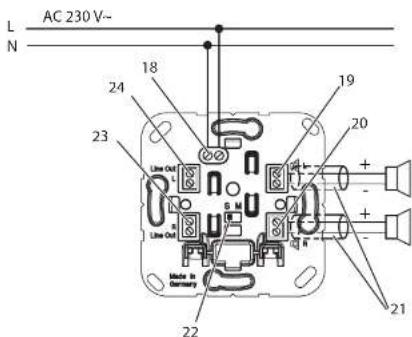
Figure 4: Loudspeaker connection
- Power supply AC 230 V\~
- Loudspeaker connection left
- Loudspeaker connection right
- Insulating sleeve
- Stereo/mono changeover switch
- Line out connection right
- Line out connection left
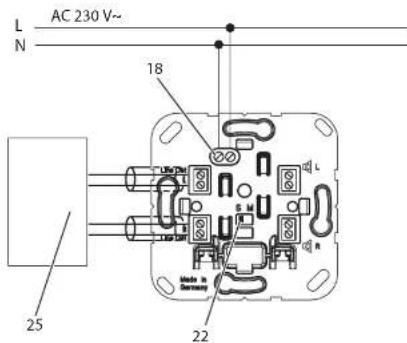
Figure 5: Connection to external amplifier
- External amplifier or multi-room system

DANGER!
When connecting the loudspeakers or line out and power supply wires to a shared device box, the loudspeakers or line out cables may come into contact with mains voltage.
The safety of the entire music centre installation will be endangered. Even persons at remote devices may receive an electrical shock. Lay the loudspeaker or line out cables in the device box in the additional insulation sleeves.
- Lay the cables for loudspeaker and line out outputs in the device box in insulation sleeves.
- Connect the insert in accordance with the connection plan (Image 4 and 5).
- Set mono/stereo operation via the slide switch (22).
i For operation with one loudspeaker (connection left or right): mono. For connection with 2 loudspeakers (connection left and right): stereo.

• Fitting the music centre in the device box
• Fit the frame (2) and centre plate (3)
Remote control
Commissioning
- Remove the film (17); the remote control is ready to operate.
Changing batteries
- Unhook and pull out the battery compartment on the back cover.
• Take out and dispose of the empty batteries. - Insert new batteries in the battery compartment. Make sure to insert them with correct polarity.
- Insert the battery compartment and snap it into place. The remote control is ready to operate.
Appendix
Technical data
Music Centre
Power supply
Rated voltage: AC 230 V \~
Mains frequency 50/60 Hz
Connection ....Screw terminals
Max. clampable cable cross-section 2.5 mm²
Protection class IP 20
AUX
Connection ...... stereo jack 3.5 mm
Line out
Output impedance line out 470 Ohm
Connection ....Screw terminals
Max. clampable cable cross-section 1.5 mm²
Loudspeaker
Rated output 2 x 1.2 W
Loudspeaker impedance 4-8 Ohm
Connection ....Screw terminals
Max. clampable cable cross-section 1.5 mm ^2
Charging socket
Rated voltage ....DC 5 V
Rated current max. 0.8 A
We reserve the right to carry out technical and formal modifications of the product
insofar as they support technical progress.
We only provide statutory warranty cover.
Please send the device, postage paid, to our central Customer Service Centre, with a
description of the error.
ALBRECHT JUNG GMBH & CO. KG
Service Centre
Kupferstr. 17-19
D-44532 Lünen
Service line: +49 (0) 23 55.80 65 51
Fax: +49 (0) 23 55.80 61 89
mail.vki@jung.de
Systems (general)
Service line: +49 (0) 23 55.80 65 55
Fax: +49 (0) 23 55.80 62 55
mail.vkm@jung.de
Systems (KNX)
Service line: +49 (0) 23 55.80 65 56
Fax: +49 (0) 23 55.80 62 55
mail.vkm@jung.de
The CE mark is a free trade symbol intended solely for the authorities, and does not carry any guarantee of properties.
ALBRECHT JUNG GMBH & CO. KG
Volmestrasse 1
- Function
- Intended purpose
- Product characteristics
- Operation
- Connecting iPod or iPhone
- Connecting players via AUX
- Connecting devices to the mini USB interface
- Information for electrically skilled persons
- Installation and electrical connection
- DANGER!
- Connecting and fitting the music centre
- Remote control
- Commissioning
- Changing batteries
- Appendix
- Technical data
- Music Centre
- AUX
- Loudspeaker
- Charging socket
- ALBRECHT JUNG GMBH & CO. KG
- Systems (KNX)
Brand : JUNG
Model : MCLS100
Category : Hi-Fi System