
F605 - Cellphone Fredenstein - Free user manual and instructions
Find the device manual for free F605 Fredenstein in PDF.


| Product Type | Professional Headphone Amplifier |
| Brand | Fredenstein |
| Model | F605 |
| Power Supply | +/-16V DC, +/-100mA (via Fredenstein Bento rack) |
| Audio Inputs | Balanced XLR (Main and Aux) on rear panel |
| Audio Outputs | Unbalanced Stereo TRS headphone output; Balanced XLR monitor outputs |
| Headphone Impedance | 20 Ohms to 600 Ohms |
| Frequency Response | 10 Hz - 30 kHz +/- 0.5 dB |
| Total Harmonic Distortion | < 0.01% |
| Signal-to-Noise Ratio | < -100 dB |
| Input Impedance | > 40 kOhm |
| Maximum Input Level | +24 dBu |
| Output Impedance | 5 Ohms |
| Maximum Output Level | +24 dBu |
| Controls | Volume knob; L<->R flip, L CH, R CH, L POL, R POL switches |
| Indicators | Power (green LED), Clip (red LED) |
| Compatibility | Fredenstein Bento rack only |
| Application | Live and studio headphone monitoring |
| Polarity Flip | Yes (per channel) |
| Mono Summing | Yes (via L CH + R CH switches) |
| Channel Swap | Yes (L<->R switch) |
| Construction | Designed by German-American team, manufactured in Taiwan |
| Contact | Fredenstein Professional Audio, Taipei, Taiwan; info@fredenstein.com |
Frequently Asked Questions - F605 Fredenstein
User questions about F605 Fredenstein
0 question about this device. Answer the ones you know or ask your own.
Ask a new question about this device
Download the instructions for your Cellphone in PDF format for free! Find your manual F605 - Fredenstein and take your electronic device back in hand. On this page are published all the documents necessary for the use of your device. F605 by Fredenstein.
USER MANUAL F605 Fredenstein
natural_image
Black silhouette of a human ear with the letter 'F' inside, no text or symbols present.Fredenstein
Professional Audio
F605
Headphone Amplifier
(Can Amp)
Operating Manual
Fredenstein F605 Headphone Amplifier
The F605 is a high performance professional headphone amplifier, offering an effective headphone volume control for live or studio applications out of a Fredenstein Bento rack. The F605 features balanced inputs, extended signal manipulation and a low output impedance to connect headphones from 20 Ohms to 600 Ohms.
As all Fredenstein products, the F605 is designed by a German-American team and manufactured in Taiwan.
Overview:
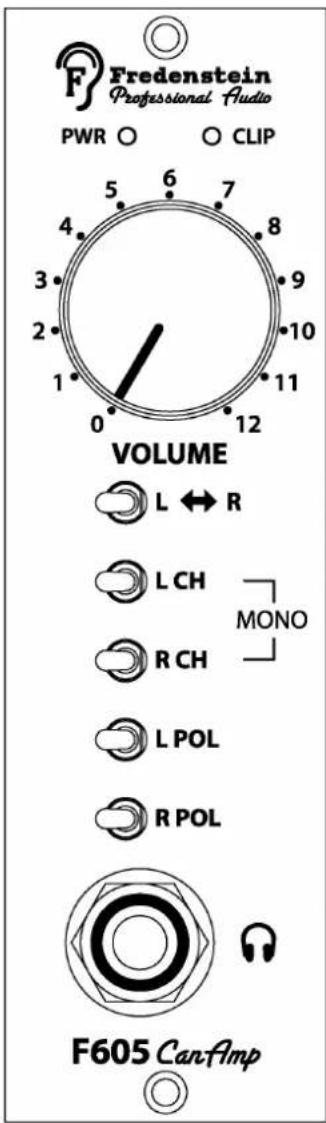
LED Indicators:
PWR: A green LED indicates presence of power
CLIP : A red CLIP indicator turns on at 2db below clipping output level
Rotary Controls:
Volume : Volume control
Switches:
L<->R : flips the channels, left on right ear, right on left ear
L CH : Both sides are reproducing the left channel only
R CH : Both sides are reproducing the right channel only
if L CH and R CH are activated a mono signal is reproduced on both sides
L POL : Selects the phase of the left channel
R POL : Selects the phase of the right channel
Connector:
Headphones : Unbalanced Stereo headphone output (TRS)
Fredenstein F605 Headphone Amplifier
Installation:
Please first power down your Fredenstein Bento rack before inserting the F605. The power requirements are +/-16V, +/-100mA.
Please be aware, the F605 will not work in any third party enclosures.
The MAIN XLR balanced inputs are located on the rear panel of the Fredenstein Bento rack, the left channels uses the XLR Main input, the right channel the XLR AUX input.
The balanced monitor outputs are located on the rear panel as well, the left channel is on the MAIN output XLR, the right channel on the AUX output XLR.
The MAIN input is connected to the MAIN output and the AUX input to the AUX output to allow the easy connection of other pieces of equipment like monitor controllers or AD converters, etc.
Volume:
Headphone volume control
L<->R:
Flips the channels of the headphones, important to insure well balanced mixes since most peoples hearing is a little different between the left and right ear.
L CH:
Puts the left channel signal on both sides of the headphones to facilitate listening to single channel signals.
RCH:
Puts the right channel signal on both sides of the headphones to facilitate listening to single channel signals.
L CH and R CH:
Switches the amp in mono mode, signals on both sides of the headphones are identical.
L POL:
Flips the polarity of the left channel signal.
R POL:
Flips the polarity of the right channel signal.
By flipping the polarity of one channel and putting the unit in mono mode the so-called Side Signal is fed to the headphones. The Side Signal is the difference between the two channels (A-B) while the mono signal is the addition of the two channels (A+B). This is also useful when trying to have identical levels on two channels. Adjust the level on one channel to the minimum volume since they will cancel each other when they are exactly the same.
Fredenstein F605 Headphone Amplifier
Technical Data:
Frequency Response : 10 Hz – 30,000 Hz, +/- 0.5dB
Distortion : < 0.01%
SNR : < -100 dB
Input Impedance : > 40 KOhm
Max. Input Level : +24dBu
Output Impedance : 5 Ohms (recommended load > 20 Ohms)
Max. Output Level : + 24 dBu
Contact Info:
Fredenstein Professional Audio
by Orion Communication
7F-1, No. 582, Ruei Guang Rd.
Neihu District
Taipei 114
Taiwan
Phone : +886-2-2657-2618
Email: info@fredenstein.com
Web : www.fredenstein.com


Brand : Fredenstein
Model : F605
Category : Cellphone