AL1561.07FKO - Switch JUNG - Free user manual and instructions
Find the device manual for free AL1561.07FKO JUNG in PDF.


User questions about AL1561.07FKO JUNG
0 question about this device. Answer the ones you know or ask your own.
Ask a new question about this device
Download the instructions for your Switch in PDF format for free! Find your manual AL1561.07FKO - JUNG and take your electronic device back in hand. On this page are published all the documents necessary for the use of your device. AL1561.07FKO by JUNG.
USER MANUAL AL1561.07FKO JUNG
Light Management Radio-control pushbutton and pilot lamp
Ref.-no.:
Operating Instructions
Radio-control pushbutton and pilot lamp
1. Function
The radio-contol pushbutton permits radio-controlled or manual switching and dimming of lamps. The starting brightness can be stored in the device as memory brightness. The pushbutton with radio-control receiver is plugged onto one of the following inserts:
■ Universal touch dimmer 1254 UDE
- Standard touch dimmer 1225 SDE
- Relay insert single-channel 1201 URE
- Relay insert two-channel 1202 URE
- Tronic switching insert 1254 TSE
- LV triac switching insert 1244 NVSE
■ Touch control unit 1240 STE
JUNG
Light Management Radio-control pushbutton and pilot lamp
Ref.-no.:
Important
The present instructions describe the functions of the radio-control pushbutton without lighting control. More information on light control with a presence detector is set out in the operating instructions for these devices.
WARNING!
Caution: The installation and assembly of electrical equipment may only be performed by a skilled electrician.
2. Fitting
The radio-control pushbutton can only be operated in conjunction with the inserts listed under 'Functions'. Connection and fitting are described in the operating instructions of the insert.
Procedure
- Install the selected insert (1) in a flush-mounting box (deep model recommended), the connecting terminals of the insert pointing downwards.
- Plug the radio-control pushbutton (2) together with frame (3) onto the insert while the mains voltage is disconnected.

JUNG
Light Management Radio-control pushbutton and pilot lamp
Ref.-no.:
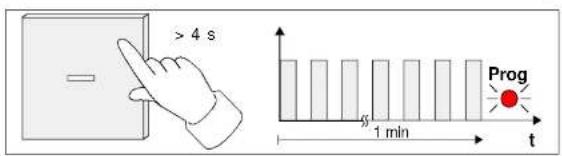
text_image
> 4 s Prog 1 min t- Send a radio telegram from the selected transmitter (fig. D); see "Radio-control transmitter" operating instructions:

Programming a channel
Depress the channel key for more than 1 second.
Programming a lightscape key
Depress the lightscape key for more than 3 seconds.
Programming a detector
Remove the battery for about 2 minutes from the detector. Put the the battery back in place and make a movement inside the detection range of the detector within the next 10 minutes.
Programming a presence detector
JUNG
Light Management Radio-control pushbutton and pilot lamp
Ref.-no.:
① The programming of a radio channel (e.g. hand-held transmitter 'Komfort') always includes the simultaneous and automatic storage of the functions of the All-ON or All-OFF key.
Deleting a radio-control transmitter
A radio-control-transmitter in the pushbutton's memory is deleted when the same transmitter is programmed again into the memory (see above). All channels and lightscape keys must be deleted one by one. Successful deletion is indicated by the LED blinking fast (fig. F).

Deleting all radio-control transmitters
It is possible to delete all transmitters in the radio pushbutton. In this case, the radio pushbutton is reset to the state as delivered.
- Depress both faces of the radio pushbutton at the same time for about. 20 s (Fig.. G: full-faced operation). After abt. 4 s, the LED starts blinking (cf. Fig. C). After 20 s the LED emits brief flashes of light for abt. 6 s.

JUNG
Light Management Radio-control pushbutton and pilot lamp
Ref.-no.:
natural_image
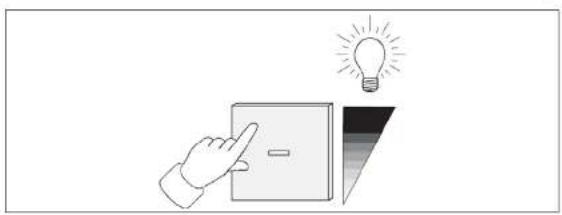
Illustration of a hand pointing at a light bulb above a switch, symbolizing an idea (no text or symbols present)Short depression of pushbutton (< 0,4 s)
The lights are switched on (on with memory brightness) or off. When the lights are on, the LED is illuminated.
Short depression of pushbutton (> or = 0,4 s)
When the radio-control pushbutton is attached to an insert permitting the dimming function, the brightness of the lamps connected can be increased (upper rocker) and decreased (lower rocker) by a long depression of the pushbutton rockers.
① To switch on the lamps at minimum brightness, depress the lower rocker for more than 0.4 seconds when the lamps are off.
3.1. Memory-function
The selected brightness level can be stored as memory value in the radio-control pushbutton. A brief depression of the pushbutton recalls the memory brightness level as the starting brightness of the lamp.
Storing the memory value

Light Management Radio-control pushbutton and pilot lamp
Ref.-no.:
4. Radio Transmission
Radio transmission takes place on a non-exclusive path. Therefore, interference cannot be excluded. This type of radio transmission is not suitable for safety applications such as emergency stops or emergency calls. The range of a radio-control system depends on transmitter power, receiver characteristics, air humidity, fitting height and building conditions. Fig. 1 illustrates the penetration of building materials by radio waves:

natural_image
Illustration of a hand interacting with a control panel, next to a wall-mounted device and a lightbulb (no text or symbols)Dry
material
Permeability
Timber, gypsum, gypsum-plasterboards approx. 90 %
Brickwork, particle boards
approx.
70
%
Reinforced concrete approx. 30 %
Metal, metal grating, aluminium lamination approx. 10%
Rain, snow
approx.
0
40
Radio operation

Light Management Radio-control pushbutton and pilot lamp
Ref.-no.:
6. Guarantee
Our products are under guarantee within the scope of the statutory provisions.
Please return the unit postage paid to our central service department giving a brief description of the fault:
ALBRECHT JUNG GMBH & CO. KG
Service-Center
Kupferstr. 17-19
D-44532 Lünen
Service-Line: +(49) 23 55 . 80 65 51
Telefax: +(49) 23 55 . 80 61 65
The C€-Sign is a free trade sign addressed exclusively to the authorities and does not include any warranty of any properties.