57064 - Heated blanket BIOS Medical - Free user manual and instructions
Find the device manual for free 57064 BIOS Medical in PDF.


User questions about 57064 BIOS Medical
0 question about this device. Answer the ones you know or ask your own.
Ask a new question about this device
Download the instructions for your Heated blanket in PDF format for free! Find your manual 57064 - BIOS Medical and take your electronic device back in hand. On this page are published all the documents necessary for the use of your device. 57064 by BIOS Medical.
USER MANUAL 57064 BIOS Medical
Heating Pad with Moist Heat
57064
Thank you for purchasing the BIOS Living heating pad.
⚠️ User and safety instructions
⚠️ Please read the instructions carefully before using your Heating Pad, failure to read the instructions could result in injury.
The BIOS Living Heating Pad has been designed for non-commercial personal use.

natural_image
Blue medical device with a white BOSI-ang sensor attached, no visible text or symbols on the device itself.
text_image
DANGER Hot Surfaces.SAFETY BRIEFS
To reduce the risk of burns, electric shock and fire, this product must be used in accordance with the following instructions.
- Avoid sharp folds that may damage the product
- Read and follow all user and safety instructions
- Do not use while sleeping
- Never leave the heating pad unattended
- Do not use on infants
- Do not use on animals
- The unattended use of the device by children or incapacitated persons maybe dangerous
- This heating pad is not to be used on a person with diabetes
- Do not use on a person(s) who are paralyzed
- Do not use on areas that are numb, experience tingling or insensitive skin
(for example, skin that is not sensitive to temperature changes resulting from advanced age, diabetes, stroke or medications for pain or sleeplessness)
- Do not use heating pad on or near open wounds or broken skin
- Burns can occur regardless of control setting, check skin under the heating pad frequently – at least every 10 minutes
- Never use the heating pad without the outer cover in place
- Do not use in an oxygen enriched environment or near equipment that stores or emits oxygen
- Do not use pins or other metallic means to fasten the heating pad in place
- Do not sit on or against the heating pad
- Do not crush or fold the heating pad during use or during storage
- Position the heating pad on top of and not underneath the body part in need of heat. The temperature of a heating pad increases if heat is trapped which could result in skin burns
- Never use heating pad with liniments, ointments or salves, especially those containing heat-producing ingredients; skin burns could result
- Never pull the heating pad by the supply cord
• Always unplug the heating pad when not in use - Never unplug the heating pad from electrical outlet with wet hands
- Never use extension cords with the heating pad
- Do not use the cord as a handle
- Do not bend or pinch the electrical cord and do not use the heating pad if it has a damaged power cord or plug, if it malfunctions or is damaged please discontinue use
- The BIOS Living heating pad does not require calibration or maintenance. There are no user serviceable parts. For any reason if the heating pad does not function satisfactorily, discontinue use and see warranty for service information
- Do not tamper with the heating pad in any way
- Loop electrical cord loosely when storing. Tightly wrapping the cord may result in damage to the cord and internal parts in the heating pad
• This product is intended solely for non-commercial, non-industrial, personal use - Do not use this product outdoors
-
Do not sterilize or place the BIOS Living heating pad into a sterilizer, autoclave or boiling water, it is not intended to be sterilized
• The unit has no protection against water or particulate matter -
Do not use excessive water or immerse in water
- Use of excessive water, immersion into water or use of a solvent may result in irreparable damage to its electronic circuitry and disable the unit
SAFETY FEATURE
As a safety feature the BIOS Living Heating Pad has a polarized plug (one blade is wider than the other). This style of plug will only fit into polarized outlets - in one direction. Do not attempt to force the plug into an outlet and defeat this safety feature, failure to comply could result in electrical shock, fire or damage.
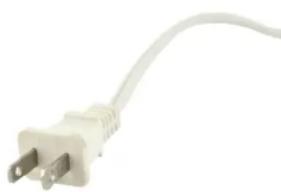
natural_image
Close-up of a white electrical outlet with two terminal leads (no text or symbols visible)HOW TO USE YOUR BIOS LIVING HEATING PAD

natural_image
Close-up of a hand pressing down on a blue and white fabric surface (no text or symbols visible)To reduce the risk of personal injury, never use this product without the cloth outer cover.
- Lay the cloth outer cover on a flat surface and open the snap.
- Insert the inner vinyl heating pad completely into the outer cover, fitting one side at a time.
- Ensure that the inner vinyl heating pad is lying flat inside the cloth outer cover with the cord and hand control outside of the outer cover.
- Close the snaps.
- Plug the product into a 120-volt AC electrical outlet.
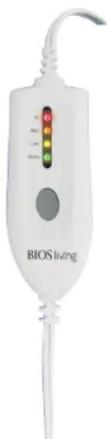
- Use the control to set the heat at the desired level, by pressing the heat control button.
- The LED light will indicate your temperature preference (WARM-green, LOW-yellow, MED-orange, HI-red), each time you press the heat control button.
- To turn OFF press the control button until the LED light is OFF, unplug the product when finished and not in use.
text_image
BIOS livingMOIST HEAT OPTION
The BIOS Living heating pad includes a separate sponge for moist heat.
To reduce the risk of personal injury, do not immerse the heating pad into water to wet the surface. Personal injury may result.
To reduce the risk of product and/or property damage, do not use gels, solvents, or any other liquid to saturate or in conjunction with the sponge.
To reduce the risk of fire, electric shock, or serious personal injury, never plug the product into an electrical outlet with a wet hand.
- Thoroughly saturate the sponge only, with warm water.
- Lightly wring excess water out of the sponge.
- Place the sponge on top of the heating pad and insert the sponge and heating pad into the cover. Close the snap.
- Dry hands thoroughly before plugging the power cord into any electrical outlet.
- Plug the Power Cord into a 120-volt AC electrical outlet.
- Use the control to set the heat at the desired level (See: How to use your BIOS Living Heating Pad).
CARE AND MAINTENANCE
Before each use, always carefully inspect the heating pad (including the inner vinyl heating pad) to assure it is in proper working order; discard if there are signs of wear and tear, frayed wires, cracks or tears in the covering, if it looks worn or if the electrical cord is frayed. The existence of these conditions can cause the heating pad to catch fire.
OUTER COVER
- Disconnect the heating pad from the electrical outlet.
- Remove the inner vinyl heating pad from the cloth outer cover.
- Cold water machine (gentle/delicate cycle) or hand wash the cloth outer cover using a mild detergent. Hang or lay flat to dry. Tumble dry on low heat.
VINYL HEATING PAD
- Wipe the inner vinyl heating pad with a soft, damp cloth, only use water to clean the surface (do not use gels, solvents, or any other cleaning liquid to clean surface). Lay flat to dry. Do not tumble dry.
-
Make sure the product is completely dry before the next use.
-
Store the product in a cool, dry, dark location after each use. Do not fold or crush the product.
ELECTRICAL SPECIFICATIONS
| Voltage Frequency Wattage Amperage | ||
| 120 VAC 60 Hz | 50 W 0.42 A | |
FREQUENTLY ASKED QUESTIONS
Q. What temperature does this product reach?
A. Maximum temperature does not exceed the 176^ F ( 80^ C) when set to "Hi". Temperature varies by heat setting; you may need to use a lower heat setting depending on the specific application and your personal preference.
Q. How much time does it take to warm up to each temperature selection?
A.
| Temperature Selection Heat Up Elapsed Time | |
| Low 10 Min. | |
| Med 12 Min. | |
| Hi 15 Min. | |
FIVE YEAR WARRANTY
The BIOS Living Heating Pad has a 5 year warranty to be free of manufacturing defects in materials and workmanship under normal applications for 5 year of the original owner. If this product becomes inoperable due to defect and requires repair, return the product with all component pieces and proof of purchase to the address listed below. This warranty does not cover any shipping/transport costs. This warranty does not apply if the product is subject to misuse, neglect, rough handling or damage.
Ship the unit prepaid and insured (at owners option) to:
Thermor Ltd.
Attn: Repair Department
16975 Leslie Street
Newmarket, ON L3Y 9A1
www.biosmedical.com
Email: support@biosmedical.com