
Si-11X - Browser Sandia Aerospace - Free user manual and instructions
Find the device manual for free Si-11X Sandia Aerospace in PDF.


| Product Type | Electronic Course Deviation Indicator (CDI) |
| Model | Si-11X |
| Brand | Sandia Aerospace |
| Overall Dimensions | 3.52 x 3.22 x 1.84 in (89.4 x 81.8 x 46.7 mm) |
| Bezel Dimensions | 3.52 x 3.22 x 0.50 in (89.4 x 81.8 x 12.7 mm) |
| Weight | 0.56 lbs (254 g) including bracket and connector |
| Mounting | Standard 3-1/8" (80 mm) round hole |
| Display | 3.5" diagonal color LCD |
| Power Input | 10-32 VDC |
| Current Draw | 1 Amp max |
| Power Consumption | 5 Watts at max display brightness |
| Operating Temperature | -20°C to +55°C |
| Functions | Lateral/Vertical deviation (VOR, ILS, GPS), VOR OBS, TO/FROM, 4 annunciations (NAV, GPS, BC, VLOC) |
| Input Signals | Analog differential: ±150 mV full scale, resolver 6-wire |
| Needle Accuracy | 2% of full scale deflection |
| Viewing Angle | 60° left/right, 45° up/down |
| Certification | For experimental aircraft only; not approved for type certificated aircraft |
| Installation | Panel mount with supplied front/rear brackets, 25-pin D-sub connector |
| Configuration | Via front rotary knob (setup mode at power-on) |
| Calibration | Adjustable gain and offset for each input channel |
| Included Items | SI-11X unit, installation kit (brackets, gasket, screws, wrench, connector), operational software |
Frequently Asked Questions - Si-11X Sandia Aerospace
User questions about Si-11X Sandia Aerospace
0 question about this device. Answer the ones you know or ask your own.
Ask a new question about this device
Download the instructions for your Browser in PDF format for free! Find your manual Si-11X - Sandia Aerospace and take your electronic device back in hand. On this page are published all the documents necessary for the use of your device. Si-11X by Sandia Aerospace.
USER MANUAL Si-11X Sandia Aerospace
SI-11X
Installation Manual

This document and the information contained herein is the propriety data of SANDIA aerospace Corporation. No part of this document may be transmitted, reproduced, or copied in any form or by any means without the prior written consent of SANDIA aerospace.
Due to SANDIA aerospace's continued product and quality improvement programs, information contained in this document is subject to change without prior notice Copyright 2019 SANDIA aerospace Corporation, all right rights reserved.
Printed in USA.
Record of Revision
| Revision | Date | Description | Approval |
| A-RR | 190813 | Initial release | FWH |
Table of Contents
Section 1 - General Description....4
1.1 Introduction....4
1.2 SI-11X Product Description....4
1.2.1 System Functions....4
1.2.2 System Interfaces....4
1.2.3 Unit Outer Dimensions....5
1.3 Specifications....6
1.3.1 Physical Characteristics....6
1.3.2 Electrical Characteristics 6
1.4 Environmental Characteristics....7
Section 2 - Installation Considerations ....8
2.1 General....8
2.2 Cooling Considerations....8
Section 3 – Installation Procedures....9
3.1 General....9
3.2 Equipment Required 9
3.2.1 Supplied....9
3.2.2 Operational Software....9
3.2.3 Required, But Not Supplied....10
3.3 Mounting Hole....10
3.4 Mounting Bracket Installation 10
3.5 Wiring Installation....11
3.6 Unit Mounting....13
3.7 System Configuration 15
3.7.1 Entry & Exit Configuration Mode....15
3.7.2 Configuration Page 16
Section 4 – Operation....17
List of Illustrations
Figure 1 – Unit Outer Dimensions....5
Figure 2 – Unit Front and Rear Views....9
Figure 3 - Instrument Cutout....10
Figure 4 – Front & Rear Mounting Bracket....11
Figure 5 - Wiring Diagram ....13
Figure 6 - Unit Mounting With Tab/Slot Cutaway .....14
Figure 7 - Power On Screen....15
Figure 8 – Setup Mode Entry....15
Figure 9-Configuration Screen....16
Section 1 - General Description
1.1 Introduction
This manual describes the installation of the SANDIA aerospace SI-11X Electronic Course Deviation Indicator. It is intended for use by experimental aircraft builders in experimental aircraft. This product is not approved for installation in type certificated aircraft.
The installer must ensure that all functions are operating properly according to their intended purpose in their particular installation.
1.2 SI-11X Product Description
The SI-11X Electronic Course Deviation Indicator is a panel mounted device to display lateral and vertical needles from a typical navigation receiver or GPS navigator.
All information is displayed on a color 3.5" diagonal LCD display in traditional aerospace symbology.
1.2.1 System Functions
The SI-11X performs the following functions:
■ Display of Lateral Deviation (Either VOR, ILS or GPS)
■ Display of Vertical Deviation (Either ILS or GPS)
■ Display of VOR OBS Degrees
■ Display of VOR TO/FROM indication
■ Display of 4 Annunciations.
- NAV or VLOC
• GPS
- BC (Back Course)
■ Backlight Control (%)
Various parameters can be configured by the installer (not pilot accessible):
■ Configuration of Analog Gain and Offsets
- OBS Resolver interface Ratio and Swap Rotor D/F
1.2.2 System Interfaces
The SI-11X provides a typical analog electrical interface to typical navigation receiver and GPS navigators. Bipolar +-150mVdc Left/Right, Up/Down and To/From. Unipolar 0-150mV Left/Right, Up/Down Flags and 6 wire, resolver.
1.2.3 Unit Outer Dimensions


Figure 1 - Unit Outer Dimensions
1.3 Specifications
1.3.1 Physical Characteristics
Mounting....Standard 3-1/8" Round Hole
Overall Dimensions....3.52 x 3.22 x 1.84 in
Bezel Dimensions....3.52 x 3.22 x 0.50 in
Weight....0.56 lbs (Including Bracket and Connector)
Viewing Angle 60° Left/Right, 45° Up/Down
Operating Temp ....-20°C to +55°C
Power Input 10-32 VDC
Current 1 Amp Max
Power 5 Watts at Max Display Brightness
1.3.2 Electrical Characteristics
Needle Range ....+150mV Full Scale Deflection
Needle Accuracy....2% of Full Scale Deflection
Needle Max Deflection ....+-175mV Max Deflection
Needle Common Mode Voltage ....+-3Vdc
Needle Differential Load ....1 kOhm
To/From Threshold ....+ -40mV (To Positive)
To/From Threshold Accuracy ....+-2mV
To/From Common Mode Voltage ....+-3Vdc
To/From Differential Load ....1 kOhm
Flags Threshold....+125mV
Flags Common Mode Voltage ....+3Vdc
Flags Load....1 kOhm
Max Rotor Input Voltage up to 8 Vp-p - Vcm
Rotor Input Frequency ....30 to 500Hz
Rotor Common Mode +- 2.5Vdc
Stator D/F Accuracy....<1 degree
Stator D/F Resolver Ratio 0.2 to 1.0
Stator Common Mode Voltage ....+-3Vdc
1.4 Environmental Characteristics
Temperature ......-20 to 55 Degrees C
Humidity DO-160G Standard Humidity, TBD
Power DO-160G Section 16, TBD
EMI ....TBD
RFI ....TBD
Section 2 - Installation Considerations
2.1 General
The SI-11X interfaces to typical navigation receiver or GPS navigators via the standard analog that typically drove mechanical needle movements and flags. The resolver circuit in the SI-11X can also emulate electrically the mechanical resolver found in traditional mechanical CDI's.
2.2 Cooling Considerations
The SI-11X does not require any special cooling considerations.
Section 3 - Installation Procedures
3.1 General
Installation consists of securely fastening the mounting bracket to the instrument panel, constructing & connecting the power cable assembly and mounting the unit to the bracket. Power-On is then performed, followed by unit configuration and finally unit checkout procedures.

natural_image
Line drawing of a rectangular electronic device with a central screen and side ports (no text or symbols)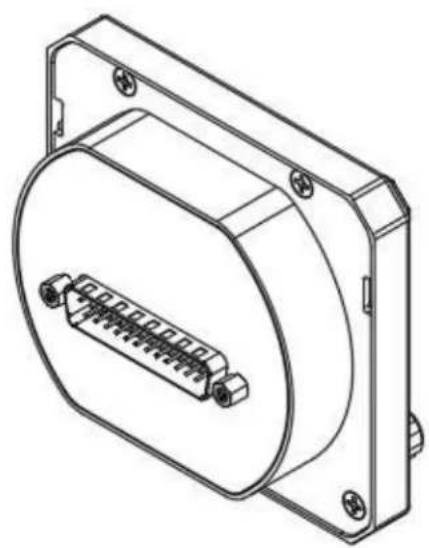
natural_image
Technical line drawing of a mechanical component with a circular housing and internal connector (no text or symbols)Figure 2 - Unit Front and Rear Views
3.2 Equipment Required
3.2.1 Supplied
SI-11X (Unit) P/N 905020-00
Kit, Install Electrical SI-11X P/N TBD
Conn, "D" 25 Pos, Rept, Sldr Cup ...... P/N TBD
Clamp, D Conn 45/180 Deg....P/N TBD
Kit, Install Mechanical SI-11X P/N 306187-00
Bracket, Mounting Front P/N 306179
Gasket..... P/N 306505
Bracket, Mounting Rear P/N 306185
Screw, Phillips, Flat Undercut SS (X4).....6-32 x 3/8
Nut, Nylon Insert, Std Zinc (X4)......6-32
Hex Wrench, 3/32" L-WR Short.....P/N 306333
3.2.2 Operational Software
SI-11X Operation Software....P/N 905321-00-OC-VX.Y
3.2.3 Required, But Not Supplied
Wire (24 AWG, Stranded unless otherwise noted)
24 AWG Shielded Twisted Pair.
3.3 Mounting Hole
The SI-11X is designed to mount in a standard 3" round mounting hole. The supplied front mounting bracket (P/N 306179) and rear mounting bracket (P/N 306185) must be utilized to mount the instrument. The panel cutout should be as follows:
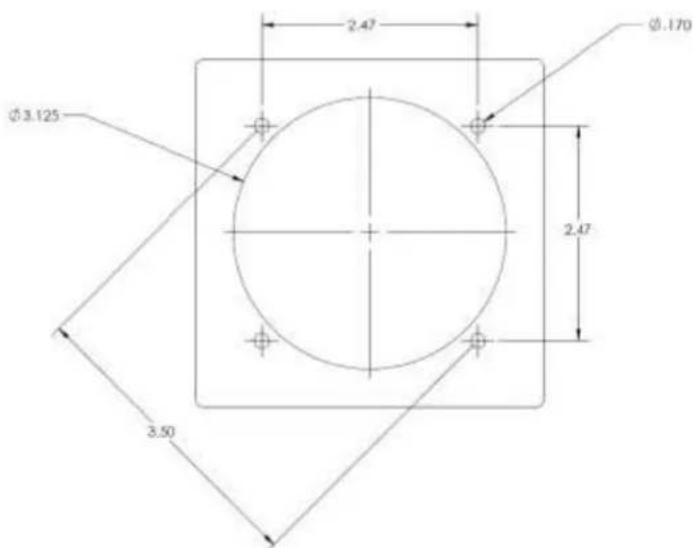
Figure 3 - Instrument Cutout
Front and rear mounting brackets adapt the unit connection points to the 3" round instrument hole cutout. The rear bracket is utilized to fasten the unit to the panel. The supplied screws and nuts must be used to retain the brackets.
3.4 Mounting Bracket Installation
- Install the bracket per Figure 4 and tighten the four screws & nuts.

natural_image
Technical line drawing of a mechanical assembly with screws and a housing (no text or symbols)Figure 4 – Front & Rear Mounting Bracket
3.5 Wiring Installation
-
The power line must be protected by a 1 AMP circuit breaker.
-
Keep power and ground lines less than 1 meter in length.
The SI-11X is supplied with one 25 pin Sub-D female mating connector and back-shell. The Sub-D connector uses screw lock assemblies to secure the connector to the unit. The screw lock assemblies can be replaced with slide lock posts if desired by the installer.
| NUM | NAME | I/O | DESCRIPTION |
| P1-1 | Rotor H | Input | Rotor Reference |
| P1-2 | Rotor C | Input | Rotor Reference |
| P1-3 | Stator D | Output | Cosine of Rotor Reference |
| P1-4 | Stator F | Output | Sine of Rotor Reference |
| P1-5 | Stator E | Output | Return for Stator D |
| P1-6 | Stator G | Output | Return for Stator F |
| P1-7 | VLOC+Flag | Input | Flag +- differential. Positive for needle active at 125mV |
| P1-8 | VLOC-Flag | Input | Flag +- differential return |
| P1-9 | VOR TO | Input | VOR TO/FROM differential input. TO positive for TO indication at 40mV |
| P1-10 | VOR FROM | Input | VOR TO/FROM differential input. FROM positive for FROM indication at -40mV |
| P1-11 | VLOC LEFT | Input | VLOC LEFT/RIGHT differential. LEFT positive for left needle movement. 150mV for Full Scale (5 dots) |
| P1-12 | VLOC RIGHT | Input | VLOC LEFT/RIGHT differential. RIGHT positive for right needle movement. -150mV for Full Scale(5 dots) |
| P1-13 | GS UP | Input | Glideslope UP/DOWN differential. UP positive for up needle movement. 150mV for full scale(5 dots) |
| P1-14 | GS DOWN | Input | Glideslope UP/DOWN differential. DOWN positive for down needle movement. -150mV for full scale(5dots) |
| P1-15 | GS +FLAG | Input | Glideslope Flag differential. Positive for needle active at 125mV |
| P1-16 | GS -FLAG | Input | Glideslope Flag differential return. |
| P1-17 | GPS ANN | Input | Active Low for GPS annunciation |
| P1-18 | VLOC Ann | Input | Active low for VLOC annunciation |
| P1-24 | NAV ANN | Input | Active low for NAV annunciation |
| P1-25 | BC ANN | Input | Active low for BC (back course) annunciation |
| P1-19 | A/C PWR | Input | 10-32Vdc. Diode OR'd with P1-20 |
| P1-20 | A/C PWR | Input | Alternate Power input Diode OR'd with P1-19 |
| P1-21 | GND PWR | Input | Power Return |
| P1-22 | RS232 RX | Input | DNC |
| P1-23 | RS232 TX | Output | DNC |
Table 1- Electrical Pin-Out

bar
| SI-11X | P1 | GARMIN GNS430 P4001 | |---|---|---| | VLOC+FLAG | 7 | 23 | | VLOC-FLAG | 8 | 24 | | TO FROM | 9 | 25 | | VLOC_LEFT VLOC_RIGHT | 11 | 26 | | GS_UP GS_DOWN | 13 | 21 | | GS+FLAG GS-FLAG | 15 | 22 | | GPS_ANN VLOC_ANN | 17 | 27 | | NAV_ANN BC_ANN | 18 | 28 | | ROTOR H ROTOR C | 1 | 29 | | STATOR D STATOR E | 3 | 30 | | STATOR F STATOR G | 4 | 2 | | A/C PWR1 A/C PWR2 | 19 | 32 | | GROUND | 21 | 31 | | RS232_RX RS232_TX | 22 | 33 | | A/C PWR1 A/C PWR2 | 20 | 34 | | A/C PWR1 A/C PWR2 | 21 | 35 | | A/C PWR1 A/C PWR2 | 23 | 36 | | A/C PWR1 A/C PWR2 | 2A | NOTES: 1. ALL WIRES 24 AWG; 2. A/C PWR1 / 2 ARE INTERNALLY DIODE'D ORD TO ALLOW FOR MULTIPLE PWR SOURCES; AIRCRAFT POWER & AIRCRAFT GROUNDFigure 5 - Wiring Diagram
3.6 Unit Mounting
- The unit connects to the mounting bracket utilizing two upper tabs and a lower fastener.
- Place gasket on unit before installing unit onto bracket.
- The unit is installed by engaging the two upper tabs first, then securing the bottom screw.
- Hold the unit at a slight angle off of the instrument panel (as shown below) and align the upper tabs with the slots on the rear of the unit.

Figure 6 - Unit Mounting With Tab/Slot Cutaway
- Push the unit toward the instrument panel until it stops against the bracket.
- While maintaining inward pressure, rotate the bottom such that the unit is now parallel to the panel.
- Once parallel to the panel, apply downward pressure to ensure the upper tabs remain fully engaged.
- While holding in-ward and down-ward pressure on the unit, tighten the lower screw with the 3/32 hex drive. Torque to 5 inch-lbs. Do not over-tighten.
- Verify that the unit is firmly attached to the instrument panel. (The bezel of the unit will stand-off slightly from the instrument panel, which is normal.)
3.7 System Configuration
The following section provides instructions for initial setup configuration of the SI-11X
Upon normal power-on, the unit will display the company logo, model number, part number and software version as follows:
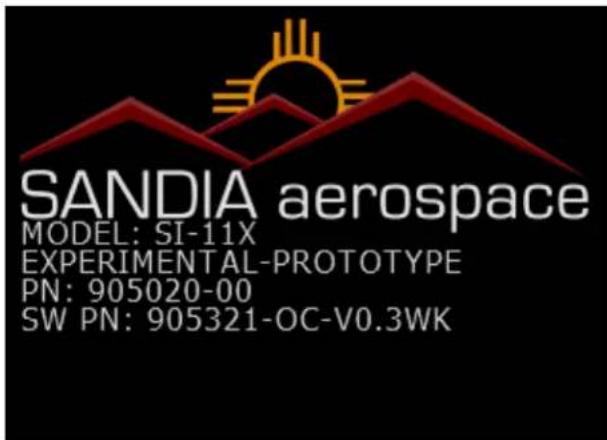
Figure 7 - Power On Screen
After displaying the splash screen for approximately 7 seconds, the unit will enter the main operating mode.
3.7.1 Entry & Exit Configuration Mode
Setup mode is enabled when the unit is powered-on while the rotary knob is being held in the pressed state. The unit will display a “Caution: Enter Config Mode? NO YES”. To enter configuration mode, rotate the encoder until YES is yellow and press the knob.

Figure 8 – Setup Mode Entry
Exiting the configuration mode is accomplished by long press and hold of the knob or cycling power to the unit. CAUTION: When setting have changed, the SI-11X needs to write to non-
volatile memory. The Configuration Page display a yellow box in the upper left hand corner of the display. DO NOT CYCLE POWER WHILE THIS BOX IS DISPLAYED. Otherwise, a corruption of the non-volatile memory may occur and the unit will default it's configuration.
3.7.2 Configuration Page
Upon entry of configuration mode, the unit displays the following page:

Figure 9-Configuration Screen
| Setup Page | Purpose | Min Value | Max Value | Increment |
| VLOC GAIN | Lateral needle gain adjustment | .8 | 1.2 | .001 |
| VLOC OFFSET | Lateral needle zero offset adjustment (10ths of mV) | -2000 | 2000 | 1 |
| GS GAIN | Vertical needle gain adjustment | .8 | 1.2 | .001 |
| GS OFFSET | Vertical needle zero offset adjustment (10ths of mV) | -2000 | 2000 | 1 |
| TO/FROM GAIN | TO/FROM input gain | .8 | 1.2 | .001 |
| TO/FROM OFFSET | TO/FROM zero offset (10ths of mV) | -2000 | 2000 | 1 |
| LOC FLAG GAIN | LOC Flag gain adjustment | .8 | 1.2 | .001 |
| LOC FLAG OFFSET | LOC Flag zero offset (10ths of mV) | -2000 | 2000 | 1 |
| GS FLAG GAIN | GS Flag gain adjustment | .2 | 1.0 | 0.01 |
| SWAP | GS Flag zero offset (10ths of mV) | -2000 | 2000 | 1 |
| RATIO | Rotor to Stator Transfer Ratio | 0.2 | 1.0 | .01 |
| SWAP | Can swap SIN/COS on Stator D/F either 0 or 1. | 0 | 1 | 1 |
| OBS | Current displayed OBS | 1 | 360 | 1 |
| OBZ | Electrically Zero OBS | 1 | 360 | 1 |
Table 2 - Configuration Parameters
The reading column shows the mV reading on that input. The ELEC column on the ZERO row gives the electrically output angle on Stator D/F.
To edit an adjustment, rotate the knob until the desired item is selected with a yellow box. Press the knob and that element will be highlighted in blue. Rotate the knob to the desired value and resulting reading. Press the knob to store the value and allow selection of another item.
3.7.3 Installation Adjustment
The SI-11X needs to be adjusted to the navigation receiver or GPS navigator that it's interfaced to. Many modern receivers have configuration pages that help in adjustment of the CDI. Garmin GNS4XX/5XX for example have a configuration page to drive the needles to Full Left, Right, Up and Down that can assist in the adjustment. A calibrated DMM is also useful in determining the voltages that are being applied by the navigation system.
For a typical navigation receiver, the following steps should be performed with the receiver and a NAV Test Set.
- Starting with the lateral VLOC needle, inject a strong localizer signal nav receiver.? Adjust DDM to zero and adjust the VLOC OFFSET so that VLOC READING is 0 +- 1.5 mV.
- The LOC FLAG READING should be greater than 125mV.
- Adjust DDM to .155 "Left" and adjust VLOC GAIN so that VLOC READING is 150mV + -1.5mV.
- Adjust DDM to .155 "Right" and Observe the VLOC READING is 150mV +-1.5mV.
- Remove the localizer signal and observe the VLOC FLAG READING is 0 + 1.5mV.
- Switch to the Glideslope receiver. Inject a strong glideslope signal. Adjust DDM to zero and adjust GS OFFSET so that GS READING is 0 +- 1.5mV
- The GS FLAG READING should be greater than 125mV
- Adjust DDM to .175 "UP" and adjust GS GAIN so that GS READING is 150mV +-1.5mV.
- Adjust DDM to .175 "DOWN" and observe that GS READING is -150mV +-1.5mV
- Remove the glideslope signal and observe the GS FLAG READING is 0 + 1.5mV
The VLOC and GS needles should now be calibrated.
3.7.3.1 OBS Resolver Adjustment
Various navigation equipment has different methods for checking the operation of the OBS resolver. Typically, the OBZ is set to 300, the RATIO is 1.0 and SWAP is 0. If the navigation equipment is reading incorrectly, adjust the OBZ. If when incrementing the OBS and the navigation equipment readout is decreasing, change the SWAP to 1. This will swap SIN/COS signals on STATOR D/F resulting in the proper rotation direction.
Verify OBS operation by checking that the navigator is reading within 2 degrees. Do this at 30 degree intervals.
3.7.3.2 VOR TO/FROM Check
After the needles and flags have been adjusted and the OBS Resolver is accurate, the system VOR operation should be verified. Typically, the TO/FROM indications do not need adjustment.
3.7.3.3 Annunciator Checks
Operate the navigation equipment through its various modes and ensure that the connected ANNUNCIATOR inputs are operating normally.

- SI-11X
- Installation Manual
- Table of Contents
- Section 1 - General Description....4
- Section 2 - Installation Considerations ....8
- Section 3 – Installation Procedures....9
- Section 4 – Operation....17
- List of Illustrations
- Section 1 - General Description
- Introduction
- SI-11X Product Description
- System Functions
- System Interfaces
- Unit Outer Dimensions
- Specifications
- Physical Characteristics
- Electrical Characteristics
- Environmental Characteristics
- Section 2 - Installation Considerations
- General
- Cooling Considerations
- Section 3 - Installation Procedures
- General
- Equipment Required
- Supplied
- Operational Software
- Required, But Not Supplied
- Mounting Hole
- Mounting Bracket Installation
- Wiring Installation
- Unit Mounting
- System Configuration
- Entry & Exit Configuration Mode
- Configuration Page
- Installation Adjustment
- OBS Resolver Adjustment
- VOR TO/FROM Check
- Annunciator Checks
Brand : Sandia Aerospace
Model : Si-11X
Category : Browser