
STX 165R - Unspecified Sandia Aerospace - Free user manual and instructions
Find the device manual for free STX 165R Sandia Aerospace in PDF.


| Product Type | Remote Mode A/C Transponder |
| Model | STX 165R |
| Dimensions (H x W x D) | 3.5 x 1.8 x 6.9 in (8.89 x 4.57 x 17.53 cm) |
| Weight | 1.16 lbs (0.526 kg) |
| Operating Voltage | 11-32 Vdc |
| Current Consumption (typical) | 0.36 A @ 14 V (squawk 7777, PRF 500) |
| Transmitter Frequency | 1090 MHz |
| Receiver Frequency | 1030 MHz |
| Receiver Sensitivity | -74 dBm nominal at 90% reply rate |
| Power Output | 200 Watts nominal |
| Altitude Range | -1,000 ft to +35,000 ft |
| Operating Temperature | -20°C to +55°C |
| Certification | TSO C74d, DO-178B Level C, DO-160F |
| Altitude Input | External encoder via RS232 (9600/1200 baud) or Gilham Gray code |
| RS232 Output | Altitude data, baud selectable (9600/1200) |
| Squawk Codes | 4096 codes |
| Suppression Input | For dual transponder installations (low <0.5V, high >1.8V) |
| Remote On/Off | Momentary for on, 3 sec hold for off via pin 14 of J2 |
| Transponder Select | Ground pin 15 of J2 to de-select as active transponder |
| External Ident | Ground pin 6 of J3 for IDENT mode |
| Mounting | Remote mount with optional tray (P/N 305835-20) or hard mount via flanges |
| Connectors | 1x 9-pin Sub-D (J3), 1x 15-pin Sub-D (J2), 1x SMA (antenna) |
| Antenna | External, vertically mounted, ground plane radius ~4 in |
| Continued Airworthiness | On condition only |
| Environmental Qualification | Tested to DO-160F categories: A4/C4 (temp/alt), B (shock), S (vibration), etc. |
Frequently Asked Questions - STX 165R Sandia Aerospace
User questions about STX 165R Sandia Aerospace
0 question about this device. Answer the ones you know or ask your own.
Ask a new question about this device
Download the instructions for your Unspecified in PDF format for free! Find your manual STX 165R - Sandia Aerospace and take your electronic device back in hand. On this page are published all the documents necessary for the use of your device. STX 165R by Sandia Aerospace.
USER MANUAL STX 165R Sandia Aerospace
STX 165 / STX 165R Installation Manual
3700 Osuna Rd NE, Suite 711
Albuquerque, NM 87109
www.sandia.aero
306100-00
This document and the information contained herein is the proprietary data of SANDIA aerospace Corporation. No part of this document may be transmitted, reproduced, or copied in any form or by any means without the prior written consent of SANDIA aerospace. Due to SANDIA aerospace's continued product and quality improvement programs, information contained in this document is subject to change without prior notice Copyright 2010 SANDIA aerospace Corporation, All right rights reserved. Printed in USA
Information Subject To Export Control Laws
Record of Revisions
| Revision | Date Description | Approval | |
| -1 20120222 DRN 402 L. Harrison | |||
| -2 20120308 ECN 3884 L. Harrison | |||
| -3 20130311 ECN 3916 L. Harrison | |||
Table of Contents
Record of Revisions....1
Table of Contents 2
List of Illustrations....3
Section 1 General Description....4
1.1 Introduction....4
1.2 STX 165 / STX 165R Product Description....4
1.3 Technical Characteristics ....4
1.3.1 Physical Characteristics ....4
1.3.1.1 STX 165 Panel Mount ....4
1.3.1.2 STX165R Remote Mount Unit 4
1.3.2 Electrical Characteristics - STX 165 and STX 165R....4
1.3.3 Operational Chacteristics....5
1.3.3.1 STX 165 Panel Mount ....5
1.3.3.2 STX 165R Remote Mount ....5
1.3.3.3 ST 78 OAT Probe....5
1.3.4 Certification....5
Environmental Qualification Form - STX 165....6
Environmental Qualification Form - STX 165 R....7
Section 2 Installation Considerations....8
2.1 General....8
2.2 Mounting Considerations....8
2.2.1 STX 165 Panel Mount ....8
2.2.1.1 Optional 3" Adapter Plate....8
2.2.2 STX 165R Remote Mount....8
2.3 Cooling....8
Section 2 Installation Procedures....9
3.1 General....9
3.2 Equipment Required 9
3.2.1 STX 165 Panel Mount ....9
3.2.1.1 Supplied 9
3.2.1.2 Required but not supplied 9
3.2.2 STX 165R Remote Mount....9
3.2.2.1 Supplied 9
3.2.2.1 Required but not supplied....9
3.2.2.3 Optional....9
3.3 Electrical....10
3.4 Aircraft mounting....10
3.4.1 STX 165....10
3.5.2 STX 165R....11
3.4.2.1 Mounting Tray 11
3.4.2.2 Hard Mounting without Tray 12
3.5 Static Port Connection ....13
3.6 Electrical Connections....13
3.6.1 STX 165 Panel Mount ....13
3.6.2 STX 165R Remote Mount ....13
3.6.3 Outside Air Temp Probe....14
3.6.4 Antenna Connector 14
3.7 Connector Pin Out....16
3.7.1 STX 165 Panel Mount ....16
3.7.2 STX 165R Remote Mount....17
3.8 Calibration Procedures -STX 165 Panel Mount ....18
3.9 Installation Configurations - STX 165 Panel Mount ....18
3.9.1 OAT Sensor....18
3.9.2 OAT Correction....19
3.9.3 RS 232 BAUD Rate Selection....19
3.9.4 MAX Relpy Rate 19
3.9.5 Exit Installer Set Up Mode 19
3.10 User Set Up Mode....19
3.10.1 Altitude Unit 19
3.10.2 Temperature Unit 20
3.10.3 Icing Alert Temp 20
3.10.4 EFT Start....20
3.10.5 Auto Mode C Alt....20
3.10.6 Min Brightness....20
3.10.7 Default VFR Code 21
3.10.8 Exit User Set Up Mode 21
3.11 Continued Airwortiness ....21
3.11.1 STX 165 Panel Mount ....21
3.11.2 STX 165R Remote Mount ....20
List of Illustrations
Figure 3-1 Panel Cut Out Dimensions....10
Figure 3-2 STX 165 Top Dimensions....11
Figure 3-3 Remote Mounting Tray Dimensions....11
Figure 3-4 Remote Unit Dimensions w/out tray....12
Figure 3-5 J2/J3 Connector Wiring....13
Figure 3-6 J2/J3 Connector Hood Assembly ....13
Figure 3-7 STP 78 OAT Probe Dimensions....14
Figure 3-8 STP 78 OAT Probe Mounting ....14
Figure 3-9 Antenna SMA Assembly 15
Figure 3-10 STX 165 Rear View 15
Section 1 General Description
1.1 Introduction
This manual describes the installation of the SANDIA aerospace STX 165 and STX 165 Mode C transponders. It is intended for use by FAA certified repair stations to install the STX 165 and STX 165R transponders and includes both mechanical and electrical installation information. Calibration, system configuration and checkout procedures are included. The installer should ensure that all functions are operating according to their intended purpose in their particular installation.
1.2 STX 165 / STX 165R Product Description
The STX 165 is a self contained, panel mounted Mode A/C transponder with a built-in 35K foot altitude encoder. The built-in encoder supplies altitude data to the STX 165 for altitude reporting (Mode C) and outputs the altitude data on an RS 232 data bus for interface to other avionics systems that require altitude data. A SANDIA aerospace STP 78 OAT probe, P/N 305561-91 can be installed as an option. When the STP 78 is installed, the STX 165 will display OAT (Outside Air Temperature), Density Altitude and Icing Alert.
The STX 165R is a Remote Mode A/C transponder that accepts attitude data from altitude encoders, such as the SANDIA SAE 5-35, in either a Gilham Grey code or RS 232 format.
Both units rely to ATCRABS interrogations with one of 4096 possible ‘squawk’ codes.
1.3 Technical Characteristics
1.3.1 Physical Characteristics
1.3.1.1 STX 165 Panel Mount
1/2 3ATI Panel Cut Out
Behind Panel Dimensions 1.78"H x 3.5"W x 7.34"L (4.52cm x 8.89cm x 18.64cm)
Weight: 1.30 Lbs. (.59 kg)
1.3.1.2 STX 165R Remote Mount Unit
Dimensions: 3.5" H x 1.8"W x 6.9"L (8.89cm x 4.57cm x 17.53cm)
Weight: 1.16 Lbs. (.526 kg)
1.3.2 Electrical Characteristics- STX 165 and STX 165R
Power Out: 200 Watts Nominal
Transmitter Freq: 1090 MHz
Receiver Freq: 1030 MHz
Receiver Sensitivity: -74dBm Nominal at 90% reply rate
1.3.3 Operational Characteristics
1.3.3.1 STX 165 Panel Mount
Operational Voltage: 11-32Vdc
Current: All Current readings are with the encoder heater on
| Aircraft Power | PRF | Squawk Code | Watts | Current | |
| 14Vdc | 500 | 7777 | 13.16 | .94A | |
| 14Vdc | 500 | 1200 | 11.49 | .82A | |
| 28Vdc | 500 | 7777 | 21.14 | .76A | |
| 28Vdc | 500 | 1200 | 19.68 | .70A | |
Operating Temp: -20°C - +55°C
Altitude: -1000' - +35,000'
Encoder:
Altitude: -1000' to +35,000'
Output: RS 232 (9600 or 1200 Baud, Installation Selectable)
Resolution RS 232 10'
Grey Code 100'
1.3.3.2 STX 165R Remote Unit Operational Voltage 11-32Vdc
Current:
| Aircraft Power | PRF | Squawk Code | Watts | Current | |
| 14Vdc | 500 | 7777 | 5.06 | .36A | |
| 14Vdc | 500 | 1200 | 3.65 | .26A | |
| 28Vdc | 500 | 7777 | 5.12 | .18A | |
| 28Vdc | 500 | 1200 | 3.66 | .13A |
Operating Temp: -200C - +550C
Altitude: -1000' - +35,000'
1.3.3.3 STP 78 OAT Probe (Optional)
TSO C88a, C106
Operating Temp: -55°C - +70°C
Altitude: 35,000'
1.3.4 Certification
TSO: C74d (transponder)
C88b (encoder) STX 165 panel mount only
Software: DO-178B Level C
Environmental: DO-160F
STX 165 [(A4C4)X]CAB(SM)XXXXXXZBAB[BC][TT]M[XXXXX]XXXX
STX165R [(A4C4)X]CAB(SM)XXXXXXZBAB[BC][TT]M[XXXXX]XXXX
FCC ID YJL-DAF-JDX
"The conditions and test required for TSO approval of this article are minimum performance standards. It is the responsibility of those desiring to install the article either on or within a specific type or class of aircraft to demonstrate that the aircraft installation conditions are within the TSO standards.
The article may be installed only if installation of the article is approved by the Administrator.
306100-00
Environmental Qualification Form for the STX 165 Mode C Transponder
NOMENCLATURE: STX 165, Airborne ATC Transponder Equipment
TYPE/MODEL/PART No.: STX 165 / 305832-[XX] & Electrical Install Kit P/N 305994
TSO NUMBER: C74d (Transponder)
C88b (Encoder)
MANUFACTURER'S SPECIFICATION AND/OR OTHER APPLICABLE SPECIFICATION:
STX 165 INSTALLATION MANUAL, P/N 306100-00
QUALIFICATION TEST PLAN, STX 165 AIRBORNE MODE A/C TRANSPONDER P/N 901016-QTP
MANUFACTURER: SANDIA AEROSPACE
ADDRESS: 3700 OSUNA RD NE, SUITE 711, ALBUQUERQUE, NM 87109
REVISION & CHANGE NUMBER OF DO-160 : REV F DATED December 6, 2007
DATE OF TESTS: 2012
| CONDITION SECTION | DESCRIPTION | ON OF TESTS CONDUCTED |
| Temperature and Altitude | 4.3 | Equipment Tested to Category A4/C4 |
| Low Temperature | 4.5.5 | -20°C Operating Cold Temp |
| High Temperature | 4.5.2 | +55°C Operating High Temp |
| In-Flight Loss of Cooling | 4.5.4 | Test not Applicable |
| Altitude | 4.6.1 | 35,000 feet |
| Decompression | 4.6.2 | 30,000 feet |
| Overpressure | 4.6.3 | -15,000 feet |
| Temperature Variation 5.0 | Tested to Category C, 2C/Min | |
| Humidity | 6.0 | Tested to Category A |
| Operational Shock and Crash Safety | 7.0 | Tested to Category B, Aircraft Type 5. Random Orientation |
| Vibration | 8.0 | Tested to Category S, Aircraft Zone 2, Vib curve M |
| Explosion | 9.0 | Equipment Identified as Category X, No Test Performed |
| Waterproofness | 10.0 | Equipment Identified as Category X, No Test Performed |
| Fluids Susceptibility | 11.0 | Equipment Identified as Category X, No Test Performed |
| Sand and Dust | 12.0 | Equipment Identified as Category X, No Test Performed |
| Fungus | 13.0 | Equipment Identified as Category X, No Test Performed |
| Salt Spray | 14.0 | Equipment Identified as Category X, No Test Performed |
| Magnetic Effect | 15.0 | Equipment is Category Z |
| Power Input | 16.0 | Tested to Category B |
| Voltage Spike | 17.0 | Tested to Category A |
| Audio Frequency Susceptibility | 18.0 | Tested to Category B |
| Induced Signal Susceptibility | 19.0 | Tested to Category BC |
| Radio Frequency Susceptibility | 20.0 | Tested to Category TT |
| Radio Frequency Susceptibility | 21.0 | Tested to Category M |
| Lightning Induced Transient Susceptibility | 22.0 | Equipment Identified as Category X, No Test Performed |
| Lightning Direct Effects 23.0 | Equipment Identified as Category X, No Test Performed | |
| Icing | 24.0 | Equipment Identified as Category X, No Test Performed |
| Electrostatic Discharge | 25.0 | Equipment Identified as Category X, No Test Performed |
| Flammability | 26.0 | Equipment Identified as Category X, No Test Performed |
Environmental Qualification Form for the STX 165R Mode C Transponder
NOMENCLATURE: STX 165R, Airborne ATC Transponder Equipment
TYPE/MODEL/PART No.: STX 165 / 305831-[XX] & Electrical Install Kit P/N 305994
TSO NUMBER: C74d (Transponder)
MANUFACTURER'S SPECIFICATION AND/OR OTHER APPLICABLE SPECIFICATION:
STX 165 INSTALLATION MANUAL, P/N 306100-00
QUALIFICATION TEST PLAN, STX 165 AIRBORNE MODE A/C TRANSPONDER P/N 901016-QTP
MANUFACTURER: SANDIA AEROSPACE
ADDRESS: 3700 OSUNA RD NE, SUITE 711, ALBUQUERQUE, NM 87109
REVISION & CHANGE NUMBER OF DO-160 : REV F DATED December 6, 2007
DATE OF TESTS: 2012
| CONDITION SECTION | DESCRIPTION | ON OF TESTS CONDUCTED |
| Temperature and Altitude | 4.3 | Equipment Tested to Category A4/C4 |
| Low Temperature | 4.5.5 | -20°C Operating Cold Temp |
| High Temperature | 4.5.2 | +55°C Operating High Temp |
| In-Flight Loss of Cooling | 4.5.4 | Test not Applicable |
| Altitude | 4.6.1 | 35,000 feet |
| Decompression | 4.6.2 | 30,000 feet |
| Overpressure | 4.6.3 | -15,000 feet |
| Temperature Variation 5.0 Tested to Category C, 2C/Min | ||
| Humidity | 6.0 Tested to Category A | |
| Operational Shock and Crash Safety | 7.0 Tested to Category B, Aircraft Type 5. Random Orientation | |
| Vibration | 8.0 Tested to Category S, Aircraft Zone 2, Vib curve M | |
| Explosion | 9.0 Equipment Identified as Category X, No Test Performed | |
| Waterproofness | 10.0 | Equipment Identified as Category X, No Test Performed |
| Fluids Susceptibility | 11.0 | Equipment Identified as Category X, No Test Performed |
| Sand and Dust | 12.0 | Equipment Identified as Category X, No Test Performed |
| Fungus | 13.0 | Equipment Identified as Category X, No Test Performed |
| Salt Spray | 14.0 | Equipment Identified as Category X, No Test Performed |
| Magnetic Effect | 15.0 | Equipment is Category Z |
| Power Input | 16.0 | Tested to Category B |
| Voltage Spike | 17.0 | Tested to Category A |
| Audio Frequency Susceptibility | 18.0 | Tested to Category B |
| Induced Signal Susceptibility | 19.0 | Tested to Category BC |
| Radio Frequency Susceptibility | 20.0 | Tested to Category TT |
| Radio Frequency Susceptibility | 21.0 | Tested to Category M |
| Lightning Induced Transient Susceptibility | 22.0 | Equipment Identified as Category X, No Test Performed |
| Lightning Direct Effects 23.0 | Equipment Identified as Category X, No Test Performed | |
| Icing | 24.0 | Equipment Identified as Category X, No Test Performed |
| Electrostatic Discharge | 25.0 | Equipment Identified as Category X, No Test Performed |
| Flammability | 26.0 | Equipment Identified as Category X, No Test Performed |
Section 2 Installation Considerations
2.1 GENERAL
The STX 165 is self contained panel mounted Mode C transponder with a built-in encoder. In addition to providing Mode C altitude for it's internal use, the STX 165 outputs the encoders pressure altitude in an RS 232 format for use with other on board systems that require pressure altitude information. The baud rate for the RS 232 output is selected (9600 or 1200 baud) in the installer setup mode during installation. A Sandia STP 78 OAT probe (Part Number 305561-91) can also be installed as an option with the STX 165. When the STP 78 is installed the STX 165 will display Outside Air Temperature, Density Altitude, and an Icing Alert. The icing Alert will come on at a preset temperature that is selected by the user in the user set up mode.
The STX 165R is a remote Mode C transponder designed to be used with other navigation systems. SANDIA provides a Interface Control Document to those that wish to interface with the STX 165R. The ICD can be obtained from SANDIA Aerospace by contacting the factory at 505.341.2930. The STX 165R can be hard mounted in the aircraft or mounted with the use of a mounting tray. The STX 165R requires altitude input from an encoder, such as the Sandia SAE 5-35, in either RS 232 or Gilham Gray code format.
2.2 MOUNTING CONSIDERATIONS
2.2.1 STX 165 Panel Mount
The STX 165 is designed to be rear mounted in a 1/2 3ATI cutout. The ATI (Airline Transport Indicator) form factor is used in most corporate and commercial aircraft. It provides a professional look while keeping space requirements to a minimum. The STX 165 is attached to the aircraft panel with four user supplied 6-32 machine screws. The length of the mounting screw should be the thickness of the aircraft panel plus 0.15 inches (extension into the STX 165 bezel). A template is provided with the STX 165 to aid in panel cutout. SANDIA aerospace also has a panel punch avialable for use in installing the STX 165. Contact the factory at 505.341.2930 regarding use of the panel punch.
2.2.1.1 Optional 3" Adapter Plate
An adapter plate is available to allow the STX 165 to mount in a standard 3" instrument hole. The
2.2.2 STX 165R Remote Mount
The STX 165R can be remote mounted in the avionics bay or other location in or outside a pressure vessel. The STX 165R can be mounted in any orientation by attaching the unit to a structure using the slots on the mounting tabs. The mounting tabs allow for four point to secure the STX 165R, but only three are required. The STX 165R can also be mounted using the optional mounting tray. The tray should be secured with the use of three (3) number 6-32 or 8-32 pan head machine screws.
Section 3 Installation Procedures
3.1 General
The STX 165 and STX 165R are supplied with two Sub-D mating connectors and a connector clamps. The Sub-D connectors use screw lock assemblies to secure the connectors to the unit. In some installations both connectors will not be needed. The spare connector can be discarded. Also supplied is a SMA connector for use in connecting the antenna coax. It is important that proper installation techniques be observed in attaching wires and building the antenna cable. The static port connection must be securely attached to prevent any leakage. Failure to observe proper installation techniques could result in a failure of a connection and cause intermittent or non operation of the STX 165 or STX 165R. The STX 165 and STX 165R must never be turned on without the antenna connected. FAILURE TO DO SO COULD CAUSE DAMAGE TO THE TRANSMITTER.
3.2 Equipment Required
3.2.1 STX 165 Panel Mount
3.2.1.1 Supplied
STX 165 P/N 305832-00
Installation Kit 305994-00
9 Pin Sub D Connector P/N 305214
Clamp, D Conn, Size 1 P/N 305207
15 Pin Sub D Connector P/N 305215
Clamp, D Conn, Size 2 P/N 305208
SMA Connector P/N 306109
3.2.1.2 Required but not supplied
4 each 6-32 pan head screws for mounting to the instrument panel.
RF antenna coax
Cables
Static port tubing
3.2.1.3 Optional
STP 78 OAT Probe. Sandia P/N 305561-91
3.2.2 STX 165R Remote Mount
3.2.2.1 Supplied
STX 165R P/N 305831-00
Installation Kit 305994-00
9 Pin Sub D Female Connector P/N 305214
Clamp, D Conn, Size 1 P/N 305207
15 Pin Sub D Female Connector P/N 305215
Clamp, D Conn, Size 2 P/N 305208
SMA Connector P/N 306109
3.2.2.2 Required but not supplied
3 or 4 each number 6-32 or 8-32 pan head screws for mounting unit.
RF antenna coax
Cables
3.2.2.3 Optional
Remote mounting tray, P/N 305835-20
3.3 Electrical
The STX 165 and STX 165R operate on 11-32Vdc. Power should be protected by a 1 amp fuse or circuit breaker. J3, a 9 pin Sub-D connector, has system power, external Ident and RS 232 altitude functions. J2 is a 15 pin Sub-D connector that has the Gilham Gray code and OAT functions. On the STX 165 panel mount unit, the gray code connections are outputs on J2 and on the STX 165R remote unit the gray code connections are inputs. Additionally Pin 8 of J2 is unswitched aircraft power out that can be used to run other devices such as an encoder. Maximum current on Pin 8 of J2 is not to exceed 1 amp. When routing the antenna cable, sharp bends and routing near motors and generators should be avoided. The antenna cable should be kept as short as possible (the antenna could be at least 3 feet away from the transponder itself).
WARNING: The STX 165 and STX 165R must NEVER be turned on without the antenna connected or a proper annunciator attached to the antenna output connector. Failure to do so will result in the failure of the transmitter output devise. This type failure is not covered by the manufactures warranty.
Installation to be in accordance with FAA AC 43.13-1B
3.4 AIRCRAFT MOUNTING
3.4.1 STX 165
The STX 165 is rear mounted in the aircraft panel using four (4) 6-32 machine screws. To ensure a secure attachment, the length of the mounting screw should be the thickness of the aircraft panel plus 0.15 inches (extension into the STX 165 bezel). The STX 165 does not require any additional mechanical support. The panel cut out is a standard 1/2 3ATI (Airline Transport Indicator). Allow enough room behind the panel for the unit, connectors and harness.
A panel punch is available from the factory for a nominal charge. Contact the factory at 505.341.2930
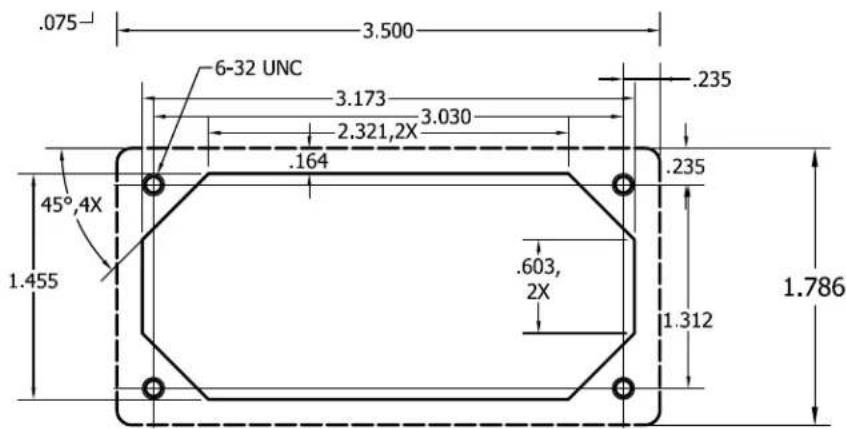
Figure 3-1
Panel Cut Out Dimensions
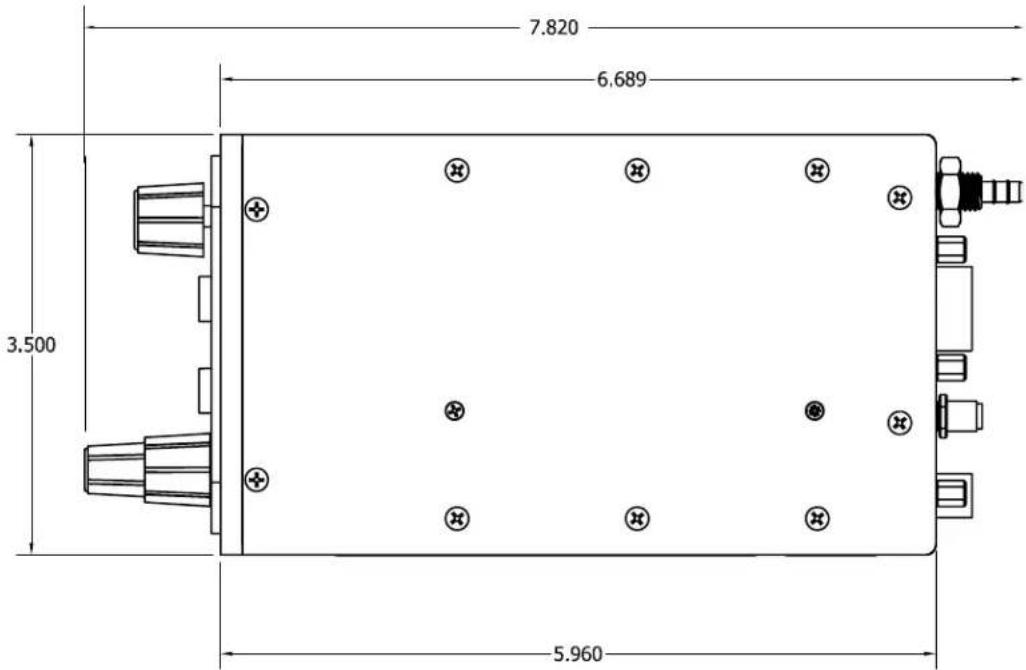
Figure 3-2 STX 165 Top View Dimensions
3.4.2 STX 165R
The STX 165R remote transponder can be either hard mounted using the mounting flanges or mounted in the optional mounting tray.
3.4.2.1 Mounting Tray
When using the mounting tray, it needs to be secured with two number 8 pan head mounting screws. Ensure that the top of the screw head is below the mounting tray surface. The STX 165R can be installed in either direction in the mounting tray. Ensure that the STX 165R is securely fastened to the tray using the thumb nut.

Figure 3-3 Remote Mounting Tray Dimensions
306100-00
3.4.2.2 Hard Mounting without Tray
The STX 165R can be hard mounted to the aircraft using the slotted flanges on the unit using either number 6 or number 8 mounting screws. It can be mounted in either axis. When mounted on the narrow edge two screws are used to fasten the unit. When on the wide edge, either three or four mounting screws are required. When mounting the unit, ensure that enough clearance is allowed for the mating connectors.

Figure 3-4 Unit Mounting Dimensions Without Tray
3.5 Static Port Connection
The STX 165 has a built-in altitude encoder that requires connection to the aircraft static port. The static port connection is on the back of the STX 165. To ensure a leak proof fit, it is recommended to use tubing with an Inside Diameter of .125" and secure it with a hose clap or ty-wrap. Upon completion of the STX 165 installation a leak test of the static line is to be performed per FAR Part 43 Appendix E.
3.6 Electrical Connection
The STX 165 and STX 165R are designed to operate on 11-32Vdc without any special wiring considerations. Power should be supplied from aircraft power through a 1 amp fuse or circuit breaker to protect the transponder. The STX 165 and STX 165R also output unswitched aircraft power to operate other avionics. If this output is used (a Maximum of 1 Amp), the fuse or breaker size should be adjusted to accommodate the other system. Power and ground wires are 20 AWG. All other wires are 22 AWG unless otherwise noted.
3.6.1 STX 165 Panel Mounted Unit
The minimum installation for an operable STX 165 is Aircraft Power, Aircraft Ground, Antenna and Static Line. Aircraft power and ground are both found on J3, the 9 pin connector. The STX 165 will also accept a remote altitude encoder input in an RS 232 format if so desired. In this case, the STX 165 will use the external encoder as first priority for altitude information. If the external altitude becomes unavailable, the STX 165 will use the internal encoder. The STX 165 outputs encoder altitude data in either RS 232 or Gilham Gray Code. An External Ident input is provide for a yoke mount switch. Grounding the External Ident line will place the STX 165 in the Ident mode.
3.6.2 STX 165R Remote Mounted Unit
The minimum installation for an operable STX 165 is Aircraft Power, Aircraft Ground, Antenna, and pressure altitude from an altitude encoder. The STX 165R accepts altitude data in either an RS 232 format (9600 Baud rate) or via Gilham Grey code. The STX 165R outputs the received altitude in an RS 232 format whose baud rate is installation selectable. An open on J2 Pin 6 (the 15 pin connector) sets the RS 232 baud rate at 9600. Grounding J2 Pin 6 changes the baud rate to 1200. In cases where the aircraft has dual transponders (one active and one stand-by) grounding J2 Pin 15 de-selects the STX 165R as the active transponder.
![Solder Cup Contact 3.175 ±0.25 mm [1.25 ± 0.10 in] Note: Note to Scale](/content/2026/06/1214909/images/1c2a1757f410d87cd94a903b4b791948dc8738c47ca9e1b4851662584860f199.jpg)
Figure 3-5 J2/J3 Connector Wiring For Ref Only
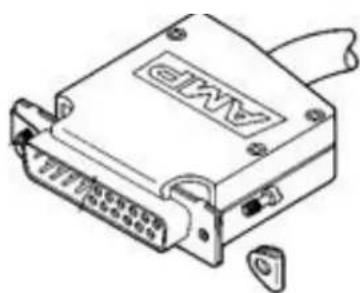
Figure 3-6 J2/J3 Connector Hood Assembly For Ref Only
306100-00
3.6.3 Outside Air Temperature (OAT) Probe Installation
Avoid mounting the OAT probe in or near prop airstream, engine or heater exhaust, transmitting antennas or on dark painted surface. Failure to do so will result in improper OAT readings. The OAT probe requires a 7/16" hole be drilled in the skin of the aircraft. The installer should consider fabricating an appropriate doubler plate in accordance with accepted installation practices as outlined in AC 43.13-1B. Skin thickness including doubler should be a minimum of 0.050" and a maximum of 0.188". See figure 3-47 for mounting details. The OAT probe comes with a three wire pigtail approximately 23 inches in length. The installer can cut this cable to length or extend it by adding additional wire. Make sure that any connections are away from areas that can accumulate water or chemicals.

Figure 3-7 STP 78 OAT Probe Dimensions
10 - Nut
20 - Shoulder Washer
30 - Insulating Washer
40 - Lock Washer
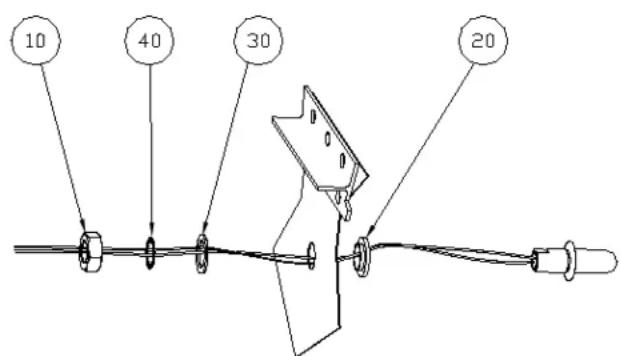
Figure 3-8 STP 78 OAT Probe Mounting
3.6.4 Antenna Connector
The transponder antenna (installer supplied) should be mounted vertically on the bottom of the aircraft. The antenna requires the use of a ground plane that should have a radius of approximately 4". The STX 165 uses a SMA connector (supplied). Instruction for assembling the SMA connector are shown in Figure 3-9. A BNC to SMA adapter can also be used without any measurable degradation of transponder performance. This adapter can be obtained from your avionics parts supplier.

Figure 3-9
Antenna SMA Assembly
- Strip cable to dimensions shown. Do not nick braid or center conductor.
- Solder contact to center conductor.
- Flare braid and slide body assembly over contact and under braid. Then seat body assembly firmly onto contact. The cable may have to be held in a clamping fixture. Arrange braid uniformly around crimp stem. Slide crimp sleeve forward and crimp using recommended crimp tool. Slide heat shrink froward and shrink (as applicable.)
Note: tools can be purchased from Emerson at http://emersonconnectivity.com

Figure 3-10 STX 165 Rear View
3.7 Connector Pin Out
3.7.1 STX 165 Panel Mounted Unit
| Pin # | Description I/O Notes | ||
| 1 Aircraft Power 11-33Vdc In | |||
| 2 RS 232A (TCMD) In | |||
| 3 Serial Ground In | |||
| 4 RS232B (Altitude In) In 9600 Baud | |||
| 5 Aircraft Ground In | |||
| 6 External Ident In | |||
| 7 RS232A (TSTAT) Out | |||
| 8 RS232B (Altitude Out) Out | 9600/1200 Baud Selectable.9600 Baud Factory Default | ||
| 9 Suppression | In <.5V= Low, >1.8V=High) | ||
J3 9 Pin Sub-D
| Pin # | Description | I/O | Notes |
| 1 | Altitude D4 | Out | |
| 2 | Altitude A1 | Out | |
| 3 | Altitude A2 | Out | |
| 4 | Altitude A4 | Out | |
| 5 | Altitude B1 | Out | |
| 6 | Stobe | Out | |
| 7 | Signal Ground | OAT Drain, Grey Code | |
| 8 | Aircraft Power | Out | Non Switchable |
| 9 | Altitude B2 | Out | |
| 10 | Altitude B4 | Out | |
| 11 | Altitude C1 | Out | |
| 12 | Altitude C4 | Out | |
| 13 | Altitude C2 | Out | |
| 14 | OAT Power | Out | OAT Probe Power (Red Wire*) |
| 15 | OAT Signal | In | OAT Probe Signal (Black Wire*) |
J2 15 Pin Sub-D
*OAT Probe wire colors
306100-00
3.7.2 STX 165R Remote Mounted Unit
| Pin # | Description I/O Notes | ||
| 1 Aircraft Power 11-33Vdc In | |||
| 2 RS 232A (TCMD) In | |||
| 3 Serial Ground In | |||
| 4 RS232B (Altitude In) In 9600 Baud | |||
| 5 Aircraft Ground In | |||
| 6 No C | |||
| 7 RS232A (TSTAT) Out | |||
| 8 RS232B (Altitude Out) Out 9600/1200 Baud Selectable.9600 Baud Factory Default | |||
| 9 Suppression | In <.5V= Low, > | 1.8V=High) | |
J3 9 Pin Sub-D
| Pin # | Description | I/O | Notes |
| 1 | Altitude D4 | In | |
| 2 | Altitude A1 | In | |
| 3 | Altitude A2 | In | |
| 4 | Altitude A4 | In | |
| 5 | Altitude B1 | In | |
| 6 | Baud Select | In | < .5v on Pin Changes J3 Pin 8 to 1200 Baud |
| 7 | Signal Ground | Grey Code | |
| 8 | Aircraft Power Out | Non Switchable, 1 | Amp Max. |
| 9 | Altitude B2 | In | |
| 10 | Altitude B4 | In | |
| 11 | Altitude C1 | In | |
| 12 | Altitude C4 | In | |
| 13 | Altitude C2 | In | |
| 14 | Remote On-Off | In | < .5V toggles On-Off. Momentary for On, 3 seconds +/- .3 seconds for Off |
| 15 | Transponder Select | In | Selects/deselects active transponder (ground on pin 15 de-selects STX 165R as active transponder) |
J2 15 Pin Sub-D
3.8 Calibration Procedures - STX 165 Panel Mount Unit
NOTE: The Primary Flight Altimeter must be calibrated per Part 43 Section E. Verify compliance with AC-43.13 as applicable.
- Connect the pitot-static test set to the aircraft static system. The STX 165 must be connected to the aircraft static line.
- Apply power to the STX 165 and allow the internal encoder to stabilize.
- While in the SBY (Stand-by) Mode, Press and hold the IDT pushbutton while rotating the Select Knob counterclockwise for three seconds (Note that the select knob will go a hard stop when rotated approximately an eighth of a turn). When the USER SET UP screen is displayed, Press the Enter pushbutton.
- Rotate the Data knob clockwise to the DEFAULT VFR page.
- Press and hold the IDT push-button for three seconds while rotating the Select knob Clockwise. This will put you in the Installation set up mode and display the PALT TRIM page. (Note that the select knob will go a hard stop when rotated approximately an eighth of a turn).
- Set the Primary Flight Altimeter to 29.92 inches of mercury.
- Apply vacuum from the pitot-static test set to obtain an altimeter reading of 35,000 feet (or maximum test altitude specified in Part 43, Appendix E).
- On the STX 165, Press the ENTER pushbutton. The H (High) Trim value will be blinking. Adjust the Data knob until the PALT display in the lower right hand corner of the display shows 35,000 feet +/- 30 feet and press the Enter pushbutton. (Note that the altitude display is an unfiltered one foot increment display, and may show mind fluctuations.)
- Apply pressure to the static system until the Primary Flight Altimeter reads -1000 feet.
- Rotate the Select knob to place the brackets over the L Trim Value and press the Enter pushbutton.
- Rotate the Data knob until the PALT display in the lower right hand of the display shows -1000 feet +/- 30 feet, and press the Enter pushbutton.
3.9 Installation Configuration - STX 165 Panel Mount Unit Only
- Apply power to the STX 165.
- While in the SBY (Stand-by) Mode, Press and hold the IDT pushbutton while rotating the Select Knob counterclockwise. When the USER SET UP screen is displayed, Press the Enter pushbutton.
- Rotate the Data knob clockwise to the DEFAULT VFR page.
- Press and hold the IDT push-button while rotating the Select knob Clockwise for three seconds. This will put you in the Installation set up mode and display the PALT TRIM page.
3.9.1 OAT Sensor
- After entering the Installation configuration page, rotate the Data knob one click clockwise. The OAT sensor page is displayed.
- The default setting is Installed, meaning the STP 78 is installed with the STX 165.
- If the STP 78 OAT probe is not installed as part of the system, rotate the Select knob counterclockwise to select disabled.
306100-00
3.9.2 OAT Correction
The OAT probe should not generally require any calibration. However, in the event that the component in the OAT probe age after several years, OAT temperature can be trimmed. To trim the OAT setting ensure that the OAT probe sensor is at a known temperature, such as 329 F
- Rotate the Data knob to select OAT Correction page
- Press the Enter pushbutton. The brackets will extinguish and the Offset temperature will begin blinking
- Rotate the Data knob until the proper OAT Temperature is shown, and then press Enter.
WARNING: Never attempt to trim the OAT setting without knowing the exact temperature of the OAT Probe.
3.9.3 RS 232 BAUD Rate Selection
This setting sets the BAUD rate of the encoders RS 232 output. The factory default setting is 9600 BAUD.
- Rotate the Data knob to select the ENCODER FORMAT Page.
- Rotate the Select knob counterclockwise to select 1200 BAUD and clockwise to select 9600 BAUD
3.9.4 MAX REPLY RATE
TSO requires a replay rate of 500 PRF to 1200 PRF. The factory default for the replay rate is 1200 PRF and this is the recommended setting. In some instances where the STX 165 is operating on a battery the operator may wish this setting to be lower than the maximum of 1200 in order to conserve battery power.
- Rotate the Data knob to select the MAX REPLY RATE page.
- Press the Enter pushbutton. The brackets will extinguish and the Reply Rate will begin blinking.
- Rotate the Data knob counter clockwise to decrease the replay rate (a minimum of 500 PRF) and clockwise to increase the reply rate (a maximum of 1200 PRF)
3.9.5 Exit Installer Set Up Mode
To exit the installer set up mode, Press the Mode pushbutton twice.
3.10 USER SET UP MODE
The user set mode allows the pilot to configure certain displays screens to his preference. The user configuration does not alter the way the STX 165 operates or reports in the airspace system.
- Apply power to the STX 165.
- While in the SBY (Stand-by) Mode, Press and hold the IDT pushbutton while rotating the Select Knob counterclockwise for three seconds (Note that the select knob will go a hard stop.
- Press the Enter Pushbutton. This will place the STX 165 in the User Set Up Mode with the AL-TITUDE UNIT page displayed
3.10.1 Altitude Unit
This changes the altitude display to the pilot between feet and meters. All altitude functions will be set to the selected unit.
- Rotate the Select knob counter clockwise to select Meters display and clockwise to select Feet display.
3.10.2 TEMPERATURE UNIT
If the optional OAT probe is installed, this page changes the Temperature display to the pilot between Fahrenheit and Celsius. All Temperature functions will be set to the selected unit.
1 Rotate the Data knob unit the Temperature Unit page is displayed.
2. Rotate the Select knob counter clockwise to select Celsius and clockwise to select Fahrenheit.
3.10.3 ICING ALERT TEMP
If the optional OAT probe is installed, this page selects the temperature at which the Icing Alert Icon is displayed.
- Rotate the Data knob until the Icing Alert Temp page is displayed.
- Press the Enter Pushbutton. This extinguishes the brackets and alert temp will be blinking.
- Rotate the Data knob until the desired Icing alert Temp is displayed. The set range is 32° to 41° F or 0° to 5° C.
- Press the Enter Pushbutton.
3.10.4 EFT START
The EFT (Elapsed Flight Time) can be set to begin counting at unit turn on or at a prespecified altitude after take off. The altitude after take off is the differential altitude from where the aircraft was tuned on as sensed by the internal encoder.
- Rotate the Data knob to select the EFT Start Alt page.
- Press the Enter pushbutton. The brackets will extinguish and the data will blink.
- Rotate the Data knob to select the differential altitude at which you wish the EFT timer to begin counting. Note that if you select 0 feet, the EFT will begin counting at unit turn on.
- Press the Enter pushbutton to select the EFT Altitude.
The STX 165 can be set to automatically select Mode C either at turn on or at a pre specified altitude after take off. The altitude after take off is the differential altitude from where the aircraft was tuned on as sensed by the internal encoder. This function can also be turned off, in which case it will turn on and stay in the SBY Mode until the pilot selects an alternative mode.
- Rotate the Data knob until the Auto Mode C Alt page is selected.
- Press the Enter pushbutton. The brackets will extinguish and the data will blink.
- Rotate the Data knob to select the differential altitude at which you wish the Mode C to be automatically selected. Note that if you select 0 feet, Mode C will be selected at unit turn on.
- Press the Enter pushbutton to select the EFT Altitude.
3.10.6 MIN BRIGHTNESS
The STX 165 uses a photo cell to sense the ambient light conditions and automatically adjust the brightness of the display. This page allows the pilot to set the minimum brightness of the display to match other panel displays or his preference. Note that the maximum brightness is preset at the factory and not adjustable.
- Rotate the Data knob to display the MIN Brightness page.
- Press the Enter pushbutton. The brackets will extinguish and the display will show the level of the minimum brightness selected.
- Rotate the Data knob clockwise to increase the minimum brightness and counter clockwise to decrease the minimum brightness to the desired level.
- Press the Enter pushbutton.
306100-00
3.10.7 DEFAULT VFR CODE
The factory default VFR code is set to 1200, the normal US VFR code. The pilot can change the VFR code to the one used in his local area.
- Rotate the Data knob to select DEFAULT VFR
- Press the Enter pushbutton. The brackets will extinguish and the first digit in the squawk code will blink, indicating it is ready for programming.
- Rotate the Data knob to select the desired digit.
- Rotate the Select knob clockwise and the second digit will blink showing that it can now be programmed.
- Continue 3 and 4 above until all digits are programmed to the desired squawk code.
- Press the Enter pushbutton.
3.10.8 Exit User Set Up Mode
To exit the user set up mode, Press the Mode pushbutton once.
3.11 Continued Airworthiness
3.11.1 STX 165 Panel Mounted unit
The STX 165's built-in encoder requires calibration every 24 months per FAR 91.411. All other maintenance of the STX 165 is on condition only.
3.11.2 STX 165R Remote
Continued Airworthiness of the STX 165R Remote transponder is on condition only.

- STX 165 / STX 165R INSTALLATION MANUAL
- INFORMATION SUBJECT TO EXPORT CONTROL LAWS
- TABLE OF CONTENTS
- RECORD OF REVISIONS....1
- TABLE OF CONTENTS 2
- LIST OF ILLUSTRATIONS....3
- SECTION 1 GENERAL DESCRIPTION....4
- ENVIRONMENTAL QUALIFICATION FORM - STX 165....6
- ENVIRONMENTAL QUALIFICATION FORM - STX 165 R....7
- SECTION 2 INSTALLATION CONSIDERATIONS....8
- SECTION 2 INSTALLATION PROCEDURES....9
- LIST OF ILLUSTRATIONS
- SECTION 1 GENERAL DESCRIPTION
- 1.1 INTRODUCTION
- 1.2 STX 165 / STX 165R PRODUCT DESCRIPTION
- 1.3 TECHNICAL CHARACTERISTICS
- 1.3.1 PHYSICAL CHARACTERISTICS
- 1.3.1.1 STX 165 PANEL MOUNT
- 1.3.1.2 STX 165R REMOTE MOUNT UNIT
- 1.3.2 ELECTRICAL CHARACTERISTICS- STX 165 AND STX 165R
- 1.3.3 OPERATIONAL CHARACTERISTICS
- 1.3.3.1 STX 165 PANEL MOUNT
- 1.3.3.2 STX 165R REMOTE UNIT OPERATIONAL VOLTAGE 11-32VDC
- 1.3.3.3 STP 78 OAT PROBE (OPTIONAL)
- 1.3.4 CERTIFICATION
- ENVIRONMENTAL QUALIFICATION FORM FOR THE STX 165 MODE C TRANSPONDER
- ENVIRONMENTAL QUALIFICATION FORM FOR THE STX 165R MODE C TRANSPONDER
- SECTION 2 INSTALLATION CONSIDERATIONS
- 2.1 GENERAL
- 2.2 MOUNTING CONSIDERATIONS
- 2.2.1 STX 165 PANEL MOUNT
- 2.2.1.1 OPTIONAL 3" ADAPTER PLATE
- 2.2.2 STX 165R REMOTE MOUNT
- SECTION 3 INSTALLATION PROCEDURES
- 3.1 GENERAL
- 3.2 EQUIPMENT REQUIRED
- 3.2.1 STX 165 PANEL MOUNT
- 3.2.1.1 SUPPLIED
- 3.2.1.2 REQUIRED BUT NOT SUPPLIED
- 3.2.1.3 OPTIONAL
- 3.2.2 STX 165R REMOTE MOUNT
- 3.2.2.1 SUPPLIED
- 3.2.2.2 REQUIRED BUT NOT SUPPLIED
- 3.2.2.3 OPTIONAL
- 3.3 ELECTRICAL
- 3.4 AIRCRAFT MOUNTING
- 3.4.1 STX 165
- 3.4.2 STX 165R
- 3.4.2.1 MOUNTING TRAY
- 3.4.2.2 HARD MOUNTING WITHOUT TRAY
- 3.5 STATIC PORT CONNECTION
- 3.6 ELECTRICAL CONNECTION
- 3.6.1 STX 165 PANEL MOUNTED UNIT
- 3.6.2 STX 165R REMOTE MOUNTED UNIT
- 3.6.3 OUTSIDE AIR TEMPERATURE (OAT) PROBE INSTALLATION
- 3.6.4 ANTENNA CONNECTOR
- 3.7 CONNECTOR PIN OUT
- 3.7.1 STX 165 PANEL MOUNTED UNIT
- 3.7.2 STX 165R REMOTE MOUNTED UNIT
- 3.8 CALIBRATION PROCEDURES - STX 165 PANEL MOUNT UNIT
- NOTE: THE PRIMARY FLIGHT ALTIMETER MUST BE CALIBRATED PER PART 43 SECTION E. VERIFY COMPLIANCE WITH AC-43.13 AS APPLICABLE
- 3.9 INSTALLATION CONFIGURATION - STX 165 PANEL MOUNT UNIT ONLY
- 3.9.1 OAT SENSOR
- 3.9.2 OAT CORRECTION
- 3.9.3 RS 232 BAUD RATE SELECTION
- 3.9.4 MAX REPLY RATE
- 3.9.5 EXIT INSTALLER SET UP MODE
- 3.10 USER SET UP MODE
- 3.10.1 ALTITUDE UNIT
- 3.10.2 TEMPERATURE UNIT
- 3.10.3 ICING ALERT TEMP
- 3.10.4 EFT START
- 3.10.6 MIN BRIGHTNESS
- 3.10.7 DEFAULT VFR CODE
- 3.10.8 EXIT USER SET UP MODE
- 3.11 CONTINUED AIRWORTHINESS
- 3.11.1 STX 165 PANEL MOUNTED UNIT
- 3.11.2 STX 165R REMOTE
Brand : Sandia Aerospace
Model : STX 165R
Category : Unspecified