AR18BY3AQWK - Air-conditioner SAMSUNG - Free user manual and instructions
Find the device manual for free AR18BY3AQWK SAMSUNG in PDF.


User questions about AR18BY3AQWK SAMSUNG
0 question about this device. Answer the ones you know or ask your own.
Ask a new question about this device
Download the instructions for your Air-conditioner in PDF format for free! Find your manual AR18BY3AQWK - SAMSUNG and take your electronic device back in hand. On this page are published all the documents necessary for the use of your device. AR18BY3AQWK by SAMSUNG.
USER MANUAL AR18BY3AQWK SAMSUNG
- Thank you for purchasing this Samsung air conditioner.
- Before operating this unit, please read this manual carefully and retain it for future reference.
text_image
SAMSUNGSafety Information

WARNING: Read This Manual
Read and follow all safety information and instructions before installation, use, or maintenance of this appliance. Incorrect installation, use, or maintenance of this appliance can result in death, serious injury, or property damage. Keep these instructions with this appliance. This manual is subject to change. For the latest version, visit www.samsung.com.
Because the instructions in this manual cover various models, the characteristics of your air conditioner may differ slightly from those described. If you have any questions, please contact your service provider or visit www.samsung.com.
Notices and notes
To make you aware of safety messages and highlighted information, we use the following notices and notes throughout this manual:

WARNING
Hazards or unsafe practices that may result in severe personal injury or death.

CAUTION
Hazards or unsafe practices that may result in minor personal injury or property damage.

IMPORTANT
Information of special interest

NOTE
Supplementary information that may be useful



WARNING: Low burning velocity material (This appliance is filled with R-32.)
The user and installer guides should be read carefully.
The user and installer guides should be read carefully.
The service guide should be read carefully.
2 English
Failure to follow the instructions may result in electric shock, injury, fire, breakdown or explosion.
FOR GENERAL
This appliance is not intended for use by persons (including children) with reduced physical, sensory or mental capabilities, or lack of experience and knowledge, unless they have been given supervision or instruction concerning use of the appliance by a person responsible for their safety. Children should be supervised to ensure that they do not play with the appliance.
FOR INSTALLATION

WARNING
Use a power cord with this product's power specifications or higher and use the power cord for this appliance only. In addition, do not use an extension cord.
- Do not use it together with a power strip or other device. Do not extend the power cord.
- Connect power matching to voltage / frequency / rated current conditions.
The installation of this appliance must be performed by a qualified technician or service company. Do not attempt to install the air conditioner yourself.
Install an Isolation Switch next to the Air Conditioner (but not on the panels of the Air Conditioner) and circuit breaker dedicated to the air conditioner.
Do not install this appliance near a heater, or inflammable material. Do not install this appliance in a humid, oily or dusty location, in a location exposed to direct sunlight and water (or rain). Do not install this appliance in a location where gas may leak.
This appliance must be properly grounded. Do not ground the appliance to a gas pipe, plastic, water pipe, or telephone line.
- Make sure to use a socket-outlet with ground.

CAUTION
When installing the outdoor unit, make sure to connect the drain hose so that draining is performed correctly.
- The water generated during heating by the outdoor unit may overflow and result in property damage. In particular, in winter, if a block of ice falls, it may result in injury, death or property damage.
Do not install the product in a place where thermo-hygrostat is needed (such as server room, machinery room, computer room, etc.)
- Those places do not provide guaranteed operation condition of the product therefore performance can be poor in these places.
FOR POWER SUPPLY

WARNING
Do not pull or excessively bend the power line. Do not twist or tie the power line. Do not hook the power line over a metal object, place a heavy object on the power line, insert the power line between objects, or push the power line into the space behind the appliance.
If the supply cord is damaged, it must be replaced by the manufacturer, its service agent or similarly qualified persons in order to avoid a hazard.
English 3

Safety Information
FOR USING

WARNING
If the product has been immersed in water or shows any abnormal sign, please contact the Customer Service Centre. Do NOT arbitrarily disassemble, repair or modify it. In the event of a gas leak (such as propane gas, LP gas, etc.), ventilate immediately without touching the power line. Do not touch the appliance or power line.
- Do not use a ventilating fan.
Do not touch the circuit breaker with wet hands.
After unpacking the air conditioner, keep all packaging materials well out of the reach of children, as packaging materials can be dangerous to children.
- If a child places a bag over its head, it may result in suffocation.
Do not touch the air-flow blade with your hands or fingers during heating.
Do not insert your fingers or foreign substances into the air inlet/outlet of the air conditioner. Do not place an object near the outdoor unit that allows children to climb onto the machine.
• This may result in children seriously injuring themselves.
If any foreign substance such as water has entered the appliance, cut off the power supply and contact the nearest service centre.

CAUTION
Check that the installation frame of the outdoor unit is not broken at least once a year.
Do not install the product in a ship or a vehicle (such as a campervan).
Do not stand on top of the appliance or place objects (such as laundry, lighted candles, lighted cigarettes, dishes, chemicals, metal objects, etc.) on the appliance.
Do not spray volatile material such as insecticide onto the surface of the appliance.
When replacing the remote control batteries, keep them out of the reach of infants.
- If an infant eats batteries, contact a doctor immediately.
Do not use this air conditioner to preserve precision equipment, food, animals, plants or cosmetics, or for any other unusual purposes.
FOR CLEANING

WARNING
Before cleaning, servicing, or performing maintenance, make sure to disconnect the product from its power source and wait until the fan stops.

CAUTION
Take care when cleaning the surface of the heat exchanger of the outdoor unit since it has sharp edges.
- This should be done by a qualified technician. Please contact your installer or service centre.
FOR R-32 REFRIGERANT

WARNING
If the air conditioner malfunctions or requires repair, immediately stop its operation and disconnect the entire power system. Then consult the authorized service personnel.
Do not use means to accelerate the defrost operation or to clean, other than those recommended by Samsung. Do not pierce or burn.
Be aware that refrigerants may not contain an odour.
4 English
The product shall be stored in a room with no ignition sources (e.g. open flames, gas appliance, electric heater, etc.).
- Note that the refrigerant has no odour.

CAUTION
When the air conditioner does not operate properly for cooling or heating, there is a possibility of refrigerant leakage. If any leakage, stop operation, ventilate the room, and consult your dealer immediately for recharging refrigerant.
The refrigerant is not harmful. However, if it comes in contact with fire, it may generate harmful gases and there is risk of fire.
During transportation of the indoor unit, the pipe lines shall be covered with brackets for protection. Do not move the product with holding the pipe lines.
- It may cause gas leakage.
Do not cut or burn the refrigerant container or pipings.
Do not point the air direction to the fireplace or heater.
Preparation
Connecting SmartThings

text_image
Mobile phone screenshot showing a payment interface with a smartphone and QR code for scanning1 Launch a QR code reader app and scan the QR code image on the product.
2 Try connecting the SmartThings app to the product.
Registering the product / Reading the manual / Connecting to Services

text_image
Mobile phone screenshot showing a QR code with Chinese text '扫码关注' (Scan to follow) and a logo with icons for app, phone, and email.1 Launch a QR code reader app and scan the QR code image on the product.
2 Choose the desired menu from the Product Registration, Manual, Customer Support. If you choose 'Manual' you can read the manual of the product you purchased.

NOTE
- We provide online manuals that can be accessed via your smartphone or our website to contribute in reducing the usage of manuals in paper format, as part of efforts to save the Earth.
English 5
Indoor Unit Overview
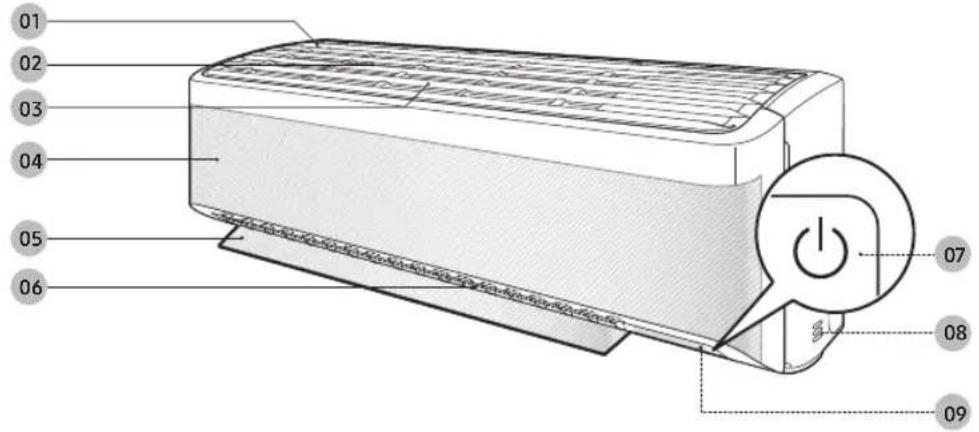
The appearance of the actual product may differ slightly from the image below.
text_image
01 02 03 04 05 06 07 08 0901 Air intake
02 Air filter
03 Tri-care filter
04 WindFree panel
05 Airflow blade (up and down)
06 Airflow blade (left and right)
07 Power button/Remote control receiver
08 Room temperature sensor
09 Display

NOTE
- The product ships with Tri-care filter and the manual included. (For AR**BY*AM***, AR12BY4AP***, AR18BY*AN*** models)

Display
text_image
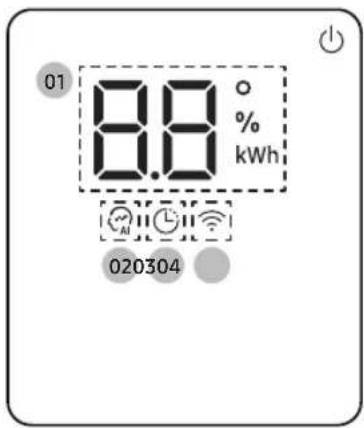
01 8.8 ° % kWh 02030401 Temperature indicator (numeric)
Filter reset indicator OF
Electricity consumption indicator (numeric)
(For AR12/18**5*****, AR18**4***** models)
Auto clean indicator
02 Al Auto indicator
03 Timer indicator
good'sleep indicator
04 Wi-Fi indicator

NOTE
- When the Wi-Fi is turned on, the indicator blinks three times and then turn on.
6 English
Operating the Air Conditioner

text_image
Set On Off 18.8°C F hr AUTO Auto Cool Dry Fan Fast 5step Quiet Usage Beep Clean Wash Filter Reset Display 01 02 Mode Temp Fan Fast 3sec Timer Options Clean 3sec SET °C~°F 3sec >01 Display
02 Button

NOTE
- Features may differ depending on models.
Functions and Buttons
| Function Button and Selection Display | ||
| Power On/Off | [0YCT] | |
| WindFree Cooling | In Cool/Dry/Fan mode ▶ | ### |
| AI Auto |  ▶ Select Auto. ▶ Select Auto. | Ru |
| Auto | [70X3] ▶ Select Auto. | Auto |
| Cool |  ▶ Select Cool. ▶ Select Cool. | Cool |
| Dry |  ▶ Select Dry. ▶ Select Dry. | Dry |
| Fan |  ▶ Select Fan. ▶ Select Fan. | Fan |
| Fast | [YWST] ool mode ▶Press and hold for 3 or more seconds. | Fast |
| 5 Step Cooling |  ool mode ▶ ool mode ▶ | 5step |
| Quiet |  ool mode ▶< [IMAGE][DW26] elect Quiet. ▶ Fan Post Bars ool mode ▶< [IMAGE][DW26] elect Quiet. ▶ Fan Post Bars | Quiet |
| Electricity consumption check | [277Y] For AR12/18**5****,AR18**4**** models peration ▶ < [IMAGE] peration ▶ < [IMAGE] elect Usage. ▶ SETT-7 Bars elect Usage. ▶ SETT-7 Bars | Usage |
| Beep |  ▶ Select Beep. ▶ Fan Post Bars ▶ Select Beep. ▶ Fan Post Bars | Beep |
| Freeze Wash |  For AR12/18**5****,AR18**4**** models[AB48] operation stop condition,[KC77] ▶ Select Wash. ▶ SETT-7 Bars For AR12/18**5****,AR18**4**** models[AB48] operation stop condition,[KC77] ▶ Select Wash. ▶ SETT-7 Bars | Wash |
| Display lighting |  ▶ Select Display.[8XTD] Fan Post Bars ▶ Select Display.[8XTD] Fan Post Bars | Display |
| Wi-Fi (SmartThings) |  ▶ Press and hold for 5 or more[DSBW] bonds. ▶ Press and hold for 5 or more[DSBW] bonds. | RP |
| Wi-Fi (On/Off) | [7642] and ▶ Press and hold formore seconds. | |
| Timed on/off |  ▶ Select On or Off ▶ ▶ Select On or Off ▶ ▶ (Set the duration.) ▶ Fan Post Bars ▶ (Set the duration.) ▶ Fan Post Bars | On Off ### hr |
| good'sleep |  ool mode ▶ (Select.) ▶[< ] ▶ (Set the duration.) ▶ Fan Post Bars ool mode ▶ (Select.) ▶[< ] ▶ (Set the duration.) ▶ Fan Post Bars | 80hr |

English 7
Cleaning
Auto clean function
Use the Auto clean function if the indoor unit produces odors.
Activating Auto clean
To activate Auto clean, press the (Options) button for at least 3 seconds.
The indoor unit display shows:

Canceling Auto clean
To cancel Auto clean while it is running, follow the procedure below:

▶ Press and hold for 3 or more seconds.
Deactivating Auto clean
To deactivate Auto clean, follow the procedure below while the air conditioner is in operation or turned off:



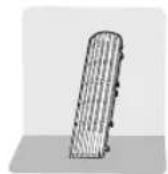
Cleaning the filter
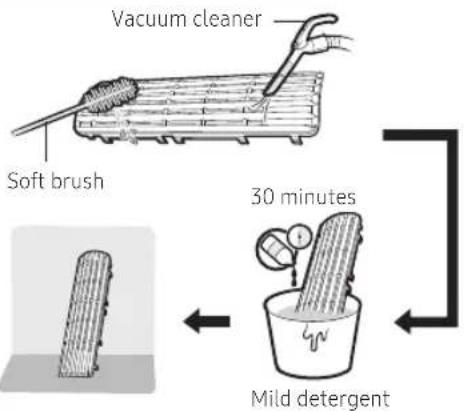
Clean the air filter every two weeks or when the CF (filter-cleaning reminder) appears on the indoor unit display. The time between cleanings may vary, depending on the usage and environmental conditions.

natural_image
Illustration of a car air conditioner unit with a ventilation grille and airflow direction arrow (no text or symbols)
text_image
Vacuum cleaner Soft brush 30 minutes Mild detergent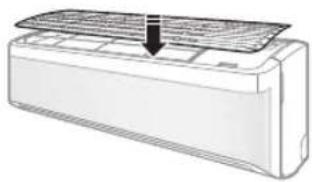
natural_image
Line drawing of a car air conditioner unit with a downward arrow indicating airflow or cooling (no text or symbols)


8 English
1 Slide the filter off of the unit.
2 Use a soft brush or vacuum cleaner to remove any dust or debris on the filter.
3 Soak the filter in a solution of water and mild detergent for 30 minutes.
4 Rinse the filter and let it air dry in a well-ventilated area that is out of direct sunlight.
5 Reinstall the filter.
6 Reset the filter-cleaning reminder:
In operation ▶

lect Filter Reset.
SET °C\~°F 3sec
Replacing the Tri-care filter (For AR\*\*BY\*AM\*\*\*, AR12BY4AP\*\*\*, AR18BY\*AN\*\*\* models)
Replace Tri-care filters once every three years. Replacement cycle may differ depending on the environment and usage time.

text_image
Tri-care filter ① ②
CAUTION
- Do not clean the Tri-care filter with water. Failing to do so may result in damage to the filter.

NOTE
• To replace a Tri-care filter, purchase a new one at a service centre.
- To use the Tri-care filter for a long time in an environment where fish cooking and smoking cause odour, ventilate the place by opening a window.
English 9
SAMSUNG
Helpline - Call : 1800 40 SAMSUNG (7267864) / 1800 5 SAMSUNG (7267864)
natural_image
Black-and-white photo collage of various household appliances including refrigerator, washing machine, TV, and air conditioner (no visible text or labels)This warranty card gives the key points related to warranty claim. for further details log on to www.samsung.com/in/support.
Warranty Card
*TERMS & CONDITIONS
- Proof of purchase is a pre-requisite to claim warranty.
2 The product should have been purchased from an authorised Samsung Sales Dealer in India. - Warranty can be claimed only if the repair was carried out by the Samsung authorised service center.
- Carry-in service or In-Home service applicability depends on the product category and Samsung policy.
- Free installation or demo of the product, if applicable, can be availed only once and within 6 month from the date of purchase. In case of installation, any additional material required over and above the standard installation kit shall be on the chargeable basis.
- In case of defective accessory, only the accessory will be repaired or replaced.
- Cosmetic/ Aesthetic / Plastic / Glass Parts /Bulbs / Cable /Wiring / Piping/ Consumables are not covered under warranty.
- The defective parts/ products which were replaced by Samsung under this warranty shall be the property of Samsung.
- While carrying out repair, Samsung may use accessories or parts that are new or refurbished or reconditioned.
- Samsung shall not be liable for any losses or consequential losses due to product failure or the installed software.
- Samsung shall be free to decide on whether or not to provide a software update for its products.
- Samsung shall not be responsible for any loss or misuse of data, personal information, setting, third party software during product usage or repair or software update.
- Samsung shall not be liable for any loss, cost, expense, inconvenience or damage that may result from use inability to use the product. Under no circumstances shall Samsung be liable for any loss, cost, expense, inconvenience or damage exceeding the purchase price of the product.
- Defects caused by customer negligence, tampering shall void the product warranty.
- Any extended/addition warranty offered by Samsung has to be supported by relevant proofs.
- Usage of power stabilizers of proper rating is necessary unless explicitly mentioned by Samsung on product literature/instruction booklet.
- In case of defect arising out of installation done by party other than Samsung authorised party, the limited warranty will be applicable as per revised T&C as Samsung shall deem fit.
- Regular upkeep, maintenance and cleaning of parts are necessary in certain products. Such periodic maintenance shall be on chargeable basis unless otherwise provided and not covered under warranty.
- In the event of any unforeseen circumstances, and spares not being available Samsung's prevailing depreciation rules will be binding on the purchaser and same shall be considered as a commercial solution in lieu of repairs.
- Defects arising out of the following are not covered under warranty like Mishandling/Misuse,Improper ventilation, Improper voltage, Use of external material, Normal wear and tear, Physical damage and / or electrical damage caused by physical impact.
- Complaints related to playability, printability, compatibility with external accessories, software, file systems, third party applications, CODEs, signals, Networks& ISP bandwidth shall not be considered as defect in product and not covered under warranty.
- This warranty covers only the defects in products arising out of manufacturing or faulty workmanship.
- This warranty covers repair/replacement of parts.
- Warranty period of parts & accessories may vary from product to product.
- Maximum liability out of this warranty is limited to the product purchase value/MRP.
- No warranty on certain parts/conditions/types of product failures.
- Under certain conditions where warranty obligations cannot be met, depreciation will be applicable on the existing product.
CUSTOMER DETAILS CUM WARRANTY CARD
Customer copy ( to be retained by customer)
Model No:
Product Serial No:
Date of Purchase:
Name:
Address in Full:
Telephone No.
Model No:
Dealer Name & Address
Customer's Signature & Date
(I accept the Terms & Conditions of warranty)
Dealer's Signature with rubber stamp
The Warranty shall be null and void in any of the following cases, and in such cases Samsung may at its sole discretion repair the equipment on a chargeable basis. The decision of Samsung, whether a complaint falls in any of these categories or not shall be binding on the Purchaser.
- The duly filled warranty card/proof of purchase is not presented to the service engineer at the time of repairs being undertaken / requested.
• The original serial number of the product is removed, altered or obliterated from the product. - The product purchased is not used as per the rated power conditions or instructions mentioned in the INSTRUCTION MANUAL.
- The product is being used for commercial purpose OR if the product has been used excessively and beyond reasonable usage as permitted within the product instruction manual.
• Site (premises where the product is used/ kept) conditions that do not conform to the recommended operations of the product. - Defects caused due to exposure to moisture/dampness/extreme thermal or environmental conditions or rapid changes in such of conditions/corrosions/oxidations/spilling of food/liquid/influence of Chemical substances.
• Defects due to causes beyond control like lightning, abnormal voltage, spikes, external sources (ex: cable/set top box connections), fire, water logging, natural calamities, commotion, riots, theft, anti-social action, acts of God or while in transit.
• Defects caused by household pets, rats, cockroaches, ants, pests, fungi or any other animal/birds/insects. - Defects caused due to negligence/omission of the Purchaser on account of periodic maintenance(s)/periodic servicing as mentioned in the instruction manual of the product.
• Defects caused due to usage of third party material/non Samsung Authorized Consumables.
• Any modifications, including but not limited to, rooting attempts, reverse engineering, unlocking, jail-breaking etc. of the original firmware(s) or software(s) of the product.
• Repair due to misuse/third party repair attempts are not covered in warranty.
• Warranty does not cover repair due to external factors/mediums/data types.
• Warranty shall apply only if the product is used as per its usage specifications (ex: personal, commercial etc.)
• Warranty shall be void if product has failed under certain conditions/types (ex: water logging, misuse, etc.)
All disputes arising out of this warranty are subject to Delhi jurisdiction only.
Warranty period commences from the date of purchase of the product unless specified otherwise.
| Product Group | Product Description | Warranty Period (Months) | Parts/Accessory Warranty (if applicable) |
| AC | Room/Split Air Conditioner/Floor Standing Air Conditioners (FAC) | 12 | 60 Months on Compressor*120 Months on Digital Inverter Compressor*Condenser : 60 months (Fin&Tube : 12 months) |
| Window Air Conditioner | 12 | 60 Months on Compressor* | |
| Duct Type Air Conditioner | 15" | 36 Months on Compressor* | |
| Cassette Air Conditioner | 15" | ||
| FJM | 15" | ||
| Indoor DVM & Outdoor DVM | 12** | 12 Months on Compressor* | |
| Ventilation | ERV | 12** | |
| Dish Washer | Dish Washer | 12 | |
| Microwave | Microwave | 12 | 120 Months on Ceramic Enamel Cavity* |
| Refrigerator | Refrigerator | 12 | 60 Months on Compressor* 120 Months on Digital Inverter Compressor* |
| Washing Machine | Semi Automatic | 24 | 5 Year Warranty on Semi Automatic Wash Motor |
| Rear control panel Top Loading Fully Automatic | 36 | 10 Year Warranty on Motor(Applicable for Rear and Front Control Panel with Wobble pulsator) | |
| Front control panel Top Loading Fully Automatic | 24 | ||
| Fully Auto Front Loading | 36 | Front Loading Fully Automatic "Eco Bubble Pump" only 120 months*5 Year Warranty on Universal Motor (In Case of Front Load) 10 Year Warranty on Digital Inverter Motor (In Case of Front Load) | |
| Vacuum Cleaner | Canister/Robot | 12 | |
| Air Cleaner | Air Cleaner | 12 | Warranty not applicable on Air Purifier Filters |
* 15 Months from date of purchase or 12 months from installation, whichever ends early. **12 Months from date of commissioning. * In case of parts warranty, labour cost and gas charging cost(if applicable) will be chargeable as per the applicable rates.

Correct disposal of the product (Waste Electrical & Electronic Equipment)
This marking on the product, accessories or literature indicates that the electronic accessories (e.g. charger, headset, and USB cable) should not be dispose with other household waste at the end of their working life.

For more information on safe disposal and recycling visit our website or contact number.
SAMSUNG INDIA ELECTRONICS PRIVATE LIMITED
Registered Address:6th Floor,DLF Centre, Sansad Marg,New Delhi-110001,Visit : www.samsung.com/in
Samsung Helpline - Call : 1800 40 SAMSUNG (7267864) / 1800 5 SAMSUNG (7267864)
SAMSUNG
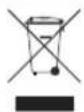
Correct Disposal of This Product
(Waste Electrical & Electronic Equipment)
(Applicable in countries with separate collection systems)
This marking on the product, accessories or literature indicates that the product and its electronic accessories (e.g. charger, headset, USB cable) should not be disposed of with other household waste at the end of their working life. To prevent possible harm to the environment or human health from uncontrolled waste disposal, please separate these items from other types of waste and recycle them responsibly to promote the sustainable reuse of material resources.
Household users should contact either the retailer where they purchased this product, or their local government office, for details of where and how they can take these items for environmentally safe recycling.
Business users should contact their supplier and check the terms and conditions of the purchase contract. This product and its electronic accessories should not be mixed with other commercial wastes for disposal.
For more information on safe disposal and recycling, visit our website www.samsung.com/in/support or contact our Helpline numbers - 1800 40 SAMSUNG (1800 40 7267864) 1800 5 SAMSUNG (1800 5 7267864).

Correct disposal of batteries in this product
This marking on the battery, manual or packaging indicates that the batteries in this product should not be disposed of with other household waste at the end of their working life. Where marked, the chemical symbols Hg, Cd or Pb indicate that the battery contains mercury, cadmium or lead above the reference levels in EC Directive 2006/66.
QUESTIONS OR COMMENTS?
| COUNTRY CALL OR VISIT US ONLINE AT | ||
| INDIA | 1800 40 SAMSUNG (1800 40 7267864) (Toll-Free)1800 5 SAMSUNG (1800 5 7267864) (Toll-Free) | www.samsung.com/in/support |
This product is RoHS compliant
DB68-11043F-00