
VK8812HUMR - Vacuum Cleaner LG - Free user manual and instructions
Find the device manual for free VK8812HUMR LG in PDF.


| Product Type | Canister Vacuum Cleaner |
| Brand | LG |
| Model | VK8812HUMR |
| Power Supply | 220-240V ~ 50/60Hz |
| Power Consumption | 1400W |
| Dust Capacity | 1.5L |
| Filtration System | Cyclonic with washable air filter, motor safety filter, and reusable exhaust filter |
| Cord Length | 6m |
| Weight | 5.5kg |
| Noise Level | 75dB |
| Included Accessories | Carpet & Floor Nozzle, Hard Floor Nozzle, Corner Free Nozzle, 2-in-1 Nozzle, Crevice Tool, Dusting Brush |
| Special Features | Cord rewind, park mode, telescopic pipe, variable suction control |
| Safety Features | Thermal overload protection, automatic shutoff on overheating |
| Maintenance | Washable air filter and motor safety filter; reusable exhaust filter; empty dust tank when full |
Frequently Asked Questions - VK8812HUMR LG
User questions about VK8812HUMR LG
0 question about this device. Answer the ones you know or ask your own.
Ask a new question about this device
Download the instructions for your Vacuum Cleaner in PDF format for free! Find your manual VK8812HUMR - LG and take your electronic device back in hand. On this page are published all the documents necessary for the use of your device. VK8812HUMR by LG.
USER MANUAL VK8812HUMR LG
This information contains important instructions for the safe use and maintenance of the vacuum cleaner. Especially, please read all of the information on pages 4, 5, 6, 7 for your safety. Please keep this manual in an easily accessible place and refer to it anytime.
NEW TYPE CYCLONE VACUUM CLEANER
Important safety instructions.... 4~7
Assembling vacuum cleaner....17~18
Assembling the vacuum cleaner
Operating vacuum cleaner 19~20
Operating the vacuum cleaner
Using carpet and floor nozzle and Hard floor nozzle 21
Using 2 in 1 nozzle ....24
Using accessory nozzles 25
Cleaning dust tank....27
Cleaning air filter and motor safety filter 28~29
Cleaning exhaust filter 30
What to do if your vacuum cleaner does not work....31
What to do when suction power decreases....31
IMPORTANT SAFETY INSTRUCTIONS
Read and follow all instructions before using your vacuum cleaner to prevent the risk of fire, electric shock, personal injury, or damage when using the vacuum cleaner. This guide does not cover all possible conditions that may occur. Always contact your service agent or manufacturer about problems that you do not understand. This appliance complies with the following EC Directives: 2006/95/EC Low Voltage Directive and 2004/108/EC EMC Directive.

This is the safety alert symbol.
This symbol alerts you to potential hazards that can kill or hurt you and others.
All safety messages will follow the safety alert symbol and either the word "WARNING" or "CAUTION."
These words mean:

This symbol will alert you to hazards or unsafe practices which could cause serious bodily harm or death.

This symbol will alert you to hazards or unsafe practices which could cause bodily injury or property damage.
- This appliance is not intended for use by persons (including children) with reduced physical, sensory or mental capabilities, or lack of experience and knowledge, unless they have been given supervision or instruction concerning use of the appliance by a person responsible for their safety.
- Children should be supervised to ensure that they do not play with the appliance.
- If the supply cord is damaged, it must be replaced by LG Electronics Service Agent in order to avoid a hazard.
- This appliance can be used by children aged from 8 years and above and persons with reduced physical, sensory or mental capabilities or lack of experience and knowledge if they have been given supervision or instruction concerning use of the appliance in a safe way and understand the hazards involved. Children shall not play with the appliance. Cleaning and user maintenance shall not be made by children without supervision.

WARNING
- Do not plug in if control knob is not in OFF position.
Personal injury or product damage could result.
- Keep children away and beware of obstructions when rewinding the cord to prevent personal injury.
The cord moves rapidly when rewinding.
- Disconnect electrical supply before servicing or cleaning the unit or when cleaner is not in use.
Failure to do so could result in electrical shock or personal injury.
- Do not use vacuum cleaner to pick up anything that is burning or smoking such as cigarettes, or hot ashes.
Doing so could result in death, fire or electrical shock.
- Do not vacuum flammable or explosive substances such as gasoline, benzene, thinners, propane (liquids or gases).
The fumes from these substances can create a fire hazard or explosion. Doing so could result in death or personal injury.
- Do not handle plug or vacuum cleaner with wet hands.
Doing so could result in death or electrical shock.
- Do not unplug by pulling on cord.
Doing so could result in product damage or electrical shock. To unplug, grasp the plug, not the cord.
- Keep hair, loose clothing, fingers, and all parts of the body away from openings and moving parts.
Failure to do so could result in electrical shock or personal injury.
- Do not pull or carry by cord, use cord as a handle, close a door on cord, or pull cord around sharp edges or corners. Do not run vacuum cleaner over cord. Keep cord away from heated surfaces.
Failure to do so could result in electrical shock, personal injury, fire, or product damage.
- The hose contains electrical wires. Do not use it if it is damaged, cut, or punctured.
Failure to do so could result in death or electrical shock.
- Do not allow it to be used as a toy. Close attention is necessary when used by or near children.
Personal injury or product damage could result.
- Do not use the vacuum cleaner if the power cord or plug is damaged or faulty.
Personal injury or product damage could result. In these cases, contact LG Electronics Service Agent to avoid hazard.
- Do not use the vacuum cleaner if it has been under water.
Personal injury or product damage could result. In these cases, contact LG Electronics Service Agent to avoid hazard.
- Do not continue to vacuum if any parts appear missing or damaged.
Personal injury or product damage could result. In these cases, contact LG Electronics Service Agent to avoid hazard.
- Do not use an extension cord with this vacuum cleaner.
Fire hazard or product damage could result.
• Use proper voltage.
Using improper voltage may result in damage to the motor and possible injury to the user. Proper voltage is listed on the bottom of the vacuum cleaner.
- Turn off all controls before unplugging.
Failure to do so could result in electrical shock or personal injury.
- Do not change the plug in any way.
Failure to do so could result in electrical shock, personal injury, or product damage. Doing so could result in death. If the plug does not fit, contact a qualified electrician to install the proper outlet.
If the supply cord is damaged, it must be replaced by the manufacturer, its service agent, or similarly qualified persons in order to avoid a hazard.
- Repairs to electrical appliances may only be performed by qualified service engineers.
Improper repairs may lead to serious hazards for the user.
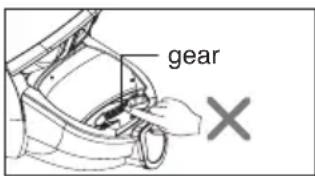
- Do not put fingers near the gear.
Failure to do so could result in personal injury.

CAUTION
- Do not put any objects into openings. Failure to do so could result in product damage.
- Do not use with any opening blocked: keep free of dust, lint, hair, and anything that may reduce air flow. Failure to do so could result in product damage.
- Do not use vacuum cleaner without the dust tank and/or filters in place. Failure to do so could result in product damage. Always clean the dust bin after vacuuming carpet cleaners or fresheners, powders, and fine dust. These products clog the filters, reduce airflow, and can cause damage to the cleaner. Failure to clean the dust bin could cause permanent damage to the cleaner.
- Do not use vacuum cleaner to pick up sharp hard objects, small toys, pins, paper clips, etc. They may damage the cleaner or dust bin.
- Store the vacuum cleaner indoors. Put the vacuum cleaner away after use to prevent tripping over it.
- The vacuum cleaner is not intended for use by young children or infirm people without supervision. Failure to do so could result in personal injury or product damage.
- Only use parts produced or recommended by LG Electronics Service Agents. Failure to do so could result in product damage.
- Use only as described in this manual. Use only with LG recommended or approved attachments and accessories. Failure to do so could result in personal injury or product damage.
- To avoid personal injury and to prevent the machine from falling when cleaning stairs, always place it at the bottom of stairs. Failure to do so could result in personal injury or product damage.
- Use accessory nozzles in sofa mode. Failure to do so could result in product damage.
- Don't grasp the tank handle when you are moving the vacuum cleaner. The vacuum cleaner's body may fall when separating tank and body. Personal injury or product damage could result. You should grasp the carrier handle when you are moving the vacuum cleaner. (Page 25)
- If after emptying the dust tank the alarm sounds, clean the dust tank. Failure to do so could result in product damage.
- Make sure the filters (exhaust filter and motor safety filter) are completely dry before replacing in the machine. Failure to do so could result in product damage.
- Do not dry the filter in an oven or microwave. Failure to do so could result in fire hazard.
- Do not dry the filter in a clothes dryer. Failure to do so could result in fire hazard.
- Do not dry near an open flame. Failure to do so could result in fire hazard.
- Do not use filters that are not dried.
- If the power cord is damaged, it must be replaced by an approved LG Electronics Service Agent to avoid a hazard.
- This appliance is not intended for use by persons (including children) with reduced physical, sensory or mental capabilities, or lack of experience and knowledge, unless they have been given supervision or instruction concerning use of the appliance by a person responsible for their safety. Children should be supervised to ensure that they do not play with the appliance.
Thermal protector:
This vacuum cleaner has a special thermostat that protects the vacuum cleaner in case of motor overheating. If the vacuum cleaner suddenly shuts off, turn off the switch and unplug the vacuum cleaner. Check the vacuum cleaner for possible source of overheating such as a full dust tank, a blocked hose or clogged filter. If these conditions are found, fix them and wait at least 30 minutes before attempting to use the vacuum cleaner. After the 30 minute period, plug the vacuum cleaner back in and turn on the switch.
If the vacuum cleaner still does not run, contact a qualified electrician.
How to use: Assembling vacuum cleaner
① Carpet and floor nozzle (depend on model)
Push the nozzle into the telescopic pipe.
How to use: Assembling vacuum cleaner
③ Connecting the hose to the vacuum cleaner
Push the fitting pipe on the flexible hose into the attachment point on the vacuum cleaner.
To remove the flexible hose from the vacuum cleaner, press the button situated on the fitting pipe, then pull the fitting pipe out of the vacuum cleaner.
- Pull out the power cord to the desired length and plug into the socket.
- Slide the control knob of the hose handle to operate vacuum cleaner.
• To turn off, slide the control knob to off position.
- Press the cord reel button to rewind the power cord after use.
- Always empty the dust tank when the dust level reaches the MAX line.
Liquid suction can cause defects.
- Slide the control knob to the off position before parking.
- To store during vacuuming, for example to move a small piece of furniture or a rug, use park mode to support the flexible hose and nozzle.
- Slide the hook on the nozzle into the slot on the side of the vacuum cleaner.
- When you have switched off and unplugged the vacuum cleaner, press the cord reel button to automatically rewind the cord.
- You can store your vacuum cleaner in a vertical position by sliding the hook on the nozzle into the slot on the underside of the vacuum cleaner.
How to use: Using carpet and floor nozzle and hard floor nozzle
① Carpet and floor nozzle (depending on model)
- Cleaning carpet and floor nozzle
How to use: Corner free nozzle
⑤ Corner free nozzle (depending on model)
Corner free nozzle (depending on model) Corner cleaning nozzle (not on all models) Corner attachment (depending on model)
- You can perform cleaning at any place such as corner or narrow crack by utilizing the structure that both sides of the suction hole are leaned back.
- With this nozzle, both sides of the suction opening can be tilted backward, allowing you to clean in any location, such as corners or narrow gaps.
- You can clean in any place, such as corners or hard-to-reach areas, thanks to the fact that both sides of the brush can be tilted backward.
- By using the structure where both sides of the suction hole lean back, you can clean in any place, such as corners or narrow gaps.

How to use: Using 2-in-1 nozzle
Upholstery nozzle is for vacuuming upholstery, mattresses, etc.
⑦ Dusting brush (depending on model)
Dusting brush is for vacuuming picture frames, furniture frames, books, and other irregular surfaces.
< Dusting brush mode >
·BOX·
• BOX •
• BOX •
• BOX •
- 2-in-1 nozzle included in the "BOX" with owner's manual (depending on model)
How to use: Using accessory nozzles
⑧ Crevice tool (depending on model)
The crevice tool is for vacuuming in those normally hard-to-reach places, such as reaching cobwebs or between the cushions of a sofa.
⑨ Dusting brush (depending on model)
The dusting brush is for vacuuming picture frames, furniture frames, books, and other irregular surfaces.
Use the accessory in the sofa mode.

How to use: Emptying the dust tank
The dust tank needs emptying when the dust tank level reaches the MAX line.
① Turn off the vacuum cleaner and unplug it. ② Grasp the handle of the tank and then press the tank separation lever. Pull out the dust tank. ③ Empty the tank and then assemble the dust tank as below.
Moving the vacuum cleaner
- Don't grasp the tank handle when you are moving the vacuum cleaner.
The vacuum cleaner's body may fall when separating the tank and body.
You should grasp the carrier handle when you are moving the vacuum cleaner.
How to use: Cleaning the dust tank
If suction power decreases after cleaning the dust tank, clean the air filter and the motor safety filter. ➕ Next page
How to use: Cleaning air filter and motor safety filter
① Open the vacuum cleaner cover by pushing the button. ② Grasp the handle of the dust separator and take it out. ③ Open the guide cover by pulling the guide cover lever and remove the dust. ④ Open the air filter cover by pushing the air filter cover lever and take out the air filter.
Dry fully for more than 24 hours in shade.
DANGER
⑤ Separate the motor safety filter from the dust separator. ⑥ Wash the air filter and the motor safety filter.
Do not wash filters with hot water.
⑦ Dry fully in shade so that moisture is entirely removed.
The air filter and the motor safety filter should be cleaned as shown in the figure above.
If filters are damaged, do not use them.
In such cases, contact LG Electronics Service Agent.
Wash filters at least once a month.
NOTE
How to use: Cleaning exhaust filter
• The exhaust filter is reusable.
① To clean the exhaust filter, remove the exhaust filter cover on the body by pulling it out. ② Separate the exhaust filter. ③ Dust off the filter. (Do not wash filter with water.) ④ Insert the projection of the exhaust filter into the grooves on the body and push the exhaust filter.
Exhaust filter cover assembling
The exhaust filter should be cleaned at least once a year.
NOTE
What to do when suction power decreases
- Turn off the vacuum cleaner and unplug it.
- Check the telescopic pipe, flexible hose, and cleaning tool for blockages or obstructions. Check that the dust tank is not full. Empty if necessary.
- Check that the exhaust filter is not clogged. Clean the exhaust filter if necessary.
- Check that the air filter and the motor safety filter are not clogged. Clean them if necessary.
- Check the inside of the dust separator. Clean the inside of the dust separator if necessary.
Disposal of your old appliance
- All electrical and electronic products should be disposed of separately from the municipal waste stream via designated collection facilities appointed by the government or the local authorities.
- The correct disposal of your old appliance will help prevent potential negative consequences for the environment and human health.
- For more detailed information about disposal of your old appliance, please contact your city office, waste disposal service, or the shop where you purchased the product.

The equipment complies with requirements of the Technical Regulation, in terms of restrictions for the use of certain dangerous substances in electrical and electronic equipment.

- NEW TYPE CYCLONE VACUUM CLEANER
- IMPORTANT SAFETY INSTRUCTIONS
- WARNING
- CAUTION
- THERMAL PROTECTOR
- HOW TO USE: ASSEMBLING VACUUM CLEANER
- ① CARPET AND FLOOR NOZZLE (DEPEND ON MODEL)
- HOW TO USE: EMPTYING THE DUST TANK
- MOVING THE VACUUM CLEANER
- HOW TO USE: CLEANING THE DUST TANK
- HOW TO USE: CLEANING AIR FILTER AND MOTOR SAFETY FILTER
- DANGER
- NOTE
- HOW TO USE: CLEANING EXHAUST FILTER
- EXHAUST FILTER COVER ASSEMBLING
- WHAT TO DO WHEN SUCTION POWER DECREASES
- DISPOSAL OF YOUR OLD APPLIANCE
Brand : LG
Model : VK8812HUMR
Category : Vacuum Cleaner