MIC2870YFT - Electronic component Microchip - Free user manual and instructions
Find the device manual for free MIC2870YFT Microchip in PDF.


User questions about MIC2870YFT Microchip
0 question about this device. Answer the ones you know or ask your own.
Ask a new question about this device
Download the instructions for your Electronic component in PDF format for free! Find your manual MIC2870YFT - Microchip and take your electronic device back in hand. On this page are published all the documents necessary for the use of your device. MIC2870YFT by Microchip.
USER MANUAL MIC2870YFT Microchip
The MIC2870 is a high-current, high-efficiency flash LED driver for one or two high-brightness camera flash LEDs.
The LED driver current is generated by an integrated inductive boost converter with 2MHz switching frequency which allows the use of very small inductor and output capacitor. These features make the MIC2870 an ideal solution for high-resolution camera phone LED flash light driver applications.
MIC2870 supports two 750mA white-LEDs (WLEDs) or a single 1.5A WLED configuration. When two WLEDs are connected, their currents are matched automatically.
MIC2870 operates in either flash or torch modes that can be controlled through either I²C interface or external pins. The brightness in the flash and torch mode can be adjusted via two external resistors individually. High-speed mode I²C interface provides a simple control at a clock speed up to 3.4MHz to support most camera functions such as auto-focus, white balance, and image capture.
Datasheets and support documentation are available on Micrel's web site at: www.micrel.com.
Requirements
The MIC2870 evaluation board requires a bench input power source that is adjustable from 2.7V to 5.0V and is able to deliver greater than 4.5A at 2.7V.
Precautions
The evaluation board does not have reverse polarity protection. Applying a negative voltage across the VIN terminal to GND terminal may damage the device. The MIC2870 evaluation board is tailored for a Li-ion range input supply voltage. It should not exceed 5.0V on the input.
Getting Started
1. Connect external supply to the VIN terminals.
Apply desired input voltage to the VIN (J1) and ground (J2) terminals of the evaluation board, paying careful attention to polarity and supply range (2.7V to 5.0V). An ammeter may be placed between the power supply and the input terminal of the evaluation board. Ensure that the supply voltage is monitored at the input terminals. The ammeter and/or power lead resistance can reduce the voltage supplied to the input.
2. Enable/Disable the MIC2870.
The MIC2870 evaluation board has an enable (EN) pin (J5). The MIC2870 is in standby mode when the EN pin is asserted high. Setting a jumper at TP1 can connect the EN pin to VIN through a pull-high resistor. If this pin is driven low for more than 1s, the IC is shutdown. This pin is pulled down by an internal resistor. Alternatively, the IC can be enabled or disabled by software through I²C interface.
3. Enable/Disable the torch mode.
The TEN (J3) is the torch mode enable pin. When this pin is high, the torch mode is initiated. Setting a jumper at TP4 can connect TEN pin to VIN through a resistor. If this pin is left floating, it is pulled-down internally by a built-in 1μA current source when the device is enabled. Alternatively, the torch mode can be enabled or disabled by software through I²C interface.
4. Enable/Disable the flash mode.
The FEN (TP2 upper pin) is the flash mode enable pin. A low-to-high transition at this pin initiates the flash mode and the flash mode timer. Setting a jumper at TP2 can connect FEN to VIN through a resistor. If this pin is left floating, it is pulled-down internally by a built-in 1μA current source when the device is enabled. Alternatively, the flash mode can be enabled or disabled by software through I²C interface.
Ordering Information
| Part Number Description | |
| MIC2870YFT EV MIC2870 Evaluation Board | |
| MICUSB Dongle EV I | ^2C Serial Programmer Board |
Getting Started (Continued)
5. Enable/Disable flash inhibit.
The FI (TP3 upper pin) is the flash inhibit pin. When this pin is high in flash mode, both LED1 (D1) and LED2 (D2) currents are changed from the flash mode current level to the torch mode current level. When this pin is low, both LED1 (D1) and LED2 (D2) currents are changed from torch mode current level back to the original flash mode current level. Setting a jumper at TP3 can connect FI to VIN through a resistor. If this pin is left floating, it is pulled-down internally by a built-in 1 A current source when the device is enabled.
6. Graphic user interface support.
Graphical user interface software can be used with the MICUSB Dongle EV allowing configuration and testing of the MIC2870 with a standard computer. For more detail, refer to the Evaluation Software section.
Evaluation Board Description
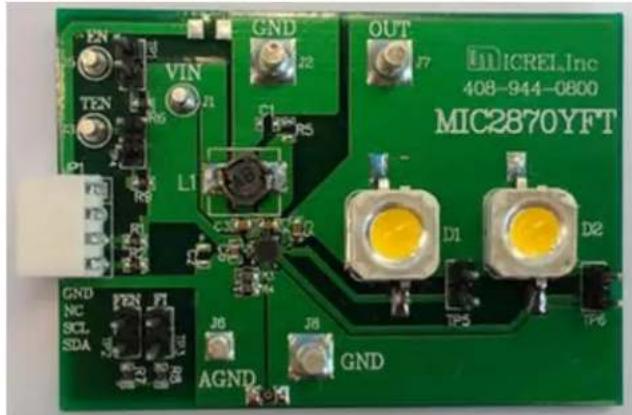
text_image
EN TEN VIN L1 GND J2 C1 RS OUT J7 MICREL,Inc 408-944-0600 MIC2870YFT GND NC SCL SDA J6 AGND J8 GNDFigure 1. MIC2870 Evaluation Board
Flash Mode
The maximum current level in the flash mode is 750mA per channel. This current level can be adjusted through an external resistor connecting to the FRSET pin according to Equation 1:
$$ I _ {\text { L E D (M A X) }} \quad \frac {7 5 0 0}{R _ {\text { F R S E T }}} \quad \text { Eq. } 1 $$
Alternatively, the default maximum value of 750mA per channel is used when the FRSET pin is grounded.
The flash mode current can be initiated at the preset FRSET brightness level by asserting FEN pin high or by setting the I ^2 C flash control register (address 01h) for the desired flash duration, subjected to the flash safety timeout setting. The flash mode current is terminated when the FEN pin is brought low and the I ^2 C flash register is cleared.
Flash mode current can be adjusted to a fraction of the maximum flash mode level (either default or set by the FRSET resistor) by selecting the desired flash current level percentage in the flash control register (Address 01h) through the I²C interface. The flash current is the product of the maximum flash current setting and the percentage selected in the flash register.
The flash safety timeout feature automatically shuts down the flash current if the flash mode is enabled for an extended period of time. Refer to the "Flash Safety Timer" setting in Table 4.
The flash inhibit (FI) pin can be used to synchronize the flash current to a handset GSM pulse event to prevent excessive battery droop. When FEN and FI pins are both high, the flash mode current is limited to the torch mode current setting. The FI Pin is also functional when the flash mode current is enabled through the I ^2 C flash register.
Torch Mode
The maximum torch mode level can be adjusted through an external resistor connecting to the TRSET pin according to Equation 2:
$$ I _ {\text {LED(MAX)}} \quad \frac {7 5 0 0}{4 R _ {\text {TRSET}}} \quad \text {Eq.2} $$
Alternatively, the default maximum value of 187.5mA per channel is used when the TRSET pin is grounded. The torch mode operation is activated by asserting the TEN pin high or by setting the I²C torch register (address 02h) for the desired duration. The torch mode current is terminated when the TEN pin is brought low and the I²C torch register is cleared.
Like the flash mode current, the torch mode current can be set to a fraction of the maximum torch mode level (either default or set by the TRSET resistor) by selecting the desired torch current level percentage in the torch register (Address 02h) through the I²C interface. The torch current is the product of the maximum torch current setting and the percentage selected in the torch register.
Overvoltage Protection
When the output voltage rises above the OVP threshold, the MIC2870 is turned off automatically to avoid permanent damage to the IC.
Open Circuit Detection
The open-circuit detector (OCD) is active only when the LED current regulator is turned on. When the external LED is missing or fails open, the LED1/2 pin voltage is pulled to near the ground potential by the internal current sink. If both LEDs are open or missing, the open-circuit detector would force the boost regulator and LED current regulator to turn off. The MIC2870 will try to turn on the boost regulator and LED current regulator again after a 100ms timeout. However, in most practical cases, the boost output voltage would rise above the OVP threshold, when both LED channels have an open fault. The OVP function would cause the MIC2870 to shut down.
Short-Circuit Detection
Like the open-circuit detector, the short-circuit detector is active only when the current regulator is turned on. If either one or both of the external LEDs fail as a short, the short-circuit detector would force the MIC2870 to turn off. The MIC2870 will try to turn on the boost regulator and LED current regulator again after a 100ms timeout. If the short condition persists, the whole cycle repeats again. Prolonged operation in short-circuit condition is not recommended as it may damage the device.
I²C Interface
The timing diagram shows the communications required for write and read operations via the I ^2 C interface. The black lines show master communications and the red lines show the slave communications. During a write operation the master must drive SDA and SCL for all stages except the acknowledgement (A) shown in red, which are provided by the slave (MIC2870).

text_image
SLAVE ADDRESS REGISTER ADDRESS DATA SDA 1011010 0 0 SCL S W A A P SLAVE ADDRESS REGISTER ADDRESS SLAVE ADDRESS DATA SDA 1011010 0 0 SCL Sr R A A PFigure 2. I²C Timing Example
The read operation begins firstly with a data-less write to select the register address from which to read. Then a restart sequence is issued, and then a read command followed by the data read.
The MIC2870 responds to a slave address of hex 0xB4 and 0xB5 for write and read operations respectively, or binary 1011010X (where X is the read/write bit).
The register address is eight bits wide and carries the address of the MIC2870 register to be operated upon. Only the lower three bits are used.
I²C Registers
MIC2870 contains three 8-bit read/write registers having an address from 00h to 02h for operation control as shown in Table 1. These registers are reset to their default values in power-on-reset (POR) event. In other words, they hold their previous contents when the chip is shutdown as long as supply voltage is above 1.5V (typical).
Master Control / Status Register [00h]
The master control / status register allows the MIC2870 to be enabled by the I²C interface -- setting the ON [ ] bit high has the same effect as asserting EN pin. The LED short bit, LED_SHT[ ] is set if any or both of the LED is shorted to OUT, while the LED open bit, LED_OP[ ] is asserted only when both LED are open circuit. The thermal shutdown bit, TSD[ ] is set when the junction temperature of the MIC2870 is higher than 160°C. The bit names and assignment of all the bits in the master control / status register and their default values are shown in Table 2.
Flash Control Register [01h]
The flash mode enable, flash safety timer and flash mode current are configurable via the flash control register. The flash control register contains the FTMR[] bits, FEN[] bit, and FCUR bits. The FTMR[] bits set the flash safety timer duration. The FEN[] bit has the same function as the FEN pin. When the FEN[] is set the flash mode is enabled. The FCUR[] bits set the flash mode current in 16 steps from 100% down to 18% of the maximum LED flash current which is set by the FRSET resistor. The detail description of the bit names of all the bits and their assignment in the flash control register and their default values are shown in Table 3. The details of flash timeout duration setting and flash mode current setting can be referred to Table 4 and Table 5.
Torch Control Register [02h]
The torch mode enable, torch mode current, and flash inhibit are configurable via the torch control register. The torch control register contains the TCUR[ ] bits, TEN[ ] bit, and FI[ ] bit. The TCUR[ ] bits set the torch mode current in 16 steps from 100% down to 18% of the maximum LED torch current which is set by the TRSET resistor. The TEN[ ] bit has the same function as the TEN pin. When the TEN[ ] bit is set the torch mode is enabled. The FI[ ] bit has the same function as the FI pin. When the FI[ ] bit is set, the flash mode current is reduced to the torch mode current setting. The detail description of the bit names of all the bits and their assignment in the torch control register and their default values are shown in Table 6. The detail of the torch mode current setting is shown in Table 7.
Table 1. MIC2870 Register Map
| Register Address | Register Name | Description |
| 00h | Master Control/ Status | Chip Enable, Control and Status Register |
| 01h | Flash Control | Flash Mode Current, Flash Mode Enable, and Flash Timeout Control Register |
| 02h | Torch Control | Torch Mode Current and Torch Mode Enable Control Register |
Table 2. Master Control Register [00h]
| D7 | D6 | D5 | D4 | D3 | D2 | D1 | D0 | |
| Name | Reserved | Reserved | Reserved | Reserved | ON | LED_SHT | LED_OP | TSD |
| Access | R | R | R | R | R/W | R | R | R |
| Default Value | 0 | 0 | 0 | 0 | 0 | 0 | 0 | 0 |
Table 3. Flash Control Register [01h]
| BIT | D7 | D6 | D5 | D4 | D3 | D2 | D1 | D0 |
| Name | FTMR | FTMR | FTMR | FEN | FCUR | FCUR | FCUR | FCUR |
| Access | R/W | R/W | R/W | R/W | R/W | R/W | R/W | R/W |
| Default Value | 111 | 0 | 0000 | |||||
Table 4. Flash Safety Timer Setting [FTMR]
| Register Value [D7:D5] of 01h | Flash Timeout Duration (ms) |
| 111 | 1250 |
| 110 | 1093.75 |
| 101 | 937.5 |
| 100 | 781.25 |
| 011 | 625 |
| 010 | 468.75 |
| 001 | 312.5 |
| 000 | 156.25 |
Table 5. Flash Mode Current Setting [FCUR]
| Percentage of Maximum Current (%) | Register Value [D3:D0] of 01h | Current Per Channel (mA) ( R_FRSET = 0 ) | Combined Current (mA) ( R_FRSET = 0 ) |
| 100 | 0000 | 750.0 | 1500.0 |
| 90 | 0001 | 675.0 | 1350.0 |
| 80 | 0010 | 600.0 | 1200.0 |
| 70 | 0011 | 525.0 | 1050.0 |
| 63 | 0100 | 472.5 | 945.0 |
| 56 | 0101 | 420.0 | 840.0 |
| 50 | 0110 | 375.0 | 750.0 |
| 44.7 | 0111 | 335.3 | 670.5 |
| 39.8 | 1000 | 298.5 | 597.0 |
| 35.5 | 1001 | 266.3 | 532.5 |
| 31.6 | 1010 | 237.0 | 474.0 |
| 28.2 | 1011 | 211.5 | 423.0 |
| 25.1 | 1100 | 188.3 | 376.5 |
| 22.4 | 1101 | 168.0 | 336.0 |
| 20 | 1110 | 150.0 | 300.0 |
| 18 | 1111 | 135.0 | 270.0 |
Table 6. Torch Control Register [02h]
| BIT | D7 | D6 | D5 | D4 | D3 | D2 | D1 | D0 |
| Name | Reserved | Reserved | FI | TEN | TCUR | TCUR | TCUR | TCUR |
| Access | RO | RO | R/W | R/W | R/W | R/W | R/W | R/W |
| Default Value | 0 | 0 | 0 | 0 | 0000 | |||
Table 7. Torch Mode Current Setting [TCUR]
| Percentage of Maximum Current (%) | Register Value [D3:D0] of 02h | Current Per Channel (mA) ( R_TRSET = 0 ) | Combined Current (mA) ( R_TRSET = 0 ) |
| 100 | 0000 | 187.5 | 375.0 |
| 90 | 0001 | 168.8 | 337.5 |
| 80 | 0010 | 150.0 | 300.0 |
| 70 | 0011 | 131.3 | 262.5 |
| 63 | 0100 | 118.1 | 236.3 |
| 56 | 0101 | 105.0 | 210.0 |
| 50 | 0110 | 93.8 | 187.5 |
| 44.7 | 0111 | 83.8 | 167.6 |
| 39.8 | 1000 | 74.6 | 149.3 |
| 35.5 | 1001 | 66.6 | 133.1 |
| 31.6 | 1010 | 59.3 | 118.5 |
| 28.2 | 1011 | 52.9 | 105.8 |
| 25.1 | 1100 | 47.1 | 94.1 |
| 22.4 | 1101 | 42.0 | 84.0 |
| 20 | 1110 | 37.5 | 75.0 |
| 18 | 1111 | 33.8 | 67.5 |
Evaluation Kit Overview
The MIC2870 can be operated as a standalone board or as a modular system where the evaluation board is connected to a PC via an I²C-to-USB interface board (MICUSB Dongle EV).
Connecting the USB-to-I2C Adapter
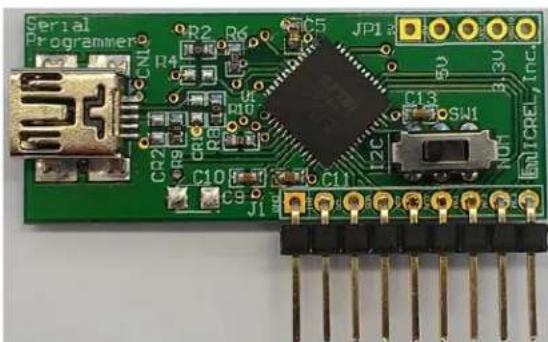
When interfacing the MIC2870 evaluation board with the MICUSB Dongle, carefully match the GND pin of the evaluation board with the GND pin of the adapter (as shown in Figure 3, the MICUSB Dongle will be upside down). On the MIC2870 evaluation board, the GND pin location is labeled on the left side of the board. It is the first pin of the connector receptacle JP1. The MICUSB Dongle has GND labeled on both sides of the adapter board.

natural_image
Close-up of a green printed circuit board with various electronic components and connectors (no readable text or symbols)Figure 3. MIC2870 Evaluation Board Interfaces with MICUSB Dongle EV (adapter bottom side faces up)
natural_image
Close-up of a green printed circuit board with gold connectors and terminal pins (no readable text or symbols)Figure 4. Top Side of the Adapter with the Mini Slide Switch Toggled to I²C Position
MIC2870 Evaluation Software
The MIC2870 evaluation software provides a graphic user interface (GUI) to program the MIC2870 evaluation board. A complete application note on the installation and operation of the evaluation software and the USB adapter user manual can be downloaded from Micrel's web site at www.micrel.com. The evaluation software can read and write to registers inside the MIC2870 IC device via I ^2 C for enabling or disabling the device, torch mode, flash mode, and flash inhibit; changing the WLEDs' brightness in torch mode and flash mode; changing the flash safety timer duration; enabling/disabling breath and strobe special effects; and reporting fault status.
Getting Started
- Download the MIC2870 evaluation software and run the setup.exe file. This step may take some time and require an internet connection to update the computer to .NET Framework 3.5.
- Install the MICUSB Dongle EV driver from FTDI. Double-click on the file CDM20828_Setup.exe. The latest driver can be downloaded from the FTDI website: www.ftdichip.com.
- After installing the driver, locate the virtual COM port created by the FTDI driver in the Device Manager Menu, under Ports (COM & LPT). The corresponding port will have FTDI listed as the manufacturer.
- Connect the MIC2870 evaluation board to the PC via the MICUSB Dongle EV. Power the MIC2870 evaluation board VIN input.
- Set the mini slide switch SW1 on the MICUSB Dongle EV. The SW1 should be toggled to the I ^2 C position as shown in Figure 4.
- Open the MIC2870 evaluation software in Programs under the Start Menu.
Evaluation Software
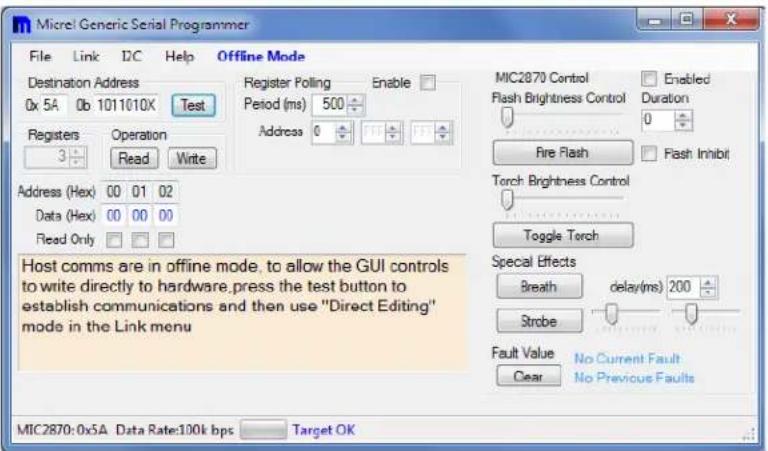
The MIC2870 evaluation software graphic user interface (GUI) is shown in Figure 5 and Figure 6. When the evaluation software is just started, it is default in offline mode as shown on the right of the top menu bar in Figure 5. The offline mode is only for running the software without the communication or connection with the MIC2870 evaluation board.
To control the MIC2870 evaluation board with the software GUI, the user firstly has to click the "Test" button. If the connection from the PC to the dongle and then to the MIC2870 EVB is fine as instructed in Connecting the USB-to-I²C Adapter section and in steps 4 and 5 in the Getting Started section, the "Target OK" will be shown up at the status bar at the bottom of the GUI as shown Figure 5.
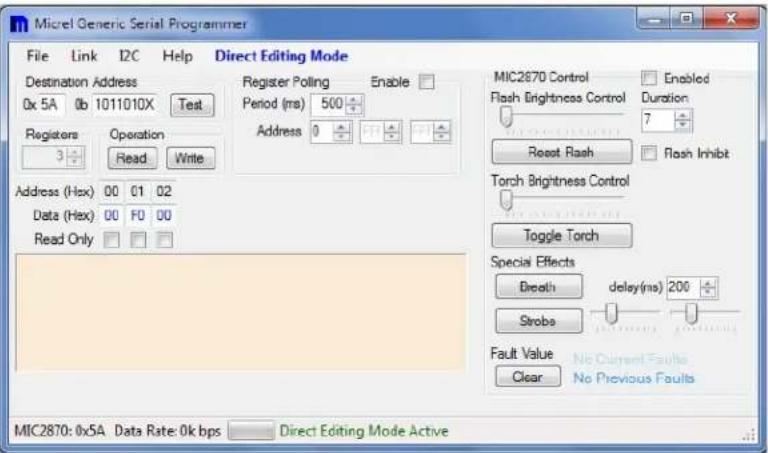
If the connection is not good, the "Target Not Detected" will be shown up at the status bar and the user has to check with the cable connections before proceeding to the next step. When the "Target OK" status is shown, the user can click on the "Offline Mode" at the menu bar to change it to "Direct Editing Mode". When the "Direct Editing Mode" is shown up at the top menu bar and the "Direct Editing Mode Active" is indicated at the status bar as shown in Figure 6, the software GUI allows the user to control the operation of the MIC2870 evaluation board.
Introduction to the GUI Panel
At the left side of the GUI panel, user can check with the MIC2870 registers information and perform read and write operation to the IC registers. At the middle of the GUI panel, user can click the "Enable" option to enable the register polling.
At the right side of the GUI panel which is the MIC2870 Control panel, user can perform the following MIC2870 operation:
- Check or uncheck the "Enabled" option to enable or disable the MIC2870 device.
- Change the flash safety timer duration setting from 0 to 7 which corresponding to 8 options from 156ms to 1250ms. Please refer to Table 4 for details.
- Adjust the flash brightness with the slide bar from 100% to 18% of the maximum LED current in flash mode in 16 steps. The maximum is on the left and the minimum is on the right.
- Fire flash or reset flash by clicking the flash mode enable button.
- Check or uncheck flash inhibit option to enable or disable the flash inhibit function.
- Adjust the torch brightness with the slide bar from 100% to 18% of the maximum LED current in torch mode in 16 steps. The maximum is on the left and the minimum is on the right.
- Set or reset torch by clicking on the torch mode enable button.
- Click the "Breath" button, "Strobe" button, and set delay time options for special effects demonstration.
- Fault indication will be shown at the bottom of the control panel if the register polling is enabled and fault conditions are detected. The current detected fault value can be cleared by clicking the "Clear" button.
Setting of I²C Data Rate
The data rate of the I ^2 C communication can be set at the pull-down menu from the “I ^2 C” menu at the top menu bar as shown in Figure 7. User can set the data rate to 100kbps, 400kbps, or 3.4Mbps from the pull-down menu.
text_image
Micrel Generic Serial Programmer File Link IDC Help Offline Mode Destination Address 0x 5A 0b 1011010X Test Registers Operation 3 Read Write Address (Hex) 00 01 02 Data (Hex) 00 00 00 Read Only Host comms are in offline mode, to allow the GUI controls to write directly to hardware. press the test button to establish communications and then use "Direct Editing" mode in the Link menu Register Polling Enable Period (ms) 500 Address 0 MIC2870 Control Enabled Flash Brightness Control Duration Fire Flash Flash Inhibit Torch Brightness Control Toggle Torch Special Effects Breath delay(ms) 200 Strobe Fault Value No Current Fault Clear No Previous Faults MIC2870:0x5A Data Rate:100k bps Target OKFigure 5. MIC2870 Evaluation Software GUI in Offline Mode
text_image
Micrel Generic Serial Programmer File Link I2C Help Direct Editing Mode Destination Address 0x 5A 0b 1011010X Test Register Polling Enable Period (ms) 500 Address 0 Registers Operation Read Write Address (Hex) 00 C1 02 Data (Hex) 00 F0 00 Read Only MIC2870 Control Enabled Flash Brightness Control Duration 7 Reset Rash Flash Inhibit Torch Brightness Control Toggle Torch Special Effects Death delay(ns) 200 Strobe Fault Value No Current Faults Clear No Previous Faults MIC2870: 0x5A Data Rate: 0k bps Direct Editing Mode ActiveFigure 6. MIC2870 Evaluation Software GUI in Direct Editing Mode

text_image
Micrel Generic Serial Programmer File Link I2C Help Direct Editing Mode Destination Adj Data Rate 100kbps 0x 5A 0b 10 Search I2C Slave 400kbps Registers Operation Address 3.4Mbps Read Write Address (Hex) 00 01 02 Data (Hex) 00 F0 00 Read Only MIC2870 Control Enabled Flash Brightness Control Duration 7 Reset Flash Flash Inhibit Torch Brightness Control Toggle Torch Special Effects Breath delay(ms) 200 Stroke Fault Value No Current Faults Clear No Previous Faults MIC2870: 0x5A Data Rate: 0k bps Direct Editing Mode ActiveFigure 7. Setting Data Rate from Pulldown Menu
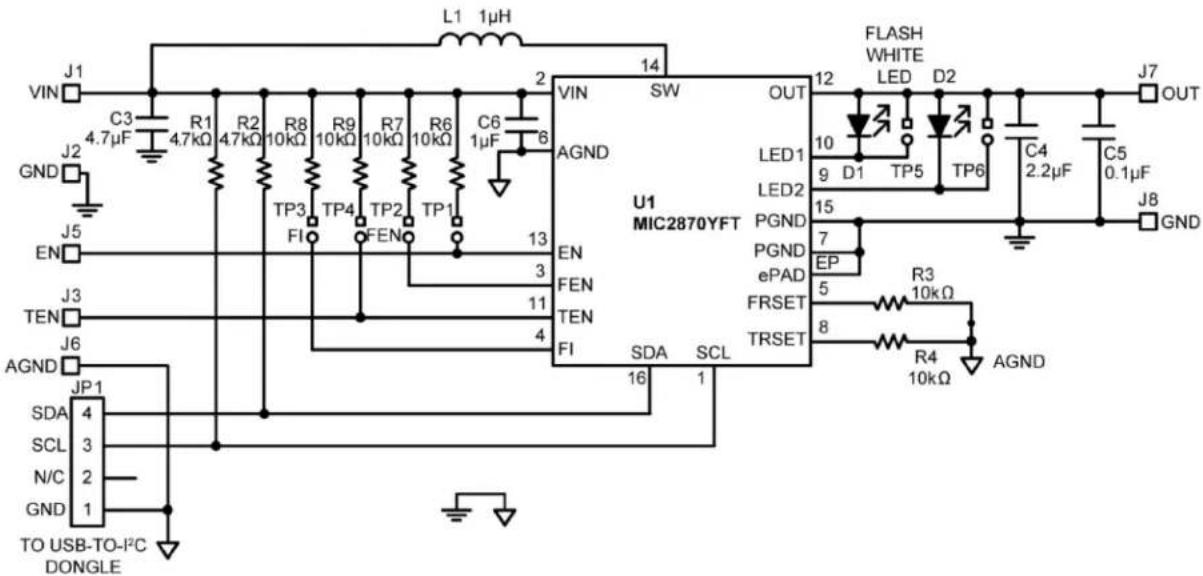
Evaluation Board Schematic
text_image
L1 1μH VIN C3 4.7μF R1 4.7kΩ R2 4.7kΩ R8 10kΩ R9 10kΩ R7 10kΩ R6 10kΩ C6 1μF 6 TP3 TP4 TP2 TP1 FI FEN J5 EN J3 TEN J6 AGND JP1 SDA 4 SCL 3 N/C 2 GND TO USB-TO-I²C DONGLE U1 MIC2870YFT VIN SW OUT AGND EN FEN TEN FI SDA SCL 16 1 SDA 4 SCL 3 N/C 2 GND 1 FLASH WHITE LED D2 LED1 10 LED2 9 D1 TP5 TP6 PGND 15 PGND 7 EP ePAD FRSET 5 TRSET 8 R3 10kΩ R4 10kΩ AGND J7 OUT C4 2.2μF C5 0.1μF J8 GNDBill of Materials
| Item | Part Number | Manufacturer | Description | Qty. |
| C3 | 0603ZD475KAT2A AVX | (1) | Ceramic Capacitor 4.7μF, 10V, X5R, 0603 | 1 |
| C1608X5R1A475K080AC TDK | (2) | |||
| C4 | 0603ZD225KAT2A AVX | Ceramic Capacitor 2.2μF, 10V, X5R, 0603 | 1 | |
| GRM188R61A225KE34D | Murata(3) | |||
| C1608X5R1A225K080AC TDK | ||||
| C5 | 06033D104KAJ2A AVX | Ceramic Capacitor 0.1μF, 25V, X5R, 0603 | 1 | |
| GRM188R61C104KA01D | Murata | |||
| C1608X5R1E104K | TDK | |||
| C6 | 0603ZD105KAT2A AVX | Ceramic Capacitor 1μF, 10V, X5R, 0603 | 1 | |
| GRM188R61A105KA61D | Murata | |||
| C1608X5R1A105K080AC TDK | ||||
| L1 | CDRH4D28CLDNP-1R0PC | Sumida(4) | Inductor 1μH, 3.0A, 14mΩ, L5.1mm x W5.1mm x H3.0mm | 1 |
| LQH44PN1R0NP0L | Murata | Inductor 1μH, 2.45A, 36mΩ, L4.0mm x W4.0mm x H1.65mm | ||
| R1, R2 | CRCW06034K70FKEA | Vishay/Dale(5) | Resistor 4.7kΩ, 1%, 1/10W, 0603 | 2 |
| R3, R4 | ERA3AEB103V | Panasonic(6) | Resistor 10kΩ, 0.1%, 1/10W, 0603 | 2 |
| R6, R7, R8, R9 | CRCW060310K0FKEA | Vishay/Dale | Resistor 10kΩ, 1%, 1/10W, 0603 | 4 |
| D1, D2 | SML-LXL99UWC-TR/5 | Lumex(7) | LED SQ 5W COOL WHT 6000K SMD, 190lm | 2 |
| 2ER103CW06000002 Edison-Opto | (8) LED, 3W, COOL WHT 6000K SMD, 210lm | |||
| U1 | MIC2870YFT | Micrel, Inc.(9) | 1.5A Synchronous Boost Flash LED Driver with fC Interface | 1 |
Notes:
1. AVX: www.avx.com.
2. TDK: www.tdk.com.
3. Murata: www.murata.com.
4. Sumida: www.sumida.com.
5. Vishay: www.vishay.com.
6. Panasonic: www.panasonic.com
7. Lumex: www.lumex.com.
8. Edison-Opto: www.edison-opto.com
9. Micrel, Inc.: www.micrel.com.
PCB Layout Recommendations

text_image
2354.377 (mil) 1653.597 (mil) GND J2 OUT ICREL,Inc 408-944-0800 MIC2870YFT GND J5 TEN J3 JP1 R6 VIN L1 C1 R5 D1 D2 TP5 TP6 GND NC SCL SDA FEN FI AGND J6 J8 RxTop Layer

text_image
2354.377 (mil) 1653.597 (mil) MICSB80YLT 408-844-0800 ICREL Inc. 00 O thera BorH2 DD# OSSF\SONS-DL DEBottom Layer
MICREL, INC. 2180 FORTUNE DRIVE SAN JOSE, CA 95131 USA
TEL +1 (408) 944-0800 FAX +1 (408) 474-1000 WEB http://www.micrel.com
Micrel makes no representations or warranties with respect to the accuracy or completeness of the information furnished in this data sheet. This information is not intended as a warranty and Micrel does not assume responsibility for its use. Micrel reserves the right to change circuitry, specifications and descriptions at any time without notice. No license, whether express, implied, arising by estoppel or otherwise, to any intellectual property rights is granted by this document. Except as provided in Micrel's terms and conditions of sale for such products, Micrel assumes no liability whatsoever, and Micrel disclaims any express or implied warranty relating to the sale and/or use of Micrel products including liability or warranties relating to fitness for a particular purpose, merchantability, or infringement of any patent, copyright or other intellectual property right.
Micrel Products are not designed or authorized for use as components in life support appliances, devices or systems where malfunction of a product can reasonably be expected to result in personal injury. Life support devices or systems are devices or systems that (a) are intended for surgical implant into the body or (b) support or sustain life, and whose failure to perform can be reasonably expected to result in a significant injury to the user. A Purchaser's use or sale of Micrel Products for use in life support appliances, devices or systems is a Purchaser's own risk and Purchaser agrees to fully indemnify Micrel for any damages resulting from such use or sale.
© 2013 Micrel, Incorporated.